

Gestire progetti e documentazione può essere complicato, soprattutto se gli strumenti che utilizzi attualmente non soddisfano le tue esigenze. Confluence è molto diffuso, ma non è sempre la scelta giusta per ogni squadra. Potresti cercare una soluzione più adatta alle tue esigenze specifiche, che offra maggiore facilità d'uso, più opzioni di integrazione o un prezzo più conveniente.
Ho dedicato del tempo a esaminare e testare diverse alternative a Confluence (così non dovrai farlo tu), concentrandomi sulle funzionalità e sugli aspetti che distinguono Confluence dagli altri software disponibili. In questo articolo condividerò le mie scelte migliori, basate su ricerche imparziali e test nel mondo reale.
Presento opzioni software che potrebbero essere perfette per le esigenze di collaborazione e documentazione della tua squadra, aiutandola a lavorare in modo più efficiente. Iniziamo.
Che cos'è Confluence?
Confluence è un software per la collaborazione e la gestione della documentazione che aiuta le squadre a condividere le conoscenze e a organizzare il lavoro. Viene comunemente utilizzato da responsabili di progetto, sviluppatori e squadre aziendali che hanno bisogno di mantenere tutti aggiornati. Grazie a funzionalità come la creazione di pagine, la collaborazione tra squadre e le capacità di integrazione, Confluence supporta una gestione efficiente dei progetti e la condivisione delle informazioni. Nel complesso, offre una piattaforma che consente alla tua squadra di lavorare insieme in modo efficace.
Perché fidarsi dei nostri consigli sui software
6,700+
Reviews
20
Industry experts
16+
Evaluation factors
14
Years
Il nostro team testa e recensisce software dal 2012. In quanto product manager noi stessi, sappiamo quanto sia difficile — e importante — scegliere il software giusto.
Per questa guida, abbiamo valutato gli strumenti attraverso test pratici e ricerche indipendenti, assegnando un punteggio agli strumenti in base ai nostri criteri di selezione.
Le nostre recensioni riflettono il nostro giudizio editoriale umano, non un discorso di vendita.
Revisori esperti:
- Andrew LumbySenior TPM
- Cristiano ValimSenior UI/UX Lead


Tabella di confronto delle alternative a Confluence
Questa tabella di confronto riassume i dettagli sui prezzi delle mie migliori alternative a Confluence:
| Tool | Best For | Trial Info | Price | ||
|---|---|---|---|---|---|
| 1 | Ideale per due modalità di modifica dei documenti | Demo gratuita disponibile | Prezzi su richiesta | Website | |
| 2 | Ideale per uno spazio di lavoro tutto-in-uno | Piano gratuito + demo gratuita disponibile | Da $10/utente/mese (con fatturazione annuale) | Website | |
| 3 | Ideale per i wiki dei team nativi di Microsoft 365 | Prova gratuita di 30 giorni | A partire da $5.00/utente/mese (con fatturazione annuale) | Website | |
| 4 | Ideale per la migrazione di wiki Confluence self-hosted | Piano gratuito + prova gratuita di 30 giorni disponibile | A partire da 2,50 € per utente al mese (con fatturazione annuale) | Website | |
| 5 | Ideale per la gestione controllata della conoscenza con flussi di verifica | Demo gratuita disponibile | Prezzi su richiesta | Website | |
| 6 | Ideale per documenti collegati direttamente ad attività e sprint | Piano gratuito + demo gratuita disponibile | A partire da $7/utente/mese (con fatturazione annuale) | Website | |
| 7 | Ideale per mantenere aggiornati i documenti grazie agli aggiornamenti segnalati dall'IA | Dimostrazione gratuita + prova gratuita di 14 giorni disponibile | A partire da $10/utente/mese (con fatturazione annuale) | Website | |
| 8 | Ideale per documenti collegati alle bacheche dei progetti attivi | Piano gratuito disponibile | A partire da $9/utente/mese (con fatturazione annuale) | Website | |
| 9 | Ideale per le basi di conoscenza delle squadre autogestite | Piano gratuito + prova gratuita di 30 giorni disponibile | A partire da $10/mese | Website | |
| 10 | Ideale per la documentazione come codice con flussi di lavoro Git Sync | Prova gratuita di 14 giorni + piano gratuito disponibile | A partire da $65/site/month + $12/user/month (fatturati annualmente) | Website |


Testiamo e analizziamo software per la gestione dei prodotti dal 2020. In qualità di responsabili di prodotto, sappiamo quanto sia fondamentale e difficile prendere la decisione giusta quando si sceglie un software. Investiamo in ricerche approfondite per aiutare il nostro pubblico a prendere decisioni migliori sull'acquisto di software.
Abbiamo testato più di 2.000 strumenti per diversi casi d'uso nella gestione dei prodotti e scritto oltre 1.000 recensioni software complete. Scopri come manteniamo la trasparenza e consulta la nostra metodologia di valutazione dei software.
Recensioni delle migliori alternative a Confluence
Di seguito trovi i miei riepiloghi dettagliati delle migliori alternative a Confluence incluse nella mia selezione. Le mie recensioni offrono uno sguardo approfondito sulle funzionalità principali, sui vantaggi e gli svantaggi, sulle integrazioni e sui casi d’uso ideali di ogni strumento, per aiutarti a trovare quello più adatto a te.
 Ideale per due modalità di modifica dei documenti
- Demo gratuita disponibile
- Prezzi su richiesta
Visit WebsiteCustomer Rating:4.7/5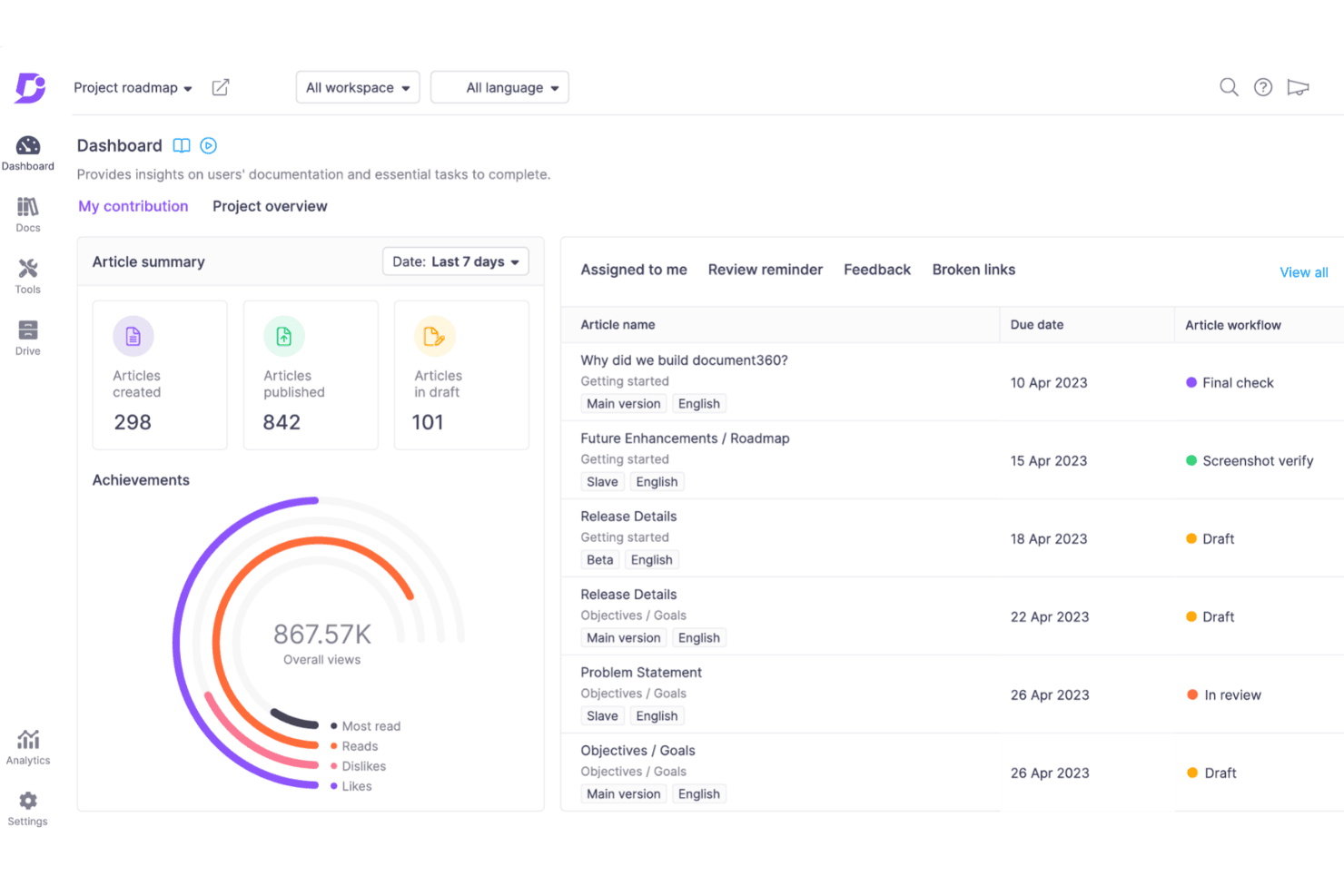
Document360 offre una panoramica chiara dei progressi della documentazione, dello stato degli articoli e delle assegnazioni alla squadra in un unico pannello di controllo centralizzato. Document360 è una piattaforma di gestione della conoscenza per le squadre di prodotto, assistenza e operazioni, che aiuta a creare documentazione interna, procedure operative standard, basi di conoscenza e centri assistenza rivolti ai clienti senza la dispersione tipica degli strumenti generici di collaborazione.
A chi è più adatto Document360?
Document360 è adatto alle squadre di prodotto, assistenza e operazioni che necessitano di esperienze di modifica separate per i collaboratori tecnici e non tecnici.
Perché Document360 è una valida alternativa a Confluence
Ho scelto Document360 perché le sue due modalità di modifica dei documenti si adattano alle squadre di prodotto eterogenee. La mia squadra può usare Markdown per la documentazione tecnica e un editor WYSIWYG per le procedure operative standard, le note di rilascio e i contenuti dell'assistenza. Questa separazione consente agli ingegneri e ai collaboratori non tecnici di gestire la stessa base di conoscenza senza costringere tutti a usare un unico flusso di modifica.
Funzionalità principali di Document360
- Ricerca avanzata: filtra i risultati per tipo di contenuto, lingua, categoria e autore.
- Flussi di lavoro personalizzati: assegna le fasi di creazione, revisione e pubblicazione ai membri della squadra.
- Cronologia delle revisioni: confronta le modifiche, ripristina le versioni e visualizza l'attribuzione agli utenti.
- Analisi della base di conoscenza: monitora visualizzazioni, ricerche, riscontri e comportamento dei lettori.
Integrazioni di Document360
Il pannello di integrazione nativo di Document360 supporta Zendesk, Freshdesk, Intercom, Drift, Slack, Microsoft Teams, Crowdin, Google Analytics, Segment, GitHub e Zapier. Offre inoltre un'API REST per le integrazioni personalizzate.
Pros and Cons
Pros:
- Supporta la modifica in Markdown e WYSIWYG
- Separa i flussi di lavoro tecnici e non tecnici
- Offre controlli granulari per la pubblicazione e la revisione
Cons:
- La governance avanzata può richiedere una configurazione accurata
- L'analisi si concentra principalmente sul comportamento nella base di conoscenza
Learn more about Document360: Ideale per uno spazio di lavoro tutto-in-uno
- Piano gratuito + demo gratuita disponibile
- Da $10/utente/mese (con fatturazione annuale)
Visit WebsiteCustomer Rating:4.6/5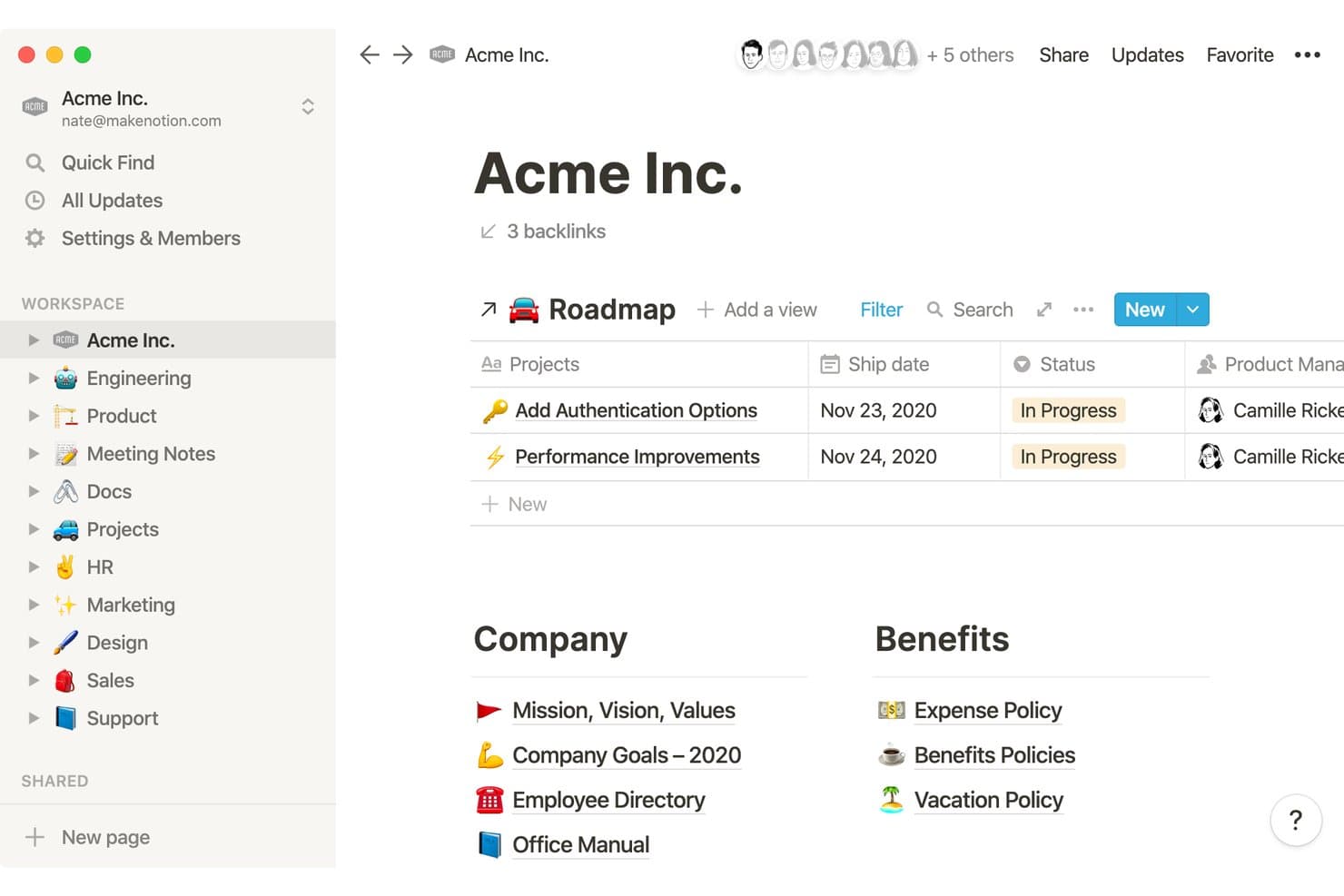
Notion organizza wiki aziendali, roadmap e documenti delle risorse umane in un unico spazio di lavoro. Notion è uno spazio di lavoro flessibile per la gestione della conoscenza, pensato per team di prodotto, startup e aziende in crescita che hanno bisogno di riunire documentazione, contesto dei progetti, conoscenze del team e lavoro collaborativo in un unico luogo.
Per chi è più adatto Notion?
Team di prodotto che hanno bisogno di un unico spazio di lavoro per la documentazione del prodotto, il contesto dei progetti, la condivisione delle conoscenze e la collaborazione interfunzionale.
Perché Notion è una buona alternativa a Confluence
Ho scelto Notion perché il suo spazio di lavoro tutto-in-uno collega la documentazione del prodotto, i database dei progetti, gli appunti delle riunioni e le conoscenze del team. Uso database collegati per visualizzare le decisioni sulla roadmap insieme ai requisiti, mentre le pagine wiki mantengono il contesto ricercabile e organizzato. In questo modo il mio team può gestire le informazioni relative alla scoperta e alla realizzazione senza distribuirle su strumenti separati.
Funzionalità principali di Notion
- Modelli di pagina: Crea formati riutilizzabili per brief, policy e guide all'inserimento.
- Commenti e menzioni: Discuti i contenuti delle pagine e invia notifiche a membri specifici del team.
- Autorizzazioni granulari: Controlla l'accesso a livello di spazio di lavoro, teamspace, pagina o blocco.
- Salvataggio di pagine web: Salva le pagine web direttamente in Notion dal tuo browser.
Integrazioni di Notion
Notion supporta integrazioni con Typeform, Salesforce, Slack, GitHub, Jira e Zapier. Offre inoltre un'API per creare connessioni personalizzate.
Pros and Cons
Pros:
- I database collegati connettono la documentazione al lavoro sul prodotto
- I modelli riutilizzabili standardizzano le attività ricorrenti dei team di prodotto
- Le autorizzazioni a livello di blocco consentono di condividere selettivamente le conoscenze
Cons:
- I database complessi richiedono un'architettura delle informazioni accurata
- La modifica offline resta limitata negli spazi di lavoro basati principalmente sul web
Learn more about Notion: Ideale per i wiki dei team nativi di Microsoft 365
- Prova gratuita di 30 giorni
- A partire da $5.00/utente/mese (con fatturazione annuale)
Visit WebsiteCustomer Rating:4/5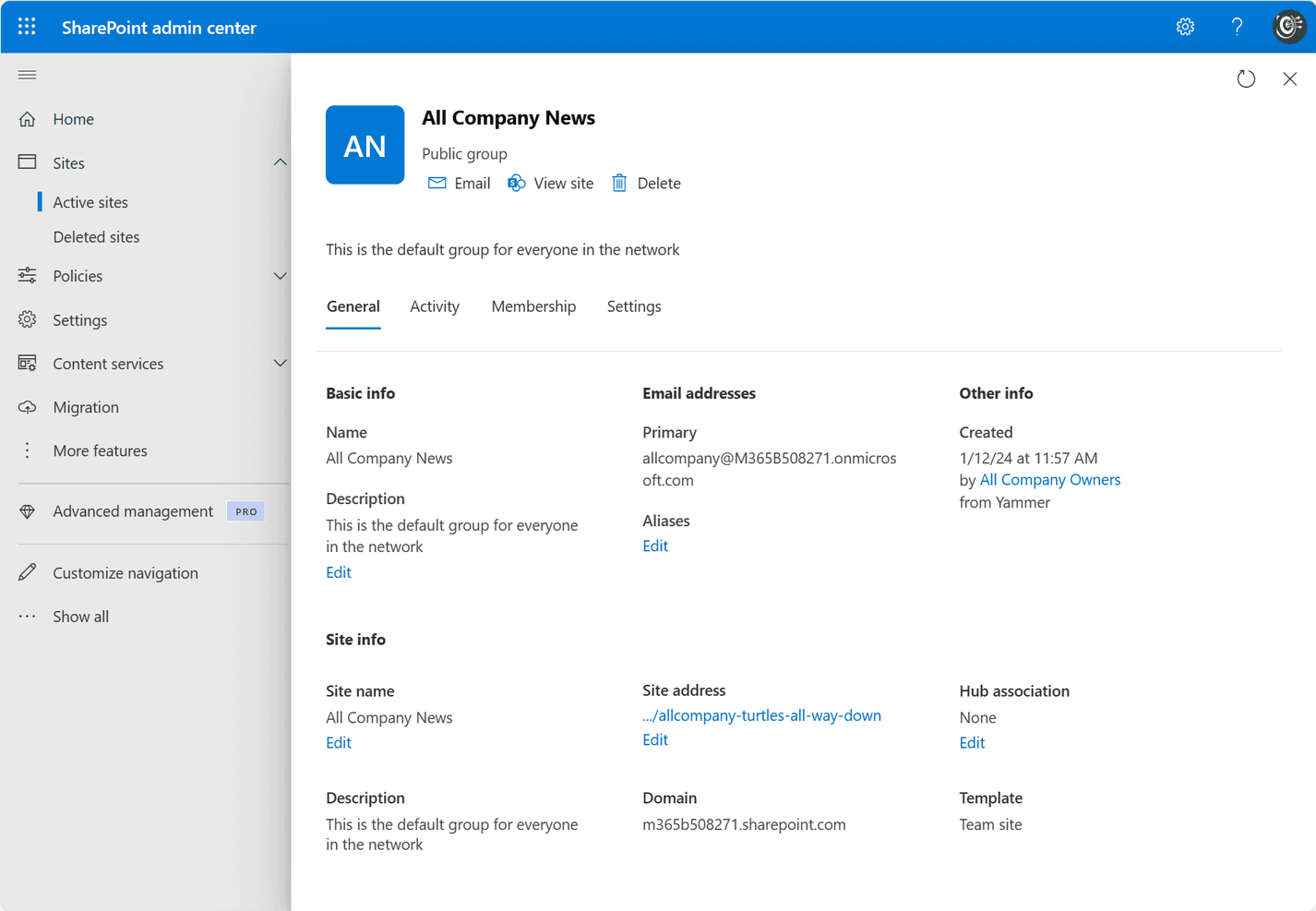
Microsoft SharePoint consente ai team di creare, gestire e condividere contenuti all'interno della propria organizzazione. SharePoint è una piattaforma di gestione della conoscenza e collaborazione per i team di Microsoft 365 che centralizza la documentazione, le policy e la conoscenza dei progetti, migliorando al contempo l'accesso ai contenuti, la governance e la reperibilità.
Per chi è più adatto SharePoint?
SharePoint è adatto ai team di prodotto che lavorano già in Microsoft 365 e hanno bisogno di wiki strutturati per roadmap, registri delle decisioni e linee guida per la distribuzione.
Perché SharePoint è una buona alternativa a Confluence
Ho scelto SharePoint perché è la soluzione migliore per i wiki dei team nativi di Microsoft 365. Utilizzo siti del team, pagine strutturate e raccolte documenti per organizzare le decisioni sul prodotto, le indicazioni sulla roadmap e gli standard di distribuzione. La cronologia delle versioni e le autorizzazioni granulari aiutano il mio team a mantenere una documentazione affidabile senza perdere il contesto.
Funzionalità principali di SharePoint
- Ricerca Microsoft: Trova pagine, file, persone e siti in tutto Microsoft 365.
- Elenchi di SharePoint: Tengono traccia delle informazioni strutturate con colonne e visualizzazioni personalizzabili.
- Approvazione dei contenuti: Indirizza le pagine e i documenti inviati attraverso flussi di revisione.
- Integrazione con Microsoft 365: Si connette a Teams, OneDrive, Power Automate e Power BI.
Integrazioni di SharePoint
SharePoint offre integrazioni native nell'ecosistema Microsoft, tra cui Microsoft Teams, OneDrive, Power Automate e Power BI.
Pros and Cons
Pros:
- Le autorizzazioni granulari supportano una documentazione controllata
- La cronologia delle versioni protegge le indicazioni sul prodotto soggette a modifiche
- Gli elenchi organizzano la conoscenza strutturata del prodotto
Cons:
- La creazione di wiki è meno intuitiva
- L'architettura dei siti richiede un'amministrazione attenta
Learn more about SharePoint: Ideale per la migrazione di wiki Confluence self-hosted
- Piano gratuito + prova gratuita di 30 giorni disponibile
- A partire da 2,50 € per utente al mese (con fatturazione annuale)
Visit WebsiteCustomer Rating:4.4/5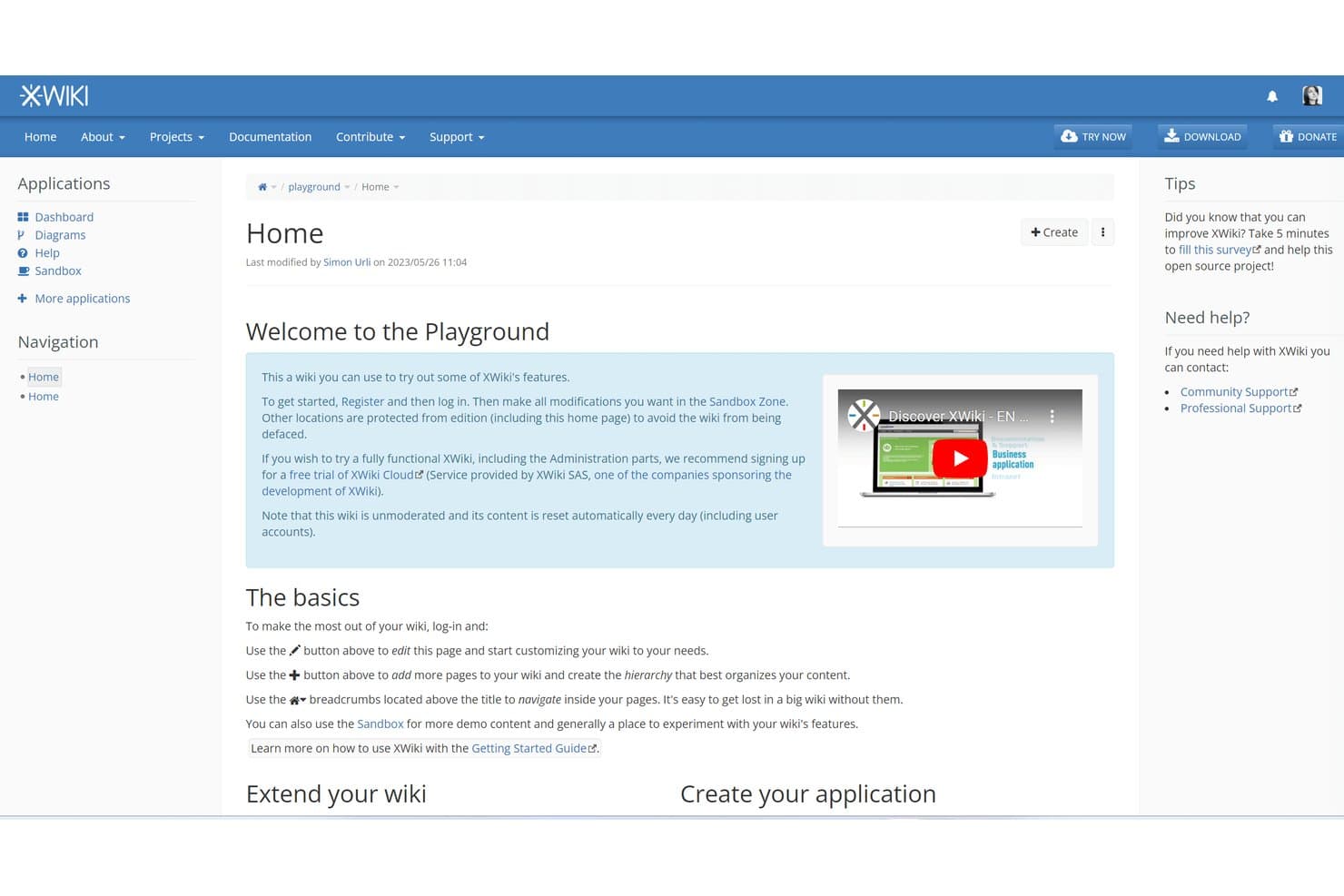
XWiki offre un wiki di prova che consente agli utenti di esplorare liberamente le funzionalità. XWiki è una piattaforma open source per la gestione della conoscenza destinata ai team che cercano un'alternativa personalizzabile a Confluence per organizzare documentazione, conoscenze interne e collaborazione in un unico luogo.
Per chi è più adatto XWiki?
XWiki è adatto ai team che migrano da Confluence self-hosted e hanno bisogno di una piattaforma open source e personalizzabile per la gestione della conoscenza.
Perché XWiki è una buona alternativa a Confluence
Ho scelto XWiki perché supporta i team che migrano wiki Confluence self-hosted senza rinunciare al controllo sulla propria base di conoscenze. Utilizzo i suoi strumenti di migrazione da Confluence per trasferire spazi, pagine e allegati in una piattaforma open source. Le sue pagine nidificate, la cronologia delle versioni e i controlli degli accessi aiutano a preservare i flussi di lavoro familiari per la documentazione dopo la migrazione.
Caratteristiche principali di XWiki
- Editor WYSIWYG : Crea e formatta pagine senza scrivere codice di markup.
- Modelli di pagina : Crea strutture di pagina riutilizzabili per la documentazione ricorrente.
- Macro : Aggiungi componenti di contenuto dinamici alle pagine wiki.
- Importatore di documenti Office : Converti i file Office in pagine wiki modificabili.
Integrazioni di XWiki
XWiki supporta Jira tramite la macro JIRA ufficiale e l'integrazione con CKEditor, oltre a OpenProject tramite l'app OpenProject Integration (Pro). Offre inoltre un'API REST per le integrazioni personalizzate.
Pros and Cons
Pros:
- La distribuzione open source mantiene il controllo dei dati
- Gli strumenti di migrazione da Confluence preservano spazi e allegati
- Macro e modelli supportano flussi di lavoro personalizzati per la documentazione
Cons:
- L'interfaccia appare datata rispetto alle alternative più recenti
- L'amministrazione richiede una notevole competenza tecnica
Learn more about XWiki: 5Ideale per la gestione controllata della conoscenza con flussi di verifica
Guru
- Demo gratuita disponibile
- Prezzi su richiesta
Visit WebsiteCustomer Rating:3.5/5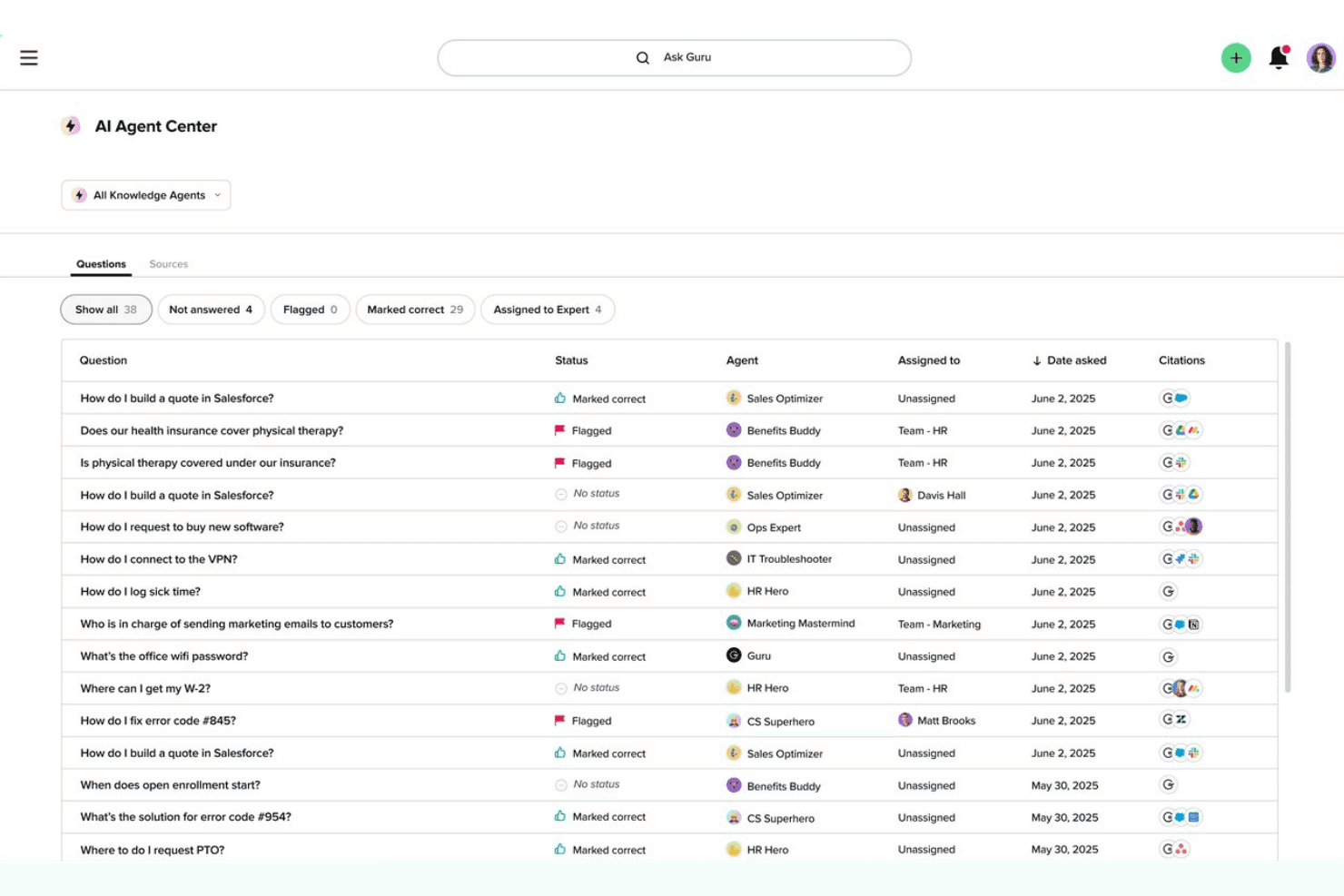
Il Centro agenti AI di Guru offre un registro delle domande con stati, agenti assegnati e fonti delle citazioni tra i vari reparti. Come alternativa a Confluence, Guru offre ai team di prodotto, supporto e operazioni una piattaforma di gestione della conoscenza per organizzare le informazioni aziendali, trovare rapidamente le risposte e ridurre le domande ripetute.
Per chi è più adatto Guru?
Guru è adatto ai team di prodotto, supporto e operazioni che necessitano di risposte interne affidabili, con una chiara attribuzione della responsabilità e una verifica programmata dei contenuti.
Perché Guru è una buona alternativa a Confluence
Ho scelto Guru perché il suo approccio alla gestione controllata della conoscenza mantiene aggiornate le risposte interne e assegna responsabilità precise. Utilizzo i flussi di verifica per assegnare i responsabili dei contenuti e programmare revisioni ricorrenti, mentre gli avvisi sulla conoscenza segnalano le indicazioni obsolete. Questo si adatta ai team di prodotto che documentano i processi di lancio, i risultati della fase di ricerca e le risposte del supporto che richiedono una convalida regolare.
Funzionalità principali di Guru
- Ricerca basata sull'intelligenza artificiale: trova risposte tra i contenuti aziendali collegati.
- Estensione per browser: acquisisce e consente di accedere alla conoscenza da qualsiasi pagina web.
- Integrazioni con Slack e Microsoft Teams: consente di cercare in Guru senza uscire dalle conversazioni del team.
- Schede di conoscenza: archiviano le informazioni in blocchi di contenuti concisi e riutilizzabili.
Integrazioni di Guru
Guru documenta oltre 100 integrazioni predefinite, tra cui Slack, Microsoft Teams, Salesforce, Jira, Google Drive, GitHub, HubSpot, Zendesk, Confluence e Notion Pages, e si connette a Zapier. Supporta inoltre Workato, Prismatic e l'API di Guru per integrazioni personalizzate.
Pros and Cons
Pros:
- I flussi di verifica assegnano responsabili e date di revisione
- L'estensione per browser acquisisce la conoscenza nel luogo in cui si svolge il lavoro
- Le schede di conoscenza forniscono risposte concise e riutilizzabili
Cons:
- La precisione della ricerca può variare tra le diverse fonti di contenuto
- I documenti lunghi si adattano male alle schede
Learn more about Guru: Ideale per documenti collegati direttamente ad attività e sprint
- Piano gratuito + demo gratuita disponibile
- A partire da $7/utente/mese (con fatturazione annuale)
Visit WebsiteCustomer Rating:4.6/5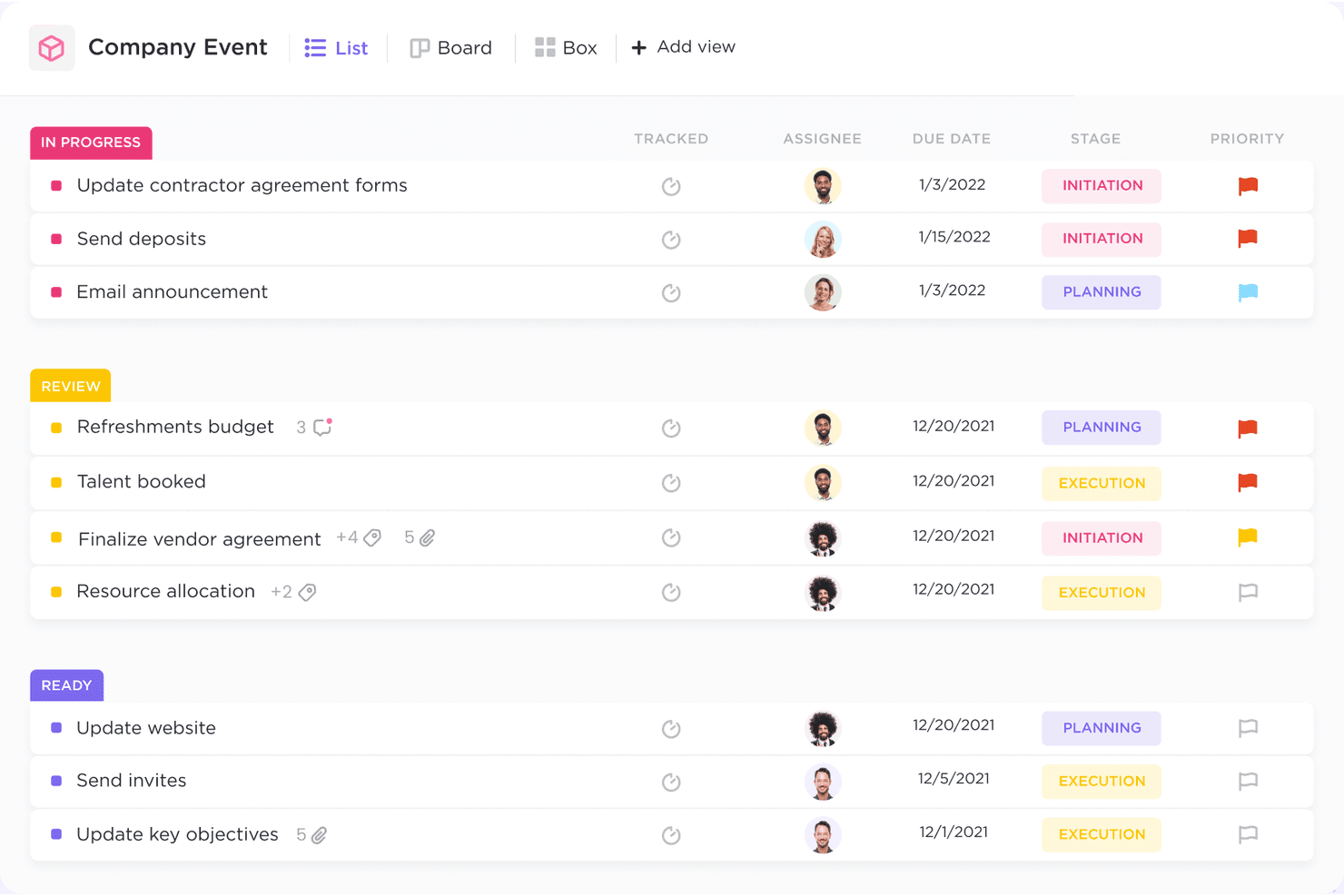
ClickUp aiuta i team a gestire le attività, monitorare i progressi e collaborare in modo efficiente in un unico spazio. ClickUp è una piattaforma flessibile per la gestione della conoscenza e la collaborazione sui progetti, pensata per i team di prodotto che devono organizzare documentazione, decisioni e conoscenze operative insieme al lavoro quotidiano.
A chi è più adatto ClickUp?
ClickUp è adatto ai team di prodotto che devono collegare la documentazione alla pianificazione degli sprint, all'assegnazione delle attività e ai flussi di lavoro di consegna.
Perché ClickUp è una buona alternativa a Confluence
Ho scelto ClickUp perché i suoi Documenti si collegano direttamente alle attività, ai responsabili e al lavoro degli sprint. Il mio team conserva le decisioni di prodotto accanto all'esecuzione, trasformando gli appunti della fase di analisi in attività assegnate e collegando i requisiti agli elementi dello sprint. I commenti preservano il contesto della consegna nello stesso spazio di lavoro per la gestione della conoscenza.
Funzionalità principali di ClickUp
- Pagine nidificate: Organizza la conoscenza con cartelle, pagine e sottopagine.
- Ricerca globale: Trova contenuti in tutti gli spazi di lavoro, elenchi, attività e Documenti.
- Modelli di pagina: Crea strutture riutilizzabili per guide, wiki e brief.
- Autorizzazioni: Controlla chi può visualizzare, commentare o modificare i contenuti.
Integrazioni di ClickUp
ClickUp offre integrazioni native con Slack, Microsoft Teams, Google Drive, Dropbox, GitHub, GitLab, Bitbucket, Jira e Zoom. Si collega inoltre a Zapier e Make e fornisce un'API per integrazioni personalizzate.
Pros and Cons
Pros:
- I Documenti si collegano direttamente alle attività assegnate
- Le pagine nidificate organizzano chiaramente la conoscenza del prodotto
- I commenti conservano le decisioni accanto al lavoro di consegna
Cons:
- Gli spazi di lavoro di grandi dimensioni possono risultare visivamente affollati
- La modifica dei documenti è meno completa rispetto agli strumenti wiki dedicati
Learn more about ClickUp: Ideale per mantenere aggiornati i documenti grazie agli aggiornamenti segnalati dall'IA
- Dimostrazione gratuita + prova gratuita di 14 giorni disponibile
- A partire da $10/utente/mese (con fatturazione annuale)
Visit WebsiteCustomer Rating:4.7/5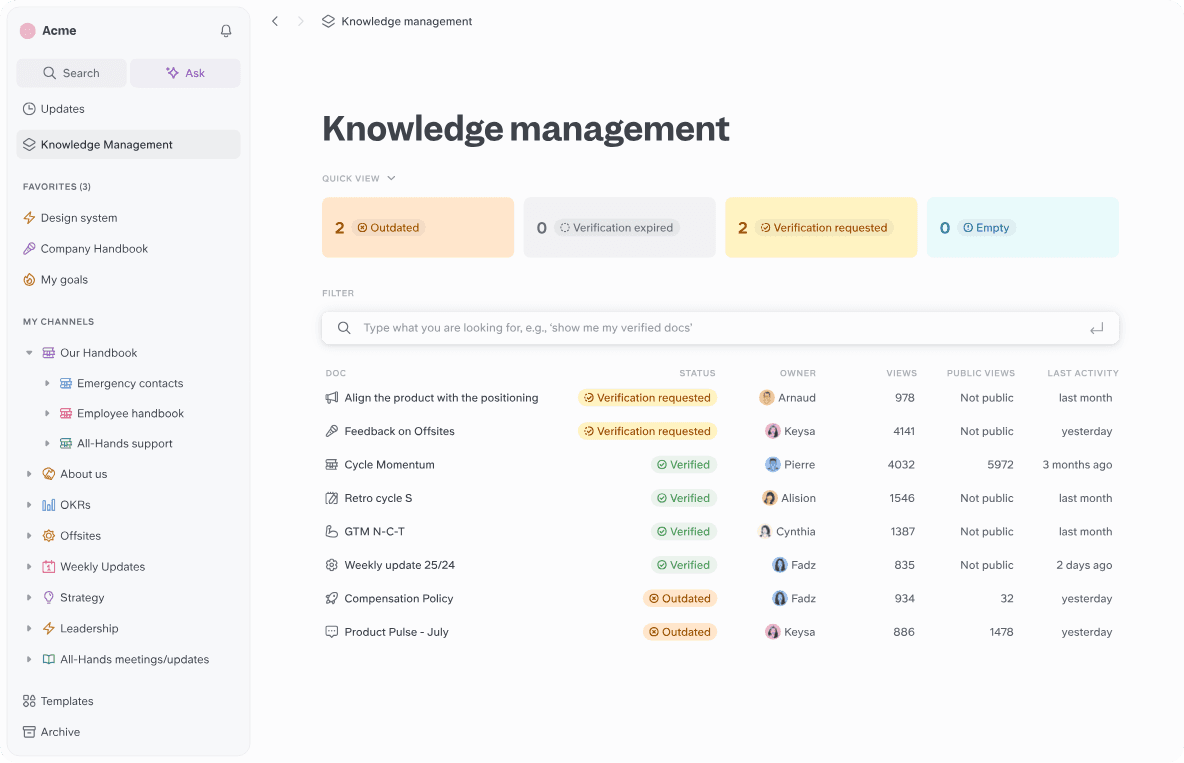
Slite aiuta i team a creare, organizzare e verificare le proprie conoscenze in un unico spazio di lavoro collaborativo. Slite è una piattaforma di gestione della conoscenza per i team di prodotto che centralizza documenti aziendali, decisioni e contesto dei progetti in uno spazio di lavoro collaborativo.
Per chi è più adatto Slite?
I responsabili di prodotto e i team operativi possono usare Slite per mantenere allineate decisioni, specifiche e conoscenze interne man mano che il lavoro sul prodotto cambia.
Perché Slite è una buona alternativa a Confluence
Ho scelto Slite perché aiuta i team di prodotto a mantenere aggiornati i documenti grazie agli aggiornamenti segnalati dall'IA. Uso la sua base di conoscenza per centralizzare specifiche, decisioni e contesto dei progetti, quindi esamino i suggerimenti dell'IA quando le informazioni potrebbero richiedere attenzione. Questo offre al mio team un modo pratico per individuare indicazioni obsolete prima che influenzino il nuovo lavoro sul prodotto.
Funzionalità principali di Slite
- Pagine nidificate: Organizza i documenti correlati in gerarchie di pagine strutturate.
- Ricerca a testo completo: Trova contenuti pertinenti in tutto il tuo spazio di lavoro con la ricerca per parole chiave.
- Autorizzazioni dei documenti: Controlla chi può visualizzare o modificare documenti specifici.
- Modelli: Crea documenti ripetibili a partire da formati di pagina riutilizzabili.
Integrazioni di Slite
Slite offre integrazioni native con GitHub, Linear, Asana, Airtable, Canva, Grain, Pitch, Lucidchart, Notion e Slack. Si connette anche a Zapier e mette a disposizione un'API per integrazioni personalizzate.
Pros and Cons
Pros:
- L'IA segnala le informazioni obsolete da esaminare
- Modifica collaborativa e ordinata per la documentazione del prodotto
- Le pagine nidificate organizzano specifiche e decisioni
Cons:
- La ricerca può non trovare alcune corrispondenze di parole chiave
- Formattazione limitata per esigenze di documentazione avanzate
Learn more about Slite: Ideale per documenti collegati alle bacheche dei progetti attivi
- Piano gratuito disponibile
- A partire da $9/utente/mese (con fatturazione annuale)
Visit WebsiteCustomer Rating:4.6/5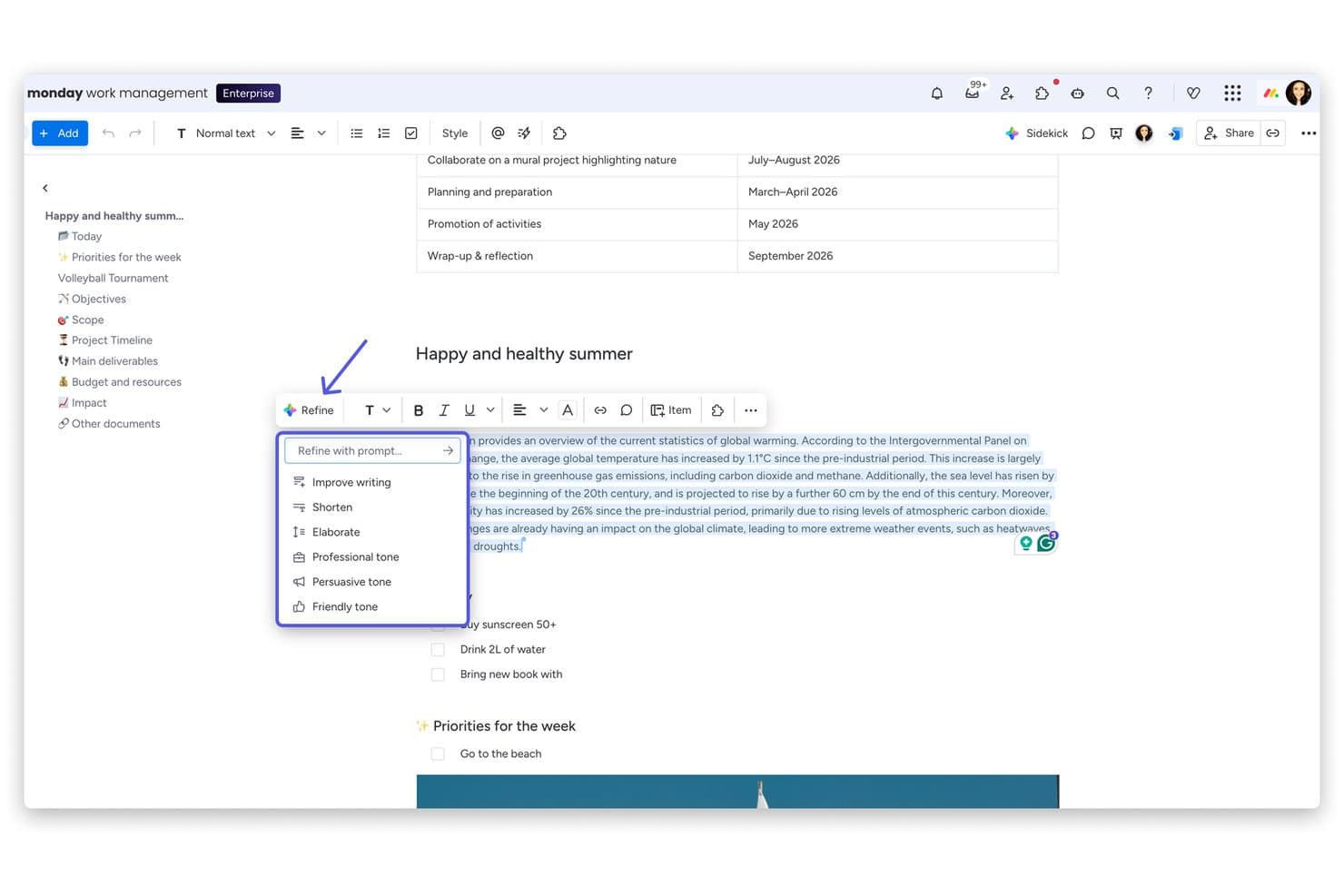
monday AI Workspace offre un menu 'Perfeziona' basato sull'IA con opzioni come Migliora la scrittura, Accorcia, Elabora e regolazioni del tono direttamente nel suo editor di documenti. monday AI Workspace è una piattaforma collaborativa per la gestione delle conoscenze, pensata per i team di prodotto, che collega il contesto dei progetti, la documentazione e i flussi di lavoro del team in un unico spazio di lavoro.
Per chi è più adatto monday AI Workspace?
Team di prodotto che hanno bisogno di una documentazione collegata direttamente alle bacheche dei progetti attivi, ai flussi di lavoro e agli aggiornamenti sulle consegne.
Perché monday AI Workspace è una buona alternativa a Confluence
Ho scelto monday AI Workspace perché la sua attenzione ai “documenti collegati alle bacheche dei progetti attivi” mantiene la documentazione del prodotto legata al lavoro di consegna. Utilizzo i documenti di lavoro per registrare le decisioni, incorporare gli elementi delle bacheche e collegare direttamente il contesto della roadmap ai progetti attivi. Il mio team può aggiornare i requisiti accanto alle modifiche di stato invece di gestire pagine Confluence separate.
Funzionalità principali di monday AI Workspace
- Strumenti di scrittura basati sull'IA: Genera, riassumi e perfeziona i contenuti all'interno dei documenti di lavoro.
- Modelli personalizzabili: Inizia i documenti con formati riutilizzabili per le attività ricorrenti.
- Autorizzazioni di accesso: Controlla chi può visualizzare o modificare i contenuti dello spazio di lavoro.
- Cronologia delle versioni: Esamina le versioni precedenti dei documenti e ripristina le modifiche.
Integrazioni di monday AI Workspace
monday AI Workspace offre oltre 850 integrazioni e app, tra cui Slack, Jira, Google Drive, Microsoft Teams, GitHub, Asana, Trello e Zapier. Fornisce inoltre un'API per le integrazioni personalizzate.
Pros and Cons
Pros:
- Collega direttamente la documentazione al lavoro attivo sui progetti
- Le bacheche personalizzate supportano diversi flussi di lavoro dei team di prodotto
- L'IA riassume e perfeziona i contenuti dei documenti di lavoro
Cons:
- L'organizzazione delle conoscenze sembra meno efficace rispetto a Confluence
- La struttura incentrata sulle bacheche complica la documentazione autonoma
Learn more about monday AI Workspace: Ideale per le basi di conoscenza delle squadre autogestite
- Piano gratuito + prova gratuita di 30 giorni disponibile
- A partire da $10/mese
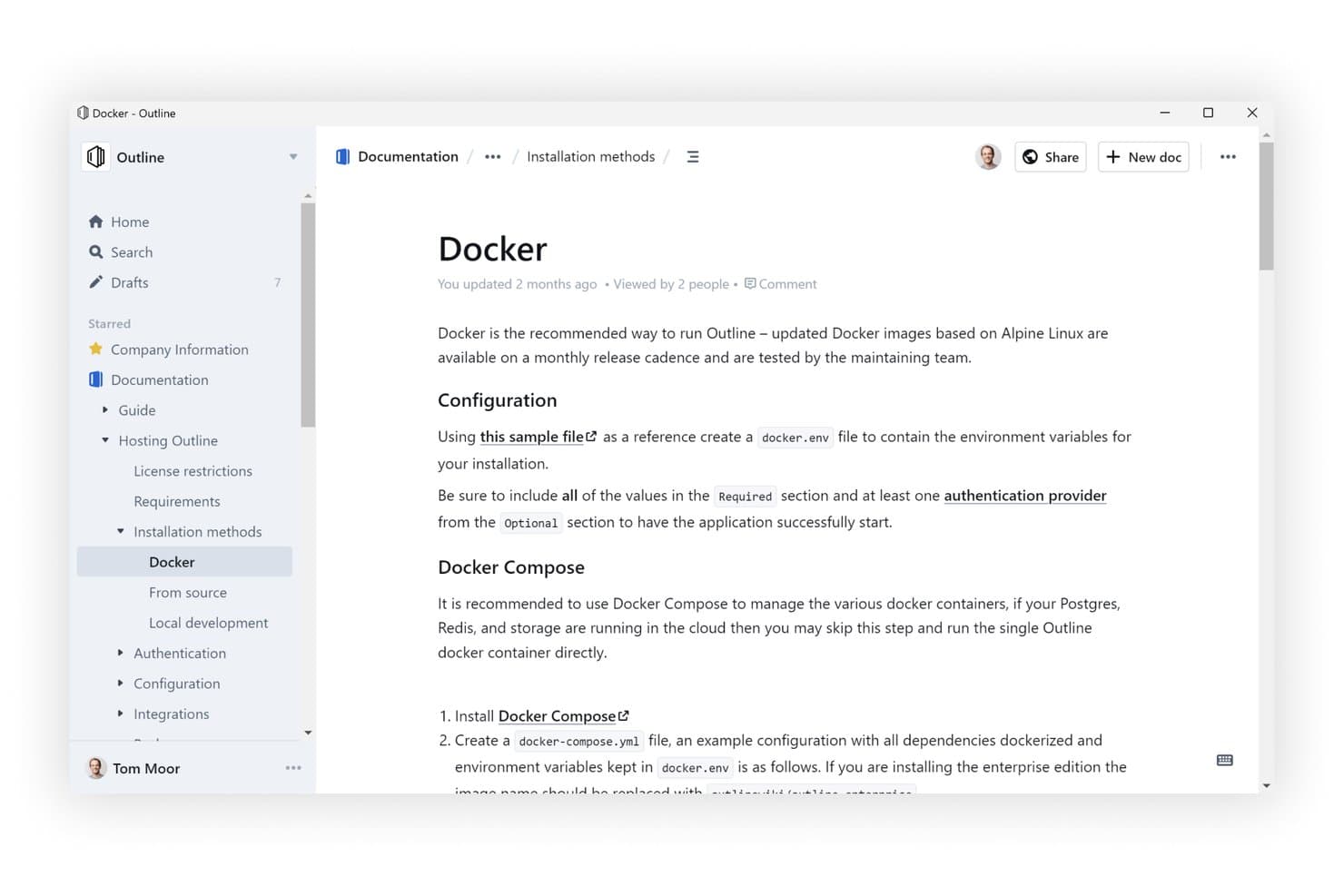
Outline offre un'interfaccia pulita e gerarchica per la base di conoscenza, con documenti nidificati. Outline è una base di conoscenza autogestita per le squadre che necessitano di un maggiore controllo sulla documentazione interna, sulle informazioni condivise e sulle conoscenze collaborative sul luogo di lavoro.
Per chi è più adatto Outline?
Outline è adatto alle squadre tecniche che desiderano una base di conoscenza collaborativa da poter ospitare e gestire autonomamente.
Perché Outline è una buona alternativa a Confluence
Ho scelto Outline perché è ideale per le basi di conoscenza delle squadre autogestite. Utilizzo le sue raccolte e l'editor di Markdown per organizzare specifiche di prodotto, note di ricerca e registri delle decisioni in un unico spazio di lavoro. L'hosting autonomo offre alla mia squadra un maggiore controllo sulla documentazione interna e sulle conoscenze condivise sul luogo di lavoro.
Funzionalità principali di Outline
- Collaborazione in tempo reale: Modificate insieme i documenti e discutete le modifiche tramite commenti e discussioni.
- Risposte alle domande tramite IA: Ponete domande e ricevete risposte basate sui documenti del vostro spazio di lavoro.
- Integrazione con Slack: Cercate, condividete e ponete domande sui documenti direttamente da Slack.
- Condivisione pubblica: Pubblicate documenti con personalizzazione del marchio, domini e controlli degli accessi.
Integrazioni di Outline
Outline supporta le integrazioni con Slack, Figma e Loom, oltre a un'API aperta per integrazioni personalizzate.
Pros and Cons
Pros:
- Esperienza di modifica dei documenti rapida e curata
- L'hosting autonomo mantiene la documentazione sotto il vostro controllo
- I collegamenti reciproci e la ricerca istantanea collegano le informazioni
Cons:
- L'hosting autonomo richiede competenze nella configurazione dell'autenticazione
- Le distribuzioni autogestite non supportano più spazi di lavoro
Learn more about Outline: 10Ideale per la documentazione come codice con flussi di lavoro Git Sync
GitBook
- Prova gratuita di 14 giorni + piano gratuito disponibile
- A partire da $65/site/month + $12/user/month (fatturati annualmente)
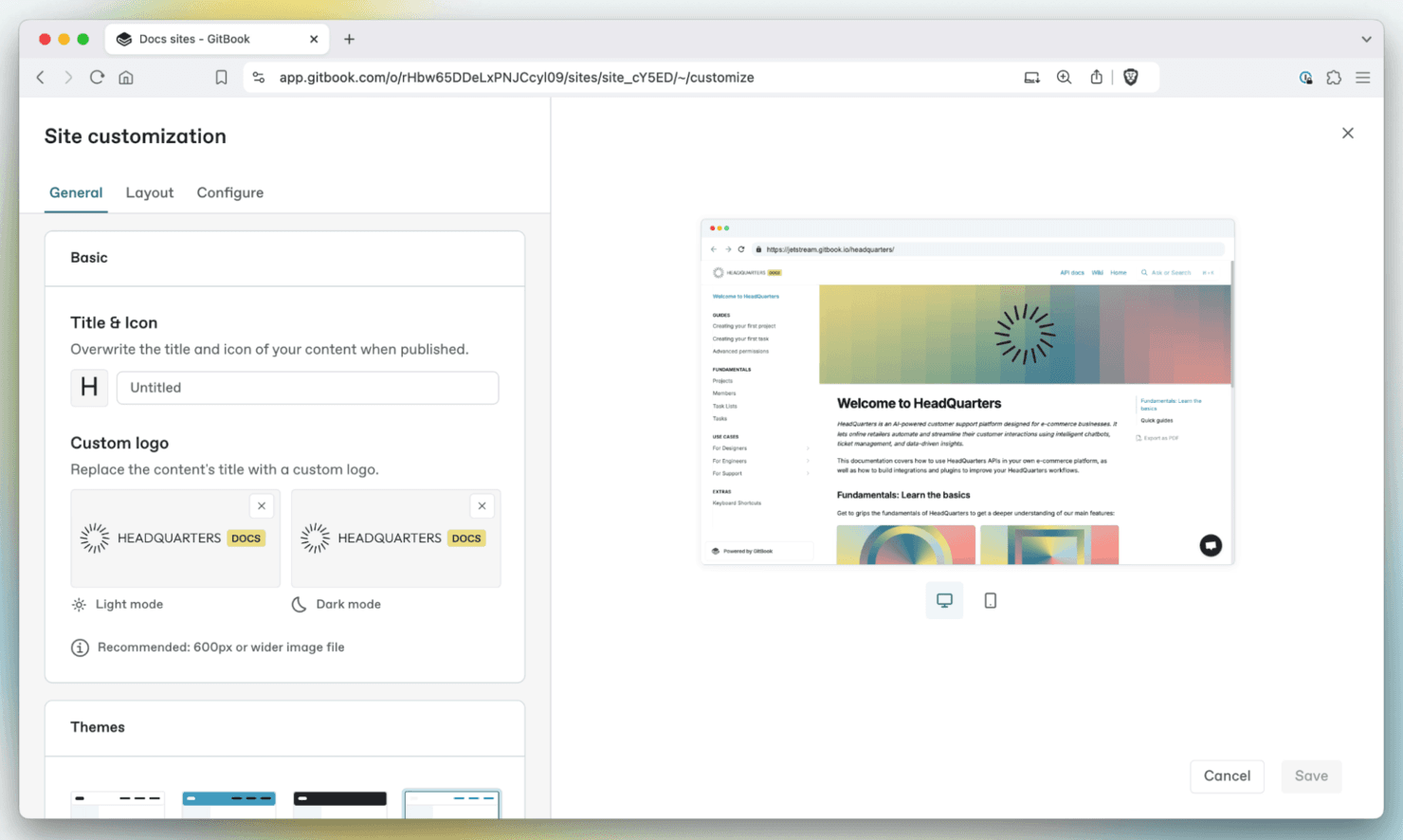
GitBook aiuta i team a creare, organizzare e pubblicare la documentazione con una piattaforma pulita e collaborativa. GitBook è una piattaforma di gestione della conoscenza per i team di prodotto, ingegneria e tecnici che hanno bisogno di creare, organizzare e condividere documentazione affidabile senza il disordine delle wiki tradizionali.
Per chi è più adatto GitBook?
Team di prodotto e ingegneria che gestiscono la documentazione tecnica tramite flussi di lavoro basati su Git e cicli di rilascio frequenti.
Perché GitBook è una buona alternativa a Confluence
Ho scelto GitBook perché supporta la documentazione come codice con flussi di lavoro Git Sync. Utilizzo la modifica basata su Git, le richieste di integrazione e la cronologia delle versioni per mantenere la documentazione del prodotto allineata ai rilasci del software. I suoi spazi strutturati aiutano inoltre i team a pubblicare riferimenti API, note di rilascio e guide tecniche interne da un unico hub documentale.
Funzionalità principali di GitBook
- Ricerca avanzata: trova pagine e termini negli spazi collegati.
- Domini personalizzati: pubblica la documentazione sul tuo dominio.
- Autenticazione dei visitatori: limita i contenuti ai lettori approvati.
- Feedback sulle pagine: raccogli commenti dei lettori e suggerimenti per migliorare.
Integrazioni di GitBook
GitBook offre integrazioni integrate con GitHub, GitLab, Slack, Linear, Jira, Intercom, Google Analytics, Segment, PostHog e Sentry. Supporta Git Sync bidirezionale con GitHub e GitLab, oltre a una piattaforma per creare integrazioni personalizzate.
Pros and Cons
Pros:
- La modifica basata su Git supporta una documentazione allineata ai rilasci
- La cronologia delle versioni aiuta i team a rivedere le modifiche ai contenuti
- Gli spazi strutturati sono adatti a guide API e tecniche
Cons:
- La configurazione di Git Sync può rappresentare una difficoltà per i collaboratori non tecnici
- La gerarchia delle pagine può diventare macchinosa su larga scala
Learn more about GitBook:
Altre alternative a Confluence
Ecco alcune alternative aggiuntive a Confluence che non sono entrate nella mia selezione, ma che vale comunque la pena prendere in considerazione:
- 11ArchbeeIdeale per la documentazione tecnica con flussi di lavoro sincronizzati con Git
- 12Superhuman DocsIdeale per documenti con database integrati e sincronizzazione con Jira
- 13TettraIdeale per domande e risposte e wiki dei team che usano principalmente Slack
- 14BloomfireIdeale per la ricerca aziendale delle conoscenze basata sull'IA
- 15StonlyIdeale per la documentazione dell'assistenza clienti basata sull'IA
- 16HelpjuiceIdeale per la ricerca basata sull'IA nel centro assistenza interno
- 17SlabIdeale per documenti che verificano e restano aggiornati
- 18BookStackIdeale per la documentazione ospitata autonomamente, senza costi di licenza
- 19Wiki.jsIdeale per soluzioni wiki open-source
- 20MintlifyIdeale per i team di documentazione per sviluppatori che lavorano in modo nativo con Git
Come valuto le alternative a Confluence
Divido la mia valutazione in tre parti. Innanzitutto, le funzionalità fondamentali: un'alternativa deve consentire ai team di modificare le pagine insieme in tempo reale e organizzare i contenuti in gerarchie scalabili: questo aspetto ha il peso maggiore. In secondo luogo, cerco funzionalità distintive come assistenti basati sull'IA per la conoscenza e modelli di PRD. Infine, considero il supporto alla migrazione e la trasparenza dei prezzi.
Funzionalità fondamentali (Requisiti indispensabili per questo elenco)
Quando seleziono gli strumenti da includere nel mio elenco, assegno a ciascuno un punteggio su una scala da 0 (non offre la funzionalità) a 5 (eccelle in questo ambito) per ciascuna delle funzionalità fondamentali elencate di seguito. Converto quindi il totale in una percentuale per contribuire a valutare l'idoneità complessiva di ogni strumento, assegnando un peso aggiuntivo alle funzionalità che ho considerato essenziali.
- Modifica collaborativa (Essenziale): Cerco la modifica simultanea in tempo reale, i commenti in linea, le menzioni e i flussi di revisione per le specifiche di prodotto e i verbali delle decisioni.
- Organizzazione dei contenuti (Essenziale): Pagine, spazi e gerarchie nidificate devono supportare basi di conoscenza strutturate per roadmap, ricerche e documentazione delle versioni.
- Ricerca & individuazione: Valuto se la ricerca trova i contenuti delle pagine, i titoli e gli allegati, con filtri che aiutano a individuare le informazioni aggiornate sul prodotto.
- Autorizzazioni & condivisione: Verifico i controlli a livello di pagina e di spazio per limitare l'accesso a ricerche riservate, bozze e registri interni delle decisioni.
- Integrazioni degli strumenti: Le connessioni native dovrebbero collegare la documentazione agli strumenti di gestione dei progetti, comunicazione e sviluppo utilizzati dai team di prodotto.
- Cronologia delle versioni: Cerco revisioni attribuite, timestamp, confronti e possibilità di ripristino quando cambiano i requisiti o le note di rilascio.
Una volta ottenuto un elenco di strumenti che soddisfano i criteri, considero ciò che distingue ogni piattaforma.
Fattori distintivi (Ciò che distingue i fornitori)
Ecco come confronto i diversi fornitori:
Funzionalità distintive
Verifico se uno strumento offre un assistente basato sull'IA per la conoscenza, in grado di riassumere lunghi documenti di specifica o rispondere a domande basate sulle pagine esistenti: è utile quando si inserisce un nuovo ingegnere a metà dello sprint. Anche le visualizzazioni di database e tabelle sono importanti, perché monitorare lo stato di una funzionalità o la preparazione al lancio all'interno dello stesso documento in cui risiedono i requisiti elimina il passaggio da un contesto all'altro. Valuto inoltre gli strumenti integrati per lavagne bianche o diagrammi, poiché mappare i flussi degli utenti accanto a un PRD mantiene collegati gli elementi della fase di scoperta ai documenti di sviluppo.
Oltre le funzionalità
Il supporto alla migrazione è particolarmente importante quando il team dispone di anni di spazi Confluence nidificati. Verifico se un fornitore offre strumenti di importazione automatica o assistenza personalizzata durante l'avvio, poiché ricostruire manualmente le gerarchie delle pagine può rallentare l'adozione per settimane. Anche la trasparenza dei prezzi è altrettanto importante: alcuni strumenti nascondono i costi nei limiti di archiviazione o nei componenti aggiuntivi per le integrazioni, facendo aumentare il conto quando il team multidisciplinare supera le dimensioni di un gruppo pilota. Valuto inoltre con quanta facilità gli stakeholder non tecnici, come i responsabili del marketing o i dirigenti, riescano a navigare nello strumento senza formazione.
Perché cercare un'alternativa a Confluence?
Sebbene Confluence sia una buona scelta per la collaborazione e la gestione della documentazione, ci sono diversi motivi per cui alcuni utenti cercano soluzioni alternative. Potresti cercare un'alternativa a Confluence perché…
- È troppo complesso per i piccoli team
- Hai bisogno di un accesso offline migliore
- Le opzioni di personalizzazione sono limitate
- Desideri una navigazione più intuitiva
- L'integrazione con altri strumenti è carente
Se ti riconosci in una di queste situazioni, sei nel posto giusto. Il mio elenco contiene diverse opzioni di software per la collaborazione e la documentazione più adatte ai team che affrontano queste difficoltà con Confluence e cercano soluzioni alternative.
Caratteristiche principali di Confluence
Ecco alcune delle caratteristiche principali di Confluence di Atlassian, per aiutarti a mettere a confronto le funzionalità offerte dalle soluzioni alternative:
- Modifica collaborativa: modifica le pagine contemporaneamente con il tuo team senza conflitti tra versioni, una soluzione ideale per il lavoro asincrono.
- Commenti in linea: aggiungi feedback direttamente al testo e agli elementi visivi per mantenere le discussioni contestualizzate e orientate all'azione.
- Notifiche intelligenti: tagga i membri del team, assegna attività e collega senza problemi gli aggiornamenti a Jira e ad altri strumenti.
- Lavagne: collabora visivamente su una tela infinita, trasformando le idee in attività operative o in pagine strutturate.
- Database: utilizza tabelle flessibili con viste sincronizzate per monitorare le conoscenze e gestire flussi di lavoro leggeri per i progetti.
- Strumenti di IA: riassumi le note, riordina i documenti o struttura automaticamente i contenuti con l'assistenza dell'IA integrata.
- Autorizzazioni sui contenuti: imposta i diritti di visualizzazione e modifica per pagina o spazio, così da gestire la visibilità e proteggere le informazioni sensibili.
- Modelli e controllo delle versioni: utilizza modelli basati sulle migliori pratiche e una cronologia completa delle modifiche per semplificare la documentazione.
- Calendari del team: condividi disponibilità e scadenze per coordinare gli orari tra i team.
- Sicurezza aziendale: progettato per operare su larga scala, con conformità normativa, registri di controllo e controlli amministrativi.