

Una valida alternativa ad Adobe Analytics ti offre affidabili strumenti di analisi UX, tracciamento delle sessioni, informazioni sulle conversioni e visibilità reale sui percorsi degli utenti—senza richiedere la scala o l’impegno dell’ecosistema Adobe. Se stai cercando alternative ad Adobe Analytics, probabilmente desideri piattaforme che offrano una raccolta dati flessibile, reportistica significativa e metriche sull’esperienza utente adatte al tuo flusso di lavoro. Scegliere lo strumento giusto consente al tuo team di individuare i punti di attrito, validare i cambiamenti di prodotto e dare priorità con sicurezza agli interventi di miglioramento. In questa guida troverai un confronto aggiornato tra le principali alternative ad Adobe Analytics, con particolare attenzione all’usabilità reale e alla profondità dell’analisi di prodotto, così da poter scegliere con consapevolezza in questo 2026.
Che cos’è Adobe Analytics?
Adobe Analytics è una piattaforma di analisi digitale per monitorare, misurare e analizzare le interazioni degli utenti su siti web, app e canali digitali. Aiuta le aziende a raccogliere dati in tempo reale, costruire report personalizzati e visualizzare il percorso cliente dal primo accesso alla conversione. I team adottano Adobe Analytics per individuare tendenze, segmentare il pubblico e prendere decisioni in base a dati affidabili su comportamenti e conversioni.
Riepilogo migliori alternative ad Adobe Analytics
Questa tabella di confronto riassume i dettagli sui prezzi delle mie migliori selezioni di alternative ad Adobe Analytics per aiutarti a trovare la soluzione migliore per il tuo budget e le esigenze della tua azienda.
| Tool | Best For | Trial Info | Price | ||
|---|---|---|---|---|---|
| 1 | Ideale per il monitoraggio unificato delle sessioni web e app | Piano gratuito disponibile | Prezzo su richiesta | Website | |
| 2 | Ideale per analisi comportamentali basate su eventi | Piano gratuito + demo gratuita disponibile | Da $1200/anno (fatturazione annuale) | Website | |
| 3 | Ideale per individuare visivamente i punti di attrito | Piano gratuito + demo gratuita disponibile | Prezzi su richiesta | Website | |
| 4 | Ideale per l'analisi dell'utilizzo delle funzionalità di prodotto | Piano gratuito disponibile | Prezzo su richiesta | Website | |
| 5 | Ideale per sequenze push automatiche durante il ciclo di vita dell’utente | Prova gratuita di 30 giorni + demo gratuita disponibile | Da $75/mese | Website | |
| 6 | Ideale per visualizzare i percorsi digitali degli utenti | Demo gratuita disponibile | Prezzo su richiesta | Website | |
| 7 | Ideale per la raccolta automatica retrospettiva dei dati | Piano gratuito + prova gratuita + demo gratuita disponibili | Prezzi su richiesta | Website | |
| 8 | Ideale per tracciare i funnel di conversione degli utenti | Prova gratuita di 7 giorni + demo gratuita disponibile | A partire da $99/mese | Website | |
| 9 | Ideale per analizzare l’intento tramite session replay | Prova gratuita di 15 giorni + piano gratuito + demo gratuita disponibile | A partire da $39/mese (fatturazione annuale) | Website | |
| 10 | Ideale per il controllo dell'hosting orientato alla privacy | Prova gratuita di 21 giorni + piano gratuito disponibile | Da $26/mese | Website |


Perché fidarsi dei nostri consigli sui software
6,700+
Reviews
20
Industry experts
16+
Evaluation factors
14
Years
Il nostro team testa e recensisce software dal 2012. In quanto product manager noi stessi, sappiamo quanto sia difficile — e importante — scegliere il software giusto.
Per questa guida, abbiamo valutato gli strumenti attraverso test pratici e ricerche indipendenti, assegnando un punteggio agli strumenti in base ai nostri criteri di selezione.
Le nostre recensioni riflettono il nostro giudizio editoriale umano, non un discorso di vendita.
Revisori esperti:
- Andrew LumbySenior TPM
- Cristiano ValimSenior UI/UX Lead


Recensioni migliori alternative ad Adobe Analytics
Di seguito trovi i miei riassunti dettagliati delle migliori alternative ad Adobe Analytics che hanno superato la selezione. Le mie recensioni offrono uno sguardo approfondito a funzionalità, casi d’uso ideali e integrazioni di ciascuna piattaforma, aiutandoti a trovare la soluzione migliore per te.
 Ideale per il monitoraggio unificato delle sessioni web e app
- Piano gratuito disponibile
- Prezzo su richiesta
Visit WebsiteCustomer Rating:4.6/5This rating combines scores from multiple user review sites to reflect overall customer sentiment about the product.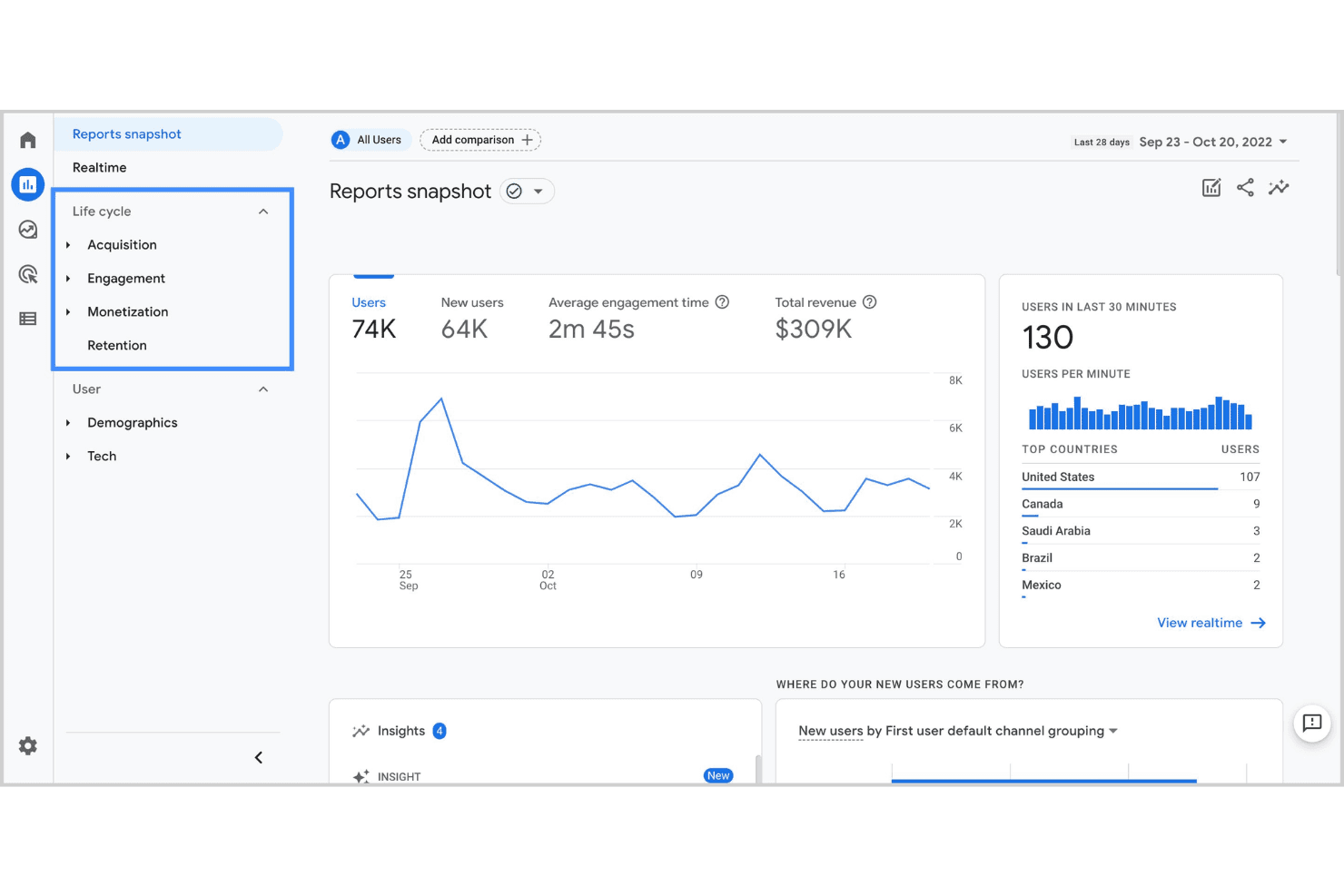
Dashboard di Google Analytics per il monitoraggio unificato delle performance di web e app. Google Analytics è una piattaforma di analisi web e app di Google che aiuta i team di marketing e prodotto a tracciare le sessioni degli utenti, misurare le fonti di traffico e comprendere come i visitatori interagiscono con le loro proprietà digitali.
Per chi è ideale Google Analytics?
Google Analytics è particolarmente adatto a piccole e medie imprese che necessitano di analisi web accessibili e gratuite senza configurazioni tecniche complesse.
Perché Google Analytics è una valida alternativa ad Adobe Analytics
Ho scelto Google Analytics tra i migliori perché il suo tracciamento delle sessioni cross-platform copre sia i dati web che quelli dell'app in una singola proprietà. Apprezzo in particolare la funzione Esplorazione del percorso, che mi permette di seguire esattamente come gli utenti si muovono tra sito e app prima di convertire. Il report Esplorazione del funnel aggiunge un ulteriore livello, consentendomi di individuare dove gli utenti abbandonano e di convalidare le modifiche confrontandole con dati reali delle sessioni.
Funzionalità principali di Google Analytics
- Report in tempo reale: Monitora utenti attivi, eventi dal vivo e attività delle pagine mentre avvengono su sito o app.
- Segmentazione del pubblico: Crea segmenti personalizzati basati sul comportamento degli utenti, dati demografici, tipo di dispositivo o fonte di traffico.
- Tracciamento eventi personalizzati: Definisci e traccia interazioni specifiche degli utenti, come clic su pulsanti o riproduzioni video, oltre ai dati predefiniti delle visualizzazioni di pagina.
- Modellazione dell'attribuzione: Confronta diversi modelli di attribuzione per capire quali canali e touchpoint contribuiscono alle conversioni.
Integrazioni di Google Analytics
Google Analytics offre integrazioni native con Google Ads, Shopify, HubSpot e Squarespace, oltre a Google Search Console, Google Cloud, Firebase e Google Sheets. Funziona anche insieme a Microsoft Clarity per approfondimenti UX a livello di sessione. È disponibile un'API per integrazioni personalizzate e si collega con Zapier.
Pros and Cons
Pros:
- Aggiornamenti dati in tempo reale per monitoraggio attivo
- Integrazione approfondita con strumenti di marketing Google
- Configurazione flessibile del tracciamento basato su eventi
Cons:
- Nessuna visualizzazione integrata del percorso cliente
- Non supporta nativamente fonti di dati offline
Learn more about Google Analytics: Ideale per analisi comportamentali basate su eventi
- Piano gratuito + demo gratuita disponibile
- Da $1200/anno (fatturazione annuale)
Visit WebsiteCustomer Rating:4.5/5This rating combines scores from multiple user review sites to reflect overall customer sentiment about the product.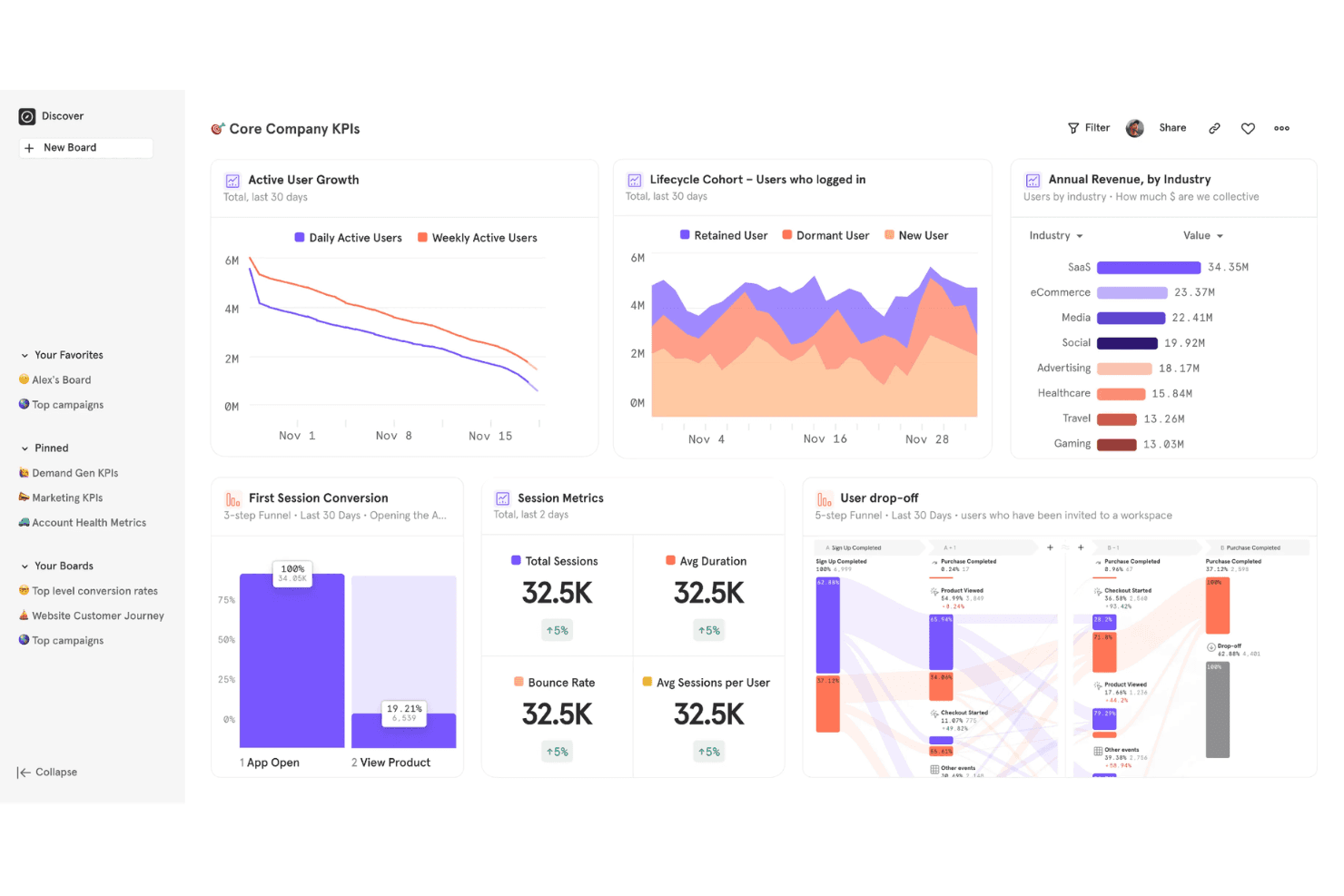
Mixpanel offre una dashboard dei KPI aziendali principali con crescita utenti attivi, analisi delle coorti, ricavi annuali per settore, metriche di sessione e funnel di abbandono degli utenti. Mixpanel è una piattaforma di analisi dei prodotti che traccia come gli utenti interagiscono con il tuo prodotto a livello di evento, offrendo ai team di prodotto e crescita una visibilità granulare sull'adozione delle funzionalità, la fidelizzazione e il comportamento di conversione.
Per chi è più adatto Mixpanel?
Mixpanel è particolarmente indicato per product manager e team di crescita di aziende SaaS B2B e per app mobile che hanno bisogno di analizzare il comportamento degli utenti oltre le semplici visualizzazioni di pagina.
Perché Mixpanel è una buona alternativa ad Adobe Analytics
Ho scelto Mixpanel perché il tracciamento basato sugli eventi è davvero il suo punto di forza rispetto ad Adobe Analytics. Ogni azione dell'utente viene registrata come un evento distinto, così posso creare report a imbuto che mostrano esattamente dove gli utenti abbandonano tra specifiche interazioni, non solo tra le pagine. Utilizzo anche i grafici di fidelizzazione per vedere quali funzionalità mantengono i gruppi di utenti attivi settimana dopo settimana, con filtri che posso applicare senza scrivere una sola query.
Funzionalità principali di Mixpanel
- Flussi utente: Visualizza i percorsi che gli utenti seguono nel tuo prodotto dopo qualsiasi evento iniziale o finale.
- Dashboard personalizzate: Crea dashboard condivise che combinano più report in una singola vista per il tuo team.
- Segmentazione comportamentale: Filtra qualsiasi report per proprietà dell'utente, tipo di dispositivo o azioni precedenti senza SQL.
- Dizionario dati Lexicon: Gestisci centralmente, definisci e nascondi eventi e proprietà monitorate su tutto il progetto.
Integrazioni di Mixpanel
Mixpanel offre integrazioni native con Braze, Segment, Google Ads, Facebook Ads, Mailchimp, Salesforce Marketing Cloud, mParticle, Intercom, Appcues e VWO. È disponibile un'API per integrazioni personalizzate e si collega con Zapier.
Pros and Cons
Pros:
- Creazione retroattiva di funnel senza modifiche al codice
- Report integrati per test A/B sugli esperimenti
- Analisi dei gruppi per il tracking degli account B2B
Cons:
- Richiede la strumentazione degli eventi per il massimo valore
- Dashboard preimpostate limitate
 Ideale per individuare visivamente i punti di attrito
- Piano gratuito + demo gratuita disponibile
- Prezzi su richiesta
Visit WebsiteCustomer Rating:4.5/5This rating combines scores from multiple user review sites to reflect overall customer sentiment about the product.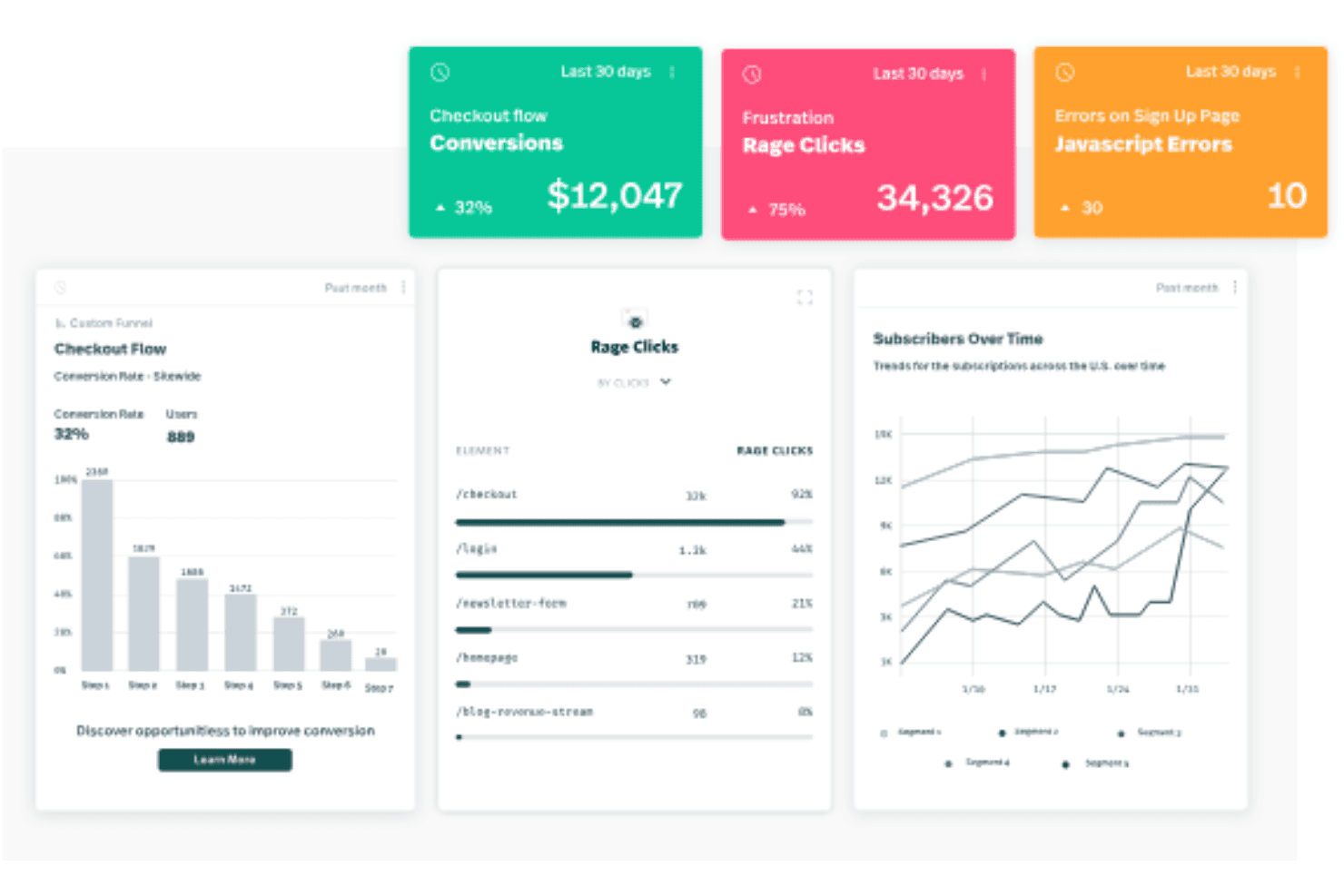
Fullstory offre una dashboard di analisi che mostra le conversioni del percorso di checkout, i rage click, gli errori JavaScript, i passaggi del funnel e le tendenze degli abbonati nel tempo. Per i product manager e i team UX che hanno bisogno di capire esattamente dove le esperienze digitali si interrompono, FullStory combina la riproduzione delle sessioni, la registrazione automatica e l'analisi comportamentale in un'unica piattaforma.
Per chi è pensato FullStory?
FullStory è adatto a società di ecommerce e SaaS che necessitano di una visibilità dettagliata sul comportamento degli utenti su prodotti digitali ad alto traffico.
Perché FullStory è una valida alternativa ad Adobe Analytics
Ho incluso FullStory tra le mie scelte principali perché mette in evidenza i punti di attrito in un modo che i dati grezzi sugli eventi semplicemente non possono fare. Mentre Adobe Analytics ti comunica dove gli utenti abbandonano un passaggio del funnel, le heatmap e la riproduzione delle sessioni di FullStory ti mostrano esattamente cosa è successo visivamente: i rage click, i movimenti frenetici del cursore, l'esitazione prima dell'abbandono. Apprezzo anche i Sentiment Signals, che segnalano automaticamente i modelli di frustrazione tra le sessioni senza richiedere il settaggio manuale del tracciamento degli eventi.
Funzionalità principali di FullStory
- Registrazione automatica: Registra automaticamente ogni interazione dell'utente sul tuo sito o app senza la necessità di strumentazione manuale degli eventi in anticipo.
- Analisi dei funnel di conversione: Ti permette di costruire funnel da qualsiasi evento registrato per vedere dove gli utenti abbandonano lungo flussi multi-step.
- Mappatura del percorso utente: Visualizza il percorso completo che un utente compie attraverso le sessioni, incluse visite pagina, clic e interazioni con i moduli.
- Integrazione con strumenti di sviluppo: Raccoglie errori JavaScript e richieste di rete insieme alle riproduzioni delle sessioni così gli ingegneri possono risolvere i problemi nel contesto.
Integrazioni di FullStory
FullStory offre integrazioni native con Slack, Jira, Trello, Intercom, Google Analytics, Google Tag Manager, Optimizely, Segment, Salesforce e Microsoft Teams. È disponibile un'API per integrazioni personalizzate e si collega con Zapier.
Pros and Cons
Pros:
- La riproduzione delle sessioni mostra le esatte interazioni degli utenti
- Il rilevamento dei rage click evidenzia i punti di frustrazione
- I funnel di conversione visualizzano gli abbandoni nei percorsi multi-step
Cons:
- Le analisi per app mobile sono meno avanzate
- Manca la capacità di tracking su più domini
Learn more about Fullstory: Ideale per l'analisi dell'utilizzo delle funzionalità di prodotto
- Piano gratuito disponibile
- Prezzo su richiesta
Visit WebsiteCustomer Rating:4.5/5This rating combines scores from multiple user review sites to reflect overall customer sentiment about the product.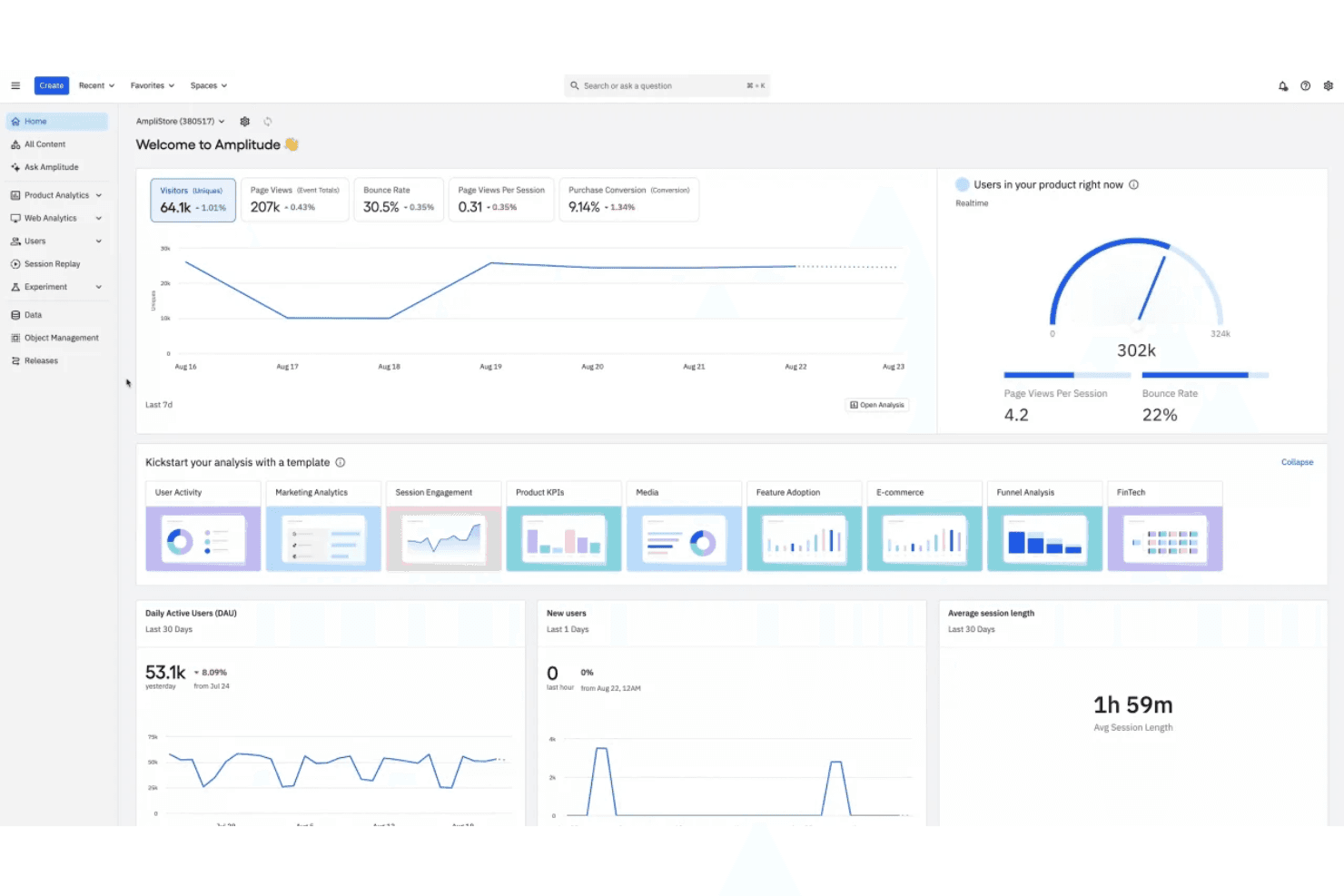
Amplitude offre una dashboard analitica completa che mostra metriche in tempo reale sugli utenti, tendenze del traffico, DAU, durata delle sessioni e strumenti di analisi basati su modelli. Amplitude è una piattaforma di analisi dei prodotti progettata per i team di prodotto e di crescita che devono comprendere come gli utenti interagiscono con funzionalità specifiche su app web e mobile.
Per chi è ideale Amplitude?
Amplitude è particolarmente indicato per aziende SaaS di medie e grandi dimensioni con team di prodotto dedicati che svolgono sperimentazione continua sulle funzionalità e analisi della retention.
Perché Amplitude è una valida alternativa ad Adobe Analytics
Ho scelto Amplitude perché il suo grafico Feature Adoption mi consente di monitorare esattamente quali funzionalità vengono attivate, riutilizzate o abbandonate dagli utenti nel tempo. Inoltre, mi affido al grafico Compass di Amplitude per identificare quali comportamenti sono correlati alla retention a lungo termine, qualcosa che Adobe Analytics non mostra in modo nativo. Insieme, queste due visualizzazioni offrono al mio team di prodotto una visione chiara su dove investire per i prossimi sviluppi della roadmap di prodotto.
Funzionalità principali di Amplitude
- Analisi dei funnel: Mappatura di flussi di conversione multi-step per vedere esattamente dove gli utenti abbandonano tra le azioni chiave.
- Costruttore di coorti: Raggruppamento degli utenti in base a comportamenti o proprietà condivise per confrontare il modo in cui diversi segmenti utilizzano il prodotto.
- Session replay: Visualizzazione delle sessioni degli utenti con dati evento sincronizzati per capire cosa è successo prima e dopo una determinata interazione.
- Analisi di esperimenti A/B: Avvio e misurazione di esperimenti di prodotto con tracking della significatività statistica integrato su diversi segmenti di utenti.
Integrazioni di Amplitude
Amplitude offre più di 138 integrazioni native, inclusi Twilio Segment, Braze, Snowflake, HubSpot, Slack, AWS S3, Google Ads, Salesforce, Intercom e WordPress. Si collega anche con Zapier, ed è disponibile un'API per integrazioni personalizzate.
Pros and Cons
Pros:
- Analisi avanzata delle coorti per la segmentazione degli utenti
- Dashboard di utilizzo prodotto in tempo reale
- Analisi dei test A/B integrata
Cons:
- Richiede configurazione manuale per eventi personalizzati
- Meno integrazioni marketing pronte all'uso
Learn more about Amplitude: Ideale per sequenze push automatiche durante il ciclo di vita dell’utente
- Prova gratuita di 30 giorni + demo gratuita disponibile
- Da $75/mese
Visit WebsiteCustomer Rating:4.5/5This rating combines scores from multiple user review sites to reflect overall customer sentiment about the product.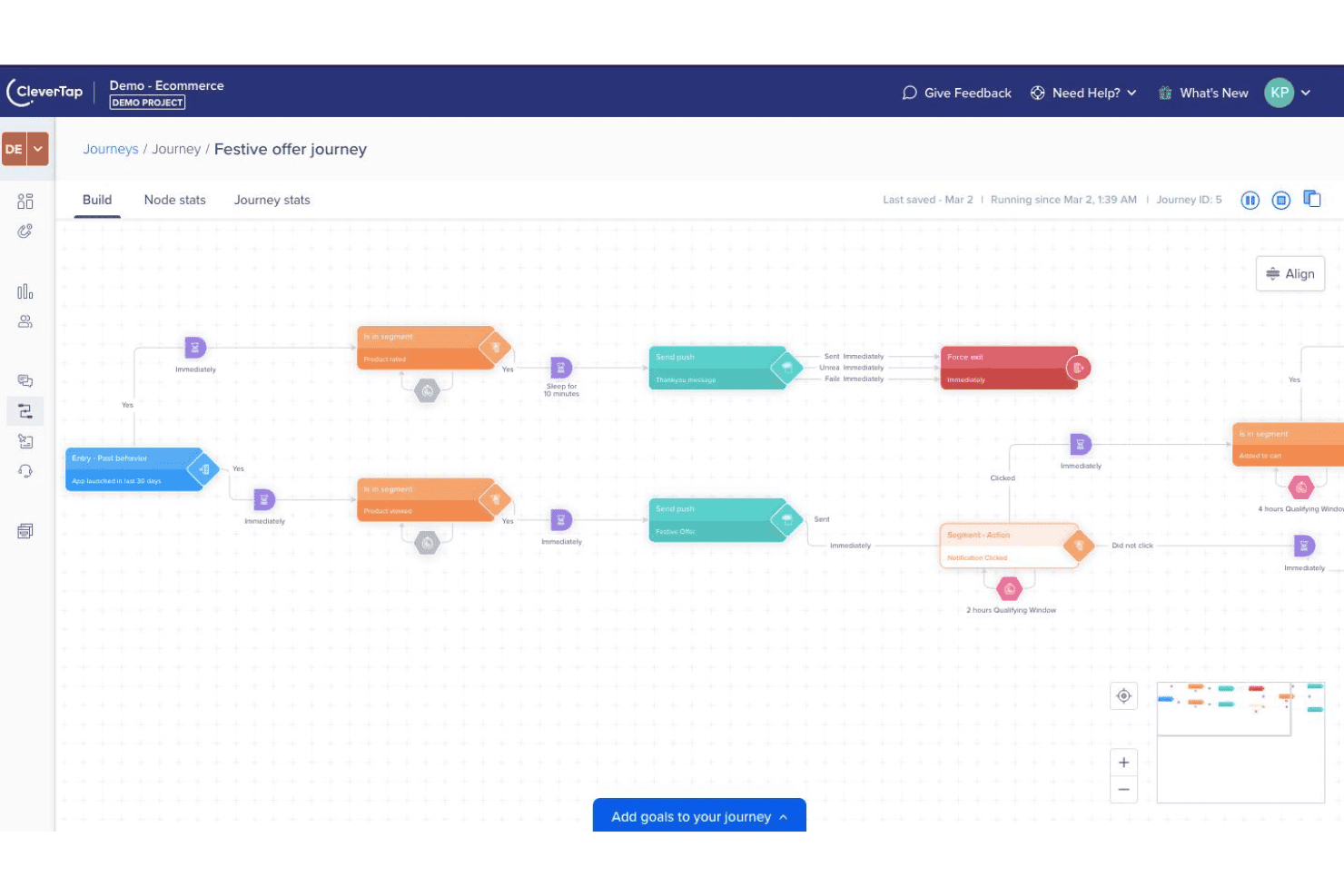
Costruttore di journey di CleverTap per campagne push automatiche durante il ciclo di vita dell’utente. CleverTap è una piattaforma di marketing e analisi mobile pensata per le app di consumo che hanno bisogno di combinare dati comportamentali, segmentazione utenti ed esecuzione di campagne multicanale in un unico posto.
Per chi è più adatto CleverTap?
CleverTap è particolarmente indicato per le aziende mobile-first nei settori delle app di consumo, fintech ed ecommerce che devono segmentare gli utenti e attivare campagne sulla base di dati comportamentali in tempo reale.
Perché CleverTap è una valida alternativa ad Adobe Analytics
Ho scelto CleverTap tra i migliori perché il suo costruttore di 'Journey' consente di progettare sequenze push attivate dal comportamento in modo visuale, senza codice. Puoi impostare campagne drip che inviano una notifica push quando un utente abbandona un carrello, si inattiva dopo l'onboarding o raggiunge un determinato traguardo, tutto da un'unica schermata. Apprezzo anche RenderMax™, la tecnologia proprietaria di CleverTap che aumenta i tassi di consegna fino al 90% anche sui dispositivi Android OEM dove la maggior parte delle piattaforme è carente.
Caratteristiche principali di CleverTap
- Analisi dei funnel: Visualizza dove gli utenti abbandonano in qualsiasi flusso multi-step, come onboarding o checkout, utilizzando report funnel basati sugli eventi.
- Analisi delle coorti: Raggruppa gli utenti in base alla data in cui hanno completato una specifica azione e monitora il mantenimento o le tendenze di conversione nel tempo.
- A/B/n testing: Esegui test suddivisi su messaggi in-app, testi di campagne o varianti di esperienza per confrontare le prestazioni tra diverse versioni.
- Segmenti predittivi: Usa l’IA integrata per identificare gli utenti che potrebbero abbandonare o convertire prima che lo facciano, sulla base di modelli comportamentali.
Integrazioni CleverTap
CleverTap offre integrazioni native con Segment, mParticle, Mixpanel, Amplitude, Adjust, Branch, RudderStack, Tealium, Hightouch e RevenueCat, con un ecosistema più ampio di oltre 300 partner tecnologici e di soluzioni. È inoltre disponibile un’API per integrazioni personalizzate.
Pros and Cons
Pros:
- Campagne multicanale tra push, SMS ed email
- Segmentazione comportamentale in tempo reale tra gruppi di utenti
- Costruttore di journey per campagne integrato e con automazione
Cons:
- Le journey pubblicate non possono essere modificate dopo il lancio
- La gestione dei webhook non consente modifica o eliminazione
Learn more about CleverTap: Ideale per visualizzare i percorsi digitali degli utenti
- Demo gratuita disponibile
- Prezzo su richiesta
Visit WebsiteCustomer Rating:4.7/5This rating combines scores from multiple user review sites to reflect overall customer sentiment about the product.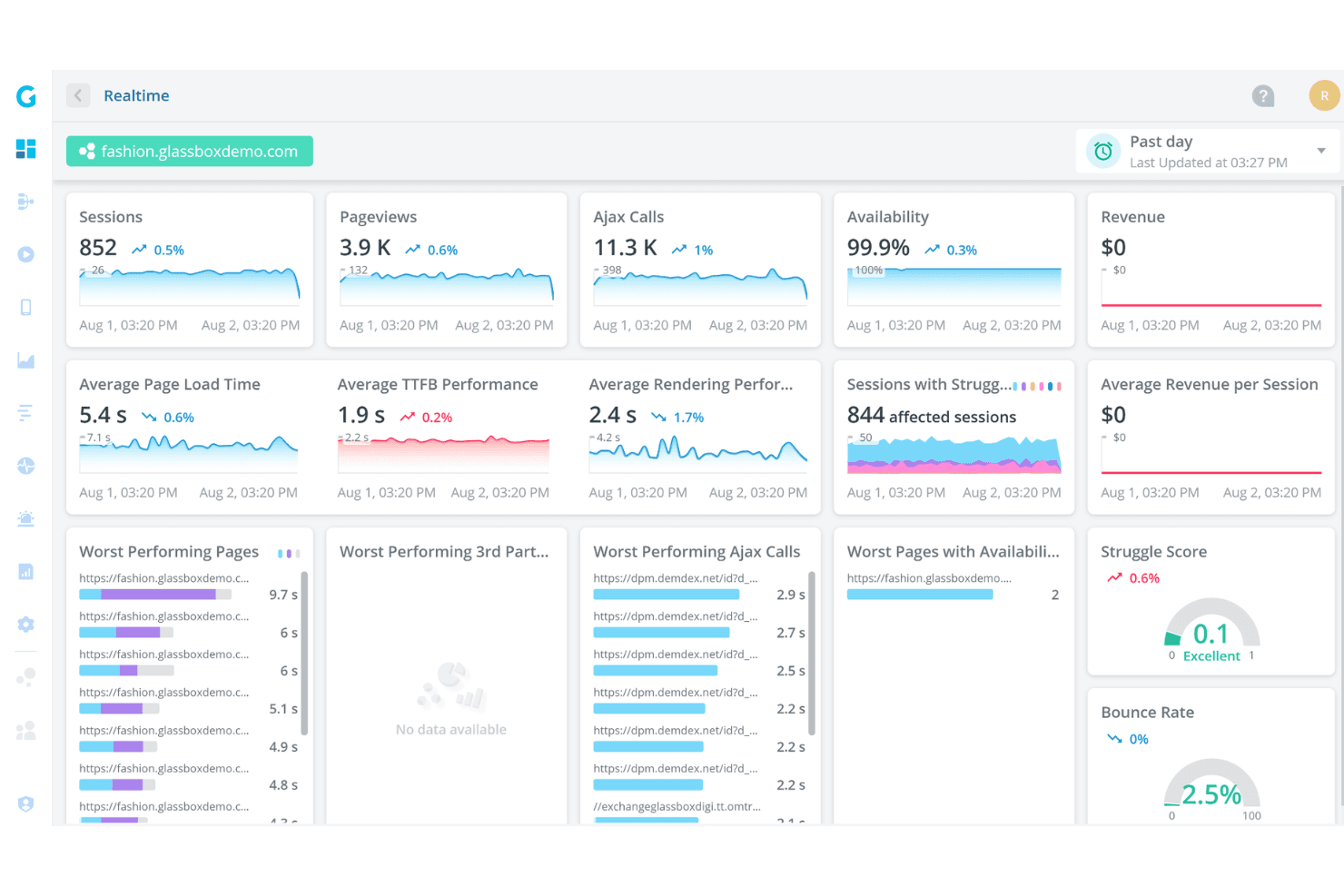
Glassbox offre una dashboard di analytics in tempo reale che mostra sessioni, visualizzazioni di pagina, chiamate Ajax, disponibilità, tempi di caricamento delle pagine e punteggi sulle difficoltà per un sito web demo di moda. Glassbox è una piattaforma di analisi dell'esperienza digitale progettata per i team aziendali nei settori regolamentati che necessitano di una profonda visibilità su come i clienti interagiscono con le loro app web e mobili.
Per chi è più indicato Glassbox?
Glassbox è particolarmente adatto per team aziendali nei settori finanziario, assicurativo e retail che hanno bisogno di visibilità a livello di sessione sulle app web e mobile native.
Perché Glassbox è una buona alternativa ad Adobe Analytics
Ho scelto Glassbox perché la sua Mappa dei Percorsi Potenziata mi offre una visuale unica di ogni fase del percorso digitale, dall'acquisizione fino alla conversione, senza dover assemblare report separati. Posso vedere abbandoni, difficoltà ed errori in un'unica schermata e accedere direttamente al replay della sessione dalla stessa pagina. Trovo particolarmente utile la metrica integrata sull'impatto sul fatturato, che assegna un valore monetario alle frizioni in ogni fase del percorso e mi permette di dare priorità agli interventi in base al costo reale per l'azienda.
Caratteristiche principali di Glassbox
- Heatmap: Aggrega attività di click, scroll e passaggio del mouse su qualsiasi pagina per mostrare dove si concentra o cala l'attenzione.
- Analisi dei moduli: Monitora le interazioni sui singoli campi dei moduli, inclusi esitazione, abbandono e reinserimento dei dati.
- Registrazione delle sessioni su app mobile: Cattura e riproduce le sessioni di app iOS e Android native, compresi i momenti di crash.
- Rilevamento delle difficoltà: Segnala automaticamente rage click, click inattivi e ripetuti errori di click senza configurazione manuale degli eventi.
Integrazioni di Glassbox
Glassbox offre integrazioni native con Adobe Analytics, Google Analytics, Google Tag Manager, Tealium, Qualtrics, Jira, Slack, Firebase, AB Tasty, Adobe Target, Optimizely e VWO. È disponibile un'API per integrazioni personalizzate.
Pros and Cons
Pros:
- Avvisi in tempo reale per problemi di user experience
- Si integra con i principali strumenti di analytics e monitoraggio
- La mappatura visuale del percorso evidenzia le barriere alla conversione
Cons:
- Meno opzioni di segmentazione avanzata rispetto ad Adobe
- Per le funzionalità di mobile analytics è necessaria una configurazione separata
Learn more about Glassbox: Ideale per la raccolta automatica retrospettiva dei dati
- Piano gratuito + prova gratuita + demo gratuita disponibili
- Prezzi su richiesta
Visit WebsiteCustomer Rating:4.3/5This rating combines scores from multiple user review sites to reflect overall customer sentiment about the product.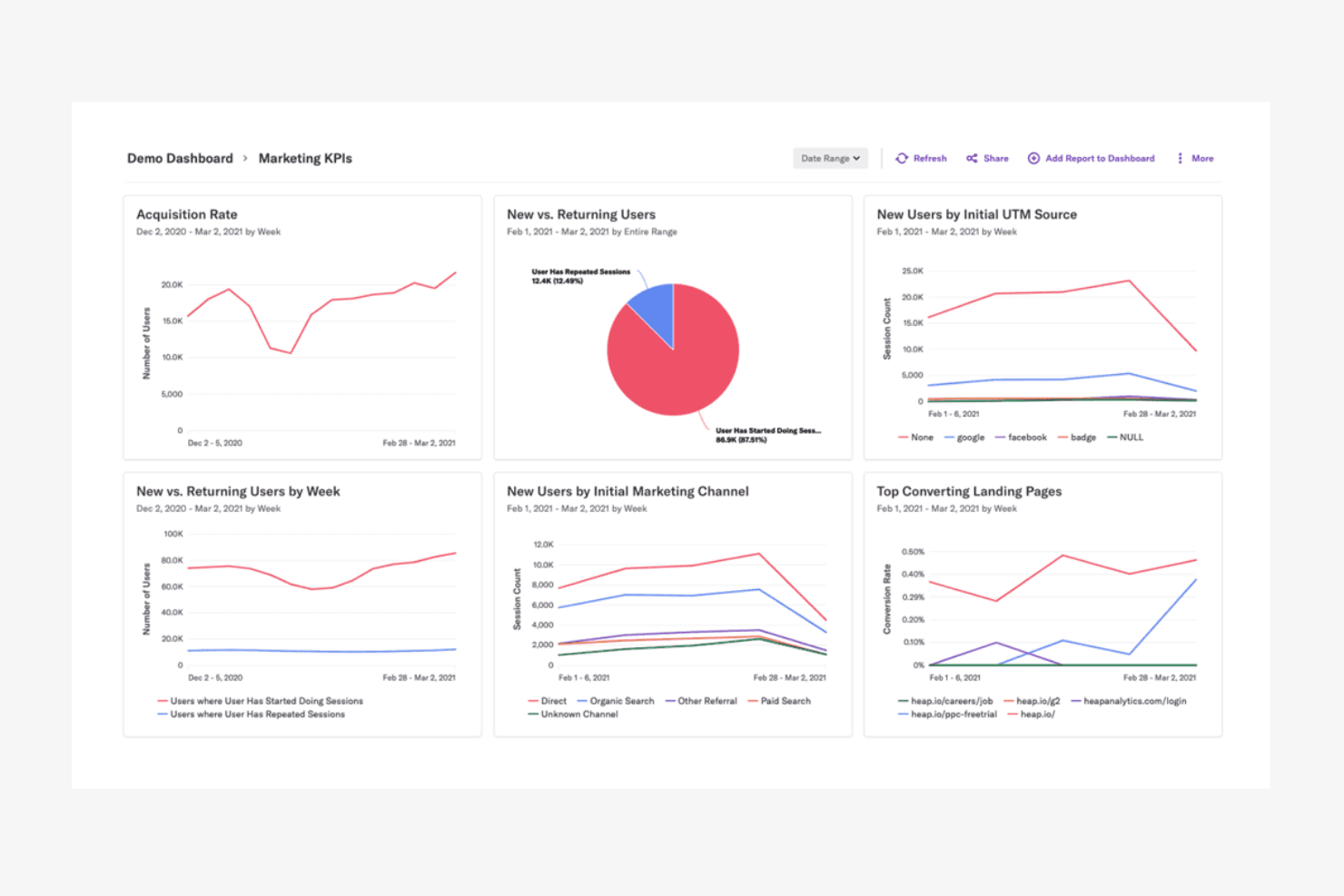
Heap offre una dashboard demo sui KPI di marketing con grafici per il tasso di acquisizione, utenti nuovi vs. di ritorno, fonti UTM, canali di marketing e landing page con il maggior tasso di conversione. Heap è una piattaforma di digital insights che acquisisce automaticamente ogni clic, tocco e invio di modulo degli utenti senza etichettatura manuale degli eventi, offrendo a team di prodotto e UX dati comportamentali completi fin dal primo giorno.
Per chi è ideale Heap?
Heap è particolarmente adatto a team di prodotto e crescita in aziende SaaS di medie dimensioni che necessitano di dati comportamentali completi senza dover dipendere dagli ingegneri per strumentare ogni evento.
Perché Heap è una buona alternativa ad Adobe Analytics
Ho scelto Heap perché la sua funzionalità di autocattura registra ogni clic, tocco, scroll e interazione con i moduli dal momento dell'installazione, senza bisogno di una tassonomia degli eventi predefinita. Ciò che apprezzo davvero è l'analisi retrospettiva: posso definire un nuovo evento oggi e recuperare immediatamente i dati storici relativi, risalendo fino al primo giorno. Questo significa che non rischio mai di perdere un insight perché nessuno aveva pensato di etichettarlo in anticipo.
Funzionalità principali di Heap
- Riproduzione sessioni: Guarda le sessioni degli utenti registrate come video per vedere esattamente come navigano all'interno del tuo prodotto.
- Mappe di calore: Visualizza mappe aggregate di clic e scroll su qualsiasi pagina per individuare dove si concentra o cala l'attenzione.
- Analisi dei funnel: Crea funnel di conversione a più step per identificare dove gli utenti abbandonano un percorso.
- Percorsi utente: Visualizza i percorsi che gli utenti seguono prima o dopo una specifica azione all'interno del tuo prodotto.
Integrazioni di Heap
Heap offre decine di integrazioni native in categorie come CRM, marketing automation, A/B testing e commercio, tra cui Salesforce, Intercom, Shopify, HubSpot, Braze, Marketo, Iterable, Klaviyo, Optimizely e Snowflake. Si collega con Zapier e mette a disposizione un'API per integrazioni personalizzate.
Pros and Cons
Pros:
- Riproduzione sessioni per l’analisi visiva del comportamento
- Governance dei dati e controlli di privacy integrati
- La mappatura dei percorsi utenti evidenzia i punti di attrito
Cons:
- Limita la durata dell'archiviazione dei dati grezzi
- Gestisce efficientemente i log degli eventi grezzi
Learn more about Heap (by Contentsquare): Ideale per tracciare i funnel di conversione degli utenti
- Prova gratuita di 7 giorni + demo gratuita disponibile
- A partire da $99/mese
Visit WebsiteCustomer Rating:4.1/5This rating combines scores from multiple user review sites to reflect overall customer sentiment about the product.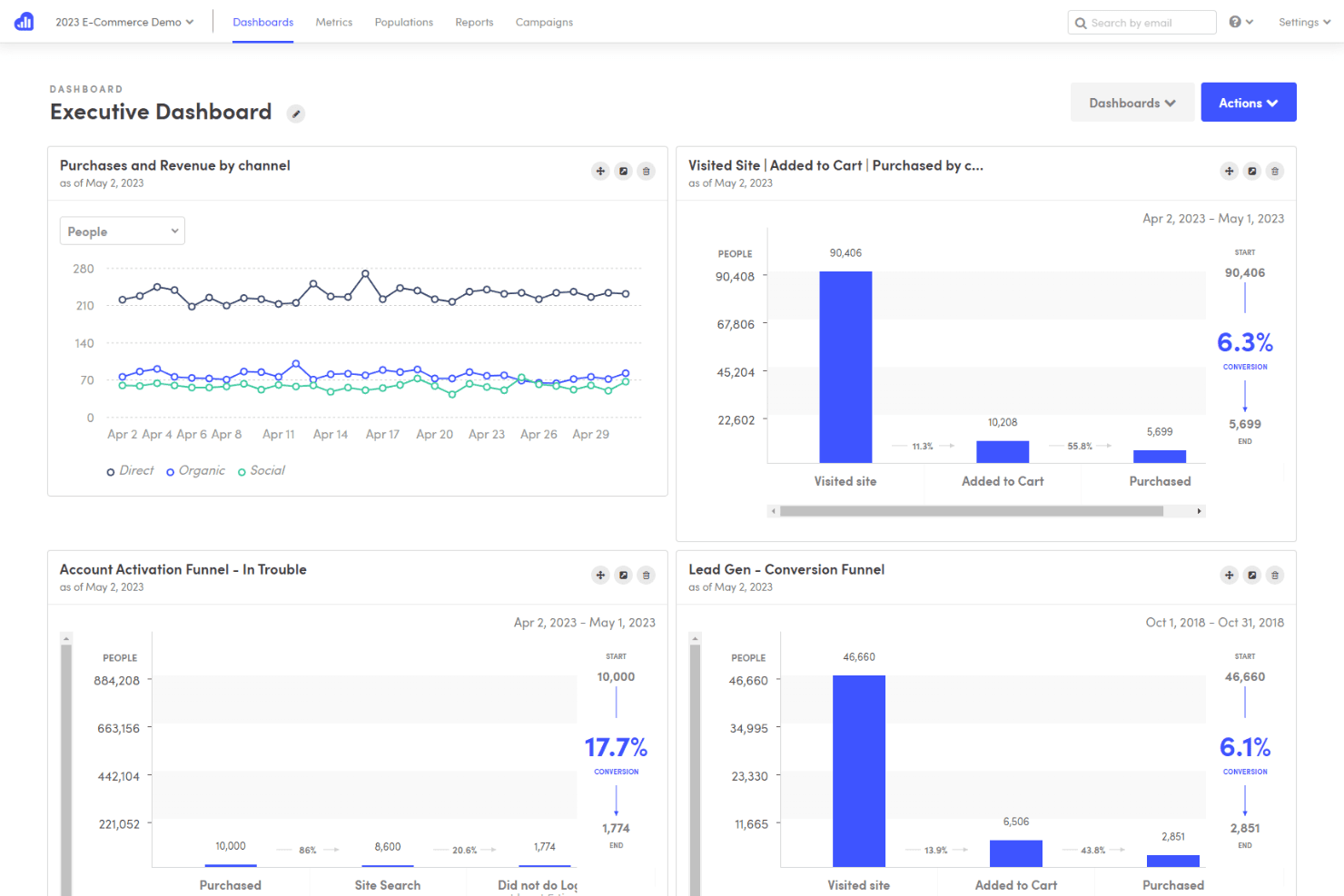
Kissmetrics offre una Dashboard Executive con analisi dei funnel, tracciamento delle conversioni e visualizzazioni dei dati di acquisto per canale. Kissmetrics è una piattaforma di analisi comportamentale progettata per team SaaS e ecommerce che necessitano del tracciamento a livello individuale per comprendere come i singoli utenti interagiscono con un prodotto e dove si verificano gli abbandoni.
Per Chi È Ideale Kissmetrics?
Product manager e growth marketer di aziende in abbonamento che devono collegare gli eventi comportamentali ai ricavi senza un team di data engineering dedicato.
Perché Kissmetrics è una Buona Alternativa ad Adobe Analytics
Kissmetrics merita il suo posto nella mia shortlist perché il tracciamento dei funnel avviene qui a livello della singola persona, non solo della sessione, così quando un utente SaaS si interrompe al terzo step dell’onboarding posso accedere immediatamente a tutto il suo storico degli eventi. Mi piace anche il fatto che sia possibile costruire funnel retroattivi a partire dai dati storici, quindi non è necessario configurare il tracking in anticipo per ottenere risposte. La segmentazione interna a ciascun step del funnel permette di suddividere i risultati per tipo di piano o canale di acquisizione senza lasciare il report.
Funzionalità Principali di Kissmetrics
- Report di coorte: Raggruppa gli utenti per data di iscrizione o prima azione per monitorare come cambia il comportamento in differenti periodi di tempo.
- Report sulla popolazione: Mostra quale percentuale della tua base utenti totale ha completato un determinato evento entro una finestra temporale definita.
- Analisi A/B test: Suddivide i dati comportamentali per variante di esperimento per confrontare come agisce ciascun gruppo dopo l’esposizione.
- Attribuzione dei ricavi: Collega i ricavi da abbonamenti e acquisti ai touchpoint di marketing che hanno guidato ciascuna conversione.
Integrazioni di Kissmetrics
Kissmetrics offre integrazioni native con Shopify, WooCommerce, HubSpot, Mailchimp, Marketo, Optimizely, Help Scout, Recurly, Appcues, Segment e Google Tag Manager. È disponibile anche un’API per le integrazioni personalizzate.
Pros and Cons
Pros:
- Traccia i percorsi degli utenti singolarmente anche tra diverse sessioni
- L'analisi delle coorti evidenzia fidelizzazione e abbandono
- I report sui ricavi collegano l'analisi ai risultati di vendita
Cons:
- Richiede configurazione manuale per il tracciamento degli eventi
- Conservazione limitata dei dati evento personalizzati
Learn more about Kissmetrics: Ideale per analizzare l’intento tramite session replay
- Prova gratuita di 15 giorni + piano gratuito + demo gratuita disponibile
- A partire da $39/mese (fatturazione annuale)
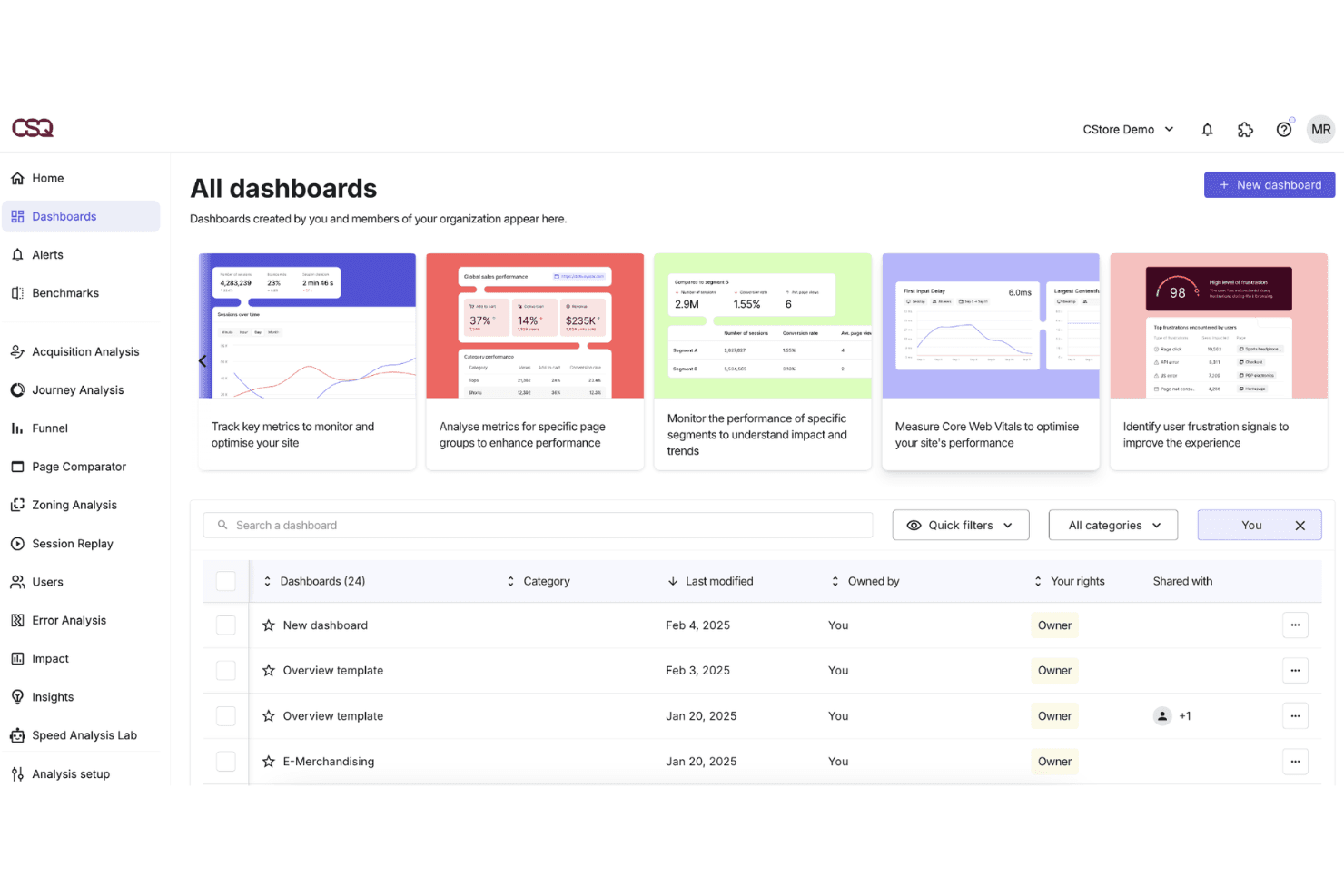
Contentsquare offre una vista 'Tutte le Dashboard' dove gli utenti possono gestire, filtrare e accedere a dashboard di analytics personalizzate per il monitoraggio delle prestazioni del sito. Per i team di prodotto e digital delle aziende di ecommerce e media, Contentsquare collega dati quantitativi sul comportamento con l’analisi visiva dell’esperienza per diagnosticare esattamente dove e perché gli utenti si disimpegnano su web e mobile.
Per chi è ideale Contentsquare?
Contentsquare è ideale per i ricercatori UX e gli analisti digitali che necessitano di collegare i dati comportamentali ai risultati di business senza dover dipendere dal supporto degli sviluppatori per l’instrumentazione.
Perché Contentsquare è una valida alternativa ad Adobe Analytics
Contentsquare si guadagna un posto nella mia shortlist perché le riproduzioni delle sessioni sono arricchite con metriche comportamentali come il tasso di esposizione e la ricorrenza, aggiungendo un contesto di intento che la semplice riproduzione video non può offrire. Apprezzo anche la possibilità di filtrare le riproduzioni per errori di pagina specifici o selettori CSS, che permette al mio team di isolare rapidamente le sessioni problematiche. È inoltre possibile sovrapporre i timestamp dei feedback dei clienti per mappare direttamente le risposte qualitative al momento esatto della frizione nella registrazione.
Funzionalità chiave di Contentsquare
- Quantificazione dell’impatto: Valuta i problemi di UX in base al potenziale impatto sui ricavi utilizzando i dati comportamentali e di conversione.
- Analisi per app mobile: Monitora le gesture touch, la profondità degli swipe e le transizioni tra schermate su app native iOS e Android.
- CS Live: Un’estensione browser che sovrappone le metriche comportamentali in tempo reale direttamente su qualsiasi pagina senza dover aprire la dashboard.
- Confronto di segmenti: Confronta i dati comportamentali tra segmenti personalizzati di audience, come nuovi visitatori rispetto a quelli di ritorno.
Integrazioni Contentsquare
Contentsquare offre integrazioni native con AB Tasty, Adobe Target, Optimizely, Monetate, Kameleoon, VWO, Google Analytics 4, Mixpanel, Adobe Analytics, Shopify, Snowflake e AWS. È disponibile un’API per integrazioni personalizzate.
Pros and Cons
Pros:
- Heatmap visive mostrano interazioni utente dettagliate
- Strumenti per la conformità alla privacy supportano i requisiti GDPR
- Analisi per app mobile inclusa per il tracciamento cross-device
Cons:
- Offre una libreria flessibile di widget di reportistica
- Alcune integrazioni richiedono sviluppo personalizzato
Learn more about Contentsquare: 10Ideale per il controllo dell'hosting orientato alla privacy
Matomo
- Prova gratuita di 21 giorni + piano gratuito disponibile
- Da $26/mese
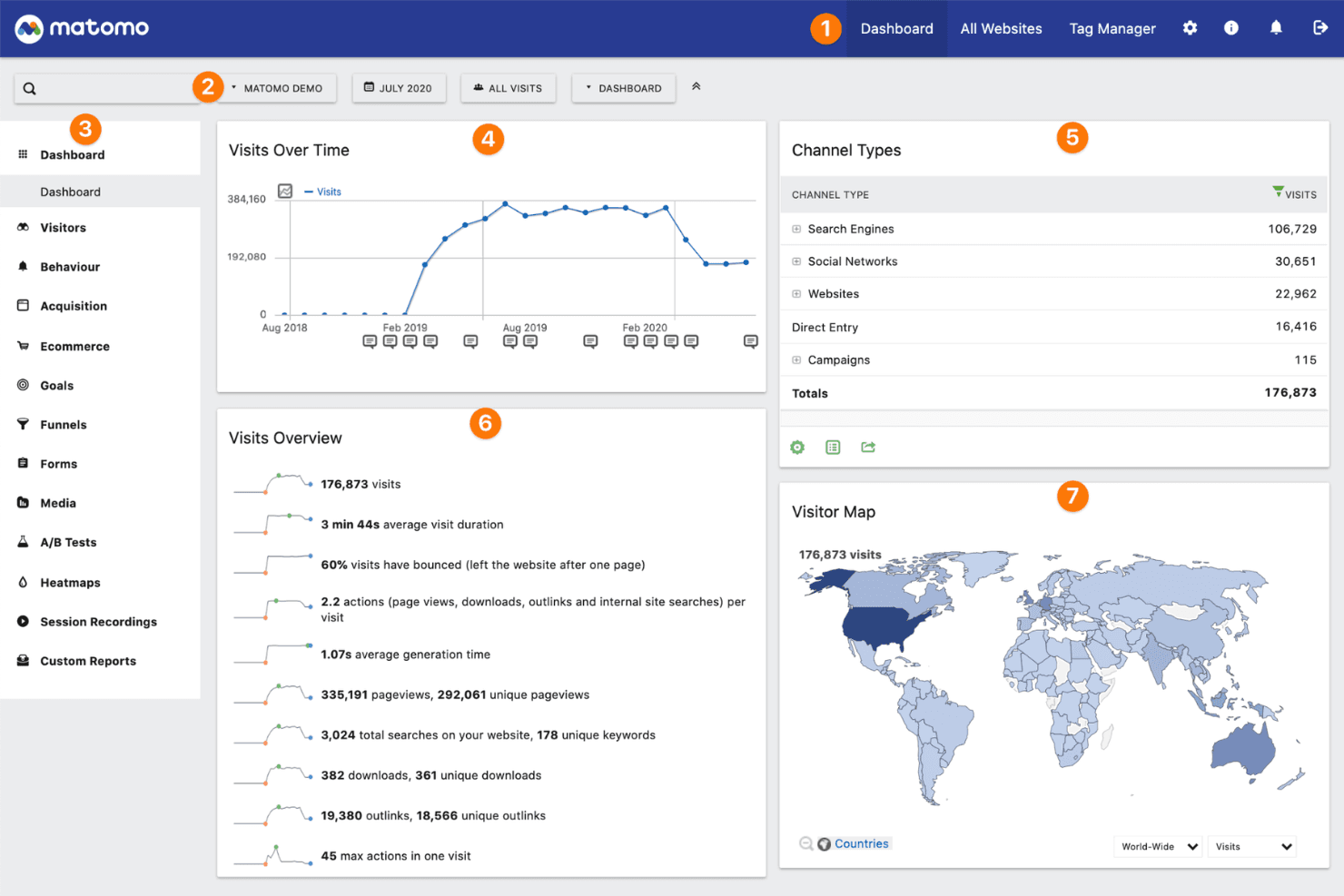
Matomo offre una dashboard di analisi completa che mostra le visite nel tempo, i tipi di canale, metriche di panoramica delle visite e una mappa globale dei visitatori. Matomo è una piattaforma di analisi web open-source progettata per le organizzazioni che necessitano del pieno controllo sui dati dei visitatori, con opzioni di hosting on-premise e cloud che mantengono i dati lontani dai server di terze parti.
Per chi è Matomo?
Matomo è particolarmente adatto per organizzazioni attente alla privacy in settori regolamentati come sanità, finanza e pubblica amministrazione, che non possono inviare dati degli utenti a piattaforme di terze parti.
Perché Matomo è una valida alternativa ad Adobe Analytics
Ho scelto Matomo perché mi offre ciò che Adobe Analytics non può: il controllo totale su dove risiedono i miei dati. Grazie all'opzione self-hosted di Matomo, distribuisco la piattaforma sul mio server, così i dati dei visitatori non transitano mai su un sistema di terze parti. Utilizzo inoltre il suo GDPR Manager integrato per configurare le impostazioni di consenso, anonimizzare gli indirizzi IP e definire le regole di conservazione dei dati direttamente dall'interfaccia, senza dover creare soluzioni improvvisate per la conformità.
Funzionalità principali di Matomo
- Mappe di calore: Visualizza dove gli utenti cliccano, scorrono e passano il mouse su ogni pagina senza campionare i dati.
- Registrazioni delle sessioni: Riproduci le sessioni utente individuali per rivedere i percorsi di navigazione e le interazioni sulle pagine.
- Obiettivi e funnel: Definisci obiettivi di conversione e monitora dove gli utenti abbandonano i flussi a più step prima di completarli.
- Report personalizzati: Crea report utilizzando qualsiasi combinazione di dimensioni e metriche raccolte dai tuoi dati.
Integrazioni Matomo
Matomo offre integrazioni native con WordPress, Drupal, Joomla, WooCommerce, Shopify, Google Looker Studio, Microsoft Power BI, Snowflake, Tableau e Slack. È disponibile un'API per integrazioni personalizzate.
Pros and Cons
Pros:
- Distribuzione on-premise per il pieno controllo dei dati
- Strumenti integrati per GDPR e conformità alla privacy
- Tracciamento senza cookie per i siti che privilegiano la privacy
Cons:
- Ecosistema di integrazione più limitato rispetto ad Adobe Analytics
- Necessarie competenze per la manutenzione del server
Learn more about Matomo:
Altre alternative ad Adobe Analytics
Ecco alcune altre alternative ad Adobe Analytics che non sono rientrate nella mia selezione principale, ma che meritano comunque di essere considerate:
- 11Quantum Metric Felix AgenticIdeale per dati di esperienza in tempo reale e multipiattaforma
- 12Hotjar (by Contentsquare)Ideale per una rapida raccolta di feedback visivi
- 13UXCamIdeale per il monitoraggio del comportamento degli utenti nelle app mobili
- 14MouseflowIdeale per monitorare i percorsi utente su più pagine
- 15StatsigIdeale per le capacità di versioning illimitate
- 16PostHogIdeale per la flessibilità di distribuzione open-source
- 17Firebase AnalyticsIdeale per l'integrazione con i servizi app di Firebase
Come Valuto le Alternative a Adobe Analytics
Valuto su due livelli: le funzionalità di base—tracciamento eventi, funnel, retention—che ogni candidato deve avere, e i fattori differenzianti che rendono una piattaforma la scelta giusta per sostituire Adobe Analytics per il tuo team.
Funzionalità Core (Requisiti Fondamentali per questa Lista)
Quando seleziono gli strumenti per la mia lista, valuto ciascuno su una scala da 0 (non offre la funzionalità) a 5 (eccelle in questo ambito) per ciascuna funzionalità core elencata di seguito. Poi calcolo il punteggio totale dello strumento in percentuale. Ogni strumento deve raggiungere un punteggio totale minimo del 65% per essere considerato per l'inclusione.
- Tracciamento Basato su Eventi: Controllo se uno strumento cattura eventi personalizzati con proprietà su web e mobile, come il tracciamento di clic su pulsanti, adozione di funzionalità o acquisti in-app oltre alle semplici visualizzazioni di pagina.
- Analisi Funnel & Retention: Cerco funnel multi-step con finestre di conversione e grafici di retention per coorti, poiché i PM hanno bisogno di individuare esattamente dove gli utenti abbandonano durante onboarding o checkout.
- Segmentazione Utenti: Valuto quanto sia flessibile creare segmenti basati sul comportamento e sugli attributi, come isolare power user che hanno completato una specifica sequenza di azioni nella prima settimana.
- Analisi dei Percorsi & Journey: In questa area sono importanti le visualizzazioni di flusso che mappano come gli utenti navigano realmente in un prodotto. Cerco strumenti che permettano di tracciare i percorsi in avanti e all'indietro tra schermate e funzionalità.
- Dashboard & Reportistica Self-Service: I product manager condividono dati con ingegneri, designer e leadership costantemente. Cerco builder di query no-code e dashboard condivisibili che non richiedano SQL per rispondere alle domande quotidiane.
- Integrazioni & Pipeline Dati: Strumenti come Amplitude, Mixpanel e Heap gestiscono ognuno in modo diverso la connettività con warehouse e CDP. Valuto copertura SDK, accesso API e connessioni native a piattaforme come Segment, BigQuery e Snowflake.
Una volta che ho una lista di strumenti che soddisfano questi criteri, considero cosa distingue ciascuna piattaforma.
Fattori Differenzianti (Cosa Distingue i Fornitori)
Ecco come confronto e metto a confronto i diversi fornitori:
Funzionalità Distintive
L'esperimentazione integrata è un grande fattore differenziante. Strumenti come Amplitude e Statsig permettono ai PM di eseguire test A/B e analizzare i risultati direttamente dove si monitora il comportamento. Questo elimina la frizione dovuta a dover unire dati tra strumenti separati. Cerco anche la session replay, che abbina contesto qualitativo ai dati quantitativi. Vedere esattamente dove un utente ha esitato durante il checkout ti dice più di un semplice funnel. Anche il rilevamento delle anomalie tramite intelligenza artificiale è importante, per segnalare cambi metrici inaspettati prima che un PM debba andare a cercarli.
Oltre le Funzionalità
Il modello di pricing conta molto quando si lascia Adobe Analytics. Valuto se uno strumento fa pagare per volume di eventi o per utenti tracciati mensilmente, perché questa differenza può incidere notevolmente sui costi man mano che il prodotto cresce. Il tempo fino al valore è un altro fattore che considero. L'onerosità dell'implementazione di Adobe è una ragione comune per cui i team cambiano, quindi verifico quanto rapidamente un PM può passare dall'installazione SDK al primo dashboard utilizzabile. L'integrazione con il tech stack chiude il cerchio. Esamino le connessioni native con strumenti che i PM usano già ogni giorno, come Jira, Slack e LaunchDarkly.
Come Valuto le Alternative a Adobe Analytics
Valuto su due livelli: le funzionalità di base—tracciamento eventi, funnel, retention—che ogni candidato deve avere, e i fattori differenzianti che rendono una piattaforma la scelta giusta per sostituire Adobe Analytics per il tuo team.
Funzionalità Core (Requisiti Fondamentali per questa Lista)
Quando seleziono gli strumenti per la mia lista, valuto ciascuno su una scala da 0 (non offre la funzionalità) a 5 (eccelle in questo ambito) per ciascuna funzionalità core elencata di seguito. Poi calcolo il punteggio totale dello strumento in percentuale. Ogni strumento deve raggiungere un punteggio totale minimo del 65% per essere considerato per l'inclusione.
- Tracciamento Basato su Eventi: Controllo se uno strumento cattura eventi personalizzati con proprietà su web e mobile, come il tracciamento di clic su pulsanti, adozione di funzionalità o acquisti in-app oltre alle semplici visualizzazioni di pagina.
- Analisi Funnel & Retention: Cerco funnel multi-step con finestre di conversione e grafici di retention per coorti, poiché i PM hanno bisogno di individuare esattamente dove gli utenti abbandonano durante onboarding o checkout.
- Segmentazione Utenti: Valuto quanto sia flessibile creare segmenti basati sul comportamento e sugli attributi, come isolare power user che hanno completato una specifica sequenza di azioni nella prima settimana.
- Analisi dei Percorsi & Journey: In questa area sono importanti le visualizzazioni di flusso che mappano come gli utenti navigano realmente in un prodotto. Cerco strumenti che permettano di tracciare i percorsi in avanti e all'indietro tra schermate e funzionalità.
- Dashboard & Reportistica Self-Service: I product manager condividono dati con ingegneri, designer e leadership costantemente. Cerco builder di query no-code e dashboard condivisibili che non richiedano SQL per rispondere alle domande quotidiane.
- Integrazioni & Pipeline Dati: Strumenti come Amplitude, Mixpanel e Heap gestiscono ognuno in modo diverso la connettività con warehouse e CDP. Valuto copertura SDK, accesso API e connessioni native a piattaforme come Segment, BigQuery e Snowflake.
Una volta che ho una lista di strumenti che soddisfano questi criteri, considero cosa distingue ciascuna piattaforma.
Fattori Differenzianti (Cosa Distingue i Fornitori)
Ecco come confronto e metto a confronto i diversi fornitori:
Funzionalità Distintive
L'esperimentazione integrata è un grande fattore differenziante. Strumenti come Amplitude e Statsig permettono ai PM di eseguire test A/B e analizzare i risultati direttamente dove si monitora il comportamento. Questo elimina la frizione dovuta a dover unire dati tra strumenti separati. Cerco anche la session replay, che abbina contesto qualitativo ai dati quantitativi. Vedere esattamente dove un utente ha esitato durante il checkout ti dice più di un semplice funnel. Anche il rilevamento delle anomalie tramite intelligenza artificiale è importante, per segnalare cambi metrici inaspettati prima che un PM debba andare a cercarli.
Oltre le Funzionalità
Il modello di pricing conta molto quando si lascia Adobe Analytics. Valuto se uno strumento fa pagare per volume di eventi o per utenti tracciati mensilmente, perché questa differenza può incidere notevolmente sui costi man mano che il prodotto cresce. Il tempo fino al valore è un altro fattore che considero. L'onerosità dell'implementazione di Adobe è una ragione comune per cui i team cambiano, quindi verifico quanto rapidamente un PM può passare dall'installazione SDK al primo dashboard utilizzabile. L'integrazione con il tech stack chiude il cerchio. Esamino le connessioni native con strumenti che i PM usano già ogni giorno, come Jira, Slack e LaunchDarkly.
Come Valuto le Alternative a Adobe Analytics
Valuto su due livelli: le funzionalità di base—tracciamento eventi, funnel, retention—che ogni candidato deve avere, e i fattori differenzianti che rendono una piattaforma la scelta giusta per sostituire Adobe Analytics per il tuo team.
Funzionalità Core (Requisiti Fondamentali per questa Lista)
Quando seleziono gli strumenti per la mia lista, valuto ciascuno su una scala da 0 (non offre la funzionalità) a 5 (eccelle in questo ambito) per ciascuna funzionalità core elencata di seguito. Poi calcolo il punteggio totale dello strumento in percentuale. Ogni strumento deve raggiungere un punteggio totale minimo del 65% per essere considerato per l'inclusione.
- Tracciamento Basato su Eventi: Controllo se uno strumento cattura eventi personalizzati con proprietà su web e mobile, come il tracciamento di clic su pulsanti, adozione di funzionalità o acquisti in-app oltre alle semplici visualizzazioni di pagina.
- Analisi Funnel & Retention: Cerco funnel multi-step con finestre di conversione e grafici di retention per coorti, poiché i PM hanno bisogno di individuare esattamente dove gli utenti abbandonano durante onboarding o checkout.
- Segmentazione Utenti: Valuto quanto sia flessibile creare segmenti basati sul comportamento e sugli attributi, come isolare power user che hanno completato una specifica sequenza di azioni nella prima settimana.
- Analisi dei Percorsi & Journey: In questa area sono importanti le visualizzazioni di flusso che mappano come gli utenti navigano realmente in un prodotto. Cerco strumenti che permettano di tracciare i percorsi in avanti e all'indietro tra schermate e funzionalità.
- Dashboard & Reportistica Self-Service: I product manager condividono dati con ingegneri, designer e leadership costantemente. Cerco builder di query no-code e dashboard condivisibili che non richiedano SQL per rispondere alle domande quotidiane.
- Integrazioni & Pipeline Dati: Strumenti come Amplitude, Mixpanel e Heap gestiscono ognuno in modo diverso la connettività con warehouse e CDP. Valuto copertura SDK, accesso API e connessioni native a piattaforme come Segment, BigQuery e Snowflake.
Una volta che ho una lista di strumenti che soddisfano questi criteri, considero cosa distingue ciascuna piattaforma.
Fattori Differenzianti (Cosa Distingue i Fornitori)
Ecco come confronto e metto a confronto i diversi fornitori:
Funzionalità Distintive
L'esperimentazione integrata è un grande fattore differenziante. Strumenti come Amplitude e Statsig permettono ai PM di eseguire test A/B e analizzare i risultati direttamente dove si monitora il comportamento. Questo elimina la frizione dovuta a dover unire dati tra strumenti separati. Cerco anche la session replay, che abbina contesto qualitativo ai dati quantitativi. Vedere esattamente dove un utente ha esitato durante il checkout ti dice più di un semplice funnel. Anche il rilevamento delle anomalie tramite intelligenza artificiale è importante, per segnalare cambi metrici inaspettati prima che un PM debba andare a cercarli.
Oltre le Funzionalità
Il modello di pricing conta molto quando si lascia Adobe Analytics. Valuto se uno strumento fa pagare per volume di eventi o per utenti tracciati mensilmente, perché questa differenza può incidere notevolmente sui costi man mano che il prodotto cresce. Il tempo fino al valore è un altro fattore che considero. L'onerosità dell'implementazione di Adobe è una ragione comune per cui i team cambiano, quindi verifico quanto rapidamente un PM può passare dall'installazione SDK al primo dashboard utilizzabile. L'integrazione con il tech stack chiude il cerchio. Esamino le connessioni native con strumenti che i PM usano già ogni giorno, come Jira, Slack e LaunchDarkly.
Perché cercare un’alternativa ad Adobe Analytics?
Sebbene Adobe Analytics sia una buona piattaforma di analitica digitale, ci sono diversi motivi per cui alcuni utenti scelgono soluzioni alternative. Potresti essere alla ricerca di un’alternativa a Adobe Analytics perché…
- Hai bisogno di una soluzione di analytics che metta al primo posto la privacy oppure senza cookie
- La piattaforma è troppo complessa rispetto alle necessità del tuo team
- I prezzi non sono trasparenti o sono fuori budget
- Vuoi un’implementazione più rapida e una configurazione più semplice
- Hai bisogno di analytics per siti o progetti di dimensioni ridotte
- L’integrazione con la tua infrastruttura esistente è limitata
Se ti riconosci in una di queste situazioni, sei nel posto giusto. Il mio elenco contiene diverse opzioni di piattaforme di analisi digitale più adatte ai team che affrontano queste sfide con Adobe Analytics e sono alla ricerca di soluzioni alternative.
Funzionalità principali di Adobe Analytics
Ecco alcune delle funzionalità chiave di Adobe Analytics per aiutarti a confrontare e paragonare ciò che offrono le soluzioni alternative:
- Raccolta dati in tempo reale: Cattura ed elabora le interazioni degli utenti mano a mano che avvengono, consentendo ai team di monitorare picchi di traffico, performance delle campagne o problemi tecnici senza ritardi.
- Segmentazione avanzata: Raggruppa gli utenti in base a comportamenti specifici, dati demografici o proprietà personalizzate, consentendo analisi mirate e confronti approfonditi tra coorti su più dimensioni.
- Modellazione dell'attribuzione: Tiene traccia di ogni punto di contatto nel percorso del cliente e attribuisce il merito a ciascun canale di marketing o interazione, aiutando i team a distribuire il budget in modo più efficace.
- Dashboard e report personalizzati: Permette di creare report e visualizzazioni su misura, così gli stakeholder possono concentrarsi sui KPI e sulle tendenze più rilevanti per il proprio ruolo.
- Analisi dei percorsi: Mappa i flussi degli utenti all'interno del tuo sito o app, rendendo possibile individuare punti critici e ottimizzare i percorsi di conversione o la disposizione dei contenuti basandosi sul comportamento reale.
- Creazione e attivazione di audience: Consente la creazione di segmenti di pubblico personalizzati che possono essere esportati o collegati a piattaforme pubblicitarie per retargeting e ottimizzazione delle campagne.
- Analisi predittiva: Utilizza l'IA per prevedere le tendenze, segnalare anomalie e suggerire azioni, identificando schemi che potresti non notare nei dati.
- Gestione dei tag: Semplifica l'aggiunta, la modifica o la rimozione di codici di tracciamento attraverso un'interfaccia utente invece di modifiche al codice, riducendo la dipendenza dalle risorse di ingegneria.
- Connettori dati: Si integra con un ampio ecosistema di strumenti e data warehouse, facilitando il collegamento degli insight di analytics con piattaforme di marketing automation, CRM o BI.
- Controlli di accesso basati sui ruoli: Permettono impostazioni di autorizzazione granulari, garantendo che ciascun membro del team visualizzi e modifichi solo i dati e le dashboard pertinenti al proprio lavoro.