

Con così tante soluzioni per il coinvolgimento del prodotto disponibili, scegliere quella giusta per te può essere difficile. Vuoi sicuramente aumentare la soddisfazione degli utenti, migliorare i tassi di retention, ottimizzare l’esperienza utente e perfezionare i vari touchpoint all’interno di un prodotto per ottenere un maggiore coinvolgimento, ma devi trovare lo strumento più adatto. Ti aiuto io! In questo articolo ti guiderò verso una scelta più facile grazie alla mia esperienza con decine di strumenti diversi utilizzati da grandi team e su prodotti diversi, così da proporti una selezione dei migliori software per l’engagement del prodotto.
Perché fidarsi dei nostri consigli sui software
6,700+
Reviews
20
Industry experts
16+
Evaluation factors
14
Years
Il nostro team testa e recensisce software dal 2012. In quanto product manager noi stessi, sappiamo quanto sia difficile — e importante — scegliere il software giusto.
Per questa guida, abbiamo valutato gli strumenti attraverso test pratici e ricerche indipendenti, assegnando un punteggio agli strumenti in base ai nostri criteri di selezione.
Le nostre recensioni riflettono il nostro giudizio editoriale umano, non un discorso di vendita.
Revisori esperti:
- Andrew LumbySenior TPM
- Cristiano ValimSenior UI/UX Lead


Riepilogo dei migliori software per l’engagement del prodotto
Questa tabella comparativa riassume i dettagli sui prezzi delle mie migliori selezioni di software per il coinvolgimento del prodotto, per aiutarti a trovare quello più adatto alle tue esigenze di budget e di business.
| Tool | Best For | Trial Info | Price | ||
|---|---|---|---|---|---|
| 1 | Ideale per l'onboarding degli utenti in-app | Prova gratuita di 14 giorni | A partire da $174/mese (con fatturazione annuale) | Website | |
| 2 | Ideale per la riproduzione delle sessioni collegata all'analisi comportamentale | Piano gratuito + demo gratuita disponibile | Prezzi su richiesta | Website | |
| 3 | Ideale per esperienze nel prodotto senza codice su larga scala | Prova gratuita disponibile | Prezzo su richiesta | Website | |
| 4 | Ideale per analisi, riproduzione e guide integrate nell'app | Piano gratuito disponibile | Prezzi su richiesta | Website | |
| 5 | Ideale per il coinvolgimento omnicanale degli utenti basato sull'IA | Demo gratuita disponibile | Prezzi su richiesta | Website | |
| 6 | Ideale per il coinvolgimento nell'app basato sull'analisi dei dati | Prova gratuita di 14 giorni + demo gratuita disponibile | A partire da $299/mese | Website | |
| 7 | Ideale per la guida in-app nelle applicazioni web e desktop | Prova gratuita disponibile | Prezzi su richiesta | Website | |
| 8 | Ideale per la riproduzione delle sessioni collegata all'analisi comportamentale | Piano gratuito + demo gratuita disponibile | Prezzi su richiesta | Website | |
| 9 | Ideale per guidare gli utenti attraverso i flussi di lavoro aziendali | Non disponibile | Prezzi su richiesta | Website | |
| 10 | Ideale per creare guide nell'applicazione e richieste di funzionalità | Piano gratuito + prova gratuita di 30 giorni disponibile | Prezzi su richiesta | Website |


Recensioni dei migliori software per l’engagement del prodotto
Qui sotto trovi i miei riassunti dettagliati dei migliori software per il coinvolgimento del prodotto che sono entrati nella mia shortlist. Le recensioni offrono uno sguardo approfondito sulle principali funzionalità, punti di forza e debolezza, integrazioni e casi d’uso ideali di ciascun tool, per aiutarti a trovare quello giusto per te.
 Ideale per l'onboarding degli utenti in-app
- Prova gratuita di 14 giorni
- A partire da $174/mese (con fatturazione annuale)
Visit WebsiteCustomer Rating:4.7/5This rating combines scores from multiple user review sites to reflect overall customer sentiment about the product.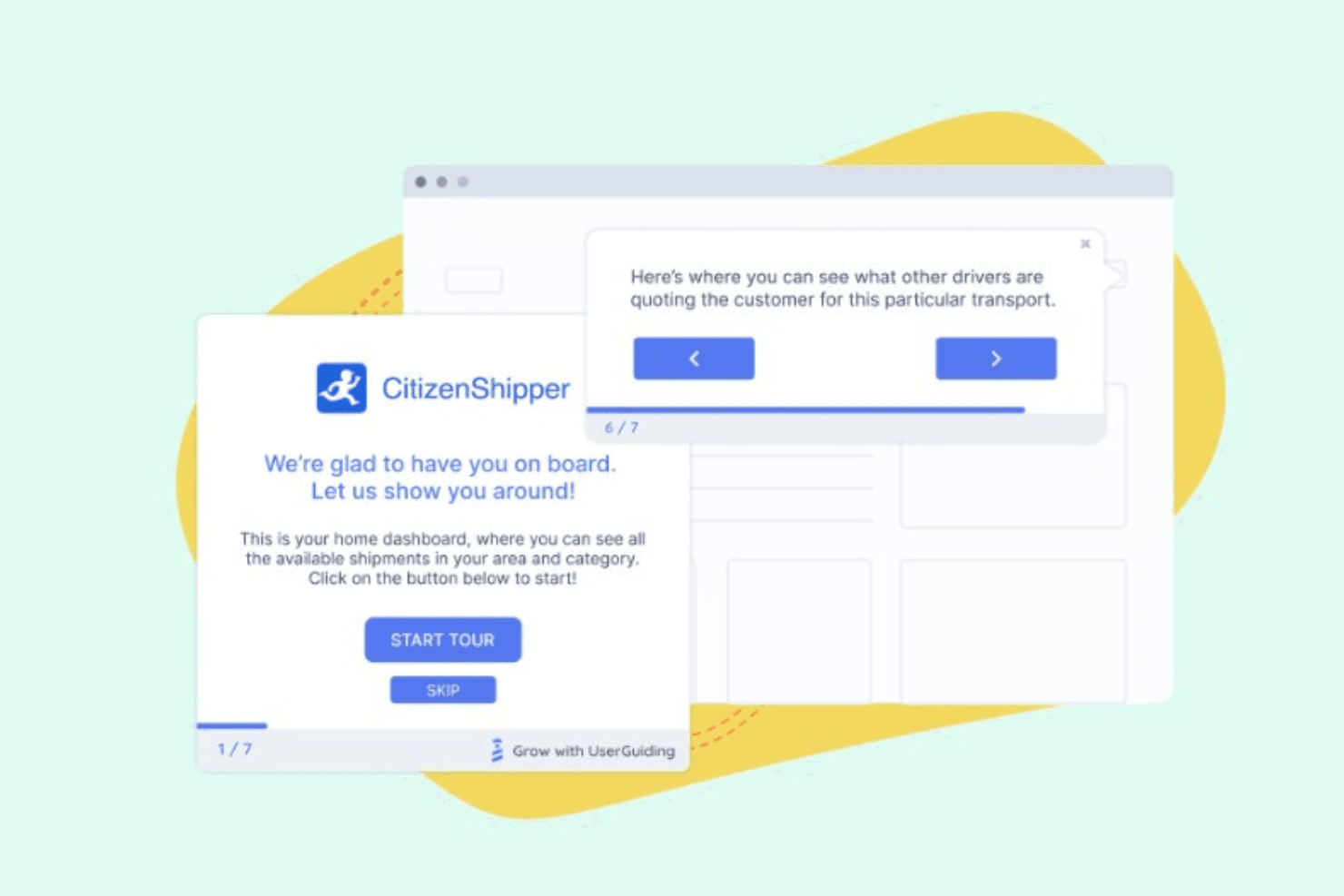
UserGuiding consente di creare finestre a comparsa che evidenziano le nuove funzionalità per i clienti, aumentando l'adozione. UserGuiding è una piattaforma di coinvolgimento dei prodotti senza codice che combina strumenti di guida in-app, tra cui tour del prodotto, descrizioni comandi, hotspot, checklist per l'onboarding e modali di annuncio, con la raccolta di feedback, centri risorse, segmentazione degli utenti e un modulo di analisi integrato.
Per chi è più adatto UserGuiding?
UserGuiding è particolarmente adatto ai team di prodotto e di successo dei clienti delle aziende SaaS che desiderano creare e lanciare flussi di onboarding in-app senza coinvolgere il team di sviluppo.
Perché ho scelto UserGuiding
Ho scelto UserGuiding come una delle soluzioni migliori perché il suo costruttore senza codice consente ai team di prodotto di distribuire tour di onboarding, checklist e hotspot senza scrivere una sola riga di codice. Apprezzo particolarmente il modo in cui i sondaggi in-app e gli strumenti NPS si collegano direttamente ai flussi di onboarding, così è possibile raccogliere feedback nel momento esatto in cui un utente completa un passaggio importante. Anche il centro risorse integrato e l'Assistente AI offrono agli utenti un livello di assistenza autonoma che riduce l'abbandono durante l'onboarding.
Funzionalità principali di UserGuiding
- Sondaggi in-app e sondaggi NPS: Raccogli feedback strutturati dagli utenti e misura la soddisfazione direttamente all'interno del tuo prodotto, senza reindirizzare gli utenti verso moduli esterni.
- Centro risorse e base di conoscenza: Offri agli utenti un centro di assistenza autonoma all'interno dell'app, dove possono cercare articoli e accedere ai contenuti di supporto senza interrompere il loro flusso di lavoro.
- Riproduzione delle sessioni: Registra e rivedi sessioni reali degli utenti per vedere esattamente come interagiscono con il tuo prodotto dopo aver completato i flussi di onboarding.
- Richieste di funzionalità e piano evolutivo pubblico: Consenti agli utenti di inviare idee per nuove funzionalità e seguire il piano evolutivo del prodotto direttamente nell'app, creando un ciclo di feedback trasparente tra il tuo team e gli utenti.
Integrazioni di UserGuiding
Le integrazioni native non sono documentate in modo chiaro. Il server MCP di UserGuiding connette strumenti e agenti di intelligenza artificiale ai dati del prodotto.
Pros and Cons
Pros:
- I tour senza codice vengono lanciati senza il supporto del team di sviluppo
- Il feedback collega sondaggi, NPS e piano evolutivo
- I centri risorse riducono le richieste di supporto durante l'onboarding
Cons:
- Le analisi non offrono una visualizzazione confermata del percorso nell'imbuto
- Incentrato sul web, con supporto limitato per le app mobili
Learn more about UserGuiding: Ideale per la riproduzione delle sessioni collegata all'analisi comportamentale
- Piano gratuito + demo gratuita disponibile
- Prezzi su richiesta
Visit WebsiteCustomer Rating:4.8/5This rating combines scores from multiple user review sites to reflect overall customer sentiment about the product.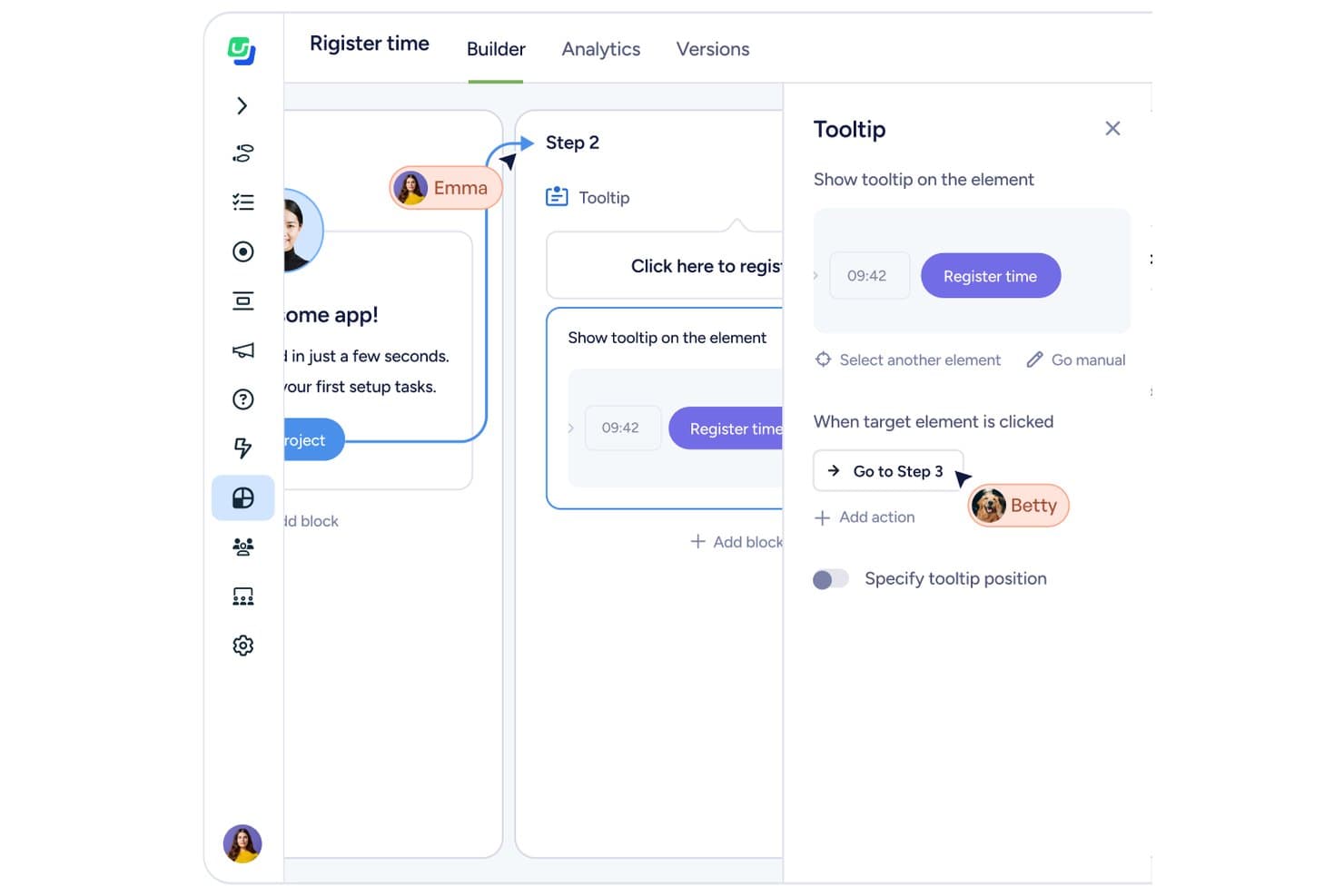
Fullstory consente agli utenti di distribuire sondaggi e guide introduttive all'interno dell'app. Fullstory è una piattaforma di analisi comportamentale e coinvolgimento del prodotto che combina riproduzione delle sessioni, mappe di calore, analisi dei funnel e guide in-app con la raccolta automatica degli eventi sul web e sui dispositivi mobili.
A chi è più adatto Fullstory?
Fullstory è particolarmente adatto ai team di prodotto e UX che hanno bisogno di collegare direttamente la riproduzione delle sessioni all'analisi comportamentale senza assemblare strumenti separati.
Perché ho scelto Fullstory
Fullstory si guadagna un posto nella mia selezione perché è l'unico strumento in cui la riproduzione delle sessioni e l'analisi comportamentale non sono flussi di lavoro separati, ma fanno parte dello stesso set di dati. Apprezzo molto il fatto che Fullcapture registri automaticamente ogni clic, scorrimento e clic frenetico senza applicare manualmente tag agli eventi: così, quando compare un abbandono nel funnel nelle analisi, puoi passare direttamente alla riproduzione della sessione per vedere esattamente cosa è successo. Abbinando questa funzione ai riepiloghi delle sessioni di StoryAI, ottieni il «cosa» e il «perché» senza dover esaminare ore di registrazioni.
Funzionalità principali di Fullstory
- Fullcapture: Registra automaticamente ogni clic, scorrimento e clic frenetico sul web e sui dispositivi mobili senza applicare manualmente tag agli eventi.
- Analisi del flusso delle pagine: Visualizza i percorsi effettivi seguiti dagli utenti nel prodotto, mostrando dove navigano prima e dopo ogni passaggio.
- Sondaggi in-app e NPS: Distribuisce sondaggi direttamente all'interno del prodotto e collega ogni risposta alla registrazione della sessione attiva dell'utente.
- Avvisi sui segmenti: Ti notifica quando cambia il comportamento di un segmento di utenti definito, così puoi intervenire sui cambiamenti nel coinvolgimento senza controllare manualmente i pannelli di controllo.
Integrazioni di Fullstory
Fullstory offre integrazioni con Adobe Analytics, Google Tag Manager e Segment, oltre a un'API aperta, webhook ed esportazione dei dati per connettività personalizzata.
Pros and Cons
Pros:
- La riproduzione delle sessioni si collega direttamente all'analisi comportamentale
- La raccolta automatica elimina l'applicazione manuale dei tag agli eventi
- I sondaggi collegano le risposte alle registrazioni delle sessioni
Cons:
- Le guide native per dispositivi mobili non sono ancora disponibili
- Il punteggio dello stato di salute rivolto ai clienti non è disponibile
Learn more about Userflow: Ideale per esperienze nel prodotto senza codice su larga scala
- Prova gratuita disponibile
- Prezzo su richiesta
Visit WebsiteCustomer Rating:4.7/5This rating combines scores from multiple user review sites to reflect overall customer sentiment about the product.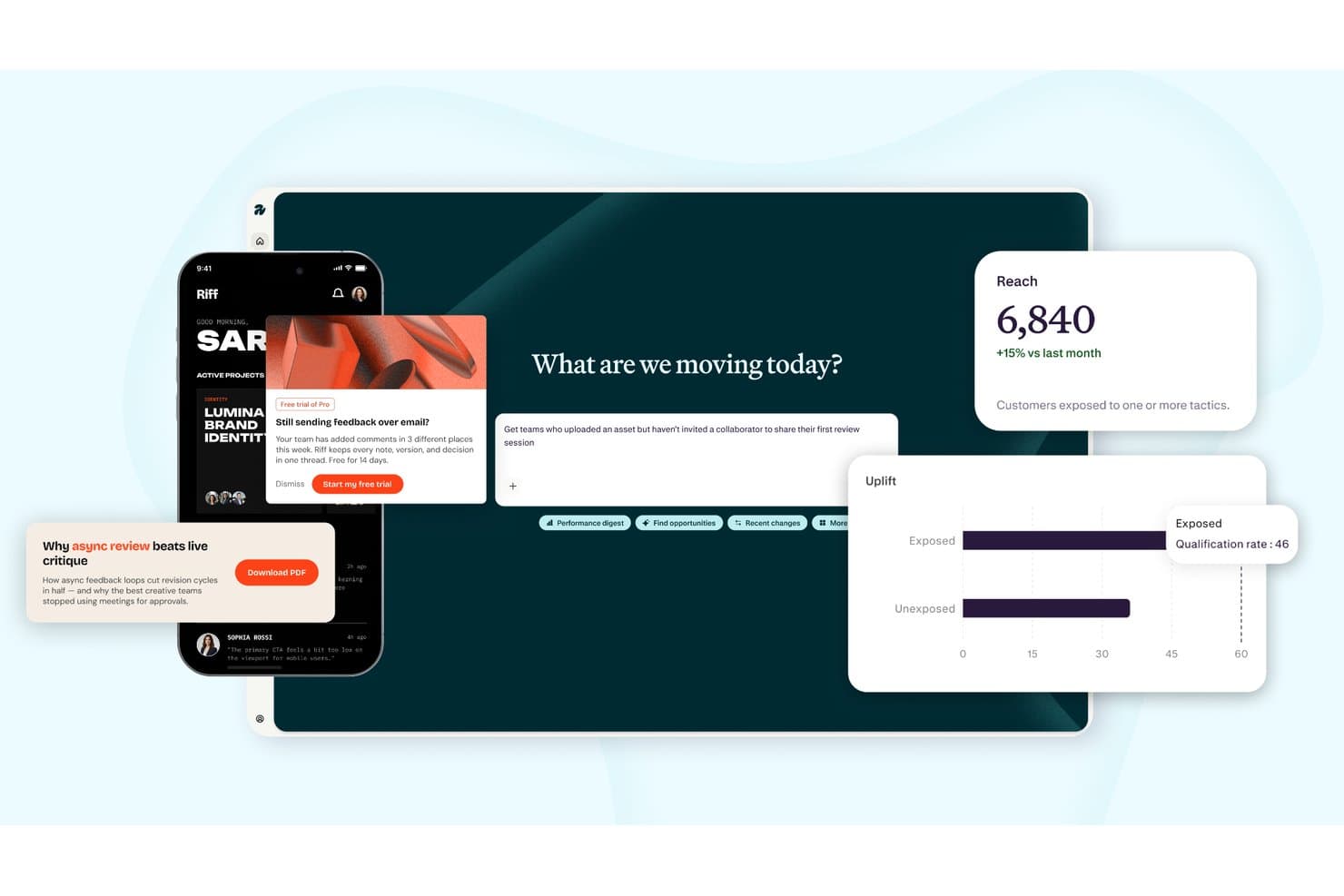
Appcues monitora la portata, l'incremento e il coinvolgimento nelle campagne multicanale. Appcues è una piattaforma di coinvolgimento del prodotto che combina la creazione senza codice di esperienze nel prodotto, l'analisi dell'utilizzo del prodotto, la segmentazione degli utenti e la messaggistica comportamentale tramite canali nel prodotto, e-mail e notifiche push.
Per chi è più adatto Appcues?
Appcues è una soluzione particolarmente adatta ai team di prodotto SaaS di medie dimensioni che vogliono creare, indirizzare e misurare esperienze nel prodotto senza dipendere dalle risorse di ingegneria.
Perché ho scelto Appcues
Appcues si è guadagnato un posto nella mia lista ristretta perché consente ai team di prodotto di creare e pubblicare esperienze nel prodotto—flussi, checklist, indicatori, banner e pagine di lancio—senza scrivere una sola riga di codice. Apprezzo in particolare il fatto che sia sufficiente configurare il proprio marchio una volta e che ogni esperienza lo erediti automaticamente, un aspetto importante quando si pubblicano esperienze per decine di segmenti su larga scala. Anche il livello di intelligenza artificiale è davvero utile: crea bozze di esperienze a partire da istruzioni in linguaggio naturale e segnala i link non funzionanti nei flussi attivi prima che gli utenti li raggiungano.
Funzionalità principali di Appcues
- Segmentazione comportamentale: Indirizza gli utenti in base ai loro attributi e alle azioni compiute nel prodotto, importando dati dal tuo CRM, magazzino dati o CDP per una selezione precisa del pubblico.
- Report su impatto e incremento: Misura se una determinata esperienza ha prodotto un risultato significativo e se gli utenti che l'hanno visualizzata hanno ottenuto prestazioni migliori rispetto a quelli che non l'hanno visualizzata.
- NPS e sondaggi nel prodotto: Distribuisci sondaggi di riscontro mirati all'interno del tuo prodotto, rivolti a segmenti specifici, con le risposte inoltrate direttamente a Slack o al tuo CRM.
- SDK mobili: Estendi il monitoraggio e le esperienze nel prodotto alle app iOS, Android, React Native, Flutter e Ionic dalla stessa piattaforma che utilizzi per il web.
Integrazioni di Appcues
Appcues offre integrazioni native bidirezionali con Salesforce, HubSpot, Intercom, Slack, Mixpanel e Heap. Supporta inoltre Segment, webhook per API ed eventi e Zapier.
Pros and Cons
Pros:
- Esperienze senza codice sul web e sui dispositivi mobili
- L'intelligenza artificiale crea bozze di flussi e segnala i link non funzionanti
- Misura l'incremento oltre le metriche di interazione di base
Cons:
- Non è disponibile alcuna riproduzione nativa delle sessioni per le analisi
- Non è disponibile un punteggio di adozione a livello di account
Learn more about Appcues: Ideale per analisi, riproduzione e guide integrate nell'app
- Piano gratuito disponibile
- Prezzi su richiesta
Visit WebsiteCustomer Rating:4.5/5This rating combines scores from multiple user review sites to reflect overall customer sentiment about the product.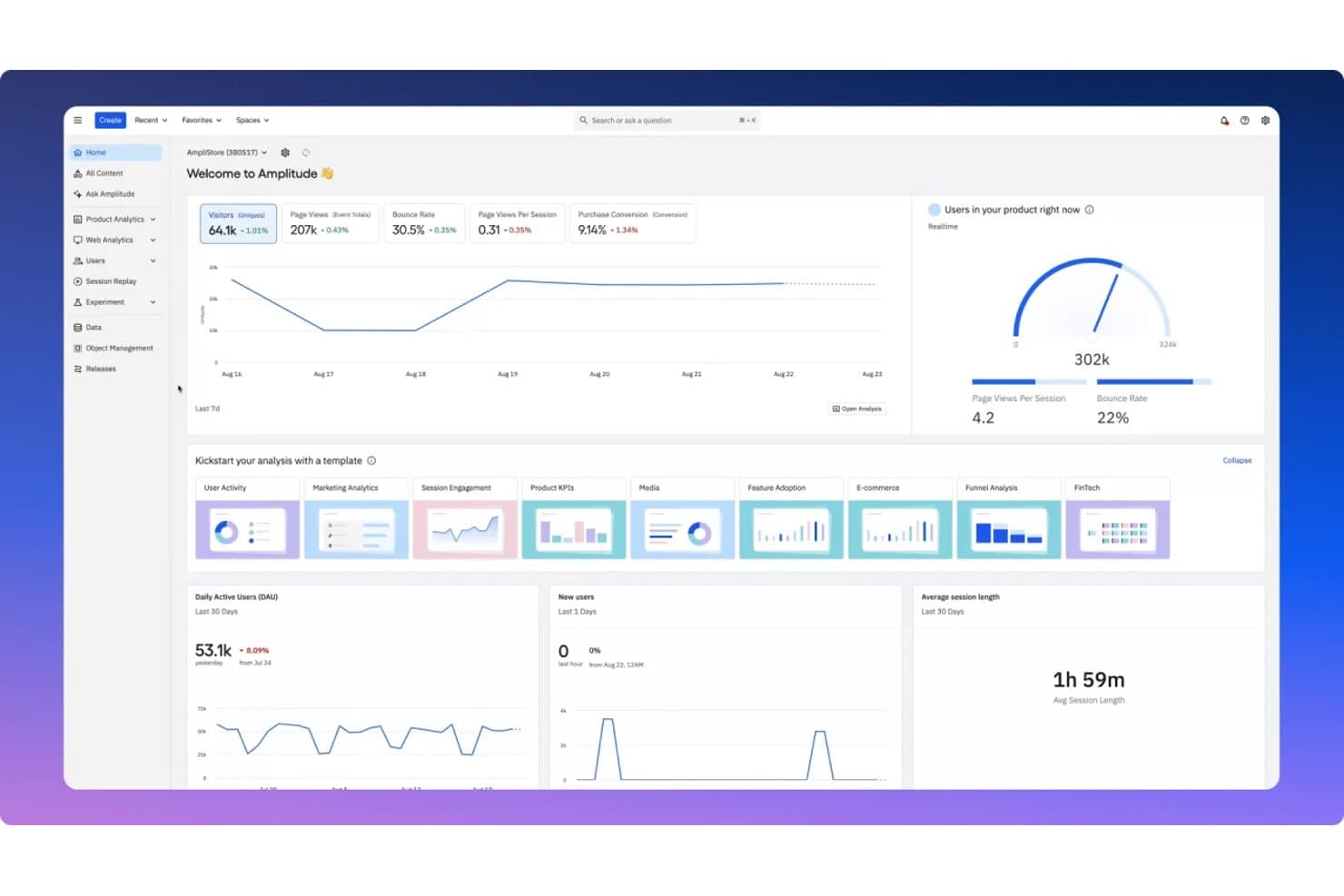
Amplitude centralizza le metriche di coinvolgimento del prodotto in un unico pannello di controllo. Amplitude è una piattaforma di analisi dei prodotti che combina analisi comportamentale, riproduzione delle sessioni, guide e sondaggi integrati nell'app e sperimentazione in un unico prodotto.
Per chi è più adatto Amplitude?
Amplitude è particolarmente adatto ai responsabili di prodotto e ai team di crescita che desiderano analisi, riproduzione delle sessioni e guide integrate nell'app in un unico posto, invece di dover combinare strumenti separati.
Perché ho scelto Amplitude
Amplitude si è guadagnato un posto nella mia selezione perché riunisce analisi, riproduzione delle sessioni e guide integrate nell'app in un'unica piattaforma, così i dati comportamentali analizzati alimentano direttamente le guide distribuite. Apprezzo particolarmente il fatto che il suo prodotto Guide e sondaggi supporti tour, checklist, suggerimenti e finestre modali con attivatori basati sul comportamento e regole di frequenza integrate che impediscono di inviare messaggi eccessivi. La riproduzione delle sessioni fa un ulteriore passo avanti nei piani Growth ed Enterprise con riepiloghi basati sull'IA che segnalano automaticamente i punti di frizione e mettono in evidenza la percezione degli utenti.
Funzionalità principali di Amplitude
- Segmentazione comportamentale delle coorti: Crea coorti in base al comportamento degli utenti e usale per indirizzare guide, sondaggi ed esperimenti senza supporto SQL o ingegneristico.
- Riproduzione delle sessioni multipiattaforma: Acquisisci riproduzioni ad alta fedeltà su web, iOS, Android e React Native, con la possibilità di eseguire la riproduzione come SDK autonomo insieme a strumenti come Segment.
- Test A/B per le guide: Esegui test A/B sulle guide e sui sondaggi integrati nell'app nei piani Growth ed Enterprise per confrontare quale versione genera un coinvolgimento maggiore.
- Analisi IA dei riscontri: Analizza automaticamente fino a 2.000 record di riscontri al mese in ogni piano, incluso quello gratuito, per individuare schemi nelle risposte degli utenti.
Integrazioni di Amplitude
Amplitude si collega a Segment per la riproduzione delle sessioni e supporta connessioni MCP con Claude, Cursor, Lovable e Figma Make. Supporta inoltre la sincronizzazione delle coorti e la trasmissione in tempo reale verso altri strumenti.
Pros and Cons
Pros:
- Unifica analisi, riproduzione e guida
- La riproduzione assistita dall'IA mette in evidenza gli schemi di frizione
- La segmentazione basata sul comportamento limita la fatica da messaggi
Cons:
- La profondità delle analisi può mettere in secondo piano i flussi di coinvolgimento
- I pannelli di controllo complessi rallentano l'analisi iniziale
Learn more about Amplitude: Ideale per il coinvolgimento omnicanale degli utenti basato sull'IA
- Demo gratuita disponibile
- Prezzi su richiesta
Visit WebsiteCustomer Rating:4.5/5This rating combines scores from multiple user review sites to reflect overall customer sentiment about the product.
MoEngage personalizza la comunicazione omnicanale in ogni punto di contatto del percorso del cliente per migliorare il coinvolgimento del prodotto. MoEngage è una piattaforma di coinvolgimento dei prodotti basata sugli insight dei dati che aiuta a offrire un'esperienza utente personalizzata durante l'intero percorso del cliente, per costruire relazioni solide con i clienti. Il software alimenta le esperienze digitali con segmentazione avanzata, coinvolgimento omnicanale, analisi del percorso del cliente e previsioni basate sull'IA.
Perché ho scelto MoEngage: Ho scelto MoEngage per le sue funzionalità omnicanale basate sull'IA, che aiutano a migliorare il coinvolgimento dei clienti e l'esperienza del marchio. Questo include esperimenti di test A/B intelligenti che aiutano a ottenere risultati e a costruire la fedeltà dei clienti tramite e-mail, messaggi nell'app, notifiche push e altri canali. Conoscendo i canali a cui i tuoi clienti rispondono maggiormente, puoi massimizzare il coinvolgimento e configurare eventi in tempo reale.
Funzionalità e integrazioni principali di MoEngage
Una funzionalità di spicco è lo strumento di creazione del percorso del cliente basato sull'IA, che crea e automatizza le tue campagne senza codice in modo fluido su più canali. Utilizzando questa funzionalità, puoi accogliere i singoli utenti con offerte di benvenuto, personalizzare le comunicazioni 1:1 per costruire relazioni e sfruttare le funzionalità predittive per le opportunità di vendita aggiuntiva e vendita incrociata. Inoltre, puoi inviare i messaggi attraverso i loro canali preferiti. Gli insight sui consumatori basati sull'IA possono aiutarti a visualizzare i percorsi dei clienti attraverso ogni fase e a rilevare eventuali punti di attrito per coinvolgerli nuovamente, tutto da un unico cruscotto. Questo ottimizza in definitiva l'adozione dei prodotti, gli abbonamenti e le conversioni.
Le integrazioni includono oltre 110 strumenti, tra cui Airtable, Amazon S3, EduMe, Freshdesk, Growthbook, LeadSquared, Mailmodo, Open Weather, Shopify, Smashpops, Typeform e Vizard.
MoEngage si integra anche con Zapier, consentendoti di creare flussi di lavoro personalizzati in oltre 5000 app.
Pros and Cons
Pros:
- Supporto alla comunicazione multicanale tramite SMS, WhatsApp ed e-mail
- Creazione semplice dei segmenti tramite l'acquisizione di attributi ed eventi
- Analisi e insight in tempo reale per creare percorsi automatizzati dei clienti
Cons:
- Incoerenze nella formattazione dei report della base di dati
- L'esperienza utente potrebbe essere migliorata in termini di facilità d'uso
Learn more about MoEngage: Ideale per il coinvolgimento nell'app basato sull'analisi dei dati
- Prova gratuita di 14 giorni + demo gratuita disponibile
- A partire da $299/mese
Visit WebsiteCustomer Rating:4.7/5This rating combines scores from multiple user review sites to reflect overall customer sentiment about the product.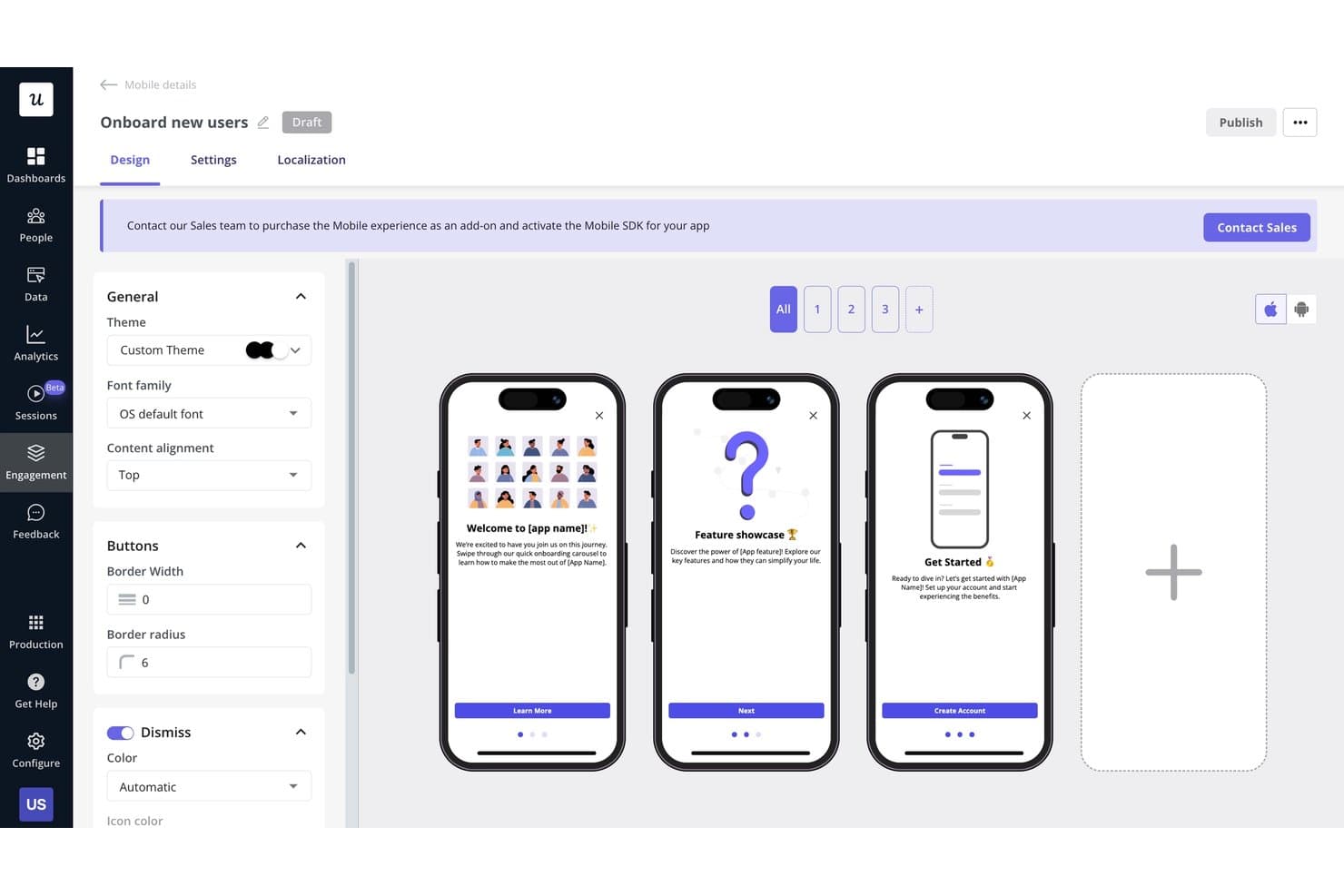
Userpilot consente agli utenti di creare visivamente flussi di introduzione per dispositivi mobili a più passaggi. Userpilot è una piattaforma di coinvolgimento del prodotto che combina esperienze senza codice nell'app, analisi dell'utilizzo, segmentazione degli utenti, riproduzione delle sessioni e strumenti per la raccolta dei feedback, come i sondaggi NPS e CSAT.
Per chi è più adatto Userpilot?
Userpilot è particolarmente adatto ai responsabili di prodotto e ai team del successo dei clienti che hanno bisogno di collegare direttamente il coinvolgimento nell'app ai dati di utilizzo.
Perché ho scelto Userpilot
Userpilot si è guadagnato un posto nella mia lista ristretta perché collega direttamente il coinvolgimento nell'app ai dati di utilizzo del prodotto in un modo che la maggior parte degli strumenti non offre. Mi piace molto la possibilità di creare un percorso guidato o una checklist mirata e di recuperare subito rapporti sui funnel e sui percorsi per verificare se hanno favorito l'adozione. Funzionalità come la raccolta automatica dei dati e la riproduzione delle sessioni con indicatori dei clic ripetuti mi permettono di individuare esattamente dove gli utenti abbandonano il percorso, ancora prima di creare una soluzione.
Funzionalità principali di Userpilot
- Sondaggi NPS e CSAT: Raccogli feedback nell'app su tutti i piani utilizzando NPS, con tipologie di sondaggio avanzate, incluso CSAT, disponibili a partire dal piano Growth.
- Agente AI (Lia): Poni domande sui dati del tuo prodotto, analizza i feedback degli utenti e crea guide nell'app utilizzando un agente di intelligenza artificiale conversazionale incluso in ogni piano.
- Segmentazione di utenti e aziende: Crea segmenti per singoli utenti o account utilizzando dati comportamentali e attributi, quindi applicali a funzionalità di analisi, messaggistica e feedback.
- Centro risorse: Offri agli utenti un centro di assistenza self-service all'interno del prodotto, realizzato senza codice, per mostrare guide, annunci e contenuti di supporto su richiesta.
Integrazioni di Userpilot
Userpilot offre sei integrazioni native documentate, tra cui Segment, Mixpanel, Amplitude, Heap, Intercom e Slack. Supporta inoltre webhook e un'API HTTP per integrazioni personalizzate, mentre la sincronizzazione con HubSpot, Salesforce e i data warehouse è disponibile nel piano Enterprise.
Pros and Cons
Pros:
- L'analisi collega i funnel ai risultati del coinvolgimento
- La riproduzione delle sessioni rivela gli attriti causati dai clic ripetuti
- Le guide senza codice consentono un'implementazione rapida
Cons:
- Il coinvolgimento da dispositivi mobili richiede l'accesso Enterprise
- Alcuni recensori segnalano blocchi durante la creazione
Learn more about Userpilot: Ideale per la guida in-app nelle applicazioni web e desktop
- Prova gratuita disponibile
- Prezzi su richiesta
Visit WebsiteCustomer Rating:4.6/5This rating combines scores from multiple user review sites to reflect overall customer sentiment about the product.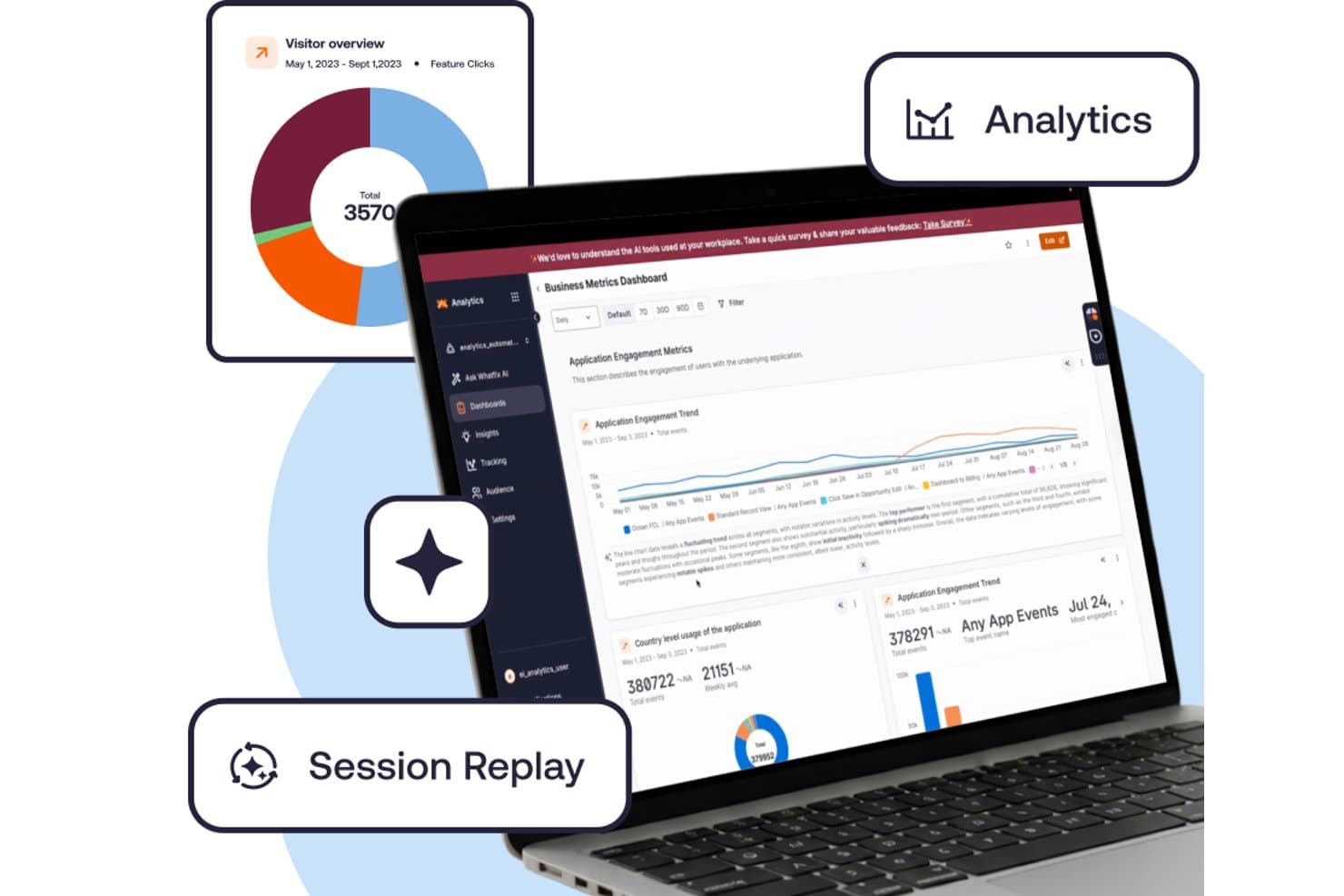
Whatfix monitora le metriche di coinvolgimento tramite analisi e riproduzione delle sessioni. Whatfix è una piattaforma per l’adozione digitale che combina strumenti di guida in-app, analisi dell’utilizzo del prodotto e supporto multipiattaforma per ambienti web, desktop, mobili e desktop virtuali.
Per chi è più adatto Whatfix?
Whatfix è adatto alle grandi aziende con team UX o L&D che gestiscono la guida negli ambienti web, desktop e desktop virtuali.
Perché ho scelto Whatfix
Whatfix è entrato nella mia rosa di candidati perché nessun altro strumento che ho testato offre supporto per la guida su web, desktop (Windows e Mac), Citrix e Azure Virtual Desktop in un’unica soluzione. Apprezzo in particolare i Flussi e i Suggerimenti intelligenti, che consentono ai team UX di creare percorsi guidati passo passo e descrizioni comandi a livello di campo senza scrivere una riga di codice. I Test automatici verificano automaticamente che questi Flussi continuino a funzionare dopo un aggiornamento dell’app, facendo risparmiare ore di controllo qualità manuale in ambienti aziendali complessi.
Funzionalità principali di Whatfix
- Riproduzione delle sessioni: Un componente aggiuntivo a pagamento che registra le sessioni degli utenti con controlli della privacy progettati per soddisfare gli standard di conformità aziendali.
- Specchio: Un ambiente di simulazione in cui gli utenti possono esercitarsi nei flussi di lavoro in un’applicazione clonata, con simulazioni di ruolo basate sull’AI, quiz ed esportazione SCORM.
- Pannello di controllo dello stato di adozione: Un pannello integrato che monitora le tendenze di adozione delle funzionalità e mette in evidenza i modelli di utilizzo nel tempo.
- Assistenza autonoma: Una base di conoscenza integrata con ricerca basata sull’AI, riepiloghi e consigli sui contenuti contestuali visualizzati direttamente nell’applicazione.
Integrazioni di Whatfix
Whatfix si integra con Mixpanel, Amplitude e Segment per le applicazioni mobili. La versione standard della piattaforma di adozione digitale supporta due integrazioni con applicazioni aziendali, ma Whatfix non specifica quali siano nella pagina dei prezzi.
Pros and Cons
Pros:
- La guida si estende agli ambienti web, desktop e desktop virtuali
- I test automatici dei flussi rilevano i percorsi guidati non funzionanti
- La creazione regolamentata supporta approvazioni e localizzazione
Cons:
- Le analisi desktop omettono alcune proprietà degli utenti
- La segmentazione mobile resta basilare
Learn more about Whatfix: Ideale per la riproduzione delle sessioni collegata all'analisi comportamentale
- Piano gratuito + demo gratuita disponibile
- Prezzi su richiesta
Visit WebsiteCustomer Rating:4.5/5This rating combines scores from multiple user review sites to reflect overall customer sentiment about the product.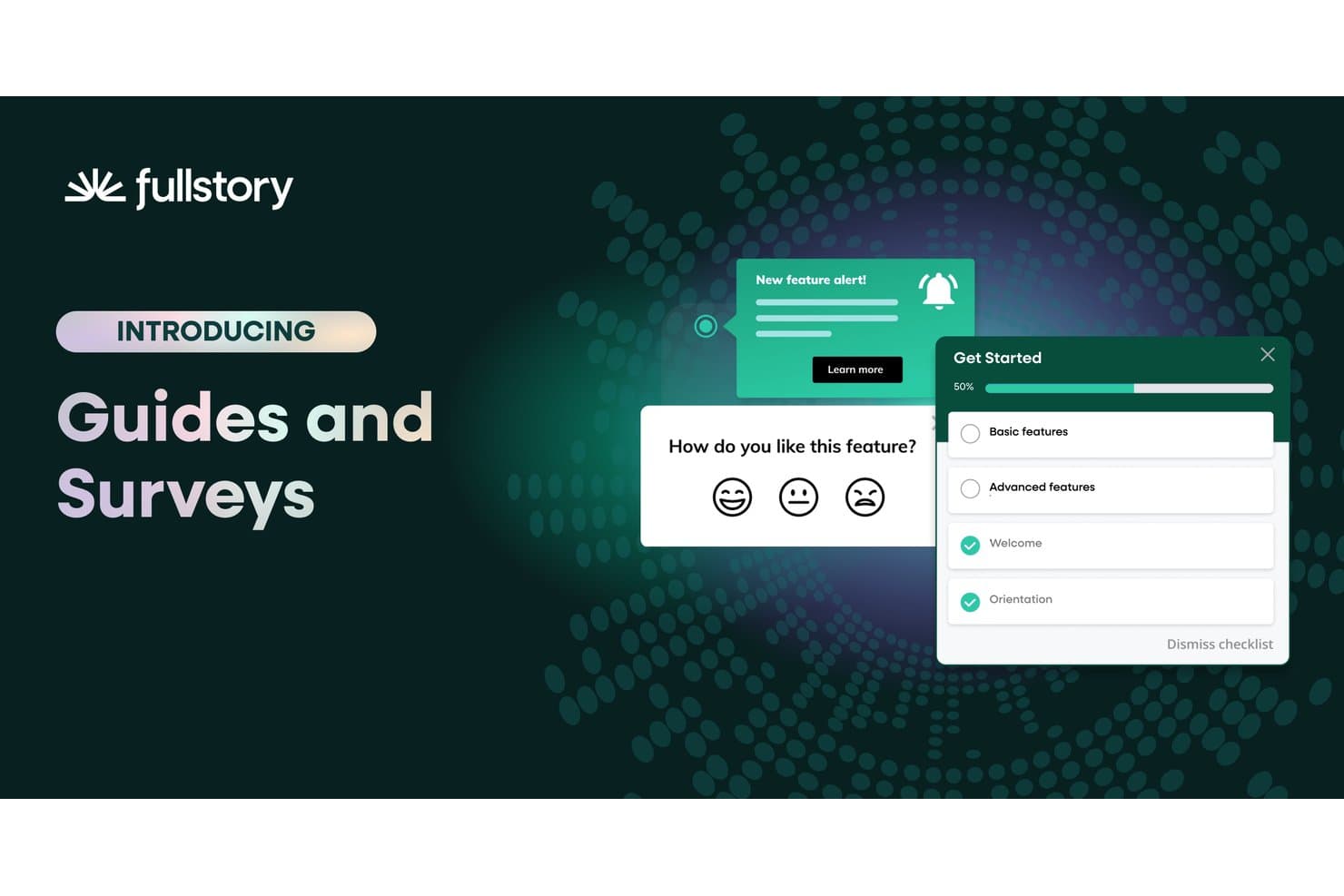
Fullstory consente agli utenti di distribuire sondaggi e guide all'onboarding all'interno dell'applicazione. Fullstory è una piattaforma di analisi comportamentale e coinvolgimento dei prodotti che combina la riproduzione delle sessioni, le mappe di calore, l'analisi dei funnel e le guide in-app con la raccolta automatica degli eventi sul web e sui dispositivi mobili.
Per chi è più adatto Fullstory?
Fullstory è particolarmente adatto ai team di prodotto e UX che devono collegare direttamente la riproduzione delle sessioni all'analisi comportamentale senza unire strumenti separati.
Perché ho scelto Fullstory
Fullstory si è guadagnato un posto nella mia lista ristretta perché è l'unico strumento in cui la riproduzione delle sessioni e l'analisi comportamentale non sono flussi di lavoro separati, ma lo stesso set di dati. Mi piace molto il fatto che Fullcapture registri automaticamente ogni clic, scorrimento e clic ripetuto per frustrazione senza etichettatura manuale, così quando nei dati analitici compare un abbandono del funnel, puoi passare direttamente alla riproduzione della sessione per vedere esattamente cosa è successo. Se aggiungi i riepiloghi delle sessioni di StoryAI, ottieni il 'cosa' e il 'perché' senza dover esaminare ore di registrazioni.
Funzionalità principali di Fullstory
- Fullcapture: Registra automaticamente ogni clic, scorrimento e clic ripetuto per frustrazione sul web e sui dispositivi mobili, senza alcuna etichettatura manuale degli eventi.
- Analisi del flusso delle pagine: Visualizza i percorsi effettivi seguiti dagli utenti all'interno del prodotto, mostrando dove navigano prima e dopo ogni passaggio.
- Sondaggi in-app e NPS: Distribuisce i sondaggi direttamente all'interno del prodotto e collega ogni risposta alla registrazione della sessione attiva dell'utente.
- Avvisi sui segmenti: Ti avvisa quando cambia il comportamento di un segmento di utenti definito, permettendoti di intervenire sui cambiamenti nel coinvolgimento senza controllare manualmente i dashboard.
Integrazioni di Fullstory
Fullstory offre integrazioni con Adobe Analytics, Google Tag Manager e Segment, oltre a un'API aperta, webhook ed esportazione dei dati per connessioni personalizzate.
Pros and Cons
Pros:
- La riproduzione delle sessioni si collega direttamente all'analisi comportamentale
- La raccolta automatica elimina l'etichettatura manuale degli eventi
- I sondaggi collegano le risposte alle registrazioni delle sessioni
Cons:
- Le guide native per dispositivi mobili non sono ancora disponibili
- Il punteggio dello stato di salute rivolto ai clienti non è disponibile
Learn more about Fullstory: Ideale per guidare gli utenti attraverso i flussi di lavoro aziendali
- Non disponibile
- Prezzi su richiesta
Visit WebsiteCustomer Rating:4.5/5This rating combines scores from multiple user review sites to reflect overall customer sentiment about the product.
WalkMe offre una sovrapposizione trasparente con le sue funzionalità di analisi e coinvolgimento basate sull'intelligenza artificiale, che consentono di semplificare le esperienze degli utenti. WalkMe è essenzialmente una piattaforma per l'adozione digitale (DAP) che offre la visibilità e gli approfondimenti necessari per fornire esperienze digitali senza ostacoli. Il software può aiutarti a creare potenti esperienze sullo schermo che guidano gli utenti attraverso ogni fase di un processo, dall'inserimento degli utenti alla gestione del cambiamento.
Perché ho scelto WalkMe: Ho scelto WalkMe per le sue solide funzionalità che potenziano l'adozione del prodotto, migliorano la produttività degli utenti e riducono i rischi per la sicurezza. Queste funzionalità includono analisi delle applicazioni, dei flussi di lavoro e dei moduli, che mostrano il livello di utilizzo del prodotto e identificano i punti di attrito che causano abbandoni. WalkMe ti guida inoltre attraverso i flussi di lavoro aziendali all'interno e tra le applicazioni, utilizzando indicazioni in-app, automazione e un editor di contenuti self-service conversazionale.
Questo strumento offre anche modelli configurabili e specifici per le applicazioni per le azioni più difficili. La DAP di WalkMe semplifica inoltre le esperienze utente omnicanale su qualsiasi prodotto software web, mobile o desktop per la personalizzazione, utilizzando iper-automazione, indicazioni e coinvolgimento in-app.
Funzionalità e integrazioni distintive di WalkMe
Le funzionalità includono le sue potenti capacità di analisi e reportistica basate sull'intelligenza artificiale. Lo strumento mostra il comportamento degli utenti, ad esempio per quanto tempo utilizzano il prodotto e in quali punti incontrano difficoltà. Puoi utilizzare queste informazioni per identificare le funzionalità sottoutilizzate e creare processi di supporto che favoriscano il coinvolgimento e l'adozione delle funzionalità. La piattaforma senza codice di WalkMe consente a chiunque nel tuo team di creare sessioni di apprendimento. La funzionalità di intelligenza dell'interfaccia utente rende tutte queste informazioni disponibili in una dashboard semplice e intuitiva. Inoltre, puoi ridurre il tempo necessario per ottenere valore e aumentare l'affidabilità durante il processo di creazione in WalkMe utilizzando modelli preconfigurati. La funzionalità Acceleratore di soluzioni ti aiuta a progettare flussi di lavoro senza ostacoli che accelerano i tempi di implementazione, continuando a offrire risultati di alta qualità.
Le integrazioni includono oltre 20 strumenti, come Amazon S3, Azure Active Directory, Gainsight, Google Suite, Intercom, LiveAgent, LiveChat, Okta, Segment, Slack, Webhooks e Zendesk.
Pros and Cons
Pros:
- Procedure guidate intelligenti con fasi di attivazione e condizioni
- Funzionalità di comunicazioni mirate condizionali per comunicazioni fluide con i clienti
- Fornisce il giusto livello di assistenza nei diversi punti del flusso di lavoro di utilizzo del prodotto
Cons:
- Manca la gestione delle versioni della guida da una versione all'altra
- Mancanza di modelli integrati e di funzionalità avanzate di reportistica
Learn more about WalkMe: 10Ideale per creare guide nell'applicazione e richieste di funzionalità
Pendo
- Piano gratuito + prova gratuita di 30 giorni disponibile
- Prezzi su richiesta
Visit WebsiteCustomer Rating:4.4/5This rating combines scores from multiple user review sites to reflect overall customer sentiment about the product.
Monitora nel tempo il Punteggio di coinvolgimento del prodotto (PES) e confronta i valori tra diversi segmenti di pubblico. Pendo è una piattaforma completa per il coinvolgimento del prodotto che ti aiuta a offrire un'esperienza utente digitale di livello eccellente. Il software combina analisi retrospettive e feedback qualitativi per sviluppare una comprensione completa di ciò che i tuoi clienti pensano del prodotto.
Perché ho scelto Pendo.io: Ho scelto Pendo per le sue solide procedure guidate mirate e le guide integrate nell'applicazione, che offrono onboarding, orientamento e assistenza personalizzati. Lo strumento consente di inviare i messaggi giusti agli utenti giusti per favorire l'adozione delle funzionalità.
Pendo ti aiuta a raccogliere, definire le priorità e gestire le richieste di funzionalità. Di conseguenza, puoi accedere a numerosi dati in tempo reale sul prodotto provenienti da fonti quali interviste agli utenti, ticket di assistenza, test beta e altro. Combinando questi dati con le solide metriche di analisi del prodotto a basso codice di Pendo (come PES), puoi migliorare la pianificazione della tabella di marcia e sviluppare il prodotto giusto.
Funzionalità e integrazioni distintive di Pendo.io
Le funzionalità includono il modulo nativo per i riscontri. Questo consente agli utenti di inviare richieste di funzionalità e lasciare riscontri. Puoi quindi collegare queste richieste alle iniziative della tabella di marcia per la progettazione e lo sviluppo del prodotto in tempo reale. Inoltre, Pendo offre anche una funzionalità di analisi del sentiment. Usandola, puoi aggiungere un sondaggio NPS o altri sondaggi alle funzionalità appena lanciate e valutare la soddisfazione dei tuoi clienti.
Le integrazioni includono oltre 50 strumenti, come Algolia, BigQuery, Breadcrumbs, Calendly, Catalyst, Gainsight, HubSpot, Integrately, Intercom, Salesforce, Slack e Tableau. Puoi accedere a migliaia di app aggiuntive utilizzando un abbonamento a pagamento a Zapier.
Pros and Cons
Pros:
- Aiuta a organizzare tutte le richieste di miglioramento delle funzionalità in un unico luogo
- Lo strumento Esplora dati è ottimo per le sue funzionalità di reportistica
- Offre procedure guidate per l'onboarding, descrizioni comandi informative e moduli per i riscontri
Cons:
- Le funzionalità di pianificazione della tabella di marcia devono essere migliorate
- I report personalizzati non sono disponibili sull'applicazione mobile
Learn more about Pendo:
Altri software per l’engagement del prodotto
Ecco alcune altre opzioni di software per il coinvolgimento del prodotto che non sono entrate nella mia selezione principale, ma che vale comunque la pena considerare:
- 11
- 12
- 13BrazeIdeale per i test A/B e le campagne di ludicizzazione
- 14Qualtrics XMIdeale per l'ottimizzazione delle funzionalità basata sulle ricerche di mercato
Come valuto i software per il coinvolgimento nel prodotto
Divido la mia valutazione in tre parti: prima di tutto, le funzionalità di base, che hanno il peso maggiore—nello specifico, verifico se uno strumento è in grado di monitorare l'utilizzo delle funzionalità nel prodotto e di consentire ai team non tecnici di implementare guide all'interno dell'app senza il supporto degli sviluppatori. Poi esamino le funzionalità distintive, come la riproduzione delle sessioni o gli approfondimenti generati dall'IA. Infine, considero il supporto all'onboarding e la scalabilità dei prezzi.
Funzionalità di base (requisiti fondamentali per questo elenco)
Quando seleziono gli strumenti per il mio elenco, assegno a ciascuno un punteggio su una scala da 0 (non offre la funzionalità) a 5 (eccelle in quest'area) per ogni funzionalità di base elencata di seguito. Successivamente converto il totale in una percentuale per contribuire a valutare l'idoneità complessiva di ciascuno strumento, attribuendo un peso aggiuntivo a tutte le funzionalità che ho ritenuto essenziali.
- Analisi dell'utilizzo del prodotto (essenziale): verifico se lo strumento consente di monitorare l'adozione delle funzionalità, la frequenza di utilizzo e le tendenze relative al coinvolgimento tra i diversi segmenti di utenti senza dipendere da un team di dati.
- Strumenti di coinvolgimento all'interno dell'app (essenziale): cerco strumenti di creazione senza codice che consentano ai responsabili di prodotto di lanciare suggerimenti, guide dettagliate e annunci mirati in base al comportamento degli utenti o alla fase del ciclo di vita.
- Segmentazione degli utenti: una buona segmentazione va oltre gli attributi statici. Valuto se i segmenti basati sul comportamento o sull'attività nel prodotto vengono mantenuti tra analisi, messaggistica e sondaggi.
- Mappatura dei funnel e dei percorsi: analizzo la flessibilità con cui uno strumento consente di definire funnel in più fasi e di individuare esattamente il punto in cui gli utenti abbandonano il percorso tra azioni chiave, come nei flussi dalla registrazione all'attivazione.
- Raccolta dei feedback: valuto se i sondaggi all'interno dell'app e le richieste NPS possono essere indirizzati a segmenti specifici e se i dati sulle risposte possono essere collegati al comportamento di utilizzo per fornire il contesto necessario.
- Monitoraggio multipiattaforma: per i team che gestiscono prodotti web e mobili, verifico se i dati sul coinvolgimento vengono unificati in un'unica visualizzazione invece di rimanere in silos separati.
Una volta ottenuto un elenco di strumenti che soddisfano i criteri, considero ciò che distingue ciascuna piattaforma.
Fattori distintivi (ciò che differenzia i fornitori)
Ecco come confronto e metto in evidenza le differenze tra i vari fornitori:
Funzionalità distintive
La riproduzione delle sessioni è l'aspetto a cui dedico più tempo nella valutazione. Cerco strumenti che consentano di filtrare le riproduzioni in base a segnali di frustrazione, come clic ripetuti e tocchi a vuoto, invece di limitarsi a mostrare registrazioni casuali. Anche gli approfondimenti generati dall'IA sono importanti: verifico se la piattaforma individua anomalie o suggerisce autonomamente esperimenti, invece di richiedermi di creare manualmente ogni report. Per i team che distribuiscono prodotti in più mercati, valuto anche il supporto alla localizzazione delle guide e dei suggerimenti all'interno dell'app.
Oltre le funzionalità
Valuto la rapidità con cui un team può passare dalla registrazione al primo approfondimento utile. I modelli predefiniti, l'assegnazione automatica dei tag e le procedure guidate di configurazione riducono di settimane i tempi di implementazione. Anche la scalabilità è altrettanto importante: verifico se una piattaforma supporta più prodotti con un unico account e con una risoluzione condivisa delle identità, così i team che gestiscono app web e mobili separate non finiscono per pagare spazi di lavoro isolati. Esamino inoltre le integrazioni con l'ecosistema, in particolare i collegamenti nativi a data warehouse come Snowflake e BigQuery, poiché trasferire i dati sul coinvolgimento in uno stack di analisi già esistente evita di duplicare il lavoro di strumentazione.
Come scegliere un software per l’engagement del prodotto
È facile perdersi in liste infinite di funzionalità e strutture di prezzo complicate. Per aiutarti a mantenere il focus durante il tuo processo di selezione del software, ecco una checklist di fattori da tenere presenti:
| Fattore | Cosa considerare |
|---|---|
| FattoreScalabilità | Cosa considerareIl software può crescere insieme alla tua azienda? Verifica se supporta un aumento degli utenti e dei dati senza problemi di prestazioni. Cerca soluzioni con prezzi a livelli o limiti di capacità. |
| FattoreIntegrazioni | Cosa considerareSi collega ai tuoi strumenti attuali? Controlla la compatibilità con CRM, mail e piattaforme di analytics per evitare silos di dati. |
| FattorePersonalizzazione | Cosa considerarePuoi adattare il software ai tuoi flussi di lavoro? Cerca opzioni per personalizzare dashboard, report e permessi utente. |
| FattoreFacilità d’uso | Cosa considerareÈ semplice da usare per il tuo team? Valuta l’interfaccia e la navigazione. Una curva d’apprendimento troppo ripida può rallentare l’adozione. |
| FattoreImplementazione e onboarding | Cosa considerareQuanto tempo serve per partire? Valuta le risorse richieste per l’installazione e la disponibilità di supporto iniziale, come guide e tutorial. |
| FattoreCosto | Cosa considerareRientra nel tuo budget? Confronta il costo totale, inclusi eventuali costi di configurazione e spese ricorrenti. Fai attenzione ai costi nascosti nei contratti. |
| FattoreTutela della sicurezza | Cosa considerareI dati e le informazioni degli utenti sono al sicuro? Assicurati che rispetti standard come il GDPR e che disponga di funzionalità come crittografia e controlli di accesso. |
| FattoreDisponibilità di supporto | Cosa considerareIl fornitore offre assistenza quando ne hai bisogno? Verifica la presenza di supporto 24/7 e la qualità del servizio clienti. |
Che cos’è un software per l’engagement del prodotto?
Il software di engagement del prodotto è uno strumento che aiuta le aziende a monitorare e migliorare il modo in cui gli utenti interagiscono con i loro prodotti. Generalmente utilizzato da product manager, team di marketing e assistenza clienti, offre approfondimenti utili per migliorare l’esperienza utente e la fidelizzazione. Funzionalità come l’onboarding degli utenti, la raccolta di feedback e le analisi aiutano a comprendere le necessità dei clienti e a ottimizzare l’uso del prodotto. In sintesi, questi strumenti offrono alle aziende un modo per aumentare la soddisfazione e il coinvolgimento degli utenti.
Funzionalità
Quando scegli un software di engagement del prodotto, presta attenzione alle seguenti funzionalità chiave:
- Onboarding degli utenti: Guida i nuovi utenti all’interno del prodotto per assicurarsi che comprendano come utilizzarlo in modo efficace e rapido.
- Raccolta feedback: Raccoglie le opinioni e le esperienze degli utenti per migliorare le funzionalità del prodotto e risolvere eventuali problematiche.
- Analisi: Fornisce approfondimenti sul comportamento e sul coinvolgimento degli utenti per aiutare a ottimizzare le prestazioni del prodotto e l’esperienza utente.
- Messaggistica in-app: Consente la comunicazione diretta con gli utenti all’interno del prodotto per offrire supporto o annunci.
- Segmentazione utenti: Classifica gli utenti in base a comportamento o dati demografici per personalizzare strategie di marketing e coinvolgimento.
- Dashboard personalizzabili: Permette agli utenti di personalizzare la visualizzazione di dati e metriche, concentrandosi su ciò che è più importante per loro.
- Elaborazione dati in tempo reale: Garantisce che le interazioni e il coinvolgimento degli utenti vengano tracciati e analizzati istantaneamente per ottenere rapidamente informazioni utili.
- A/B testing: Consente di testare diverse versioni delle funzionalità del prodotto per determinare quale risulti migliore per gli utenti.
- Targetizzazione comportamentale: Utilizza i dati relativi al comportamento degli utenti per personalizzare i contenuti e le strategie di coinvolgimento con risultati migliori.
- Tutele di sicurezza: Protegge i dati degli utenti e assicura la conformità a normative come il GDPR per mantenere fiducia e sicurezza.
Vantaggi
Implementare un software di engagement del prodotto offre diversi vantaggi per il tuo team e la tua azienda. Eccone alcuni a cui puoi puntare:
- Migliore esperienza utente: Guidando gli utenti nell’onboarding e fornendo supporto in-app, questi strumenti aiutano gli utenti a ottenere il massimo dal tuo prodotto.
- Maggiore comprensione dei clienti: Analisi e raccolta di feedback forniscono dati preziosi su comportamento e preferenze degli utenti, aiutandoti a prendere decisioni consapevoli.
- Maggiore fidelizzazione: Capire e soddisfare le esigenze degli utenti attraverso strategie mirate di coinvolgimento ti permette di mantenerli attivi.
- Comunicazione personalizzata: Funzionalità come segmentazione utenti e messaggistica in-app permettono interazioni su misura che raggiungono al meglio ogni gruppo di utenti.
- Ottimizzazione efficace del prodotto: A/B testing e elaborazione dati in tempo reale consentono di identificare rapidamente ciò che funziona meglio, permettendo miglioramenti più rapidi.
- Conformità alla sicurezza dei dati: Le tutele di sicurezza garantiscono la protezione dei dati utenti, rafforzando la fiducia e rispettando i requisiti normativi.
Costi e prezzi
La scelta di un software di engagement del prodotto richiede la comprensione dei diversi modelli di prezzo e piani disponibili. I costi variano in base alle funzionalità, alla dimensione del team, ad eventuali componenti aggiuntivi e altro ancora. La tabella seguente riassume i piani più comuni, i loro prezzi medi e le funzionalità tipiche incluse nelle soluzioni di engagement del prodotto:
Tabella di confronto dei piani per il software di engagement del prodotto
| Tipo di piano | Prezzo medio | Funzionalità comuni |
|---|---|---|
| Tipo di pianoPiano gratuito | Prezzo medio$0 | Funzionalità comuniAnalisi di base, onboarding utenti limitato e messaggistica in-app di base. |
| Tipo di pianoPiano personale | Prezzo medio$5-$25/user/month | Funzionalità comuniAnalisi avanzate, segmentazione utenti e dashboard personalizzabili. |
| Tipo di pianoPiano business | Prezzo medio$30-$75/user/month | Funzionalità comuniOnboarding utenti avanzato, A/B testing ed elaborazione dati in tempo reale. |
| Tipo di pianoPiano enterprise | Prezzo medio$100-$200/user/month | Funzionalità comuniComplete tutele di sicurezza, integrazioni estese e supporto e formazione dedicati. |
Domande frequenti sul software di coinvolgimento del prodotto
Ecco alcune risposte alle domande più comuni sul software di coinvolgimento del prodotto:
Il software di coinvolgimento del prodotto è adatto alle piccole imprese?
Sì, il software di coinvolgimento del prodotto può essere adatto alle piccole imprese. Molti fornitori offrono piani scalabili pensati per team più piccoli con budget limitati. Come piccola impresa, puoi utilizzare questi strumenti per comprendere il comportamento degli utenti, migliorare il supporto clienti e aumentare la fidelizzazione senza bisogno di un grande team. Cerca soluzioni con prezzi flessibili e funzionalità che si allineino ai tuoi obiettivi di crescita.rn
Come si crea il coinvolgimento del prodotto?
Per creare coinvolgimento sul prodotto, le organizzazioni devono adottare strategie che mettano in evidenza il valore che il prodotto apporta all’utente, creare un’esperienza utente interattiva e dare priorità all’ottimizzazione basata interamente sul comportamento del cliente e sui dati analitici.rnrnPuoi creare coinvolgimento personalizzando il percorso dell’utente. Puoi anche impostare l’invio di email in base ad azioni specifiche, rafforzare il supporto clienti per una risoluzione più rapida dei problemi, costruire una presenza online sui social media, introdurre premi gamificati per utenti fedeli e altro ancora.rn
Come si misura il coinvolgimento del prodotto?
Quando si tratta di misurare il coinvolgimento del prodotto, occorre definire i parametri e le metriche target.rnrnAlcune metriche note di coinvolgimento del prodotto includono l’indice di coinvolgimento del prodotto (PES), il numero di clienti attivi settimanali o mensili (che indica la fidelizzazione), il tasso di adozione delle funzionalità, i tassi di fidelizzazione e abbandono, e il tempo di permanenza sul prodotto (che indica il tempo medio trascorso sul sito web o app per singola sessione di navigazione).rn
Cosa succede dopo:
Se stai cercando informazioni su un software di coinvolgimento del prodotto, contatta gratuitamente un consulente SoftwareSelect per ricevere consigli personalizzati.
Compili un modulo e fai una breve chiacchierata durante cui vengono approfonditi i tuoi bisogni specifici. Poi riceverai una lista ristretta di software da valutare. Ti supporteranno anche durante tutto il processo d’acquisto, incluse le trattative sul prezzo.