

Gestire i progetti può essere difficile, soprattutto quando gli strumenti che utilizzi attualmente non sono all'altezza. In qualità di product manager, devi affrontare una pressione costante per mantenere tutto sotto controllo e, sebbene possa essere un ottimo strumento per casi d'uso specifici, a volte Asana semplicemente non soddisfa le tue esigenze.
Forse hai a che fare con progetti complessi oppure hai bisogno di funzionalità migliori per la personalizzazione o la collaborazione. Qualunque sia il caso, trovare lo strumento giusto può fare una grande differenza per il tuo team.
Ho testato e recensito diverse opzioni e sono qui per condividere informazioni imparziali sulle migliori alternative ad Asana. Troverai soluzioni pratiche adattate alle tue esigenze specifiche. Ecco i miei principali consigli software.
Che cos'è Asana?
Asana è uno strumento fondamentale per la gestione dei prodotti, progettato per aiutare i team a organizzare, monitorare e gestire il proprio lavoro. Viene utilizzato comunemente da project manager, responsabili di team e professionisti dello sviluppo dei prodotti che devono mantenere i progetti nei tempi previsti e garantire la collaborazione. L'assegnazione delle attività, il monitoraggio delle scadenze e le funzionalità di visualizzazione dei progetti, come i calendari e le bacheche Kanban, aiutano a gestire i flussi di lavoro e a migliorare l'efficienza del team. Nel complesso, Asana semplifica la gestione dei progetti offrendo una visione chiara delle attività e dei progressi.
Perché fidarsi dei nostri consigli sui software
6,700+
Reviews
20
Industry experts
16+
Evaluation factors
14
Years
Il nostro team testa e recensisce software dal 2012. In quanto product manager noi stessi, sappiamo quanto sia difficile — e importante — scegliere il software giusto.
Per questa guida, abbiamo valutato gli strumenti attraverso test pratici e ricerche indipendenti, assegnando un punteggio agli strumenti in base ai nostri criteri di selezione.
Le nostre recensioni riflettono il nostro giudizio editoriale umano, non un discorso di vendita.
Revisori esperti:
- Andrew LumbySenior TPM
- Cristiano ValimSenior UI/UX Lead


Tabella di confronto: alternative ad Asana
Questa tabella di confronto riassume i dettagli sui prezzi delle mie principali alternative ad Asana.
| Tool | Best For | Trial Info | Price | ||
|---|---|---|---|---|---|
| 1 | Ideale per il monitoraggio del tempo integrato | Piano gratuito + prova gratuita di 15 giorni + demo gratuita disponibile | A partire da $4/utente/mese (con fatturazione annuale) | Website | |
| 2 | Ideale per flussi di lavoro di progetto personalizzabili | Piano gratuito + prova di 14 giorni + demo disponibile | A partire da $10/utente/mese (con fatturazione annuale) | Website | |
| 3 | Ideale per il monitoraggio dei progetti dei team di sviluppo | Piano gratuito + prova gratuita disponibili | A partire da $7.91/utente/mese | Website | |
| 4 | Ideale per il monitoraggio del lavoro tra team assistito dall'IA | Piano gratuito disponibile | A partire da $11/utente/mese | Website | |
| 5 | Ideale per la pianificazione dei progetti in stile foglio di calcolo | Prova gratuita di 30 giorni + demo disponibile | A partire da $9/utente/mese (con fatturazione annuale) | Website | |
| 6 | Ideale per una personalizzazione delle attività su più livelli | Piano gratuito + demo gratuita disponibile | Da $10/utente/mese | Website | |
| 7 | Ideale per prezzi fissi per i team | Piano gratuito + prova gratuita di 14 giorni disponibili | A partire da $10/utente/mese (con fatturazione annuale) | Website | |
| 8 | Ideale per la produttività e l'analisi degli obiettivi | Piano gratuito + prova di 14 giorni + demo disponibile | A partire da $5/utente/mese | Website | |
| 9 | Ideale per agenzie e team responsabili delle consegne ai clienti | Piano gratuito + prova gratuita di 14 giorni + demo gratuita disponibile | A partire da $9.99/utente/mese (con fatturazione annuale) | Website | |
| 10 | Ideale per agenzie che gestiscono progetti per i clienti | Piano gratuito + prova gratuita di 14 giorni + demo gratuita disponibile | Da $9.99/utente/mese (con fatturazione annuale) | Website |


Recensioni delle migliori alternative ad Asana
Di seguito trovi i miei riepiloghi dettagliati delle migliori alternative ad Asana incluse nel mio elenco. Le mie recensioni offrono un’analisi approfondita delle funzionalità principali, dei pro e dei contro, delle integrazioni e dei casi d’uso ideali di ciascuno strumento, per aiutarti a trovare quello più adatto a te.
 Ideale per il monitoraggio del tempo integrato
- Piano gratuito + prova gratuita di 15 giorni + demo gratuita disponibile
- A partire da $4/utente/mese (con fatturazione annuale)
Visit WebsiteCustomer Rating:4.3/5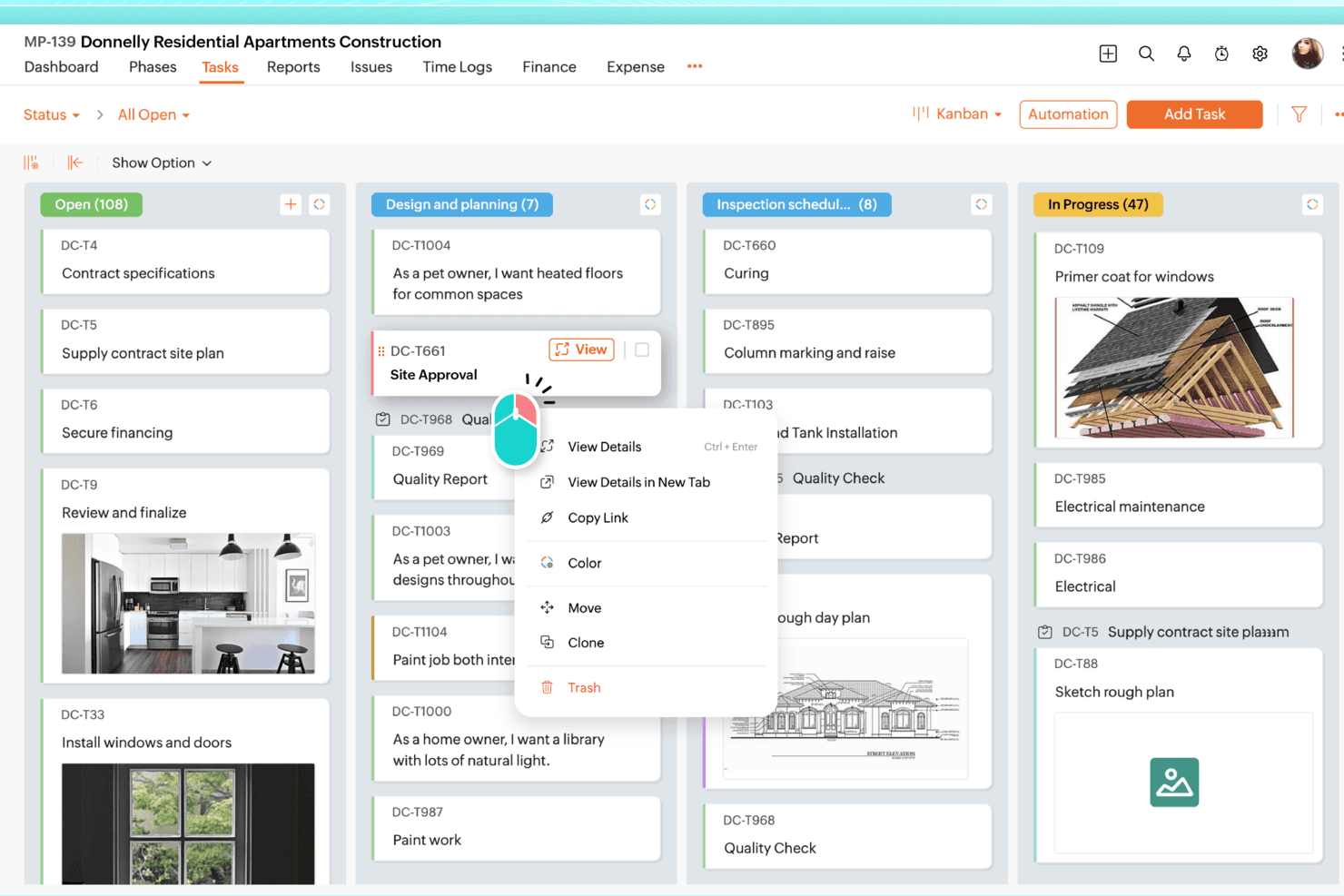
Zoho Projects organizza visivamente le attività tra colonne Kanban personalizzabili. Zoho Projects è uno strumento completo per la gestione dei progetti, adatto ai responsabili di progetto e ai team operativi che necessitano di diagrammi di Gantt, monitoraggio delle dipendenze, gestione del budget e monitoraggio del tempo integrati in un'unica piattaforma conveniente.
Per chi è più adatto Zoho Projects?
Zoho Projects è una soluzione adatta ai responsabili di progetto e ai team operativi che necessitano degli strumenti tradizionali per la gestione dei progetti—diagrammi di Gantt, budget e monitoraggio del tempo—senza pagare prezzi paragonabili a quelli di Asana.
Perché ho scelto Zoho Projects
Ho scelto Zoho Projects come una delle soluzioni migliori perché il monitoraggio del tempo integrato va ben oltre un semplice timer. I timer a livello di attività confluiscono direttamente nelle schede delle ore, dove le ore vengono contrassegnate come fatturabili o non fatturabili e passano attraverso flussi di approvazione prima di essere sincronizzate con Zoho Invoice o Zoho Books per la fatturazione. Apprezzo anche i report sulle ore pianificate rispetto a quelle effettive e la gestione del valore acquisito, che consentono di individuare gli scostamenti dal budget prima che diventino un problema concreto.
Funzionalità principali di Zoho Projects
- Automazione dei flussi di lavoro Blueprint: Un editor con funzionalità di trascinamento che associa le modifiche allo stato delle attività, le regole degli assegnatari, gli aggiornamenti dei campi e gli avvisi via e-mail in flussi di lavoro strutturati e ripetibili.
- Diagramma di Gantt con monitoraggio delle dipendenze: Visualizza le tempistiche dei progetti e imposta tutti e quattro i tipi di dipendenza—fine-inizio, inizio-inizio, fine-fine e inizio-fine—tra i progetti al livello Enterprise.
- Dashboard del portafoglio: Una vista trasversale dei progetti che mostra lo stato, la responsabilità e la situazione del budget, insieme alle ore pianificate rispetto a quelle effettive e alla percentuale di completamento di ciascun progetto.
- Report sulla gestione del carico di lavoro: Un report integrato che mostra la capacità di ciascun membro del team come libera, occupata o sovraccarica, tenendo automaticamente conto delle assenze approvate.
Integrazioni di Zoho Projects
Zoho Projects offre integrazioni native con Google Calendar, Microsoft Teams, Slack, GitHub, GitLab, Dropbox, Box, Zendesk e le app Zoho. Supporta inoltre oltre 50 integrazioni del marketplace, Zapier, webhook, funzioni personalizzate e un server MCP.
Pros and Cons
Pros:
- I timer integrati alimentano le schede delle ore fatturabili
- Le dipendenze nei diagrammi di Gantt supportano la pianificazione tradizionale dei progetti
- I report sul budget e sul valore acquisito evidenziano gli scostamenti
Cons:
- Le schermate affollate rallentano la navigazione nei progetti
- La migrazione da Asana richiede assistenza dedicata
Learn more about Zoho Projects: Ideale per flussi di lavoro di progetto personalizzabili
- Piano gratuito + prova di 14 giorni + demo disponibile
- A partire da $10/utente/mese (con fatturazione annuale)
Visit WebsiteCustomer Rating:4.3/5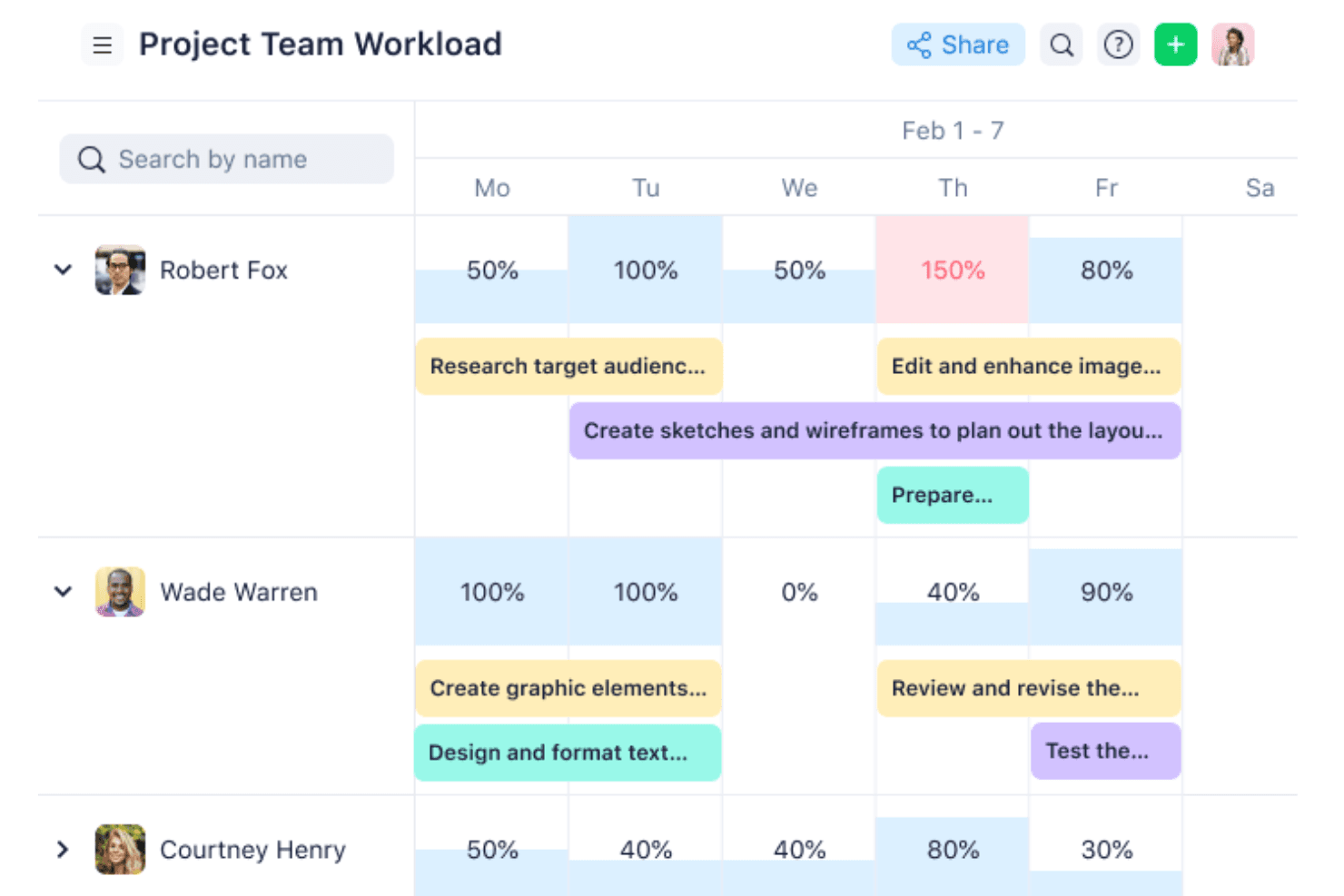
Wrike visualizza il carico di lavoro del team e le assegnazioni delle attività durante la settimana. Wrike è una piattaforma per la gestione di progetti e del lavoro, progettata per i team che necessitano di una personalizzazione approfondita dei flussi di lavoro, offrendo una gerarchia flessibile, visibilità interfunzionale e strumenti di pianificazione scalabili dai piccoli team ai portafogli aziendali.
Per chi è più adatto Wrike?
Wrike è particolarmente adatto ai team di medie e grandi dimensioni che devono configurare i flussi di lavoro in base ai propri processi, anziché adattarsi a una struttura rigida.
Perché ho scelto Wrike
Wrike si è guadagnato un posto nella mia lista ristretta grazie al livello di personalizzazione dei flussi di lavoro che consente di raggiungere senza toccare una sola riga di codice. Apprezzo in particolare i tipi di elementi personalizzati, che permettono di modellare la terminologia esatta del proprio team, ad esempio creando una gerarchia di iniziativa > epica > storia > attività, invece di costringere tutto all'interno di generiche 'attività' e 'progetti'. Abbinando questa funzione all'etichettatura incrociata, un elemento può risiedere contemporaneamente in più spazi, così nulla rimane isolato.
Funzionalità principali di Wrike
- Diagramma di Gantt con dipendenze: Una vista interattiva della sequenza temporale che consente di mappare le sequenze delle attività, impostare le tappe fondamentali e trascinare le scadenze per modificare la programmazione.
- Prenotazione delle risorse e grafici del carico di lavoro: Assegna persone o ruoli specifici ai progetti e visualizza la capacità individuale per riequilibrare le assegnazioni prima che si creino colli di bottiglia.
- Moduli dinamici per le richieste: Moduli di acquisizione configurabili che generano automaticamente attività o progetti a partire dagli invii, indirizzando il lavoro nel flusso appropriato senza configurazioni manuali.
- Oltre 400 integrazioni native predefinite: Collega Wrike agli strumenti del tuo ecosistema, tra cui Jira, Slack, Salesforce e GitHub, tramite integrazioni native, un'API REST aperta o Wrike Integrate.
Integrazioni di Wrike
Wrike offre oltre 400 integrazioni native predefinite, tra cui Jira, GitHub, Slack, Salesforce, Google Workspace, Microsoft Teams e HubSpot. Fornisce inoltre un'API REST aperta e Wrike Integrate per l'automazione personalizzata e tra applicazioni.
Pros and Cons
Pros:
- I tipi di elementi personalizzati si adattano alle gerarchie dei prodotti
- L'etichettatura incrociata mantiene le iniziative visibili tra gli spazi
- Le dipendenze del diagramma di Gantt chiariscono la sequenza delle consegne
Cons:
- I flussi di lavoro complessi possono disorientare i nuovi membri del team
- Nessuna funzionalità nativa per fatturazione o gestione delle fatture
 3Ideale per il monitoraggio dei progetti dei team di sviluppo
Jira
- Piano gratuito + prova gratuita disponibili
- A partire da $7.91/utente/mese
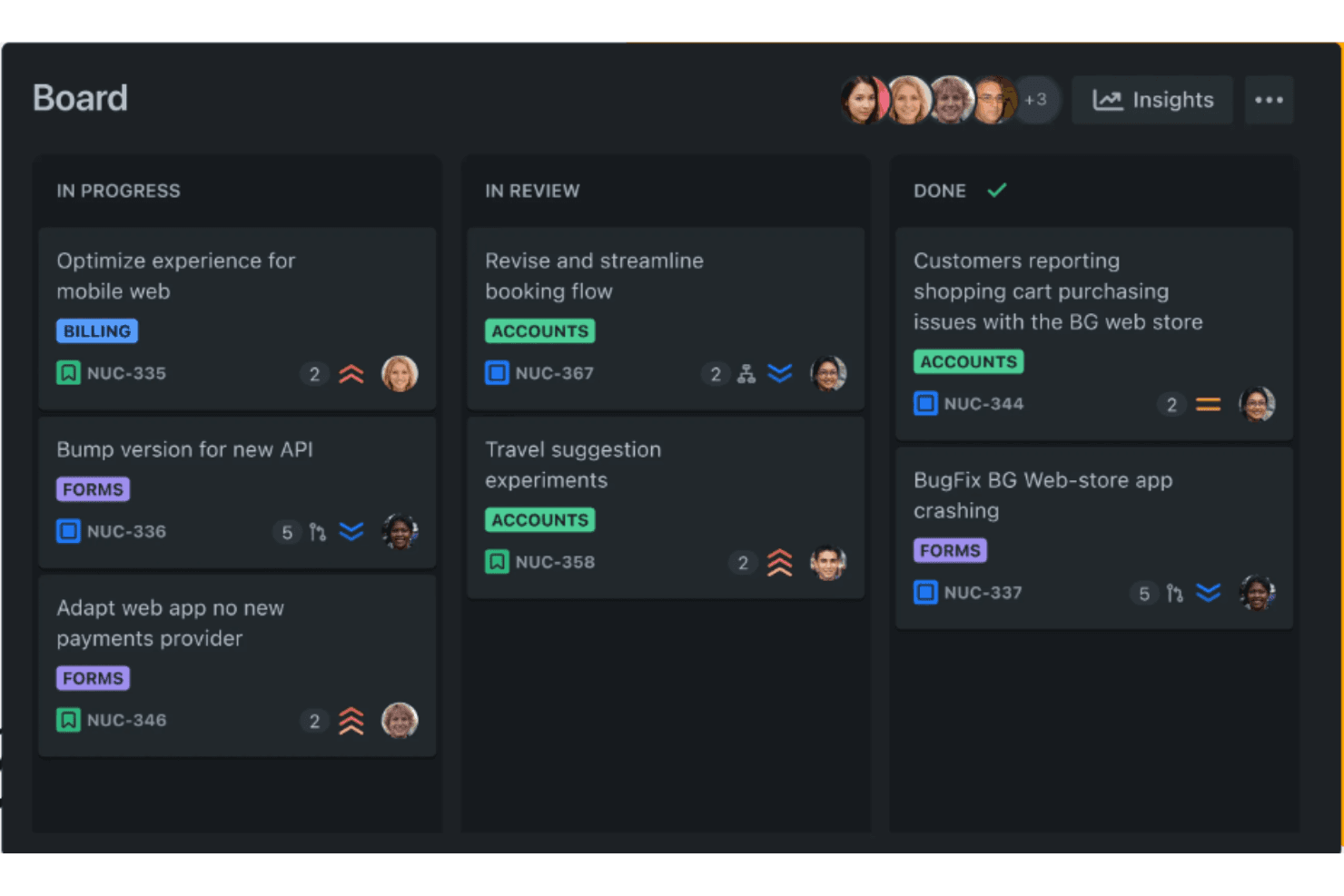
La visualizzazione a bacheca di Jira organizza visivamente le attività in base alle fasi di avanzamento. Jira è una piattaforma di Atlassian per la gestione di progetti e problemi, che offre ai team tecnici e affini allo sviluppo una personalizzazione approfondita dei flussi di lavoro, una gerarchia flessibile e integrazioni native con strumenti come GitHub e Bitbucket.
Per chi è più adatto Jira?
Jira è particolarmente adatto ai team tecnici e alle organizzazioni affini allo sviluppo che necessitano di una personalizzazione approfondita dei flussi di lavoro, di una gerarchia flessibile e di un'integrazione nativa con strumenti come GitHub e Bitbucket.
Perché ho scelto Jira
Ho scelto Jira come uno dei migliori strumenti perché è stato progettato fin dall'inizio per il monitoraggio dei progetti dei team di sviluppo, con una gerarchia flessibile (Iniziativa > Epic > Storia > Sottoattività) che riflette direttamente il modo in cui i team di progettazione portano effettivamente a termine il lavoro. Apprezzo particolarmente il fatto che l'integrazione nativa con GitHub mostri rami, commit e richieste di pull direttamente negli elementi di lavoro, così nulla si perde tra il tracker dei progetti e la base di codice. La mappatura delle dipendenze tra team e la pianificazione della capacità in Jira Plans completano il quadro per chi gestisce contemporaneamente più squadre di sviluppo.
Caratteristiche principali di Jira
- Personalizzazione flessibile dei flussi di lavoro: Crea flussi di lavoro personalizzati con stati, transizioni e campi unici per ogni tipo di progetto gestito dal tuo team.
- Creazione di regole di automazione senza codice: Configura regole basate su condizioni e azioni per attività, progetti e strumenti collegati come Slack e GitHub senza scrivere codice.
- Report e dashboard agili: Accedi a grafici burndown, report sui tempi di ciclo e dashboard personalizzabili per monitorare lo stato delle consegne negli sprint.
- Importatore nativo da Asana: Migra direttamente da Asana attività, sottoattività, assegnatari, date di scadenza, commenti e campi personalizzati tramite una connessione OAuth.
Integrazioni di Jira
Jira offre integrazioni native con GitHub, Bitbucket, Slack, Microsoft Teams, Figma, Gmail, Confluence e Loom. Supporta inoltre oltre 3.000 integrazioni del Marketplace e API avanzate per connessioni personalizzate.
Pros and Cons
Pros:
- Le gerarchie personalizzate riflettono il lavoro di progettazione
- Visualizzazioni di sequenza temporale, calendario e arretrato
- Pianificazione della capacità e delle dipendenze tra team
Cons:
- La configurazione dei flussi di lavoro può risultare complessa per i team nuovi
- I team non tecnici potrebbero trovare la navigazione macchinosa
Learn more about Jira: Ideale per il monitoraggio del lavoro tra team assistito dall'IA
- Piano gratuito disponibile
- A partire da $11/utente/mese
Visit WebsiteCustomer Rating:4.6/5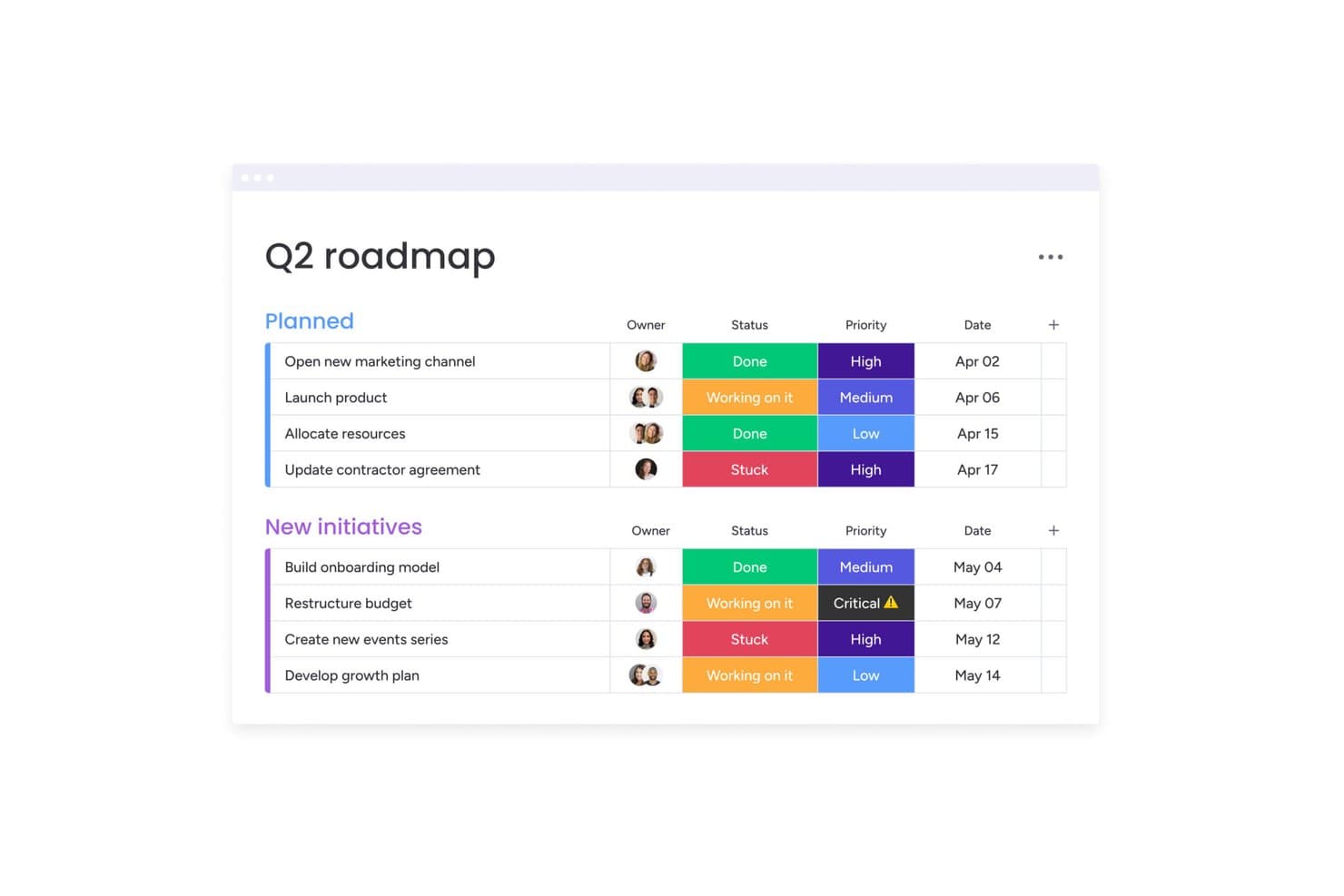
monday AI Workspace organizza le tappe fondamentali in base a stato, priorità e data. monday AI Workspace è una piattaforma visiva per la gestione del lavoro che consente ai team interfunzionali di pianificare, monitorare e automatizzare i progetti tra i vari reparti, risultando particolarmente adatta ai responsabili delle operazioni e ai responsabili dei team che hanno bisogno di flessibilità senza configurazioni complesse.
Per chi è più adatto monday AI Workspace?
monday AI Workspace è particolarmente adatto ai responsabili delle operazioni e ai responsabili dei team interfunzionali che hanno bisogno di uno spazio di lavoro visivo e flessibile, in grado di adattarsi a più reparti senza richiedere una configurazione IT complessa.
Perché ho scelto monday AI Workspace
Ho scelto monday AI Workspace perché è una delle poche alternative ad Asana che utilizza attivamente l'IA per gestire le dipendenze tra team, invece di limitarsi a visualizzarle. Apprezzo soprattutto gli avvisi di rischio dell'IA, che segnalano i conflitti tra dipendenze prima che compromettano un'iterazione, e i suggerimenti dell'IA per le risorse, che consigliano a chi assegnare un'attività in base al carico di lavoro. Quando il mio team gestisce iniziative parallele tra prodotto, design e ingegneria, i pannelli di controllo con più schede riuniscono tutto in un'unica vista aggiornata senza aggiornamenti manuali.
Funzionalità principali di monday AI Workspace
- Generatore di automazioni senza codice: Configura regole del tipo 'se succede questo, allora fai quello' per assegnare automaticamente le attività, attivare notifiche e spostare elementi tra le schede senza scrivere codice.
- WorkForms: Crea moduli di raccolta personalizzati che inviano le richieste direttamente alle tue schede, mantenendo richieste e approvazioni in un unico posto.
- Visualizzatori gratuiti illimitati: Ogni piano a pagamento consente di aggiungere un numero illimitato di parti interessate con accesso in sola lettura senza costi aggiuntivi, così chiunque abbia bisogno di visibilità non deve occupare una postazione a pagamento.
- Viste multiple delle schede: Passa tra le viste Kanban, Sequenza temporale, Gantt, Calendario e Carico di lavoro nella stessa scheda, adattandoti al modo in cui il tuo team organizza il lavoro.
Integrazioni di monday AI Workspace
monday AI Workspace offre oltre 850 integrazioni, tra cui Asana, Jira Cloud, GitHub, GitLab, Slack, Microsoft Teams, Google Calendar e Google Drive. La sua API e il suo SDK supportano app e integrazioni personalizzate.
Pros and Cons
Pros:
- L'IA segnala i rischi relativi alle dipendenze tra i progetti
- I pannelli di controllo visivi unificano lo stato dei progetti tra i team
- WorkForms indirizza le richieste di prodotto nelle schede
Cons:
- Le importazioni da Asana non includono campi personalizzati e commenti
- Gli strumenti per le dipendenze e il carico di lavoro richiedono piani di livello superiore
Learn more about monday AI Workspace: Ideale per la pianificazione dei progetti in stile foglio di calcolo
- Prova gratuita di 30 giorni + demo disponibile
- A partire da $9/utente/mese (con fatturazione annuale)
Visit WebsiteCustomer Rating:4.4/5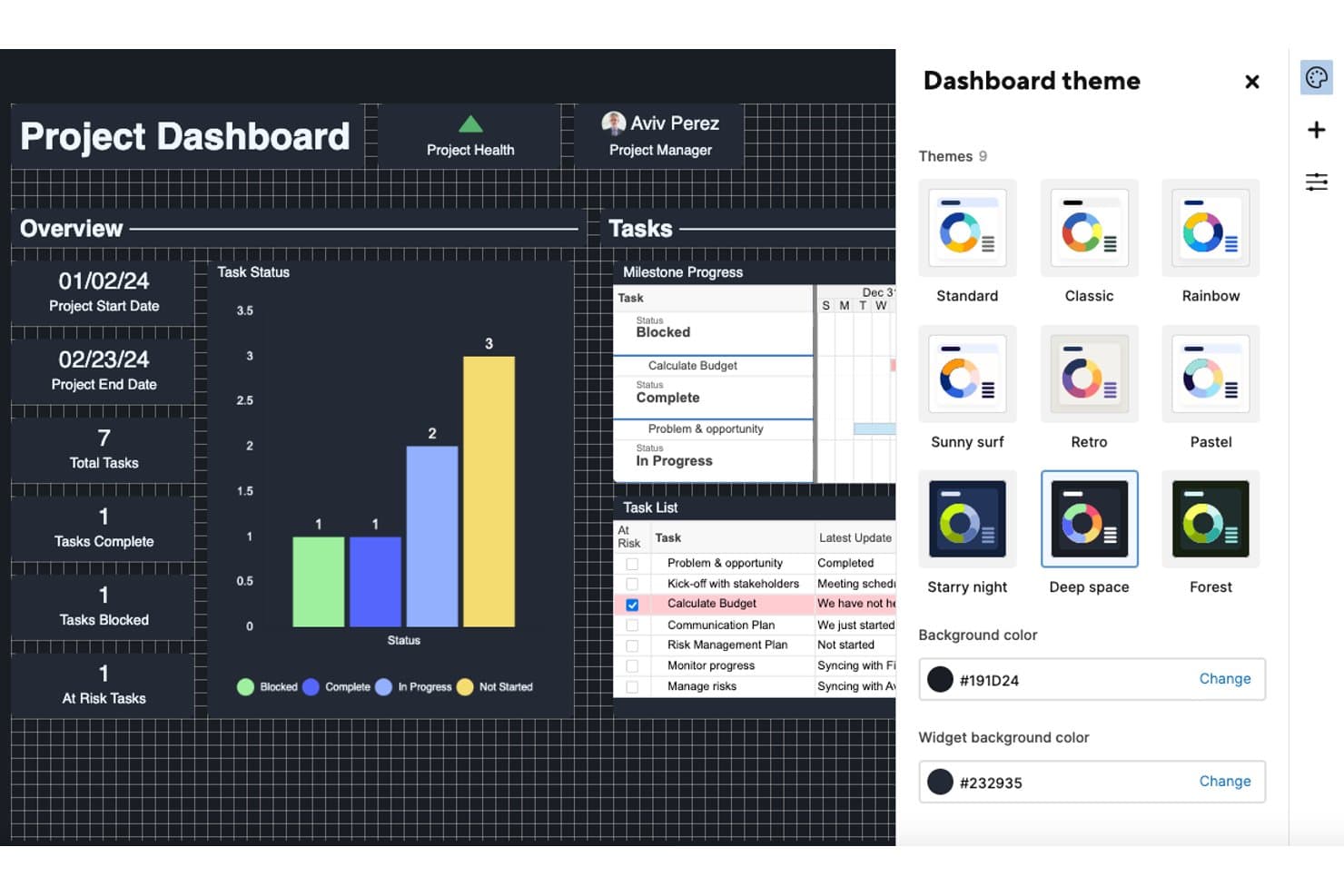
Smartsheet consente agli utenti di personalizzare le dashboard con nove temi di colore. Smartsheet è una piattaforma di gestione del lavoro in stile foglio di calcolo, adatta ai project manager e ai team operativi che necessitano di strumenti di pianificazione dettagliati come diagrammi di Gantt, dipendenze tra attività e report tra progetti.
A chi è più adatto Smartsheet?
Smartsheet è particolarmente adatto ai project manager e ai team operativi che necessitano di una pianificazione dettagliata e basata sui dati, con diagrammi di Gantt, dipendenze tra attività e report tra progetti.
Perché ho scelto Smartsheet
Ho scelto Smartsheet come una delle migliori soluzioni perché porta una pianificazione dei progetti autenticamente in stile foglio di calcolo all'interno di uno strumento di gestione del lavoro, qualcosa che Asana non riesce a offrire. Mi affido a funzionalità come i diagrammi di Gantt con monitoraggio del percorso critico, le dipendenze tra attività e le baseline a livello di riga per gestire tempistiche di consegna complesse senza uscire dalla griglia. Quando gestisco un progetto con sottoattività su più livelli e il monitoraggio delle milestone, la struttura di righe padre-figlio di Smartsheet mantiene tutto organizzato in un modo naturale per chi proviene da Excel.
Funzionalità principali di Smartsheet
- Automazione dei flussi di lavoro: Crea flussi di lavoro condizionali in più passaggi e senza codice, con automazioni illimitate nei piani Business e superiori.
- Posti gratuiti per collaboratori e ospiti: Invita collaboratori esterni e clienti a visualizzare, commentare e gestire gli allegati senza pagare un posto.
- Sincronizzazione bidirezionale con Jira: Collega Smartsheet a Jira tramite un connettore bidirezionale che mantiene la gerarchia Storia > Attività > Sottoattività come righe padre e figlio.
- Report e dashboard tra fogli: Recupera i dati da più fogli in un unico report e visualizza metriche aggiornate in tempo reale su dashboard interattive.
Integrazioni di Smartsheet
Smartsheet offre integrazioni con Google Workspace, Microsoft 365, Slack, Microsoft Teams, Salesforce, Power BI e Jira tramite il suo connettore premium. Fornisce inoltre un'API per sviluppatori e supporta Zapier.
Pros and Cons
Pros:
- Le dipendenze e le baseline di Gantt supportano piani complessi
- Le dashboard collegano dati aggiornati in tempo reale tra i fogli
- Supporto per collaboratori gratuiti per la collaborazione con i clienti
Cons:
- La migrazione da Asana richiede una pulizia sostanziale dei file CSV
- I costi di rinnovo possono aumentare notevolmente
Learn more about Smartsheet: Ideale per una personalizzazione delle attività su più livelli
- Piano gratuito + demo gratuita disponibile
- Da $10/utente/mese
Visit WebsiteCustomer Rating:4.6/5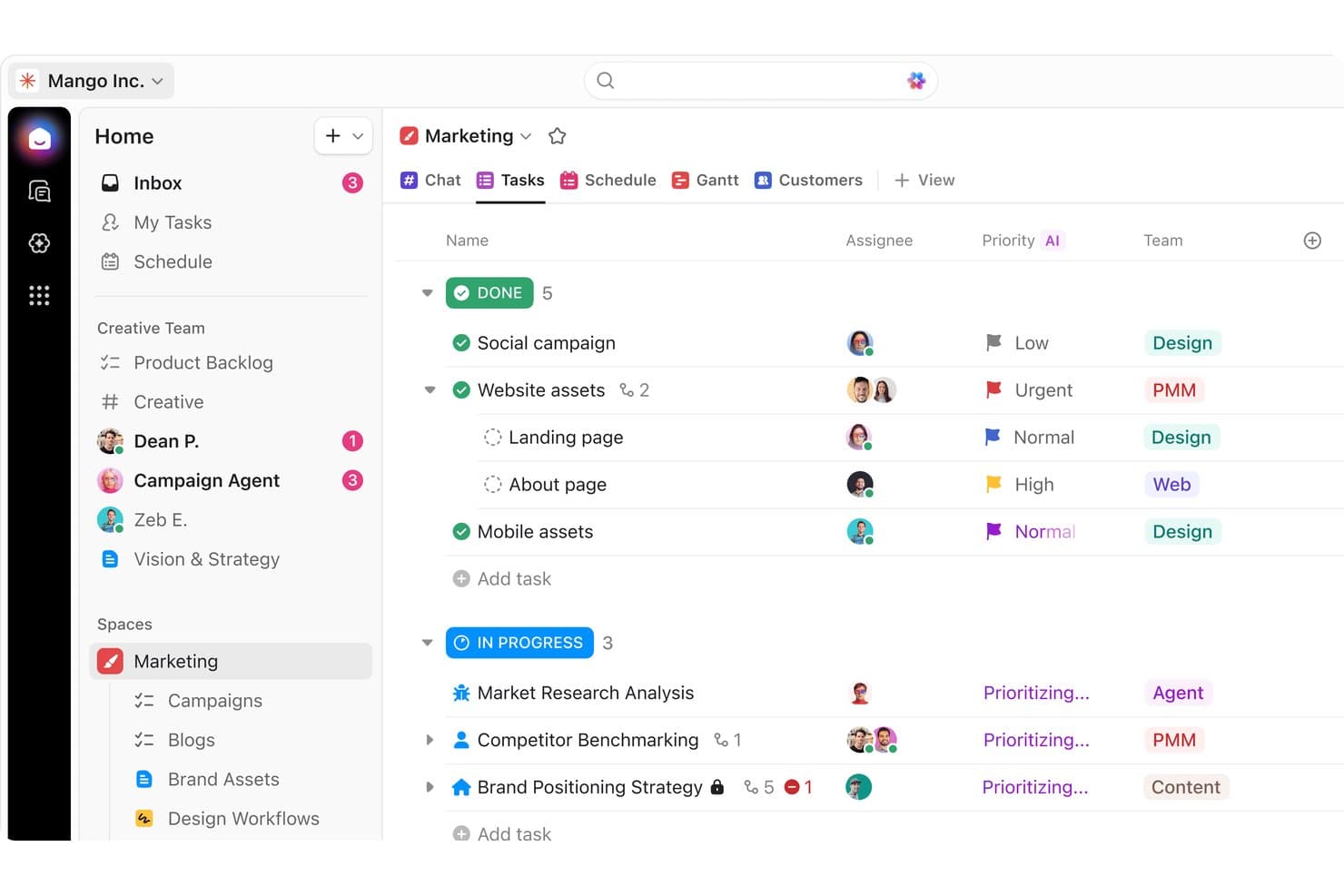
ClickUp organizza le attività di marketing per stato, priorità e team. ClickUp è una piattaforma completa per la gestione del lavoro che riunisce attività, documenti, obiettivi e chat del team in un unico spazio di lavoro, rivelandosi ideale per i team interfunzionali che necessitano di una notevole flessibilità nei flussi di lavoro senza dover gestire più strumenti.
A chi è più adatto ClickUp?
ClickUp è ideale per i team interfunzionali che devono gestire attività, documenti e comunicazioni in un unico luogo senza adottare più strumenti.
Perché ho scelto ClickUp
Ho scelto ClickUp come una delle soluzioni migliori perché la profondità della personalizzazione delle attività lo distingue davvero. Posso creare attività con stati personalizzati, più assegnatari e tutti e quattro i tipi di dipendenza, quindi annidare le sottoattività in una gerarchia a sei livelli per rispecchiare esattamente il modo in cui il mio team struttura il lavoro. Apprezzo particolarmente il modo in cui la vista Gantt riunisce tutto, riprogrammando automaticamente le attività dipendenti quando cambia una scadenza e mettendo in evidenza il percorso critico, così nulla resta indietro senza che ce ne accorgiamo.
Funzionalità principali di ClickUp
- Monitoraggio nativo degli obiettivi: Collega gli obiettivi direttamente alle attività o agli sprint e lascia che ClickUp calcoli automaticamente i progressi, con traguardi impostati come valori numerici, basati sulle attività o vero/falso.
- Chat integrata: Crea canali, invia messaggi diretti e avvia videochiamate senza uscire dalla piattaforma, con riepiloghi generati dall'IA per recuperare le conversazioni perse.
- Generatore di automazioni dei flussi di lavoro: Imposta automazioni basate su trigger utilizzando richieste in linguaggio naturale tramite AI Builder, con azioni come l'assegnazione automatica delle attività, l'invio di e-mail o l'attivazione di webhook.
- Moduli personalizzati: Crea moduli per segnalazioni di bug, feedback dei clienti o richieste di inserimento che generano automaticamente attività al momento dell'invio.
Integrazioni di ClickUp
ClickUp offre integrazioni native con Slack, Jira, GitHub, HubSpot, Google Calendar, Microsoft Teams e Zendesk. Supporta inoltre un'API aperta, webhook e Zapier per connessioni personalizzate.
Pros and Cons
Pros:
- Le gerarchie annidate delle attività rispecchiano il lavoro sul prodotto
- Le dipendenze del diagramma di Gantt riprogrammano il lavoro collegato
- Gli obiettivi collegano le attività di consegna ai risultati
Cons:
- Le schermate dense fanno sembrare disordinati anche i flussi di lavoro semplici
- L'app mobile è meno efficace della versione desktop per il lavoro sui progetti
Learn more about ClickUp: Ideale per prezzi fissi per i team
- Piano gratuito + prova gratuita di 14 giorni disponibili
- A partire da $10/utente/mese (con fatturazione annuale)
Visit WebsiteCustomer Rating:4.6/5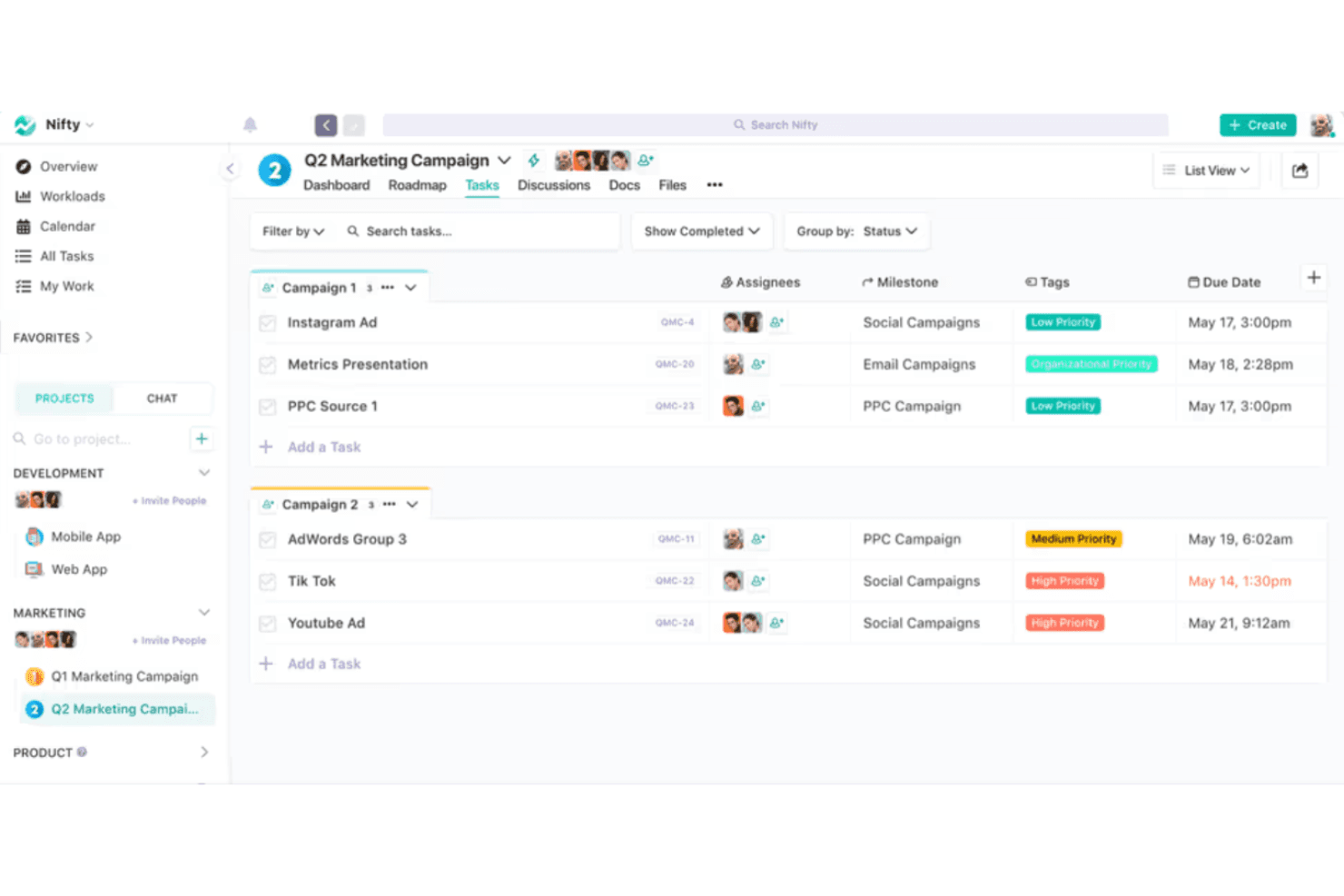
Nifty organizza le attività di marketing per campagna con tag di priorità e scadenze. Nifty è uno spazio di lavoro tutto-in-uno per la gestione dei progetti che riunisce attività, documenti, chat, obiettivi e report per i team che hanno bisogno di una visibilità a livello di portafoglio senza dover gestire più strumenti.
Per chi è più adatto Nifty?
Nifty è ideale per i team in crescita che desiderano uno spazio di lavoro unico per attività, documenti e chat senza pagare costi per utente man mano che aumenta il numero di membri.
Perché ho scelto Nifty
Nifty si è guadagnato un posto nella mia selezione perché i suoi prezzi fissi per i team sono davvero rari in questa categoria. Quando il team raggiunge sette o più persone, si paga una tariffa mensile fissa invece di vedere i costi moltiplicarsi per ogni utente. Apprezzo in particolare il fatto che questo modello includa ospiti illimitati nella maggior parte dei piani a pagamento, così posso coinvolgere clienti o collaboratori esterni senza incorrere in costi aggiuntivi. La visibilità a livello di portafoglio tra i progetti è ciò che mi convince definitivamente.
Funzionalità principali di Nifty
- Monitoraggio nativo degli obiettivi: Imposta obiettivi che aggiornano automaticamente i progressi in base ad attività, elenchi, campi personalizzati o tempo registrato in più progetti.
- Sincronizzazione bidirezionale con gli strumenti di sviluppo: Collega GitHub o Jira per fare in modo che commit, richieste pull e aggiornamenti delle attività si riflettano in entrambi gli strumenti senza aggiornamenti manuali.
- Generatore di automazioni del flusso di lavoro: Crea regole se/allora a più passaggi con attivatori, condizioni e azioni personalizzati per portare avanti il lavoro automaticamente.
- Monitoraggio integrato di tempo e budget: Registra le ore direttamente sulle attività e monitora la spesa del progetto senza dover ricorrere a uno strumento di monitoraggio separato.
Integrazioni di Nifty
Nifty offre integrazioni native con Slack, GitHub, GitLab, Jira, Google Drive, Google Calendar, Microsoft 365, Zoom, Figma e Miro. Supporta inoltre Zapier e un'API aperta per integrazioni personalizzate.
Pros and Cons
Pros:
- Attività, documenti e chat condividono un unico spazio di lavoro
- I portafogli mostrano i progressi tra i progetti
- L'importatore di Asana trasferisce attività e commenti
Cons:
- Le recensioni segnalano notifiche delle attività inaffidabili
- L'app mobile è indietro rispetto all'esperienza web
Learn more about Nifty: 8Ideale per la produttività e l'analisi degli obiettivi
Hive
- Piano gratuito + prova di 14 giorni + demo disponibile
- A partire da $5/utente/mese
Visit WebsiteCustomer Rating:4.5/5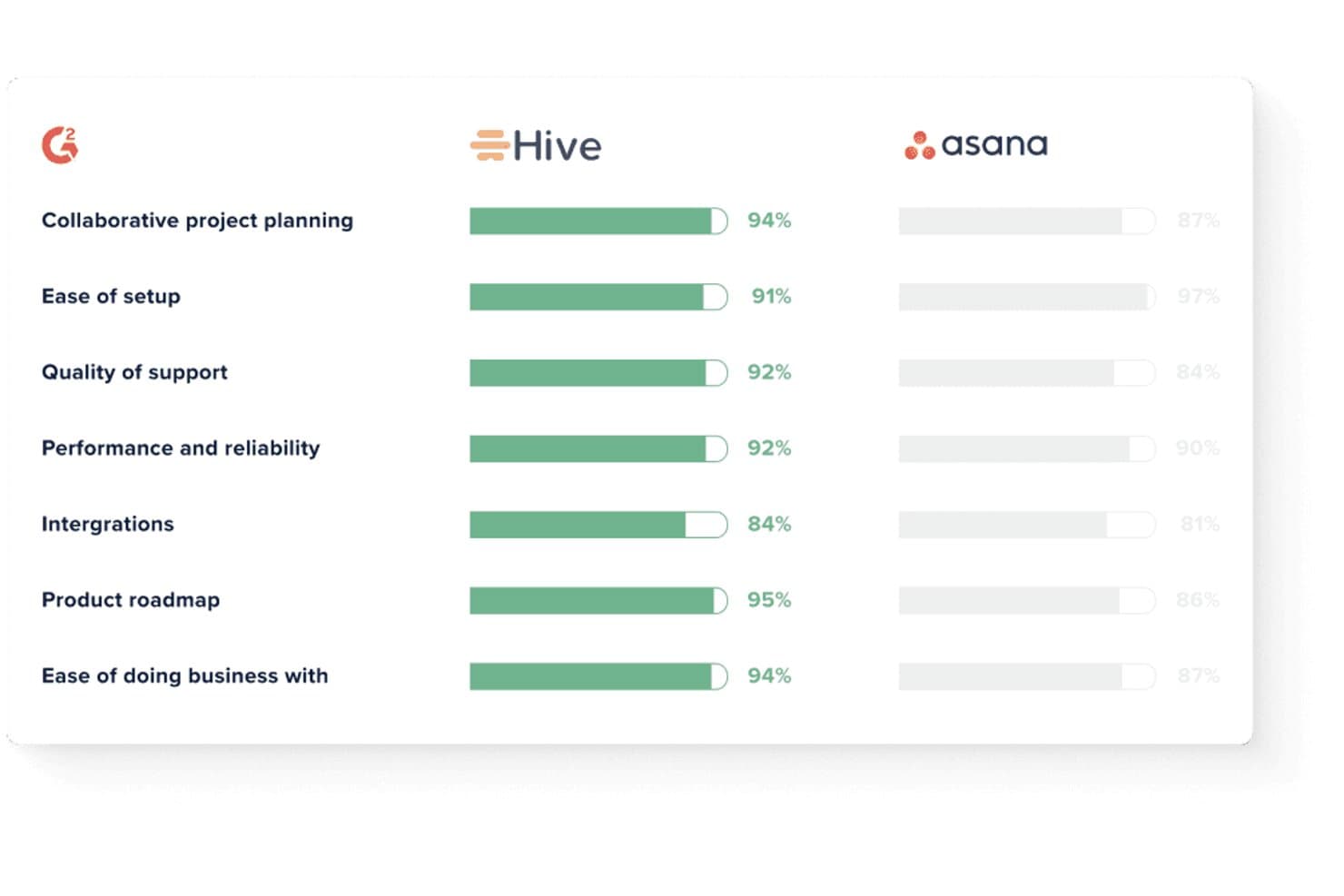
Hive supera Asana nelle principali metriche di soddisfazione di G2. Hive è una piattaforma per la gestione del lavoro che riunisce attività, chat, email, monitoraggio degli obiettivi e pannelli di controllo in un unico posto, risultando particolarmente adatta ai responsabili di progetto e ai team operativi che desiderano utilizzare meno strumenti senza rinunciare alla visibilità.
Per chi è più adatto Hive?
Hive è ideale per responsabili di progetto e team operativi che necessitano di monitoraggio degli obiettivi e reportistica integrati senza dover combinare strumenti separati.
Perché ho scelto Hive
Ho scelto Hive come una delle migliori soluzioni perché il monitoraggio degli obiettivi e i pannelli di controllo analitici integrati offrono ai responsabili di progetto un livello di visibilità che la maggior parte delle alternative ad Asana ignora completamente. Mi piace in particolare il modo in cui gli obiettivi sono collegati direttamente al completamento delle attività, agli obiettivi numerici o persino alle metriche CRM estratte da HubSpot o Salesforce, così i progressi si basano sempre su dati reali. I riepiloghi dei pannelli di controllo generati dall'AI segnalano i progetti come in linea con i piani, a rischio o bloccati, senza alcuna reportistica manuale.
Funzionalità principali di Hive
- Chat integrata: Invia messaggi, condividi file e discuti delle attività direttamente all'interno di Hive senza passare a uno strumento di messaggistica separato.
- Strumento per la creazione di automazioni dei flussi di lavoro: Crea automazioni in più passaggi e senza codice, attivate dai cambiamenti dello stato delle attività, dagli spostamenti delle date di scadenza o dagli eventi di creazione dei progetti.
- Sincronizzazione bidirezionale con Jira: Mantieni sincronizzate in tempo reale le attività di Hive e i ticket di Jira per titoli, assegnatari, stati, sottoattività e date di scadenza.
- Hive Mail: Collega Gmail o Outlook per trasformare le conversazioni email in attività e redigere risposte senza uscire dalla piattaforma.
Integrazioni di Hive
Hive offre integrazioni native con Jira, GitHub, Slack, Microsoft Teams, Zoom, Google Drive, Dropbox, Microsoft OneDrive, Box e QuickBooks. Supporta inoltre oltre 1.000 integrazioni tramite Zapier e offre un'API per integrazioni personalizzate.
Pros and Cons
Pros:
- Gli obiettivi collegano le attività a risultati misurabili
- I pannelli di controllo AI segnalano i progressi dei progetti a rischio
- Le dipendenze Gantt supportano una pianificazione dettagliata delle tempistiche
Cons:
- La configurazione dei flussi di lavoro può richiedere la formazione del personale
- Le notifiche mobili possono essere inaffidabili
Learn more about Hive: Ideale per agenzie e team responsabili delle consegne ai clienti
- Piano gratuito + prova gratuita di 14 giorni + demo gratuita disponibile
- A partire da $9.99/utente/mese (con fatturazione annuale)
Visit WebsiteCustomer Rating:4.4/5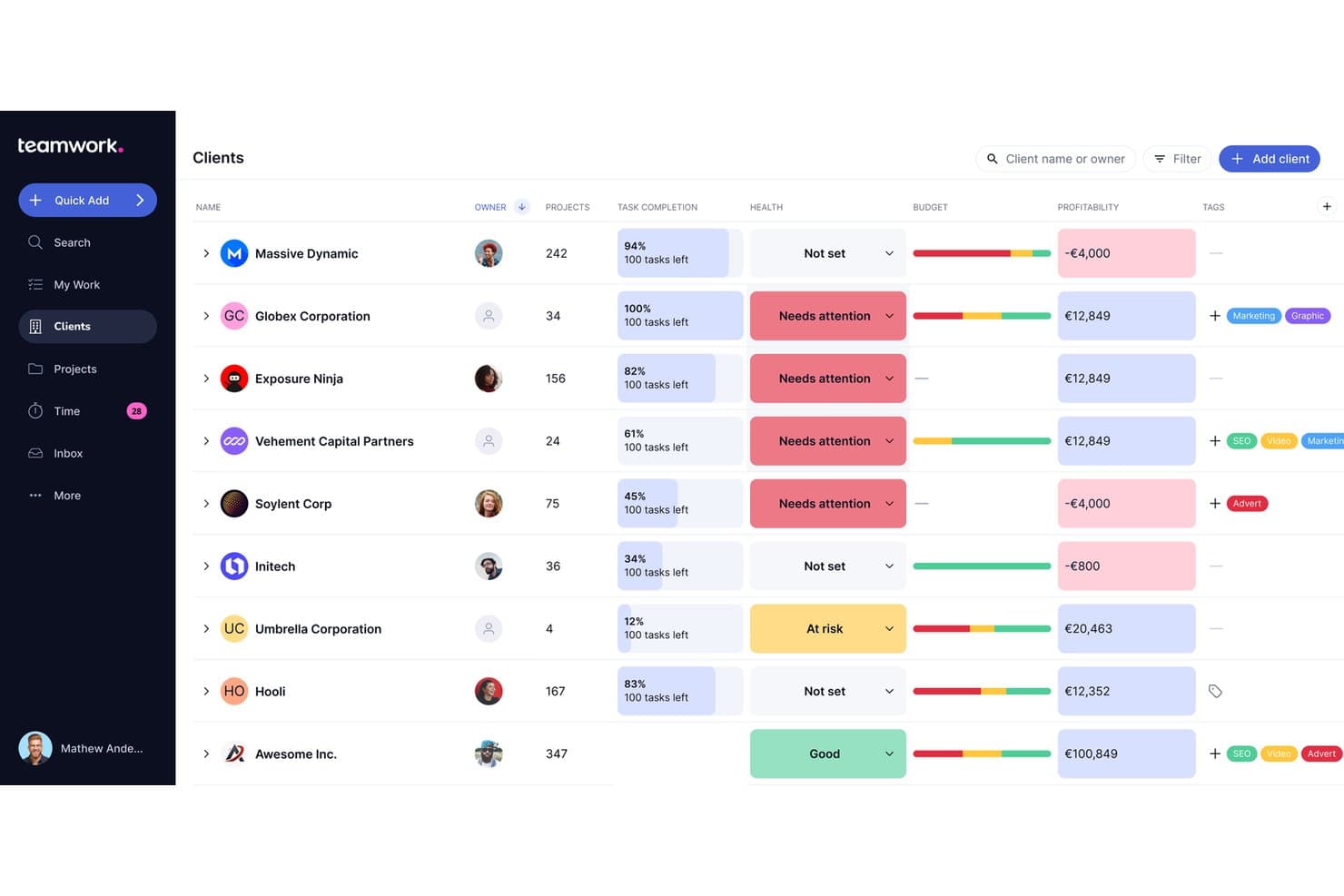
Teamwork.com consente agli utenti di monitorare in un'unica vista lo stato del cliente, il budget e la redditività. Teamwork.com è una piattaforma di gestione dei progetti pensata per agenzie e team a contatto con i clienti, che riunisce in un unico luogo la gestione delle attività, il monitoraggio del tempo, la gestione del budget e i report sulla redditività.
Per chi è più indicato Teamwork.com?
Teamwork.com è particolarmente adatto alle agenzie e ai team che offrono servizi ai clienti e che devono gestire la consegna dei progetti, monitorare il tempo fatturabile e controllare la redditività dei progetti in un unico luogo.
Perché ho scelto Teamwork.com
Teamwork.com è entrato nella mia lista ristretta perché è stato progettato da zero per il lavoro delle agenzie e la gestione delle consegne ai clienti, in un modo che Asana semplicemente non offre. Apprezzo molto il fatto che la gestione nativa del budget, il monitoraggio del tempo fatturabile e i report sulla redditività siano integrati direttamente nella gestione delle attività, così posso vedere se un progetto per un cliente sta effettivamente generando profitti senza dover cambiare strumento. Anche il modello con accesso gratuito per i clienti è un vero elemento distintivo: un numero illimitato di clienti può esaminare le milestone e le bozze senza dover acquistare una licenza.
Funzionalità principali di Teamwork.com
- Diagramma di Gantt con percorso critico: Visualizza le dipendenze tra le attività e segnala automaticamente quali attività ritarderebbero l'intero progetto in caso di slittamento.
- Moduli di richiesta: Trasforma direttamente le richieste dei clienti o del team in attività, con instradamento intelligente disponibile nei piani di livello superiore.
- Pianificazione del carico di lavoro e della capacità: Visualizza la disponibilità del team, pianifica le risorse in base al ruolo o alla competenza ed esegui scenari ipotetici per evitare un'allocazione eccessiva.
- Bacheche del portafoglio: Monitora più progetti da un'unica bacheca di alto livello, con filtri per stato, stato di salute, responsabile e campi personalizzati.
Integrazioni di Teamwork.com
Teamwork.com offre oltre 150 integrazioni, tra cui Slack, Microsoft Teams, Google Drive, Dropbox, Xero, QuickBooks, HubSpot, Salesforce, NetSuite e Unito per la sincronizzazione bidirezionale con Jira e GitHub. API e webhook supportano connessioni personalizzate.
Pros and Cons
Pros:
- I portali per i clienti offrono loro una visibilità chiara
- Il tempo fatturabile e la redditività condividono il contesto del progetto
- I percorsi del diagramma di Gantt chiariscono le dipendenze nella consegna
Cons:
- La navigazione può risultare affollata tra le diverse visualizzazioni
- I team di prodotto non dispongono del monitoraggio nativo degli OKR
Learn more about Teamwork.com: 10Ideale per agenzie che gestiscono progetti per i clienti
Teamwork
- Piano gratuito + prova gratuita di 14 giorni + demo gratuita disponibile
- Da $9.99/utente/mese (con fatturazione annuale)
Visit WebsiteCustomer Rating:4.5/5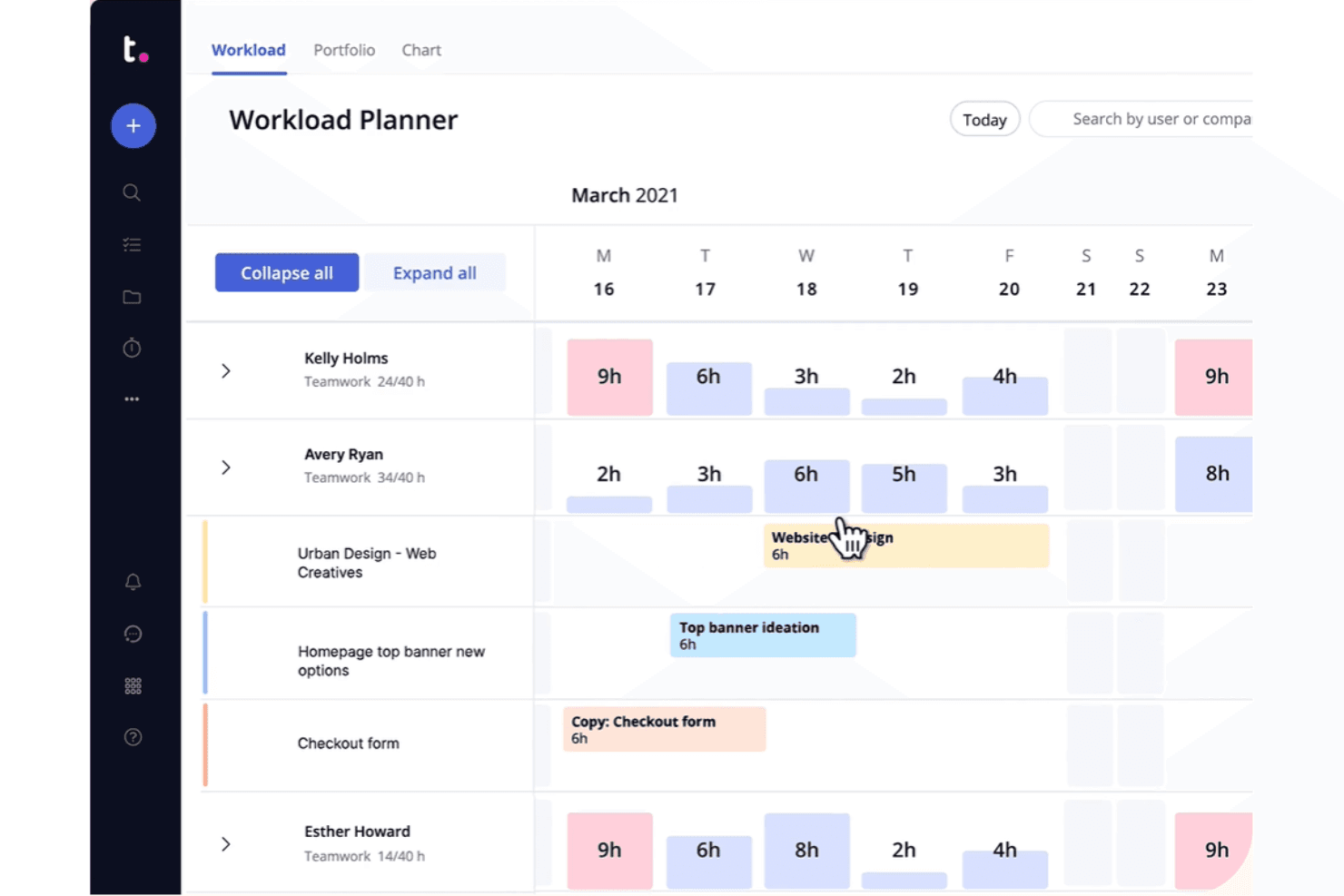
Teamwork visualizza i carichi di lavoro del team e le assegnazioni delle attività in un calendario settimanale. Teamwork è una piattaforma di gestione dei progetti pensata per agenzie e team che offrono servizi ai clienti, combinando gestione delle attività, monitoraggio del tempo, budget, fatturazione e portali per i clienti in un unico luogo.
Per chi è più indicato Teamwork?
Teamwork è pensato per agenzie e team che offrono servizi ai clienti e che devono gestire la consegna dei progetti, il monitoraggio del tempo e la fatturazione dei clienti in un unico luogo.
Perché ho scelto Teamwork
Ho scelto Teamwork come uno dei migliori perché è l'unico strumento di questo elenco creato fin dall'inizio per il lavoro delle agenzie con i clienti, anziché essere adattato a questo scopo. Mi piace il fatto che si possa offrire ai clienti un portale personalizzato con il proprio marchio per esaminare e approvare i materiali consegnabili, senza che debbano mai accedere al proprio spazio di lavoro interno. I budget di tempo integrati, i compensi ricorrenti e la fatturazione consentono al mio team di monitorare le ore fatturabili e generare fatture direttamente dal tempo registrato, una funzione che nessun piano di Asana offre.
Funzionalità principali di Teamwork
- Più assegnatari per attività: Assegna una singola attività a più membri del team, così la responsabilità condivisa viene monitorata senza soluzioni alternative.
- Bacheche del portafoglio: Visualizza lo stato e l'avanzamento di tutti i progetti attivi in un unico luogo, con attivatori di automazione a livello di portafoglio.
- Pianificatore del carico di lavoro: Visualizza in tempo reale la capacità di ogni membro del team e modifica le assegnazioni per bilanciare il carico di lavoro tra i progetti.
- Importatore nativo di Asana: Migra direttamente da Asana persone, progetti, attività, sottoattività, assegnatari, scadenze, commenti e file in pochi minuti.
Integrazioni di Teamwork
Teamwork offre oltre 150 integrazioni, tra cui Slack, Microsoft Teams, Google Calendar, Outlook Calendar, HubSpot, QuickBooks Online, Jira tramite SoftSync e GitHub tramite Unito. Offre inoltre un'API e supporta Zapier.
Pros and Cons
Pros:
- I portali per i clienti mantengono le approvazioni al di fuori degli spazi di lavoro interni
- Il tempo registrato alimenta i budget e le fatture dei clienti
- Più assegnatari chiariscono la responsabilità condivisa delle attività
Cons:
- La navigazione e le visualizzazioni possono risultare poco chiare
- Le importazioni da Asana non includono dipendenze e campi personalizzati
Learn more about Teamwork:
Altre alternative ad Asana
Ecco alcune alternative aggiuntive ad Asana che non sono state incluse nel mio elenco, ma che vale comunque la pena prendere in considerazione:
- 11CeloxisIdeale per la supervisione del portafoglio a livello aziendale
- 12GoodDayHet meest geschikt voor documentatie met ingebouwde databases en synchronisatie met Jira
- 13RavetreeIdeale per le approvazioni dei progetti rivolte ai clienti
- 14AirtableIdeale per creare flussi di lavoro personalizzati senza codice
- 15NotionIdeale per documenti, wiki e attività in un'unica area di lavoro
- 16Aha!Ideale per collegare le attività alla strategia del prodotto
- 17LinearIdeale per il monitoraggio dei problemi e della roadmap del team di sviluppo
- 18TrelloIdeale per le bacheche Kanban con automazione integrata
Come valuto le alternative ad Asana
Divido la mia valutazione in tre parti, attribuendo il peso maggiore alle funzionalità principali: uno strumento deve organizzare le attività tra più progetti e mostrare il lavoro in più di una visualizzazione. Cerco poi il monitoraggio nativo degli obiettivi o una visibilità a livello di portafoglio come elementi distintivi. Infine, considero il supporto alla migrazione e il costo totale di proprietà.
Funzionalità principali (elementi imprescindibili per questo elenco)
Quando seleziono gli strumenti per il mio elenco, assegno a ciascuno un punteggio su una scala da 0 (non offre la funzionalità) a 5 (eccelle in quest'area) per ogni funzionalità principale elencata di seguito. Converto poi il totale in una percentuale per contribuire a valutare l'idoneità complessiva di ogni strumento, attribuendo un peso aggiuntivo alle funzionalità che ho considerato essenziali.
- Gestione delle attività e dei progetti (essenziale): cerco assegnatari chiari per le attività, date di scadenza, sottoattività e dipendenze per monitorare il lavoro tra lanci di prodotti o altri progetti che coinvolgono più team.
- Visualizzazioni del lavoro (essenziale): verifico la presenza di visualizzazioni sincronizzate, come elenchi, bacheche, calendari e sequenze temporali, affinché i team possano pianificare il lavoro nel formato più adatto alle loro esigenze.
- Automazione dei flussi di lavoro: valuto se i team possono impostare regole per azioni ricorrenti, come assegnare un'attività quando cambia il suo stato.
- Collaborazione tra team: cerco commenti, condivisione di file e menzioni associati al lavoro, così da mantenere le discussioni sui progetti collegate alle attività.
- Report e avanzamento: valuto i cruscotti relativi allo stato dei progetti, al carico di lavoro e all'avanzamento degli obiettivi, per aiutare i team a individuare i rischi per la consegna.
- Integrazioni di terze parti: verifico la presenza di connessioni con i comuni strumenti di comunicazione, archiviazione e calendario che si integrano nei flussi di lavoro esistenti dei team.
Una volta ottenuto un elenco di strumenti che soddisfano i criteri, considero ciò che distingue ciascuna piattaforma.
Fattori distintivi (ciò che distingue i fornitori)
Ecco come confronto i diversi fornitori:
Caratteristiche di spicco
Cerco un monitoraggio nativo degli obiettivi che colleghi le attività quotidiane agli OKR, in modo che un responsabile di progetto possa risalire da un'attività dello sprint a un obiettivo trimestrale senza cambiare strumento. La sincronizzazione bidirezionale con gli strumenti di sviluppo è altrettanto importante: quando gli aggiornamenti da Jira o GitHub confluiscono in tempo reale nello strumento di pianificazione, i team di prodotto e ingegneria evitano riunioni duplicate sullo stato di avanzamento. Valuto anche la visibilità a livello di portafoglio, che consente a un vicepresidente di aggregare diversi piani di sviluppo in un'unica vista dirigenziale per individuare i conflitti di risorse tra le linee di prodotto.
Oltre le funzionalità
Valuto innanzitutto il supporto alla migrazione: la fedeltà dell'importazione di attività, campi personalizzati e allegati determina se il tuo team adotterà effettivamente il nuovo strumento o tornerà silenziosamente ai fogli di calcolo. Il costo totale di proprietà è altrettanto importante, poiché il prezzo per utente può aumentare rapidamente quando si aggiungono collaboratori interfunzionali che necessitano solo dell'accesso in visualizzazione. Verifico inoltre come ogni piattaforma passi da un singolo team di prodotto a un'organizzazione con più portafogli senza frammentare i report o costringere a una ristrutturazione radicale e problematica dello spazio di lavoro.
Perché cercare un'alternativa ad Asana?
Sebbene Asana sia una buona scelta per la gestione dei prodotti, esistono diversi motivi per cui alcuni utenti cercano soluzioni alternative. Potresti cercare un'alternativa ad Asana per uno dei seguenti motivi.
- Hai bisogno di più opzioni di personalizzazione
- Il tuo team necessita di strumenti avanzati per la reportistica
- Trovi l'interfaccia utente troppo complessa
- Ritieni che manchi l'integrazione con app specifiche
- Stai cercando piani tariffari più convenienti
- Il tuo team sta crescendo e necessita di una migliore scalabilità
- Hai bisogno della conformità a specifiche normative sui dati
Se ti riconosci in una di queste situazioni, sei nel posto giusto. Il mio elenco contiene diverse soluzioni fondamentali per la gestione dei prodotti, più adatte ai team che affrontano queste difficoltà con Asana e cercano soluzioni alternative.
Funzionalità principali di Asana
Ecco alcune delle funzionalità principali di Asana, per aiutarti a mettere a confronto e comparare ciò che offrono le soluzioni alternative:
- Gestione delle attività: consente di creare, assegnare e monitorare le attività per mantenere organizzati i progetti.
- Tempistiche dei progetti: aiuta a visualizzare i programmi e le scadenze dei progetti, assicurandosi che il team rimanga in linea con i piani.
- Bacheche e calendari: offre strumenti visivi per la pianificazione e la gestione dei progetti, aiutando a organizzare il team.
- Aggiornamenti in tempo reale: mantiene il team informato con notifiche istantanee, migliorando la collaborazione e la responsabilità.
- Portfolio: consente di organizzare i progetti per account o team, risultando utile per gestire numerosi progetti in modo efficiente.
- Intelligenza di Asana: offre analisi e suggerimenti basati sull'intelligenza artificiale per migliorare i risultati dei progetti e risparmiare tempo.
- Strumenti di collaborazione: facilita la comunicazione con bacheche per i messaggi e allegati di file all'interno delle attività.
- Visualizzazione Gantt: aiuta a creare progetti, impostare dipendenze e visualizzare le tempistiche tramite un'interfaccia con trascinamento della selezione.
- Funzionalità di revisione: converte i feedback in sottoattività, aiutando i team a gestire in modo efficiente la produzione dei contenuti.
- Campi personalizzati: consente di adattare i dettagli del progetto alle esigenze specifiche del tuo flusso di lavoro. Sembra che il tuo messaggio sia vuoto. Come posso assisterti ulteriormente? Se hai istruzioni o domande, non esitare a farmelo sapere!