

Se sei un responsabile di prodotto, conosci le difficoltà legate al mantenimento dell'allineamento del team e al rispetto delle tempistiche dei progetti. Potresti aver notato che ProductPlan non soddisfa le tue esigenze. Che sia a causa delle funzionalità limitate, dei problemi di scalabilità o delle difficoltà di integrazione, stai cercando qualcosa che si adatti meglio al flusso di lavoro del tuo team.
Ho dedicato del tempo a testare e recensire diverse soluzioni software per trovare le migliori alternative a ProductPlan. In questo articolo condividerò le mie scelte principali. Analizzerò ciò che rende unica ogni opzione e il modo in cui può rispondere ai tuoi specifici punti critici.
Il mio obiettivo è fornirti una guida imparziale e approfondita che ti aiuti a scegliere lo strumento giusto per il successo del tuo team.
Che cos'è ProductPlan?
ProductPlan è uno strumento fondamentale per la gestione dei prodotti che aiuta i team a pianificare e visualizzare le proprie strategie di prodotto. Gli utenti, generalmente responsabili di prodotto e responsabili di progetto, potrebbero scoprire che ProductPlan non soddisfa le loro esigenze per uno o più dei seguenti motivi:
- È troppo costoso per il loro budget
- Il loro team ha bisogno di più opzioni di personalizzazione
- Richiedono una migliore integrazione con altri strumenti
- Hanno bisogno del supporto per team più numerosi
- Il team lavora da una località geografica diversa e ha bisogno di funzionalità di supporto globale
- Hanno bisogno di funzionalità di reportistica più avanzate
Se ti riconosci in una di queste situazioni, sei nel posto giusto. Il mio elenco contiene diverse opzioni fondamentali per la gestione dei prodotti, più adatte ai team che affrontano queste specifiche difficoltà con ProductPlan e che cercano le migliori soluzioni software alternative per la gestione dei prodotti.
Perché fidarsi dei nostri consigli sui software
6,700+
Reviews
20
Industry experts
16+
Evaluation factors
14
Years
Il nostro team testa e recensisce software dal 2012. In quanto product manager noi stessi, sappiamo quanto sia difficile — e importante — scegliere il software giusto.
Per questa guida, abbiamo valutato gli strumenti attraverso test pratici e ricerche indipendenti, assegnando un punteggio agli strumenti in base ai nostri criteri di selezione.
Le nostre recensioni riflettono il nostro giudizio editoriale umano, non un discorso di vendita.
Revisori esperti:
- Andrew LumbySenior TPM
- Cristiano ValimSenior UI/UX Lead


Tabella di confronto delle alternative a ProductPlan
Questa tabella di confronto riepiloga i dettagli sui prezzi delle mie principali alternative a ProductPlan:
| Tool | Best For | Trial Info | Price | ||
|---|---|---|---|---|---|
| 1 | Ideale per pubblicare roadmap aggiornate basate su Jira | Prova gratuita di 30 giorni + piano gratuito disponibile | A partire da $1.10/utente/mese | Website | |
| 2 | Ideale per aziende tecnologiche di medie e grandi dimensioni | Piano gratuito + prova gratuita di 14 giorni + demo gratuita disponibile | A partire da $19/utente/mese (con fatturazione annuale) | Website | |
| 3 | Ideale per valutare le funzionalità rispetto agli obiettivi strategici | Prova gratuita di 30 giorni + dimostrazione gratuita disponibile | A partire da $9/utente/mese | Website | |
| 4 | Ideale per squadre di prodotto di piccole e medie dimensioni | Prova gratuita di 14 giorni + dimostrazione gratuita disponibile | A partire da $44/postazione/mese (con fatturazione annuale) | Website | |
| 5 | Ideale per la raccolta dei feedback dei clienti | Piano gratuito disponibile | Da $79 al mese (con fatturazione annuale) | Website | |
| 6 | Ideale per la pianificazione basata su flussi di lavoro altamente personalizzabili | Piano gratuito disponibile | Da $11/utente/mese | Website | |
| 7 | Ideale per la pianificazione delle roadmap a livello di portafoglio basata sull'IA | Demo gratuita disponibile | Prezzi su richiesta | Website | |
| 8 | Ideale per modelli personalizzati di valutazione delle priorità | Demo gratuita disponibile | Prezzi su richiesta | Website | |
| 9 | Ideale per collegare il feedback dei clienti agli elementi della roadmap | Prova gratuita di 14 giorni + demo gratuita disponibile | A partire da $19/utente/mese (con fatturazione annuale) | Website | |
| 10 | Ideale per allineare il feedback alla roadmap | Prova gratuita di 14 giorni + demo gratuita disponibile | A partire da $10/utente/mese | Website |


Testiamo e recensiamo software per la gestione dei prodotti dal 2020. Essendo noi stessi responsabili di prodotto, sappiamo quanto sia fondamentale e difficile prendere la decisione giusta quando si sceglie un software. Investiamo in ricerche approfondite per aiutare il nostro pubblico a prendere decisioni migliori in merito all'acquisto di software.
Abbiamo testato più di 2.000 strumenti per diversi casi d'uso della gestione dei prodotti e scritto oltre 1.000 recensioni software complete. Scopri come garantiamo la trasparenza & consulta la nostra metodologia di recensione del software.
Recensioni delle migliori alternative a ProductPlan
Di seguito trovi i miei riepiloghi dettagliati delle migliori alternative a ProductPlan che ho incluso nella mia selezione. Le mie recensioni offrono una panoramica dettagliata delle funzionalità principali, dei pro e dei contro, delle integrazioni e dei casi d’uso ideali di ogni strumento, per aiutarti a trovare quello più adatto a te.
 Ideale per pubblicare roadmap aggiornate basate su Jira
- Prova gratuita di 30 giorni + piano gratuito disponibile
- A partire da $1.10/utente/mese
Visit WebsiteCustomer Rating:5/5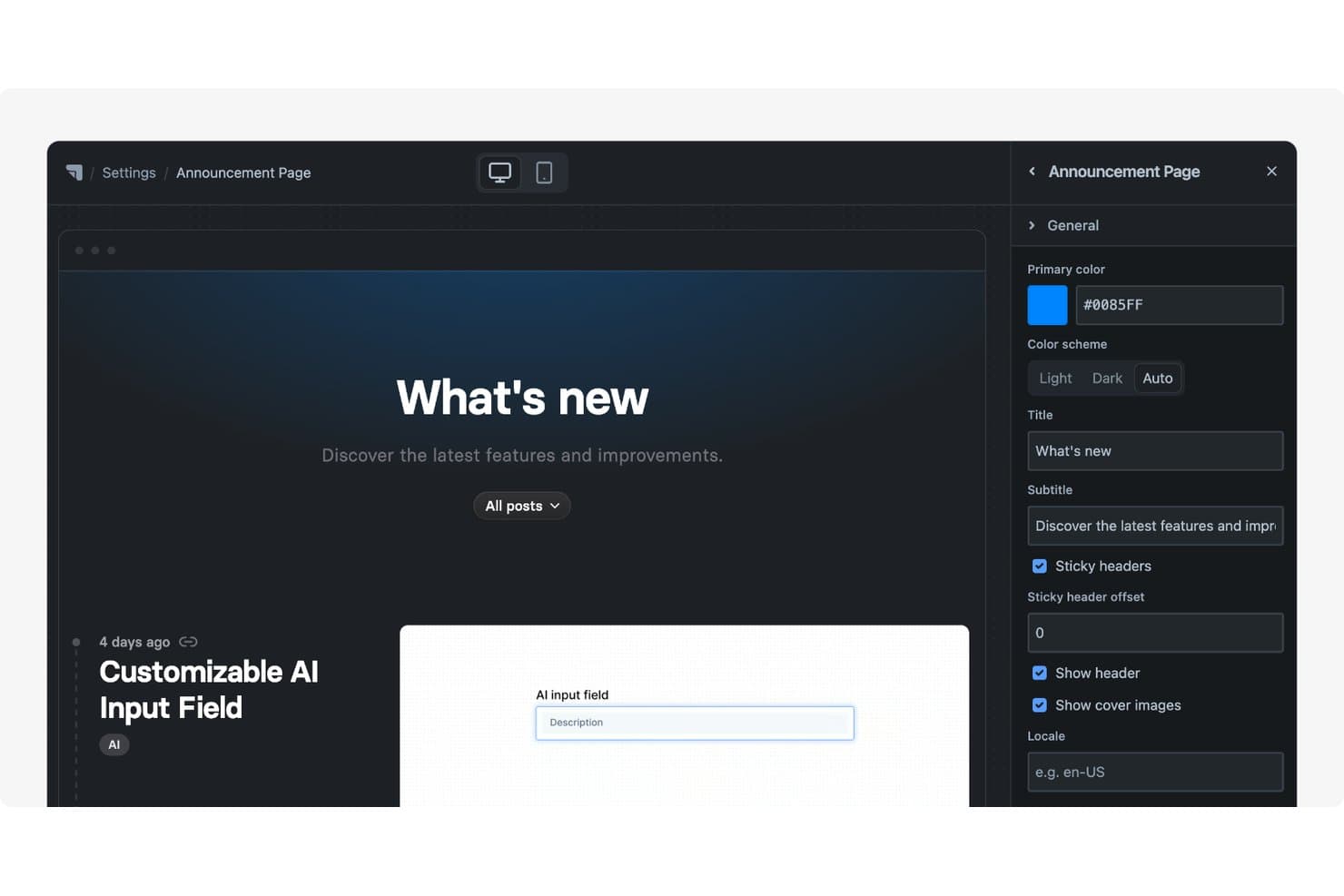
Released offre una pagina degli annunci personalizzabile con titolo, sottotitolo, schema di colori e impostazioni dell'intestazione modificabili tramite un pannello laterale. Released è una piattaforma di gestione dei prodotti per i team che vogliono trasformare il lavoro di Jira in roadmap rivolte ai clienti, condividere i piani di prodotto e allineare gli stakeholder senza sostituire il flusso di lavoro di distribuzione esistente.
Per chi è più indicato Released?
Responsabili di prodotto e team di prodotto che utilizzano Jira e hanno bisogno di pubblicare roadmap aggiornate rivolte ai clienti.
Perché Released è una valida alternativa a ProductPlan
Ho scelto Released perché è ideale per pubblicare roadmap aggiornate basate su Jira. Il mio team può trasformare il lavoro di Jira in roadmap rivolte ai clienti e condividere i piani di prodotto mantenendo Jira come fonte di riferimento per la distribuzione. Gli stakeholder possono vedere i progressi aggiornati senza richiedere ai responsabili di prodotto di gestire manualmente una roadmap separata.
Funzionalità principali di Released
- Portale per il feedback dei clienti: Raccogli idee, voti e commenti tramite spazi pubblici o privati.
- Note di rilascio generate dall'IA: Crea bozze delle note di rilascio a partire dai ticket Jira completati.
- Registro delle modifiche personalizzato: Pubblica aggiornamenti ricercabili sul prodotto sul tuo dominio.
- Incorporamento del portale: Aggiungi roadmap, registri delle modifiche o moduli di feedback a siti web e documenti.
Integrazioni di Released
Released è progettato per Jira e offre integrazioni con Slack, Framer, Webflow e Confluence, inclusa un'integrazione nativa con Scroll Sites per Confluence. Supporta inoltre il monitoraggio delle richieste pull di GitHub e connessioni personalizzate basate su API.
Pros and Cons
Pros:
- Le roadmap aggiornate riutilizzano il lavoro già presente in Jira
- Le conversazioni sul feedback si collegano direttamente alle attività Jira
- L'IA crea bozze delle note di rilascio a partire dai ticket
Cons:
- Richiede Jira come fonte dei dati di distribuzione
- Meno strumenti di definizione delle priorità strategiche rispetto a ProductPlan
Learn more about Released: Ideale per aziende tecnologiche di medie e grandi dimensioni
- Piano gratuito + prova gratuita di 14 giorni + demo gratuita disponibile
- A partire da $19/utente/mese (con fatturazione annuale)
Visit WebsiteCustomer Rating:4.5/5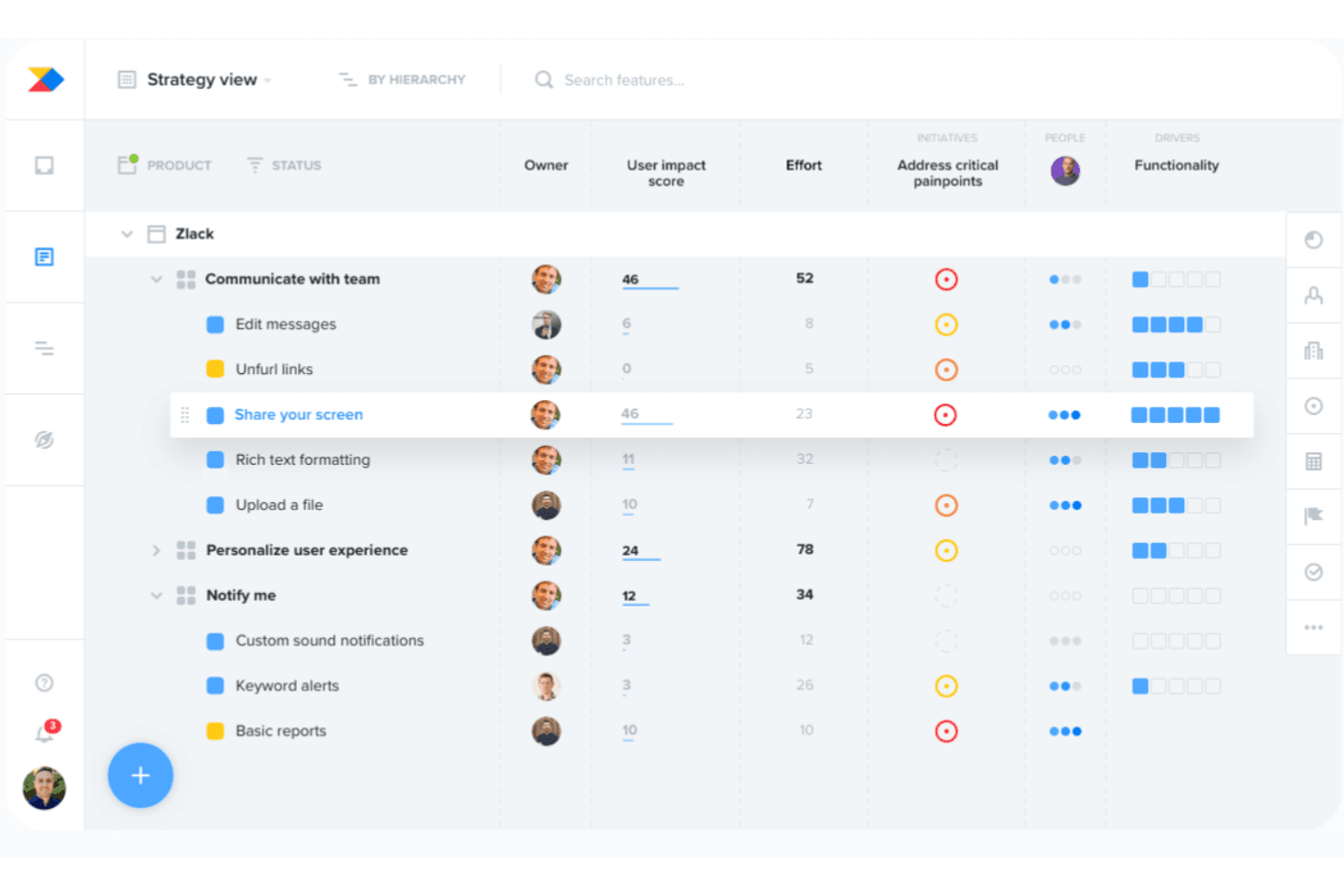
Productboard allinea lo sviluppo alle esigenze dei clienti utilizzando la definizione delle priorità basata sull'IA. Productboard è una piattaforma di gestione dei prodotti per aziende tecnologiche di medie e grandi dimensioni che collega gli insight dei clienti, la definizione delle priorità e le roadmap per aiutare i team di prodotto ad allineare le decisioni agli obiettivi aziendali.
Per chi è più adatto Productboard?
Productboard è adatto ai product manager di aziende tecnologiche di medie e grandi dimensioni che necessitano di insight condivisi, definizione delle priorità e pianificazione delle roadmap.
Perché Productboard è una buona alternativa a ProductPlan
Ho scelto Productboard perché collega gli insight dei clienti, la definizione delle priorità e le roadmap in un'unica piattaforma di gestione dei prodotti. Il mio team può collegare il feedback dei clienti alle decisioni sui prodotti e quindi allineare le priorità della roadmap agli obiettivi aziendali. È particolarmente adatto alle aziende tecnologiche di medie e grandi dimensioni che gestiscono portafogli di prodotti complessi.
Funzionalità principali di Productboard
- Gerarchia dei prodotti: Organizza prodotti, componenti e funzionalità in strutture nidificate.
- Visualizzazioni della sequenza temporale: Mostra iniziative, funzionalità e rilasci su sequenze temporali flessibili.
- Mappatura delle dipendenze: Visualizza le relazioni e le dipendenze tra gli elementi pianificati.
- Integrazione con Jira: Sincronizza i piani dei prodotti con i ticket Jira e i flussi di lavoro di distribuzione.
Integrazioni di Productboard
Productboard si integra con Jira per collegare i piani dei prodotti ai ticket di sviluppo e ai flussi di lavoro di distribuzione.
Pros and Cons
Pros:
- Centralizza il feedback dei clienti nelle decisioni sui prodotti
- Collega direttamente gli insight alle funzionalità prioritarie
- Supporta la pianificazione delle roadmap a livello di portafoglio
Cons:
- Richiede una configurazione sostanziale prima di un'adozione su larga scala
- Alcuni flussi di lavoro risultano rigidi per i team
Learn more about Productboard: 3Ideale per valutare le funzionalità rispetto agli obiettivi strategici
Aha!
- Prova gratuita di 30 giorni + dimostrazione gratuita disponibile
- A partire da $9/utente/mese
Visit WebsiteCustomer Rating:4.4/5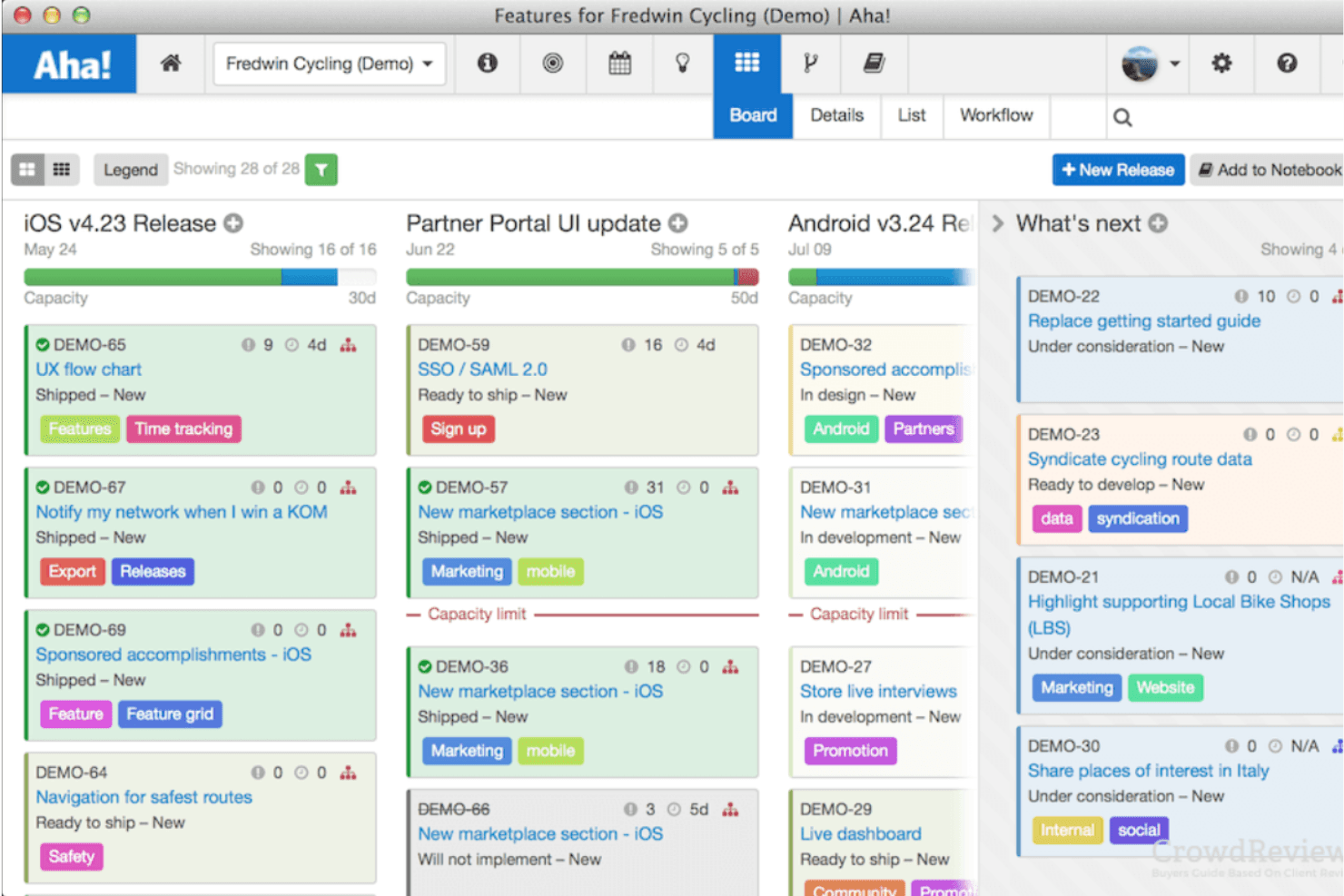
Aha! aiuta a definire le priorità dei progetti con schede di valutazione e piani strategici. Aha! è un software per la pianificazione dei prodotti destinato ai responsabili di prodotto che devono collegare le esigenze dei clienti, le priorità aziendali e i piani di sviluppo, mantenendo allineate le parti interessate.
Per chi è più adatto Aha!?
Aha! è adatto ai responsabili di prodotto che devono valutare le idee per le funzionalità rispetto agli obiettivi strategici e allineare le parti interessate sulle decisioni relative al piano di prodotto.
Perché Aha! è una buona alternativa a ProductPlan
Ho scelto Aha! perché posso valutare le idee per le funzionalità rispetto agli obiettivi strategici utilizzando schede di valutazione personalizzate. Utilizzo le sue iniziative e i suoi modelli strategici per collegare gli elementi del piano di prodotto agli obiettivi aziendali, quindi confronto le richieste concorrenti durante la definizione delle priorità. Questo lo rende utile quando un gruppo deve spiegare perché una funzionalità ha la precedenza su un'altra.
Funzionalità principali di Aha!
- Visualizzazioni del piano di prodotto: Mostra i piani in formato cronologico, pivot, Gantt o a corsie.
- Pianificazione delle versioni: Raggruppa le funzionalità in versioni con date, traguardi e capacità.
- Monitoraggio delle dipendenze: Collega gli elementi di lavoro correlati e monitora le dipendenze di sviluppo.
- Portale per i riscontri dei clienti: Raccoglie, organizza e condivide le idee dei clienti con i collaboratori.
Integrazioni di Aha!
Aha! offre oltre 65 integrazioni tra i suoi prodotti, tra cui Jira, Azure DevOps, GitHub, Salesforce, Slack, Microsoft Teams, Zendesk, Asana e Trello, oltre a Zapier. Fornisce inoltre l'API di Aha! per le integrazioni personalizzate.
Pros and Cons
Pros:
- Valuta le funzionalità rispetto agli obiettivi strategici
- Collega le iniziative agli obiettivi aziendali
- Offre diversi formati di presentazione del piano di prodotto
Cons:
- La navigazione può risultare complessa per i nuovi utenti
- La configurazione richiede tempo prima del lancio
Learn more about Aha!: Ideale per squadre di prodotto di piccole e medie dimensioni
- Prova gratuita di 14 giorni + dimostrazione gratuita disponibile
- A partire da $44/postazione/mese (con fatturazione annuale)
Visit WebsiteCustomer Rating:4.2/5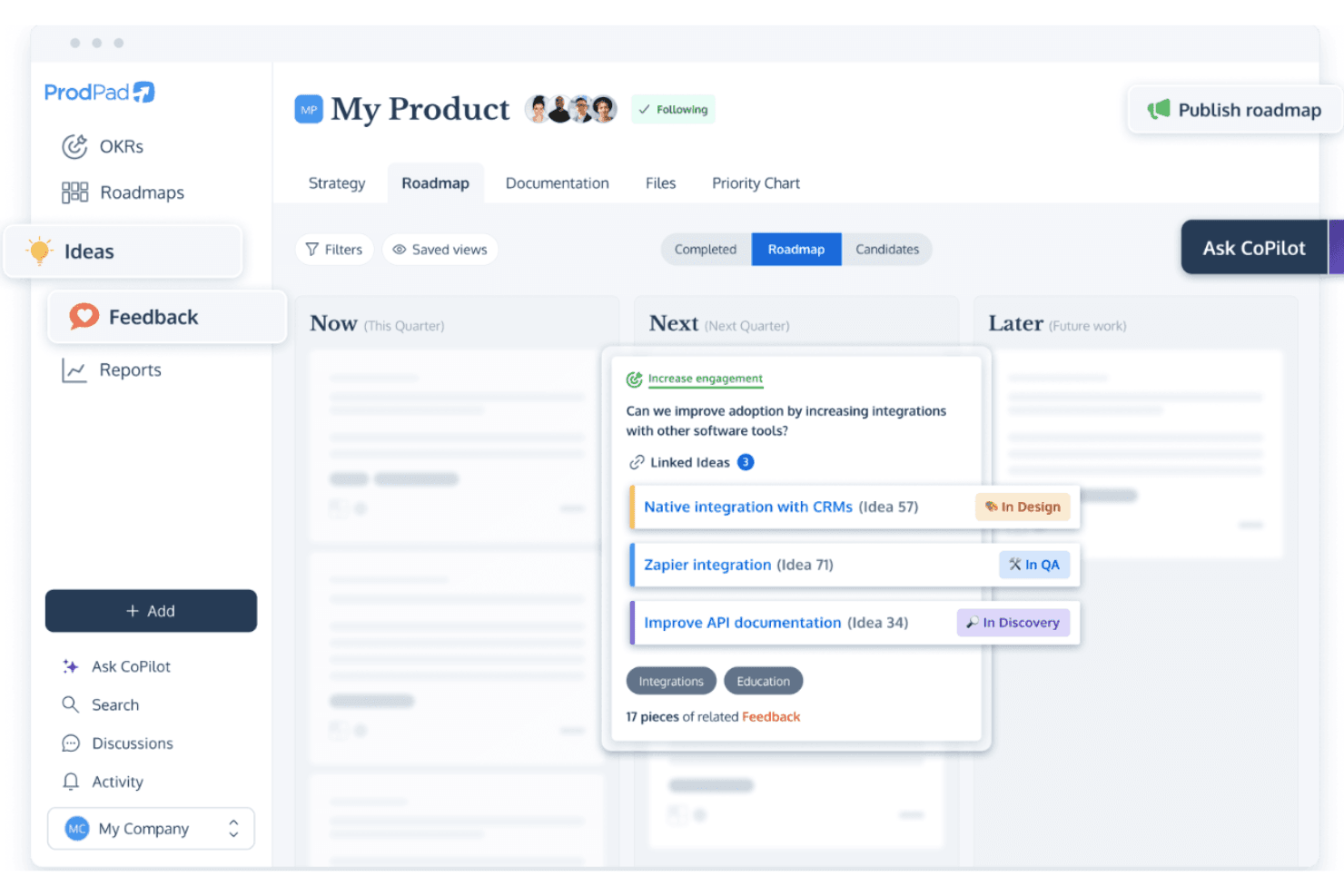
ProdPad supporta tabelle di marcia flessibili e la gestione delle idee per la pianificazione Agile. ProdPad è una piattaforma per la gestione dei prodotti e delle tabelle di marcia destinata a squadre di piccole e medie dimensioni, che collega i riscontri dei clienti, la definizione delle priorità, la scoperta dei prodotti e la pianificazione della distribuzione in un unico spazio di lavoro.
Per chi è più adatto ProdPad?
Responsabili di prodotto di aziende in crescita che hanno bisogno di collegare le informazioni sui clienti, la scoperta dei prodotti, la definizione delle priorità e la pianificazione della distribuzione.
Perché ProdPad è una buona alternativa a ProductPlan
Ho scelto ProdPad perché collega i riscontri dei clienti, la scoperta dei prodotti, la definizione delle priorità e la pianificazione della distribuzione in un unico spazio di lavoro. Per le squadre di prodotto di piccole e medie dimensioni, il mio team può trasformare le informazioni sui clienti in decisioni prioritarie per la tabella di marcia e poi collegare tali decisioni ai piani di distribuzione. In questo modo, le evidenze della fase di scoperta rimangono visibili quando cambiano le priorità della tabella di marcia.
Funzionalità principali di ProdPad
- Visualizzazioni della tabella di marcia: Passa dai formati cronologico, a elenco e a corsie.
- Campi personalizzati: Aggiungi campi strutturati per acquisire i dettagli del prodotto.
- Dipendenze: Mappa le relazioni tra gli elementi della tabella di marcia.
- Integrazioni: Collega ProdPad a strumenti di distribuzione come Jira.
Integrazioni di ProdPad
ProdPad si integra con Jira per collegare la pianificazione del prodotto e le decisioni sulla tabella di marcia alle attività di distribuzione.
Pros and Cons
Pros:
- I riscontri dei clienti si collegano direttamente alle decisioni sulla tabella di marcia
- Gli elementi della fase di scoperta orientano le discussioni sulla definizione delle priorità
- Diverse visualizzazioni della tabella di marcia favoriscono la comunicazione con le parti interessate
Cons:
- La pianificazione della distribuzione è meno completa rispetto ai pacchetti per l'esecuzione
- Le opzioni di reportistica potrebbero richiedere una configurazione aggiuntiva
Learn more about ProdPad: Ideale per la raccolta dei feedback dei clienti
- Piano gratuito disponibile
- Da $79 al mese (con fatturazione annuale)
Visit WebsiteCustomer Rating:4.6/5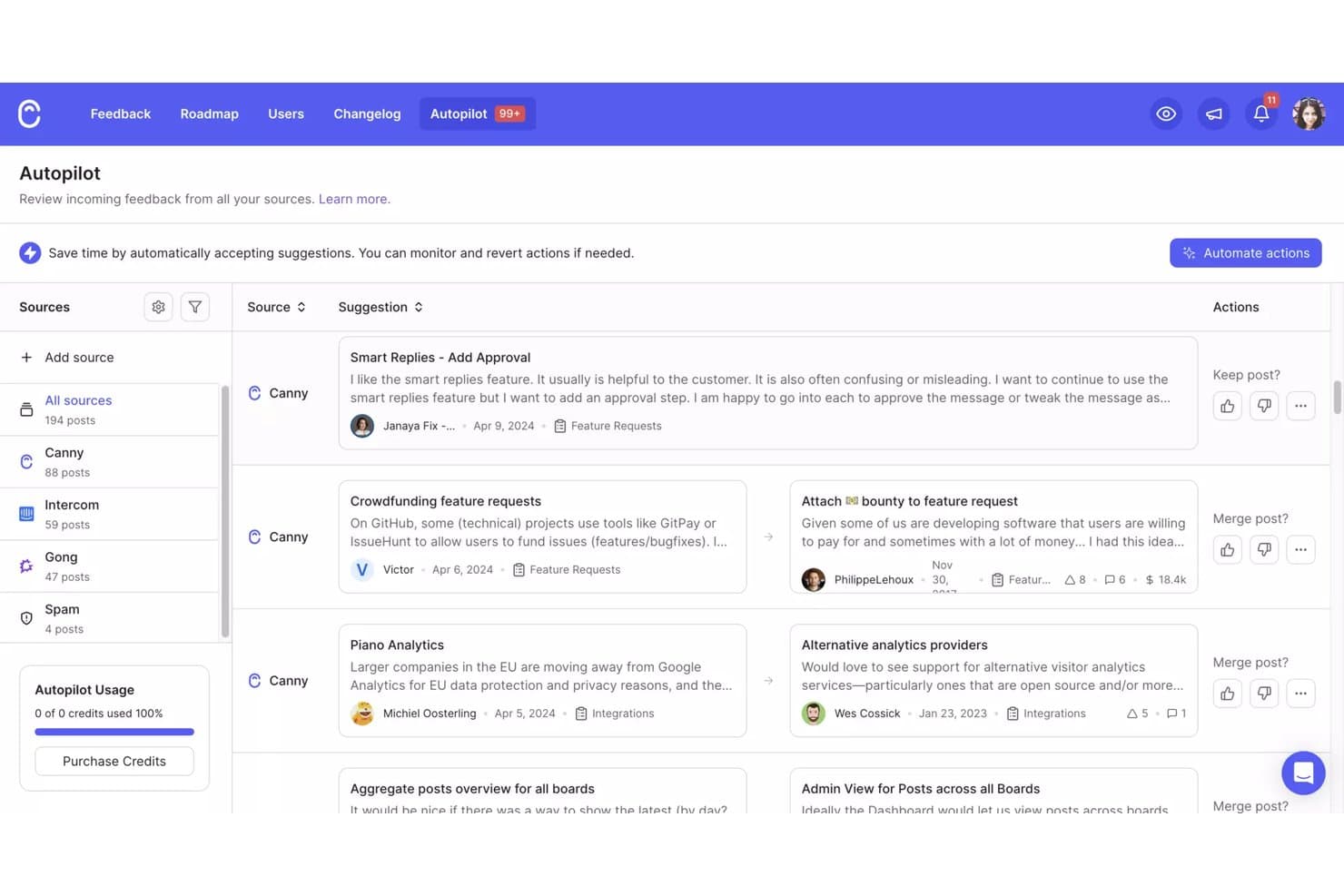
L'Autopilot di Canny consolida i feedback provenienti da più fonti per la revisione. Canny è una piattaforma di gestione del prodotto per i team che devono organizzare gli input sul prodotto, dare priorità alle decisioni sulla roadmap e mantenere clienti e stakeholder allineati su ciò che verrà dopo.
Per chi è più adatto Canny?
I team di prodotto delle aziende SaaS in crescita possono utilizzare Canny per centralizzare le richieste dei clienti, identificare le esigenze ricorrenti e orientare le decisioni sulla roadmap.
Perché Canny è una valida alternativa a ProductPlan
Ho scelto Canny perché utilizzo le sue bacheche di feedback e il sistema di votazione per raccogliere le richieste dei clienti, raggruppare le esigenze ricorrenti e quantificare la domanda. Inoltre, collego le richieste validate agli aggiornamenti della roadmap e ai post del changelog, così i clienti possono vedere come i loro contributi influenzano le decisioni sul prodotto. Questo rende Canny una valida alternativa a ProductPlan quando il feedback dei clienti guida la definizione delle priorità.
Funzionalità principali di Canny
- Campi personalizzati: Aggiungi dettagli strutturati alle segnalazioni di feedback.
- Stati personalizzati: Definisci le fasi del flusso di lavoro per la valutazione delle richieste.
- Segmentazione degli utenti: Filtra i feedback in base agli attributi dei clienti.
- Integrazioni: Collega Canny a strumenti come Slack e Jira.
Integrazioni di Canny
Canny offre oltre 50 integrazioni, tra cui Jira Cloud, Linear, GitHub, ClickUp, Asana, Azure DevOps Services, Slack, Salesforce, HubSpot e Intercom. Fornisce un'API per le integrazioni personalizzate e si collega a Zapier.
Pros and Cons
Pros:
- Centralizza le richieste con la votazione pubblica
- Collega il feedback dei clienti agli aggiornamenti della roadmap
- Segmenta la domanda in base agli attributi dei clienti
Cons:
- Le visualizzazioni della roadmap risultano secondarie rispetto alla gestione dei feedback
- I report avanzati richiedono una maggiore analisi manuale
Learn more about Canny: Ideale per la pianificazione basata su flussi di lavoro altamente personalizzabili
- Piano gratuito disponibile
- Da $11/utente/mese
Visit WebsiteCustomer Rating:4.6/5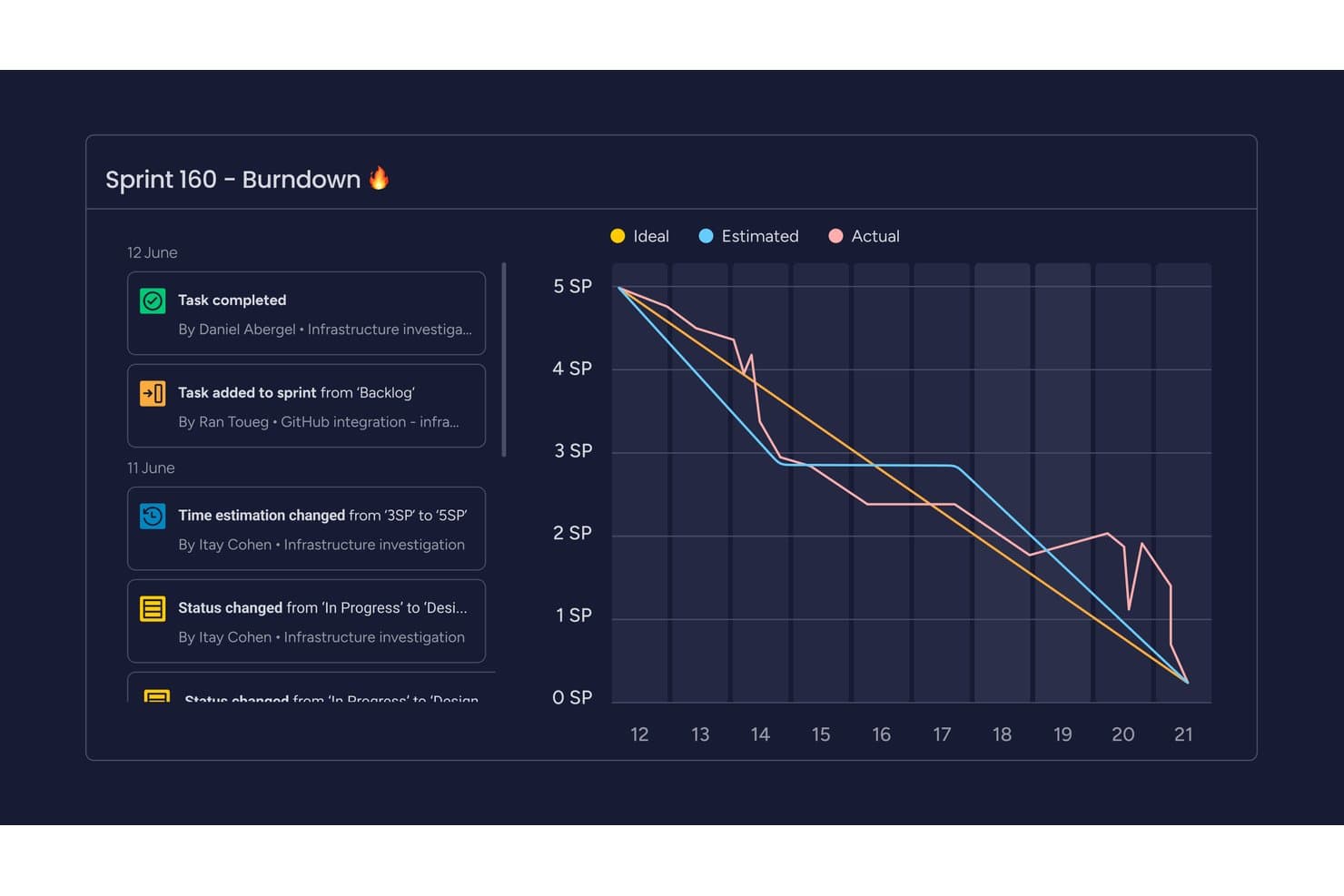
monday AI Workspace monitora l'avanzamento dello sprint con un grafico di burndown visivo. monday AI Workspace è una piattaforma flessibile per la gestione del lavoro, pensata per i team di prodotto che hanno bisogno di collegare roadmap, feedback dei clienti, piani di distribuzione e priorità interfunzionali in un unico luogo.
Per chi è più adatto monday AI Workspace?
Team di product operations che hanno bisogno di flussi di lavoro personalizzabili per gestire la raccolta delle richieste, la definizione delle priorità, i lanci e le dipendenze interfunzionali.
Perché monday AI Workspace è una buona alternativa a ProductPlan
Ho scelto monday AI Workspace perché la sua pianificazione basata su flussi di lavoro altamente personalizzabili si adatta alle attività di product operations. Utilizzo bacheche collegate per riunire feedback dei clienti, roadmap, piani di distribuzione e dipendenze interfunzionali. I flussi di lavoro personalizzati per la raccolta delle richieste e la definizione delle priorità aiutano inoltre il mio team a portare le richieste dalla fase di scoperta al lancio senza perdere il contesto.
Funzionalità principali di monday AI Workspace
- Viste temporali e Gantt: Visualizza le date della roadmap, le tappe fondamentali e i programmi di distribuzione.
- Monitoraggio delle dipendenze: Collega gli elementi e segnala le attività successive bloccate.
- Vista del carico di lavoro: Visualizza la capacità del team nelle iniziative della roadmap.
- Dashboard: Monitora l'avanzamento dei progetti con widget personalizzabili.
Integrazioni di monday AI Workspace
monday AI Workspace offre oltre 850 integrazioni e app, tra cui Slack, Salesforce, HubSpot, Google Calendar, Microsoft Teams, GitHub, GitLab, Zendesk e Mailchimp. Supporta Zapier, le integrazioni del marketplace e un'API GraphQL per le integrazioni personalizzate.
Pros and Cons
Pros:
- Le bacheche personalizzate collegano la fase di scoperta a quella di distribuzione
- Le viste flessibili supportano la pianificazione della roadmap interfunzionale
- Le dashboard evidenziano l'avanzamento delle iniziative di prodotto
Cons:
- Meno pensato specificamente per la pianificazione del portafoglio prodotti
- La suddivisione delle attività può limitare la gestione di lavori di prodotto complessi
Learn more about monday AI Workspace: Ideale per la pianificazione delle roadmap a livello di portafoglio basata sull'IA
- Demo gratuita disponibile
- Prezzi su richiesta
Visit WebsiteCustomer Rating:4.8/5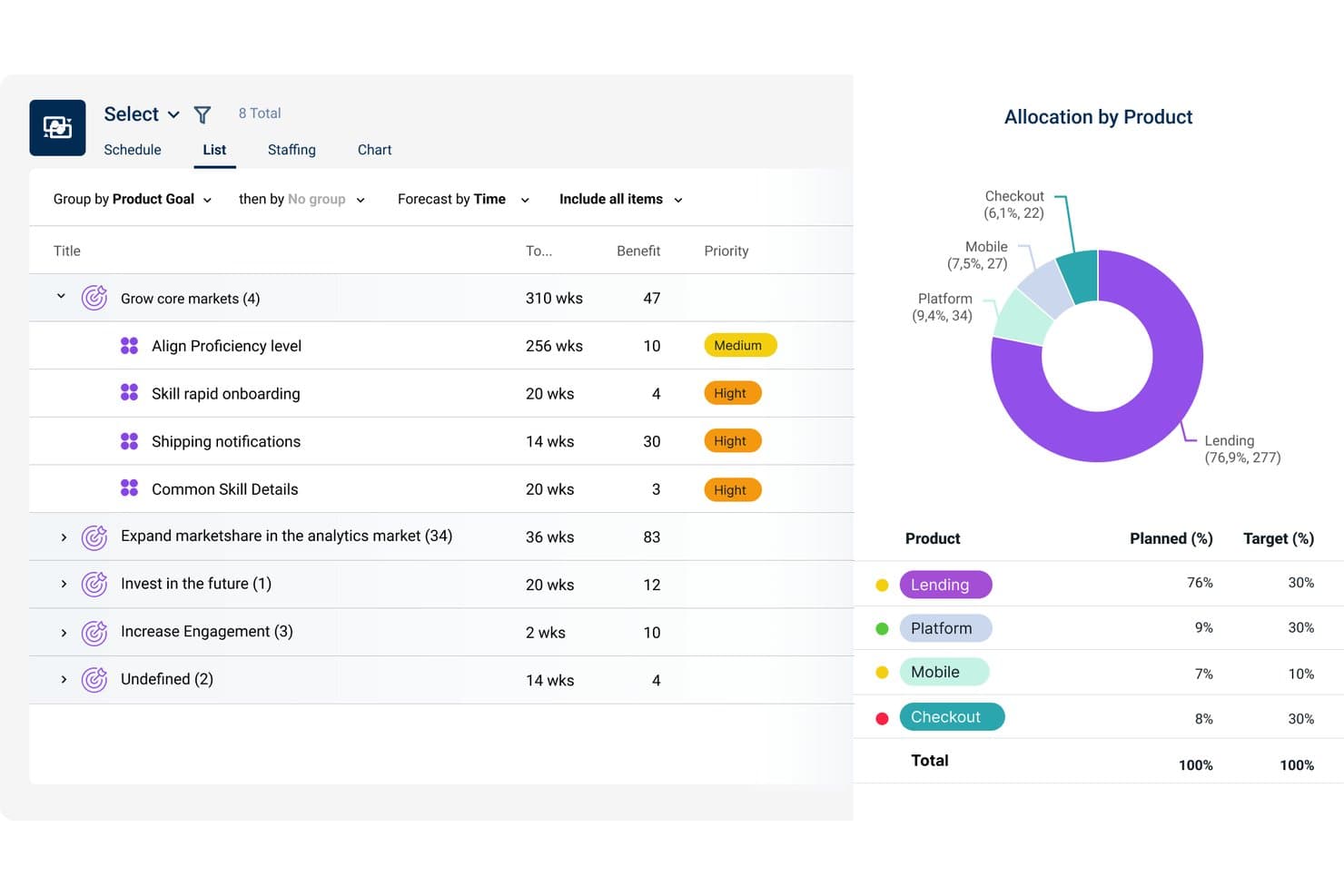
Dragonboat visualizza l'allocazione dei prodotti rispetto agli obiettivi tra i portafogli. Dragonboat è una piattaforma per la gestione del portafoglio prodotti destinata ai responsabili di prodotto che devono collegare strategia, definizione delle priorità, pianificazione della capacità e realizzazione tra i team, mantenendo sotto controllo i risultati aziendali.
Per chi è più adatto Dragonboat?
I responsabili del portafoglio prodotti nelle organizzazioni in crescita possono usare Dragonboat per collegare le priorità strategiche, la pianificazione della capacità e la realizzazione tra i team.
Perché Dragonboat è una buona alternativa a ProductPlan
Ho scelto Dragonboat perché la sua pianificazione delle roadmap a livello di portafoglio basata sull'IA collega le priorità strategiche alla pianificazione della capacità e alla realizzazione. Lo uso per confrontare le iniziative tra i team, bilanciare la capacità disponibile e mantenere le roadmap collegate a risultati aziendali misurabili. Questo lo rende utile quando le alternative a ProductPlan devono supportare decisioni a livello di portafoglio che vadano oltre le tempistiche delle funzionalità.
Funzionalità principali di Dragonboat
- Integrazioni con Jira e Azure DevOps: Sincronizza gli elementi della roadmap con gli strumenti di realizzazione.
- Mappatura delle dipendenze: Visualizza le relazioni tra iniziative ed elementi di lavoro.
- Viste personalizzate della roadmap: Filtra e raggruppa le roadmap in base ai campi selezionati.
- Monitoraggio dei progressi: Monitora lo stato delle iniziative, le tappe fondamentali e gli aggiornamenti sulla realizzazione.
Integrazioni di Dragonboat
Dragonboat supporta le integrazioni con Jira e Azure DevOps, consentendo ai team di sincronizzare gli elementi della roadmap con gli strumenti di realizzazione.
Pros and Cons
Pros:
- I riepiloghi del portafoglio collegano le roadmap alle esigenze di risorse
- La pianificazione degli scenari collega le priorità a risultati misurabili
- Le viste flessibili mantengono l'allineamento tra i diversi interlocutori
Cons:
- La pianificazione della capacità risente delle variazioni nelle dimensioni dei team
- La condivisione delle viste esterne richiede uno sforzo aggiuntivo
Learn more about Dragonboat: Ideale per modelli personalizzati di valutazione delle priorità
- Demo gratuita disponibile
- Prezzi su richiesta
Visit WebsiteCustomer Rating:4.4/5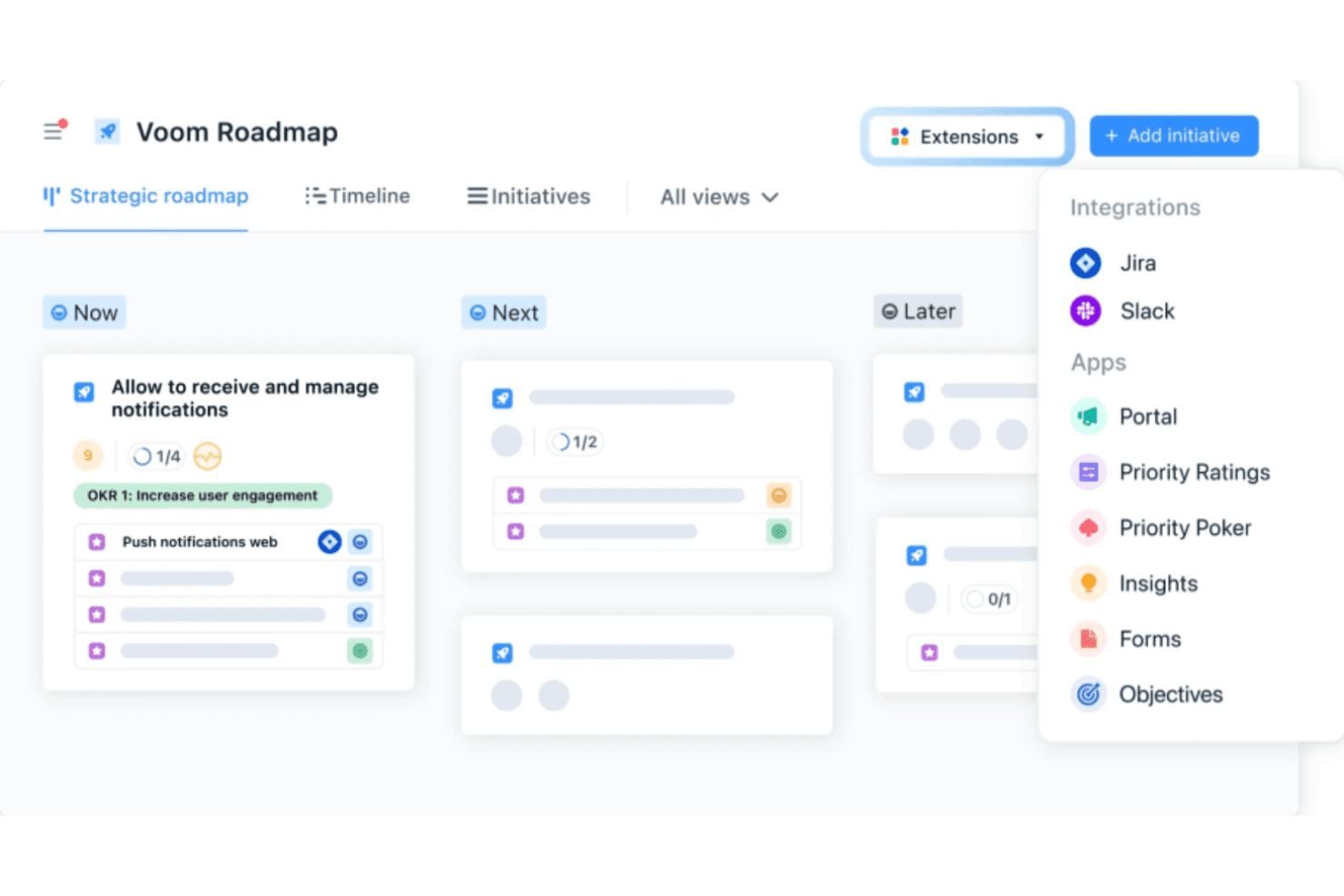
airfocus utilizza l'intelligenza artificiale per definire le priorità e offre strutture personalizzabili per piani di sviluppo flessibili. airfocus è una piattaforma di gestione dei prodotti per squadre che devono collegare la strategia del prodotto, il feedback dei clienti, i piani di sviluppo e le decisioni sulla consegna in un unico spazio di lavoro.
Per chi è più adatto airfocus?
Responsabili di prodotto e squadre addette alle operazioni di prodotto che necessitano di modelli di valutazione configurabili per confrontare le iniziative in base alla strategia, al valore per i clienti e ai vincoli di consegna.
Perché airfocus è una buona alternativa a ProductPlan
Ho scelto airfocus perché è progettato per modelli personalizzati di valutazione delle priorità. Utilizzo criteri ponderati, campi personalizzati e viste per la definizione delle priorità per confrontare le iniziative in base al valore per i clienti, all'allineamento strategico e all'impegno richiesto per la consegna. La mia squadra può modificare i modelli di valutazione quando cambiano gli obiettivi del prodotto e utilizzare poi i risultati per supportare le decisioni sui compromessi del piano di sviluppo.
Funzionalità principali di airfocus
- Portale dei feedback: Raccogli e organizza il feedback dei clienti in uno spazio condiviso.
- Piano di sviluppo del prodotto: Crea piani di sviluppo visivi con viste temporali flessibili.
- Gestione delle dipendenze: Collega gli elementi di lavoro correlati per monitorare le dipendenze della consegna.
- Integrazioni: Collega airfocus a strumenti come Jira, Azure DevOps e Slack.
Integrazioni di airfocus
airfocus si integra con Jira, Azure DevOps e Slack.
Pros and Cons
Pros:
- I modelli di valutazione ponderata consentono di confrontare le iniziative in modo coerente
- Il feedback dei clienti si collega direttamente alla definizione delle priorità
- Il monitoraggio delle dipendenze supporta le decisioni sui compromessi del piano di sviluppo
Cons:
- La modifica della sequenza temporale risulta poco intuitiva su larga scala
- La configurazione iniziale della valutazione richiede una configurazione considerevole
 Ideale per collegare il feedback dei clienti agli elementi della roadmap
- Prova gratuita di 14 giorni + demo gratuita disponibile
- A partire da $19/utente/mese (con fatturazione annuale)
Visit WebsiteCustomer Rating:4.4/5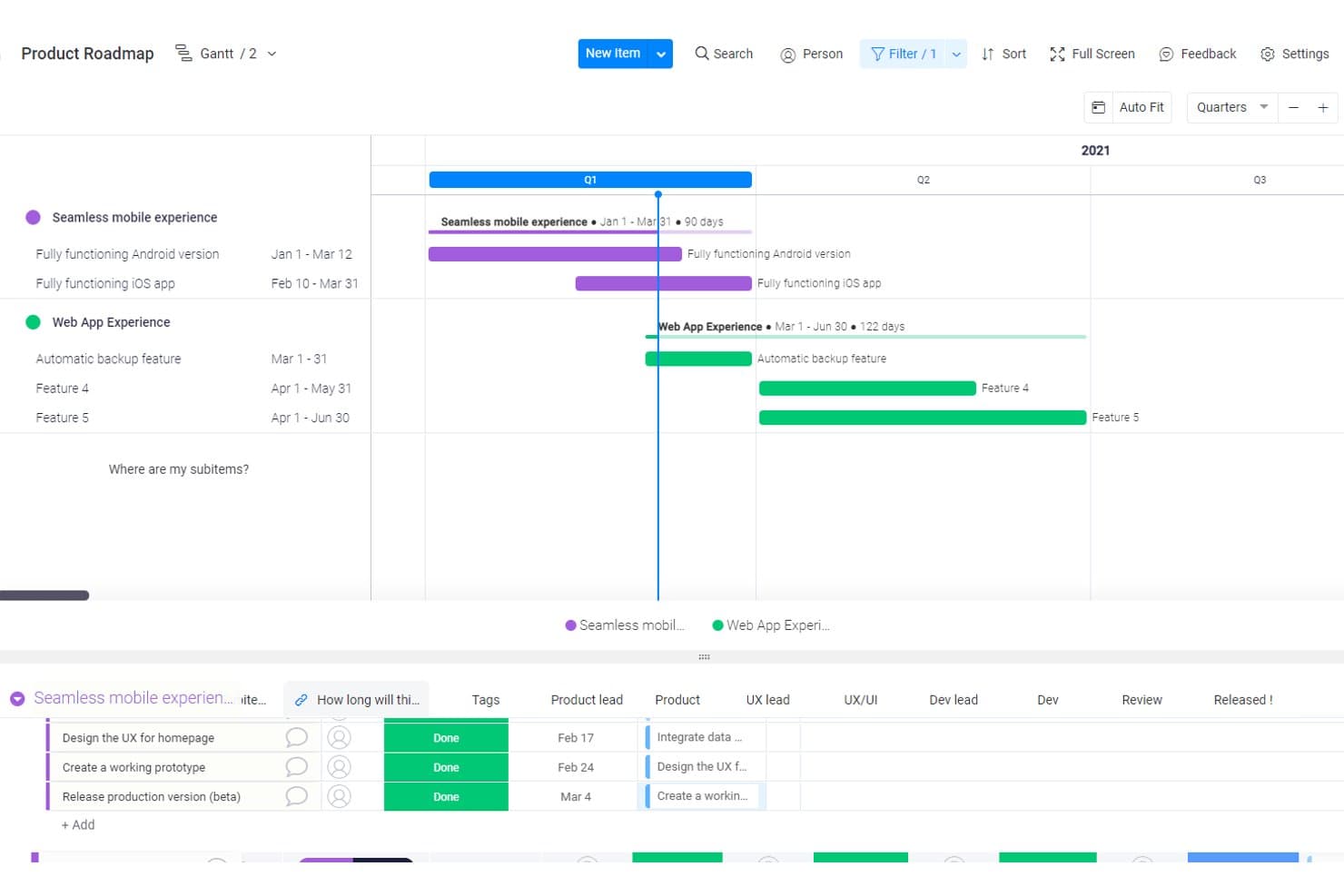
Craft.io visualizza le roadmap dei prodotti con sequenze temporali Gantt e sottoelementi. Craft.io è un software per la pianificazione della roadmap dei prodotti, destinato ai team di prodotto che devono collegare strategia, definizione delle priorità, pianificazione del portafoglio e collaborazione interfunzionale in un unico spazio di lavoro.
Per chi è più adatto Craft.io?
Craft.io è adatto ai team di prodotto che devono collegare il feedback dei clienti alle decisioni sulle priorità e alla pianificazione della roadmap.
Perché Craft.io è una buona alternativa a ProductPlan
Ho scelto Craft.io perché è progettato per collegare il feedback dei clienti agli elementi della roadmap. Utilizzo il suo repository dei feedback, gli insight sui clienti e gli strumenti per la definizione delle priorità per collegare le richieste alle iniziative di prodotto. Il mio team può quindi mostrare perché un elemento della roadmap è importante, ad esempio collegando i reclami ricorrenti relativi all’onboarding a un miglioramento pianificato del flusso di lavoro.
Funzionalità principali di Craft.io
- Viste della roadmap: Crea roadmap temporali, a corsie e di portafoglio.
- Gerarchia del prodotto: Organizza prodotti, capacità, funzionalità e release.
- Mappatura delle dipendenze: Collega gli elementi di lavoro correlati e metti in evidenza le dipendenze di consegna.
- Integrazione con Jira: Sincronizza gli elementi della roadmap con i dati di consegna di Jira.
Integrazioni di Craft.io
Craft.io offre un’integrazione nativa con Jira che sincronizza gli elementi della roadmap con i dati di consegna. Supporta inoltre integrazioni personalizzate tramite un’API.
Pros and Cons
Pros:
- Collega direttamente il feedback agli elementi della roadmap
- Collega le iniziative agli obiettivi strategici
- Supporta la pianificazione delle dipendenze e della capacità
Cons:
- L’ampiezza delle funzionalità può disorientare i nuovi utenti
- La qualità del feedback dipende da una categorizzazione coerente
Learn more about Craft.io: Ideale per allineare il feedback alla roadmap
- Prova gratuita di 14 giorni + demo gratuita disponibile
- A partire da $10/utente/mese
Visit WebsiteCustomer Rating:4/5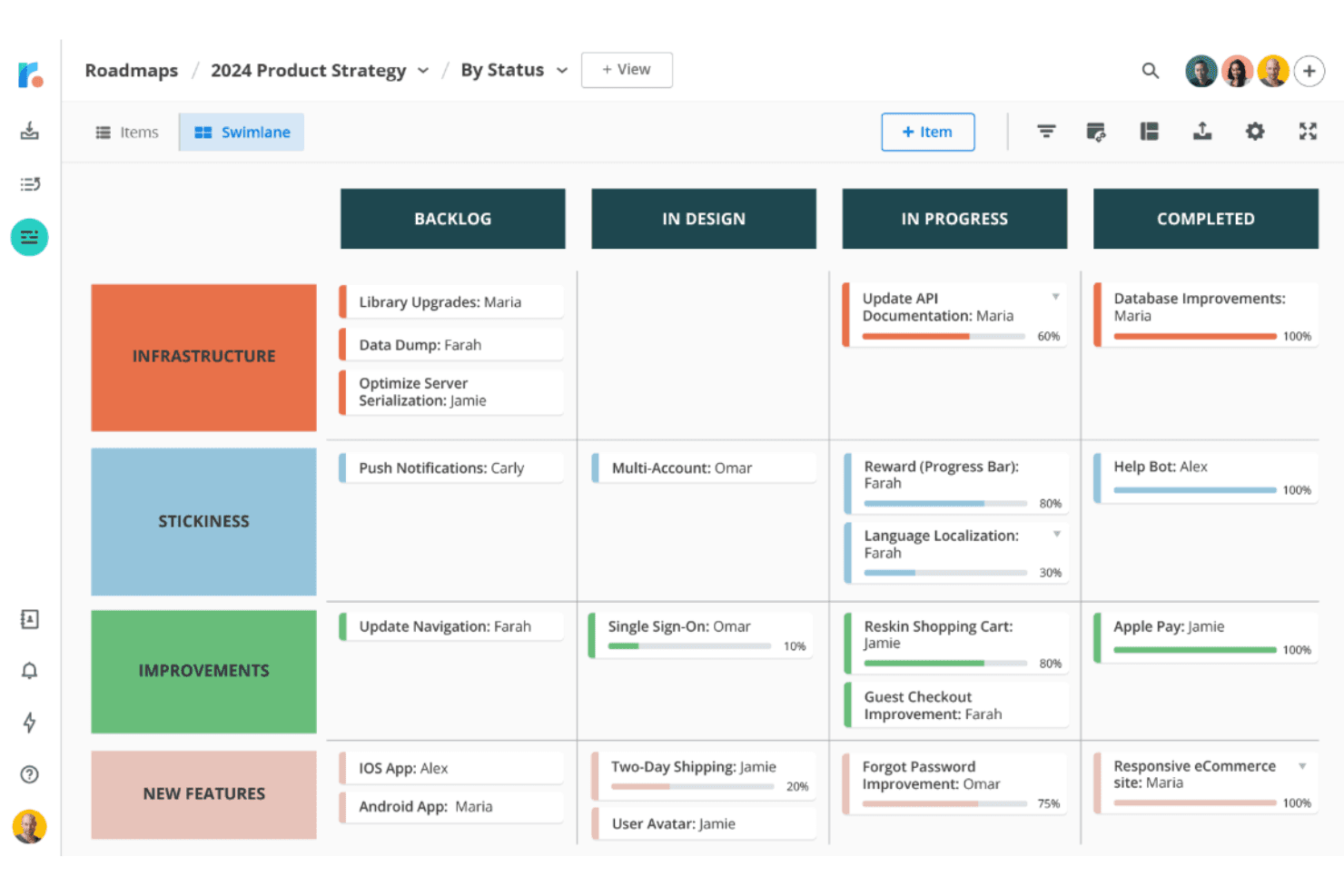
Roadmunk integra il feedback degli utenti in roadmap chiare e basate sulle esigenze dei clienti. Il software di roadmapping di Tempo aiuta i team di prodotto a creare roadmap visive e condivisibili che collegano le priorità strategiche ai piani di sviluppo e mantengono gli stakeholder allineati tra portafogli complessi.
Per chi è più adatto il software di roadmapping di Tempo?
I product manager che devono trasformare il feedback dei clienti in roadmap prioritarie e condivisibili lo troveranno adatto alle loro esigenze.
Perché il software di roadmapping di Tempo è una valida alternativa a ProductPlan
Ho scelto il software di roadmapping di Tempo perché il suo allineamento tra feedback e roadmap collega gli input dei clienti alle priorità del prodotto. Utilizzo il feedback dei clienti per definire roadmap visive e condivisibili, quindi collego le priorità strategiche ai piani di sviluppo. In questo modo, gli stakeholder hanno una visione chiara del motivo per cui un'iniziativa è importante e del suo posizionamento all'interno del portafoglio.
Funzionalità principali del software di roadmapping di Tempo
- Visualizzazioni della sequenza temporale : Mostrano le iniziative in formati di roadmap basati sul tempo.
- Campi personalizzati : Aggiungono metadati per temi, responsabili, stato e priorità.
- Mappatura delle dipendenze : Collega le iniziative per mostrare le relazioni di sviluppo.
- Integrazione con Jira : Sincronizza gli elementi della roadmap con progetti e attività di Jira.
Integrazioni del software di roadmapping di Tempo
Il software di roadmapping di Tempo offre integrazioni native con Jira, Azure DevOps, GitHub, GitLab, Asana, Shortcut e Trello. Le integrazioni con Jira e Azure DevOps supportano la sincronizzazione degli elementi della roadmap con il lavoro di sviluppo, comprese le date e i campi personalizzati.
Pros and Cons
Pros:
- Definizione delle priorità delle idee collegata al feedback
- Più visualizzazioni della roadmap a partire da un unico set di dati
- Le roadmap condivisibili chiariscono l'allineamento degli stakeholder
Cons:
- Nessun periodo di pianificazione degli sprint nativo
- Alcuni recensori segnalano problemi occasionali
Learn more about Tempo Roadmapping Software:
Altre alternative a ProductPlan
Ecco alcune alternative aggiuntive a ProductPlan che non sono entrate nella mia selezione, ma che vale comunque la pena prendere in considerazione:
- 11IBM TargetprocessIdeale per la pianificazione SAFe e del portafoglio aziendale
- 12Jira Product DiscoveryIdeale per la pianificazione di roadmap native per Jira
- 13SmartsheetIdeale per allineare il team tra fogli di calcolo e roadmap
- 14UservoiceIdeale per la definizione delle priorità dei feedback ponderata in base ai ricavi
- 15ClickUpIdeale per il lavoro tutto-in-uno e la pianificazione delle roadmap
- 16AirtableIdeale per creare roadmap basate su modelli di dati personalizzati
- 17PendoIdeale per la pianificazione della roadmap basata sui feedback ponderati in base ai ricavi
- 18LinearIdeale per le tempistiche delle roadmap legate all'esecuzione
- 19FeaturebaseIdeale per chiudere il ciclo sulle richieste di funzionalità
- 20SleekplanIdeale per la pianificazione della roadmap basata sui feedback
Come valuto un'alternativa a ProductPlan
Divido la mia valutazione in tre parti: funzionalità di base, caratteristiche distintive e aspetti aggiuntivi. Per prima cosa verifico se uno strumento è in grado di creare piani temporali visivi e di valutare le iniziative in base a criteri strategici: questi elementi hanno il peso maggiore. Poi cerco funzionalità di pianificazione assistita dall'IA o di segmentazione dei clienti in base ai feedback, oltre a valutare l'efficacia dei prezzi e dell'avvio per i team interfunzionali.
Funzionalità di base (requisiti fondamentali per questo elenco)
Quando seleziono gli strumenti da includere nel mio elenco, assegno a ciascuno un punteggio su una scala da 0 (non offre la funzionalità) a 5 (eccelle in quest'area) per ogni funzionalità di base riportata di seguito. Poi converto il totale in una percentuale per aiutare a valutare l'idoneità complessiva di ciascuno strumento, attribuendo un peso aggiuntivo alle funzionalità che ho considerato essenziali.
- Visualizzazione del piano temporale (essenziale): Cerco piani temporali modificabili che mostrino chiaramente iniziative, funzionalità, dipendenze e rilasci.
- Struttura per la definizione delle priorità (essenziale): Il punteggio dovrebbe confrontare valore, impegno, impatto o aderenza strategica tra iniziative concorrenti.
- Condivisione con le parti interessate: Valuto viste di presentazione curate, collegamenti condivisibili, esportazioni e controlli di visibilità specifici per il pubblico.
- Integrazioni con gli strumenti di sviluppo: Verifico la presenza di collegamenti bidirezionali con strumenti come Jira, che colleghino gli elementi del piano temporale alle attività di sviluppo.
- Viste del piano temporale: Diverse viste temporali, a corsie, a flusso di lavoro o di portafoglio dovrebbero supportare le esigenze di pianificazione e comunicazione.
- Raccolta dei feedback: Cerco richieste categorizzate, votazioni e collegamenti tra le idee dei clienti e gli elementi prioritari del piano temporale.
Una volta ottenuto un elenco di strumenti che soddisfano i criteri, considero ciò che distingue ciascuna piattaforma.
Fattori distintivi (ciò che differenzia i fornitori)
Ecco come confronto i diversi fornitori:
Caratteristiche distintive
Cerco una pianificazione dei piani temporali assistita dall'IA che vada oltre le semplici parole d'ordine: strumenti come Productboard e Aha! consentono di redigere bozze delle note di rilascio o di suggerire punteggi di priorità, risparmiando ore prima della revisione da parte delle parti interessate. Anche la segmentazione dei clienti in base ai feedback è altrettanto preziosa; valuto se uno strumento è in grado di ponderare le richieste in base al valore dell'account o al livello del piano, in modo che siano i clienti con l'impatto maggiore a determinare l'elenco delle attività. Verifico inoltre la presenza di una pianificazione della capacità che segnali gli impegni eccessivi prima della pianificazione del ciclo di lavoro, non dopo.
Oltre le funzionalità
I modelli di prezzo sono importanti in questo caso. Un prezzo per redattore con licenze gratuite per i visualizzatori consente di condividere i piani temporali tra i team vendite, assistenza e dirigenza senza far lievitare i costi, cosa che i modelli con prezzo per licenza penalizzano. Valuto anche la rapidità dell'avvio, poiché uno strumento che offre modelli e assistenza per la migrazione permette a un team di diventare operativo in pochi giorni, non settimane. Per le organizzazioni in crescita, verifico se le autorizzazioni basate sui ruoli e i piani temporali gerarchici possono scalare da un singolo team a un portafoglio completo senza dover ristrutturare la configurazione.
Funzionalità di ProductPlan: confronta i software alternativi per le roadmap
Ecco alcune delle funzionalità principali di ProductPlan, per aiutarti a mettere a confronto ciò che offrono le soluzioni alternative:
- Creazione visiva delle roadmap: Progetta roadmap intuitive che offrano al tuo team una visione d'insieme della strategia di prodotto, rendendo accessibili e attuabili anche i piani più complessi.
- Interfaccia drag-and-drop: Modifica facilmente attività o tempistiche, consentendo al tuo team di rimanere agile e adattarsi alle priorità in evoluzione senza perdere la concentrazione.
- Monitoraggio delle milestone: Mantieni il tuo team allineato monitorando visivamente i progressi verso gli obiettivi critici e assicurandoti che le scadenze vengano rispettate in modo efficiente. Hai un budget limitato? Consulta il nostro elenco dei migliori software gratuiti per il monitoraggio delle milestone.
- Strumenti di prioritizzazione: Valuta e assegna una priorità alle iniziative per concentrarti su ciò che conta di più, consentendo di prendere decisioni migliori per la direzione del tuo prodotto.
- Spazio di lavoro collaborativo: Favorisci la collaborazione in tempo reale con i membri del team e gli stakeholder in uno strumento di pianificazione delle roadmap basato sul cloud, garantendo allineamento e consenso.
- Roadmap condivisibili: Migliora la comunicazione tra i reparti o con i partner esterni condividendo roadmap chiare e concise che riflettano i tuoi piani più recenti.
- Libreria di modelli: Sfrutta modelli predefiniti basati sulle migliori pratiche, risparmiando tempo e aiutando il tuo team ad adottare stili di roadmap collaudati nel settore.
- Campi personalizzati: Adatta le roadmap alle esigenze specifiche del tuo team aggiungendo punti dati o metriche specifici e creando un'esperienza su misura per il tuo flusso di lavoro di gestione del prodotto.
- Controlli di accesso sicuri: Proteggi le informazioni sensibili con autorizzazioni personalizzabili, assicurandoti che solo i membri del team autorizzati possano accedere alle roadmap o modificarle.
- Accesso API: Integra ProductPlan con i tuoi strumenti SaaS preferiti, come i prodotti Atlassian, per sincronizzare attività, backlog, prioritizzazione dei prodotti e sprint, ottenendo un'esperienza di gestione del prodotto fluida.
- Notifiche: Rimani aggiornato grazie alle notifiche che informano il tuo team sui cambiamenti, assicurandoti che tutti lavorino sulla roadmap più recente.
- Diagrammi di Gantt e bacheche Kanban: Visualizza attività e progressi in diversi formati, offrendo ai team la flessibilità di lavorare nel modo più adatto alle loro esigenze.