

10 mejores herramientas de IA para crear estructuras visuales en 2026

Lista de herramientas de IA para crear wireframes


Las herramientas de IA para crear wireframes utilizan inteligencia artificial para ayudarte a crear, editar y perfeccionar wireframes digitales más rápido y con menos esfuerzo manual. Si buscas las mejores herramientas de IA para crear wireframes, probablemente quieras acelerar tu proceso de diseño, reducir las tareas repetitivas y mejorar la colaboración del equipo, sin sacrificar la calidad ni el control.
Con tantas opciones disponibles, es fácil perderse entre listas de funciones y afirmaciones de marketing. Esta guía elimina el ruido y te ayuda a comparar rápidamente las principales soluciones para que puedas elegir la herramienta adecuada para tu flujo de trabajo, equipo y objetivos del proyecto.
Por Qué Confiar en Nuestras Reseñas de Software
Llevamos revisando y probando software de gestión de productos desde 2020. Como product managers, sabemos lo crucial y complicado que es tomar la decisión correcta al seleccionar software. Invertimos en investigación profunda para ayudar a nuestra audiencia a tomar mejores decisiones de compra de software. Hemos probado más de 2,000 herramientas para distintos casos de uso y escrito más de 1,000 reseñas exhaustivas. Conozca cómo mantenemos la transparencia & nuestra metodología de reseñas de software.
Tabla comparativa de herramientas de IA para crear wireframes
Esta tabla comparativa resume los detalles de precios de mi selección de las mejores herramientas de IA para crear wireframes:
| Tool | Best For | Trial Info | Price | ||
|---|---|---|---|---|---|
| 1 | Ideal para edición colaborativa en tiempo real | Plan gratuito disponible | Desde $8/miembro/mes (facturado anualmente) | Website | |
| 2 | Ideal para componentes de arrastrar y soltar | Plan gratuito disponible | Desde $10/editor/mes (facturado anualmente) | Website | |
| 3 | Ideal para digitalizar wireframes hechos a mano | Plan gratuito disponible | Desde $12/usuario/mes (facturado anualmente) | Website | |
| 4 | Mejor para combinar IA con diseño manual | Plan gratuito disponible | Desde $11/editor/mes (facturado anualmente) | Website | |
| 5 | Ideal para la ideación con kits de interfaz integrados | Plan gratuito disponible | Desde $14/mes (facturado anualmente) | Website | |
| 6 | Ideal para la colaboración visual en distintos tipos de diagramas | Plan gratuito disponible | Desde $6.58/mes | Website | |
| 7 | Ideal para generar múltiples variantes a partir de indicaciones | Plan gratuito disponible | Desde $12/mes (facturado anualmente) | Website | |
| 8 | Ideal para exportaciones de componentes Figma y React | Plan gratuito + prueba gratuita disponible | Desde $18/mes | Website | |
| 9 | Ideal para diseños adaptativos enfocados en la estructura | Prueba gratuita disponible | Desde $10/mes (facturado anual) | Website | |
| 10 | Ideal para integraciones con el ecosistema de Google | Uso gratuito | Gratis | Website |

Reseñas de herramientas de IA para crear wireframes
A continuación encontrarás mis resúmenes detallados de las mejores herramientas de IA para crear wireframes que llegaron a mi lista. Mis reseñas ofrecen un análisis detallado de las funciones, los mejores casos de uso y las integraciones de cada herramienta para ayudarte a encontrar la mejor opción para ti.

Miro
Ideal para edición colaborativa en tiempo real
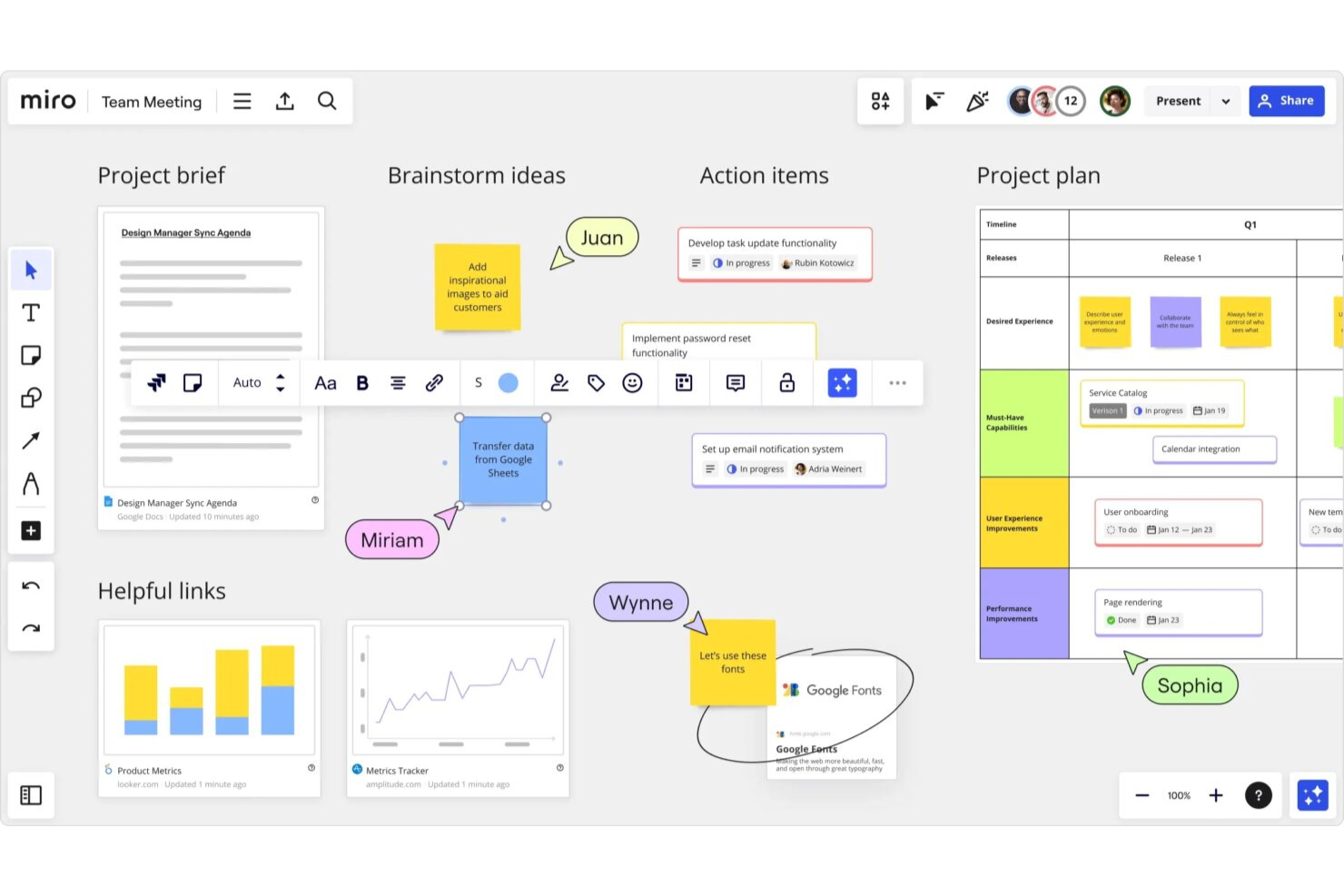
Miro ofrece un espacio de trabajo digital flexible diseñado para equipos que necesitan hacer lluvias de ideas, crear wireframes y iterar visualmente. Es especialmente útil para gerentes de producto, diseñadores UX y equipos multifuncionales que desean colaborar en conceptos en etapas tempranas. Con sus funciones impulsadas por IA y herramientas visuales, Miro ayuda a los equipos a convertir ideas en wireframes estructurados rápidamente.
¿Para quién es mejor Miro?
Miro es ideal para equipos multifuncionales y organizaciones de producto que priorizan la colaboración en tiempo real durante el proceso de creación de wireframes e ideación.
Por qué elegí Miro
Lo que diferencia a Miro para mí es cómo permite la edición colaborativa en tiempo real, algo esencial para los equipos que trabajan juntos en wireframes. La edición simultánea por varios usuarios les permite a todos aportar ideas, hacer cambios y dejar comentarios directamente en el tablero sin tener que esperar traspasos. También me gusta que las funciones de IA de Miro pueden ayudar a generar componentes de wireframe y organizar los diseños mientras el equipo trabaja. Esta combinación de colaboración sincrónica y asistencia impulsada por IA hace de Miro una opción sólida para equipos que necesitan pasar rápidamente de la lluvia de ideas a wireframes estructurados.
Características clave de Miro
Otras características que hacen de Miro una opción versátil para la creación de wireframes con IA incluyen:
- Plantillas de wireframe: Accede a una biblioteca de plantillas de wireframe prediseñadas para proyectos web y móviles.
- Notas adhesivas y votación: Usa notas adhesivas digitales y herramientas de votación integradas para recopilar opiniones y priorizar ideas.
- Modo de presentación: Comparte wireframes y flujos de diseño en un formato de presentación guiada a pantalla completa.
- Historial de versiones: Revisa y restaura versiones anteriores de los tableros para seguir los cambios y las iteraciones.
Integraciones de Miro
Las integraciones incluyen Microsoft 365, Google Workspace, Jira, Confluence, Slack, Asana, Notion, Zoom, Microsoft Teams y más.
Pros and Cons
Pros:
- Edición en tiempo real por múltiples usuarios en wireframes
- Herramientas integradas de retroalimentación y votación
- Modo de presentación para compartir wireframes
Cons:
- Retrasos ocasionales con tableros grandes y complejos
- Opciones de exportación limitadas
New Product Updates from Miro
Miro Adds Japan Data Residency for Enterprise Customers
Miro has introduced Japan data residency for enterprise customers, offering in-region storage for production data, backups, and metadata, plus in-region compute infrastructure. For more information, visit Miro's official site.

Ideal para componentes de arrastrar y soltar
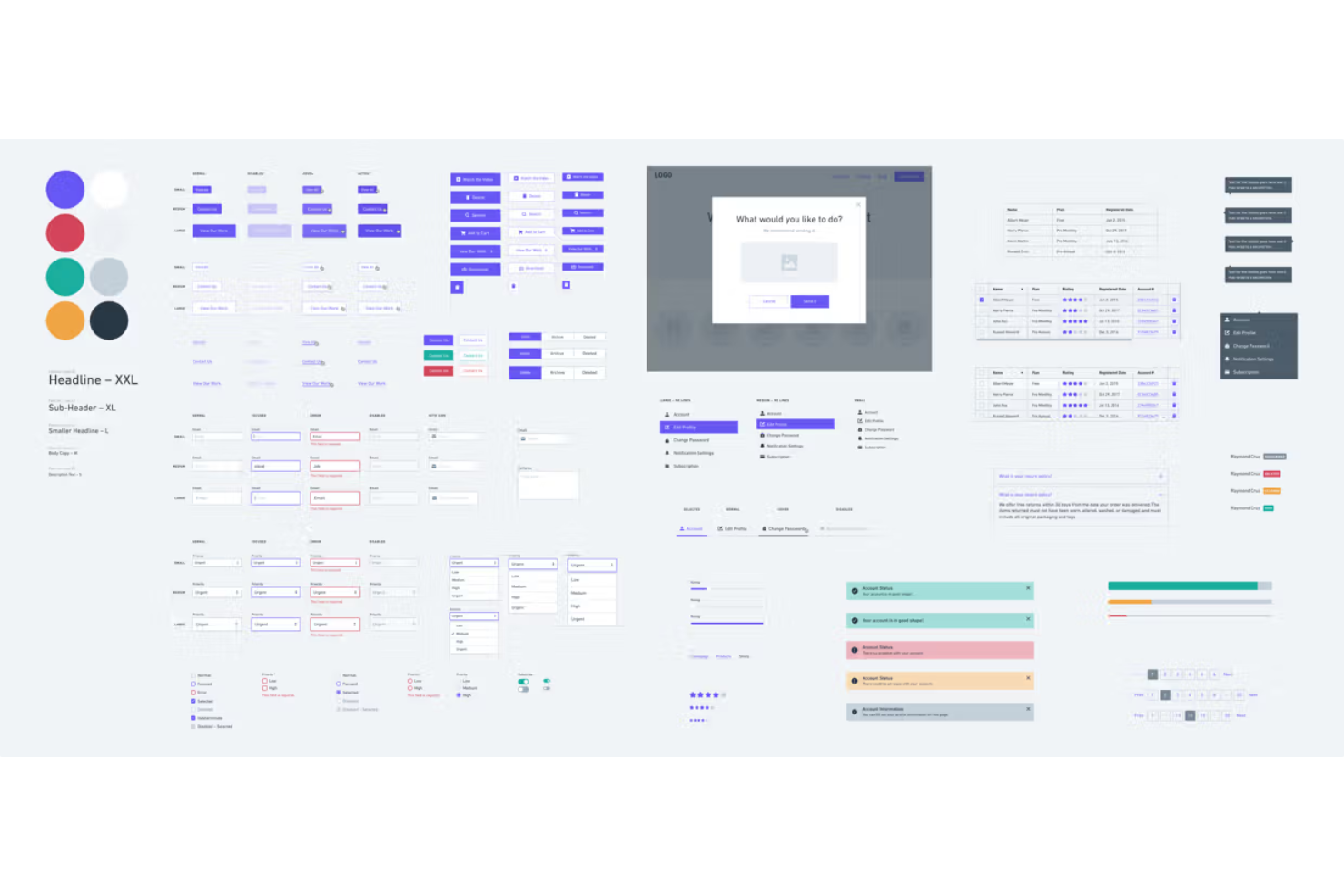
Whimsical es un espacio de trabajo visual diseñado para equipos que necesitan crear e iterar rápidamente sobre wireframes. Es especialmente atractivo para gestores de producto, diseñadores UX y startups que buscan una manera sencilla de plasmar ideas de forma visual. La plataforma ayuda a los usuarios a pasar del concepto al wireframe con muy poca fricción, facilitando la comunicación de la intención de diseño desde las primeras fases del proceso.
¿Para quién es Whimsical?
Whimsical es ideal para equipos de producto y diseñadores UX en startups o empresas pequeñas y medianas que necesitan prototipar y compartir wireframes a gran velocidad.
Por qué elegí Whimsical
Lo que más me llama la atención de Whimsical es su biblioteca de componentes con función de arrastrar y soltar, que hace que el wireframing sea rápido y accesible para los equipos que deben iterar rápidamente. La plataforma ofrece una amplia gama de elementos de interfaz de usuario prediseñados, para que puedas montar maquetas sin tener que dedicar tiempo a dibujar o dar formato de forma manual. También me gusta que Whimsical permite cambiar instantáneamente entre wireframes, diagramas de flujo y mapas mentales dentro del mismo espacio de trabajo, lo que ayuda a los equipos a mantener todo su trabajo de diseño inicial conectado. Este enfoque en el montaje visual y rápido es especialmente útil para equipos de producto y UX que desean avanzar de la idea al wireframe con la mínima fricción.
Funciones clave de Whimsical
Otras funciones que considero valiosas para los equipos que piensan usar Whimsical para wireframing con IA son:
- Sugerencias de wireframes impulsadas por IA: La herramienta puede generar maquetas de wireframes a partir de indicaciones escritas o requisitos.
- Herramientas de comentarios y retroalimentación: Los miembros del equipo pueden dejar comentarios directamente sobre los wireframes para una revisión colaborativa.
- Historial de versiones: Los usuarios pueden rastrear cambios y volver a versiones anteriores de sus wireframes.
- Opciones para compartir e insertar: Los wireframes pueden compartirse mediante enlaces públicos o integrarse en otras plataformas, facilitando el acceso a los interesados.
Integraciones de Whimsical
Las integraciones incluyen Jira, Google Docs, ClickUp, Asana, ChatGPT, Confluence, Guru, Trello, Notion y más.
Pros and Cons
Pros:
- Genera mapas mentales instantáneos a partir de palabras clave
- Convierte indicaciones de texto en lógica de diagrama de flujo
- Soporta código Mermaid para exportación de diagramas
Cons:
- No permite personalizar paletas de colores de marca
- No tiene API nativa para integraciones externas

Uizard
Ideal para digitalizar wireframes hechos a mano
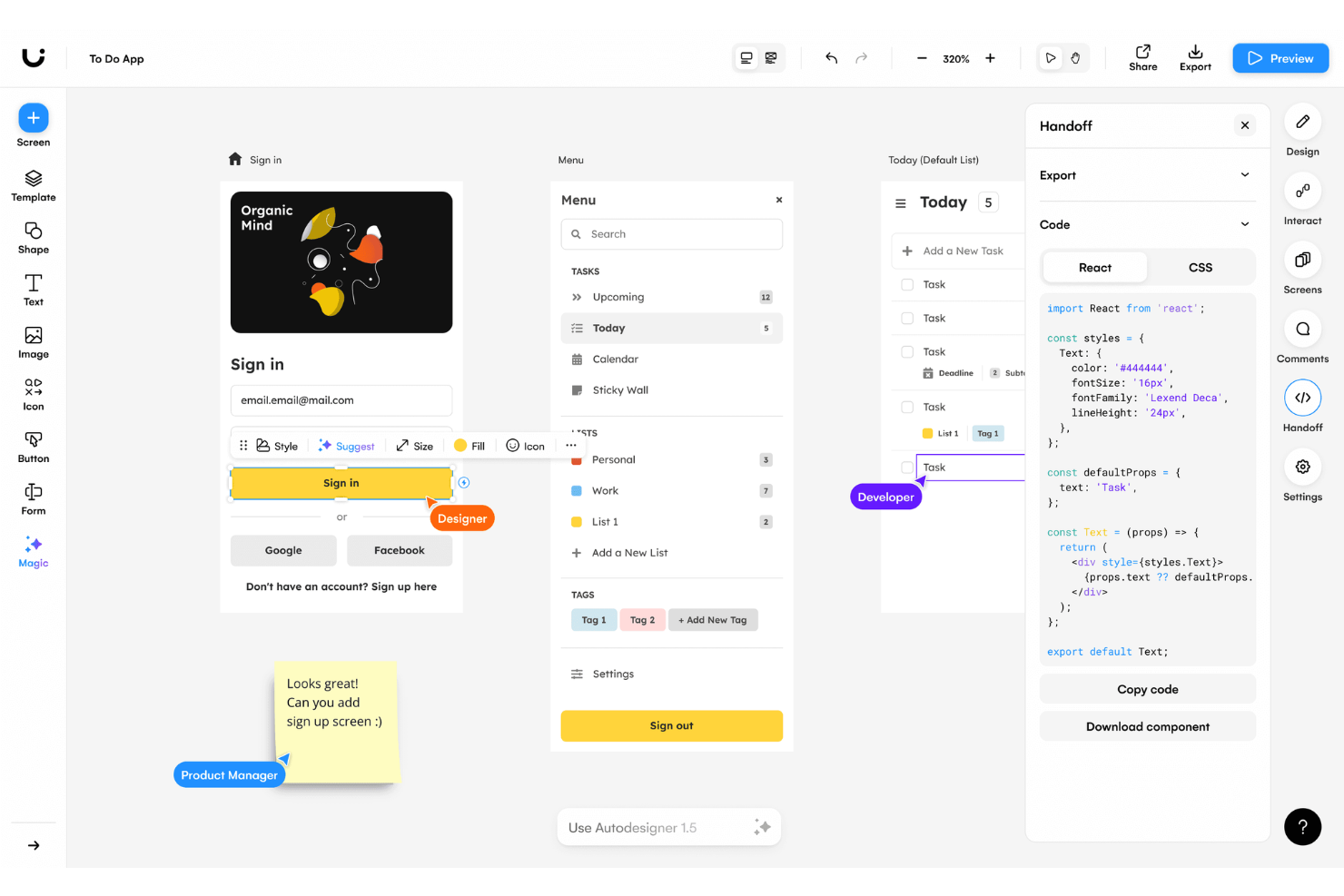
Uizard es una herramienta de wireframing impulsada por inteligencia artificial diseñada para equipos de producto, diseñadores UX y fundadores que desean transformar rápidamente ideas en prototipos digitales. Se destaca por su capacidad para convertir bocetos y conceptos en wireframes interactivos con un esfuerzo manual mínimo. Si necesitas acelerar el diseño en las etapas iniciales y iterar visualmente, Uizard ofrece una solución rápida y accesible.
¿Para quién es mejor Uizard?
Uizard es ideal para diseñadores UX y equipos de producto que quieren digitalizar wireframes hechos a mano y crear prototipos rápidamente de conceptos iniciales.
Por qué elegí Uizard
Lo que me atrajo de Uizard es su capacidad única para digitalizar wireframes hechos a mano utilizando IA. Veo un valor real en poder tomar una foto de un boceto y que Uizard lo convierta instantáneamente en un wireframe digital editable. Esta función es especialmente útil para equipos que suelen hacer lluvia de ideas en pizarras o papel y desean mover esas ideas rápidamente a un formato digital colaborativo. La IA de Uizard también reconoce elementos de interfaz y los organiza en estructuras bien definidas, lo que ayuda a acelerar el proceso de diseño inicial.
Funciones clave de Uizard
Además de digitalizar bocetos, Uizard ofrece otras funciones que apoyan un wireframing colaborativo y rápido:
- IA de texto a diseño: Genera wireframes y estructuras de interfaces a partir de instrucciones escritas usando inteligencia artificial.
- Biblioteca de componentes: Accede a una biblioteca de componentes reutilizables para proyectos web y móviles.
- Generador de temas: Aplica instantáneamente esquemas de color y tipografías coherentes a tus wireframes.
- Colaboración en tiempo real: Invita a los miembros del equipo a editar, comentar e iterar juntos sobre los wireframes.
Integraciones de Uizard
Las integraciones no están disponibles públicamente.
Pros and Cons
Pros:
- Convierte bocetos hechos a mano en wireframes
- Generador de temas para un diseño estilísticamente coherente
- Genera flujos de varias pantallas a partir de texto
Cons:
- No permite exportar archivos nativos de Figma
- No permite voltear imágenes horizontalmente

Visily
Mejor para combinar IA con diseño manual
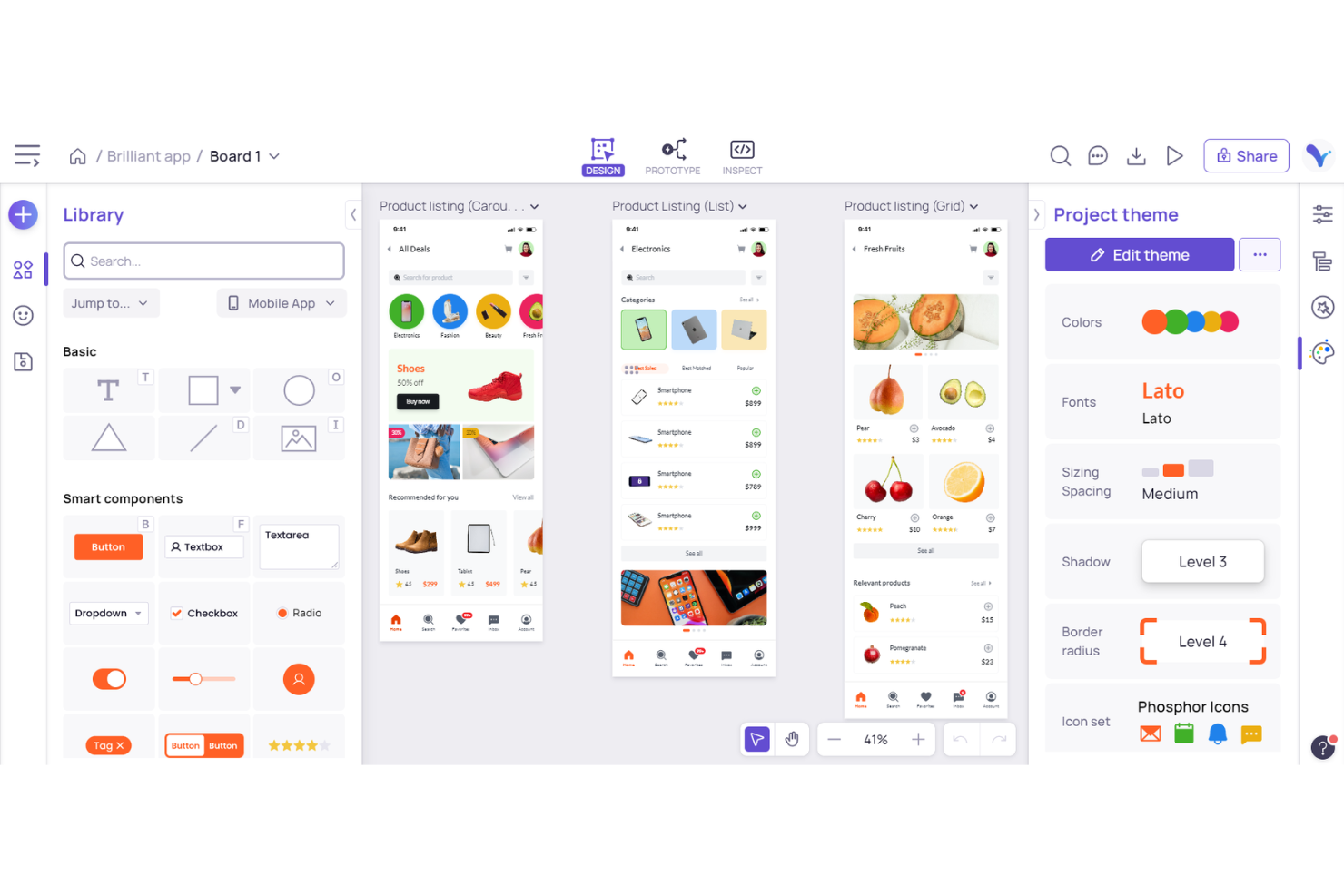
Visily ofrece una solución de wireframing potenciada por IA diseñada para equipos que desean combinar la automatización con el control práctico del diseño. Es una excelente opción para gerentes de producto, diseñadores UX y startups que buscan transformar rápidamente ideas en wireframes interactivos. La plataforma aborda desafíos como la creación rápida de prototipos, la colaboración en equipo y la reducción del esfuerzo manual al comenzar desde cero.
¿Para quién es mejor Visily?
Visily es ideal para equipos de producto y diseñadores UX en startups o pequeñas empresas que quieren acelerar el diseño en etapas tempranas y la creación de prototipos.
Por qué elegí Visily
Elegí Visily porque destaca para equipos que desean combinar la automatización impulsada por IA con la flexibilidad del diseño manual. La plataforma permite generar wireframes a partir de indicaciones de texto o capturas de pantalla, para luego perfeccionar distribuciones y componentes mediante un editor de arrastrar y soltar. Valoro cómo puedes alternar entre sugerencias generadas por IA y ajustes manuales sin perder el control creativo. Este enfoque hace que Visily sea especialmente útil para equipos que quieren acelerar la ideación pero aún necesitan perfeccionar los detalles por sí mismos.
Funciones clave de Visily
Otras funciones que hacen de Visily una opción destacada para wireframing con IA incluyen:
- Biblioteca de plantillas: Accede a una amplia variedad de plantillas de wireframes prediseñadas para proyectos web y móviles.
- Personalización de componentes: Modifica y guarda componentes UI personalizados para reutilizarlos en diferentes wireframes.
- Herramientas de colaboración: Invita a miembros del equipo a comentar, editar y revisar wireframes en tiempo real.
- Historial de versiones: Haz seguimiento de los cambios y vuelve a versiones anteriores de tus wireframes cuando sea necesario.
Integraciones de Visily
Las integraciones incluyen Figma, Jira, Notion, Slack, Unsplash, Pixabay y más.
Pros and Cons
Pros:
- Genera wireframes a partir de texto o imágenes
- Gran biblioteca de plantillas prediseñadas
- Fácil exportación a Figma y otras herramientas
Cons:
- Funciones avanzadas de prototipado limitadas
- No tiene modo sin conexión para wireframing

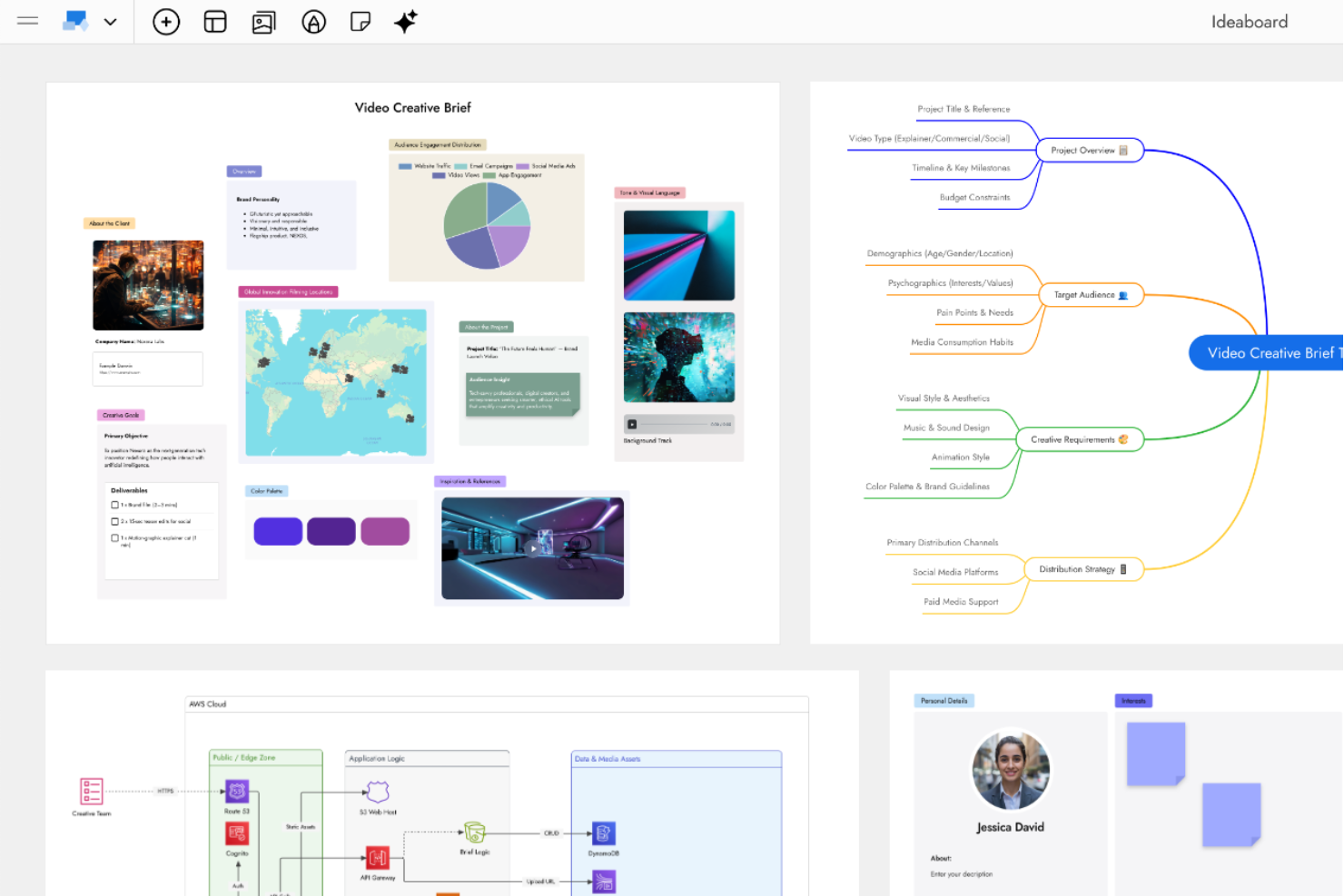
MockFlow es una plataforma web para la creación de wireframes e ideación, diseñada para equipos de producto y profesionales de UX. Destaca por su extensa biblioteca de kits de interfaz de usuario y plantillas, lo que facilita la visualización de ideas en las primeras etapas del proceso de diseño. Los equipos que buscan iterar rápidamente sobre conceptos y colaborar visualmente pueden encontrar MockFlow especialmente útil.
¿Para quién es MockFlow?
MockFlow es una excelente opción para diseñadores UX y equipos de producto en startups o agencias que necesitan idear rápidamente y colaborar de manera visual.
Por qué elegí MockFlow
Lo que me atrajo de MockFlow es su enfoque en la ideación con una amplia gama de kits de interfaz integrados. Estos kits abarcan desde interfaces web y móviles hasta componentes específicos para distintas industrias, por lo que puedes armar wireframes que se ajusten rápidamente a las necesidades de tu proyecto. También valoro la biblioteca de plantillas, que ayuda a los equipos a iniciar nuevos proyectos y mantener la coherencia en los diseños. Para quienes buscan una herramienta de wireframing con IA que permita una lluvia de ideas visual, rápida y con elementos listos para usar, MockFlow se destaca como una elección práctica.
Funciones clave de MockFlow
Otras funciones que hacen de MockFlow una opción versátil para wireframes con IA incluyen:
- Sugerencias de wireframes impulsadas por IA: Genera instantáneamente diseños de wireframes a partir de descripciones o requerimientos del proyecto.
- Colaboración en tiempo real: Varios miembros del equipo pueden editar, comentar y revisar wireframes simultáneamente.
- Historial de revisiones: Haz un seguimiento de los cambios y vuelve a versiones anteriores de tus wireframes en cualquier momento.
- Opciones de exportación: Exporta wireframes a formatos como PDF, PNG y HTML para compartir o continuar el desarrollo.
Integraciones de MockFlow
Las integraciones incluyen Figma, Trello, Slack, Microsoft Teams, Jira, Confluence, Google Docs, Google Meet y más.
Pros and Cons
Pros:
- Incluye una biblioteca de kits de UI integrados
- Historial de revisiones para seguimiento de cambios en el diseño
- Exportación directa a formatos PDF
Cons:
- Interacciones avanzadas de prototipado limitadas
- No cuenta con app móvil

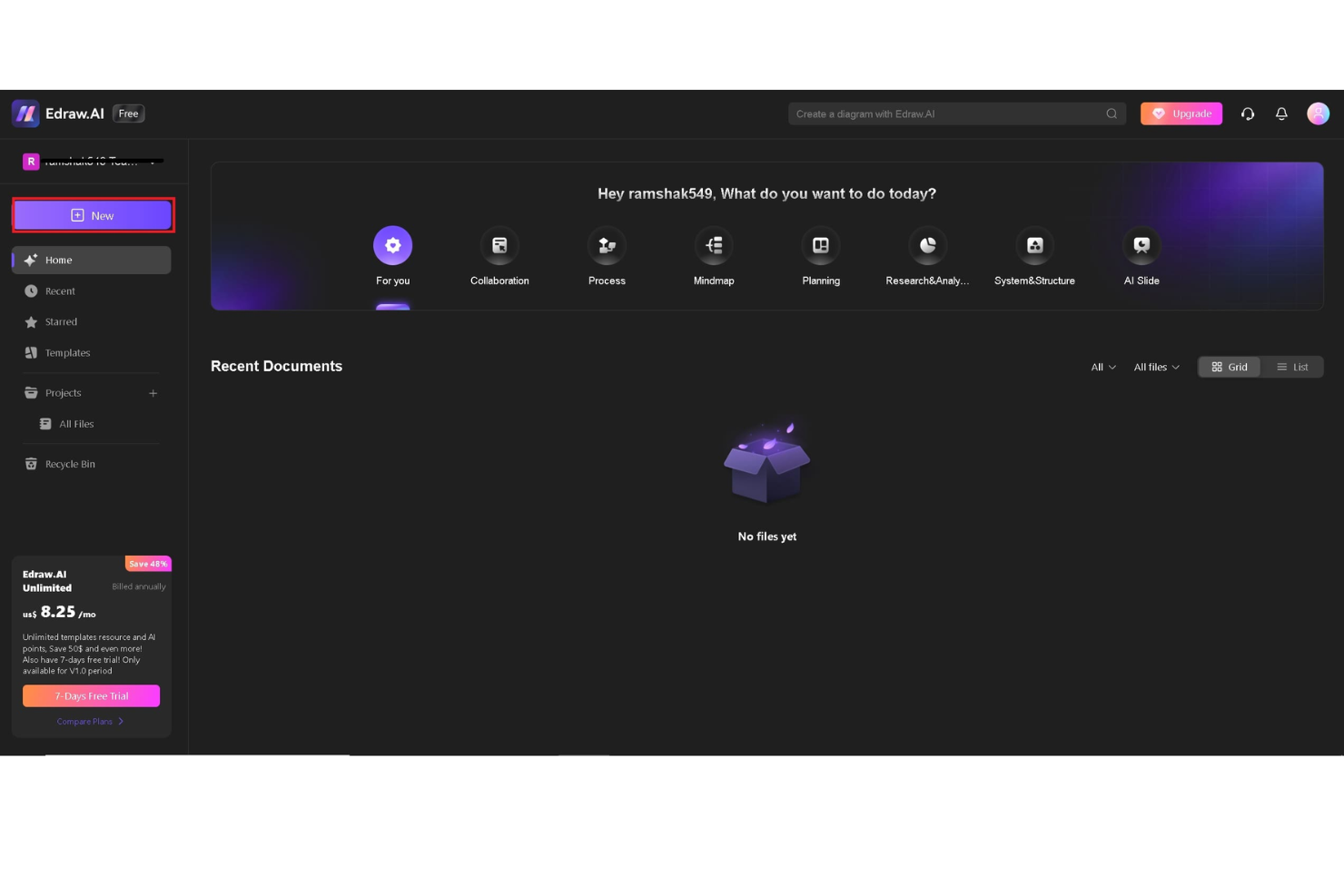
Edraw.AI ofrece una plataforma impulsada por IA para crear una amplia variedad de diagramas, lo que la convierte en una excelente opción para equipos que necesitan visualizar ideas complejas juntos. Es especialmente útil para profesionales de diseño, ingeniería y negocios que desean colaborar en diagramas de flujo, mapas mentales y wireframes en un solo lugar. La herramienta ayuda a los equipos a pasar rápidamente de la lluvia de ideas a diagramas estructurados sin tener que cambiar entre múltiples aplicaciones.
¿Para Quién es Mejor Edraw.AI?
Edraw.AI es especialmente adecuado para equipos multifuncionales en áreas de diseño, ingeniería o negocios que necesitan colaborar visualmente en distintos tipos de diagramas.
Por Qué Elegí Edraw.AI
Lo que me atrajo de Edraw.AI es cómo permite la colaboración visual en tiempo real en una amplia gama de tipos de diagramas, lo que resulta especialmente valioso para equipos que trabajan en proyectos de wireframing con IA. La plataforma permite edición y comentarios simultáneos, por lo que varios participantes pueden aportar a wireframes, diagramas de flujo y mapas mentales sin complicaciones con el control de versiones. También valoro la generación de diagramas mediante IA, que ayuda a los equipos a transformar ideas rápidamente en visualizaciones estructuradas. Esta combinación hace que Edraw.AI sea una elección sólida para grupos que necesitan avanzar de la lluvia de ideas a wireframes detallados juntos, todo en un solo espacio de trabajo.
Funciones Clave de Edraw.AI
Otras funciones que considero valiosas para equipos que contemplan Edraw.AI para wireframing con IA incluyen:
- Biblioteca de plantillas: Ofrece una amplia selección de plantillas predefinidas para wireframes, diagramas de flujo, mapas mentales y más.
- IA de texto a diagrama: Convierte indicaciones escritas o requisitos en diagramas estructurados automáticamente.
- Historial de versiones: Rastrea los cambios y permite a los usuarios volver a versiones previas del diagrama cuando sea necesario.
- Opciones de exportación: Permite exportar diagramas en múltiples formatos, incluidos PNG, PDF, SVG y archivos editables.
Integraciones de Edraw.AI
Actualmente no se listan integraciones nativas.
Pros and Cons
Pros:
- Genera diagramas editables a partir de texto
- Extrae estructuras de wireframe desde imágenes
- Incluye varios símbolos vectoriales incorporados
Cons:
- Requiere conexión a internet para funciones de IA
- Consume tokens de IA mensuales no renovables

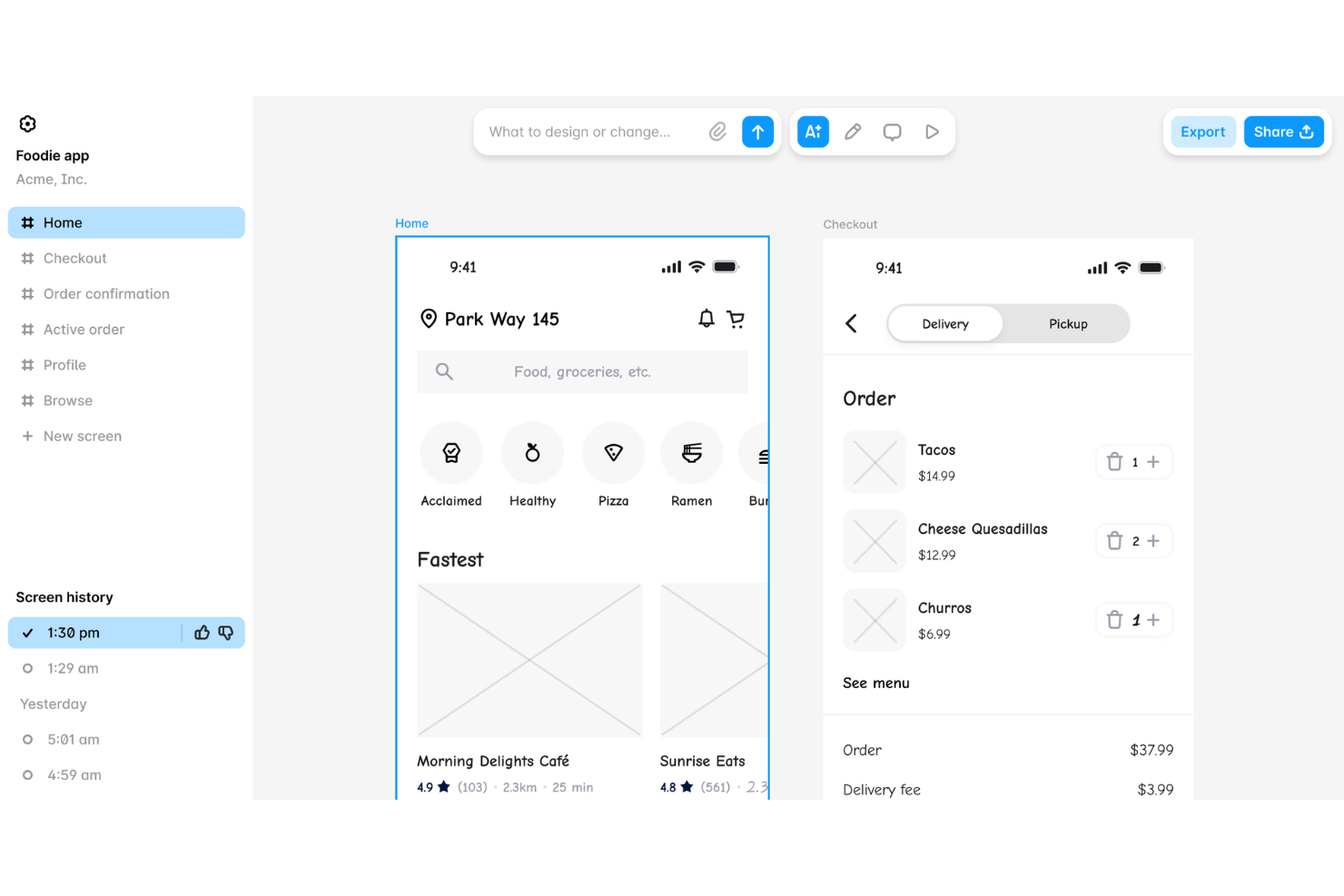
Si deseas generar rápidamente ideas de wireframes usando IA, Banani ofrece una solución especializada para equipos de producto y diseñadores. La plataforma atrae a quienes necesitan una creación de wireframes rápida y automatizada a partir de instrucciones simples. Banani ayuda a los usuarios a explorar una variedad de opciones de diseño sin trabajo manual de diseño.
¿Para Quién Es Banani?
Banani es ideal para gerentes de producto y diseñadores UX que desean generar múltiples conceptos de wireframes a partir de indicaciones de texto.
Por Qué Elegí Banani
Lo que más me llama la atención de Banani es su capacidad para generar múltiples variantes de wireframes a partir de una sola indicación. Veo un gran valor en poder explorar rápidamente diferentes opciones de diseño sin tener que rediseñar manualmente cada versión. El enfoque impulsado por IA de Banani permite a los usuarios ingresar una descripción y recibir varios conceptos únicos de wireframe, lo cual es especialmente útil para equipos que desean comparar e iterar ideas en las primeras etapas del proceso de diseño. Este enfoque en la generación rápida y automatizada de variantes hace de Banani una opción sólida para quienes buscan acelerar la ideación con un generador de wireframes impulsado por IA.
Características Clave de Banani
Otras características que noté mientras exploraba Banani incluyen:
- Historial de indicaciones: Ve y revisa indicaciones anteriores y wireframes generados para una referencia sencilla.
- Herramientas de edición de wireframes: Realiza ajustes directos a los wireframes generados dentro de la plataforma.
- Exportar a Figma: Envía wireframes directamente a Figma para continuar el trabajo de diseño de producto.
- Biblioteca de componentes: Accede a un conjunto de componentes reutilizables de diseño UI para acelerar la creación de wireframes.
Integraciones de Banani
La integración incluye Figma.
Pros and Cons
Pros:
- Genera flujos de usuario completos de múltiples pantallas
- Combina estilos de marca a partir de URLs de referencia
- Incluye un selector de velocidad versus calidad
Cons:
- Requiere experiencia en indicaciones específicas
- No tiene sincronización bidireccional con Figma

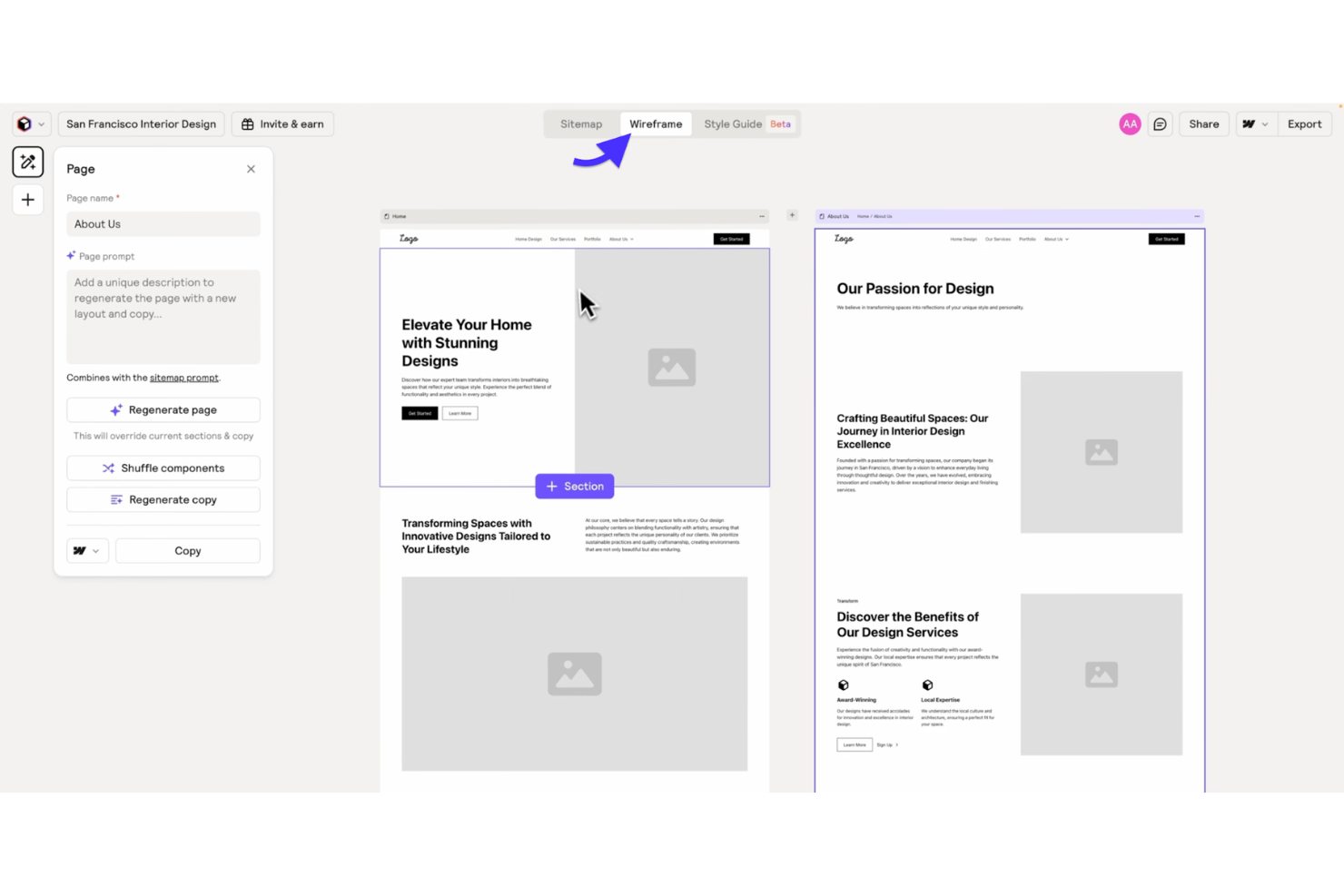
Relume es una plataforma de wireframing y diseño web impulsada por IA, diseñada para profesionales del diseño y desarrollo que buscan acelerar su flujo de trabajo. La herramienta atrae a equipos que necesitan generar, personalizar y exportar wireframes rápidamente para proyectos web modernos. Relume ayuda a los usuarios a pasar del concepto a componentes listos para producción con menos esfuerzo manual y mayor coherencia en el diseño.
¿Para quién es mejor Relume?
Relume es ideal para diseñadores y desarrolladores en agencias o startups que necesiten exportar wireframes directamente a proyectos de Figma o React.
Por qué elegí Relume
Lo que distingue a Relume para mí son sus opciones de exportación directa tanto a Figma como a React, algo poco común entre las herramientas de wireframing con IA. Elegí Relume porque tiende un puente entre el diseño y el desarrollo, permitiendo generar wireframes con IA y luego llevar estos diseños directamente a tu flujo de trabajo preferido. Las funciones de exportación de la plataforma permiten convertir wireframes rápidamente en archivos editables de Figma o componentes de React listos para producción. Esto hace que Relume sea especialmente valioso para equipos que desean minimizar la transferencia manual y avanzar de concepto a código sin contratiempos.
Funciones clave de Relume
Otras características que hacen de Relume una opción versátil para wireframing con IA incluyen:
- Generador de mapas del sitio con IA: Crea rápidamente mapas del sitio estructurados para sitios web según los requisitos de tu proyecto.
- Biblioteca de componentes: Accede a una gran colección de componentes de interfaz listos para usar y agiliza el wireframing.
- Herramientas de branding personalizadas: Aplica los colores, fuentes y estilos de tu marca directamente en tus wireframes.
- Espacio colaborativo: Invita a miembros del equipo a comentar y trabajar juntos en los wireframes en tiempo real.
Integraciones de Relume
Las integraciones incluyen Figma, Webflow, React y Slack.
Pros and Cons
Pros:
- Exporta directamente a Figma y React
- Funciones de colaboración en equipo en tiempo real
- Generador de mapas del sitio y estructura integrado
Cons:
- Menos integraciones de terceros
- Retrasos ocasionales con proyectos complejos

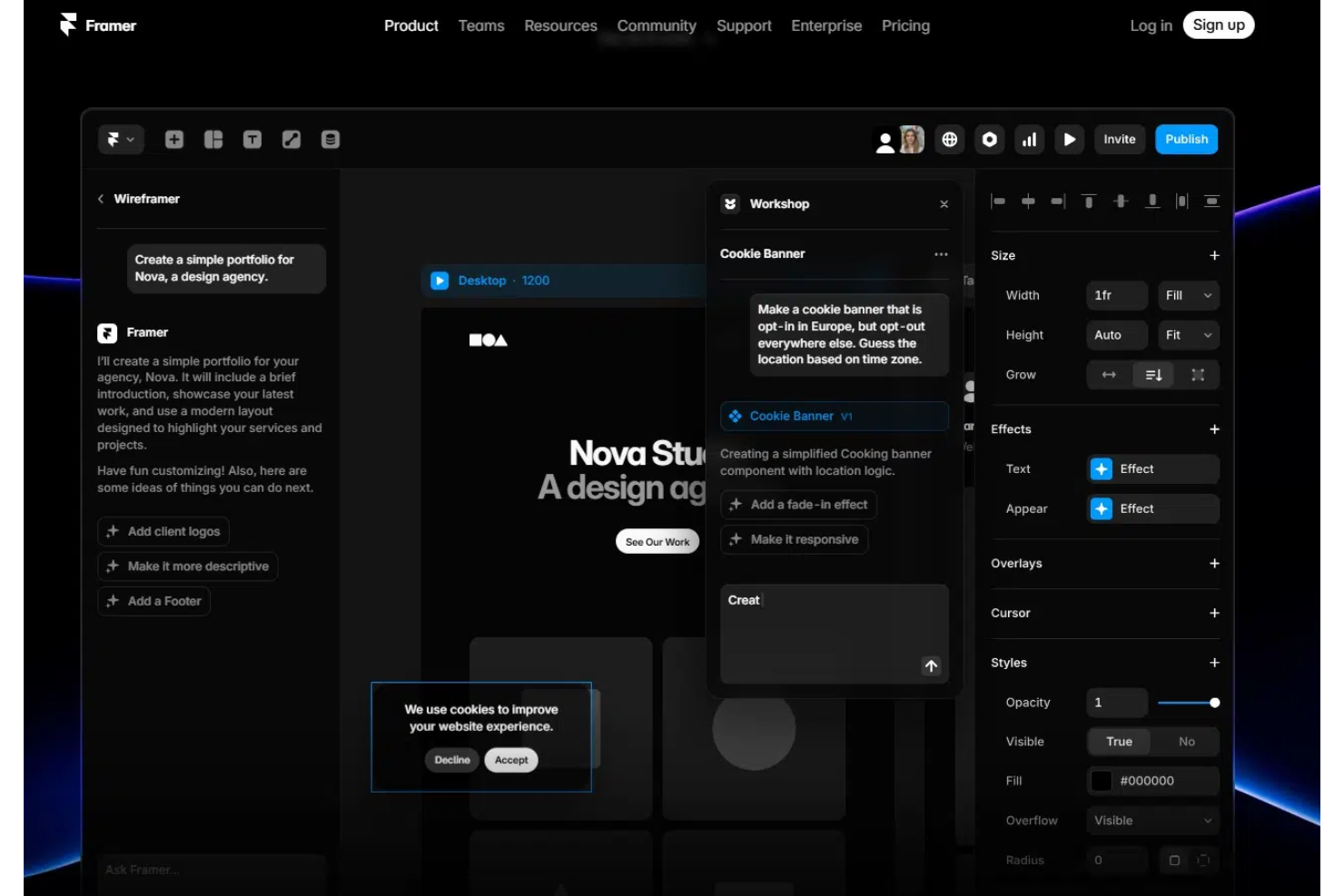
Framer Wireframer es una herramienta de wireframing potenciada por IA, diseñada para diseñadores y equipos de producto que desean visualizar rápidamente diseños de sitios web y aplicaciones. Es ideal para quienes necesitan crear wireframes estructurados y adaptables, sin atascarse en detalles a nivel de píxel. La plataforma ayuda a los usuarios a pasar de la idea al diseño mucho más rápido, automatizando gran parte del proceso inicial de diseño.
¿Para quién es mejor Framer Wireframer?
Framer Wireframer es ideal para diseñadores y equipos de producto en startups o agencias digitales que necesitan crear e iterar rápidamente diseños adaptativos para web y aplicaciones.
Por qué elegí Framer Wireframer
Lo que me atrajo de Framer Wireframer es su fuerte enfoque en crear diseños adaptativos que priorizan la estructura desde el inicio. La herramienta utiliza IA para generar wireframes que se adaptan automáticamente a diferentes tamaños de pantalla, lo cual es fundamental para equipos que diseñan tanto para web como para móviles. También aprecio cómo Framer Wireframer enfatiza la jerarquía y el espaciado del diseño, facilitando visualizar toda la estructura antes de adentrarse en los detalles. Para quienes necesitan producir wireframes rápidamente y que estén listos para el desarrollo adaptable, este enfoque destaca en el espacio de wireframing con IA.
Funciones clave de Framer Wireframer
Otras funciones que noté al explorar Framer Wireframer incluyen:
- Generación de wireframes con IA: Crea wireframes al instante a partir de descripciones de tus ideas de diseño.
- Biblioteca de componentes: Accede a una colección de elementos de interfaz para acelerar el armado de tus wireframes.
- Edición de arrastrar y soltar: Reorganiza y personaliza los elementos del wireframe directamente en el lienzo.
- Historial de versiones: Rastrea los cambios y recupera versiones previas de tus wireframes cuando sea necesario.
Integraciones de Framer Wireframer
Las integraciones no están disponibles públicamente.
Pros and Cons
Pros:
- Genera diseños web listos para producción
- Incluye textos e imágenes generados por IA
- Admite importaciones de Figma a Framer con un clic
Cons:
- Requiere corrección manual de elementos superpuestos
- No permite exportar código HTML o CSS

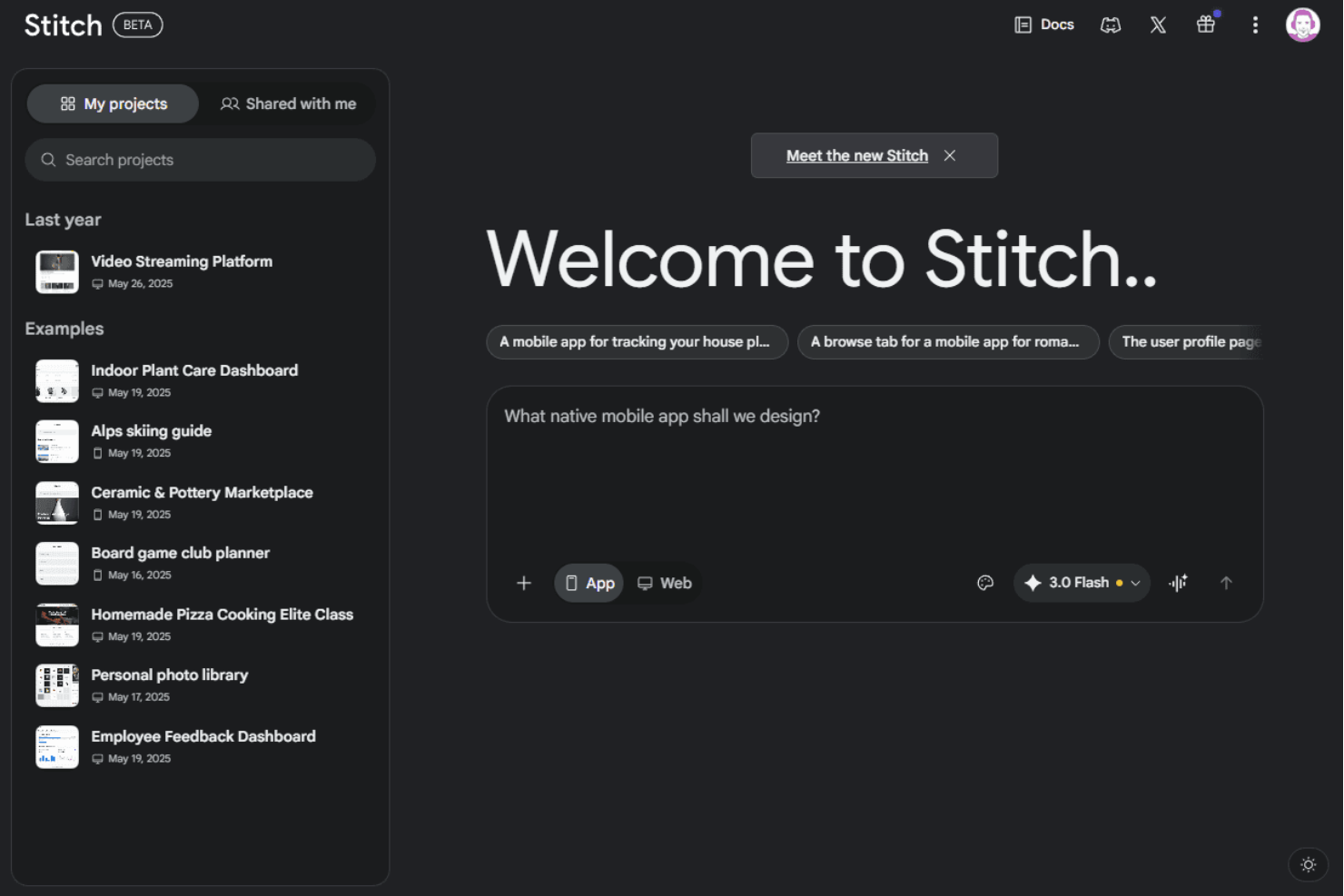
Google Stitch es una herramienta de wireframing impulsada por IA, diseñada para equipos que ya utilizan Google Workspace y productos relacionados. Está dirigida a gerentes de producto, diseñadores y desarrolladores que desean convertir rápidamente ideas en wireframes estructurados dentro de un entorno familiar. La herramienta facilita la colaboración en las etapas iniciales de diseño aprovechando el ecosistema de Google y las sugerencias de diseño impulsadas por IA.
¿Para quién es mejor Google Stitch?
Google Stitch es ideal para equipos de producto y diseñadores en organizaciones que dependen en gran medida de Google Workspace para la colaboración y la gestión del flujo de trabajo.
Por qué elegí Google Stitch
Lo que destaca de Google Stitch es su profunda integración con el ecosistema de Google, lo que lo convierte en una opción natural para equipos que ya usan Google Workspace. Elegí esta herramienta porque permite a los usuarios importar recursos desde Google Drive y colaborar en tiempo real utilizando comentarios al estilo de Google Docs. Las sugerencias de wireframing impulsadas por IA están diseñadas para funcionar perfectamente con otros productos de Google, lo que ayuda a mantener un flujo de trabajo unificado y reduce la fricción al pasar de la ideación al diseño. Para quienes quieren que su proceso de wireframing se adapte a un flujo de trabajo basado en Google, Google Stitch ofrece una clara ventaja.
Características clave de Google Stitch
Otras características que distinguen a Google Stitch incluyen:
- Generación de diseño por IA: Crea automáticamente diseños de wireframe basados en la información o indicaciones del usuario, acelerando el proceso de diseño inicial.
- Motor de sugerencia de componentes: Recomienda componentes de interfaz de usuario que se ajustan al contexto de tu wireframe, ayudando a los equipos a mantener la coherencia.
- Seguimiento del historial de versiones: Permite a los usuarios ver, comparar y volver a versiones previas del wireframe para una mejor gestión del proyecto.
- Controles de acceso basados en roles: Permite a los administradores asignar diferentes permisos a los miembros del equipo, apoyando una colaboración segura y organizada.
Integraciones de Google Stitch
Las integraciones están disponibles a través de MCP (Model Context Protocol).
Pros and Cons
Pros:
- Extrae sistemas de diseño desde URLs
- Permite importar recursos desde Google Drive
- Permite ediciones por comando de voz en tiempo real
Cons:
- Consistencia limitada con las guías de marca
- Requiere acceso experimental a Google Labs
Otras herramientas de IA para crear wireframes
Estas son algunas opciones adicionales de herramientas de IA para crear wireframes que no llegaron a mi lista, pero que aun así vale la pena revisar:
- Balsamiq AI
Ideal para convertir capturas de pantalla en wireframes
- UXMagic
Ideal para la investigación y el análisis de UX impulsados por IA
- Magic Patterns
Mejor para plantillas de patrones de diseño personalizables


Cómo Evalúo las Herramientas de Wireframing con IA
Cada herramienta en esta lista debe hacer más que solo poner la etiqueta de IA en un editor de wireframes básico; busco herramientas que permitan a un jefe de producto escribir un prompt y obtener un punto de partida útil. Divido mi evaluación entre la funcionalidad central que merece un lugar en la lista y los factores diferenciadores que separan las buenas opciones de las excelentes.
Funcionalidad Central (Requisitos Básicos Para Esta Lista)
Cuando selecciono herramientas para mi lista, califico cada una en una escala de 0 (no ofrece la funcionalidad) a 5 (sobresale en esta área) por cada funcionalidad principal que se describe a continuación. Luego, calculo la puntuación total de la herramienta como un porcentaje. Cada herramienta necesita lograr una puntuación total mínima del 65% para ser considerada para su inclusión.
- Generación de Wireframes a partir de Prompts de IA: Evalúo qué tan bien una herramienta traduce una indicación en lenguaje sencillo como "panel de control con barra lateral de navegación y tarjetas de análisis" en un esquema de wireframe utilizable.
- Wireframes Generados Editables: Las pantallas generadas deben ser completamente editables—busco la manipulación de componentes mediante arrastrar y soltar, no imágenes estáticas que tenga que volver a construir.
- Biblioteca de Componentes UI: Una buena biblioteca integrada de botones, campos de formulario, barras de navegación y tarjetas es importante, especialmente cuando quiero reemplazar rápidamente los elementos sugeridos por la IA.
- Soporte para Múltiples Pantallas y Flujos: Verifico si la herramienta puede manejar un flujo de usuario completo, como una secuencia de registro a través de tres pantallas, con navegación enlazada entre ellas.
- Colaboración y Compartición: El descubrimiento de producto es un trabajo en equipo, así que busco enlaces compartibles, comentarios y, en lo ideal, co-edición en tiempo real para revisiones en sprints.
- Opciones de Exportación y Entrega: Evalúo cuán fácilmente los wireframes pasan a la siguiente fase—ya sea un PNG para una presentación a partes interesadas o una exportación directa a Figma para el equipo de diseño.
Una vez que tengo una lista de herramientas que cumplen con estos criterios, considero qué diferencia a cada plataforma.
Factores Diferenciadores (Lo que Distingue a los Proveedores)
Así es como comparo y contraste distintos proveedores:
Características Destacadas
La ingestión de PRD es un gran diferenciador—las herramientas que pueden analizar un documento de requisitos o un ticket de Jira y generar wireframes automáticamente ahorran a los jefes de producto un gran paso de traducción. También valoro la conversión de bocetos a wireframes para equipos que dibujan flujos en pizarras durante el descubrimiento y necesitan digitalizarlos rápidamente. La generación de prototipos interactivos completa la experiencia al convertir pantallas estáticas en demos interactivas para presentaciones a partes interesadas sin cambiar a otra herramienta de prototipos.
Más Allá de las Funcionalidades
La privacidad de los datos es importante aquí—tus wireframes a menudo contienen conceptos de producto aún no lanzados, así que reviso si la IA del proveedor se entrena con las entradas de los usuarios y si hay espacios de trabajo privados disponibles. La compatibilidad con la pila tecnológica es otro aspecto clave. Una herramienta que permita la conexión con Figma para la entrega y con Jira para la ingestión de requisitos encaja en los flujos de trabajo existentes sin pasos adicionales. También evalúo la estructura de precios, especialmente si la generación con IA es por créditos o ilimitada, ya que un jefe de producto que itera docenas de prompts por sprint necesita costos predecibles.
Cómo elegir herramientas de IA para crear wireframes
Es fácil perderse entre largas listas de funciones y estructuras de precios complejas. Para ayudarte a mantenerte centrado mientras avanzas en tu proceso único de selección de software, aquí tienes una lista de factores que debes tener en cuenta:
| Factor | Qué debes considerar |
|---|---|
| Escalabilidad | ¿La herramienta será compatible con tu equipo a medida que crezca? Considera los límites de usuarios, los límites de proyectos y las necesidades de colaboración para futuras ampliaciones. |
| Integraciones | ¿La herramienta se conecta con tu conjunto de herramientas existente (por ejemplo, Jira, Figma o Slack)? Comprueba que ofrezca integraciones nativas, no solo opciones mediante API o Zapier. |
| Personalización | ¿Puedes adaptar plantillas, componentes o flujos de trabajo para que se ajusten a tu proceso? Evalúa hasta qué punto puedes adaptar la herramienta a las necesidades de tu equipo. |
| Facilidad de uso | ¿Con qué rapidez pueden los nuevos usuarios empezar a trabajar de forma productiva? Busca una navegación intuitiva, etiquetas claras y requisitos mínimos de formación. |
| Implementación e incorporación | ¿Qué recursos hay disponibles para la configuración y la formación? Evalúa la disponibilidad de tutoriales, guías de incorporación y asistencia al cliente durante el despliegue. |
| Coste | ¿Los niveles de precios son transparentes y predecibles? Presta atención a las tarifas ocultas, los precios basados en usuarios o las funciones restringidas que podrían afectar a tu presupuesto. |
| Medidas de seguridad | ¿La herramienta cumple los estándares de seguridad de tu organización? Comprueba que ofrezca SSO, cifrado de datos y cumplimiento de las normativas pertinentes. |
| Disponibilidad del soporte | ¿Qué canales de soporte se ofrecen y durante qué horario? Considera si necesitas soporte las 24 horas del día, los 7 días de la semana, chat en directo o gestión de cuentas personalizada. |
¿Qué son las herramientas de IA para crear wireframes?
Las herramientas de creación de estructuras alámbricas con IA son plataformas de software que utilizan inteligencia artificial para ayudar a los usuarios a generar, editar y perfeccionar rápidamente estructuras alámbricas digitales para sitios web o aplicaciones. Estas herramientas automatizan la creación de diseños, sugieren elementos de diseño web y, a menudo, interpretan indicaciones de texto para producir estructuras visuales. Están diseñadas para equipos de producto, diseñadores y desarrolladores que desean acelerar las primeras etapas del diseño y colaborar de manera más eficiente en conceptos de interfaz de usuario.
Características de las herramientas de creación de estructuras alámbricas con IA
Al seleccionar herramientas de creación de estructuras alámbricas con IA, presta atención a las siguientes características clave:
- Diseños generados por IA: Crea automáticamente estructuras alámbricas a partir de indicaciones de texto o requisitos, ahorrando tiempo en el diseño manual.
- Biblioteca de componentes de arrastrar y soltar: Accede a una amplia variedad de elementos de interfaz de usuario prediseñados que pueden colocarse y organizarse rápidamente en el lienzo.
- Colaboración en tiempo real: Permite que varios usuarios trabajen simultáneamente en la misma estructura alámbrica, con actualizaciones y comentarios en directo.
- Historial de versiones: Realiza un seguimiento de los cambios, compara iteraciones anteriores y vuelve a versiones anteriores cuando sea necesario.
- Opciones de exportación: Descarga las estructuras alámbricas en varios formatos, como PNG, PDF o SVG, para compartirlas o editarlas posteriormente.
- Galería de plantillas: Inicia proyectos con plantillas de estructuras alámbricas prediseñadas para tipos de páginas comunes, como una página de destino y una página de inicio.
- Capacidades de integración: Conecta con otras herramientas, como plataformas de gestión de proyectos, documentación o diseño, para centralizar los flujos de trabajo.
- Herramientas de comentarios y anotaciones: Permite que las partes interesadas dejen comentarios, sugerencias o marcas directamente en las estructuras alámbricas.
- Compatibilidad con el diseño adaptable: Diseña estructuras alámbricas que se adapten a diferentes tamaños de pantalla y dispositivos, con vistas previas de los diseños para móviles, tabletas y ordenadores de escritorio.
- Controles de acceso: Gestiona los permisos de los usuarios para garantizar que las personas adecuadas puedan ver, editar o comentar las estructuras alámbricas.
Beneficios de las herramientas de creación de estructuras alámbricas con IA
La implementación de herramientas de creación de estructuras alámbricas con IA ofrece varios beneficios para tu equipo y tu empresa. Estos son algunos de los que puedes esperar:
- Iteración de diseño más rápida: Los diseños y las plantillas generados por IA ayudan a los equipos a explorar rápidamente varias opciones de diseño sin tener que empezar desde cero.
- Colaboración mejorada: Las funciones de edición y comentarios en tiempo real permiten que diseñadores, desarrolladores y partes interesadas trabajen juntos con facilidad.
- Interfaces de usuario coherentes: Las bibliotecas de componentes y las plantillas prediseñadas promueven la coherencia del diseño entre proyectos y equipos.
- Menor esfuerzo manual: La generación automatizada de estructuras alámbricas a partir de indicaciones de texto minimiza las tareas repetitivas y acelera las primeras etapas del diseño.
- Comentarios más sencillos de las partes interesadas: Las herramientas integradas de anotación y uso compartido facilitan que las partes interesadas revisen las estructuras alámbricas y aporten sus comentarios directamente en ellas.
- Mejor integración con los flujos de trabajo: Las integraciones nativas con herramientas de gestión de proyectos y diseño ayudan a los equipos a mantener la creación de estructuras alámbricas conectada con el proceso más amplio de desarrollo del producto.
- Control de versiones mejorado: Las funciones de historial de versiones permiten a los equipos realizar un seguimiento de los cambios, comparar iteraciones y volver a diseños anteriores cuando sea necesario.
Costes y precios de las herramientas de creación de estructuras alámbricas con IA
Seleccionar herramientas de creación de estructuras alámbricas con IA requiere comprender los diversos modelos de precios y planes disponibles. Los costes varían según las características, el tamaño del equipo, los complementos y otros factores. La siguiente tabla resume los planes habituales, sus precios medios y las características que suelen incluir las soluciones de herramientas de creación de estructuras alámbricas con IA:
Tabla comparativa de planes para herramientas de creación de estructuras alámbricas con IA
| Tipo de plan | Precio medio | Características habituales |
|---|---|---|
| Plan gratuito | $0 | Herramientas básicas de creación de estructuras alámbricas, funciones de IA limitadas, acceso para un solo usuario y opciones básicas de exportación. |
| Plan personal | $5-$15/usuario/mes | Creación de estructuras alámbricas con IA completa, bibliotecas de componentes ampliadas, más formatos de exportación e integraciones limitadas. |
| Plan empresarial | $15-$30/usuario/mes | Colaboración en equipo, integraciones avanzadas, historial de versiones, asistencia prioritaria y controles de administración. |
| Plan corporativo | $30-$60/usuario/mes | Integraciones personalizadas, seguridad mejorada, gestión de cuentas exclusiva, asistencia para la incorporación y garantías de SLA. |
Preguntas frecuentes sobre las herramientas de creación de wireframes con IA
Estas son algunas respuestas a preguntas frecuentes sobre las herramientas de creación de wireframes con IA:
¿Pueden las herramientas de creación de wireframes con IA reemplazar al software de diseño tradicional?
No, las herramientas de creación de wireframes con IA no sustituyen por completo al software de diseño tradicional. Aceleran la ideación y la creación de diseños iniciales, pero la mayoría de los equipos sigue utilizando herramientas de diseño especializadas para el trabajo detallado de interfaces de usuario, la creación de prototipos y la producción final de recursos gráficos.
¿Qué precisión tienen los wireframes generados por IA?
Los wireframes generados por IA suelen ser precisos para diseños básicos y patrones de interfaz de usuario estándar. Sin embargo, pueden requerir ajustes manuales para flujos de trabajo complejos, marcas únicas o interfaces altamente personalizadas. Revisa y perfecciona siempre los resultados de la IA antes de compartirlos con las partes interesadas.
¿Las herramientas de creación de wireframes con IA requieren experiencia en diseño?
No, la mayoría de las herramientas de creación de wireframes con IA están diseñadas tanto para diseñadores como para personas sin experiencia en diseño. Sus interfaces intuitivas y sugerencias basadas en IA ayudan a los usuarios con poca experiencia en diseño a crear wireframes funcionales, aunque los conocimientos de diseño pueden mejorar los resultados.
¿Son seguras las herramientas de creación de wireframes con IA para proyectos confidenciales?
Sí, muchas herramientas de creación de wireframes con IA ofrecen funciones de seguridad como cifrado de datos, SSO y cumplimiento de las normas de privacidad. Revisa siempre la documentación de seguridad del proveedor y confirma que cumple los requisitos de tu organización antes de utilizarla en proyectos confidenciales.
¿Puedo colaborar con mi equipo en tiempo real utilizando estas herramientas?
Sí, la mayoría de las herramientas de creación de wireframes con IA admiten la colaboración en tiempo real. Varios usuarios pueden editar, comentar y revisar wireframes simultáneamente, lo que facilita recopilar comentarios e iterar rápidamente con equipos distribuidos.
¿A qué formatos de archivo puedo exportar los wireframes?
La mayoría de las herramientas de creación de wireframes con IA permiten exportar wireframes en formatos como PNG, PDF y SVG. Algunas también admiten compartir mediante enlaces web o la integración directa con otras plataformas de diseño y gestión de proyectos. Comprueba siempre las opciones de exportación antes de elegir una herramienta.