

10 mejores herramientas de análisis de UX reseñadas en 2026

Lista de las mejores herramientas de análisis de UX


Como gerente de producto, te enfrentas al desafío de comprender el comportamiento de los usuarios y tomar decisiones basadas en datos para mejorar tu producto.
Según mi experiencia, las herramientas de análisis de UX ayudan a cerrar la brecha entre la interacción de los usuarios y los conocimientos prácticos. Proporcionan los datos que necesitas para tomar decisiones informadas y mejorar la satisfacción de los usuarios.
En esta lista, compartiré mis principales recomendaciones de herramientas de análisis de UX. Ofreceré una reseña imparcial de cada una, centrándome en cómo pueden satisfacer las necesidades específicas de tu equipo. Analicemos los detalles y descubramos las mejores soluciones para mejorar la experiencia de usuario de tu producto.
Por Qué Confiar en Nuestras Reseñas de Software
Llevamos revisando y probando software de gestión de productos desde 2020. Como product managers, sabemos lo crucial y complicado que es tomar la decisión correcta al seleccionar software. Invertimos en investigación profunda para ayudar a nuestra audiencia a tomar mejores decisiones de compra de software. Hemos probado más de 2,000 herramientas para distintos casos de uso y escrito más de 1,000 reseñas exhaustivas. Conozca cómo mantenemos la transparencia & nuestra metodología de reseñas de software.
Resumen de las mejores herramientas de análisis de UX
Esta tabla comparativa resume los detalles de precios de mi selección de las mejores herramientas de análisis de UX para ayudarte a encontrar la más adecuada para tu presupuesto y las necesidades de tu empresa.
| Tool | Best For | Trial Info | Price | ||
|---|---|---|---|---|---|
| 1 | Prueba gratuita de 14 días | Desde $299/mes | Website | ||
| 2 | Ideal para seguimiento del comportamiento de usuarios | Plan gratuito + demo gratuita disponible | Desde $1200/año (facturado anualmente) | Website | |
| 3 | Plan gratuito disponible | Precios bajo solicitud | Website | ||
| 4 | Ideal para analítica de aplicaciones móviles | Plan gratuito disponible | Precios bajo consulta | Website | |
| 5 | Ideal para la puntuación de fricción y VoC empresariales | Demostración gratuita disponible | Precios disponibles previa solicitud | Website | |
| 6 | La mejor opción para el descubrimiento continuo de productos a escala | Demostración gratuita disponible | Precios disponibles bajo solicitud | Website | |
| 7 | Ideal para reproducción de sesiones | Plan gratuito + demo gratis disponible | Precios bajo solicitud | Website | |
| 8 | Ideal para el seguimiento automático de eventos | Plan gratuito disponible | Precios disponibles previa solicitud | Website | |
| 9 | Mejor para el análisis de experiencia digital | Prueba gratuita de 15 días + plan gratuito + demostración gratuita disponible | Desde $39/mes (facturado anualmente) | Website | |
| 10 | Ideal para cerrar el ciclo de los datos a la acción dentro de la aplicación | Prueba gratuita de 30 días; plan gratuito disponible | Precio bajo solicitud | Website |
Reseñas de las mejores herramientas de análisis de UX
A continuación encontrarás mis resúmenes detallados de las mejores herramientas de análisis de UX que llegaron a mi lista. Mis reseñas ofrecen un análisis detallado de las funciones principales, ventajas y desventajas, integraciones y casos de uso ideales de cada herramienta para ayudarte a encontrar la más adecuada para ti.

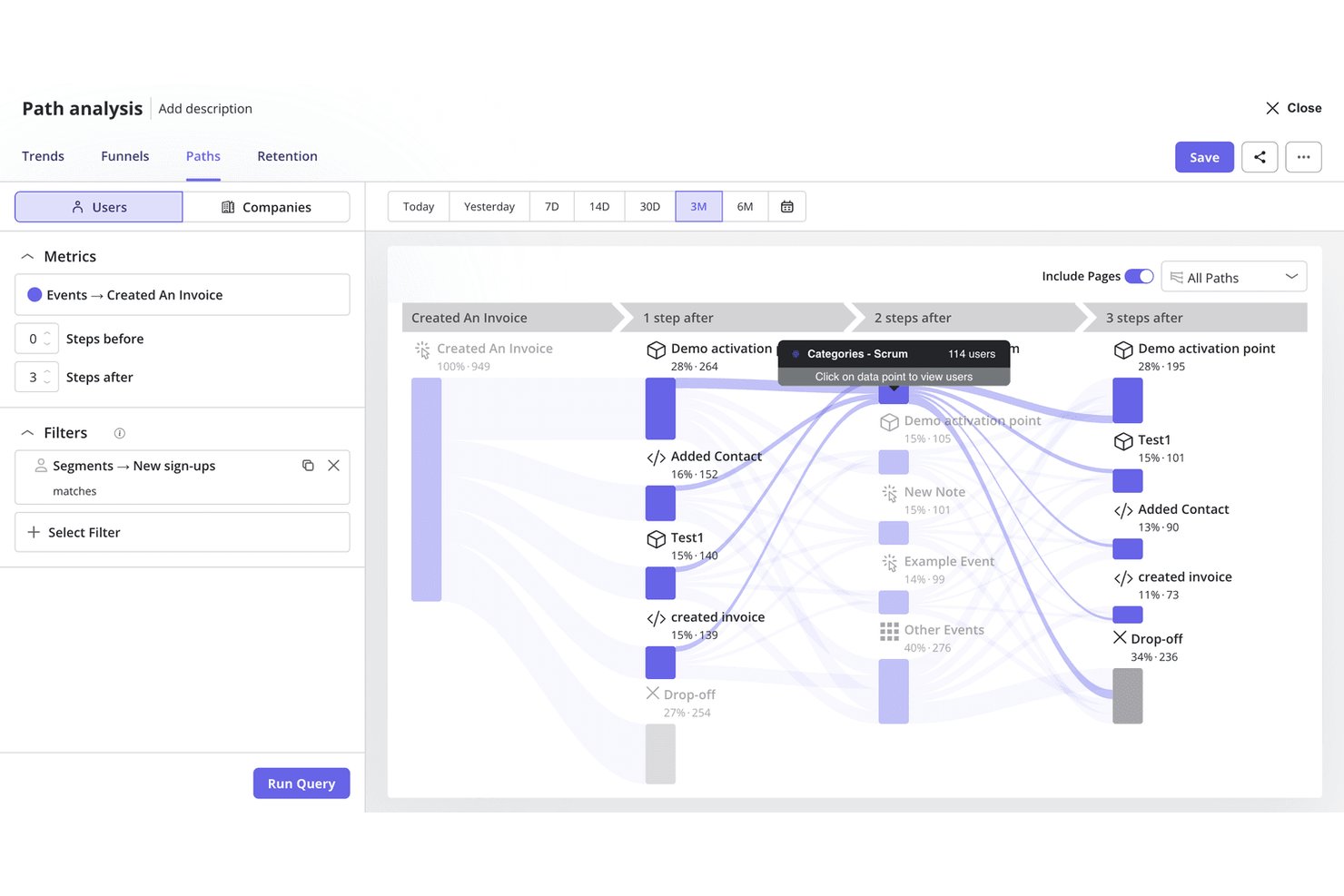
Userpilot es una plataforma de análisis de productos y participación dentro de la aplicación que combina la reproducción de sesiones, el análisis de embudos y rutas, el seguimiento de eventos, la detección de señales de frustración y herramientas nativas de encuestas con funciones integradas para crear flujos y guías dentro de la aplicación.
¿Para quién es más adecuado Userpilot?
Userpilot es una opción excelente para los equipos de producto que quieren pasar de detectar la fricción a solucionarla sin tener que alternar entre distintas herramientas.
Por qué elegí Userpilot
Userpilot está en mi lista de favoritos porque es la única herramienta que he utilizado en la que detectar un abandono y aplicar una solución ocurren dentro de la misma plataforma. Puedo hacer clic desde un informe de embudo directamente en las reproducciones de sesiones relacionadas con ese abandono exacto y, después, lanzar un flujo dentro de la aplicación o una información sobre herramientas para solucionar la fricción sin tocar otra herramienta. El análisis de correlación basado en IA también identifica automáticamente qué señales de frustración, como los clics repetidos o los cambios de sentido, provocan ese abandono.
Características principales de Userpilot
- Captura automática retroactiva de eventos: Define nuevos eventos a partir de datos históricos de interacción que ya se han capturado, para que puedas realizar análisis sin volver a instrumentar tu producto.
- Análisis de correlación basado en IA: Muestra automáticamente qué atributos de usuario, eventos y señales de frustración se correlacionan con la conversión o el abandono del embudo en tus informes.
- Encuestas nativas de NPS, CSAT y CES: Activa encuestas basadas en el comportamiento a partir de eventos específicos dentro de la aplicación y relaciona después las respuestas directamente con los datos de retención y participación en la misma plataforma.
- Servidor MCP: Conecta los datos de producto de Userpilot con herramientas externas de IA como Claude, ChatGPT y Microsoft Copilot, para que puedas consultar información sobre el comportamiento sin salir de esos entornos.
Integraciones de Userpilot
Userpilot ofrece integraciones nativas con Segment, Amplitude, Mixpanel, Heap, Google Analytics, Google Tag Manager, Intercom, Slack, HubSpot y Salesforce. También admite API, webhooks y sincronización con un almacén de datos empresarial.
Pros and Cons
Pros:
- Los embudos se conectan directamente con las reproducciones de sesiones
- Detecta señales de frustración como clics repetidos y clics sin efecto
- Lanza soluciones dentro de la aplicación desde los informes de análisis
Cons:
- No ofrece mapas de calor para visualizar los clics agregados
- Las funciones de análisis más avanzadas están limitadas según el plan

Mixpanel
Ideal para seguimiento del comportamiento de usuarios
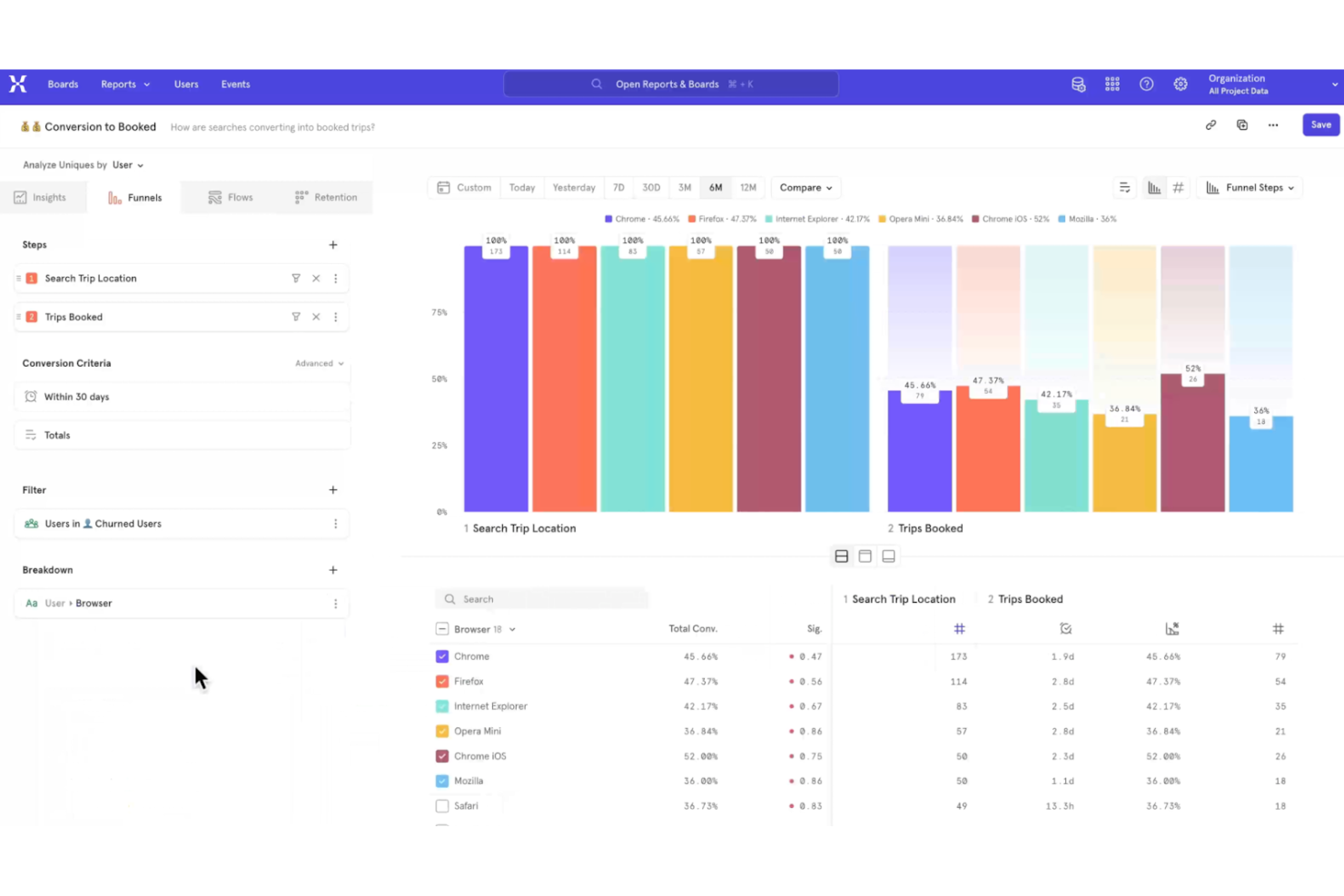
Mixpanel es una herramienta de análisis diseñada para empresas que desean realizar un seguimiento del comportamiento e interacciones de los usuarios con sus productos. Sus principales usuarios son los responsables de producto y analistas de datos que necesitan comprender los recorridos y la interacción de los usuarios.
Por qué elegí Mixpanel: Está especializado en el seguimiento del comportamiento de los usuarios, permitiéndote analizar en tiempo real cómo interactúan con tu producto. Puedes crear embudos detallados para monitorizar las rutas de conversión e identificar los puntos donde los usuarios abandonan. Mixpanel también ofrece análisis de cohortes, ayudándote a segmentar usuarios según sus acciones a lo largo del tiempo. Esta combinación de funcionalidades lo hace ideal para comprender en profundidad el engagement de los usuarios.
Características destacadas e integraciones:
Características incluyen pruebas A/B para optimizar las experiencias de usuario, notificaciones push para interactuar directamente con los usuarios e informes de retención que te ayudan a entender la fidelidad de los usuarios. Estas funciones están pensadas para brindarte información útil y accionable sobre el comportamiento de los usuarios.
Integraciones incluye Segment, Zapier, Salesforce, HubSpot, Google Ads, Marketo, Amplitude, Optimizely, Slack e Intercom.
Pros and Cons
Pros:
- Análisis de cohortes detallado
- Paneles personalizables
- Permite pruebas A/B
Cons:
- Curva de aprendizaje moderada
- Las funciones avanzadas requieren conocimientos de programación

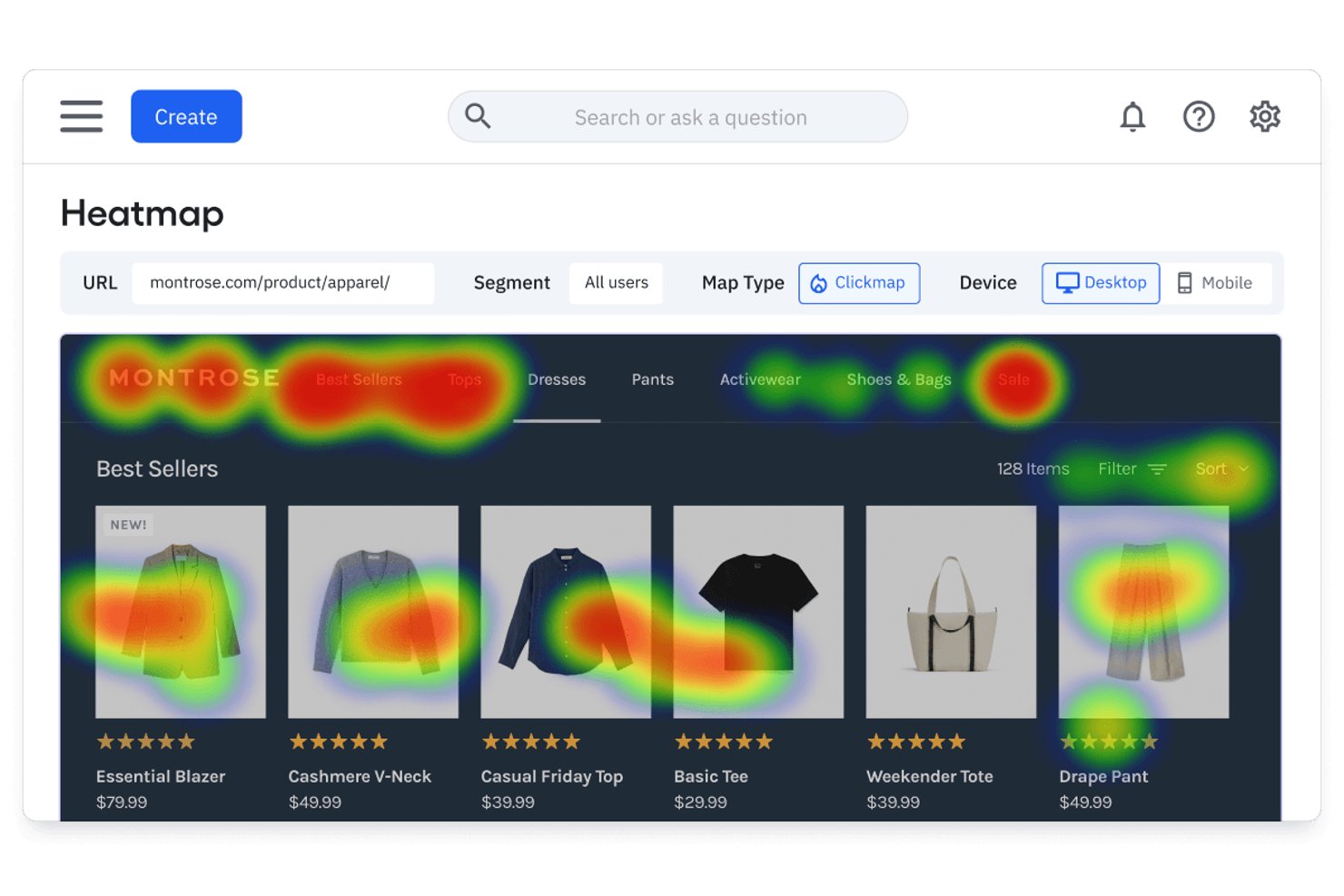
Amplitude es una plataforma de análisis de productos que combina la reproducción de sesiones, los mapas de calor, el análisis de embudos, las cohortes de comportamiento y la experimentación integrada con agentes impulsados por IA que revelan información de todos tus datos.
¿Para quién es más adecuada Amplitude?
Amplitude es una excelente opción para los equipos de producto y crecimiento que necesitan análisis de comportamiento, experimentación y reproducción de sesiones en una sola plataforma, en lugar de soluciones independientes unidas entre sí.
Por qué elegí Amplitude
Amplitude ocupa un lugar en mi lista final porque su análisis de comportamiento basado en IA va más allá de los paneles pasivos de maneras que no he visto igualadas. El agente de reproducción de sesiones resume automáticamente las sesiones y revela los puntos de fricción sin necesidad de revisarlas manualmente, mientras que el agente global responde preguntas en lenguaje natural como '¿por qué los usuarios nuevos abandonan antes de completar la configuración?' al sintetizar datos de todo tu producto. También me encanta que el análisis de embudos retrospectivo te permita aplicar al instante eventos recién definidos a datos históricos, sin necesidad de volver a instrumentar nada.
Características principales de Amplitude
- Cohortes de comportamiento: Guarda grupos de usuarios definidos por acciones específicas dentro del producto y reutilízalos en gráficos, reproducciones de sesiones, experimentos y encuestas.
- Experimentación web y móvil: Ejecuta pruebas A/B y experimentos con indicadores de funcionalidades de forma nativa, con reproducciones de sesiones adjuntas directamente a los resultados de las variantes para su validación cualitativa.
- Guías y encuestas: Implementa guías de incorporación dentro de la aplicación, solicitudes de NPS y widgets de comentarios, con la reproducción de sesiones vinculada a los momentos en que se recopilan los comentarios.
- Etiquetado visual: Etiqueta elementos de la interfaz de usuario y define eventos con nombre directamente desde la interfaz de Amplitude sin escribir código.
Integraciones de Amplitude
Amplitude ofrece más de 60 integraciones nativas, incluidas Twilio Segment, Snowflake, Google BigQuery, Salesforce, HubSpot, Zendesk, Intercom, Braze y Google Analytics 4. También proporciona API HTTP, Batch, de exportación y DSAR para flujos de trabajo de datos personalizados.
Pros and Cons
Pros:
- La reproducción de sesiones impulsada por IA resume automáticamente los puntos de fricción
- Cohortes de comportamiento reutilizables en análisis y experimentos
- Análisis de embudos retrospectivo sobre datos históricos del producto
Cons:
- Los mapas de calor requieren el plan de nivel superior con un complemento
- Todavía no hay mapas de calor nativos para aplicaciones móviles

UXCam
Ideal para analítica de aplicaciones móviles
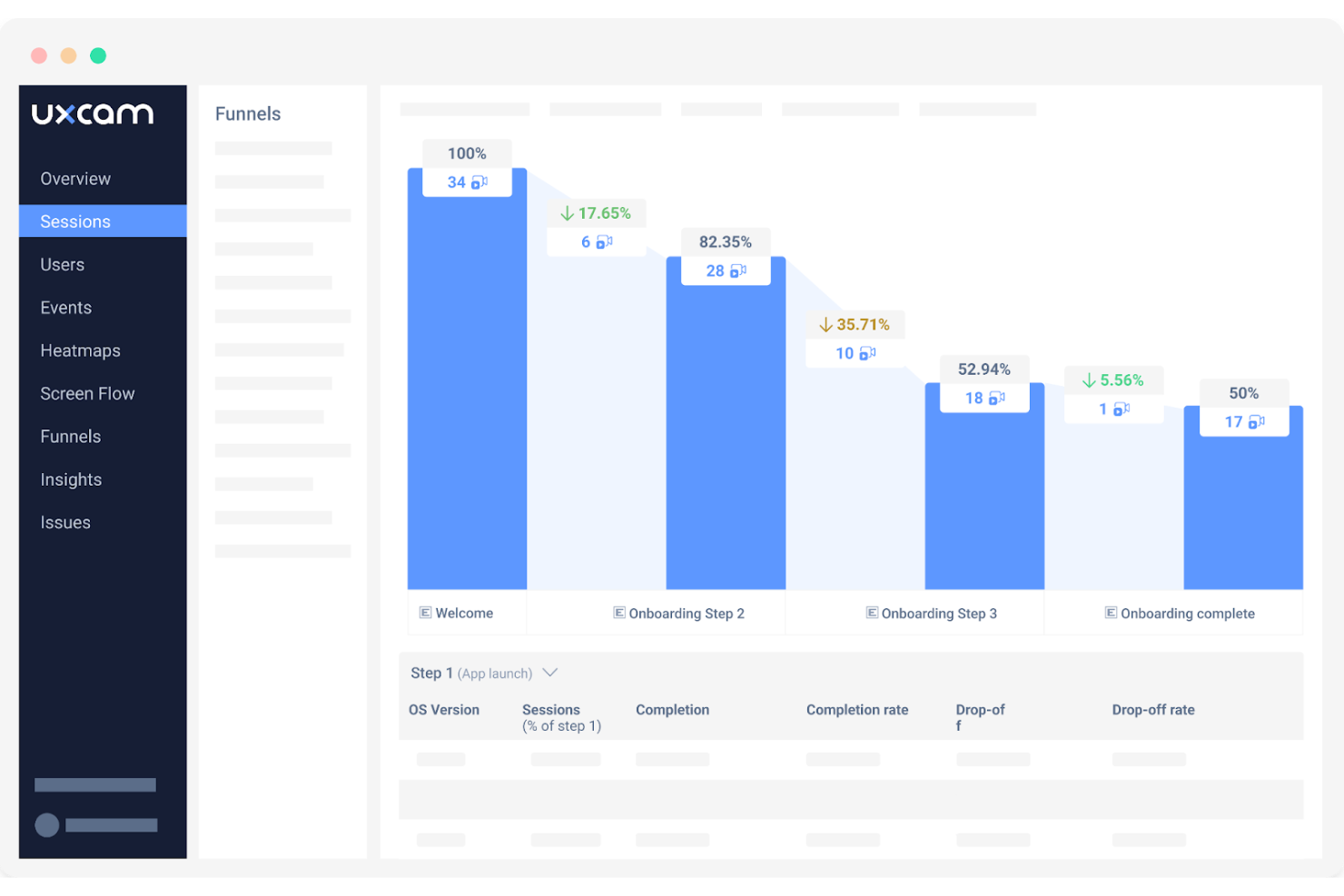
UXCam es una herramienta de analítica para aplicaciones móviles diseñada para ayudar a las empresas a comprender el comportamiento de los usuarios en sus aplicaciones móviles. Sus principales usuarios son desarrolladores de apps y gestores de producto que necesitan conocer el rendimiento de la app y las interacciones de los usuarios.
Por qué elegí UXCam: Destaca en la analítica de aplicaciones móviles, ofreciendo funciones como la repetición de sesiones para visualizar las acciones de los usuarios. Puedes analizar mapas de calor para ver dónde tocan y se desplazan los usuarios dentro de la app. UXCam también proporciona análisis de fallos para ayudarte a identificar y resolver problemas rápidamente. Estas capacidades lo convierten en una elección integral para mejorar la experiencia de usuario de tu app.
Funciones destacadas e integraciones:
Funciones incluyen analítica de embudos que rastrea los recorridos de los usuarios dentro de la app, detección de gestos como deslizamientos y pellizcos, y análisis de navegación que mapea cómo los usuarios se desplazan por tu aplicación. Estas funciones proporcionan información profunda sobre el comportamiento del usuario.
Integraciones incluye Google Analytics, Segment, Mixpanel, Amplitude, Firebase, Adjust, AppsFlyer, Kochava, Airship y Braze.
Pros and Cons
Pros:
- Repeticiones de sesiones detalladas
- Proporciona analítica de embudos
- Ofrece mapeo de navegación y detección de gestos
Cons:
- Precios altos para equipos pequeños
- Requiere configuración técnica

Glassbox
Ideal para la puntuación de fricción y VoC empresariales
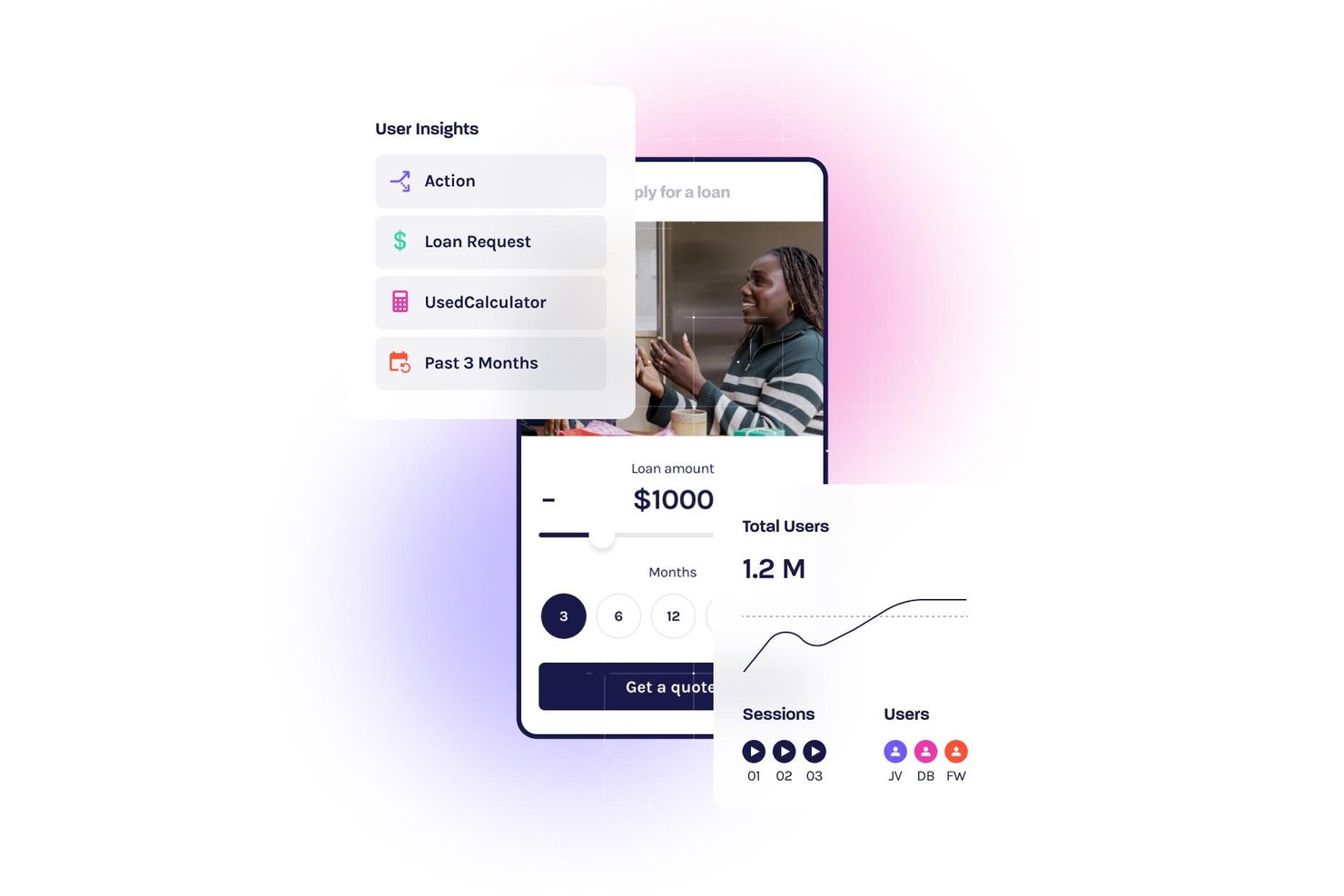
Glassbox es una plataforma empresarial de análisis de UX que combina reproducción de sesiones, captura automática sin etiquetas, mapas de interacción, análisis de embudos, puntuación de fricción y herramientas nativas de VoC en la web y dispositivos móviles.
¿Para quién es más adecuado Glassbox?
Glassbox es una opción excelente para equipos empresariales de producto y experiencia del cliente en sectores regulados, como los servicios financieros, la atención sanitaria y el comercio minorista, que necesitan datos profundos sobre el comportamiento sin la carga adicional de la instrumentación manual.
Por qué elegí Glassbox
Glassbox ocupa un lugar destacado en mi lista porque cuenta con su propia Puntuación de fricción, que cuantifica la fricción mediante más de 30 señales de comportamiento —clics repetidos, giros en U y clics en errores— y relaciona cada una directamente con su impacto en los ingresos. Me gusta que no se limite a señalar molestias; permite a los equipos de producto y experiencia del cliente clasificar los problemas de UX según su coste empresarial y abordar primero los problemas de mayor prioridad. La función La voz de los silenciosos amplía aún más esta perspectiva al utilizar IA para aplicar el sentimiento de VoC de los encuestados al más del 95 % de los usuarios que nunca completan una encuesta.
Características principales de Glassbox
- Captura automática sin etiquetas: Glassbox registra automáticamente cada clic, desplazamiento, entrada de formulario y evento del lado del servidor sin etiquetado manual ni instrumentación por parte de ingeniería.
- Mapa de recorrido aumentado: Una única visualización multicanal representa todo el recorrido del cliente, desde la adquisición hasta la conversión, en la web y los dispositivos móviles, en una sola vista.
- GIA (Asistente de análisis de Glassbox): Un asistente de IA generativa permite consultar los datos de las sesiones, generar resúmenes de sesiones y descubrir información sobre el comportamiento mediante lenguaje natural.
- Análisis de aplicaciones móviles: Los SDK específicos para iOS, Android, React Native, Flutter y otros cinco marcos ofrecen reproducción de sesiones, mapas de interacción y análisis de fallos para aplicaciones móviles nativas.
Integraciones de Glassbox
Glassbox ofrece integraciones nativas con Adobe Analytics, Google Analytics 4, Qualtrics, Medallia, Optimizely, VWO, Jira y Slack. Una API abierta permite crear integraciones personalizadas.
Pros and Cons
Pros:
- Cuantifica la fricción mediante su propia Puntuación de fricción
- La captura automática sin etiquetas elimina el etiquetado manual de eventos
- La IA descubre al instante información oculta de las sesiones
Cons:
- Es necesario solicitar una demostración comercial para acceder a la plataforma
- El volumen de datos de las sesiones puede abrumar a los equipos

La mejor opción para el descubrimiento continuo de productos a escala
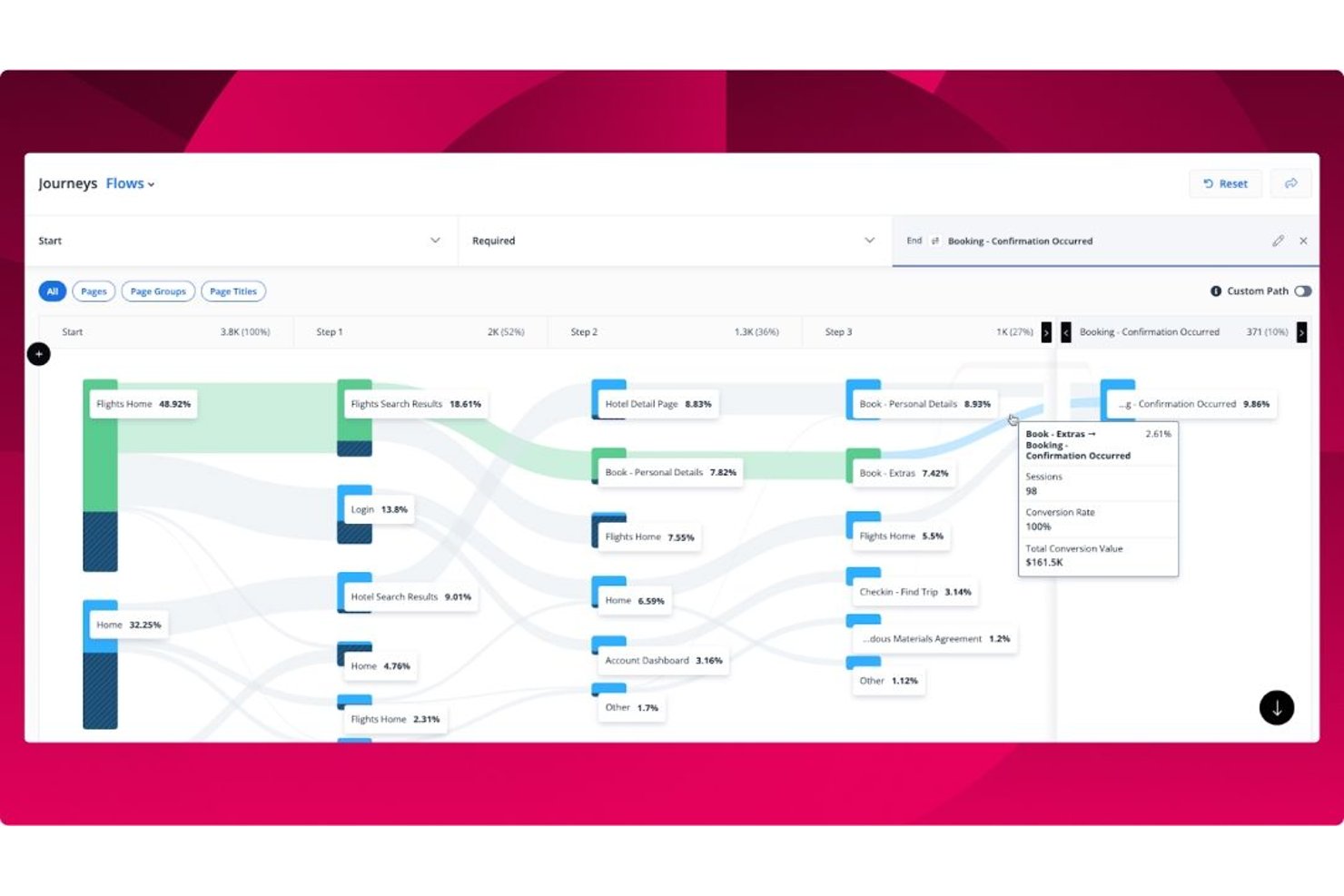
Quantum Metric es una plataforma empresarial de análisis de la experiencia de usuario que combina reproducción de sesiones sin muestreo al 100 %, mapas de calor de interacciones, análisis de embudos y recorridos, identificación de información mediante el agente autónomo de IA Felix AI y la integración de la voz del cliente en aplicaciones web y móviles nativas.
¿Para quién es más adecuado Quantum Metric?
Quantum Metric es una excelente opción para equipos empresariales de producto y digitales que necesitan conectar los datos de comportamiento con el impacto empresarial en sitios web y aplicaciones móviles nativas con grandes volúmenes de tráfico.
Por qué elegí Quantum Metric
Quantum Metric ocupa un lugar en mi lista de finalistas porque ninguna otra plataforma que haya evaluado hace que el descubrimiento continuo de productos parezca tan automático a escala empresarial. El agente autónomo de IA Felix AI funciona de forma autónoma en segundo plano, supervisando sus KPI y poniendo de manifiesto las fricciones que afectan a los ingresos antes de que piense en buscarlas. Combine esto con el análisis de oportunidades, que cuantifica el impacto empresarial de abandonos específicos en los recorridos web y móviles nativos, y su equipo dedicará menos tiempo a buscar problemas y más a solucionar los adecuados.
Características principales de Quantum Metric
- Chat de IA de Felix: Una interfaz de lenguaje natural que le permite hacer preguntas en lenguaje sencillo sobre sus datos de comportamiento y obtener respuestas directas sin escribir consultas.
- Captura de datos del lado del servidor: Envía eventos críticos, como transacciones y registros, directamente desde sus servidores y los añade a las reproducciones de sesiones activas incluso cuando la captura del lado del cliente falla.
- Detección automática de información personal identificable: Busca continuamente capturas involuntarias de información personal identificable y aplica el enmascaramiento de privacidad de forma predeterminada en todos los datos de sesión.
- Transmisión de datos: Exporta sus datos de comportamiento a destinos como Snowflake, Azure y Databricks para integrarlos con su infraestructura de datos y BI existente.
Integraciones de Quantum Metric
Quantum Metric se integra con Qualtrics, Optimizely, Split, UserTesting, Snowflake, Azure, Databricks, Looker, Tealium y Slack, con transmisión de datos a más de 20 destinos. Las API, los webhooks y las integraciones con gestores de etiquetas permiten establecer conexiones personalizadas.
Pros and Cons
Pros:
- Detecta fricciones que afectan a los ingresos con Felix AI
- Ofrece datos de reproducción de sesiones sin muestreo al 100 %
- Permite crear embudos directamente a partir de las reproducciones de sesiones
Cons:
- La segmentación avanzada puede resultar confusa para los equipos
- En ocasiones, los datos no coinciden con los de otras herramientas de análisis

Ideal para reproducción de sesiones
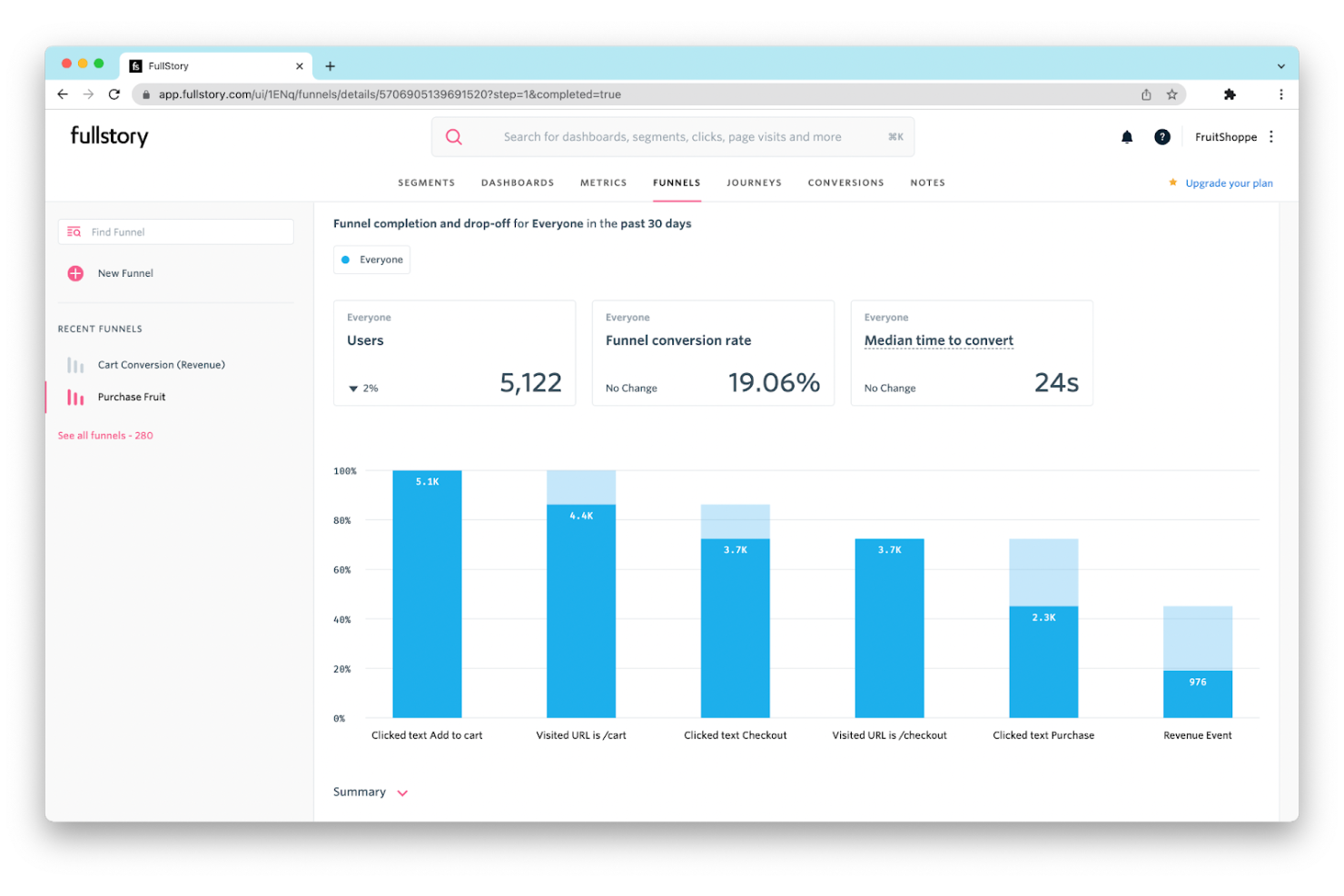
Fullstory es una plataforma de análisis de experiencia digital que ayuda a las empresas a comprender las interacciones de los usuarios mediante la reproducción de sesiones. Sus principales usuarios son diseñadores de UX y equipos de producto que necesitan conocimientos detallados sobre el comportamiento de los usuarios en sitios web y aplicaciones.
Por qué elegí Fullstory: Destaca en la reproducción de sesiones, lo que te permite ver sesiones completas de usuarios para identificar puntos de fricción. Puedes utilizar mapas de calor para visualizar el nivel de interacción de los usuarios en tu sitio. Fullstory también ofrece embudos de eventos que ayudan a seguir los recorridos de los usuarios y analizar las conversiones. Estas herramientas proporcionan una visión integral de las experiencias de los usuarios, facilitando la optimización de tu presencia digital.
Funcionalidades destacadas e integraciones:
Funciones incluyen análisis de conversiones que sigue el éxito de los recorridos de usuarios, detección de errores que te alerta sobre problemas que afectan la experiencia de usuario, y seguimiento de eventos personalizados que te permite monitorear acciones específicas de los usuarios. Estas funciones trabajan juntas para mejorar tu comprensión de las interacciones de los usuarios.
Integraciones incluyen Slack, Segment, Google Analytics, Optimizely, Mixpanel, HubSpot, Salesforce, Jira, Trello y Zendesk.
Pros and Cons
Pros:
- Reproducción de sesiones de alta calidad
- Detección efectiva de errores
- Seguimiento de eventos personalizados
Cons:
- Alto uso de recursos
- Las funciones avanzadas requieren capacitación

Heap
Ideal para el seguimiento automático de eventos
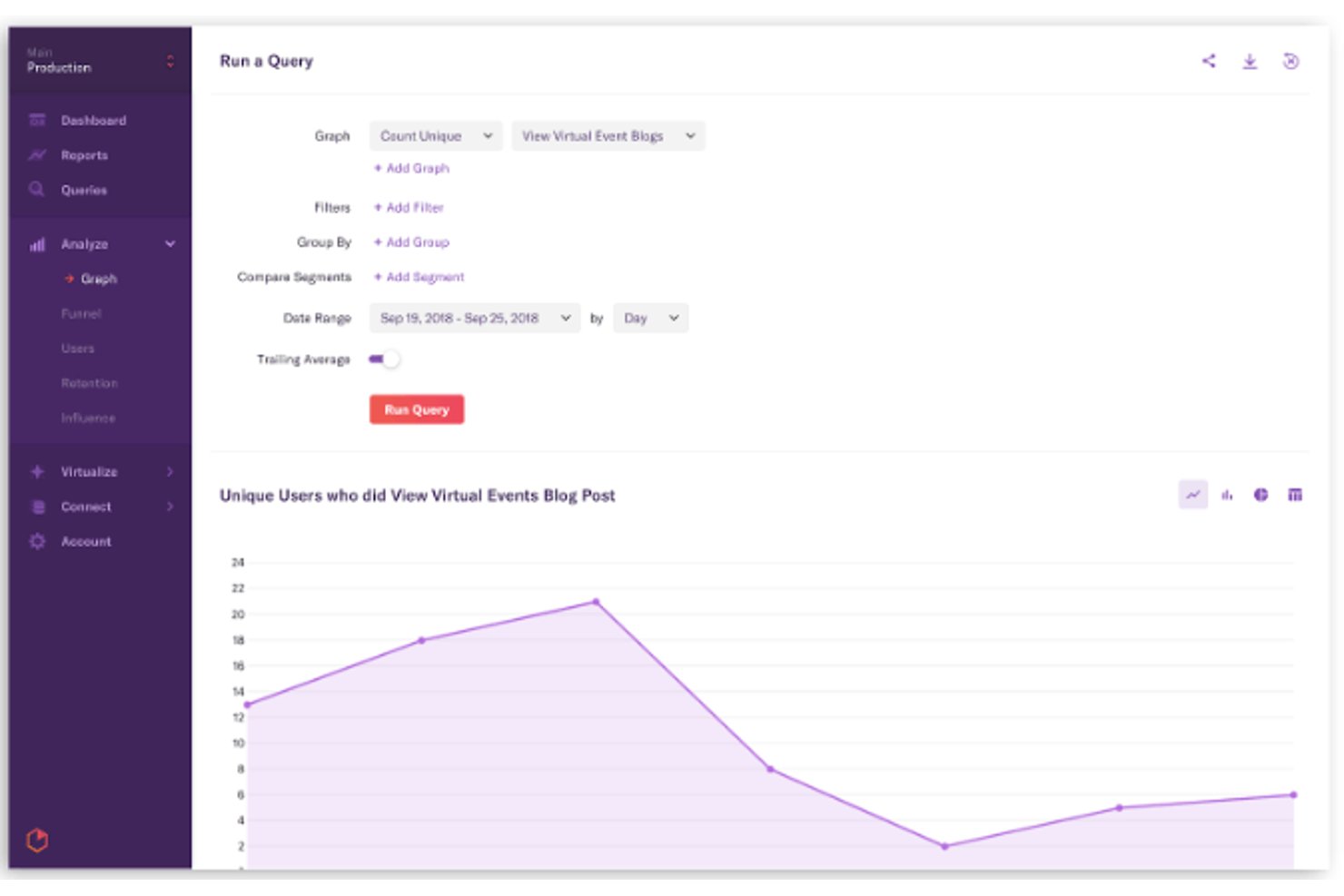
Heap es una plataforma de análisis de UX que captura automáticamente cada interacción del usuario—clics, toques, visualizaciones de página y completados de formularios—en la web y dispositivos móviles, y combina esos datos de comportamiento con análisis de embudos, mapas de recorrido, reproducción de sesiones y descubrimiento de información basado en IA.
¿Para quién es más adecuado Heap?
Heap funciona mejor para equipos de producto que necesitan información inmediata sobre el comportamiento sin esperar a que ingeniería instrumente cada evento.
Por qué elegí Heap
Heap ocupa un lugar en mi lista de favoritos porque su enfoque de captura automática cambia realmente lo que es posible hacer en el análisis de productos. Desde el momento en que insertas un único fragmento de código, Heap registra automáticamente cada clic, toque, visualización de página y completado de formulario, sin necesidad de etiquetar eventos manualmente. Lo que considero más valioso es que puedes definir nuevos eventos y crear embudos retrospectivamente a partir de datos históricos, de modo que una pregunta que no pensaste hacer hace seis meses todavía puede responderse hoy.
Funciones principales de Heap
- Sense Chat: Un asistente de IA generativa que permite a cualquier miembro del equipo hacer preguntas en lenguaje natural sobre el comportamiento de los usuarios y genera gráficos automáticamente a partir de la respuesta.
- Heap Illuminate: Una capa de ciencia de datos que identifica de forma proactiva los eventos principales, los segmentos de usuarios de mayor impacto y los patrones de fricción sin ninguna configuración manual.
- Resúmenes de reproducción de sesiones: Resúmenes generados por IA de grabaciones de sesiones individuales que destacan los momentos clave y reducen la necesidad de ver las reproducciones completas.
- Heap Connect: Una solución ETL gestionada que sincroniza los datos de comportamiento con Snowflake o BigQuery para enriquecerlos y analizarlos junto con fuentes de datos externas.
Integraciones de Heap
Heap ofrece más de 100 integraciones, incluidas Snowflake, BigQuery, Salesforce, HubSpot, Intercom, Segment, RudderStack, Shopify y WalkMe. Las API del lado del cliente y del lado del servidor permiten realizar integraciones personalizadas y enriquecer los datos.
Pros and Cons
Pros:
- Definición retrospectiva de eventos sobre datos históricos
- Descubrimiento de información y asistente de chat basados en IA
- Captura automática de todas las interacciones de los usuarios
Cons:
- La reproducción de sesiones requiere un complemento de pago
- No incluye pruebas A/B ni encuestas

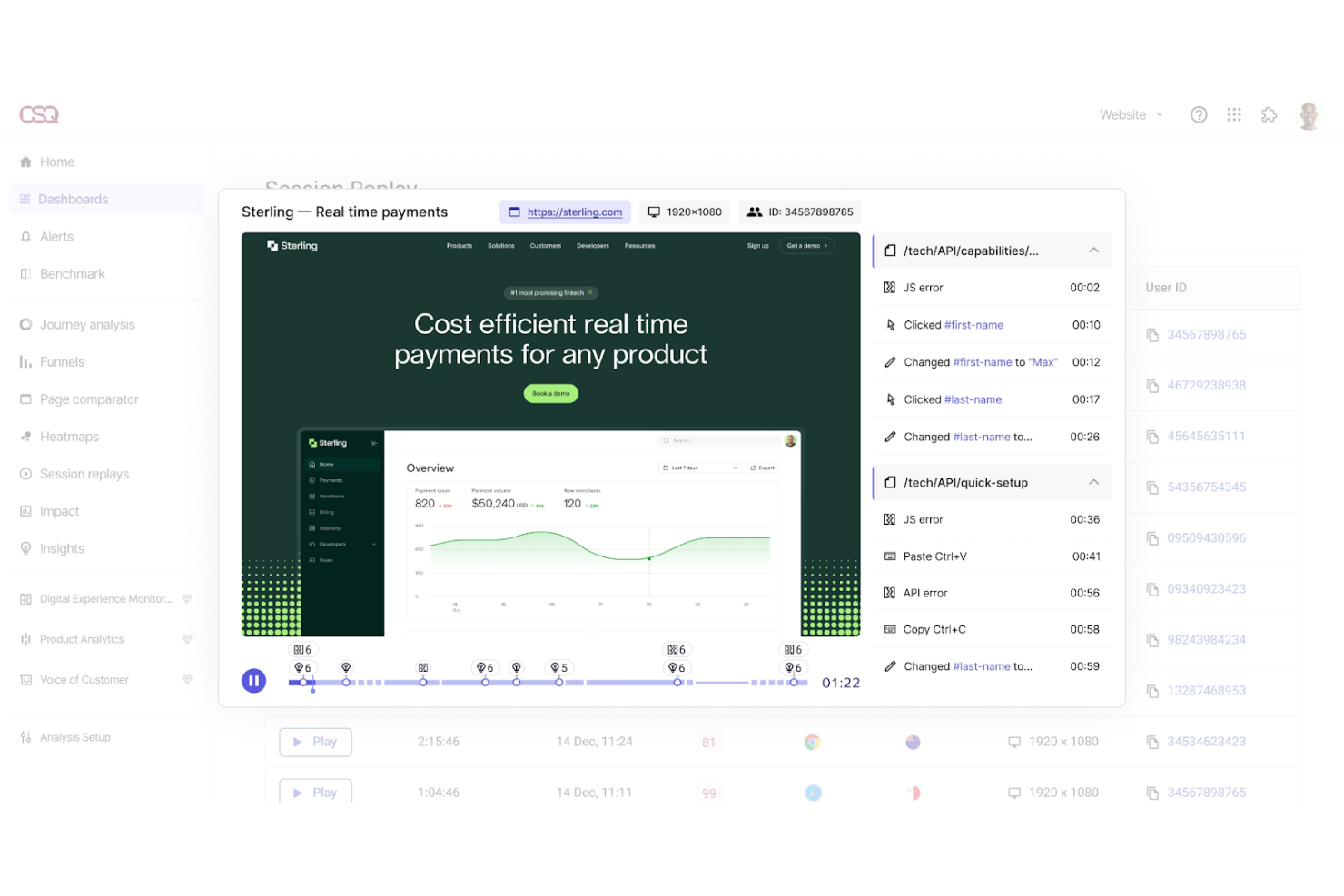
Contentsquare es una plataforma de análisis de experiencia digital diseñada para ayudar a las empresas a comprender y mejorar las interacciones de los usuarios en sus sitios web y aplicaciones. Sus principales usuarios son los especialistas en marketing digital y los diseñadores UX que necesitan información sobre el comportamiento y la participación de los usuarios.
Por qué elegí Contentsquare: Se especializa en el análisis de experiencia digital, ofreciendo funciones como los mapas de calor por zonas que brindan información detallada sobre la interacción del usuario en diferentes elementos de la página. Puedes utilizar el análisis de recorridos para seguir los trayectos de los usuarios e identificar puntos de abandono. Contentsquare también proporciona la reproducción de sesiones, lo que te permite visualizar las interacciones de los usuarios en tiempo real. Estas herramientas te ayudan a realizar mejoras basadas en datos sobre tus experiencias digitales.
Funciones y integraciones destacadas:
Funciones incluyen la cuantificación del impacto que mide el efecto de los cambios en el comportamiento del usuario, alertas de comportamiento que te informan sobre cambios significativos en la actividad del usuario e información basada en IA que resalta las principales tendencias de los usuarios. Estas funciones trabajan juntas para mejorar tu comprensión de las interacciones de los usuarios.
Integraciones incluyen Google Analytics, Adobe Analytics, Salesforce, Tealium, Segment, Optimizely, HubSpot, Shopify, Adobe Commerce y WordPress.
Pros and Cons
Pros:
- Mapas de calor por zonas detallados
- Análisis de recorrido eficaz
- Reproducción de sesiones en tiempo real
Cons:
- Curva de aprendizaje moderada
- Las funciones avanzadas requieren capacitación

Pendo
Ideal para cerrar el ciclo de los datos a la acción dentro de la aplicación
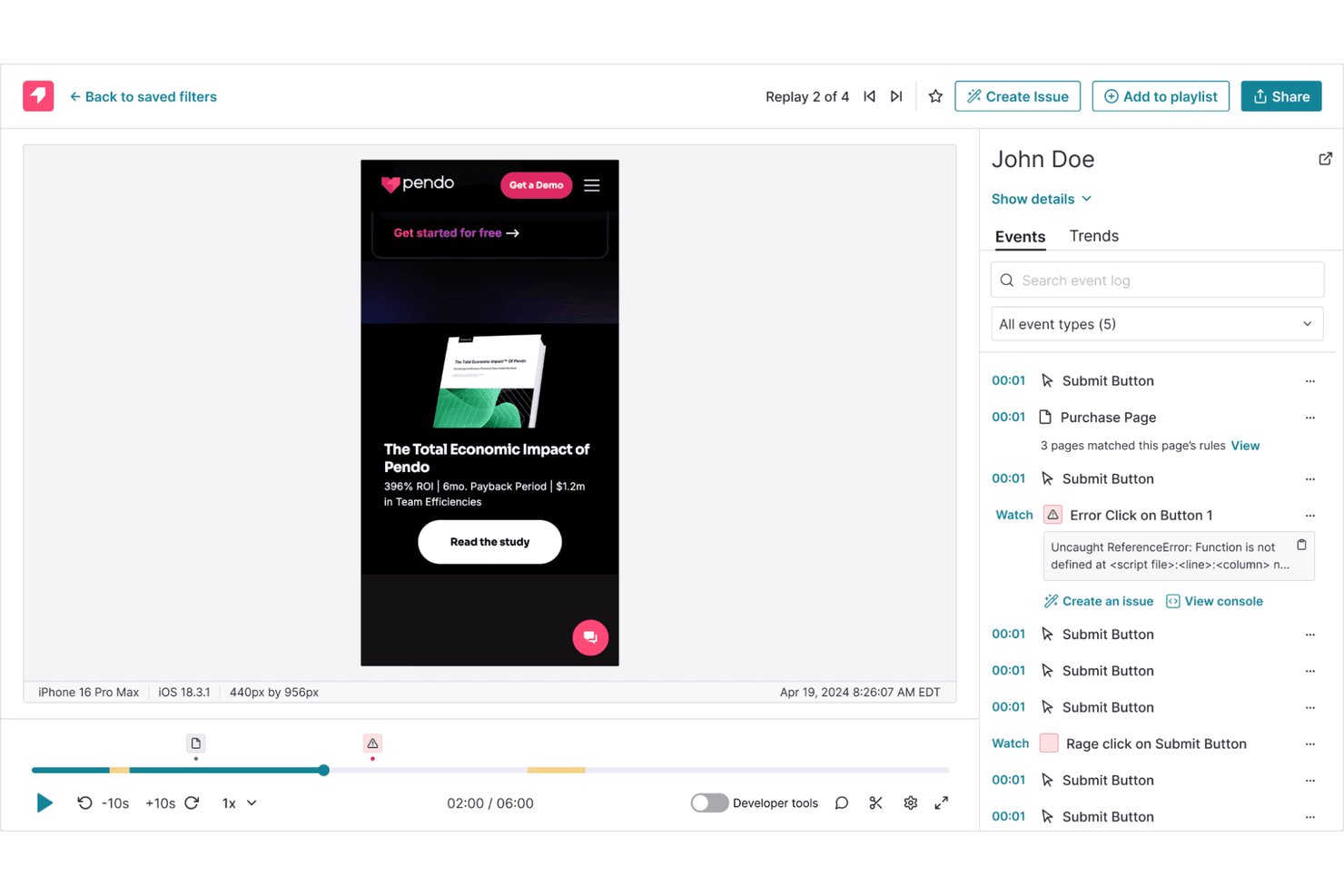
Pendo es una plataforma de experiencia de producto que combina análisis de producto, reproducción de sesiones, guías dentro de la aplicación, segmentación de usuarios y herramientas de comentarios de voz del cliente en una sola interfaz.
¿Para quién es más adecuado Pendo?
Pendo es una opción excelente para los responsables de producto de empresas SaaS medianas y grandes que necesitan análisis, guías dentro de la aplicación y comentarios de los usuarios en un solo lugar.
Por qué elegí Pendo
Pendo ocupa un lugar en mi lista final porque realmente cierra el ciclo entre los datos de comportamiento y la acción dentro de la aplicación de una forma que no he visto igualada por otras herramientas. Cuando detecto una caída en un embudo, puedo pasar directamente de ese punto de datos a una reproducción de sesión filtrada y, después, lanzar una guía específica dentro de la aplicación para ese segmento exacto de usuarios, todo sin salir de la plataforma. También me encanta que Leo AI detecte de forma proactiva anomalías de uso y me permita crear guías o segmentos directamente desde una conversación en lenguaje natural.
Características principales de Pendo
- Reproducción de sesiones con detección de señales de frustración: Pendo marca automáticamente los clics repetidos y los giros en U en las grabaciones, para que puedas filtrar directamente las sesiones en las que los usuarios encontraron dificultades sin revisar manualmente horas de material.
- Captura automática retroactiva: Cualquier etiqueta de funcionalidad, segmento o embudo que crees se aplica a los datos históricos recopilados desde la instalación, sin necesidad de volver a instrumentar nada.
- Centro de VoC Pendo Listen: Agrega las respuestas de las encuestas de NPS, CSAT y PMF dentro de la aplicación junto con los tickets de Zendesk y las fuentes de comentarios de terceros, vinculando cada respuesta con los datos de comportamiento del usuario que respondió.
- SDK de análisis para dispositivos móviles: Los SDK nativos para iOS, Android, React Native, Flutter, .NET MAUI y Kotlin Multiplatform ofrecen análisis sin código, reproducción de sesiones y guías dentro de la aplicación en aplicaciones móviles.
Integraciones de Pendo
Pendo incluye más de 51 integraciones, entre ellas Salesforce, Zendesk, Jira, Optimizely, Segment, Snowflake, BigQuery, Tableau y Slack. También admite la sincronización de datos para almacenes de datos, un servidor MCP, webhooks y Zapier.
Pros and Cons
Pros:
- Reproducción de sesiones con privacidad prioritaria y enmascaramiento en el dispositivo
- La captura automática retroactiva se aplica a todos los datos históricos
- Guías, análisis y comentarios en un solo lugar
Cons:
- Los mapas de calor se limitan a los clics a nivel de funcionalidad
- Las pruebas A/B completas requieren una integración de terceros
Otras herramientas de análisis de UX
Estas son algunas opciones adicionales de herramientas de análisis de UX que no llegaron a mi lista, pero que aún merece la pena considerar:
- PostHog
Ideal para análisis de productos de código abierto
- Crazy Egg
Ideal para obtener información sobre pruebas A/B
- Inspectlet
Ideal para el monitoreo de usuarios en tiempo real
- Smartlook
Ideal para reproducir el abandono del embudo en la web y dispositivos móviles
- Lucky Orange
Ideal para la experiencia de usuario en comercio electrónico y las señales de frustración
- Microsoft Clarity
Ideal para análisis de comportamiento gratuitos y sin límite


Cómo evalúo las herramientas de análisis UX
Evalúo las herramientas de análisis UX en dos niveles: las capacidades básicas—repetición de sesión, mapas de calor, análisis de embudos—que una herramienta debe tener, y los diferenciadores que destacan a las mejores.
Funcionalidades principales (Condiciones indispensables para esta lista)
Cuando selecciono herramientas para mi lista, califico cada una en una escala de 0 (no ofrece la funcionalidad) a 5 (sobresale en esta área) para cada funcionalidad principal que se detalla a continuación. Después, calculo la puntuación total de la herramienta como porcentaje. Cada herramienta necesita lograr una puntuación total mínima del 65% para ser considerada para su inclusión.
- Repetición de sesión: Busco calidad en la reproducción, opciones de filtrado y controles de privacidad—como si puedo encontrar rápidamente sesiones donde un usuario abandonó un flujo de pago o experimentó un error de JS.
- Mapas de calor y seguimiento de clics: Los buenos mapas de calor deben manejar contenido dinámico y aplicaciones de una sola página, no solo páginas estáticas. Verifico si las herramientas soportan mapas de scroll, clic y movimiento con segmentación.
- Análisis de embudos y recorridos: Evalúo qué tan flexible es la construcción de embudos—si puedo definir embudos personalizados de varios pasos, ver dónde los usuarios abandonan y comparar conversiones entre segmentos.
- Seguimiento de eventos y comportamiento: Importa si una herramienta ofrece autocaptura o requiere instrumentación manual. Observo qué tan fácilmente los equipos pueden etiquetar botones, campos de formularios y acciones dentro de la aplicación.
- Segmentación y análisis de cohortes: Filtrar sesiones o mapas de calor por atributos de usuario como tipo de plan, dispositivo o fecha de registro es esencial para comprender el comportamiento en diferentes grupos de usuarios.
- Señales de frustración y errores: Las herramientas que detectan clics de ira, clics muertos y giros en U ayudan a descubrir problemas de usabilidad más rápido que revisar grabaciones brutas de sesiones manualmente.
Una vez que tengo una lista de herramientas que cumplen los criterios, considero qué diferencia a cada plataforma.
Factores diferenciadores (Qué distingue a los proveedores)
Así es como comparo y contrasto diferentes proveedores:
Características destacadas
Los insights impulsados por IA ahorran horas de análisis manual al señalar automáticamente anomalías de comportamiento—como un repentino aumento de clics de ira en una funcionalidad recién lanzada. El análisis retroactivo es otro diferenciador que valoro. Aplicar nuevas definiciones de eventos a datos históricos significa que tu equipo no tiene que esperar semanas después de reinstrumentar para obtener resultados. Para equipos que desarrollan productos móviles, también reviso si una herramienta ofrece SDKs nativos con seguimiento de gestos y mapas de calor específicos para apps.
Más allá de las características
La privacidad y el cumplimiento importan cuando las grabaciones de sesiones capturan interacciones reales de usuarios. Reviso el enmascaramiento de datos personales, la gestión de consentimientos y certificaciones como SOC 2 o preparación para GDPR—especialmente para equipos que manejan datos sensibles de usuarios. La compatibilidad con la pila tecnológica también es clave. Una herramienta de análisis UX debe conectar con los sistemas donde tu equipo ya trabaja, ya sea enviando insights a tickets en Jira o canalizando datos de eventos a través de Segment. También evalúo la transparencia de precios, ya que los modelos basados en sesiones o MTU pueden crecer rápidamente a medida que tu producto escala.
Cómo elegir herramientas de análisis de UX
Es fácil perderse entre largas listas de funciones y estructuras de precios complejas. Para ayudarte a mantener la concentración mientras avanzas en tu proceso único de selección de software, estos son algunos factores que debes tener en cuenta:
| Factor | Qué considerar |
| Escalabilidad | Asegúrate de que la herramienta pueda crecer junto con tu empresa. Debe poder gestionar volúmenes de datos cada vez mayores a medida que se expande tu base de usuarios, sin sacrificar el rendimiento. |
| Integraciones | Comprueba la compatibilidad con el software existente que utiliza tu equipo, como sistemas CRM o plataformas de marketing, para garantizar un flujo de datos fluido entre las herramientas. |
| Personalización | Busca herramientas que te permitan adaptar los paneles y los informes a las necesidades y los flujos de trabajo específicos de tu equipo. |
| Facilidad de uso | La interfaz debe ser intuitiva y requerir una formación mínima, lo que permitirá a tu equipo adoptar y utilizar la herramienta eficazmente con rapidez. |
| Presupuesto | Considera tanto los costes iniciales como los planes de precios a largo plazo. Asegúrate de que la herramienta se ajuste a tu presupuesto y ofrezca una buena relación calidad-precio por sus funciones. |
| Medidas de seguridad | Evalúa las medidas de protección de datos, como el cifrado y los controles de acceso, para garantizar que los datos de tus usuarios estén seguros y cumplan con las normativas. |
| Soporte | Un servicio de atención al cliente fiable es fundamental. Busca disponibilidad las 24 horas del día, los 7 días de la semana, y varias opciones de contacto para resolver cualquier problema que pueda encontrar tu equipo. |
| Profundidad de los análisis | Evalúa el nivel de detalle de los análisis proporcionados. La herramienta debe ofrecer información detallada sobre el comportamiento de los usuarios para ayudarte a tomar decisiones fundamentadas. |
Tendencias en las herramientas de analítica de UX
Durante mi investigación, recopilé innumerables actualizaciones de productos, comunicados de prensa y registros de versiones de distintos proveedores de herramientas de analítica de UX. Estas son algunas de las tendencias emergentes que estoy siguiendo:
- Información basada en IA: Cada vez se utiliza más la IA para proporcionar información más profunda sobre el comportamiento de los usuarios. Las herramientas aprovechan el aprendizaje automático para predecir tendencias y automatizar el análisis de datos, ayudando a los equipos a tomar decisiones más rápidas. Proveedores como Contentsquare están incorporando IA para destacar las tendencias de los usuarios.
- Analítica multicanal: Las empresas quieren realizar un seguimiento del comportamiento de los usuarios en varios canales. Las herramientas están evolucionando para ofrecer una visión unificada de las interacciones de los usuarios en sitios web, aplicaciones y otros puntos de contacto digitales. Esta tendencia ayuda a los equipos a comprender todo el recorrido del cliente.
- Analítica centrada en la privacidad: Ante la creciente preocupación por la privacidad de los datos, las herramientas se están enfocando en ofrecer análisis sin poner en riesgo la privacidad de los usuarios. Funciones como la recopilación de datos anonimizados son cada vez más habituales y garantizan el cumplimiento de normativas como el RGPD.
- Colaboración en tiempo real: A medida que continúa el trabajo remoto, la posibilidad de que los equipos colaboren en tiempo real en los análisis está ganando popularidad. Las herramientas están integrando funciones que permiten a los equipos compartir información y trabajar juntos al instante en el análisis de datos.
- Énfasis en la experiencia del usuario: Más allá de los datos, existe un cambio hacia la mejora de la experiencia del usuario dentro de las propias herramientas de analítica. Los proveedores están dando prioridad a las interfaces intuitivas y los diseños fáciles de usar, lo que facilita que los equipos interactúen con los datos analíticos.
¿Qué son las herramientas de analítica de UX?
Las herramientas de analítica de UX son un tipo de herramienta de analítica web diseñada para ayudar a los equipos a comprender cómo interactúan los usuarios con los productos digitales. Utilizadas habitualmente por diseñadores de UX, responsables de producto y profesionales del marketing, estas herramientas combinan datos de comportamiento e información cualitativa para mejorar la experiencia del cliente.
Funciones como los mapas de calor, las reproducciones de sesiones y el seguimiento de conversiones permiten a los equipos detectar problemas de usabilidad, supervisar el comportamiento de usuarios individuales y perfeccionar las experiencias digitales. Al convertir los datos cuantitativos y cualitativos en información útil, estas herramientas respaldan decisiones de diseño basadas en datos que mejoran la satisfacción general de los usuarios.
Funciones de las herramientas de analítica de UX
Al seleccionar herramientas de analítica de UX, busca funciones clave que respalden tanto el seguimiento cuantitativo como la investigación cualitativa de usuarios:
- Mapas de calor: Visualiza la actividad de clics, desplazamientos y movimientos del cursor para identificar los puntos de mayor interacción de los usuarios y los puntos de fricción.
- Reproducciones de sesiones: Observa las sesiones de usuarios individuales para localizar problemas de usabilidad, clics repetidos por frustración y abandonos.
- Seguimiento de conversiones: Analiza los embudos de conversión y descubre dónde abandonan los usuarios su recorrido.
- Analítica en tiempo real: Accede a datos de comportamiento en directo para reaccionar rápidamente ante patrones o problemas emergentes.
- Paneles personalizables: Muestra las métricas de forma que se ajuste a los objetivos y flujos de trabajo de tu equipo.
- Alertas de comportamiento: Recibe notificaciones cuando surjan patrones inesperados, como aumentos repentinos en las tasas de salida o bucles de navegación.
- Análisis de cohortes: Segmenta a los usuarios por comportamiento o atributos para comprender las tendencias de diferentes audiencias.
- Recopilación de datos centrada en la privacidad: Respeta la privacidad de los usuarios y, al mismo tiempo, recopila información útil.
- Seguimiento multicanal: Supervisa todo el recorrido del usuario en aplicaciones móviles, sitios web y otros puntos de contacto digitales.
- Integración de comentarios de los usuarios: Combina las opiniones directas con el seguimiento del comportamiento para obtener una visión más completa de la experiencia del usuario.
Beneficios de las herramientas de análisis de UX
Implementar herramientas de análisis de UX proporciona varios beneficios para tu equipo y tu empresa. Estos son algunos de los que puedes esperar:
- Experiencia de usuario mejorada: Al analizar mapas de calor y reproducciones de sesiones, puedes identificar y corregir los puntos problemáticos, lo que permite interacciones más fluidas.
- Decisiones basadas en datos: Los análisis en tiempo real y el seguimiento de conversiones proporcionan información que ayuda a tu equipo a tomar decisiones fundamentadas.
- Aumento de las tasas de conversión: Comprender los puntos de abandono mediante el seguimiento de conversiones te permite optimizar el recorrido del usuario y aumentar las conversiones.
- Mayor satisfacción del cliente: Al integrar los comentarios de los usuarios y el análisis de cohortes, puedes adaptar las experiencias para satisfacer mejor las necesidades de los usuarios.
- Resolución oportuna de problemas: Las alertas de comportamiento garantizan que abordes rápidamente cualquier cambio significativo en el comportamiento de los usuarios, manteniendo una experiencia positiva.
- Visión integral de los recorridos del usuario: El seguimiento entre canales ofrece una imagen completa de las interacciones de los usuarios, lo que te ayuda a crear estrategias coherentes.
- Cumplimiento normativo: La recopilación de datos basada en la privacidad garantiza que tus prácticas de datos cumplan con las normativas y protejan la información de los usuarios.
Costes y precios de las herramientas de análisis de UX
Seleccionar herramientas de análisis de UX requiere comprender los diversos modelos de precios y planes disponibles. Los costes varían según las funciones, el tamaño del equipo, los complementos y otros factores. La tabla siguiente resume los planes habituales, sus precios medios y las funciones típicas incluidas en las soluciones de herramientas de análisis de UX:
Tabla comparativa de planes de herramientas de análisis de UX
| Tipo de plan | Precio medio | Funciones habituales |
| Plan gratuito | $0 | Mapas de calor básicos, reproducciones de sesiones limitadas y análisis estándar. |
| Plan personal | $5-$50/user/month | Mapas de calor, reproducciones de sesiones, seguimiento de conversiones básico e informes personalizados limitados. |
| Plan empresarial | $50-$150/ user/month | Seguimiento de conversiones avanzado, análisis en tiempo real, integración de comentarios de los usuarios y paneles personalizables. |
| Plan corporativo | $150+/user/month | Seguimiento entre canales, alertas de comportamiento, información basada en IA y asistencia especializada. |
Preguntas frecuentes sobre las herramientas de análisis de UX
Estas son algunas respuestas a preguntas frecuentes sobre las herramientas de análisis de UX:
¿Los diseñadores de UX necesitan saber análisis de datos?
Sí, los diseñadores de UX se benefician de comprender el análisis de datos, ya que este informa las decisiones de diseño. Saber cómo interpretar los datos de las interacciones de los usuarios ayuda a optimizar los diseños y mejorar las experiencias de usuario. El análisis de datos respalda decisiones clave en el proceso de diseño al destacar áreas de mejora.
¿Qué son las herramientas de análisis externas?
Las herramientas de análisis externas incluyen plataformas populares como Google Analytics, Hotjar y Mixpanel. Estas herramientas proporcionan información valiosa sobre el comportamiento de los usuarios, ayudándote a comprender cómo interactúan con tus productos digitales e identificar áreas de optimización.
¿Cómo se integran las herramientas de análisis de UX con los sistemas existentes?
Las herramientas de análisis de UX suelen integrarse con sistemas CRM, plataformas de marketing y otras herramientas empresariales. Estas integraciones permiten un flujo de datos fluido, ayudándote a consolidar la información y obtener una visión completa de las interacciones de los usuarios en diferentes canales.
¿Pueden las herramientas de análisis de UX ayudar a optimizar la tasa de conversión?
Sí, las herramientas de análisis de UX desempeñan un papel clave en la optimización de la tasa de conversión al realizar un seguimiento de los recorridos de los usuarios e identificar los puntos de abandono. Al analizar estos datos, puedes realizar cambios fundamentados para mejorar el flujo de usuarios y aumentar las tasas de conversión en tus plataformas digitales.
¿Qué sigue?
No olvides suscribirte a nuestro boletín, además de consultar los últimos pódcast, entrevistas y otros análisis de líderes y expertos del sector.