

A strong Adobe Analytics alternative gives you reliable UX analytics tools, session tracking, conversion insights, and real user journey visibility—without demanding the scale or commitment of Adobe’s ecosystem. If you’re searching for Adobe Analytics alternatives, you’re likely after platforms that offer flexible data capture, meaningful reporting, and user experience metrics tailored to your workflow. Choosing the right tool lets your team pinpoint friction, validate product changes, and prioritize improvements with confidence. In this guide, you’ll get an up-to-date comparison of the leading Adobe Analytics alternatives, with a focus on real-world usability and product analytics depth so you can make an informed choice this 2026.
What Is Adobe Analytics?
Adobe Analytics is a digital analytics platform for tracking, measuring, and analyzing user interactions across websites, apps, and digital channels. It helps businesses collect real-time data, build custom reports, and visualize the customer journey from first visit to conversion. Teams use Adobe Analytics to spot trends, segment audiences, and inform decision-making based on reliable behavioural and conversion data.
Best Adobe Analytics Alternatives Summary
This comparison chart summarizes pricing details for my top Adobe Analytics alternative selections to help you find the best one for your budget and business needs.
| Tool | Best For | Trial Info | Price | ||
|---|---|---|---|---|---|
| 1 | Best for unified web and app session tracking | Free plan available | From $50,000/year (billed annually) | Website | |
| 2 | Best for event-based behavioural insights | Free plan available | From $120/month (billed annually) | Website | |
| 3 | Best for pinpointing friction points visually | Free plan + free demo available | Pricing upon request | Website | |
| 4 | Best for product feature usage analysis | Free plan available | Pricing upon request | Website | |
| 5 | Best for automated lifecycle push sequences | 30-day free trial + free demo available | From $85/month | Website | |
| 6 | Best for visualizing digital user journeys | Free demo available | Pricing upon request | Website | |
| 7 | Best for retroactive automatic data capture | Free plan available | Pricing upon request | Website | |
| 8 | Best for tracking user conversion funnels | 7-day free trial + free demo available | From $99/month | Website | |
| 9 | Best for processing intent via session replays | 15-day free trial + free plan + free demo available | From $39/month (billed annually) | Website | |
| 10 | Best for privacy-focused hosting control | 21-day free trial | From $26/month (billed annually) | Website |


Why Trust Our Software Recommendations
6,700+
Reviews
20
Industry experts
16+
Evaluation factors
14
Years
Our team has been testing and reviewing software since 2012. As product managers ourselves, we know how difficult—and important—it is to choose the right software.
For this guide, we evaluated tools using hands-on testing and independent research, scoring tools using our selection criteria.
Our reviews reflect our human editorial judgment, not a sales pitch.
- Andrew LumbySenior TPM
- Cristiano ValimSenior UI/UX Lead
Best Adobe Analytics Alternatives Reviews
Below are my detailed summaries of the best Adobe Analytics alternatives that made it onto my shortlist. My reviews offer a detailed look at the features, best use cases, and integrations of each platform to help you find the best one for you.
 Best for unified web and app session tracking
- Free plan available
- From $50,000/year (billed annually)
Visit WebsiteRating:4.6/5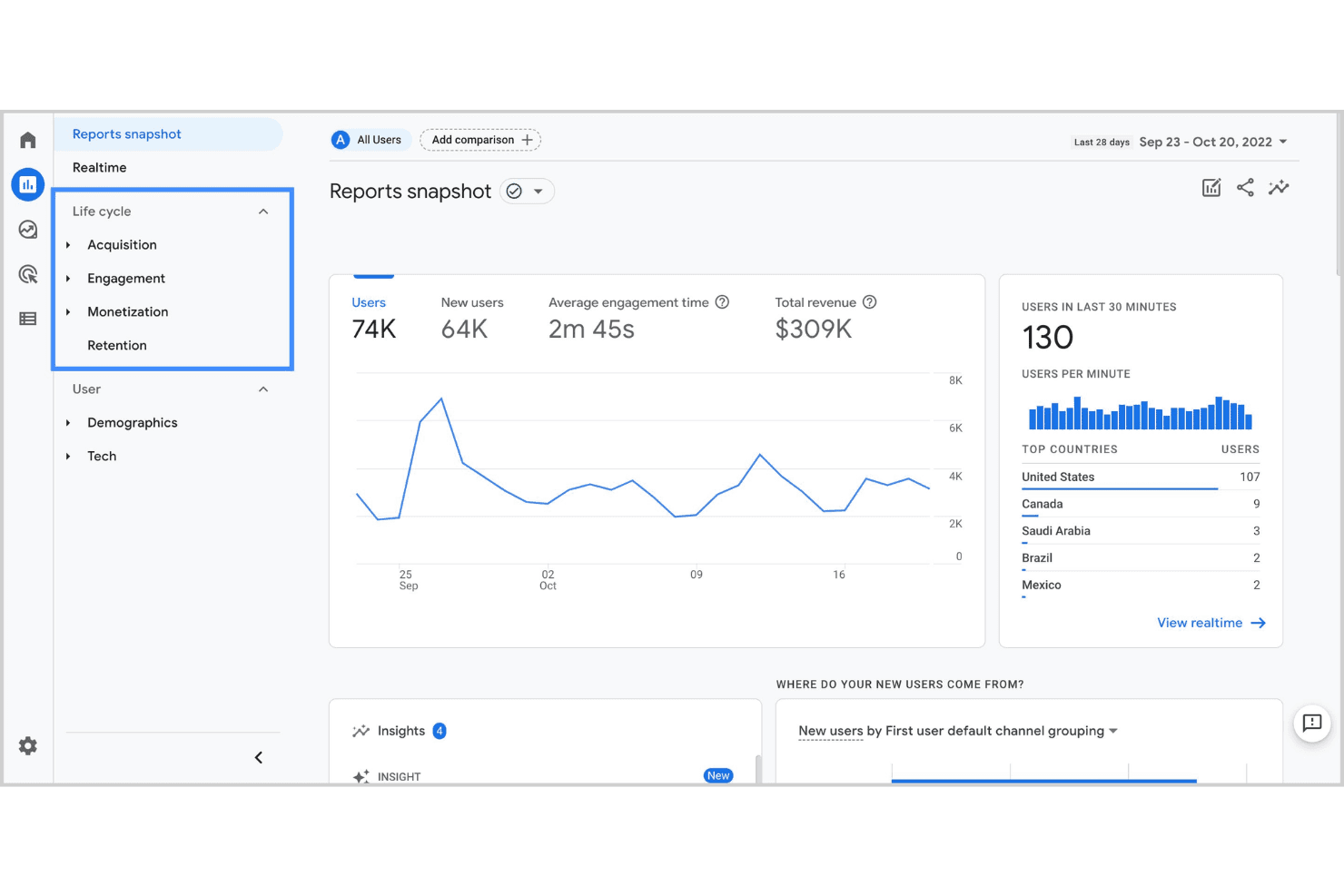
Google Analytics dashboard for unified web and app performance tracking. Google Analytics is a web and app analytics platform from Google that helps marketing and product teams track user sessions, measure traffic sources, and understand how visitors interact with their digital properties.
Who Is Google Analytics Best For?
Google Analytics is a strong fit for small to mid-sized businesses that need accessible, free web analytics without heavy technical setup.
Why Google Analytics Is a Good Adobe Analytics Alternative
I picked Google Analytics as one of the best because its cross-platform session tracking covers both web and app data in a single property. I especially like the Path Exploration feature, which lets me trace exactly how users move across my site and app before converting. The Funnel Exploration report adds another layer, letting me spot where users drop off and validate changes against real session data.
Google Analytics Key Features
- Real-time reporting: Monitor active users, live events, and page activity as they happen across your site or app.
- Audience segmentation: Build custom segments based on user behaviour, demographics, device type, or traffic source.
- Custom event tracking: Define and track specific user interactions, like button clicks or video plays, beyond default pageview data.
- Attribution modelling: Compare multiple attribution models to understand which channels and touchpoints contribute to conversions.
Google Analytics Integrations
Google Analytics offers native integrations with Google Ads, Shopify, HubSpot, and Squarespace, as well as Google Search Console, Google Cloud, Firebase, and Google Sheets. It also works alongside Microsoft Clarity for session-level UX insights. An API is available for custom integrations, and it connects with Zapier.
Pros and Cons
Pros:
- Flexible event-based tracking setup
- Deep integration with Google marketing tools
- Real-time data updates for active monitoring
Cons:
- Lacks native support for offline data sources
- No built-in customer journey visualization
Learn more about Google Analytics: Best for event-based behavioural insights
- Free plan available
- From $120/month (billed annually)
Visit WebsiteRating:4.5/5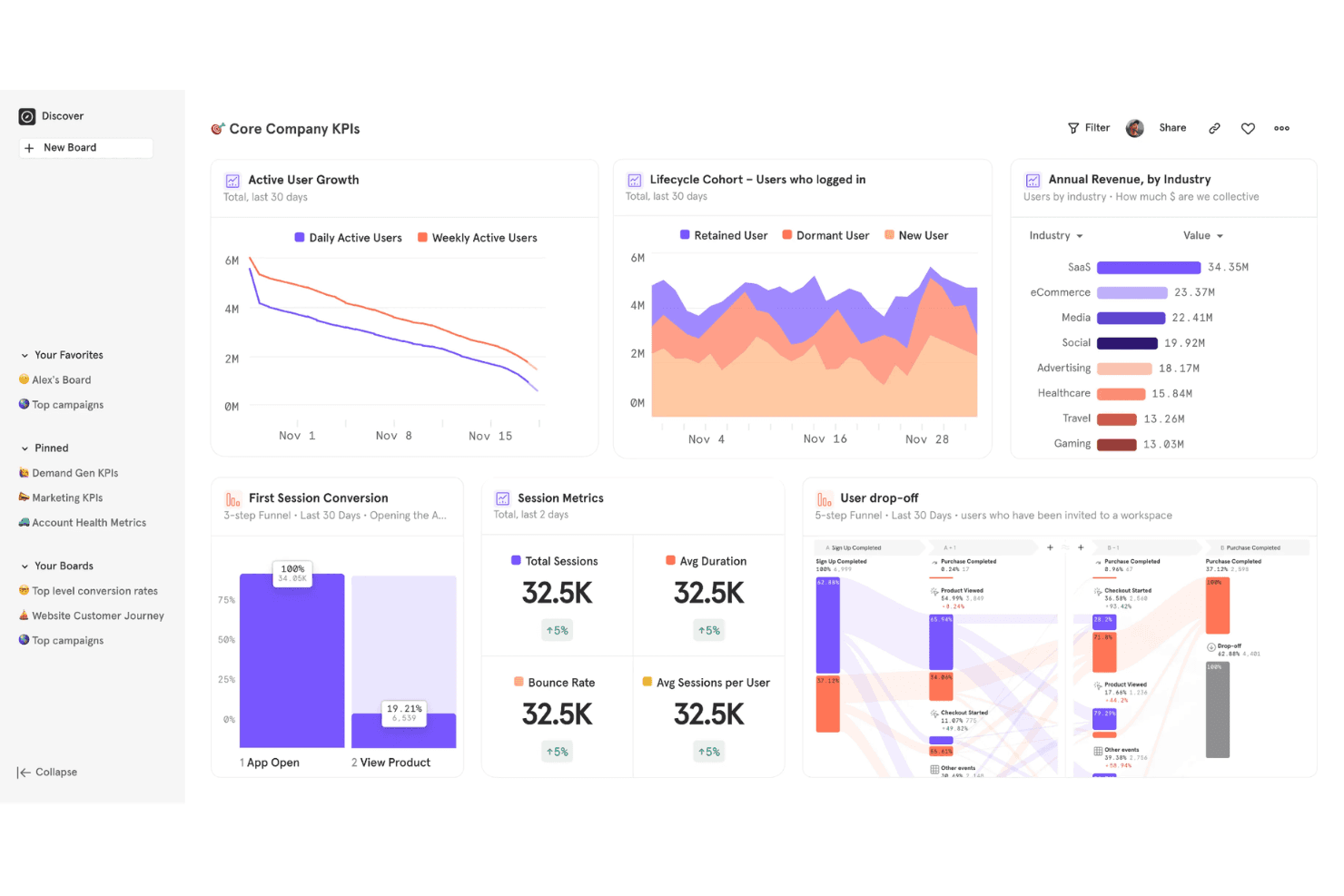
Mixpanel offers a Core Company KPIs dashboard featuring active user growth, lifecycle cohort analysis, annual revenue by industry, session metrics, and user drop-off funnels. Mixpanel is a product analytics platform that tracks how users interact with your product at the event level, giving product and growth teams granular visibility into feature adoption, retention, and conversion behaviour.
Who Is Mixpanel Best For?
Mixpanel is a strong fit for product managers and growth teams at B2B SaaS and mobile app companies who need to analyze user behaviour beyond pageviews.
Why Mixpanel Is a Good Adobe Analytics Alternative
I picked Mixpanel because event-based tracking is genuinely where it excels over Adobe Analytics. Every user action gets captured as a discrete event, so I can build funnel reports that show exactly where users drop off between specific interactions, not just between pages. I also use its retention charts to see which features keep cohorts coming back week over week, with filters I can apply without writing a single query.
Mixpanel Key Features
- User flows: Visualize the paths users take through your product after any starting or ending event.
- Custom dashboards: Build shared dashboards that combine multiple reports into a single view for your team.
- Behavioural segmentation: Filter any report by user properties, device type, or prior actions without SQL.
- Lexicon data dictionary: Centrally manage, define, and hide tracked events and properties across your entire project.
Mixpanel Integrations
Mixpanel offers native integrations with Braze, Segment, Google Ads, Facebook Ads, Mailchimp, Salesforce Marketing Cloud, mParticle, Intercom, Appcues, and VWO. An API is available for custom integrations, and it connects with Zapier.
Pros and Cons
Pros:
- Group analytics for B2B account tracking
- Built-in A/B test reporting for experiments
- Retroactive funnel building without code changes
Cons:
- Limited prebuilt dashboards
- Requires event instrumentation for full value
 Best for pinpointing friction points visually
- Free plan + free demo available
- Pricing upon request
Visit WebsiteRating:4.5/5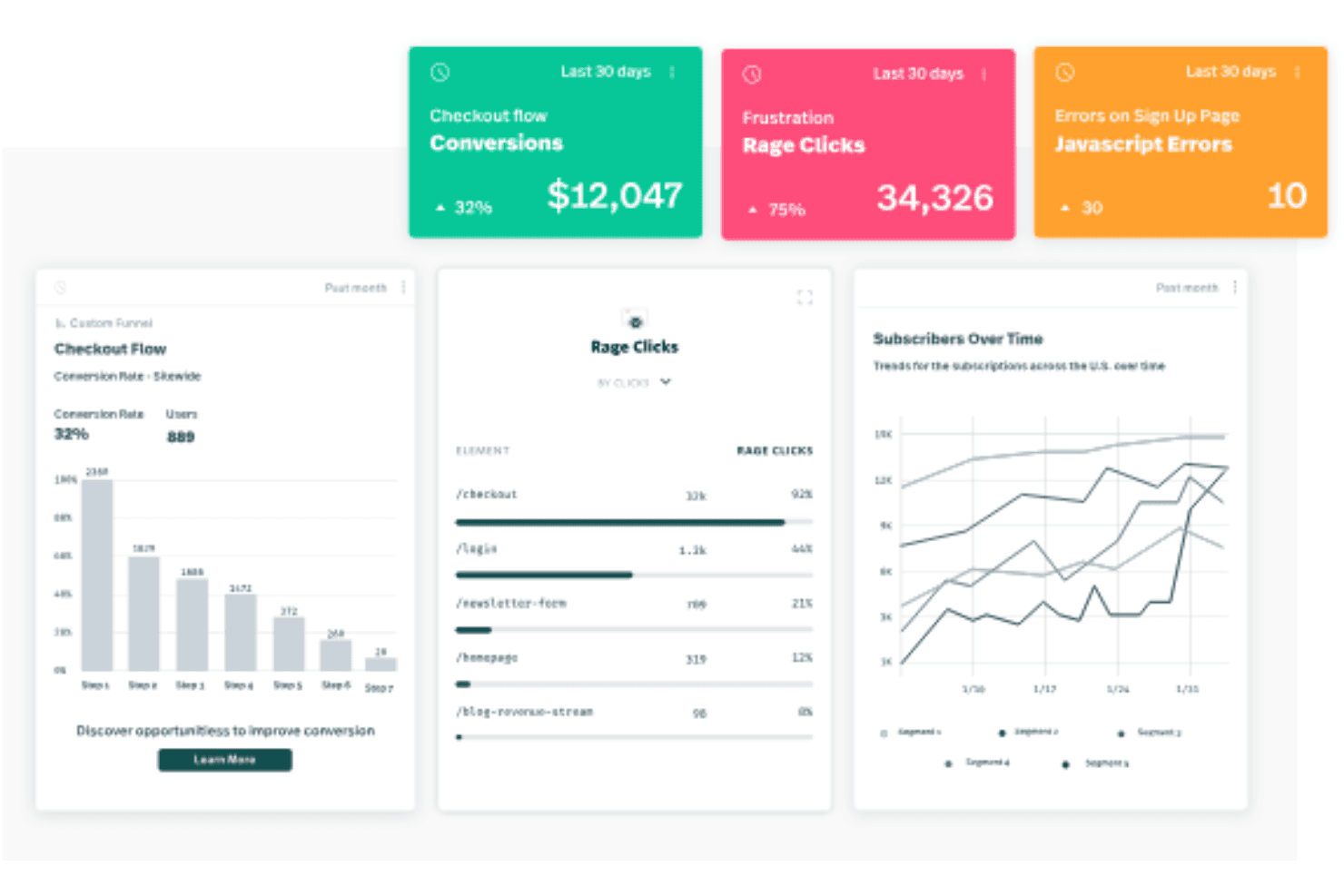
Fullstory offers an analytics dashboard displaying checkout flow conversions, rage clicks, JavaScript errors, funnel steps, and subscriber trends over time. For product managers and UX teams who need to understand exactly where digital experiences break down, FullStory combines session replay, autocapture, and behavioural analytics in one platform.
Who Is FullStory Best For?
FullStory suits ecommerce and SaaS companies that need granular visibility into user behaviour across high-traffic digital products.
Why FullStory Is a Good Adobe Analytics Alternative
I've included FullStory in my top picks because it surfaces friction in a way that raw event data simply can't. Where Adobe Analytics tells you that users dropped off a funnel step, FullStory's heatmaps and session replay show you exactly what happened visually: the rage clicks, the cursor thrashing, the hesitation before abandonment. I also appreciate Sentiment Signals, which automatically flags frustration patterns across sessions without requiring you to set up manual event tracking first.
FullStory Key Features
- Autocapture: Automatically records every user interaction on your site or app without requiring manual event instrumentation upfront.
- Conversion funnel analysis: Lets you build funnels from any captured event to see where users drop off across multi-step flows.
- User journey mapping: Visualizes the full path a user takes across sessions, including page visits, clicks, and form interactions.
- Dev Tools integration: Captures JavaScript errors and network requests alongside session replays so engineers can debug issues in context.
FullStory Integrations
FullStory offers native integrations with Slack, Jira, Trello, Intercom, Google Analytics, Google Tag Manager, Optimizely, Segment, Salesforce, and Microsoft Teams. An API is available for custom integrations, and it connects with Zapier.
Pros and Cons
Pros:
- Conversion funnels visualize multi-step drop-offs
- Rage click detection highlights frustration points
- Session replay shows exact user interactions
Cons:
- Lacks multi-domain tracking capability
- Mobile app analytics are less advanced
Learn more about Fullstory: Best for product feature usage analysis
- Free plan available
- Pricing upon request
Visit WebsiteRating:4.5/5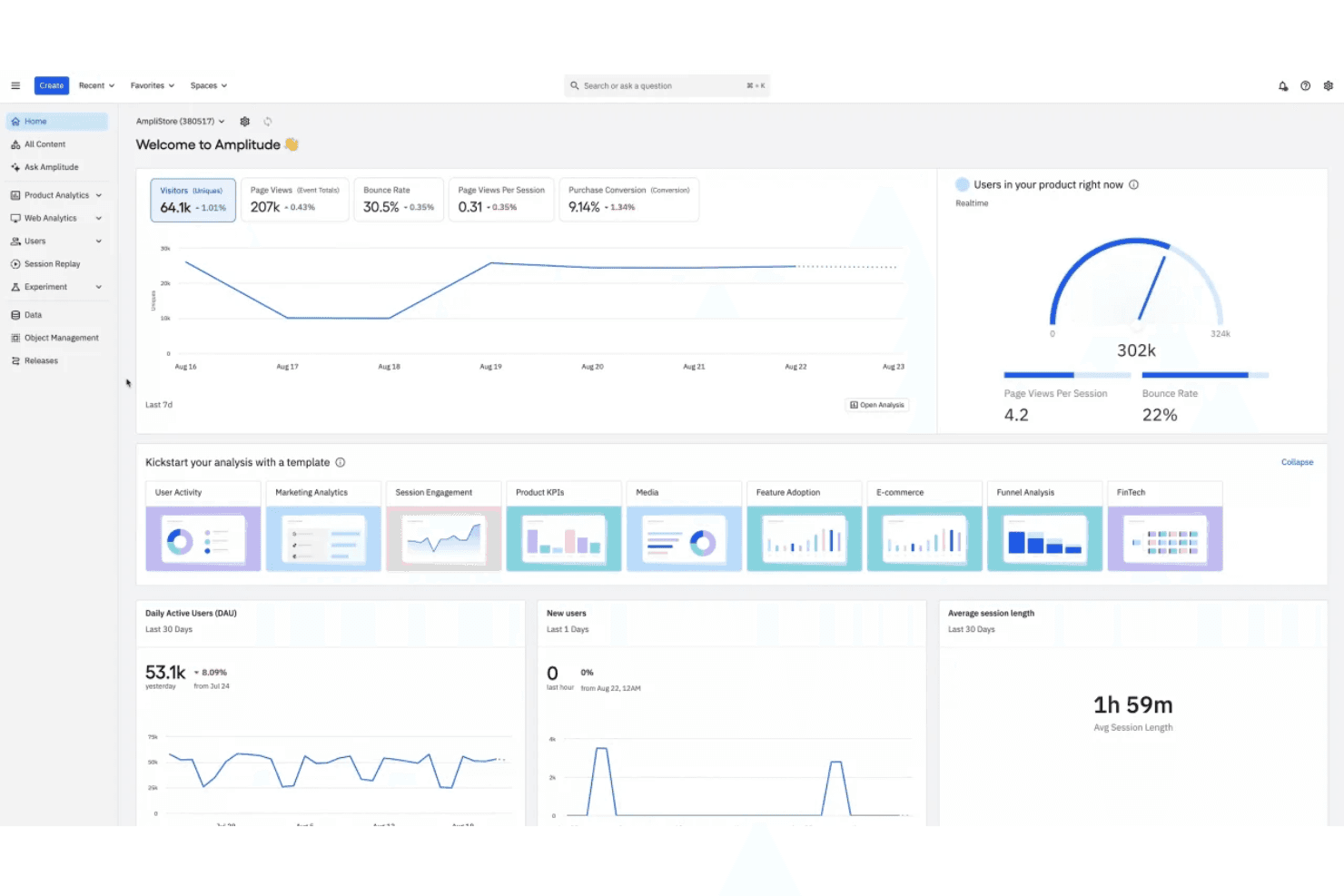
Amplitude offers a comprehensive analytics dashboard displaying real-time user metrics, traffic trends, DAU, session length, and template-based analysis tools. Amplitude is a product analytics platform built for product and growth teams who need to understand how users engage with specific features across web and mobile apps.
Who Is Amplitude Best For?
Amplitude is a strong fit for mid-size to enterprise SaaS companies with dedicated product teams running ongoing feature experimentation and retention analysis.
Why Amplitude Is a Good Adobe Analytics Alternative
I picked Amplitude because its Feature Adoption chart lets me track exactly which features users activate, return to, or abandon over time. I also rely on Amplitude's Compass chart to identify which behaviours correlate with long-term retention, something Adobe Analytics doesn't surface natively. Together, those two views give my product team a clear read on where to invest next in the product roadmap.
Amplitude Key Features
- Funnel analysis: Map multi-step conversion flows to see exactly where users drop off between key actions.
- Cohort builder: Group users by shared behaviours or properties to compare how different segments move through your product.
- Session replay: Watch individual user sessions with synced event data to see exactly what happened before and after a key interaction.
- A/B experiment analysis: Run and measure product experiments with built-in statistical significance tracking across user segments.
Amplitude Integrations
Amplitude offers 138+ built-in integrations, including Twilio Segment, Braze, Snowflake, HubSpot, Slack, AWS S3, Google Ads, Salesforce, Intercom, and WordPress. It also connects with Zapier, and an API is available for custom integrations.
Pros and Cons
Pros:
- Built-in A/B test analytics
- Real-time product usage dashboards
- Advanced cohort analysis for user segmentation
Cons:
- Fewer out-of-the-box marketing integrations
- Requires manual setup for custom events
Learn more about Amplitude: Best for automated lifecycle push sequences
- 30-day free trial + free demo available
- From $85/month
Visit WebsiteRating:4.5/5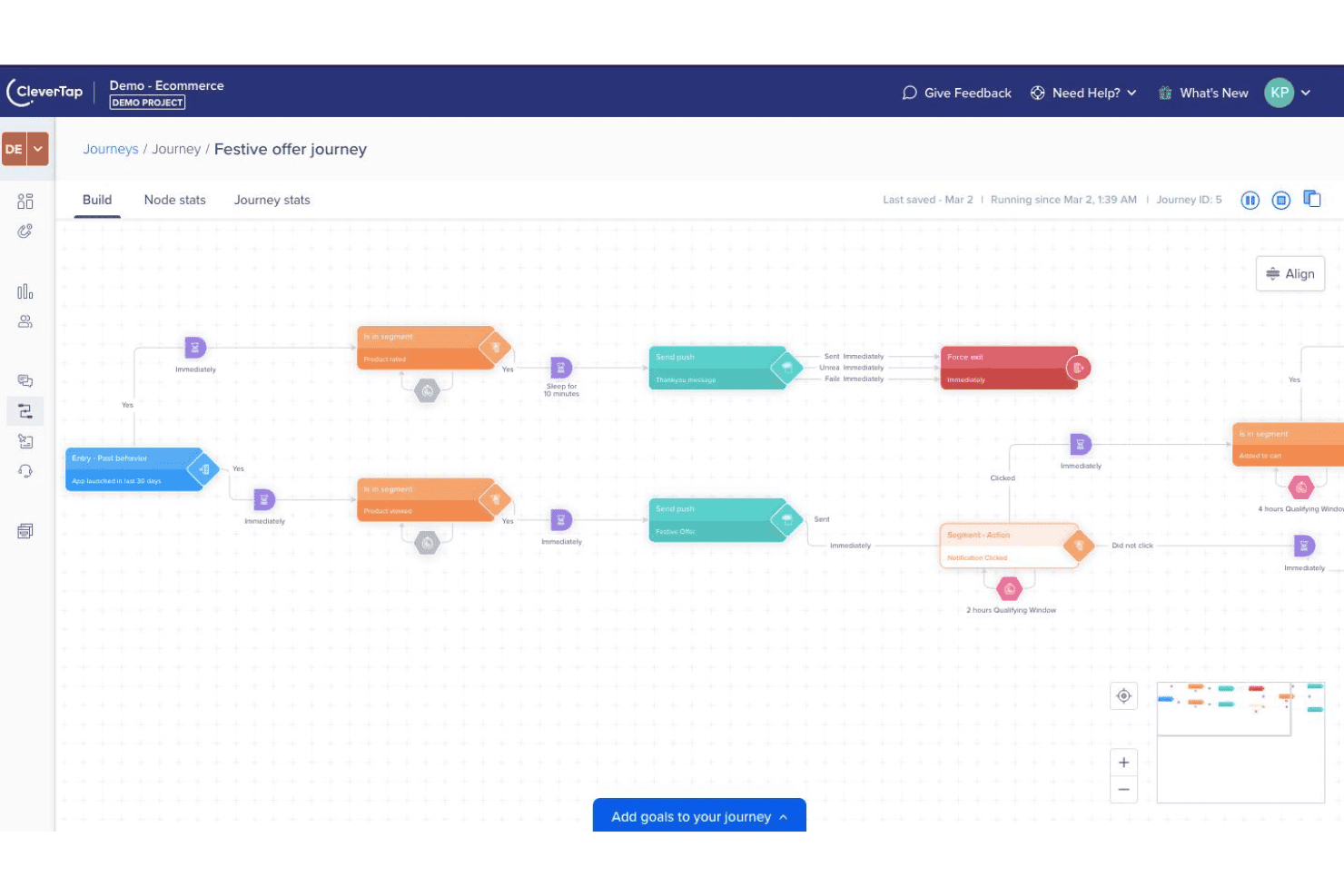
CleverTap journey builder for automated lifecycle push notification campaigns. CleverTap is a mobile marketing and analytics platform built for consumer apps that need to combine behavioural data, user segmentation, and multi-channel campaign execution in one place.
Who Is CleverTap Best For?
CleverTap is a strong fit for mobile-first companies in consumer apps, fintech, and ecommerce that need to segment users and trigger campaigns based on real-time behavioural data.
Why CleverTap Is a Good Adobe Analytics Alternative
I picked CleverTap as one of the best because its Journeys builder lets you design behaviour-triggered push sequences visually, without code. You can set up a drip campaign that fires a push when a user abandons a cart, goes quiet after onboarding, or hits a specific milestone, all from a single canvas. I also appreciate RenderMax™, CleverTap's proprietary delivery technology that pushes render rates up to 90% even on Android OEM devices where most platforms fall short.
CleverTap Key Features
- Funnel analytics: Visualize where users drop off across any multi-step flow, like onboarding or checkout, using event-based funnel reports.
- Cohort analysis: Group users by the date they completed a specific action and track retention or conversion trends over time.
- A/B/n testing: Run split tests on in-app messages, campaign copy, or experience variants to compare performance across multiple versions.
- Predictive segments: Use built-in AI to identify users likely to churn or convert before they act, based on behavioural patterns.
CleverTap Integrations
CleverTap offers native integrations with Segment, mParticle, Mixpanel, Amplitude, Adjust, Branch, RudderStack, Tealium, Hightouch, and RevenueCat, with a broader ecosystem of 300+ technology and solution partners. An API is also available for custom integrations.
Pros and Cons
Pros:
- Built-in campaign journey builder with automation
- Real-time behavioural segmentation across user groups
- Multichannel campaigns span push, SMS, and email
Cons:
- Webhook management lacks modify and delete options
- Published journeys can't be edited after launch
Learn more about CleverTap: Best for visualizing digital user journeys
- Free demo available
- Pricing upon request
Visit WebsiteRating:4.7/5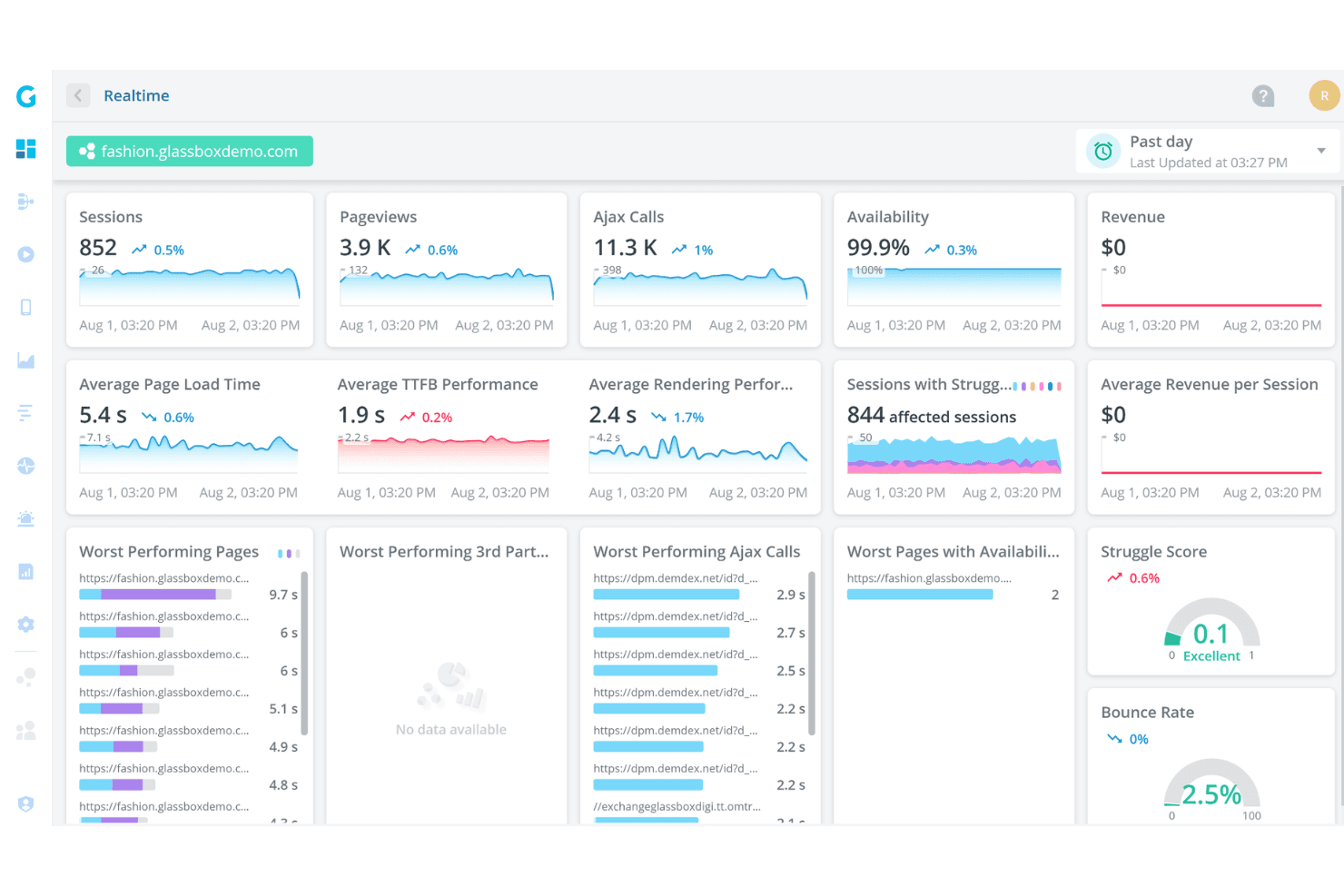
Glassbox offers a real-time analytics dashboard displaying sessions, pageviews, Ajax calls, availability, page load times, and struggle scores for a demo fashion website. Glassbox is a digital experience analytics platform built for enterprise teams in regulated industries who need deep visibility into how customers interact with their web and mobile apps.
Who Is Glassbox Best For?
Glassbox is a strong fit for enterprise teams in financial services, insurance, and retail who need session-level visibility across web and native mobile apps.
Why Glassbox Is a Good Adobe Analytics Alternative
I picked Glassbox because its Augmented Journey Map gives me a single visual of every step across a digital journey, from acquisition through conversion, without piecing together separate reports. I can see drop-offs, struggles, and errors in one view, then jump directly into a session replay from that same screen. What I find especially useful is the built-in revenue impact metric, which assigns a dollar value to friction at each journey step so I can prioritize fixes by actual business cost.
Glassbox Key Features
- Heatmaps: Aggregate click, scroll, and hover activity across any page to show where attention concentrates or drops off.
- Form analytics: Tracks field-level interactions inside forms, including hesitation, abandonment, and re-entry behaviour.
- Mobile app session recording: Captures and replays native iOS and Android app sessions, including crash moments.
- Struggle detection: Automatically flags rage clicks, dead clicks, and repeated error clicks without manual event configuration.
Glassbox Integrations
Glassbox offers native integrations with Adobe Analytics, Google Analytics, Google Tag Manager, Tealium, Qualtrics, Jira, Slack, Firebase, AB Tasty, Adobe Target, Optimizely, and VWO. An API is available for custom integrations.
Pros and Cons
Pros:
- Visual journey mapping highlights conversion barriers
- Integrates with major analytics and monitoring tools
- Real-time alerts for user experience issues
Cons:
- Mobile analytics features require separate setup
- Fewer advanced segmentation options than Adobe
Learn more about Glassbox: Best for retroactive automatic data capture
- Free plan available
- Pricing upon request
Visit WebsiteRating:4.3/5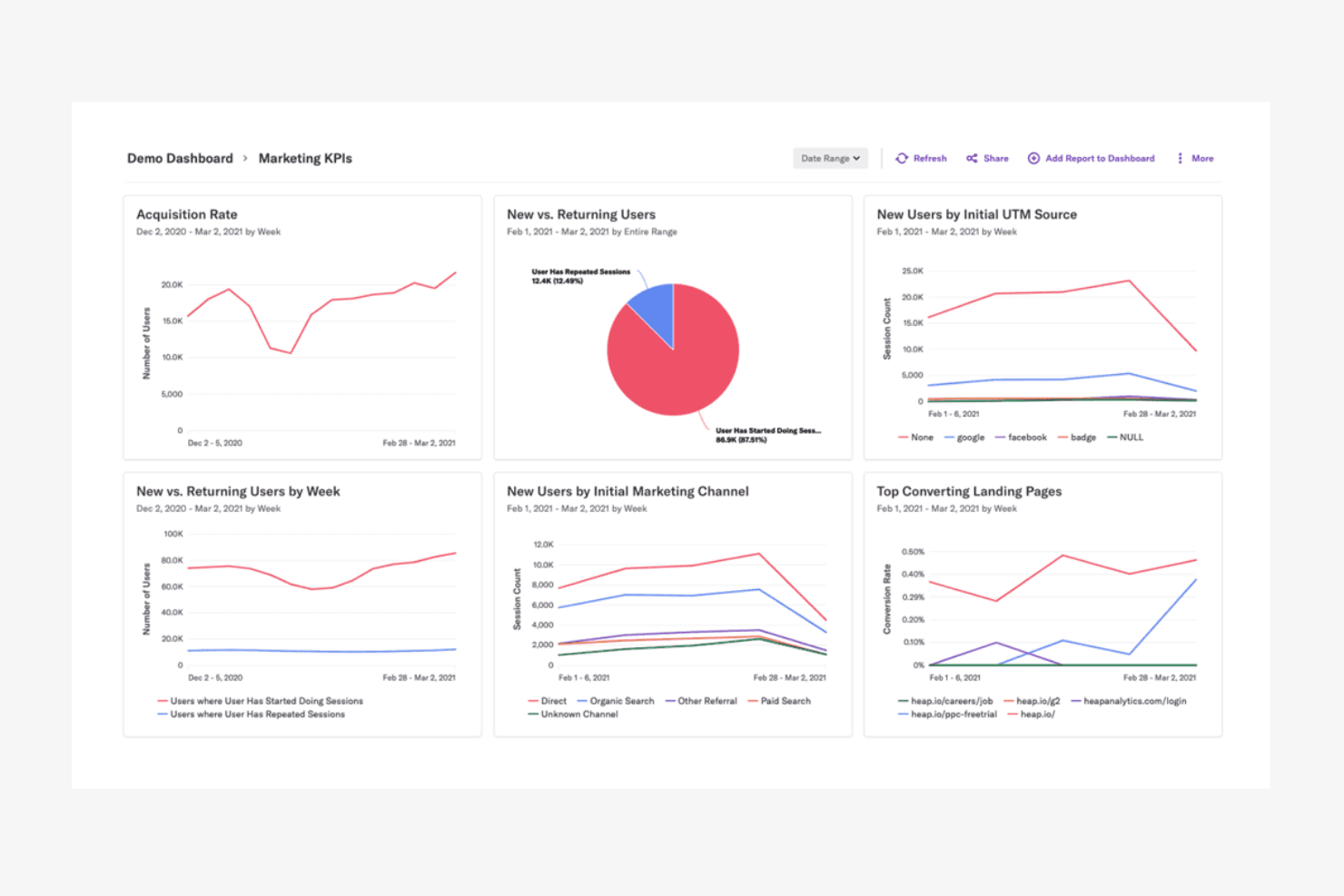
Heap offers a Marketing KPIs demo dashboard with charts for acquisition rate, new vs. returning users, UTM sources, marketing channels, and top converting landing pages. Heap is a digital insights platform that automatically captures every user click, tap, and form submission without manual event tagging, giving product and UX teams full behavioural data from day one.
Who Is Heap Best For?
Heap is a strong fit for product and growth teams at mid-market SaaS companies who need complete behavioural data without relying on engineering to instrument every event.
Why Heap Is a Good Adobe Analytics Alternative
I picked Heap because its autocapture feature records every click, tap, scroll, and form interaction the moment you install it, with no event taxonomy required upfront. What I really appreciate is the retroactive analysis: I can define a new event today and instantly pull historical data on it, going back to day one. That means I'm never locked out of an insight because nobody thought to tag it in advance.
Heap Key Features
- Session replay: Watch individual user sessions as recorded video to see exactly how someone navigated your product.
- Heatmaps: View aggregated click and scroll maps across any page to spot where attention concentrates or drops off.
- Funnel analysis: Build multi-step conversion funnels to identify where users abandon a flow.
- User paths: Visualize the routes users take before or after any specific action in your product.
Heap Integrations
Heap offers dozens of native integrations across categories like CRM, marketing automation, A/B testing, and commerce, including Salesforce, Intercom, Shopify, HubSpot, Braze, Marketo, Iterable, Klaviyo, Optimizely, and Snowflake. It connects with Zapier and provides an API for custom integrations.
Pros and Cons
Pros:
- Journey mapping highlights user friction points
- Built-in data governance and privacy controls
- Session replay for visual behaviour analysis
Cons:
- Handles raw event logs efficiently
- Limits raw data storage duration
Learn more about Heap (by Contentsquare): Best for tracking user conversion funnels
- 7-day free trial + free demo available
- From $99/month
Visit WebsiteRating:4.1/5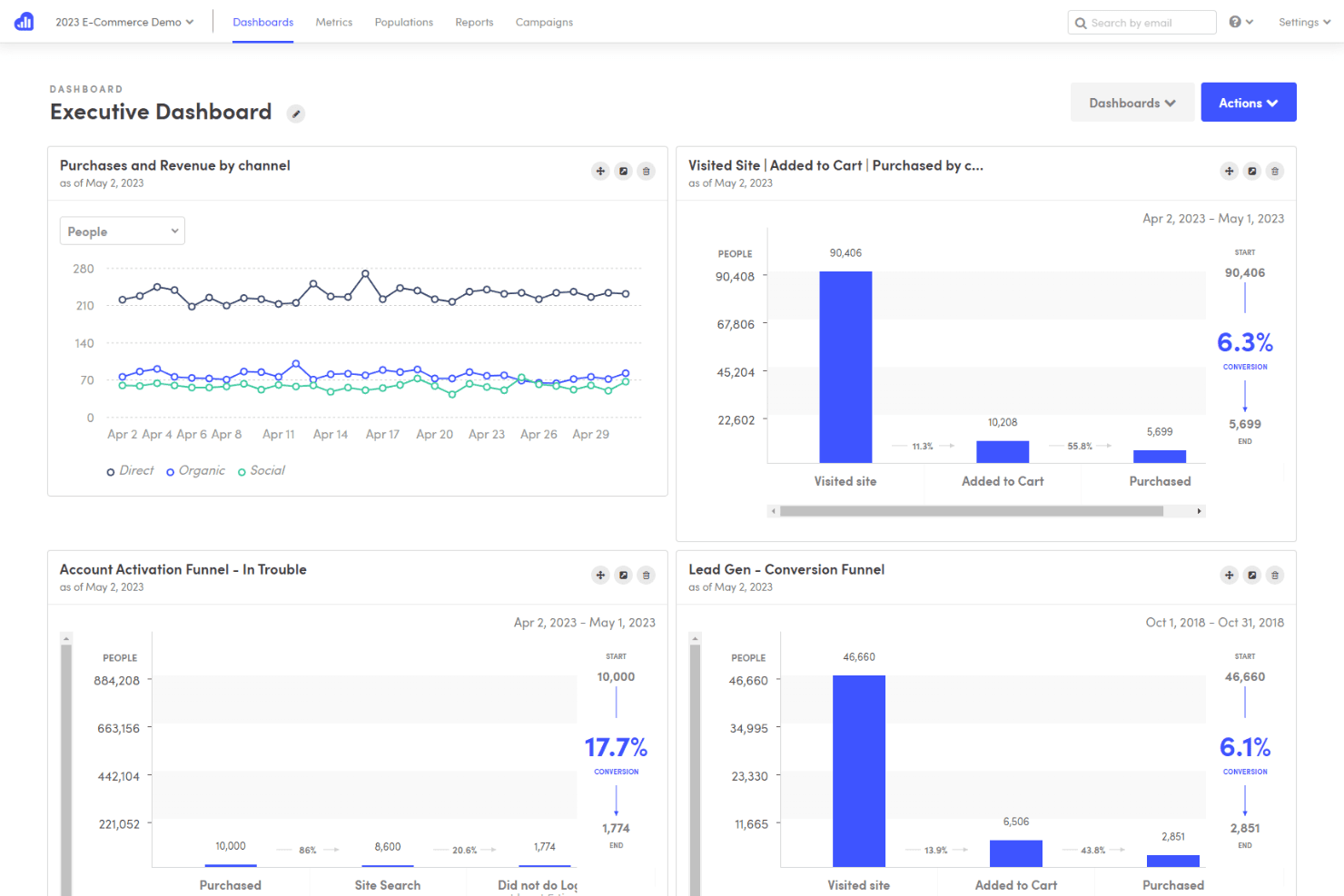
Kissmetrics offers an Executive Dashboard with funnel analytics, conversion tracking, and channel-based purchase data visualizations. Kissmetrics is a behavioural analytics platform built for SaaS and ecommerce teams who need person-level tracking to understand how individual users move through a product and where they drop off.
Who Is Kissmetrics Best For?
Product managers and growth marketers at subscription-based businesses who need to connect behavioural events to revenue without a dedicated data engineering team.
Why Kissmetrics Is a Good Adobe Analytics Alternative
Kissmetrics earns its spot on my shortlist because funnel tracking here works at the person level, not just the session level, so when a SaaS user drops off at step three of onboarding I can pull up their full event history instantly. I also love that you can build funnels retroactively from historical data, which means I don't need to configure tracking in advance to get answers. The segmentation inside each funnel step lets me split results by plan type or acquisition channel without leaving the report.
Kissmetrics Key Features
- Cohort reports: Group users by signup date or first action to track how behaviour shifts across different time periods.
- Population reports: Show what percentage of your total user base completed a specific event within a defined time window.
- A/B test analysis: Breaks down behavioural data by experiment variant to compare how each group acts after exposure.
- Revenue attribution: Ties subscription and purchase revenue back to the marketing touchpoints that drove each conversion.
Kissmetrics Integrations
Kissmetrics offers native integrations with Shopify, WooCommerce, HubSpot, Mailchimp, Marketo, Optimizely, Help Scout, Recurly, Appcues, Segment, and Google Tag Manager. An API is available for custom integrations.
Pros and Cons
Pros:
- Revenue reporting links analytics to sales outcomes
- Cohort analysis highlights retention and churn
- Tracks individual user journeys across sessions
Cons:
- Limits custom event data retention
- Requires manual setup for event tracking
Learn more about Kissmetrics: Best for processing intent via session replays
- 15-day free trial + free plan + free demo available
- From $39/month (billed annually)
Visit WebsiteRating:0.0/5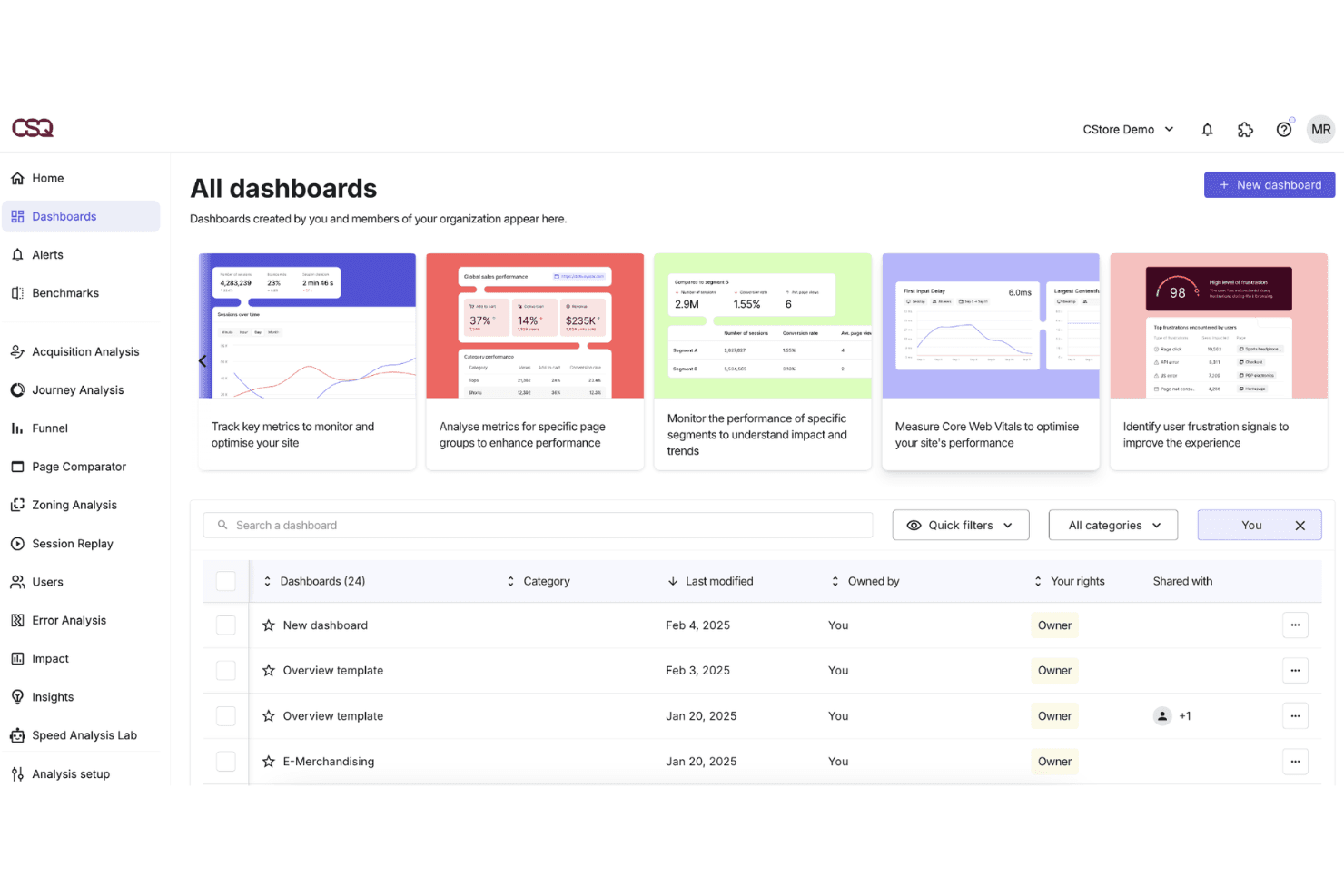
Contentsquare offers an 'All Dashboards' view where users can manage, filter, and access customized analytics dashboards for site performance monitoring. For product and digital teams at ecommerce and media companies, Contentsquare connects quantitative behavioural data with visual experience analysis to diagnose exactly where and why users disengage across web and mobile.
Who Is Contentsquare Best For?
Contentsquare suits UX researchers and digital analysts who need to connect behavioural data to business outcomes without relying on engineering support for instrumentation.
Why Contentsquare Is a Good Adobe Analytics Alternative
Contentsquare earns its spot on my shortlist because session replays are enriched with behavioural metrics like exposure rate and recurrence, adding intent context that raw video playback can't provide. I also like filtering replays by specific page errors or CSS selectors, which lets my team isolate problem sessions fast. You can even layer in voice-of-customer feedback timestamps so qualitative responses map directly to the moment of friction in a recording.
Contentsquare Key Features
- Impact quantification: Scores UX issues by their estimated revenue impact using behavioural and conversion data.
- Mobile app analytics: Tracks touch gestures, swipe depth, and screen transitions on native iOS and Android apps.
- CS Live: A browser extension that overlays live behavioural metrics directly onto any page without opening the dashboard.
- Segment comparison: Compares behavioural data across custom audience segments like new versus returning visitors.
Contentsquare Integrations
Contentsquare offers native integrations with AB Tasty, Adobe Target, Optimizely, Monetate, Kameleoon, VWO, Google Analytics 4, Mixpanel, Adobe Analytics, Shopify, Snowflake, and AWS. An API is available for custom integrations.
Pros and Cons
Pros:
- Mobile app analytics included for cross-device tracking
- Privacy compliance tools support GDPR requirements
- Visual heatmaps show granular user interactions
Cons:
- Some integrations require custom development work
- Offers a flexible reporting widget library
Learn more about Contentsquare: 10Best for privacy-focused hosting control
Matomo
- 21-day free trial
- From $26/month (billed annually)
Visit WebsiteRating:0.0/5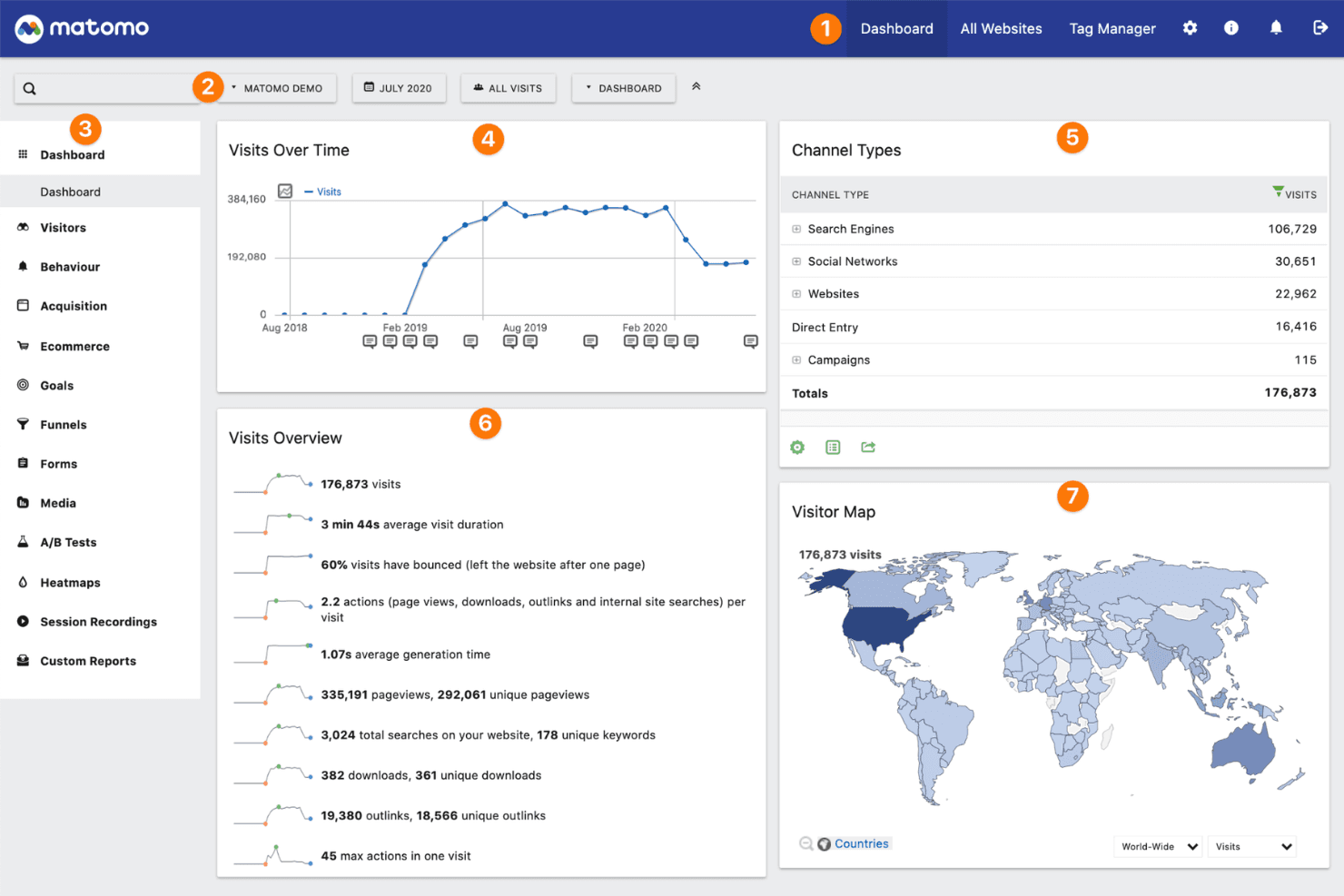
Matomo offers a comprehensive analytics dashboard displaying visits over time, channel types, visits overview metrics, and a global visitor map. Matomo is an open-source web analytics platform built for organizations that need full ownership of their visitor data, with on-premise and cloud hosting options that keep data off third-party servers.
Who Is Matomo Best For?
Matomo is a strong fit for privacy-conscious organizations in regulated industries like healthcare, finance, and government that can't send user data to third-party platforms.
Why Matomo Is a Good Adobe Analytics Alternative
I picked Matomo because it gives me something Adobe Analytics can't: complete ownership of where my data lives. With Matomo's self-hosted option, I deploy the platform on my own server, so visitor data never touches a third-party system. I also use its built-in GDPR Manager to configure consent settings, anonymize IPs, and set data retention rules directly in the interface, without patching together compliance workarounds.
Matomo Key Features
- Heatmaps: Visualize where users click, scroll, and hover on any page without sampling your data.
- Session recordings: Replay individual user sessions to review navigation patterns and page interactions.
- Goals and funnels: Define conversion goals and track where users exit multi-step flows before completing them.
- Custom reports: Build reports using any combination of dimensions and metrics from your tracked data.
Matomo Integrations
Matomo offers native integrations with WordPress, Drupal, Joomla, WooCommerce, Shopify, Google Looker Studio, Microsoft Power BI, Snowflake, Tableau, and Slack. An API is available for custom integrations.
Pros and Cons
Pros:
- Cookie-less tracking for privacy-conscious sites
- Built-in GDPR and privacy compliance tools
- On-premise deployment for full data ownership
Cons:
- Needs server maintenance knowledge
- Smaller integration ecosystem than Adobe Analytics
Learn more about Matomo:
Other Adobe Analytics Alternatives
Here are some additional Adobe Analytics alternatives that didn’t make it onto my shortlist, but are still worth checking out:
- 11Quantum Metric Felix AgenticBest for real-time cross-device experience data
- 12Hotjar (by Contentsquare)Best for quick visual feedback collection
- 13UXCam Best for mobile app user behaviour tracking
- 14MouseflowBest for tracking multi-page user paths
- 15StatsigBest for feature flag experimentation
- 16PostHogBest for open-source deployment flexibility
- 17Firebase AnalyticsBest for integration with Firebase app services
How I Evaluate Adobe Analytics Alternatives
I evaluate in two layers: the baseline features—event tracking, funnels, retention—every contender must have, and the differentiators that make one the right Adobe Analytics replacement for your team.
Core Functionality (Table Stakes For This List)
When I'm selecting tools for my list, I rank each one on a scale from 0 (does not offer the functionality) to 5 (excels in this area) for each core functionality listed below. Then, I calculate the tool's total score into a percentage. Each tool needs to achieve a minimum total score of 65% to be considered for inclusion.
- Event-Based Tracking: I check whether a tool captures custom events with properties across web and mobile, like tracking button clicks, feature adoption, or in-app purchases beyond basic page views.
- Funnel & Retention Analysis: Multi-step funnels with conversion windows and cohort retention charts are what I look for, since PMs need to pinpoint exactly where users drop off during onboarding or checkout.
- User Segmentation: I evaluate how flexibly you can build behavioral and attribute-based segments, such as isolating power users who completed a specific action sequence within their first week.
- Path & Journey Analytics: Flow visualizations that map how users actually move through a product matter here. I look for tools that let you trace forward and reverse paths across screens and features.
- Dashboards & Self-Serve Reporting: Product managers share data with engineering, design, and leadership constantly. I look for no-code query builders and shareable dashboards that don't require SQL to answer everyday questions.
- Integrations & Data Pipeline: Tools like Amplitude, Mixpanel, and Heap each handle warehouse and CDP connectivity differently. I evaluate SDK coverage, API access, and native connections to platforms like Segment, BigQuery, and Snowflake.
Once I have a list of tools that meet this criteria, I consider what sets each platform apart.
Differentiating Factors (What Sets Vendors Apart)
Here's how I compare and contrast different vendors:
Standout Features
Built-in experimentation is a big differentiator. Tools like Amplitude and Statsig let PMs run A/B tests and analyze results right where they track behavior. That removes the friction of stitching data across separate tools. I also look for session replay that pairs qualitative context with quantitative data. Seeing exactly where a user hesitated during checkout tells you more than a funnel chart alone. AI-powered anomaly detection matters too, flagging unexpected metric shifts before a PM has to go hunting.
Beyond Features
Pricing model matters a lot when you're moving off Adobe Analytics. I evaluate whether a tool charges per event volume or monthly tracked users, since that distinction can dramatically shift costs as your product scales. Time-to-value is another factor I weigh. Adobe's implementation overhead is a common reason teams leave, so I check how quickly a PM can go from SDK install to first actionable dashboard. Tech stack fit rounds it out. I look at native connections to tools PMs already use daily, like Jira, Slack, and LaunchDarkly.
How I Evaluate Adobe Analytics Alternatives
I evaluate in two layers: the baseline features—event tracking, funnels, retention—every contender must have, and the differentiators that make one the right Adobe Analytics replacement for your team.
Core Functionality (Table Stakes For This List)
When I'm selecting tools for my list, I rank each one on a scale from 0 (does not offer the functionality) to 5 (excels in this area) for each core functionality listed below. Then, I calculate the tool's total score into a percentage. Each tool needs to achieve a minimum total score of 65% to be considered for inclusion.
- Event-Based Tracking: I check whether a tool captures custom events with properties across web and mobile, like tracking button clicks, feature adoption, or in-app purchases beyond basic page views.
- Funnel & Retention Analysis: Multi-step funnels with conversion windows and cohort retention charts are what I look for, since PMs need to pinpoint exactly where users drop off during onboarding or checkout.
- User Segmentation: I evaluate how flexibly you can build behavioral and attribute-based segments, such as isolating power users who completed a specific action sequence within their first week.
- Path & Journey Analytics: Flow visualizations that map how users actually move through a product matter here. I look for tools that let you trace forward and reverse paths across screens and features.
- Dashboards & Self-Serve Reporting: Product managers share data with engineering, design, and leadership constantly. I look for no-code query builders and shareable dashboards that don't require SQL to answer everyday questions.
- Integrations & Data Pipeline: Tools like Amplitude, Mixpanel, and Heap each handle warehouse and CDP connectivity differently. I evaluate SDK coverage, API access, and native connections to platforms like Segment, BigQuery, and Snowflake.
Once I have a list of tools that meet this criteria, I consider what sets each platform apart.
Differentiating Factors (What Sets Vendors Apart)
Here's how I compare and contrast different vendors:
Standout Features
Built-in experimentation is a big differentiator. Tools like Amplitude and Statsig let PMs run A/B tests and analyze results right where they track behavior. That removes the friction of stitching data across separate tools. I also look for session replay that pairs qualitative context with quantitative data. Seeing exactly where a user hesitated during checkout tells you more than a funnel chart alone. AI-powered anomaly detection matters too, flagging unexpected metric shifts before a PM has to go hunting.
Beyond Features
Pricing model matters a lot when you're moving off Adobe Analytics. I evaluate whether a tool charges per event volume or monthly tracked users, since that distinction can dramatically shift costs as your product scales. Time-to-value is another factor I weigh. Adobe's implementation overhead is a common reason teams leave, so I check how quickly a PM can go from SDK install to first actionable dashboard. Tech stack fit rounds it out. I look at native connections to tools PMs already use daily, like Jira, Slack, and LaunchDarkly.
How I Evaluate Adobe Analytics Alternatives
I evaluate in two layers: the baseline features—event tracking, funnels, retention—every contender must have, and the differentiators that make one the right Adobe Analytics replacement for your team.
Core Functionality (Table Stakes For This List)
When I'm selecting tools for my list, I rank each one on a scale from 0 (does not offer the functionality) to 5 (excels in this area) for each core functionality listed below. Then, I calculate the tool's total score into a percentage. Each tool needs to achieve a minimum total score of 65% to be considered for inclusion.
- Event-Based Tracking: I check whether a tool captures custom events with properties across web and mobile, like tracking button clicks, feature adoption, or in-app purchases beyond basic page views.
- Funnel & Retention Analysis: Multi-step funnels with conversion windows and cohort retention charts are what I look for, since PMs need to pinpoint exactly where users drop off during onboarding or checkout.
- User Segmentation: I evaluate how flexibly you can build behavioral and attribute-based segments, such as isolating power users who completed a specific action sequence within their first week.
- Path & Journey Analytics: Flow visualizations that map how users actually move through a product matter here. I look for tools that let you trace forward and reverse paths across screens and features.
- Dashboards & Self-Serve Reporting: Product managers share data with engineering, design, and leadership constantly. I look for no-code query builders and shareable dashboards that don't require SQL to answer everyday questions.
- Integrations & Data Pipeline: Tools like Amplitude, Mixpanel, and Heap each handle warehouse and CDP connectivity differently. I evaluate SDK coverage, API access, and native connections to platforms like Segment, BigQuery, and Snowflake.
Once I have a list of tools that meet this criteria, I consider what sets each platform apart.
Differentiating Factors (What Sets Vendors Apart)
Here's how I compare and contrast different vendors:
Standout Features
Built-in experimentation is a big differentiator. Tools like Amplitude and Statsig let PMs run A/B tests and analyze results right where they track behavior. That removes the friction of stitching data across separate tools. I also look for session replay that pairs qualitative context with quantitative data. Seeing exactly where a user hesitated during checkout tells you more than a funnel chart alone. AI-powered anomaly detection matters too, flagging unexpected metric shifts before a PM has to go hunting.
Beyond Features
Pricing model matters a lot when you're moving off Adobe Analytics. I evaluate whether a tool charges per event volume or monthly tracked users, since that distinction can dramatically shift costs as your product scales. Time-to-value is another factor I weigh. Adobe's implementation overhead is a common reason teams leave, so I check how quickly a PM can go from SDK install to first actionable dashboard. Tech stack fit rounds it out. I look at native connections to tools PMs already use daily, like Jira, Slack, and LaunchDarkly.
Why Look For an Adobe Analytics Alternative?
While Adobe Analytics is a good choice of digital analytics platform, there are a number of reasons why some users seek out alternative solutions. You might be looking for an Adobe Analytics alternative because…
- You need a privacy-first or cookieless analytics solution
- The platform is too complex for your team’s needs
- Pricing is not transparent or is out of budget
- You want a faster setup and easier onboarding
- You require analytics for smaller sites or projects
- Integration with your existing stack is limited
If any of these sound like you, you’ve come to the right place. My list contains several digital analytics platform options that are better suited for teams facing these challenges with Adobe Analytics and looking for alternative solutions.
Adobe Analytics Key Features
Here are some of the key features of Adobe Analytics to help you contrast and compare what alternative solutions offer:
- Real-time data collection: Captures and processes user interactions as they happen, allowing teams to monitor traffic spikes, campaign performance, or technical incidents without delay.
- Advanced segmentation: Groups users by specific behaviours, demographics, or custom properties, allowing targeted analysis and deep cohort comparisons across multiple dimensions.
- Attribution modelling: Tracks every touchpoint on the customer journey and gives credit to each marketing channel or interaction, helping teams allocate budgets more effectively.
- Custom dashboards and reporting: Let you build tailored reports and visualizations, so stakeholders can focus on KPIs and trends that matter most to their roles.
- Path analysis: Maps user flows through your site or app, making it possible to spot sticking points and optimize conversion paths or content placement based on actual behaviour.
- Audience creation and activation: Enables creation of custom audience segments that can be exported or linked to advertising platforms for retargeting and campaign optimization.
- Predictive analytics: Uses AI to forecast trends, flag anomalies, and suggest actions by identifying patterns you might otherwise miss in the data.
- Tag management: Simplifies adding, editing, or removing tracking codes through a user interface instead of code changes, reducing reliance on engineering resources.
- Data connectors: Integrates with a wide ecosystem of tools and data warehouses, making it easier to connect analytics insights with marketing automation, CRM, or BI platforms.
- Role-based access controls: Allow fine-grained permission settings, ensuring team members only see and edit the data and dashboards relevant to their work.