



Jira vs. monday.com: Detaillierter Vergleich und Expertenbewertungen für 2026


Choosing between Jira and monday.com means weighing two very different approaches to product management tools: Jira offers deep customization and agile workflows for technical teams, while monday.com brings visual simplicity and flexible boards that appeal to cross-functional groups. If you’re struggling to pick the right platform, you’re not alone—many teams face the same challenge as they try to balance structure, collaboration, and ease of use. In this article, you’ll get a side-by-side look at how these product management tools compare in real-world scenarios, what sets each apart, and how to decide which one fits your team’s style, scale, and goals.
Die Wahl zwischen Jira und monday.com bedeutet, zwei sehr unterschiedliche Ansätze für Produktmanagement-Tools abzuwägen: Jira bietet umfangreiche Anpassungsmöglichkeiten und agile Workflows für technische Teams, während monday.com mit visueller Einfachheit und flexiblen Boards punktet, die funktionsübergreifende Gruppen ansprechen. Wenn es dir schwerfällt, die richtige Plattform auszuwählen, bist du nicht allein – viele Teams stehen vor der gleichen Herausforderung, da sie Struktur, Zusammenarbeit und Benutzerfreundlichkeit ausbalancieren möchten. In diesem Artikel erhältst du einen direkten Vergleich, wie sich diese Produktmanagement-Tools in realen Szenarien schlagen, was jedes einzelne besonders macht und wie du herausfindest, welches Tool am besten zu Stil, Größe und Zielen deines Teams passt.
Jira vs. monday AI Workspace: An Overview
Jira
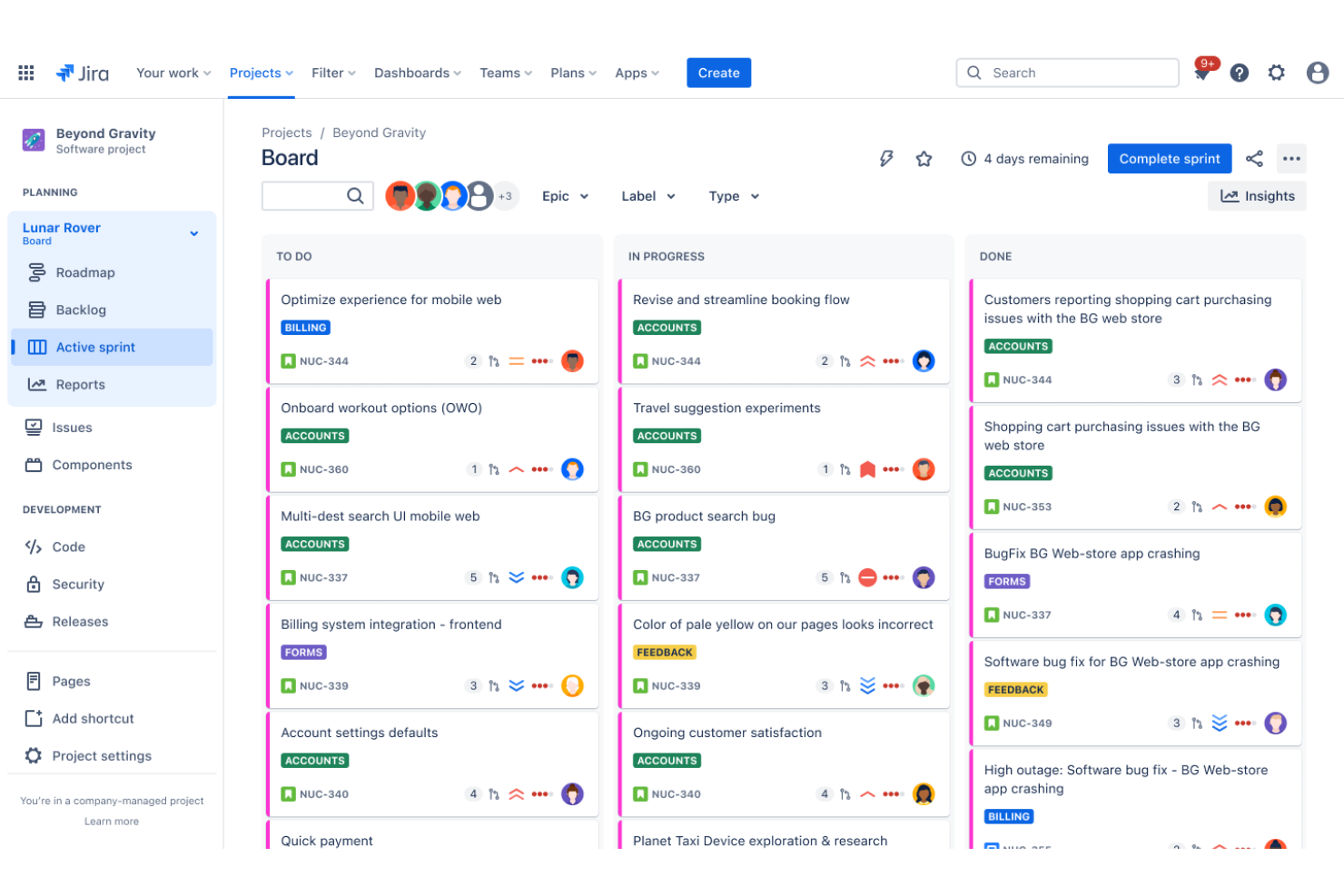
monday AI Workspace

Warum Sie unseren Software-Empfehlungen vertrauen können
Unser Team testet und bewertet Software seit 2012. Als Produktmanager wissen wir selbst, wie schwierig – und wichtig – es ist, die richtige Software auszuwählen.
Für diesen Leitfaden haben wir Tools mithilfe von praktischen Tests und unabhängiger Recherche bewertet und dabei unsere Bewertungskriterien angewendet.
Unsere Bewertungen spiegeln unser menschliches redaktionelles Urteilsvermögen wider, keine Verkaufsstrategie.
Jira vs. monday AI Workspace Pricing Comparison
| Jira | monday AI Workspace | |
|---|---|---|
| Free Trial | Free plan + 14-day free trial available | 14-day free trial |
| Pricing | From $7.91/user/month | From $12/user/month (billed annually) |
Jira vs. monday.com Preise & versteckte Kosten
Jira arbeitet mit einem gestaffelten Abonnementmodell, das sich nach der Nutzeranzahl und dem Funktionsumfang richtet, wobei separate Gebühren für Add-ons und erweiterte Funktionen anfallen. Auch monday.com setzt auf eine gestaffelte Preisstruktur, allerdings sind die Pläne nach Funktionspaketen und Mindestplatz-Anforderungen organisiert, was für kleinere Teams zu höheren Kosten führen kann. Beide Tools können zusätzliche Ausgaben für Integrationen, Automatisierungslimits oder Premium-Support nach sich ziehen, sodass die Gesamtkosten mit dem steigenden Bedarf deines Teams wachsen können.
Um das richtige Preismodell zu wählen, solltest du die unverzichtbaren Funktionen deines Teams, das erwartete Nutzerwachstum und die benötigten Integrationen vorab festlegen. Überprüfe die Tarifdetails der jeweiligen Anbieter, achte auf mögliche Einschränkungen bei Automatisierungen oder Speicher und berücksichtige die Kosten für Add-ons, die du für deinen Workflow benötigst. Es ist auch sinnvoll, die kostenlose Testphase jeder Plattform mit der tatsächlichen Teamgröße und euren Prozessen auszuprobieren, um versteckte Kosten frühzeitig zu erkennen.
Jira vs. monday AI Workspace Feature Comparison
Jiras anpassbare Workflows und fortschrittliche Vorgangsverfolgung helfen technischen Teams, komplexe Backlogs zu verwalten und Aufgaben präzise zu priorisieren. Im Gegensatz dazu ermöglichen monday.coms visuelle Boards und das Ziehen und Ablegen von Aufgaben eine einfache Organisation von Projekten, das Verfolgen des Fortschritts und die Zusammenarbeit zwischen Abteilungen – und das ohne steile Lernkurve.
| Jira | monday AI Workspace | |
|---|---|---|
| API | ||
| Calendar Management | ||
| Collaboration Support | ||
| Dashboards | ||
| Data Export | ||
| Data Import | ||
| External Integrations | ||
| File Sharing | ||
| Gantt Charts | ||
| Kanban Boards | ||
| Multi-User | ||
| Notifications | ||
| Project Management | ||
| Task Scheduling/Tracking | ||
| Time Management |
Jira vs. monday.com Integrationen
| Integration | Jira | monday.com |
|---|---|---|
| Slack | ✅ | ✅ |
| GitHub | ✅ | ✅ |
| Google Drive | ✅ | ✅ |
| Microsoft Teams | ✅ | ✅ |
| Salesforce | ✅ | ✅ |
| Figma | ❌ | ✅ |
| Zendesk | ✅ | ✅ |
| HubSpot | ❌ | ✅ |
| Bitbucket | ✅ | ❌ |
| Trello | ✅ | ✅ |
| API | ✅ | ✅ |
| Zapier | ✅ | ✅ |
Sowohl Jira als auch monday.com decken die beliebtesten Integrationen ab, wobei monday.com mehr Optionen für Marketing- und Design-Tools bietet, während Jira vor allem die entwicklungsorientierten Verbindungen wie Bitbucket in den Fokus stellt. Mit API- und Zapier-Support auf beiden Plattformen finden die meisten Teams die Flexibilität, die sie brauchen, um ihre bevorzugten Apps zu verbinden.
Jira vs. monday.com Sicherheit, Compliance & Zuverlässigkeit
| Faktor | Jira | monday.com |
|---|---|---|
| Datenverschlüsselung | Verwendet TLS 1.2+ für Datenübertragungen und AES-256 für ruhende Daten. | Verschlüsselt Daten bei der Übertragung mit TLS 1.2+ und speichert ruhende Daten mit AES-256. |
| Regulatorische Compliance | Bietet SOC 2-, ISO 27001-, DSGVO- und HIPAA-Compliance-Optionen. | Besitzt SOC 2-, ISO 27001-, DSGVO- und HIPAA-Zertifizierungen. |
| Zugriffskontrollen | Bietet feingranulare Berechtigungen, SSO und Zwei-Faktor-Authentifizierung. | Unterstützt rollenbasierte Berechtigungen, SSO und Zwei-Faktor-Authentifizierung. |
| Betriebszeit-Garantie | Veröffentlicht Statusmeldungen in Echtzeit und bietet eine 99,9% Uptime SLA. | Hält eine 99,9% Uptime SLA ein und informiert in Echtzeit über Systemstatus. |
| Datenresidenz | Erlaubt es Kunden, Speicherorte für Daten in ausgewählten Regionen zu wählen. | Bietet Möglichkeiten zur Datenresidenz in mehreren globalen Regionen. |
Sowohl Jira als auch monday.com bieten starke Sicherheit und Compliance mit ähnlichen Zertifizierungen und Verschlüsselungsstandards. Jira überzeugt durch sehr feine Zugriffskontrollen, während monday.com mit zuverlässigen Diensten und globalen Datenresidenzoptionen besonders für verteilte Teams attraktiv ist.
Jira vs. monday.com Benutzerfreundlichkeit
| Faktor | Jira | monday.com |
|---|---|---|
| Benutzeroberfläche | Bietet eine komplexe, technisch geprägte Oberfläche mit zahlreichen Konfigurationsmöglichkeiten. | Bietet eine übersichtliche, visuelle Oberfläche mit farbcodierten Boards und Widgets. |
| Onboarding | Benötigt mehr Einarbeitungszeit, insbesondere für nicht-technische Nutzer. | Bietet geführtes Onboarding und Vorlagen für einen schnellen Einstieg. |
| Anpassbarkeit | Sehr anpassbar, kann jedoch gerade für neue Nutzer überwältigend sein. | Anpassungen sind intuitiv über Drag-&-Drop und einfache Menüs möglich. |
| Support-Ressourcen | Umfangreiche Dokumentation und Community-Foren verfügbar. | Enthält Tutorials im Tool, Live-Chat und ein durchsuchbares Hilfe-Center. |
| Aufgabenverwaltung | Erweiterte Filterfunktionen und Massenbearbeitung für komplexe Workflows. | Einfache Erstellung und Verfolgung von Aufgaben mit visuellen Statusanzeigen. |
monday.com ist im Allgemeinen für neue Nutzer leichter zu erlernen, während Jiras Komplexität die Einarbeitung verlangsamen kann – sich jedoch für Teams mit Bedarf an fortgeschrittener Konfiguration auszahlt. monday.com punktet durch das einladende Design und den schnellen Start, während Jira in der Tiefe für Teams geeignet ist, die bereit sind, Zeit in die volle Funktionsvielfalt zu investieren.
Jira vs monday AI Workspace: Pros & Cons
Jira
- It offers powerful Agile project management features for your team.
- You can customize workflows to match your project's unique needs.
- It enhances collaboration with real-time updates and tracking.
- You might find the interface overwhelming if you're new to it.
- It can be too complex for smaller teams or simpler projects.
- You may experience a steep learning curve during onboarding.
monday AI Workspace
- Visual boards simplify tracking product development stages
- Built-in AI features assist with risk identification and automation
- Fast onboarding with templates for product roadmaps and sprints
- Complex workflows can require frequent manual board updates
- Automation options require higher-tier plans
- Limited advanced reporting for product analytics
Best Use Cases for Jira and monday AI Workspace
Jira
- Software Development Teams Jira excels in Agile project management, making it perfect for tracking bugs and managing sprints.
- IT Departments You can manage incident tickets and service requests efficiently with Jira's customizable workflows.
- Tech Startups Jira supports rapid iteration and collaboration, essential for fast-paced startup environments.
- Project Managers You can oversee complex projects with Jira's detailed reporting and task management features.
- Agile Coaches Jira provides tools for sprint planning and tracking, crucial for guiding Agile teams.
- Cross-functional Teams Jira's integrations and real-time updates enhance collaboration across different departments.
monday AI Workspace
- Creative Agencies Visual boards and timeline views help manage campaigns and client deliverables.
- Mid-Sized Tech Startups Customizable workflows and integrations support rapid product iteration.
- Marketing Departments Campaign planning templates and collaboration tools fit marketing workflows.
- Operations Teams Automations and dashboards help track recurring processes and tasks.
- Product Managers Roadmap templates and sprint boards support agile product development.
- Remote Teams Centralized communication and file sharing streamline distributed collaboration.
Wer sollte Jira nutzen, und wer monday.com?
Jira eignet sich besonders gut für technische Teams – vor allem in der Softwareentwicklung, IT und im Ingenieurwesen – die erweiterte Anpassung von Workflows, feingranulare Berechtigungen und agiles Projektmanagement benötigen. monday.com wiederum ist besser für bereichsübergreifende Teams, Marketing, Betrieb und Unternehmen geeignet, die visuelle Planung, schnelles Onboarding und einfache Zusammenarbeit zwischen Abteilungen schätzen. Wer Wert auf Struktur und detaillierte Prozesskontrolle legt, wird sich mit Jira wohlfühlen; wer flexible Nutzung, intuitives Design und eine Lösung sucht, die alle mit wenig Einarbeitung verstehen, ist mit monday.com besser beraten. Budgetbewusste Teams sollten zudem beachten, dass bei monday.com die Mindestanzahl an Nutzern ins Gewicht fallen kann, während bei Jira für fortgeschrittene Anforderungen Kosten durch Add-ons anfallen können.
Differences Between Jira and monday AI Workspace
| Jira | monday AI Workspace | |
|---|---|---|
| Agile Support | Built-in agile boards, sprints, and backlog management. | Basic agile templates, but less depth for technical teams. |
| Integration Focus | Prioritizes developer tools like Bitbucket and GitHub. | Emphasizes marketing, sales, and design integrations like HubSpot and Figma. |
| Pricing Model | Charges per user with add-ons for extra features. | Tiered plans with minimum seat requirements and bundled features. |
| User Interface | Dense, technical interface designed for power users. | Visual, colorful interface designed for broad accessibility. |
| Workflow Customization | Offers advanced, granular workflow automation and branching. | Provides simple, visual workflow automation with drag-and-drop. |
| Read Jira ReviewOpens new window | Visit monday AI WorkspaceOpens new window |
Similarities Between Jira and monday AI Workspace
| Cloud-Access | Both are available as cloud-based solutions with real-time updates, mobile apps, and 99.9% uptime SLAs. |
|---|---|
| Collaborative Tools | Each platform supports comments, file attachments, and notifications to keep teams aligned on project work. |
| Integration Options | Both offer integrations with popular tools like Slack, Google Drive, and Microsoft Teams, plus API and Zapier access. |
| Security Measures | Both meet high security standards with SOC 2, ISO 27001, GDPR, and HIPAA compliance, and use strong encryption. |
| Task Management | Both let users create, assign, and track tasks with status updates; Jira uses issues, monday.com uses visual cards. |
| Read Jira ReviewOpens new window Visit monday AI WorkspaceOpens new window | |