

Birbirinden farklı pek çok kullanılabilirlik testi aracı bulunduğundan, hangisinin sizin için doğru olduğunu belirlemek zordur. Kullanıcı davranışlarına ve tercihlerine dayanarak bilinçli kararlar vermek, tasarım seçimlerini ve hipotezleri doğrulamak istediğinizi biliyorsunuz; ancak bu iş için hangi aracın en iyi olduğunu belirlemeniz gerekiyor. Size yardımcı olacağım! Bu yazıda, farklı araçları büyük ekipler ve onlarca ürünle kullanma konusundaki kişisel deneyimlerimi paylaşarak en iyi kullanılabilirlik testi araçları arasından seçim yapmanızı kolaylaştıracağım.
Why Trust Our Software Recommendations
6,700+
Reviews
20
Industry experts
16+
Evaluation factors
14
Years
Our team has been testing and reviewing software since 2012. As product managers ourselves, we know how difficult—and important—it is to choose the right software.
For this guide, we evaluated tools using hands-on testing and independent research, scoring tools using our selection criteria.
Our reviews reflect our human editorial judgment, not a sales pitch.
Expert reviewers:
- Andrew LumbySenior TPM
- Cristiano ValimSenior UI/UX Lead


Kullanılabilirlik Testi Araçları Karşılaştırma Tablosu
Bu karşılaştırma tablosu, en iyi kullanılabilirlik testi aracı seçimlerim için fiyatlandırma ayrıntılarını özetlemektedir:
Score legend (out of 5)
- Excellent4.5–5
- Good4–4.4
- Average3–3.9
- Below average2–2.9
- Poor1–1.9
Sorted by: Default
| Tool | Starting Price | Website | |||||||
|---|---|---|---|---|---|---|---|---|---|
Best for AI-driven synthesis of session findings | 3.7 out of 5 | 2 | 4 | 4 | 4 | 4 | 4 | $699/month Free demo available | Website |
Best for multilingual panel testing | Not rated | Not rated | 4 | 4 | 4 | 4 | 5 | $30/tester Free demo available | Website |
Best for user-focused feedback collection | Not rated | Not rated | 2 | 2 | 2 | 1 | 4 | $50/month Free plan available | Website |
Best for Figma prototype testing at scale | 3.8 out of 5 | 3 | 4 | 4 | 4 | 4 | 4 | Pricing upon request Free plan + free demo available | Website |
Best for cross-study UX benchmarking at scale | 3.8 out of 5 | 3 | 5 | 4 | 4 | 3 | 4 | Pricing upon request Free demo available | Website |
Best for SDK-free native mobile app testing | 4.2 out of 5 | 4 | 4 | 4 | 5 | 4 | 4 | $80/month Free plan available | Website |
Best for testing across the widest participant panel | 4.5 out of 5 | 3 | 5 | 5 | 4 | 5 | 5 | Pricing upon request Free demo available | Website |
Best for multi-method research on one platform | 4.0 out of 5 | 3 | 5 | 4 | 4 | 4 | 4 | Pricing upon request Free demo available | Website |
Best for mixed-method research in APAC markets | 3.8 out of 5 | 3 | 4 | 4 | 4 | 4 | 4 | Pricing upon request Free trial available | Website |
Best for IA-focused navigation and structure testing | 4.0 out of 5 | 3 | 5 | 2 | 4 | 5 | 5 | $208/user/month Free plan available | Website |


En İyi 10 Kullanılabilirlik Testi Aracına Genel Bakış
 Best for AI-driven synthesis of session findings
- Free demo available
- From $699/month (billed annually)
Visit WebsiteCustomer Rating:4.5/5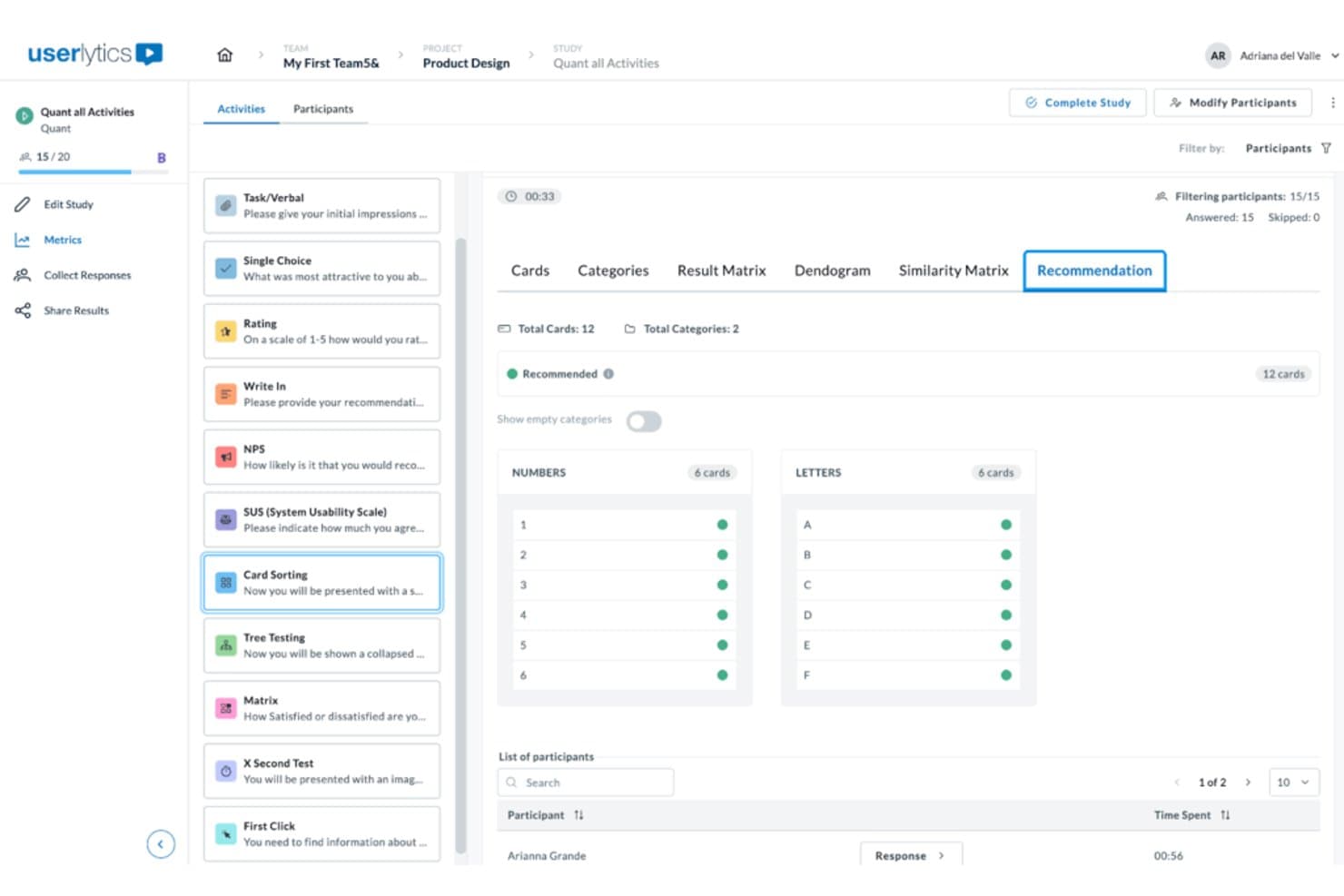
Userlytics surfaces card sorting recommendations grouped by category. Userlytics is a usability testing platform that supports moderated, unmoderated, and quantitative testing across websites, mobile apps, and prototypes, with built-in participant recruitment, session recording, and AI-powered analysis tools including card sorting, tree testing, and benchmarking.
Who Is Userlytics Best For?
Userlytics is a strong fit for UX researchers and product teams who need to run a wide range of remote studies—from moderated sessions to tree testing—and want AI to do the heavy lifting on synthesis.
Why I Picked Userlytics
I've included Userlytics in my top picks because its AI Insights feature genuinely changes how fast you can move from raw sessions to shareable findings. After sessions run, AI Insights auto-generates a summary across all recordings, lets you ask plain-language questions, and cites the exact session ID and timestamp behind every answer. Pair that with AI Annotations flagging key moments automatically, and you're not spending hours scrubbing through footage to find the part that matters.
Userlytics Key Features
- Live Conversations: Run browser-based moderated sessions with built-in scheduling, calendar sync, and a chat channel for moderators and up to 10 invisible observers.
- Tree testing: Measure navigation success rates, first-click paths, time spent, and directness, with AI recommendations and industry benchmarks built into the results view.
- Card sorting: Run open, closed, or hybrid card sort studies to evaluate how participants naturally group and label your content or features.
- ULX Benchmarking Score: Track a composite usability score across trust, appeal, usability, and performance, and compare results against competitive benchmarks over time.
Userlytics Integrations
Userlytics supports prototype links from Figma, Adobe XD, InVision, and Proto, plus app testing through TestFlight and Google Play. Moderated sessions sync with personal calendars; native Jira, Slack, analytics integrations, and a public API aren’t documented.
Pros and Cons
Pros:
- Moderated and unmoderated methods share one platform
- Global panel supports niche participant recruiting
- AI summaries cite session timestamps precisely
Cons:
- Reviewers report cumbersome study setup workflows
- First-click heatmaps exclude live-site behavior
Learn more about Userlytics: Best for multilingual panel testing
- Free demo available
- From $30/tester
Visit WebsiteCustomer Rating:4.5/5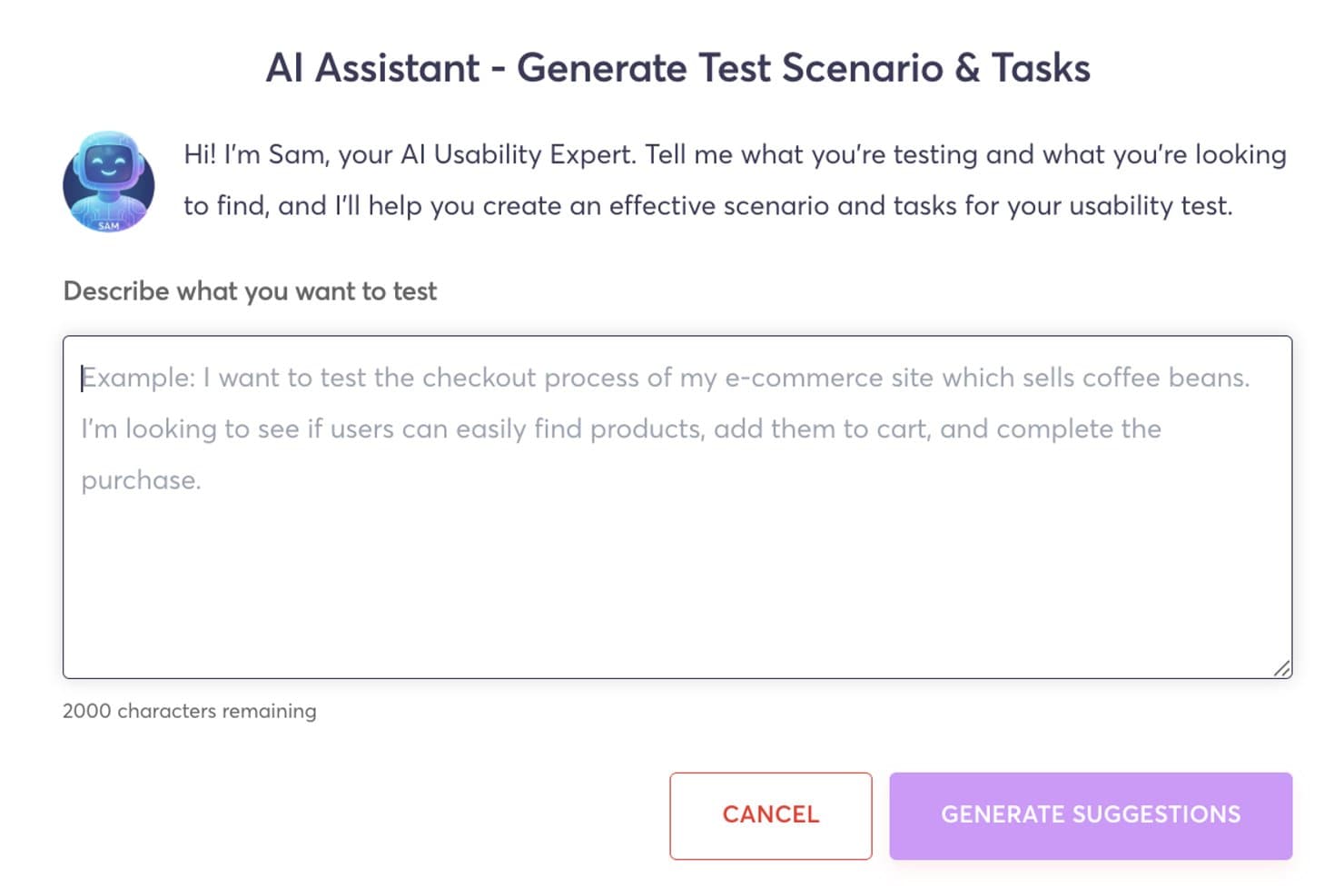
Userfeel's AI assistant generates usability test scenarios and tasks automatically. Userfeel is a remote usability testing platform that supports moderated and unmoderated sessions, prototype testing, card sorting, tree testing, and multilingual participant recruitment across 40+ languages.
Who Is Userfeel Best For?
Userfeel is a strong fit for UX researchers and designers who need to run usability studies across multiple languages and countries from a single platform.
Why I Picked Userfeel
I picked Userfeel as one of the best because its multilingual panel is genuinely unmatched for teams running research across regions. With over one million vetted testers spanning 40+ languages and countries, I can target French-speaking Canadian users or Japanese mobile shoppers from the same workflow. The built-in screener questions and User Lists let me lock in the right audience for repeat studies, and the AI Sentiment Analysis on the Team plan surfaces pain points across sessions without manual tagging.
Userfeel Key Features
- Prototype testing: Connect Figma or Adobe XD links directly to task-based studies to collect feedback on designs before development.
- System Usability Scale (SUS) scoring: Built-in SUS ratings let you track usability scores across multiple studies over time.
- Card sorting and tree testing: Run open or closed card sorts and tree tests to validate your information architecture with real participants.
- Searchable transcripts: Every session generates time-stamped, searchable transcripts so you can locate specific moments without rewatching full recordings.
Userfeel Integrations
Userfeel doesn't have any native integrations or a documented API. It supports prototype testing through Figma and Adobe XD links, moderated sessions through Google Meet, and exports results to CSV or Excel.
Pros and Cons
Pros:
- Vetted testers improve feedback consistency
- Fast participant recruitment and study turnaround
- Multilingual panel supports cross-market research
Cons:
- Moderated sessions exclude external observers
- No heatmaps or clickstream analysis
Learn more about Userfeel: Best for user-focused feedback collection
- Free plan available
- From $50/month
Visit WebsiteCustomer Rating:4.8/5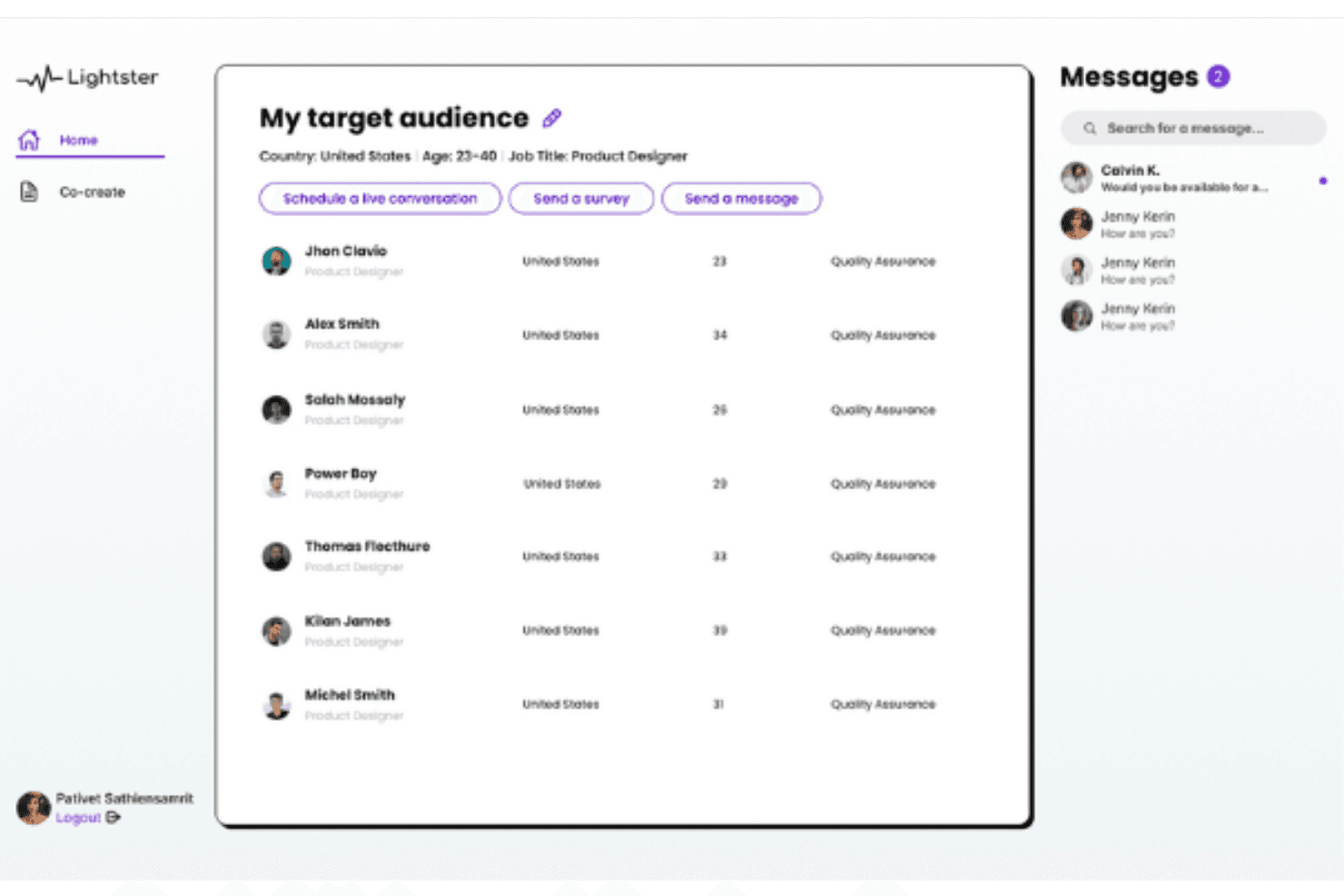
Lighter's comprehensive user matching system allows you to connect with your target audience with various criteria. Lightster is a user research platform that combines moderated video calls, unmoderated video recordings, and surveys with a built-in participant panel you can filter across 100+ targeting criteria.
Who Is Lightster Best for?
Lightster suits early-stage product teams and startups that need quick, affordable access to target users for lightweight qualitative feedback without a dedicated research budget.
Why I Picked Lightster
I picked Lightster as one of the best for user-focused feedback collection because its built-in participant panel lets you filter across 100+ targeting criteria, including job title, industry, and location, so you're hearing from the right people every time. I especially like that you can run moderated video calls, unmoderated recordings, and surveys all in one place, covering everything from early discovery to concept validation.
Lightster Key Features
- Built-in participant communities: You can follow pre-built communities or create your own with automatic criteria-based membership, then message participants in bulk before a session.
- Custom screening questions: Add unlimited multiple-choice and text screening questions to filter participants beyond the 100+ standard targeting criteria.
- LinkedIn-linked participant profiles: Each participant profile includes a LinkedIn link so you can verify professional backgrounds before committing to a session.
- Unlimited session observers: Invite unlimited guests or team members to any live session via a shareable link at no additional cost.
Lightster Integrations
Native integrations are not clearly documented. Lightster has a Figma Community plugin for recruiting and testing designs, plus LinkedIn profile links for participant verification.
Pros and Cons
Pros:
- Responsive support praised by reviewers
- Moderated and unmoderated testing in one platform
- Precise participant targeting with custom screeners
Cons:
- Limited task-building and results-reporting capabilities
- No heatmaps, click maps, or path analysis
Learn more about Lightster:
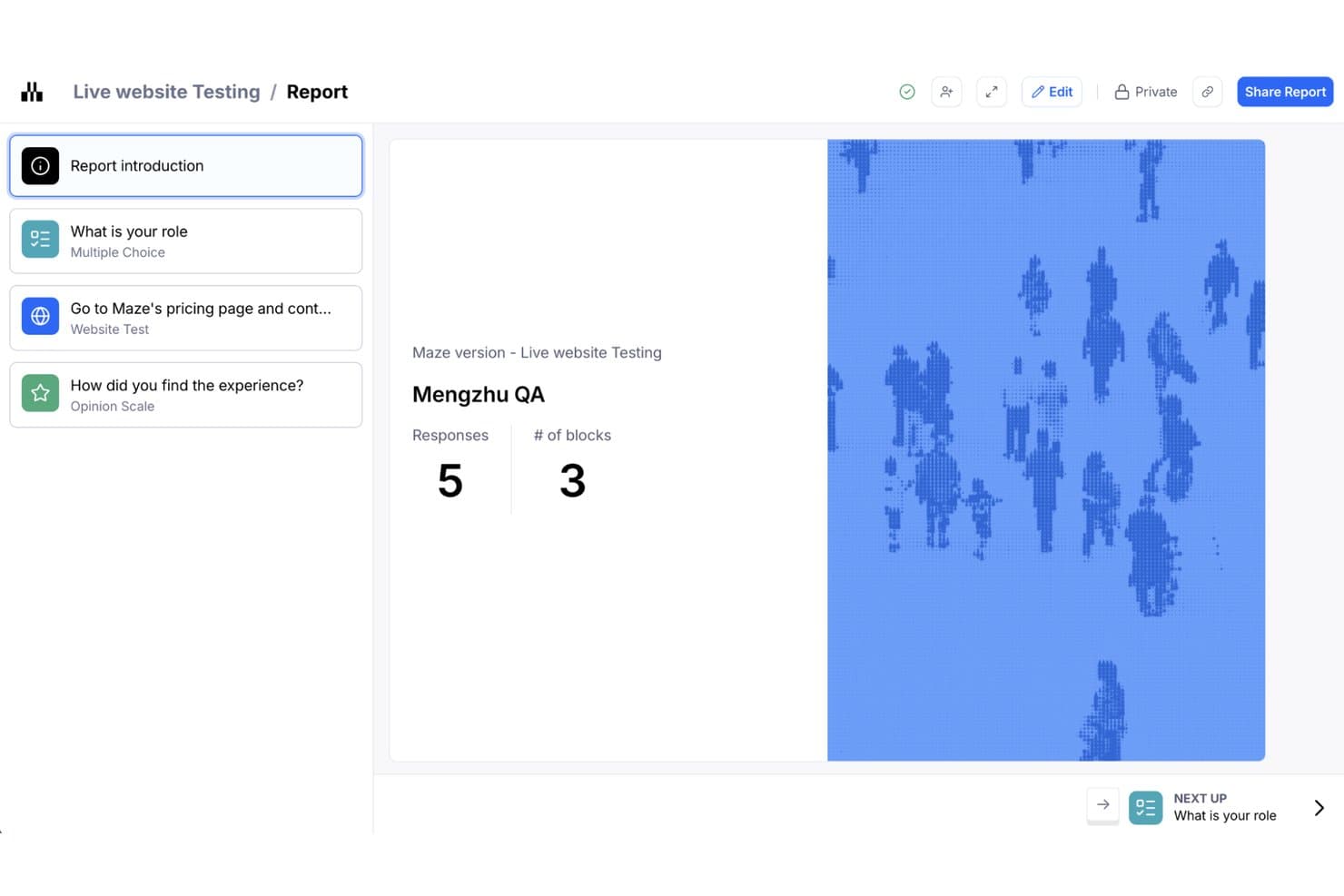
Maze organizes usability test results into a structured report with response metrics. Maze is an AI-first usability testing platform that supports prototype testing, live-website testing, native mobile testing, card sorting, tree testing, moderated and unmoderated interviews, panel-based recruitment, and automated reporting.
Who Is Maze Best For?
Maze is a strong fit for product teams and UX researchers who need to run frequent, fast prototype tests directly from Figma without leaning on a dedicated research ops function.
Why I Picked Maze
I picked Maze as one of the best because it makes Figma prototype testing genuinely fast to run at scale. One-click Figma import means I can have a study live in minutes, and built-in path analysis shows me exactly where testers deviate from my intended flow. When I need volume, the Maze Panel delivers responses from millions of participants across 150+ countries, with unmoderated studies filling in under five hours on average.
Maze Key Features
- AI study builder: Describe your research goal and Maze suggests methods and builds a ready-to-run study for you.
- Live website testing: Add Maze's tracking code to a live site to capture how users navigate and where they deviate from your intended path.
- Maze Panel recruitment: Access millions of B2B and B2C participants across 150+ countries using 400+ demographic and behavioral filters.
- Automated reports: Maze generates a shareable, editable report for every study, with AI-generated themes and sentiment from open-ended responses.
Maze Integrations
Maze integrates with Figma, FigJam, Axure, Notion, Miro, Confluence, Jira, Slack, Amplitude, and Zoom. It also connects with Google Meet, Microsoft Teams, and calendar tools for interview scheduling.
Pros and Cons
Pros:
- Automated reports synthesize mixed research data
- Built-in heatmaps and path analysis
- Fast Figma prototype testing at scale
Cons:
- Limited cross-study benchmarking for behavioral trends
- Advanced methods often require higher-tier plans
Learn more about Maze: Best for cross-study UX benchmarking at scale
- Free demo available
- Pricing upon request
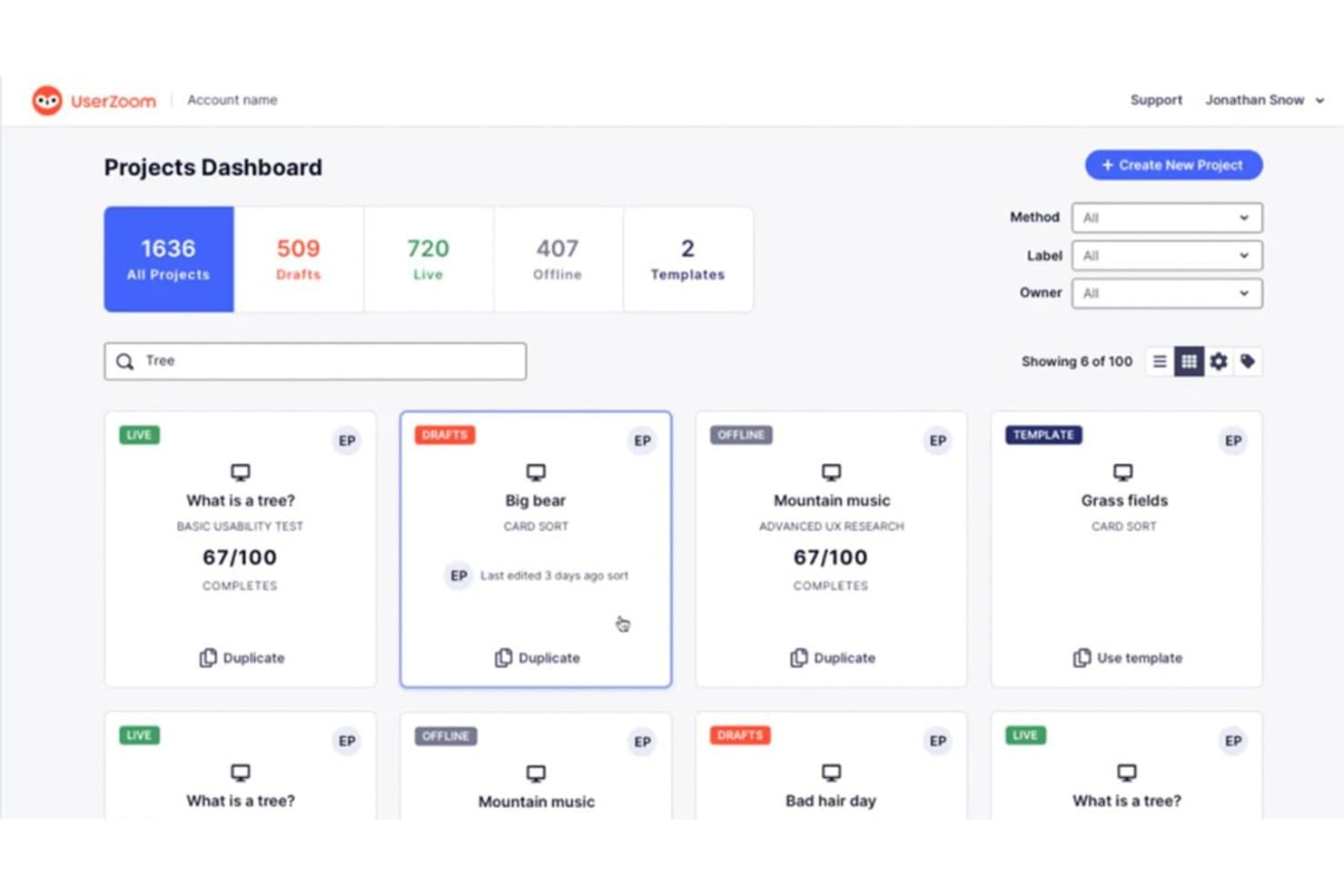
UserZoom organizes usability studies in a searchable project dashboard. UserZoom is an enterprise usability testing platform that supports moderated and unmoderated studies, tree testing, card sorting, click tests, live intercepts, and cross-study UX benchmarking through its QXscore metric.
Who Is UserZoom Best For?
UserZoom suits enterprise UX research teams that need to run benchmarking studies at scale and track experience quality across releases or competitors.
Why I Picked UserZoom
UserZoom earns its spot on my shortlist because of how seriously it takes cross-study UX benchmarking. Its QXscore metric combines behavioral data like task success rates with attitudinal signals like trust and ease of use into a single 0–100 score, so you can track experience quality across product releases or against competitors over time. I also like that the Advanced UX Research method lets you run A/B prototype comparisons and before/after benchmarks in one study type.
UserZoom Key Features
- Live intercepts: A pop-up recruits real visitors directly from your live website, letting you capture in-the-moment feedback without redirecting users to a separate study.
- Tree testing: Built-in tree tests let you evaluate your information architecture by tracking how participants navigate through a text-based site hierarchy.
- Card sorting: Open, closed, and hybrid card sort studies help you understand how users mentally group and label content or features.
- Virtual observation room: Team members can watch moderated sessions live from a hidden observation room, without the participant knowing they're being observed.
UserZoom Integrations
UserZoom lists integrations with Figma, FigJam, FullStory, Contentsquare, Quantum Metric, AWS, and Atlassian. The broader UserTesting platform documents integrations with Jira, Slack, Trello, Microsoft Teams, Miro, and EnjoyHQ.
Pros and Cons
Pros:
- Moderated sessions include hidden observation rooms
- Built-in tree tests and card sorts
- Cross-study QXscore benchmarking tracks UX changes
Cons:
- Reports cite freezing and patchy session audio
- Heatmaps exclude Figma and Adobe XD
Learn more about UserZoom: Best for SDK-free native mobile app testing
- Free plan available
- From $80/month (billed annually)
Visit WebsiteCustomer Rating:4.8/5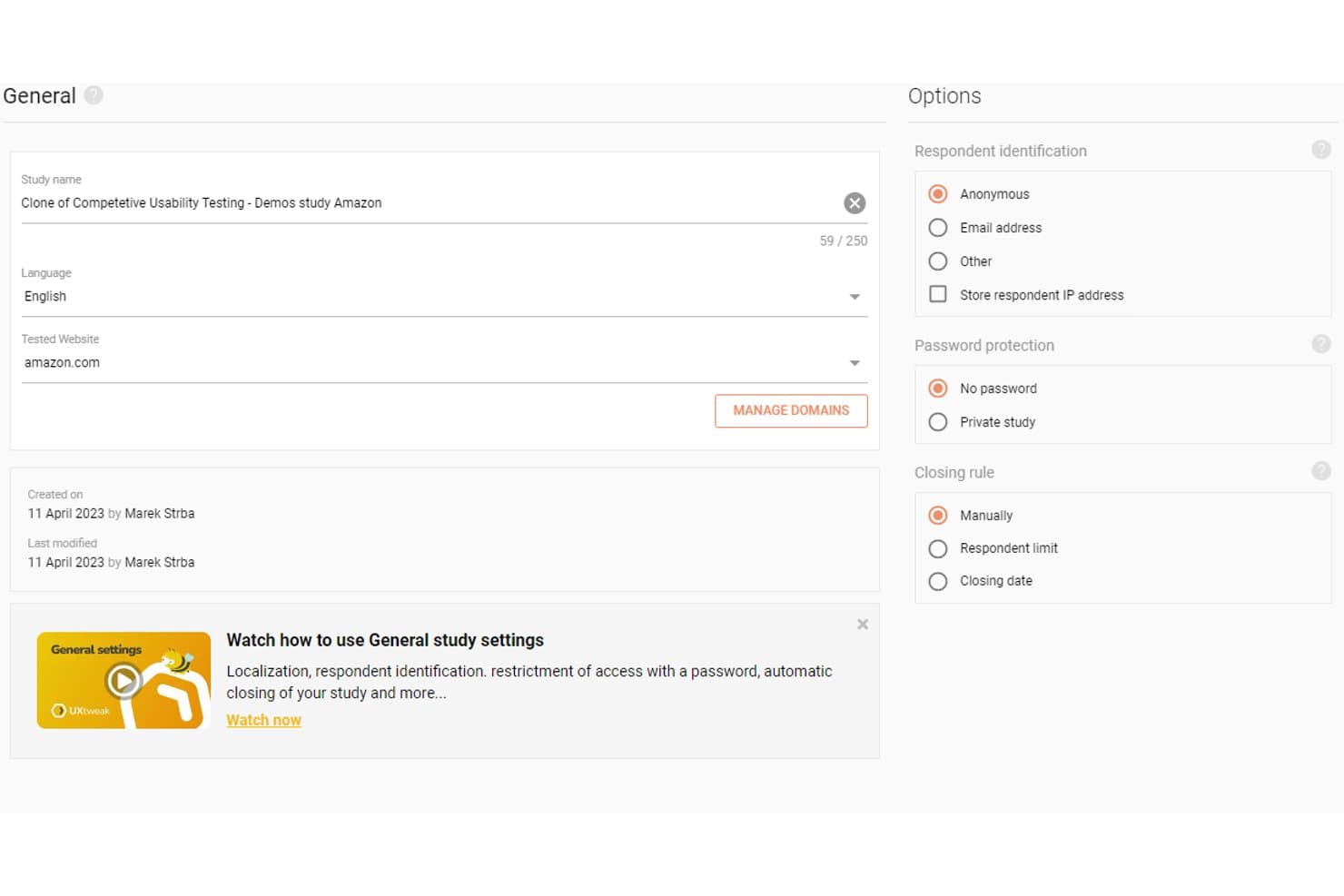
UXtweak lets users configure study settings, language, and respondent options. UXtweak is a UX research platform that covers moderated and unmoderated usability testing, session recording, behavioral analytics, card sorting, tree testing, and participant recruitment across websites, prototypes, and native mobile apps.
Who Is UXtweak Best For?
UXtweak is a strong fit for UX researchers and product teams who need an all-in-one research platform that handles everything from recruitment to synthesis.
Why I Picked UXtweak
I picked UXtweak as one of the best because its SDK-free native mobile app testing sets it apart from most tools in this category. Participants install UXtweak's companion app instead, so your team can test live App Store and Google Play builds, beta APKs, or TestFlight releases without touching the app's codebase. I also like that mobile sessions capture screen, voice, and face simultaneously, giving you the same behavioral depth you'd expect from desktop testing.
UXtweak Key Features
- Participant panel: Access a global pool of 130+ countries and 2,000+ targeting attributes, with fixed pricing and guaranteed delivery before you place an order.
- Behavioral analytics maps: Generate heatmaps, clickmaps, scroll maps, and movement maps from session data, segmentable by device or viewport.
- Insights Editor: Build collaborative research reports that embed video clips and highlight reels, then share them with stakeholders via password-protected links—no account required.
- Card sorting and tree testing: Run open, closed, or hybrid card sorts and tree tests, with results visualized as similarity matrices, dendrograms, and navigation path breakdowns.
UXtweak Integrations
UXtweak documents 10 native integrations, including Figma, Google Drive, Microsoft OneDrive, Condens, Marvin, Dovetail, Notion, Google Tag Manager, Marvel, and Axure. Adobe XD and Sketch connect through public links; no public API is documented.
Pros and Cons
Pros:
- Guaranteed participant delivery and replacements
- Pixel-perfect playback with synced transcripts
- SDK-free native mobile app testing
Cons:
- Complex studies may require another tool
- Cluttered interface can overwhelm beginners
Learn more about UXtweak: Best for testing across the widest participant panel
- Free demo available
- Pricing upon request
Visit WebsiteCustomer Rating:4.5/5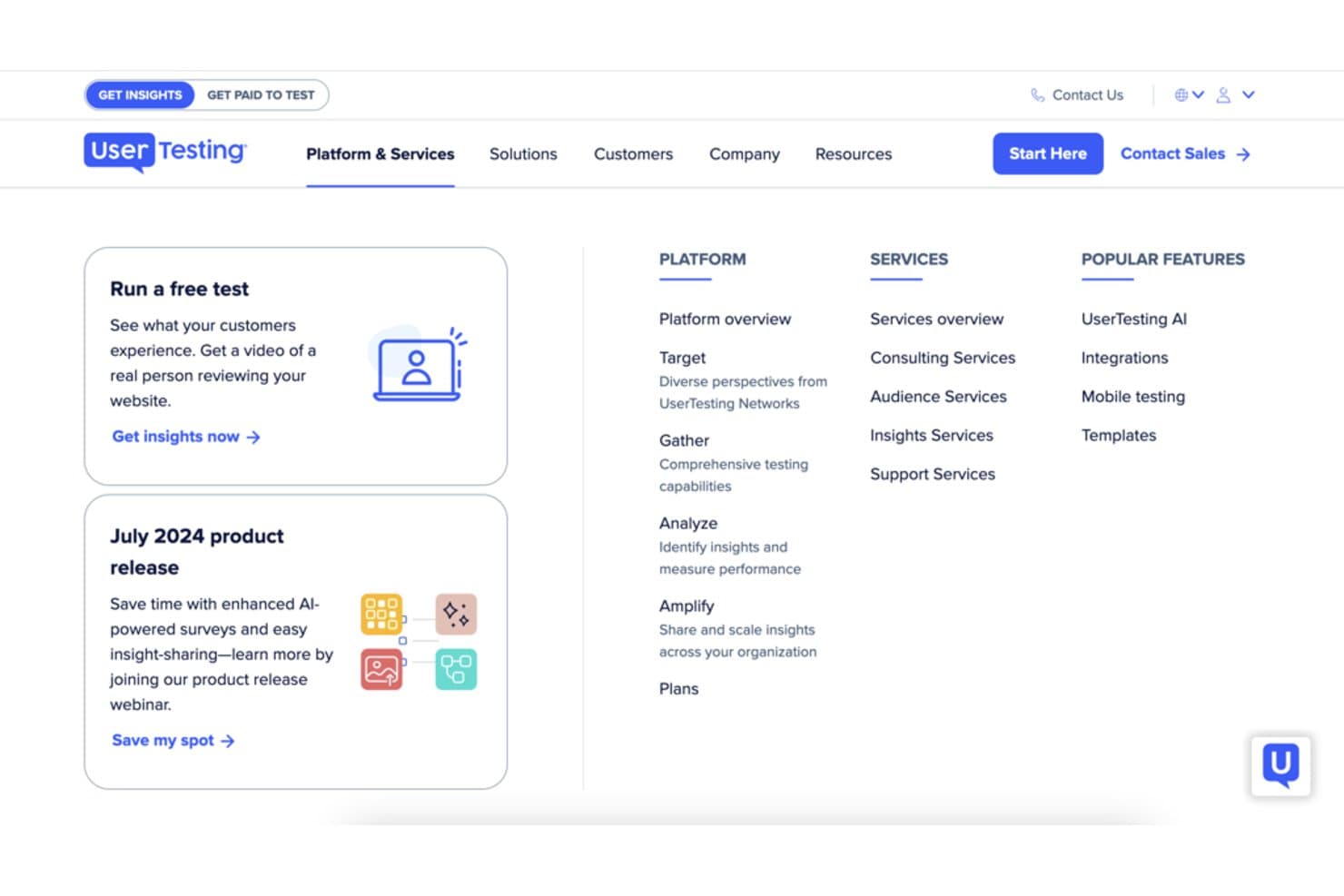
UserTesting organizes platform and services into a structured navigation menu. UserTesting is a usability testing platform that supports moderated and unmoderated research, participant recruitment from a global panel, session recording, behavioral analytics, and AI-driven insight synthesis across web, mobile, and emerging device environments.
Who Is UserTesting Best For?
UserTesting is a strong fit for UX research and product teams that need to recruit participants across a wide range of demographics, geographies, and professional profiles without juggling multiple tools.
Why I Picked UserTesting
I picked UserTesting as one of the best because its participant panel of 7.6M+ verified people across 34 core markets is the largest I've seen in this category. When I need to reach niche professionals like developers or financial analysts, the built-in Advanced Targeting pulls from the User Interviews network without switching platforms. AI-generated screeners and fraud detection mean the right participants actually show up.
UserTesting Key Features
- Live Conversation moderated sessions: Two-way video interviews with screen sharing that run on Zoom and automatically save recordings to your dashboard.
- QXscore benchmarking: A scoring system that tracks experience quality across studies over time, letting you measure progress and run competitive comparisons.
- Insights Hub: A centralized workspace where you can combine video clips, survey data, and third-party research, then use AI to surface themes across sessions.
- In-the-wild mobile testing: Participants use their phone camera to capture real-world experiences in-home, in-store, or in any environment outside a lab setting.
UserTesting Integrations
UserTesting offers native integrations with Figma, Jira, Confluence, Slack, Miro, Qualtrics, Contentsquare, FullStory, and Rally. Its open API and Results API support custom integrations.
Pros and Cons
Pros:
- Synthesizes video evidence with AI themes
- Combines moderated and unmoderated study formats
- Recruits niche professionals across broad markets
Cons:
- Panel quality can vary by audience
- Behavioral analytics omit classic scroll maps
Learn more about UserTesting: Best for multi-method research on one platform
- Free demo available
- Pricing upon request
Visit WebsiteCustomer Rating:5/5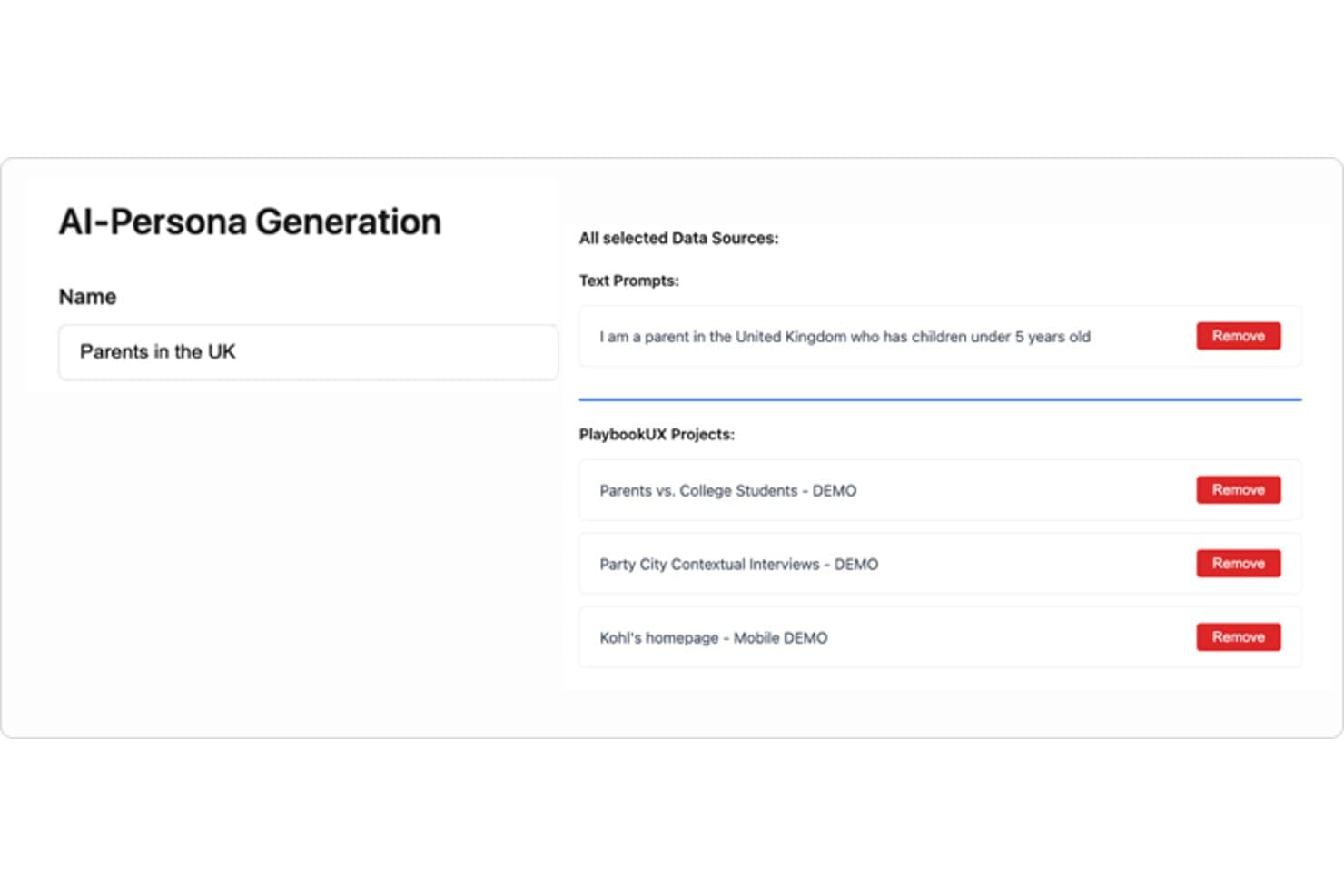
PlaybookUX lets users build AI personas from text prompts and research projects. PlaybookUX is a usability testing platform that supports moderated and unmoderated testing, card sorting, tree testing, surveys, prototype testing, and session replays, with AI-assisted analysis across methods.
Who Is PlaybookUX Best For?
PlaybookUX suits UX researchers and designers who need moderated interviews, unmoderated tests, card sorting, and tree testing all in one place.
Why I Picked PlaybookUX
I picked PlaybookUX as one of the best because it's the only platform where I can run moderated interviews, unmoderated tests, card sorting, and tree testing without stitching together separate tools. What I especially like is the card sorting analysis: similarity matrices and dendrograms give me real structural insight into how users group information, not just raw sort data. The tree testing results go just as deep, showing first-click analysis, path directness, and participant paths in one view.
PlaybookUX Key Features
- AI executive reports: AI generates a full study summary covering demographics, themes with supporting quotes, and ideas for next research steps.
- Built-in participant panel: Access a vetted pool of 7M+ consumers and professionals across 50+ countries, with fraud controls and live screener data.
- Figma prototype testing: Import Figma prototypes directly to track goal completion, misclicks, time per screen, and heatmaps.
- Unlimited seats: Every plan includes unlimited team members, so collaborators can comment, take notes, and review sessions without added cost.
PlaybookUX Integrations
PlaybookUX has one documented native integration with Figma for prototype testing. Its API with an MCP layer supports custom connections to AI assistants, CRMs, and data warehouses.
Pros and Cons
Pros:
- Generates AI summaries with supporting quotes
- Provides deep card-sort and tree-test analysis
- Combines moderated, unmoderated, and IA studies
Cons:
- Prototype analytics lack cross-segment comparisons
- Advanced methods require higher-tier access
Learn more about PlaybookUX: Best for mixed-method research in APAC markets
- Free trial available
- Pricing upon request
Visit WebsiteCustomer Rating:4.6/5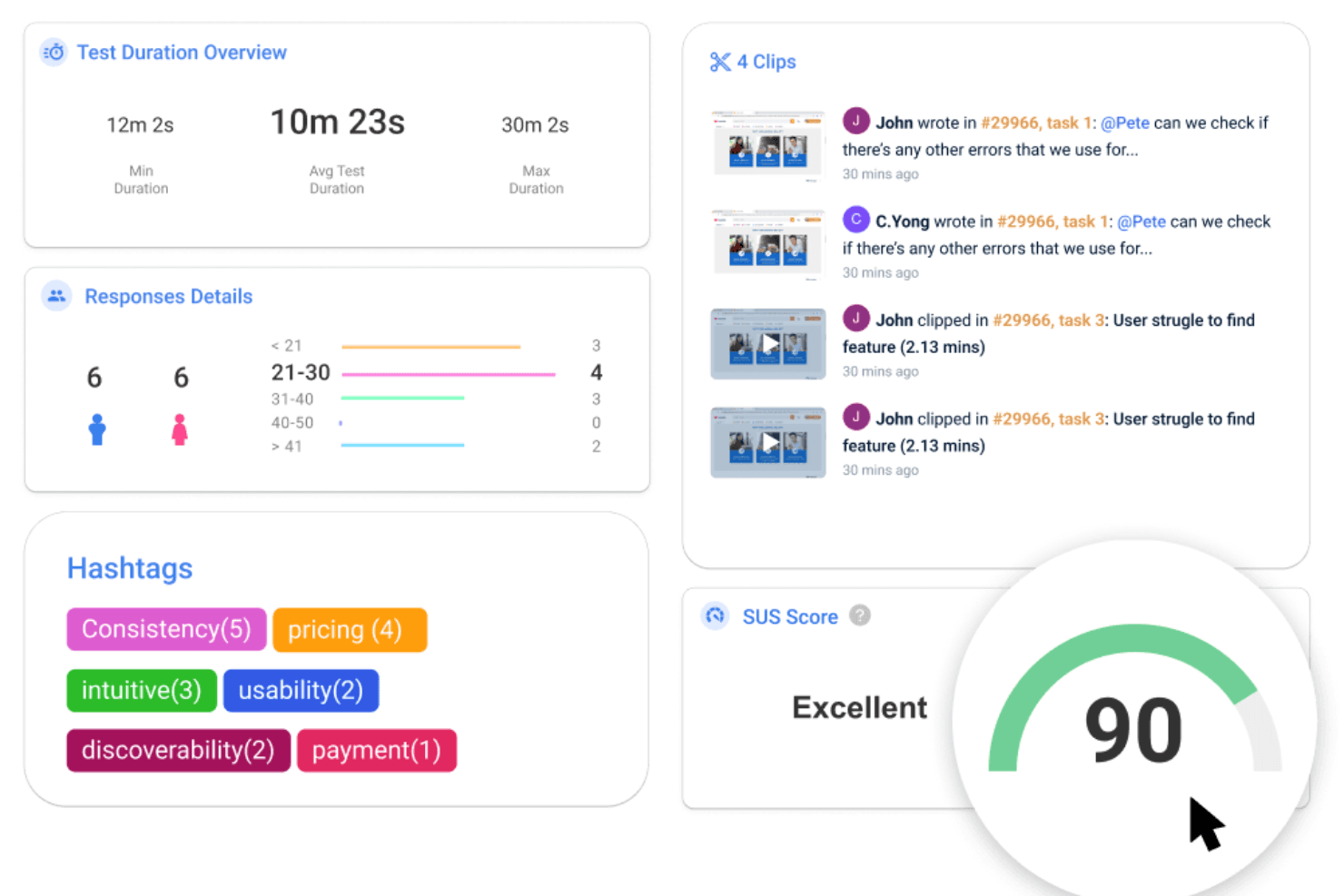
UXArmy offers various features and tools for conducting remote usability tests. UXArmy is a multi-method user research platform covering moderated and unmoderated usability testing, interviews, focus groups, card sorting, tree testing, and surveys, with built-in AI analysis and a native participant panel.
Who Is UXArmy Best For?
UXArmy is a strong fit for research teams that need to recruit and test with participants across Southeast Asia and the broader APAC region.
Why I Picked UXArmy
UXArmy earns its spot on my shortlist because its native participant panel (UserAdvocate) is specifically built around Southeast Asia and the broader APAC region, making it one of the few platforms where you can actually recruit and run studies with participants in Singapore, India, or Australia within about two days. I also like that it covers the full range of research methods, including moderated sessions via DeepDive, unmoderated app testing, card sorting, and tree testing, all in a single platform. The AI summaries that consolidate sentiment, quotes, and timestamps across sessions cut down analysis time considerably.
UXArmy Key Features
- DeepDive moderated sessions: Run 1:1 interviews, dyads, triads, or focus groups of up to 10 participants, with sessions lasting up to three hours and support for up to three shared screens simultaneously.
- Native mobile app testing: Test live iOS and Android apps, including TestFlight and Google Play beta builds, with full session recordings and no SDK or code changes required.
- Topic Anchors: Automatically split long interview recordings into labeled chapters, making it easier to navigate, annotate, and share specific moments across sessions.
- Slack notifications: Receive real-time test updates, new responses, and insight alerts directly in a Slack channel as studies run.
UXArmy Integrations
UXArmy has documented integrations with Figma, Slack, Miro, and FigJam, plus recording imports from Zoom, Microsoft Teams, and Google Meet. No public API documentation or confirmed Jira, Notion, Amplitude, or Mixpanel integrations is available.
Pros and Cons
Pros:
- Native mobile app testing needs no SDK
- Moderated sessions support groups of ten
- Strong APAC participant recruitment
Cons:
- Panel diversity skews toward APAC
- Native apps lack heatmaps and paths
Learn more about UXArmy: Best for IA-focused navigation and structure testing
- Free plan available
- From $208/user/month
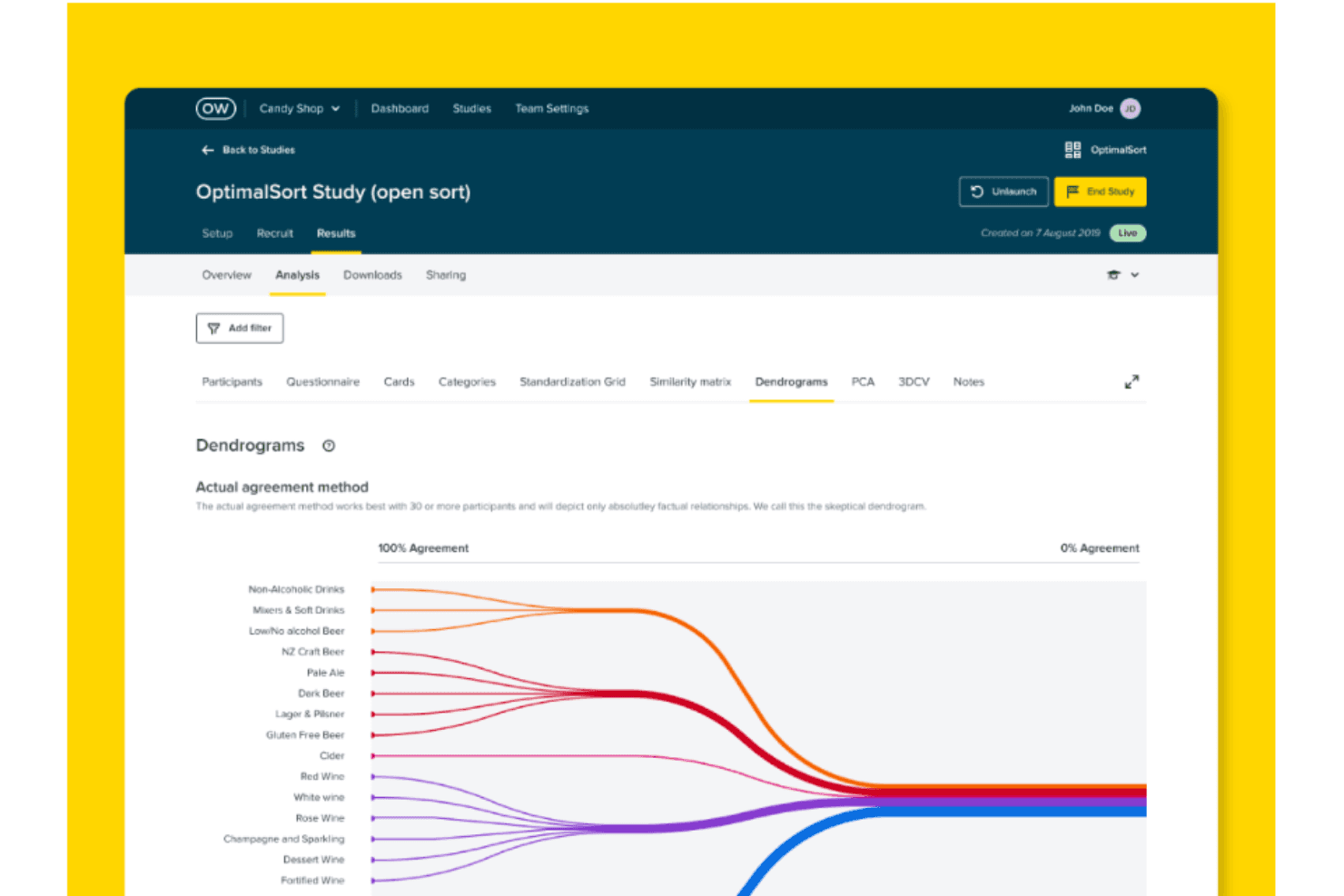
Take a look at Optimial Workshop's optimal sort dendrogram, which it depicts only factual relationships and provides the most useful data if over 30 participants have completed your study. Optimal Workshop is a usability testing platform specializing in information architecture research, offering tree testing, card sorting, first-click testing, prototype and live site testing, moderated interview logistics, and AI-powered synthesis.
Who Is Optimal Workshop Best For?
Optimal Workshop is a strong fit for UX researchers and product teams who run frequent information architecture research, including tree testing, card sorting, and navigation testing.
Why I Picked Optimal Workshop
Optimal Workshop earns its spot on my shortlist because of how deeply it specializes in information architecture research. I've done tree testing with other platforms, but Optimal's implementation is genuinely best in class: you get path analysis, directness metrics, and side-by-side IA variant comparisons in one place. I also love that card sorting includes session replays so you can see exactly how participants grouped content, not just the end result.
Optimal Workshop Key Features
- Mixed-methods study builder: Combine prototype testing, live site testing, and surveys into a single study, with branching logic and section-level randomization.
- AI-moderated follow-up questions: Set study goals and probe depth, and an AI moderator automatically asks follow-up questions when participants give short or off-topic answers in surveys.
- Multi-profile participant recruitment: Target multiple audience segments in one study with separate demographic filters, quotas, and automatic exclusion windows for recent participants.
- Research repository with AI Chat: Search across transcripts and studies using plain-language questions, with video evidence linked directly to AI-generated responses.
Optimal Workshop Integrations
Optimal Workshop integrates with Figma, Zoom, Google Meet, Microsoft Teams, Google Calendar, Outlook, User Interviews, Respondent, Prolific, and Cint. An Enterprise-only API supports custom connections to data warehouses, business intelligence tools, dashboards, and analytics tools.
Pros and Cons
Pros:
- Multi-profile quotas support niche B2B recruiting
- AI links themes to video evidence
- Best-in-class tree testing path analysis
Cons:
- No built-in live moderated session room
- Native mobile app testing remains unavailable
Learn more about Optimal Workshop:
Diğer Kullanılabilirlik Testi Araçları
Aşağıda kısa listeme aldığım ancak en üst sıralara giremeyen ek kullanılabilirlik testi araçlarının bir listesi yer alıyor. Kesinlikle göz atmaya değer.
- 11Loop11Best for Agile sprint-cycle usability testing
- 12UseberryBest for tree testing and card sorting workflows
- 13UserbrainBest for continuous unmoderated testing schedules
- 14UXCamBest for mobile app behavioral analytics
- 15LookbackBest for live observer rooms in remote studies
- 16LyssnaBest for speed-to-insight with a vetted panel
- 17DscoutBest for video-screened panel recruitment
- 18TestBirdsBest for crowdsourced testing on real devices
How I Evaluate Usability Testing Tools
My evaluation starts with core functionality—specifically, whether a tool can run moderated and unmoderated tests and capture clear session recordings. From there, I look at standout features like AI-generated insights and native Figma integration, then consider panel quality and turnaround speed beyond the feature set.
Core Functionality (Table Stakes For This List)
When I'm selecting tools for my list, I score each one on a scale from 0 (does not offer the functionality) to 5 (excels in this area) for each core functionality listed below. I then convert the total into a percentage to help assess each tool's overall fit, with extra weight on any functionalities I've deemed essential.
- Test Creation & Execution (Essential): I check whether you can build branching tasks, set custom scenarios, and run both moderated and unmoderated sessions from one workspace.
- Participant Recruitment (Essential): Panel size, screening filters, and demographic targeting all matter here—I look at how quickly you can fill a study with qualified participants.
- Session Recording & Playback: I evaluate playback quality, timestamped navigation, and whether recordings sync screen activity with audio and interaction data for faster review.
- Behavioral Analytics: Heatmaps and click maps are table stakes, but I also look for scroll depth tracking and path analysis that let you compare segments side by side.
- Results Synthesis & Reporting: Tools like UserTesting and Maze approach reporting differently, so I check for auto-tagging, highlight reels, and shareable summaries you can hand to stakeholders.
- Device & Platform Coverage: Real users test on phones, tablets, and desktops, so I evaluate whether a tool supports mobile web and native app testing without extra configuration.
Once I have a list of tools that meet the criteria, I consider what sets each platform apart.
Differentiating Factors (What Sets Vendors Apart)
Here's how I compare and contrast different vendors:
Standout Features
I look for native Figma and prototype integration so teams can test clickable designs without exporting files—tools like Maze and UserTesting handle this differently, and the setup friction matters. AI-generated insights are equally important; I evaluate whether a tool can surface sentiment and themes from transcripts automatically, which cuts hours off synthesis after a large study. I also check for live observer rooms where PMs and engineers can tag moments in real time during moderated sessions.
Beyond Features
Panel quality matters just as much as feature depth. I check whether a vendor's built-in panel can reach niche audiences—like enterprise IT buyers or healthcare professionals—since generic consumer panels won't cut it for B2B research. Turnaround speed is another factor I evaluate closely; teams running weekly sprints need unmoderated results back in hours, not days. I also look at how each tool handles collaboration and stakeholder access, because a highlight reel that's easy to share with an executive will drive more buy-in than a raw session link buried in a dashboard.
Kullanılabilirlik Testi Aracı Nasıl Seçilir?
Uzun özellik listeleri ve karmaşık fiyatlandırma yapıları içinde kaybolmak kolaydır. Benzersiz yazılım seçimi sürecinizde ilerlerken odağınızı korumanıza yardımcı olmak için şu faktörleri göz önünde bulundurabilirsiniz:
| Faktör | Dikkat Edilmesi Gerekenler |
|---|---|
| FaktörÖlçeklenebilirlik | Dikkat Edilmesi GerekenlerAraç ekibiniz ve ürününüzle birlikte büyüyebilir mi? Yeni sözleşmeler gerektirmeden hem küçük testleri hem de büyük, birden fazla ekibin yer aldığı kullanımları yönetebilen çözümler arayın. |
| FaktörEntegrasyonlar | Dikkat Edilmesi GerekenlerMevcut araçlarınızla (ör. Jira, Figma, Slack) çalışıyor mu? İş akışınızı değiştirmenizi zorunlu kılan veya özel API çalışması gerektiren araçlardan kaçının. |
| FaktörÖzelleştirilebilirlik | Dikkat Edilmesi GerekenlerGörevleri, markalamayı veya raporları ihtiyaçlarınıza göre uyarlayabilir misiniz? Katı yapıdaki araçlar sizi yavaşlatabilir veya paydaşların kafasını karıştırabilir. |
| FaktörKullanım kolaylığı | Dikkat Edilmesi GerekenlerEkibiniz derinlemesine eğitime ihtiyaç duymadan ne kadar hızlı değer elde edebilir? Zaman kaybettiren hantal arayüzlere veya karmaşık kurulum akışlarına dikkat edin. |
| FaktörUygulama ve işe alıştırma | Dikkat Edilmesi GerekenlerAraç ekibin kullanımına hazır hâle gelene kadar ne kadar zaman geçiyor? Tipik kurulum süresini ve destek ya da geçiş yardımının dâhil olup olmadığını sorun. |
| FaktörMaliyet | Dikkat Edilmesi GerekenlerZaman içindeki gerçek maliyet nedir—kullanıcı hesapları, katılımcılar ve yükseltmeler? Uygun fiyatlı görünen ancak kritik özellikleri ücret duvarlarının arkasına gizleyen araçlardan kaçının. |
| FaktörGüvenlik önlemleri | Dikkat Edilmesi GerekenlerGüvenlik standartlarınızı karşılıyor mu (ör. SSO, veri şifreleme)? Bu, özellikle müşteri verileri veya düzenlemelere tabi sektörler için önemlidir. |
Kullanılabilirlik Testi Araçları Nedir?
Kullanılabilirlik testi araçları; UX araştırmacıları, geliştiriciler ve ürün tasarımcıları tarafından hedef kitlelerini test etmek için kullanılan yazılım çözümleridir. Gerçek kullanıcı etkileşimlerini taklit ederek veya gerçek test katılımcılarından nicel veriler izleyip toplayarak bir ürünün ya da sistemin ne kadar kullanıcı dostu ve verimli olduğunu ölçerler.
Görev analizi, öne çıkan klipler, kullanıcı anketleri veya ısı haritaları gibi yöntemler aracılığıyla test yazılımı, kullanıcıların bir üründe nasıl gezindiğini, nerelerde sorunlarla karşılaştığını ve hangi unsurların genel müşteri deneyimlerini iyileştirdiğini veya kötüleştirdiğini ortaya çıkarır. Pek çok ekip, farklı sürümleri karşılaştırmak ve tasarım kararlarını doğrulamak için A/B testi yazılımından da yararlanır. Bu, işletmelerin kullanıcı arayüzlerini sadeleştirmesine, ürünlerini daha sezgisel ve kullanımı kolay hâle getirmesine ve nihayetinde pazarda daha başarılı olmasına yardımcı olur.
Kullanılabilirlik Testi Yazılımının Özellikleri
Kullanılabilirlik testi araçlarını seçerken aşağıdaki temel özelliklere dikkat edin:
- Oturum kaydı ve oynatma: Ekiplerin kullanıcı etkileşimlerini ayrıntılı olarak görüntülemesini sağlayarak kullanıcı yolculuğundaki sorunlu noktaların belirlenmesine yardımcı olur.
- Isı haritaları: Bir web sayfası veya uygulamadaki ilgi ya da kafa karışıklığı alanlarını ortaya çıkarmak için tıklamalar, dokunuşlar ve kaydırmalar gibi kullanıcı etkinliklerini görselleştirir.
- Canlı kullanıcı testi: Kullanıcılar görevleri tamamlarken gerçek zamanlı olarak gözlemlenmelerini sağlar; anında geri bildirim ve daha zengin niteliksel içgörüler sunar.
- Görev analitiği: Kullanılabilirlik performansını nicel olarak ölçmek için görev tamamlama oranlarını, görev başında geçirilen süreyi ve hata oluşumlarını izler.
- Katılımcı bulma: Daha temsilî sonuçlar elde etmek için farklı kullanıcı panellerine yerleşik erişim sunar veya belirli demografik grupları hedeflemeye olanak tanır.
- Anket entegrasyonu: Davranışsal verilerin yanı sıra öznel kullanıcı geri bildirimlerini toplamak için kullanılabilirlik testlerini anketlerle birleştirir.
- A/B testi desteği: Gerçek dünya kullanımında hangi tasarımın daha iyi performans gösterdiğini belirlemek için farklı arayüz sürümlerinin karşılaştırılmasını kolaylaştırır.
- Mobil ve platformlar arası test: Tutarlı deneyimler sağlamak için çeşitli cihazlar ve platformlar genelinde kullanılabilirlik testini destekler.
- İş birliği ve paylaşım araçları: Geri bildirim döngülerini kolaylaştırmak amacıyla bulgulara açıklama ekleme, yorum yapma ve bulguları paydaşlarla paylaşma özellikleri sunar.
- Uyumluluk ve gizlilik kontrolleri: Test sırasında katılımcı bilgilerinin korunmasını sağlayarak veri koruma düzenlemelerine uyulmasını güvence altına alır.
Kullanılabilirlik Testi Araçlarının Faydaları
Kullanılabilirlik testi araçlarını uygulamak ekibiniz ve işletmeniz için çeşitli faydalar sağlar. Yararlanmayı bekleyebileceğiniz birkaç fayda şunlardır:
- Daha hızlı geri bildirim döngüleri: Bu araçlar, ekiplerin tasarım veya geliştirme sırasında kullanıcı girdilerini hızlı bir şekilde toplamasına olanak tanıyarak sorunların büyümeden fark edilmesine yardımcı olur.
- Daha iyi ürün kararları: Gerçek kullanıcı davranışına ilişkin içgörüler sayesinde ekipler tahmin yürütmek yerine daha net ve kanıta dayalı kararlar alabilir.
- Artan kullanıcı memnuniyeti: Kafa karıştırıcı tasarımları veya hatalı akışları erken fark etmek, daha sorunsuz kullanıcı deneyimleri oluşturmaya yardımcı olur.
- Azalan geliştirme israfı: Sorunları erken bularak ekipler, kullanıcıların anlamayacağı veya kullanmayacağı özellikleri geliştirmek için zaman ve para harcamaktan kaçınır.
- Daha yüksek dönüşüm oranları: Testler, kayıt, ödeme veya başlangıç akışlarındaki sorunlu noktaları ortaya çıkarır; böylece kullanıcıları yavaşlatan unsurları düzeltebilirsiniz.
- Uzaktan test desteği: Birçok araç, kullanıcılarla herhangi bir yerde test yapmaya olanak tanır; böylece yüz yüze oturumlar planlamadan farklı kullanıcı gruplarından girdi alabilirsiniz.
- Daha net paydaş uyumu: Kaydedilen oturumlar ve raporlar, ekiplerin ve yöneticilerin aynı kullanıcı sorunlarını görmesine ve nelerin düzeltilmesi gerektiği konusunda anlaşmasına yardımcı olur.
Kullanılabilirlik Testi Araçlarının Maliyetleri & Fiyatlandırması
Kullanılabilirlik testi araçlarını seçmek, mevcut çeşitli fiyatlandırma modellerinin ve planların anlaşılmasını gerektirir. Maliyetler özelliklere, ekip büyüklüğüne, eklentilere ve daha fazlasına göre değişir. Aşağıdaki tablo, kullanılabilirlik testi aracı çözümlerindeki yaygın planları, ortalama fiyatlarını ve genellikle sunulan özellikleri özetlemektedir:
Kullanılabilirlik Testi Araçları için Plan Karşılaştırma Tablosu
| Plan Türü | Ortalama Fiyat | Yaygın Özellikler |
|---|---|---|
| Plan TürüÜcretsiz Plan | Ortalama Fiyat$0 | Yaygın ÖzelliklerSınırlı testlere, temel analitik özelliklerine ve kendi kendine hizmet desteğine erişim. |
| Plan TürüKişisel Plan | Ortalama Fiyat$25–$75/kullanıcı/ay | Yaygın ÖzelliklerSınırsız testler, gelişmiş analitik özellikleri, video kayıtları ve temel entegrasyonlar. |
| Plan Türüİşletme Planı | Ortalama Fiyat$75–$150/kullanıcı/ay | Yaygın ÖzelliklerEkip iş birliği araçları, özelleştirilebilir iş akışları, öncelikli destek ve içgörüler panosu. |
| Plan TürüKurumsal Plan | Ortalama Fiyat$150–$300+/kullanıcı/ay | Yaygın ÖzelliklerÖzel hesap yöneticisi, tam API erişimi, beyaz etiketleme, gelişmiş güvenlik ve özel SLA'lar. |
Kullanılabilirlik Testi SSS'leri
Kullanılabilirlik testi hakkında diğer kişilerin sorduğu yaygın soruların yanıtlarını bulun.
Kullanılabilirlik testi araçlarını kullanmanın faydaları nelerdir?
Kullanılabilirlik testi araçları çeşitli avantajlar sunar:
- İşletmelerin, kullanıcı etkileşimlerini ve davranışlarını kaydederek ürünlerinin nasıl kullanıldığına dair daha derin bir anlayış kazanmasını sağlar. Bu, kullanıcı deneyimini engelleyebilecek kullanılabilirlik sorunlarının ortaya çıkarılmasına yardımcı olabilir.
- Kullanıcı davranışını görselleştirmek için ısı haritaları ve oturum kayıtları gibi görsel sunumlar sağlar.
- Bu araçlar, doğrudan kullanıcı geri bildirimleri toplamak amacıyla anketler ve soru formları düzenlemeye de yardımcı olabilir.
- İşletmeler, kullanılabilirlik sorunlarını erken tespit ederek daha sonraki aşamalarda yapılacak değişikliklerle ilişkili maliyetlerden potansiyel olarak tasarruf edebilir.
Temel bir kullanılabilirlik testi nedir?
Temel bir kullanılabilirlik testi iki kişiyi içerir: bir test kullanıcısı ve bir gözlemci. Testi kurmak için kullanıcının önüne yerleştireceğiniz prototipi test edebileceği bir bilgisayara ihtiyacınız olur. Ardından kullanıcı ürününüzde gezinirken gözlemci, araştırma ekibi tarafından önemli görülen davranışları ve diğer gezinme gözlemlerini not alır.
Kullanılabilirlik testi araçlarının tipik maliyeti ne kadardır?
Kullanılabilirlik testi araçlarının fiyatlandırması; özelliklerine, kullanıcı tabanının büyüklüğüne ve gerçekleştirebildikleri görevlerin karmaşıklığına bağlı olarak önemli ölçüde değişebilir.
Bu araçlar için birkaç yaygın fiyatlandırma modeli vardır. Bazıları abonelik esasına göre çalışır; erişim için aylık veya yıllık ücret ödersiniz. Diğerleri test başına veya katılımcı başına model kullanır; yaptığınız test miktarına göre ödeme yaparsınız. Bazı araçlar, daha yüksek kademelerde daha fazla özellik ve yetenek sunan kademeli bir fiyatlandırma modeli uygular.
Fiyat, aylık $20 gibi düşük bir seviyeden daha gelişmiş araçlar için aylık $200’ın üzerine çıkabilir. Maliyetin genellikle özellik sayısıyla ve aracın sağlayabileceği içgörü düzeyiyle orantılı olduğunu belirtmek önemlidir.
Kullanılabilirlik testlerinin türleri nelerdir?
Kullanılabilirlik testi, kullanıcı hakkında bilgi edinmenizi sağlar. Ancak farklı testler, analiz etmeniz için farklı veriler sunar. İşte en popüler 5 kullanılabilirlik testinden bazıları:
- Moderatörlü kullanılabilirlik testleri: Bir moderatör ve bir test kullanıcısı olmak üzere iki kişinin bir test için etkileşime girmesidir. Bu, yüz yüze veya bir video konferans yazılımı aracılığıyla gerçekleştirilebilir.
- Moderatörsüz kullanılabilirlik testleri: Hedef kitlenize bir test göndermeniz ancak gözlem veya moderasyon yapmamanızdır. Bunun yerine, testi tamamladıktan sonra oturum kaydını alırsınız.
- Kart gruplama: Kullanıcılardan öğeleri kendileri için anlamlı olana göre gruplamalarını istemenizdir. Kart gruplama, bir web sitesinin sınıflandırma sistemini test etmek için harika bir çalışmadır.
- İlk tıklama testi: Şaşırtıcı olmayan bir şekilde, ilk tıklama testi tam olarak kulağa geldiği gibidir. Bir kullanıcıya talimatlar vermeniz ve ilk tıklamayı yaptığı yeri kaydetmenizdir.
- Tercih testi: Ürünün farklı seçeneklerini kullanıcıya sunmanızdır. Tercih testinin amacı, kullanıcıların neden bir seçeneği diğerine tercih ettiklerine ilişkin verdikleri geri bildirimleri kaydetmektir.
Ücretsiz kullanılabilirlik testi araçları var mı?
Evet, bazı ücretsiz seçenekler mevcuttur. Optimal Workshop tarafından sunulan Chalkmark gibi araçlar ücretsiz bir plan sunar; ancak bu planlar, ücretli seçeneklere kıyasla genellikle özellik ve kapsam bakımından sınırlıdır.
Bu araçlar mobil uygulama testi için kullanılabilir mi?
Evet, bu araçların çoğu hem web sitelerinde hem de mobil uygulamalarda kullanılabilirlik testi yapma olanağı sunar. Yetenekler değişebileceğinden belirli aracı kontrol etmeyi unutmayın.
Kullanılabilirlik testi UX'i nasıl etkiler?
Kullanılabilirlik testi, dijital ürünlerinizin UX tasarımında olumlu düzenlemeler yapmanıza yardımcı olur. Kullanılabilirlik testi sayesinde kullanıcıların sorun yaşadığı noktaları ortaya çıkarabilir ve bu da yinelemeli tasarım iyileştirmelerini kullanıma sunmanıza yardımcı olur. Ayrıca kullanılabilirlik testi, kullanıcı empatisi geliştirmenizi ve müşteriyi göz önünde bulundurarak ürünler oluşturmanızı sağlar.
UX testi ile UAT testi arasındaki fark nedir?
UX testi, dijital ürünlerinizin kullanıcı deneyimini ve kullanılabilirliğini değerlendirir. Buna karşılık, Kullanıcı Kabul Testi (UAT), yazılım sistemlerinizin kullanıma hazır olup olmadığını belirlemeye yardımcı olur. UAT, ürünlerinizin genel işlevselliğini vurgularken UX testi daha çok kullanılabilirliğe odaklanır.