

En iyi kullanıcı oryantasyonu yazılımı, mühendislik desteğine ihtiyaç duymadan kullanıcıları değere yönlendiren etkileşimli ürün turları, kontrol listeleri ve uygulama içi mesajlar oluşturmanıza yardımcı olur. Bu yazılım olmadan oryantasyon süreci genellikle hantal veya kopuk hissettirir; bu da kullanıcı kaybına, destek taleplerine veya düşük etkinleştirme oranlarına yol açar.
20'den fazla oryantasyon aracını test ettim ve özelleştirme ile kullanım kolaylığı arasında denge kurmanın ne kadar zor olduğunu biliyorum. Bu rehberde, ürün ekiplerinin kişiselleştirilmiş oryantasyon akışlarını hızlıca başlatmasına, etkileşimi ölçmesine ve kullanıcı yolculuğunu sürekli olarak iyileştirmesine yardımcı olan platformları bulacaksınız.
Why Trust Our Software Recommendations
6,700+
Reviews
20
Industry experts
16+
Evaluation factors
14
Years
Our team has been testing and reviewing software since 2012. As product managers ourselves, we know how difficult—and important—it is to choose the right software.
For this guide, we evaluated tools using hands-on testing and independent research, scoring tools using our selection criteria.
Our reviews reflect our human editorial judgment, not a sales pitch.
Expert reviewers:
- Andrew LumbySenior TPM
- Cristiano ValimSenior UI/UX Lead


Kullanıcı Oryantasyonu Yazılımları Karşılaştırma Tablosu
Bu karşılaştırma tablosu, en iyi kullanıcı oryantasyonu yazılımı seçimlerimin fiyatlandırma ayrıntılarını özetlemektedir:
Score legend (out of 5)
- Excellent4.5–5
- Good4–4.4
- Average3–3.9
- Below average2–2.9
- Poor1–1.9
Sorted by: Default
| Tool | Starting Price | Website | |||||||
|---|---|---|---|---|---|---|---|---|---|
Best for turning support questions into learning | Not rated | 2 | 3 | 2 | 3 | 1 | Not rated | $119/month Free plan + free demo available | Book Demo |
Best for all-in-one online product training | Not rated | 2 | 2 | 1 | 2 | Not rated | Not rated | Pricing upon request 14-day free trial + demo available | Website |
Best for creating engaging user onboarding checklists | 3.5 out of 5 | 3 | 3 | 4 | 4 | 3 | 4 | $174/month 14-day free trial | Website |
Best for engaging self-serve training modules | Not rated | 3 | 3 | 1 | 2 | Not rated | Not rated | Pricing upon request Free trial available | Website |
Best for instant AI voiceover in onboarding guides | Not rated | Not rated | 2 | Not rated | 1 | 1 | Not rated | $29/creator/month Free plan + free demo available | Website |
Best for segmentation-driven onboarding flows | 3.8 out of 5 | 4 | 4 | 3 | 4 | 4 | 4 | $299/month 14-day free trial | Website |
Best for contextual, behavior-driven resource centers | 4.0 out of 5 | 4 | 3 | 4 | 5 | 4 | 4 | $240/month 14-day free trial | Website |
Best for multi-platform in-app guidance at scale | 4.2 out of 5 | 4 | 4 | 3 | 5 | 4 | 5 | Pricing upon request Free trial available | Website |
Best for tracking onboarding KPIs | 4.5 out of 5 | 5 | 5 | 3 | 5 | 4 | 5 | Pricing upon request Free trial available | Website |
Best for feature adoption tied to retention analytics | 3.7 out of 5 | 4 | 5 | 1 | 3 | 4 | 5 | Pricing upon request Free plan + 30-day free trial + free demo available | Website |


En İyi Kullanıcı Oryantasyonu Yazılımları İncelemeleri
\u0026nbsp;
Her bir kullanıcı oryantasyonu platformunun en uygun kullanım alanını ve öne çıkan özelliklerini göstermek için her araç hakkında kısa bir açıklama:
 Best for turning support questions into learning
- Free plan + free demo available
- From $119/month (billed annually)
Visit WebsiteCustomer Rating:4.6/5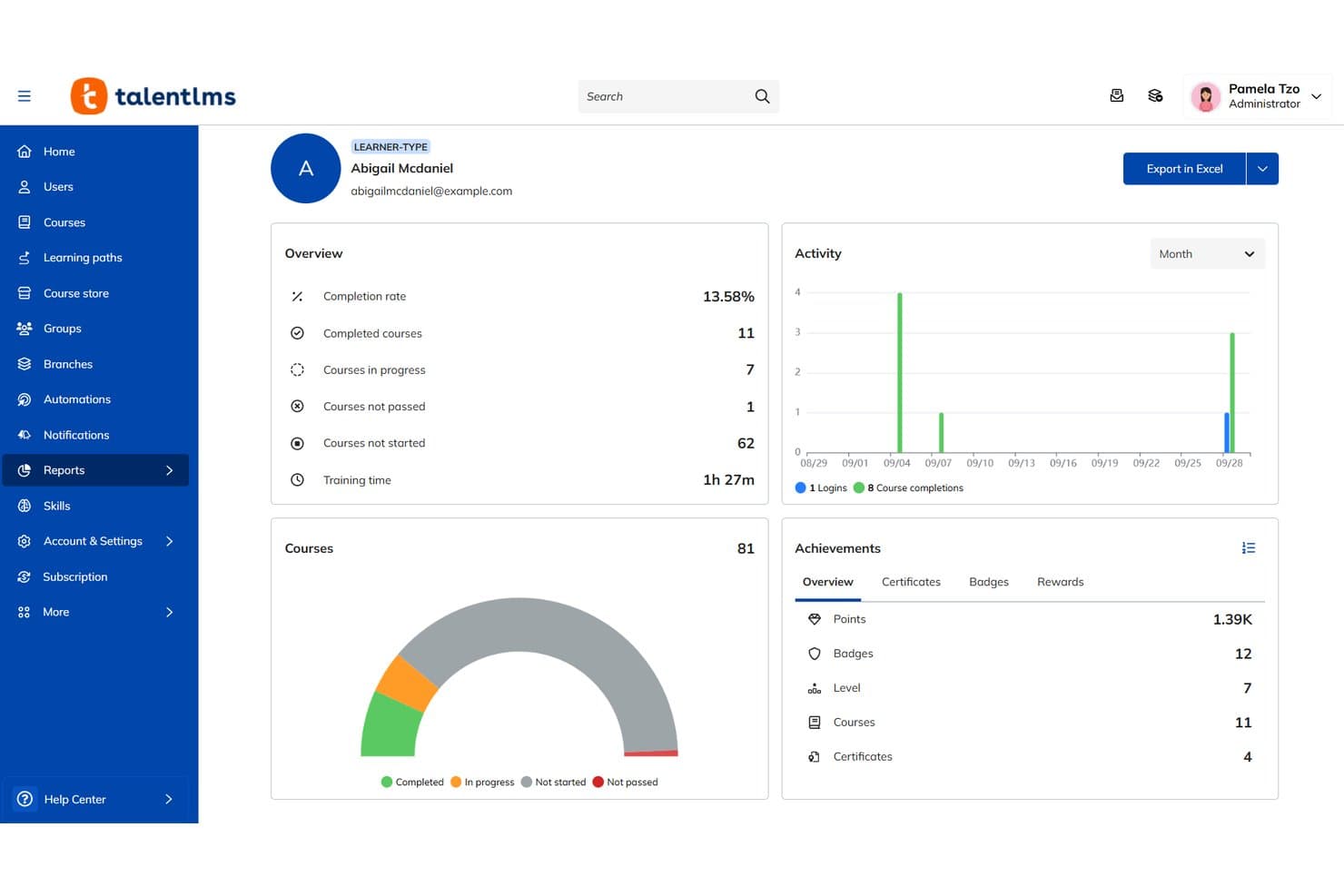
TalentLMS tracks learner progress, completions, and achievements in one dashboard. TalentLMS is a cloud-based learning management system (LMS) that lets you build and deliver structured customer training through a branded portal, using a drag-and-drop course builder, learning paths, AI-assisted content creation, and branch portals for multi-audience training.
Who Is TalentLMS Best For?
TalentLMS is a strong fit for customer success and training teams that need to build a structured, self-serve learning portal for external users.
Why I Picked TalentLMS
I've included TalentLMS in my top picks because it treats your support queue as a content brief. When the same questions keep coming in, TalentLMS lets you build structured courses and Learning Paths around them, turning reactive support into a self-serve training portal customers actually use. I especially like TalentCraft, its AI course builder, which can spin up a full course with quizzes and translated content fast. Branch portals let you deliver different course catalogs to different customer segments from one platform.
TalentLMS Key Features
- Branch portals: Separate sub-portals let you deliver different course catalogs to different customer segments, all from one account.
- TalentCraft AI course builder: Generates full courses, quizzes, and translated content in 40+ languages without manual authoring from scratch.
- Learning Paths: Sequential course structures that enforce a set order and track each learner's progress through your training curriculum.
- Gamification: Badges, leaderboards, and levels reward learners for completing courses and keep engagement up across your training portal.
TalentLMS Integrations
TalentLMS offers integrations with HubSpot, Zoom, Microsoft Teams, BambooHR, Salesforce, and Zapier. It also supports SAML 2.0, LDAP, OpenID Connect, LTI 1.3, and an API for custom connections.
Pros and Cons
Pros:
- AI drafts translated courses and quizzes
- Branches separate customer training audiences
- Turns recurring support questions into courses
Cons:
- Learning Paths cannot replace activation checklists
- No in-app tours, tooltips, or overlays
Learn more about TalentLMS: Best for all-in-one online product training
- 14-day free trial + demo available
- Pricing upon request
Visit WebsiteCustomer Rating:4.7/5
SkyPrep's management dashboard displays learner activity, upcoming events, and quick links. SkyPrep is a cloud-based learning management system (LMS) that lets you build structured customer training programs using courses, video, quizzes, checklists, and a multi-tenant portal setup for managing separate learner groups.
Who Is SkyPrep Best For?
SkyPrep suits customer success teams that need to run structured, course-based education programs for clients through a dedicated training portal.
Why I Picked SkyPrep
I picked SkyPrep as one of the best because it handles the full scope of structured customer education in one place. I love how its multi-tenant portal lets you spin up a separate, branded training hub for each client, so a SaaS company can run distinct certification programs for different customer segments without mixing learner groups. Course builders with built-in quizzes, checklists, and video support mean you can guide customers through complex product workflows at their own pace.
SkyPrep Key Features
- AI-powered content creation: Lets you generate course content automatically, reducing the manual effort needed to build structured training programs.
- SCORM compliance: Supports the SCORM standard so you can import and deliver third-party e-learning content alongside your own courses.
- Gamification: Adds points, badges, and other game-like elements to training programs to keep learners engaged throughout a course.
- E-commerce for courses: Enables you to sell training content directly through the platform, useful for teams that monetize customer education.
SkyPrep Integrations
SkyPrep offers integrations with Salesforce, HubSpot, Okta, Microsoft Active Directory, Azure AD, Google Workspace, and Zoom. Its API supports custom integrations.
Pros and Cons
Pros:
- Course checklists support guided learning
- Separate portals for distinct learner groups
- Structured customer education programs
Cons:
- Learner reporting misses product activation metrics
- Separate portal lacks in-app guidance
Learn more about SkyPrep: Best for creating engaging user onboarding checklists
- 14-day free trial
- From $174/month (billed annually)
Visit WebsiteCustomer Rating:4.7/5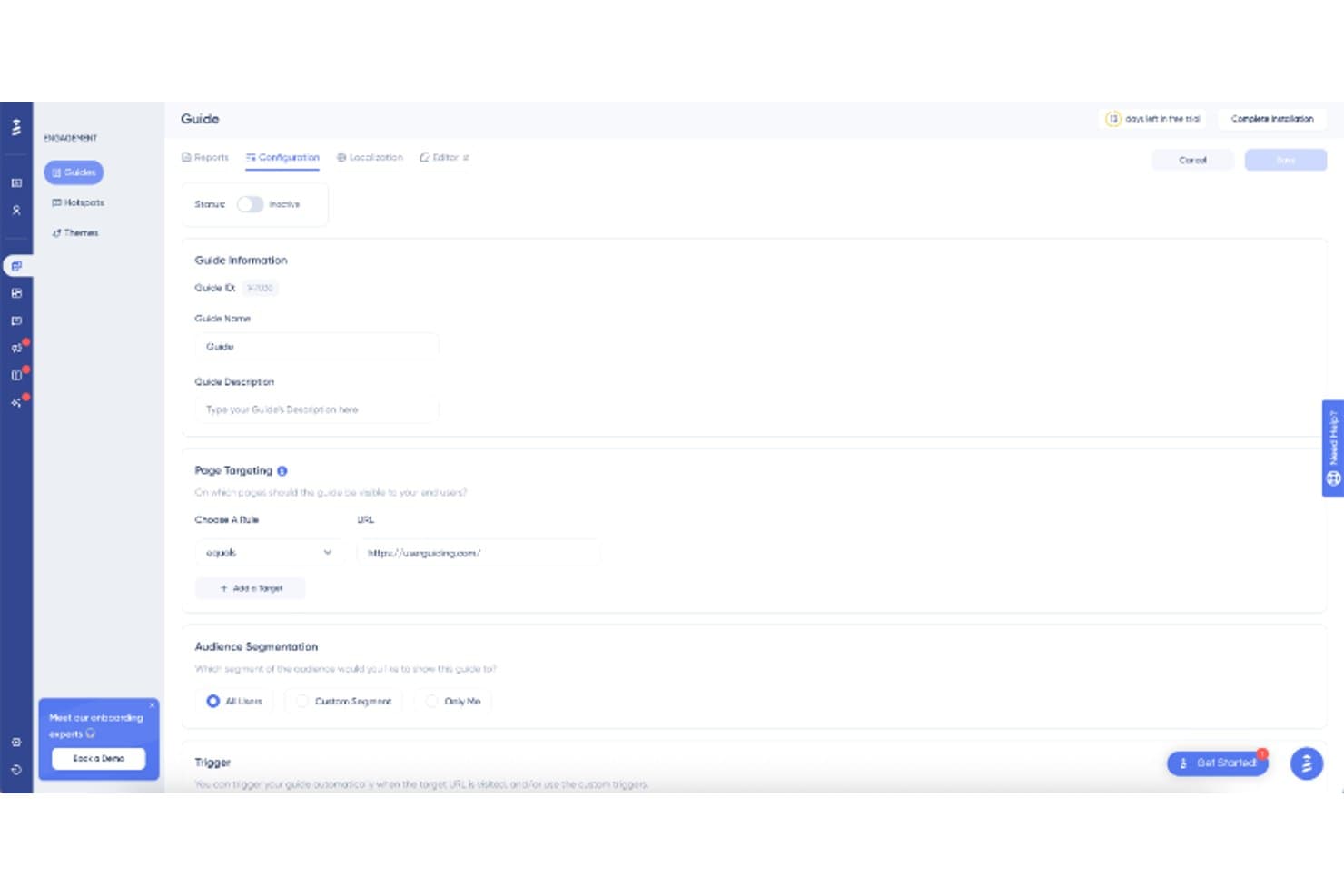
UserGuiding lets users configure guide targeting, audience, and triggers. UserGuiding is a user onboarding platform for web apps that combines product tours, onboarding checklists, tooltips, hotspots, modals, banners, in-app surveys, and a resource center into a single no-code tool.
Who Is UserGuiding Best For?
UserGuiding is a strong fit for product managers and customer success teams at SaaS companies who want to build and manage onboarding checklists without writing a single line of code.
Why I Picked UserGuiding
UserGuiding earns its spot on my shortlist because of how deeply configurable its onboarding checklists are. I love that you can set completion rules tied to real user behavior, like marking a checklist item done when a user visits a specific page or triggers a custom attribute, rather than just finishing a guided tour. You can also target checklists by segment, schedule their visibility, and even launch them directly from the Resource Center.
UserGuiding Key Features
- Multi-format in-app guidance: Build product tours, hotspots, tooltips, modals, and banners from a single no-code Chrome extension builder.
- In-app surveys and NPS: Collect user feedback and measure satisfaction directly inside your product without any custom development.
- Resource center: Give users a persistent, self-serve help hub they can open at any time to access guides, knowledge base articles, and checklists.
- Checklist and guide analytics: Track completion rates, step-level engagement, and user-level progress through dedicated reports you can export to CSV.
UserGuiding Integrations
UserGuiding offers 8 documented integrations, including HubSpot, Amplitude, Segment, Google Analytics, Mixpanel, Intercom, and Woopra, plus webhooks. Its developer APIs, Checklist API, and MCP Server support custom integrations.
Pros and Cons
Pros:
- Users praise quick launches and responsive support
- Resource Center keeps guidance available after tours
- Goal-based checklist completion tracks real actions
Cons:
- No native mobile app onboarding support
- Checklist setup requires tags and custom triggers
Learn more about UserGuiding: Best for engaging self-serve training modules
- Free trial available
- Pricing upon request
Visit WebsiteCustomer Rating:4.6/5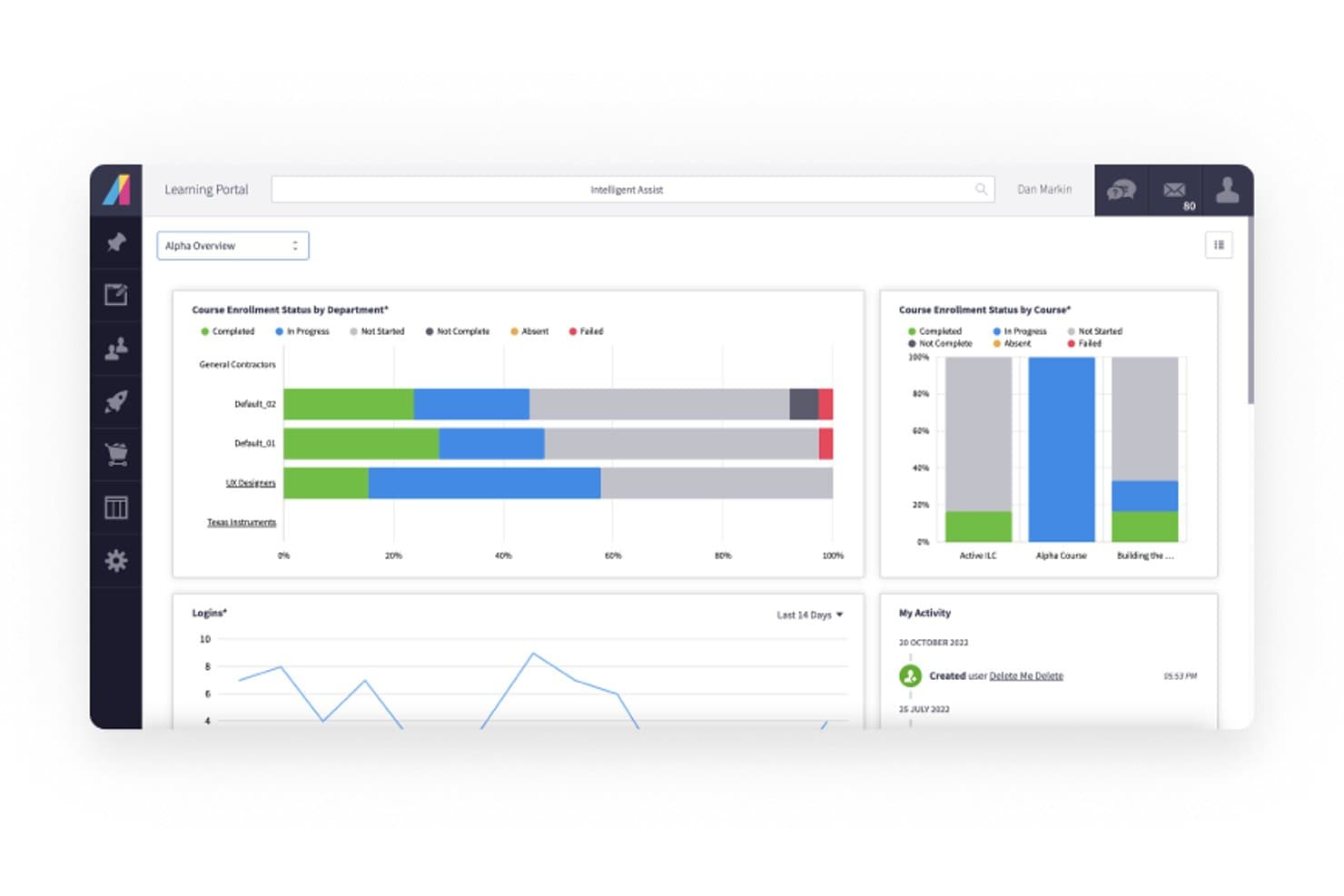
Absorb tracks course enrollment and login activity across departments. Absorb is an AI-powered learning management system (LMS) that delivers customer onboarding through a separate, branded training portal with courses, learning paths, quizzes, video content, and AI-assisted course creation.
Who Is Absorb Best For?
Absorb is a strong fit for teams that need to deliver structured, course-based customer training at scale across multiple roles, regions, or partner tiers.
Why I Picked Absorb
I've included Absorb in my top picks because it's built specifically for teams that need to deliver structured, course-based training at scale through a dedicated, branded learning portal. I particularly like Absorb Create, which uses AI to turn product documentation into full courses in under an hour, keeping training current whenever your product changes. Aura Learn then answers learner questions directly within those courses, reducing the support load without any manual intervention.
Absorb Key Features
- Multi-language support: Absorb delivers courses and admin interfaces in 24+ languages, so you can train customers across global markets without rebuilding content from scratch.
- eCommerce for course selling: A PCI-compliant storefront with 70+ payment gateways lets you monetize training programs across multiple currencies with no commission fees.
- Certifications and compliance tracking: Absorb issues completion certificates and tracks learner progress against compliance requirements, useful for regulated industries or partner accreditation programs.
- Absorb Amplify content library: A ready-made library of 20,000+ courses covering 12,000+ skills gives your team a head start when building out a customer education catalog.
Absorb Integrations
Absorb offers integrations with ADP, Workday, Salesforce, Microsoft Teams, and 40+ other systems. It also provides a RESTful API for custom integrations.
Pros and Cons
Pros:
- Certifications reinforce product knowledge and adoption
- Structured paths support role-based customer education
- AI builds courses from product documents
Cons:
- No in-app walkthroughs or checklist builder
- Training happens outside the product
Learn more about Absorb: Best for instant AI voiceover in onboarding guides
- Free plan + free demo available
- From $29/creator/month (billed annually)
Visit WebsiteCustomer Rating:5/5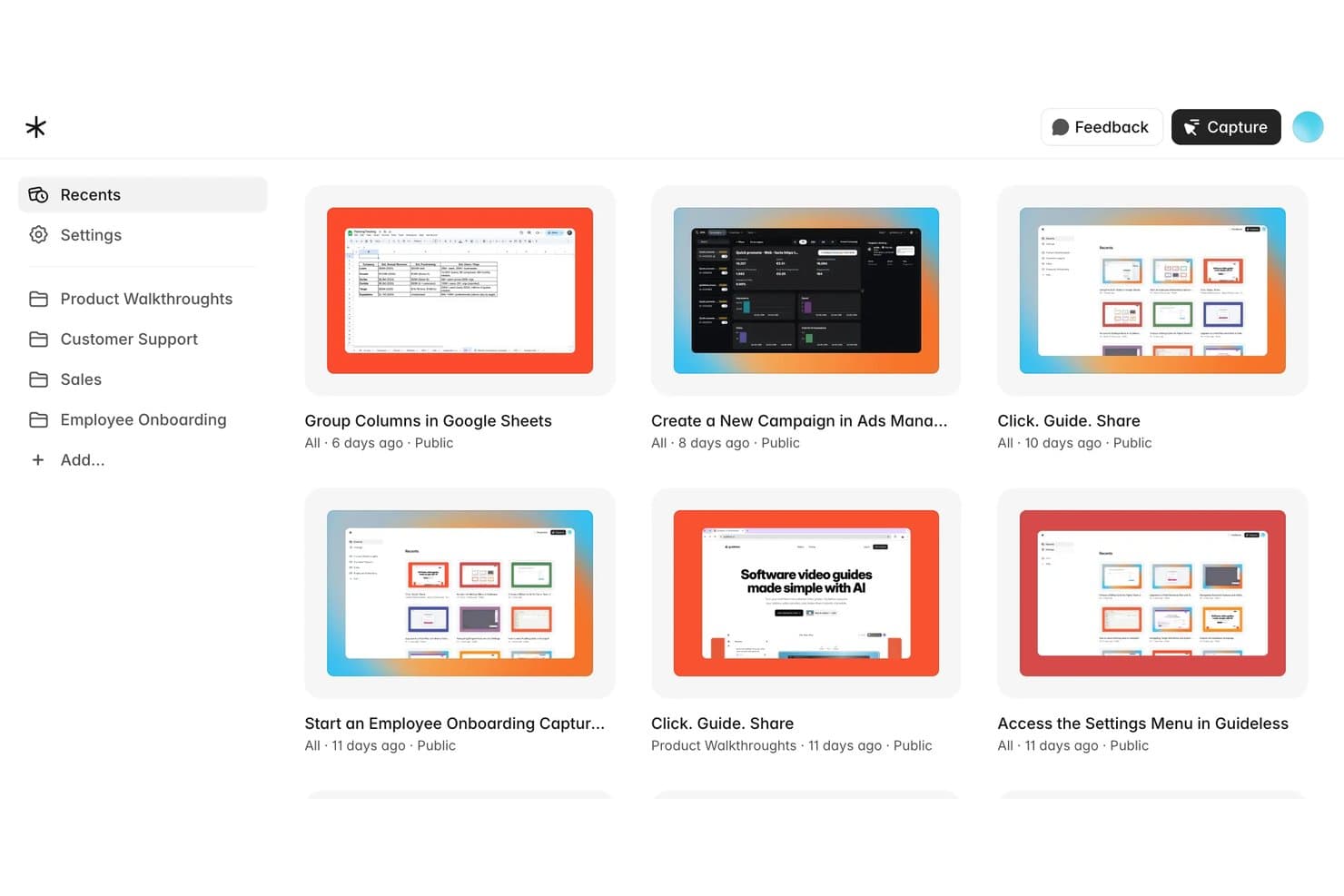
Guideless offers a dashboard with organized folders for product walkthroughs, customer support, sales, and employee onboarding guides. Guideless is an AI guide-creation tool that turns recorded browser workflows into narrated video walkthroughs and step-by-step documents, which you can share by link, embed in a help center, or export as MP4, PDF, or Markdown.
Who Is Guideless Best For?
Guideless is a good fit for teams that need to produce narrated video walkthroughs and help documentation quickly, without relying on a video editor or voiceover artist.
Why I Picked Guideless
I've included Guideless in my top picks because it's the fastest way I've found to produce narrated video walkthroughs without touching a microphone or video editor. The AI voiceover feature is what sets it apart: you record a browser workflow once, and Guideless writes the step-by-step script and adds natural-sounding narration automatically. When a flow changes, you can regenerate just the affected steps without re-recording the whole guide.
Guideless Key Features
- AI script generation: Guideless automatically writes step-by-step text for each captured workflow, so you don't need to draft copy manually.
- Multi-language narration: AI voiceover is available in 42+ languages, letting you publish guides for international users without separate recordings.
- Guide analytics: Track views, play rate, completions, and drop-off points to see where viewers lose interest in a walkthrough.
- Flexible publishing options: Share guides via link, embed them in a help center, or export to MP4, PDF, or Markdown for use across different channels.
Guideless Integrations
Guideless lists integrations with Slack, Notion, and Confluence, plus embedding in websites, help centers, and knowledge bases. Native integrations, an API, and Zapier support aren't clearly documented.
Pros and Cons
Pros:
- Exports narrated guides beyond your product
- Regenerates changed narration without rerecording
- Instant AI voiceover speeds guide production
Cons:
- Omits segmentation, checklists, and activation analytics
- Delivers videos, not in-app guidance
Learn more about Guideless: Best for segmentation-driven onboarding flows
- 14-day free trial
- From $299/month
Visit WebsiteCustomer Rating:4.7/5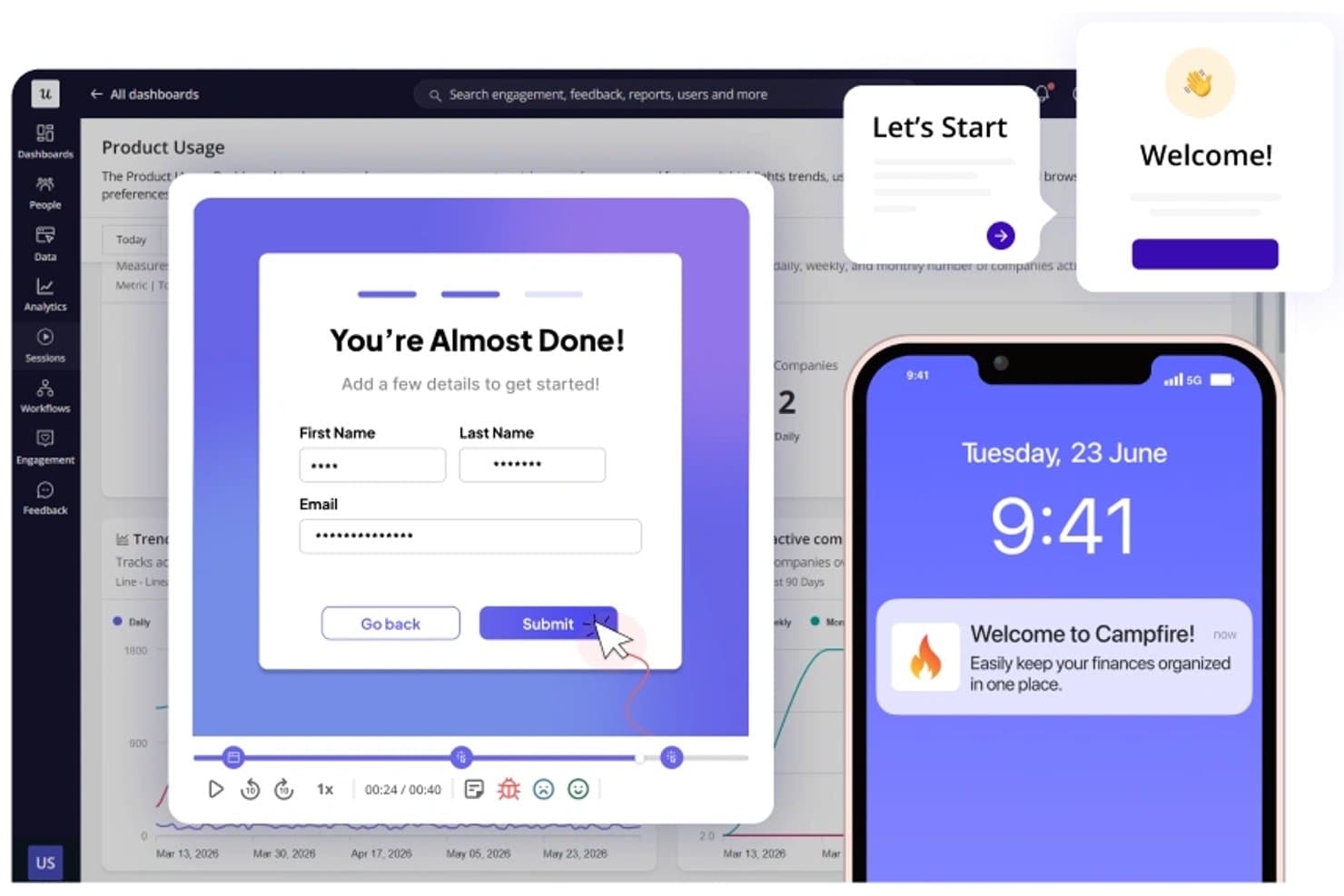
Userpilot lets users build onboarding flows, modals, and mobile tooltips. Userpilot is a user onboarding and product growth platform that combines in-app guidance, behavioral segmentation, onboarding analytics, surveys, and session replay in a single no-code tool.
Who Is Userpilot Best For?
Userpilot is a strong fit for product and growth teams that need to segment users and deliver personalized onboarding experiences without relying on engineers.
Why I Picked Userpilot
I picked Userpilot as one of the best because its segmentation engine is genuinely built for onboarding, not bolted on. On the Growth plan, you get unlimited segments with event-based triggers, so you can show a different checklist to a power user who's hit three key actions versus a new signup who hasn't touched a core feature yet. Pair that with A/B testing and funnel reports that tie directly to those segments, and you can actually measure whether your personalized flows are moving activation numbers.
Userpilot Key Features
- No-code flow builder: A visual editor lets you create multi-step walkthroughs, tooltips, hotspots, and banners without writing a single line of code.
- In-app resource center: A self-serve help hub where users can access guides, videos, and support content directly inside your product, available on Growth plans and above.
- NPS and custom surveys: Run Net Promoter Score surveys on every plan, with custom in-app, mobile, and email surveys unlocked on Growth for deeper feedback collection.
- Session replay: Recorded user sessions link directly to funnel drop-offs and flag rage clicks, giving you a clear view of where onboarding breaks down.
Userpilot Integrations
Userpilot integrates with six tools on every plan: Segment, Mixpanel, Amplitude, Heap, Intercom, and Slack. Growth adds webhooks and an HTTP API, while Enterprise adds HubSpot and Salesforce integrations.
Pros and Cons
Pros:
- Lets teams launch flows without developers
- Links replay evidence to funnel drop-offs
- Segments onboarding around real product behavior
Cons:
- Some reviewers report occasional freezes
- Advanced reports can be hard to slice
Learn more about Userpilot: Best for contextual, behavior-driven resource centers
- 14-day free trial
- From $240/month (billed annually)
Visit WebsiteCustomer Rating:4.8/5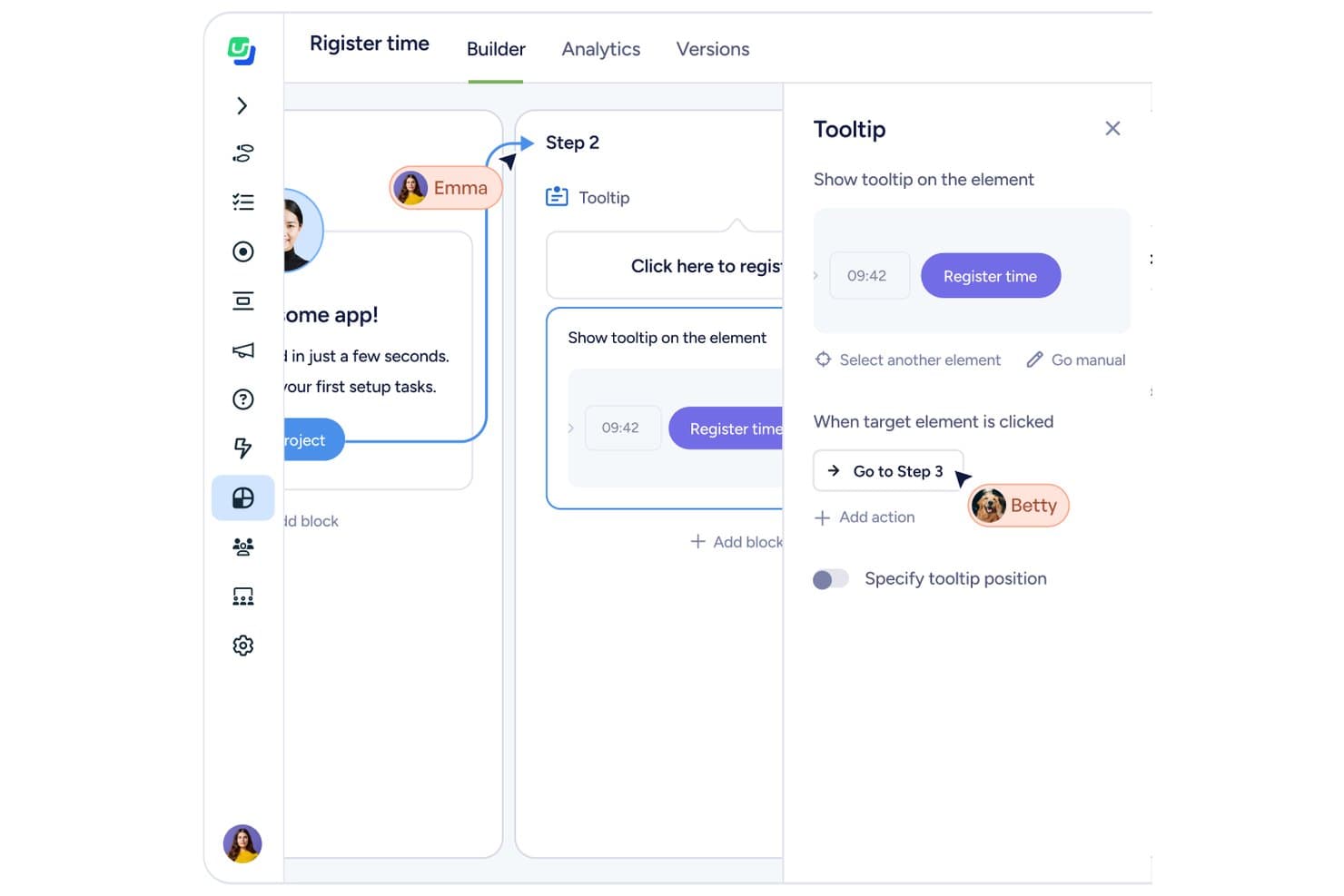
Userflow lets users build tooltip steps with click-triggered navigation. Userflow is a user onboarding platform that lets product and customer success teams build in-app flows, tooltips, checklists, surveys, NPS, and a behavior-driven resource center—all without engineering support beyond an initial JavaScript snippet install.
Who Is Userflow Best For?
Userflow is a strong fit for product and customer success teams that want a self-serve resource center that adapts to each user's behavior and lifecycle stage.
Why I Picked Userflow
Userflow earns its spot on my shortlist because its resource center does something most onboarding tools don't: it updates its content based on what a user has actually done in your product. If someone completes onboarding but hasn't touched a key feature, the resource center surfaces relevant guidance automatically. I also like that checklist steps auto-complete when users take the target action, so the experience stays current without any manual upkeep.
Userflow Key Features
- FlowAI builder: An AI-assisted tool that drafts flow steps and structure so you can build tours and guidance faster.
- A/B testing: Splits users into groups by attribute and targets different flows to each group to test variations.
- Surveys and NPS: Built-in survey and NPS tools let you collect user feedback directly inside your product.
- MCP integration: A read/write MCP connection lets AI tools like Claude or ChatGPT build flows, segments, and dashboards on your behalf.
Userflow Integrations
Userflow integrates with HubSpot, Salesforce, Mixpanel, Heap, Amplitude, and Slack. It also supports REST API, webhooks, and MCP connections for custom data and AI-tool workflows.
Pros and Cons
Pros:
- AI accelerates flow creation and analysis
- Checklists auto-complete after users take action
- Contextual resource center adapts to user behavior
Cons:
- Initial JavaScript installation requires engineering help
- Analytics reporting remains relatively shallow
Learn more about Userflow: Best for multi-platform in-app guidance at scale
- Free trial available
- Pricing upon request
Visit WebsiteCustomer Rating:4.6/5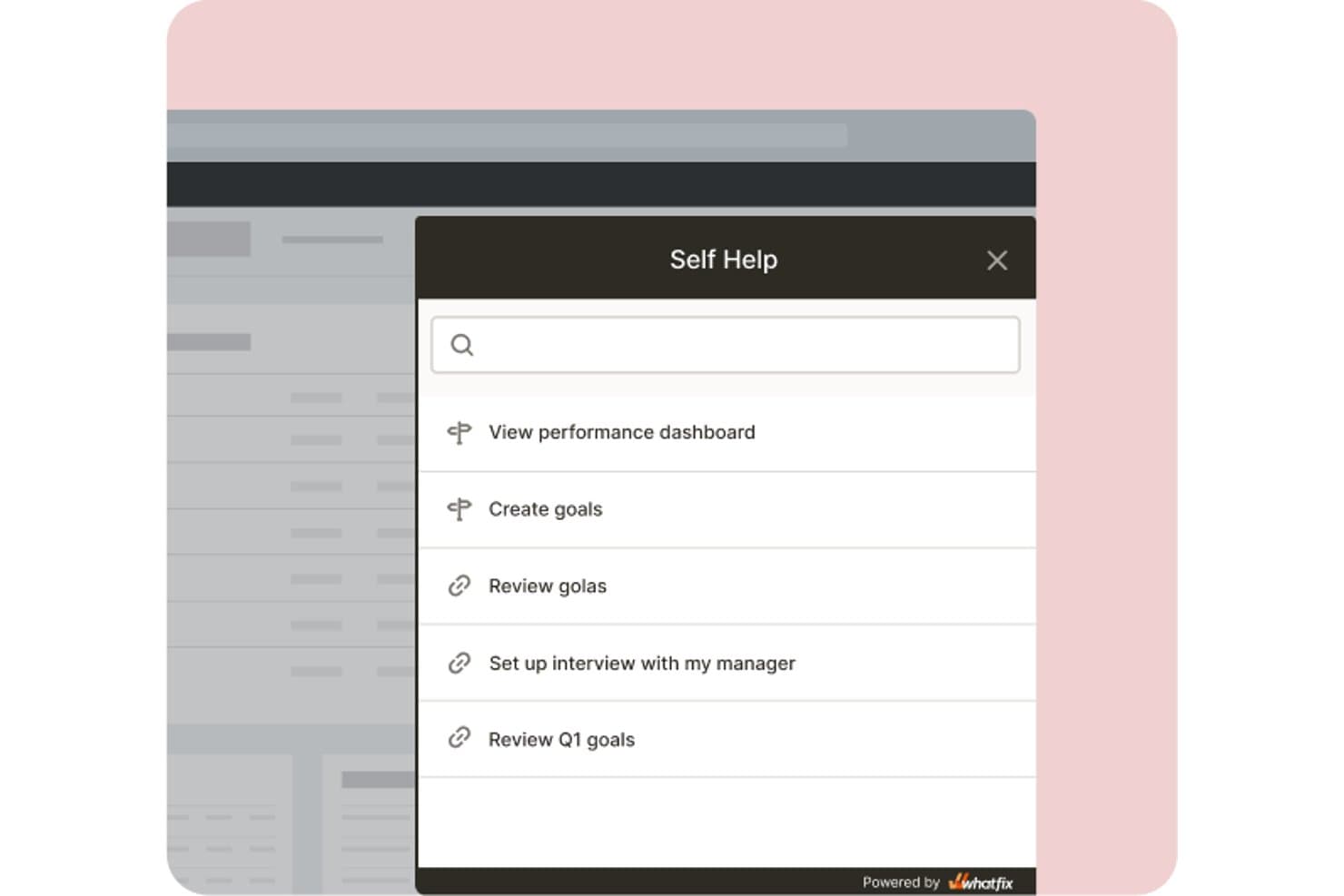
Whatfix lets users access self-help guides and goals without leaving the app. Whatfix is an enterprise digital adoption platform that delivers in-app guidance across web, desktop, mobile, and virtual desktop environments through walkthroughs, tooltips, task lists, pop-ups, and a self-help resource center.
Who Is Whatfix Best For?
Whatfix is a strong fit for large enterprises running onboarding across multiple platforms—web, desktop, mobile, and virtual desktop environments—where governance, scale, and content lifecycle management matter.
Why I Picked Whatfix
Whatfix earns its spot on my shortlist because it delivers in-app guidance across web, desktop, mobile, and virtual desktop environments from a single platform. I picked it specifically for teams running onboarding at scale across complex, multi-surface products—think Salesforce or SAP implementations where users switch between browser and desktop daily. Smart Context automatically surfaces the right Flow or tooltip based on where a user is in the app, and the content lifecycle tools (version control, approval workflows, auto-testing) keep large guidance libraries from becoming a maintenance burden.
Whatfix Key Features
- Resource center: An in-app self-help hub that surfaces flows, videos, and articles—including content pulled from your existing knowledge base—with AI-powered search.
- Product Analytics: Tracks user funnels, adoption health, and engagement trends, with session replay available as an add-on.
- Surveys and NPS: Built-in NPS and usability surveys, plus fully custom surveys, let you collect user feedback without leaving the app.
- Mirror: A simulation environment that copies your app for training and AI roleplay, including automated blurring of personal data.
Whatfix Integrations
Whatfix lists integrations with Mixpanel, Amplitude, and Segment for analytics, and supports guidance across Oracle, SAP, Salesforce, Microsoft, and custom apps.
Pros and Cons
Pros:
- Resource Center centralizes contextual customer help
- Governance supports approvals and content rollback
- Guidance spans web, desktop, mobile
Cons:
- Analytics miss some cross-tab user activity
- Initial setup requires substantial implementation effort
Learn more about Whatfix: Best for tracking onboarding KPIs
- Free trial available
- Pricing upon request
Visit WebsiteCustomer Rating:4.7/5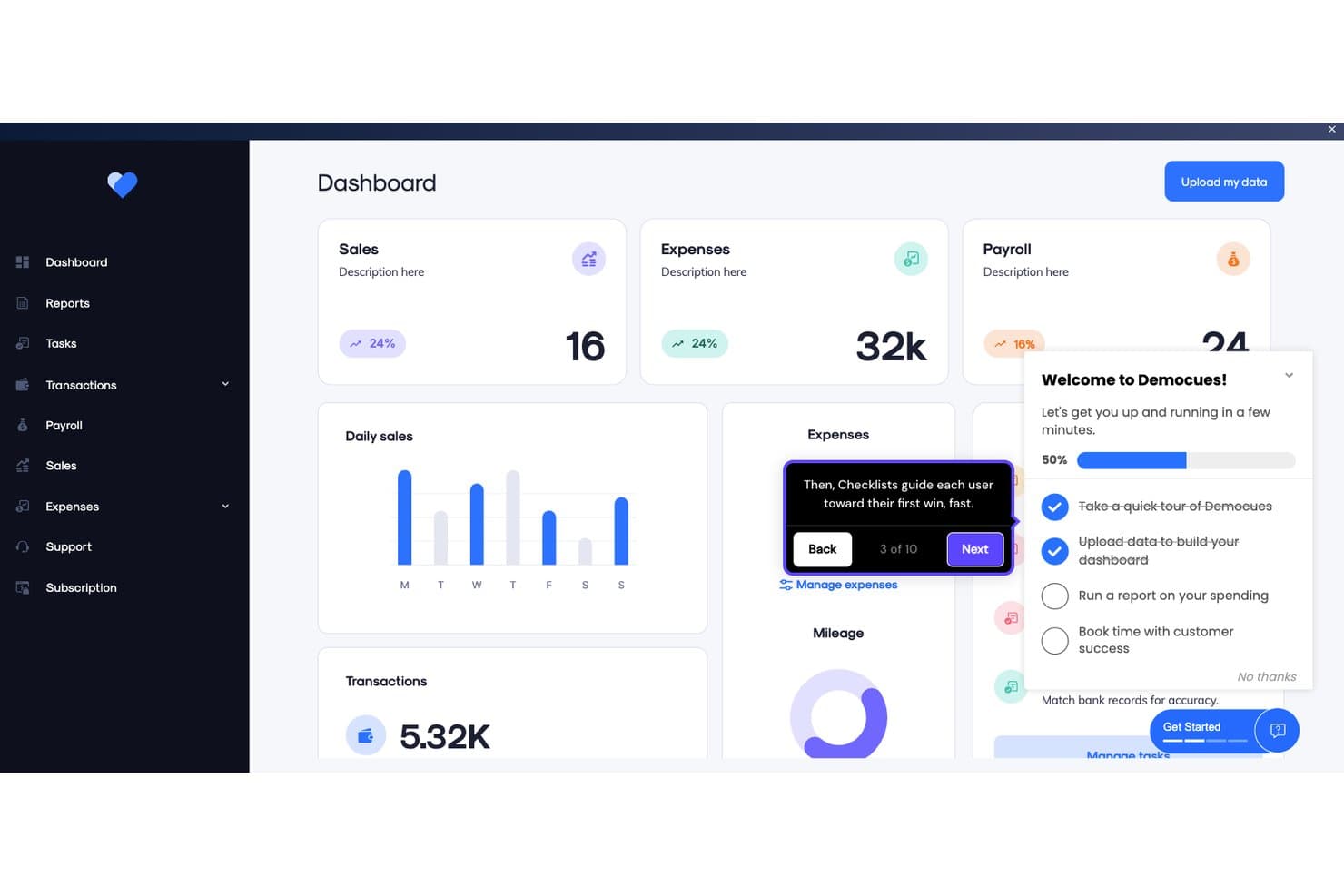
Appcues guides users through onboarding with checklists and tooltips. Appcues is a user onboarding platform that lets you build in-app flows, checklists, tooltips, banners, and surveys for web and mobile—without writing code—alongside built-in analytics that connect onboarding experiences to activation outcomes.
Who Is Appcues Best For?
Appcues is a strong fit for product managers and growth teams who need to connect onboarding experiences directly to activation metrics and user behavior data.
Why I Picked Appcues
Appcues earns its spot on my shortlist because its analytics go beyond basic view counts to actually connect onboarding experiences to activation outcomes. I particularly like the Impact and Uplift reports, which show you whether a specific flow moved the needle on a goal, and the built-in funnel reports that pinpoint exactly where users drop off. You can also attach goals directly to individual experiences, so tracking KPIs isn't an afterthought—it's built into how you build.
Appcues Key Features
- No-code flow builder: A visual builder lets you create and publish multi-step flows, tooltips, banners, and slideouts without touching code.
- Mobile SDK: Native iOS, Android, and cross-platform support lets you deliver in-app experiences across web and mobile from one platform.
- Behavioral email and push notifications: Appcues extends onboarding beyond the product interface with triggered email and push channels alongside your in-app experiences.
- Launchpad resource center: An in-app menu gives users on-demand access to guides, checklists, and help content whenever they need it.
Appcues Integrations
Appcues offers seven native integrations, including Salesforce, HubSpot, Intercom, Slack, Mixpanel, Heap, and Segment. It also supports an API, event webhooks, and Zapier.
Pros and Cons
Pros:
- Targets users by behavior and account data
- Supports web and mobile product guidance
- Ties onboarding experiences to activation outcomes
Cons:
- Experience limits constrain larger onboarding programs
- Manual A/B testing requires extra setup
Learn more about Appcues: 10Best for feature adoption tied to retention analytics
Pendo
- Free plan + 30-day free trial + free demo available
- Pricing upon request
Visit WebsiteCustomer Rating:4.4/5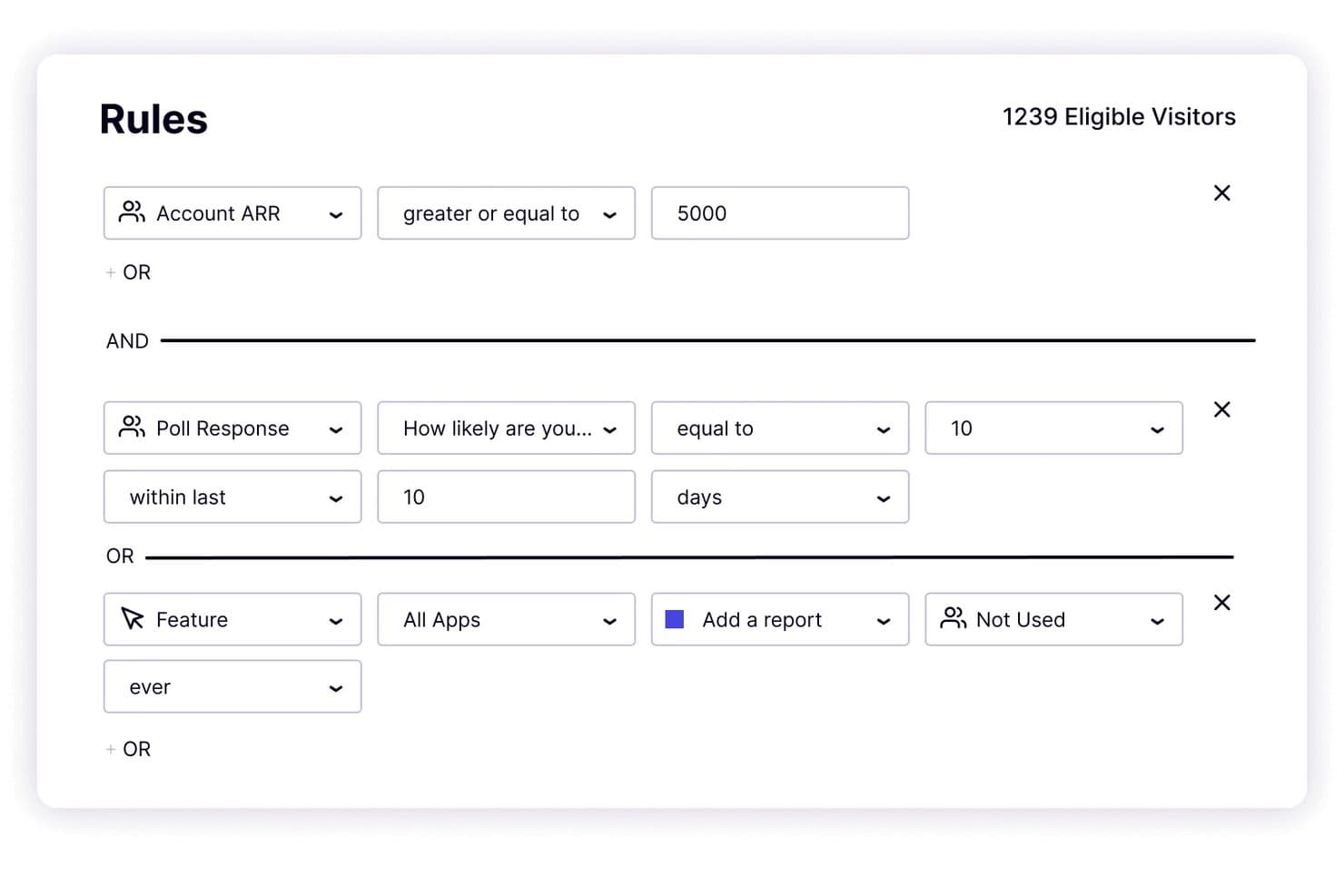
Pendo lets users target onboarding by ARR, poll response, and feature usage. Pendo is a user onboarding and product analytics platform that combines in-app guides, behavioral analytics, user segmentation, and feedback surveys to help product teams understand and influence how users engage with their product.
Who Is Pendo Best For?
Pendo is a strong fit for product managers at mid-market and enterprise companies who need to connect in-app guidance directly to feature adoption and retention data.
Why I Picked Pendo
Pendo earns its spot on my shortlist because its retroactive product analytics make feature discovery genuinely actionable: I can identify an underused feature after the fact and immediately build a targeted guide to surface it for the right user segment. Guide branching adds another layer here, letting me send different user cohorts down different paths based on what they've already done in the product. Paired with built-in A/B testing on guides, I can actually measure which approach drives adoption.
Pendo Key Features
- Retroactive product analytics: Tracks feature usage and user workflows automatically, letting you analyze historical data without having to set up tracking in advance.
- Cross-app guide tracking: A single guide can run and be measured across multiple apps simultaneously, with no additional cost per app added.
- Leo AI guide creation: Pendo's built-in AI assistant builds guides from a plain-text prompt and is included on all paid plans.
- Session Replay: Records user sessions so you can watch how people actually move through your product, included in Core and above.
Pendo Integrations
Pendo offers 85+ integrations, including Salesforce, HubSpot, Gainsight, ChurnZero, Zendesk, Intercom, Segment, Snowflake, Jira, and Slack, plus webhooks, Workato, Tray.io, and Zapier for broader connectivity.
Pros and Cons
Pros:
- Built-in experiments measure feature adoption
- Branching guides personalize learning paths
- Retroactive analytics reveal underused features
Cons:
- Checklist support remains undocumented
- Manual tagging slows self-service setup
Learn more about Pendo:
Diğer Kullanıcı Oryantasyonu Yazılımları
En iyi listeye giremeyen ancak değerlendirmenizde fayda bulunan birkaç araç daha:
- 11WalkMeBest for enterprise-wide AI-guided onboarding
- 12StonlyBest for branching, goal-based onboarding flows
- 13IntercomBest for onboarding built into live chat support
- 14AptyBest for enterprise app adoption at scale
- 15Product FruitsBest for AI-drafted tours on every plan
- 16JIMOBest for AI-built tours across all plan tiers
- 17Amplitude Guides and SurveysBest for onboarding tied to behavioral analytics
- 18ChameleonBest for no-code tours with native-feeling design
İlgili Ürün Yönetimi Yazılımları
Burada hâlâ aradığınızı bulamadıysanız, test edip değerlendirdiğimiz ve kullanıcı oryantasyonu yazılımıyla yakından ilişkili olan şu araçlara göz atın.
- En İyi Ürün Planlama Yazılımları
- En İyi UX Tasarım Araçları
- En İyi Ürün Geliştirme Yazılımları
- En İyi Ürün Analitiği Araçları
- En İyi Ürün Geliştirme Yazılımları
- En İyi Ürün Pazarlama Araçları
How I Evaluate User Onboarding Software
I split my evaluation into three parts: core functionality (building in-app walkthroughs and segmenting users by behavior) carries the most weight, followed by standout features like native resource centers, then pricing transparency and time-to-launch.
Core Functionality (Table Stakes for This List)
When I'm selecting tools for my list, I score each one on a scale from 0 (does not offer the functionality) to 5 (excels in this area) for each core functionality listed below. I then convert the total into a percentage to help assess each tool's overall fit, with extra weight on any functionalities I've deemed essential.
- In-App Guidance (Essential): I evaluate whether tours support branching logic, conditional triggers, and contextual adaptation rather than just static pop-ups.
- No-Code Flow Builder (Essential): PMs should be able to build and launch multi-step onboarding flows without filing engineering tickets or writing custom code.
- User Segmentation: I look for rule-based targeting that combines user attributes with behavioral data, like showing different tours to trial users vs. paying accounts.
- Checklists & Task Tracking: Good checklists update dynamically as users complete actions and can be customized per segment or user role.
- Analytics & Engagement Tracking: I check for step-level funnel data that pinpoints exactly where users drop off, not just top-line completion rates.
- Multi-Format Content Support: The tool should let you mix tooltips, modals, hotspots, banners, and slideouts within a single onboarding flow.
Once I have a list of tools that meet the criteria, I consider what sets each platform apart.
Differentiating Factors (What Sets Vendors Apart)
Here's how I compare and contrast different vendors:
Standout Features
I look for native resource centers that bundle guides, FAQs, and support links into a single in-app widget. A good one deflects tickets before users ever leave the product. Cross-platform support matters just as much. If your product spans web and mobile, I check whether the vendor offers iOS and Android SDKs that keep onboarding consistent across surfaces. I also evaluate built-in survey and NPS tools, since collecting feedback inside the flow itself gives you activation context no external survey tool can match.
Beyond Features
Pricing models based on MAUs can spike fast, especially for consumer-facing products. I check whether advanced segmentation or multi-product support is locked behind higher tiers before committing. Integration depth matters just as much. Native connections to tools like Amplitude, Mixpanel, or Salesforce let onboarding data feed directly into your broader activation and customer success workflows. I also evaluate time-to-launch, including whether the vendor offers templates, staging environments, and migration support for teams switching from a competitor.
Kullanıcı Oryantasyonu Yazılımı Nasıl Seçilir?
Çok sayıda farklı kullanıcı oryantasyonu yazılımı çözümü mevcut olduğundan, ihtiyaçlarınıza en uygun kullanıcı oryantasyonu yazılımının hangisi olduğuna karar vermek zor olabilir.
Kullanıcı oryantasyonu yazılımlarını kısa listeye alırken, denerken ve seçerken aşağıdakileri göz önünde bulundurun:
- Hangi problemi çözmeye çalışıyorsunuz - Kullanıcıya alıştırma sürecinde doldurmaya çalıştığınız özellik açığını belirleyerek başlayın; böylece kullanıcıya alıştırma yazılımının sunması gereken özellikleri ve işlevleri netleştirebilirsiniz.
- Kimlerin kullanması gerekecek - Maliyeti ve gereksinimleri değerlendirmek için yazılımı kimlerin kullanacağını ve kaç lisansa ihtiyaç duyacağınızı göz önünde bulundurun. Erişimin yalnızca ürün yönetimi profesyonelleriyle mi sınırlı olacağını, yoksa tüm kuruluşun mu erişim gerektireceğini değerlendirmeniz gerekir. Bu netleştiğinde, herkes için kullanım kolaylığına mı yoksa kullanıcıya alıştırma yazılımınızın deneyimli kullanıcıları için hıza mı öncelik verdiğinizi düşünmeye değer.
- Hangi diğer araçlarla birlikte çalışması gerekiyor - Hangi araçları değiştirdiğinizi, hangi araçların kullanılmaya devam edeceğini ve muhasebe, CRM veya İK yazılımları gibi hangi araçlarla entegre olmanız gerektiğini netleştirin. Araçların birbiriyle entegre olması gerekip gerekmediğine veya birden fazla aracı tek bir birleşik kullanıcıya alıştırma aracıyla değiştirip değiştiremeyeceğinize karar vermeniz gerekir.
- Hangi sonuçlar önemli - Yazılımın başarılı kabul edilmesi için sunması gereken sonucu düşünün. Hangi yetkinliği kazanmak veya neyi geliştirmek istediğinizi ve başarıyı nasıl ölçeceğinizi değerlendirin.
Örneğin sonuç, performans hakkında daha fazla görünürlük elde etme becerisi olabilir. Kullanıcıya alıştırma özelliklerini gözünüz kararana kadar karşılaştırabilirsiniz; ancak elde etmek istediğiniz sonuçları düşünmüyorsanız, çok değerli zamanınızı boşa harcıyor olabilirsiniz. - Kuruluşunuz içinde nasıl çalışacağı - Yazılım seçimini iş akışlarınız ve teslim metodolojinizle birlikte değerlendirin. Nelerin iyi çalıştığını ve ele alınması gereken sorunlara yol açan alanları inceleyin.
Unutmayın, her işletme farklıdır — bir araç popüler diye kuruluşunuzda işe yarayacağını varsaymayın.
Kullanıcıya Alıştırma Yazılımındaki Eğilimler
Kullanıcıya alıştırma araçlarının gelişimi, teknolojideki önemli ilerlemeleri ve kullanıcı ihtiyaçlarının giderek daha iyi anlaşılmasını yansıtır; bunun özel amacı, öğrenme eğrisini kolaylaştırmak ve ilk etkileşimden itibaren kullanıcı etkileşimini artırmaktır. Kullanıcıya alıştırma teknolojisinin gelecekteki yönüne ışık tutan, belirlediğim bazı temel eğilimler şunlardır.
Kullanıcıya Alıştırma Yazılımı ve Teknolojisindeki Eğilimler
- Yapay Zekâ ve Makine Öğreniminin Artan Kullanımı: Kullanıcıya alıştırma deneyimini kişiselleştirmek için yapay zekâyı entegre etmeye yönelik belirgin bir değişim var. Bu teknoloji, kullanıcı ihtiyaçlarını öngörmeye ve özelleştirilmiş rehberlik sunmaya yardımcı olarak alıştırma sürecini daha verimli ve ilgi çekici hâle getirir.
- Oyunlaştırma Unsurları: Oyun benzeri unsurların alıştırma sürecine dâhil edilmesi hızla gelişiyor. Bu yaklaşım, öğrenmeyi eğlenceli ve ödüllendirici hâle getirerek kullanıcı etkileşimini artırır; bu da kullanıcıları ilk aşamaların ötesinde elde tutmak için kritik öneme sahiptir.
- Entegre Yardım Masası Çözümleri: Daha fazla şirket, alıştırma sırasında gerçek zamanlı destek sağlamak için Help Scout ve Zendesk gibi yardım masası yazılımlarını entegre ediyor. Paylaşılan gelen kutuları, canlı sohbet ve yapay zekâ destekli sohbet robotları gibi özellikler, kullanıcıların üründen ayrılmadan sorunları hızla çözmesine yardımcı olur.
- Kendi Kendine Hizmet Kaynak Merkezleri: İşletmeler ayrıca kullanıcıların yanıtları bağımsız olarak bulmasını sağlamak için bilgi tabanlarından, topluluk forumlarından ve otomatik bilet sistemlerinden yararlanıyor. Bu yaklaşım sürtüşmeyi azaltır, alıştırma verimliliğini artırır ve kullanıcıların elde tutulmasını güçlendirir.
- Gelişmiş Analizler ve Kullanıcı İçgörüleri: Kullanıcı davranışını daha iyi anlamak için veri analizlerinden yararlanmaya giderek daha fazla önem veriliyor. Bu işlevsellik, gerçek kullanıcı etkileşimlerine ve geri bildirimlerine dayanarak alıştırma süreçlerinin sürekli iyileştirilmesini sağlar.
- Oturum Kayıtları ve Isı Haritaları: Oturum kayıtları, ekiplerin kullanıcıların alıştırma akışında tam olarak nasıl gezindiğini, nerede takıldığını ve hangi özelliklerle en çok etkileşim kurduğunu görmesini sağlar. Isı haritaları, kullanıcı etkileşimlerinin görsel bir sunumunu sağlayarak yoğun etkileşim alanlarını ve kullanıcıların süreci terk edebileceği olası noktaları vurgular. İşletmeler bu verilerden yararlanarak alıştırma akışlarını optimize edebilir, kullanıcı deneyimi tasarımını iyileştirebilir ve ürünlerine daha sorunsuz bir giriş yapılmasını sağlayabilir.
Yeni ve Sıra Dışı İşlevler
- Sesle Etkinleştirilen Arayüzler: Ortaya çıkan eğilimlerden biri, sesli komutların kullanıcıya alıştırma sürecine dâhil edilmesidir. Bu yeni yaklaşım, eller serbest gezinmeye ve erişilebilirliğe yönelik artan talebi karşılayarak daha kapsayıcı bir kullanıcı deneyimi sunar.
- AR/VR Alıştırma Deneyimleri: Artırılmış Gerçeklik (AR) ve Sanal Gerçeklik (VR), daha sürükleyici alıştırma deneyimleri için araştırılıyor. Bu sıra dışı işlevsellik, gerçek dünya uygulamalarını simüle ederek karmaşık yazılımların anlaşılmasını önemli ölçüde geliştirebilir.
En Önemli ve En Çok Talep Gören Özellikler
- Etkileşimli Eğitimler ve Uygulamalı Anlatımlar: Kullanıcılara yazılımda adım adım rehberlik eden etkileşimli eğitimlere olan talep yüksekliğini koruyor. Bu özellikler, başlangıçtaki öğrenme eğrisini azaltmak ve kullanıcıların yazılımda gezinirken kendilerine duydukları güveni artırmak açısından büyük önem taşıyor.
- Özelleştirme ve Kişiselleştirme: Kullanıcıya uyum sağlama deneyimini bireysel kullanıcı tercihlerine ve ihtiyaçlarına göre şekillendirme yeteneği giderek daha önemli hale geliyor. Özelleştirme, kullanıcıların kendileriyle ilgili bilgileri almasını sağlayarak yazılımdan genel memnuniyetlerini ve etkileşimlerini artırıyor.
Önemi ve Talebi Azalan Unsurlar
- Uzun Metin Tabanlı Talimatlar: Uzun ve metin tabanlı kullanıcıya uyum sağlama içeriklerine olan ilgi azalıyor. Kullanıcılar, kapsamlı okumalar yapmadan yazılımı kullanmaya başlamalarını sağlayan hızlı ve görsel kılavuzları tercih ediyor; bu da daha etkileşimli ve ilgi çekici biçimlere doğru bir değişime işaret ediyor.
- Herkese Uyan Tek Tip Kullanıcıya Uyum Süreçleri: Farklı kullanıcı rollerini veya uzmanlık düzeylerini dikkate almayan genel kullanıcıya uyum deneyimleri daha az tercih ediliyor. Kullanıcılar, kendi özel bağlamlarını ve hedeflerini dikkate alan, daha iyi uyarlanmış deneyimler bekliyor.
2025 yılında kullanıcıya uyum yazılımlarındaki eğilimler, daha kişiselleştirilmiş, ilgi çekici ve teknolojik açıdan gelişmiş özelliklere doğru daha geniş kapsamlı bir yönelimi yansıtıyor. Ürün yönetimi profesyonelleri olarak bu eğilimleri anlamak, kullanıcıların değişen ihtiyaçlarını karşılayan kullanıcıya uyum çözümlerini seçmek ve geliştirmek açısından büyük önem taşıyor. Bu sayede kullanıcıların yazılım ürünleriyle tanışma sürecinin sorunsuz ve keyifli olması sağlanabilir.
Kullanıcıya Ürün Tanıtma Yazılımı nedir?
Kullanıcıya ürün tanıtma yazılımı, yeni kullanıcıların temel özellikler ve görevler konusunda rehberlik sağlayarak bir ürünü hızlıca anlamalarına ve benimsemelerine yardımcı olan bir araçtır. Ürün yöneticileri, büyüme ekipleri ve kullanıcı deneyimi tasarımcıları bu yazılımı erken aşamadaki kullanıcı kaybını azaltmak, kurulumu kolaylaştırmak ve etkinleştirme oranlarını artırmak için kullanır. Etkileşimli eğitimler, kontrol listeleri ve uygulama içi mesajlar sunarak belirsiz kullanıcı arayüzü, rehberlik eksikliği veya değerin geç fark edilmesi gibi yaygın kullanıcıya uyum sorunlarını çözer.
Kullanıcıya Ürün Tanıtma Yazılımının Özellikleri
Kullanıcıya ürün tanıtma yazılımı seçerken aşağıdaki temel özelliklere dikkat edin:
- Özelleştirilebilir kullanıcıya uyum akışları: Ürününüz ve kullanıcılarınız için uyarlanmış, adım adım rehberlik oluşturun. Böylece ilk deneyim bunaltıcı olmak yerine anlaşılır ve rahat bir hale gelir.
- Etkileşimli uygulamalı anlatımlar: Kullanıcılara temel özellikler konusunda rehberlik eden, uygulama içinde gerçekleştirilen uygulamalı turlar sunarak deneyerek öğrenmeyi kolay ve akılda kalıcı hale getirin.
- İlerleme takibi: Kullanıcılara kullanıcıya uyum yolculuklarında ne kadar ilerlediklerini göstererek motivasyonu yüksek tutun ve deneyimin ulaşılabilir görünmesini sağlayın.
- Bağlama duyarlı araç ipuçları: Kullanıcıların en çok ihtiyaç duyduğu anda arayüz içinde görünen, zamanında ve ilgili ipuçları sunarak kafa karışıklığını veya sürecin duraksamasını önlemeye yardımcı olun.
- Kullanıcı segmentasyonu: Kullanıcı rollerine, sektörlere veya ihtiyaçlara göre özel kullanıcıya uyum içerikleri sunun; böylece herkes kendisine en uygun bilgileri alır.
- Analiz ve raporlama: Süreci sürekli iyileştirebilmek ve sorun yaşanan noktaları hızlıca tespit edebilmek için kullanıcıya uyum tamamlama oranlarını, kullanıcı davranışlarını ve terk noktalarını takip edin.
- Geri bildirim toplama: Kullanıcıların kullanıcıya uyum sürecinde düşüncelerini kolayca paylaşmasına veya sorunları bildirmesine olanak tanıyın; böylece problemleri erken çözebilir ve kullanıcı memnuniyetini koruyabilirsiniz.
- Diğer araçlarla entegrasyonlar: Kullanıcıya uyum akışınızı CRM, yardım masası veya analiz platformlarınızla bağlayarak daha sorunsuz işlemler ve bağlantılı bir deneyim sağlayın.
Kullanıcıya Ürün Tanıtma Yazılımlarındaki Yaygın Yapay Zekâ Özellikleri
Yukarıda sıralanan standart kullanıcıya ürün tanıtma yazılımı özelliklerinin yanı sıra, bu çözümlerin çoğu aşağıdaki gibi özelliklerle yapay zekâyı da bünyesine katıyor:
- Otomatik içerik önerileri: Kullanıcının o ana kadar yaptıklarına göre en iyi kaynakları, eğitimleri veya ipuçlarını önermesi için yapay zekâyı etkinleştirin; böylece kullanıcıların güvenle ilerlemeye devam etmesini sağlayın.
- Kişiselleştirilmiş kullanıcıya uyum yolları: Her kullanıcı için daha ilgili ve ilgi çekici bir deneyim oluşturmak amacıyla kullanıcı davranışlarına veya tercihlerine göre kullanıcıya uyum adımlarını otomatik olarak ayarlayın.
- Otomatik destek yanıtları: Yapay zekâ sohbet robotlarının kullanıcı sorularını kullanıcıya uyum akışı içinde anında yanıtlamasını sağlayarak bekleme sürelerini azaltın ve destek ekibinizin üzerindeki yükü hafifletin.
- Tahmine dayalı terk analizi: Kullanıcıya uyum sürecini bırakma olasılığı en yüksek kullanıcıları belirlemek için yapay zekâyı kullanın. Böylece kullanıcıların etkileşimde kalmasını ve süreci terk etme olasılıklarının azalmasını sağlamak üzere uygulanabilir ipuçları veya teşviklerle proaktif olarak müdahale edebilirsiniz.
- Kullanıcı duygu analizi: Kullanıcı memnuniyetini veya hayal kırıklığını değerlendirmek için yapay zekânın geri bildirimleri ve etkileşimleri analiz etmesini sağlayın; böylece sorunlu noktalar daha büyük problemlere dönüşmeden önce bunları hızla ele alabilirsiniz.
Bu özelliklere sahip kullanıcı katılımı yazılımını seçmek, herhangi bir yazılım veya uygulamaya ilgi çekici, bilgilendirici ve sorunsuz bir giriş oluşturmak için çok önemlidir. Bu özellikler yalnızca yeni kullanıcıların eğitimine yardımcı olmakla kalmaz, aynı zamanda yazılımla uzun vadeli etkileşimleri ve başarıları için sağlam bir temel oluşturarak kullanıcı memnuniyetini ve elde tutma oranını artırır.
Kullanıcı Katılımı Yazılımının Avantajları
Etkili katılım, kullanıcının ilk kullanım deneyiminin ötesine geçer; müşteri yaşam döngüsü boyunca devam eden ürün benimsenmesini desteklemesi gerekir.
Google'da Baş UX Tasarımcısı olan Krystal Higgins'e göre katılım, kullanıcıları farklı etkileşim aşamalarında yönlendiren sürekli bir süreç olmalıdır.
Bunun olmaması durumunda kullanıcılar temel özellikleri unutabilir, benimseme konusunda zorlanabilir veya zaman içinde etkileşimlerini kaybedebilir; bu durum unutma eğrisi olarak bilinir.
Katılım yazılımı, kullanıcıların etkileşimde kalmasını ve öğrenmeye devam etmesini sağlayan sürekli ve uyarlanabilir rehberlik sunarak bu düşüşle mücadele etmeye yardımcı olur. En iyi araçlar özellikleri tanıtmakla kalmaz, aynı zamanda:
- Etkileşimli gezintiler ve araç ipuçlarıyla kullanıcıları ürünle tanıştırır.
- Kademeli katılım akışları ve aralıklı öğrenmeyle ürünü etkili şekilde nasıl kullanacaklarını öğretir.
- Zamanında gönderilen hatırlatmalar ve özellik vurgularıyla kullanıcıları bağlı müşterilere dönüştürür.
- Yaşam döngüsü e-postaları, ürün güncellemeleri ve bağlamsal destekle onları sürekli yönlendirir.
Higgins, kullanıcıların bir görevi tamamlamaya karar vermeden önce takip edebilmesini sağlayan AirTasker'ı ve kullanıcılar uzun bir aradan sonra geri döndüğünde özellikleri yeniden tanıtan TurboTax'i örnek gösterir. Bu stratejiler, katılımın yalnızca yeni kaydolan kullanıcılar için olmadığını; kullanıcıların uzun vadede etkileşimde kalmasını sağlayan devamlı bir süreç olduğunu kanıtlar.
Kullanıcı Katılımı Yazılımının Temel Avantajları
1. Artan Kullanıcı Elde Tutma ve Ürün Benimsenmesi
Kullanıcılar, bir ürünün değerini erken aşamada anladıklarında ve zaman içinde yeni özellikleri keşfetmeye devam ettiklerinde etkileşimlerini sürdürmeye daha yatkın olur. Katılım yazılımı sürtünmeyi azaltır, keşfi teşvik eder ve kullanıcıların geri dönmesini sağlayarak daha yüksek elde tutma oranına ve daha derin ürün benimsenmesine yol açar.
2. Azalan Destek Maliyetleri
Uygulama içi rehberlik, kendi kendine hizmet kaynakları ve etkileşimli yardım sunmak, doğrudan müşteri desteğine duyulan ihtiyacı azaltır. Bu, destek taleplerini en aza indirir, operasyonel maliyetleri düşürür ve ekiplerin daha karmaşık kullanıcı ihtiyaçlarına odaklanmasını sağlar.
3. Değere Ulaşma Süresinin Kısalması
Kullanıcılar temel işlevleri ne kadar hızlı kavrarsa ürünü kullanmaya devam etme olasılıkları da o kadar artar. Katılım yazılımı öğrenmeyi hızlandırarak kullanıcıların ilk "aydınlanma" anına daha çabuk ulaşmasını sağlar; bu da memnuniyeti ve marka sadakatini artırır.
4. Sürekli İyileştirme İçin Veriye Dayalı İçgörüler
Kullanıcı katılımı yazılımı, işletmelerin katılım süreçlerini geliştirmesine yardımcı olan analiz ve davranış izleme özelliklerini içerir. Şirketler, süreçten kopma noktalarını, etkileşim eğilimlerini ve kullanıcı geri bildirimlerini analiz ederek iş akışlarını optimize edebilir, ürün deneyimlerini iyileştirebilir ve yeniliği teşvik edebilir.
Kullanıcı Katılımı Yazılımı Maliyetleri ve Fiyatlandırması
Doğru kullanıcı katılımı yazılımını seçmek, yeni kullanıcıların deneyimini geliştirmek isteyen işletmeler için kritik bir karardır. Çeşitli plan seçenekleri mevcut olduğundan, ihtiyaçlarınıza en uygun seçeneği belirlemek için özellikler, işlevler ve fiyatlandırma arasındaki farkları anlamak önemlidir.
Fiyatlandırma ve özellikler genellikle kullanıcı tabanınızın büyüklüğüne, katılım ihtiyaçlarınızın karmaşıklığına ve gerektirdiğiniz özelleştirme ve destek düzeyine göre değişir. Burada, kullanıcı katılımı yazılımı için yaygın plan seçeneklerini inceleyerek her plana dahil edilen ortalama fiyatlandırma ve özellikler hakkında bilgi sunacağız. Böylece bu alanı ilk kez değerlendiren yazılım alıcılarına yol göstereceğiz.
Kullanıcı Katılımı Yazılımı İçin Plan Karşılaştırma Tablosu
| Plan Türü | Ortalama Fiyat | Şunlar İçin En İyisi: | Dahil Edilen Yaygın Özellikler |
|---|---|---|---|
| Plan TürüTemel | Ortalama Fiyat$50 - $100 aylık | Şunlar İçin En İyisi:Erken aşamadaki girişimler | Dahil Edilen Yaygın ÖzelliklerStandart kullanıcı onboarding akışlarına erişim, temel analizler, e-posta desteği |
| Plan TürüProfesyonel | Ortalama Fiyat$100 - $500 aylık | Şunlar İçin En İyisi:Büyüme aşamasındaki girişimler | Dahil Edilen Yaygın ÖzelliklerGelişmiş özelleştirme seçenekleri, entegrasyon özellikleri, geliştirilmiş analizler, öncelikli destek |
| Plan TürüKurumsal | Ortalama Fiyat$500 - $2000+ aylık | Şunlar İçin En İyisi:Olgun/kurumsal kuruluşlar | Dahil Edilen Yaygın ÖzelliklerTam özelleştirme ve markalama, özel destek ve eğitim, gelişmiş entegrasyon ve analizler, tüm özelliklere ve üst düzey desteğe erişim |
| Plan TürüÜcretsiz | Ortalama Fiyat$0 | Şunlar İçin En İyisi:Ön tohum aşamasındaki girişimler | Dahil Edilen Yaygın ÖzelliklerSınırlı onboarding akışları, temel analizler, topluluk desteği |
Hangi planı seçeceğinizi değerlendirirken ihtiyaçlarınızın ölçeğini her seçeneğin sunduğu özellikler ve destekle karşılaştırmanız önemlidir. Ücretsiz bir plan, bütçesine dikkat eden veya sınırlı ihtiyaçları olan işletmeler için cazip görünse de ücretli bir plana yatırım yapmak, kullanıcı onboarding deneyimini önemli ölçüde geliştirebilecek değerli gelişmiş özellikler ve destek sağlayabilir.