

Bir ürün yöneticisi olarak, kullanıcılarla bağ kuran kullanıcı deneyimleri oluştururken sayısız zorlukla karşılaşırsınız. İş akışınızı kolaylaştıracak ve tasarım sonuçlarını iyileştirecek araçlar istersiniz. İşte UX yapay zekâ araçları bu noktada devreye girer.
Ekibiniz için doğru olanı seçmenize yardımcı olmak amacıyla bu araçları test edip inceledim. Güvenebileceğiniz içgörüler sunmak için tarafsız ve kapsamlı araştırmalara dayanan incelemelere odaklanıyorum.
Bu makalede, UX yapay zekâ araçları için en iyi seçimlerimi paylaşacağım. Her aracı benzersiz kılan özellikleri ve özel ihtiyaçlarınızı nasıl karşılayabileceklerini öğreneceksiniz. Tasarım sürecinizi daha verimli ve etkili hâle getirelim.
Why Trust Our Software Recommendations
6,700+
Reviews
20
Industry experts
16+
Evaluation factors
14
Years
Our team has been testing and reviewing software since 2012. As product managers ourselves, we know how difficult—and important—it is to choose the right software.
For this guide, we evaluated tools using hands-on testing and independent research, scoring tools using our selection criteria.
Our reviews reflect our human editorial judgment, not a sales pitch.
Expert reviewers:
- Andrew LumbySenior TPM
- Cristiano ValimSenior UI/UX Lead


UX Yapay Zekâ Araçları Karşılaştırma Tablosu
Bu karşılaştırma tablosu, en iyi UX yapay zekâ aracı seçimlerimin fiyatlandırma ayrıntılarını özetlemektedir:
Sorted by: Default
| Tool | Starting Price | Website | |
|---|---|---|---|
Best for AI-driven user journey insights | 4.6 out of 5 | $114/month 10-day free trial | Website |
Best for automated competitive UX analysis | Not rated | $16/month Free plan available | Website |
Best for AI-generated synthetic persona research | Not rated | $79/month 7-day free trial + free demo available | Website |
Best drag-and-drop design tool for teams | 4.6 out of 5 | $144/user/year Free trial + free plan available | Website |
Best for rapid prototyping | 4.6 out of 5 | $39/month Free plan available | Website |
Best for AI design suggestions | 4.4 out of 5 | $8/month Free plan available | Website |
Best for user testing | 4.4 out of 5 | $12/month Free plan available | Website |
Best for live co-editing | 4.3 out of 5 | $91.99/month Free trial available | Website |
Best for vector editing | 4.5 out of 5 | $12/user/month Free plan + 30-day free trial available | Website |
Best for AI wireframing | Not rated | $14/month Free plan available | Website |


En İyi UX Yapay Zekâ Araçları İncelemeleri
Aşağıda, kısa listeme giren en iyi UX yapay zekâ araçlarına ilişkin ayrıntılı özetlerimi bulabilirsiniz. İncelemelerim, size en uygun aracı bulmanıza yardımcı olmak için her aracın temel özelliklerini, artılarını ve eksilerini, entegrasyonlarını ve ideal kullanım alanlarını ayrıntılı olarak ele alır.
 Best for AI-driven user journey insights
- 10-day free trial
- From $114/month (billed annually)
Visit WebsiteCustomer Rating:4.6/5
Survicate dashboard prompting widget installation to start collecting user feedback. Survicate is a customer feedback and experience management tool designed to help teams collect, analyze, and act on user insights across multiple touchpoints. It enables you to run targeted surveys on websites, mobile apps, and emails, making it easier to understand user satisfaction and improve digital experiences through data-driven decisions.
Why I picked Survicate: For AI-driven feedback insights, Survicate uses artificial intelligence to analyze survey responses, detect sentiment, and categorize feedback automatically. This helps you quickly identify user journeys, trends and pain points without manual data sorting. You can also personalize surveys based on user behavior and preferences, ensuring that the questions you ask are always relevant. I like that its automation features make continuous user feedback collection effortless, helping your UX team stay connected to real customer needs.
Standout features & integrations:
Features include automated survey triggers, and real-time analytics dashboards that track UX metrics like NPS and CSAT. You can design surveys from scratch or use customizable templates to fit your research goals. The platform also supports multilingual feedback collection and role-based account management for team collaboration.
Integrations include HubSpot, Salesforce, Google Sheets, Slack, Intercom, Mailchimp, Marketo, Segment, Zendesk, Microsoft Teams, Zapier, and Google Analytics.
Pros and Cons
Pros:
- Robust integrations library
- Customizable multi-channel surveys
- AI-powered feedback analysis
Cons:
- Design customization could improve
- Limited advanced survey logic
Learn more about Survicate:

Figr AI generates editable UX diagrams, workflows, and design artifacts from natural language prompts. Figr is an AI-powered UX design agent that works from live product context to map flows, surface edge cases, generate high-fidelity prototypes, and review UX decisions against real design system constraints.
Who Is Figr Best For?
Figr is a good fit for product designers and UX teams at early-to-mid stage startups that need to move from product context to design artifacts without switching between multiple tools.
Why I Picked Figr
I picked Figr as one of the best because of how it handles competitive UX research automatically. When you give it a product problem, it pulls UX patterns from real products across the web and references them directly in its reasoning. I've seen it surface patterns from nine or more products in a single session, comparing how similar interfaces handle the same interaction. Its web search capability runs in parallel with product context, so the competitive comparison isn't isolated from your own design system—it's woven into the design decisions Figr makes.
Figr Key Features
- Context Pods: Store and organize product context, including PRDs, docs, analytics data, and research, so Figr can reference them when generating designs.
- Screen recording analysis: Upload a recorded walkthrough of your product and Figr converts it into UX artifacts like annotated flows and edge case lists.
- Live Product Capture: A Chrome extension that lets you capture live product screens directly into Figr's working context for analysis and design generation.
- Edge case mapping: Figr automatically identifies missing states and edge cases from your product screens and PRDs, flagging gaps before you move into prototyping.
Figr Integrations
Figr integrates with Figma through its Figma Sync feature, which imports design files, components, and tokens as context and generates Figma-ready output. It also connects with Storybook for code and component context and includes a Chrome extension for live product capture. Zapier and API support are not clearly documented.
Pros and Cons
Cons:
- Slower than prompt-to-screen tools by design
- Credit system limits high-volume output
- Outputs include documented UX reasoning
- Catches edge cases before design review
- Generates designs matching your existing product style
Learn more about Figr: Best for AI-generated synthetic persona research
- 7-day free trial + free demo available
- From $79/month
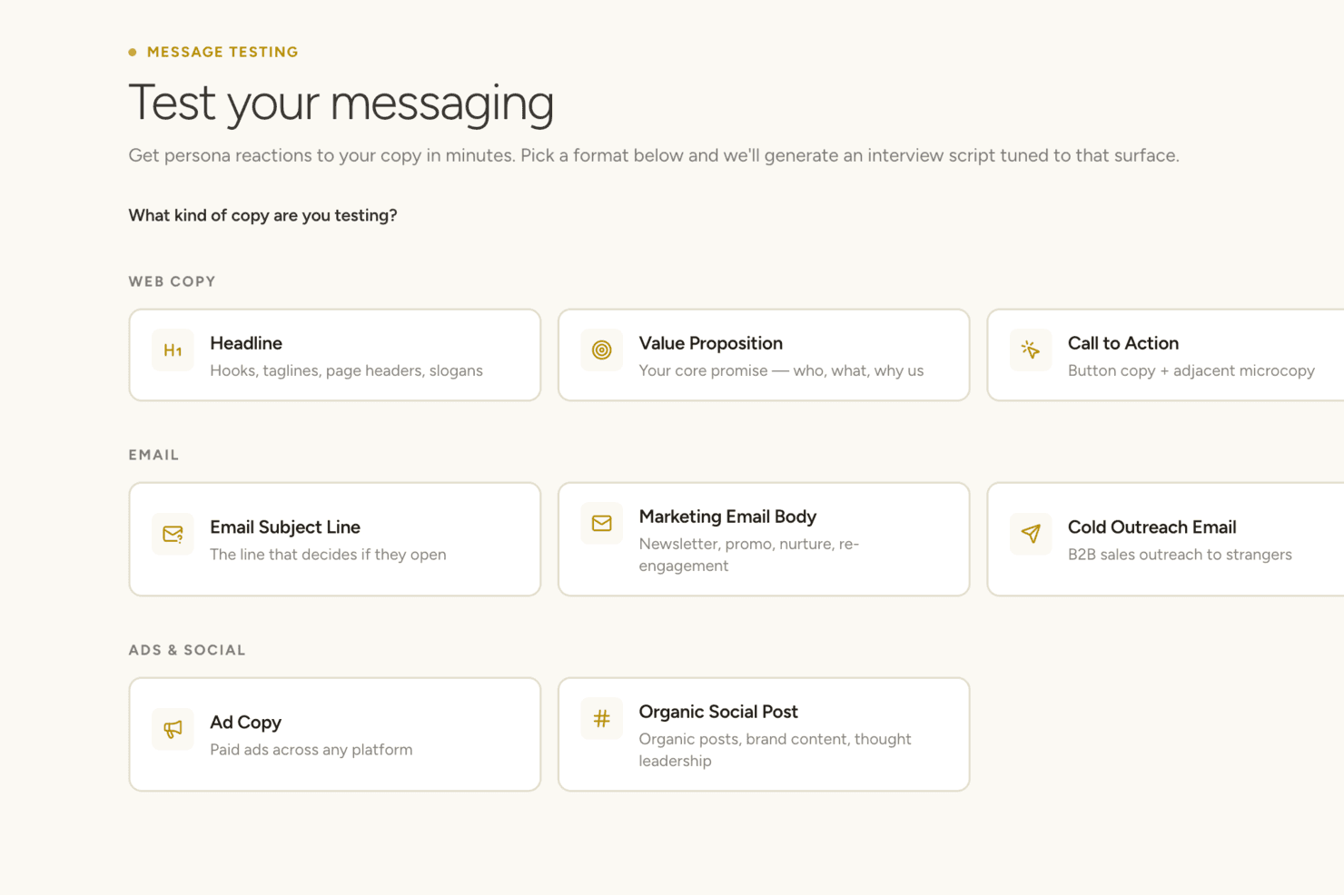
Articos appears to offer a message testing tool that generates persona-based interview scripts for various copy formats including web, email, and social. Articos is a synthetic user research platform that generates AI-driven persona panels, runs hypothesis-blind interviews, and delivers structured insight reports covering motivations, objections, and confusion points.
Who Is Articos Best For?
Articos is a strong fit for consultants and agencies who need fast, structured user research without recruiting participants or coordinating interview schedules.
Why I Picked Articos
Articos earns its spot on my shortlist because of how it handles persona architecture. Each synthetic persona is built on 30 Big Five personality facets and cognitive bias mapping, then interviewed hypothesis-blind so they can't simply validate your assumptions. I especially like the enforced dissenter design: five of twelve personas are calibrated as skeptics, which surfaces genuine objections rather than the confirmation bias you'd get from prompting a standard AI model directly.
Articos Key Features
- Structured research output: Reports surface motivations, objections, confusion points, language patterns, and prioritized recommendations for each research study.
- Persona diversity configuration: Generate panels with 30 personality facets, cognitive bias mapping, and enforced stance diversity.
- A/B testing with synthetic audiences: Run comparative tests to collect structured feedback from synthetic persona panels.
- Talk to Research for follow-up: Re-engage any persona from a completed study with additional targeted questions after the initial research.
Articos Integrations
Native integrations are not clearly documented. An API is available for custom integrations.
Pros and Cons
Pros:
- No participant recruitment or scheduling needed
- Enforced skeptic personas surface genuine objections
- Hypothesis-blind interviews prevent confirmation bias
Cons:
- No generative design capability
- No behavioral data from real users
Learn more about Articos: Best drag-and-drop design tool for teams
- Free trial + free plan available
- From $144/user/year (billed annually)
Visit WebsiteCustomer Rating:4.6/5
Canva brings storyboards to life with generated visuals from simple prompts. Canva is a graphic design platform that caters to individuals, small businesses, and teams looking to create visually appealing designs without needing advanced design skills. It allows users to create a wide array of visual content, including social media graphics, presentations, and marketing materials.
Why I picked Canva: As a tool best for user-friendly design, Canva offers an intuitive drag-and-drop interface that's accessible to everyone, regardless of design experience. You can choose from thousands of templates to jumpstart your projects, making it easy to produce professional-looking designs quickly. Its extensive library of stock photos, icons, and fonts helps you customize designs to fit your brand. The platform's collaborative features enable your team to work together on projects in real-time.
Standout features & integrations:
Features include the ability to create designs for various formats, such as social media posts and business cards. You can access a rich library of templates that cater to different design needs. The tool also offers a brand kit feature to ensure consistency across your team's designs.
Integrations include Dropbox, Google Drive, HubSpot, Instagram, Facebook, Slack, Mailchimp, Microsoft Teams, LinkedIn, and YouTube.
Pros and Cons
Pros:
- Brand kit for consistency
- Extensive template library
- Accessible to non-designers
Cons:
- Less suitable for professional workflows
- Lacks precision controls for detailed design work
Learn more about Canva: Best for rapid prototyping
- Free plan available
- From $39/month (billed annually)
Visit WebsiteCustomer Rating:4.6/5
Uizard supports collaboration by turning design ideas into developer-ready code. Uizard is a prototyping tool designed for UX/UI designers and product teams. It enables users to create wireframes and prototypes quickly, enhancing the design process with minimal effort.
Why I picked Uizard: For rapid prototyping, Uizard offers features like drag-and-drop design, which allows you to swiftly create mockups. Its AI-powered design assistant helps convert sketches into digital designs, saving you time. You can easily share prototypes with stakeholders for feedback, streamlining collaboration. The intuitive interface ensures that even non-designers can participate in the design process.
Standout features & integrations:
Features include the ability to transform hand-drawn sketches into digital wireframes. You can create design templates to standardize your team's workflow. The real-time collaboration feature allows multiple team members to work on a project simultaneously.
Integrations include Figma, Sketch, Adobe XD, Trello, Jira, Slack, Google Drive, Dropbox, and Asana.
Pros and Cons
Pros:
- AI-powered design assistant
- Suitable for non-designers
- Converts sketches to wireframes
Cons:
- Basic customization features
- Limited export options
Learn more about Uizard:

Galileo AI transforms simple prompts into polished, high-fidelity UI designs instantly. Galileo AI is a tool designed for designers and product teams to enhance their design processes. It provides AI-driven design recommendations, helping users create visually appealing and effective designs efficiently.
Why I picked Galileo AI: For AI design suggestions, Galileo AI provides intelligent design recommendations based on user inputs. You can leverage its AI algorithms to enhance your team's design workflow, making design decisions faster. The tool's ability to offer suggestions for layout and color schemes helps maintain consistency across projects. By using AI to inform design choices, Galileo AI enables your team to focus on creativity.
Standout features & integrations:
Features include the ability to generate design templates that align with current trends. You can use its AI to suggest layout improvements, enhancing the overall user experience. The tool also provides analytics on design performance, helping you make data-driven decisions.
Integrations include Figma, Sketch, Adobe XD, Canva, Slack, Trello, Jira, Asana, and Microsoft Teams.
Pros and Cons
Pros:
- Data-driven design analytics
- Provides layout suggestions
- Speeds up design workflow
Cons:
- Learning curve for new users
- Limited customization options
Learn more about ChatGPT: Best for user testing
- Free plan available
- From $12/month (billed annually)
Visit WebsiteCustomer Rating:4.4/5
Marvel simplifies user testing with ready-made scripts and prototype interaction tools. Marvel is a design and prototyping tool ideal for UX/UI designers and product teams. It facilitates the creation of interactive prototypes and supports user testing, helping teams gather feedback to refine their designs.
Why I picked Marvel: For user testing, Marvel provides a platform where you can create and share prototypes easily. Its user testing feature allows you to collect valuable feedback directly from users, helping your team make informed design decisions. You can use its intuitive interface to quickly iterate on designs based on this feedback. The ability to test and refine designs ensures that your final product meets user needs effectively.
Standout features & integrations:
Features include the ability to create interactive prototypes that mimic real user experiences. You can use its design collaboration tools to work with your team in real-time. The handoff feature provides developers with the specs they need to build designs accurately.
Integrations include Sketch, Slack, Jira, Dropbox, Google Drive, Trello, Confluence, Microsoft Teams, Asana, and InVision.
Pros and Cons
Pros:
- Offers user testing tools
- Facilitates design collaboration
- Supports interactive prototypes
Cons:
- No support for responsive breakpoints
- Design tools are limited to wireframing and basic mockups
Learn more about Marvel:

Adobe XD simplifies UI design with an intuitive interface and organized components. Adobe XD is a design and prototyping tool aimed at UX/UI designers and teams. It supports the creation of wireframes, prototypes, and user interfaces, providing a platform for collaborative design work.
Why I picked Adobe XD: Adobe XD offers real-time co-editing, which allows your team to work together without as many workflow interruptions. You can share design specs and prototypes with stakeholders for feedback, making collaboration smoother. Its repeat grid feature helps in quickly creating multiple elements with consistent spacing. The auto-animate feature adds motion to your designs, enhancing your team's ability to create engaging prototypes.
Standout features & integrations:
Features include responsive design tools for creating layouts that automatically adjust to different screen sizes. Voice triggers let you add speech-based interactions to prototypes for testing voice interfaces. Component states allow you to manage variations like hover or active states within a single component, making updates more efficient and consistent.
Integrations include Adobe Creative Cloud, Slack, Microsoft Teams, Jira, Trello, Zeplin, Sketch, Dropbox, Google Drive, and Airtable.
Pros and Cons
Pros:
- Repeat grid for rapid design
- Supports voice prototyping
- Real-time collaboration
Cons:
- Lack of advanced animations
- Limited text editing options
 Best for vector editing
- Free plan + 30-day free trial available
- From $12/user/month (billed annually)
Visit WebsiteCustomer Rating:4.5/5
Sketch offers precise vector editing tools for creating clean, scalable designs. Pros and Cons
Pros:
- Interactive prototyping tools
- Supports reusable symbols
- Precise vector editing
Cons:
- Limited advanced animation features
- Mac-only application


UX Pilot generates complete wireflows from prompts, streamlining early app design. UX Pilot is a design tool aimed at UX/UI designers and product teams, providing AI-driven wireframing capabilities. It helps users quickly generate wireframes, saving time and enhancing the design process.
Why I picked UX Pilot: For AI wireframing, UX Pilot offers an intuitive platform that uses AI to generate wireframes based on your input. You can rapidly prototype ideas, allowing your team to focus on refining designs. The tool's AI capabilities help streamline the initial stages of design, making it easier to iterate. Its focus on wireframing makes it a useful addition for teams looking to enhance their design workflow.
Standout features & integrations:
Features include the ability to customize wireframes to fit specific project needs. You can generate multiple wireframe variations quickly, helping you explore different design options. The tool also offers collaborative features, allowing your team to work together on wireframes in real-time.
Integrations include Figma, Sketch, Adobe XD, Slack, Trello, Jira, Asana, Microsoft Teams, and Google Drive.
Pros and Cons
Pros:
- Real-time team collaboration
- Supports design iterations
- Quick wireframe generation
Cons:
- Learning curve for new users
- Limited to wireframing tasks
Learn more about UX Pilot:
Diğer UX Yapay Zekâ Araçları
Kısa listeme giremeyen ancak yine de göz atmaya değer bazı ek UX yapay zekâ aracı seçenekleri şunlardır:
- 11Axure RP Best for advanced prototyping
- 12KhromaBest for color palette generation
- 13Attention InsightBest for attention prediction
- 14Galileo AIBest for AI design suggestions
- 15NeuronsBest for cognitive testing
- 16MiroBest for AI-assisted visual brainstorming
- 17VisilyBest for low-fidelity prototyping
- 18MidjourneyBest for AI-driven art creation
- 19Designs.aiBest for creative automation
- 20Adobe SenseiBest for AI-enhanced design tools
- 21FrontyBest for converting designs to code
- 22Wireframe DesignerBest for quick wireframe creation
- 23Magician for FigmaBest for generating design ideas
How I Evaluate UX AI Tools
To make this list, a tool’s AI needs to handle real UX work, like generating wireframes from prompts or synthesizing usability findings. From there, I evaluate three things. Core functionality carries the most weight, like creating usable screens and building interactive prototypes. Then I look at standout features, like design system awareness, and how securely it handles user research data.
Core Functionality (Table Stakes For This List)
When I'm selecting tools for my list, I score each one on a scale from 0 (does not offer the functionality) to 5 (excels in this area) for each core functionality listed below. I then convert the total into a percentage to help assess each tool's overall fit, with extra weight on any functionalities I’ve deemed essential.
- AI Design Output (Essential): I look for usable wireframes, UI screens, and multi-step flows generated from prompts, sketches, or product requirements.
- User Insight Analysis (Essential): I assess how well AI finds usability themes and actionable findings across interviews, surveys, analytics, and test sessions.
- Predictive Behavior Modeling: I check whether attention, click, or engagement predictions help identify confusing layouts before recruiting participants.
- Design-to-Code Conversion: I evaluate whether designs become functional prototypes or clean front-end code across standard responsive components.
- Automated Design Assistance: I look for AI support with interface copy, assets, layout suggestions, accessibility checks, and design consistency.
Once I have a list of tools that meet the criteria, I consider what sets each platform apart.
Differentiating Factors (What Sets Vendors Apart)
Here's how I compare and contrast different vendors:
Standout Features
I look for design system awareness first. A tool that respects your existing component library and brand tokens saves hours of cleanup after every generation. I also evaluate whether a tool accepts multi-modal inputs like sketches, screenshots, or competitor URLs, since a PM snapping a whiteboard photo and getting a usable wireframe back beats typing detailed prompts. Accessibility compliance checks matter too. I check whether contrast, labeling, and navigation issues get flagged against WCAG automatically during generation, not as an afterthought.
Beyond Features
I check how each tool handles data privacy for user research inputs, especially whether session recordings and interview transcripts are stored with clear anonymization policies and verifiable compliance like SOC 2 or GDPR. I also evaluate how well the tool fits into an existing stack. A UX AI tool that doesn't connect to Figma, Jira, or Slack adds manual handoff work that erases speed gains. Pricing tiers matter too—I look for plans that scale from a solo designer to a full product organization without forcing an enterprise contract on day one.
UX Yapay Zekâ Araçları Nasıl Seçilir?
Uzun özellik listeleri ve karmaşık fiyatlandırma yapılarına takılıp kalmak kolaydır. Kendinize özgü yazılım seçim sürecinizde ilerlerken odağınızı korumanıza yardımcı olmak için göz önünde bulundurmanız gereken faktörleri içeren bir kontrol listesi hazırladım:
| Faktör | Dikkat Edilmesi Gerekenler |
| Ölçeklenebilirlik | Aracın daha fazla kullanıcıyı ve daha büyük projeleri destekleyerek ekibinizin ihtiyaçları doğrultusunda büyüyebildiğinden emin olun. |
| Entegrasyonlar | Tasarım araçları, proje yönetimi uygulamaları ve iletişim platformları gibi mevcut yazılımlarınızla entegre olup olmadığını kontrol edin. |
| Özelleştirilebilirlik | Arayüzü ve iş akışlarını ekibinizin süreçlerine uyacak şekilde düzenlemenize olanak tanıyan seçenekleri arayın. |
| Kullanım Kolaylığı | Öğrenme eğrisini azaltmak için aracın hem yeni hem de deneyimli kullanıcılar açısından sezgisel olup olmadığını değerlendirin. |
| Bütçe | İhtiyacınız olan özellikleri sunarken fiyatlandırmanın bütçenize uygun olup olmadığını göz önünde bulundurun. Ücretsiz denemeler veya planlar arayın. |
| Güvenlik Önlemleri | Aracın, şifreleme ve veri düzenlemelerine uyumluluk dâhil olmak üzere verilerinizi koruyacak güçlü güvenlik önlemlerine sahip olduğunu doğrulayın. |
| Destek | İhtiyaç duyduğunuzda yardımcı olmak için canlı sohbet ve kapsamlı kaynaklar gibi hızlı yanıt veren müşteri destek kanallarını arayın. |
| İş Birliği | Birden fazla kullanıcının gerçek zamanlı olarak birlikte çalışmasına olanak tanıyarak aracın ekip iş birliğini ne kadar iyi desteklediğini değerlendirin. |
UX Yapay Zekâ Araçlarındaki Trendler
Araştırmam sırasında farklı UX yapay zekâ aracı sağlayıcılarının sayısız ürün güncellemesini, basın bültenini ve sürüm günlüğünü inceledim. İşte takip ettiğim yükselen trendlerden bazıları:
- Yapay Zekâ Destekli Tasarım Önerileri: Araçlar, ekiplerin daha etkili düzenler oluşturmasına yardımcı olmak için tasarım önerileri sunmak üzere giderek daha fazla yapay zekâ kullanıyor. Örneğin Adobe Sensei, kullanıcı davranışı verilerine dayalı iyileştirmeler önererek tasarım süreçlerini geliştiriyor.
- Gerçek Zamanlı İş Birliği Özellikleri: Daha fazla araç, ekiplerin gerçek zamanlı olarak birlikte çalışmasını sağlıyor; bu da üretkenliği ve tasarım sonuçlarını iyileştiriyor. Miro Assist, birden fazla kullanıcının tasarımları aynı anda düzenlemesine ve yorum yapmasına olanak tanıyan özellikler sunuyor.
- Sesle Etkinleştirilen Arayüzler: Sesli komutlar, UX araçlarının bir parçası hâline geliyor ve eller serbest kullanım ile daha hızlı tasarım düzenlemeleri sağlıyor. Bazı sağlayıcılar, erişilebilirliği artırmak için sesle tetiklenen tasarım değişikliklerini deniyor.
- Duygu Tanıma: Araçlar, ekiplerin kullanıcı deneyimlerini geliştirmesine yardımcı olmak için kullanıcıların tasarımlara yönelik duygularını ve tepkilerini değerlendirmeye başlıyor. Örneğin Neurons, etkileşimi iyileştirmek amacıyla duygusal tepkileri değerlendiren bilişsel testleri bünyesinde barındırıyor.
- Sürdürülebilirliğe Odaklanma: Çevre dostu ve sürdürülebilir dijital ürünlerin tasarlanmasına yardımcı olan araçlara verilen önem giderek artıyor. Bazı sağlayıcılar, kullanıcıların sürdürülebilirlik talebine yanıt olarak dijital tasarımların çevresel etkisini değerlendiren özellikler geliştiriyor.
UX Yapay Zekâ Aracı Nedir?
UX yapay zekâ araçları, kullanıcı deneyimi tasarım süreçlerini geliştirmek için yapay zekâyı entegre eden yazılım çözümleridir. Genellikle UX/UI tasarımcıları, ürün yöneticileri ve pazarlama profesyonelleri tarafından daha sezgisel ve etkili dijital arayüzler oluşturmak için kullanılırlar. Gerçek zamanlı iş birliği, yapay zekâ destekli tasarım önerileri ve duygu tanıma özellikleri; kullanıcı dostu tasarımlar oluşturmaya, ekip üretkenliğini artırmaya ve kullanıcı etkileşimlerini anlamaya yardımcı olur. Genel olarak bu araçlar, tasarım görevlerini basitleştirerek ve kullanıcı deneyimlerinin kalitesini iyileştirerek değer sağlar.
UX Yapay Zekâ Araçlarının Özellikleri
UX yapay zekâ araçlarını seçerken kullanıcı araştırması ve fikir geliştirmeden prototip oluşturmaya ve teslim sürecine kadar UX tasarım sürecinin her aşamasını destekleyen özellikleri arayın. Yapay zekâ özelliklerinin doğru bileşimi, UX profesyonelleri ve ürün tasarım ekipleri için çıktı kalitesini artırırken zaman alan manuel çalışmaları azaltabilir.
- Yapay zekâ destekli tasarım önerileri: Tasarım düzenlerini geliştirmek için öneriler sunarak zamandan tasarruf sağlar ve yaratıcılığı artırır.
- Gerçek zamanlı iş birliği: Birden fazla kullanıcının projeler üzerinde aynı anda birlikte çalışmasına olanak tanıyarak üretkenliği ve ekip çalışmasını artırır.
- Etkileşimli prototip oluşturma: Kullanıcı etkileşimlerini etkili bir şekilde görselleştirmek ve test etmek için dinamik prototipler oluşturulmasını sağlar.
- Duygu tanıma: Etkileşimi ve kullanıcı deneyimini geliştirmek için kullanıcıların duygularını ve tepkilerini değerlendirir.
- Sesle etkinleştirilen arayüzler: Eller serbest kullanım ve hızlı tasarım düzenlemeleri sunarak erişilebilirliği artırır.
- Bilişsel test: Tasarımları geliştirmeye yönelik içgörüler sunarak kullanıcı algısını ve etkileşimini değerlendirir.
- Tasarım şablonları: Projelere hızlı bir başlangıç yapmak için kullanıma hazır şablonlar sunarak tutarlılık ve kalite sağlar.
- Veri görselleştirme: Kullanıcı verilerini görsel içgörülere dönüştürerek bilinçli tasarım kararları alınmasına yardımcı olur.
- Özelleştirme seçenekleri: Kullanıcıların arayüzü ve iş akışlarını belirli ekip ihtiyaçlarına ve süreçlerine uyacak şekilde düzenlemesine olanak tanır.
- Güvenlik önlemleri: Güçlü güvenlik önlemleriyle veri koruması sağlayarak kullanıcılara gönül rahatlığı verir.
UX Yapay Zekâ Araçlarının Faydaları
UX yapay zekâ araçlarını kullanmak; iş akışlarını düzenleyerek, sonuçları iyileştirerek ve kullanıcı araştırması, metin istemleri ile üretken yapay zekâ aracılığıyla daha kapsamlı içgörüler ortaya çıkararak ekibinizin UI/UX tasarımına yaklaşımını dönüştürebilir. Bu araçlar daha hızlı ve bilinçli tasarım kararlarını destekler ve özellikle hız ile hassasiyeti dengeleyen ekipler için faydalıdır.
- Yapay zekâ destekli tasarım önerileri: Yerleşimi ve akışı iyileştiren tasarım değişiklikleri önermek için üretken yapay zekâ kullanır ve UI/UX tasarımı sırasında yapılan manuel düzenlemeleri azaltır.
- Gerçek zamanlı iş birliği: UX araştırmacıları ve tasarımcılar dâhil olmak üzere ekip üyelerinin canlı olarak birlikte çalışmasını sağlayarak işlevler arası iletişimi kolaylaştırır.
- Etkileşimli prototip oluşturma: Etkileşimleri görselleştirmek ve kullanıcılardan veya paydaşlardan erken geri bildirim almak için tel kafesleri hızla tıklanabilir prototiplere dönüştürür.
- Duygu tanıma: Görsellere ve etkileşimlere verilen duygusal tepkileri yakalayarak kullanıcı araştırmasını zenginleştirir ve kullanıcı personalarının iyileştirilmesine yardımcı olur.
- Sesle etkinleştirilen arayüzler: Prototiplerde veya tasarımlarda eller serbest ayarlamaları destekleyerek geniş bir kullanıcı kitlesi için erişilebilirliği artırır.
- Bilişsel test: Kullanıcıların tasarımları nasıl algıladığını ve tasarımlarla nasıl etkileşime girdiğini değerlendirerek ürün tasarımını iyileştirmek için veriye dayalı içgörüler sunar.
- Tasarım şablonları: Önceden oluşturulmuş UI/UX tasarım çerçeveleriyle projeleri hızla başlatır, tutarlılığı artırır ve tekrarlanan işlerde zaman kazandırır.
- Veri görselleştirme: Kullanıcı araştırması verilerini, tasarımcıların daha iyi kararlar almasına ve akışları iyileştirmesine yardımcı olan görsel içgörülere dönüştürür.
- Özelleştirme seçenekleri: Ekiplerin araçları, ister fikir oluşturma, ister tel kafes oluşturma veya yüksek sadakatli maketler için olsun, tercih ettikleri iş akışlarına uyarlamasına olanak tanır.
- Güvenlik önlemleri: Ekran görüntüleri, kullanıcı verileri ve dahili geri bildirimler gibi hassas varlıkları şifreli depolama ve erişim denetimleri aracılığıyla korur.
UX Yapay Zekâ Araçlarının Maliyetleri ve Fiyatlandırması
UX yapay zekâ araçlarını seçmek, mevcut çeşitli fiyatlandırma modellerinin ve planların anlaşılmasını gerektirir. Maliyetler özelliklere, ekip büyüklüğüne, eklentilere ve daha fazlasına göre değişir. Aşağıdaki tabloda yaygın planlar, ortalama fiyatları ve UX yapay zekâ araçları çözümlerinde genellikle sunulan özellikler özetlenmektedir:
UX Yapay Zekâ Araçları için Plan Karşılaştırma Tablosu
| Plan Türü | Ortalama Fiyat | Yaygın Özellikler |
| Ücretsiz Plan | $0 | Sınırlı tasarım şablonları, temel prototip oluşturma ve temel iş birliği araçları. |
| Kişisel Plan | $5-$25/kullanıcı/ay | Tasarım şablonlarına, gelişmiş prototip oluşturmaya ve sınırlı yapay zekâ destekli içgörülere erişim. |
| İşletme Planı | $25-$100/ kullanıcı/ay | Tam tasarım paketi erişimi, gerçek zamanlı iş birliği ve yapay zekâ destekli tasarım önerileri. |
| Kurumsal Plan | $100+/kullanıcı/ay | Özel entegrasyonlar, özel destek ve gelişmiş güvenlik özellikleri. |
UX Yapay Zekâ Araçları SSS
UX yapay zekâ araçları hakkında sık sorulan soruların bazı yanıtları:
Yapay zekâ UX tasarımında nasıl kullanılabilir?
Yapay zekâ, UX tasarım sürecini birkaç temel yolla geliştirebilir. Yapay zekâ araçları, büyük miktarlardaki kullanıcı verilerini analiz ederek davranış kalıplarını belirleyebilir, kullanılabilirlik sorunlarını ortaya çıkarabilir ve hatta kullanıcıların gelecekteki tasarımlarla nasıl etkileşime girebileceğini tahmin edebilir. Bu içgörü, tasarım döngüsünün erken aşamalarında daha bilinçli ve kullanıcı odaklı kararlar alınmasını destekler.
Yapay zekâ ayrıca kullanıcı personaları oluşturma, anketlerden veya incelemelerden gelen geri bildirimleri analiz etme ya da kullanılabilirlik testi sonuçlarını düzenleme gibi zaman alan görevleri otomatikleştirebilir. Bazı araçlar, metin istemlerine dayalı olarak tel çerçeveler, metinler veya tasarım çeşitleri oluşturmak için üretken yapay zekâ kullanır ve ekiplerin fikir geliştirme aşamasında daha hızlı ilerlemesine yardımcı olur. Sonuç olarak yapay zekâ, otomasyonun tekrarlayan veya analitik işleri üstlenmesini sağlarken UX profesyonellerinin stratejiye, etkileşim tasarımına ve yaratıcı problem çözmeye daha fazla odaklanmasına olanak tanır.
Yapay zekâ kullanıcı içgörülerini ve tel çerçeve önerilerini hızla oluşturabilse de UX vizyonunuzu net bir görsel yönlendirmeyle temellendirmek yine de önemlidir. Örneğin, ilk aşamadaki kavramsallaştırma ve estetik uyum sürecinde, prototip oluşturmaya geçmeden önce ekibinizin aynı anlayışta buluşmasına \u003ca href=\u0022https://cpoclub.com/tools/best-mood-board-creator\u0022 rel=\u0022noopener\u0022 target=\u0022_new\u0022 data-start=\u0022476\u0022 data-end=\u0022568\u0022\u003eilham panosu oluşturma araçları\u003c/a\u003e yardımcı olabilir.
UX Pilot ile Galileo AI arasındaki fark nedir?
UX Pilot ve Galileo AI farklı işlevlere sahiptir. UX Pilot ayrıntılı tasarım çalışmaları için gelişmiş tel çerçeve oluşturma araçları sunarken Galileo AI, yapay zekâ destekli tasarım önerileri sağlar. Tel çerçeve oluşturmada esneklik için UX Pilot’ı, tasarım kararlarında yapay zekâdan yararlanmak için ise Galileo AI’ı seçin.
Yapay zekâ sohbet robotları UX metinlerinin etkinliğini artırmada nasıl bir rol oynayabilir?
Yapay zekâ sohbet robotları, içeriği kullanıcı davranışına göre kişiselleştirerek UX metinlerini geliştirebilir. Tarama kalıpları ve etkileşimler gibi verileri analiz ederek kişiye özel içerik sunar, kullanıcı etkileşimini ve memnuniyetini artırır. Bu kişiselleştirme, daha alakalı ve etkili bir kullanıcı deneyimi oluşturmaya yardımcı olur.
Yapay zekâ UX tasarımında kullanıcı testlerini nasıl geliştirir?
Yapay zekâ, analizi hızlandırarak ve zaman ile kaynak açısından yoğun manuel test oturumlarına olan bağımlılığı azaltarak kullanıcı testlerini geliştirir. Yapay zekâ destekli araçlar, kullanıcı etkileşimlerini simüle edebilir, kullanıcı akışlarını haritalandırabilir ve büyük bir canlı test katılımcısı örneklemine ihtiyaç duymadan davranış kalıplarına dayalı sürtünme noktalarını öne çıkarabilir. Bazı araçlar, kullanılabilirlik sorunlarını belirlemek ve kullanıcıların süreci terk etmesini tahmin etmek için ekran görüntülerini, tıklama verilerini ve oturum kayıtlarını analiz eder.
Yapay zekâ ayrıca otomatik görev analizine, kullanıcı geri bildirimlerinden duygu tespitine ve farklı kullanıcı segmentlerindeki sorunlu noktaların kümelenmesine yardımcı olabilir. UX profesyonelleri için bu; daha hızlı doğrulama döngüleri, sorunların daha erken tespit edilmesi ve kapsamlı test turlarını beklemeden hızlı bir şekilde yineleme yapabilme anlamına gelir.
Yapay zekâ araçları UX tasarımcılarının yerini alabilir mi?
Yapay zekânın UX tasarımına dâhil edilmesi, tasarımcıların gelecekteki rolü hakkında tartışmalara yol açtı. Yapay zekâ belirli görevleri otomatikleştirebilse de sınırlılıklarını kabul etmek önemlidir. Yapay zekâ, incelikli kullanıcı ihtiyaçlarını ve kültürel bağlamları anlamak için gerekli olan insani sezgi ve empatiden yoksundur.
Google ve Lyft’te edindiği deneyimlerle ürün tasarımı alanında liderlik yapan Koji Pereira’nın vurguladığı gibi tasarım, yapay zekâ araçlarının henüz tam olarak taklit edemediği sürekli test ve geri bildirim süreçlerini içeren, doğası gereği yinelemeli bir çalışmadır. Bu nedenle yapay zekâ değerli bir araç olsa da yalnızca bir araç olarak kalır. UX tasarımcılarının yaratıcı ve stratejik katkıları vazgeçilmezdir; bu katkılar ürünlerin yalnızca işlevsel olmasını değil, aynı zamanda kullanıcılarla anlamlı bir bağ kurmasını sağlar