

Yapay zekâ prototipleme araçları, ilk fikir aşamasından son lansmana kadar dijital ürün prototiplerini hızlı bir şekilde oluşturmanıza, yinelemenize ve geliştirmenize yardımcı olmak için üretken yapay zekâyı kullanır. En iyi yapay zekâ prototipleme araçlarını arıyorsanız muhtemelen ürün geliştirme döngülerini hızlandırmak, manuel çalışmayı azaltmak ve ekibinizin boş bir kontrol paneline bakmak yerine yüksek etkili kararlara odaklanmasını sağlamak istiyorsunuz.
Doğru aracı seçmek, tekrarlayan görevlerle uğraşmadan PRD'ler ile işlevsel prototipler arasındaki boşluğu kapatmanıza yardımcı olabilir. Bu listede, çeşitli iş akışlarına uygun güvenilir seçenekler bulacaksınız; böylece bir sonraki web uygulaması projeniz için en iyi çözümü güvenle seçebilirsiniz.
Why Trust Our Software Recommendations
6,700+
Reviews
20
Industry experts
16+
Evaluation factors
14
Years
Our team has been testing and reviewing software since 2012. As product managers ourselves, we know how difficult—and important—it is to choose the right software.
For this guide, we evaluated tools using hands-on testing and independent research, scoring tools using our selection criteria.
Our reviews reflect our human editorial judgment, not a sales pitch.
Expert reviewers:
- Andrew LumbySenior TPM
- Cristiano ValimSenior UI/UX Lead


Yapay Zekâ Prototipleme Araçları Karşılaştırma Tablosu
Bu karşılaştırma tablosu, en iyi yapay zekâ prototipleme araçları seçimlerim için fiyatlandırma ayrıntılarını özetlemektedir:
Score legend (out of 5)
- Excellent4.5–5
- Good4–4.4
- Average3–3.9
- Below average2–2.9
- Poor1–1.9
Sorted by: Default
| Tool | Starting Price | Website | |||||||
|---|---|---|---|---|---|---|---|---|---|
Best for multi-user whiteboarding sessions | 3.2 out of 5 | 4 | 3 | 3 | 4 | 2 | 3 | $8/user/month Free plan + 14-day trial available | Book Demo |
Best for AI-generated multi-screen wireframe flows | 4.0 out of 5 | 4 | 5 | 4 | 4 | 5 | 2 | $9/user/month Free plan available | Website |
Best for Figma-to-code with two-way sync | 3.8 out of 5 | 4 | 2 | 5 | 4 | 4 | 4 | $20/user/month Free plan available | Website |
Best for prototyping using your live codebase | 3.7 out of 5 | 4 | 1 | 5 | 4 | 4 | 4 | $20/user/month Free plan + free demo available | Website |
Best for code-based design iteration | 3.8 out of 5 | 4 | 2 | 5 | 4 | 4 | 4 | $8/month Free plan available | Website |
Best for reference-based prototype generation | 3.5 out of 5 | 4 | 4 | 3 | 4 | 3 | 3 | $14/month Free plan available | Website |
Best for handling large-scale, complex projects | 3.7 out of 5 | 3 | 1 | 5 | 4 | 4 | 5 | $25/month Free plan + free demo available | Website |
Best for importing specs from project management tools | 3.7 out of 5 | 4 | 1 | 4 | 4 | 5 | 4 | $25/month Free plan + free demo available | Website |
Best with Figma design system integration | 3.5 out of 5 | 4 | 2 | 3 | 4 | 4 | 4 | $16/month Free plan | Website |
Best for text-to-prototype with PM-focused AI tools | 3.8 out of 5 | 4 | 3 | 4 | 4 | 4 | 4 | $10/month Free plan available | Website |


Yapay Zekâ Prototipleme Araçları İncelemeleri
Kısa listemde yer alan en iyi yapay zekâ prototipleme araçlarının ayrıntılı özetlerini aşağıda bulabilirsiniz. İncelemelerim, size en uygun aracı bulmanıza yardımcı olmak için her aracın özelliklerine, en iyi kullanım alanlarına ve entegrasyonlarına ayrıntılı bir bakış sunuyor.
 1Best for multi-user whiteboarding sessions
Miro
- Free plan + 14-day trial available
- From $8/user/month (billed annually)
Visit WebsiteCustomer Rating:4.8/5
Miro brings product planning, design, and team collaboration together in one shared workspace. Miro helps product, design, and cross-functional teams turn early ideas into visual plans, wireframes, and AI-generated prototypes in one shared workspace. Its infinite canvas, ready-made templates, and collaborative feedback tools make it useful for teams that need to brainstorm, map workflows, and validate product concepts before moving into full design or development.
Who Is Miro Best For?
Miro is a strong fit for product and design teams at mid-size to enterprise companies that need a shared space for cross-functional collaboration and prototyping.
Why I Picked Miro
I picked Miro because it helps product and design teams move from brainstorming to AI-generated prototypes without leaving the same shared canvas. Your team can add sticky notes, sketches, screenshots, and prototype screens in one workspace, which makes it easier to turn early ideas into testable product flows. I like how its real-time collaboration features, including live cursors, comments, and voting, support group prototyping sessions where everyone can give input quickly. Miro’s AI prototyping tools also help you generate and revise screens from prompts or board content, making it a good fit for teams that need to explore concepts before handing work off to design or development.
Miro Key Features
Some other features in Miro support faster prototype creation, testing, and design handoff:
- AI prototype generation: Create multi-screen prototypes from a text prompt, screenshot, URL, or existing board content.
- Interactive preview mode: Share clickable prototype previews so stakeholders can review flows without editing the main canvas.
- Prototyping component library: Build screens faster with pre-built UI components, including navigation bars, dialogs, calendars, and light or dark variants.
- Figma export: Copy completed Miro prototypes into Figma as SVGs while preserving the prototype’s layout structure.
Miro Integrations
Integrations include Jira, Confluence, Figma, Slack, Google Drive, Notion, Microsoft Teams, Zoom, Asana, and Azure DevOps.
Pros and Cons
Pros:
- Generates prototypes from prompts, screenshots, and board content
- Shared canvas supports live feedback during prototyping sessions
- Component library helps teams build clickable flows faster
Cons:
- Advanced AI prototyping requires the Prototypes add-on
- Not built for production-ready code generation workflows
 Best for AI-generated multi-screen wireframe flows
- Free plan available
- From $9/user/month (billed annually)
Visit WebsiteCustomer Rating:4.3/5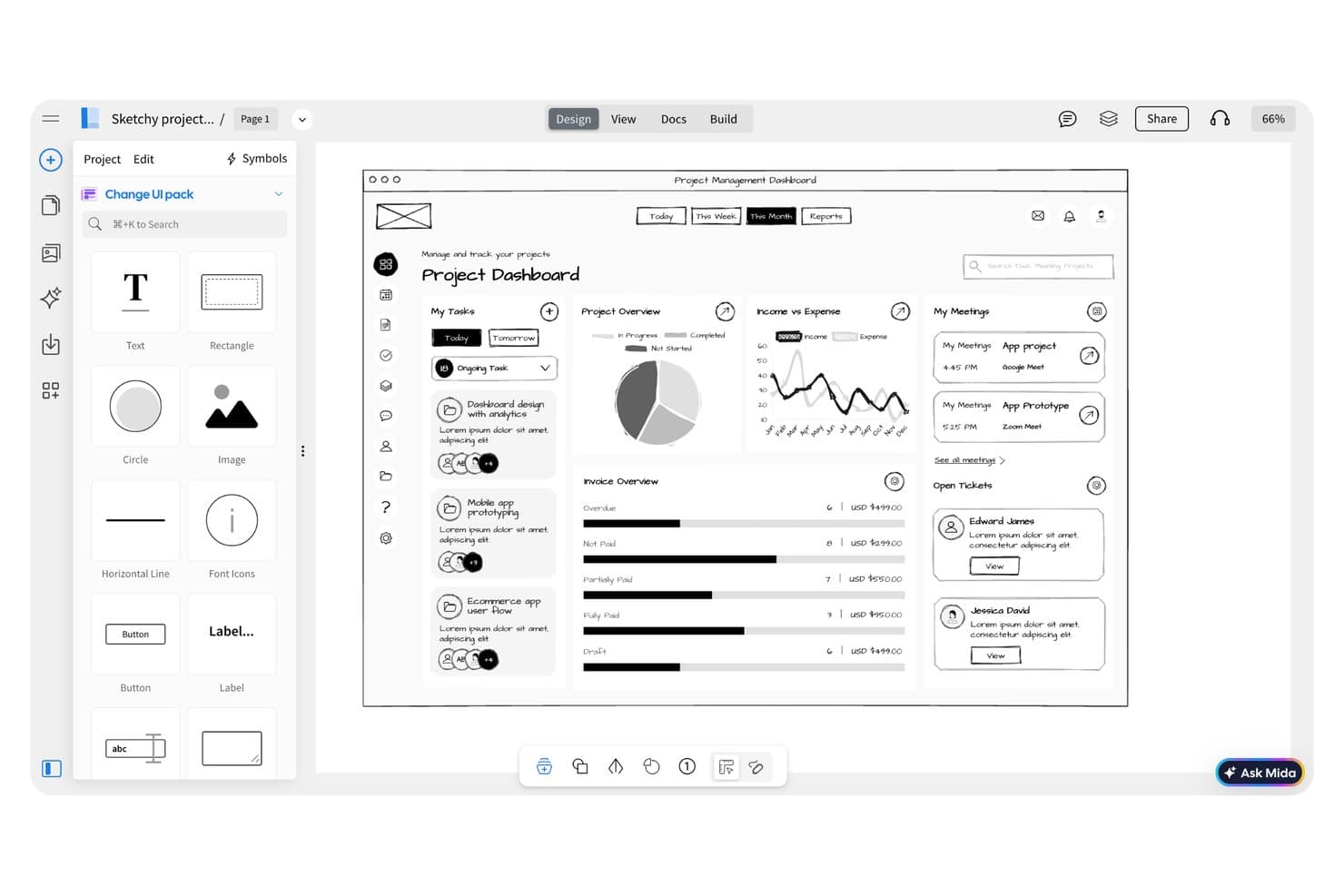
MockFlow lets users wireframe a project dashboard with UI components. MockFlow is a wireframing and prototyping tool that uses AI to generate multi-screen user flows, sitemaps, and low-fidelity mockups from text prompts.
Who Is MockFlow Best For?
MockFlow is a strong fit for UX designers and product teams who need to quickly generate multi-screen wireframe flows without building each screen from scratch.
Why I Picked MockFlow
MockFlow earns its spot on my shortlist because of how it handles multi-screen flow generation from a single text prompt. Instead of building screens one by one, I can describe a user journey and get a connected wireframe flow with navigation logic already mapped. The AI sitemap generator also gives me a structural starting point before any screen-level design begins.
MockFlow Key Features
- Component library: Access a built-in set of pre-made UI elements to drag and drop into wireframes without designing from scratch.
- Real-time collaboration: Invite team members to edit and comment on wireframes simultaneously within a shared workspace.
- Interactive prototyping: Link screens together with clickable hotspots to simulate user navigation flows for stakeholder review.
- Wireframe-to-specification export: Generate design specification documents directly from wireframes to hand off to developers.
MockFlow Integrations
MockFlow offers integrations with Slack, Microsoft Teams, Google Meet, Jira, Confluence, Trello, Google Drive, Google Docs, Microsoft 365, VS Code, Figma, Claude, and Cursor, plus API access for custom integrations.
Pros and Cons
Pros:
- Clickable hotspots support stakeholder walkthroughs
- AI sitemap clarifies product structure early
- Generates connected multi-screen flows from prompts
Cons:
- Generated flows still need manual refinement
- Low-fidelity output limits visual design exploration
Learn more about MockFlow: Best for Figma-to-code with two-way sync
- Free plan available
- From $20/user/month (billed annually)
Visit WebsiteCustomer Rating:4.2/5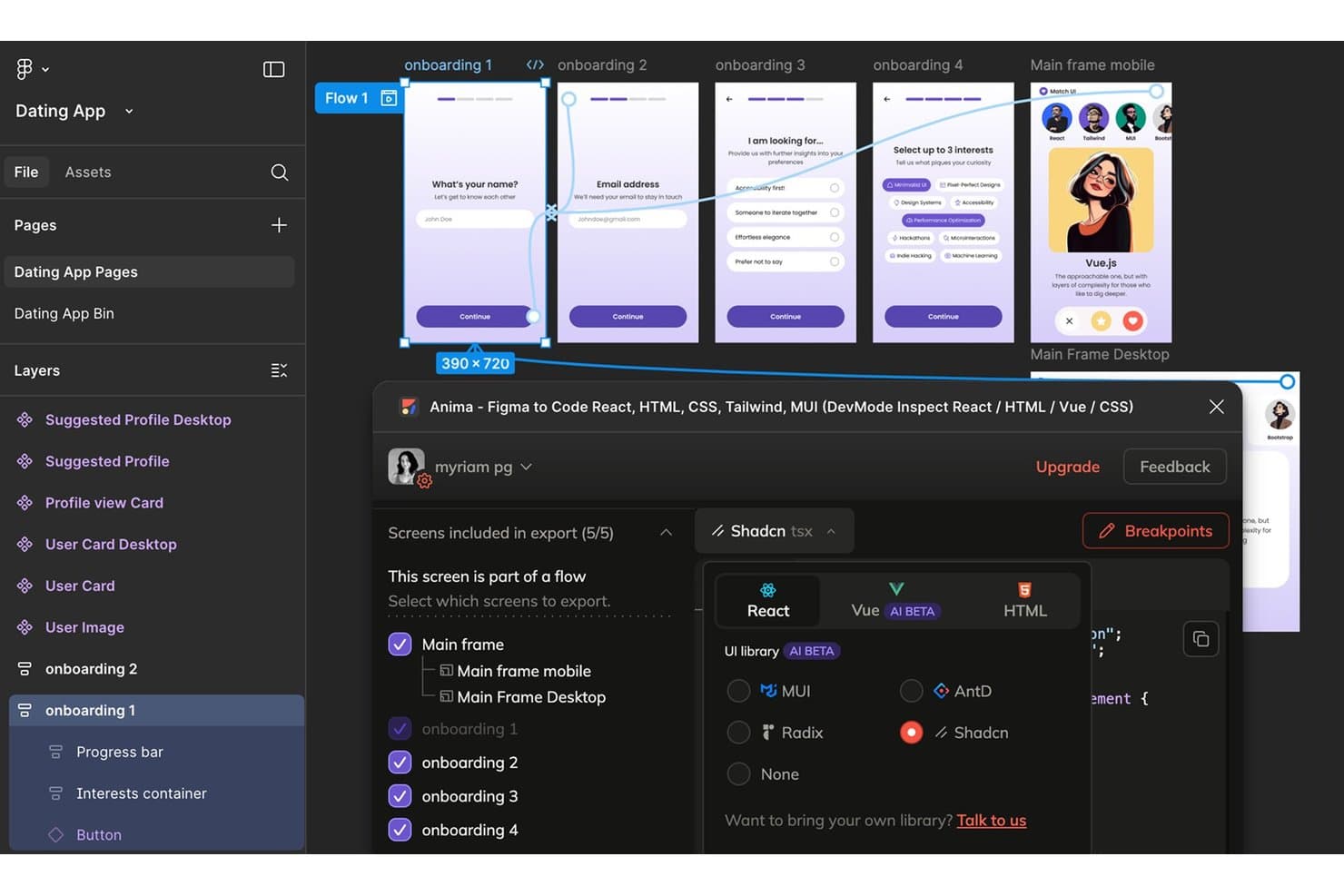
Anima exports multi-screen Figma flows as React, Vue, or HTML code. Anima is an AI prototyping tool that converts Figma designs into production-ready code, offering interactive prototyping, design-to-code generation, and two-way sync between design and development environments.
Who Is Anima Best For?
Anima is a strong fit for product teams and designers who work in Figma and need to hand off production-ready code to developers without losing design fidelity.
Why I Picked Anima
Anima earns its spot on my shortlist because of how cleanly it handles the gap between Figma designs and production code. I love that its two-way sync means design changes in Figma automatically reflect in the generated code, so developers aren't chasing outdated specs. The AI-powered code generation produces React, HTML, and CSS that's actually usable, not throwaway scaffolding.
Anima Key Features
- Interactive prototype builder: Create clickable, animated prototypes directly from your Figma designs without writing any code.
- Multi-framework code export: Export designs as React, HTML, or CSS code that developers can drop into existing projects.
- Component-level code inspection: Developers can inspect individual design components to view and copy the generated code for specific elements.
- Figma plugin integration: Run Anima directly inside Figma so you can generate prototypes and code without switching between tools.
Anima Integrations
Anima offers a native Figma plugin integration for creating prototypes and generating code within Figma.
Pros and Cons
Pros:
- Clickable prototypes from Figma designs
- React, HTML, and CSS exports
- Two-way sync keeps generated code current
Cons:
- Figma-centered workflow limits non-Figma teams
- Generated code may need developer cleanup
Learn more about Anima: Best for prototyping using your live codebase
- Free plan + free demo available
- From $20/user/month
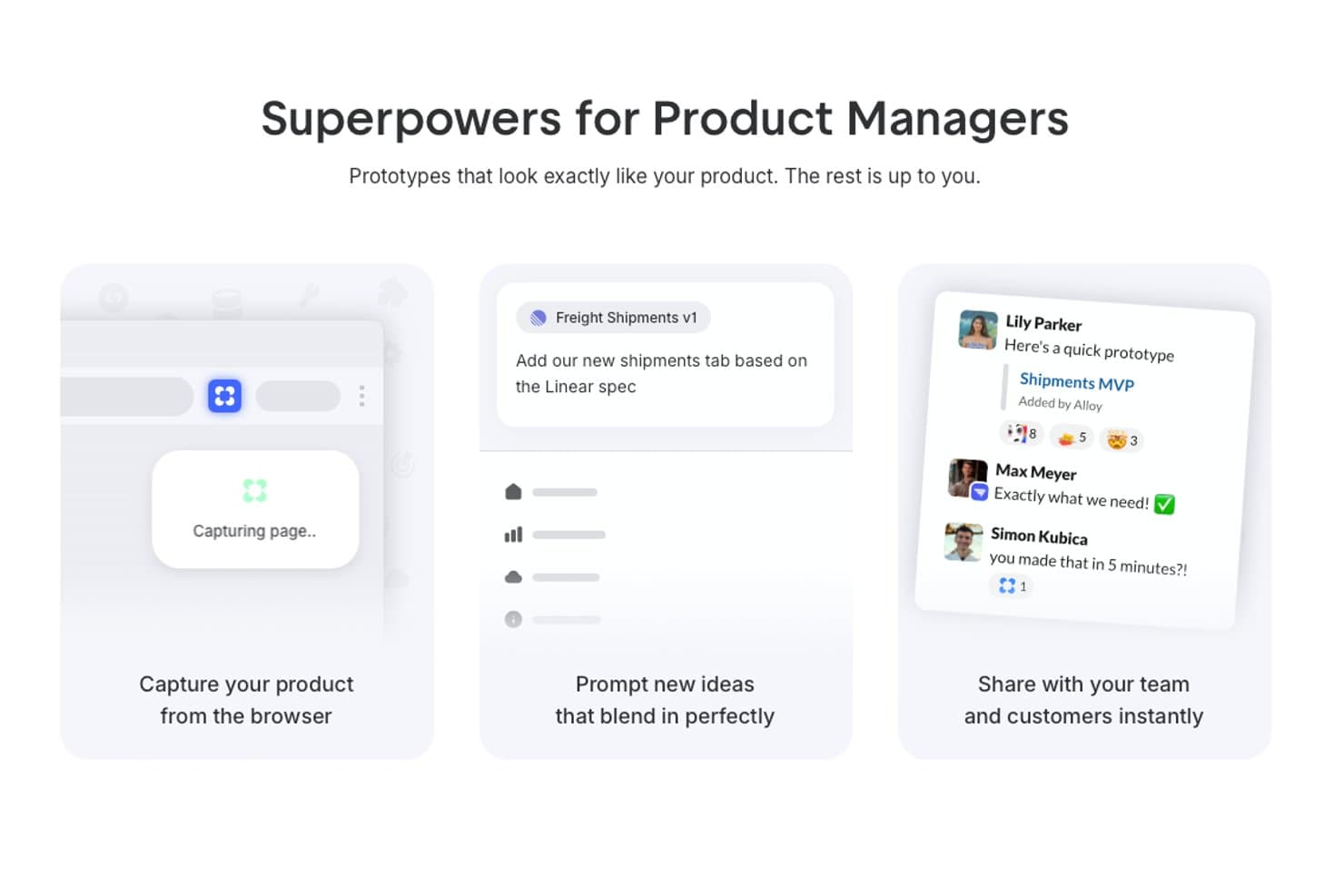
Alloy offers AI-powered prototyping features that let product managers capture their product from a browser, prompt new UI ideas, and share prototypes instantly with their team. Alloy is an AI-powered prototyping platform that lets you build, modify, and test interactive product prototypes directly on top of your actual codebase using conversational prompts.
Who Is Alloy Best For?
Product and UX teams at software companies who need to prototype directly with their existing application’s codebase.
Why I Picked Alloy
I picked Alloy as one of the best because I can prompt changes right inside my product’s live codebase and instantly generate interactive prototypes. My team is able to use our actual components and flows, not disconnected mockups, when prototyping new features.
Alloy Key Features
- Conversational AI editing: Make real-time design edits using text or voice prompts.
- Slack integration: Start or update prototypes directly from team Slack threads.
- Figma export: Export generated prototypes to Figma for further design work.
- Skills library: Save custom AI instructions as reusable actions for repetitive prototyping tasks.
Alloy Integrations
Alloy offers native integration with GitHub, Jira, Notion, Dovetail, Asana, Figma, ClickUp, Trello, Slack, and more. It also provides an API for custom integrations.
Pros and Cons
Pros:
- Allows real-time editing with voice or text
- Generates interactive, production-grade UI flows
- Uses your live codebase for prototyping
Cons:
- Not suited for legacy or non-React stacks
- Limited value for new, code-free prototypes
Learn more about Alloy: Best for code-based design iteration
- Free plan available
- From $8/month
Visit WebsiteCustomer Rating:5/5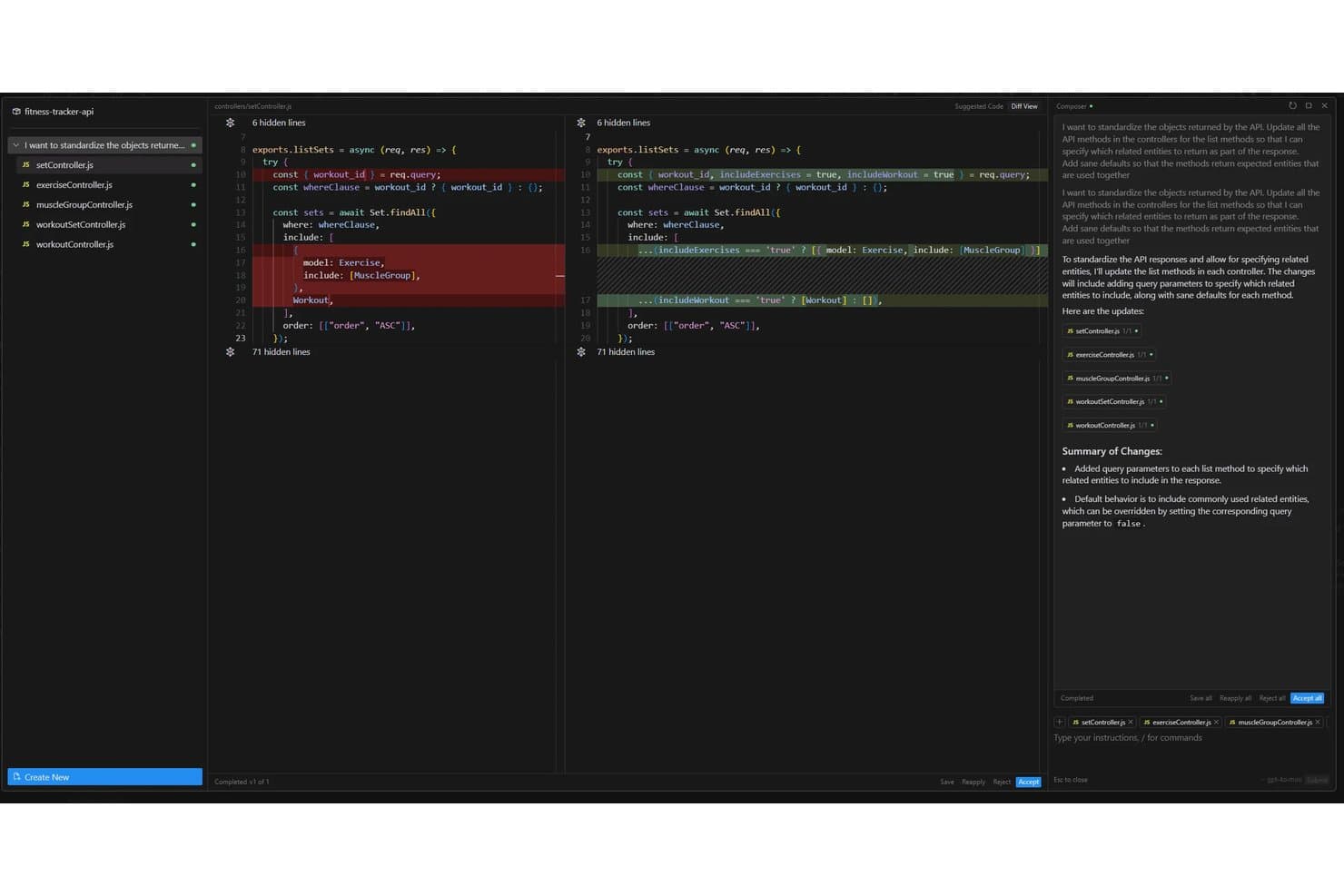
Cursor offers an AI-powered Composer feature that automatically refactors API controller methods across multiple files to standardize response objects with configurable query parameters. Cursor is an AI-powered code editor that lets you build and iterate on UI prototypes directly in code, using natural language prompts, an AI chat interface, and context-aware code generation.
Who Is Cursor Best For?
Cursor is a strong fit for product managers and developers who prototype directly in code and need AI-assisted iteration without switching between design and engineering tools.
Why I Picked Cursor
I picked Cursor as one of the best because it lets you prototype directly in a real codebase rather than faking it in a design tool. I love how its AI chat understands your project's full context, so when you say "make this sidebar collapsible," it generates code that actually fits your existing component structure. Its Composer feature lets you make sweeping, multi-file edits in one prompt, which means you can iterate on a live UI prototype without the usual back-and-forth between design and dev.
Cursor Key Features
- Inline code autocomplete: Cursor predicts and suggests your next line or block of code as you type, based on the surrounding context.
- @-symbol context referencing: You can tag specific files, docs, or web URLs directly in a prompt to give the AI precise context for generating prototype code.
- Terminal integration: A built-in terminal lets you run, test, and debug your prototype without leaving the editor.
- Multi-model AI support: Cursor lets you switch between leading AI models—including Claude and GPT-4o—depending on the task at hand.
Cursor Integrations
Native integrations are not clearly documented.
Pros and Cons
Pros:
- Multi-file changes accelerate interface iteration
- Context-aware edits fit existing component structures
- Prototypes run directly in real codebases
Cons:
- Generated changes still require technical review
- Requires comfort working directly in code
Learn more about Cursor: Best for reference-based prototype generation
- Free plan available
- From $14/month

UX Pilot creates prototypes from references so teams can shape ideas faster. UX Pilot is an AI-powered prototyping tool designed for UX professionals and product teams who want to accelerate early-stage design. It appeals to those who need to generate prototypes based on existing references or design inspiration. The platform helps teams quickly visualize ideas and iterate on concepts without starting from scratch.
Who Is UX Pilot Best For?
UX Pilot is a strong fit for UX designers and product teams at digital agencies or startups who want to generate prototypes using reference designs.
Why I Picked UX Pilot
What drew me to UX Pilot is its ability to generate prototypes directly from reference designs, which is especially valuable for teams that want to build on proven patterns or competitor examples. The tool lets you upload screenshots or URLs of existing products, then uses AI to create editable prototypes that mirror those references.
I find this approach useful for quickly iterating on familiar layouts or benchmarking against industry standards. For anyone who needs to translate inspiration into actionable prototypes without manual recreation, UX Pilot’s reference-based workflow is a clear advantage.
UX Pilot Key Features
Some other features that make UX Pilot stand out for AI prototyping include:
- AI-powered wireframe generation: Instantly create wireframes from text prompts describing your product or feature ideas.
- Multi-screen prototype support: Build and organize entire user flows with multiple connected screens in a single project.
- Component library: Access a built-in library of reusable UI components to speed up prototyping.
- Figma export: Export your prototypes directly to Figma for further design refinement or developer handoff.
UX Pilot Integrations
Integrations include Figma and GitHub.
Pros and Cons
Pros:
- Easy to prompt variations
- Good for UI brainstorming
- Fast AI wireframe creation
Cons:
- No direct dev code exports
- Requires good reference art
Learn more about UX Pilot:

Bolt automates planning and tracks dependencies for large, complex projects. Bolt offers an AI-driven platform for teams managing complex product or project workflows. It’s designed for organizations that need to coordinate large-scale initiatives with multiple stakeholders and moving parts. Bolt helps users automate planning, visualize dependencies, and keep projects on track as they scale.
Who Is Bolt Best For?
Bolt is well suited for project managers and operations leads at mid-sized to large organizations running complex, multi-team projects.
Why I Picked Bolt
What drew me to Bolt is how it addresses the unique demands of large-scale, complex projects in AI prototyping. The platform’s AI-powered planning engine helps break down massive initiatives into manageable tasks, automatically mapping dependencies and timelines.
I also appreciate its visual project mapping, which makes it easier to spot bottlenecks and coordinate across multiple teams. These features make Bolt a strong choice for organizations that need to keep ambitious, multi-layered prototyping efforts organized and on track.
Bolt Key Features
Some other features that make Bolt valuable for AI prototyping teams include:
- Automated status reporting: The platform generates real-time progress updates for all stakeholders.
- Role-based permissions: Assign different access levels to team members based on their responsibilities.
- Template library: Access pre-built project templates tailored for various industries and workflows.
- Custom workflow automation: Set up automated triggers and actions to streamline repetitive project management tasks.
Bolt Integrations
Integrations include Figma and GitHub.
Pros and Cons
Pros:
- Great AI chat code editor
- Deployable AI prototypes
- Handles full-stack logic
Cons:
- Overwhelming for designers
- UI design is very basic
Learn more about Bolt: Best for importing specs from project management tools
- Free plan + free demo available
- From $25/month
Visit WebsiteCustomer Rating:4.5/5
Lovable converts project specs into prototypes for faster design work. Lovable is an AI-powered prototyping tool designed for product teams and UX professionals who want to accelerate the transition from requirements to interactive prototypes. It stands out for its ability to turn detailed project specs into working prototypes with minimal manual effort. Teams looking to bridge the gap between planning and design may find Lovable especially useful.
Who Is Lovable Best For?
Lovable is a strong fit for product managers and UX teams at SaaS companies who need to quickly convert project management specs into interactive prototypes.
Why I Picked Lovable
What drew me to Lovable is how it directly addresses the challenge of moving specs from project management tools into actionable prototypes. Lovable lets you import requirements and user stories from platforms like Jira or Linear, then uses AI to generate interactive wireframes that reflect those specs.
I find this especially valuable for teams that want to reduce manual translation work and keep prototypes tightly aligned with evolving project documentation. This approach helps ensure that design and development stay in sync from the very start of a project.
Lovable Key Features
Some other features that stood out to me include:
- AI-powered UI component suggestions: The tool recommends relevant UI elements based on your imported specs and user flows.
- Real-time collaborative editing: Multiple team members can edit and comment on prototypes simultaneously within the platform.
- Version history and rollback: You can track changes to prototypes and revert to previous versions as needed.
- Export to Figma and code: Prototypes can be exported directly to Figma or as developer-ready code snippets for faster handoff.
Lovable Integrations
Integrations include Jira, Confluence, Notion, Linear, GitHub, GitLab, Slack, Shopify, Stripe, and Supabase.
Pros and Cons
Pros:
- Creates functional web apps
- Understands project context
- Fast full-stack generation
Cons:
- Subscription can be pricey
- Steep learning curve exists
Learn more about Lovable: Best with Figma design system integration
- Free plan
- From $16/month (billed annually)

Figma Make builds prototypes in Figma so design teams can move ideas faster. Figma Make brings AI-driven prototyping directly into the Figma ecosystem, making it a strong fit for design teams already using Figma for their workflows. Product designers and UX professionals can use it to quickly turn concepts into interactive prototypes without leaving their primary design environment. This tool helps teams reduce manual steps and maintain consistency across projects.
Who Is Figma Make Best For?
Figma Make is a strong choice for design teams and UX professionals working within organizations that already rely on Figma for collaborative product design.
Why I Picked Figma Make
I chose Figma Make because it brings AI-powered prototyping directly into the Figma design system, which is a major advantage for teams already invested in Figma’s ecosystem. The tool uses AI to generate interactive prototypes that automatically align with your existing design tokens, components, and libraries.
This means you can maintain brand consistency and design standards without extra manual work. I also appreciate how Figma Make lets you iterate on prototypes using the same assets and workflows your team already knows.
Figma Make Key Features
Some other features worth noting for teams considering Figma Make include:
- AI-powered user flow generation: Automatically creates user flows based on your project requirements and prompts.
- Real-time collaboration: Multiple team members can work on prototypes simultaneously within the same Figma file.
- Component suggestion engine: Recommends relevant components from your design system as you build out screens.
- Version history tracking: Keeps a detailed log of changes and iterations for easy review and rollback.
Figma Make Integrations
Integrations include Supabase, Figma Sites, Figma Design, FigJam, ProtoPie, Principle, Maze, Framer Web, Pendo, and Bubble.
Pros and Cons
Pros:
- Smooth designer workflows
- Real-time team collaboration
- Generates UI very quickly
Cons:
- Requires premium accounts
- Struggles with deep logic
Learn more about Figma Make: 10Best for text-to-prototype with PM-focused AI tools
Mockitt
- Free plan available
- From $10/month (billed annually)
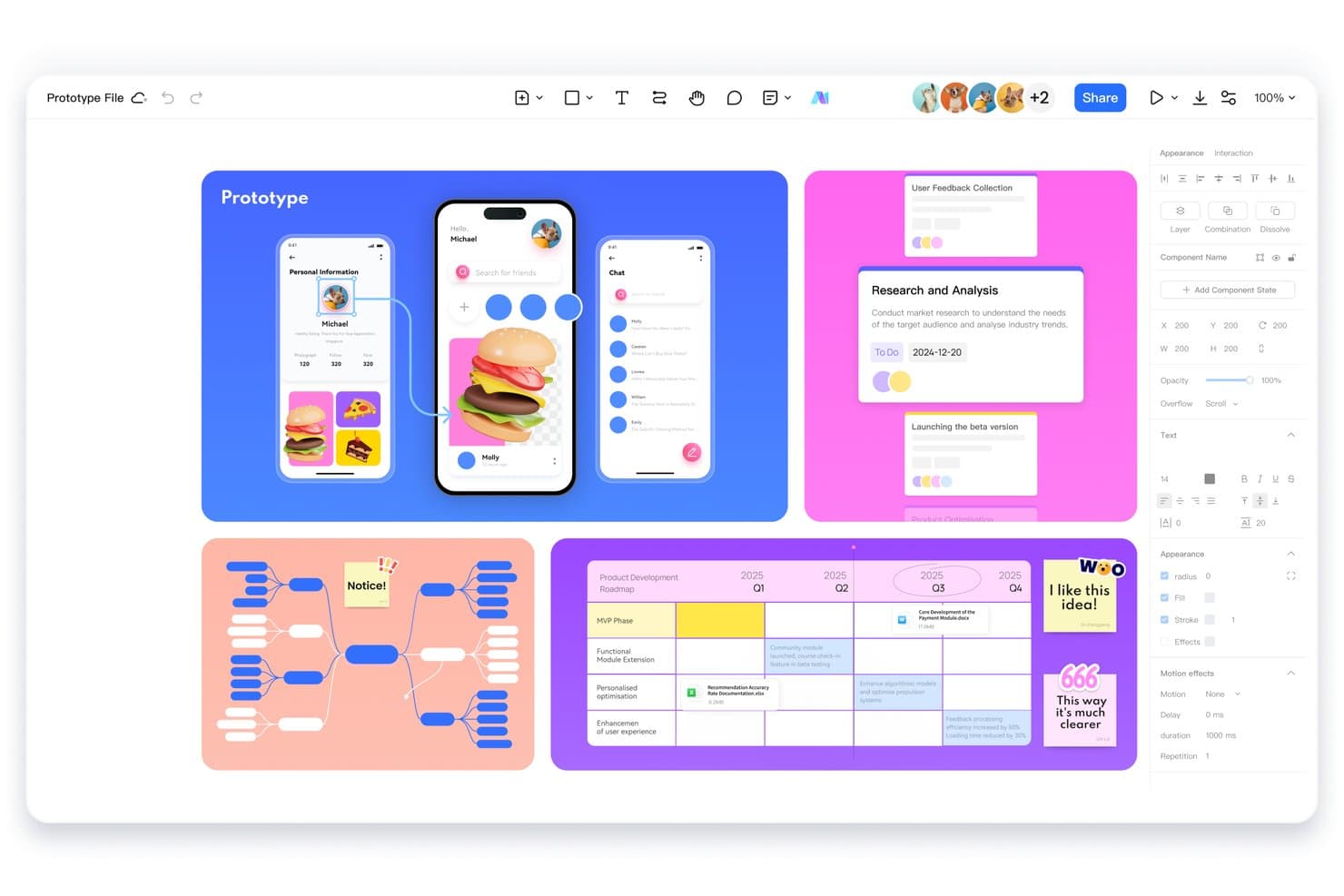
Mockitt lets users design prototypes, mind maps, and roadmaps in one workspace. Mockitt is an AI prototyping tool that lets you generate interactive prototypes from text prompts, alongside wireframing, user flow mapping, and product requirement drafting tools built for product managers.
Who Is Mockitt Best For?
Mockitt is a strong fit for product managers who want to go from idea to interactive prototype without handing off to a designer first.
Why I Picked Mockitt
I picked Mockitt as one of the best because it's built around a text-to-prototype workflow that product managers can actually drive themselves. Type a product brief or feature description, and Mockitt generates an interactive prototype directly from that input. I also like its AI-powered user flow mapping and product requirement drafting tools, which keep the entire discovery-to-prototype process in one place without pulling in a designer at every turn.
Mockitt Key Features
- Real-time collaboration: Multiple team members can edit and comment on prototypes simultaneously within a shared workspace.
- Interactive component library: A built-in library of pre-built UI components lets you drag and drop elements directly into your prototype canvas.
- Clickable prototype sharing: Generate a shareable link to your prototype so stakeholders can click through flows and leave feedback without needing an account.
- Version history: Mockitt tracks changes over time, letting you restore earlier versions of your prototype when needed.
Mockitt Integrations
Mockitt documents an OpenAI-powered ChatGPT integration for AI prototyping. It also supports importing Figma and Sketch files, though these are file imports rather than native integrations.
Pros and Cons
Pros:
- Stakeholders can review shared clickable prototypes
- PM tools connect briefs with flows
- Text prompts produce clickable prototypes quickly
Cons:
- AI output can miss product context
- Generated screens need manual refinement
Learn more about Mockitt:
Diğer Yapay Zekâ Prototipleme Araçları
Kısa listemde yer almayan ancak yine de göz atmaya değer bazı ek yapay zekâ prototipleme aracı seçenekleri şunlardır:
- 11BananiBest for exporting prototypes to Figma or code
- 12RelumeFrom $18/month (billed annually)
- 13Magic PatternsBest for matching prototypes to existing design systems
- 14Tempo LabsBest for visual editing of React codebases
- 15FramerBest for interactive website mockups
- 16v0Best for GitHub and Vercel deploy workflows
How I Evaluate AI Prototyping Tools
To make this list, AI must support prototyping work, like generating screens from prompts and building multi-screen flows. From there, I evaluate three things. Core functionality carries most weight: linking screens into clickable flows and editing generated layouts. Then I consider standout features, like design system awareness, and beyond-feature fit with your team’s workflow.
Core Functionality (Table Stakes For This List)
When I'm selecting tools for my list, I score each one on a scale from 0 (does not offer the functionality) to 5 (excels in this area) for each core functionality listed below. I then convert the total into a percentage to help assess each tool's overall fit, with extra weight on any functionalities I’ve deemed essential.
- AI-Generated Design (Essential): I look for prompts, sketches, or existing assets to produce relevant screens and coherent flows, such as onboarding through account setup.
- Interactive Prototypes (Essential): Check whether teams can link screens into clickable, branching journeys to review checkout or onboarding paths with stakeholders.
- Editable Output: Assess whether generated layouts allow meaningful changes to hierarchy, copy, and components as requirements shift.
- Multi-Fidelity Support: I consider whether teams can move from rough wireframes to polished UI in one project as concepts gain validation.
- Design System Consistency: Look for reusable components, styles, and tokens that keep generated screens aligned with an existing product system.
- Export & Handoff: Check sharing, export, or handoff options that let designers and developers inspect flows and carry specs into implementation.
Once I have a list of tools that meet the criteria, I consider what sets each platform apart.
Differentiating Factors (What Sets Vendors Apart)
Here's how I compare and contrast different vendors:
Standout Features
I look for multimodal input support—tools that accept sketches, screenshots, or Figma files alongside text prompts let PMs prototype from whatever artifact they already have. Design system awareness matters just as much. When a tool references your existing tokens and component libraries, every generated screen stays on-brand without manual cleanup. I also evaluate built-in user testing tools, like native annotation or heatmap capture, since gathering stakeholder feedback inside the prototype removes handoff friction.
Beyond Features
I evaluate how quickly a tool gets you from idea to testable prototype within a single sprint. A PM preparing for a stakeholder review needs a clickable flow in hours, not days. I also check whether non-designers can realistically use the tool without training—if your APM can't generate and edit screens independently, adoption stalls. Data privacy matters too: I look at how vendors handle proprietary prompts and designs, especially for pre-launch concepts.
Yapay Zekâ Prototipleme Araçları Nasıl Seçilir?
Uzun özellik listeleri ve karmaşık fiyatlandırma yapılarına kendinizi kaptırmanız kolaydır. Özgün yazılım seçimi sürecinizi yürütürken odağınızı korumanıza yardımcı olmak için göz önünde bulundurmanız gereken faktörlerin bir kontrol listesini aşağıda bulabilirsiniz:
| Faktör | Dikkat Edilmesi Gerekenler |
|---|---|
| FaktörÖlçeklenebilirlik | Dikkat Edilmesi GerekenlerEkip büyüdükçe araç ekibinizi destekleyecek mi? Kullanıcı sınırlarını, proje kotalarını ve gelecekteki ihtiyaçları göz önünde bulundurun. |
| FaktörEntegrasyonlar | Dikkat Edilmesi GerekenlerTasarım, kod ve iş birliği araçlarınıza yerel olarak bağlanıyor mu? Yalnızca API'leri değil, doğrudan desteği de kontrol edin. |
| FaktörÖzelleştirilebilirlik | Dikkat Edilmesi Gerekenlerİş akışlarını, şablonları veya çıktıları sürecinize uyacak şekilde uyarlayabiliyor musunuz? Katı ve herkese uyan tek tip çözümlere karşı dikkatli olun. |
| FaktörKullanım kolaylığı | Dikkat Edilmesi GerekenlerYeni kullanıcılar ne kadar hızlı üretken hâle gelebilir? Sezgisel gezinme ve minimum eğitim gereksinimleri arayın. |
| FaktörUygulama ve kullanıma alıştırma | Dikkat Edilmesi GerekenlerBaşlamak için hangi kaynaklara ihtiyaç var? Geçiş desteğini, eğitim materyallerini ve ilk prototipe ulaşma süresini değerlendirin. |
| FaktörMaliyet | Dikkat Edilmesi GerekenlerKullanım arttıkça fiyatlandırma kademeleri açık ve öngörülebilir mi? Gizli ücretlere veya maliyetli eklentilere dikkat edin. |
| FaktörGüvenlik önlemleri | Dikkat Edilmesi GerekenlerAraç, veri gizliliği ve güvenlik standartlarınızı karşılıyor mu? Şifreleme, erişim kontrolleri ve uyumluluk hakkında bilgi alın. |
| FaktörDestek bulunabilirliği | Dikkat Edilmesi GerekenlerHangi destek kanalları sunuluyor ve hangi saatlerde kullanılabiliyor? Canlı yardıma mı yoksa kendi kendine hizmet kaynaklarına mı ihtiyaç duyacağınızı değerlendirin. |
Yapay Zekâ Prototipleme Araçları Nedir?
Yapay zekâ prototipleme araçları, ekiplerin etkileşimli ürün prototiplerini hızlı bir şekilde tasarlamasına, oluşturmasına ve test etmesine yardımcı olan gelişmiş yapay zekâ modelleriyle desteklenen yazılım platformlarıdır. Yapay zekâ tasarımını geliştirmek için yapay zekâ ürünleri; tam yığın kod oluşturma, kullanıcı arayüzleri hazırlama veya düzenleri optimize etmenin yollarını önerme gibi görevleri otomatikleştirmek amacıyla sıklıkla bu araçlardan yararlanır. Bu da hem teknik hem de teknik olmayan kullanıcıların yeni fikirleri denemesini kolaylaştırır.
Tam ölçekli geliştirme başlamadan önce gerçek dünya senaryolarında kavramların daha hızlı yinelenmesini, iş birliğini ve doğrulanmasını desteklerler.
Özellikler
Yapay zekâ prototipleme araçlarını seçerken aşağıdaki temel özelliklere dikkat edin:
- Yapay zekâ destekli kod oluşturma: Kullanıcı girdilerine göre kullanıcı arayüzü bileşenleri veya mantığı için otomatik olarak kod oluşturur; zamandan tasarruf sağlar ve manuel kodlamayı azaltır.
- Görsel düzenleme arayüzü: Kullanıcıların sürükleyip bırakma veya işaretleyip tıklama araçlarıyla prototipler tasarlamasını ve değiştirmesini sağlar; böylece prototiplemeyi geliştirici olmayan kişiler için de erişilebilir hâle getirir.
- Gerçek zamanlı iş birliği: Birden fazla ekip üyesinin aynı prototip üzerinde eş zamanlı olarak çalışmasına olanak tanır; geri bildirim ve yineleme süreçlerini gecikme olmadan destekler.
- Tasarımdan koda dönüştürme: Tasarım dosyalarını veya maketleri doğrudan çalışan koda dönüştürerek tasarım ile geliştirme arasındaki boşluğu kapatır.
- Bileşen kitaplığı entegrasyonu: Önceden oluşturulmuş kullanıcı arayüzü bileşenlerinin içe aktarılmasını ve yeniden kullanılmasını destekler; prototipleme sürecini hızlandırır ve tutarlılığı sağlar.
- Sürüm denetimi desteği: Değişiklikleri izler, dalları yönetir ve önceki sürümlere dönmeyi mümkün kılar; ekiplerin yinelemeleri yönetmesine ve güvenli bir şekilde iş birliği yapmasına yardımcı olur.
- Etkileşimli önizleme ve test: Etkileşimli öğeler içeren canlı prototip önizlemeleri sunar; böylece kullanıcılar geliştirme öncesinde akışları ve kullanıcı deneyimlerini test edebilir.
- Üçüncü taraf araç entegrasyonları: İş akışlarını kolaylaştırmak ve manuel devirleri azaltmak için tasarım, kod ve proje yönetimi platformlarına bağlanır.
- Ortam değişkeni yönetimi: Ekiplerin ortama özgü ayarları prototipleme aracı içinde güvenli bir şekilde yönetmesine ve güncellemesine olanak tanır.
- Rol tabanlı erişim denetimleri: Yöneticilerin farklı kullanıcılar için izinler belirlemesine olanak tanır ve her ekip üyesinin doğru erişim düzeyine sahip olmasını sağlar.
Avantajlar
Yapay zekâ prototipleme araçlarını uygulamak ekibiniz ve işletmeniz için çeşitli avantajlar sağlar. Faydalanabileceğiniz avantajlardan bazıları şunlardır:
- Daha hızlı yineleme döngüleri: Yapay zekâ destekli kod oluşturma ve tasarımdan koda dönüştürme özellikleri, ekiplerin manuel kodlama yapmadan fikirleri hızlıca test edip geliştirmesini sağlar.
- Daha geniş ekip iş birliği: Gerçek zamanlı düzenleme ve görsel arayüzler, hem teknik hem de teknik olmayan ekip üyelerinin prototiplere katkıda bulunmasını sağlar.
- Azalan geliştirme darboğazları: Otomatikleştirilmiş iş akışları ve bileşen kitaplıkları tekrarlayan görevleri en aza indirerek geliştiricilerin daha yüksek değer sağlayan işlere odaklanmasını sağlar.
- Geliştirilmiş tasarım doğruluğu: Tasarımdan koda dönüştürme ve etkileşimli önizlemeler, prototiplerin nihai ürün gereksinimleriyle yakından eşleşmesini sağlamaya yardımcı olur.
- Geliştirmeye daha kolay devir: Sürüm denetimi ve üçüncü taraf entegrasyonları, prototiplerin üretime hazır koda dönüştürülmesini kolaylaştırır.
- Gelişmiş güvenlik ve denetim: Rol tabanlı erişim ve ortam değişkeni yönetimi, hassas verileri korur ve projenin bütünlüğünü sürdürür.
- Daha düşük prototipleme maliyetleri: Otomasyon ve yeniden kullanılabilir varlıklar, yeni kavramları oluşturmak ve doğrulamak için gereken zamanı ve kaynakları azaltır.
Maliyetler ve Fiyatlandırma
Yapay zekâ prototipleme araçlarını seçmek, sunulan çeşitli fiyatlandırma modellerinin ve planların anlaşılmasını gerektirir. Maliyetler özelliklere, ekip büyüklüğüne, eklentilere ve diğer unsurlara göre değişir. Aşağıdaki tablo, yapay zekâ prototipleme aracı çözümlerinde yaygın planları, ortalama fiyatlarını ve genellikle sunulan özellikleri özetlemektedir:
Yapay Zekâ Prototipleme Araçları İçin Plan Karşılaştırma Tablosu
| Plan Türü | Ortalama Fiyat | Yaygın Özellikler |
|---|---|---|
| Plan TürüÜcretsiz Plan | Ortalama Fiyat$0 | Yaygın ÖzelliklerTemel prototipleme araçları, sınırlı yapay zekâ özellikleri, tek kullanıcı erişimi ve topluluk desteği. |
| Plan TürüKişisel Plan | Ortalama Fiyat$12-$25/kullanıcı/ay | Yaygın ÖzelliklerGelişmiş prototipleme, yapay zekâ ile kod oluşturma, sınırlı entegrasyonlar ve e-posta desteği. |
| Plan Türüİşletme Planı | Ortalama Fiyat$30-$100/kullanıcı/ay | Yaygın ÖzelliklerEkip iş birliği, gerçek zamanlı düzenleme, sürüm denetimi, genişletilmiş entegrasyonlar ve öncelikli destek. |
| Plan TürüKurumsal Plan | Ortalama Fiyat$100+/kullanıcı/ay | Yaygın ÖzelliklerÖzel entegrasyonlar, gelişmiş güvenlik, rol tabanlı erişim, özel işe alıştırma ve SLA destekli destek. |
AI Prototipleme Araçları SSS
AI prototipleme araçları hakkında sık sorulan bazı soruların yanıtları:
Teknik bilgiye sahip olmayan ekip üyeleri AI prototipleme araçlarını kullanabilir mi?
Evet, çoğu AI prototipleme aracı, teknik bilgiye sahip olmayan kullanıcıların prototip oluşturmasını ve değiştirmesini kolaylaştıran görsel düzenleyiciler ile sürükle ve bırak arayüzleri sunar. Bu, ekiplerin farklı roller arasında işbirliği yapmasına yardımcı olur ve erken aşamadaki tasarım çalışmaları için geliştiricilere olan bağımlılığı azaltır.
AI prototipleme araçları tasarım sürecini nasıl hızlandırır?
AI prototipleme araçları; kod oluşturma, kullanıcı arayüzü birleştirme ve tasarımdan koda dönüştürme gibi tekrarlayan görevleri otomatikleştirir. Bu, ekiplerin fikirleri hızlı bir şekilde test etmesine, geri bildirimler doğrultusunda yineleme yapmasına ve manuel yöntemlere kıyasla kavramdan etkileşimli prototipe çok daha hızlı geçmesine olanak tanır.
AI prototipleme araçları hassas projeler için güvenli midir?
Evet, birçok AI prototipleme aracı şifreleme, role dayalı erişim denetimleri ve sektör standartlarına uyumluluk gibi güvenlik önlemleri içerir. Hassas verileri paylaşmadan önce bir aracın kuruluşunuzun gereksinimlerini karşıladığından emin olmak için güvenlik belgelerini mutlaka inceleyin.
Bir AI prototipleme aracında hangi entegrasyonları aramalıyım?
Mevcut tasarım araçlarınız, kod depolarınız ve proje yönetimi platformlarınızla entegrasyonlar arayın. Figma, GitHub, Jira veya Slack ile doğrudan bağlantılar iş akışınızı kolaylaştırmaya ve ekipler arasındaki manuel görev aktarımlarını azaltmaya yardımcı olabilir.
AI prototipleme araçları gerçek zamanlı işbirliğini destekler mi?
Evet, önde gelen AI prototipleme araçlarının çoğu, birden fazla kullanıcının aynı proje üzerinde eşzamanlı olarak çalışmasına olanak tanıyan gerçek zamanlı işbirliğini destekler. Bu özellik, dağıtık ekipler ve hızlı tempolu tasarım sprintleri için değerlidir.