

10 Best Product Intelligence Software Reviewed in 2026

10 The Best Product Intelligence Software Shortlist


With so many different product intelligence solutions available, figuring out which is right for you is tough. You know you want to track user behaviour, streamline manual data gathering, gather insights more efficiently, and access granular insights into your competition that empower your decision-making with predictive analytics but need to figure out which tool is best. I've got you! In this post I'll help make your choice easy, sharing my personal experiences using dozens of different intelligence tools with large teams and complex products, with my picks of the best product intelligence software.
Why Trust Our Software Reviews
We’ve been testing and reviewing product management software since 2020. As product managers ourselves, we know how critical and difficult it is to make the right decision when selecting software.
We invest in deep research to help our audience make better software purchasing decisions. We’ve tested more than 2,000 tools for different product management use cases and written over 1,000 comprehensive software reviews. Learn how we stay transparent & our software review methodology.
Best Product Intelligence Software Summary
This comparison chart summarizes pricing details for my top product intelligence software selections to help you find the best one for your budget and business needs.
| Tool | Best For | Trial Info | Price | ||
|---|---|---|---|---|---|
| 1 | Best for customer data integration | Free plan available | From $120/month | Website | |
| 2 | Best for drag-and-drop data analytics | Free trial + free plan available | From $15/user/month (billed annually) | Website | |
| 3 | Best for live video customer feedback | Free demo available | Pricing upon request | Website | |
| 4 | Best for mobile-first businesses | 30-day free trial + free demo available | From $75/month | Website | |
| 5 | Best for data exploration and visualization | Free plan available | From $9/user/project/month | Website | |
| 6 | Best for in-app user interaction tracking | 30-day free trial + free plan + free demo available | Pricing upon request | Website | |
| 7 | Best for capturing and analyzing product experience insights at scale with AI | 14-day free trial + free plan available | From $175/month (billed annually) | Website | |
| 8 | Best for capturing all user interactions automatically | Free plan + free trial + free demo available | Pricing upon request | Website | |
| 9 | Best for customer journey and funnel tracking | 7-day free trial + free demo available | From $99/month | Website | |
| 10 | Best for marketing performance tracking | Free demo available | Pricing upon request | Website |
Best Product Intelligence Software Reviews
Below are my detailed summaries of the best product intelligence software that made it onto my shortlist. My reviews offer a detailed look at the key features, pros & cons, integrations, and ideal use cases of each tool to help you find the best one for you.


Segment operates as a powerful customer data platform, aiming to provide clean, reliable customer data to the tools which businesses use for analytics and growth. Its capacity to collect user events from web & mobile apps and provide a complete data toolkit makes it ideal for companies looking to improve their data integrity and customer understanding.
Why I Picked Segment:
I picked Segment for its high degree of proficiency in consolidating customer data. Its ability to funnel customer data into a single, unified view for multiple uses, including analytics, marketing, and product development, sets it apart from other tools. Its efficient data integration makes it the best choice for customer data integration.
Standout features & integrations:
Segment's primary features include data management, prototyping, identity resolution, and data privacy, all of which contribute to maintaining a clean and controlled data environment. As for integrations, Segment works well with a myriad of tools, such as Google Analytics, Mixpanel, and Mailchimp, which broadens its application for different business needs.
Pros and Cons
Pros:
- Extensive list of integrations with other platforms
- Provides a single view of customer data
- Offers robust data integration options
Cons:
- Some users may find the user interface complex to navigate
- May require technical skills to maximize its features
- The price point might be steep for small businesses


Tableau is a data visualization and business intelligence tool that helps users transform raw data into understandable, interactive dashboards. It has an easy-to-use interface with drag-and-drop features, making it an optimal choice for individuals or organizations that prefer intuitive, hands-on data analytics.
Why I Picked Tableau:
In my quest to find an effective tool for data analytics, I judged various contenders. Tableau emerged as my choice thanks to its straightforward user interface that allows even the most non-technical individuals to manipulate data with ease. Its exceptional drag-and-drop feature allows users to create visualizations quickly, making it an optimal choice for those in need of swift, uncomplicated data analytics.
Standout features & integrations:
Tableau offers robust features, including real-time data analytics, data blending, and collaborative capabilities. Perhaps the most noteworthy feature is its drag-and-drop interface that facilitates rapid dashboard and report creation. In terms of integrations, Tableau connects with a wide array of data sources, from databases like MySQL, Microsoft Teams, and Oracle, to cloud-based services like Google Analytics and Salesforce.
Pros and Cons
Pros:
- Real-time data analytics
- Wide range of data source integrations
- User-friendly drag-and-drop feature
Cons:
- Customer support could be improved
- Complex calculations can be challenging to implement
- Pricing can be expensive for smaller businesses


UserTesting is a platform that allows businesses to gain real-time insights into their customer's experiences. By enabling live video feedback from a diverse set of users, it offers an unparalleled window into understanding customer interactions and preferences. This makes it the best for capturing live video customer feedback, ensuring a deeper connection between businesses and their users.
Why I Picked UserTesting:
When I was assessing different feedback tools, UserTesting stood out due to its unique emphasis on live video feedback. The ability to see and hear users interact with your product in real-time presents a wealth of qualitative data that traditional feedback tools often overlook. I chose UserTesting as the best for live video customer feedback because it allows businesses to empathize with their customers at a granular level and adapt their strategies based on these insights.
Standout features & integrations:
UserTesting's key features include the ability to target specific user demographics, live video feedback sessions, and the option to ask follow-up questions. These allow for a thorough understanding of user experiences. In terms of integrations, UserTesting can be paired with many popular platforms like Slack, Jira, and Trello, making the workflow more streamlined.
Pros and Cons
Pros:
- Wide range of integrations with popular platforms
- Allows demographic targeting for feedback
- Provides live video feedback for in-depth insights
Cons:
- More quantitative data options would be beneficial
- The platform requires a learning curve to use effectively
- The cost per video might be high for smaller businesses


CleverTap is a comprehensive customer engagement and retention tool that offers a range of mobile marketing solutions. With its ability to analyze, segment, and engage users across mobile and web platforms, it proves to be an invaluable asset for mobile-first businesses.
Why I Picked CleverTap:
CleverTap caught my attention for its robust capabilities specifically geared toward mobile-first businesses. It is the tool's deep emphasis on mobile user engagement and the ability to leverage user behavior data for personalized marketing that sets it apart. In my view, CleverTap is best for mobile-first businesses due to its focus on delivering meaningful mobile user experiences and driving customer retention on mobile platforms.
Standout features & integrations:
Key features of CleverTap include behavior-based segmentation, real-time analytics, omnichannel marketing, and AI-powered predictive modeling. Each of these components is critical for creating and implementing effective mobile marketing strategies. In terms of integrations, CleverTap partners with several leading social media platforms like Facebook, Google Ads, LinkedIn, Zapier, and Shopify.
Pros and Cons
Pros:
- Integrates well with other major platforms
- Offers a comprehensive set of features
- Specialized tool for mobile-first businesses
Cons:
- Customer support can be improved
- A steep learning curve due to the multitude of features
- The pricing may not be affordable for small businesses


Looker is a data platform that empowers businesses to delve into their data, providing comprehensive tools for exploration and visualization. Its emphasis on creating interactive dashboards and extensive customization options make it ideal for organizations that need a deeper understanding of their data.
Why I Picked Looker:
In deciding on a tool for data exploration and visualization, I had to make a comparison of a wide variety of offerings. I selected Looker for its rich features and reputation for facilitating data-driven decision-making. What made Looker stand out is its powerful exploration capabilities coupled with an intuitive interface. This makes it best for any organization aiming for a hands-on approach to data visualization and exploration.
Standout features & integrations:
Key features of Looker include its flexible data modeling that allows for customization and control over how data is explored and delivered. Moreover, Looker's powerful graph and visualization tools create interactive dashboards that effectively communicate insights. When it comes to integrations, Looker provides connectivity with SQL databases and major data warehouse providers, including Google BigQuery, Amazon Redshift, and Snowflake, among others.
Pros and Cons
Pros:
- Highly customizable data modeling
- Extensive integrations with major data warehouses
- Robust data exploration and visualization capabilities
Cons:
- Can be expensive for small businesses
- Might be complex for non-technical users
- Lack of transparent pricing


Pendo is a product experience platform that allows businesses to understand their user's interactions within the app. It provides critical insights about in-app user behavior and leverages these to deliver a better user experience.
Why I Picked Pendo:
Pendo emerged as a strong contender in my research, primarily for its in-depth in-app interaction tracking capabilities. I noticed that Pendo excels at providing detailed analytics about how users navigate within an application. It stands apart from the rest because of its unique focus on maximizing user experience, which directly aligns with its prowess in tracking in-app interactions.
Standout features & integrations:
Pendo is loaded with features like user segmentation, which helps in targeting specific user groups. It offers rich feedback and analytics features, providing a holistic view of the user experience. Pendo’s integration capabilities are vast, supporting integration with major CRM and marketing tools like Salesforce, Marketo, and Slack.
Pros and Cons
Pros:
- Vast integration options
- Rich feedback and analytics capabilities
- Extensive in-app tracking
Cons:
- Custom pricing can lack transparency
- Steeper learning curve compared to similar platforms
- Pricing can be high for smaller businesses

Sprig
Best for capturing and analyzing product experience insights at scale with AI

Sprig is a product experience platform that offers tools such as session replay, heatmaps, surveys, feedback collection, and AI analysis to help businesses understand and optimize their users' experience. Its strength lies in AI-powered insights, which can turn user feedback and behavior data into actionable product learnings at scale.
Ian Gardner, Director of Sales and Business Development at Sigma Tax Pro, saw that firsthand:
“We assumed clients struggled most with the filing steps, but Sprig feedback showed the real issue was at the very beginning—people didn’t know what documents or data they needed up front. That insight shifted our roadmap toward better onboarding and prep tools, saving clients time and reducing frustration.”
Why I Picked Sprig:
I chose Sprig for its advanced suite of tools designed to capture and analyze user behavior, making it a strong candidate for product intelligence software. When comparing it to other tools, Sprig stands out due to its AI-powered capabilities that automate the analysis of user feedback and behavior, providing actionable insights in real time. This makes it particularly effective for teams looking to quickly identify and address product issues and opportunities.
Standout features & integrations:
Sprig's features enable users to capture and analyze user behavior, gather continuous feedback, and turn insights into actionable product improvements. The platform is designed to help various teams optimize their products, improve conversion rates, solve user pain points, and save time and resources.
For integrations, Sprig can be paired with Segment, Google Tag Manager, Mixpanel, Amplitude, Optimizely, LaunchDarkly, Figma, Sketch, Adobe XD, Slack, Zapier, Google Sheets, Salesforce, HubSpot, Intercom, and Gmail.
Pros and Cons
Pros:
- Intuitive sentiment analysis
- Seamless integration with design tools
- Automated insights generation
Cons:
- High dependency on user participation
- Limited customization options
- Complex setup for advanced features


Heap is a product analytics platform that makes user interactions and activity data instantly accessible and usable for businesses. Its primary strength is its automatic data capture feature, which eliminates the need for manual tracking setup, thereby reducing the chances of missed data or insights.
Why I Picked Heap:
I selected Heap for my list due to its automatic user interaction capture capability, which sets it apart from many other tools in the market. While most tools require manual configuration for tracking different events, Heap captures all user actions from the get-go, making it truly "best for capturing all user interactions automatically."
Standout features & integrations:
Heap's key features include automatic event capturing, retroactive analytics, and data governance, which offer a rich, flexible, and secure environment for data analysis. Heap smoothly integrates with platforms such as Salesforce, Optimizely, and Google Ads.
Pros and Cons
Pros:
- Integrates well with many commonly used platforms
- Ability to perform retroactive analytics
- Automatic capturing of all user interactions
Cons:
- Some users might find the user interface less intuitive than competitor platforms
- Can be expensive for small businesses or startups
- Custom pricing may lack transparency for potential customers


Kissmetrics is an advanced analytics platform that provides businesses with a deep understanding of their customer's behavior. Its specialty lies in tracking the customer journey and analyzing conversion funnels, making it an exceptional tool for businesses striving to improve their customer experience and conversion rates.
Why I Picked Kissmetrics:
I chose Kissmetrics for this list because of its unique focus on the customer journey and funnel tracking. It differentiates itself with its capacity to track individual customers across various touchpoints, providing valuable insights into their behavior and preferences. I believe that Kissmetrics stands out as the best option for businesses seeking to understand and improve their customer journey and conversion funnels.
Standout features & integrations:
Kissmetrics boasts standout features like behavioral tracking, segmentation, and funnel analysis. It allows businesses to track customer behavior across multiple devices and sessions, offering valuable insights that can drive conversion optimization. As for integrations, it partners with a wide array of platforms such as Shopify, WooCommerce, and HubSpot, thus enabling a flow of data across different tools.
Pros and Cons
Pros:
- Wide array of integrations
- Offers valuable behavioral insights
- Exceptional at tracking customer journey and conversion funnels
Cons:
- May be overkill for small businesses
- Steeper learning curve compared to other platforms
- High starting price

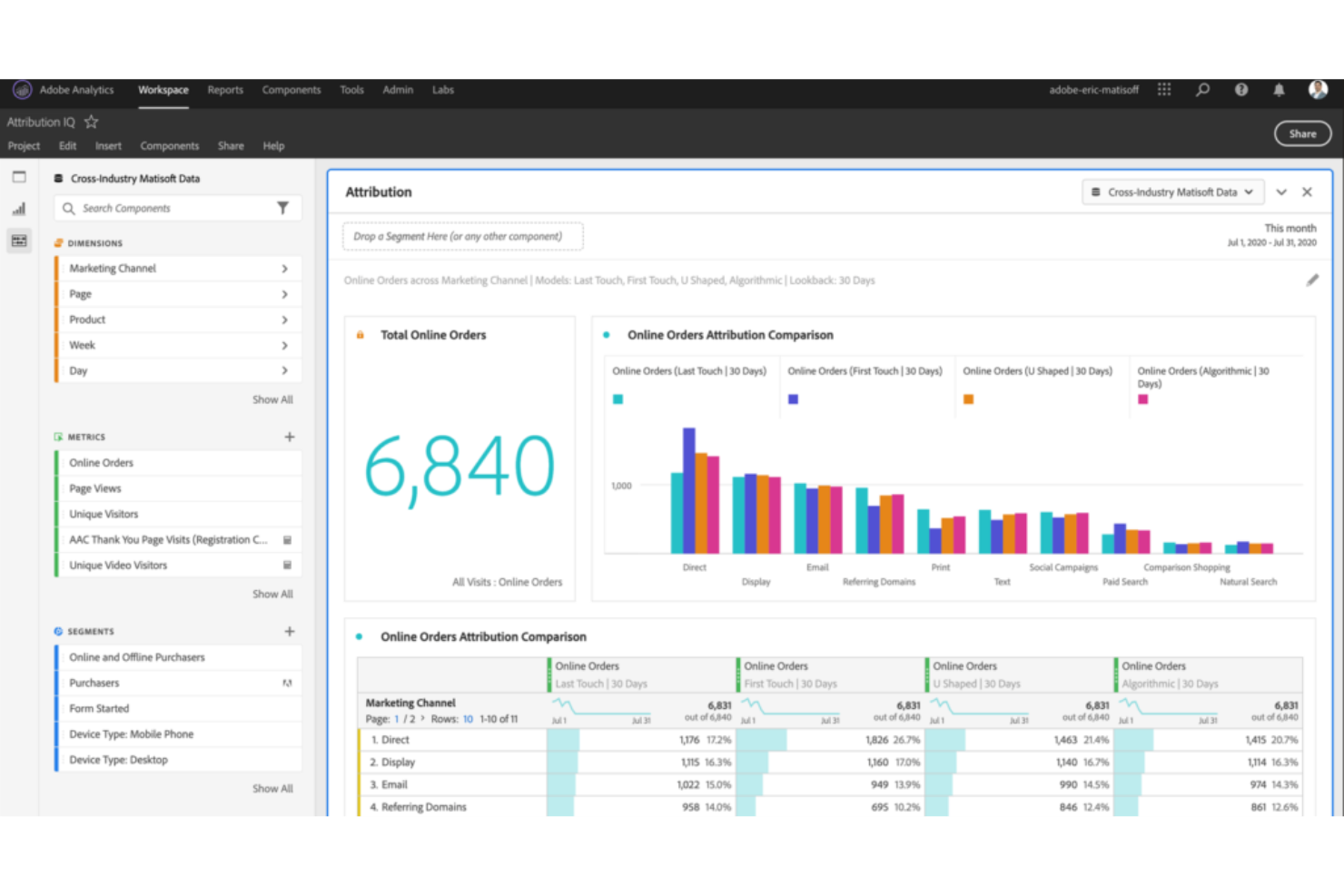
Adobe Analytics is a comprehensive analytics platform that offers a deep understanding of customers' interactions with your business. It's particularly suited for monitoring and optimizing marketing performance, as it integrates with other marketing tools and provides a plethora of data points for in-depth analysis.
Why I Picked Adobe Analytics:
After careful comparison and judgment of various analytics tools, I selected Adobe Analytics because it offers extensive marketing performance tracking capabilities. Its ability to pull data from a multitude of sources, combined with detailed segmentation and real-time analytics, sets it apart from other solutions. Thus, in my opinion, Adobe Analytics is best suited for those looking to monitor and optimize their marketing initiatives.
Standout features & integrations:
Some of the key features of Adobe Analytics include real-time analytics, segment discovery, anomaly detection, and contribution analysis. It excels at integrating various data sources, offering a unified view of the customer journey. As for integrations, Adobe Analytics pairs well with other Adobe Experience Cloud products like Adobe Target and Adobe Audience Manager.
Pros and Cons
Pros:
- Comprehensive customer journey analysis
- Deep integration with Adobe products
- Extensive marketing performance tracking
Cons:
- Limited integrations outside of the Adobe ecosystem
- Can be complex for beginners
- Pricing isn't transparent
Other Product Intelligence Software
Here are some additional product intelligence software options that didn’t make it onto my shortlist, but are still worth checking out:
- Mixpanel
For real-time data analytics
- SellerApp
For Amazon marketplace sellers
- Amplitude
For product and user behavior analytics
- Crazy Egg
Good for heat map tracking
- Qualaroo
Good for collecting user feedback
- Countly
Good for real-time mobile analytics
- Fullstory
Good for session replay functionalities
- AppDynamics
Good for application performance management
- Piwik PRO
Good for data privacy compliance
- MoEngage
Good for customer segmentation and engagement


How I Evaluate Product Intelligence Software
I split my evaluation into two layers: the core capabilities—like funnel analysis and cohort segmentation—a tool must have, and the differentiators that set the best options apart.
Core Functionality (Table Stakes For This List)
When I'm selecting tools for my list, I rank each one on a scale from 0 (does not offer the functionality) to 5 (excels in this area) for each core functionality listed below. Then, I calculate the tool's total score into a percentage. Each tool needs to achieve a minimum total score of 65% to be considered for inclusion.
- Behavioral Event Tracking: I check whether a tool can capture user actions like button clicks, form submissions, and page views across web and mobile with minimal engineering lift.
- Funnel & Path Analysis: Multi-step funnels that show where users drop off—say, between adding an item to a cart and completing checkout—are what I evaluate here.
- Cohort & User Segmentation: I look for the ability to group users by behavior and attributes, such as comparing trial users who completed onboarding against those who didn't.
- Retention & Engagement Analytics: Tools should surface retention curves and stickiness metrics so you can answer questions like "are users coming back after their first week?"
- Session Replay or User-Level Insights: I evaluate whether the tool provides qualitative context, like watching a user struggle with a settings page, alongside quantitative data.
- Integrations & Data Pipeline: Compatibility with warehouses like Snowflake or BigQuery and CDPs like Segment matters here, along with CRM and marketing tool connectivity.
Once I have a list of tools that meet the criteria, I consider what sets each platform apart.
Differentiating Factors (What Sets Vendors Apart)
Here's how I compare and contrast different vendors:
Standout Features
AI-powered insights are a big differentiator—I look for tools that automatically flag unexpected drops in activation or retention without requiring manual dashboard exploration. Native A/B testing is another factor I weigh, since it lets product teams measure the impact of a new onboarding flow or pricing page directly within the analytics environment. I also evaluate feature flag integration, which ties release events to usage data so you can see exactly how a new feature affects engagement.
Beyond Features
Pricing model matters a lot here. Event-based pricing can spiral quickly as your product scales, so I evaluate whether a vendor's model stays predictable as your user base grows. Warehouse and data stack fit is equally important—I check whether a tool works natively with your existing warehouse or requires a separate data pipeline. I also consider data governance, especially role-based access controls and compliance certifications, since product data often contains sensitive user behavior that teams across the organization will access.
How to Choose Product Intelligence Software
It’s easy to get bogged down in long feature lists and complex pricing structures. To help you stay focused as you work through your unique software selection process, here’s a checklist of factors to keep in mind:
| Factor | What to Consider |
|---|---|
| Scalability | Can the software grow with your team? Consider future growth and whether the tool can handle increased data and users without performance issues. |
| Integrations | Does it connect with your existing tools? Check for compatibility with your CRM, analytics, and communication platforms to avoid workflow disruptions. |
| Customizability | Can you tailor the software to your needs? Look for options to adjust dashboards, reports, and workflows to suit your team's preferences. |
| Ease of use | Is the tool user-friendly? Evaluate the learning curve and whether your team can quickly adapt without extensive training. |
| Implementation and onboarding | How smooth is the setup? Consider the time and resources needed for deployment, including training and support during the transition. |
| Cost | Does it fit your budget? Compare pricing plans, watch for hidden fees, and consider the value of features offered in each tier. |
| Security safeguards | Are your data and privacy protected? Look for encryption, user access controls, and compliance with relevant data protection regulations. |
What is Product Intelligence Software?
Product intelligence (PI) software is a tool that helps businesses gather and analyze data about how users interact with their products. Product managers, marketers, and data analysts generally use these tools to make informed decisions and improve product offerings. Features like user behavior tracking, data analysis, and reporting help with understanding customer needs and enhancing product development. Overall, these tools provide valuable insights to drive product success and customer satisfaction.
Features
When selecting product intelligence software, keep an eye out for the following key features:
- User behavior tracking: Collects data on how users interact with your product to help identify popular features and areas for improvement.
- Data analysis: Provides tools to analyze user data and generate insights that inform product decisions and strategies.
- Reporting: Offers customizable reports to visualize data trends and track product performance over time.
- Audience segmentation: Allows you to categorize users based on behavior and characteristics for targeted analysis and marketing.
- Predictive analytics: Uses historical data to forecast future trends and user behaviors, aiding in proactive decision-making.
- Integration capabilities: Connects with other tools and platforms to ensure seamless data flow and comprehensive analysis.
- Customizable dashboards: Let you tailor the interface to display the most relevant metrics and insights for your team.
- Real-time data processing: Provides immediate insights into user interactions, enabling quicker response to trends and issues.
- Security safeguards: Ensures data protection with encryption and access controls, keeping user information safe.
- Interactive product tours: Guides new users through features, enhancing onboarding and user experience.
Benefits
Implementing product intelligence software provides several benefits for your team and your business. Here are a few you can look forward to:
- Improved decision-making: Access to detailed data analysis helps your team make informed product decisions based on real user behavior.
- Enhanced customer understanding: User behavior tracking offers insights into customer needs and preferences, allowing for better-targeted product improvements.
- Increased efficiency: Automated reporting saves time by providing quick access to key metrics and performance indicators.
- Proactive development: Predictive analytics enables your team to anticipate trends and plan enhancements before issues arise.
- Targeted marketing efforts: Audience segmentation allows for more precise marketing strategies by identifying distinct user groups.
- Better user experience: Interactive product tours and onboarding features improve user satisfaction by making the product easier to learn and use.
- Data security assurance: Security safeguards protect user data, ensuring compliance with privacy regulations and building customer trust.
Costs & Pricing
Selecting product intelligence software requires an understanding of the various pricing models and plans available. Costs vary based on features, team size, add-ons, and more. The table below summarizes common plans, their average prices, and typical features included in product intelligence software solutions:
Plan Comparison Table for Product Intelligence Software
| Plan Type | Average Price | Common Features |
|---|---|---|
| Free Plan | $0 | Basic analytics, limited user tracking, and basic reporting. |
| Personal Plan | $5-$25/user/month | Advanced analytics, custom dashboards, and email support. |
| Business Plan | $30-$60/user/month | User segmentation, integration capabilities, and priority support. |
| Enterprise Plan | $75-$150/user/month | Predictive analytics, a dedicated account manager, and advanced security features. |
Product Intelligence Software FAQs
Here are some answers to common questions about product intelligence software:
How does product intelligence software collect data?
Product intelligence software collects data through various methods, including tracking user interactions on your website or app, integrating with other tools like CRMs, and importing existing datasets. It uses cookies, event tracking, and API connections to gather information. You’ll need to ensure your software complies with data privacy regulations like GDPR when collecting user data.
Can product intelligence software work across multiple teams?
Yes, most tools can support product, marketing, and support teams at once. Each team can use different dashboards to focus on what they care about. Product managers might look at feature usage, while marketers care about conversions. You can set custom access levels to avoid noise.
How do product teams use funnels in product intelligence software?
Funnels help you measure how users move through key flows like onboarding or checkout. You can find where users drop off and test changes to improve that step. Product teams often build funnels for both new and returning users. You can also break them down by segment or platform.
Is training required to use product intelligence software?
Yes, some training is usually required to use product intelligence software effectively. While many tools are user-friendly, understanding the full capabilities may need tutorials or training sessions. Look for software that offers comprehensive onboarding resources like videos, webinars, and documentation to get your team up to speed quickly.
What’s Next:
If you're in the process of researching product intelligence software, connect with a SoftwareSelect advisor for free recommendations.
You fill out a form and have a quick chat where they get into the specifics of your needs. Then you'll get a shortlist of software to review. They'll even support you through the entire buying process, including price negotiations.