

Free storyboard software or storyboards with a free version give you essential tools to visually plan scenes, sequences, and ideas without any upfront cost, whether through a free plan or a free trial. If you need to sketch concepts, collaborate with your team, or bring creative ideas to life, choosing the right free storyboard tool can make or break your workflow.
With paid options and feature limitations everywhere, it’s tough to tell which free storyboard software can actually support your pre-production process and still fit your budget. This guide breaks down what you can expect from each option, so you can confidently invest your time in the best tools for your projects.
Why Trust Our Software Recommendations
6,700+
Reviews
20
Industry experts
16+
Evaluation factors
14
Years
Our team has been testing and reviewing software since 2012. As product managers ourselves, we know how difficult—and important—it is to choose the right software.
For this guide, we evaluated tools using hands-on testing and independent research, scoring tools using our selection criteria.
Our reviews reflect our human editorial judgment, not a sales pitch.
Expert reviewers:
- Andrew LumbySenior TPM
- Cristiano ValimSenior UI/UX Lead


Comparison Table: Free Storyboard Software
This comparison table summarizes pricing details for my top free storyboard software selections.
| Tool | Best For | Trial Info | Price | ||
|---|---|---|---|---|---|
| 1 | Best for collaborative visual planning | Free trial + free plan available | From $144/user/year (billed annually) | Website | |
| 2 | Best for organizing creative concepts visually | Free plan available | From $9.99/user/month (billed annually) | Website | |
| 3 | Best for integrated production workflows | Free plan available | From $25/user/month (billed annually) | Website | |
| 4 | Best for AI-powered storyboard generation | Free plan + free trial available | From $50/month (billed annually) | Website | |
| 5 | Best for diverse scene and character libraries | Free trial + free plan available | From $14.99/month | Website | |
| 6 | Best for cross-functional team collaboration | Free plan + 14-day free trial available | From $8/user/month (billed annually) | Website | |
| 7 | Best for film-grade animatic storyboarding | 14-day free trial | From $90/month | Website | |
| 8 | Best for hand-drawn illustration flexibility | Free forever | Free forever | Website | |
| 9 | Best for rapid sketching with drawing tools | Free forever | Free forever | Website | |
| 10 | Best for intuitive drag-and-drop sequences | Not available | From $7.99/month (billed annually) | Website |


Free Storyboard Software Reviews
Below are my detailed summaries of the free storyboard software that made it onto my shortlist. My reviews offer a detailed look at the features, capabilities, and best use cases of each tool to help you find the best one for you.
 Best for collaborative visual planning
- Free trial + free plan available
- From $144/user/year (billed annually)
Visit WebsiteCustomer Rating:4.7/5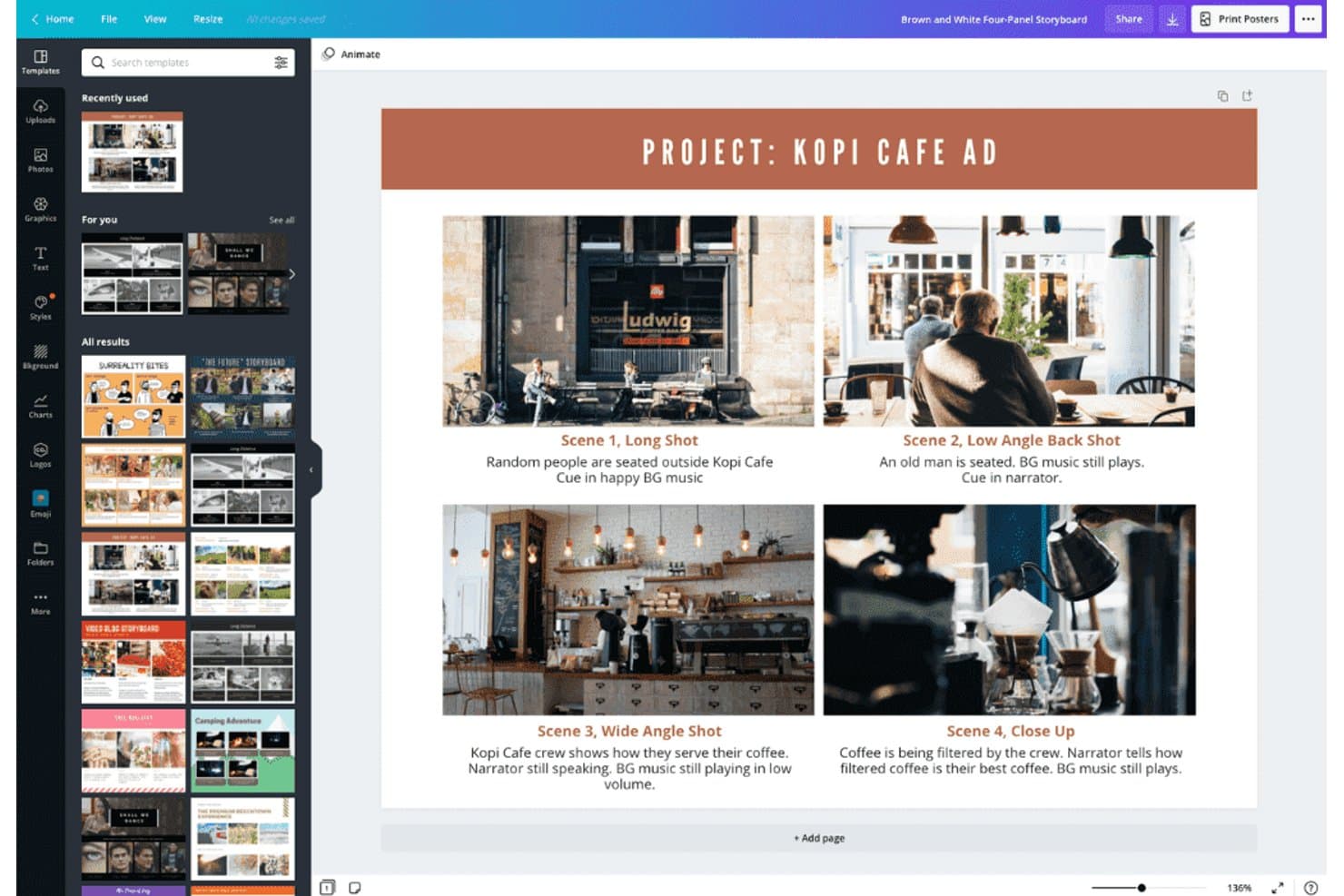
Canva lets users build storyboards with scenes, shots, and notes. Canva is a free storyboard software platform with film and video templates, multi-page panel layouts, drawing and image-import tools, annotations, whiteboards, collaborative editing, and presentation and export features.
Who Is Canva Best For?
Canva suits film and video creators and marketing teams that need to storyboard, collaborate on visual ideas, and present concepts without specialized production software.
Why I Picked Canva
I picked Canva because its storyboard templates turn scene planning into a collaborative visual workspace. I use multi-page film and video layouts to arrange shots, add annotations, and reorder sequences before production. Whiteboards, comments, and presentation mode also let my team refine a concept and present the visual flow from one shared design.
Canva Key Features
- Shape Assist: Converts freehand sketches into clean shapes, arrows, and diagrams.
- AI image generation: Creates visuals for storyboard scenes from text prompts.
- Flowchart connectors: Links shapes with straight, curved, or elbow connectors.
- Presenter view: Displays speaker notes and upcoming slides during presentations.
Canva Integrations
Canva offers documented integrations with Google Workspace, Microsoft Teams, Dropbox, OneDrive, Box, and Google Photos. It also supports marketplace integrations through the Canva Apps Marketplace, including Figma to Canva.
What's Free?
Canva offers a free-forever plan with 5 GB of storage, free templates and assets, and PDF, JPG, and PNG exports. Premium content, advanced brand tools, print-ready downloads, transparent backgrounds, and higher AI allowances require a paid plan.
Pros and Cons
Pros:
- Presentation mode supports creative pitches
- Extensive film and video storyboard templates
- Collaborative scene planning with live comments
Cons:
- Large projects can feel slow
- No structured shot metadata fields
Learn more about Canva: Best for organizing creative concepts visually
- Free plan available
- From $9.99/user/month (billed annually)
Visit WebsiteCustomer Rating:4.7/5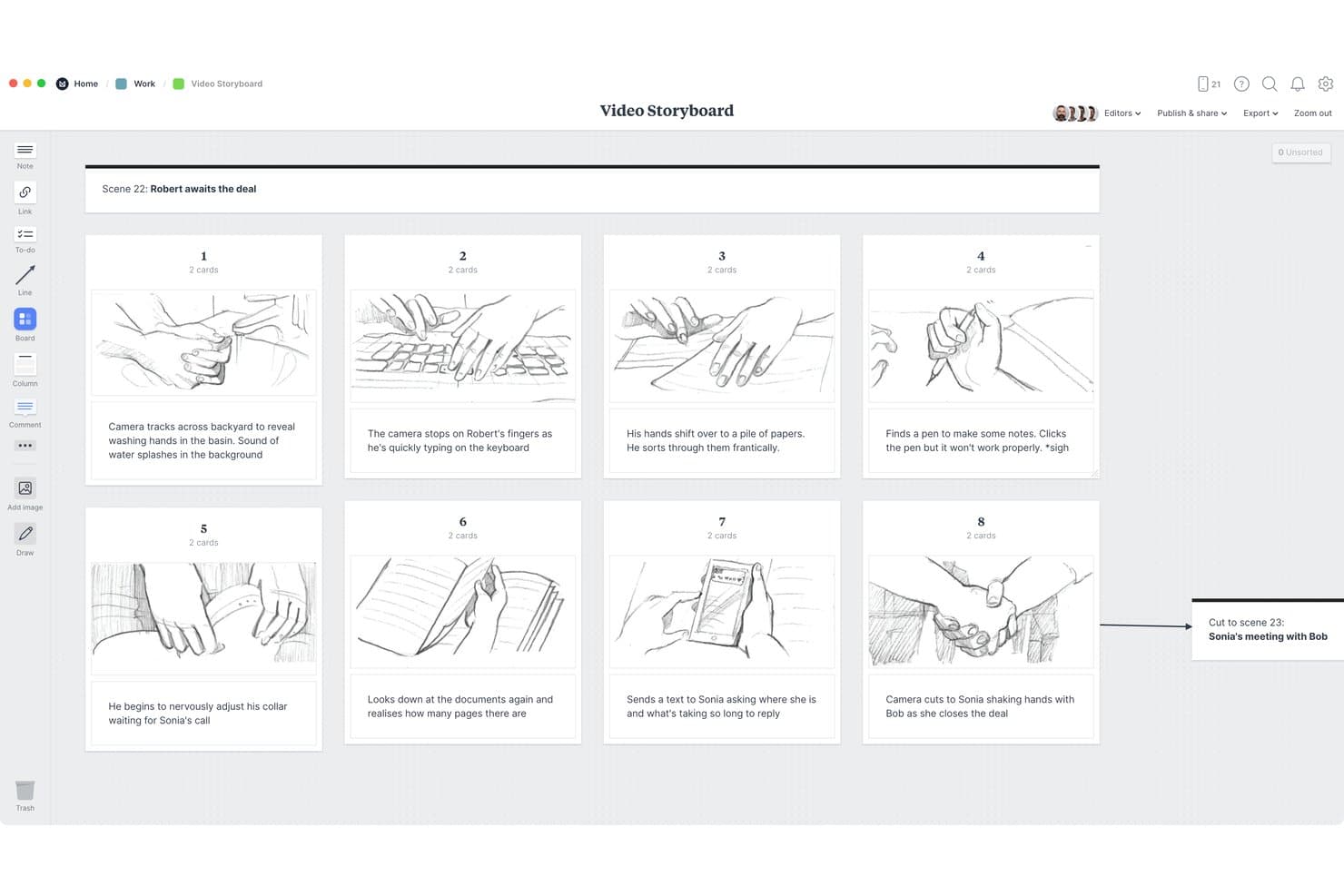
Milanote lets users build visual storyboards with sketches and scene notes. Milanote is free storyboard software built around an infinite visual workspace, with image and video cards, sketches, columns, templates, annotations, presentation mode, and collaborative sharing.
Who Is Milanote Best For?
Milanote suits marketing and creative teams that need to shape campaign concepts, scene sequences, and visual pitches on a flexible shared canvas.
Why I Picked Milanote
I picked Milanote because it turns storyboard planning into a flexible visual workspace. I use its infinite canvas, image and sketch cards, and columns to arrange scenes, references, and annotations side by side. Presentation mode then helps me walk stakeholders through a campaign concept or scene sequence without exposing editing tools.
Milanote Key Features
- Storyboard templates: Choose from 12 templates for film, UX, video, games, and marketing.
- Comment threads: Add replies, mentions, reactions, and notifications to board items.
- Export formats: Download boards as PDF, PNG, Word, Markdown, plain text, or ZIP.
- Read-only links: Share boards with viewers who don't have Milanote accounts.
Milanote Integrations
Milanote supports Pexels and link-card embeds for YouTube, Vimeo, Airtable, Marvel, and other documented services.
What's Free?
Milanote has a free-forever plan with no time limit. It includes up to 100 notes, images, or links and 10 file uploads, while larger usage requires a paid plan.
Pros and Cons
Pros:
- Read-only sharing simplifies stakeholder review
- Presentation mode clarifies creative pitches
- Flexible canvas supports mixed-media storyboards
Cons:
- Missing structured fields complicates shot planning
- Free card limits restrict larger projects
Learn more about Milanote: Best for integrated production workflows
- Free plan available
- From $25/user/month (billed annually)
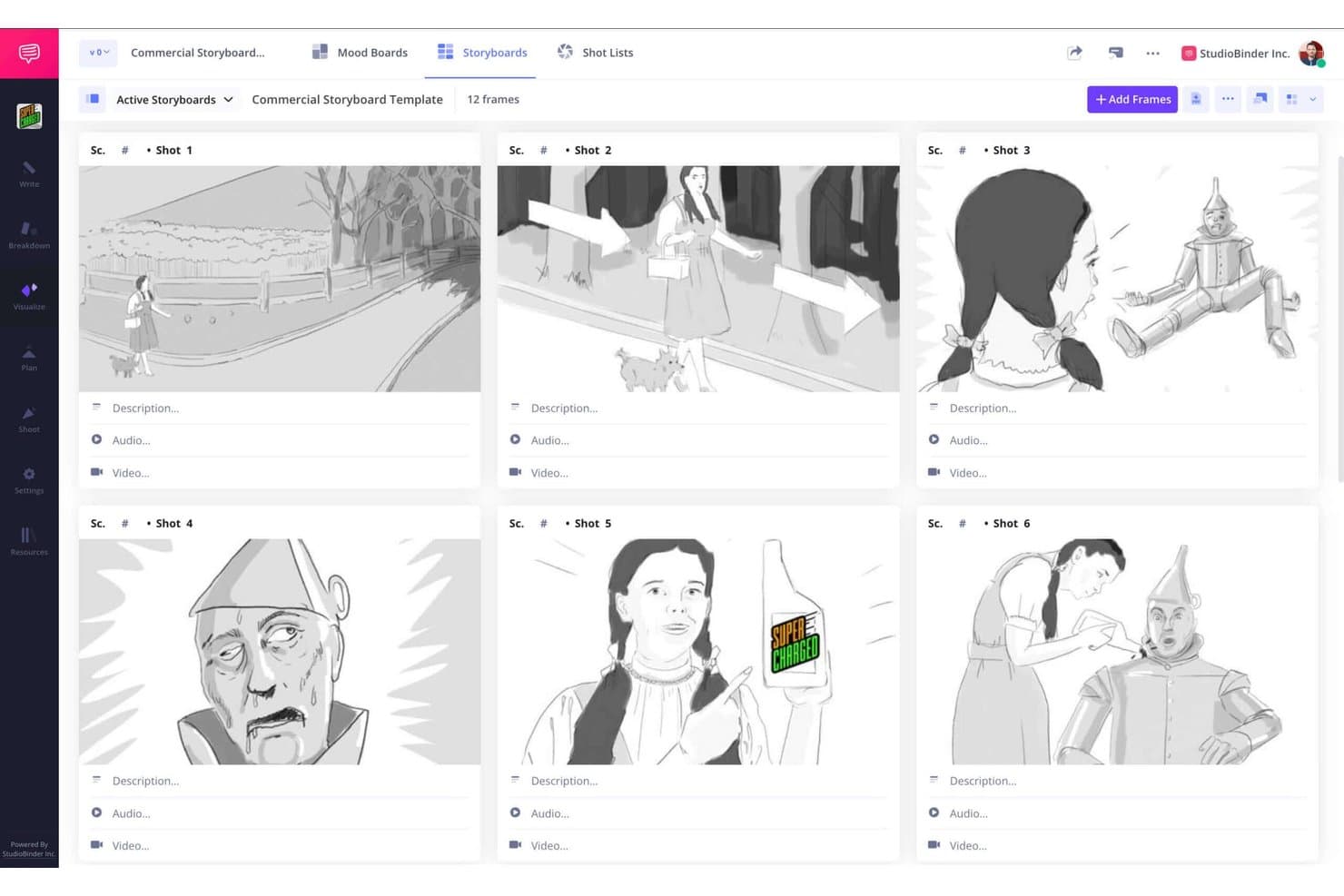
StudioBinder lets users build visual storyboards with sketches in a grid layout. StudioBinder is free storyboard software for film and video production that connects script-to-storyboard creation with scene panels, shot lists, mood boards, scheduling, and call sheets.
Who Is StudioBinder Best For?
Film and video production teams that need to connect storyboards with shot lists, scripts, schedules, and call sheets.
Why I Picked StudioBinder
I picked StudioBinder because it connects storyboards to integrated production workflows. I use its script-to-storyboard tools to turn scenes into sequential panels, then carry shot details into shot lists and schedules. Scene grouping, camera fields, and view-only sharing keep directors, crews, and collaborators aligned from planning through production.
StudioBinder Key Features
- Image import: Upload images, drag and drop files, or scan sketches with a webcam.
- Drag-and-drop sequencing: Reorder frames between scenes with automatic renumbering.
- Storyboard annotations: Add text boxes and structured fields for shot size, lens, angle, and sound.
- CSV export: Export storyboard data from the storyboard settings menu.
StudioBinder Integrations
StudioBinder connects with Final Draft for script import and export, and pulls Google Maps and live weather into call sheets.
What's Free?
StudioBinder offers a free-forever tier with access to core storyboard and production planning tools. Advanced scheduling, call sheets, and collaboration features require a paid subscription.
Pros and Cons
Pros:
- No-login collaborator viewing supports reviews
- Shot details carry into production planning
- Script-to-storyboard scene generation
Cons:
- No native freehand drawing canvas
- Free tier caps projects and storyboards
Learn more about StudioBinder: Best for AI-powered storyboard generation
- Free plan + free trial available
- From $50/month (billed annually)

Boords offers storyboard panels with scene art, camera moves, and shot notes. Boords is a cloud-based storyboard software that lets you generate, edit, and manage storyboards, create scripts, collaborate in real time, and utilize AI to speed up the storyboarding process.
Who Is Boords Best For?
Boords is a strong fit for creative teams and studios in media, marketing, and production who want to speed up storyboard creation using AI.
Why I Picked Boords
I picked Boords as one of the best because I can use its AI-powered storyboard generation to draft scenes instantly from scripts. I like how it lets me edit boards, generate images from text prompts, and quickly adjust scripts and visuals together.
Boords Key Features
- Frame labeling: Add captions and notes directly to each frame for clear scene direction.
- Version control: Easily track changes and revert to previous storyboard versions.
- Drag-and-drop rearranging: Move scenes and frames around by dragging to adjust storyboard order.
- Script-to-board sync: Link your script to frames so updates reflect instantly.
Boords Integrations
Boords offers native integrations with Slack, Notion, and Airtable. An API is available for custom integrations.
What's Free?
Boords offers a free-forever plan, but with limited export capabilities and restrictions on the number of boards you can create. Some advanced features are only available on paid plan.
Pros and Cons
Pros:
- Exports to PDF, animatic, or video formats
- Lets teams edit boards simultaneously online
- AI turns scripts into visuals automatically
Cons:
- Free plan leaves watermarks on exports
- Free plan has export limitations
Learn more about Boords: Best for diverse scene and character libraries
- Free trial + free plan available
- From $14.99/month
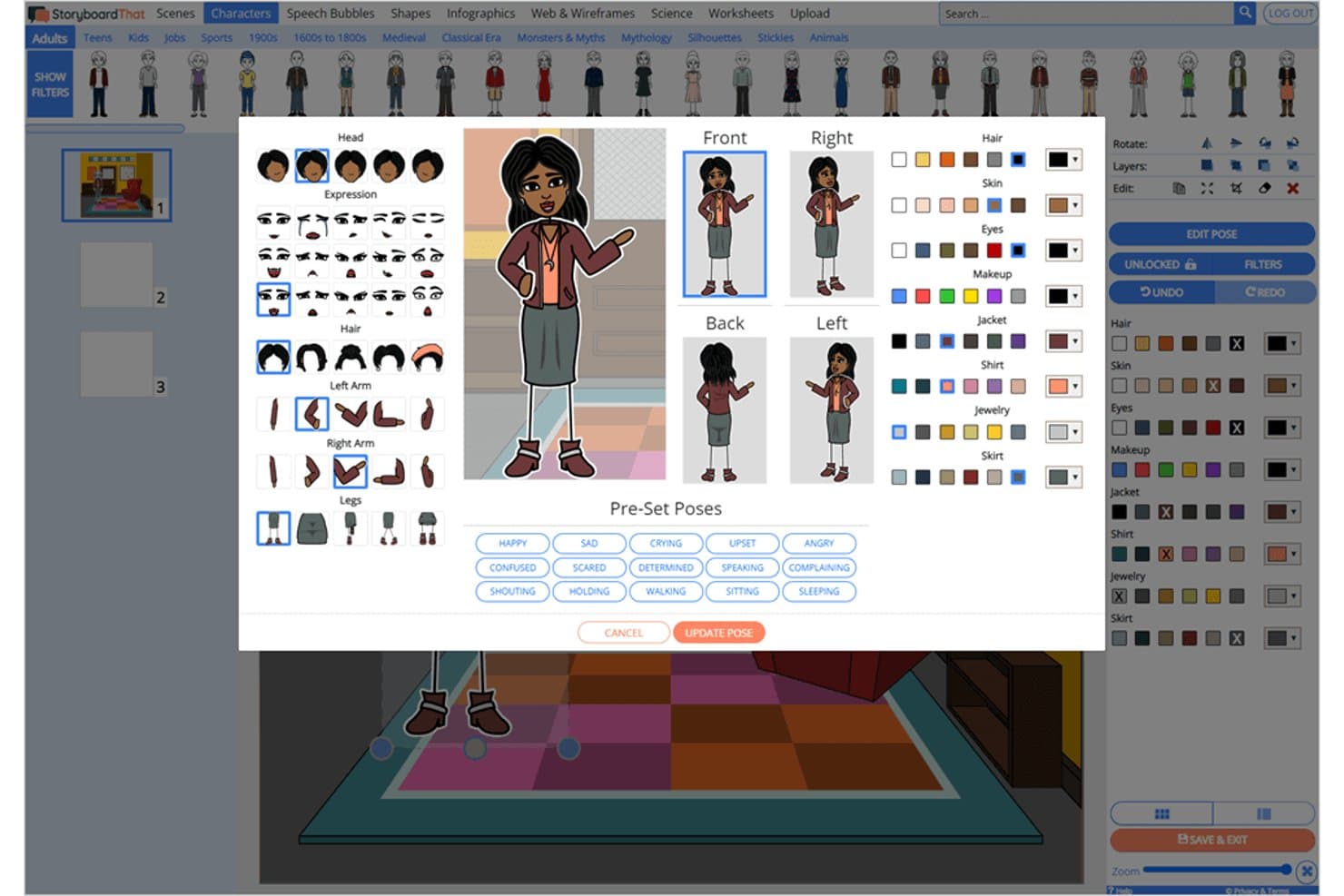
Storyboard That lets users customize character poses and appearances. Storyboard That is free storyboard software with a drag-and-drop, cell-based editor for sequential scenes, posable characters and settings, film and wireframe templates, text annotations, audio, and exports to PDF, PNG, GIF, and PowerPoint.
Who Is Storyboard That Best For?
Storyboard That suits marketing content teams and educators who need polished visual narratives without drawing skills.
Why I Picked Storyboard That
I picked Storyboard That because its diverse scene and character libraries let me build film sequences without drawing. I can pose characters, change expressions, and customize Smart Scenes for marketing concepts or video pitches. Film templates, camera-angle artwork, and 16x9 layouts help me turn those scenes into presentation-ready storyboards.
Storyboard That Key Features
- Cell reordering: Move panels into a new sequence with the dedicated Move Cells tool.
- Audio recording: Attach recorded audio to individual cells for slideshow playback.
- Image uploads: Add JPG, PNG, GIF, BMP, WMF, or SVG files up to 5 MB.
- Version history: Review and restore earlier saved versions on paid plans.
Storyboard That Integrations
Storyboard That supports Google Classroom, Clever, ClassLink, Canvas, Schoology, Blackbaud, Buzz, and D2L through documented integrations. It also embeds Google Docs, Sheets, Slides, Forms, YouTube, and Google Maps.
What's Free?
Storyboard That offers a free-forever basic account for one user, with two storyboards per week and a three-cell layout. It includes limited art, watermarked downloads, and public storyboards, while excluding image uploads, private boards, and commercial use.
Pros and Cons
Pros:
- Templates cover film, marketing, and wireframes
- Film layouts support presentation-ready visual pitches
- Posable characters make polished scenes accessible
Cons:
- No structured fields for shot details
- Free boards remain public and watermarked
Learn more about Storyboard That: 6Best for cross-functional team collaboration
Miro
- Free plan + 14-day free trial available
- From $8/user/month (billed annually)
Visit WebsiteCustomer Rating:4.8/5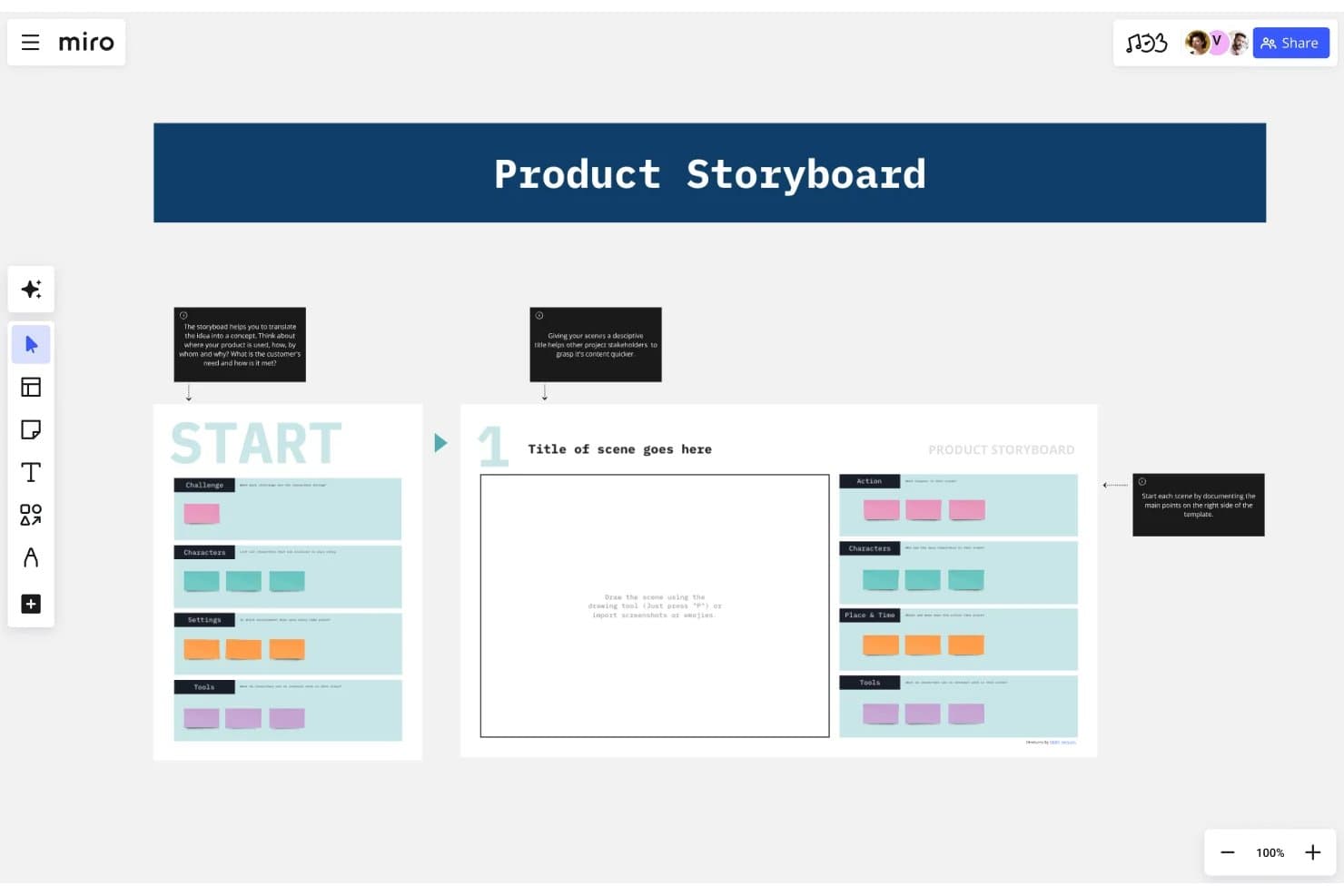
Miro's storyboard template helps teams map product scenes visually. Miro is a free storyboard software platform with an infinite canvas, resizable frames, drawing and image import tools, 7,000+ templates, presentation mode, and Talktrack walkthroughs.
Who Is Miro Best For?
Miro suits marketing content teams and cross-functional product groups that need to plan, present, and refine visual story sequences together.
Why I Picked Miro
I picked Miro because its infinite canvas lets my team arrange resizable storyboard frames for campaigns, product flows, and narrative concepts. Presentation mode and Talktrack turn those sequences into guided stakeholder walkthroughs. Its storyboard and wireframe templates help marketing, design, and product contributors shape the same concept together, making it best for cross-functional team collaboration.
Miro Key Features
- Pen tool: Draw freehand with a mouse, trackpad, or stylus.
- AI image generation: Create storyboard visuals from text prompts.
- Sticky notes: Add color-coded notes with tags and formatting.
- Export formats: Download boards as PDF, JPG, SVG, or CSV.
Miro Integrations
Miro offers 250+ integrations, including Figma, Adobe XD, Google Workspace, Microsoft 365, Slack, Jira, and Confluence. Its APIs and SDKs support custom integrations.
What's Free?
Miro offers a free-forever plan with unlimited team members and up to three editable boards. It includes 250+ integrations, but private boards, guest access, and unlimited editable boards require a paid plan.
Pros and Cons
Pros:
- Talktrack turns sequences into async walkthroughs
- Templates cover campaigns, products, and films
- Infinite canvas supports unlimited storyboard frames
Cons:
- Frames lack built-in shot and timing fields
- Free exports are low-resolution and watermarked
 Best for film-grade animatic storyboarding
- 14-day free trial
- From $90/month
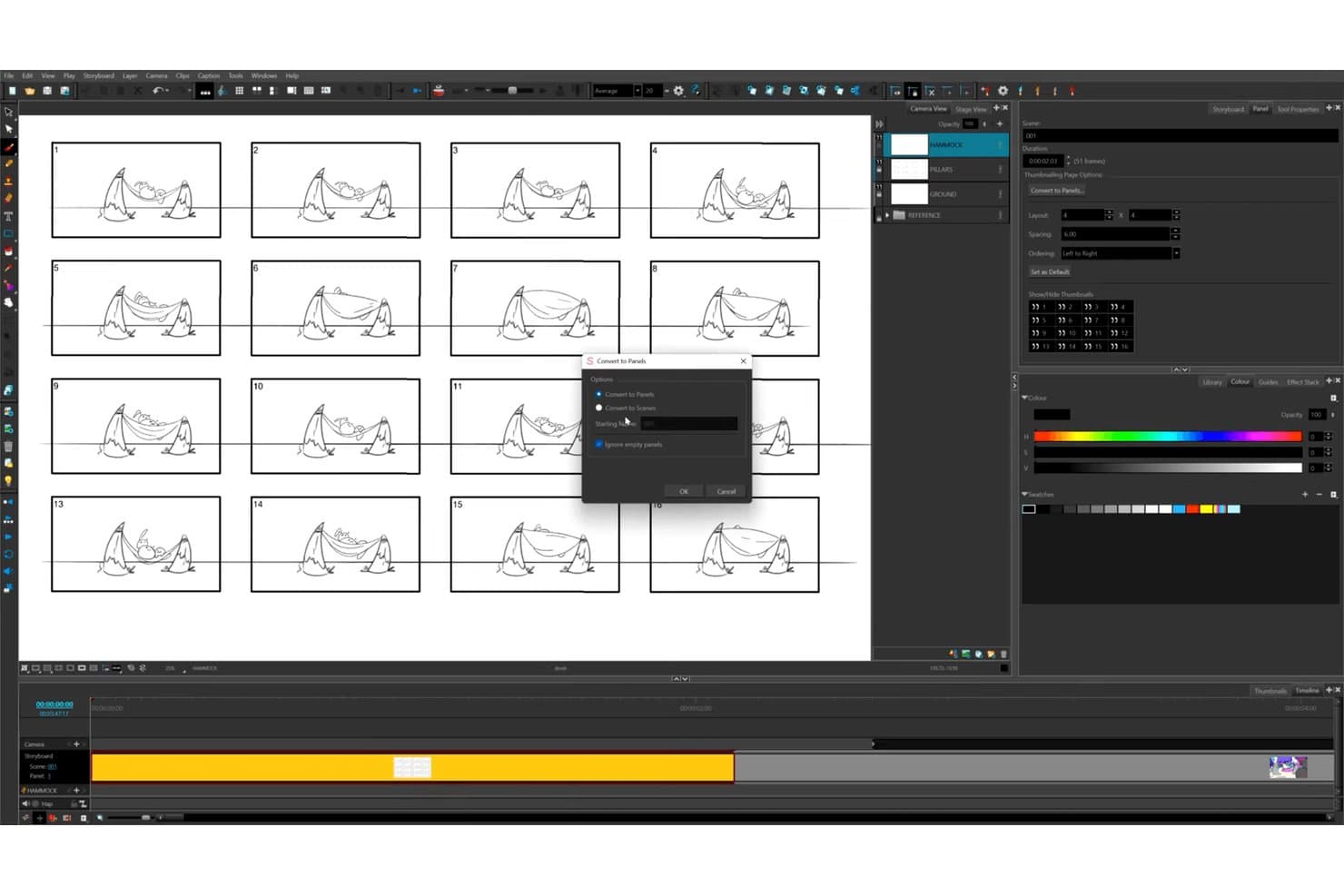
Toon Boom Storyboard Pro lets users convert thumbnails to panels or scenes quickly. Toon Boom Storyboard Pro is desktop storyboard software for film and animation, combining panel-based scene creation, drawing and image imports, animatics, shot notes, camera tools, and exports for editors.
Who Is Toon Boom Storyboard Pro Best For?
Film and animation teams that need detailed storyboards, animatics, camera planning, and editor-ready exports.
Why I Picked Toon Boom Storyboard Pro
I picked Toon Boom Storyboard Pro for film-grade animatic storyboarding because it combines panel and sequence planning with timeline-based camera moves, timing, and audio. I use Pitch Mode to present full-screen scenes with transitions and comments. Its 14-day full-feature trial includes export for testing real production workflows.
Toon Boom Storyboard Pro Key Features
- Thumbnailing page: Arrange rough thumbnails in a customizable grid before converting them into panels.
- Final Draft import: Convert screenplay scenes, action, characters, and dialogue into storyboard content.
- Panel captions: Add dialogue, action notes, slugging, and notes to individual panels.
- 3D environment tools: Import 3D assets, including USD and USDZ files, into scenes.
Toon Boom Storyboard Pro Integrations
Toon Boom Storyboard Pro integrates with Toon Boom Harmony, Final Draft, Adobe Photoshop, and Adobe Illustrator. It supports Avid, Adobe Premiere, Final Cut Pro 7, and Vegas workflows through EDL, AAF, and XML exports.
What's Free?
Toon Boom Storyboard Pro offers a 14-day free trial rather than a free-forever plan. The trial includes full features and export, so you can test production workflows before subscribing.
Pros and Cons
Pros:
- Detailed captions support shot planning
- Pitch Mode supports creative presentations
- Panel timing supports animatic production
Cons:
- No reusable industry template library
- No browser-based stakeholder review
Learn more about Toon Boom Storyboard Pro:
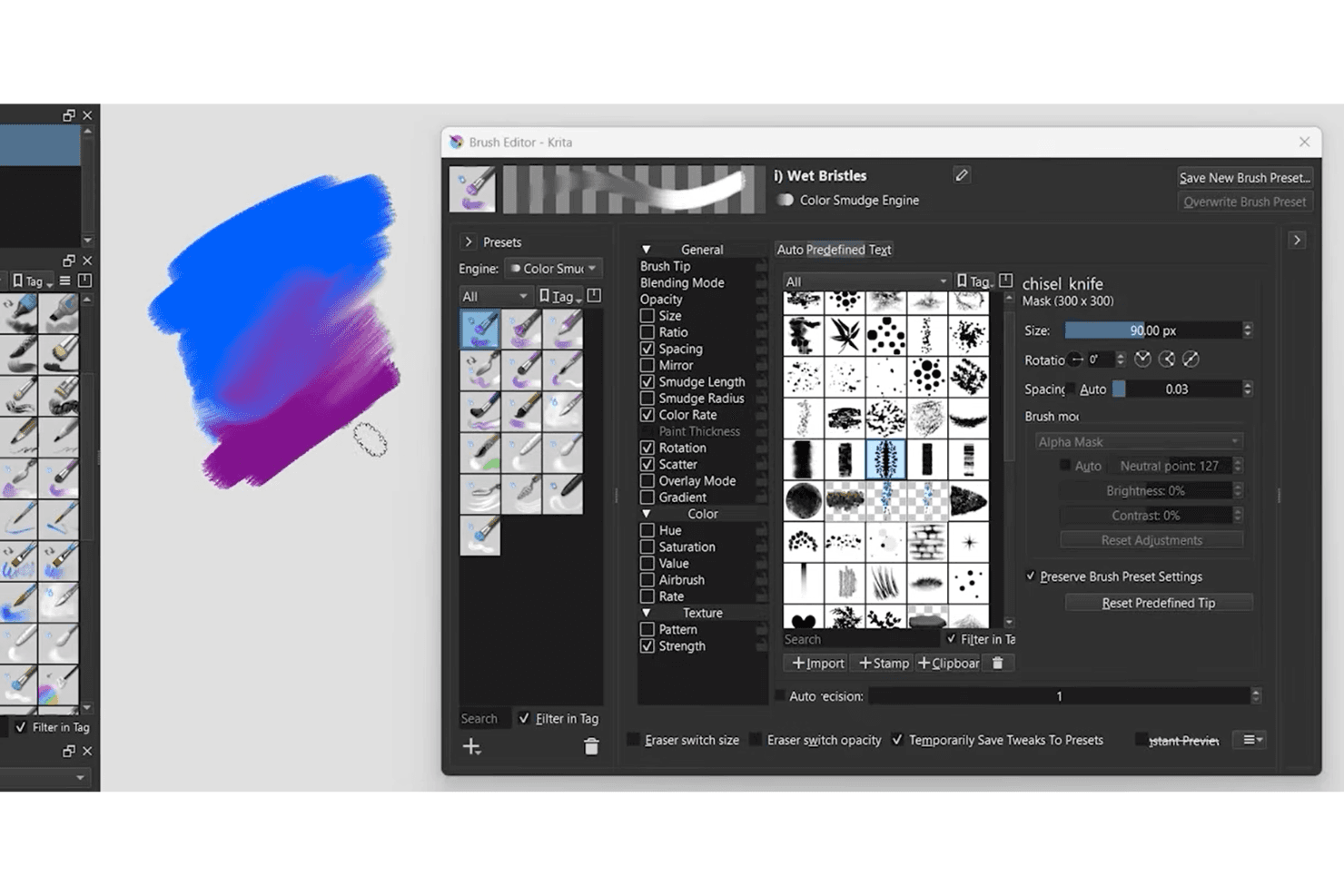
Krita brush editor offers customizable brush presets and digital painting tools. Krita is free, open-source storyboard software with a built-in Storyboard Docker for arranging illustrated scenes, adding durations and production notes, previewing animatics, and exporting boards as PDF or SVG.
Who Is Krita Best For?
Krita suits independent storyboard artists and small film or animation teams needing hand-drawn scene planning without subscription costs.
Why I Picked Krita
I picked Krita because it brings Best for hand-drawn illustration flexibility to structured storyboard planning. I use its Storyboard Docker to arrange scene cards, set durations, add production notes, and preview animatics. Its brush engines, perspective assistants, and reference-image tools help me develop visual sequences from rough thumbnails to polished panels.
Krita Key Features
- PSD file support: Opens and saves Photoshop documents.
- Audio and video export: Exports animations as videos or image sequences.
- Custom SVG templates: Creates reusable storyboard export layouts.
- Comic panel editing: Splits and merges vector panel shapes.
Krita Integrations
Krita doesn't have any native integrations. Its Python API supports custom scripts, dockers, and exporters, while Inkscape and Scribus serve as companion tools for templates and comics layouts.
What's Free?
Krita is free forever and open-source, with no trial expiry or user limit. It doesn’t include native integrations for project management, cloud collaboration, or review tools.
Pros and Cons
Pros:
- PSD support preserves existing artwork workflows
- Scene durations support accurate animatic timing
- Hand-drawn scenes gain polished visual depth
Cons:
- Non-artists face complex storyboard controls
- Storyboard review requires exported files
Learn more about Krita: Best for rapid sketching with drawing tools
- Free forever
- Free forever
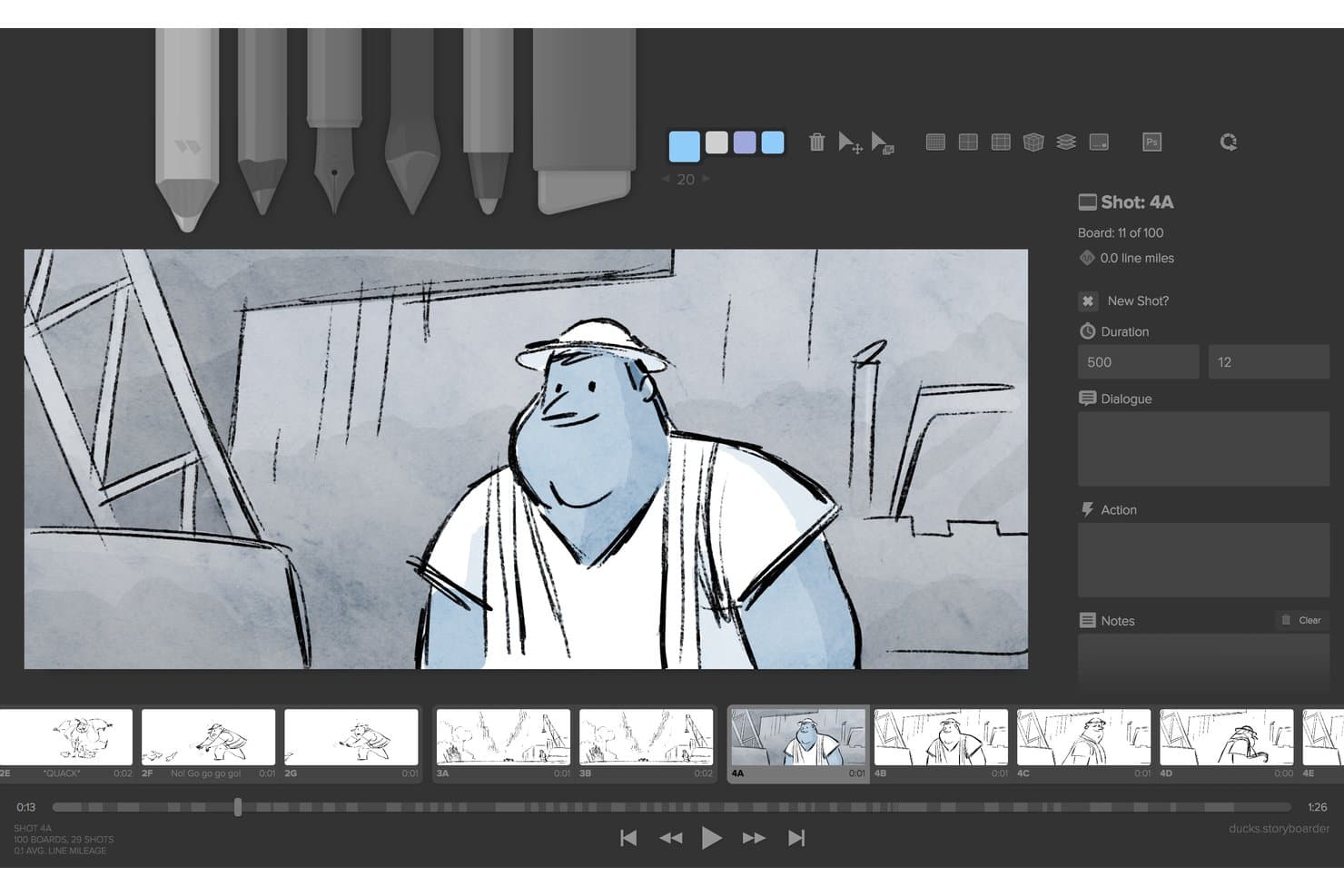
Storyboarder (Wonder Unit) lets users draw and annotate storyboard panels with shot details. Storyboarder is a free, open-source desktop storyboard app for macOS, Windows, and Linux, with drawing tools, script import, panel sequencing, timeline controls, shot notes, animatics, and film-editing exports.
Who Is Storyboarder Best For?
Film and video creators who need a free desktop tool for sketching shots, sequencing panels, and building animatics before production.
Why I Picked Storyboarder
I picked Storyboarder for rapid sketching with drawing tools because its six drawing tools, onion skinning, and framing guides keep shot ideas moving. I use Shot Generator’s 3D references to block camera angles before refining panels. Sketch Sprint also helps capture a timed sequence as an animated GIF.
Storyboarder Key Features
- Script import: Import Final Draft and Fountain screenplays to create boards by scene.
- Timeline mode: Resize boards to set shot durations and display audio waveforms.
- Audio recording: Attach audio files or record narration directly from a microphone.
- NLE export: Export storyboards to Premiere, Final Cut Pro, Avid, PDF, GIF, or video.
Storyboarder Integrations
Storyboarder integrates with Adobe Premiere, Final Cut Pro, Avid, Final Draft, Fountain, Photoshop, Krita, GIMP, Sketchbook, and Clip Studio. It also supports GitHub for version control and collaboration.
What's Free?
Storyboarder is free forever and open source for macOS, Windows, and Linux. There’s no user limit or paid tier listed, but its drawing-focused workflow may feel limited if you need advanced professional features such as extensive background layers.
Pros and Cons
Pros:
- Timeline animatics include timing and audio
- Shot Generator provides useful 3D camera references
- Rapid sketching with six focused drawing tools
Cons:
- No share links, comments, or collaboration
- Development appears stalled since 2021
Learn more about Storyboarder (Wonder Unit): Best for intuitive drag-and-drop sequences
- Not available
- From $7.99/month (billed annually)
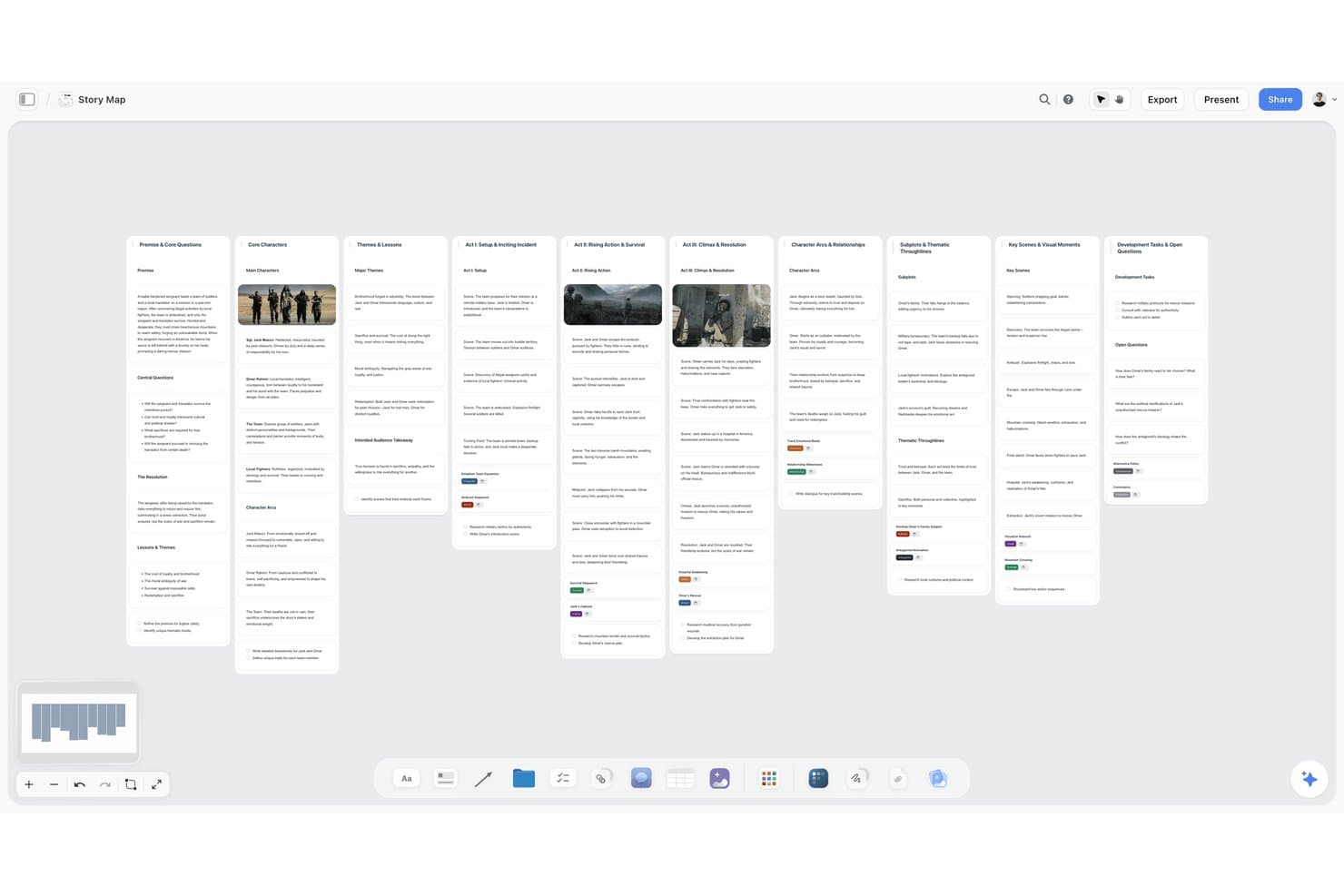
Storyflow organizes story structure across visual swimlane columns. Storyflow is an AI storyboard software platform with an infinite canvas, drag-and-drop frames, shot lists, scene annotations, media imports, collaborative sharing, and exports for pitches, treatments, and presentations.
Who Is Storyflow Best For?
Storyflow suits film, video, and marketing teams that need AI-assisted storyboards, shot lists, and pitch-ready visual plans on one canvas.
Why I Picked Storyflow
I picked Storyflow because its intuitive drag-and-drop sequences let me arrange frames, group scenes, and branch alternate takes on an infinite canvas. I use shot fields for camera, audio, timing, and action notes, then turn boards into pitch decks or treatments. Storyflow is currently paid-only during early access, with a Free plan planned.
Storyflow Key Features
- AI storyboard generation : Create boards from scripts, prompts, or campaign briefs.
- Media imports : Add images, PDFs, videos, audio, and embedded media to boards.
- Comments and sharing : Collect feedback through view-only links and board comments.
- Storyboard templates : Start with templates for storyboards, shot lists, and commercial planning.
Storyflow Integrations
Storyflow doesn't have any native integrations with project management, documentation, chat, or design tools. It supports YouTube and Vimeo embeds, Pinterest pins, and imports from Figma, Miro, FigJam, Mural, Notion, Google Docs, Word, and Markdown.
What's Free?
Storyflow doesn’t currently offer a free-forever plan or free trial. It’s paid-only during early access, although a Free plan is planned.
Pros and Cons
Pros:
- Shot fields organize camera and timing notes
- AI turns scripts into scene boards
- Drag-and-drop sequences support alternate takes
Cons:
- Drawing tools remain limited for sketching
- No free plan or trial currently
Learn more about Storyflow:
Other Free Storyboard Software
Here are some additional free storyboard software options that didn’t make it onto my shortlist, but are still worth checking out:
- 11StoryTribeBest for remote team story development
- 12MurphyBest for script-to-storyboard conversion
- 13KROCKBest for storyboard-to-animatic conversion
- 14FigJamBest for mapping user flows with team input
- 15FrameForge StudioBest for camera-accurate film shot planning
- 16LTX StudioBest AI-driven concept visualization
- 17PanelForgeBest for frame-by-frame animation workflows
How I Evaluate Free Storyboard Software
First, I define what counts as free. Storyboard software qualifies with a free-forever plan or a 7–14-day full-feature trial with export and sharing. From there, I split my evaluation into three parts: core functionality, which carries the most weight, like creating panels and rearranging scenes; standout features, like UI wireframe kits; and what a tool offers beyond its feature set, like free-plan scalability.
Core Functionality (Table Stakes For This List)
In addition to my free plan requirements, I use a scoring system to select tools for my list. I score each one on a scale from 0 (does not offer the functionality) to 5 (excels in this area) for each core functionality listed below, based on what's available on the free plan. I then convert the total into a percentage to help assess each tool's overall fit, with extra weight on any functionalities I've deemed essential.
- Panel-Based Scene Creation (Essential): I look for flexible panels that support multi-scene projects, such as mapping an onboarding flow or planning a video sequence.
- Drawing And Image Import (Essential): I check for direct sketching or image uploads, including interface mockups, reference images, and rough production frames.
- Reordering And Sequencing: Drag-and-drop panel reordering should support quick changes to a user journey, pitch narrative, or shot list.
- Annotations And Notes: I assess per-panel text for dialogue, captions, acceptance details, camera direction, or notes for design and engineering.
- Export And Sharing: I look for PDF or image export and shareable review links for presenting concepts or collecting stakeholder feedback.
- Storyboard Templates: I check for useful starting layouts, including product flows, film sequences, campaign concepts, and presentation-ready boards.
Once I have a list of tools that meet the criteria, I consider what sets each platform apart.
Differentiating Factors (What Sets Vendors Apart)
Here's how I compare and contrast different vendors:
Standout Features
I look for flowchart and connector tools that let you link frames with arrows and branching logic, since product flows rarely follow a straight line. A tool like Miro or FigJam that supports connectors makes it easy to map conditional user journeys during discovery. I also evaluate whether a platform offers a presentation or pitch mode, so you can walk stakeholders through a board without exporting to a separate slide deck. Cross-tool import matters too; pulling in screenshots or design assets from tools like Figma speeds up storyboard assembly and keeps context intact.
Beyond Features
I check whether shareable links let external reviewers comment without creating an account, since stakeholder sign-off stalls when leadership or engineering has to onboard into a new tool just to leave feedback. Free-tier scalability matters too: I look at caps on boards, frames, and collaborators to judge whether a team can realistically run a full sprint cycle before hitting a paywall. Tools like Miro and Canva handle this differently, so I compare how each structures its free limits against actual planning volume.
How to Choose Free Storyboard Software
It’s easy to get bogged down in long feature lists and complex pricing structures. To help you stay focused as you work through your unique software selection process, here’s a checklist of factors to keep in mind:
| Factor | What to Consider |
|---|---|
| FactorScalability | What to ConsiderCan the platform grow with your team and projects, or will you quickly hit user, project, or storage limits on the free plan? |
| FactorIntegrations | What to ConsiderDoes the tool offer built-in connections to apps you already use, such as file storage or project management tools? |
| FactorCustomizability | What to ConsiderCan you adjust story templates, workflow steps, or export settings to fit your creative process without extra costs? |
| FactorEase of use | What to ConsiderWill all team members pick up the basics quickly, or will they need extensive training to get started? |
| FactorImplementation and onboarding | What to ConsiderWhat support, tutorials, or import tools are provided for moving existing materials and ramping up new users with minimal disruption? |
| FactorCost | What to ConsiderWhat are the hidden costs of “free”—does the plan restrict downloads, watermarks, users, or collaboration? |
| FactorSecurity safeguards | What to ConsiderAre your storyboards and assets protected with basic security, user roles, or privacy controls that meet your team’s requirements? |
| FactorSupport availability | What to ConsiderCan you access timely technical help or real user support when issues come up, or are you limited to community forums and self-service resources? |
What Is Free Storyboard Software?
Free storyboard software is a digital tool that lets individuals or teams visually organize, plan, and sequence stories or projects using frames or panels, without requiring payment. These platforms help users sketch, arrange, and edit story ideas, supporting creative collaboration and project visualization. Most free storyboard tools offer core features like adding images, text, and notes to panels, making them practical for any visual storyboard artist, educator, content creator, and design team.
Features of Free Storyboard Software
Let’s go over the features commonly found in storyboard software, and which ones are usually included in free vs. paid plans.
Typically Free Storyboard Software Features
- Drag-and-drop editing: Move, resize, and arrange storyboard frames visually within a digital workspace, allowing for easy reordering of scenes or ideas.
- Basic image and text support: Add images, illustrations, and text notes directly to panels for clear communication of ideas and scene details.
- Template library: Start with pre-designed storyboard templates to speed up project setup and maintain consistent layouts.
- Frame duplication: Quickly copy existing frames to maintain continuity or iterate on story changes without rebuilding from scratch.
- Export to image formats: Save or share complete storyboards in standard formats like PNG or JPEG for use in presentations or collaboration.
- Team collaboration: Invite others to view, comment, or contribute on a storyboard in real time or asynchronously.
- Basic version history: Access and restore earlier drafts or changes to support group edits or undo mistakes.
Typically Paid Storyboard Software Features
- Audio and video embedding: Attach soundtracks or video clips to storyboard frames, providing a richer, more realistic preview of the final project.
- Advanced export options: Export storyboards to specialized formats like PDF, PSD, or production-ready files for seamless integration with other tools.
- Watermark removal: Output finished storyboards without branding or watermarks, supporting professional and client-facing use cases.
- Unlimited projects or frames: Create as many projects or storyboard panels as needed, without restrictions that can limit creative scope.
- Custom branding: Add company logos, colors, or templates to storyboards for a consistent and branded client deliverable.
- Priority support or training: Access live, prioritized help channels or specialized onboarding and training materials for faster issue resolution.
- Interactive commenting and markup: Draw, highlight, or leave frame-specific feedback directly on storyboards for precise team communication.
- Integrations with external tools: Connect to third-party platforms like file storage, creative suites, or project management tools for streamlined workflows.
- Advanced permissions and access controls: Set detailed user roles and permissions to control who can view, edit, or share storyboard projects.
- AI-enhanced features: Use tools such as AI-generated storyboards, script suggestions, or automatic animatics to accelerate creative development.
Benefits of Free Storyboard Software
Implementing free storyboard software provides several benefits for your team and your business. Here are a few you can look forward to:
- Cost savings: Access essential storyboard features without upfront investment, making it easier for startups and small teams to manage creative projects.
- Visual clarity: Communicate ideas more effectively by arranging scenes and adding notes with drag-and-drop editing and templates.
- Real-time collaboration: Work together with remote team members using shared boards, commenting, and live updates built into many platforms.
- Faster feedback cycles: Quickly duplicate frames, update scenes, or export drafts for review to accelerate creative iteration and approvals.
- Easy onboarding: Bring new contributors up to speed using templates, tutorials, and intuitive interfaces often included in freemium plans.
- Flexible workflows: Rearrange and adapt story structures or add new frames as creative needs evolve, supporting different project types and sizes.
- Accessible anywhere: Use cloud-based storyboard software to sketch, review, or update projects from any location or device.
Costs and Pricing of Storyboard Software
I realize you came to this article looking for the best storyboard software options that are available for free. However, since free plans only offer limited features, there's a good chance you'll need to scale your plan up in the future.
The table below summarizes common plans, their average prices, and typical features included in storyboard software:
Plan Comparison Table for Storyboard Software
| Plan Type | Average Price | Common Features |
|---|---|---|
| Plan TypeFree Plan | Average Price$0 | Common FeaturesBasic editing tools, limited export options, collaboration for small teams, access to templates, and basic cloud storage. |
| Plan TypePersonal Plan | Average Price$5-$15/user/month | Common FeaturesAdditional export formats, more storage, version history, watermark removal, and access to support channels. |
| Plan TypeBusiness Plan | Average Price$15-$30/user/month | Common FeaturesUnlimited projects, team management tools, custom branding, advanced commenting, integrations, and larger asset libraries. |
| Plan TypeEnterprise Plan | Average Price$30-$60/user/month | Common FeaturesAdvanced security, priority support, custom integrations, audit trails, dedicated onboarding, and granular user permissions. |
Free Storyboard Software FAQs
Here are some answers to common questions about free storyboard software:
Are free storyboard software solutions secure?
Yes, most free storyboard software providers use standard security measures like encryption and user authentication, but you should always check if advanced protections or compliance features are available and sufficient for your needs.
Can I use free storyboard software for commercial projects?
Yes, many free storyboard tools allow commercial use, but always review the provider’s terms to check for limitations on outputs or any required attribution, especially regarding watermarks or branded exports.
What limitations should I expect with free storyboard software?
Free plans often limit the number of projects, storage space, export formats, and team members, and may display watermarks on your storyboards, so you’ll want to assess if these constraints fit your workflow before relying on a tool.
Do free plans usually include real-time collaboration features?
Some free storyboard platforms do include real-time collaboration, but access may be restricted to smaller teams or limited in feature depth compared to paid versions; always confirm collaboration options before starting a group project.
How easy is it to upgrade from a free to a paid storyboard plan?
Upgrading is usually straightforward. Most vendors let you keep your projects and settings when moving to a paid plan, unlocking additional features and removing previous limitations almost instantly after purchase.