

With so many different free product analytics options available, figuring out which one is right for you is tough. You need all of the essential features to track and analyze user interactions, behavior, and key metrics related to a digital product, but you still have to stick to a limited budget. I've got you! In this post I'll help make your choice easy, sharing my experiences using multiple free tools with larger teams and dozens of diverse products on a tight budget, with my picks of the best free product analytics tools.
Why Trust Our Software Recommendations
6,700+
Reviews
20
Industry experts
16+
Evaluation factors
14
Years
Our team has been testing and reviewing software since 2012. As product managers ourselves, we know how difficult—and important—it is to choose the right software.
For this guide, we evaluated tools using hands-on testing and independent research, scoring tools using our selection criteria.
Our reviews reflect our human editorial judgment, not a sales pitch.
Expert reviewers:
- Andrew LumbySenior TPM
- Cristiano ValimSenior UI/UX Lead


Comparison Table: Free Product Analytics Tools
This comparison table summarizes pricing details for my top free product analytics tool selections.
| Tool | Best For | Trial Info | Price | ||
|---|---|---|---|---|---|
| 1 | Best for no-code UX friction spotting | Free plan available | From $25/month | Website | |
| 2 | Best for mapping the full customer journey free | Free plan available | Pricing upon request | Website | |
| 3 | Best for no-code retroactive event tracking | Free plan available | Pricing upon request | Website | |
| 4 | Best for behavior analytics and AI-driven insights | Free plan + free demo + 15-day free trial available | From $39/month (billed annually) | Website | |
| 5 | Best for privacy-first, unsampled web analytics | 21-day free trial | From $26/month (billed annually) | Website | |
| 6 | Best for a universally-popular choice | Free plan available | From $50,000/year (billed annually) | Website | |
| 7 | Best for interactive reporting | Free plan available | From $120/month (billed annually) | Website | |
| 8 | Best for free analytics with built-in replay | Free plan available | Pricing upon request | Website | |
| 9 | Best for advanced session replay | 14-day free trial + free plan available | From $176/month (billed annually) | Website | |
| 10 | Best for Microsoft-backed free heatmaps and replay | Free plan available | Pricing upon request | Website |


Best Free Product Analytics Tools Reviews
Below are my detailed summaries of the best free product analytics tools that made it onto my shortlist. My reviews offer a detailed look at the key features, pros & cons, integrations, and ideal use cases of each tool to help you find the best one for you. While some of these tools offer a completely free version, others offer a free trial period. I’ve added a note about what’s free in each of my reviews.
 Best for no-code UX friction spotting
- Free plan available
- From $25/month
Visit WebsiteCustomer Rating:4.7/5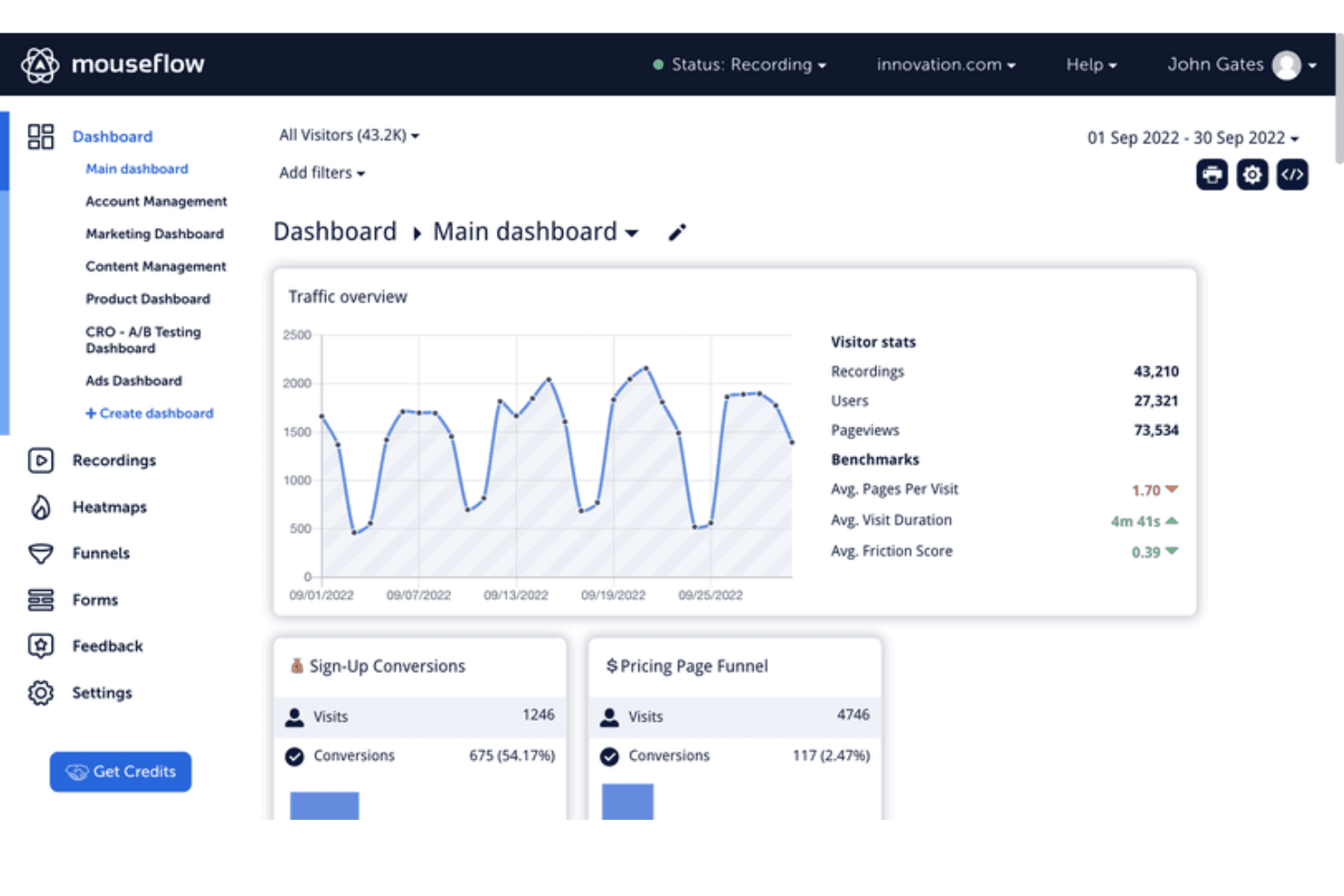
Mouseflow's dashboard tracks traffic, conversions, and visitor behavior metrics. Mouseflow is a free digital experience analytics tool that combines no-code session replay, heatmaps, form analytics, conversion funnels, surveys, and friction detection for website behavior analysis.
Who Is Mouseflow Best For?
Mouseflow suits website-focused product teams and founders who need no-code session replay and UX friction signals.
Why I Picked Mouseflow
I picked Mouseflow for no-code UX friction spotting when product teams need behavioral evidence without event instrumentation. Session replays, rage-click and dead-click detection, and Friction Scores reveal where users struggle in signup, checkout, or onboarding flows. I use its heatmaps and form analytics to connect those moments with conversion drop-offs.
Mouseflow Key Features
- Personal and team dashboards: View reported metrics in dedicated dashboards.
- Conversion funnels: Analyze conversions, drop-offs, and revenue figures.
- Feedback surveys: Create NPS surveys with branching logic and six question types.
- REST API: Export data and connect Mouseflow with external systems.
Mouseflow Integrations
Mouseflow lists 40+ integrations, including Google Analytics, Adobe Analytics, Google Tag Manager, Shopify, WordPress, Twilio Segment, Slack, and Microsoft Teams. It also offers an open REST API for custom integrations.
What's Free?
Mouseflow has a free-forever plan with 500 sessions per month, one website project, one conversion funnel, one month of data retention, and unlimited users. New accounts receive 14 days of full-feature access, limited to 2,000 sessions, five projects, and 10 funnels.
Pros and Cons
Pros:
- Combines replays, heatmaps, and funnel views
- Reveals rage clicks and form failures
- Captures friction without custom event instrumentation
Cons:
- Free usage supports only limited ongoing analysis
- Cannot measure feature adoption or retention
Learn more about Mouseflow: Best for mapping the full customer journey free
- Free plan available
- Pricing upon request
Visit WebsiteCustomer Rating:4.5/5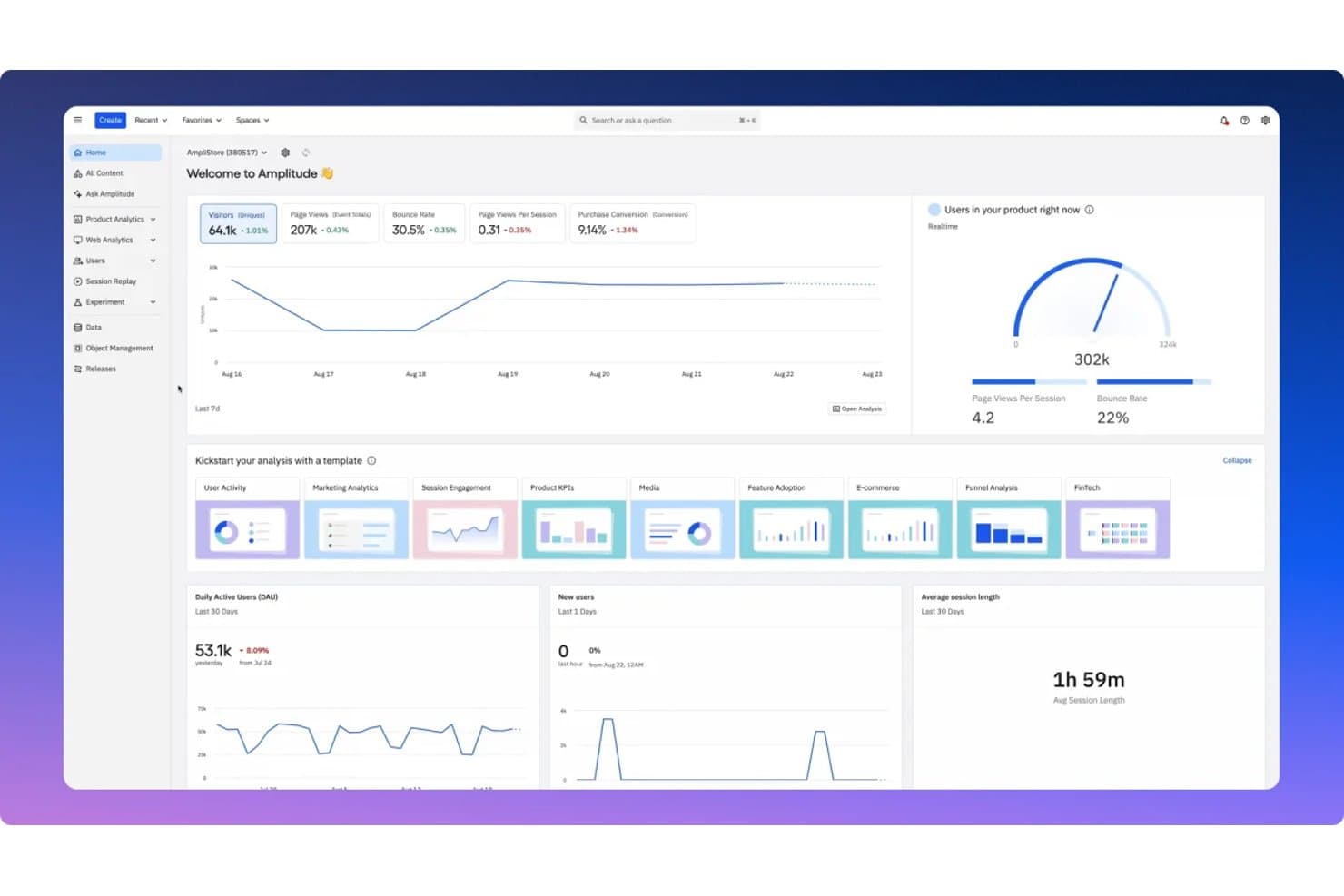
Amplitude centralizes key product metrics in a unified analytics dashboard. Amplitude is a product analytics platform with free event tracking, dashboards, funnel and retention analysis, session replay, feature flags, experiments, guides, and surveys.
Who Is Amplitude Best For?
Product managers and growth teams at startups benefit from Amplitude’s free journey analysis, session replay, funnels, retention reports, and feature experiments.
Why I Picked Amplitude
I picked Amplitude because it’s best for mapping the full customer journey free. Funnels and retention reports show where users convert or drop off, while session replay reveals what happened before they left. I also use feature flags and experiments to connect journey insights with product changes.
Amplitude Key Features
- Web and mobile SDKs: Capture product events across supported platforms.
- Behavioral cohorts: Group users based on shared actions and attributes.
- In-app Guides and Surveys: Create product education and feedback experiences.
- MCP integrations: Connect analytics data with compatible AI tools.
Amplitude Integrations
Amplitude connects to Claude, Cursor, Lovable, and Figma Make through MCP. It also provides developer SDKs and APIs for custom integrations.
What's Free?
Amplitude offers a free-forever plan with unlimited seats and no credit card required. It includes up to 2 million events and 10,000 session replays per month, but limits saved charts to 10 per organization, session replay retention to one month, and experiments, Guides, and Surveys.
Pros and Cons
Pros:
- Includes experiments, guides, and surveys
- Supports product decisions beyond event reporting
- Maps funnels, retention, and replay together
Cons:
- Restricts cohorts, heatmaps, and alert depth
- Limits saved charts and shared workspaces
Learn more about Amplitude: Best for no-code retroactive event tracking
- Free plan available
- Pricing upon request
Visit WebsiteCustomer Rating:4.3/5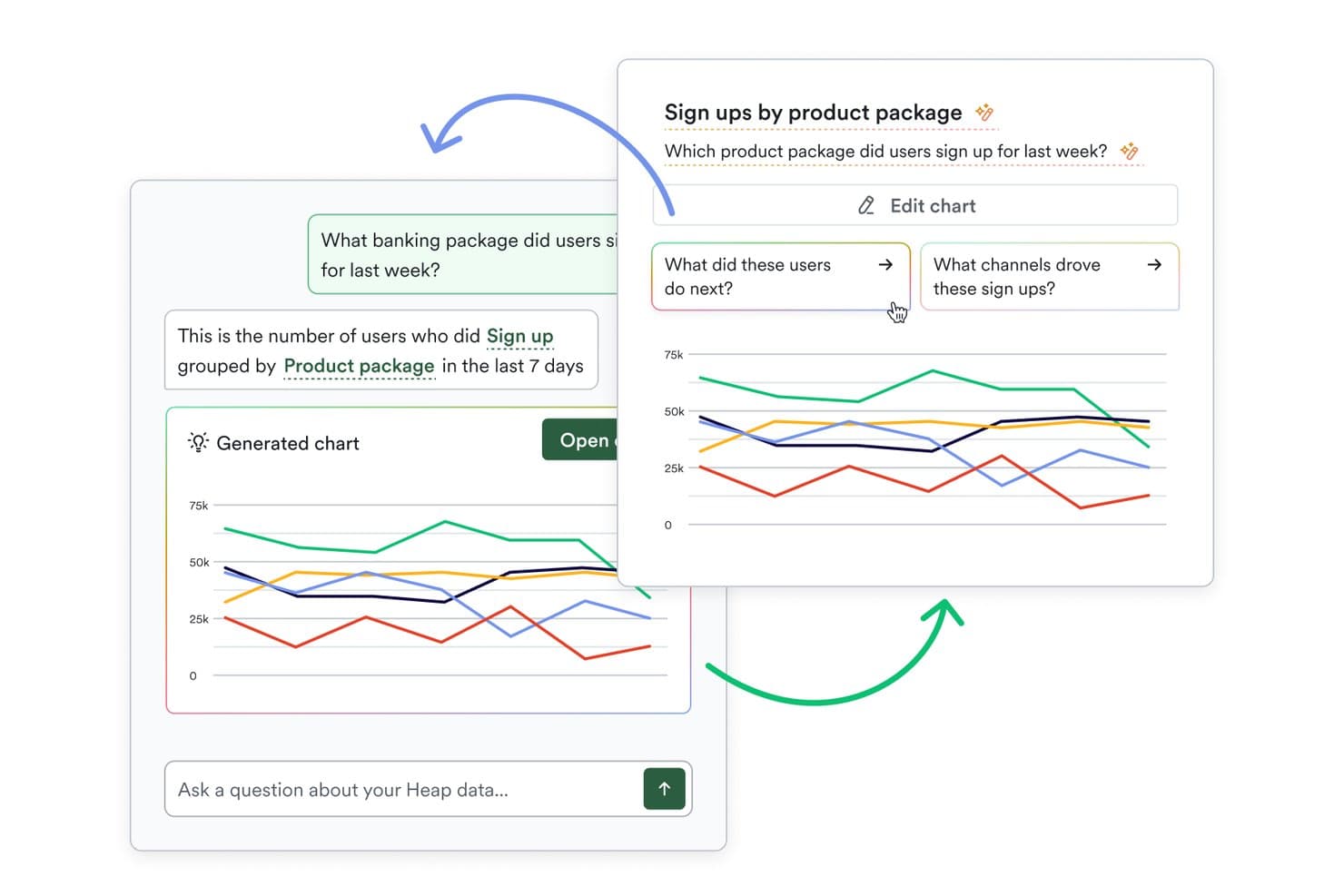
Heap (by Contentsquare) lets users query analytics data using plain language. Heap (by Contentsquare) is a free product analytics platform with autocapture, retroactive event definition, funnels, Journeys, retention reports, dashboards, custom events, and segmentation.
Who Is Heap (by Contentsquare) Best For?
Heap (by Contentsquare) suits product managers and growth teams that need no-code, retroactive event tracking without extensive engineering support.
Why I Picked Heap (by Contentsquare)
I picked Heap (by Contentsquare) for its no-code retroactive event tracking. Autocapture records clicks and pageviews, while visual event labeling lets me define events after collection. I use Funnels and Journeys to trace feature adoption, identify drop-offs, and analyze paths without creating tracking specs first.
Heap (by Contentsquare) Key Features
- Retention reports: Measure returning users across selected time periods.
- Influence reports: Connect product interactions with conversion outcomes.
- Custom event properties: Add attributes to events for deeper analysis.
- Single sign-on: Secure workspace access with SSO support.
Heap (by Contentsquare) Integrations
Native integrations are not clearly documented. Heap supports custom integrations through APIs and lists Guides integrations on its Free plan.
What's Free?
Heap offers a free plan rather than only a time-limited trial. Pricing is otherwise available upon request, and the Free plan includes Guides integrations; Heap doesn’t clearly publish user or event limits.
Pros and Cons
Pros:
- Retention and Influence reports support outcome analysis
- Funnels and Journeys reveal adoption drop-offs
- Retroactive event definition avoids tracking plans
Cons:
- Limited history complicates long-term trend analysis
- Session replay and heatmaps aren’t included
Learn more about Heap (by Contentsquare): Best for behavior analytics and AI-driven insights
- Free plan + free demo + 15-day free trial available
- From $39/month (billed annually)
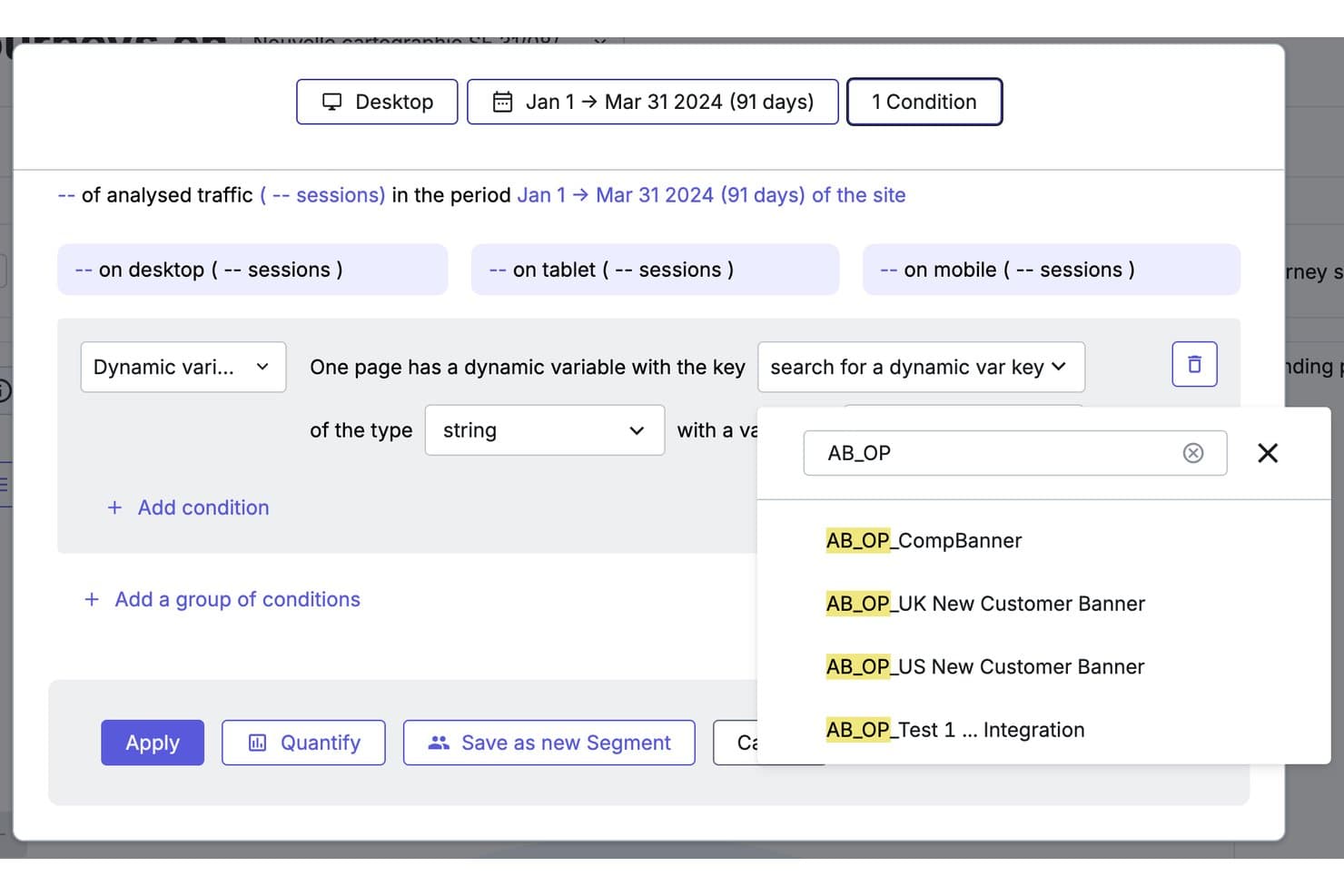
Contentsquare lets users filter sessions by dynamic variables like A/B test flags. Contentsquare is a free product analytics platform combining autocaptured event tracking, funnels, retention, feature adoption, heatmaps, and session replay across its Product Analytics and Experience Analytics products.
Who Is Contentsquare Best For?
Contentsquare suits product managers and growth teams that need heatmaps, session replays, and AI-assisted insights to understand user behavior.
Why I Picked Contentsquare
I picked Contentsquare because it connects behavior analytics with AI-driven insights for product decisions. I use heatmaps and session replay to locate friction, then apply Sense AI summaries and chat to interpret patterns across user journeys. Its Product Analytics tools also track feature adoption, retention, and engagement without requiring extensive event tagging.
Contentsquare Key Features
- Basic funnels: Visualize drop-offs across key user journeys.
- Error monitoring: Track JavaScript errors and basic performance issues.
- Usage dashboards: Filter and review key product metrics in one project.
- Native integrations: Connect Slack, Jira, HubSpot, Mixpanel, and Google Analytics.
Contentsquare Integrations
Contentsquare offers 10+ integrations, including Slack, Jira, Google Analytics, Mixpanel, HubSpot, Microsoft Teams, and Unbounce. It also connects to ChatGPT, Claude, and Copilot through MCP.
What's Free?
Contentsquare offers a free-forever plan, rather than a time-limited trial. Its Product Analytics plan includes unlimited users, 10,000 monthly sessions, and six months of data retention; higher usage limits require an upgrade.
Pros and Cons
Pros:
- AI summaries surface journey friction
- Pairs heatmaps with session replay
- Autocaptures behavior without manual event tagging
Cons:
- Free funnels and segmentation remain basic
- Product analytics has limited sessions and history
Learn more about Contentsquare: Best for privacy-first, unsampled web analytics
- 21-day free trial
- From $26/month (billed annually)
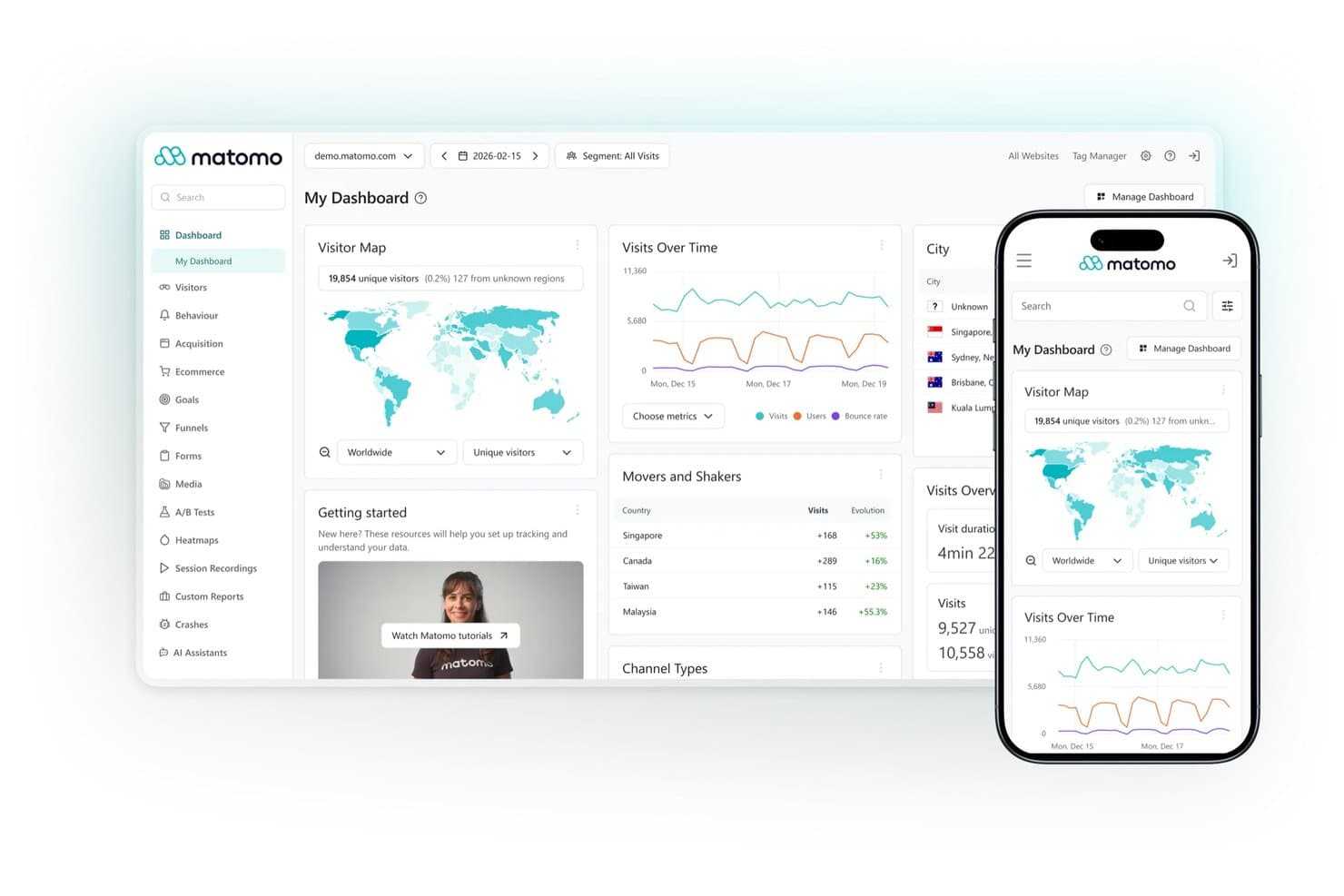
Matomo centralizes visitor analytics across web and mobile dashboards. Matomo is an open-source product analytics platform with self-hosted web analytics, event tracking, customizable dashboards, segmentation, visitor profiles, and reporting APIs.
Who Is Matomo Best For?
Privacy-conscious organizations with engineering support will value Matomo for unsampled, self-hosted web analytics and full data ownership.
Why I Picked Matomo
I picked Matomo because it brings privacy-first, unsampled web analytics to a genuinely free, self-hosted plan with unlimited hits. I use its event tracking, visitor profiles, segmentation, and customizable dashboards to inspect behavior without sending data to a third-party analytics vendor. Its API and data ownership suit teams that need auditable web usage data, though funnels and retention require paid plugins.
Matomo Key Features
- Real-time analytics: Monitor current visitor activity as it happens.
- Scheduled email reports: Send recurring analytics reports to stakeholders.
- Tag Manager: Add and manage tracking tags without backend access.
- Chart annotations: Mark releases, campaigns, and other events directly on reports.
Matomo Integrations
Matomo supports integrations with 100+ technologies, including WordPress, Joomla, Drupal, SharePoint, Magento, WooCommerce, Moodle, and Google, Bing, and Yahoo Search Console. Its HTTP reporting and tracking APIs support custom integrations.
What's Free?
Matomo offers a free-forever, self-hosted plan with unlimited hits and full data ownership. You’ll need to provide your own hosting and technical setup, while features such as funnels and retention require paid plugins.
Pros and Cons
Pros:
- Privacy controls support GDPR-conscious teams
- Full data ownership through self-hosting
- Unlimited unsampled event and web tracking
Cons:
- Server maintenance adds engineering overhead
- Funnels and retention require paid plugins
Learn more about Matomo: Best for a universally-popular choice
- Free plan available
- From $50,000/year (billed annually)
Visit WebsiteCustomer Rating:4.6/5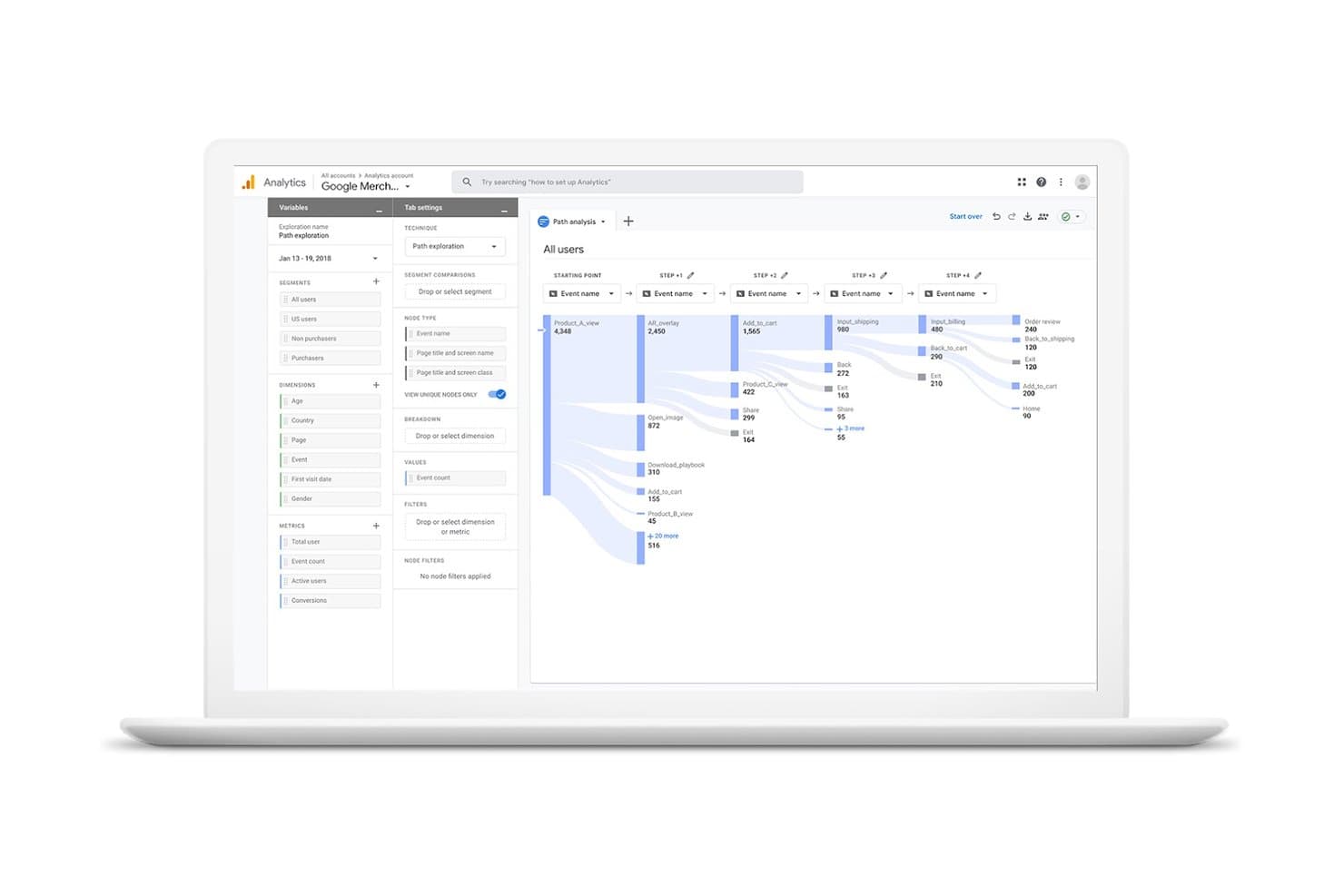
Google Analytics visualizes user journeys across events with path exploration. Google Analytics is a free product analytics platform for tracking web and app events, exploring funnels and retention, segmenting users, and exporting data through BigQuery and the Google ecosystem.
Who Is Google Analytics Best For?
Google Analytics suits growth marketers and lean product teams needing free web-and-app measurement with Google Ads and BigQuery connections.
Why I Picked Google Analytics
I picked Google Analytics as a universally-popular choice because its event model tracks web and app behavior in one property. I use funnel exploration and retention reports to examine feature adoption, then send event data to BigQuery for deeper product analysis. Its broad documentation and familiar reporting model also make findings easier to share across product, marketing, and engineering.
Google Analytics Key Features
- Enhanced measurement: Tracks scrolls, outbound clicks, downloads, and site searches.
- Custom dimensions: Adds user, event, and item attributes to reports.
- Audience builder: Creates audiences from user attributes and behaviors.
- Path exploration: Maps forward and backward journeys through your product.
Google Analytics Integrations
Google Analytics offers native integrations with Google Ads, Search Ads 360, Display & Video 360, BigQuery, and Search Console. Its Data API supports custom integrations.
What's Free?
Google Analytics offers a free-forever standard plan, not a limited-time trial. It includes web and app measurement, but standard properties have lower limits than Analytics 360, including up to 14 months of event-level retention, sampling for explorations exceeding 10 million events, and a 1-million-event daily BigQuery export limit.
Pros and Cons
Pros:
- Exports event data for deeper analysis
- Supports funnels, retention, and behavioral segmentation
- Combines website and app event tracking
Cons:
- Exploration reports face sampling and retention limits
- Lacks session replay and heatmaps
Learn more about Google Analytics: Best for interactive reporting
- Free plan available
- From $120/month (billed annually)
Visit WebsiteCustomer Rating:4.5/5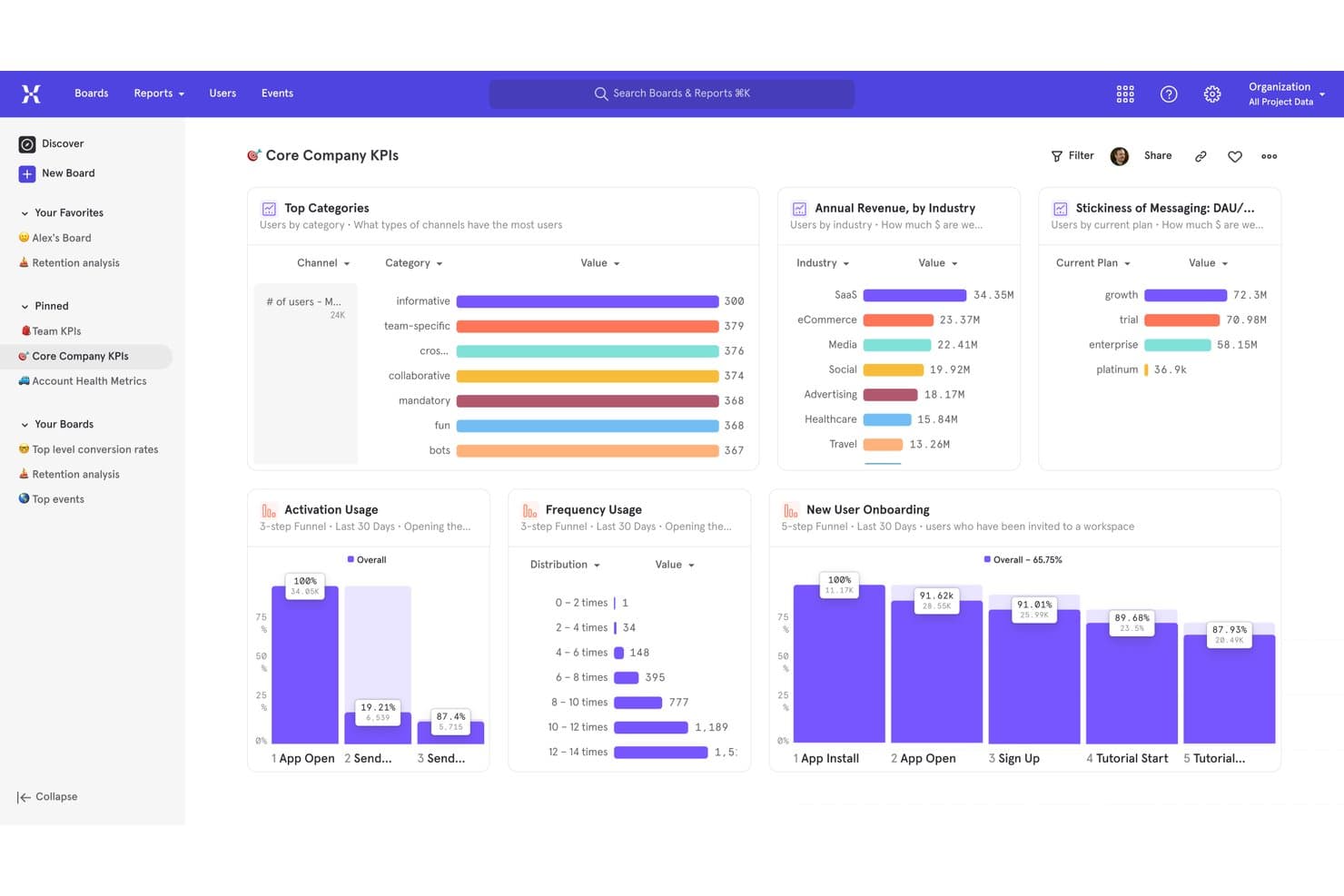
Mixpanel centralizes KPIs, funnels, and revenue metrics in one dashboard. Mixpanel is a product analytics platform with a permanent free tier covering event tracking, interactive reports, funnels, retention, session replay, heatmaps, experiments, and feature flags.
Who Is Mixpanel Best For?
Product managers and analysts at startups can use Mixpanel’s interactive reports to explore user journeys, funnels, and retention.
Why I Picked Mixpanel
I picked Mixpanel because its interactive reporting helps me connect product behavior to decisions. Boards combine Insights, Funnels, Retention, and Flows, so I can investigate a drop-off from conversion to user paths without switching tools. The Free plan adds up to 1 million events monthly, 10,000 session replays, heatmaps, and unlimited seats.
Mixpanel Key Features
- Data dictionary: Define and organize tracked events and properties.
- Query API: Retrieve product data for custom analysis.
- Feature flags: Release changes through percentage rollouts and cohort targeting.
- Privacy controls: Apply masking, blocking, and user privacy APIs.
Mixpanel Integrations
Mixpanel connects to Segment and mParticle, supports OpenFeature for feature flags, and includes ingestion, export, and query APIs for custom integrations.
What's Free?
Mixpanel offers a free-forever plan with unlimited seats, up to 1 million events per month, and 10,000 session replays. It also includes interactive reports, funnels, retention analysis, heatmaps, experiments, and feature flags, but higher usage requires a paid plan.
Pros and Cons
Pros:
- Free feature flags support percentage rollouts
- Session replay includes heatmaps and click detection
- Interactive Boards connect funnels, retention, and Flows
Cons:
- Free cohorts and custom properties remain limited
- Only five saved reports per seat
 Best for free analytics with built-in replay
- Free plan available
- Pricing upon request
Visit WebsiteCustomer Rating:4.5/5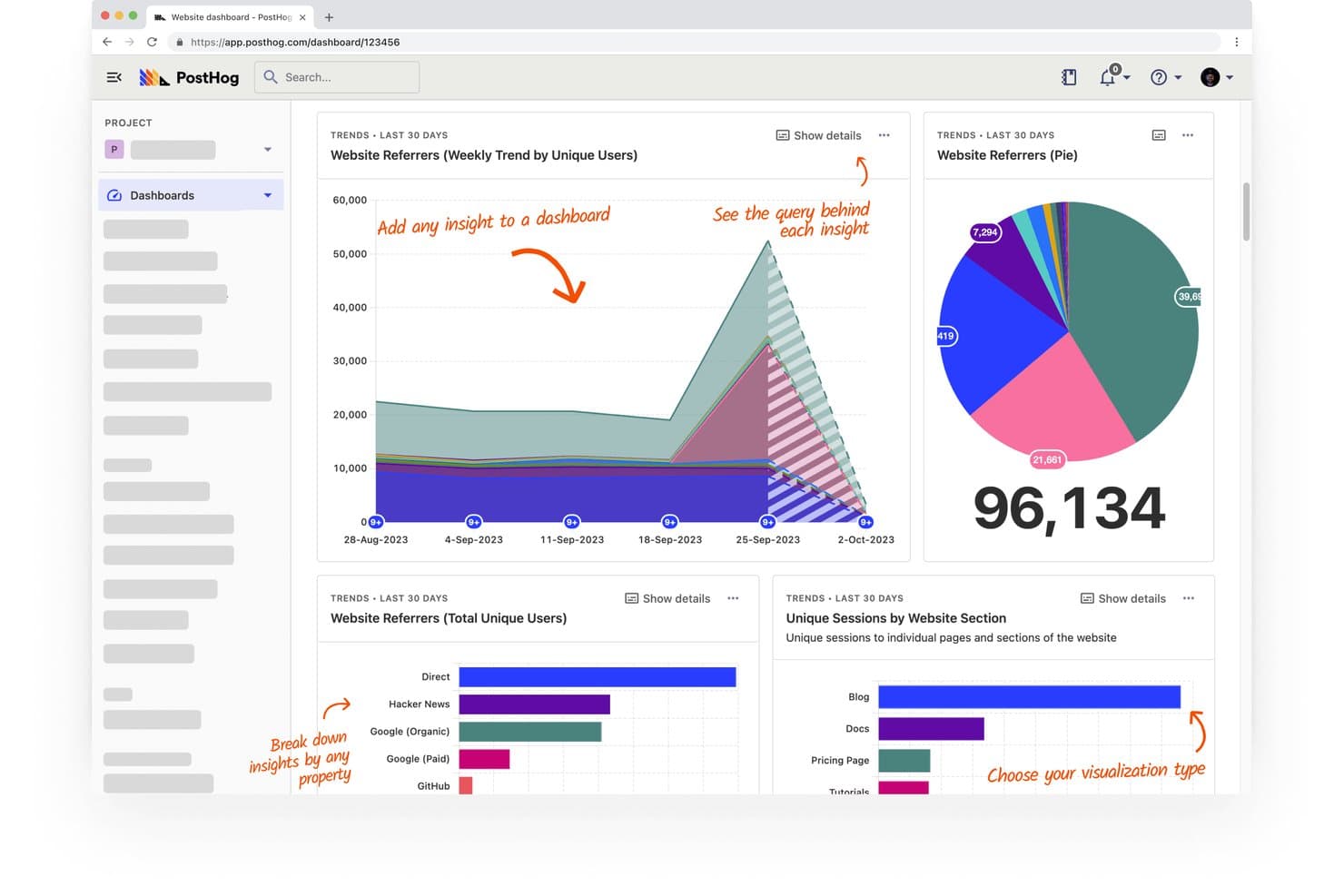
PostHog lets users track website referrers and sessions across visual dashboards. PostHog is a free product analytics platform that combines autocapture, funnels, retention, paths, session replay, feature flags, and experiments in one developer-focused toolkit.
Who Is PostHog Best For?
Product managers, analysts, growth teams, and startup founders who need free product analytics with built-in session replay.
Why I Picked PostHog
I picked PostHog because it combines free product analytics with built-in replay. I use autocapture, funnels, and path analysis to find where users drop off, then jump from a chart to the relevant session recording. Its feature flags and experiments also connect product behavior to release decisions.
PostHog Key Features
- Retention curves: Measure cohort retention across selected time periods.
- HogQL SQL editor: Query product data directly with SQL.
- Heatmaps: Inspect clicks and page engagement visually.
- SDK coverage: Track web, mobile, and backend applications.
PostHog Integrations
PostHog supports integrations with Slack and MCP-compatible tools, including Claude, Cursor, VS Code, Codex, Zed, Replit, Lovable, and Windsurf. Its SDKs connect web, mobile, and backend applications across JavaScript, React, Python, iOS, Android, and other supported stacks.
What's Free?
PostHog has a free-forever plan with no credit card required, including 1 million analytics events and 5,000 session recordings each month. The plan includes one project, one-year event retention, and community support; unused allowances don’t roll over, and usage above the limits is dropped unless you add billing.
Pros and Cons
Pros:
- Funnels reveal drop-offs and retention trends
- Autocapture reduces instrumentation work
- Built-in replay connects behavior to friction
Cons:
- Developer focus challenges nontechnical teams
- Interface can feel clunky for newcomers
Learn more about PostHog: Best for advanced session replay
- 14-day free trial + free plan available
- From $176/month (billed annually)
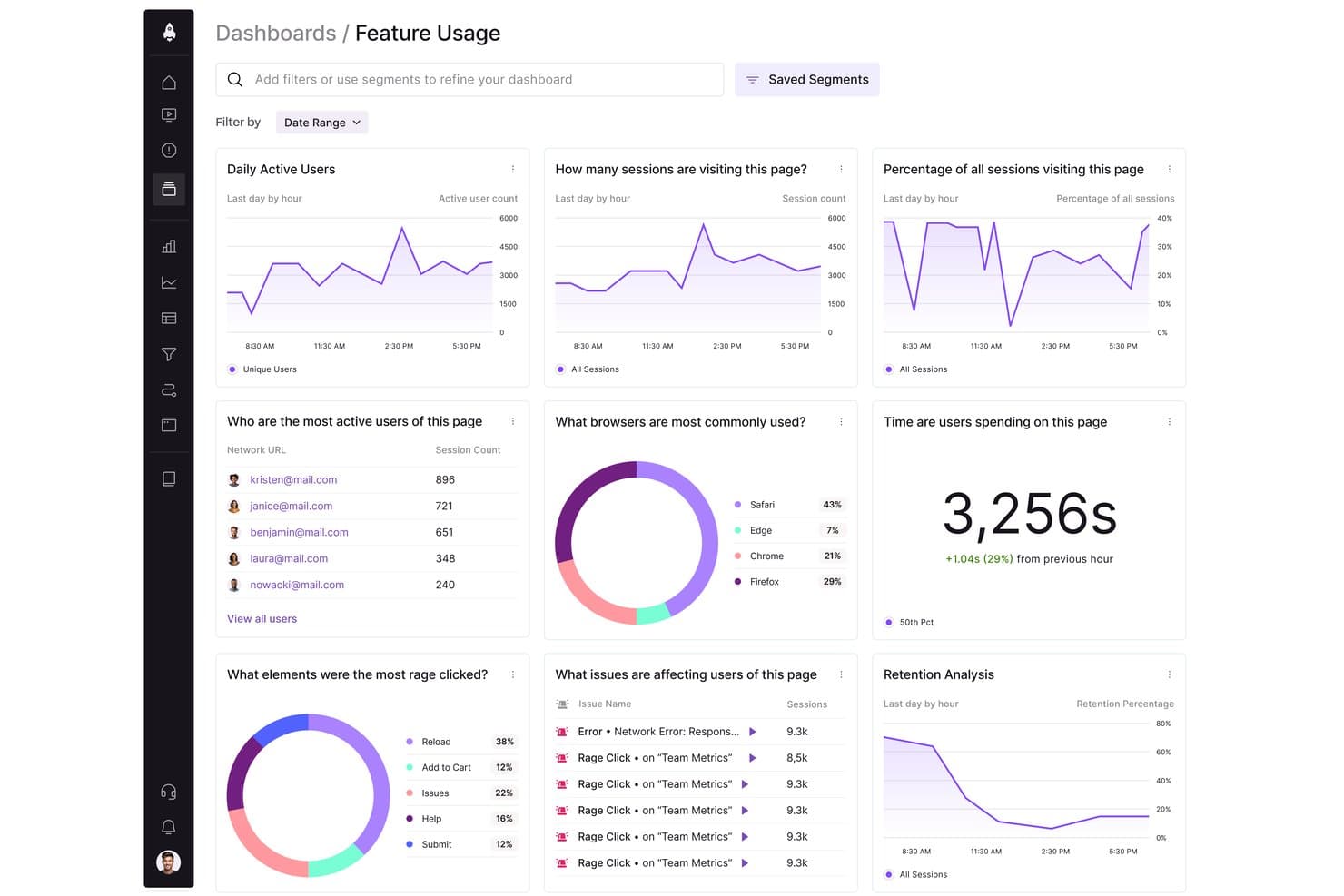
LogRocket tracks user behavior, sessions, and browser usage in one dashboard. LogRocket is a product analytics platform that combines autocaptured event tracking, funnels, retention charts, path analysis, session replay, heatmaps, error monitoring, and technical debugging.
Who Is LogRocket Best For?
LogRocket suits developer-adjacent product teams and analysts who need technical context alongside user behavior data.
Why I Picked LogRocket
I picked LogRocket because it’s best for advanced session replay, combining interaction timelines with errors, network requests, and performance data. I use path analysis, rage-click detection, and similar-session search to trace friction from a funnel drop-off back to the user experience that caused it.
LogRocket Key Features
- Autocapture: Records events, pages, and user actions without code changes.
- Conversion funnels: Shows drop-off points and AI explanations on Pro.
- Retention charts: Measures return usage for products and individual features.
- Behavioral cohorts: Groups users by traits, metadata, and product activity.
LogRocket Integrations
LogRocket offers integrations with Sentry, Bugsnag, Rollbar, Datadog, Jira, GitHub, Cursor, and Claude Code. It also supports hundreds of integrations, API access, and an MCP server for custom connectivity.
What's Free?
LogRocket offers a 14-day free trial, not a free-forever plan, with access to all features and no credit card required. After the trial, paid plans start at $176 per month, with pricing based on monthly sessions captured.
Pros and Cons
Pros:
- Path analysis exposes journey drop-offs and friction
- Autocapture tracks actions without code changes
- Advanced session replay links behavior to errors
Cons:
- Developer-oriented interface slows product analysis
- Limited transparency on price discounts
Learn more about LogRocket: Best for Microsoft-backed free heatmaps and replay
- Free plan available
- Pricing upon request
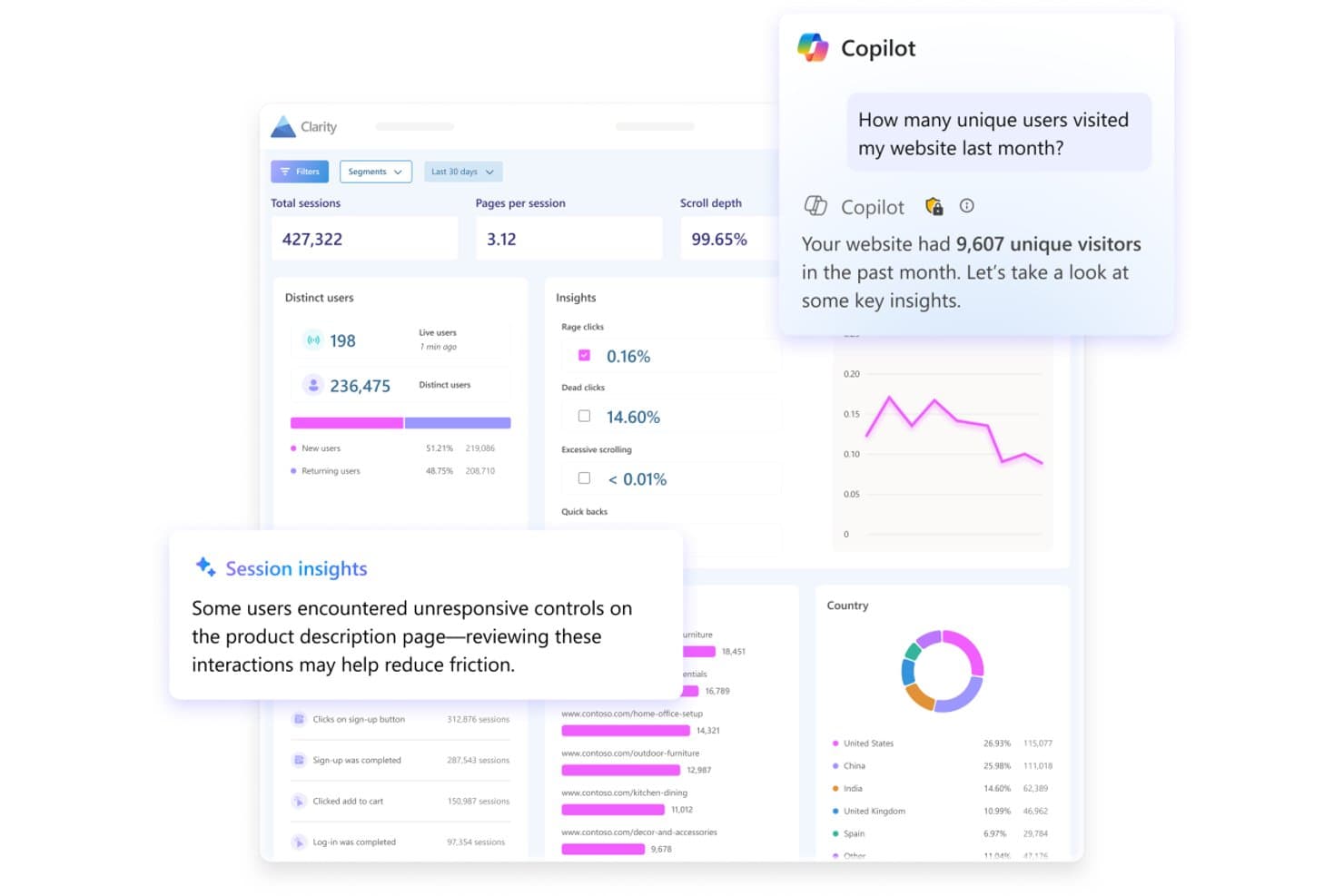
Microsoft Clarity surfaces AI-powered session insights and visitor analytics. Microsoft Clarity is a free product analytics tool with autocaptured behavior data, session recordings, heatmaps, funnels, dashboards, and signals for rage clicks, dead clicks, and other user actions.
Who Is Microsoft Clarity Best For?
Growth marketers and startup founders who need free, no-code insight into user behavior, conversion friction, and website experience.
Why I Picked Microsoft Clarity
I picked Microsoft Clarity for its Microsoft-backed free heatmaps and replay. I use click, scroll, area, rage-click, and dead-click heatmaps to find friction on key pages, then review DOM-based recordings to understand each session. Funnels connect drop-offs with recordings and heatmaps for faster conversion diagnosis.
Microsoft Clarity Key Features
- Autocapture: Records clicks, scrolls, mouse movements, and page rendering automatically.
- Smart Events: Tracks purchases, sign-ups, logins, downloads, and other conversion actions.
- Saved segments: Filters data by device, browser, country, URL, referrer, and session duration.
- Mobile SDKs: Supports Android, iOS, React Native, Flutter, and Cordova apps.
Microsoft Clarity Integrations
Microsoft Clarity offers documented integrations with Google Analytics, Google Tag Manager, WordPress, Shopify, Wix, Squarespace, Weebly, and CookieYes. Its Data Export API supports custom integrations.
What's Free?
Microsoft Clarity is free forever, with no traffic limits or required upgrade to a paid plan. All core features are included, but advanced data exports and API access may require separate setup or usage limits.
Pros and Cons
Pros:
- Funnels connect drop-offs to recordings
- Rage-click signals expose conversion friction
- Microsoft-backed heatmaps and replay
Cons:
- Export API lacks raw event data
- No retention or cohort analysis
Learn more about Microsoft Clarity:
Other Free Product Analytics Tools
Here are some additional product analytics tools options that also offer free plans or trials. While these tools didn’t make it onto my shortlist, they’re still worth checking out:
- 11Open Web AnalyticsBest for open-source self-hosted data ownership
- 12UmamiBest for privacy-first, self-hosted web analytics
How I Evaluate Free Product Analysis Tools
First, I define what counts as free. Product analysis is an ongoing function, so I only consider tools with a long-term free plan—not a trial. From there, I split my evaluation into three parts: core functionality, which carries the most weight, like capturing user events and surfacing usage dashboards; standout features, like autocapture tracking; and what a tool offers beyond its feature set, like how cleanly it scales from free to paid.
Core Functionality (Table Stakes For This List)
In addition to my free plan requirements, I use a scoring system to select tools for my list. I score each one on a scale from 0 (does not offer the functionality) to 5 (excels in this area) for each core functionality listed below, based on what's available on the free plan. I then convert the total into a percentage to help assess each tool's overall fit, with extra weight on any functionalities I've deemed essential.
- Event & Behavior Tracking (Essential): I check whether custom events, clicks, and pageviews are captured with enough volume for a growing product's daily active users.
- Usage Dashboards & Reporting (Essential): The free plan should include visual dashboards that surface key metrics like DAU, feature usage, and trends without manual setup.
- Funnel & Retention Analysis: I evaluate whether you can build multi-step funnels and view cohort retention curves to pinpoint where users drop off after onboarding.
- Segmentation: Filtering by user properties, behaviors, or cohorts matters—I look for combinable filters, like isolating mobile users who completed signup.
- Data Export or Integration: I check for CSV exports, API access, or native connections to warehouses and tools like BigQuery, Slack, or Hubspot on the free tier.
- Session or Path Analysis: Path visualizations or session replays help trace how users move through a product, so I look at depth and volume limits here.
Once I have a list of tools that meet the criteria, I consider what sets each platform apart.
Differentiating Factors (What Sets Vendors Apart)
Here's how I compare and contrast different vendors:
Standout Features
Autocapture tracking is the first thing I check. Tools like PostHog and Heap record clicks, taps, and pageviews without manual instrumentation, which means you get usable data within minutes of installing the snippet. Session replay access is equally valuable—I look for free tiers that let you watch real user sessions so you can see exactly where someone hesitates during checkout or abandons a multi-step form. Heatmaps round this out by showing aggregate click and scroll patterns across key pages, giving you quick UX reads without building custom reports.
Beyond Features
I check whether a tool lets you export raw event data on the free tier, since teams that can't pull CSVs or hit a basic API risk losing months of behavioral data if they switch platforms later. Self-serve setup matters just as much—I look for SDKs, tag manager support, and starter templates that let a PM get tracking live without filing an engineering ticket. Privacy posture rounds this out: tools like PostHog and Matomo offer cookie-less or self-hosted options, which saves early-stage teams from scrambling to retrofit GDPR compliance after launch.
How to Choose Free Product Analytics Tool
Complex feature lists and pricing structures can make it hard to figure out what you’re really getting from a free product analytics tools. To help you stay focused as you work through your software selection process, here are some factors to keep in mind:
| Factor | What to Consider |
|---|---|
| FactorFree offer scope | What to ConsiderCheck what's included in the free plan. Ensure it covers essential features like user tracking and analytics without hidden costs or limitations. |
| FactorScalability | What to ConsiderConsider if the tool can grow with your needs. Look for options that offer easy upgrades and handle increased data volumes as your business expands. |
| FactorIntegrations | What to ConsiderEnsure the tool integrates with your existing software stack. Popular integrations might include CRM systems, marketing platforms, and data visualization tools. |
| FactorEase of use | What to ConsiderEvaluate the user interface and learning curve. Choose a solution that your team can quickly understand and use without extensive training. |
| FactorData security | What to ConsiderAssess the tool's data protection measures. Ensure it complies with relevant regulations and offers features like data encryption and user access controls. |
| FactorCustomization | What to ConsiderLook for tools that allow customization of reports and dashboards. This helps tailor insights to your specific business needs and workflows. |
| FactorCustomer support | What to ConsiderCheck the availability and quality of customer support. Access to live chat, a knowledge base, and community forums can be valuable resources. |
| FactorAnalytics depth | What to ConsiderDetermine the depth of analytics provided. Ensure it offers detailed insights into user behavior and engagement, not just surface-level metrics. |
What Are Free Product Analytics Tools?
Free product analytics tools are software that help you track and understand how people use your product without having to pay for it. Product managers, marketers, and UX designers use these to spot trends in user behavior, see what’s working, and find ways to make your product better. With basics like user and event tracking, you get quick, visual answers on how people interact with your app or website so you can make smarter decisions—without breaking the bank.
Features
Let’s go over the features commonly found in product analytics tools, and which ones are usually included in free vs. paid plans.
Typically Free Product Analytics Tools Features
- User tracking: Monitors user interactions and behaviors, helping you understand how users engage with your product.
- Event tracking: Captures specific actions users take, providing insights into user journeys and feature usage.
- Data visualization: Offers charts and graphs to make complex data more accessible and easier to interpret.
- Real-time analytics: Provides immediate data updates, allowing you to quickly react to user behavior and trends.
- Basic reporting: Generates essential reports that summarize key metrics and user activities for quick insights.
- Session replays: Allows you to view user sessions to understand navigation patterns and identify usability issues.
- Heatmaps: Visualizes areas of high activity on your site, helping you see where users are most engaged.
- Feedback collection: Gathers user feedback through surveys or polls to understand user satisfaction and needs.
Typically Paid Product Analytics Tools Features
- Advanced segmentation: Enables detailed user group analysis based on multiple criteria for targeted insights.
- A/B testing: Compares different product versions to determine which performs better, optimizing user experience.
- Predictive analytics: Uses historical data to forecast future user behaviors and trends, aiding decision-making.
- Custom dashboards: Allows personalized data views to focus on metrics that matter most to your team.
- Funnel analysis: Tracks user paths to identify where users drop off, improving conversion rates.
- Cohort analysis: Analyzes groups of users with shared characteristics over time, understanding retention and behavior.
- Data integration: Connects with other data sources to provide a more comprehensive view of user interactions.
- Data governance: Ensures data quality and compliance with regulations, maintaining data integrity and security.
Benefits
Implementing free product analytics tools provides several benefits for your team and your business. Here are a few you can look forward to:
- Cost-effective insights: Gain valuable insights into user behavior without spending money, helping you make data-driven decisions.
- User engagement tracking: Monitor how users interact with your product, allowing you to improve user experience based on real data.
- Immediate feedback: Access real-time analytics to quickly understand user trends and respond to changes effectively.
- Visual data representation: Use data visualization features to easily interpret complex data and communicate findings with your team.
- Improved user satisfaction: Collect user feedback through surveys and polls, helping you address user needs and enhance satisfaction.
- Identification of pain points: Use session replays and heatmaps to spot usability issues and improve product design.
- Scalability: Start with basic features and upgrade as your needs grow, ensuring your analytics capabilities can expand with your business.
Costs & Pricing
I realize you came to this article looking for the best product analytics tools options that are available for free. However, since free plans only offer limited features, there's a good chance you'll need to scale your plan up in the future.
The table below summarizes common plans, their average prices, and typical features included in product analytics tools solutions:
Plan Comparison Table for Product Analytics Tools
| Plan Type | Average Price | Common Features |
|---|---|---|
| Plan TypeFree Plan | Average Price$0 | Common FeaturesBasic user tracking, event tracking, data visualization, real-time analytics, and feedback collection. |
| Plan TypePersonal Plan | Average Price$5-$25/user/month | Common FeaturesAdvanced user tracking, customizable dashboards, funnel analysis, cohort analysis, and basic integrations. |
| Plan TypeBusiness Plan | Average Price$50-$150/user/month | Common FeaturesComprehensive analytics, A/B testing, predictive analytics, advanced segmentation, and extensive integrations. |
| Plan TypeEnterprise Plan | Average Price$200+/user/month | Common FeaturesFull customization, dedicated support, data governance, unlimited data storage, and enterprise-level integrations. |
Free Product Analytics Tools FAQs
Here are some answers to common questions about free product analytics tools:
How do free product analytics tools differ from paid versions?
Free product analytics tools often provide basic features like user tracking, event tracking, and basic reporting. Paid versions typically offer advanced features such as A/B testing, predictive analytics, and more detailed data analysis. As your needs grow, you may find it beneficial to upgrade to access these additional features.
Can I rely on free product analytics tools for comprehensive data analysis?
While free tools are great for getting started, they may not offer the depth needed for comprehensive data analysis. They provide essential insights but may lack advanced capabilities such as in-depth segmentation or predictive analytics. If your team requires more detailed data analysis, consider upgrading to a paid plan.
What limitations should I expect with free product analytics tools?
Free product analytics tools often come with limitations like data caps, restricted features, and fewer integrations. These constraints can affect the depth of insights you can gain. It’s important to evaluate these limitations against your team’s needs to ensure they align with your goals.
Are free product analytics tools secure?
Most free product analytics tools prioritize security, offering basic data protection measures. However, they may not provide the same level of security or compliance features as paid versions. If security is a major concern for your team, make sure to verify the security protocols of the tool you choose.
How easy is it to switch from a free plan to a paid plan?
Switching from a free plan to a paid plan is usually straightforward. Most providers offer an easy upgrade process with clear instructions. You can often maintain your existing data and settings, allowing for a smooth transition as your needs evolve.
Do free product analytics tools offer customer support?
Free product analytics tools often provide limited customer support options. You might have access to online resources like FAQs, forums, and knowledge bases. For more personalized support, such as live chat or dedicated account managers, you may need to consider a paid plan.