

Explorar o mundo do design para a web pode ser difícil, especialmente quando os orçamentos são reduzidos. Poderá estar a gerir vários projetos e precisar de uma solução que não aumente as suas despesas. É aí que entra o software gratuito de design para a web. Este oferece ferramentas para criar e gerir os seus sites sem o preço elevado.
Na minha experiência, encontrar a ferramenta gratuita certa pode poupar-lhe tempo e esforço, permitindo-lhe concentrar-se na criatividade e na funcionalidade. Vou partilhar as minhas principais escolhas, cada uma com um plano gratuito ou um período de avaliação, para que possa decidir qual se adapta melhor às necessidades da sua equipa. Vamos explorar opções que o podem ajudar a enfrentar os seus desafios de design sem gastar uma fortuna.
Why Trust Our Software Recommendations
6,700+
Reviews
20
Industry experts
16+
Evaluation factors
14
Years
Our team has been testing and reviewing software since 2012. As product managers ourselves, we know how difficult—and important—it is to choose the right software.
For this guide, we evaluated tools using hands-on testing and independent research, scoring tools using our selection criteria.
Our reviews reflect our human editorial judgment, not a sales pitch.
Expert reviewers:
- Andrew LumbySenior TPM
- Cristiano ValimSenior UI/UX Lead


Tabela comparativa de software gratuito de design para a web
Esta tabela comparativa resume os detalhes de preços das minhas principais escolhas de software gratuito de design para a web:
| Tool | Best For | Trial Info | Price | ||
|---|---|---|---|---|---|
| 1 | Best for design-to-prototype team handoff | Free plan available | From $3/user/month | Website | |
| 2 | Best for template-based sites without coding | Free trial + free plan available | From $144/user/year (billed annually) | Website | |
| 3 | Best for designer-quality website templates | 14-day free trial available | From $25/month | Website | |
| 4 | Best for all-in-one site building without coding | Free plan + Free demo available | Pricing upon request | Website | |
| 5 | Best for HTML5 interactive ad design | Free demo available | Free to use | Website | |
| 6 | Best for AI-generated site setup from a prompt | Free plan + free demo available | From $17.77/month (billed annually) | Website | |
| 7 | Best for CRM-connected site building | Free plan available | Pricing upon request | Website | |
| 8 | Best for visual coding without writing code | Free plan available | From $15/month (billed annually) | Website | |
| 9 | Best for per-device responsive layout control | Free plan available | From $6.75/month (billed annually) | Website | |
| 10 | Best for scroll-driven visual storytelling | Free plan available | From $15/month | Website |


Avaliações do melhor software gratuito de design para a web
Abaixo encontrará os meus resumos das melhores opções de software gratuito de design para a web que entraram na minha lista restrita. As minhas avaliações apresentam uma análise detalhada das principais funcionalidades, vantagens e desvantagens, integrações e casos de utilização ideais de cada ferramenta, para o ajudar a encontrar a melhor opção para si. Embora algumas destas ferramentas ofereçam uma versão totalmente gratuita, outras disponibilizam um período de avaliação gratuito. Adicionei uma nota sobre o que é gratuito em cada uma das minhas avaliações.
 Best for design-to-prototype team handoff
- Free plan available
- From $3/user/month
Visit WebsiteCustomer Rating:4.7/5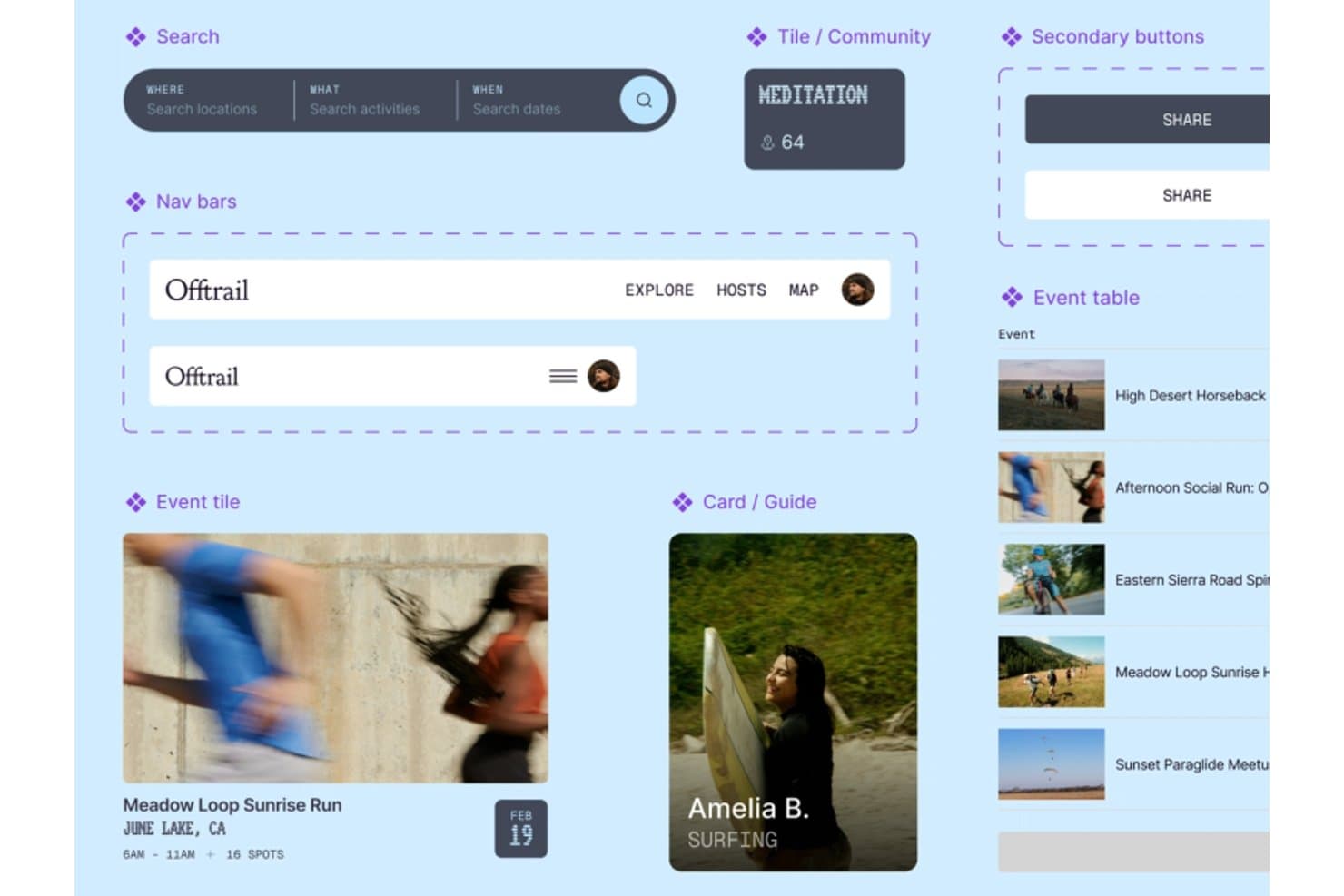
Figma organizes reusable UI components for smooth web design workflows. Figma is web design and prototyping software with a canvas editor, responsive layouts, interactive prototypes, CMS tools, code layers, and Figma Sites publishing through paid plans.
Who Is Figma Best For?
Product teams that need collaborative design, responsive prototypes, and clear handoffs between designers, developers, and stakeholders.
Why I Picked Figma
I picked Figma because my team can turn responsive page designs into interactive prototypes before development starts. Auto layout, breakpoint controls, reusable components, and animated transitions make designer-to-developer handoff clear. The free Starter plan supports design and prototyping, though publishing a live Figma Sites website requires a paid plan.
Figma Key Features
- CMS collections: Create multi-page sites with collections, lists, and item pages.
- Code layers: Add React, TypeScript, and Tailwind code blocks to Sites.
- Website settings: Configure metadata, favicons, analytics IDs, and custom code.
- Community templates: Start from website templates for portfolios, landing pages, and businesses.
Figma Integrations
Figma supports Supabase in Make for login and APIs, plus GitHub repository cloning in its code-layer beta. Plugin and REST APIs support custom integrations, while MCP Server is available on Professional and higher.
What's Free?
Figma has a free-forever Starter plan with unlimited drafts and unlimited viewers. You can collaborate with unlimited users on up to three shared files, while advanced features and Figma Sites publishing require a paid plan.
Pros and Cons
Pros:
- Interactive prototypes validate designs before development
- Responsive breakpoints support desktop and mobile layouts
- Real-time collaboration clarifies stakeholder feedback
Cons:
- Canvas workflow overwhelms non-designers building quickly
- Free plan cannot publish live websites
 Best for template-based sites without coding
- Free trial + free plan available
- From $144/user/year (billed annually)
Visit WebsiteCustomer Rating:4.6/5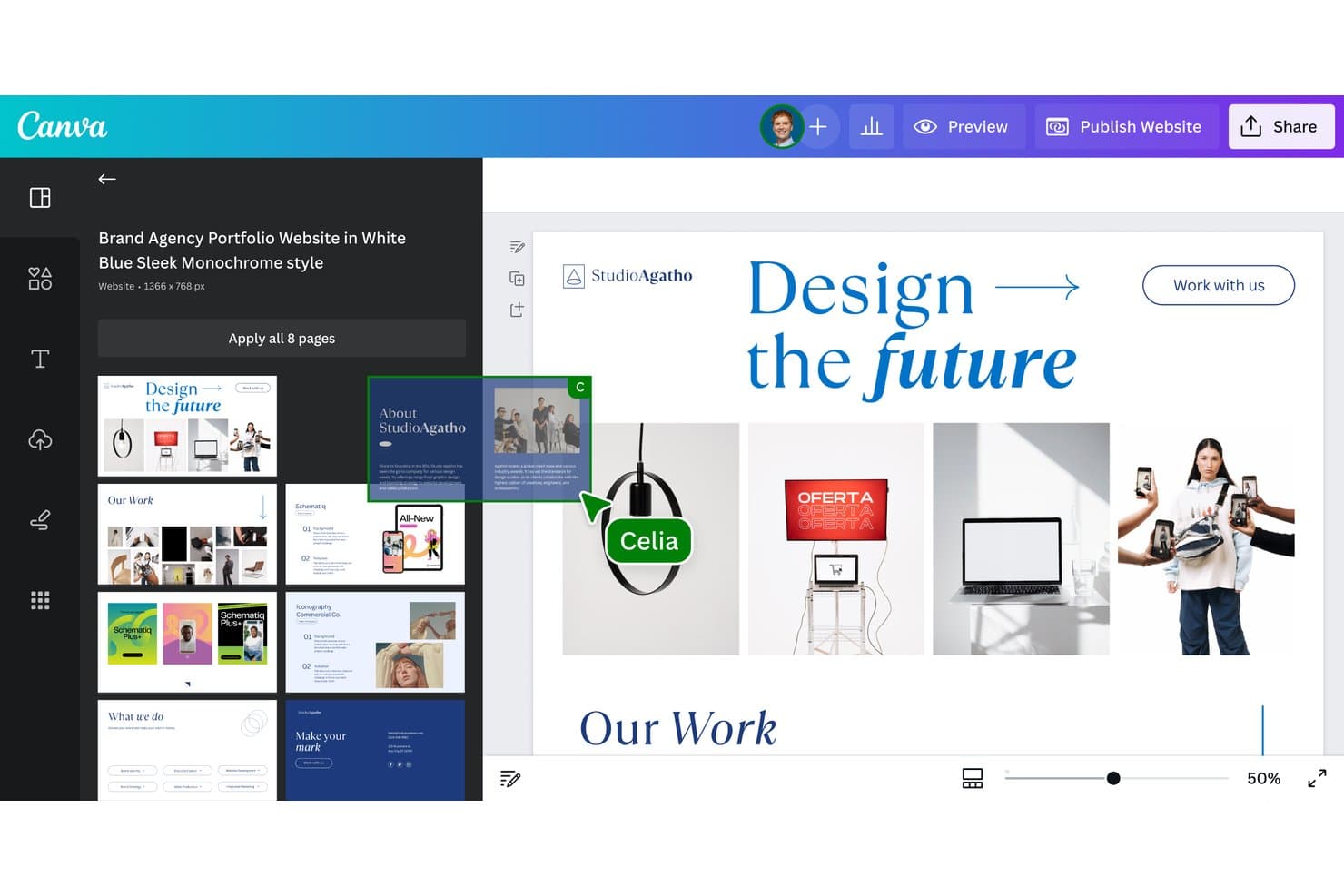
Canva lets users build websites from multi-page templates visually. Canva is free web design software with a drag-and-drop editor for template-based websites, multi-page layouts, responsive publishing, forms, animations, and hosted sites on Canva domains.
Who Is Canva Best For?
Small businesses, startup founders, and freelance creatives can launch polished landing pages or portfolio sites without coding or paying for hosting.
Why I Picked Canva
I picked Canva because its template-based sites let me launch polished landing pages, portfolios, or event sites without coding. I use its drag-and-drop editor to customize layouts, then publish up to 45-page sites with SSL on Canva hosting. Responsive templates and mobile previews help me prepare designs for different screens.
Canva Key Features
- Native forms: Add polls, quizzes, and forms with up to 10 questions.
- Website analytics: Pro users can track visits, page views, devices, and traffic sources.
- SEO settings: Edit page titles, meta descriptions, URL paths, and social preview details.
- Canva Code: Generate interactive elements such as calculators, quizzes, charts, and dashboards.
Canva Integrations
Canva offers marketplace integrations including FluidForms, Giphy, and Magic Icons, plus documented integrations with Google Workspace, Hootsuite, Mailchimp, Zapier, Make, and Workato. It also provides an Apps SDK and REST API for custom integrations.
What's Free?
Canva offers a free-forever plan, with 5 GB of storage and access to basic templates, design tools, and limited AI features. Premium templates, media, advanced exports, and some AI tools require a paid plan, while premium elements can display watermarks on free designs.
Pros and Cons
Pros:
- Hosted publishing includes SSL
- Thousands of templates speed initial launches
- Publishes polished sites without coding
Cons:
- Standard websites lack HTML and CSS export
- Mobile layouts can break without grouping
Learn more about Canva: Best for designer-quality website templates
- 14-day free trial available
- From $25/month
Visit WebsiteCustomer Rating:4.6/5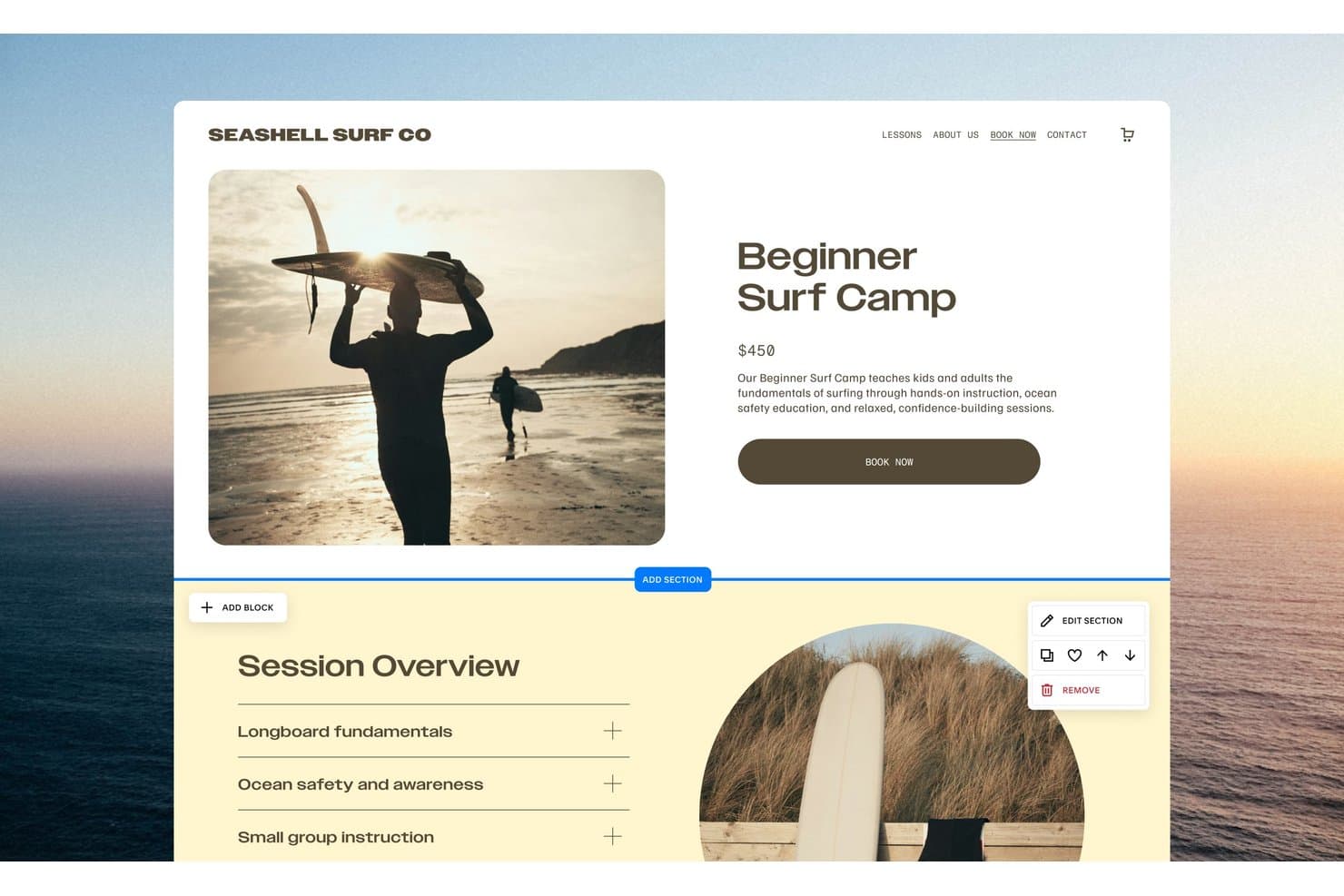
Squarespace lets users edit product pages with drag-and-drop section tools. Squarespace is a website design platform with Fluid Engine drag-and-drop editing, responsive mobile layouts, designer templates, integrated hosting, and a 14-day trial instead of free-forever publishing.
Who Is Squarespace Best For?
Squarespace suits small businesses, creative professionals, and founders who need a polished website and can pay after the trial.
Why I Picked Squarespace
I picked Squarespace because its designer-quality website templates give trial users a polished starting point for portfolios, service sites, and launch concepts. Fluid Engine lets me resize and position blocks on a grid, while Mobile View supports separate mobile adjustments. It’s a strong design benchmark, though public publishing requires a paid plan.
Squarespace Key Features
- Password-protected trial sharing: Share private trial sites with reviewers through a site-wide password.
- Form blocks: Create contact forms, surveys, polls, and applications with up to 30 fields.
- Built-in analytics: Track website activity, with advanced analytics available on Core and higher.
- Third-party integrations: Connect services such as Mailchimp, Zapier, Google Analytics, and Stripe.
Squarespace Integrations
Squarespace offers native integrations with Google Analytics, Mailchimp, Stripe, PayPal, Google Workspace, and Unsplash. It also supports marketplace extensions, Zapier, and API integrations on the Core plan and higher.
What's Free?
Squarespace offers a 14-day free trial, not a free-forever plan. You can build and share a password-protected trial site, but you’ll need a paid plan to publish it publicly.
Pros and Cons
Pros:
- Mobile View enables separate responsive adjustments
- Fluid Engine supports precise visual layout control
- Designer-made templates create polished starting points
Cons:
- Export omits styles and custom CSS
- Trial sites cannot publish publicly
Learn more about Squarespace: Best for all-in-one site building without coding
- Free plan + Free demo available
- Pricing upon request
Visit WebsiteCustomer Rating:4.4/5
SITE123 lets users build professional business websites with ease. SITE123 is free web design software with a section-based editor, responsive templates, landing pages, online stores, blogs, booking tools, forms, and built-in marketing integrations.
Who Is SITE123 Best For?
SITE123 suits small businesses and startup teams that need responsive marketing sites, landing pages, or booking pages without technical staff.
Why I Picked SITE123
I picked SITE123 because it’s best for all-in-one site building without coding. I can assemble a business site with section-based pages, booking tools, forms, blogs, or an online store from one dashboard. Its responsive layouts and mobile-specific settings also help me prepare a site for desktop, tablet, and mobile visitors.
SITE123 Key Features
- AI content tools: Generate text, images, layouts, and SEO suggestions.
- Access modes: Set pages to public, password-protected, under construction, or members-only.
- App Market: Add Google Analytics, Google Tag Manager, pixels, chat, and external forms.
- Free SSL hosting: Publish sites with SSL, CDN hosting, and 250 MB of storage.
SITE123 Integrations
SITE123 offers marketplace integrations with Google Analytics 4, Google Tag Manager, Facebook Pixel, JotForm, Tidio, Hotjar, Stripe, and PayPal.
What's Free?
SITE123 offers a free-forever plan rather than a limited-time trial. It includes 250 MB of storage, 250 MB of bandwidth, a free SITE123 subdomain, and access to its website builder and templates; connecting a custom domain requires a paid plan.
Pros and Cons
Pros:
- Mobile-specific settings refine responsive layouts
- Built-in booking and store tools
- Section-based setup publishes sites quickly
Cons:
- Sites cannot be exported elsewhere
- Free sites retain platform branding
Learn more about SITE123:
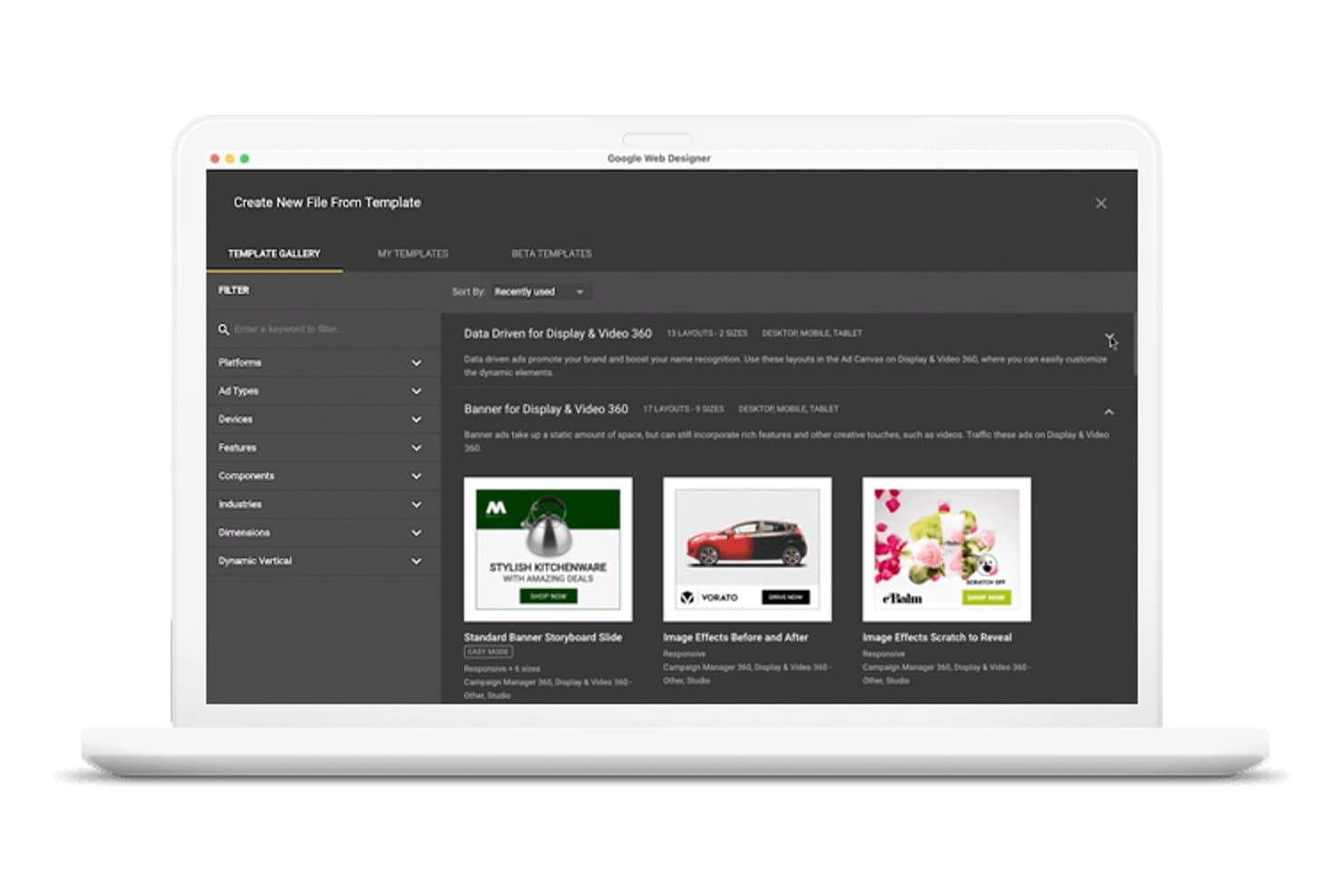
Google Web Designer lets users browse ad templates by platform and type. Google Web Designer is free desktop web design software for creating HTML5 pages and interactive creatives with visual and code editors, animation timelines, responsive layouts, reusable components, and export tools.
Who Is Google Web Designer Best For?
Marketing teams creating responsive, interactive HTML5 ads for Google Ads, AdMob, and other advertising platforms.
Why I Picked Google Web Designer
I picked Google Web Designer because it turns HTML5 interactive ad design into a visual, code-accessible workflow. I use timeline animation, responsive media rules, and interactive components to create rich ads for Google Ads and AdMob. Its Code view also lets me fine-tune HTML, CSS, and JavaScript before exporting the creative.
Google Web Designer Key Features
- Template Gallery: Browse display and video ad templates by platform, device, format, and industry.
- Easy mode: Replace images, edit copy, and adjust colors across multiple ad sizes.
- Ad platform validation: Check creatives for Google Ads, AdMob, and other supported environments.
- Preview links: Generate shareable URLs and QR codes for supported ad environments.
Google Web Designer Integrations
Google Web Designer has native integrations with Google Drive, Google Ads, Google AdMob, Display & Video 360, Campaign Manager 360, Studio Asset Library, and Ads Creative Studio. It also includes YouTube, Google Maps, and Street View components.
What's Free?
Google Web Designer is free desktop software with no time-limited trial. You can create HTML5 pages and interactive ads, but some ad platform features and validation tools support Google products and selected environments.
Pros and Cons
Pros:
- Design and code views work together
- Responsive controls cover multiple screen sizes
- HTML5 ad animation supports rich interactions
Cons:
- Published files need separate hosting
- Templates target ads rather than websites
Learn more about Google Web Designer: 6Best for AI-generated site setup from a prompt
Wix
- Free plan + free demo available
- From $17.77/month (billed annually)
Visit WebsiteCustomer Rating:4.2/5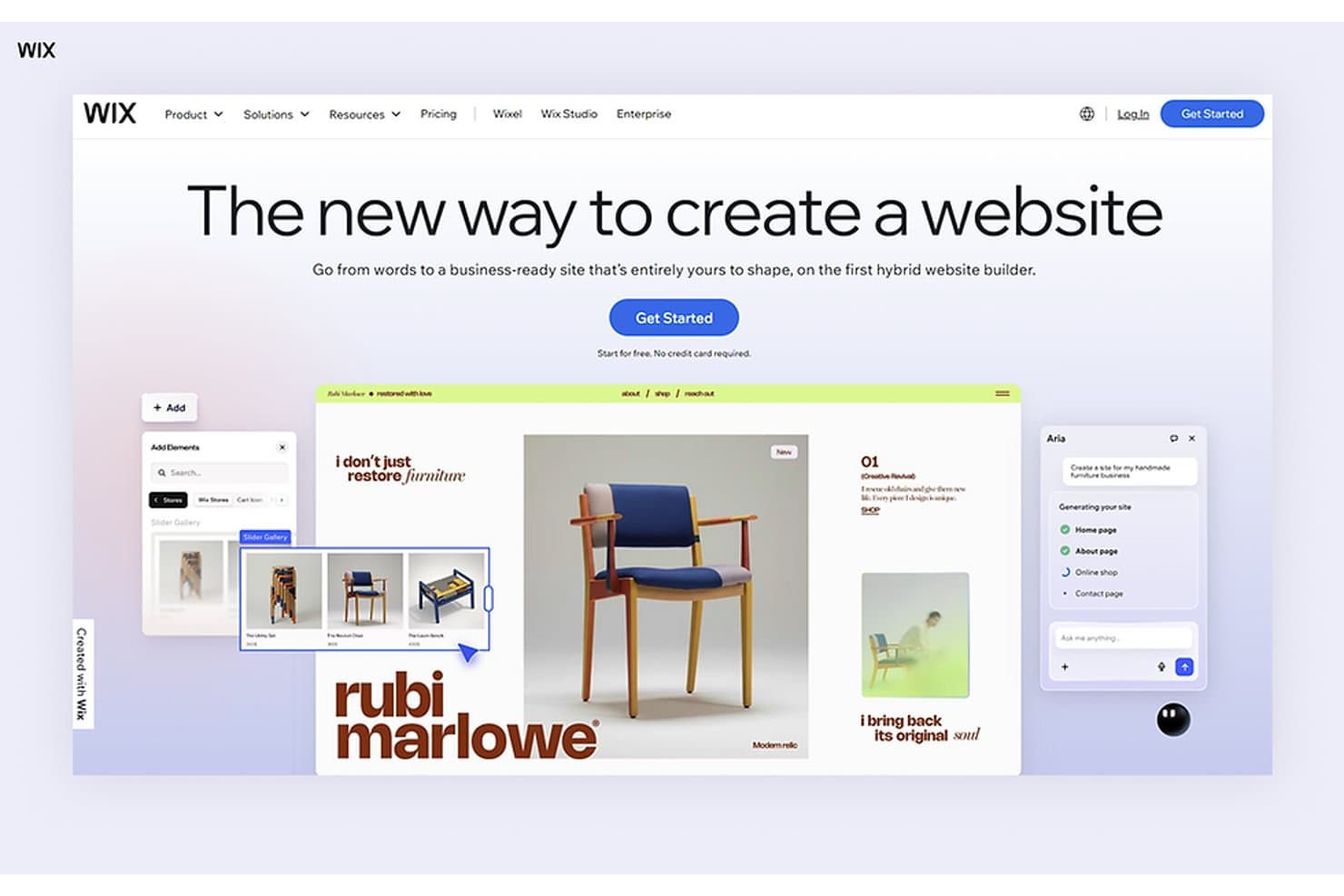
Wix lets users build websites using AI and a drag-and-drop editor. Wix is free web design software with AI-assisted and drag-and-drop editors, industry templates, responsive layout tools, hosting, forms, analytics, SEO features, and ecommerce capabilities.
Who Is Wix Best For?
Small business owners, startup founders, and marketers needing AI-generated site setup from a prompt can launch without coding.
Why I Picked Wix
I picked Wix because its AI-generated site setup from a prompt turns a business description into pages, copy, structure, and visuals through the Harmony Editor and Aria. I can then adjust the generated design on the canvas, choose from 2,000+ templates, and publish a working prototype on Wix’s free plan.
Wix Key Features
- Built-in analytics: Track visitors and site activity with Wix Analytics.
- Form builder: Create up to four forms on the free plan.
- SEO tools: Connect Google Search Console and create AI-generated meta tags.
- App Market: Add integrations for ecommerce, bookings, consent, reviews, and social feeds.
Wix Integrations
Wix offers marketplace integrations through the Wix App Market, including QuickBooks Online, Instagram, TikTok Ads, Fera Reviews, Consentik, Usercentrics, and WhatsApp. It also connects with Google Search Console, Google Analytics, Google Tag Manager, Facebook, and TikTok, plus headless APIs for custom integrations.
What's Free?
Wix offers a free-forever plan, so you can create and publish a website without a time-limited trial. The plan includes Wix branding, a Wix subdomain, limited storage and bandwidth, and no custom domain connection; premium features require an upgrade.
Pros and Cons
Pros:
- Free hosting includes SSL and CDN
- 2,000-plus templates support launch pages
- Prompt-to-site setup accelerates validation
Cons:
- Sites cannot be exported elsewhere
- Free sites display Wix branding
Learn more about Wix: Best for CRM-connected site building
- Free plan available
- Pricing upon request
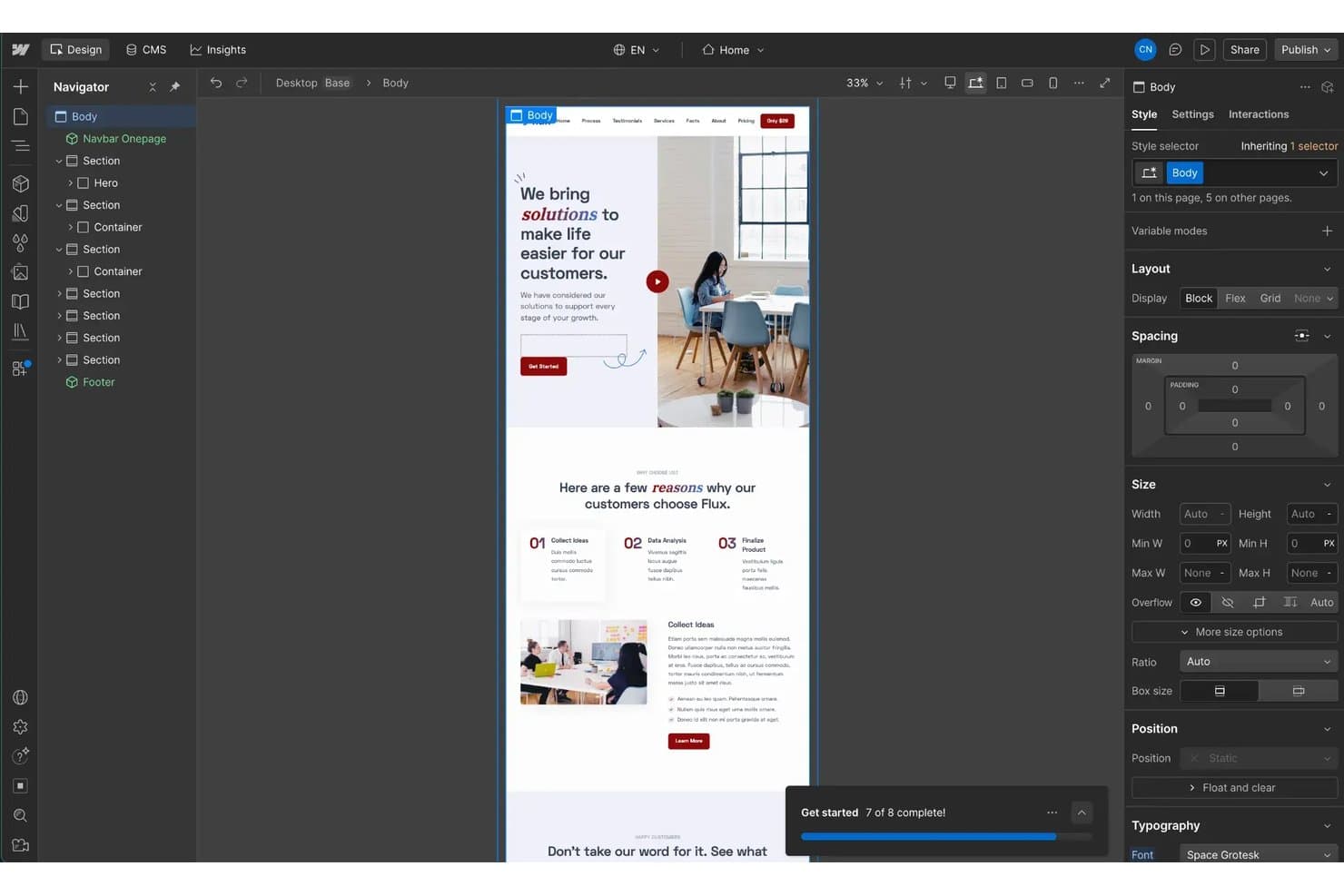
HubSpot CMS lets users visually design and edit web pages with a drag-and-drop interface. HubSpot CMS is free web design software with drag-and-drop editing, themes, AI site generation, hosting, forms, analytics, and built-in CRM tools for creating multi-page websites and landing pages.
Who Is HubSpot CMS Best For?
Marketing teams that need to build lead-generating websites with native forms, CRM integration, analytics, and a free multi-page site plan.
Why I Picked HubSpot CMS
I picked HubSpot CMS because it connects website design directly to lead capture and customer records. Its native forms, CTAs, live chat, and CRM store prospect activity alongside site analytics. I can use its free multi-page setup to publish campaign pages, capture submissions, and measure conversions from one workspace.
HubSpot CMS Key Features
- Drag-and-drop editor: Build pages with visual modules and WYSIWYG text formatting.
- AI Website Generator: Create an editable starter page from business prompts.
- Responsive editing: Adjust mobile visibility, spacing, and margins separately.
- Custom domain connection: Publish on your domain with free hosting and SSL.
HubSpot CMS Integrations
HubSpot CMS connects natively with HubSpot CRM, Marketing, Sales, Service, Data, Revenue, and Agent Hubs. Its marketplace offers 2,000+ integrations, including Adobe Express, Microsoft Teams, LinkedIn, Jira, Aircall, and Amplitude.
What's Free?
HubSpot CMS offers a free-forever plan for building multi-page websites and landing pages. Advanced features may require a paid plan, which starts at $20 per user per month.
Pros and Cons
Pros:
- Hosted SSL and custom domains included
- AI generator drafts editable starter layouts
- Free plan supports multi-page websites
Cons:
- Mobile controls omit tablet breakpoints
- HubSpot branding appears across published content
Learn more about HubSpot CMS: Best for visual coding without writing code
- Free plan available
- From $15/month (billed annually)
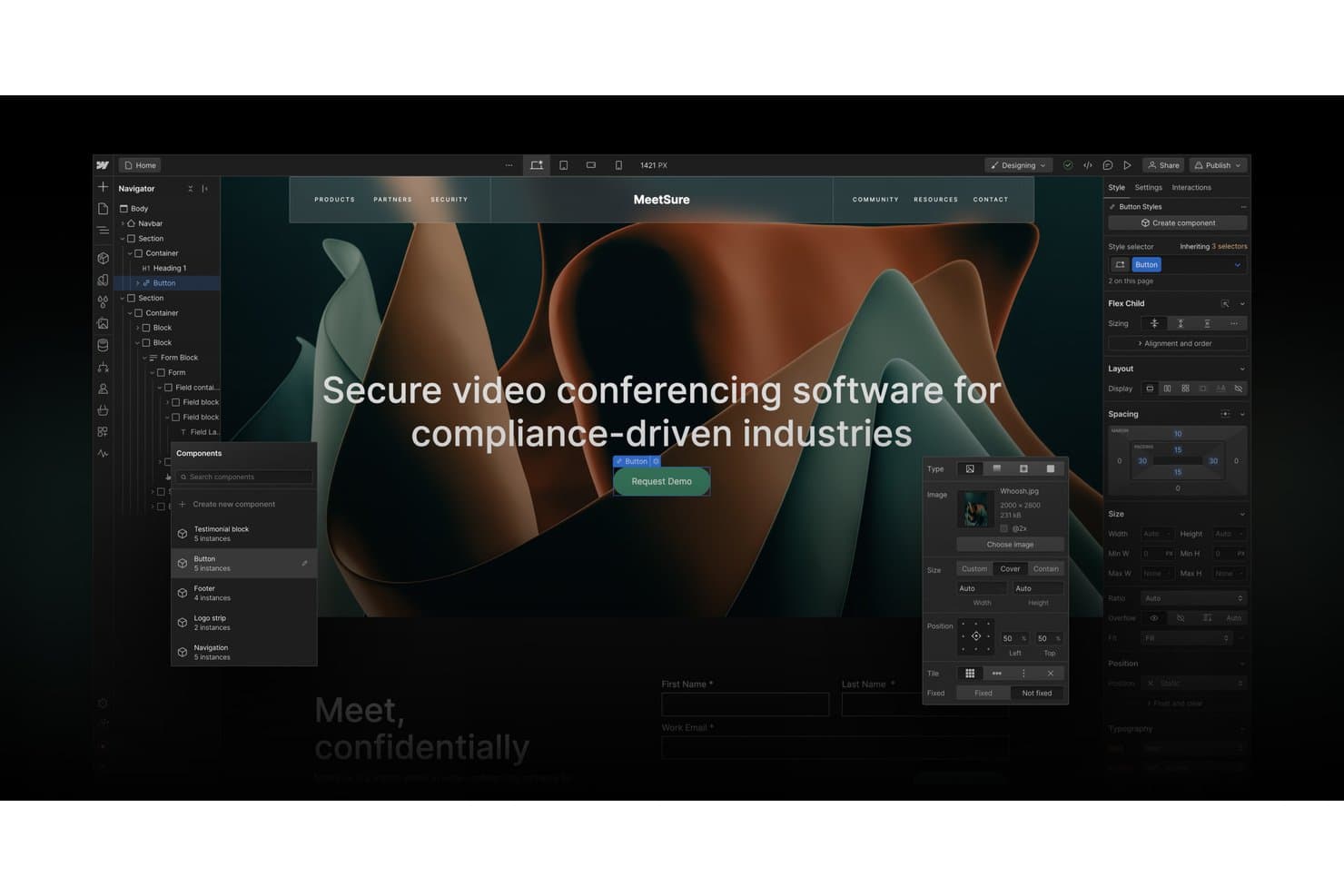
Webflow's visual designer lets users build and style web pages without code. Webflow is free web design software with a visual Designer for responsive layouts, customizable templates, CMS content, forms, interactions, and publishing to a webflow.io subdomain through its Starter plan.
Who Is Webflow Best For?
Freelance designers and startup founders who need precise visual control, responsive layouts, and a clear path from prototype to production site.
Why I Picked Webflow
Webflow earns its spot because it supports visual coding without writing code. I use its Designer to build precise layouts with classes, Flexbox, Grid, and responsive breakpoints. GSAP-powered interactions let me turn a two-page Starter site into a polished landing page or prototype on a webflow.io subdomain.
Webflow Key Features
- Template library: Choose from one-page, multi-page, and multi-layout templates.
- CMS collections: Organize dynamic content with structured collections.
- Native forms: Collect up to 50 submissions on the free plan.
- Reviewer comments: Share read-only sites and gather pinned feedback.
Webflow Integrations
Webflow’s documented integrations include Google Sheets, Airtable, Google site tools, and Zapier. Its APIs and Webflow MCP support custom connections and AI-assisted site management.
What's Free?
Webflow’s Starter plan is free forever, with hosting on a
webflow.iosubdomain. It includes two static pages, limited CMS and form features, and up to 50 form submissions, while custom domains require a paid plan.Pros and Cons
Pros:
- Responsive breakpoints support detailed mobile tuning
- Free reviewer seats support design feedback
- Pixel-level control with Flexbox and Grid
Cons:
- Code export requires a paid Workspace
- Free sites publish only two static pages
Learn more about Webflow: Best for per-device responsive layout control
- Free plan available
- From $6.75/month (billed annually)
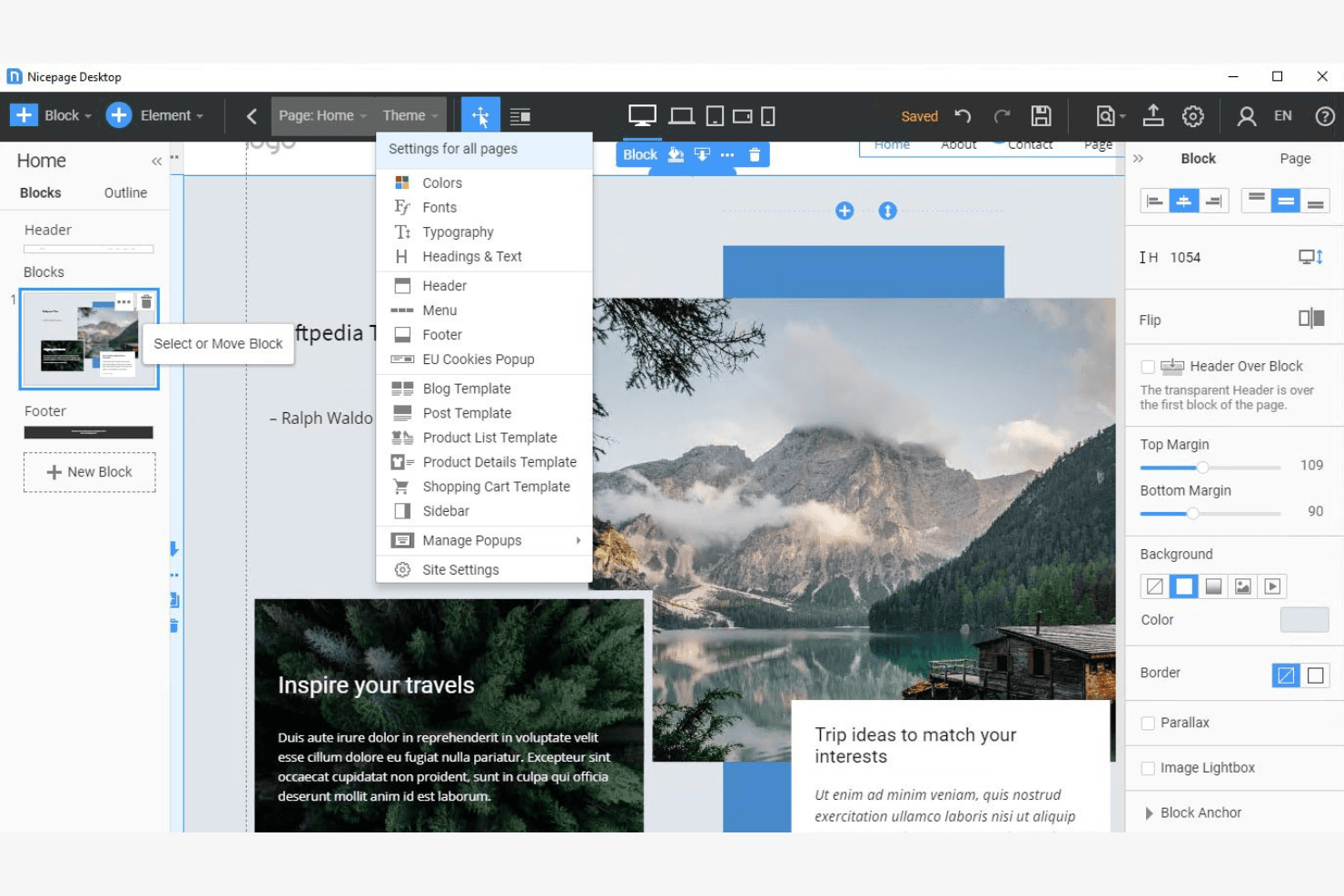
Nicepage lets users customize site-wide theme settings via a dropdown menu. Nicepage is free web design software with a freehand visual editor, AI page and content builders, extensive templates and blocks, multi-page site tools, forms, and HTML, WordPress, and Joomla export.
Who Is Nicepage Best For?
Nicepage suits small businesses, marketing teams, and startup founders who need precise desktop-to-mobile layouts without coding.
Why I Picked Nicepage
I picked Nicepage because it gives free users unusually precise control over responsive layouts. I can edit five device views separately, hide elements on selected devices, and set content widths for each screen size. That helps me adapt a campaign page from desktop to mobile without rebuilding its structure. The free Starter plan also supports two projects and nicepage.io hosting.
Nicepage Key Features
- AI page builder: Generates editable pages from a topic or prompt.
- Template library: Includes 1,000+ page templates and 9,000+ block designs.
- Form builder: Supports multi-step forms, conditional fields, reCAPTCHA, and lead review.
- CMS export: Exports sites to HTML, WordPress, and Joomla formats.
Nicepage Integrations
Documented integrations include WordPress, Joomla, WooCommerce, VirtueMart, Google Sheets, Mailchimp, Contact Form 7, Google Analytics, and Google Tag Manager. Nicepage has no public API for custom integrations.
What's Free?
Nicepage offers a free-forever Starter plan, so you can build without a time-limited trial. It supports two projects and includes nicepage.io hosting, while paid plans unlock additional capabilities.
Pros and Cons
Pros:
- AI builders accelerate editable page drafts
- Freehand positioning enables pixel-level page control
- Five device views support precise responsive layouts
Cons:
- Free HTML export requires desktop app
- Free hosting imposes strict traffic limits
Learn more about Nicepage:
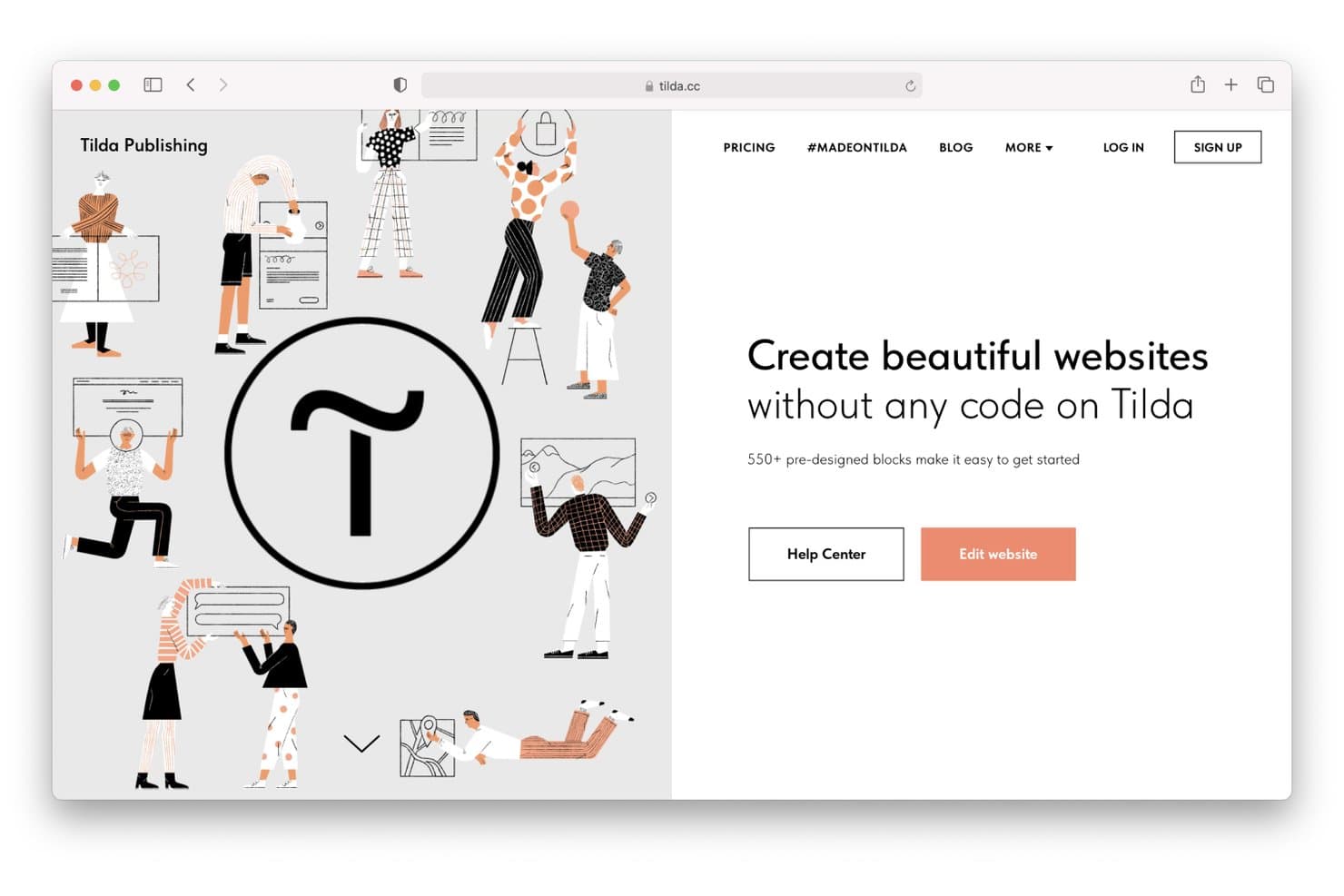
Tilda lets users build websites visually without writing any code. Tilda is free web design software with a block-based editor, responsive templates, Zero Block for custom layouts, animation controls, and hosting on a tilda.ws subdomain.
Who Is Tilda Best For?
Tilda suits freelance designers, marketers, and small businesses that need animated, story-led landing pages without writing code.
Why I Picked Tilda
I picked Tilda because it turns scroll-driven visual storytelling into a practical website workflow. Zero Block gives me layered layouts, parallax, triggers, and fix-on-scroll controls for interactive portfolios or longform campaigns. Its free plan supports multi-page sites on a tilda.ws subdomain, so I can publish a 50-page visual project without paying.
Tilda Key Features
- Block library: Choose from 550+ blocks and 210+ templates.
- Responsive breakpoints: Adjust layouts from 320px to 1920px.
- Form builder: Create multi-step forms and branching quizzes.
- Built-in analytics: Track visits, leads, clicks, and conversions.
Tilda Integrations
Tilda documents integrations with 50+ payment services, including Stripe and PayPal, plus HubSpot, Google Sheets, Mailchimp, and Google Analytics. It also supports Zapier and provides an API, though many connections require a paid plan.
What's Free?
Tilda offers a free-forever plan with up to 50 pages on a tilda.ws subdomain. Custom domains and many integrations require a paid plan.
Pros and Cons
Pros:
- Templates support portfolios and longform articles
- Zero Block enables pixel-level layouts
- Scroll animations support visual storytelling
Cons:
- Code export limits migration flexibility
- Free sites retain Tilda branding
Learn more about Tilda:
Outro software gratuito de design para a web
Eis algumas opções adicionais de software de design para a web que também oferecem planos gratuitos ou períodos de avaliação. Embora estas ferramentas não tenham entrado na minha lista restrita, vale a pena conhecê-las:
- 11CarrdBest for one-page sites built in minutes
- 12FramerBest for animated and interactive site design
- 13WeeblyBest for free e-commerce site building
- 14Google SitesBest for Google Workspace-connected site building
- 15StrikinglyBest for quick no-code business landing pages
Related Reviews
How I Evaluate Free Web Design Software
First, I define what counts as free. A qualifying web design tool has a genuine free-forever plan, not just a trial, though publishing or features can be limited. From there, I weigh building pages visually and adapting them for mobile most, collaborative feedback tools next, and whether code export supports a path from a quick signup-page test to a production site.
Core Functionality (Table Stakes For This List)
In addition to my free plan requirements, I use a scoring system to select tools for my list. I score each one on a scale from 0 (does not offer the functionality) to 5 (excels in this area) for each core functionality listed below, based on what's available on the free plan. I then convert the total into a percentage to help assess each tool's overall fit, with extra weight on any functionalities I've deemed essential.
- Visual Page Editor (Essential): I look for drag-and-drop controls that let you arrange a signup page or portfolio without code and adjust its layout.
- Template Library (Essential): I consider the variety of customizable starting points for common needs, such as a small business site, portfolio, or campaign page.
- Responsive Design: I check how layouts adapt to mobile and tablet screens and whether you can fine-tune key elements at smaller sizes.
- Free Publishing: I evaluate whether you can publish a working site on a free hosted address and what branding or publishing limits apply.
- Design Customization: I look for control over fonts, colors, images, and page structure so a template can match your brand and content.
- Code Access Or Export: I check whether free-plan users can view, edit, or export HTML and CSS when a project needs further customization.
Once I have a list of tools that meet the criteria, I consider what sets each platform apart.
Differentiating Factors (What Sets Vendors Apart)
Here's how I compare and contrast different vendors:
Standout Features
I look for native form blocks that handle waitlist or beta signups without adding a third-party tool. A PM testing positioning for a new feature shouldn't need to wire up an external form service just to capture interest. I also evaluate collaborative feedback options like shareable preview links, since stakeholders reviewing a launch page need a fast way to leave comments before go-live. Multi-page microsite support matters too; tools like Wix and Webflow let you link several free pages, which is useful when a validation experiment needs more than a single landing page.
Beyond Features
I evaluate how quickly a PM can go from signup to a live URL. Tools like Carrd and Google Sites let you publish a validation page in minutes, which matters when you're testing positioning ahead of a launch. I also check whether free tiers show heavy platform branding, since a watermark on an investor demo undermines credibility. Finally, I look at code export or clear upgrade paths so a prototype built during discovery doesn't become throwaway work when the project moves to production.
Como escolher software gratuito de design para a web
Listas complexas de funcionalidades e estruturas de preços podem dificultar a compreensão do que está realmente a obter com um software gratuito de design para a web. Para o ajudar a manter o foco enquanto analisa o processo de seleção do seu software, eis alguns fatores a ter em conta:
| Fator | O que deve considerar |
|---|---|
| FatorÂmbito da oferta gratuita | O que deve considerarVerifique o que está incluído no plano gratuito. Este cobre as suas necessidades básicas ou terá de fazer rapidamente uma atualização? Considere as limitações ao nível das funcionalidades e do apoio. |
| FatorEscalabilidade | O que deve considerarPense no crescimento futuro. A ferramenta pode acompanhar o crescimento da sua empresa? Procure opções para adicionar mais funcionalidades ou utilizadores conforme necessário. |
| FatorIntegrações | O que deve considerarCertifique-se de que o software funciona com as ferramentas que já utiliza. Verifique a compatibilidade com plataformas como o Google Analytics, o Mailchimp e outras de que depende. |
| FatorFacilidade de utilização | O que deve considerarConsidere a rapidez com que consegue aprender a utilizar a ferramenta. Esta oferece uma interface intuitiva? Procure funcionalidades de arrastar e largar e uma navegação clara. |
| FatorPersonalização | O que deve considerarAvalie até que ponto pode adaptar o design. Pode modificar os modelos para se adequarem à imagem e ao estilo da sua marca? |
| FatorApoio | O que deve considerarAnalise as opções de apoio disponíveis. Existem tutoriais, fóruns da comunidade ou conversação em direto para o ajudar quando surgem problemas? |
| FatorDesempenho | O que deve considerarAvalie a velocidade e a fiabilidade da ferramenta. Esta carrega rapidamente e lida bem com o tráfego? Certifique-se de que não torna o seu site mais lento. |
| FatorOtimização para dispositivos móveis | O que deve considerarVerifique se a ferramenta oferece designs adaptáveis a dispositivos móveis. O seu site deve ter bom aspeto em todos os dispositivos sem esforço adicional. |
O que é software gratuito de design para a web?
O software gratuito de design web é uma ferramenta que ajuda os utilizadores a criar sites sem terem de pagar antecipadamente. Estes produtos oferecem frequentemente planos ou períodos de teste gratuitos com funcionalidades básicas. As opções gratuitas de design web podem ser baseadas no navegador ou estar disponíveis como software para criar sites offline.
Normalmente, os proprietários de pequenas empresas, os freelancers e os entusiastas utilizam estas ferramentas para criar e gerir a sua presença online. Estas ferramentas são úteis por permitirem aos utilizadores, incluindo principiantes, conceber e publicar sites sem conhecimentos técnicos. Funcionalidades como editores de arrastar e largar, modelos personalizáveis e otimização para dispositivos móveis ajudam os utilizadores a criar sites profissionais de forma eficiente.
Funcionalidades
Vamos analisar as funcionalidades habitualmente encontradas no software de design web e quais são normalmente incluídas nos planos gratuitos e pagos.
Funcionalidades normalmente gratuitas do software de design web
- Editor de arrastar e largar: Permite organizar os elementos do site sem programação.
- Modelos personalizáveis: Fornecem esquemas pré-concebidos.
- Otimização para dispositivos móveis: Garante que o seu site tem bom aspeto em todos os dispositivos, para que possa alcançar os utilizadores móveis.
- Ferramentas básicas de SEO: Ajudam a melhorar a visibilidade do seu site nos motores de pesquisa, atraindo mais visitantes.
- Alojamento num subdomínio: Oferece alojamento gratuito num subdomínio da plataforma, permitindo-lhe publicar o seu site sem custos adicionais.
- Suporte multilingue: Permite criar sites em vários idiomas, expandindo o seu alcance a um público global.
- Funcionalidades de blog: Permitem criar e gerir publicações de blog, envolvendo o seu público com conteúdos regulares.
Funcionalidades normalmente pagas do software de design web
- Ferramentas avançadas de comércio eletrónico: Fornecem funcionalidades como gateways de pagamento e carrinhos de compras.
- Suporte para domínio personalizado: Permite utilizar um domínio personalizado.
- Análises e relatórios: Oferecem informações detalhadas sobre o desempenho do site, ajudando-o a tomar decisões informadas.
- Suporte prioritário ao cliente: Dá-lhe acesso a tempos de resposta mais rápidos e a suporte dedicado.
- Armazenamento ilimitado: Remove as restrições relativas ao espaço de armazenamento, permitindo incluir mais conteúdos e ficheiros multimédia no seu site.
- Opções avançadas de personalização: Oferecem um controlo mais aprofundado sobre os elementos de design, permitindo criar uma experiência no site mais adaptada às suas necessidades.
- Integração com aplicações de terceiros: Permite ligar o seu site a outras ferramentas, como plataformas de CRM e de marketing por email.
Benefícios
A implementação de software gratuito de design web proporciona vários benefícios à sua equipa e à sua empresa. Eis alguns dos benefícios que pode esperar:
- Poupança de custos: Pode criar e publicar sites sem gastar dinheiro, o que é ideal para startups e pequenas empresas.
- Facilidade de utilização: Os editores de arrastar e largar e os modelos simplificam o processo de design, permitindo a qualquer pessoa criar um site sem conhecimentos técnicos.
- Configuração rápida: Os modelos pré-concebidos e as opções de alojamento permitem colocar um site online e em funcionamento rapidamente.
- Alcance global: O suporte multilingue ajuda a estabelecer ligação com um público mais vasto.
- SEO básico: As ferramentas integradas melhoram a visibilidade do seu site nos motores de pesquisa, atraindo mais visitantes sem custos adicionais.
- Ferramentas de interação: As funcionalidades de blog permitem atualizar regularmente o seu público, promovendo a interação e a fidelização à marca.
- Escalabilidade: Os planos gratuitos permitem começar com uma solução pequena e expandi-la à medida que as suas necessidades aumentam, oferecendo flexibilidade para o crescimento futuro.
Custos e preços
Compreendo que tenha vindo a este artigo à procura das melhores opções de software de design web disponíveis gratuitamente. No entanto, uma vez que os planos gratuitos oferecem apenas funcionalidades limitadas, é bastante provável que precise de atualizar o seu plano no futuro.
A tabela abaixo resume os planos comuns, os respetivos preços médios e as funcionalidades normalmente incluídas nas soluções de software de design web:
Tabela de comparação de planos de software de design web
| Tipo de plano | Preço médio | Funcionalidades comuns |
|---|---|---|
| Tipo de planoPlano gratuito | Preço médio$0 | Funcionalidades comunsModelos básicos, armazenamento limitado e alojamento de subdomínio. |
| Tipo de planoPlano pessoal | Preço médio$3-$149/mês | Funcionalidades comunsDomínio personalizado, remoção de anúncios e modelos adicionais. |
| Tipo de planoPlano empresarial | Preço médio$5-$199/mês | Funcionalidades comunsFerramentas de comércio eletrónico, funcionalidades de SEO e análise avançada. |
| Tipo de planoPlano profissional | Preço médio$9-$599/mês | Funcionalidades comunsSoluções personalizadas, suporte dedicado e utilizadores e armazenamento ilimitados. |
Perguntas frequentes sobre software gratuito de design de sites
Eis algumas respostas a perguntas comuns sobre software gratuito de design de sites:
Posso utilizar software gratuito de design de sites para fins comerciais?
Sim, pode utilizar software gratuito de design de sites para fins comerciais, mas deve verificar os termos da licença. Algumas ferramentas podem impor restrições à utilização comercial, por isso é importante ler as condições detalhadas antes de lançar um site empresarial.
Como é que as ferramentas gratuitas de design de sites ganham dinheiro?
As ferramentas gratuitas de design de sites ganham frequentemente dinheiro através de atualizações premium, disponibilizando funcionalidades avançadas ou armazenamento adicional mediante pagamento. Também podem apresentar anúncios nas versões gratuitas ou cobrar por domínios personalizados.
Existem limites de armazenamento e largura de banda nos planos gratuitos?
Sim, os planos gratuitos têm normalmente limites de armazenamento e largura de banda. Isto significa que pode alojar uma quantidade limitada de conteúdo e suportar um determinado nível de tráfego. Se o seu site crescer, poderá ter de atualizar para um plano pago para evitar estas restrições.
Posso transferir o meu site para outra plataforma se começar com um plano gratuito?
A transferência do seu site pode ser complicada, uma vez que algumas ferramentas gratuitas de design de sites não disponibilizam opções fáceis de exportação. Antes de começar, verifique se a plataforma permite exportar ou migrar o site.
O suporte ao cliente está disponível no software gratuito de design de sites?
O suporte ao cliente pode ser limitado nos planos gratuitos, dependendo frequentemente de fóruns da comunidade ou bases de conhecimento. Algumas plataformas disponibilizam suporte por e-mail ou chat em direto apenas para utilizadores pagos.
Existem custos ocultos no software gratuito de design de sites?
Embora o software em si seja gratuito, podem existir custos ocultos, como o registo de domínio ou atualizações para funcionalidades premium. Reveja sempre os detalhes dos preços para compreender as despesas potenciais e garantir que se enquadram no seu orçamento.