

Gerir projetos de design de sites pode ser difícil, sobretudo quando é necessário cumprir prazos apertados e responder às diversas necessidades da equipa. Pode sentir-se assoberbado pelo enorme volume de tarefas e pela coordenação necessária. É aqui que entra o software de design de sites — ajuda a organizar, colaborar e dar vida às suas ideias criativas de forma mais eficiente.
Com base na minha experiência, selecionar a ferramenta certa pode fazer uma diferença significativa na forma como os seus projetos decorrem. Testei e analisei vários softwares de forma independente para lhe apresentar uma lista imparcial das melhores opções.
Neste artigo, encontrará informações sobre as melhores ferramentas de design de sites disponíveis, com destaque para funcionalidades que respondem aos desafios específicos da sua equipa.
Why Trust Our Software Recommendations
6,700+
Reviews
20
Industry experts
16+
Evaluation factors
14
Years
Our team has been testing and reviewing software since 2012. As product managers ourselves, we know how difficult—and important—it is to choose the right software.
For this guide, we evaluated tools using hands-on testing and independent research, scoring tools using our selection criteria.
Our reviews reflect our human editorial judgment, not a sales pitch.
Expert reviewers:
- Andrew LumbySenior TPM
- Cristiano ValimSenior UI/UX Lead


Tabela comparativa: software de design de sites
Esta tabela comparativa resume os detalhes dos preços das minhas principais escolhas de software de design de sites.
| Tool | Best For | Trial Info | Price | ||
|---|---|---|---|---|---|
| 1 | Best website builder with a freeform canvas | Free plan + free trial available | From $10/month (billed annually) | Website | |
| 2 | Best for white-labeled website building | Free plan + 14-day free trial + free demo available | From $8/month | Website | |
| 3 | Best for building a store and a site together | 3-day free trial + free demo available | From $29/month (billed annually) | Website | |
| 4 | Best for creating no-code and lightweight websites | 14-day free trial available | From $25/month | Website | |
| 5 | Best for ecommerce storefront design and launch | 15-day free trial | From $39/month | Website | |
| 6 | Best drag-and-drop website builder | Free trial + free plan available | From $144/user/year (billed annually) | Website | |
| 7 | Best for designer-to-developer code handoff | Free plan available | From $15/month (billed annually) | Website | |
| 8 | Best for WordPress sites with a visual design system | Free plan available | From $5/month (billed annually) | Website | |
| 9 | Best for sites built on the WordPress ecosystem | Free plan available | From $4/month (billed annually) | Website | |
| 10 | Best for WordPress sites with an AI site builder | Free trial available | From $23.08/year (billed annually) | Website |


Análise do melhor software de design de sites
Segue-se o meu resumo detalhado dos melhores softwares de design de sites que entraram na minha lista restrita. As minhas análises apresentam uma visão detalhada das principais funcionalidades, vantagens e desvantagens, integrações e casos de utilização ideais de cada ferramenta, para o ajudar a encontrar a melhor opção para si.
 Best website builder with a freeform canvas
- Free plan + free trial available
- From $10/month (billed annually)
Visit WebsiteCustomer Rating:4.4/5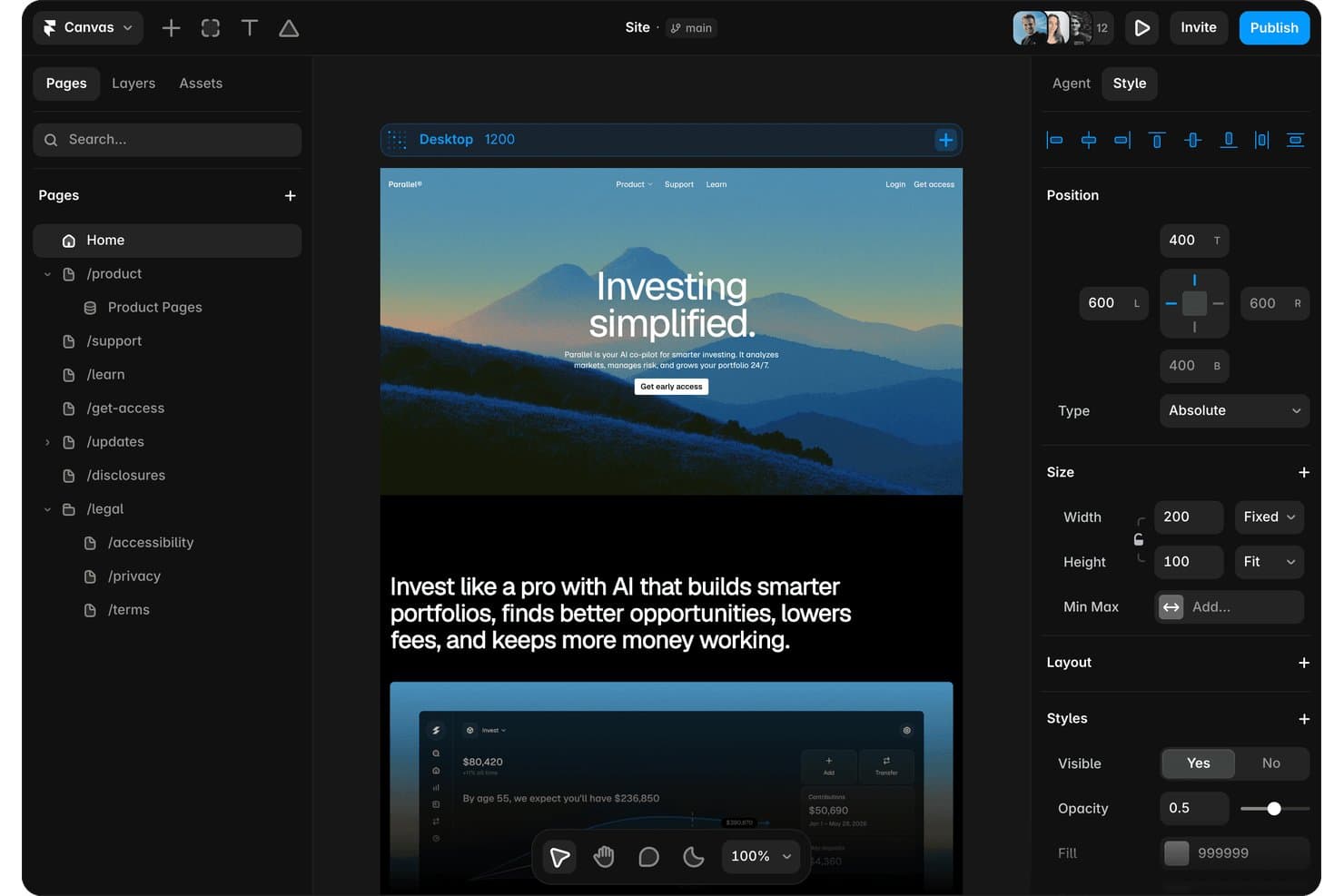
Framer lets users manage pages, layers, and styles in one editor. Framer is a website builder that combines a freeform design canvas with built-in CMS, hosting, AI-assisted layout generation, analytics, and A/B testing.
Who Is Framer Best For?
Framer is a strong fit for freelance designers and marketing teams who want design-level control over their websites without relying on developers.
Why I Picked Framer
Framer earns its spot on my shortlist because its freeform canvas gives you genuine design freedom, not just drag-and-drop within a rigid grid. I love that you can sketch layouts exactly as you'd imagine them in Figma, then publish a live, hosted site directly from that same canvas. The AI Design Agent takes it further, generating responsive layouts per breakpoint from a single prompt. Built-in A/B testing and cookieless analytics mean I can iterate on what's actually working without bolting on extra tools.
Framer Key Features
- CMS with on-page editing: Create and manage content collections with rich field types, drafts, conditional visibility, and on-page editing directly from your live site.
- Built-in localization: Add multiple language versions of your site with AI-assisted translation, automatic browser-language redirects, and per-page translation management from one table.
- Branching and staging: Build and preview changes on isolated branches with real domain staging URLs, then merge to your main site with sign-off workflows and a full changelog.
- Code components and overrides: Extend your site with custom React components, property controls, and a Server API for integrating external data or building complex interactions.
Framer Integrations
Framer offers documented integrations with Google Analytics, Google Tag Manager, HubSpot Forms, Mailchimp, Typeform, Google Sheets, Airtable, and webhooks. It also supports marketplace integrations such as Framer Commerce for Shopify, plus a Server API and custom JavaScript integrations.
Pros and Cons
Pros:
- AI generates editable responsive website designs
- Built-in animation creates polished interactive experiences
- Figma-like canvas enables highly custom layouts
Cons:
- Responsive text styles fail inside components
- No native site code export
 2Best for white-labeled website building
Duda
- Free plan + 14-day free trial + free demo available
- From $8/month
Visit WebsiteCustomer Rating:4.6/5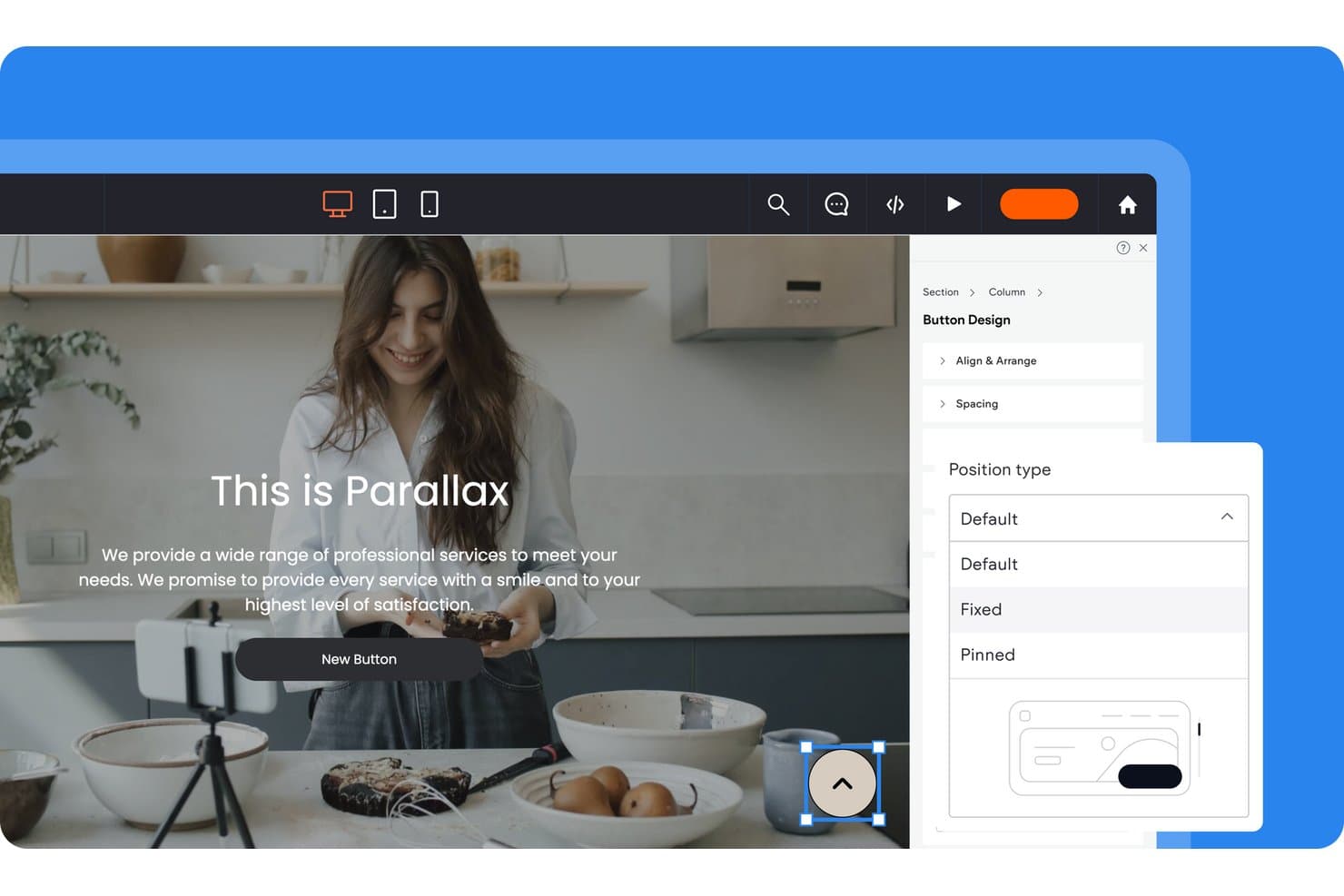
Duda lets users control button position types via a design panel. Duda is a website builder and design platform for agencies and professionals, offering a drag-and-drop editor, AI site generation, multi-site management, white-label client portals, and built-in hosting.
Who Is Duda Best For?
Duda is a strong fit for freelance designers and agencies managing multiple client sites who need white-label branding, client billing, and multi-site dashboards under one roof.
Why I Picked Duda
I picked Duda as one of the best because its white-label depth is genuinely unlike what most website builders offer. You can replace every trace of Duda's branding, including the login screen, client dashboard, editor, tutorial videos, and even the support portal, with your own. I also love that Client Billing runs through Stripe so I can automate publishing when a client pays and unpublish when they don't.
Duda Key Features
- AI Site Generator: Builds multi-page sites with layouts and content from a business description, prompt, or uploaded file.
- DudaFlex editor: Uses CSS Grid and Flexbox to create pixel-precise layouts with nested columns, overlapping elements, and up to 8 columns per section.
- Dynamic pages: Generates large sets of pages automatically from external data collections, including Airtable and Google Sheets.
- Site Theme: Sets sitewide fonts, colors, buttons, and spacing from one place, with individual widget overrides available.
Duda Integrations
Duda offers native integrations with HubSpot, Mailchimp, ActiveCampaign, and more, plus data connections to Airtable and Google Sheets and marketplace integrations such as SimplyBook.me and Bablic. It also supports REST APIs, webhooks, custom widgets, and Zapier.
Pros and Cons
Pros:
- AI builds multi-page sites quickly
- Multi-site dashboards simplify agency workflows
- White-labels the entire client experience
Cons:
- Exporting removes dynamic features and apps
- Fixed breakpoints limit responsive control
Learn more about Duda: Best for building a store and a site together
- 3-day free trial + free demo available
- From $29/month (billed annually)
Visit WebsiteCustomer Rating:4.5/5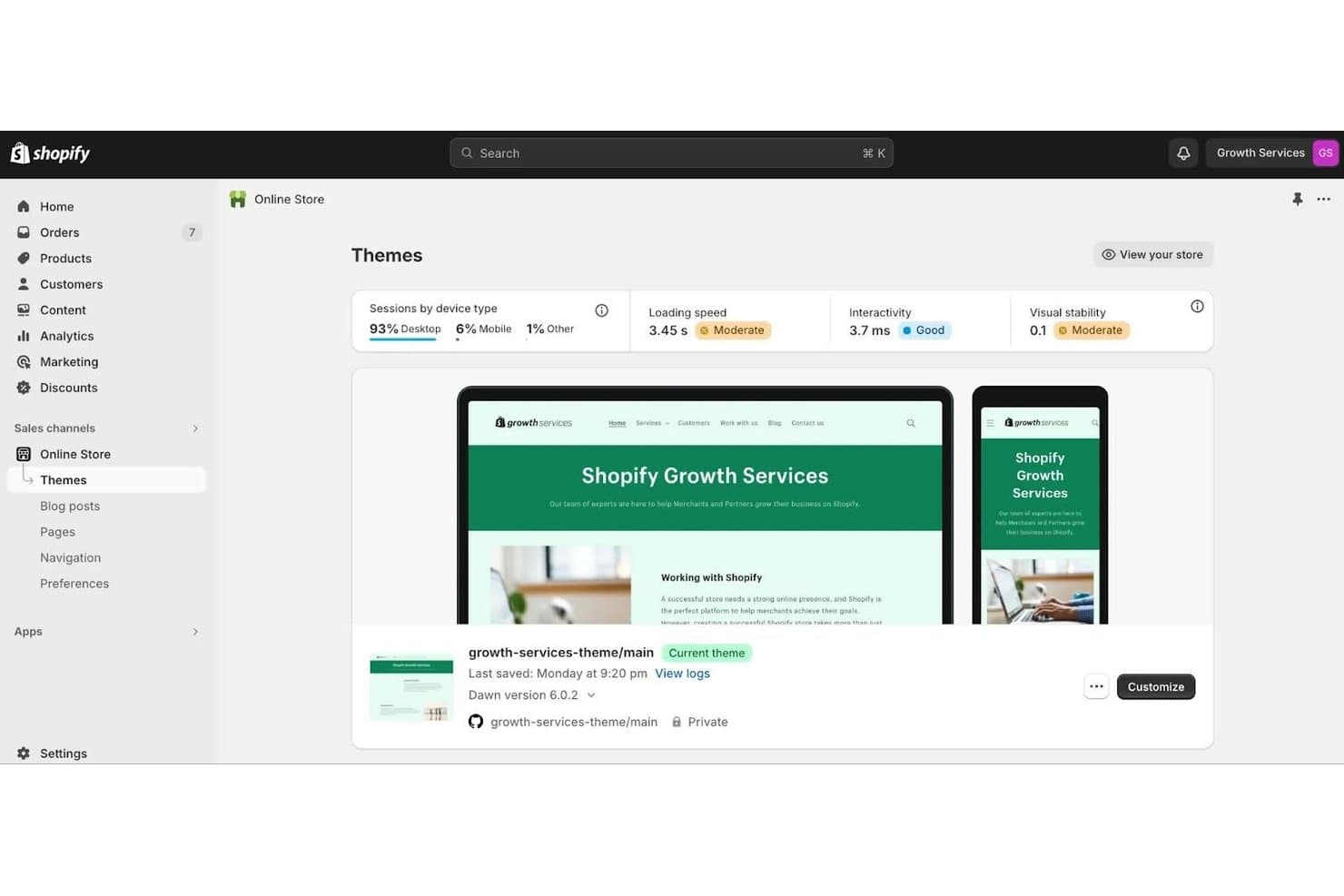
Shopify lets users customize and preview themes visually. Shopify is an ecommerce-first website builder that combines a no-code theme editor, built-in hosting, and commerce tools like checkout, payments, and inventory management into a single platform.
Who Is Shopify Best For?
Shopify is a strong fit for small business owners who want to build and manage a full online store without juggling separate hosting, payment, and design tools.
Why I Picked Shopify
I've included Shopify in my top picks because it's the only tool on this list that builds your store and your site as one thing, not two separate projects to manage. The no-code theme editor, built on sections and nested blocks, lets you design pages visually while your checkout, inventory, and product catalog stay connected underneath. I particularly like Rollouts, which lets you A/B test theme changes against a live control, so you can iterate on your site's design with real traffic data rather than guesswork.
Shopify Key Features
- Global theme settings: Adjust typography, colors, spacing, and animations from a single panel that applies changes across your entire site.
- Metaobjects and dynamic sources: Create custom content types like lookbooks or banners and connect them to sections and blocks directly in the editor.
- GitHub integration: Sync your theme to a repository branch in both directions to support version control and CI/CD workflows.
- Shopify Markets: Sell to multiple regions from one store, with per-market domains, languages, and localized theme content.
Shopify Integrations
Shopify supports marketplace integrations with Shogun, PageFly, Klaviyo, Yotpo, Recharge, Weglot, and Instafeed. Its Storefront API, GraphQL Admin API, Hydrogen, GitHub integration, and Shopify CLI support custom storefronts and CI/CD workflows.
Pros and Cons
Pros:
- Native experiments validate design changes
- 800-plus themes cover varied industries
- Commerce and content share one editor
Cons:
- Tablet and breakpoint controls are limited
- Layouts remain bounded by theme sections
Learn more about Shopify: Best for creating no-code and lightweight websites
- 14-day free trial available
- From $25/month
Visit WebsiteCustomer Rating:4.6/5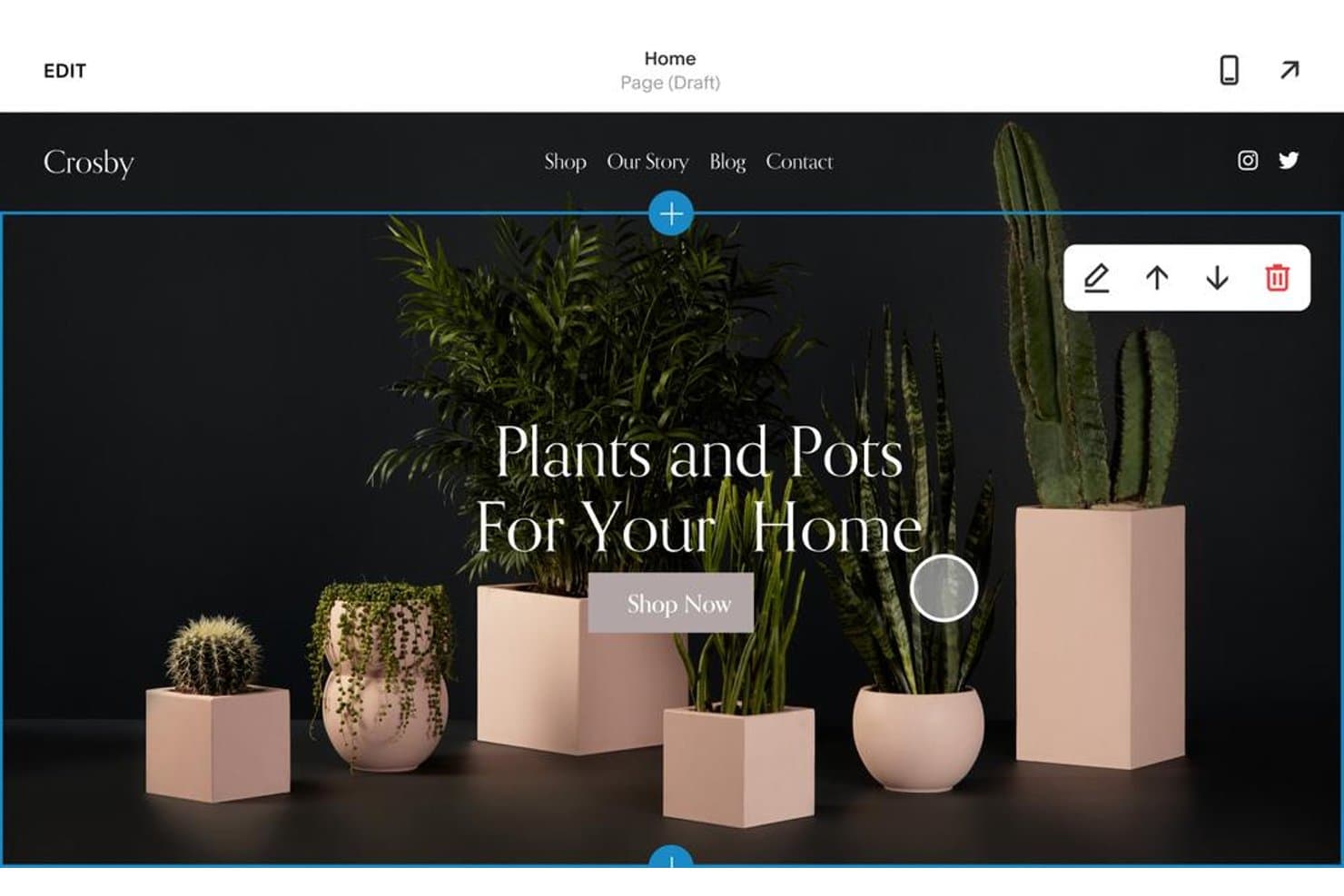
Squarespace lets users edit hero sections with drag-and-drop tools. Squarespace is a no-code website builder that combines drag-and-drop page editing, AI-assisted site generation, designer templates, and built-in hosting into a single platform.
Who Is Squarespace Best For?
Squarespace is a strong fit for small business owners and freelance designers who want a polished, hosted website without touching code.
Why I Picked Squarespace
Squarespace earns its spot on my shortlist because its Fluid Engine editor makes no-code site building genuinely capable, not just convenient. I love how Finish Layer lets you add scroll-triggered animations, block transforms, and mobile-specific layouts without touching a single line of CSS. Pair that with Blueprint AI, which generates a full personalized site from a short business description, and you can go from blank canvas to live, polished website in a single afternoon.
Squarespace Key Features
- Global Site Styles panel: Adjust fonts, color palettes, buttons, and spacing across your entire site from a single settings panel.
- Saved sections library: Save up to 250 reusable page sections per site and pull them into any page without rebuilding from scratch.
- Squarespace Circle partner program: A free program giving freelancers and agencies extended client trials, plan discounts, and priority support tiers.
- Built-in SEO and analytics tools: Track site performance, monitor search visibility, and access AI Visibility tracking to see how your business appears in AI-generated answers.
Squarespace Integrations
Squarespace offers marketplace integrations with Mailchimp, HubSpot, QuickBooks Online, Xero, Printful, Printify, ShipStation, Weglot, and Google Shopping. It also supports Zapier on Core and higher plans.
Pros and Cons
Pros:
- Templates accelerate polished website launches
- Finish Layer adds no-code animations
- Fluid Engine supports flexible visual layouts
Cons:
- Saved sections don’t update globally
- Mobile editing lacks tablet-specific controls
Learn more about Squarespace: Best for ecommerce storefront design and launch
- 15-day free trial
- From $39/month
Visit WebsiteCustomer Rating:4.3/5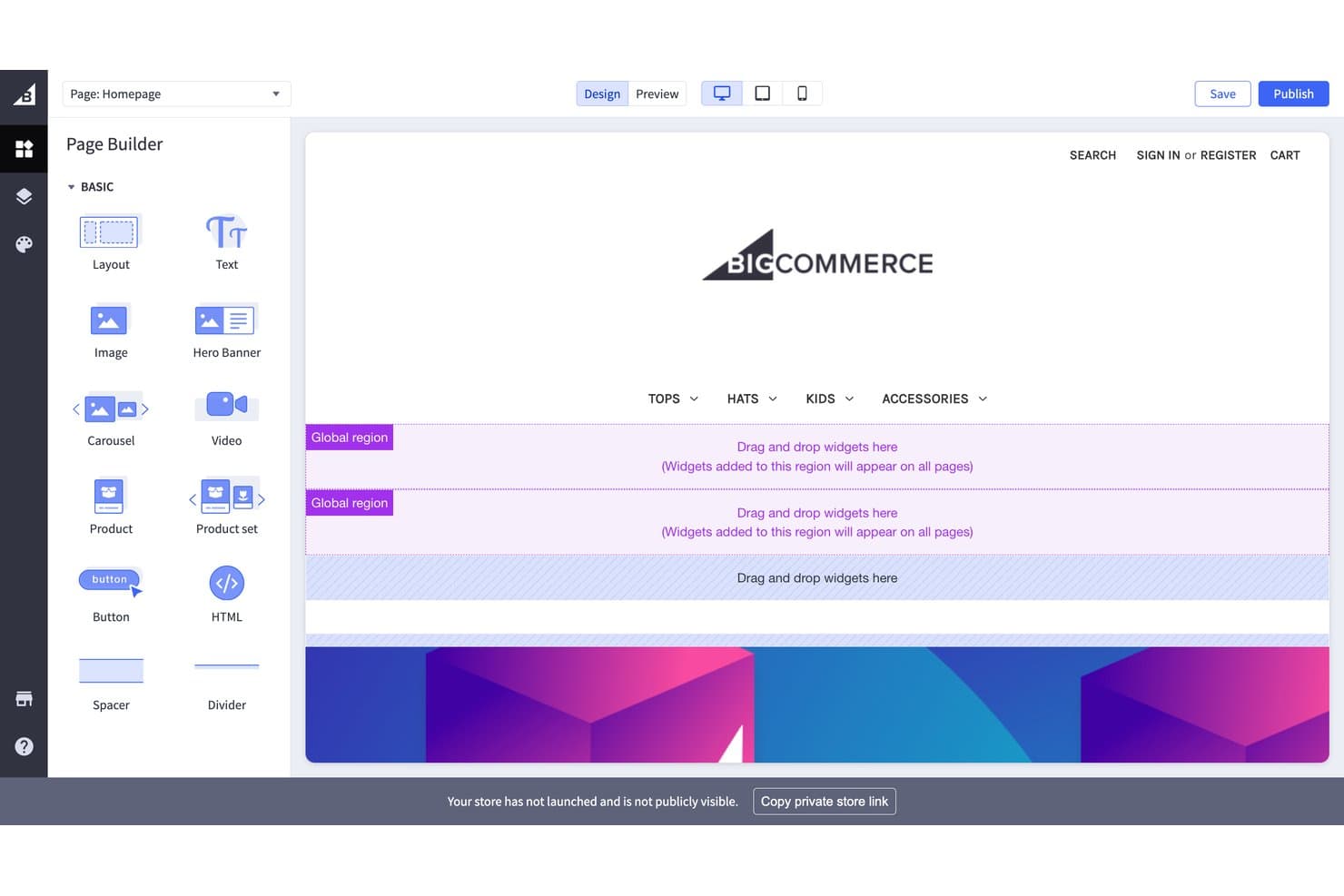
BigCommerce lets users drag and drop widgets to build pages visually. BigCommerce is an ecommerce platform that combines storefront design, hosted publishing, and a theme marketplace with both drag-and-drop and headless visual editing tools.
Who Is BigCommerce Best For?
BigCommerce is a strong fit for merchants and small business owners who want to launch a fully hosted online store without piecing together separate design, hosting, and ecommerce tools.
Why I Picked BigCommerce
I picked BigCommerce as one of the best because it's the only tool on this list built specifically around launching a complete, hosted ecommerce storefront from day one. I love that the 231-theme marketplace lets you preview themes using your own live store content before committing, so you're not guessing how your products will actually look. Page Builder handles no-code layout editing, and Makeswift layers on multiplayer editing, scheduled publishing, and rollbacks for teams who need tighter content control.
BigCommerce Key Features
- Stencil CLI theme editing: Developers can edit Handlebars, SCSS, and YAML theme files locally or in-browser for granular storefront control.
- Global regions: Widgets placed in global regions appear across multiple pages simultaneously, keeping design consistent without manual duplication.
- Multi-storefront management: Run several storefronts with separate domains from one control panel, each with its own design and catalog settings.
- Entrance animations: Makeswift's Box component supports scroll-triggered entrance animations with configurable duration, delay, and stagger settings.
BigCommerce Integrations
BigCommerce offers 1,200+ marketplace integrations, including Contentful, Contentstack, Google Analytics, BigQuery, Klaviyo, Mailchimp, and Optimizely. REST and GraphQL APIs support custom storefront, CMS, and data integrations.
Pros and Cons
Pros:
- Developers can extend designs through Catalyst
- 231 themes preview live store content
- Hosted storefronts launch with built-in SSL
Cons:
- No standalone client prototyping workflow
- Page Builder limits device-specific layout control
Learn more about BigCommerce: Best drag-and-drop website builder
- Free trial + free plan available
- From $144/user/year (billed annually)
Visit WebsiteCustomer Rating:4.6/5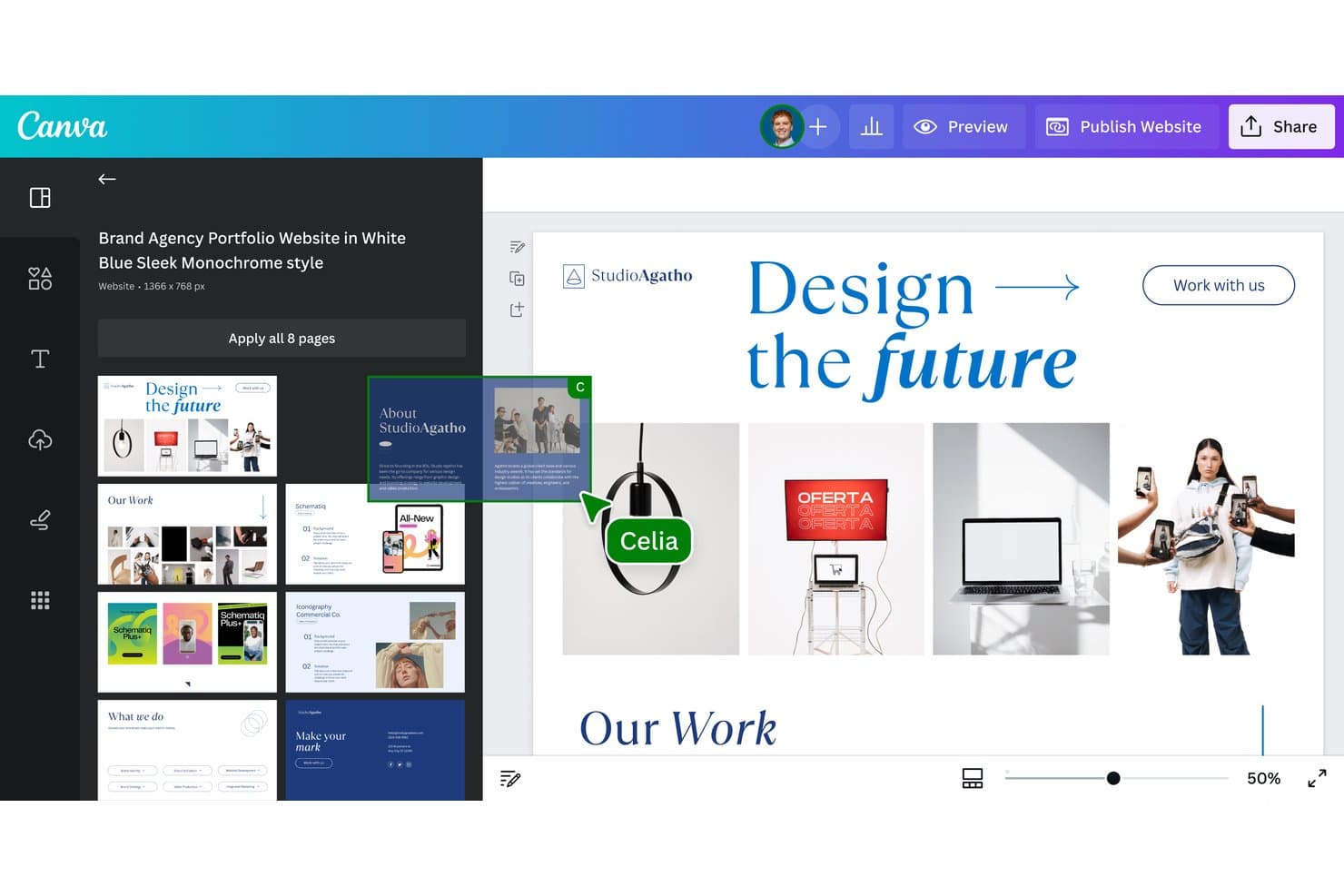
Canva lets users build multi-page websites from branded templates. Canva is a visual design and website builder that lets you create, publish, and host websites using a freeform drag-and-drop editor, AI-assisted design tools, and a library of 800+ templates.
Who Is Canva Best For?
Canva's website builder is a strong fit for small business owners and marketing managers who want to go from design to live site quickly, without touching code.
Why I Picked Canva
I picked Canva as one of the best because its freeform drag-and-drop editor genuinely sets it apart from block-based builders that lock you into rigid section structures. I love that you can place any element anywhere on the canvas, and features like Brand Kits and reusable Components let you maintain visual consistency across every page without rebuilding styles from scratch. Canva Code also lets you describe an interactive landing page in plain language and publish it to a custom domain in minutes.
Canva Key Features
- Brand Kits: Store logos, colors, and fonts in a centralized kit that applies consistently across every page of your site.
- Website Insights: Track visits, traffic sources, device types, and link clicks without cookies or IP-based tracking.
- Magic SEO: Automatically generates titles, meta descriptions, and URL paths for every page on your site at once.
- Password protection: Restrict access to your published site with a password, keeping content visible only to intended viewers.
Canva Integrations
Canva offers native integrations with Google Analytics 4 and Google Search Console, plus Google Sheets data imports on Business and Enterprise. Its Apps Marketplace connects with more than 100 business tools, including Mailchimp, YouTube, Instagram, OneDrive, and Figma.
Pros and Cons
Pros:
- Brand Kits maintain consistent visual systems
- Hundreds of templates accelerate website launches
- Freeform canvas enables flexible page layouts
Cons:
- Sites lack native blogging and ecommerce structure
- Mobile layouts lack per-breakpoint controls
Learn more about Canva: Best for designer-to-developer code handoff
- Free plan available
- From $15/month (billed annually)
Visit WebsiteCustomer Rating:4.4/5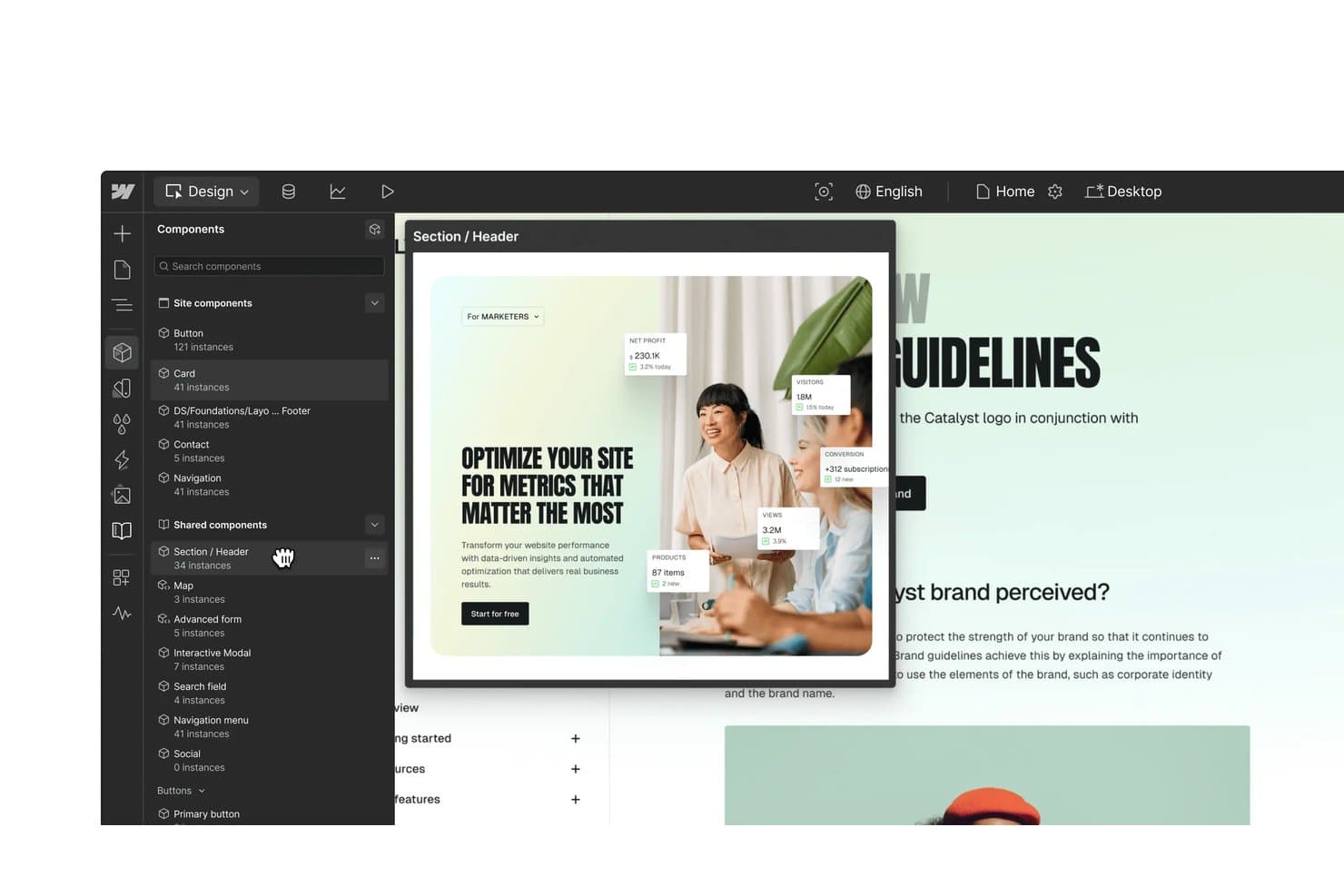
Webflow lets users reuse shared components across site designs. Webflow is a visual web design platform that combines a no-code designer, CMS, managed hosting, and developer handoff tools into a single environment.
Who Is Webflow Best For?
Webflow is a strong fit for freelance designers and web developers who need to hand off production-ready code without losing design fidelity.
Why I Picked Webflow
I've included Webflow in my top picks because it's the clearest example I've seen of a tool that closes the gap between design and production code. DevLink is what sets it apart: designers build components visually, and developers pull those same components directly into React projects via CLI, keeping both sides in sync without back-and-forth exports. The Figma to Webflow plugin also converts auto layout frames into responsive flexbox structures, so what's designed is exactly what ships.
Webflow Key Features
- Seven-breakpoint responsive control: Adjust styles independently across four default and three large breakpoints, with side-by-side preview and per-breakpoint animation settings.
- CMS Collections: Build structured content with up to 20,000 items and 40 collections, then auto-generate pages and landing pages at scale.
- Interactions and animations: Create scroll, hover, click, and page-load animations on a visual timeline built on GSAP, with support for Lottie, Spline 3D, and Rive imports.
- A/B testing via Webflow Optimize: Run classic A/B tests or rules-based personalization targeting device, location, UTM parameters, and CRM data without cookies.
Webflow Integrations
Webflow offers a marketplace including Figma, Relume, HubSpot, Adobe Marketo Engage, Google Site Tools, Google Ads, Microsoft Clarity, Algolia, Memberstack, and Bynder. Its APIs, webhooks, DevLink CLI/CI, and MCP server support custom developer workflows.
Pros and Cons
Pros:
- Shared Libraries sync components across sites
- Seven breakpoints support precise responsive styling
- Visual layouts produce production-ready HTML and CSS
Cons:
- CMS and form features disappear after export
- Element order changes affect every breakpoint
Learn more about Webflow: Best for WordPress sites with a visual design system
- Free plan available
- From $5/month (billed annually)
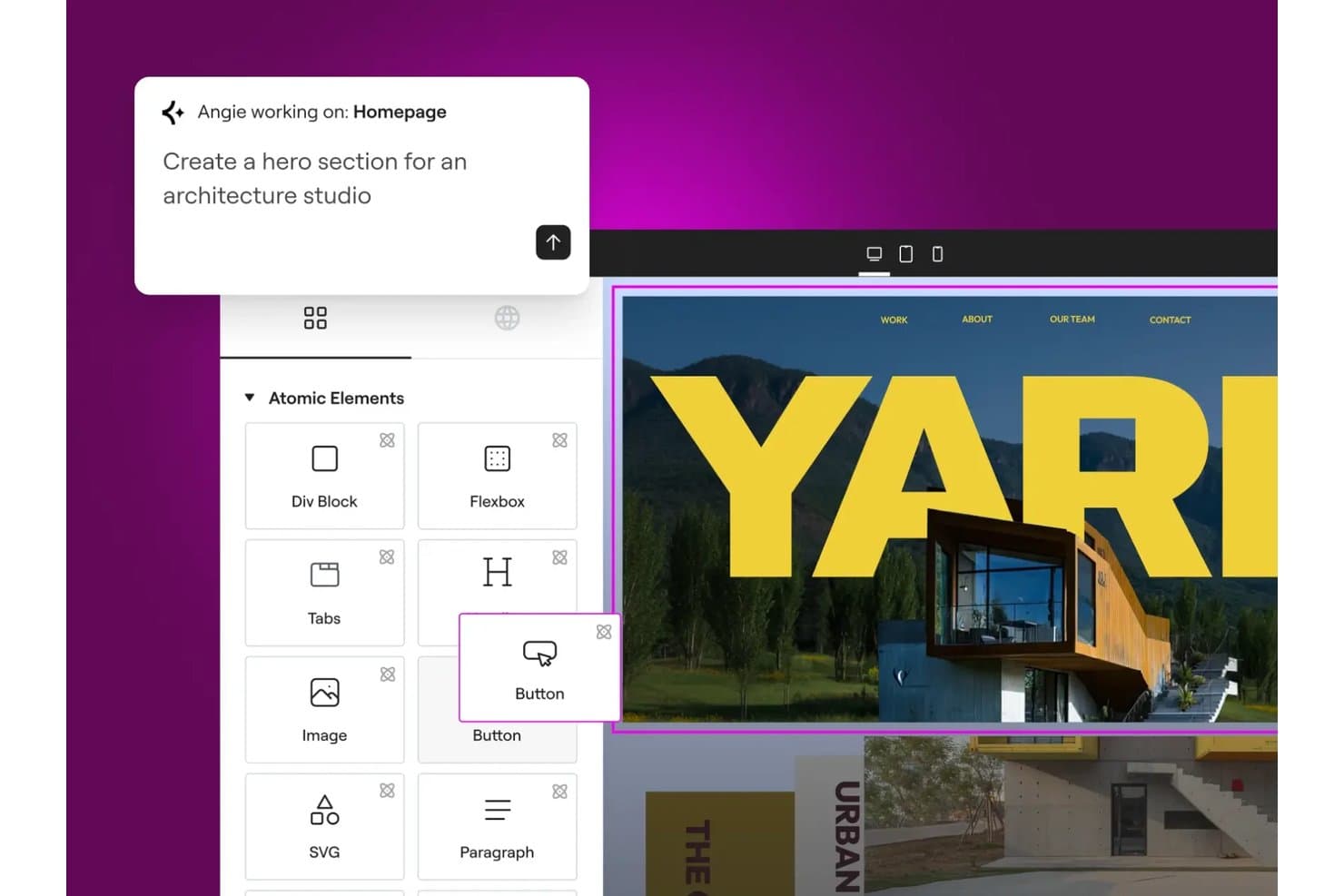
Elementor lets users build hero sections with AI-assisted drag-and-drop tools. Elementor is a WordPress page builder plugin with a drag-and-drop visual editor, Theme Builder, a library of 100+ website kits, and a V4 design system built around reusable classes, variables, and components.
Who Is Elementor Best For?
Elementor fits WordPress designers and small business owners who want a visual design system with reusable styles, components, and AI tools built in.
Why I Picked Elementor
Elementor earns its spot on my shortlist because its V4 design system is the closest thing I've seen to a real visual design system inside WordPress. I love how Classes and Variables let you define a color or type style once and push it across an entire site instantly. The Atomic Editor also outputs cleaner HTML per element, which directly improves Core Web Vitals without touching a single line of code manually.
Elementor Key Features
- Theme Builder: Visually design headers, footers, single post templates, archive pages, and 404 pages without touching code.
- Popup Builder: Create triggered popups with scroll, exit intent, timer, and click conditions to capture leads on any page.
- Angie AI agent: Generate full pages, design systems, custom widgets, and dynamic loops from plain-language prompts or screenshots.
- Role Manager: Restrict editor access to content-only editing so marketers can update copy without altering the design layout.
Elementor Integrations
Elementor has documented integrations with HubSpot, Mailchimp, ActiveCampaign, Slack, Discord, WooCommerce, PayPal, Stripe, Google Analytics, and Google Search Console. It also supports API, webhooks, WPML, and Zapier connectivity.
Pros and Cons
Pros:
- WordPress editing supports marketing handoffs
- Hundreds of kits accelerate client prototypes
- Sitewide design systems update styles instantly
Cons:
- Complex pages can suffer performance slowdowns
- V4 still misses some established controls
Learn more about Elementor: Best for sites built on the WordPress ecosystem
- Free plan available
- From $4/month (billed annually)
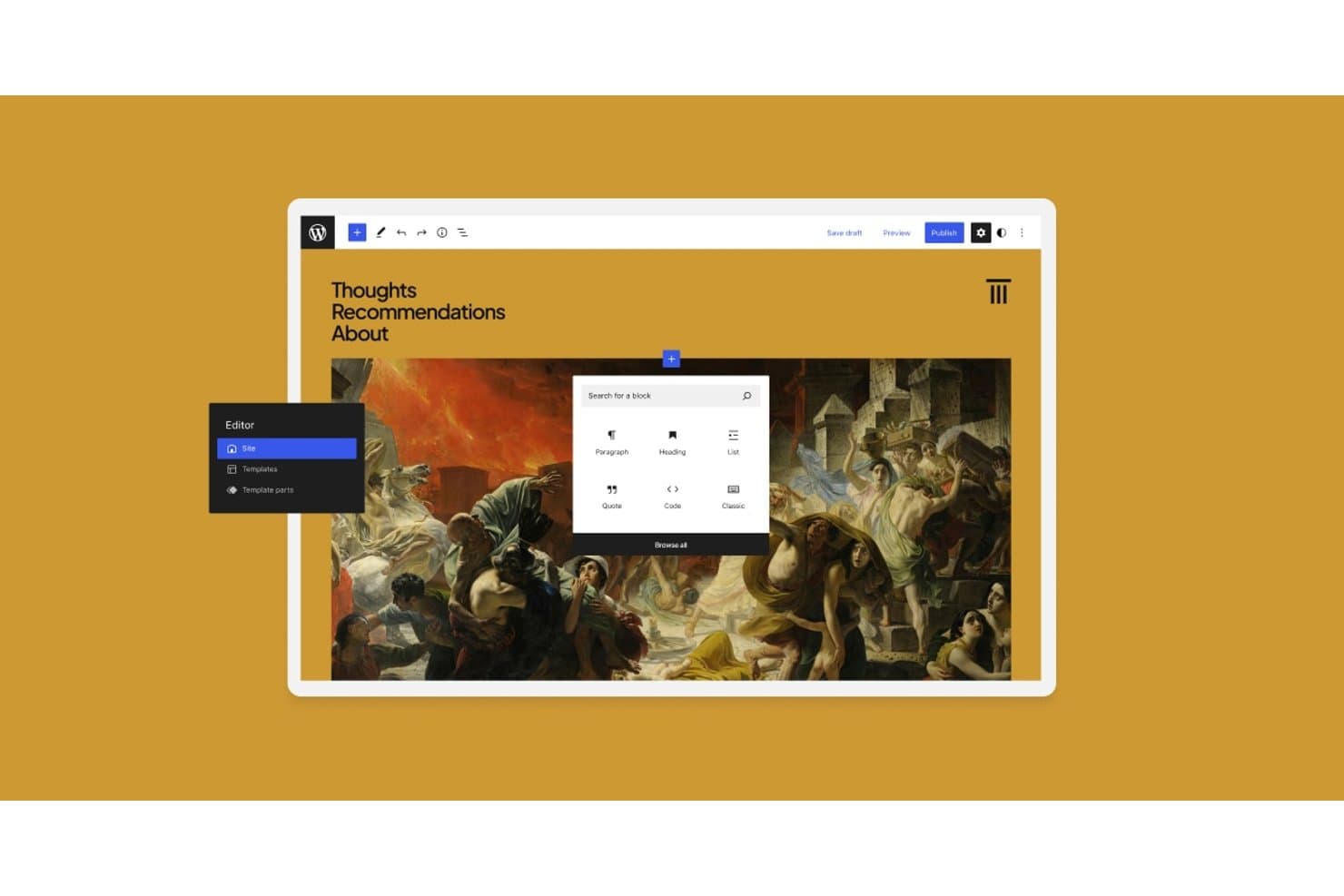
WordPress.com lets users add content blocks via a visual site editor. WordPress.com is a managed website building and hosting platform that combines a no-code block editor, a full site editing interface, thousands of themes and patterns, and the broader WordPress plugin ecosystem.
Who Is WordPress.com Best For?
WordPress.com is a strong fit for small business owners and marketing managers who want the flexibility of the WordPress ecosystem without managing their own hosting or server configuration.
Why I Picked WordPress.com
WordPress.com earns its spot on my shortlist because it gives you the full WordPress ecosystem—60,000+ plugins, thousands of themes, and a mature block-based Site Editor—without touching a server. I especially like that Global Styles lets you define sitewide color palettes, typography, and per-block defaults once, then propagate them everywhere instantly. Synced patterns take that further: edit a testimonial section in one place and every instance on the site updates automatically.
WordPress.com Key Features
- AI Website Builder: Describe your site in a chat and WordPress.com generates a fully editable site from your prompt.
- Managed hosting with 99.99% uptime: WordPress.com handles security, updates, backups, SSL, and CDN delivery across 28+ global data centers.
- Plugin library: Access 60,000+ plugins from the WordPress.org directory on any paid plan to extend your site's functionality.
- GitHub Deployments: Connect a GitHub repo to automatically deploy code changes to your site on every commit or on demand.
WordPress.com Integrations
WordPress.com supports integrations with Google Analytics, Mailchimp, Yoast, Rank Math, WooCommerce, WooPayments, PayPal, Stripe, and GitHub. Its REST API and MCP connections support custom workflows with tools such as ChatGPT and Claude.
Pros and Cons
Pros:
- Managed hosting simplifies website publishing
- Reusable patterns speed page creation
- Sitewide styles keep branding consistent
Cons:
- Animation requires plugins or custom code
- Custom breakpoints aren't available
Learn more about WordPress.com: 10Best for WordPress sites with an AI site builder
Divi
- Free trial available
- From $23.08/year (billed annually)
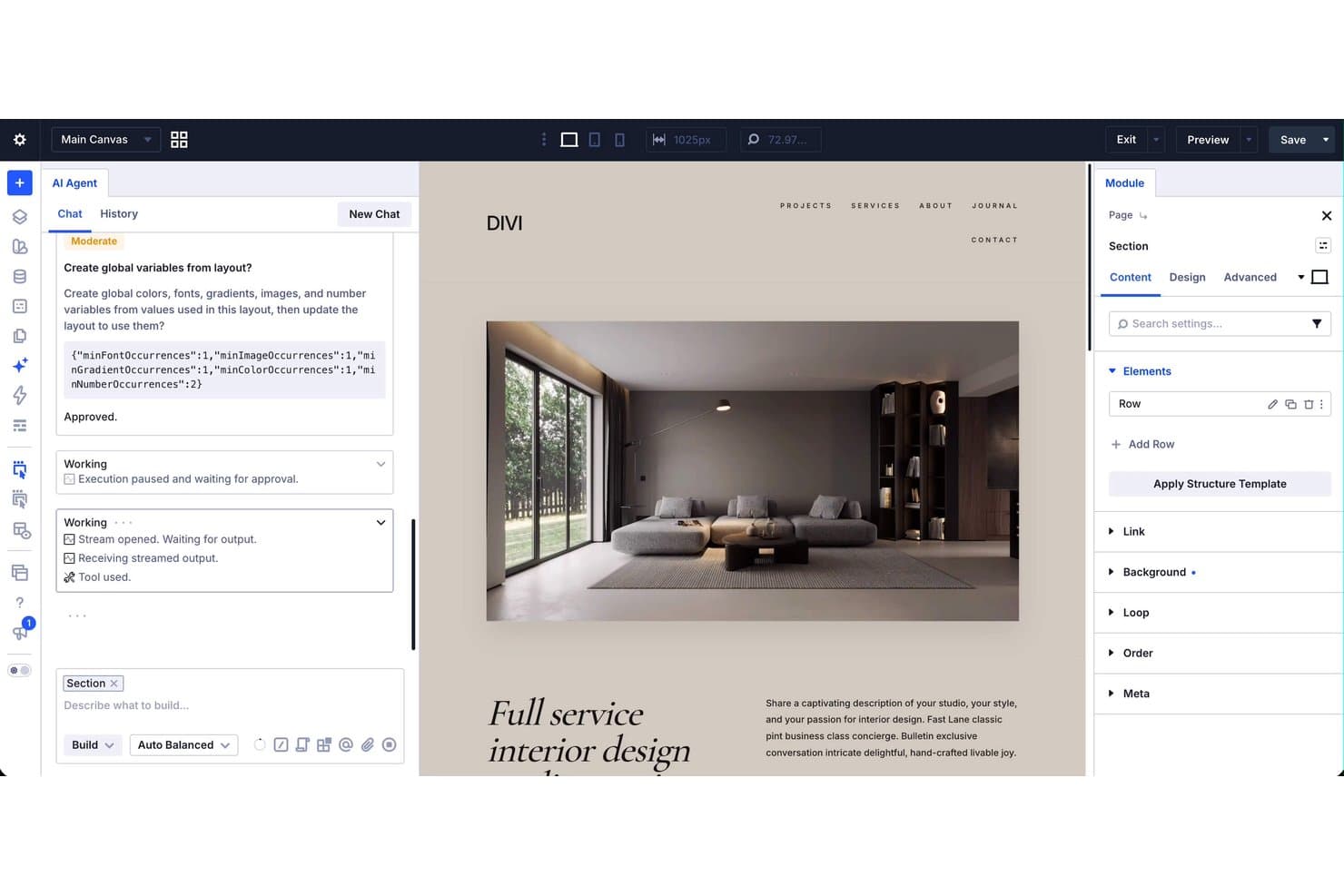
Divi's AI Agent builds and edits website sections visually in real time. Divi is a WordPress theme and visual page builder that lets you design full websites using drag-and-drop editing, a library of 2,000+ layouts, a Theme Builder for full-site templates, and an AI-powered site builder.
Who Is Divi Best For?
Divi is a great fit for freelance designers and small business owners who build and manage multiple WordPress sites and want a full design toolkit under one license.
Why I Picked Divi
I picked Divi as one of the best because its AI site builder sets it apart in the WordPress space. The AI Agent lets you build and edit a full site from plain-language instructions inside the builder, handling pages, menus, templates, presets, and variables in one go. Paired with Quick Sites, which spins up a complete site with global styles, headers, and WooCommerce pages in under two minutes, Divi makes building on WordPress genuinely fast.
Divi Key Features
- Theme Builder: Visually design full-site templates for headers, footers, posts, archives, WooCommerce pages, and 404 pages without touching code.
- Loop Builder: Build custom content loops for posts, products, events, and users, with native support for Advanced Custom Fields.
- Seven responsive breakpoints: Independently adjust layouts and styles at seven customizable screen sizes for precise device-level control.
- Global Variables: Define sitewide colors, fonts, and sizes as variables that update every element across your site in one edit.
Divi Integrations
Divi offers documented integrations with WooCommerce, Advanced Custom Fields, Rank Math, WPML, TranslatePress, WPForms, MemberPress, Tutor LMS, Amelia, and Mailchimp. Its open-source codebase, hooks, filters, and Module API support custom integrations.
Pros and Cons
Pros:
- Global Variables maintain consistent visual branding
- Seven breakpoints support precise responsive layouts
- AI Agent builds complete WordPress sites
Cons:
- Divi 5 can disrupt third-party modules
- Hosting requires separate WordPress infrastructure
Learn more about Divi:
Outro software de design de sites
Eis algumas opções adicionais de software de design de sites que não entraram na minha lista restrita, mas que ainda vale a pena conhecer:
- 11WixBest for customizable templates
- 12Figma SitesBest for designers publishing direct from Figma
- 13Justinmind Best for web and mobile application prototyping
- 14InstapageBest for conversion-focused landing page testing
- 15Adobe DreamweaverBest for technical front-end developers
- 16Hostinger Website BuilderBest for AI and no-code site building with hosting
- 17DesignmodoBest web design software with free hosting
- 18HubSpot CMS HubBest for marketing-led sites with built-in CRM
- 19Base44Best for AI-driven app creation
How I Evaluate Web Design Software
I split my evaluation into three parts: core functionality (how well a tool lets you visually edit pages and build responsive layouts) carries the most weight, followed by standout features like built-in A/B testing, then support quality and pricing value.
Core Functionality (Table Stakes For This List)
When I'm selecting tools for my list, I score each one on a scale from 0 (does not offer the functionality) to 5 (excels in this area) for each core functionality listed below. I then convert the total into a percentage to help assess each tool's overall fit, with extra weight on any functionalities I've deemed essential.
- Visual Page Editing (Essential): I evaluate how freely you can place, arrange, and nest elements on a page without touching code—whether that's drag-and-drop blocks or a freeform canvas.
- Responsive Design Control: I check whether you can independently adjust layouts, spacing, and visibility per breakpoint, not just preview a shrunken version of the desktop view.
- Template and Layout Library: The library should cover a range of industries and page types, and I look at how customizable each template is once you start editing it.
- Publishing and Hosting Output: I look for one-click publishing to a custom domain with reliable uptime, so you're not juggling a separate hosting provider to get a site live.
- Asset and Style Management: Reusable components, global color palettes, and shared font settings matter here—I check whether a style change propagates across every page automatically.
Once I have a list of tools that meet the criteria, I consider what sets each platform apart.
Differentiating Factors (What Sets Vendors Apart)
Here's how I compare and contrast different vendors:
Standout Features
I look for built-in A/B testing that lets you pit two landing page variants against each other without wiring up a third-party tool. Interaction and animation controls also matter—scroll-triggered animations and micro-interactions can elevate a product launch page from flat to memorable. I evaluate localization support closely, since product teams managing sites across multiple markets need native multi-language workflows to keep messaging consistent without duplicating effort.
Beyond Features
I evaluate how well each tool fits cross-functional workflows—specifically whether product marketers can update page copy without a designer resetting layouts, and whether approval permissions match real team structures. Speed to launch matters just as much; when a competitor drops a feature announcement, you need to publish a response page in hours, not days. I also check scalability across web properties, since a platform that performs well with ten pages can slow down noticeably once you're managing hundreds across multiple locales and campaigns.
Como escolher software de design de sites
É fácil perder-se em listas extensas de funcionalidades e estruturas de preços complexas. Para o ajudar a manter-se concentrado enquanto percorre o seu processo específico de seleção de software, eis uma lista de verificação dos fatores a ter em conta:
| Fator | O que considerar |
|---|---|
| FatorEscalabilidade | O que considerarO software acompanhará as necessidades da sua equipa? Considere se consegue lidar com um aumento do tráfego ou com projetos mais complexos à medida que a sua empresa cresce. |
| FatorIntegrações | O que considerarFunciona com as suas ferramentas atuais? Verifique se integra CMS, ferramentas de análise e outras ferramentas de que depende. |
| FatorPossibilidade de personalização | O que considerarPode adaptá-lo à sua marca? Procure flexibilidade de design e opções para personalizar modelos e esquemas. |
| FatorFacilidade de utilização | O que considerarÉ intuitivo para a sua equipa? Avalie a curva de aprendizagem e se a sua equipa consegue adaptar-se rapidamente à interface. |
| FatorImplementação e integração inicial | O que considerarCom que rapidez pode começar a utilizá-lo? Avalie a disponibilidade de guias, tutoriais e apoio durante a configuração inicial. |
| FatorCusto | O que considerarEncaixa-se no seu orçamento? Compare os planos de preços e determine se existem custos ocultos ou taxas adicionais. |
| FatorMedidas de segurança | O que considerarOs seus designs e dados estão seguros? Certifique-se de que dispõe de medidas de segurança robustas, como encriptação e atualizações regulares. |
| FatorDisponibilidade do apoio | O que considerarPode obter ajuda quando necessário? Considere a disponibilidade de canais de apoio ao cliente, como chat, e-mail ou telefone. |
O que é software de design de sites?
O software de design de websites é uma ferramenta que ajuda a criar e gerir estruturas e designs de websites. Dependendo da plataforma, este trabalho pode ser realizado num navegador ou através de software de design de websites offline instalado localmente.
Estas ferramentas são utilizadas por designers, programadores e profissionais de marketing para criar websites visualmente apelativos e funcionais. Funcionalidades como o design de arrastar e largar, a personalização de modelos e o suporte para design responsivo ajudam a criar sites envolventes e fáceis de utilizar. De um modo geral, estas ferramentas facilitam a criação de websites que respondem às necessidades das empresas e melhoram a experiência do utilizador.
Funcionalidades
Ao selecionar software de design de websites, procure as seguintes funcionalidades essenciais:
- Design de arrastar e largar: Permite aos utilizadores organizar facilmente os elementos numa página sem escrever código, tornando o design acessível a pessoas que não são programadores.
- Personalização de modelos: Disponibiliza modelos pré-concebidos que podem ser modificados para corresponder à identidade visual da marca, poupando tempo na criação do design.
- Suporte para design responsivo: Garante que os websites têm bom aspeto em todos os dispositivos, ajustando automaticamente as estruturas a diferentes tamanhos de ecrã.
- Ferramentas de SEO: Ajudam a otimizar os websites para os motores de pesquisa, melhorando a visibilidade e atraindo mais visitantes.
- Capacidades de integração: Permitem a ligação a outras ferramentas, como CMS e ferramentas de análise, simplificando os fluxos de trabalho e a gestão de dados.
- Ferramentas de colaboração: Permitem que os membros da equipa trabalhem em conjunto nos projetos em tempo real, melhorando a produtividade e a comunicação.
- Opções de exportação de código: Permitem exportar código HTML e CSS para posterior personalização ou integração com outras plataformas.
- Integração com comércio eletrónico: Suporta funcionalidades de venda online, como carrinhos de compras e gateways de pagamento, para empresas que pretendam vender produtos.
- Suporte multilingue: Permite a criação de websites em vários idiomas, alcançando um público mais vasto.
- Funcionalidades de segurança: Inclui medidas como a encriptação de dados e atualizações regulares para manter os websites protegidos contra ameaças.
Benefícios
A implementação de software de design de websites proporciona vários benefícios à sua equipa e à sua empresa. Eis alguns dos que pode esperar:
- Processo de design mais rápido: As funcionalidades de arrastar e largar e os modelos aceleram a criação de páginas Web, poupando tempo e esforço.
- Colaboração melhorada: As ferramentas de colaboração em tempo real permitem que os membros da equipa trabalhem em conjunto de forma eficiente, melhorando a comunicação e os resultados.
- Melhor experiência do utilizador: O design responsivo garante que o seu website tem bom aspeto em qualquer dispositivo, melhorando a satisfação e o envolvimento dos visitantes.
- Maior visibilidade: As ferramentas de SEO integradas ajudam o seu site a obter uma classificação mais elevada nos resultados de pesquisa, atraindo mais visitantes.
- Poupança de custos: Ao permitir que pessoas que não são programadores criem sites, as empresas poupam nos custos de contratação de pessoal especializado para tarefas de design de websites.
- Personalização melhorada: A personalização de modelos e as opções de exportação de código permitem um maior controlo sobre o aspeto e a funcionalidade do website.
- Escalabilidade: Funcionalidades como a integração com comércio eletrónico e o suporte multilingue permitem que o seu website cresça de acordo com as necessidades da sua empresa.
Custos e preços
A seleção de software de design de websites exige uma compreensão dos vários modelos de preços e planos disponíveis. Os custos variam consoante as funcionalidades, o tamanho da equipa, os complementos e outros fatores, estando disponível software gratuito de design de websites como um ponto de partida útil para equipas com orçamentos limitados. A tabela abaixo resume os planos mais comuns, os seus preços médios e as funcionalidades habitualmente incluídas nas soluções de software de design de websites:
Tabela de comparação de planos de software de design de websites
| Tipo de plano | Preço médio | Funcionalidades comuns |
|---|---|---|
| Tipo de planoPlano gratuito | Preço médio$0 | Funcionalidades comunsModelos básicos, armazenamento limitado e suporte básico. |
| Tipo de planoPlano pessoal | Preço médio$5-$25/utilizador/mês | Funcionalidades comunsModelos personalizados, design responsivo, ferramentas de SEO e suporte por email. |
| Tipo de planoPlano empresarial | Preço médio$25-$75/utilizador/mês | Funcionalidades comunsIntegrações avançadas, funcionalidades de comércio eletrónico, suporte prioritário e análise. |
| Tipo de planoPlano empresarial avançado | Preço médio$75+/utilizador/mês | Funcionalidades comunsSoluções personalizadas, gestor de conta dedicado, segurança avançada e acesso à API. |
Perguntas frequentes sobre software de design web
Eis algumas respostas a perguntas comuns sobre software de design web:
É necessário saber programar para fazer design web?
Já não é necessário saber programar para fazer design web. Muitas ferramentas contemporâneas de design web disponibilizam interfaces visuais de arrastar e largar e vastas coleções de componentes pré-criados. Como resultado, pode tirar partido do poder do desenvolvimento sem código e lançar rapidamente websites.
No entanto, os conhecimentos das linguagens de código HTML, CSS e JavaScript podem proporcionar maior flexibilidade e mais possibilidades de personalização para designs web mais complexos.
Como posso criar o meu próprio website?
Pode criar o seu próprio website de duas formas: escolher um construtor de websites ou escrever o código por si próprio.
Se pretende conceber, desenvolver e lançar um site rapidamente, plataformas de construção de websites como Wix, Squarespace ou WordPress são os seus aliados. Estas plataformas simplificam todo o processo através de ferramentas de arrastar e largar e modelos pré-concebidos.
No entanto, pode utilizar programas como o Adobe Dreamweaver e dominar HTML, CSS e JavaScript se quiser que o seu site tenha maior personalização e designs originais.
Escolher entre rapidez e total liberdade criativa pode ser avassalador. Nesses casos, considere os seus objetivos empresariais, os recursos disponíveis e a complexidade do website que pretende criar.
Como faço o design de um website de comércio eletrónico?
Para desenvolver um site de comércio eletrónico, deve concentrar-se numa estratégia de design centrada no utilizador. Pode fazê-lo simplificando a navegação, mantendo um esquema visual organizado e permitindo pesquisas rápidas de produtos.
Muitas pessoas irão visitar as suas lojas através do telemóvel. Por isso, deve dar prioridade à adaptação a dispositivos móveis no seu website de comércio eletrónico. Pode fomentar a confiança na marca através de imagens relevantes e de alta qualidade, descrições detalhadas dos produtos e testemunhos positivos de clientes. Reduzir os obstáculos diminui o abandono do carrinho e simplifica a experiência geral do utilizador.
Analisar o comportamento dos utilizadores através de ferramentas de análise ao longo do tempo pode ajudá-lo ainda mais a melhorar as conversões, modificar o design e otimizar o seu website ao máximo. Um design web deficiente pode tornar a sua marca numa excluída do seu setor de nicho. Consulte estas boas práticas de design de páginas de detalhes de produtos para criar o seu próximo website.