

Com tantas soluções de VoC disponíveis online, é difícil perceber qual é a mais adequada para si. Sabe que quer analisar e obter informações a partir do feedback e das interações dos clientes para poder alinhar a sua estratégia de produto, mas precisa de descobrir qual é a melhor ferramenta. Eu ajudo! Nesta publicação, vou ajudá-lo a tornar a sua escolha mais fácil, partilhando as minhas experiências pessoais com dezenas de ferramentas diferentes e as inúmeras horas que passei a visualizar a experiência do cliente através de diferentes perspetivas, com as minhas escolhas do melhor software de análise da Voz do Cliente.
Why Trust Our Software Recommendations
6,700+
Reviews
20
Industry experts
16+
Evaluation factors
14
Years
Our team has been testing and reviewing software since 2012. As product managers ourselves, we know how difficult—and important—it is to choose the right software.
For this guide, we evaluated tools using hands-on testing and independent research, scoring tools using our selection criteria.
Our reviews reflect our human editorial judgment, not a sales pitch.
Expert reviewers:
- Andrew LumbySenior TPM
- Cristiano ValimSenior UI/UX Lead


Tabela comparativa de ferramentas de análise da Voz do Cliente
Eis uma tabela comparativa que resume os principais detalhes de cada uma das minhas melhores ferramentas de análise da Voz do Cliente:
| Tool | Best For | Trial Info | Price | ||
|---|---|---|---|---|---|
| 1 | Best for automated feedback tagging | Free demo available | Pricing upon request | Website | |
| 2 | Best for analytics on unified feedback sources | Free demo available | Pricing upon request | Website | |
| 3 | Best for conversational surveys | Free plan available | From $19/user/month (billed annually) | Website | |
| 4 | Best for collecting feedback from email surveys | 10-day free trial | From $114/month (billed annually) | Website | |
| 5 | Best for AI predictive analytics | Free plan + 30-day free trial + free demo available | From $25/month | Website | |
| 6 | Best for gamifying the survey and feedback processes | 7-day free trial + free demo | Pricing upon request | Website | |
| 7 | Best for linking feedback themes to revenue risk | Free demo available | From $25,000/year (billed annually) | Website | |
| 8 | Best for breaking down cross-team feedback silos | 30-day free trial | Pricing upon request | Website | |
| 9 | Best for advanced data analytics and insights | Free demo available | Pricing upon request | Website | |
| 10 | Best for generating visual infographic reports | Free demo available | Pricing upon request | Website |


Visão geral das 10 melhores ferramentas de análise da Voz do Cliente
Eis uma breve descrição de cada software de análise da Voz do Cliente, destacando o melhor caso de utilização de cada fornecedor, as suas funcionalidades mais relevantes e algumas vantagens e desvantagens. Também incluí capturas de ecrã para lhe dar uma perspetiva da respetiva interface de utilizador.
 Best for automated feedback tagging
- Free demo available
- Pricing upon request
Visit WebsiteCustomer Rating:4.4/5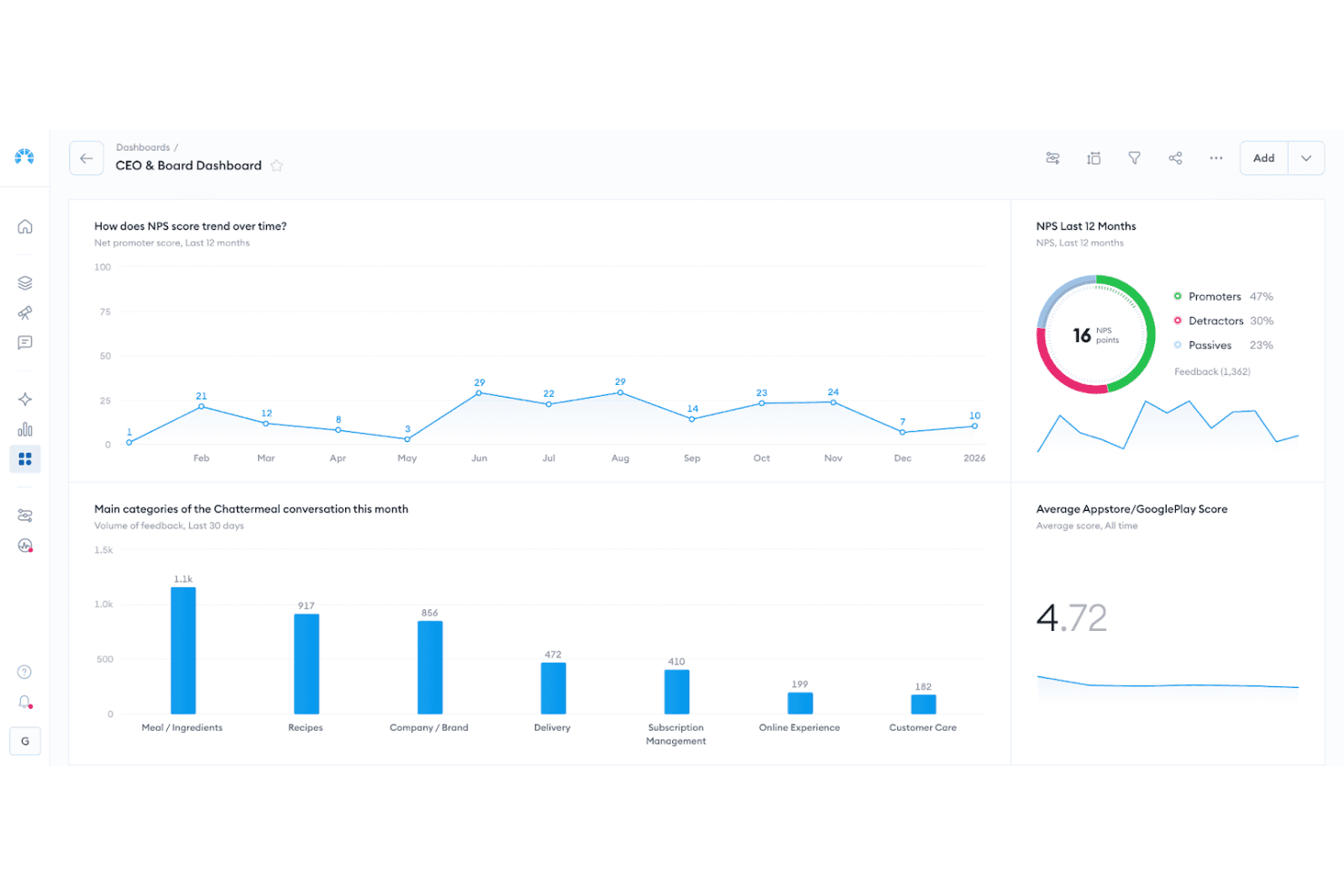
Chattermill dashboard visualizing sentiment themes, feedback volume, and trend changes over time. Chattermill is an AI-native voice of customer analytics platform that aggregates feedback from surveys, reviews, support tickets, social media, and calls, then applies aspect-based sentiment analysis and automated theme tagging across all of it.
Who Is Chattermill Best For?
Chattermill is a strong fit for enterprise CX and product teams that need to automatically categorize high volumes of customer feedback across dozens of channels without manual tagging work.
Why I Picked Chattermill
Chattermill earns its spot on my shortlist because its automated tagging is genuinely built for scale. Lyra AI applies aspect-based sentiment analysis to every comment, splitting a single piece of feedback into multiple themes, each with its own sentiment score, without any manual sorting on your end. I also love that custom themes can be added directly in Settings and apply going forward within 24 hours, so your taxonomy evolves as your product does rather than staying frozen at onboarding.
Chattermill Key Features
- Impact Analysis: Links specific feedback themes to metrics like NPS, CSAT, and sentiment to show which issues are actually moving your scores up or down.
- Anomaly detection and alerting: Monitors feedback in real time and sends alerts to Slack, email, or Jira when sentiment drops or volume spikes on a specific topic.
- MCP server integration: Lets AI assistants like Claude, ChatGPT, and Gemini query your Chattermill data directly, and push insights into tools like Linear and Notion.
- Proactive Insights: A Lyra Agent feature that continuously scans all channels and delivers ranked lists of issues, praise, and feature requests to the right teams on a set schedule.
Chattermill Integrations
Chattermill offers 65+ native integrations, including Zendesk, Intercom, Qualtrics, SurveyMonkey, Trustpilot, Google Reviews, Salesforce, Talkdesk, Slack, and Jira. It also supports API, CSV uploads, and connectors for Snowflake, Databricks, Amazon S3, and Google Cloud Platform.
Pros and Cons
Pros:
- Impact analysis links themes to outcomes
- Custom taxonomies evolve with products
- Aspect-level sentiment reveals multiple issues
Cons:
- Historical theme changes need support
- Sentiment can miss customer nuance
Learn more about Chattermill: Best for analytics on unified feedback sources
- Free demo available
- Pricing upon request
Visit WebsiteCustomer Rating:4.8/5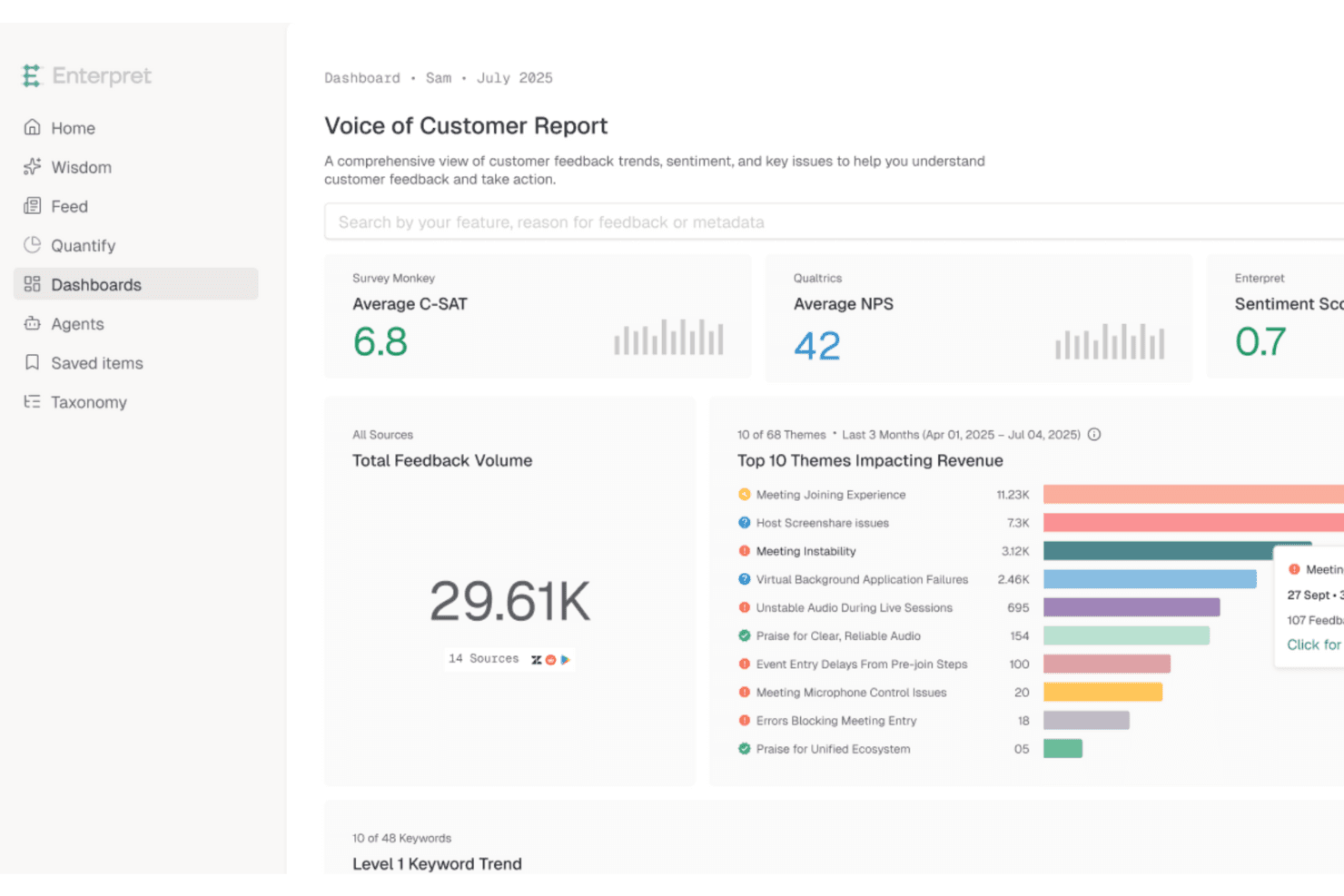
Enterpret unifies feedback data to surface revenue-impacting customer insights. Enterpret is a customer intelligence platform that aggregates feedback from support, sales, surveys, reviews, social, and CRM sources into a unified dataset, then uses an adaptive AI taxonomy to classify, analyze, and surface themes and sentiment trends.
Who Is Enterpret Best For?
Enterpret fits mid-market to enterprise product and CX teams that need to analyze feedback from many different channels without stitching together separate tools.
Why I Picked Enterpret
Enterpret earns its spot on my shortlist because it treats fragmented feedback as an infrastructure problem, not a reporting one. I love how its adaptive taxonomy automatically classifies incoming feedback from support tickets, Gong call transcripts, App Store reviews, and Reddit threads into a unified five-level hierarchy, without manual tagging. What really sets it apart is that you can rank those themes by ARR or NPS impact, so you're not just seeing what customers say most often but what's actually tied to revenue risk.
Enterpret Key Features
- Closed-loop follow-up workflows: When a linked Jira or Linear issue is resolved, Enterpret drafts personalized replies to affected customers and tracks sentiment changes after sending.
- Custom AI enrichments: Write natural-language prompts or Python functions to extract specific signals—like competitor mentions—and apply them back to historical data.
- Anomaly detection alerts: Enterpret flags spikes, drops, and sentiment shifts in real time and routes alerts to Slack or email as they happen.
- Customer Context Graph: Connects individual feedback records to account-level data like ARR, lifecycle stage, and LTV to surface revenue-linked customer intelligence.
Enterpret Integrations
Enterpret offers 50+ native integrations, including Zendesk, Gong, Qualtrics, G2, Salesforce, Jira, Linear, Slack, and Snowflake. It also supports webhooks, CSV uploads, email ingestion, Export API 2.0, and Zapier.
Pros and Cons
Pros:
- Closed-loop follow-ups connect insights to action
- Revenue-linked themes sharpen prioritization
- Adaptive taxonomy reduces manual tagging
Cons:
- Data mapping requires onboarding support
- Complex filters can slow or crash
Learn more about Enterpret: Best for conversational surveys
- Free plan available
- From $19/user/month (billed annually)
Visit WebsiteCustomer Rating:4.4/5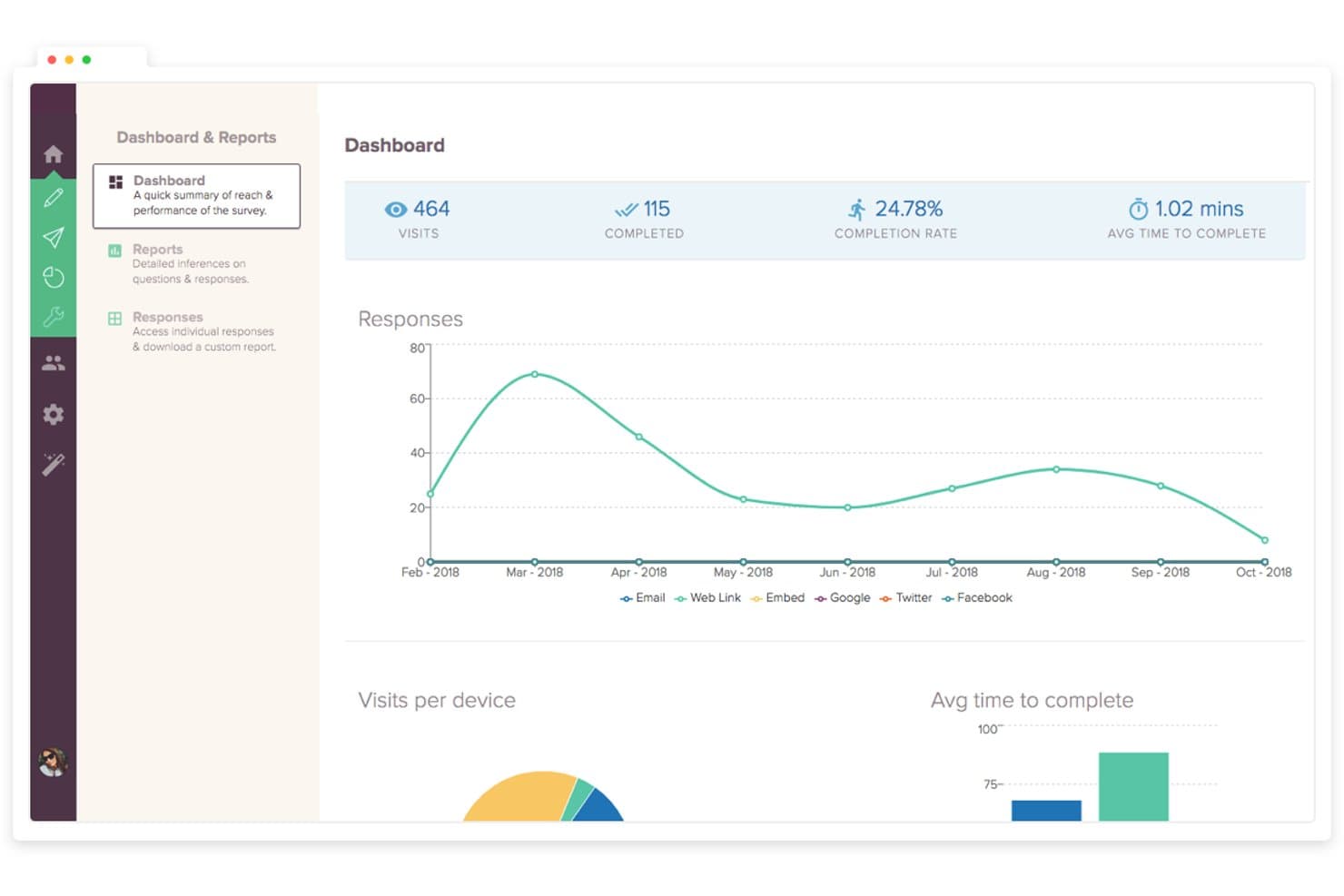
SurveySparrow tracks survey visits, completions, and response trends over time. SurveySparrow is a voice of customer analytics platform that combines conversational surveys, AI-powered text analytics (CogniVue), review aggregation from 100+ platforms, and built-in ticket management with closed-loop alerting.
Who Is SurveySparrow Best For?
SurveySparrow is a strong fit for CX and customer success teams that collect high volumes of survey feedback and need built-in tools to act on it.
Why I Picked SurveySparrow
I've included SurveySparrow in my top picks because its conversational, chat-style survey format consistently drives higher response rates than traditional forms, which means you're working with richer, more complete feedback from the start. I also like how Echo, its AI follow-up feature, automatically probes vague answers in real time, so you're not left guessing what a respondent meant. Layer CogniVue's Key Drivers analysis on top, and you can see exactly which themes are hurting your NPS or CSAT scores and in what order to address them.
SurveySparrow Key Features
- Emerging Topics detection: CogniVue automatically flags new recurring themes in your feedback so you can spot rising issues before they become widespread problems.
- Deep Dive heatmaps: Sentiment breakdowns by topic and sub-topic are visualized across dimensions like location, product variables, and review platform in a heatmap view.
- Closed-loop ticket management: Survey responses and reviews automatically convert into tickets with SLA tracking, auto-assignment, and escalation rules built in.
- Smart Filters: Reusable, saved filters let you slice feedback by response properties, contact attributes, and question answers across your CogniVue analysis.
SurveySparrow Integrations
SurveySparrow offers native integrations with Salesforce, HubSpot, Zendesk, Intercom, Power BI, Tableau, Airtable, Slack, and monday.com. It also provides a REST API, webhooks, and Zapier connectivity for custom workflows.
Pros and Cons
Pros:
- CogniVue prioritizes themes by customer impact
- Echo probes vague responses in real time
- Conversational surveys encourage richer customer feedback
Cons:
- Key Driver insights refresh only monthly
- Survey and review analysis remains siloed
Learn more about SurveySparrow: Best for collecting feedback from email surveys
- 10-day free trial
- From $114/month (billed annually)
Visit WebsiteCustomer Rating:4.6/5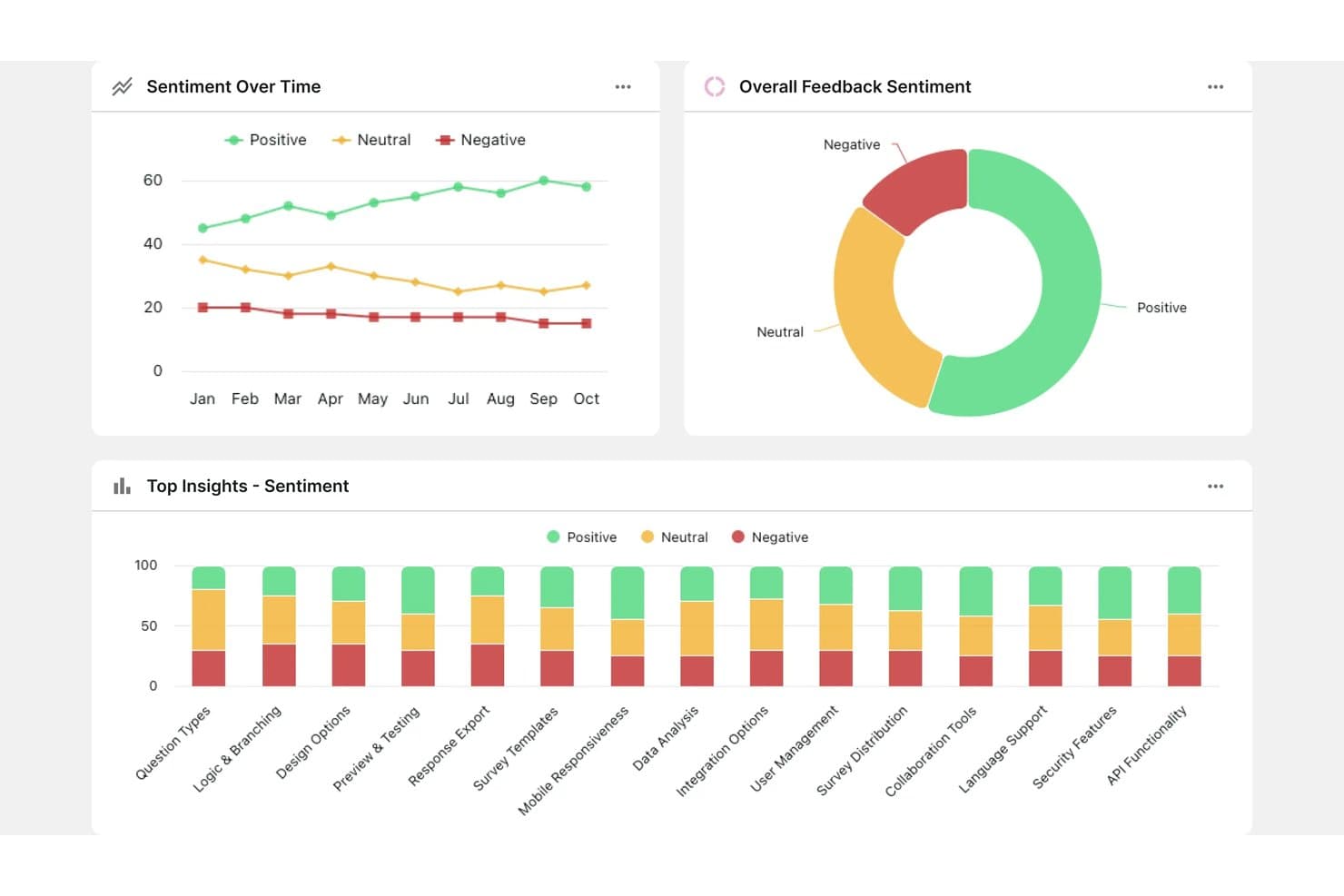
Survicate tracks customer sentiment trends across topics over time. Survicate is a customer feedback platform that collects, aggregates, and analyzes VoC data across email, web, in-app, and mobile channels, with an AI-powered Research Hub that pulls in reviews, support tickets, and call transcripts alongside survey responses.
Who Is Survicate Best For?
Survicate is a strong fit for CX and customer success teams that need to collect structured feedback through email surveys and connect those responses to support and CRM workflows.
Why I Picked Survicate
I picked Survicate as one of the best because email survey collection is genuinely built into the platform, not bolted on through a third-party integration. I like that the first survey question sits directly inside the email body, so recipients answer from their inbox without clicking through to a separate page. Survicate also ties those responses back to named contacts in your CRM, so your VoC data arrives already enriched and ready for analysis.
Survicate Key Features
- Research Hub: Aggregates feedback from 15+ sources—including support tickets, app reviews, call transcripts, and raw files—into a single AI-analyzed dataset.
- Dissatisfaction Radar: Sends instant Slack and email alerts when negative feedback is detected, so your team can follow up before issues escalate.
- AI theme and sentiment detection: Automatically groups open-text responses into themes and labels each as positive, neutral, or negative, updating continuously as new feedback arrives.
- CRM enrichment: Syncs survey responses with Salesforce, HubSpot, and Pipedrive so every piece of feedback is tied to a named contact and their account data.
Survicate Integrations
Survicate offers 40+ native integrations, including Salesforce, HubSpot, Zendesk, Intercom, Slack, Productboard, Linear, Google Sheets, Looker Studio, and Power BI. Webhooks, an Export API, and Zapier support custom connectivity.
Pros and Cons
Pros:
- Alerts support timely dissatisfaction follow-up
- AI themes connect feedback across channels
- Embedded email questions encourage immediate responses
Cons:
- Revenue and churn links require manual work
- English-only insights limit global analysis
Learn more about Survicate: Best for AI predictive analytics
- Free plan + 30-day free trial + free demo available
- From $25/month
Visit WebsiteCustomer Rating:4.6/5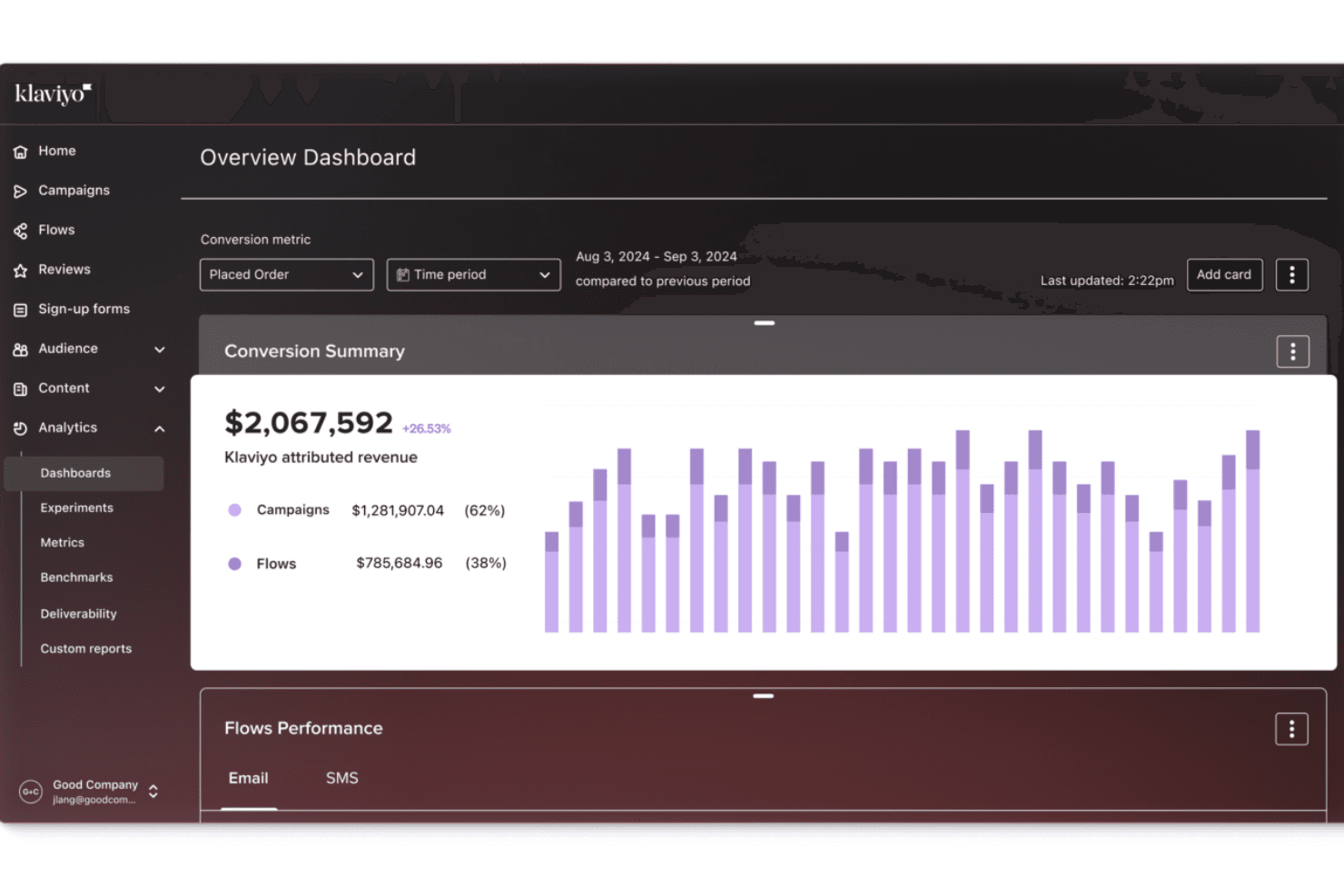
Klaviyo provides real-time analytics in a centralized dashboard. Klaviyo is a B2C CRM and customer data platform that connects review sentiment, support ticket analysis, and predictive behavioral analytics into unified customer profiles.
Who Is Klaviyo Best For?
Klaviyo suits ecommerce brands on Shopify or WooCommerce that want AI-driven predictions—churn risk, CLV, next order date—tied directly to customer feedback and purchase data.
Why I Picked Klaviyo
I picked Klaviyo as one of the best because its AI predictive analytics go further than surface-level sentiment by tying review and ticket data directly to churn risk scores, CLV predictions, and next-order-date forecasts on a single customer profile. I love that a 3-star review can automatically trigger a support ticket while that same customer's churn score updates in real time, creating a feedback loop most VoC tools can't replicate. The "Best Cross-Sell Date" and "Next Best Product" profile properties refresh daily, so predictive signals stay current alongside behavioral and feedback data.
Klaviyo Key Features
- Closed-loop review automation: Low-star reviews automatically generate support tickets, while high-star reviews trigger thank-you or promotional flows.
- Helpdesk sentiment scoring: An LLM scores every new support ticket from 0 to 10 and labels it Urgent, Promoter, Negative, Neutral, or Positive for routing.
- Review topic analysis: AI assigns each review a topic—such as quality, shipping, or price—from a curated industry list, with a "By topic" view showing positive and negative breakdowns.
- Data warehouse sync: Native connectors push profile, event, and analytics data to Redshift, BigQuery, Snowflake, Azure, and Amazon S3.
Klaviyo Integrations
Klaviyo offers 350+ pre-built integrations, including Shopify, WooCommerce, Salesforce, Google Ads, Meta, TikTok, Amazon Redshift, Google BigQuery, Snowflake, and Microsoft Azure. APIs and webhooks support custom connections, while marketplace apps connect survey tools such as Zonka Feedback.
Pros and Cons
Pros:
- Tracks review sentiment across customer lifecycles
- Triggers support workflows from low-star reviews
- Links sentiment to churn and CLV predictions
Cons:
- Uses fixed topics and basic sentiment labels
- Misses surveys, social listening, and call transcripts
Learn more about Klaviyo: Best for gamifying the survey and feedback processes
- 7-day free trial + free demo
- Pricing upon request
Visit WebsiteCustomer Rating:4.7/5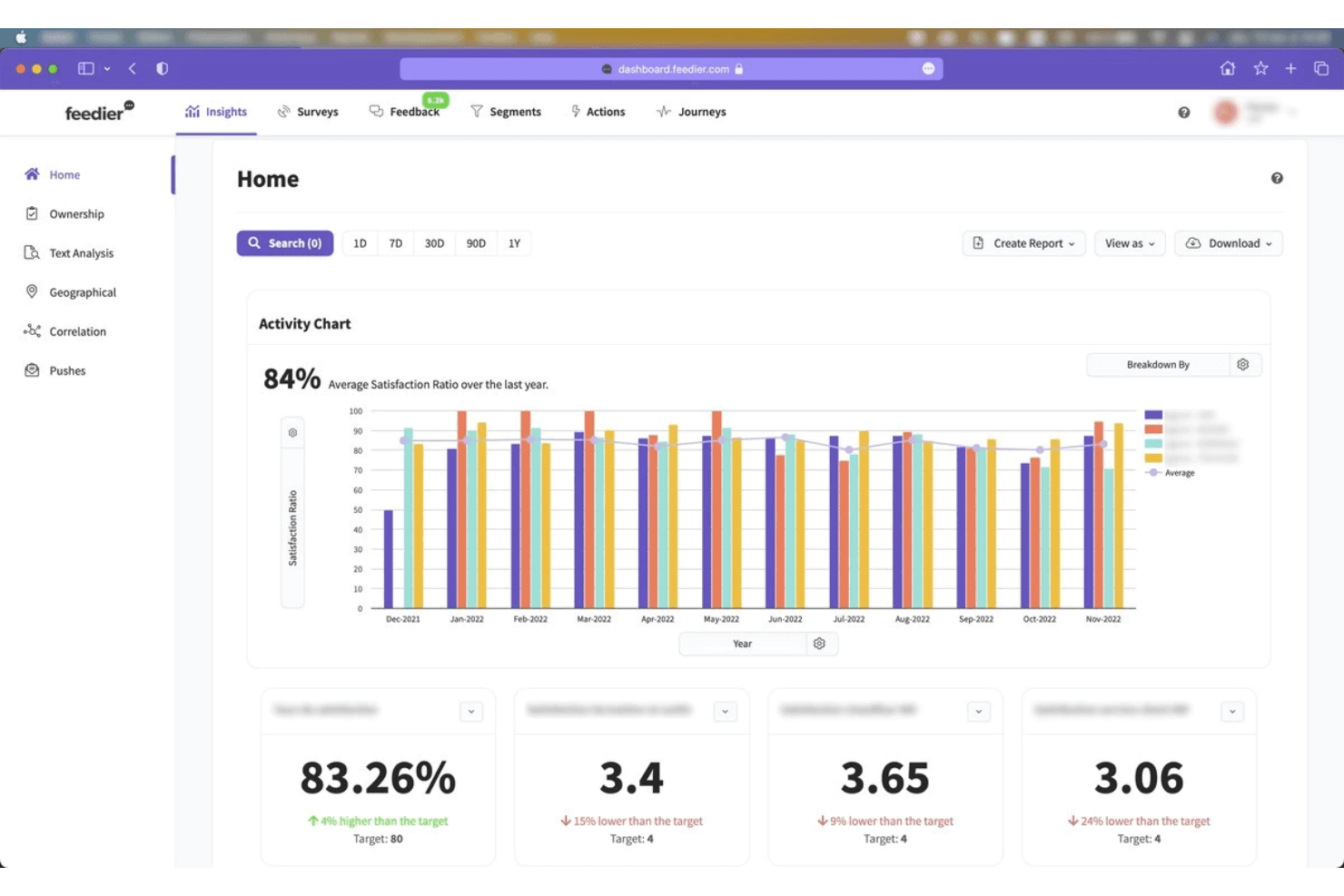
Feedier's dashboard allows businesses to analyze and visualize customer feedback in real-time with a user-friendly interface and customizable reporting. Feedier is an AI-powered voice of customer analytics platform that aggregates feedback from 20+ sources—including surveys, reviews, support tickets, and social channels—and applies aspect-level sentiment analysis, theme detection, and revenue-impact scoring to turn raw feedback into prioritized insights.
Who Is Feedier Best For?
Feedier suits mid-market and enterprise teams managing feedback across multiple business units, regions, or languages who need AI-driven analysis tied to revenue impact.
Why I Picked Feedier
I picked Feedier as one of the best because it turns feedback collection into something people actually want to engage with, using gamified survey flows that boost response rates before AI takes over to analyze what those responses mean. I love how its aspect-level sentiment scoring breaks a single comment into multiple scored dimensions, so a response that's positive about delivery but negative about product quality doesn't get flattened into one ambiguous rating. Its Business Impact Score then ranks those findings by estimated NPS and revenue impact, so you're not just collecting feedback—you're walking into prioritization conversations with evidence.
Feedier Key Features
- Multi-source feedback aggregation: Pulls in data from 20+ native connectors—including review sites, social channels, CRM platforms, and support tools—into a single workspace.
- Ask Feedier conversational analyst: A chat-based interface that lets you query your feedback data in plain language and returns reports, action plans, or verbatim exports on demand.
- Closed-loop alert workflows: Configurable alerts fire when feedback volume shifts, triggering automated notifications via email, MS Teams, Salesforce, or webhooks.
- Customer-specific taxonomy: Each account gets its own nested classification system, refined over time through a human validation loop that improves AI precision.
Feedier Integrations
Feedier offers 20+ native integrations, including Qualtrics, Medallia, Typeform, Zendesk, ServiceNow, Salesforce, HubSpot, Trustpilot, Google Reviews, and Power BI. It also supports REST API, webhooks, CSV, SFTP, and custom connectors.
Pros and Cons
Pros:
- Auditable taxonomies support defensible research findings
- Revenue impact connects feedback to product priorities
- Aspect-level sentiment supports precise prioritization
Cons:
- No native roadmap workflow for product teams
- Limited recent reviews complicate vendor validation
Learn more about Feedier: Best for linking feedback themes to revenue risk
- Free demo available
- From $25,000/year (billed annually)
Visit WebsiteCustomer Rating:4.8/5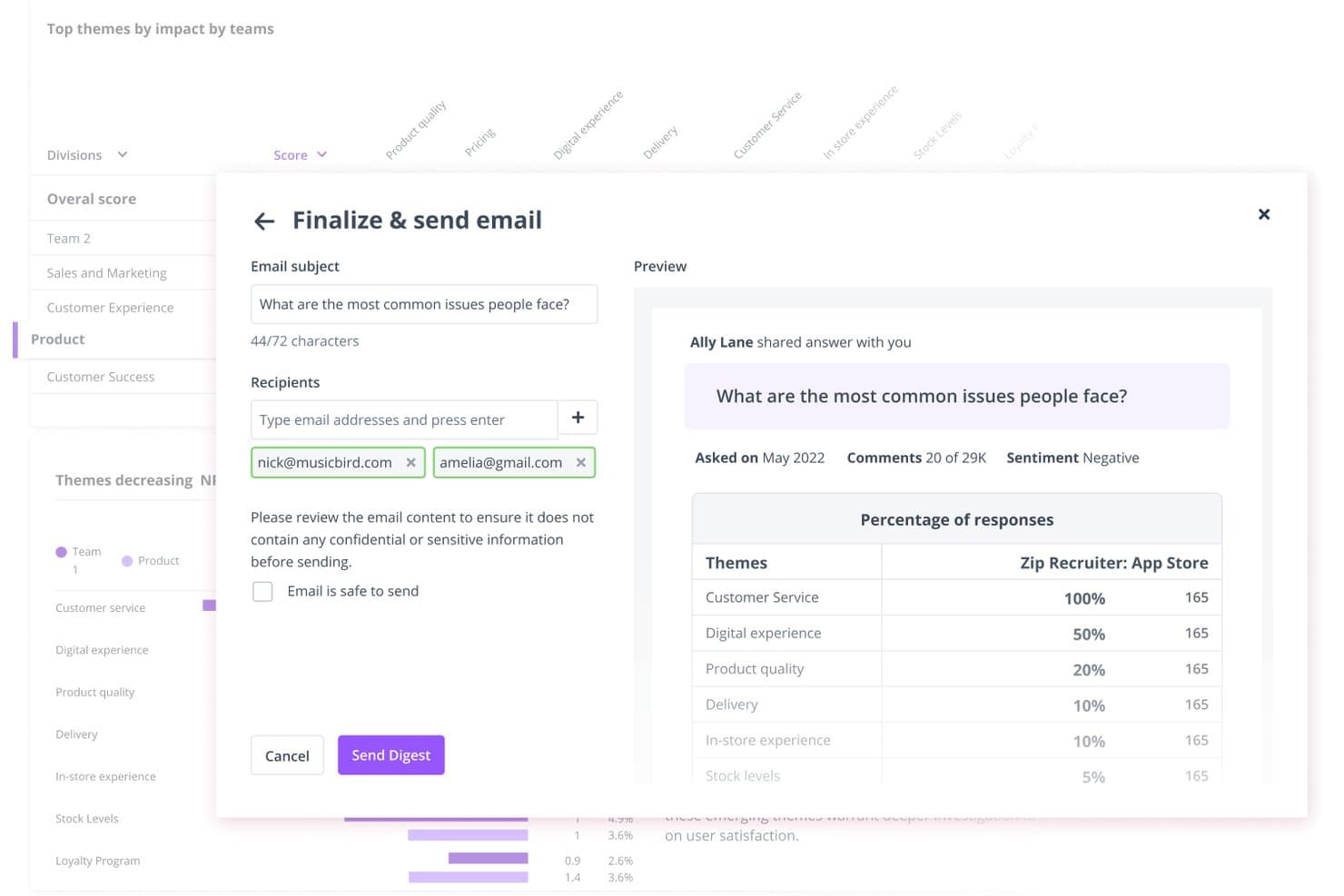
Thematic lets users share customer insight digests via email directly from the platform. Thematic is a voice of customer analytics platform that aggregates feedback from surveys, support tickets, reviews, call transcripts, and social channels, then uses AI to surface themes, detect sentiment, and track how those themes shift over time.
Who Is Thematic Best For?
Thematic is a strong fit for enterprise CX and research teams that need to connect customer feedback directly to revenue impact and prioritization decisions.
Why I Picked Thematic
I picked Thematic as one of the best because it's the only tool on my list that directly ties feedback themes to revenue risk, a connection most VoC platforms leave you to make manually. Its Revenue at Risk feature ranks themes by expected dollars at risk, calculated from churn likelihood and customer value, so you know exactly which complaints deserve priority. I also like how the Theming Agent surfaces emerging issues in real time, before they compound into churn.
Thematic Key Features
- Multi-source feedback aggregation: Thematic pulls data from surveys, support tickets, call transcripts, app reviews, social channels, and data warehouses into one unified analysis layer.
- Agentic Answers: Ask questions in plain English and get multi-step AI responses with citations and charts pulled directly from your feedback data.
- Automated theme discovery: The Theming Agent surfaces emerging and rare themes in real time, and a monthly workflow emails or Slacks newly identified themes as they appear.
- BI tool integrations: Push analyzed data directly to Power BI, Tableau, Looker, or Snowflake for reporting in your existing analytics environment.
Thematic Integrations
Thematic offers native integrations with Qualtrics, Medallia, Zendesk, Intercom, Salesforce, Trustpilot, Slack, Snowflake, Power BI, and Tableau. It also supports API, sFTP, CSV/Excel uploads, and custom integrations through a Customer Success Manager.
Pros and Cons
Pros:
- Connects themes to source customer quotes
- Surfaces emerging themes across every comment
- Links feedback themes to revenue risk
Cons:
- Impact scores can confuse some users
- Initial taxonomy setup requires substantial client effort
Learn more about Thematic: Best for breaking down cross-team feedback silos
- 30-day free trial
- Pricing upon request
Visit WebsiteCustomer Rating:4.6/5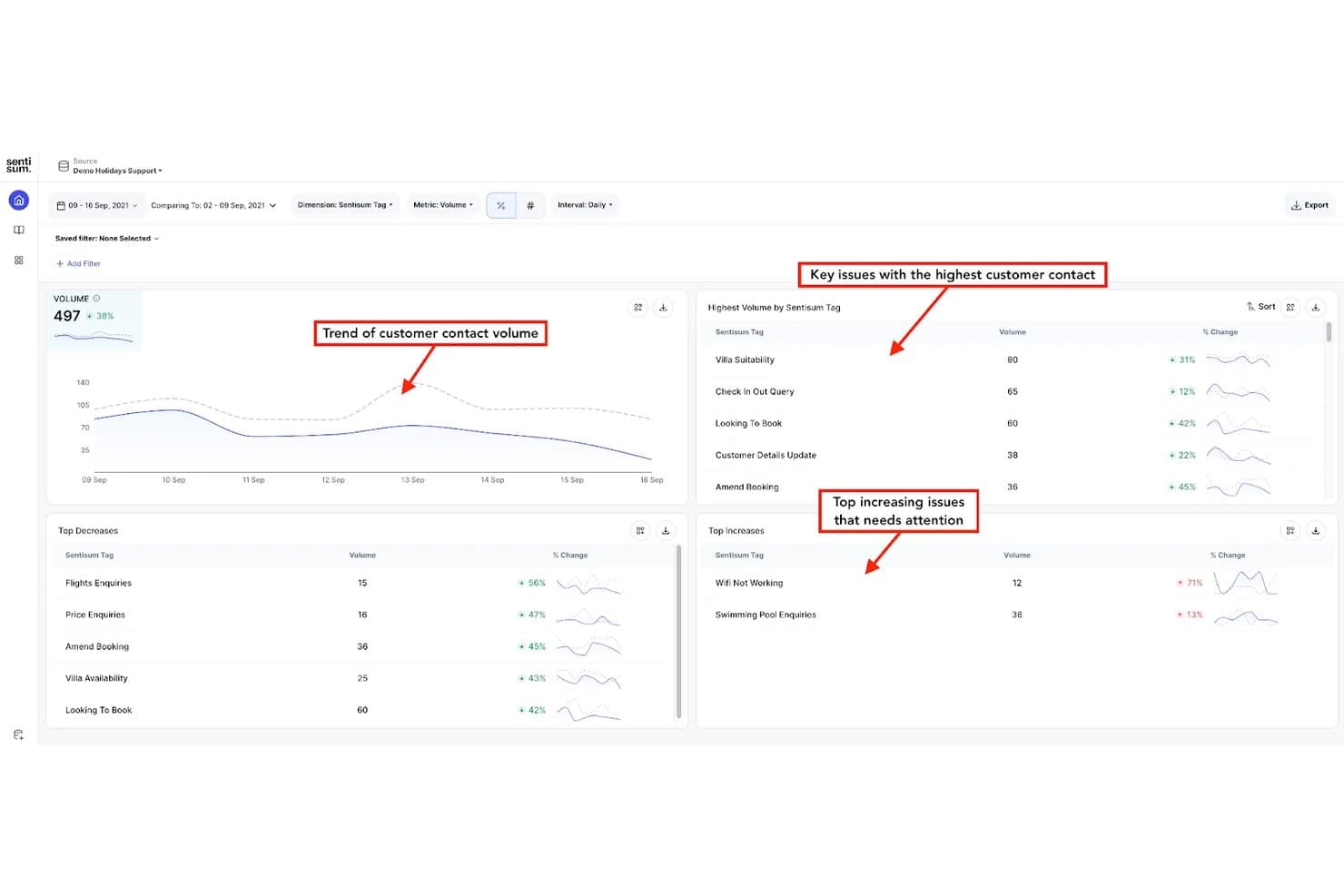
SentiSum tracks customer contact trends and top issues by volume and change. SentiSum is an AI-native voice of customer analytics platform that aggregates feedback from support tickets, calls, surveys, reviews, social posts, and CRM notes into a unified view, with built-in sentiment analysis, theme detection, and anomaly alerting.
Who Is SentiSum Best For?
SentiSum fits mid-market to enterprise CX and support teams that receive high volumes of feedback across multiple channels and need a single place to surface what's driving churn, escalations, and customer effort.
Why I Picked SentiSum
SentiSum earns its spot on my shortlist because it directly tackles the problem of feedback living in disconnected silos across teams. I love how Unified Signals pulls tickets, call transcripts, NPS surveys, reviews, and CRM notes into one view, so support, CX, and product teams are all working from the same data. The Early Warning Agent then monitors that unified feed hourly, flagging anomalies with an AI-written root-cause summary before issues escalate.
SentiSum Key Features
- Kyo AI engine: A domain-trained NLP model that analyzes feedback across 100+ languages, returning confidence scores and verbatim evidence alongside every insight.
- Impact-to-revenue linking: Assigns a dollar value to each identified root cause so you can rank fixes by business cost rather than volume alone.
- Early Warning Agent: Monitors feedback hourly for anomalies in volume, sentiment, and resolution time, then sends an AI-written root-cause summary to Slack, email, or Zendesk.
- Action tracking: Converts any insight or conversation into an assigned task with a priority, due date, status, and comment thread directly inside the platform.
SentiSum Integrations
SentiSum offers 100+ documented integrations, including Zendesk, Freshdesk, Intercom, Salesforce, HubSpot, Qualtrics, SurveyMonkey, Trustpilot, Slack, and Jira. It also provides Microsoft Teams connectivity and API access for custom integrations.
Pros and Cons
Pros:
- Flags emerging problems with root-cause evidence
- Links customer issues to revenue impact
- Unifies feedback across organizational silos
Cons:
- Machine-learning classifications may require manual correction
- Support operations outweigh product research workflows
Learn more about SentiSum: Best for advanced data analytics and insights
- Free demo available
- Pricing upon request
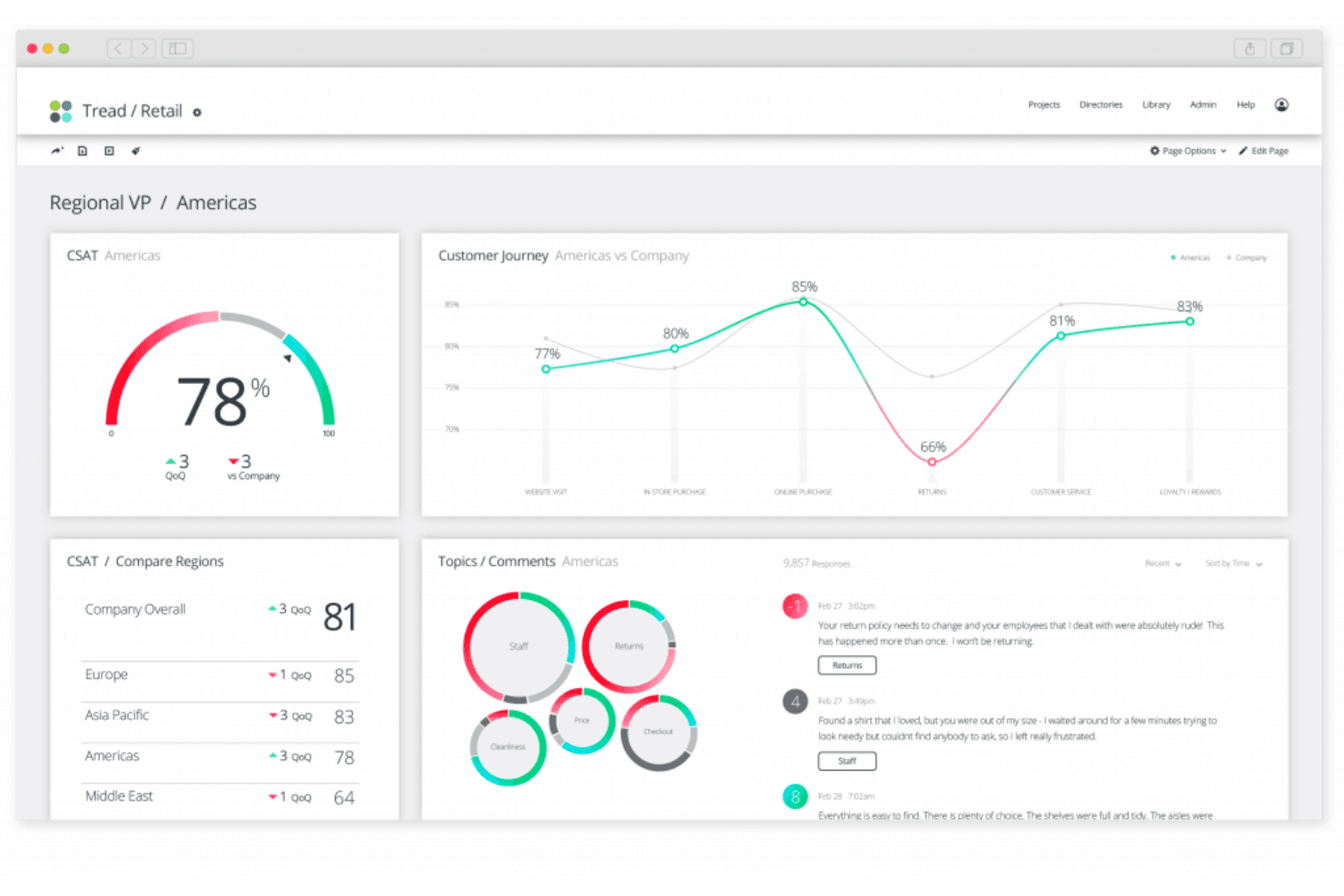
Qualtrics XM's dashboard relays real-time insights on customer feedback. Qualtrics XM is a voice of customer analytics platform that aggregates feedback across surveys, contact center interactions, digital channels, and online reviews, then applies text analysis, sentiment scoring, and AI-driven theme detection to surface insights at scale.
Who Is Qualtrics XM Best For?
Qualtrics XM is a strong fit for enterprise CX and research teams that need to unify feedback across surveys, contact centers, digital channels, and online reviews in one platform.
Why I Picked Qualtrics XM
Qualtrics XM earns its spot as one of the best on my shortlist because the depth of its analytics goes well beyond basic sentiment scoring. I particularly like how Text iQ scores sentiment at the topic level, so when a customer says "service was great but pricing felt unfair," the platform separates those signals rather than averaging them into noise. Paired with Focus Areas, which calculates a Priority Score using impact and room for improvement, I can surface which issues actually move the needle on retention.
Qualtrics XM Key Features
- XM Discover Connectors: Ingests feedback from contact center calls, chat, CRM systems, social platforms, review sites, and online communities into a single analysis environment.
- Recommended Topics: Automatically surfaces emerging themes from open-text fields once a question reaches 500+ untagged comments, supporting ten languages including English, Spanish, and Japanese.
- Closed-loop workflow engine: Triggers automated alerts and action tasks based on survey events, metric thresholds, or verbatim topic mentions across CX dashboards.
- Stats iQ: Runs advanced statistical analysis including key-driver analysis, crosstabs, and response weighting directly within the platform on paid research plans.
Qualtrics XM Integrations
Qualtrics XM offers documented native and first-party integrations with Salesforce, HubSpot, ServiceNow, Zendesk, Freshdesk, Jira, Slack, Microsoft Teams, Tableau, and Twilio. It also supports custom integrations through its API and Zapier.
Pros and Cons
Pros:
- Omnichannel dashboards unify surveys, reviews, and conversations
- Focus Areas connects issues to business outcomes
- Topic-level sentiment separates mixed customer feedback
Cons:
- Processing delays can postpone updated insights
- Advanced text analysis requires higher-tier access
Learn more about Qualtrics XM: Best for generating visual infographic reports
- Free demo available
- Pricing upon request
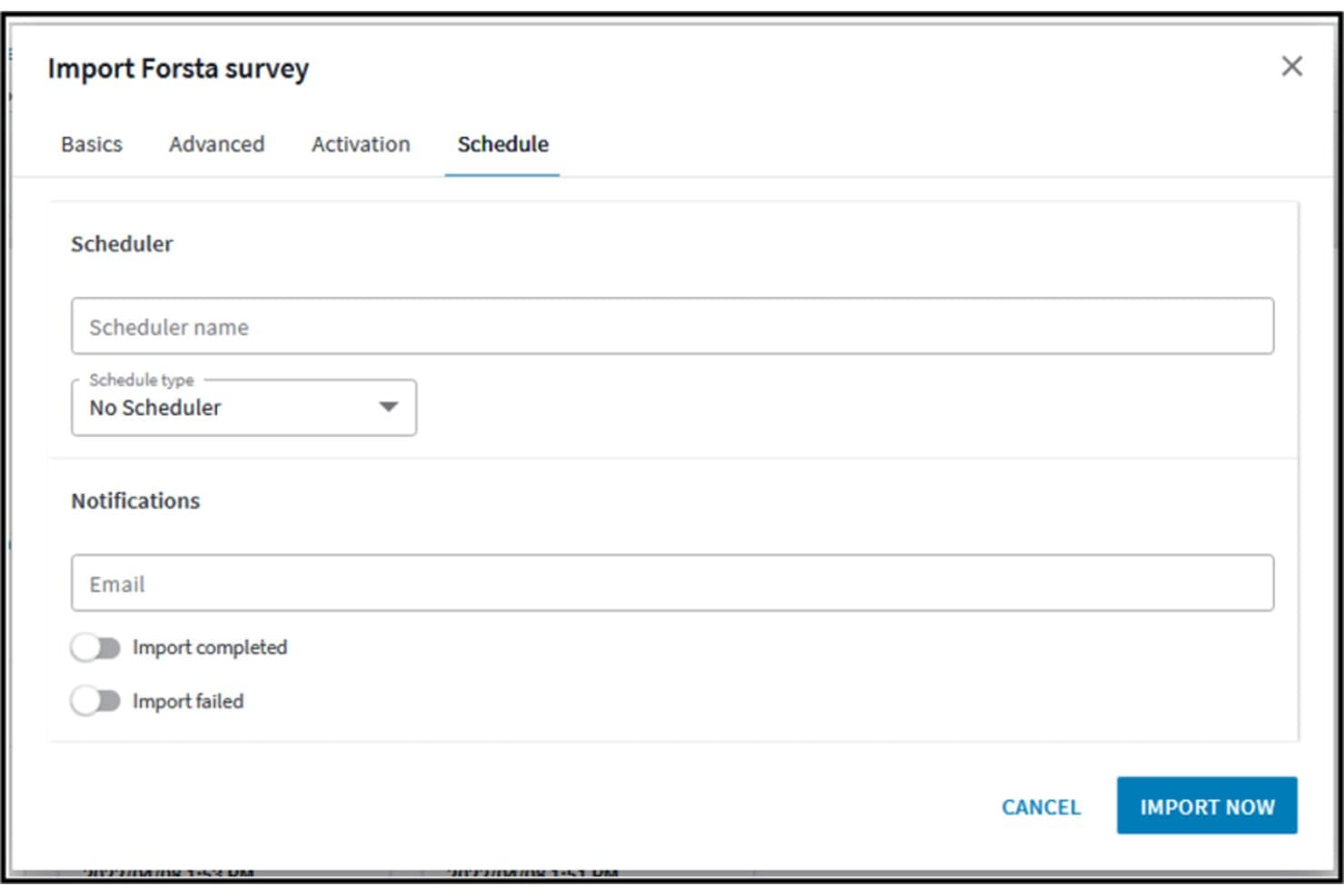
Forsta HX lets users schedule and set email notifications for survey imports. Forsta HX is an AI-powered voice of customer analytics platform that aggregates feedback from surveys, calls, reviews, social media, and support channels, and analyzes it through text analytics, sentiment detection, and visual infographic reporting tools.
Who Is Forsta HX Best For?
Forsta HX is a strong fit for enterprise CX and market research teams that need to turn large volumes of customer feedback into polished, stakeholder-ready visual reports.
Why I Picked Forsta HX
Forsta HX earns its spot on my shortlist because of how well its Visualizations module turns raw feedback data into stakeholder-ready infographic reports. I love that you can import a branded PowerPoint master, then auto-generate editable slides directly from your data using StoryCreator, cutting reporting time by up to 40%. Narrative HX layers in generative-AI sentiment and theme detection across roughly 50 languages, so the insights feeding those reports are sharp, not just pretty.
Forsta HX Key Features
- Spotlight omnichannel analytics: Pulls calls, chats, surveys, reviews, tickets, and social posts into a single dashboard with source-linked drivers and AI-generated smart summaries.
- Narrative HX text analytics: Detects sentiment, emotion, effort, and emerging themes across roughly 50 languages using generative AI with no manual rules required.
- Action Management: Automatically routes cases and sends alerts to the right people based on configurable rules, with mobile support and conditional case-closure logic.
- SmartHub data aggregation: Combines CX, operational, and financial data from sources like CRM, social media, and purchase history into a central contact database.
Forsta HX Integrations
Forsta HX integrates with Salesforce, Microsoft Dynamics 365, Adobe Analytics, Contentsquare, Google, Brandwatch, Tableau, Slack, Zendesk, and Zapier. REST and SOAP APIs support custom integrations.
Pros and Cons
Pros:
- Market-research analysis supports significance testing
- Cross-channel sentiment links insights to source feedback
- Branded infographic reports automate stakeholder storytelling
Cons:
- Product roadmap faces post-acquisition uncertainty
- Enterprise setup can overwhelm smaller teams
Learn more about Forsta HX:
Outras opções
Eis mais algumas opções válidas que não entraram na lista dos melhores softwares de análise da Voz do Cliente:
- 11UnwrapBest for advanced AI feedback categorization
- 12Zonka FeedbackBest for survey distribution across web and mobile
- 13InMomentBest for real-time closed-loop feedback alerts
- 14BrandwatchBest for social listening-led insights
- 15PendoBest for generating digital product analytics
- 16Sprinklr InsightsBest for enterprise with custom AI models
- 17Medallia Experience CloudBest for omnichannel VoC programs
- 18AlidaBest for community-based longitudinal research
- 19KapicheBest for contact centre and churn signals
- 20unitQBest for AI-driven product quality feedback loops
Análises relacionadas de ferramentas de UX
Eis uma seleção de algumas das nossas principais análises de software nas áreas de UX e gestão de produtos:
- Melhores ferramentas de gestão de produtos
- Melhor software de planeamento de produtos
- Melhor software de desenvolvimento de produtos
- Melhores ferramentas de análise de produtos
- Melhor software de gestão de ideias
- Melhor software de mapas de calor
How I Evaluate Voice of Customer Analytics
I split my evaluation into three parts, with the most weight on core functions: combine feedback across channels and surface sentiment and recurring themes. Next, I consider standout features such as verbatim highlight reels that give teams customer context. Finally, I look beyond features at onboarding, support, and value for the price.
Core Functionality (Table Stakes For This List)
When I'm selecting tools for my list, I score each one on a scale from 0 (does not offer the functionality) to 5 (excels in this area) for each core functionality listed below. I then convert the total into a percentage to help assess each tool's overall fit, with extra weight on any functionalities I’ve deemed essential.
- Feedback Sources (Essential): I look for ways to bring surveys, reviews, and support tickets into one dataset, with reliable syncing that limits manual imports.
- Text And Sentiment Analysis (Essential): I assess how well the tool detects sentiment and topics in open-text feedback, including mixed reactions to a product change.
- Theme Detection: I check whether it groups recurring requests and friction across channels, so teams can spot a growing onboarding issue without reading every response.
- Insight Reporting: I look for clear, shareable dashboards that help product and customer teams connect feedback themes to decisions.
- Feedback Tagging: I evaluate whether teams can apply custom tags by product area or issue, then use those categories to filter feedback.
- Historical Trends: I check whether teams can compare sentiment and theme patterns over time, such as before and after a release.
Once I have a list of tools that meet the criteria, I consider what sets each platform apart.
Differentiating Factors (What Sets Vendors Apart)
Here's how I compare and contrast different vendors:
Standout Features
I look for closed-loop alerts that notify product or support teams the moment negative feedback spikes around a specific feature area. Without that trigger, emerging issues sit unread for days. I also evaluate whether a tool links feedback themes to revenue signals like churn or expansion, because connecting a recurring complaint to measurable business impact changes how leadership prioritizes fixes. Verbatim highlight reels matter too. When I can pull real customer quotes into a sprint review, stakeholders grasp the problem faster than any chart allows.
Beyond Features
I evaluate how easily non-technical teammates can self-serve insights, because a tool only product managers use becomes another silo. Cross-functional adoption matters most when support leads or sales reps need to pull feedback without filing a request. I also check onboarding support and time-to-value, since taxonomy setup and source integrations can stall teams that lack internal data science resources. Finally, I look at two-way sync depth with tools like Jira or Productboard—without real-time updates flowing back into your backlog, insights stay trapped in a dashboard no one revisits.
Como escolher um software de análise da Voz do Cliente
Ao avançar no seu próprio processo de seleção de software, tenha em consideração os seguintes pontos:
- Identificação dos principais pontos problemáticos: O software de análise da voz do cliente ajuda a identificar e resolver pontos problemáticos específicos nas interações com os clientes. Ao escolher uma solução de software, considere a eficácia com que esta consegue analisar o feedback dos clientes em vários canais, como inquéritos, redes sociais e interações com o serviço de apoio ao cliente. A ferramenta certa deve disponibilizar uma análise robusta de texto e de sentimentos para detetar reclamações e elogios comuns, permitindo identificar áreas de melhoria ou oportunidades de expansão.
- Capacidades de integração: Garantir uma integração perfeita com a sua atual pilha tecnológica é crucial. O software de análise da voz do cliente deve conseguir integrar-se facilmente com o seu sistema de gestão de relações com os clientes (CRM), software de planeamento de recursos empresariais (ERP) e outras ferramentas de gestão de dados. Esta integração permite obter uma visão unificada dos dados sobre os clientes em todos os departamentos, melhorando a coordenação das respostas e das estratégias.
- Escalabilidade: À medida que a sua empresa cresce, também aumenta o volume de feedback dos clientes. O software de análise da voz do cliente escolhido deve acompanhar as necessidades da sua empresa sem diminuir o desempenho nem exigir investimentos adicionais significativos. Procure soluções que disponibilizem planos de preços flexíveis e a capacidade de processar quantidades crescentes de dados e análises mais complexas à medida que a sua base de clientes se expande.
- Processamento de dados em tempo real: No mercado acelerado de hoje, a capacidade de processar e reagir ao feedback dos clientes em tempo real pode constituir uma vantagem significativa. Avalie a capacidade do software de análise da voz do cliente para fornecer atualizações e alertas em direto. Esta funcionalidade permite que a sua equipa responda rapidamente às reclamações e dúvidas dos clientes, melhorando assim a satisfação e a fidelização dos clientes.
- Ferramentas abrangentes de elaboração de relatórios: Uma tomada de decisões eficaz baseia-se em informações abrangentes e acionáveis. O software de análise da voz do cliente ideal deve disponibilizar funcionalidades detalhadas de elaboração de relatórios que permitam criar relatórios personalizados com base em pontos de dados específicos. Estas ferramentas devem ajudá-lo a visualizar as tendências dos dados ao longo do tempo, comparar o feedback entre diferentes segmentos de clientes e acompanhar o impacto das alterações efetuadas com base no feedback dos clientes.
Ao considerar cuidadosamente estes aspetos, pode selecionar um software de análise da voz do cliente que não só satisfaça as suas necessidades imediatas, como também apoie as suas estratégias de envolvimento dos clientes a longo prazo.
Tendências no software de análise da VoC
À medida que as organizações procuram alinhar as suas estratégias com a evolução das expectativas dos clientes, o desenvolvimento das ferramentas de VoC centra-se em melhorar a extração e a utilização de feedback relevante. Eis uma análise das tendências atuais, com base nas atualizações de produtos, nos comunicados de imprensa e nos registos de versões mais recentes dos principais fornecedores neste domínio em rápida evolução:
- Utilização imediata do feedback: O software de VoC tem cada vez mais capacidade para processar dados em tempo real, permitindo que as empresas atuem imediatamente com base no feedback dos clientes. Esta mudança é crucial para melhorar a experiência e a satisfação dos clientes, possibilitando respostas imediatas tanto ao feedback positivo como ao negativo e evitando assim uma possível perda de clientes.
- Geração automatizada de informações: A automatização da geração de informações a partir dos dados dos clientes está a aumentar. Atualmente, as ferramentas utilizam inteligência artificial avançada para identificar padrões e prever tendências sem intervenção manual, simplificando significativamente o processo de tomada de decisões.
- Análise preditiva: A utilização de análise preditiva no software de VoC está a tornar-se cada vez mais comum. Estas capacidades permitem às empresas prever comportamentos e preferências futuros dos clientes, possibilitando ajustes proativos das estratégias.
- Tecnologia de deteção de emoções: Algumas das funcionalidades mais inovadoras incluem tecnologias avançadas de deteção de emoções que vão além da análise tradicional de sentimentos, utilizando a entoação da voz e o reconhecimento facial para avaliar os sentimentos dos clientes.
- Análise qualitativa orientada por inteligência artificial: As ferramentas de vanguarda disponibilizam agora análises de dados qualitativos orientadas por inteligência artificial, como respostas a inquéritos de resposta aberta e publicações nas redes sociais, para extrair informações mais detalhadas do que nunca.
Estes avanços refletem as necessidades em evolução das empresas, que não só precisam de recolher grandes quantidades de dados dos clientes, como também de interpretar e utilizar estas informações de forma rápida e eficiente. À medida que os especialistas em UX e os gestores de produto acompanham estas tendências, é provável que o foco continue a incidir na integração de tecnologias avançadas para melhorar a compreensão dos clientes e a agilidade operacional.
O que é o software de análise da voz do cliente?
O software de análise da voz do cliente refere-se a ferramentas utilizadas para recolher, analisar e interpretar o feedback e os sentimentos dos clientes, obtendo informações sobre as suas preferências, expectativas e satisfação geral. O seu objetivo é captar estes dados em vários pontos de contacto, ajudando as empresas a tomar decisões informadas para melhorar a experiência do cliente.
Entre as principais funcionalidades esperadas encontram-se a análise de sentimentos, a recolha e gestão de feedback, o mapeamento da jornada do cliente, a identificação de tendências e as ferramentas de elaboração de relatórios e visualização. Estas funcionalidades permitem às empresas extrair informações relevantes do feedback dos clientes e alinhar as suas estratégias com as expectativas dos clientes.
Funcionalidades do software de análise da voz do cliente
Escolher as funcionalidades certas num software de VoC é essencial para utilizar eficazmente os dados dos clientes e alinhar as estratégias empresariais com as necessidades dos clientes. Eis algumas funcionalidades a procurar ao avaliar as suas opções:
- Análise de Sentimentos: Esta funcionalidade identifica automaticamente o tom e as emoções presentes no feedback dos clientes. Ajuda as empresas a avaliar o sentimento geral em relação aos seus produtos ou serviços, permitindo-lhes abordar as áreas que provocam respostas negativas e reforçar aquelas que geram sentimentos positivos.
- Análise de Texto: Esta ferramenta interpreta dados de texto não estruturados provenientes de inquéritos, avaliações e redes sociais. É essencial para extrair temas e padrões que evidenciam aquilo que mais importa aos clientes, contribuindo para o desenvolvimento de produtos e para as estratégias de marketing.
- Gestão do Feedback: Esta função consolida o feedback proveniente de várias fontes numa única plataforma. A centralização dos dados permite obter uma visão holística das opiniões dos clientes, garantindo que nenhuma informação crítica é ignorada e aumentando a eficiência da tomada de decisões.
- Deteção de Tendências: Ao identificar tendências ao longo do tempo, as empresas podem acompanhar as alterações nas expectativas e na satisfação dos clientes. Esta funcionalidade é fundamental para a adaptação às mudanças nas condições do mercado e para a antecipação de necessidades emergentes.
- Capacidades de Integração: A integração simples com outros sistemas empresariais, como CRM ou ERP, garante que as informações dos clientes estão acessíveis em toda a organização. Esta interligação promove uma abordagem unificada à gestão da experiência do cliente.
- Análise em Tempo Real: Permite a análise imediata do feedback recebido. Responder rapidamente às preocupações dos clientes pode melhorar significativamente os níveis de satisfação e reduzir potenciais experiências negativas.
- Mapeamento da Jornada do Cliente: Esta funcionalidade representa visualmente o percurso que os clientes fazem desde o momento em que tomam conhecimento da empresa até à compra e além dela. Compreender este percurso permite às empresas otimizar os pontos de contacto para proporcionar melhores experiências e aumentar a fidelização.
- Painéis Personalizáveis: Estes fornecem visualizações personalizadas das métricas principais relevantes para necessidades empresariais específicas. Os painéis personalizados ajudam os diferentes departamentos a concentrarem-se nas informações mais importantes para os seus objetivos operacionais.
- Análise Preditiva: Ao prever tendências futuras com base em dados históricos, as empresas podem antecipar as necessidades e preferências dos clientes antes de estas se tornarem evidentes. Esta abordagem proativa garante que as empresas se mantêm na vanguarda.
- Suporte Multilingue: Esta funcionalidade responde às necessidades das empresas globais ao analisar feedback em vários idiomas. Expande o alcance dos programas de VoC e garante que as informações são recolhidas junto de uma base de clientes diversificada.
Ao dar prioridade à seleção das funcionalidades certas para responder às necessidades específicas da sua empresa, poderá encontrar a ferramenta mais adequada. A escolha do software de análise de VoC adequado permite à empresa não só satisfazer, mas também superar as expectativas dos clientes, garantindo uma vantagem competitiva no mercado.
Benefícios do Software de Análise da Voz do Cliente
O software de análise da Voz do Cliente (VoC) é uma ferramenta essencial para as empresas que procuram compreender e melhorar as experiências dos seus clientes. Ao recolher e analisar eficazmente o feedback dos clientes, estas ferramentas fornecem informações valiosas que podem orientar decisões estratégicas e melhorar a satisfação dos clientes. Eis cinco benefícios principais da integração de software de análise de VoC nos processos da sua empresa:
- Informações Mais Aprofundadas sobre os Clientes: O software de análise de VoC proporciona uma compreensão mais profunda das necessidades e preferências dos clientes. Esta visão mais abrangente ajuda as empresas a adaptar os seus produtos e serviços para responder melhor às expectativas dos clientes, aumentando assim a satisfação e a fidelização.
- Desenvolvimento de Produtos Melhorado: Ao agregar e analisar o feedback dos clientes, as ferramentas de VoC permitem às empresas identificar problemas comuns e áreas a melhorar. Esta informação é inestimável para orientar o desenvolvimento e a inovação de produtos, garantindo que as novas ofertas estão bem alinhadas com os desejos dos clientes.
- Maior Eficiência Operacional: O software de VoC automatiza a recolha e a análise do feedback dos clientes, reduzindo significativamente o tempo e o esforço necessários para obter informações úteis. Esta automatização permite às equipas concentrarem-se mais na implementação de alterações do que no processamento de dados.
- Maior Retenção de Clientes: Com a análise do feedback em tempo real, as ferramentas de VoC ajudam as empresas a identificar e resolver rapidamente os problemas dos clientes. Esta abordagem proativa à resolução de problemas pode melhorar significativamente as taxas de retenção de clientes, demonstrando um compromisso com a satisfação dos clientes.
- Maior Vantagem Competitiva: Ao tirar partido das informações detalhadas fornecidas pela análise de VoC, as empresas podem manter-se à frente da concorrência. Compreender as tendências e o feedback dos clientes em tempo real permite respostas mais ágeis às mudanças do mercado e às necessidades dos clientes, proporcionando às empresas uma vantagem competitiva.
Estas ferramentas ajudam as empresas a analisar minuciosamente o feedback dos clientes proveniente de vários canais e a transformá-lo em informações úteis. Ao tirar partido do poder do feedback dos clientes, as empresas podem promover melhorias nos seus produtos, serviços e interações com os clientes, conduzindo, em última análise, a uma maior satisfação dos clientes e ao sucesso empresarial.
Custos e Preços do Software de Análise da Voz do Cliente
As plataformas de software de VoC podem variar em termos de funcionalidades, escalabilidade e preços, respondendo às necessidades de empresas de diferentes dimensões. Compreender as diferentes opções de planos e as respetivas estruturas de preços pode ajudar os compradores de software a tomar uma decisão informada, alinhada com os seus objetivos empresariais e limitações orçamentais.
Tabela de comparação de planos para software de análise de VoC
Abaixo encontra-se uma tabela que apresenta os preços e as estruturas dos planos de software de análise de VoC, ajudando-o a comparar as suas opções de relance:
| Tipo de plano | Preço médio | Funcionalidades comuns |
|---|---|---|
| Tipo de planoGratuito | Preço médio$0 | Funcionalidades comunsAnálise básica, inquéritos limitados, apoio da comunidade |
| Tipo de planoBásico | Preço médio$10 - $50 por mês | Funcionalidades comunsAnálise melhorada, mais inquéritos, apoio por e-mail |
| Tipo de planoProfissional | Preço médio$50 - $200 por mês | Funcionalidades comunsConjunto completo de ferramentas de análise, inquéritos ilimitados, apoio telefónico |
| Tipo de planoEmpresarial | Preço médio$200+ por mês | Funcionalidades comunsFuncionalidades avançadas, integrações personalizadas, apoio dedicado |
Ao considerar qual o plano a escolher, pense na escala das suas operações de recolha de feedback dos clientes e no nível de profundidade da análise de que necessita. As empresas mais pequenas poderão considerar suficientes os planos básicos, enquanto as organizações maiores poderão precisar das funcionalidades avançadas e do apoio oferecidos pelos planos profissionais ou empresariais. Cada aumento de preço proporciona normalmente mais funcionalidades e apoio, por isso alinhe a sua escolha tanto com as suas necessidades atuais como com as expectativas de crescimento futuro.
Perguntas frequentes
Tem alguma dúvida sobre ferramentas de análise da voz do cliente? Consulte estas perguntas frequentes para compreender melhor:
O que é a Voz do Cliente?
A voz do cliente (VoC) refere-se à recolha e análise do feedback dos clientes, de modo a utilizar e incorporar informações como desagrados e pontos problemáticos na criação de um produto melhor. Normalmente, é possível gerar pontos de dados e métricas sobre a voz do cliente a partir de vários canais, como inquéritos, plataformas de redes sociais, SMS e avaliações de clientes.
Porque é importante ter dados de VoC?
A VoC ajuda as empresas a melhorar a experiência do cliente, que é um fator determinante da fidelização dos clientes. Além disso, os dados de VoC fornecem à sua empresa feedback valioso e construtivo sobre os aspetos que pode melhorar. Ao analisar o feedback real dos utilizadores, estará numa posição melhor para prever quais os pedidos de futuras funcionalidades do produto que merecem o seu tempo.
Qual é a diferença entre o feedback de VoC e o feedback de CSAT?
O CSAT (satisfação do cliente) é uma quantificação superficial do grau de satisfação dos clientes com um determinado produto ou serviço.
A VoC é mais específica e capta uma análise aprofundada das razões pelas quais um cliente gosta ou não gosta do seu produto. Além disso, a análise de VoC ajuda-o a compreender a forma como os utilizadores percecionam a sua marca.
O que é a análise de sentimentos?
A análise de sentimentos é o processo de análise do feedback dos clientes para determinar o sentimento geral, seja positivo, negativo ou neutro. A análise de sentimentos utiliza técnicas de processamento de linguagem natural (NLP) para identificar e extrair emoções de dados de texto.