

Gerir os conhecimentos sobre os utilizadores pode ser uma tarefa assustadora para qualquer gestor de produto. Pode dar por si soterrado sob uma quantidade interminável de notas e feedback, a tentar compreender tudo. As ferramentas de repositório de investigação UX ajudam a centralizar e organizar estes dados valiosos, facilitando a colaboração da sua equipa e a tomada de decisões informadas.
Com base na minha experiência a testar e avaliar software, descobri que estas ferramentas são essenciais para transformar dados brutos em conhecimentos úteis. Vou partilhar as minhas principais escolhas, com foco no que distingue cada ferramenta e na forma como podem responder às suas necessidades específicas.
Conte com uma análise simples e imparcial para o ajudar a escolher a solução certa para a sua equipa.
Why Trust Our Software Recommendations
6,700+
Reviews
20
Industry experts
16+
Evaluation factors
14
Years
Our team has been testing and reviewing software since 2012. As product managers ourselves, we know how difficult—and important—it is to choose the right software.
For this guide, we evaluated tools using hands-on testing and independent research, scoring tools using our selection criteria.
Our reviews reflect our human editorial judgment, not a sales pitch.
Expert reviewers:
- Andrew LumbySenior TPM
- Cristiano ValimSenior UI/UX Lead


Tabela comparativa das ferramentas de repositório de investigação UX
Esta tabela comparativa resume os detalhes dos preços das minhas principais escolhas de ferramentas de repositório de investigação UX:
| Tool | Best For | Trial Info | Price | ||
|---|---|---|---|---|---|
| 1 | Best for DIY research ops at enterprise scale | Free plan + free demo available | From $20/user/month (billed annually) | Website | |
| 2 | Best for AI-surfaced insights from live sessions | Free demo available | Pricing upon request | Website | |
| 3 | Best for multi-source feedback in one repo | Free demo available | Pricing upon request | Website | |
| 4 | Best for mixed-method research synthesis | Free plan available | From $208/user/month | Website | |
| 5 | Best for video clips shared without onboarding | Free demo available | From $395/month | Website | |
| 6 | Best for collaborative research repositories at scale | Free plan + free demo available | Pricing upon request | Website | |
| 7 | Best for qualitative analysis | 15-day free trial | From $15/user/month (billed annually) | Website | |
| 8 | Best for all-in-one research ops and CRM | Free trial + free demo available | From $129/seat/month | Website | |
| 9 | Best for end-to-end AI research synthesis | Free plan available | Pricing upon request | Website | |
| 10 | Best for flat-rate agency research repositories | Free plan available | From $20/month | Website |


Avaliações das melhores ferramentas de repositório de investigação UX
Apresentamos abaixo os meus resumos detalhados das melhores ferramentas de repositório de investigação UX que entraram na minha lista restrita. As minhas avaliações oferecem uma análise detalhada das principais funcionalidades, vantagens e desvantagens, integrações e casos de utilização ideais de cada ferramenta, para o ajudar a encontrar a melhor opção para si.
 Best for DIY research ops at enterprise scale
- Free plan + free demo available
- From $20/user/month (billed annually)
Visit WebsiteCustomer Rating:4.6/5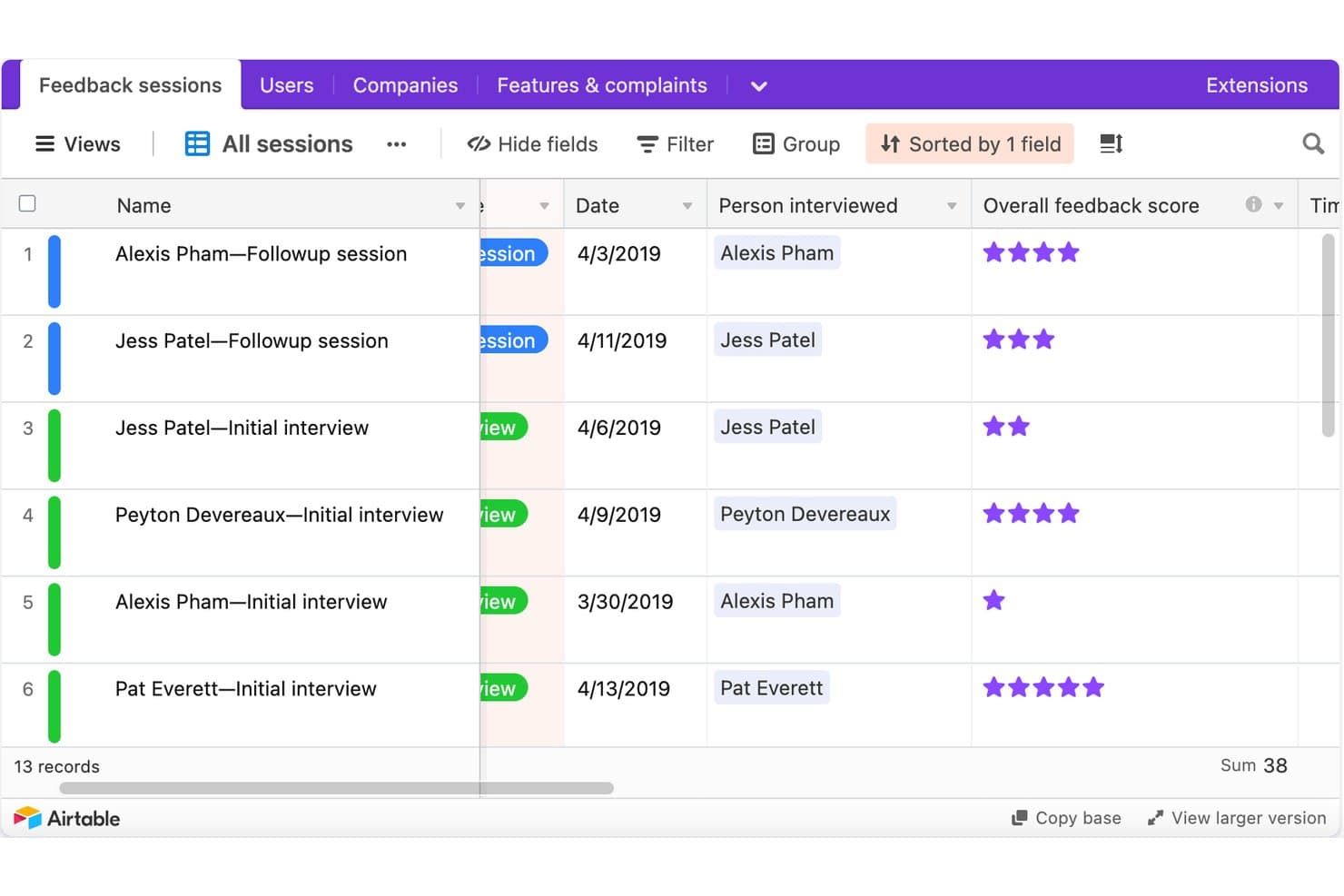
Airtable tracks UX research sessions with scores and dates. Airtable is a no-code relational database platform that research teams configure into a UX research repository, using linked tables, custom tagging fields, AI summarization, and stakeholder-facing interfaces to store and share findings.
Who Is Airtable Best For?
Airtable is a strong fit for design ops leads and product managers at enterprise organizations who have the bandwidth to build and maintain a custom research infrastructure.
Why I Picked Airtable
I've included Airtable in my top picks because it's the only tool on this list that lets enterprise research ops teams build exactly the repository structure they need from scratch. I love how a single Airtable base can house 2,000+ studies across 85+ researchers, linking raw observations to insights to recommendations in a traceable chain. Interface Designer then turns that same database into clean, read-only stakeholder dashboards without giving PMs or engineers edit access to the underlying data.
Airtable Key Features
- AI field summarization: AI fields automatically summarize interview notes and categorize feedback by sentiment directly inside your database records.
- Linked record tables: Connect studies, raw observations, insights, and recommendations in separate tables so every conclusion traces back to source evidence.
- Granular access permissions: Assign Owner, Creator, Editor, Commenter, or Read-only roles at the workspace and base level, with field- and record-level controls on Enterprise.
- Automation triggers: Set up automated Slack, email, or Teams notifications—like weekly study rollups—without writing any code.
Airtable Integrations
Airtable lists native integrations with Miro, Jira, Slack, Salesforce, Typeform, ChatGPT, Claude, Tableau Cloud, Zendesk, and Google Drive. Its API, scripting, custom extensions, and MCP connections support custom research workflows.
Pros and Cons
Pros:
- Creates tailored stakeholder research dashboards
- Scales across thousands of studies
- Links evidence to recommendations
Cons:
- No native transcript synthesis
- Requires ongoing taxonomy maintenance
Learn more about Airtable: Best for AI-surfaced insights from live sessions
- Free demo available
- Pricing upon request
Visit WebsiteCustomer Rating:4.5/5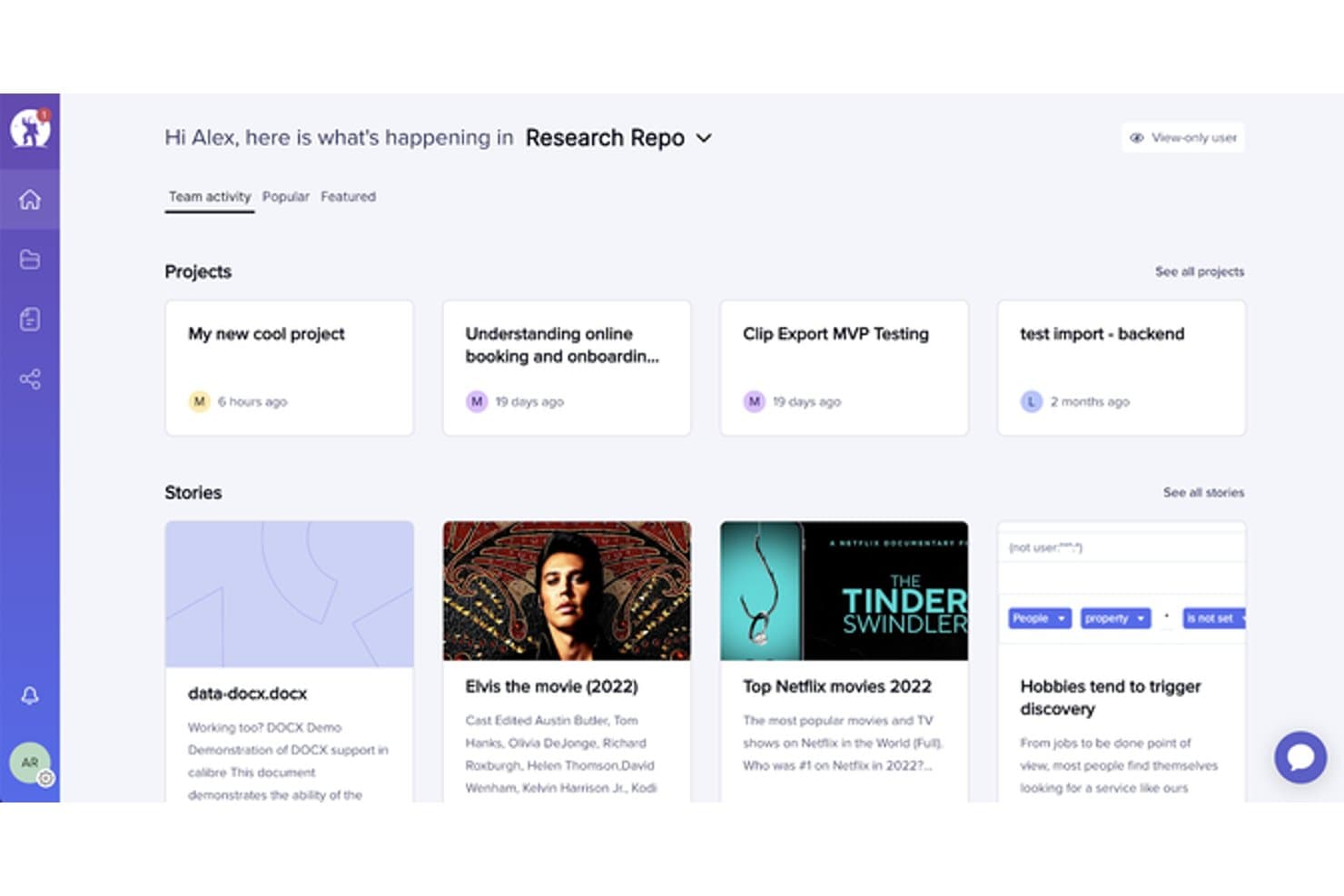
UserTesting organizes research projects and stories in a central repository. UserTesting is a user research platform that combines moderated and unmoderated testing, AI-powered insight synthesis, and a centralized research repository through its Insights Hub.
Who Is UserTesting Best For?
UserTesting fits product managers and designers at mid-size to enterprise companies who need fast video feedback from real users and want AI to do the heavy lifting of surfacing themes.
Why I Picked UserTesting
I picked UserTesting as one of the best because its AI does the synthesis work that usually falls on the researcher. After a live session wraps, Insights Discovery lets me ask questions like "What do we know about checkout friction?" across every past study, pulling answers from video and survey data without manual digging. Instant Insights and Smart tags automatically label moments by sentiment or theme, so key findings surface before I've even opened the transcript.
UserTesting Key Features
- Insights Hub: A centralized repository that organizes session videos, transcripts, surveys, and highlight reels into workspaces and folders across your team.
- Tag Manager: Create project-specific and global tags, bulk-apply them across studies, and control who can create or edit them based on their role.
- Collaborative Insights Reports: Build and co-edit shareable reports that pull in clips, tags, charts, and reels, then present them live using Presenter mode.
- Stakeholder integrations: Embed findings directly into Jira issues, Confluence pages, and Slack channels so non-researchers can act on research without leaving their tools.
UserTesting Integrations
UserTesting offers integrations with Figma, Jira, Jira Product Discovery, Confluence, Slack, Microsoft Teams, FigJam, Miro, and Atlassian Rovo. Its Results API supports custom integrations.
Pros and Cons
Pros:
- Collaborative reports package findings for stakeholders
- Evidence links connect themes to videos
- AI surfaces themes from live sessions
Cons:
- No built-in affinity mapping workspace
- Outside research artifact ingestion remains limited
Learn more about UserTesting: Best for multi-source feedback in one repo
- Free demo available
- Pricing upon request
Visit WebsiteCustomer Rating:4/5
EnjoyHQ centralizes research projects and stories in one dashboard. EnjoyHQ is a UX research repository tool that centralizes qualitative data from multiple sources—interviews, support tickets, surveys, NPS, and app reviews—into one searchable workspace with tagging, transcription, and insight reporting.
Who Is EnjoyHQ Best For?
EnjoyHQ suits UX researchers on teams that pull feedback from many sources—support tickets, NPS, surveys, and app reviews—and need one searchable place to organize it all.
Why I Picked EnjoyHQ
I picked EnjoyHQ as one of the best because it pulls feedback from more places than almost any other research repository I've used—support tickets via Zendesk and Intercom, NPS from tools like Delighted and Wootric, app reviews from the App Store and Google Play, and interview recordings, all landing in one searchable workspace. What I especially like is its dual-taxonomy system, where you can maintain one tag structure for researchers and a separate one for stakeholders. Workspace-wide boolean and fuzzy search across all those sources makes it genuinely fast to surface older findings.
EnjoyHQ Key Features
- Free unlimited transcription: EnjoyHQ transcribes video and audio files at no cost in roughly 35 languages, with speaker timestamps and clip-cutting built in.
- Analysis board: Highlighted snippets from your data land directly on a visual board where you can group them into color-coded themes and filter by tags or customer properties.
- Automation rules: You can set conditions that automatically route incoming feedback into the right project without manual sorting.
- Granular access permissions: Assign users different roles across different workspaces, and control which project sections read-only members can see.
EnjoyHQ Integrations
EnjoyHQ offers native integrations with Jira, Zendesk, Intercom, Qualtrics, Typeform, UserTesting, UserZoom, Zoom, Slack, and Trello. It also provides a public API and supports Zapier.
Pros and Cons
Pros:
- Granular permissions support broad stakeholder access
- Free unlimited transcription supports multilingual studies
- Centralizes feedback across diverse research sources
Cons:
- Product future remains uncertain under UserTesting ownership
- Manual theme synthesis lacks automated clustering
Learn more about EnjoyHQ: Best for mixed-method research synthesis
- Free plan available
- From $208/user/month
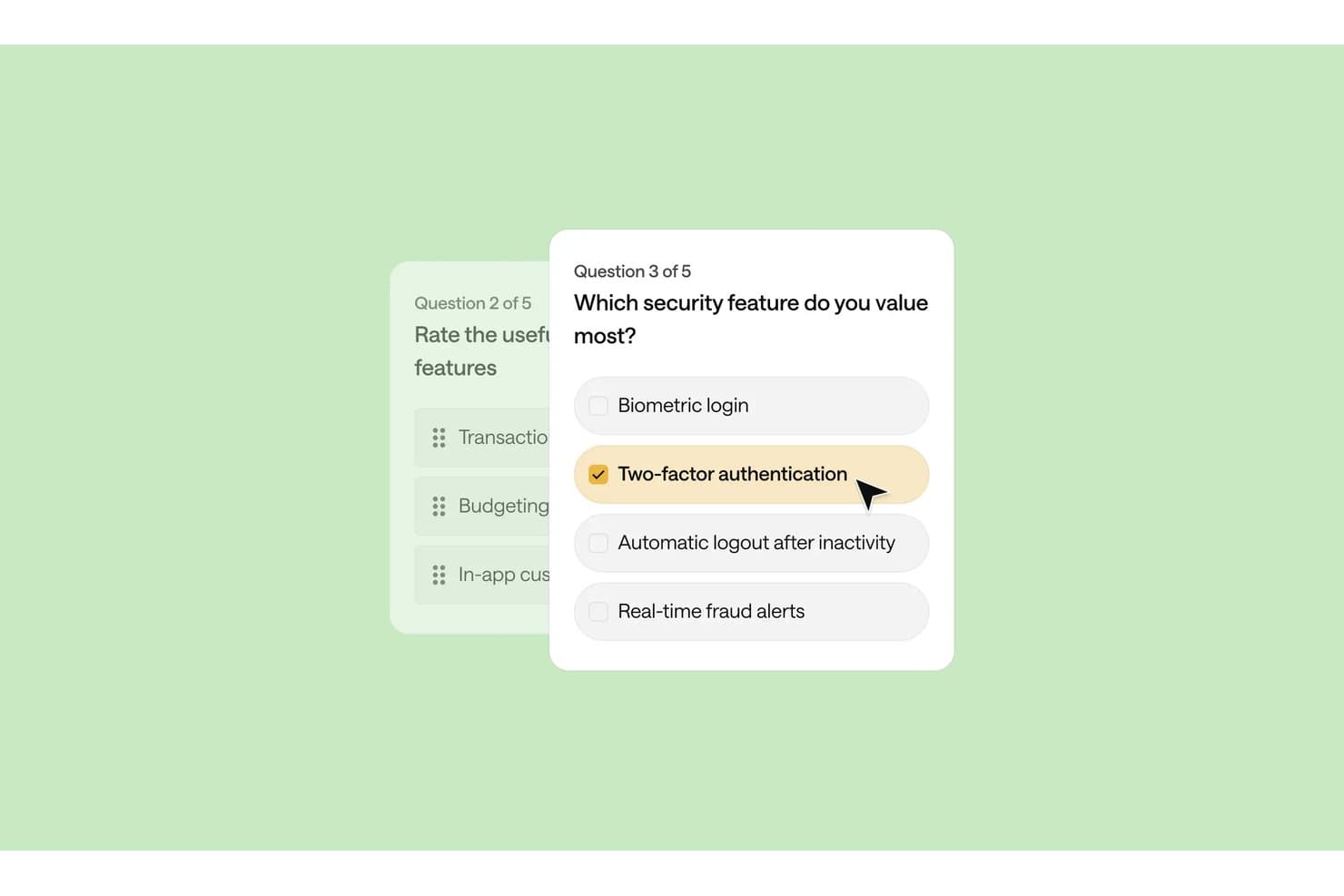
Optimal Workshop lets users build surveys with multiple-choice security questions. Optimal Workshop is a UX research platform that combines card sorting, tree testing, interviews, and qualitative analysis tools with an AI-powered repository for storing, tagging, and synthesizing research data across studies.
Who Is Optimal Workshop Best For?
Optimal Workshop suits UX researchers and research operations leads who need to run card sorting, tree testing, and qualitative interviews inside one platform and synthesize findings across methods.
Why I Picked Optimal Workshop
I picked Optimal Workshop as one of the best because it's one of the few tools that genuinely connects card sorting, tree testing, and qualitative interviews inside a single research repository. What I find especially useful is the Theme Builder, which lets me filter tagged observations across sessions and surface patterns as named themes with linked evidence. The AI Chat feature then takes that synthesized data and outputs it directly to Slack or Notion, so findings move from raw sessions to stakeholder-ready format without leaving the platform.
Optimal Workshop Key Features
- Chord diagram: Visualizes relationships between tags across your qualitative data, showing how observations connect to multiple themes at once.
- MCP integration: Connects AI tools like Claude, ChatGPT, and Gemini directly to your workspace so you can query and filter studies by type, participant segment, or timeframe.
- Highlight reels: Lets you clip and compile video moments from recorded sessions into shareable reels for stakeholders who weren't in the room.
- Participant recruitment panel: Gives you access to a built-in panel of over 10 million verified participants across 150+ countries, with built-in screening, scheduling, and incentive management.
Optimal Workshop Integrations
Optimal Workshop integrates with Slack, Notion, Confluence, Jira, Linear, Miro, Zoom, Google Meet, and Microsoft Teams for sharing findings and capturing interviews. Enterprise customers can connect Optimal’s API to data warehouses, BI tools, and internal dashboards.
Pros and Cons
Pros:
- Unlimited seats widen stakeholder access
- Linked evidence supports defensible research themes
- Strong card sorting and tree testing
Cons:
- Starter permissions limit repository governance
- Cross-study search remains immature
Learn more about Optimal Workshop: Best for video clips shared without onboarding
- Free demo available
- From $395/month
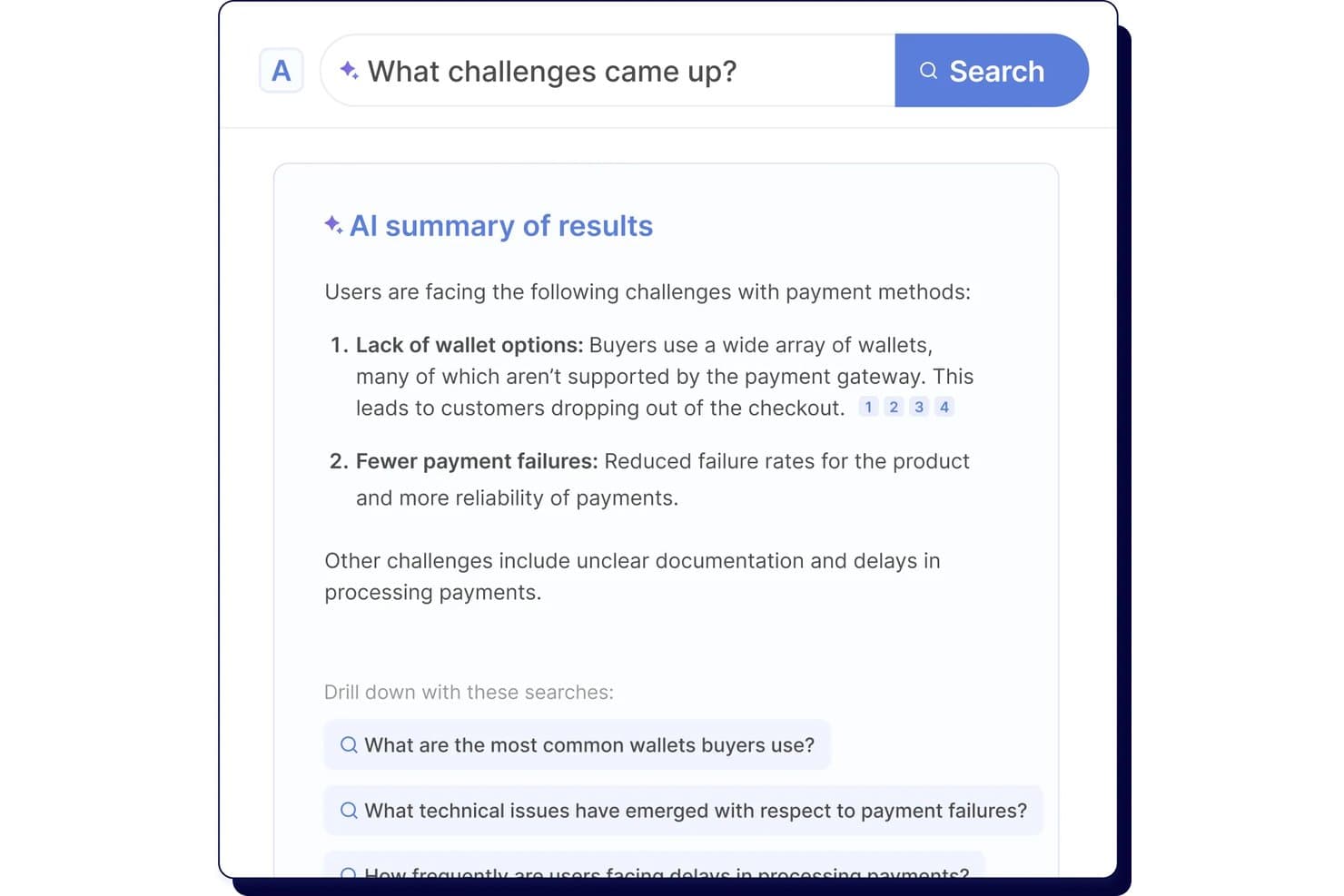
Looppanel's AI search surfaces key user research challenges instantly. Looppanel is a UX research repository platform that centralizes video recordings, transcripts, survey data, and documents, with AI-powered tagging, search, and synthesis tools for turning qualitative research into shareable insights.
Who Is Looppanel Best For?
Looppanel fits UX researchers and product teams who need to share video findings with stakeholders who won't log in to learn a new tool.
Why I Picked Looppanel
I've included Looppanel in my top picks because of how well it handles sharing video findings with people who will never log into a research tool. The Enterprise stakeholder search is built for exactly that: executives and PMs can browse and search across research without any onboarding. I also like that one-click video clips and auto-generated Research Reels let me surface a participant's exact words in seconds, then drop them straight into Slack with full source citations attached.
Looppanel Key Features
- Auto-tagging with theme grouping: AI automatically groups notes into themes across your project, which you can review and edit before finalizing.
- Ask Looppanel AI with citations: ask questions across your workspace and get AI-generated answers that link directly back to the source transcript quotes.
- Global Smart Search: searches notes, transcripts, reports, survey data, and insights across the entire workspace, surfacing relevant data even when it's untagged.
- Survey auto-analysis: automatically analyzes survey responses ranging from 5 to 500+ entries and surfaces key themes without manual sorting.
Looppanel Integrations
Looppanel offers 13 documented integrations, including Zoom, Microsoft Teams, Google Meet, Google Calendar, Slack, Jira, Confluence, HubSpot, Zendesk, and Qualtrics. Enterprise adds API access and custom integrations, while MCP connects Claude Desktop, ChatGPT, and Cursor.
Pros and Cons
Pros:
- Search finds untagged research data
- AI answers retain source citations
- Video clips make stakeholder sharing immediate
Cons:
- Advanced governance requires enterprise access
- Transcripts still contain frequent mistakes
Learn more about Looppanel: Best for collaborative research repositories at scale
- Free plan + free demo available
- Pricing upon request
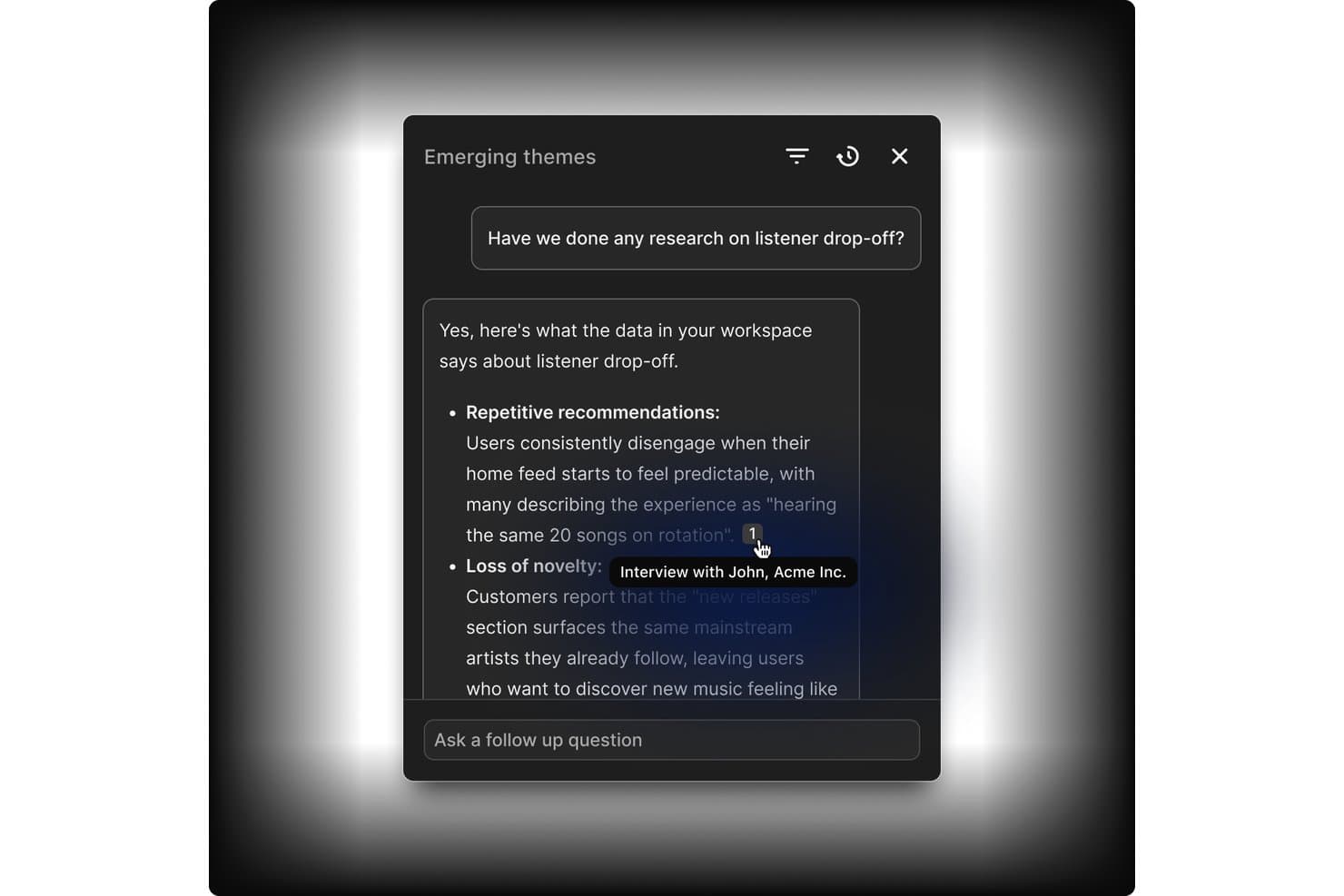
Dovetail links AI answers directly to source interview evidence. Dovetail is a customer intelligence platform that combines centralized research storage, AI-assisted tagging and synthesis, cross-study analysis, and stakeholder sharing into one collaborative research repository.
Who Is Dovetail Best For?
Dovetail fits enterprise research teams and DesignOps leads who need to manage research at scale across multiple studies, contributors, and stakeholders.
Why I Picked Dovetail
Dovetail earns its spot as one of the best on my shortlist because it's built to handle research at a scale that most tools simply aren't designed for. I love how workspace-level tag boards stay live across hundreds of projects simultaneously, so a taxonomy change made in one place reflects everywhere at once. Canvas AI clustering is also genuinely useful: when I'm pulling highlights from a dozen studies, the tool groups them by theme automatically, cutting hours of manual affinity mapping. Add free unlimited Viewer seats on Enterprise, and getting synthesized findings in front of engineering and product stakeholders becomes far less of an operational burden.
Dovetail Key Features
- Evidence-linked docs: Reports and chat answers cite exact video clips, timestamps, and quotes that link back to the original recording.
- Cross-project canvas: Pull highlights and references from multiple projects into a single infinite canvas for cross-study analysis.
- Contacts database: Store up to 50,000 research participants, link them to sessions and docs, and enrich records via Salesforce or HubSpot.
- Insight-to-roadmap linking: Send themes and data points directly to Jira or Linear as interactive embeds that link back to Dovetail.
Dovetail Integrations
Dovetail offers native integrations with Jira, Linear, Slack, Microsoft Teams, Notion, Figma, Productboard, Zoom, Google Meet, and Qualtrics. It also provides an API, CLI, MCP Server, and Zapier for custom connectivity.
Pros and Cons
Pros:
- Granular permissions support research governance
- Cross-study synthesis reveals recurring research themes
- Evidence-linked findings support stakeholder trust
Cons:
- Search reliability varies across larger datasets
- Advanced repository features require Enterprise
Learn more about Dovetail: Best for qualitative analysis
- 15-day free trial
- From $15/user/month (billed annually)
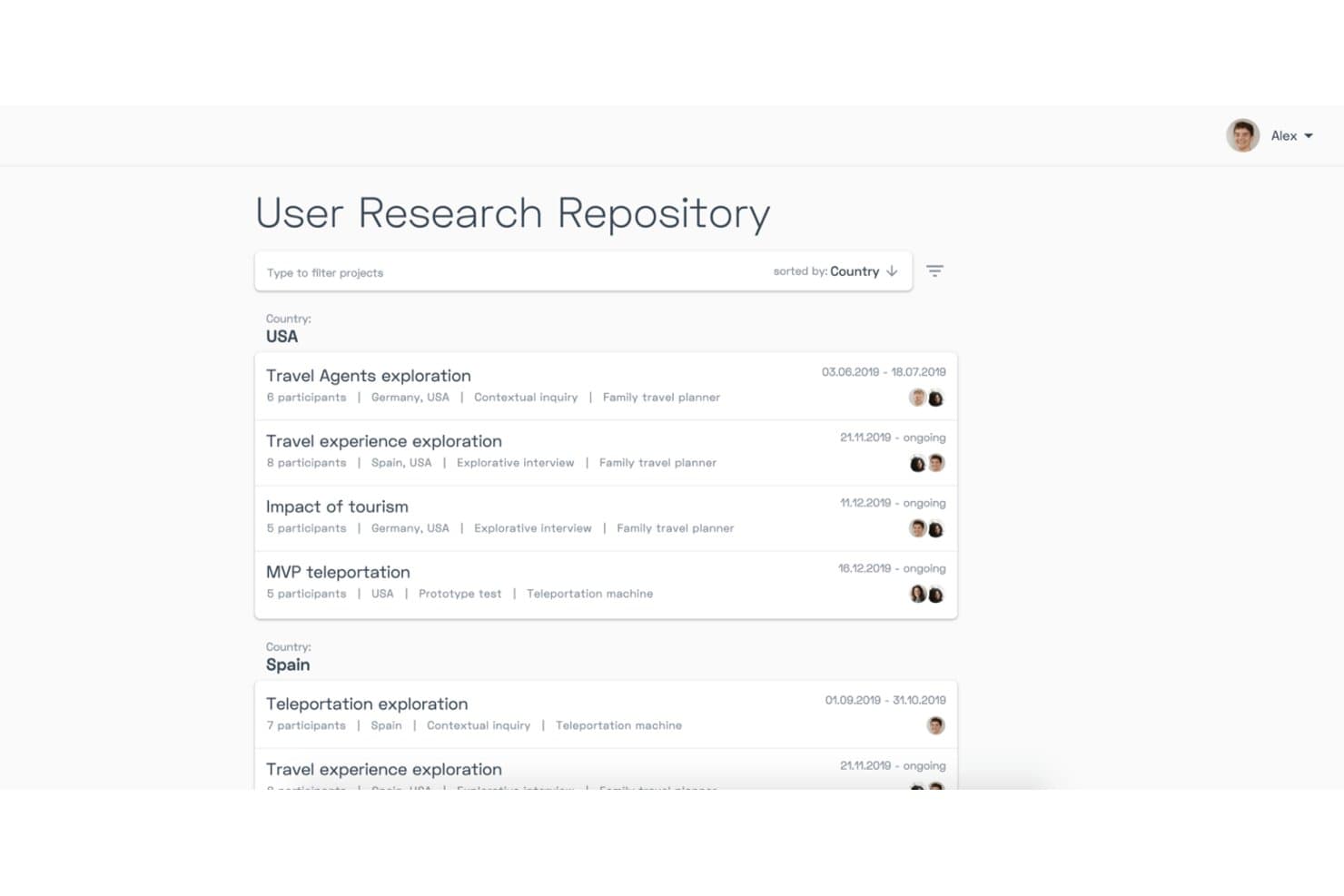
Condens organizes research projects by country with filters and metadata. Condens is a UX research repository and AI analysis platform that centralizes video, audio, notes, and text data, with tools for transcription, tagging, whiteboard synthesis, and AI-assisted qualitative analysis across studies.
Who Is Condens Best For?
Condens is a strong fit for UX researchers and product teams that do heavy qualitative work and need a structured, evidence-linked repository to synthesize findings at scale.
Why I Picked Condens
I picked Condens as one of the best because its qualitative analysis depth is genuinely hard to replicate elsewhere. I love how AI clustering groups transcript highlights into themes automatically, and how Smart Clusters keep updating as new data comes in, so synthesis isn't a one-time manual task. The whiteboard links every insight back to raw evidence, which means when stakeholders question a finding, I can trace it directly to the source clip.
Condens Key Features
- Global tag boards: A shared tag set that spans all projects, keeping your taxonomy consistent and preventing duplicate or conflicting tags across studies.
- Unlimited transcription: Every plan includes unlimited AI transcription in 85+ languages, with speaker recognition and timestamps built in.
- Insights Magazine: A customizable stakeholder hub where you can curate and publish findings for different audiences, with no login required for viewers.
- Cross-project participant profiles: Participant records that persist across studies, tracking demographics, consent, and session history in one place.
Condens Integrations
Condens offers documented integrations with Zoom, Google Drive, Microsoft Cloud, UserTesting, UXTweak, User Interviews, Zendesk, Slack, Microsoft Teams, and Figma. It also supports Notion, Jira, and Confluence embeds, plus an Enterprise API and Zapier.
Pros and Cons
Pros:
- No-login stakeholder findings access
- Unlimited transcription and storage
- Evidence-linked qualitative synthesis
Cons:
- Transcription can misrecognize names
- No built-in study recruitment
Learn more about Condens: Best for all-in-one research ops and CRM
- Free trial + free demo available
- From $129/seat/month

Great Question lets users tag and organize transcript highlights into a repository. Great Question is an all-in-one UX research platform that combines a research repository, participant CRM, recruitment, and study tools—including interviews, surveys, prototype tests, and AI-powered synthesis and search.
Who Is Great Question Best For?
Great Question is a strong fit for UX research teams that want to consolidate recruiting, CRM, study execution, and a searchable insight repository into one platform.
Why I Picked Great Question
I picked Great Question as one of the best because it's the only tool on this list that genuinely handles recruiting, participant CRM, study execution, and a searchable insight repository under one roof. I love how Ask AI lets me search across every study with natural-language questions and get verbatim, timestamped quotes back as evidence. The participant CRM tracks consent, study history, and custom attributes, so I'm never starting from scratch when I need to recruit for a follow-up study.
Great Question Key Features
- AI Synthesis: Automatically generates themed summaries, key insights, and a highlight reel from moderated interview studies with three or more transcripts.
- Global tag manager: Lets you create, color-code, group, and merge tags that apply across every study in your workspace for org-wide pattern tracking.
- Highlights Board: A drag-and-drop workspace where you group and organize video highlights into named, color-coded clusters for manual synthesis.
- Free unlimited Observer seats: Stakeholders can view the repository, attend live sessions, and browse findings without needing a paid seat.
Great Question Integrations
Great Question offers 20+ native integrations, including Zoom, Google Meet, Microsoft Teams, Slack, Figma, Google Workspace, Microsoft Outlook, Salesforce, Qualtrics, and Respondent. It also supports custom connections through its API and MCP server, plus Zapier.
Pros and Cons
Pros:
- Participant CRM connects recruitment with repository
- Free observers broaden stakeholder research access
- AI search returns cited transcript quotes
Cons:
- Repository excludes direct spreadsheet uploads
- AI synthesis only covers moderated interviews
Learn more about Great Question: Best for end-to-end AI research synthesis
- Free plan available
- Pricing upon request
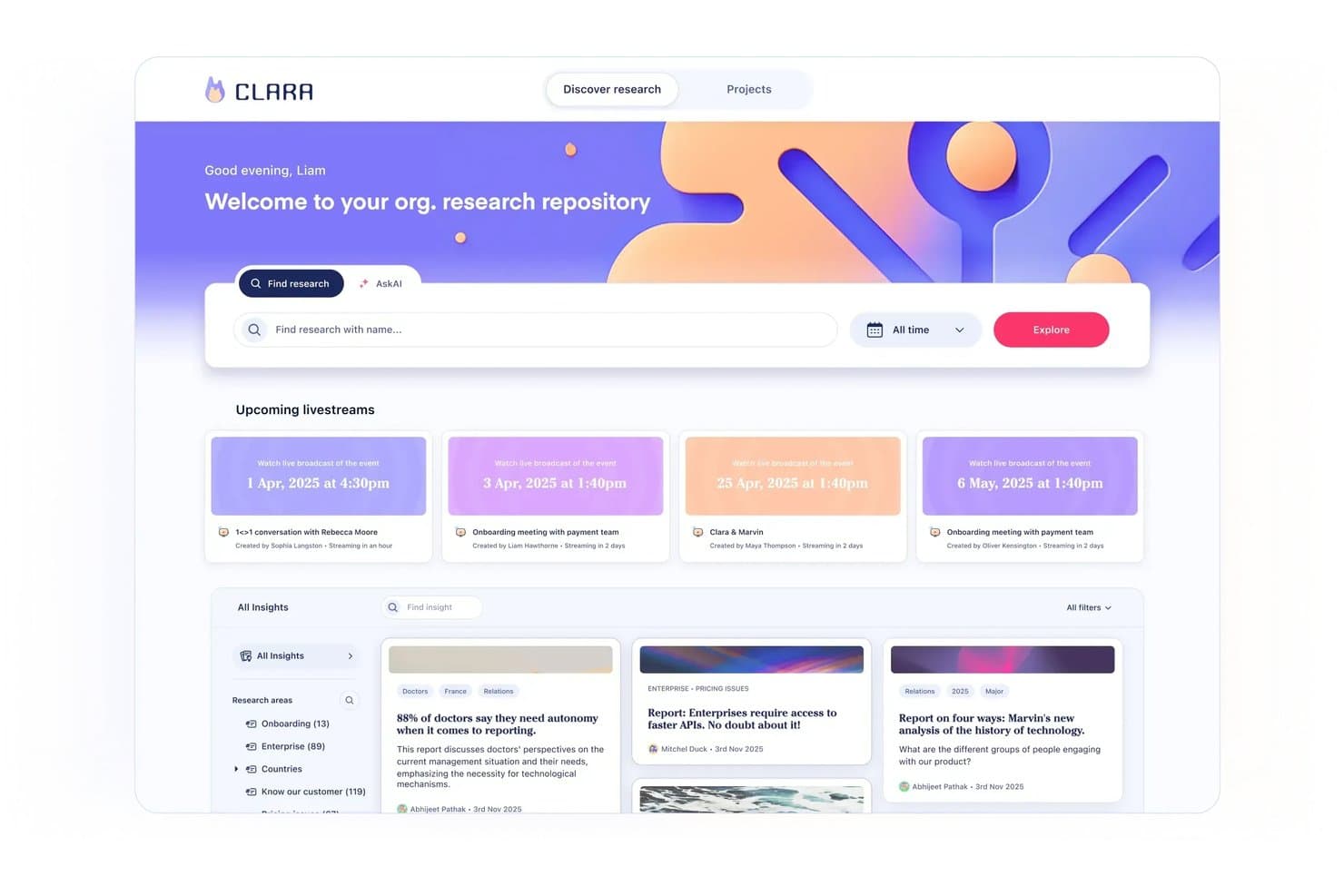
Marvin centralizes research insights and upcoming sessions in one repository. Marvin is an AI-powered UX research repository that centralizes interviews, surveys, support tickets, and other research data, with built-in transcription, tagging, synthesis, and cross-study search.
Who Is Marvin Best For?
Marvin is a strong fit for UX researchers and product managers who need to move from raw interview data to shareable, evidence-backed insights without losing track of what was learned across past studies.
Why I Picked Marvin
Marvin earns its spot on my shortlist because it covers the full arc of AI research synthesis, from live interview transcription to cross-study pattern detection, without requiring manual tagging to make search useful. I especially like Ask AI's explorer agents, which scan your entire repository, surface relevant moments across past studies, and show exactly which files informed the answer. Deep Research templates for thematic analysis, JTBD, and emotion analysis let me move from raw transcripts to structured findings in a single workflow rather than jumping between tools.
Marvin Key Features
- AI Notetaker: Automatically records, transcribes, and summarizes live calls on Zoom, Google Meet, and Microsoft Teams with speaker identification and timestamps.
- Living insight reports: Insights move through private, draft, shared, and published states, combining notes, quotes, clips, and AI analysis in a single report.
- Research newsletter automation: Auto-generates customizable research newsletters and posts insights directly to Slack or Microsoft Teams channels to keep stakeholders informed.
- Granular access permissions: Four distinct user roles—Admin, Full, Collaborator, and Viewer—with pod-level controls, PII visibility settings, and SSO support.
Marvin Integrations
Marvin offers 30+ native integrations, including Zoom, Google Meet, Microsoft Teams, Qualtrics, Dscout, UserTesting, Intercom, Zendesk, Slack, Jira, and Asana. Its Import API and MCP server support custom connections with Claude, ChatGPT, Cursor, and Copilot.
Pros and Cons
Pros:
- Insight reports connect evidence to decisions
- AI notes capture interviews with timestamps
- Repository-wide search surfaces past research
Cons:
- Cross-project synthesis can take considerable time
- AI analysis sometimes misreads research data
Learn more about Marvin:
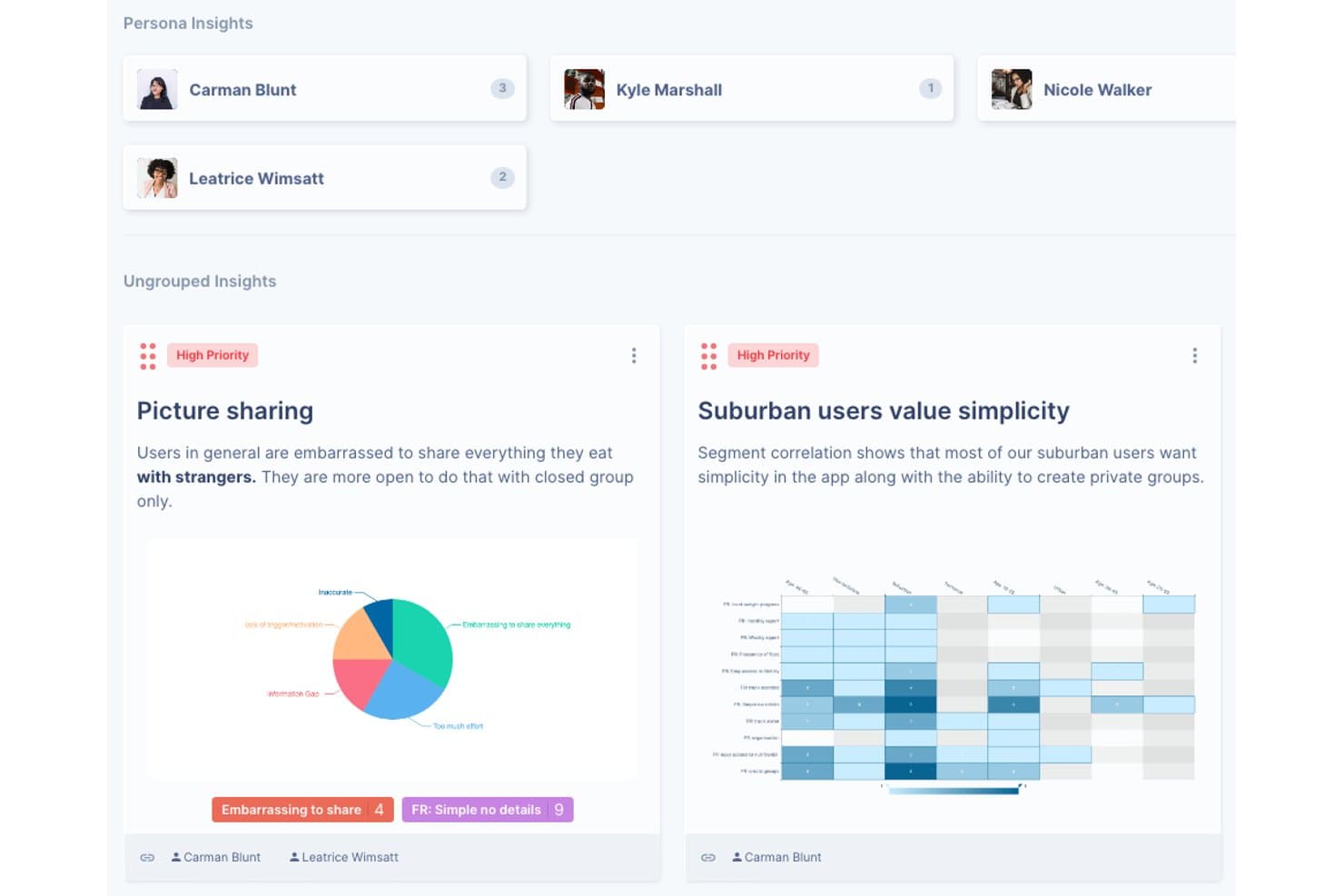
UserBit organizes research insights by persona with priority tags and charts. UserBit is a UX research repository tool built for multi-client workflows, combining interview management, notes, transcription, surveys, tagging, correlation analysis, and a stakeholder-facing Client Portal in one workspace.
Who Is UserBit Best For?
UserBit is a strong fit for UX researchers and design ops leads at agencies managing multiple client workspaces under a single flat-rate subscription.
Why I Picked UserBit
I've included UserBit in my top picks because its flat-rate Unlimited plan lets agencies add every client team member and stakeholder at no extra cost, which is rare in this category. I particularly like how each client gets its own isolated workspace with separate branding, permissions, and a dedicated Client Portal where stakeholders can filter and explore published insights without needing a researcher to walk them through it.
UserBit Key Features
- Correlation heatmaps: Visualize relationships between highlight tags and participant segments to surface patterns across your interview data.
- Global tag boards: Create and manage a shared tag taxonomy across all projects in a workspace, with changes syncing automatically.
- Stakeholder Client Portal: Give non-researcher audiences a branded, login-protected space to browse and filter published insights independently.
- Built-in transcription: Transcribe audio and video in 99 languages with speaker recognition, inline editing, and automatic clip creation from tagged segments.
UserBit Integrations
UserBit doesn't have any native integrations. It supports a beta REST API, Enterprise SSO with Okta, Google, OneLogin, and Azure AD, plus Zapier.
Pros and Cons
Pros:
- Evidence-linked insights strengthen research credibility
- Client Portal simplifies stakeholder insight access
- Isolated workspaces support multi-client research
Cons:
- Analytics interface can feel dated and confusing
- AI tagging and synthesis remain unreliable
Learn more about UserBit:
Outras ferramentas de repositório de investigação UX
Eis algumas opções adicionais de ferramentas de repositório de investigação UX que não entraram na minha lista restrita, mas que ainda vale a pena conhecer:
- 11StravitoBest for sharing insights with non-research teams
- 12AureliusBest for flat-rate, unlimited-user research repos
- 13NotionBest for research insights inside existing workflows
- 14MazeBest for prototype testing with built-in AI synthesis
- 15DscoutBest for field research in regulated industries
- 16UXArmyBest for usability research in APAC markets
How I Evaluate UX Research Repository Tools
I split my evaluation into three parts, with the most weight on core functionality: store research artifacts, tag findings, and search across studies. Next, I look for standout features such as AI theme clustering. Finally, I consider beyond-feature factors like onboarding for PMs and designers, support, and pricing as teams grow.
Core Functionality (Table Stakes For This List)
When I'm selecting tools for my list, I score each one on a scale from 0 (does not offer the functionality) to 5 (excels in this area) for each core functionality listed below. I then convert the total into a percentage to help assess each tool's overall fit, with extra weight on any functionalities I’ve deemed essential.
- Centralized Research Data (Essential): I check whether notes, recordings, transcripts, and survey results stay organized by study and remain easy to retrieve later.
- Tagging & Search (Essential): I look for tags plus keyword and filter search that can surface a specific customer quote across studies, not just within one project.
- Insight Synthesis: I assess whether teams can turn highlights into reusable themes and link each takeaway back to supporting notes or recordings.
- Cross-Study Analysis: I look for ways to compare tagged findings across projects and spot recurring onboarding confusion or changing customer needs.
- Stakeholder Sharing: I evaluate whether product and engineering partners can navigate curated findings without needing a researcher to interpret every file.
- Access Controls: I check whether roles distinguish who can view, edit, or contribute, especially when studies include sensitive participant data.
Once I have a list of tools that meet the criteria, I consider what sets each platform apart.
Differentiating Factors (What Sets Vendors Apart)
Here's how I compare and contrast different vendors:
Standout Features
I look for AI theme clustering that groups related highlights across studies automatically, since manually tagging hundreds of quotes is where adoption stalls. Insight-to-roadmap linking matters just as much—I evaluate whether a tool lets you trace a prioritization decision back to the supporting evidence, the way Dovetail or Productboard connect findings to feature requests. I also check for customizable stakeholder hubs where PMs and engineers can self-serve curated findings without needing a walkthrough from the researcher who ran the study.
Beyond Features
I evaluate how easily non-researchers can actually use the tool. If a PM needs a walkthrough just to browse findings, adoption stalls fast. I also look at licensing models—some vendors charge per seat while others offer free viewer roles, which matters when you need 30 stakeholders reading insights but only five people running studies. GDPR and SOC 2 compliance is non-negotiable for tools holding recorded interviews, so I check each vendor's data residency options and consent tracking.
Como escolher uma ferramenta de repositório de investigação UX
É fácil ficar preso a listas extensas de funcionalidades e estruturas de preços complexas. Para o ajudar a manter o foco enquanto percorre o seu processo específico de seleção de software, eis uma lista de fatores a ter em conta:
| Fator | O que deve considerar |
| Escalabilidade | Certifique-se de que a ferramenta consegue acompanhar o crescimento da sua equipa. Verifique se suporta um aumento do volume de dados e utilizadores adicionais sem problemas. |
| Integrações | Verifique se a ferramenta se integra com o software que já utiliza, como o Slack, o Jira ou o Google Drive, para simplificar os fluxos de trabalho. |
| Personalização | Procure opções que permitam adaptar a ferramenta às necessidades específicas da sua equipa, como painéis de controlo ou fluxos de trabalho personalizáveis. |
| Facilidade de utilização | Avalie se a ferramenta é intuitiva para que a sua equipa a possa adotar rapidamente. Uma curva de aprendizagem acentuada pode atrasar os seus esforços de investigação. |
| Orçamento | Analise se os preços estão de acordo com o seu orçamento. Considere o valor oferecido em cada escalão de preços e quaisquer custos ocultos. |
| Medidas de segurança | Certifique-se de que existem medidas sólidas de proteção de dados. Procure conformidade com normas do setor, como o RGPD. |
| Suporte | Considere o nível de suporte ao cliente disponível, incluindo os tempos de resposta e os recursos disponíveis, como tutoriais ou um centro de ajuda. |
| Colaboração | Verifique se a ferramenta suporta funcionalidades colaborativas, como edição em tempo real ou espaços de trabalho partilhados, para melhorar a eficiência da equipa. |
Tendências nas ferramentas de repositório de investigação UX
Na minha investigação, consultei inúmeras atualizações de produtos, comunicados de imprensa e registos de lançamentos de diferentes fornecedores de ferramentas de repositório de investigação UX. Eis algumas das tendências emergentes que estou a acompanhar:
- Informações orientadas por IA: Muitas ferramentas estão agora a utilizar IA para fornecer informações mais profundas sobre os dados dos utilizadores. Esta tendência está a ajudar as equipas a identificar rapidamente padrões e a tomar decisões fundamentadas. Fornecedores como a Dovetail estão a integrar IA para ajudar a etiquetar e sintetizar as opiniões dos utilizadores.
- Visualização de dados melhorada: As ferramentas estão a apostar em opções mais avançadas de visualização de dados, permitindo que as equipas interpretem os dados de forma fácil e eficaz. Esta tendência ajuda a apresentar dados complexos num formato mais compreensível, contribuindo para os processos de tomada de decisão.
- Funcionalidades de colaboração remota: À medida que o trabalho remoto se torna mais comum, as ferramentas estão a melhorar as funcionalidades que suportam a colaboração em tempo real. Isto inclui espaços de trabalho partilhados e edição em tempo real, que estão a tornar-se essenciais para equipas distribuídas.
- Personalização da experiência do utilizador: Existe uma tendência crescente para oferecer mais opções de personalização aos utilizadores. Isto permite que as equipas adaptem a interface e a funcionalidade da ferramenta de modo a corresponder melhor aos seus fluxos de trabalho e necessidades específicos.
- Foco na acessibilidade: Garantir que as ferramentas são acessíveis a todos os utilizadores, incluindo pessoas com deficiência, está a tornar-se uma prioridade. Isto inclui funcionalidades como a navegação por teclado e o suporte para leitores de ecrã, assegurando a inclusão nos processos de investigação.
O que são as ferramentas de repositório de investigação UX?
As ferramentas de repositório de investigação UX são soluções de software que armazenam, organizam e gerem dados de investigação de utilizadores. São normalmente utilizadas por investigadores de UX, gestores de produto e equipas de design para compreender as informações dos utilizadores e melhorar o desenvolvimento de produtos. Funcionalidades como a etiquetagem, a visualização de dados e as capacidades de colaboração ajudam a organizar os dados, interpretar as informações e facilitar o trabalho em equipa. De um modo geral, estas ferramentas fornecem uma plataforma centralizada para que as equipas possam gerir e utilizar eficazmente os dados de investigação de utilizadores.
Funcionalidades das ferramentas de repositório de investigação UX
Ao selecionar ferramentas de repositório de investigação UX, procure as seguintes funcionalidades essenciais:
- Capacidades de integração: Ligue-se a outras ferramentas, como plataformas de inquéritos, software de design ou painéis de análise. As integrações perfeitas reduzem o trabalho manual e mantêm o fluxo de trabalho a funcionar sem problemas.
- Armazenamento de dados centralizado: Armazene todos os seus resultados de investigação, documentos e ficheiros multimédia num único local seguro. Isto garante que todas as pessoas da sua equipa têm acesso fácil ao que precisam — sem procuras intermináveis.
- Pesquisa e filtragem avançadas: Localize rapidamente informações importantes ou detalhes dos participantes sem ter de procurar em inúmeras pastas. Os filtros permitem-lhe concentrar-se em estudos, datas, etiquetas ou segmentos de utilizadores específicos, tornando o processo agradavelmente simples de gerir.
- Etiquetagem e categorização: Identifique e organize os seus dados de investigação por tópicos, metodologias ou nomes de projetos. Esta estrutura poupa-lhe tempo e ajuda-o a detetar padrões ou lacunas muito mais rapidamente quando mais precisa.
- Ferramentas de colaboração: Trabalhe em conjunto em tempo real partilhando notas, deixando comentários ou atribuindo tarefas aos membros da equipa. Pode recolher opiniões sem se perder em cadeias intermináveis de e-mails.
- Histórico de versões e registos de auditoria: Acompanhe as alterações e veja quem editou o quê e quando. Isto é extremamente útil quando precisa de garantir a precisão ou revisitar resultados anteriores sem começar do zero.
- Gestão de participantes: Mantenha todas as informações dos participantes organizadas e seguras. Pode gerir formulários de consentimento, acompanhar as comunicações e evitar convites duplicados acidentais num único local.
- Ferramentas de síntese de informações: Agrupe resultados relacionados e sintetize as principais informações. Isto ajuda-o a transformar dados brutos em conhecimento útil para os seus projetos, tornando as suas conclusões imediatamente acionáveis.
- Controlos de segurança e permissões: Defina níveis de acesso para os membros da equipa e as partes interessadas. Controlos robustos garantem que a investigação sensível permanece privada, permitindo simultaneamente que os colaboradores vejam apenas o que é relevante para si.
Funcionalidades comuns de IA
As ferramentas modernas de repositório de investigação UX utilizam cada vez mais IA para ajudar as equipas a trabalhar de forma mais inteligente e rápida. Eis algumas funcionalidades comuns orientadas por IA que encontrará:
- Etiquetagem e categorização automatizadas: A IA pode analisar os seus dados de investigação, como transcrições de entrevistas ou respostas a inquéritos, e sugerir etiquetas ou categorias relevantes. Isto permite-lhe poupar tempo e manter o seu repositório organizado com um esforço manual mínimo.
- Extração de conhecimentos: Os algoritmos avançados podem destacar temas recorrentes, padrões e sentimentos na sua investigação, ajudando-o a identificar conhecimentos importantes sem ter de ler todas as notas.
- Serviços de transcrição: A transcrição baseada em IA converte rapidamente entrevistas em áudio e vídeo em texto pesquisável e editável. Isto facilita a análise das conversas e a partilha das conclusões com a sua equipa.
- Pesquisa inteligente: A IA melhora a funcionalidade de pesquisa ao compreender o contexto e a intenção, apresentando resultados mais precisos mesmo quando utiliza consultas em linguagem natural.
- Eliminação de duplicados de participantes: A IA pode identificar e fundir registos duplicados de participantes, ajudando-o a manter uma base de dados limpa e precisa.
- Resumos automatizados: Gere resumos concisos de sessões ou relatórios de investigação extensos, para que as partes interessadas possam compreender rapidamente os pontos principais sem terem de analisar todos os pormenores.
- Análise de sentimentos: A IA pode avaliar o tom emocional do feedback dos participantes, proporcionando-lhe uma compreensão mais aprofundada das atitudes e reações dos utilizadores.
As funcionalidades de IA integradas podem simplificar o seu fluxo de trabalho, reduzir as tarefas manuais e ajudá-lo a descobrir conhecimentos valiosos mais rapidamente, tornando as suas ferramentas de repositório de investigação UX ainda mais poderosas.
Vantagens das ferramentas de repositório de investigação UX
A implementação de ferramentas de repositório de investigação UX proporciona várias vantagens à sua equipa e à sua empresa. Eis algumas das vantagens que pode esperar:
- Organização melhorada: As funcionalidades de etiquetagem e categorização ajudam-no a manter os dados de investigação bem organizados e fáceis de consultar.
- Colaboração melhorada: As ferramentas de colaboração em tempo real permitem que a sua equipa trabalhe em conjunto de forma eficiente, independentemente do local onde se encontra.
- Conhecimentos mais rápidos: A análise em tempo real fornece feedback imediato, ajudando a sua equipa a tomar decisões rápidas e informadas.
- Melhor interpretação dos dados: As funcionalidades de visualização de dados facilitam a compreensão de informações complexas e a obtenção de conclusões relevantes.
- Maior acessibilidade: As funcionalidades de acessibilidade garantem que todas as pessoas da sua equipa podem utilizar a ferramenta, incluindo as pessoas com deficiência.
- Fluxos de trabalho simplificados: As capacidades de integração ligam-se a outro software, facilitando a partilha de dados e o trabalho entre plataformas.
- Gestão segura dos dados: As salvaguardas de segurança protegem as informações sensíveis, garantindo a conformidade com normas do setor como o RGPD.
Custos e preços das ferramentas de repositório de investigação UX
A seleção de ferramentas de repositório de investigação UX exige uma compreensão dos vários modelos de preços e planos disponíveis. Os custos variam consoante as funcionalidades, o tamanho da equipa, os complementos e outros fatores. A tabela abaixo resume os planos comuns, os seus preços médios e as funcionalidades normalmente incluídas nas soluções de ferramentas de repositório de investigação UX:
Tabela de comparação de planos para ferramentas de repositório de investigação UX
| Tipo de plano | Preço médio | Funcionalidades comuns |
| Plano gratuito | $0 | Armazenamento básico de dados, número limitado de utilizadores e análise essencial. |
| Plano pessoal | $5-$30/utilizador/ mês | Etiquetagem avançada, visualização de dados, ferramentas de colaboração e apoio básico. |
| Plano empresarial | $30-$60/ utilizador/mês | Conjunto completo de ferramentas de análise, recrutamento de participantes, integrações e apoio prioritário. |
| Plano empresarial de grande escala | $60-$120/ utilizador/mês | Painéis personalizados, segurança reforçada, um gestor de conta dedicado e integrações personalizadas. |
Perguntas frequentes sobre ferramentas de repositórios de investigação UX
Eis algumas respostas a perguntas frequentes sobre ferramentas de repositórios de investigação UX:
Em que difere um repositório de investigação UX de uma base de dados normal?
Um repositório de investigação UX foi concebido especificamente para armazenar e organizar dados de investigação de utilizadores, enquanto uma base de dados normal poderá não disponibilizar as mesmas funcionalidades personalizadas. Os repositórios incluem funcionalidades como etiquetagem, categorização e colaboração, essenciais para sintetizar e partilhar conhecimentos de forma eficaz entre equipas.
Uma pequena equipa de design pode beneficiar de um repositório de investigação UX?
Sem dúvida, as equipas pequenas podem beneficiar bastante de um repositório de investigação UX. Este ajuda-as a organizar os dados de investigação de forma eficiente, a evitar trabalho duplicado e a tomar decisões informadas. Mesmo com recursos limitados, um repositório bem mantido pode simplificar os processos e melhorar a colaboração.
Os repositórios de investigação UX são adequados para o trabalho remoto?
Sim, os repositórios de investigação UX são ideais para o trabalho remoto, uma vez que centralizam os dados e os conhecimentos numa plataforma baseada na nuvem. Esta acessibilidade permite que os membros da equipa colaborem eficazmente a partir de diferentes locais, garantindo a continuidade e a coerência dos esforços de investigação.
Quão seguros são os repositórios de investigação UX?
A segurança é uma prioridade máxima para os repositórios de investigação UX. A maioria das plataformas cumpre normas do setor, como o RGPD, para proteger dados sensíveis. Oferecem funcionalidades como controlos de acesso e encriptação para garantir que apenas o pessoal autorizado pode aceder às informações.
Com que frequência deve ser atualizado um repositório de investigação UX?
É importante atualizar regularmente o seu repositório de investigação UX. As atualizações consistentes ajudam a manter os dados relevantes e úteis, garantindo que a sua equipa tem sempre acesso aos conhecimentos mais recentes. É essencial estabelecer uma rotina para adicionar novas conclusões e rever os dados existentes.
Existem ferramentas gratuitas de repositórios de investigação UX?
Sim, algumas ferramentas de repositórios de investigação UX disponibilizam versões gratuitas ou períodos de avaliação. Estas opções podem ser uma excelente forma de as equipas começarem a organizar a sua investigação sem custos iniciais. No entanto, as versões gratuitas poderão ter limitações ao nível das funcionalidades ou da capacidade de armazenamento.