

As ferramentas de investigação UX ajudam as equipas de produto a recolher e analisar o feedback dos utilizadores, para que possam tomar melhores decisões de design e desenvolvimento. Desde testes de usabilidade a inquéritos e análises comportamentais, estas plataformas revelam os conhecimentos necessários para criar produtos que as pessoas realmente querem.
Mas, com tantas ferramentas a afirmar que fazem tudo, é difícil perceber quais oferecem valor real — e quais lhe farão perder tempo.
Testei e analisei dezenas de plataformas de investigação UX para separar o que realmente importa do ruído. Neste guia, apresento-lhe as principais opções — categorizadas por caso de utilização, orçamento e dimensão da equipa — para que possa escolher a ferramenta certa com confiança, sem ter de adivinhar.
Why Trust Our Software Recommendations
6,700+
Reviews
20
Industry experts
16+
Evaluation factors
14
Years
Our team has been testing and reviewing software since 2012. As product managers ourselves, we know how difficult—and important—it is to choose the right software.
For this guide, we evaluated tools using hands-on testing and independent research, scoring tools using our selection criteria.
Our reviews reflect our human editorial judgment, not a sales pitch.
Expert reviewers:
- Andrew LumbySenior TPM
- Cristiano ValimSenior UI/UX Lead


Tabela comparativa: ferramentas de investigação UX
Esta tabela comparativa resume os detalhes de preços das minhas principais escolhas de ferramentas de investigação UX.
| Tool | Best For | Trial Info | Price | ||
|---|---|---|---|---|---|
| 1 | Best for automating customer insights discovery | 7-day free trial + free demo available | From $79/month | Website | |
| 2 | Best for AI-driven feedback analysis | 10-day free trial | From $114/month (billed annually) | Website | |
| 3 | Best for Figma prototype A/B variant testing | Free plan available | From $80/month (billed annually) | Website | |
| 4 | Best for video-based participant feedback | Free demo available | Pricing upon request | Website | |
| 5 | Best for cross-device usability testing at scale | Free demo available | From $699/month (billed annually) | Website | |
| 6 | Best for customer feedback at scale | Free demo available | Pricing upon request | Website | |
| 7 | Best for information architecture testing | Free plan available | From $208/user/month | Website | |
| 8 | Best for Figma-to-panel testing in one place | Free plan + free demo available | Pricing upon request | Website | |
| 9 | Best for enterprise research at scale | Free demo available | Pricing upon request | Website | |
| 10 | Best for quick sentiment and survey analysis | Free plan + free demo available | From $83/month (billed annually) | Website |


Análises das melhores ferramentas de investigação UX
Seguem-se os meus resumos detalhados das melhores ferramentas de investigação UX que entraram na minha seleção. As minhas análises apresentam um exame detalhado das principais funcionalidades, vantagens e desvantagens, integrações e casos de utilização ideais de cada ferramenta, ajudando-o a encontrar a melhor opção para as suas necessidades
 Best for automating customer insights discovery
- 7-day free trial + free demo available
- From $79/month

Articos shows a user interview recording and a participant list. Articos is an AI-powered synthetic research platform that conducts simulated user interviews, concept tests, and journey analyses with persona panels based on personality science and cognitive bias modelling.
Who Is Articos Best For?
Articos is a good fit for product teams and UX researchers who need fast, scalable user insights without waiting for the lead time of recruiting real participants.
Why I Picked Articos
Articos is one of my top picks because I love how it collapses the entire discovery pipeline into a single automated workflow. I set a research goal, and within 30 minutes, I have a structured report covering motivations, objections, confusion points, and prioritized recommendations. What really separates it is the hypothesis-blind architecture: personas are interviewed without exposure to what I'm hoping to find, which actively prevents confirmation bias from distorting the output. On top of that, every finding comes with evidence chains and confidence scores, so I'm not just getting themes, I'm getting a traceable signal.
Articos Key Features
- Stance diversity engine: Distributes personas across champion, pragmatist, skeptic, blocker, and observer archetypes to surface a full range of user reactions.
- Concept testing: Runs synthetic panel tests against messaging, landing pages, or product positioning to evaluate how different user types respond.
- Talk to Research: Answers follow-up questions about completed research, so you can probe individual persona responses after a study.
- White-label PDF export: Generates research reports formatted for direct client delivery.
Articos Integrations
Native integrations are not currently listed. An API is available for custom integrations.
Pros and Cons
Pros:
- Traces all report findings to exact user quotes
- Hypothesis-blind personas reduce confirmation bias
- Built-in A/B concept testing without traffic
Cons:
- Outputs lack sharable visual persona graphics
- Synthetic personas don't replace live observation
Learn more about Articos: Best for AI-driven feedback analysis
- 10-day free trial
- From $114/month (billed annually)
Visit WebsiteCustomer Rating:4.6/5
The Survicate dashboard showing setup instructions for installing the feedback widget to begin collecting user insights. Survicate is a UX research and customer feedback platform that helps teams collect, analyze, and act on user insights across multiple channels. It enables you to create customizable surveys for websites, mobile apps, and emails, helping you understand how users interact with your product and where their experience can be improved.
Why I picked Survicate: I picked Survicate because it combines flexible survey creation with automated feedback analysis, allowing you to collect real-time user sentiment without extra manual work. Its AI-driven insights hub automatically categorizes feedback and detects patterns, helping you identify recurring issues and prioritize improvements efficiently. You can also trigger surveys based on specific user behaviors, ensuring that responses are timely and relevant. The customizable dashboards make it easy to monitor key UX metrics like NPS and CSAT at a glance.
Standout features & integrations:
Features include automated sentiment analysis, which helps you understand user emotions; AI-assisted question suggestions, which improve survey quality; and real-time response tracking, which allows you to monitor key performance indicators and identify trends.
Integrations include HubSpot, Salesforce, Google Sheets, Slack, Intercom, Mailchimp, Marketo, Mixpanel, Segment, Zendesk, Microsoft Teams, and Zapier.
Pros and Cons
Pros:
- Automated insights
- Strong integration options
- Intuitive interface
Cons:
- Limited advanced analytics in lower plans
- Higher pricing for small teams
Learn more about Survicate: Best for Figma prototype A/B variant testing
- Free plan available
- From $80/month (billed annually)
Visit WebsiteCustomer Rating:4.8/5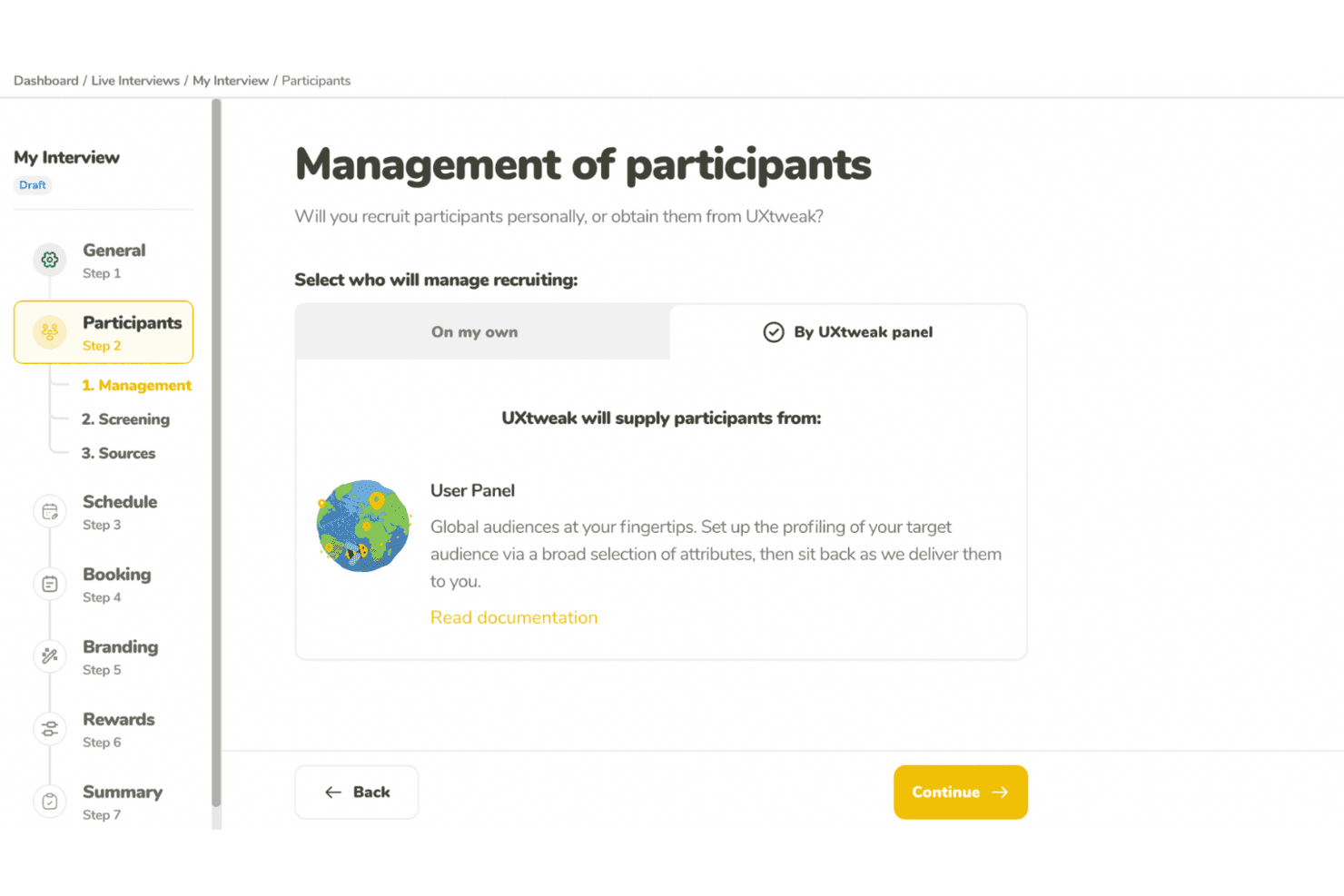
UXtweak supports UX research with usability tests and participant recruitment. UXtweak is a multi-method UX research platform covering prototype testing, usability testing, card sorting, tree testing, surveys, session recording, and moderated interviews.
Who Is UXtweak Best For?
UXtweak is a strong fit for UX researchers and product designers who need deep prototype testing capabilities alongside a full suite of research methods in one platform.
Why I Picked UXtweak
UXtweak earns its spot on my shortlist because of how far its prototype testing goes beyond basic click-through validation. I love that you can import a Figma prototype directly, run A/B variant tests across two different design directions, and then compare lostness scores and clickmaps side by side to see exactly where users diverge. That level of specificity, especially the lostness metric that quantifies how disoriented a user gets navigating a flow, is something I rarely see paired with A/B variant support in a single tool.
UXtweak Key Features
- Multi-method research suite: UXtweak combines card sorting, tree testing, surveys, session recording, five-second tests, and first-click tests in one platform.
- Own Database participant CRM: Import your own contacts via CSV or XLSX, build reusable segments, and send automated study invitations at no extra cost.
- Global User Panel: Access a managed participant panel spanning 130+ countries, with a fixed upfront price and guaranteed delivery of responses within two business days.
- Moderated interview tools: Run freeform or study-based interviews with built-in scheduling, observer streaming, timestamped notes, and AI-generated transcript highlights.
UXtweak Integrations
UXtweak offers native integrations with Figma, Google Drive, Microsoft OneDrive, Condens, Marvin, Dovetail, Notion, and Google Tag Manager. It has no documented public API, Jira, Slack, Microsoft Teams, or Zoom integrations.
Pros and Cons
Pros:
- Global panel delivers screened participants quickly
- Lostness scores reveal confusing navigation paths
- Figma prototypes support A/B variant testing
Cons:
- Dashboard navigation can overwhelm new researchers
- Cross-study insight synthesis remains unavailable
Learn more about UXtweak: Best for video-based participant feedback
- Free demo available
- Pricing upon request
Visit WebsiteCustomer Rating:5/5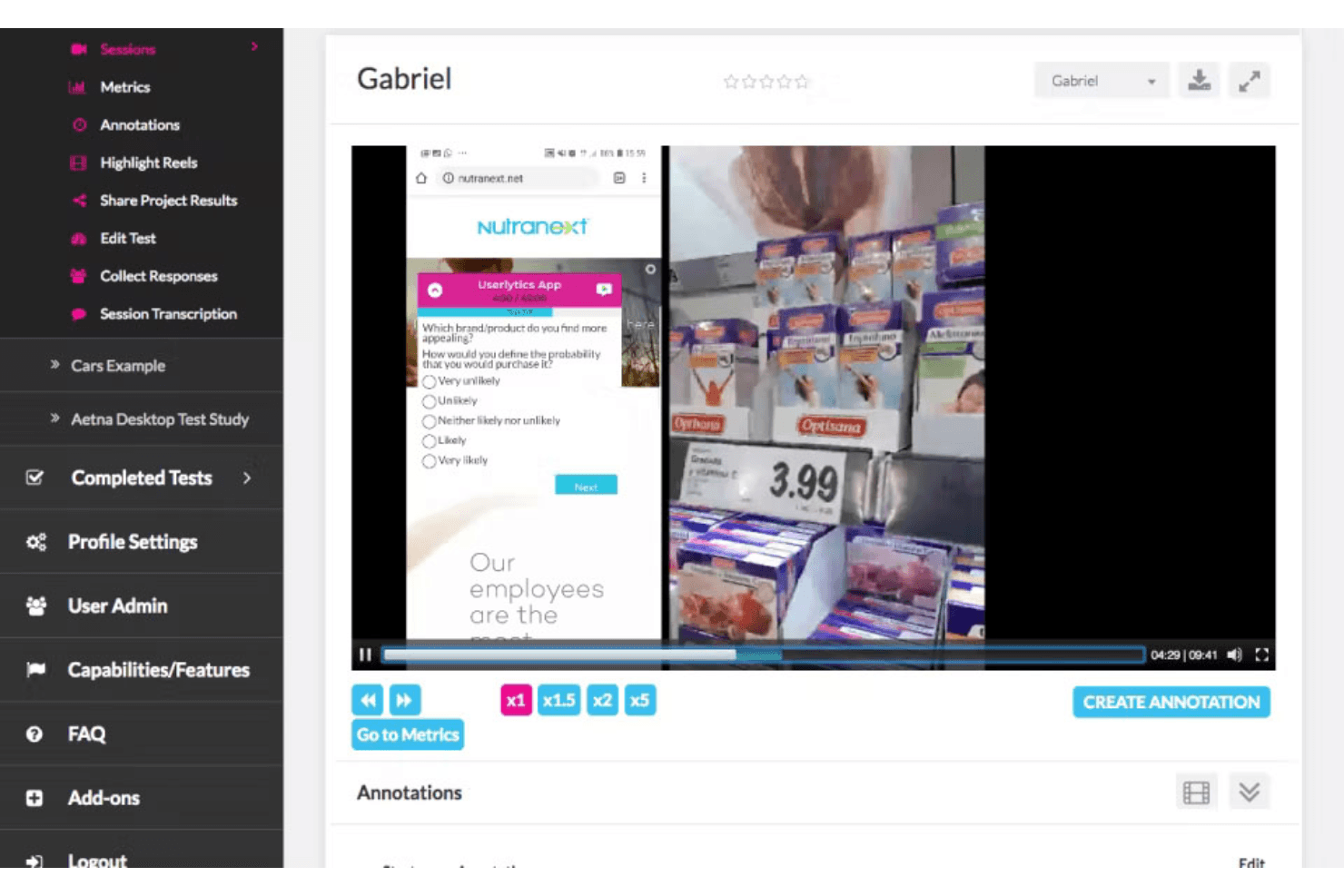
PlaybookUX captures video feedback and surveys to guide product improvements. PlaybookUX is a UX research platform that combines moderated and unmoderated usability testing, built-in participant recruitment, video-based session recording, and AI-assisted analysis and reporting.
Who Is PlaybookUX Best For?
PlaybookUX is a strong fit for UX researchers and product managers who need a single platform to recruit participants, run video-based studies, and share findings without juggling multiple tools.
Why I Picked PlaybookUX
PlaybookUX earns its spot on my shortlist because its patented recorder captures face, voice, and screen simultaneously across desktop and mobile, so you get the full picture of how participants react, not just what they click. I love that moderated interviews have video calls, timestamped notes, and invisible observers all built in, removing the need for separate recording software. AI task summaries then pull themes, sentiment, and friction points from those sessions automatically, cutting the time between raw video and shareable findings.
PlaybookUX Key Features
- Built-in participant panel: Access a pool of 7M+ vetted participants across 50+ countries, with demographic filters, screener logic, quota controls, and real-time disqualification tracking.
- Multi-method research support: Run card sorting, tree testing, five-second tests, preference tests, surveys, and session replays alongside usability tests from a single platform.
- AI-generated screeners and bias checks: Automatically draft screener questions and flag issues like leading language, vague answer options, or missing "none of the above" choices before a study goes live.
- Custom reports with password-protected sharing: Combine clips, highlight reels, tags, and notes into shareable reports you can distribute to stakeholders without requiring a login.
PlaybookUX Integrations
PlaybookUX has a native Figma integration for prototype imports, click tracking, task metrics, and heatmaps. Its public API and MCP layer support custom connections to AI tools, data warehouses, CRMs, and internal tools.
Pros and Cons
Pros:
- Responsive support helps resolve study issues
- Video captures reveal reactions beyond clicks
- Fast participant recruitment for consumer studies
Cons:
- Some participant recordings reportedly fail to upload
- Advanced synthesis across studies remains limited
Learn more about PlaybookUX: Best for cross-device usability testing at scale
- Free demo available
- From $699/month (billed annually)
Visit WebsiteCustomer Rating:4.5/5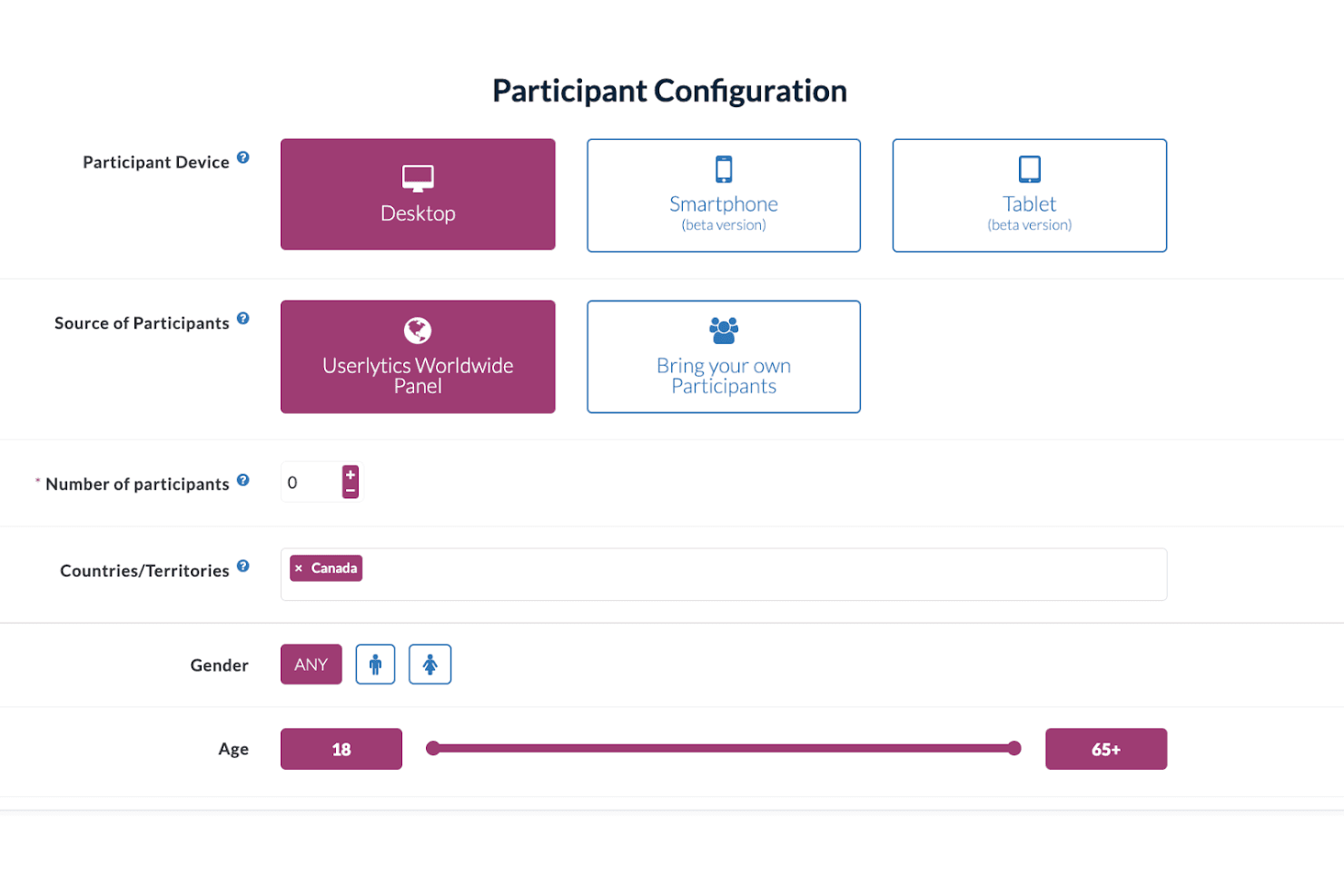
Userlytics enables multi-device user testing to improve user experience. Userlytics is a UX research platform that supports moderated and unmoderated usability testing, quantitative studies, card sorting, tree testing, and participant recruitment across desktop, iOS, and Android devices.
Who Is Userlytics Best For?
Userlytics is a strong fit for UX research teams running studies across desktop, iOS, and Android who need a large built-in panel and support for multiple research methods in one place.
Why I Picked Userlytics
Userlytics earns its spot on my shortlist because of how thoroughly it covers cross-device usability testing, from responsive mobile sites to unreleased iOS and Android builds tested via TestFlight and Google Play, all without requiring an SDK. I love that mobile moderated sessions let the participant use their phone while I observe from desktop, with up to 10 invisible observers joining live. The 2M+ global panel with niche targeting (think neurosurgeons or C-suite executives) means I can run studies at real scale across any device type.
Userlytics Key Features
- AI Study Designer: Drafts a complete unmoderated or quantitative study, including the screener, from a plain-language description you type in.
- ULX® Benchmarking Score: Combines eight dimensions—trust, appeal, usability, adequacy, performance, appearance, affinity, and distinction—into a single proprietary benchmark score.
- Card sorting and tree testing: Built-in card sort and tree test task types with dedicated analysis views, including a result matrix, dendrogram, similarity matrix, and AI category recommendations.
- Quant Reporting: Turns a finished study's metrics into a presentation-ready DOC report with charts and AI summaries in one click.
Userlytics Integrations
Userlytics offers documented integrations with Figma and Adobe XD, plus link-based support for Proto.io, InVision, Marvel, Axure, JustInMind, UXPin, Framer, and Sketch. It also supports TestFlight and Google Play for mobile builds, but no public API or native Jira, Slack, or Notion integrations are documented.
Pros and Cons
Pros:
- Supports moderated, unmoderated, and quantitative studies
- Recruits niche audiences across 150+ countries
- Tests iOS, Android, and desktop experiences
Cons:
- Reviewers report slow processes and confusing screens
- Study-level analysis limits cross-study synthesis
Learn more about Userlytics: Best for customer feedback at scale
- Free demo available
- Pricing upon request
Visit WebsiteCustomer Rating:4.5/5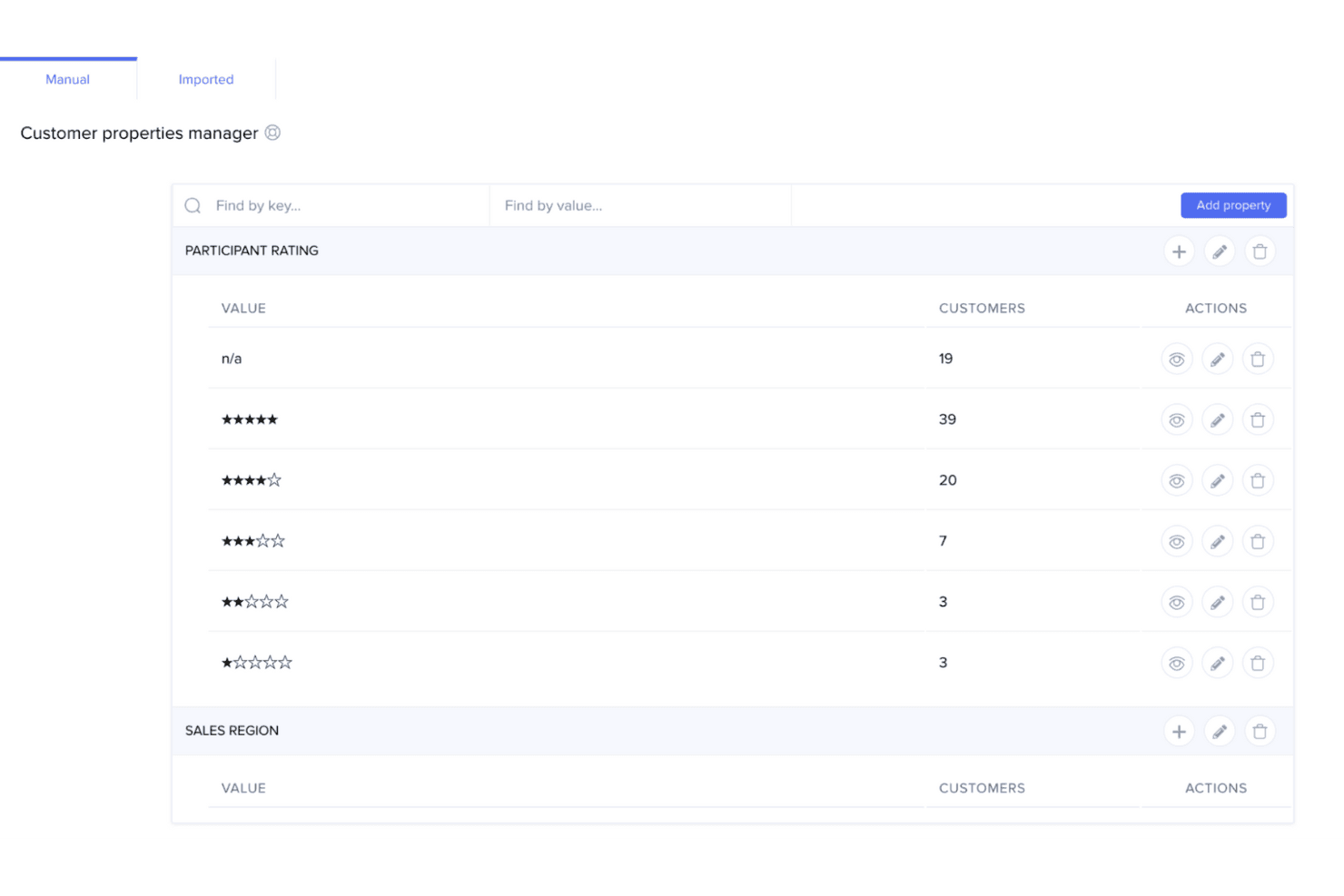
UserTesting helps teams quickly capture customer feedback to guide product decisions. UserTesting is a UX research platform that combines moderated and unmoderated usability testing, a global participant panel, AI-assisted analysis, and insight-sharing tools in one place.
Who Is UserTesting Best For?
UserTesting is a strong fit for enterprise teams that need to run customer feedback research at high volume across a large, diverse participant base.
Why I Picked UserTesting
I picked UserTesting as one of the best because its panel size and screening depth are genuinely hard to replicate at scale. With 7 million participants across 60+ countries and filters covering 73,000 occupations and 140 industries, you can run broad generative studies and niche B2B tests from the same platform. AI Insight Summaries automatically surface themes across sessions and link every finding back to the source video, which means I can move from raw recordings to a stakeholder-ready highlight reel without a lengthy manual synthesis pass.
UserTesting Key Features
- Live Conversation moderated testing: Record, transcribe, and auto-highlight key moments from moderated interview sessions with real participants.
- Figma plugin: Generate a usability test directly from a Figma prototype and view success metrics, AI themes, and clips without leaving your design file.
- QXscore benchmarking: Measure and track experience quality with a standardized score that lets you compare results across studies over time.
- Insights Hub: A centralized workspace that organizes UserTesting studies and third-party research data with tagging and AI-powered theme discovery.
UserTesting Integrations
UserTesting offers integrations with Figma, Jira, Slack, Microsoft Teams, Miro, User Interviews, Google Calendar, Qualtrics, and Contentsquare. Its Results API and open API ecosystem support custom integrations.
Pros and Cons
Pros:
- AI summaries link findings to source videos
- Moderated and unmoderated testing cover diverse studies
- Large participant panel supports niche B2B recruitment
Cons:
- Advanced analysis requires higher-tier editions
- Specialized recruiting can produce inconsistent panel quality
Learn more about UserTesting: Best for information architecture testing
- Free plan available
- From $208/user/month
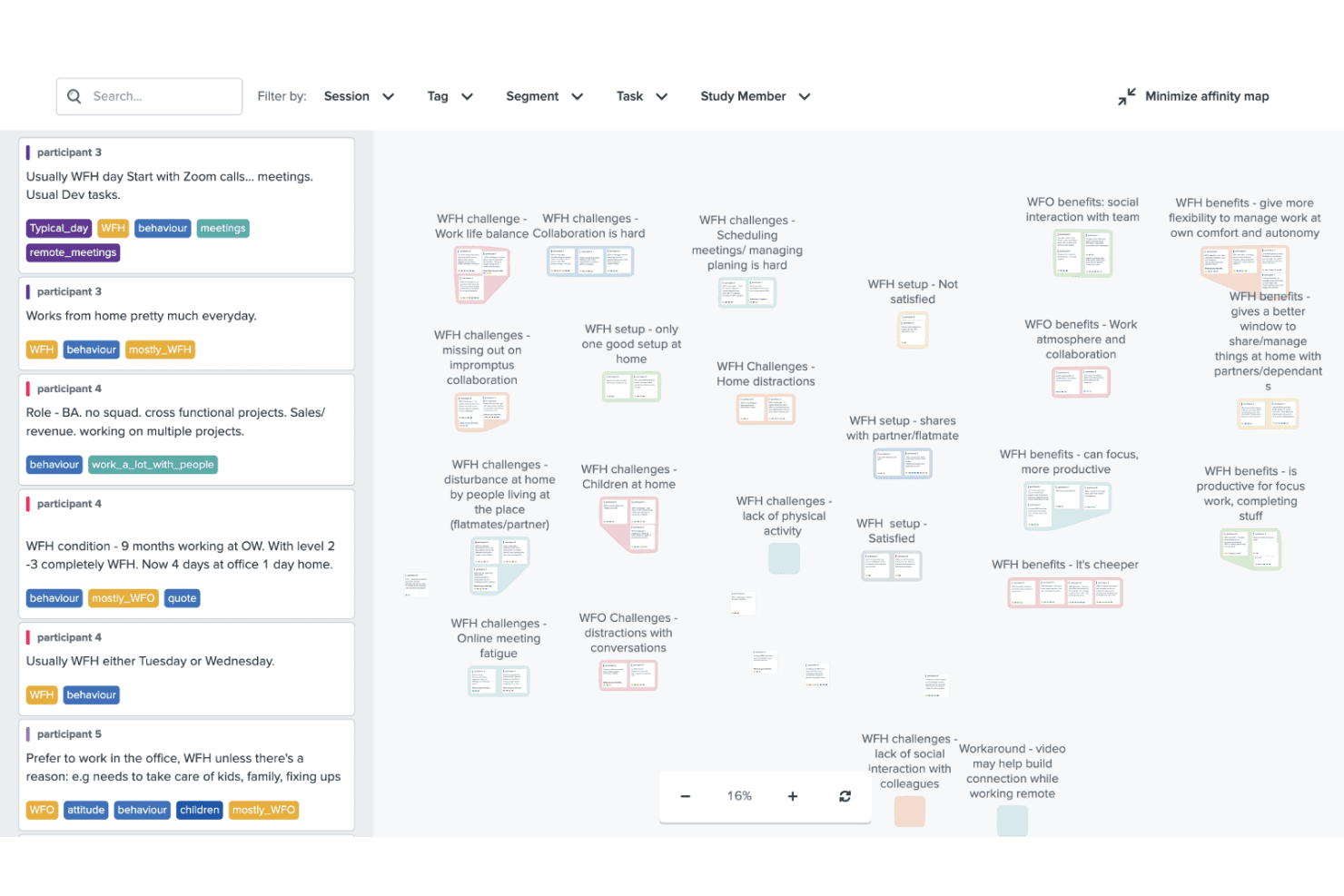
Optimal Workshop helps improve design with usability, card, and tree testing. Optimal Workshop is a UX research platform that combines information architecture testing, usability testing, prototype and live site testing, card sorting, tree testing, surveys, and AI-analyzed interviews in one tool.
Who Is Optimal Workshop Best For?
Optimal Workshop is a strong fit for UX researchers and product teams who need a dedicated information architecture testing tool alongside a broad range of complementary research methods.
Why I Picked Optimal Workshop
Optimal Workshop earns its spot as one of the best on my shortlist because its card sorting and tree testing tools are genuinely best-in-class. I've used tree testing to validate navigation structures before launch, and Optimal's dendrograms and task-success metrics make it easy to pinpoint exactly where users lose their way. Its AI-assisted thematic analysis and automated transcription across 13 languages round out a research suite that covers everything from early IA decisions to post-launch usability testing.
Optimal Workshop Key Features
- AI-assisted interview analysis: Optimal automatically transcribes sessions in 13 languages and generates thematic and sentiment analysis with timestamped evidence.
- Live site testing: Paste any URL—including staging or competitor sites—to capture session recordings that show where users hesitate or drop off.
- Built-in participant recruitment panel: Access a verified panel of 10M+ participants across 150+ countries, with screening, scheduling, and fraud prevention built in.
- Research repository with MCP search: Store and search insights across studies, with an MCP connector that lets AI tools like Claude and ChatGPT query your research library directly.
Optimal Workshop Integrations
Optimal Workshop integrates with Figma, Zoom, Google Meet, Microsoft Teams, Slack, Miro, Notion, Confluence, Jira, and Linear. It offers an Enterprise API, an MCP server for AI tools, and Zapier through MCP.
Pros and Cons
Pros:
- Unlimited seats support cross-functional research
- AI analysis includes timestamped evidence
- Best-in-class card sorting and tree testing
Cons:
- Five launched studies limit frequent testing
- Moderated usability testing lacks a dedicated environment
Learn more about Optimal Workshop: 8Best for Figma-to-panel testing in one place
Maze
- Free plan + free demo available
- Pricing upon request
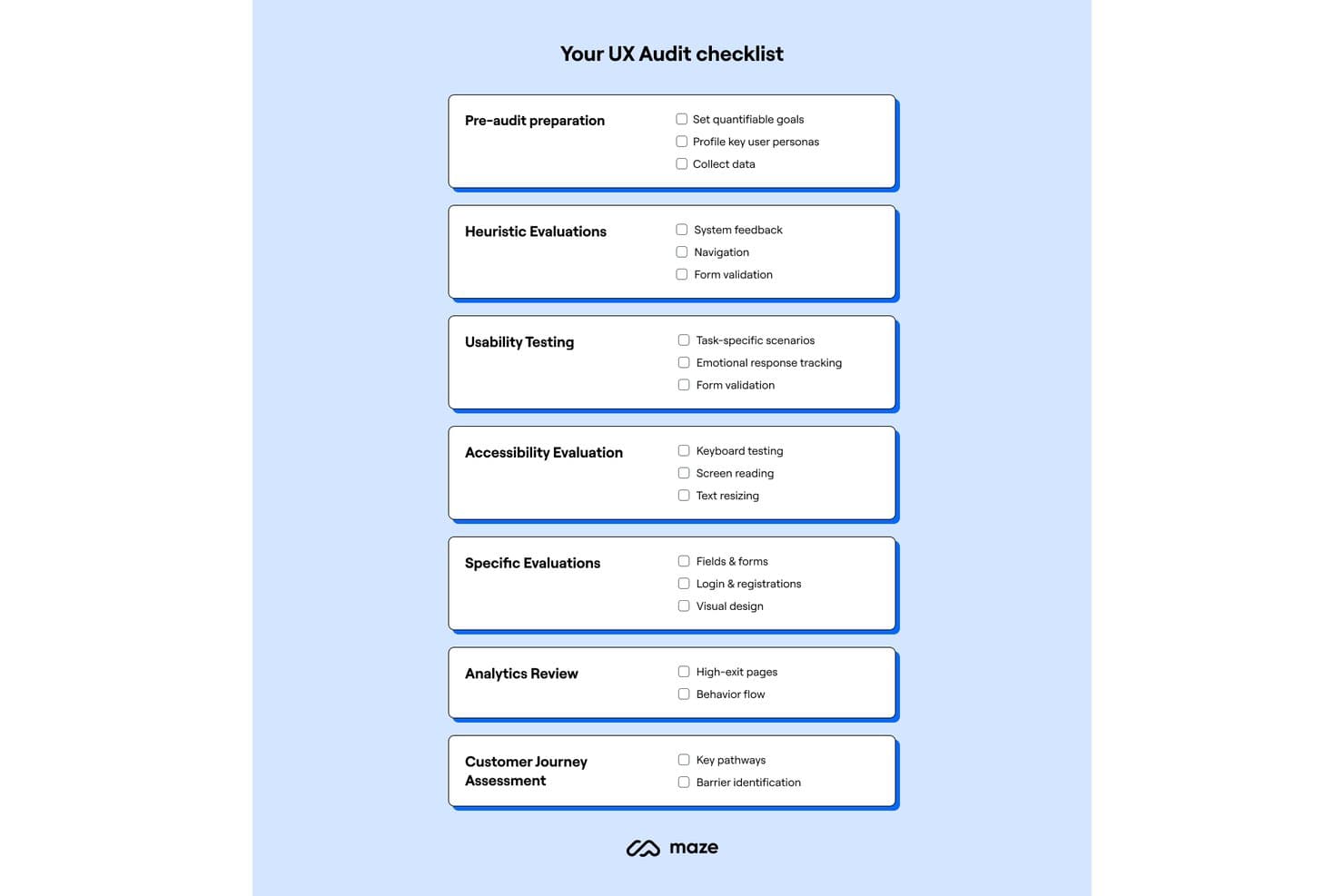
Maze provides a structured UX audit checklist across seven key areas. Maze is a UX research platform that combines unmoderated and moderated usability testing, participant recruitment, card sorting, tree testing, surveys, and AI-assisted analysis in one place.
Who Is Maze Best For?
Maze is a strong fit for product designers and PMs who want to test Figma prototypes with real users without handing off to a dedicated research team.
Why I Picked Maze
Maze earns its spot on my shortlist because it collapses the Figma-to-panel pipeline into a single workflow. I love that one-click Figma import means a designer can pull in a live prototype, including Interactive Components and animations, and have it in front of screened panel participants within hours. The built-in Maze Panel handles recruiting, incentives, and screener questions without leaving the platform, so there's no stitching together separate tools to go from prototype to validated findings.
Maze Key Features
- AI Study Builder: Turns a research question into a ready-to-launch study, with built-in bias detection that flags leading questions before you go live.
- Mobile app testing: Participants join via QR code on iOS or Android to complete tasks across real apps, mobile websites, and competitor sites, with full-screen, audio, and face recording.
- Card sorting and tree testing: Supports both open and closed card sorts alongside tree testing, giving you dedicated methods for validating information architecture decisions.
- Automatic study reports: Every study with at least one tester generates a report with heatmaps, path analysis, task metrics, and open-question highlights that you can edit and share via live link, PDF, or embed.
Maze Integrations
Maze offers native integrations with Figma, FigJam, Axure, Figma Make, Slack, Jira, Confluence, Notion, Miro, and Amplitude. It also connects with Zoom, Google Meet, Microsoft Teams, and AI tools through MCP.
Pros and Cons
Pros:
- Automatic reports include actionable task metrics
- Strong mobile app testing coverage
- Rapid prototype validation with real participants
Cons:
- Reporting flexibility can feel limited
- Moderated research requires Enterprise access
Learn more about Maze:
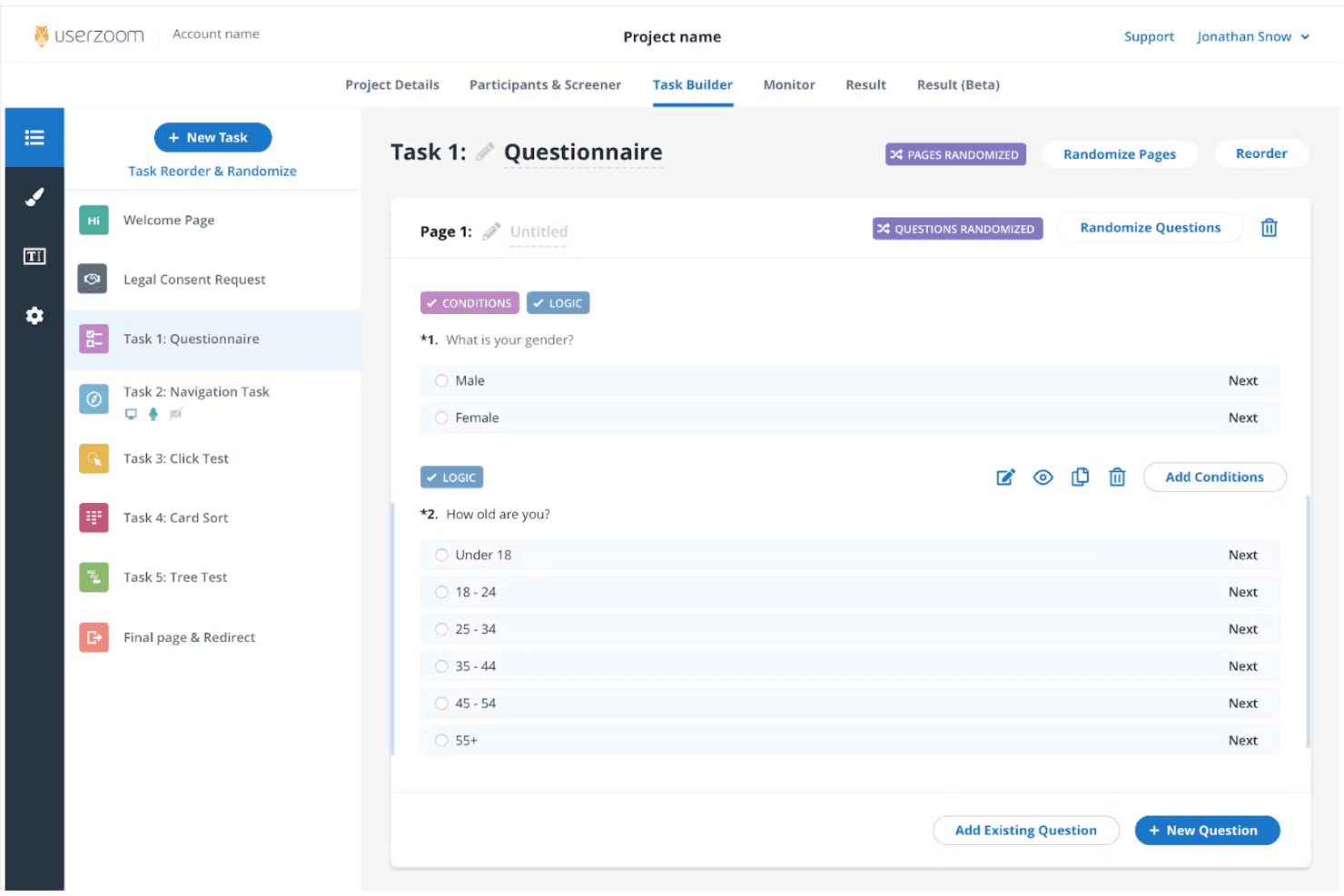
UserZoom supports enterprise UX research with in-depth testing and analytics. UserZoom is a mixed-method UX research platform that covers moderated and unmoderated usability testing, participant recruitment, information architecture testing, surveys, and research repository management through its integrated EnjoyHQ tool.
Who Is UserZoom Best For?
UserZoom fits dedicated UX research teams at large organizations that need to run moderated and unmoderated studies, manage a research repository, and recruit participants at scale.
Why I Picked UserZoom
UserZoom earns its spot on my shortlist because no other platform matches its depth for running enterprise-scale UX research across moderated and unmoderated studies in a single environment. I particularly like how its virtual observation rooms let entire research teams watch moderated sessions live without participants knowing, which changes how stakeholders engage with research. Pair that with a panel of 7M+ authenticated participants filtered across 200+ demographic criteria, and you can recruit precisely the right audience for studies that actually need statistical weight behind them.
UserZoom Key Features
- Virtual observation room: Teammates can watch moderated sessions live without participants knowing, letting stakeholders engage with research in real time.
- Information architecture testing: You can run card sorting and tree testing studies to evaluate how users navigate and understand your product's structure.
- EnjoyHQ research repository: A built-in repository lets you store, tag, and search past research findings to connect new insights to existing evidence.
- AI-generated summaries: The platform automatically generates summaries of sessions and imported videos, reducing manual synthesis time after studies conclude.
UserZoom Integrations
Documented integrations include Figma, FigJam, Jira, Jira Product Discovery, FullStory, Contentsquare, Quantum Metric, Slack, Trello, and EnjoyHQ. The UserTesting platform also offers a Results API, though availability for the legacy UserZoom manager isn't confirmed.
Pros and Cons
Pros:
- Moderated sessions support live observation
- Enterprise-scale participant recruitment and screening
- Mixed-method studies include IA testing
Cons:
- Complex setup slows one-off studies
- Reported audio and screen reliability issues
Learn more about UserZoom: 10Best for quick sentiment and survey analysis
Lyssna
- Free plan + free demo available
- From $83/month (billed annually)
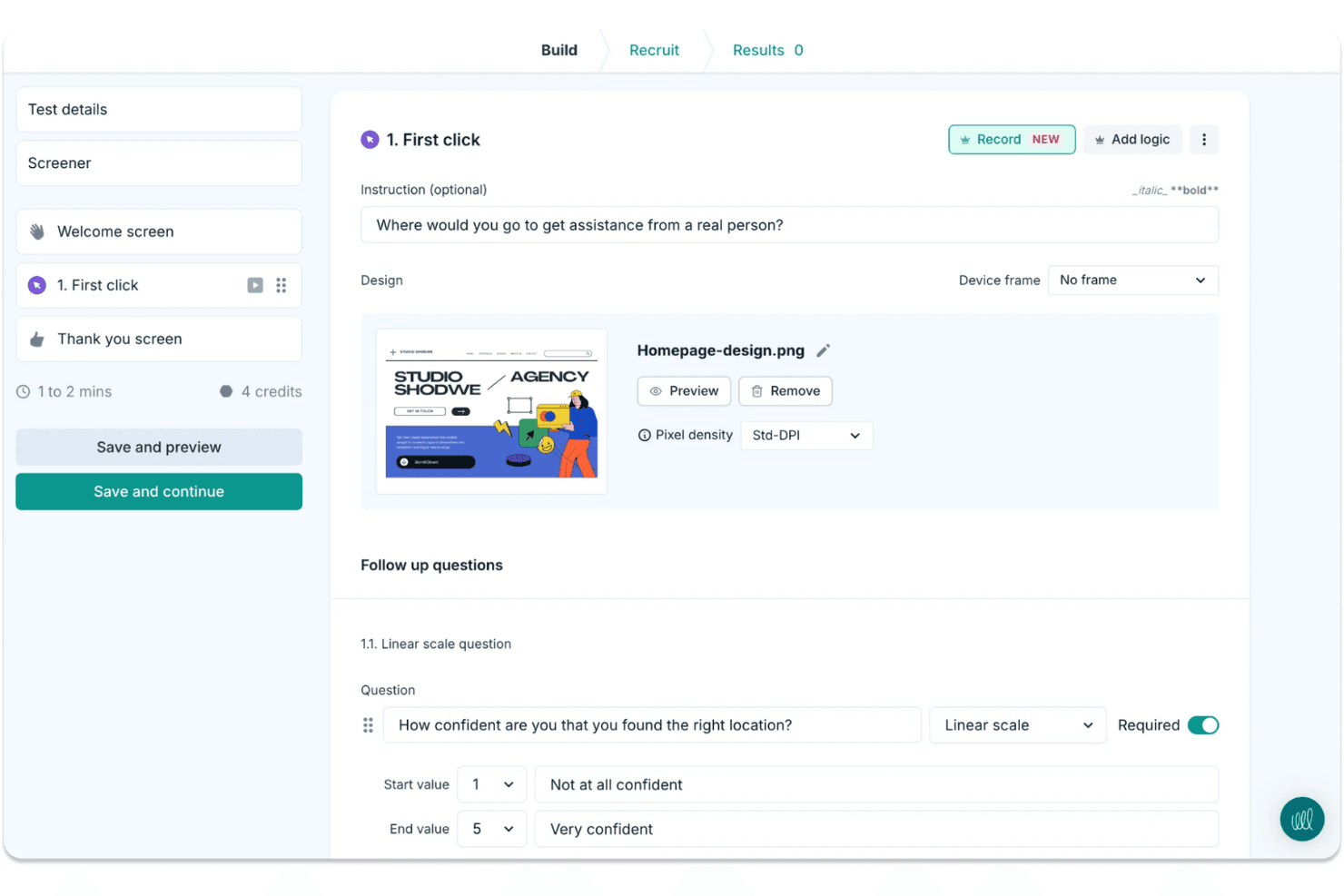
Lyssna makes it easy to run quick design tests and gather user feedback. Lyssna is a UX research platform that supports unmoderated and moderated usability testing, surveys, card sorting, tree testing, Figma prototype testing, and participant recruitment through a built-in panel of 690,000+ vetted participants.
Who Is Lyssna Best For?
Lyssna works well for product teams and UX researchers who need to run studies fast and get answers the same day.
Why I Picked Lyssna
I picked Lyssna as one of the best because of how fast it turns raw responses into usable sentiment data. Its AI Synthesize feature automatically generates summaries across every question type, including NPS, Likert, and open-text answers, so I can see where sentiment clusters without manually reading hundreds of responses. Paired with word clouds and tagging, I can spot recurring themes across a study in minutes rather than hours.
Lyssna Key Features
- Built-in participant panel: Access 690,000+ vetted B2C and B2B participants across 124 countries, with 395+ targeting filters and custom screeners to reach the right audience.
- Figma prototype testing: Connect directly to Figma and run task-based tests that track completion rate, time on task, and misclicks without exporting assets.
- Multi-method study support: Run card sorting, tree testing, five-second tests, first-click tests, preference tests, and think-aloud studies from a single platform.
- MCP server: Connect AI assistants like Claude or ChatGPT to your study data and query findings across multiple studies using plain language.
Lyssna Integrations
Lyssna offers native integrations with Figma, Zoom, Google Meet, Microsoft Teams, Google Calendar, and Microsoft Outlook. Paid plans also connect to Claude, ChatGPT, Copilot, Gemini, and Cursor through its MCP server.
Pros and Cons
Pros:
- Broad methods cover prototypes, surveys, and interviews
- AI summaries reveal sentiment across survey responses
- Rapid panel responses support same-day research
Cons:
- Reporting lacks an insight repository and highlight reels
- Study costs become hard to predict
Learn more about Lyssna:
Outras ferramentas de investigação UX
Eis algumas opções adicionais de ferramentas de investigação UX que não entraram na minha seleção, mas que vale a pena consultar:
- 11Trymata (formerly TryMyUI)Best for multi-method usability test analysis
- 12DscoutBest for diary and longitudinal field studies
- 13SprigBest for in-product survey research at scale
- 14UXArmyBest for multi-method research in Asia-Pacific
- 15LookbackBest for live moderated interview research
- 16CondensBest for qualitative research repositories
- 17UseberryBest for Figma prototype testing workflows
- 18MarvinBest for AI-driven research synthesis and sharing
How I Evaluate UX Research Tools
I split my evaluation into three parts, giving the most weight to core functions: run recorded usability tests and recruit and screen participants. Next, I look for differentiators such as AI highlight reels. Finally, I consider what’s beyond features, including onboarding, support, and pricing value.
Core Functionality (Table Stakes For This List)
When I'm selecting tools for my list, I score each one on a scale from 0 (does not offer the functionality) to 5 (excels in this area) for each core functionality listed below. I then convert the total into a percentage to help assess each tool's overall fit, with extra weight on any functionalities I’ve deemed essential.
- Usability Testing (Essential): I look for moderated and unmoderated sessions with task flows, recordings, and device coverage, such as testing checkout on mobile and desktop.
- Participant Recruitment (Essential): I assess panel reach, screening, and participant management, such as recruiting people who match a specific workflow or experience.
- Research Data Analysis: Can researchers tag clips, notes, or transcripts across sessions to spot recurring confusion, such as users missing the same navigation label?
- Insight Synthesis: I check whether teams can turn evidence into shareable highlights or reports that connect a finding to the session behind it.
- Research Methods: Look for several approaches, such as usability tests, surveys, interviews, card sorting, or tree testing, to match the method to the question.
- Team Collaboration: I evaluate shared project access, comments, and permissions so design, product, and engineering can review findings together.
Once I have a list of tools that meet the criteria, I consider what sets each platform apart.
Differentiating Factors (What Sets Vendors Apart)
Here's how I compare and contrast different vendors:
Standout Features
I look for cross-study pattern detection because spotting a recurring theme across six months of studies beats re-watching old sessions. AI-generated highlight reels also matter—tools like Maze and UserTesting let you share a two-minute clip instead of a full recording, which keeps stakeholders engaged. I evaluate whether dashboards present findings in formats product managers and executives can act on without researcher hand-holding.
Beyond Features
I check whether a tool connects to Jira, Slack, or Notion so findings reach the backlog instead of sitting in a separate platform. Turnaround speed matters too—teams on sprint cycles need same-day panel access and automated analysis to close the gap between a research question and a decision. I also evaluate onboarding quality, because product managers running studies without a dedicated researcher need templates and in-app guidance that lower the learning curve fast.
Como escolher ferramentas de investigação UX
É fácil ficar atolado em listas extensas de funcionalidades e estruturas de preços complexas. Para o ajudar a manter o foco enquanto percorre o seu processo específico de seleção de software, eis uma lista de verificação dos fatores a ter em conta:
| Fator | O que considerar |
| Escalabilidade | Certifique-se de que a ferramenta consegue acompanhar o crescimento da sua equipa. Procure opções que suportem um número crescente de utilizadores e dados sem comprometer o desempenho. |
| Integrações | Verifique se a ferramenta se integra com o software que já utiliza, como o Slack, o Trello ou o Google Analytics, para otimizar os fluxos de trabalho e a partilha de dados. |
| Personalização | Procure ferramentas que lhe permitam adaptar as funcionalidades e os painéis às necessidades e preferências específicas da sua equipa. |
| Facilidade de utilização | Escolha uma ferramenta com uma interface intuitiva e uma curva de aprendizagem reduzida, para garantir que a sua equipa a possa adotar de forma rápida e eficaz. |
| Orçamento | Avalie a estrutura de preços para garantir que se enquadra no seu orçamento. Considere os custos a longo prazo e procure planos de subscrição flexíveis. |
| Medidas de segurança | Confirme que a ferramenta disponibiliza funcionalidades de segurança robustas para proteger dados sensíveis dos utilizadores, incluindo a conformidade com o RGPD ou outros regulamentos relevantes. |
| Suporte | Considere o nível de suporte ao cliente disponível, como chat em direto, e-mail e fóruns da comunidade, para ajudar a sua equipa quando necessário. |
| Conjunto de funcionalidades | Certifique-se de que a ferramenta abrange funções essenciais, como testes de usabilidade, inquéritos e recolha de feedback dos utilizadores, para satisfazer as necessidades de investigação da sua equipa. |
Tendências nas ferramentas de investigação UX
Na minha investigação, consultei inúmeras atualizações de produtos, comunicados de imprensa e registos de lançamentos de diferentes fornecedores de ferramentas de investigação UX. Eis algumas das tendências emergentes que estou a acompanhar:
- Informações baseadas em IA: Cada vez mais ferramentas utilizam IA para analisar dados dos utilizadores e fornecer informações acionáveis. Isto ajuda as equipas a compreender mais rapidamente o comportamento dos utilizadores. Por exemplo, alguns fornecedores disponibilizam análise de sentimentos baseada em IA para avaliar as emoções dos utilizadores.
- Colaboração à distância: À medida que o trabalho remoto se torna mais comum, as ferramentas estão a melhorar as funcionalidades de colaboração em equipa. Isto inclui notas em tempo real e feedback em direto durante as sessões de testes, permitindo que as equipas trabalhem em conjunto a partir de qualquer lugar.
- Testes de acessibilidade melhorados: Existe um foco crescente nas funcionalidades que ajudam a garantir que os produtos são acessíveis a todos os utilizadores. Atualmente, as ferramentas disponibilizam testes especializados para identificar problemas de acessibilidade, ajudando as equipas a criar designs mais inclusivos.
- Reconhecimento de voz e gestos: Com o aumento dos dispositivos ativados por voz e das interfaces baseadas em gestos, as ferramentas estão a começar a suportar testes para estas interações. Isto permite às equipas garantir que os seus produtos funcionam bem com as tecnologias mais recentes.
- Ciclos integrados de feedback dos utilizadores: As ferramentas estão a integrar mecanismos contínuos de feedback diretamente nos produtos. Isto significa que as equipas podem recolher continuamente feedback dos utilizadores sem interromper a experiência do utilizador, permitindo melhorias mais ágeis no design.
O que são ferramentas de investigação UX?
As ferramentas de investigação UX são soluções de software que ajudam as equipas a compreender o comportamento dos utilizadores e a melhorar o design dos produtos. Estas ferramentas são normalmente utilizadas por designers UX, gestores de produto e investigadores para recolher informações que contribuem para melhores experiências de utilizador. Funcionalidades como testes de usabilidade, inquéritos e análise de sentimentos ajudam a compreender as necessidades e preferências dos utilizadores. De um modo geral, estas ferramentas fornecem dados valiosos que orientam o desenvolvimento de produtos e aumentam a satisfação dos utilizadores.
Funcionalidades das ferramentas de investigação UX
Ao avaliar ferramentas de investigação UX, é importante concentrar-se nas funcionalidades que apoiam testes práticos com utilizadores e informações acionáveis:
- Ferramentas de testes de usabilidade: Identifique pontos de fricção observando interações em tempo real com a sua interface.
- Inquéritos e testes de preferências: Recolha opiniões dos utilizadores e avalie preferências para fundamentar decisões sobre o produto.
- Mapas de calor e testes do primeiro clique: Visualize o comportamento dos utilizadores e compreenda quais os elementos que atraem primeiro a atenção.
- Análise de sentimentos: Identifique as reações emocionais a mensagens ou elementos de design específicos.
- Testes A/B: Compare duas ou mais opções de design para perceber qual obtém melhores resultados junto do seu público.
- Gravações e transcrições de sessões: Reveja as sessões dos utilizadores em detalhe e consulte o feedback transcrito automaticamente.
- Testes de acessibilidade: Avalie se o seu produto é inclusivo e funcional para utilizadores com diferentes capacidades.
- Colaboração em tempo real para membros da equipa: Permita que as equipas de produto, design e investigação consultem as conclusões e comentem à medida que os testes decorrem.
- Recrutamento de participantes para investigação: Encontre e faça rapidamente a gestão de utilizadores qualificados para cada teste ou grupo de discussão.
- Ciclos de feedback e testes de acompanhamento: Integre contributos contínuos dos utilizadores no seu processo de investigação e teste melhorias ao longo do tempo.
Benefícios das ferramentas de investigação UX
A adoção de métodos de investigação UX ajuda a sua equipa a passar de decisões baseadas em suposições para decisões orientadas por informações. Eis alguns dos principais benefícios:
- Melhor experiência do cliente: Identificar problemas de design numa fase inicial ajuda a melhorar o fluxo e a funcionalidade gerais do seu produto.
- Decisões mais informadas: Dados obtidos diretamente através de inquéritos, análise de sentimentos e sessões de usabilidade apoiam iterações mais confiantes.
- Maior acessibilidade: Testar com foco na inclusão garante que mais utilizadores conseguem interagir com o seu produto, independentemente das suas capacidades.
- Colaboração mais sólida entre as partes interessadas: As funcionalidades em tempo real e os dados centralizados permitem que todos os membros da equipa se mantenham alinhados, desde o feedback sobre os wireframes até às métricas de design da experiência em aplicações móveis.
- Ciclos de iteração mais rápidos: Com acesso aos dados das sessões, aos testes de preferências e ao feedback dos utilizadores, a sua equipa pode testar e rever rapidamente.
- Recrutamento e gestão eficientes de participantes para investigação: Passe menos tempo a encontrar utilizadores e mais tempo a aprender com eles.
- Poupança de custos através de uma avaliação comparativa precoce: Detetar e resolver problemas antes do lançamento reduz o risco de reformulações dispendiosas posteriormente.
Custos e preços das ferramentas de investigação UX
Ao selecionar ferramentas de investigação UX, é necessário compreender os vários modelos de preços e planos disponíveis. Os custos variam consoante as funcionalidades, o tamanho da equipa, os complementos e muito mais. A tabela abaixo resume os planos comuns, os respetivos preços médios e as funcionalidades normalmente incluídas nas soluções de ferramentas de investigação UX:
Tabela de comparação de planos para ferramentas de investigação UX
| Tipo de plano | Preço médio | Funcionalidades comuns |
| Plano gratuito | $0 | Testes de usabilidade básicos, questionários limitados e análise básica. |
| Plano pessoal | $5-$30/utilizador/ mês | Testes de usabilidade, questionários, mapas de calor e análise básica de sentimento. |
| Plano empresarial | $30-$100/ utilizador/mês | Análise avançada, testes A/B, recrutamento de participantes e ferramentas de colaboração. |
| Plano para empresas | $100+/utilizador/ mês | Funcionalidades personalizáveis, suporte dedicado, segurança reforçada e opções completas de integração. |
Perguntas frequentes sobre ferramentas de investigação UX
Eis algumas respostas a perguntas comuns sobre ferramentas de investigação UX
Quais são as melhores ferramentas de investigação UX?
\u003cspan style=\u0022font-weight: 400\u0022\u003eAs melhores ferramentas de investigação UX dependem das necessidades específicas e do orçamento da sua equipa. Entre as opções populares encontram-se o Hotjar para mapas de calor, o UserTesting para feedback em vídeo e o Optimal Workshop para testes de usabilidade. Ao selecionar uma ferramenta que corresponda aos seus requisitos, tenha em conta as funcionalidades, as integrações e os preços.\u003c/span\u003e
Quais são boas perguntas para a investigação UX?
\u003cspan style=\u0022font-weight: 400\u0022\u003eAs boas perguntas de investigação UX centram-se nos objetivos, nas motivações e nas dificuldades dos utilizadores. Faça perguntas como \u0022Que tarefas considera difíceis?\u0022 ou \u0022Que funcionalidades valoriza mais?\u0022 Estas perguntas ajudam a descobrir informações que melhoram a experiência do utilizador e orientam as decisões de design.\u003c/span\u003e
Que tipos de métodos de investigação são utilizados em UX?
\u003cspan style=\u0022font-weight: 400\u0022\u003eEm UX, os métodos de investigação incluem entrevistas com utilizadores, testes de usabilidade, questionários e estudos de campo. Cada método fornece informações diferentes, ajudando a sua equipa a compreender o comportamento e as preferências dos utilizadores. Escolha os métodos com base nos seus objetivos de investigação e na fase de desenvolvimento do produto.\u003c/span\u003e
Qual é a melhor ferramenta de questionários para a investigação UX?
\u003cspan style=\u0022font-weight: 400\u0022\u003eA melhor ferramenta de questionários para a investigação UX depende das suas necessidades. O Maze, o Typeform e o SurveyMonkey são populares pela facilidade de utilização e pelas opções de integração. Procure ferramentas que ofereçam personalização, análise e interfaces fáceis de utilizar para recolher feedback valioso.\u003c/span\u003e
Como escolher os participantes certos para a investigação UX?
\u003cspan style=\u0022font-weight: 400\u0022\u003eA escolha dos participantes certos envolve definir o seu público-alvo e criar perfis de participantes. Tenha em conta os dados demográficos, o comportamento dos utilizadores e a familiaridade com produtos semelhantes. As ferramentas de recrutamento podem ajudar a encontrar e gerir participantes que correspondam aos seus critérios.\u003c/span\u003e
Com que frequência deve ser realizada a investigação UX?
\u003cspan style=\u0022font-weight: 400\u0022\u003eA investigação UX deve ser realizada regularmente para acompanhar as mudanças nas necessidades dos utilizadores e as tendências do mercado. Pode ser integrada no processo de design em diferentes fases, desde os testes iniciais do conceito até às avaliações após o lançamento, garantindo que o seu produto continua centrado no utilizador e competitivo.\u003c/span\u003e