

As melhores ferramentas de gestão de produtos com IA apoiam os fluxos de trabalho ao automatizarem atualizações do backlog, apresentarem informações sobre os utilizadores e alinharem as equipas em torno de prioridades claras. Estas ferramentas resolvem obstáculos reais, como documentação duplicada, prazos não cumpridos e comunicação dispersa.
Depois de analisar e testar dezenas de plataformas, identifiquei as principais opções que melhoram efetivamente a tomada de decisões e a colaboração. No guia abaixo, apresentarei em detalhe as funcionalidades de destaque de cada ferramenta e mostrarei como podem integrar-se no seu fluxo de trabalho de gestão de produtos — quer precise de análises mais robustas, de um planeamento de produtos mais simples ou de uma coordenação de equipas mais eficiente.
Why Trust Our Software Recommendations
6,700+
Reviews
20
Industry experts
16+
Evaluation factors
14
Years
Our team has been testing and reviewing software since 2012. As product managers ourselves, we know how difficult—and important—it is to choose the right software.
For this guide, we evaluated tools using hands-on testing and independent research, scoring tools using our selection criteria.
Our reviews reflect our human editorial judgment, not a sales pitch.
Expert reviewers:
- Andrew LumbySenior TPM
- Cristiano ValimSenior UI/UX Lead


Tabela comparativa das ferramentas de gestão de produtos com IA
Esta tabela comparativa resume os detalhes de preços das minhas principais escolhas de ferramentas de gestão de produtos com IA.
| Tool | Best For | Trial Info | Price | ||
|---|---|---|---|---|---|
| 1 | Best for omnichannel AI feedback synthesis | Free demo available | Pricing upon request | Website | |
| 2 | Best for customizable product workflows | Free plan + 14-day trial available | From $9/user/month (billed annually) | Website | |
| 3 | Best for project lifecycle management | Free plan + 14-day trial + demo available | From $10/user/month (billed annually) | Website | |
| 4 | Best for behavioral analytics | Free plan + free demo available | Pricing upon request | Website | |
| 5 | Best for VoC-to-roadmap theme tracing | Free demo available | From $25,000/year (billed annually) | Website | |
| 6 | Best for visual ideation & stakeholder mapping | Free plan + 14-day free trial + free demo available | From $8/user/month (billed annually) | Website | |
| 7 | Best for multi-team portfolio prioritization | Free demo available | Pricing upon request | Website | |
| 8 | Best for user feedback | Free plan + free demo available | From $19/user/month (billed annually) | Website | |
| 9 | Best for revenue-aware churn and upsell prediction | Free plan + 30-day free trial + free demo available | Pricing upon request | Website | |
| 10 | Best for customer-to-roadmap impact scoring | Free plan + free demo available | Pricing upon request | Website |


Análises das melhores ferramentas de gestão de produtos com IA
Abaixo encontram-se os meus resumos detalhados das melhores ferramentas de gestão de produtos com IA que entraram na minha lista restrita. As minhas análises oferecem uma visão detalhada das principais funcionalidades, vantagens e desvantagens, integrações e casos de utilização ideais de cada ferramenta, para o ajudar a encontrar a melhor opção para si e para a sua equipa.
 Best for omnichannel AI feedback synthesis
- Free demo available
- Pricing upon request
Visit WebsiteCustomer Rating:4.8/5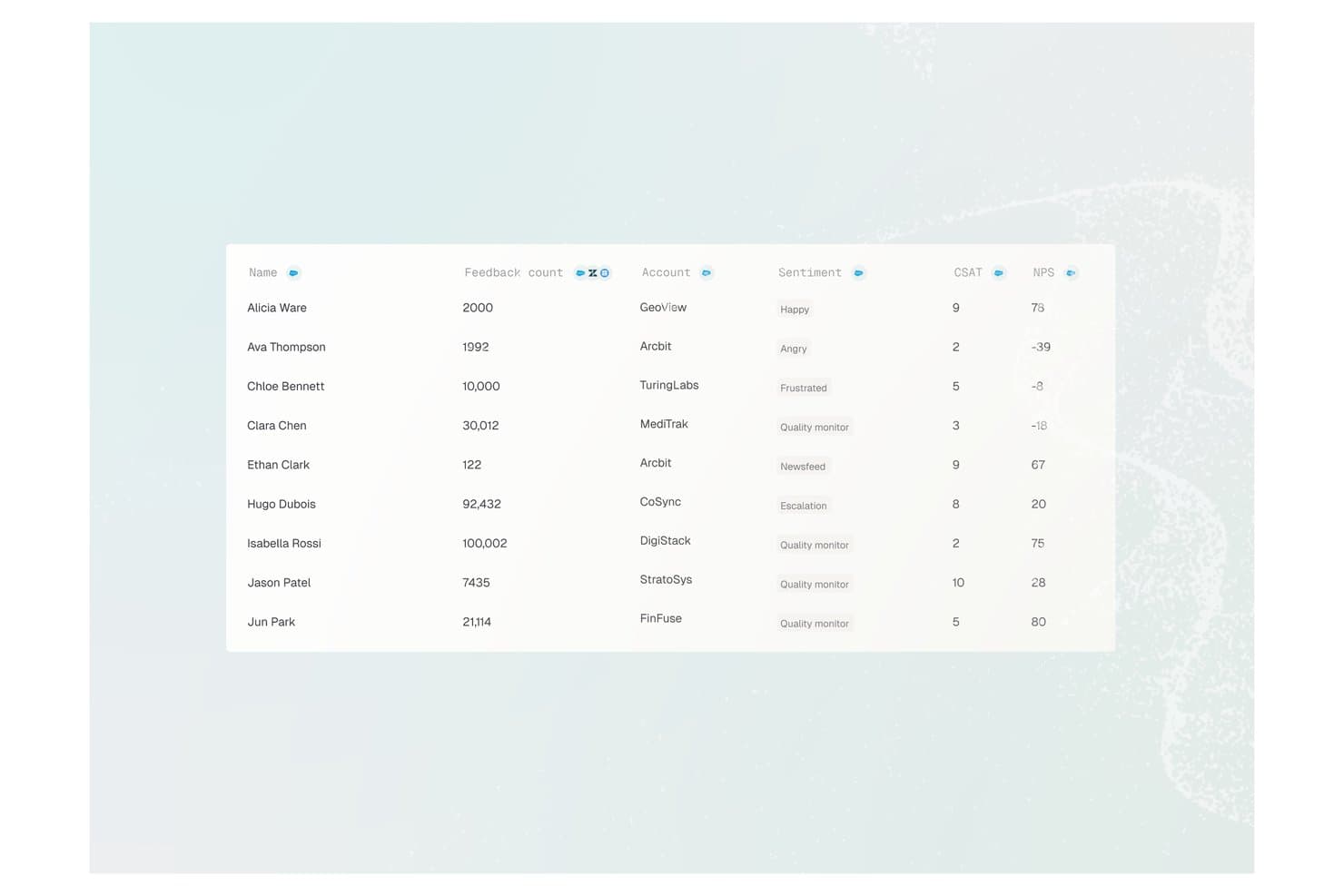
Enterpret offers a customer feedback analytics table displaying user names, feedback counts, account names, sentiment labels, CSAT scores, and NPS values. Enterpret is a customer intelligence platform that uses AI to aggregate, classify, and analyze feedback from 50+ channels — including support tickets, reviews, calls, and communities — into structured, searchable product insights.
Who Is Enterpret Best For?
Enterpret is a strong fit for mid-market and enterprise product teams that process high volumes of customer feedback across multiple channels every month.
Why I Picked Enterpret
I picked Enterpret as one of the best because its Adaptive Taxonomy automatically classifies incoming feedback from 50+ sources without manual tagging. I also love the Customer Context Graph, which ties every theme back to specific accounts and revenue weight, so my team knows which feedback signals actually drive retention. The MCP Server lets me query all of that structured context directly from Claude or Cursor.
Enterpret Key Features
- AI-powered dashboards: Searchable, customizable dashboards display feedback themes and sentiment insights from all connected channels.
- Automated alerting: Real-time notifications flag shifts in customer sentiment or new emerging topics across feedback sources.
- Data warehouse integration: Native connectors let you sync structured feedback data with platforms like Snowflake for analytics.
- Workflow integrations: Push synthesized customer insights directly into Jira, Slack, and other product management tools.
Enterpret Integrations
Enterpret offers native integrations with Zendesk, Intercom, Salesforce, Gong, Slack, Qualtrics, Linear, Jira, Google Play Store, and the Apple App Store. An API is available for custom integrations.
Pros and Cons
Pros:
- Synthesizes feedback across 50+ channels simultaneously
- Revenue-weighted insights tie feedback to business impact
- Adaptive taxonomy auto-classifies feedback without manual effort
Cons:
- Limited built-in product workflow management features
- Initial taxonomy setup requires significant configuration time
Learn more about Enterpret: Best for customizable product workflows
- Free plan + 14-day trial available
- From $9/user/month (billed annually)
Visit WebsiteCustomer Rating:4.6/5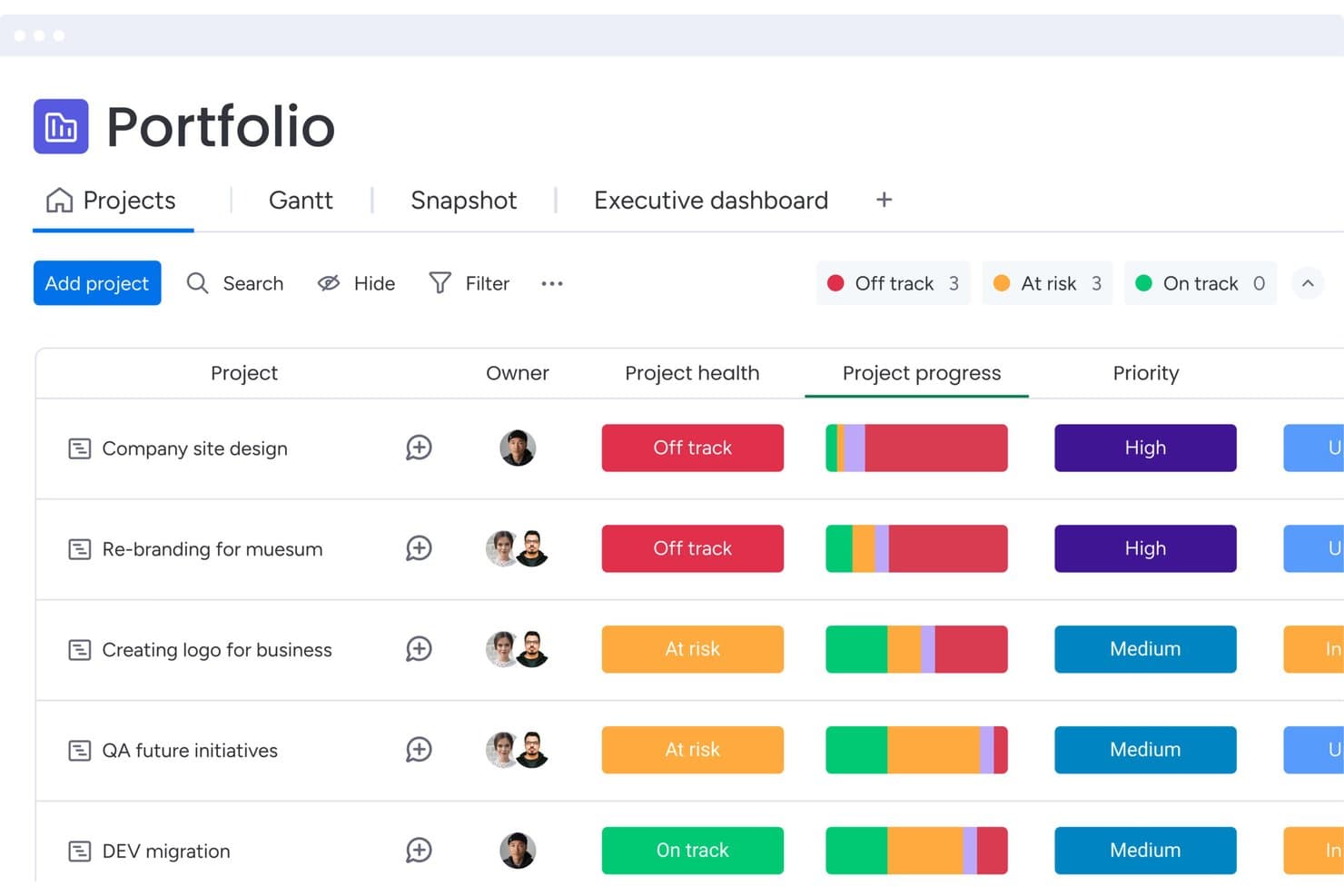
monday AI Workspace tracks project health and priority across portfolios. monday AI Workspace is a work management platform that brings together AI-assisted content generation, customizable workflow automation, natural language querying via Sidekick, and feedback aggregation across boards—all within a single, connected product and project management environment.
Who Is monday AI Workspace Best For?
monday AI Workspace suits cross-functional product teams that need a highly configurable workspace to manage backlogs, feedback, and PRD drafting without switching between tools.
Why I Picked monday AI Workspace
I've included monday AI Workspace in my top picks because it's one of the few work management platforms that lets you build a product workflow that fits your team's exact process, rather than forcing your team to fit a fixed structure. I particularly like how the AI Blocks can auto-tag and sentiment-score incoming feature requests directly on your feedback board, so your backlog reflects customer signal without a manual triage pass. Pair that with Sidekick's document drafting for PRDs and sprint summaries, and you've got a solid content generation layer for delivery work.
monday AI Workspace Key Features
- Custom agent builder: Build your own AI agents with configurable triggers, knowledge sources, and action logic to automate product team workflows.
- AI meeting notetaker: Automatically captures and summarizes meeting notes, keeping your team's decisions and action items documented without manual effort.
- MCP integration: Connects external AI assistants like Claude, ChatGPT, and Gemini directly to your monday.com data for cross-board querying.
- Release notes agent: Automatically drafts release notes for engineering and product teams based on completed work items.
monday AI Workspace Integrations
monday AI Workspace supports 850+ integrations and apps, including GitHub, Jira, Figma, Zendesk, Salesforce, Slack, and Google Calendar. It also offers open APIs and SDKs for custom integrations, plus MCP connectivity with Claude, ChatGPT, Gemini, and other AI assistants.
Pros and Cons
Pros:
- Permission-aware AI supports governed collaboration
- PRD drafting accelerates specification work
- Customizable workflows fit varied product processes
Cons:
- Sidekick may misinterpret larger boards
- AI prioritization requires manual scoring frameworks
Learn more about monday AI Workspace: Best for project lifecycle management
- Free plan + 14-day trial + demo available
- From $10/user/month (billed annually)
Visit WebsiteCustomer Rating:4.3/5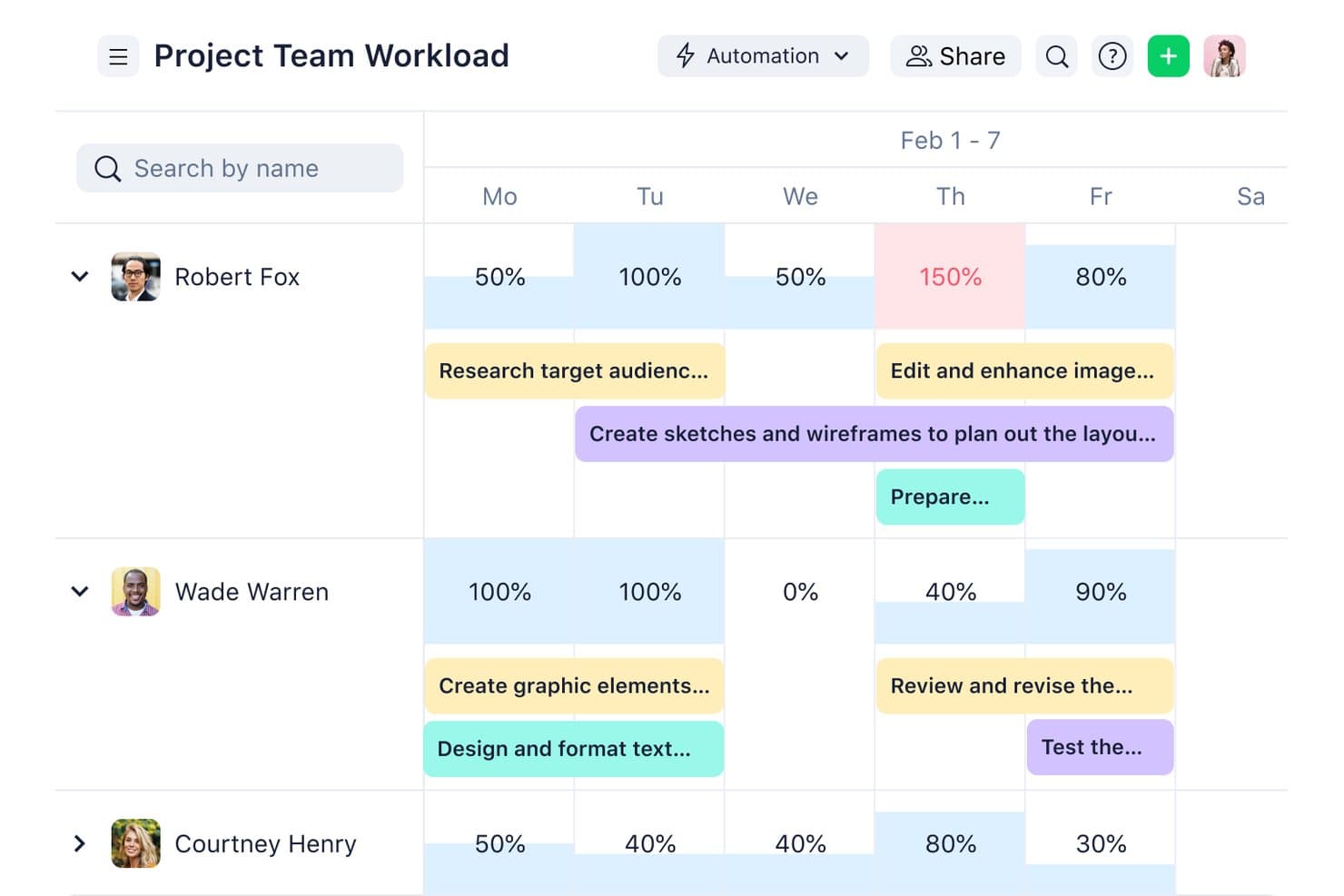
Wrike visualizes team workload percentages across a weekly timeline. Wrike is a work management platform that covers project intake, planning, Agile and Waterfall delivery, resource management, and portfolio reporting, with AI layered in to automate task triage, flag risks, and summarize work across teams.
Who Is Wrike Best For?
Wrike is a strong fit for cross-functional teams managing complex project portfolios who need structured delivery workflows, resource visibility, and AI-assisted project oversight.
Why I Picked Wrike
I've included Wrike in my top picks because it covers the full project lifecycle in one place, from intake and planning through delivery, resource management, and portfolio reporting. I particularly like how AI Agents handle task triage and request validation automatically, cutting the manual overhead that slows launch cycles. Wrike Copilot adds real-time risk flagging and milestone monitoring across active projects, so nothing falls through when you're managing multiple product initiatives at once.
Wrike Key Features
- AI Agents: No-code agents that handle request validation, task triage, and auto-assignment without manual intervention.
- Wrike MCP Server: Connects outside AI assistants like Claude and ChatGPT to live Wrike data using plain-language queries.
- Natural-language automation builder: Describe a workflow in plain language and Wrike generates the automation rule, form, or process.
- Portfolio reporting: Cross-project dashboards that surface resource loads, budget tracking, and milestone status across active initiatives.
Wrike Integrations
Wrike offers 400+ prebuilt connectors, including Jira, GitHub, Zendesk, Salesforce, HubSpot, Tableau, Power BI, Slack, Microsoft Teams, and Google Workspace. It also provides an open API and MCP Server connections for ChatGPT, Claude, Gemini, and Microsoft Copilot.
Pros and Cons
Pros:
- Provides portfolio-level resource and milestone visibility
- Summarizes work and flags delivery risks
- Covers the entire project delivery lifecycle
Cons:
- Lacks AI-driven product prioritization frameworks
- Does not synthesize customer feedback
 Best for behavioral analytics
- Free plan + free demo available
- Pricing upon request
Visit WebsiteCustomer Rating:4.5/5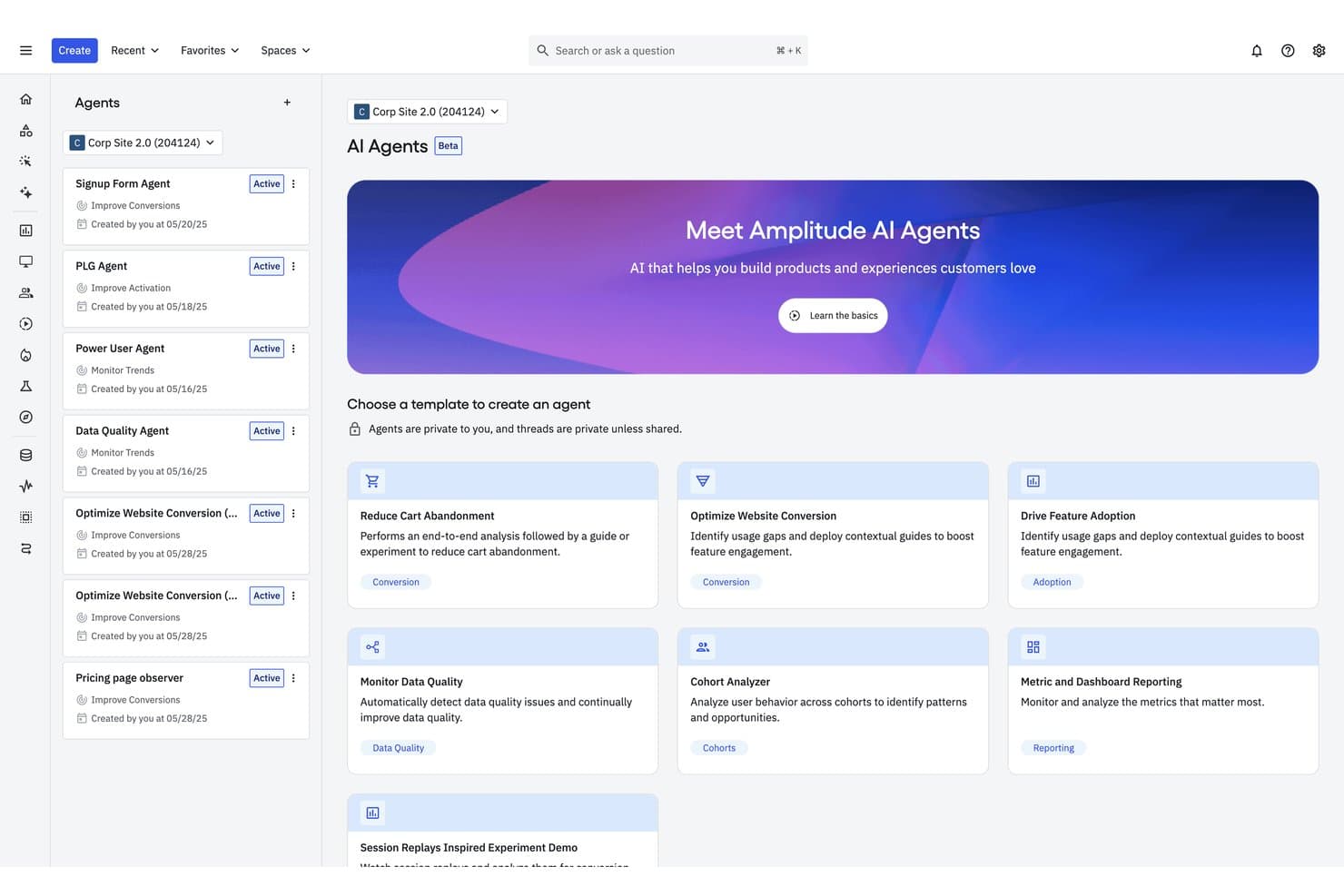
Amplitude's AI Agents help teams automate product analysis tasks. Amplitude is a behavioral analytics platform that combines AI-powered insight synthesis, natural language querying, automated feedback aggregation, and agentic AI tools for drafting PRDs and investigating product metrics.
Who Is Amplitude Best For?
Amplitude is a strong fit for product analysts and product managers at mid-to-large consumer apps who need behavioral data and customer feedback unified in one place.
Why I Picked Amplitude
Amplitude earns its spot on my shortlist because no other tool connects what users say to what they actually do as tightly as it does. I love how AI Feedback ingests raw data from 15+ sources like Zendesk, G2, and Reddit, then automatically links those feedback clusters to behavioral cohorts and session replays. The Global Agent takes that further, letting me ask plain-language questions across usage data, experiments, and feedback to get a root-cause narrative, not just a chart.
Amplitude Key Features
- Session Replay Agent: Automatically reviews large batches of user sessions, identifies friction points, and estimates their potential revenue impact.
- MCP server integration: Connects Amplitude data to external AI tools like Claude, Cursor, ChatGPT, and Notion so your whole team can query insights without leaving their workflow.
- Predictive cohorts: Uses a transformer-based model to forecast how likely individual users are to take a specific action within 7, 30, 60, or 90 days.
- Custom agents: Lets you configure purpose-built AI agents with their own instructions and schedules to run recurring analyses automatically.
Amplitude Integrations
Amplitude offers 159+ integrations, including Slack, Notion, Atlassian, Linear, GitHub, Sentry, Claude, Cursor, ChatGPT, and more. Its MCP server and APIs support custom integrations and queries through compatible AI tools.
Pros and Cons
Pros:
- Explains insights with source traceability
- Generates PRDs from customer evidence
- Connects feedback themes to user behavior
Cons:
- Predictive analytics favors marketing use cases
- Offers no native roadmap scoring
Learn more about Amplitude: Best for VoC-to-roadmap theme tracing
- Free demo available
- From $25,000/year (billed annually)
Visit WebsiteCustomer Rating:4.8/5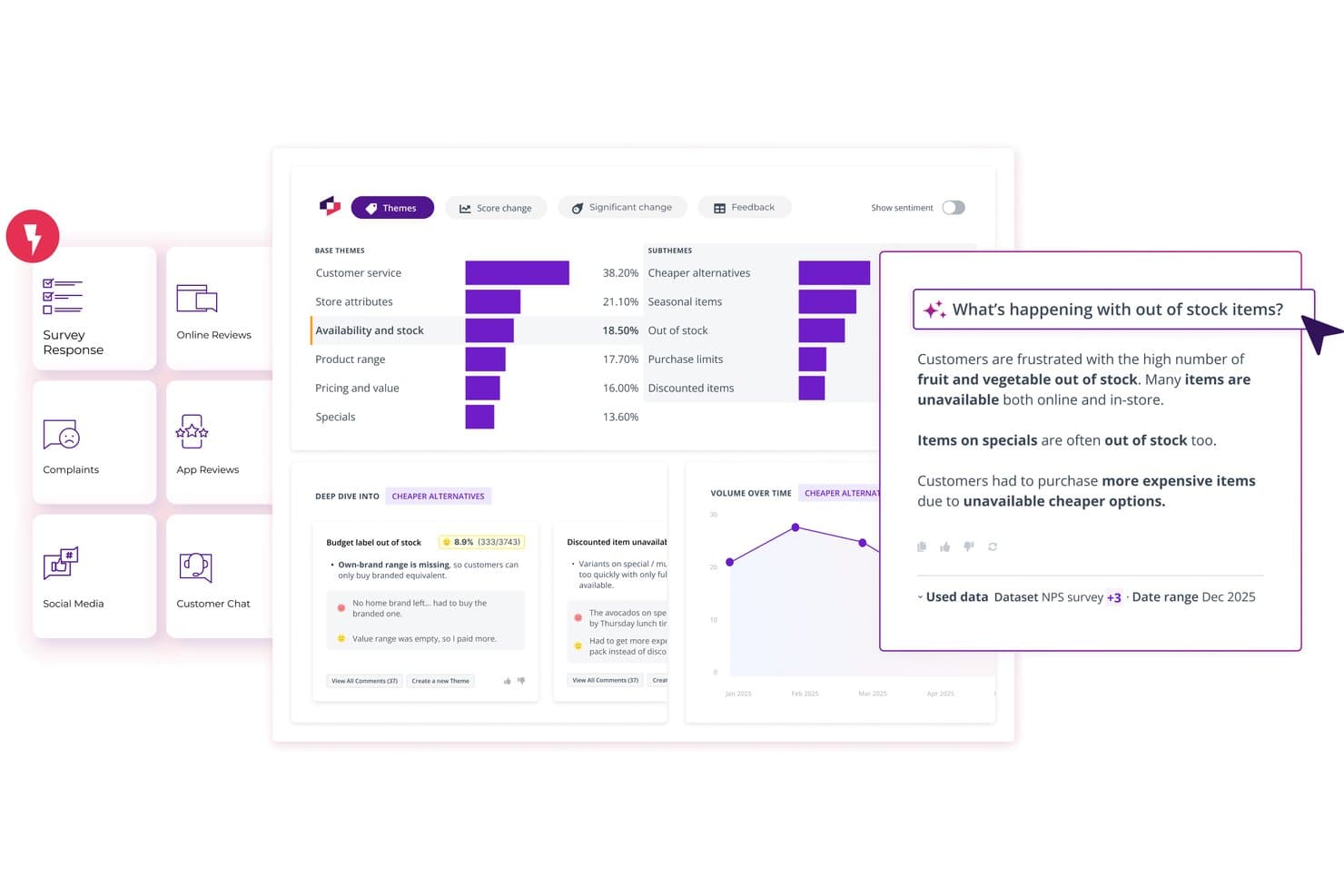
Thematic surfaces AI-powered customer feedback insights by theme. Thematic is a customer intelligence platform that aggregates feedback from surveys, support tickets, call transcripts, and reviews, then uses AI to surface and rank themes by business impact.
Who Is Thematic Best For?
Thematic is a strong fit for enterprise CX and insights teams that need to trace customer feedback themes directly to roadmap decisions.
Why I Picked Thematic
I've included Thematic in my top picks because it's the clearest path from raw customer feedback to a defensible roadmap decision. Its Theming Agent surfaces issues bottom-up from actual customer language, and the Impact Analysis ranks those themes by NPS, CSAT, or revenue at risk rather than raw mention volume. I love that every theme traces back to the original comments, so when a stakeholder questions a prioritization call, the evidence is one click away.
Thematic Key Features
- Agentic Answers: Ask plain-language questions about your customer data and get cited, multi-section answers drawn directly from source comments.
- Lenses: View and compare themes across multiple datasets—surveys, reviews, and call transcripts—in a single unified dashboard.
- Revenue at Risk scoring: Assigns an estimated dollar figure to each feedback theme based on churn likelihood and customer value inputs.
- MCP Server: Connects Thematic's theme and trend data to AI tools like Claude or ChatGPT so you can query insights from within your existing workflow.
Thematic Integrations
Thematic offers native integrations with Salesforce, Zendesk, Intercom, Qualtrics, SurveyMonkey, Snowflake, BigQuery, Google Sheets, Power BI, and Tableau. It also supports API, sFTP, CSV, and Excel connectivity for custom data workflows.
Pros and Cons
Pros:
- Agentic Answers supports cited natural-language research
- Impact scores prioritize themes beyond mention volume
- Traceable themes link directly to comments
Cons:
- Theme maintenance still needs human review
- No PRD or user-story drafting
Learn more about Thematic: 6Best for visual ideation & stakeholder mapping
Miro
- Free plan + 14-day free trial + free demo available
- From $8/user/month (billed annually)
Visit WebsiteCustomer Rating:4.8/5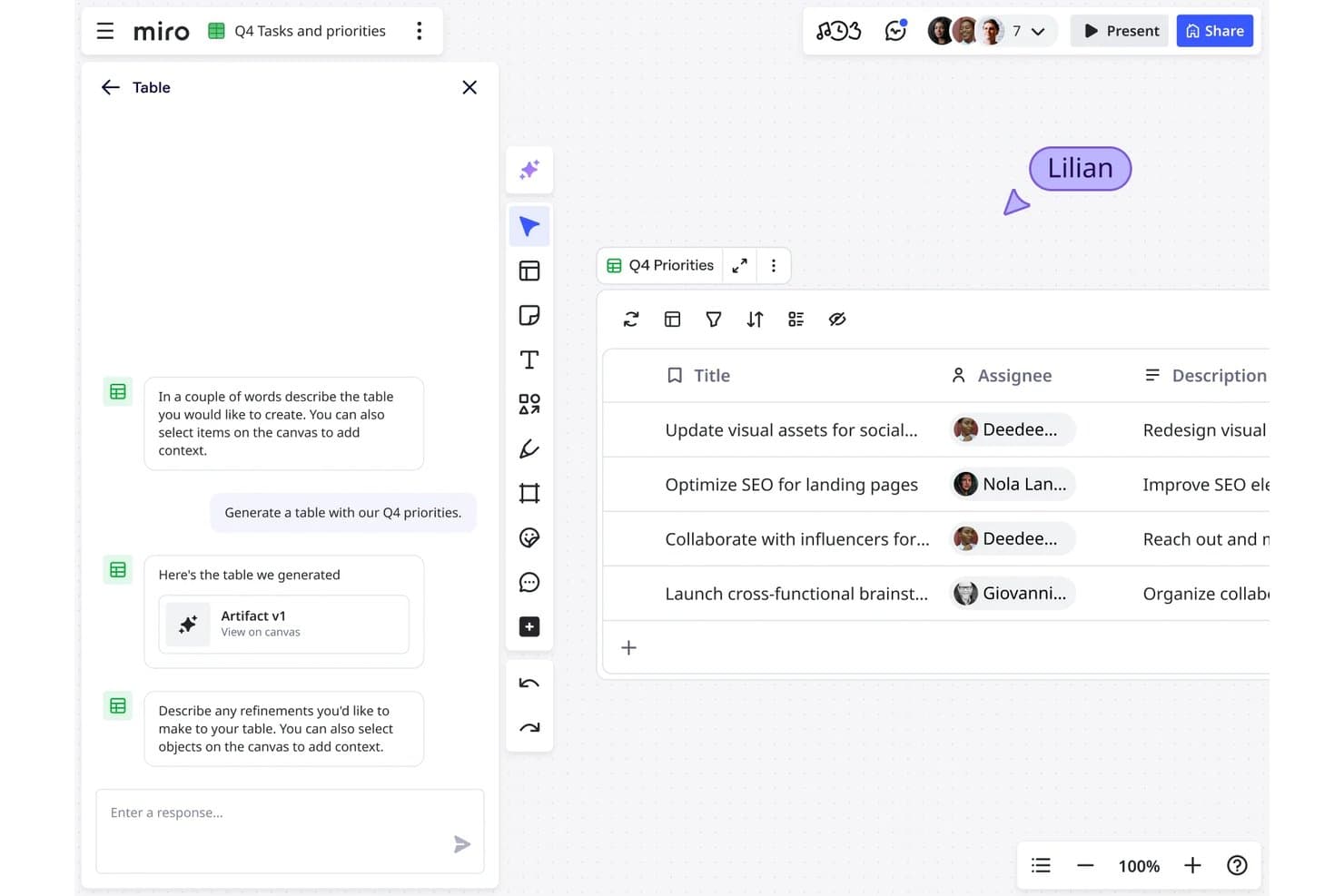
Miro lets users generate AI-powered task tables with assignees instantly. Miro is a collaborative AI innovation workspace that combines an infinite canvas with tools for visual ideation, research synthesis, content generation, and product planning across the full development lifecycle.
Who Is Miro Best For?
Miro suits cross-functional product teams that rely heavily on visual collaboration to run discovery, synthesis, and stakeholder alignment sessions together.
Why I Picked Miro
Miro earns its spot on my shortlist because no other tool matches it for turning messy discovery work into shared, visual clarity across a whole cross-functional team. I love how the Research Synthesis playbook clusters interview transcripts, survey responses, and feedback into themes automatically, with every insight linked back to its original source. Custom Sidekicks, like the built-in Roadmap Strategist, let you interrogate your entire canvas in plain language and generate prioritization matrices, personas, or roadmap summaries right where your stakeholders are already working.
Miro Key Features
- AI Flows: Multi-step, collaborative AI workflows that let teams build pipelines from customer interviews to sprint plans or brainstorms to PRDs, with editable prompts and swappable models at each step.
- Miro Specs: Converts PRDs, prototypes, and diagrams into technical specs and RFCs, syncing bidirectionally with coding tools like Cursor, Windsurf, and Claude Code via MCP.
- Feedback aggregation via Miro Insights: Automatically imports feedback from sources like Intercom, Zendesk, Gong, Salesforce, and Slack, then tags and clusters it with AI.
- AI governance controls: Admins can restrict AI features per user, set moderation filters, block sensitive data in prompts, and review an audit trail of AI activity across the workspace.
Miro Integrations
Miro offers 250+ Marketplace integrations, including Jira, Asana, Linear, ClickUp, Azure DevOps, Slack, Salesforce, and HubSpot. It also provides APIs, SDKs, connectors, and an MCP server for custom integrations.
Pros and Cons
Pros:
- Collaborative AI workflows support shared refinement
- Feedback synthesis preserves source traceability
- Visual ideation aligns cross-functional stakeholders
Cons:
- Large boards can become cluttered
- AI prioritization lacks configurable scoring
 Best for multi-team portfolio prioritization
- Free demo available
- Pricing upon request
Visit WebsiteCustomer Rating:4.4/5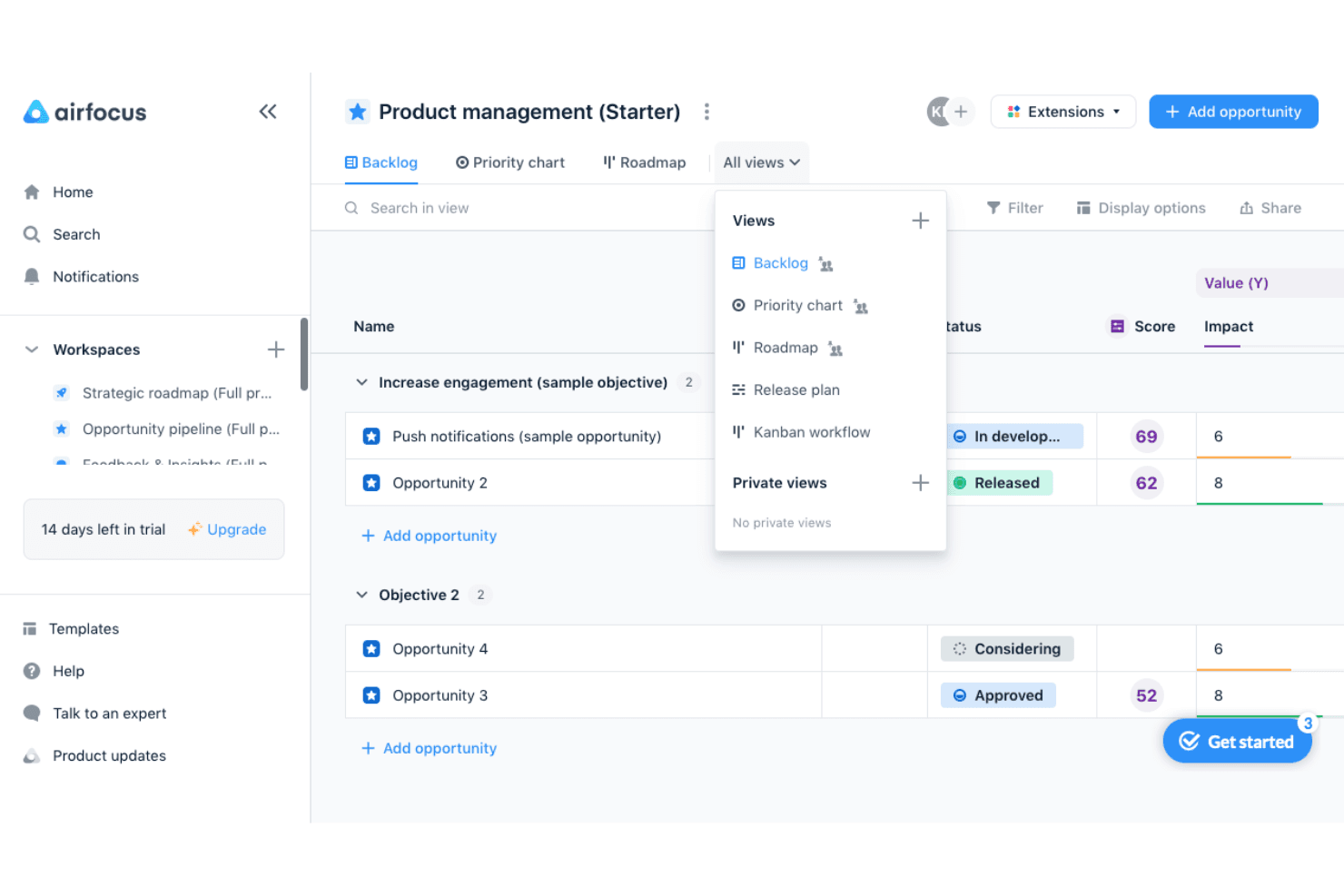
airfocus helps product teams prioritize opportunities and switch between backlog, priority chart, roadmap, release plan, and Kanban views. airfocus is an AI-powered product management platform built for multi-team organizations, combining portfolio management, feedback aggregation, configurable prioritization frameworks, and an AI insights layer that synthesizes customer data across channels.
Who Is airfocus Best For?
airfocus is a strong fit for heads of product and product operations leads managing multiple teams who need a single place to align priorities, aggregate feedback, and report on portfolio progress.
Why I Picked airfocus
airfocus earns its spot on my shortlist because its Insights Agent does something I haven't seen many tools do as well: it reads across every feedback channel you collect, from Zendesk tickets to call transcripts, and links each synthesized insight back to its original source. That traceability matters when you're managing multiple teams, because you can actually show stakeholders why a priority moved. I also like that the airfocus agent answers direct prioritization questions, like which opportunities to pursue in Q1 based on live OKRs and feedback scores, rather than just surfacing raw data and leaving you to interpret it.
airfocus Key Features
- Priority Poker: Stakeholders score items independently and asynchronously, with outliers automatically flagged for discussion.
- Slash commands for content generation: Generate PRDs, user stories, problem statements, and release notes directly inside item descriptions.
- AI Autofill: Automatically tags and routes incoming feedback to the correct fields, labels, and team owners across your workspace.
- MCP server: Connects airfocus to external AI tools like Claude, ChatGPT, and Cursor, giving them permission-controlled read and write access to your product data.
airfocus Integrations
airfocus offers native integrations with Jira, Azure DevOps, Linear, Zendesk, Salesforce, Intercom, Slack, and Microsoft Teams, plus a permission-controlled MCP server for Claude and ChatGPT. It also supports Zapier.
Pros and Cons
Pros:
- Priority Poker improves stakeholder alignment
- Custom scoring supports nuanced prioritization decisions
- Traceable insights connect themes to sources
Cons:
- Automation setup can feel complex
- No predictive forecasting for roadmap decisions
 Best for user feedback
- Free plan + free demo available
- From $19/user/month (billed annually)
Visit WebsiteCustomer Rating:4.5/5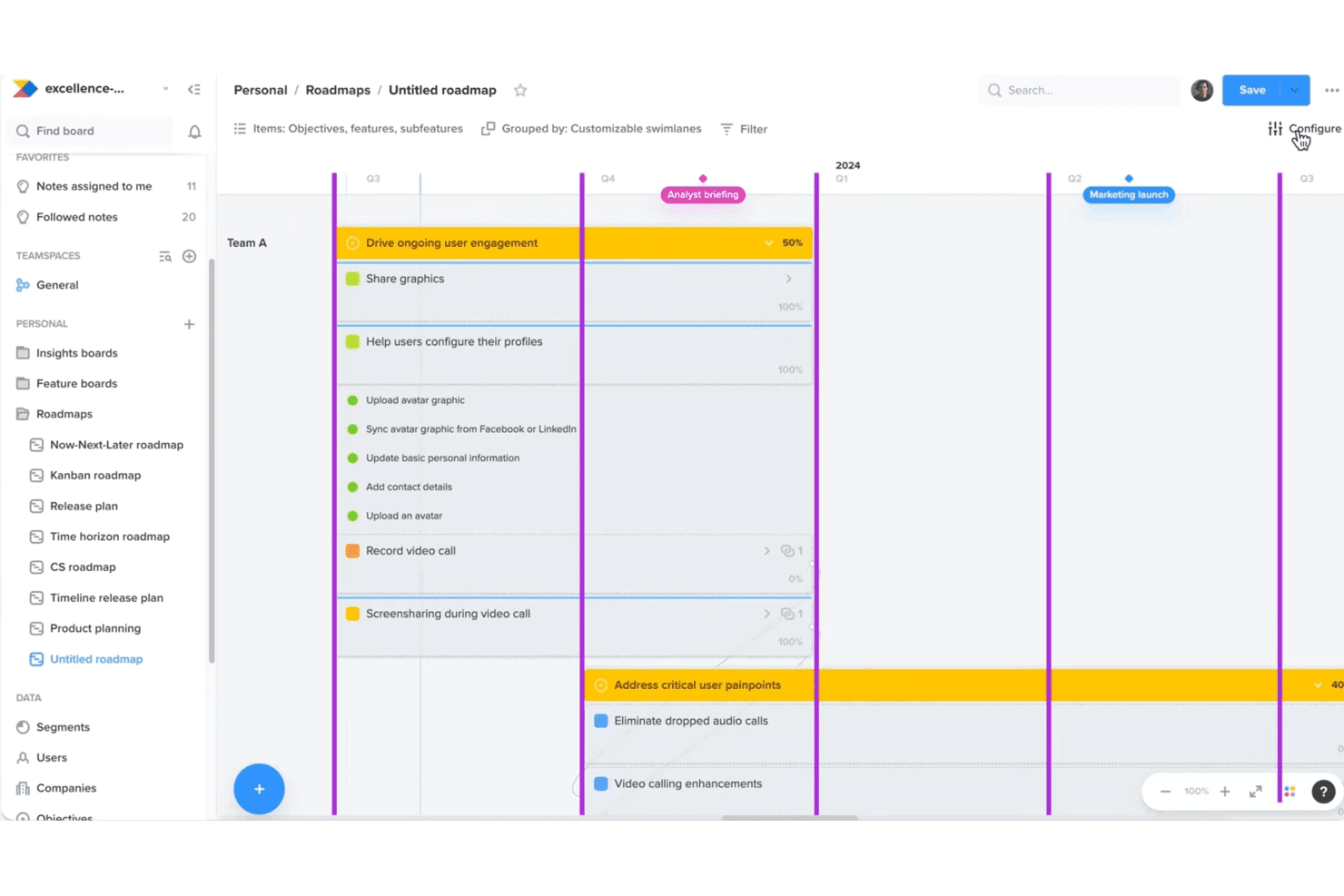
Productboard helps teams align roadmaps with customer needs and goals. Productboard is an agentic AI product management system built around its Spark AI agent, combining feedback aggregation, insight synthesis, prioritization scoring, and AI-assisted spec writing in one platform.
Who Is Productboard Best For?
Productboard is a strong fit for product teams that treat customer feedback as their primary input for roadmap decisions.
Why I Picked Productboard
Productboard earns its spot on my shortlist because no other tool I've tested does as much with raw customer feedback as Spark does. It pulls signals from Zendesk, Gong, Intercom, and app store reviews, then groups them into evidence-ranked opportunities written as problem statements, not just feature requests. I also like that every output links back to the source notes, so I can trace exactly which customers drove a prioritization decision.
Productboard Key Features
- Spark spec writing: Drafts PRDs and product briefs through a guided conversation, drawing on your strategy, personas, customer evidence, and connected codebase.
- MCP connectors: Query live data from tools like Amplitude, Linear, Slack, Pendo, and GitHub directly inside Productboard's chat panel.
- Customizable prioritization formulas: Build your own RICE, ICE, WSJF, or Value/Effort scoring frameworks using custom fields and drivers.
- Post-launch impact measurement: Compares shipped features against defined success metrics at 7, 14, and 30 days, with segment-level adoption analysis and recommended next steps.
Productboard Integrations
Productboard offers 25+ native integrations, including Zendesk, Intercom, Gong, Slack, Microsoft Teams, Jira, Azure DevOps, Amplitude, Mixpanel, and GitHub. It also supports a public REST API, MCP server, and Zapier.
Pros and Cons
Pros:
- Custom scoring supports varied prioritization frameworks
- Specs retain traceable customer proof points
- Feedback becomes evidence-ranked problem statements
Cons:
- Change history can complicate navigation
- Portfolio roadmaps can strain at scale
Learn more about Productboard: Best for revenue-aware churn and upsell prediction
- Free plan + 30-day free trial + free demo available
- Pricing upon request
Visit WebsiteCustomer Rating:4.4/5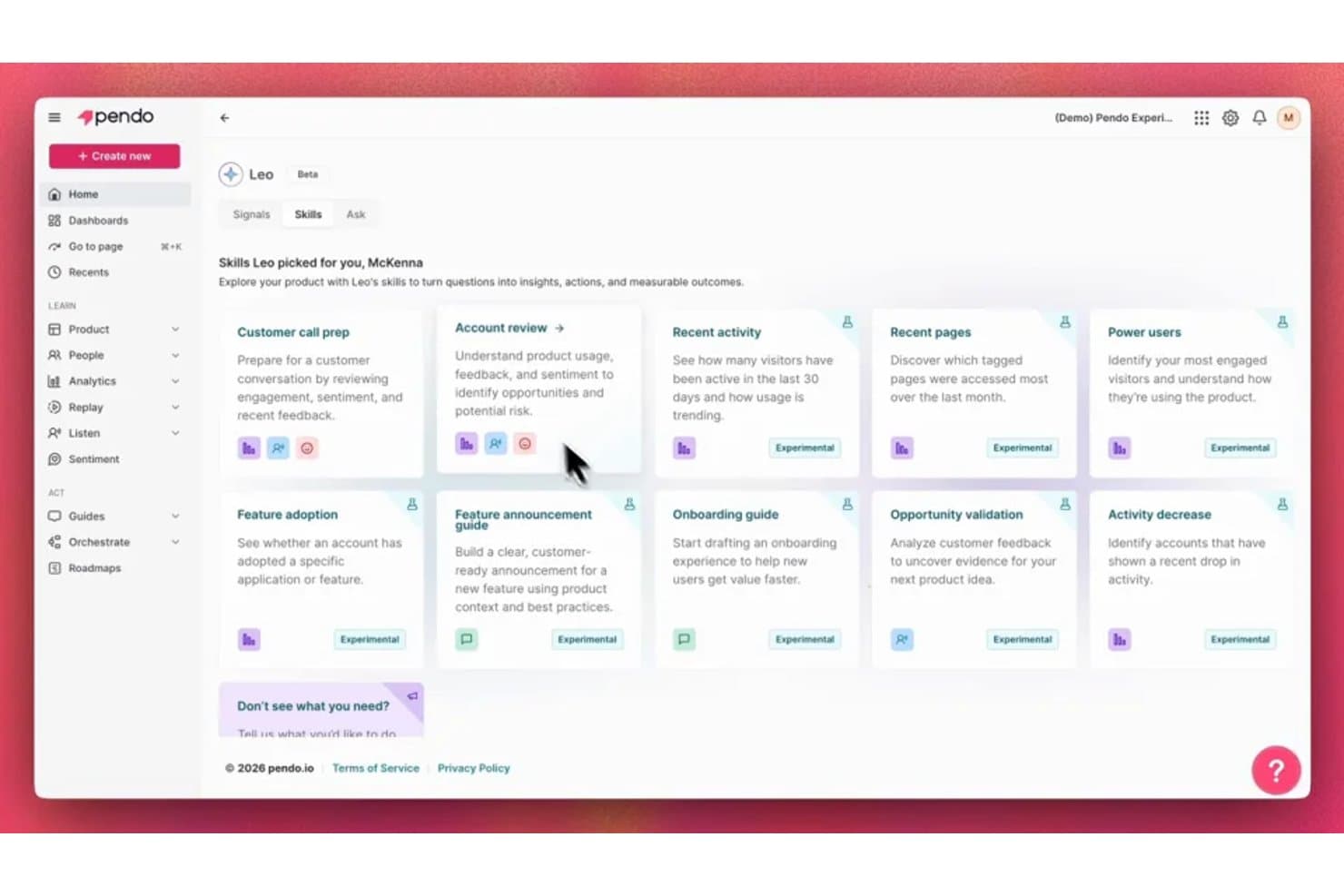
Pendo's Leo AI surfaces personalized skills to turn product questions into insights. Pendo is an AI-powered product analytics and discovery platform that combines in-app behavioral tracking, feedback aggregation, NLP-based insight synthesis, churn and upsell prediction, and an AI assistant (Leo) for querying usage data across your product portfolio.
Who Is Pendo Best For?
Pendo is a strong fit for heads of product and product operations leads at mid-market to enterprise SaaS companies who need to tie feature usage and customer feedback directly to revenue risk.
Why I Picked Pendo
I picked Pendo as one of the best because no other tool on this list ties customer feedback directly to ARR and churn risk the way Pendo does. Its Predict module continuously retrains churn and upsell models on live product usage and CRM data, flagging at-risk accounts with explained reasons rather than black-box scores. I also love how the Topics tab in Listen ranks feedback themes by revenue, so you can see which bug or feature request is sitting on the most at-risk ARR before you prioritize anything.
Pendo Key Features
- Listen Feedback Agent: Answers product questions with AI-generated theme summaries, linking each insight to source quotes, account context, and session replays.
- Leo Signals: Proactively monitors usage and retention, alerting you to shifts like unexpected feature uptake or accounts going quiet without requiring manual report builds.
- Natural language querying via MCP: Lets you query Pendo analytics, funnels, and feedback from Claude, ChatGPT, or Cursor through a published MCP server.
- AI guide builder: Generates in-app guides and tooltip sequences from plain-language descriptions, without needing design or engineering input.
Pendo Integrations
Pendo lists 51 integrations, including Jira, Salesforce, Zendesk, Gong, Snowflake, Slack, Claude, ChatGPT, and Cursor through MCP. It also offers an API and Zapier for custom connectivity.
Pros and Cons
Pros:
- Leo answers usage questions in plain language
- Explainable churn scores guide account interventions
- Revenue-ranked feedback exposes at-risk ARR
Cons:
- No native PRD or specification drafting
- Roadmap prioritization still relies on manual scoring
Learn more about Pendo: 10Best for customer-to-roadmap impact scoring
DevRev
- Free plan + free demo available
- Pricing upon request
Visit WebsiteCustomer Rating:4.5/5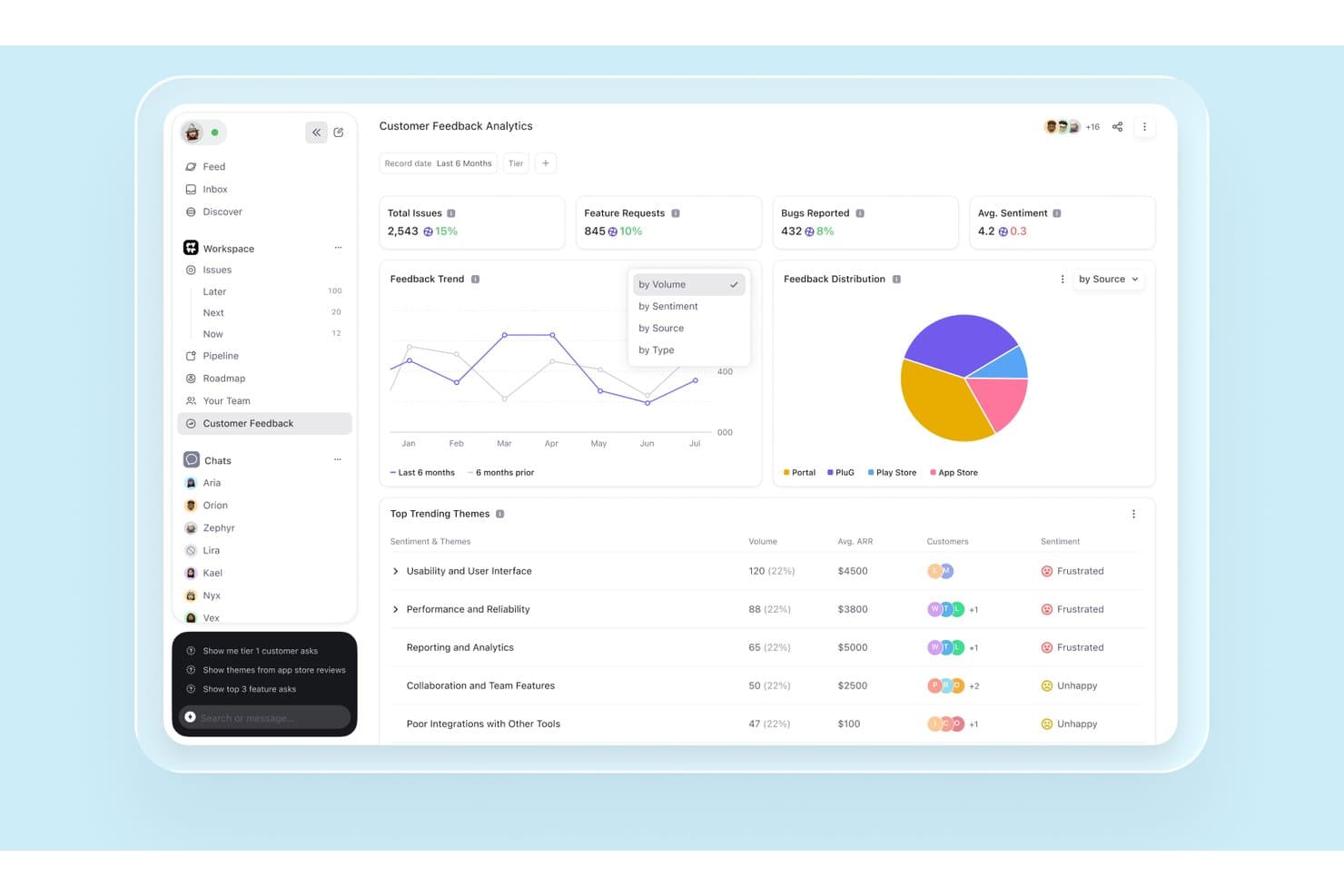
DevRev surfaces AI-driven customer feedback trends and sentiment analytics. DevRev is an AI knowledge graph platform that unifies support tickets, CRM data, session analytics, and engineering work to support customer feedback synthesis, impact-based prioritization, and product roadmap planning.
Who Is DevRev Best For?
DevRev fits product operations teams at mid-market and enterprise companies that need to connect support ticket volume directly to roadmap prioritization.
Why I Picked DevRev
I've included DevRev in my top picks because its impact scoring system does something I haven't seen many tools pull off: it builds a live score for each roadmap enhancement using linked opportunity revenue, account ARR and churn status, and ticket volume simultaneously. That means if 40 enterprise accounts are filing tickets about the same friction point, that signal surfaces directly in the prioritization view, not buried in a spreadsheet. I also like how the full traceability chain runs from ticket to enhancement to release, with automatic customer notification when the feature ships.
DevRev Key Features
- AI ticket clustering: Groups similar support tickets to surface candidate product enhancements and rank issues by customer impact.
- Voice-of-customer traceability: Links each ticket to an enhancement, then to a release, with automatic customer notification when the feature ships.
- Conversational analytics (Text2SQL): Lets you ask natural-language questions that are translated into SQL and run against the unified knowledge graph for auditable answers.
- Real-time account sentiment scoring: Scores each customer interaction, rolls sentiment up to the account level, and routes at-risk accounts into alert workflows.
DevRev Integrations
DevRev offers one-click connectors for Slack, Notion, Jira Cloud, Google Drive and Calendar, Microsoft Teams, OneDrive, and SharePoint, plus 100+ marketplace integrations including Salesforce, HubSpot, ServiceNow, and Jira Service Management. APIs and custom connectors are available.
Pros and Cons
Pros:
- Cited answers span support and product data
- Connects customer revenue to feature priorities
- Links ticket volume to roadmap impact
Cons:
- No configurable RICE or ICE scoring
- No dedicated PRD or spec generator
Learn more about DevRev:
Outras ferramentas de gestão de produtos com IA
Eis algumas opções adicionais de ferramentas de gestão de produtos com IA que não entraram na minha lista restrita, mas que continuam a merecer atenção:
- 11ClaudeBest for AI-drafted PRDs with cited sources
- 12BuildBetterBest for evidence-backed feedback synthesis
- 13ClickUpBest for all-in-one project management
- 14Aha!Best for end-to-end discovery-to-roadmap tracing
- 15Craft.ioBest for AI-drafted PRDs via guided discovery
- 16NotionBest for cross-team alignment
- 17CannyBest for revenue-linked feedback traceability
- 18LinearBest for traceable voice-of-customer workflows
- 19DovetailBest for research data organization
- 20GleapBest for revenue-weighted backlog scoring
How I Evaluate AI Product Management Tools
To make this list, AI must handle product planning, like clustering feedback and forecasting feature impact. From there, I evaluate three things. Core functionality carries most weight, like aggregating feedback and ranking roadmap items. Then I assess standout features, like explainable recommendations, and beyond-feature factors, like customer data protection.
Core Functionality (Table Stakes For This List)
When I'm selecting tools for my list, I score each one on a scale from 0 (does not offer the functionality) to 5 (excels in this area) for each core functionality listed below. I then convert the total into a percentage to help assess each tool's overall fit, with extra weight on any functionalities I’ve deemed essential.
- AI Insight Synthesis (Essential): I look for themes across feedback, research, and usage data, such as recurring onboarding friction, with enough context to guide discovery.
- AI-Assisted Prioritization (Essential): Recommendations should weigh configurable factors like customer value, effort, and strategic fit, and show why roadmap items rank differently.
- AI Content Generation: I assess whether drafts of PRDs, specs, or user stories reflect discovery notes and product context rather than generic templates.
- Natural Language Queries: Can you ask which customer segments report a problem and get a grounded answer drawn from product data or documentation?
- Predictive Analytics: I look for forecasts of feature impact or usage trends, plus visible assumptions that help teams compare roadmap scenarios.
- Feedback Aggregation: Check whether feedback from sources such as support tickets and research can be collected, tagged, and clustered in one reviewable view.
Once I have a list of tools that meet the criteria, I consider what sets each platform apart.
Differentiating Factors (What Sets Vendors Apart)
Here's how I compare and contrast different vendors:
Standout Features
Voice-of-customer traceability matters most to me. When a tool links a prioritized feature back to the original support tickets or research notes that drove it, stakeholders stop debating opinions and start reviewing evidence. I also evaluate explainable AI recommendations—I want to see why an item scored higher, not just that it did. Tools like Productboard and Airfocus handle this differently, so I check whether the reasoning references configurable criteria or just a hidden model. Finally, I look at persona and segment tagging to confirm teams can filter insights by account tier or user type without manual cleanup.
Beyond Features
Data privacy matters because these tools ingest support tickets and customer interviews. I check for SOC 2 compliance, GDPR readiness, and whether a vendor lets you opt out of AI model training on your data. I also evaluate integration depth—tools like Productboard and Chisel connect with Jira and Salesforce, but I look at whether syncs are bi-directional and real-time, since one-way imports create stale data fast. Finally, I consider how quickly a non-technical PM can onboard without a dedicated admin.
Como escolher ferramentas de gestão de produtos com IA
É fácil ficar atolado em longas listas de funcionalidades e estruturas de preços complexas. Para o ajudar a manter o foco enquanto percorre o seu processo específico de seleção de software, eis uma lista de verificação dos fatores a ter em conta:
| Fator | O que considerar |
|---|---|
| FatorEscalabilidade | O que considerarA ferramenta consegue acompanhar o crescimento da sua equipa? Considere se consegue lidar com mais utilizadores, projetos e dados à medida que as suas necessidades aumentam. |
| FatorIntegrações | O que considerarEstabelece ligação com as ferramentas que já utiliza? Verifique a compatibilidade com a sua pilha tecnológica existente para evitar silos de dados e soluções manuais. |
| FatorPersonalização | O que considerarPode adaptar a ferramenta ao seu fluxo de trabalho? Procure opções para personalizar painéis, relatórios e definições de modo a corresponderem aos processos da sua equipa. |
| FatorFacilidade de utilização | O que considerarA ferramenta é intuitiva para a sua equipa? Uma interface complicada pode atrasar a adoção; procure simplicidade e clareza na navegação e no design. |
| FatorImplementação e integração inicial | O que considerarCom que rapidez pode começar? Avalie a disponibilidade de tutoriais, apoio e recursos para ajudar a sua equipa a começar a trabalhar de imediato. |
| FatorCusto | O que considerarDe que forma os preços se enquadram no seu orçamento? Considere tanto os custos iniciais como os contínuos e compare-os com o valor e as funcionalidades oferecidos em cada plano. |
| FatorMedidas de segurança | O que considerarOs seus dados e a sua privacidade estão protegidos? Verifique a existência de encriptação, normas de conformidade e controlos de acesso dos utilizadores para proteger as suas informações. |
| FatorDisponibilidade do apoio | O que considerarQue opções de apoio estão disponíveis? Considere os horários, os canais e a capacidade de resposta do apoio para garantir que obtém ajuda quando dela precisar. |
O que são ferramentas de gestão de produtos com IA?
As ferramentas de gestão de produtos com IA são soluções de software que ajudam as equipas de produto a planear, desenvolver e lançar produtos de forma mais eficiente, utilizando inteligência artificial. Os gestores de produto, designers e programadores utilizam geralmente estas ferramentas para melhorar a colaboração, a tomada de decisões e a integração do feedback dos utilizadores.
Funcionalidades como a análise de dados, a gestão automatizada de tarefas e a recolha de feedback dos utilizadores ajudam a simplificar os fluxos de trabalho, a melhorar a qualidade dos produtos e a alinhar os esforços da equipa. Em geral, estas ferramentas proporcionam um valor significativo ao otimizar o processo de gestão de produtos e ao promover melhores resultados.
Funcionalidades das ferramentas de gestão de produtos com IA
Ao selecionar ferramentas de gestão de produtos com IA, tenha em atenção as seguintes funcionalidades principais:
- Planeamento do roteiro do produto: Ajuda as equipas a planear e visualizar os prazos de desenvolvimento do produto, assegurando o alinhamento entre todas as partes interessadas.
- Recolha de feedback dos utilizadores: Recolhe informações dos utilizadores para orientar melhorias do produto e definir a prioridade das funcionalidades.
- Análise de dados: Fornece informações sobre o comportamento dos utilizadores e o desempenho do produto, ajudando a tomar decisões baseadas em dados.
- Gestão automatizada de tarefas: Apoia os fluxos de trabalho dos projetos ao automatizar tarefas rotineiras e ao dar prioridade às atividades com base nos prazos.
- Colaboração em tempo real: Permite que os membros da equipa trabalhem em conjunto simultaneamente, melhorando a comunicação e a produtividade.
- Áreas de controlo personalizáveis: Permite aos utilizadores adaptar a sua vista para se concentrarem nas métricas e informações mais relevantes.
- Informações baseadas em IA: Utiliza inteligência artificial para disponibilizar análises preditivas e recomendações para as estratégias de produto.
- Capacidades de integração: Liga-se a outras ferramentas da sua pilha tecnológica, reduzindo os silos de dados e a introdução manual de dados.
- Medidas de segurança: Protege os dados sensíveis através de encriptação e do cumprimento das normas do setor.
- Recursos de integração: Disponibiliza tutoriais, modelos e assistência para ajudar as equipas a adotarem rapidamente a ferramenta e a tirarem partido dela.
Vantagens das ferramentas de gestão de produtos com IA
A implementação de ferramentas de gestão de produtos com IA pode proporcionar várias vantagens à sua equipa e à sua empresa. Eis algumas das vantagens que pode esperar:
- Melhoria da tomada de decisões: A análise de dados e as informações baseadas em IA ajudam a sua equipa a tomar decisões fundamentadas, fornecendo dados claros e acionáveis.
- Colaboração melhorada: As funcionalidades de colaboração em tempo real permitem que os membros da equipa trabalhem em conjunto de forma eficiente, melhorando a comunicação e a produtividade.
- Maior eficiência: A gestão automatizada de tarefas reduz o trabalho manual, permitindo que a sua equipa se concentre nas tarefas prioritárias e melhore o fluxo de trabalho geral.
- Melhor compreensão dos utilizadores: A recolha de feedback dos utilizadores proporciona uma compreensão mais profunda das necessidades dos clientes, ajudando-o a adaptar os produtos de forma mais eficaz às suas preferências.
- Fluxos de trabalho personalizáveis: As áreas de controlo e funcionalidades personalizáveis permitem à sua equipa adaptar a ferramenta às necessidades específicas de cada projeto, aumentando a flexibilidade.
- Iterações de produto mais rápidas: O acesso rápido aos dados e ao feedback dos utilizadores permite realizar testes e iterações rápidas, acelerando o ciclo de desenvolvimento.
- Segurança dos dados: As medidas de segurança garantem a proteção das informações sensíveis, dando à sua equipa tranquilidade enquanto trabalha.
Custos e preços das ferramentas de gestão de produtos com IA
A seleção de ferramentas de gestão de produtos com IA exige uma compreensão dos vários modelos de preços e planos disponíveis. Os custos variam consoante as funcionalidades, o tamanho da equipa, os complementos e outros fatores. A tabela abaixo resume os planos mais comuns, os seus preços médios e as funcionalidades normalmente incluídas nas soluções de ferramentas de gestão de produtos com IA:
Tabela de comparação de planos para ferramentas de gestão de produtos com IA
| Tipo de plano | Preço médio | Funcionalidades comuns |
|---|---|---|
| Tipo de planoPlano gratuito | Preço médio$0 | Funcionalidades comunsAnálise básica, feedback limitado dos utilizadores e assistência padrão. |
| Tipo de planoPlano pessoal | Preço médio$5-$25/utilizador/mês | Funcionalidades comunsÁreas de controlo personalizáveis, gestão de tarefas e integrações básicas. |
| Tipo de planoPlano empresarial | Preço médio$30-$60/utilizador/mês | Funcionalidades comunsAnálise avançada, colaboração em tempo real e funcionalidades de segurança melhoradas. |
| Tipo de planoPlano empresarial avançado | Preço médio$80-$150/utilizador/mês | Funcionalidades comunsPersonalização completa, assistência dedicada e amplas capacidades de integração. |
Perguntas frequentes sobre ferramentas de gestão de produtos com IA
Aqui estão algumas respostas a perguntas comuns sobre ferramentas de gestão de produtos com IA:
Como podem as ferramentas de gestão de produtos com IA melhorar a colaboração da equipa?
As ferramentas de gestão de produtos com IA melhoram a colaboração ao fornecer atualizações em tempo real e espaços de trabalho partilhados, permitindo que a sua equipa trabalhe em conjunto de forma eficiente. Estas ferramentas incluem frequentemente funcionalidades como roteiros colaborativos e canais de comunicação, que ajudam a manter todos alinhados e informados sobre o progresso e as alterações do projeto.
O que devo ter em consideração ao integrar ferramentas de gestão de produtos com IA nos sistemas existentes?
Ao integrar ferramentas de gestão de produtos com IA nos seus sistemas existentes, certifique-se de que são compatíveis com a sua atual pilha tecnológica para evitar silos de dados. Verifique se a ferramenta é compatível com APIs ou integrações pré-construídas com programas como o Jira, o Slack ou o Salesforce, de modo a facilitar um fluxo de dados contínuo entre plataformas.
Como ajudam as ferramentas de gestão de produtos com IA a definir a prioridade das funcionalidades?
Estas ferramentas ajudam a definir a prioridade das funcionalidades através da análise do feedback dos utilizadores, dos objetivos empresariais e das tendências do mercado. Incluem frequentemente matrizes de priorização ou sistemas de pontuação que permitem à sua equipa avaliar e classificar as funcionalidades com base na importância estratégica, na procura dos utilizadores e no potencial impacto.
As ferramentas de gestão de produtos com IA são adequadas para equipas de desenvolvimento ágil?
Sim, as ferramentas de gestão de produtos com IA são muito adequadas para equipas ágeis, disponibilizando funcionalidades como o planeamento de iterações, a gestão da lista de pendências e os quadros Kanban. Estas ferramentas apoiam o desenvolvimento iterativo ao fornecer informações e feedback em tempo real, permitindo que a sua equipa se adapte rapidamente às alterações dos requisitos.
Que medidas de segurança devo procurar nas ferramentas de gestão de produtos com IA?
Procure ferramentas que ofereçam encriptação, controlos de acesso e conformidade com normas do setor, como o RGPD ou a SOC 2. Garantir que a ferramenta dispõe de medidas de segurança robustas protege os seus dados sensíveis e minimiza o risco de violações ou acessos não autorizados.
Como podem as ferramentas de gestão de produtos com IA apoiar a tomada de decisões baseada em dados?
As ferramentas de gestão de produtos com IA apoiam decisões baseadas em dados ao fornecer análises e informações sobre o comportamento dos utilizadores, o desempenho das funcionalidades e as tendências do mercado. Estas ferramentas ajudam a sua equipa a identificar oportunidades de melhoria e a tomar decisões informadas com base em dados em tempo real e análises preditivas.