

Com tantas ferramentas de brainstorming diferentes disponíveis, é difícil perceber qual é a mais adequada para si. Sabe que quer uma ferramenta que o ajude a gerar ideias e a dar mais organização ao seu processo criativo, mas precisa de perceber qual é a melhor opção. Nesta publicação, vou ajudá-lo a tomar uma decisão facilmente, partilhando as minhas perspetivas sobre as melhores ferramentas de brainstorming para promover a inovação e estimular a sua criatividade.
Why Trust Our Software Recommendations
6,700+
Reviews
20
Industry experts
16+
Evaluation factors
14
Years
Our team has been testing and reviewing software since 2012. As product managers ourselves, we know how difficult—and important—it is to choose the right software.
For this guide, we evaluated tools using hands-on testing and independent research, scoring tools using our selection criteria.
Our reviews reflect our human editorial judgment, not a sales pitch.
Expert reviewers:
- Andrew LumbySenior TPM
- Cristiano ValimSenior UI/UX Lead


Tabela de comparação: ferramentas de brainstorming
Esta tabela de comparação resume os detalhes básicos de cada uma das principais ferramentas de brainstorming que selecionei.
| Tool | Best For | Trial Info | Price | ||
|---|---|---|---|---|---|
| 1 | Best for importing data from spreadsheets | Free plan + 14-day free trial + free demo available | From $8/user/month (billed annually) | Website | |
| 2 | Best brainstorming tool for project planning with tasks | Free plan + 14-day trial + demo available | From $10/user/month (billed annually) | Website | |
| 3 | Best for structured team brainstorming with agile sync | Free version available | From $8/active user/month | Website | |
| 4 | Best for diagramming-led brainstorming workflows | Free plan + 30-day free trial + free demo available | Pricing upon request | Website | |
| 5 | Best for M365-embedded team ideation | Free plan available | Pricing upon request | Website | |
| 6 | Best for design-led teams using Figma | Free plan available | From $3/user/month | Website | |
| 7 | Best for structured workshop facilitation | Free plan + trial + demo available | From $24.90/user/month (billed annually) | Website | |
| 8 | Best for brainstorming with sticky notes | Free plan + 7-day trial + demo available | From $9/user/month (billed annually) | Website | |
| 9 | Best for AI-guided ideation with dev tool sync | Free plan + 30-day trial + free demo available | Pricing upon request | Website | |
| 10 | Best for structured facilitation with AI clustering | Free plan available | From $9.99/user/month (billed annually) | Website |


Visão geral das melhores ferramentas de brainstorming
Eis uma breve descrição de cada ferramenta de brainstorming, que apresenta o melhor caso de utilização de cada fornecedor, as funcionalidades mais relevantes e as vantagens e desvantagens. Incluí também capturas de ecrã para lhe dar uma ideia da respetiva interface de utilizador.
 1Best for importing data from spreadsheets
Miro
- Free plan + 14-day free trial + free demo available
- From $8/user/month (billed annually)
Visit WebsiteCustomer Rating:4.8/5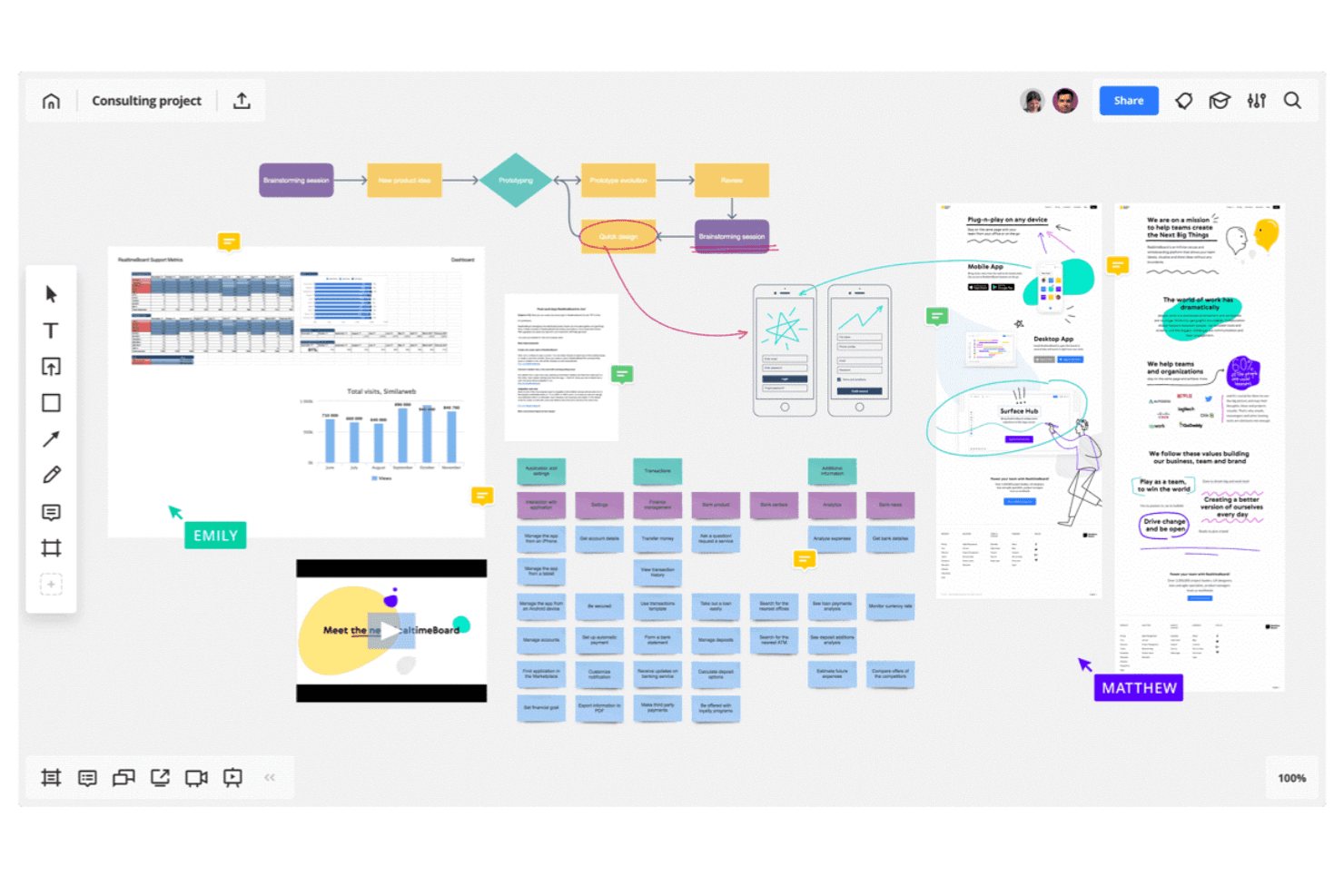
Miro allows you to map out complex workflows and systems. Miro is an infinite-canvas brainstorming and visual collaboration platform that combines sticky notes, mind maps, diagrams, flowcharts, spreadsheet import, AI-assisted clustering, and facilitation tools like voting, timers, and async Talktracks.
Who Is Miro Best For?
Miro is a strong fit for cross-functional teams—product managers, designers, and facilitators—who need to move ideas from raw input to structured plans without switching tools.
Why I Picked Miro
I picked Miro as one of the best because it's the only brainstorming tool I've used that lets you pull structured data directly from a spreadsheet onto an infinite canvas. Drop in a CSV and Miro converts rows into sticky notes or table elements you can cluster, tag, and rearrange in real time. From there, AI-assisted clustering groups related ideas automatically, and two-way sync with Jira or Asana moves prioritized items straight into your backlog without manual re-entry.
Miro Key Features
- Async Talktracks: Record a video walkthrough directly on a board so teammates can review and respond on their own time.
- AI Flows: Run multi-step AI workflows that convert raw board content into documents, diagrams, or summaries.
- Voting and anonymous voting: Run live voting sessions during workshops, with anonymous mode available to reduce groupthink.
- Miroverse community templates: Access thousands of community-built templates alongside Miro's native library to jumpstart any session.
Miro Integrations
Miro offers 250+ integrations, including Google Drive, Figma, Dropbox, Slack, Confluence, Jira, Asana, Linear, ClickUp, and Azure DevOps; Business supports two-way sync with the project management tools.
Pros and Cons
Pros:
- Talktracks support asynchronous workshop participation
- AI clusters themes from unstructured sticky notes
- Imports spreadsheet data onto the brainstorming canvas
Cons:
- AI usage is limited by monthly credits
- Large boards can become slow and laggy
 Best brainstorming tool for project planning with tasks
- Free plan + 14-day trial + demo available
- From $10/user/month (billed annually)
Visit WebsiteCustomer Rating:4.3/5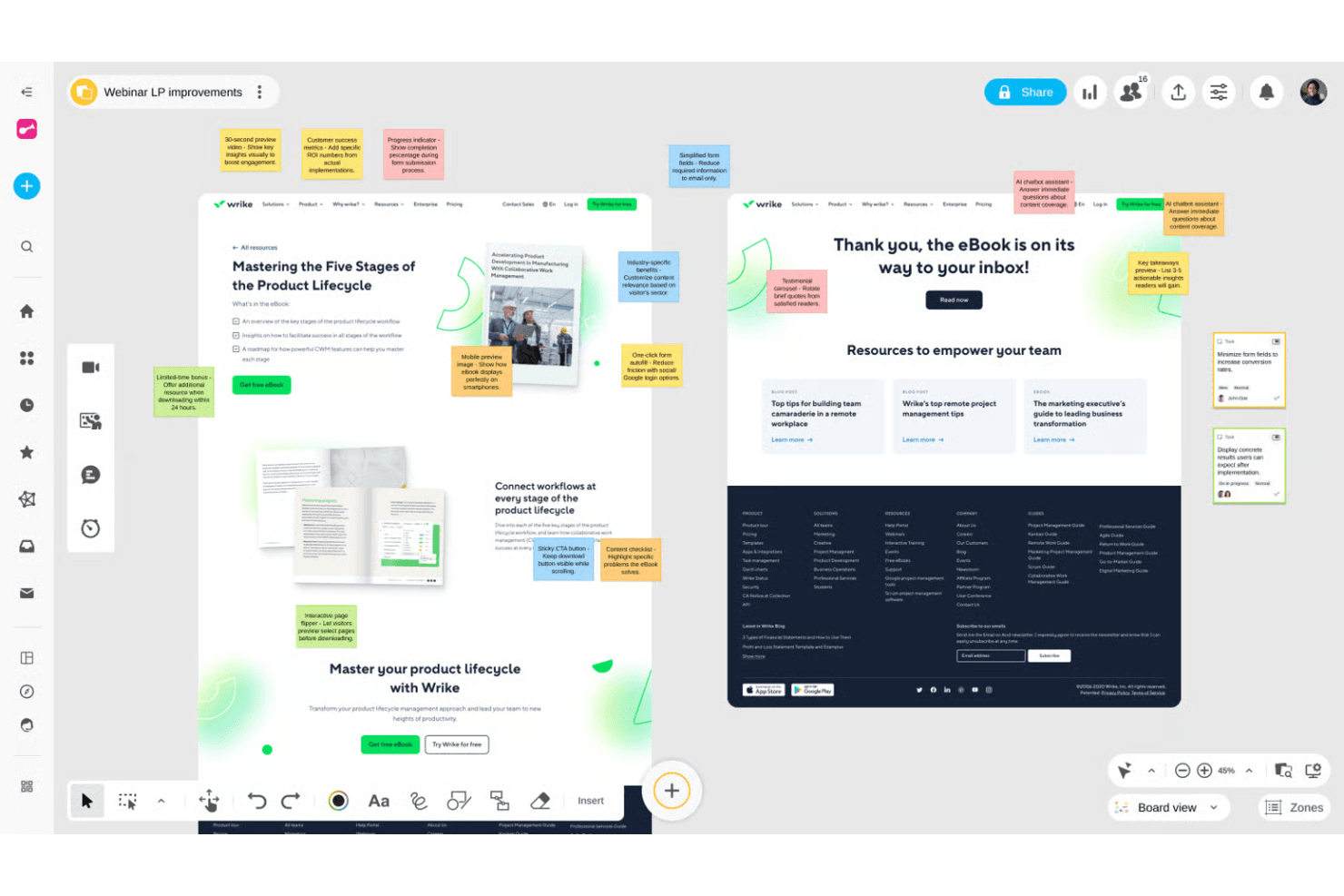
Wrike helps teams organize projects and connect ideas into workflows. Wrike is a project management platform that pairs an infinite collaborative whiteboard—with sticky notes, mind maps, and diagrams—with full project execution tools like Gantt charts, Kanban boards, and AI-powered task creation.
Who Is Wrike Best For?
Wrike is a good fit for product and project teams that want to move from whiteboard brainstorm to assigned tasks without switching tools.
Why I Picked Wrike
I picked Wrike as one of the best because it's the only tool on my list that turns a whiteboard brainstorm directly into a structured project. Wrike's AI reads your sticky notes and mind maps, then generates tasks, assigns them, and builds out Gantt charts or Kanban boards without any manual re-entry. I especially like that whiteboards attach to live projects, so the trail from idea to execution is always visible and nothing gets lost between sessions.
Wrike Key Features
- Whiteboard-to-task AI conversion: Wrike's AI reads sticky notes and mind maps on your whiteboard and generates structured tasks automatically.
- Guest collaboration via secure links: External participants can join whiteboard sessions without a Wrike account using customizable permission links.
- Polls and quizzes: Built-in voting tools let your team collect input and surface unbiased preferences during brainstorming sessions.
- Whiteboard-to-project attachment: Whiteboards link directly to live Wrike projects, keeping your ideation artifacts connected to active work.
Wrike Integrations
Wrike offers 400+ integrations, including Microsoft Teams, Zoom, Slack, Google, Dropbox, Jira, and GitHub. Whiteboards can open inside video calls, while Wrike Sync provides two-way connections with Jira and GitHub.
Pros and Cons
Pros:
- Guests join through secure links
- Whiteboards attach directly to projects
- Ideas become tasks without re-entry
Cons:
- Whiteboard operates as a separate add-on
- Limited facilitation controls for workshops
 Best for structured team brainstorming with agile sync
- Free version available
- From $8/active user/month
Visit WebsiteCustomer Rating:4.7/5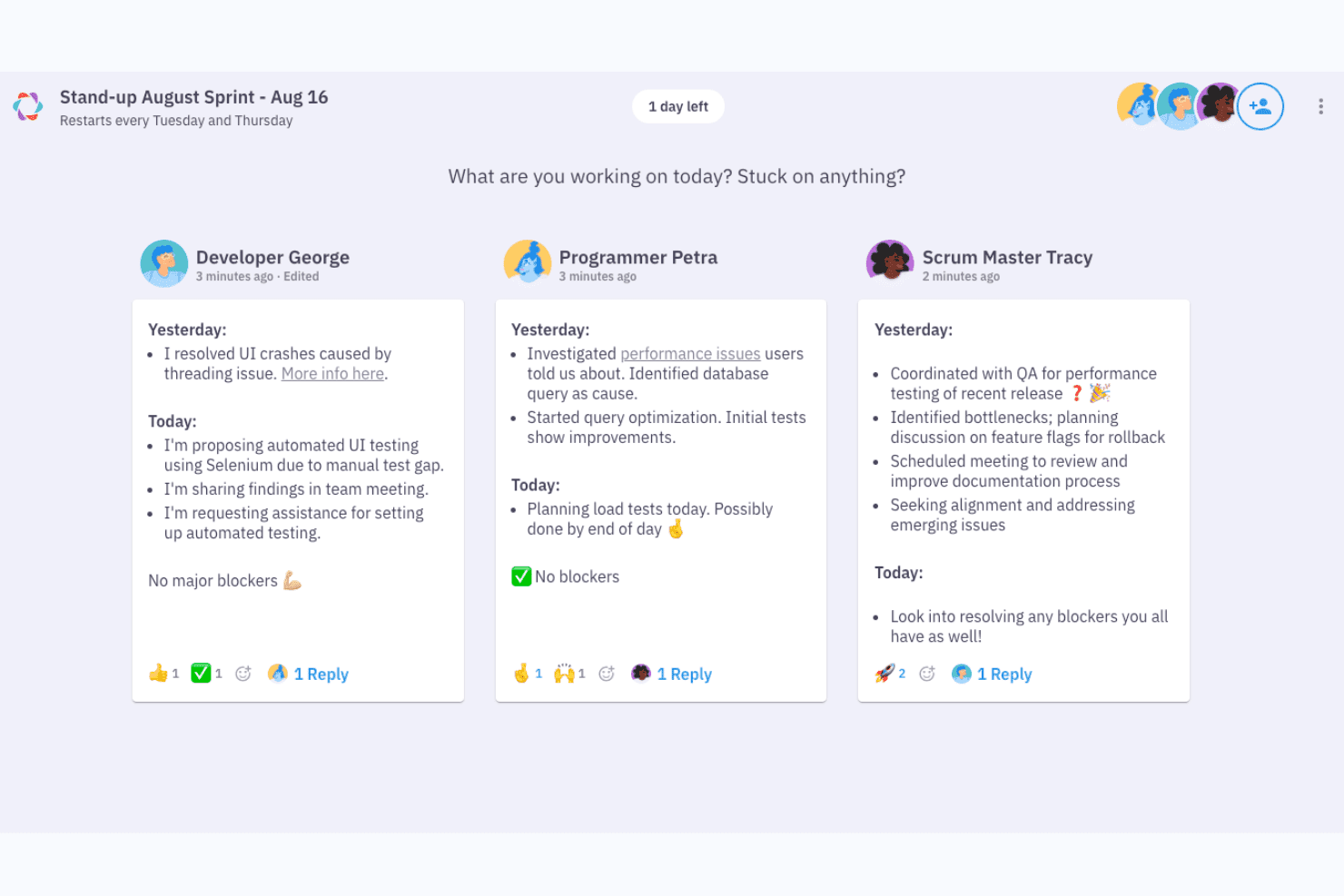
Parabol structures async standups with yesterday, today, and blockers. Parabol is an open-source agile meeting tool that structures brainstorming through a guided reflect-group-vote-discuss-tasks flow, with anonymous idea capture, drag-and-drop clustering, dot voting, and built-in retrospective and Sprint Poker templates.
Who Is Parabol Best For?
Parabol is a strong fit for agile teams and facilitators who need a structured, guided format to turn group input into decisions and action items.
Why I Picked Parabol
I picked Parabol as one of the best because it's the only tool on my list that turns brainstorming into a structured, guided ceremony rather than a free-for-all. I love how the reflect-group-vote-discuss-tasks flow keeps sessions moving, especially the anonymous reflection phase, which prevents louder voices from anchoring the room before quieter ideas surface. The AI-assisted group clustering is genuinely useful: hover over a card, see related reflections, and consolidate them in one click.
Parabol Key Features
- Anonymous reflection phase: Participants submit their ideas privately before anyone else can see them, preventing groupthink from shaping input early in the session.
- Sprint Poker estimation: Built-in Planning Poker uses Fibonacci and custom scales, with story points syncing directly back to Jira after the session.
- Async-ready meeting setup: Facilitators can open activities ahead of time with set deadlines, letting distributed teams contribute on their own schedule before a live session.
- Team Health check: A quick, anonymous pulse survey based on Google's Project Aristotle research tracks team sentiment across five categories and trends over time.
Parabol Integrations
Parabol lists seven integrations, including Jira, GitHub, GitLab, Slack, Mattermost, and Microsoft Teams. Enterprise adds support for Jira Data Center and self-managed GitLab.
Pros and Cons
Pros:
- Voting turns ideas into clear priorities
- Anonymous input reduces groupthink early
- Guided phases keep brainstorming focused
Cons:
- Agile templates limit open-ended innovation sessions
- No canvas for visual concept mapping
Learn more about Parabol: Best for diagramming-led brainstorming workflows
- Free plan + 30-day free trial + free demo available
- Pricing upon request
Visit WebsiteCustomer Rating:4.4/5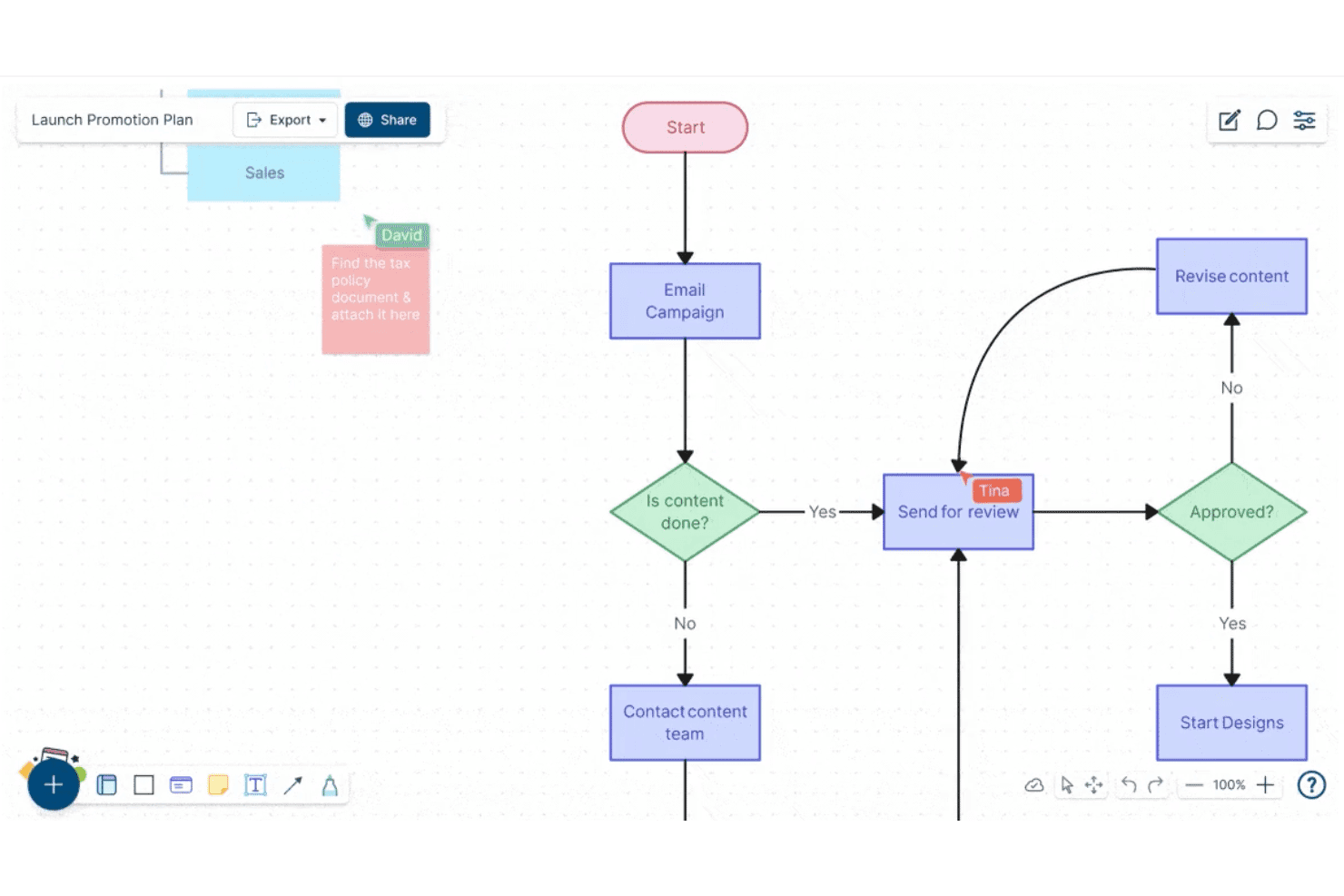
Creately lets users build and collaborate on flowcharts in real time. Creately is a visual collaboration and diagramming platform that combines an infinite canvas, sticky notes, freehand drawing, 70+ diagram types, 8,000+ templates, and real-time multi-user editing for brainstorming and structured planning workflows.
Who Is Creately Best For?
Creately is a strong fit for product managers, UX leads, and strategy teams who need to move fluidly between freeform ideation and structured diagramming without switching tools.
Why I Picked Creately
Creately earns its spot on my shortlist because it's one of the few tools that lets you move fluidly from a freeform sticky-note session directly into a structured diagram without leaving the canvas. I love that it ships with brainstorming-specific frameworks like Six Thinking Hats and Lotus diagrams alongside 8,000+ templates, so your team isn't starting from scratch. Timed, anonymous voting rounds out the ideation loop by letting groups converge on ideas without the usual groupthink pressure.
Creately Key Features
- Real-time multi-user editing: Multiple collaborators can edit the same canvas simultaneously, with visible cursors and spotlight or follow modes to keep everyone aligned.
- Timed, anonymous voting: Run voting sessions with a set time limit, with results appearing publicly or anonymously to help teams converge on ideas.
- Jira and Azure DevOps sync: Connect canvas items directly to Jira and Azure DevOps so ideas move into tracked work without leaving the tool.
- Presentation mode: Build slide decks directly from your canvas that update automatically as the board changes.
Creately Integrations
Creately offers integrations with Jira, GitHub, Azure DevOps, Google Sheets, Excel, Microsoft Teams, Slack, Google Drive, Confluence, and Zoom. It also provides an API for custom integrations and automation.
Pros and Cons
Pros:
- Timed anonymous voting supports fairer convergence
- Thousands of templates support varied workshops
- Diagramming turns ideas into structured workflows
Cons:
- Facilitation lacks private ideation controls
- Large boards can become sluggish
Learn more about Creately: Best for M365-embedded team ideation
- Free plan available
- Pricing upon request
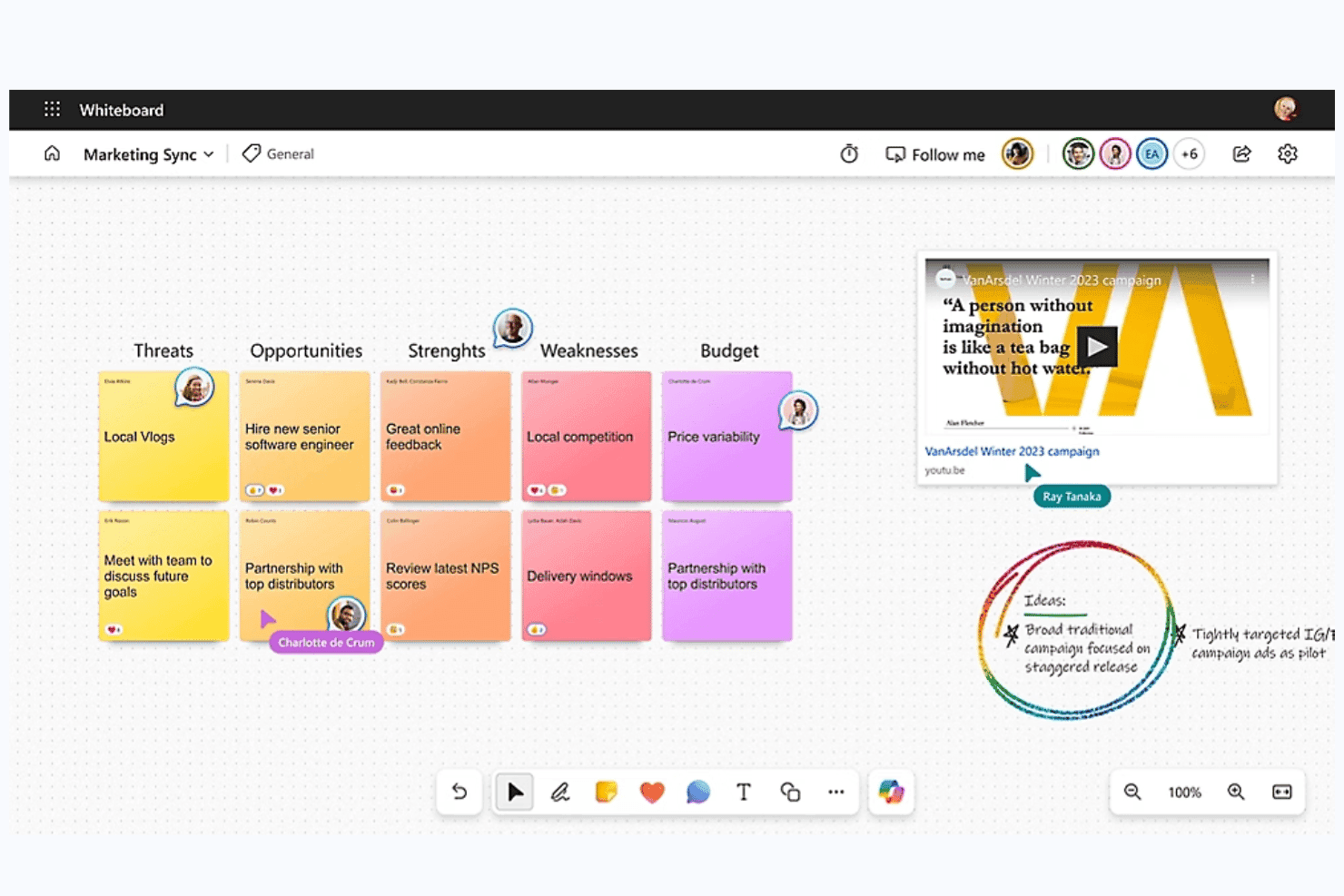
Microsoft Whiteboard is a digital whiteboard tool built into Microsoft 365 that offers a freeform collaborative canvas, sticky notes, smart inking, AI-assisted idea clustering and summarization via Copilot, and deep integration with Teams for real-time and async ideation sessions.
Who Is Microsoft Whiteboard Best For?
Microsoft Whiteboard is a natural fit for teams already working inside Microsoft 365, where pulling up a shared canvas in a Teams meeting requires zero extra setup or logins.
Why I Picked Microsoft Whiteboard
Microsoft Whiteboard earns its spot on my shortlist because it's the only brainstorming tool that lives natively inside Teams, meaning your team can open a shared canvas mid-meeting without switching apps or logging into anything new. I especially like Copilot's Categorize feature, which automatically groups sticky notes into color-coded clusters during live sessions, cutting the manual affinity-mapping work that usually eats up workshop time. The Summarize function then converts those clusters into an editable Loop document your team can act on immediately after the session wraps.
Microsoft Whiteboard Key Features
- Copilot Suggest: Generates a set of idea sticky notes directly on the canvas from a text prompt, giving teams a starting point when brainstorming stalls.
- Follow mode: Locks all participants' views to the facilitator's screen position as they navigate the canvas during live sessions.
- Async board access via OneDrive: Boards are stored in OneDrive for Business, so team members can contribute to a shared canvas before or after a meeting.
- Embedded Loop components: Teams can insert Microsoft Forms polls directly onto the canvas to collect structured input without leaving the board.
Microsoft Whiteboard Integrations
Microsoft Whiteboard offers native integrations across the Microsoft ecosystem, including Microsoft Teams, OneDrive for Business, Microsoft Loop, Microsoft Forms, Bing, and Microsoft Copilot. No third-party marketplace integrations or API are clearly documented.
Pros and Cons
Pros:
- Sticky notes support rich media capture
- Async boards support before-and-after-meeting input
- Copilot suggests, clusters, and summarizes ideas
Cons:
- Image-only export weakens action handoff
- No native dot voting or ranking
Learn more about Microsoft Whiteboard: Best for design-led teams using Figma
- Free plan available
- From $3/user/month
Visit WebsiteCustomer Rating:4.7/5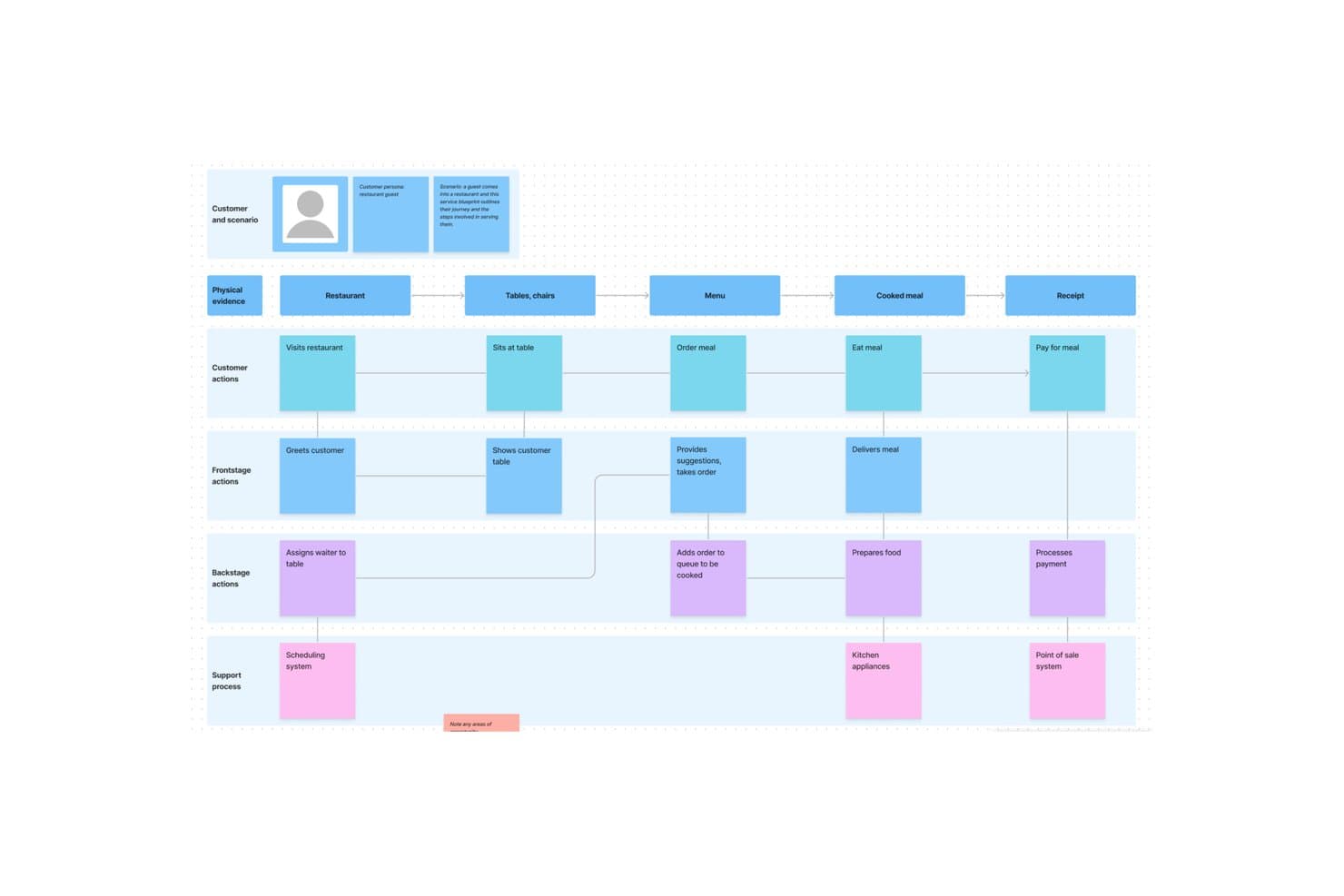
FigJam lets users map full service blueprints visually. FigJam is Figma's online whiteboard tool built for brainstorming, diagramming, and collaborative workshops, with sticky notes, AI-assisted clustering, 300+ templates, and live facilitation controls like spotlight mode, timers, and voting sessions.
Who Is FigJam Best For?
FigJam is a natural fit for cross-functional teams already working in Figma, where designers, PMs, and engineers share a single creative environment.
Why I Picked FigJam
FigJam earns its spot on my shortlist because it's built directly into the Figma ecosystem, making it the obvious brainstorming layer for teams that already live in Figma. I particularly like how AI-assisted sticky clustering lets you sort a chaotic ideation session into named themes and convert them into action items in one click. Spotlight mode is another feature I find genuinely useful: it pulls every participant's view to yours mid-session, so facilitation stays tight even across distributed teams.
FigJam Key Features
- 300+ ready-made templates: Choose from brainstorming frameworks, customer journey maps, retrospectives, roadmap reviews, and more—or build and save your own custom templates.
- Guest access: Anyone outside your organization can join a FigJam board for free for 24 hours without creating an account.
- Asana and Jira integrations: Convert ideas directly from a brainstorm session into trackable tasks in your project management tool.
- AI credit-based actions: Use AI to generate templates and visuals from a text prompt, with monthly credit allowances included on every paid plan.
FigJam Integrations
FigJam offers native integrations with Asana and Jira, helping teams turn brainstorm ideas into trackable tasks. Enterprise plans include API access for custom integrations across Figma workflows.
Pros and Cons
Pros:
- Spotlight keeps remote sessions coordinated
- 300-plus templates support varied workshops
- AI clusters sticky notes into themes
Cons:
- Research synthesis boards become muddy quickly
- Diagramming depth trails specialist whiteboards
Learn more about FigJam: Best for structured workshop facilitation
- Free plan + trial + demo available
- From $24.90/user/month (billed annually)
Visit WebsiteCustomer Rating:4.7/5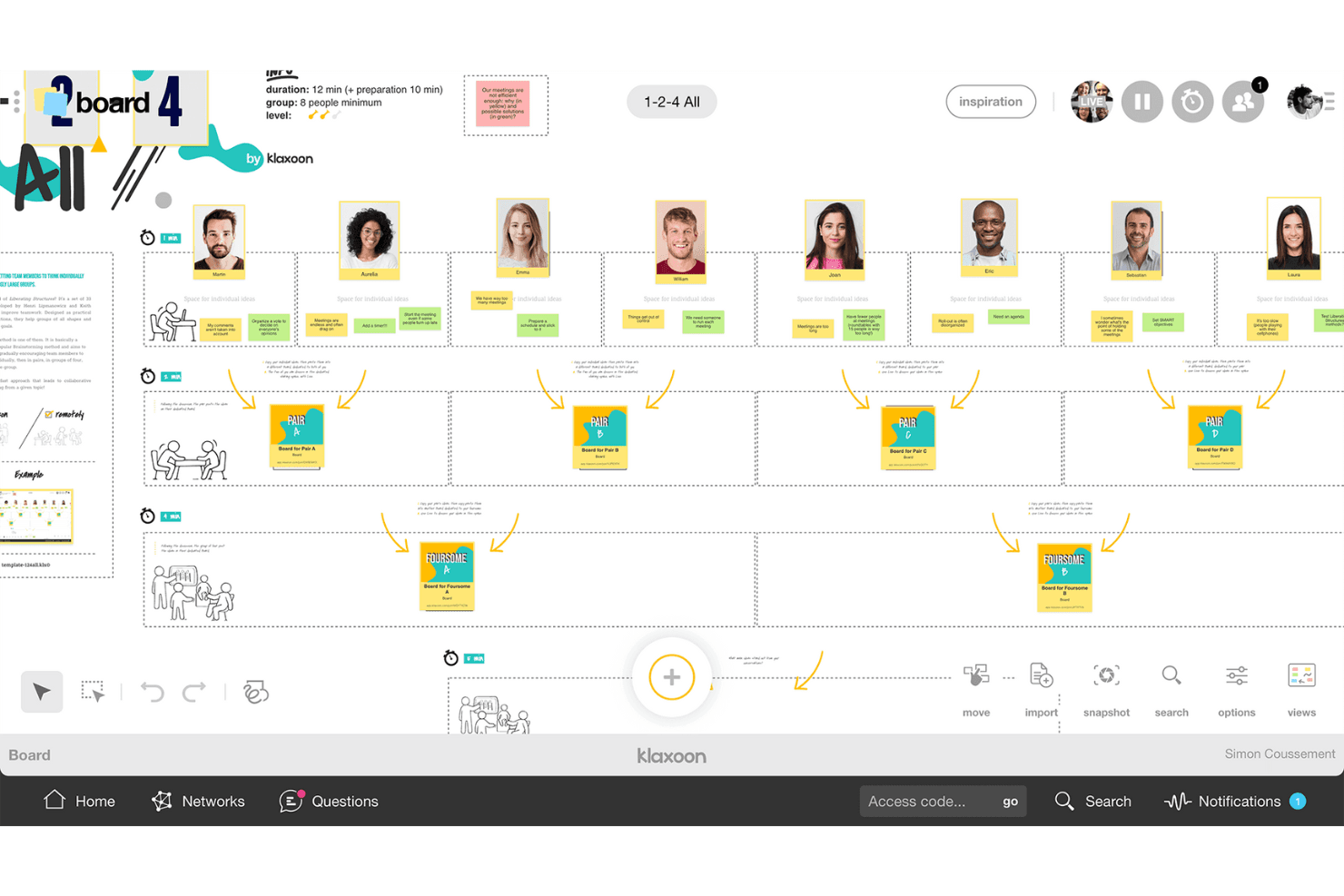
Klaxoon helps teams share ideas and organize discussions into actions. Klaxoon is a visual collaboration and workshop platform that combines an infinite whiteboard, structured facilitation controls, voting and prioritization tools, 200+ templates, and AI-assisted idea organization.
Who Is Klaxoon Best For?
Klaxoon is a strong fit for facilitators, consultants, and innovation teams who run structured workshops and need real-time facilitation controls alongside async collaboration tools.
Why I Picked Klaxoon
Klaxoon earns its spot on my list because no other tool I've tested matches its depth of live facilitation controls. I love how the Session feature lets you chain activities together—polls, quizzes, and boards—so a workshop flows like a proper agenda rather than a free-for-all. Sync Board is what really sets it apart: one click locks every participant's screen to the same canvas view, which I find invaluable when you need to walk a group through idea clustering or dot voting without losing anyone.
Klaxoon Key Features
- AI idea organization: Klaxoon's AI automatically sorts, summarizes, and translates ideas into 100+ languages directly on the board.
- Dot voting and polls: Participants can prioritize ideas using dot voting, likes, star ratings, word clouds, and live polls.
- Async missions: Missions and Adventures let contributors participate on their own schedule, keeping ideas flowing between live sessions.
- Wrike and Jira integration: Ideas on the board convert directly into Wrike tasks or Jira tickets, keeping discovery connected to delivery.
Klaxoon Integrations
Klaxoon offers a native Wrike integration and documented integrations with Jira, Confluence, Microsoft Teams, Google Workspace, OneDrive, Google Drive, Dropbox, and Zapier. Its API supports custom integrations.
Pros and Cons
Pros:
- AI groups and summarizes ideas automatically
- Multiple voting formats support quick prioritization
- Facilitator-led agendas keep workshops on track
Cons:
- Free participation limits restrict larger workshops
- Activity types take time to learn
Learn more about Klaxoon: Best for brainstorming with sticky notes
- Free plan + 7-day trial + demo available
- From $9/user/month (billed annually)
Visit WebsiteCustomer Rating:4.5/5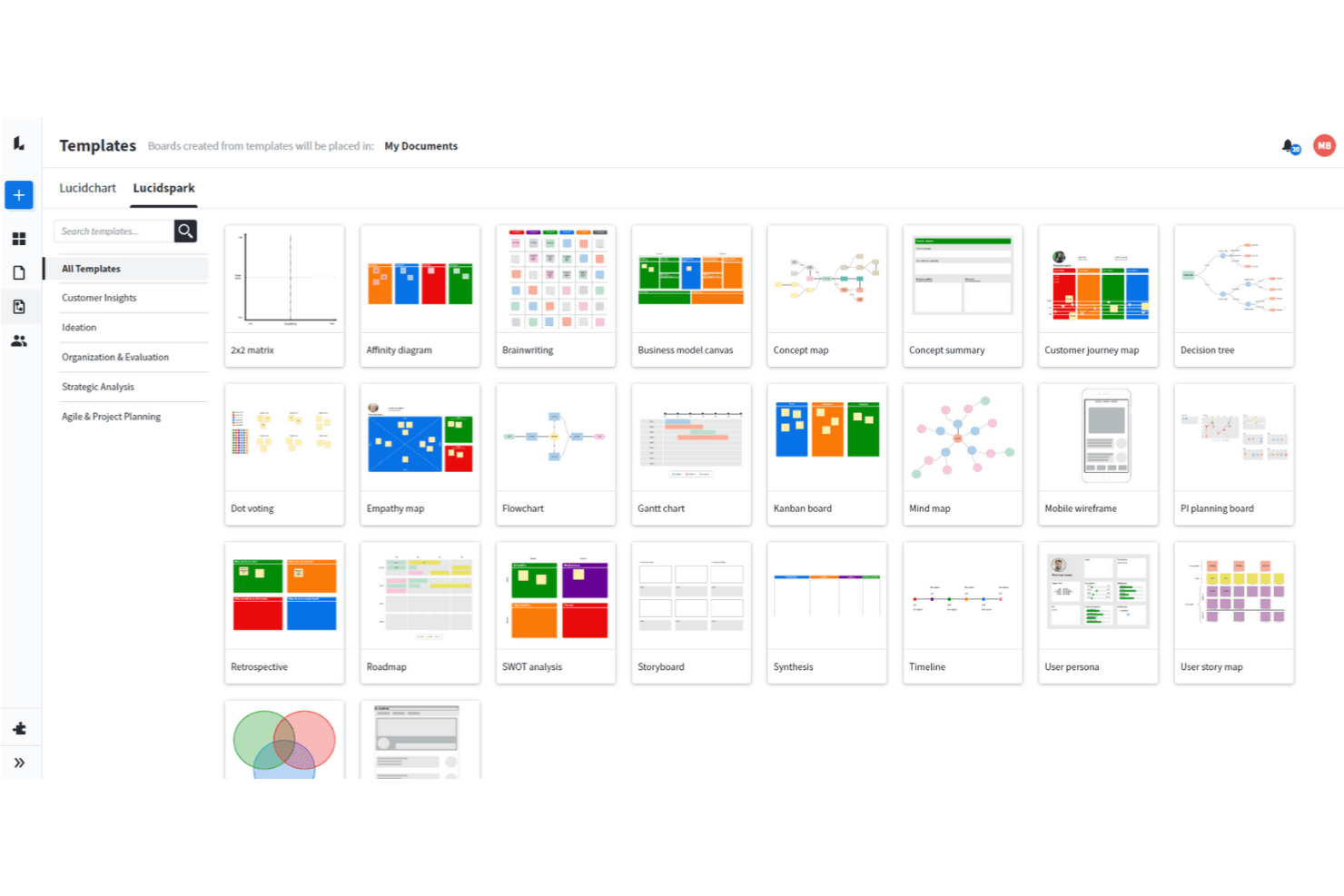
Lucidspark allows you to use a wide range of brainstorming techniques. Lucidspark is a visual collaboration and brainstorming tool built around an infinite canvas, offering sticky notes, mind maps, freehand drawing, AI-assisted ideation, voting sessions, and facilitation controls for live and async teamwork.
Who Is Lucidspark Best For?
Lucidspark is a great fit for facilitators, UX leads, and product managers who need to run structured brainstorming sessions and move ideas into execution without switching tools.
Why I Picked Lucidspark
Lucidspark earns its spot on my shortlist because sticky notes are genuinely central to how the tool works, not an afterthought. I love that private-mode brainstorming hides both note contents and authors until you're ready to reveal them, which keeps early ideas honest and avoids groupthink. From there, AI Magic Sort clusters those notes by theme automatically, so your team skips the tedious manual sorting and gets straight to discussing what matters.
Lucidspark Key Features
- Real-time collaborative canvas: An infinite shared canvas lets your whole team add, move, and edit ideas together live or asynchronously.
- Voting sessions: Team-tier voting lets facilitators run private or anonymous votes with time limits and live result tracking.
- Lucid Cards with Jira sync: Task-style cards connect directly to Jira and Azure DevOps, so ideas move into your backlog without leaving the board.
- Lucid AI idea generation: Prompt AI to generate ideas or build out an entire board, then summarize or cluster results by theme.
Lucidspark Integrations
Lucidspark offers 100+ marketplace integrations, including Jira, Azure DevOps, monday.com, Asana, Google Drive, Slack, Microsoft Teams, and Lucidchart. Team and Enterprise plans include a REST API for custom integrations.
Pros and Cons
Pros:
- Voting controls support group decisions
- AI clusters ideas by theme
- Sticky notes support private ideation
Cons:
- Canvas lacks native audio or video
- Free boards remain sharply limited
Learn more about Lucidspark: Best for AI-guided ideation with dev tool sync
- Free plan + 30-day trial + free demo available
- Pricing upon request
Visit WebsiteCustomer Rating:4.3/5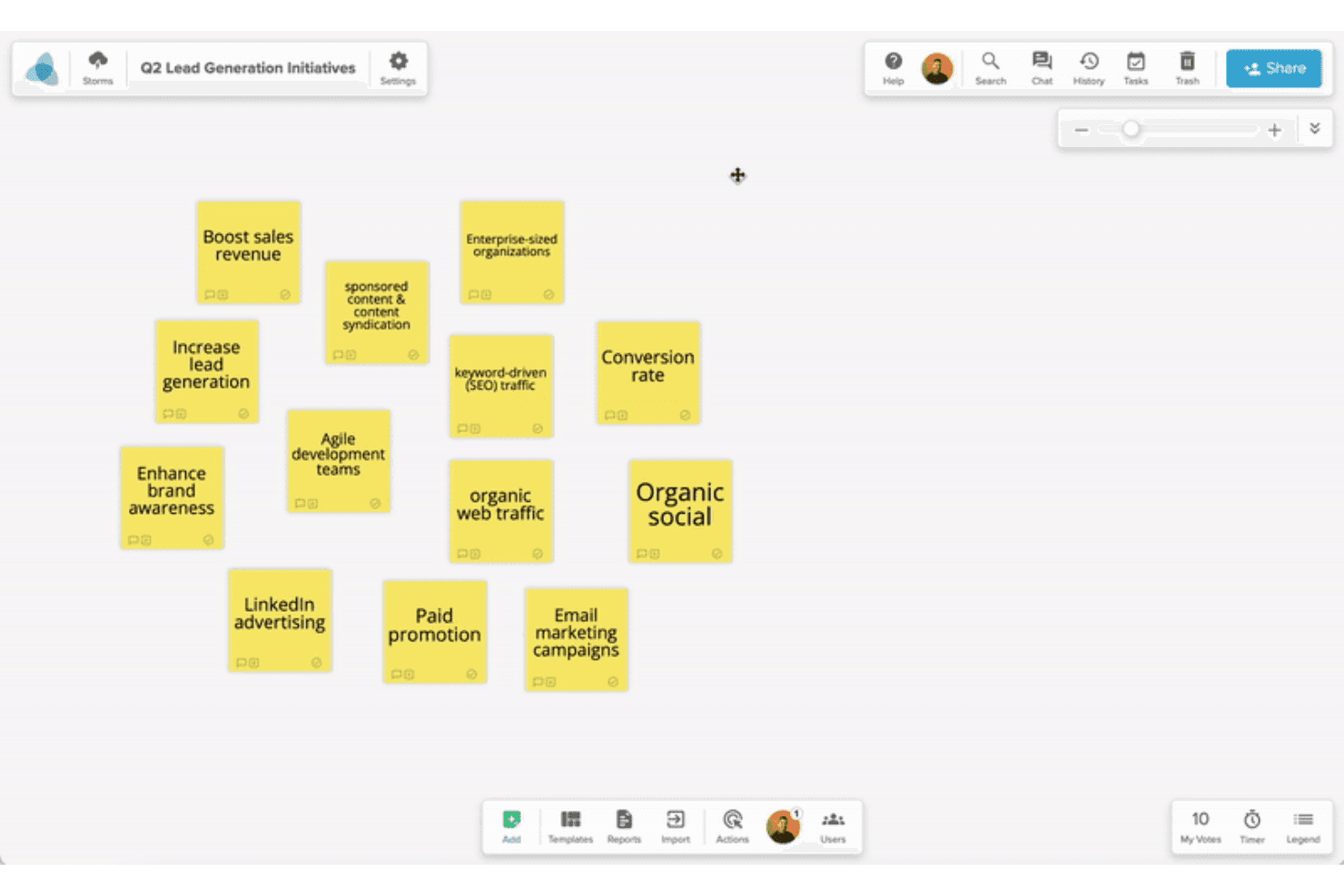
Stormboard helps teams capture and organize ideas into structured plans. Stormboard is a collaborative digital whiteboard built for structured brainstorming, offering AI-assisted idea generation, a large template library, real-time multi-user editing, and two-way sync with dev tools like Jira and Azure DevOps.
Who Is Stormboard Best For?
Stormboard is a strong fit for product and innovation teams that want AI-assisted ideation to flow directly into Jira, Rally, or Azure DevOps backlogs without manual handoffs.
Why I Picked Stormboard
I picked Stormboard as one of the best because StormAI is genuinely woven into the brainstorming process, not bolted on. It generates context-aware sticky notes per section, expands a single idea into five related ones, and clusters notes by theme or sentiment automatically. What pushes it further is the live two-way sync with Jira, Rally, and Azure DevOps, so ideas from a brainstorm session move directly into a sprint backlog without any manual re-entry.
Stormboard Key Features
- Substorms: Nest a full Storm inside a section of a parent Storm to break complex topics into focused, self-contained workspaces.
- Multiple sticky note types: Add text, image, video, freehand whiteboard, or index card notes to capture ideas in whatever format fits the moment.
- Built-in voting with exportable results: Collect votes directly on the board and export the results alongside word clouds and task data.
- Structured template library: Choose from hundreds of pre-built templates covering frameworks like SCAMPER, Affinity Diagram, and Abstraction Laddering.
Stormboard Integrations
Stormboard offers native two-way integrations with Jira, Rally, and Azure DevOps, plus Microsoft Office and Google Drive, Docs, Slides, and Sheets. It also connects with Microsoft Surface Hub and Azure OpenAI Service.
Pros and Cons
Pros:
- Multiple sticky note types support richer input
- Templates support structured discovery workshops
- StormAI expands and clusters brainstorm ideas
Cons:
- Live facilitation lacks video and spotlight tools
- Large sessions can experience board lag
Learn more about Stormboard: 10Best for structured facilitation with AI clustering
Mural
- Free plan available
- From $9.99/user/month (billed annually)
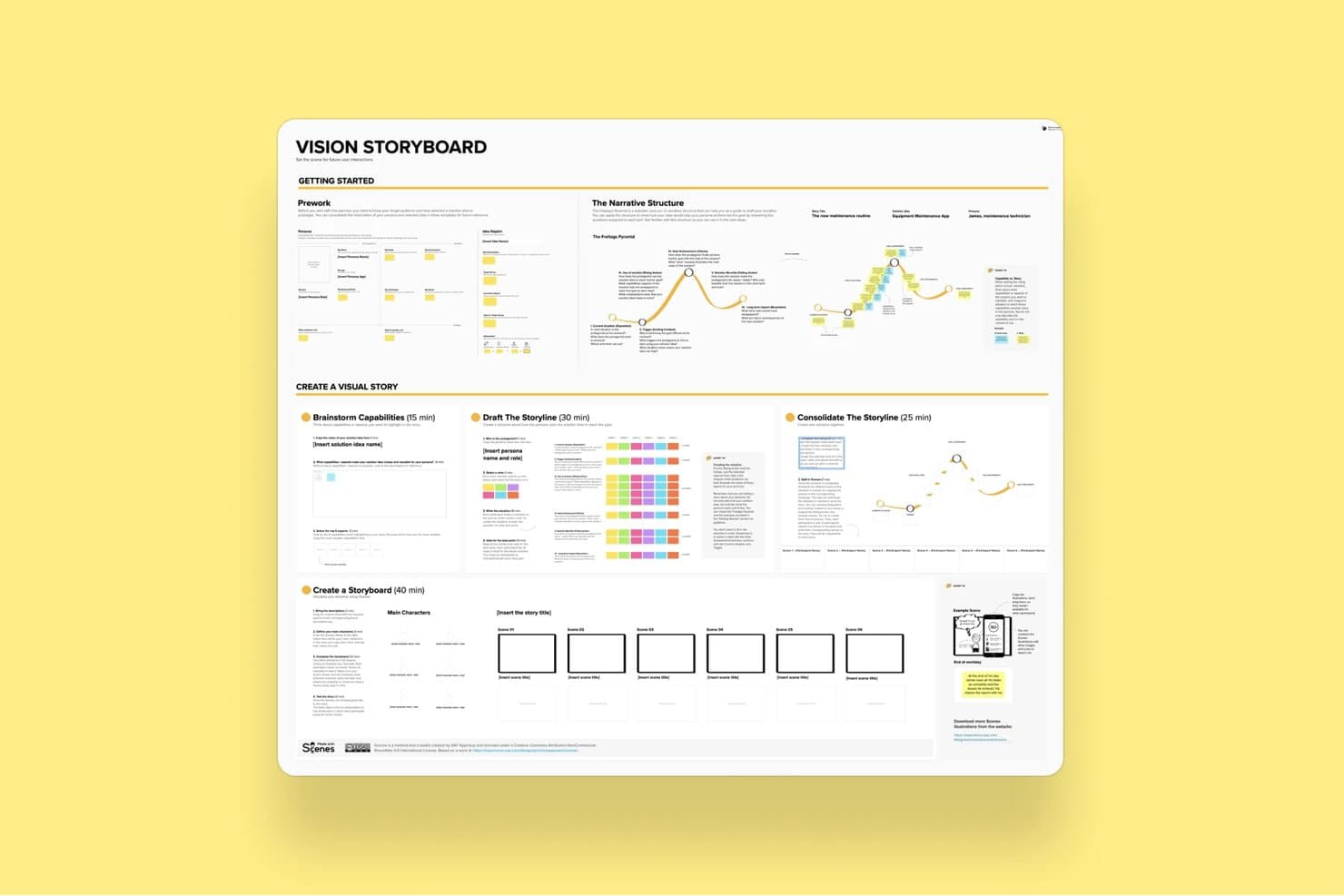
Mural's Vision Storyboard template guides users through building visual stories. Mural is a visual collaboration and brainstorming platform built around an infinite canvas, offering sticky notes, diagramming, AI-powered clustering, structured facilitation controls, and 250+ templates including LUMA design-thinking frameworks.
Who Is Mural Best For?
Mural is a strong fit for facilitators, consultants, and cross-functional teams who run structured workshops and need to move from raw ideas to organized outputs quickly.
Why I Picked Mural
Mural earns its spot on my shortlist because its AI Clustering feature genuinely changes how workshops end. Instead of manually grouping hundreds of sticky notes after a session, I can select them all and let Mural sort them into named thematic clusters, preview the results before committing, and then use the Summarize feature to pull key takeaways from each group. The full facilitation suite, including private mode to prevent groupthink and a step-by-step outline tool, means structured sessions stay on track from start to finish.
Mural Key Features
- Anonymous voting: Participants submit votes without seeing others' choices, keeping prioritization decisions free from social influence.
- Private mode: Hides each contributor's sticky notes from others during input phases, preventing groupthink before ideas are shared.
- Custom toolbar: Restricts which tools participants can access during a session, keeping the workspace focused on the task at hand.
- LUMA frameworks: A built-in set of design-thinking methods available on Business plans to guide teams through structured discovery and ideation activities.
Mural Integrations
Mural offers native integrations with Jira Cloud, Microsoft Teams, Zoom, Webex, Slack, Google Workspace, Adobe Creative Cloud Library, Butter, Azure Active Directory, Okta, and GitHub. It also provides an API for custom integrations.
Pros and Cons
Pros:
- Templates guide discovery and innovation workshops
- Facilitation controls support structured brainstorming sessions
- AI clustering organizes workshop output quickly
Cons:
- Large boards may respond slowly sometimes
- Interface changes can disrupt established workflows
Learn more about Mural:
Outras opções
Eis mais algumas opções sólidas que não entraram na lista das melhores ferramentas de brainstorming:
- 11ConceptboardBest for live facilitation with built-in video chat
- 12IdeamapBest for multi-method voting on brainstormed ideas
- 13LucidchartBest for turning diagrams into data-linked visuals
- 14ClickUpBest for turning whiteboard ideas into tracked tasks
- 15WhimsicalBest for product builders who sketch and plan
- 16MindomoBest for brainstorming across web, desktop and mobile
- 17BluescapeBest for brainstorming in air-gapped environments
- 18Confluence WhiteboardsBest for ideation that feeds straight into Jira
How I Evaluate Brainstorming Tools
I split my evaluation into three parts. First—and most heavily weighted—I check whether a tool lets teams edit a shared canvas simultaneously and capture ideas fast using sticky notes or freeform elements. Then I look at standout features like AI-assisted ideation and facilitation controls. Finally, I consider onboarding simplicity and pricing value.
Core Functionality (Table Stakes for This List)
When I'm selecting tools for my list, I score each one on a scale from 0 (does not offer the functionality) to 5 (excels in this area) for each core functionality listed below. I then convert the total into a percentage to help assess each tool's overall fit, with extra weight on any functionalities I've deemed essential.
- Real-Time Collaboration (Essential): I check whether multiple teammates can add and move sticky notes on the same board simultaneously without lag or cursor conflicts.
- Idea Capture Elements (Essential): Tools should offer more than plain text—I look for sticky notes, shapes, cards, and freeform drawing that let people capture thoughts fast.
- Organization & Clustering: I evaluate how easily you can drag ideas into groups, tag them by theme, or draw connectors to map relationships during an affinity mapping session.
- Voting & Prioritization: Built-in dot-voting or ranking matters here. I look at whether facilitators can configure vote limits and whether results display clearly for the group.
- Templates & Frameworks: A solid library of ready-made formats—like mind maps, SWOT grids, or How Might We boards—saves real setup time. I also check if you can save custom templates.
- Session Facilitation Controls: I look for features like timers, reveal toggles, and participant-management options that let a facilitator guide a structured workshop from start to finish.
Once I have a list of tools that meet the criteria, I consider what sets each platform apart.
Differentiating Factors (What Sets Vendors Apart)
Here's how I compare and contrast different vendors:
Standout Features
AI-assisted ideation is the first thing I check. I look for tools where AI can auto-cluster sticky notes or generate starter prompts mid-session—helpful when a product discovery workshop stalls. Timer and facilitation controls matter just as much. A good reveal toggle keeps ideas hidden until everyone has contributed, which prevents anchoring bias in remote sprint planning. I also evaluate whether a tool supports async contributions, since distributed teams need persistent boards that stay usable across time zones without losing thread context.
Beyond Features
I look at how easily ideas move from a brainstorming board into execution. If your team has to manually copy sticky notes into Jira or Linear, you've already lost context. Tools with native export or two-way sync to PM platforms save that handoff. Adoption matters just as much—I check whether non-technical stakeholders like execs or designers can jump in without a tutorial. A tool nobody opens after the first workshop isn't worth the license. I also evaluate security controls, since early-stage feature ideas are sensitive IP that needs proper board-level permissions and SSO.
Como escolher uma ferramenta de brainstorming
É fácil perder-se em listas extensas de funcionalidades e estruturas de preços complexas. Para o ajudar a manter-se concentrado enquanto percorre o seu processo específico de seleção de software, eis uma lista de verificação dos fatores a ter em conta:
| Fator | O que deve considerar |
|---|---|
| FatorEscalabilidade | O que deve considerarA ferramenta consegue acompanhar o crescimento da dimensão e da complexidade da sua equipa? Procure limites de utilizadores, quebras de desempenho com grandes volumes de dados ou custos que aumentem significativamente à medida que as equipas crescem. |
| FatorIntegrações | O que deve considerarIntegra-se facilmente com o seu conjunto de ferramentas atual, como o Slack, o Jira, o Figma ou o Trello? As soluções manuais consomem tempo e fazem perder o ritmo. |
| FatorPersonalização | O que deve considerarPode adaptar modelos, fluxos de trabalho ou vistas à forma como a sua equipa pensa e trabalha? As configurações iguais para todos costumam tornar os processos mais lentos. |
| FatorFacilidade de utilização | O que deve considerarAs equipas multifuncionais conseguem começar a utilizar a ferramenta com poucas explicações? Se forem necessárias horas para perceber como funciona, as pessoas não a utilizarão, por mais poderosa que seja. |
| FatorImplementação e integração inicial | O que deve considerarCom que rapidez pode começar a trabalhar? Procure ferramentas de importação, visitas guiadas ao produto e orientações na aplicação para que a sua equipa possa contribuir logo na primeira sessão. |
| FatorCusto | O que deve considerarO que obtém realmente pelo preço? Tenha atenção às funcionalidades de colaboração bloqueadas por pagamento ou aos preços elevados por utilizador que não correspondam às necessidades de utilização. |
| FatorMedidas de segurança | O que deve considerarA ferramenta é compatível com SSO, encriptação de dados e controlos de funções de utilizador? Se estiver a fazer brainstorming sobre ideias de produtos ou propriedade intelectual, não arrisque com normas de segurança pouco rigorosas. |
| FatorNecessidades de recursos internos | O que deve considerarSerá necessário que alguém faça a gestão contínua de modelos, utilizadores ou integrações? As ferramentas simples poupam tempo, especialmente em equipas mais pequenas. |
O que são ferramentas de brainstorming?
As ferramentas de geração de ideias são recursos digitais que ajudam indivíduos ou equipas a gerar ideias, organizá-las em grupos e demonstrar relações entre ideias ou tópicos. Pertencem ao mesmo grupo de software que os quadros brancos digitais ou as ferramentas de mapas mentais e foram concebidas para estimular o pensamento criativo e a colaboração em grupo. Incluem várias formas de visualizar ideias através de cores, símbolos, etiquetas, notas autocolantes e outros recursos, bem como ferramentas para colaborar com outros membros da equipa, incluindo mensagens com @ e coautoria simultânea.
As ferramentas de geração de ideias ajudam os grupos a trabalhar em conjunto, colaborando em ideias, organizando tarefas e reforçando a criatividade. Também conferem ordem a um processo anteriormente baseado em papel ou manual, digitalizando o ato de gerar ideias para que possa sempre consultar as suas ideias no futuro (em vez de voltar a uma fotografia dos seus rabiscos no quadro branco da sala de reuniões da sua empresa).
Características das ferramentas de geração de ideias
Ao selecionar ferramentas de geração de ideias, procure as seguintes características principais:
- Colaboração em tempo real: Permite que vários utilizadores contribuam com ideias em simultâneo, ajudando as equipas a manterem-se alinhadas e produtivas durante sessões ao vivo.
- Mapeamento visual de ideias: Permite aos utilizadores organizar pensamentos através de diagramas ou mapas mentais, facilitando a visualização de relações e o desenvolvimento de conceitos.
- Biblioteca de modelos: Disponibiliza estruturas prontas para formatos comuns de geração de ideias, permitindo que as equipas comecem rapidamente sem terem de configurar tudo de raiz.
- Ferramentas de comentários e feedback: Permitem aos membros da equipa deixar contributos diretamente nas ideias, apoiando a discussão e o aperfeiçoamento.
- Votação ou definição de prioridades: Permite às equipas classificar ou pontuar ideias para se concentrarem nas mais promissoras e tomarem decisões mais rapidamente.
- Opções de exportação: Permite guardar ou partilhar sessões em vários formatos, como PDF, PNG ou CSV, facilitando o trabalho de acompanhamento.
- Controlos de acesso: Permitem aos administradores gerir quem pode visualizar, editar ou comentar, protegendo ideias sensíveis e mantendo a organização nos espaços colaborativos.
- Acesso baseado na nuvem: Garante que os membros da equipa podem participar a partir de qualquer lugar com acesso à Internet, apoiando modelos de trabalho remoto e híbrido.
- Funcionalidade de quadro branco: Oferece um espaço flexível para pensamento livre, esboços ou criação de diagramas sem restrições.
- Suporte para integrações: Liga-se a ferramentas como o Slack, o Trello ou o Google Drive para simplificar os fluxos de trabalho e reduzir a alternância entre contextos.
Benefícios do software de geração de ideias
A implementação de ferramentas de geração de ideias proporciona vários benefícios à sua equipa e à sua empresa. Eis alguns dos benefícios que pode esperar:
- Geração mais rápida de ideias: Os contributos em tempo real e as ferramentas visuais ajudam as equipas a criar mais ideias em menos tempo.
- Melhor alinhamento da equipa: Os espaços de trabalho partilhados e os comentários mantêm todos a par e reduzem os mal-entendidos.
- Sessões mais organizadas: Os modelos e as funcionalidades de mapeamento conferem estrutura à geração de ideias, para que estas não se percam nem sejam esquecidas.
- Tomada de decisões mais fácil: As ferramentas de votação e as funcionalidades de definição de prioridades ajudam as equipas a identificar rapidamente as ideias mais valiosas.
- Melhor colaboração remota: O acesso à nuvem e as integrações facilitam a participação das equipas distribuídas e ajudam-nas a manterem-se envolvidas.
- Maior concretização das ideias: As opções de exportação e os fluxos de trabalho ligados ajudam a transformar ideias iniciais em passos concretos.
- Documentação mais clara: Todos os contributos são registados automaticamente, para que não tenha de depender da memória ou de notas.
Custos e preços das ferramentas de geração de ideias
A seleção de ferramentas de geração de ideias exige compreender os vários modelos de preços e planos disponíveis. Os custos variam consoante as funcionalidades, a dimensão da equipa, os complementos, entre outros fatores. A tabela abaixo resume os planos comuns, os respetivos preços médios e as funcionalidades normalmente incluídas nas soluções de ferramentas de geração de ideias:
Tabela de comparação de planos para ferramentas de geração de ideias
| Tipo de plano | Preço médio | Funcionalidades comuns |
|---|---|---|
| Tipo de planoPlano gratuito | Preço médio$0 | Funcionalidades comunsCaptura básica de ideias, modelos limitados, acesso de um único utilizador e opções de exportação mínimas. |
| Tipo de planoPlano pessoal | Preço médio$5–$15/utilizador/mês | Funcionalidades comunsQuadros ilimitados, modelos adicionais, armazenamento na nuvem e suporte por e-mail. |
| Tipo de planoPlano empresarial | Preço médio$10–$25/utilizador/mês | Funcionalidades comunsColaboração em equipa, edição em tempo real, integrações com aplicações de terceiros e suporte prioritário. |
| Tipo de planoPlano empresarial avançado | Preço médio$20–$40/utilizador/mês | Funcionalidades comunsControlos administrativos avançados, SSO, registos de auditoria, integração inicial dedicada e definições de segurança personalizadas. |
Perguntas frequentes sobre ferramentas de tempestade de ideias
Devido à minha vasta experiência na utilização de ferramentas de tempestade de ideias, é frequente pedirem-me mais informações sobre este tema. Eis as respostas às perguntas mais frequentes:
Como é que as ferramentas de tempestade de ideias apoiam as equipas remotas?
As ferramentas de tempestade de ideias permitem que as equipas remotas partilhem ideias em tempo real, independentemente do local onde se encontram. Pode utilizar quadros partilhados, edição em direto, comentários e videochamadas para colaborar como se estivessem na mesma sala. Procure ferramentas com acesso à nuvem, gravação automática e compatibilidade entre dispositivos para manter o trabalho em andamento.
Porque é que a tempestade de ideias é importante?
A tempestade de ideias é fundamental enquanto forma de promover a criatividade, a inovação e a resolução colaborativa de problemas. É uma excelente forma de as equipas gerarem novas ideias, utilizando um pensamento inovador para desafiar pressupostos.
Ao envolver todas as pessoas em reuniões inclusivas, aumenta o moral da equipa, promove o envolvimento e inspira uma nova forma de pensar. Em última análise, isto pode conduzir a uma melhor tomada de decisões e a soluções mais eficazes.
Quais são algumas técnicas populares de tempestade de ideias?
Existem muitas técnicas diferentes de tempestade de ideias que pode utilizar para desenvolver novas ideias. Estas incluem mapas mentais, análise SWOT, ideação rápida e escrita de ideias. Outras opções populares incluem os Seis Chapéus do Pensamento e o SCAMPER (Substituir, Combinar, Adaptar, Modificar, Dar outro uso, Eliminar ou Reverter).
A melhor técnica a utilizar depende muito do contexto da sua situação, bem como dos objetivos da sessão de tempestade de ideias. Recomendo combinar diferentes técnicas para descobrir o que funciona melhor para si.
A tempestade de ideias é o mesmo que um mapa mental?
Embora os dois conceitos estejam relacionados, a tempestade de ideias não é o mesmo que um mapa mental. Tempestade de ideias é um termo geral que se aplica à geração de uma vasta gama de novas ideias, de qualquer forma que funcione.
Por outro lado, um mapa mental descreve uma ferramenta ou técnica visual que ajuda as equipas a organizarem os seus pensamentos e ideias. Assim, enquanto a tempestade de ideias se centra na geração de novas ideias, o mapa mental ajuda a organizar e visualizar essas ideias.
Como gerir demasiadas ideias durante uma sessão de tempestade de ideias?
Defina um temporizador para cada ronda de tempestade de ideias e limite o número de ideias que cada pessoa pode partilhar. Utilize funcionalidades de votação ou pontuação para reduzir as opções. Agrupe ideias semelhantes para evitar repetições e reveja mais tarde as que têm menor prioridade, se necessário.