

As melhores ferramentas online de roteiros ajudam a criar, partilhar e atualizar roteiros de produtos em tempo real—para que as equipas se mantenham alinhadas mesmo quando as prioridades mudam. Sem estas ferramentas, os roteiros vivem muitas vezes em apresentações estáticas ou folhas de cálculo desatualizadas que causam falhas de comunicação e comprometem o planeamento.
Testei mais de 25 ferramentas de roteiros e sei quais oferecem vistas flexíveis, funcionalidades de colaboração e integrações que as equipas de produto realmente utilizam.
Neste guia, encontrará plataformas que facilitam a visualização da estratégia, o ajuste dos prazos e a manutenção de todos na mesma página, desde a liderança até às equipas de entrega.
Why Trust Our Software Recommendations
6,700+
Reviews
20
Industry experts
16+
Evaluation factors
14
Years
Our team has been testing and reviewing software since 2012. As product managers ourselves, we know how difficult—and important—it is to choose the right software.
For this guide, we evaluated tools using hands-on testing and independent research, scoring tools using our selection criteria.
Our reviews reflect our human editorial judgment, not a sales pitch.
Expert reviewers:
- Andrew LumbySenior TPM
- Cristiano ValimSenior UI/UX Lead


Tabela de comparação das ferramentas online de roteiros
| Tool | Best For | Trial Info | Price | ||
|---|---|---|---|---|---|
| 1 | Best for mapping product workflows | Free plan + 14-day free trial + free demo available | From $8/user/month (billed annually) | Website | |
| 2 | Best for branded, audience-based roadmap portals | Free plan + 30-day trial + demo available | From $1.10/user/month | Website | |
| 3 | Best for flexible roadmap creation | Free demo available | Pricing upon request | Website | |
| 4 | Best with OKR planning | 7-day free trial + free demo available | From $24/user/month (billed annually) | Website | |
| 5 | Best to build roadmaps for presenting | 14-day free trial available | From $19/user/month (billed annually) | Website | |
| 6 | Best for AI-driven portfolio prioritization | Free demo available | Pricing upon request | Website | |
| 7 | Best for centralizing product feedback | Free plan + free demo available | From $19/user/month (billed annually) | Website | |
| 8 | Best for scalability and flexibility | Free demo available | Pricing upon request | Website | |
| 9 | Best all-in-one product management solution | 14-day free trial + free demo available | From $24/user/month | Website | |
| 10 | Best for Agile development teams | Free plan + 14-day free trial available | From $7.91/user/month | Website |


Visão geral das 10 melhores ferramentas online de roteiros
Eis a minha visão geral das 10 melhores ferramentas online de roteiros que selecionei para destacar. Incluí o melhor caso de utilização de cada plataforma, as funcionalidades de destaque, as integrações e as vantagens e desvantagens. Também adicionei uma captura de ecrã da interface para que possa conhecer melhor as diferentes ferramentas.
 1Best for mapping product workflows
Miro
- Free plan + 14-day free trial + free demo available
- From $8/user/month (billed annually)
Visit WebsiteCustomer Rating:4.8/5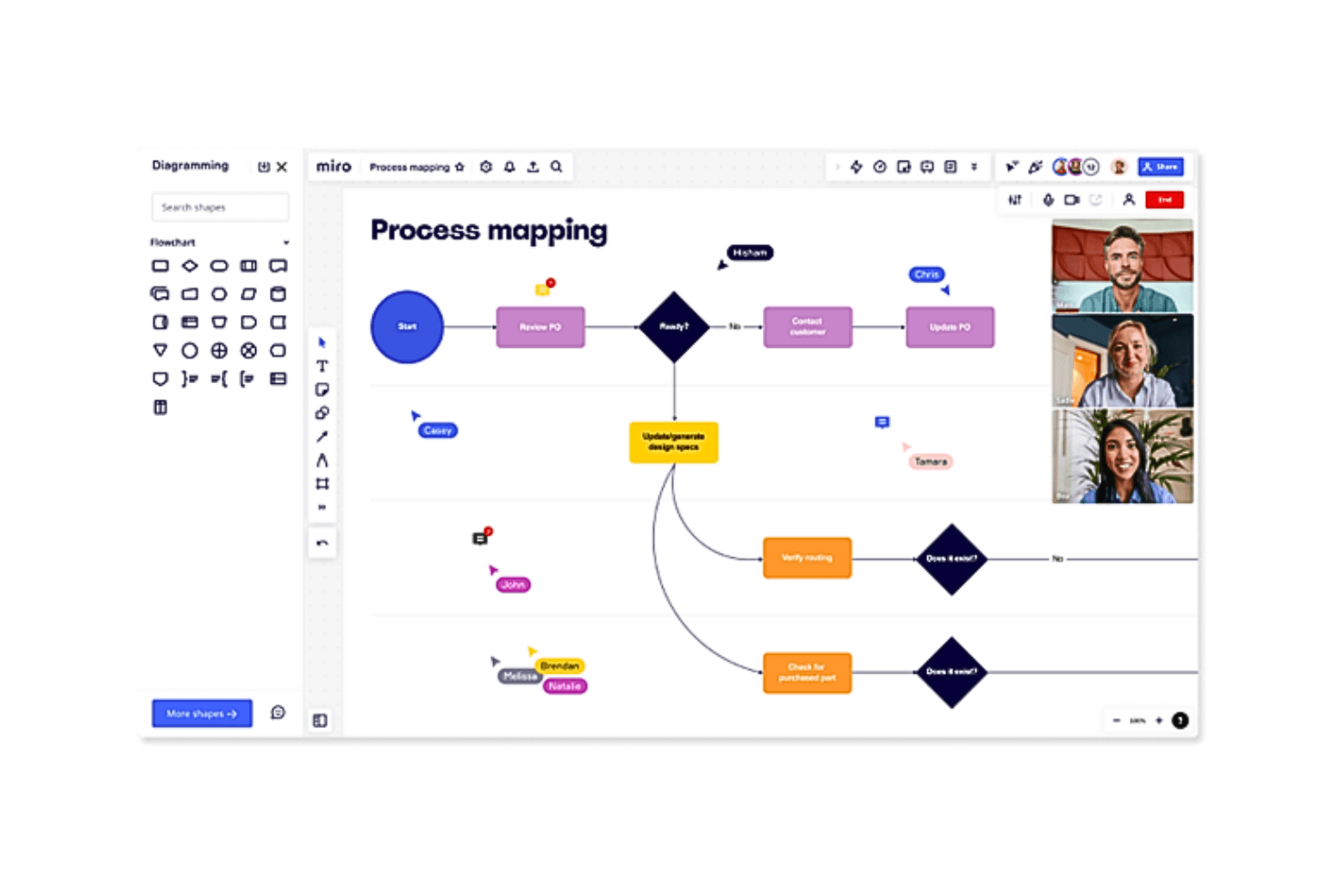
Outline both your product roadmap and core development processes and workflows in the same system Miro is a collaborative visual workspace that combines an infinite canvas with purpose-built roadmapping tools, including Timeline, Kanban, and Table views, template libraries, and real-time co-editing for cross-functional product planning.
Who Is Miro Best For?
Miro works well for cross-functional product teams that need to map workflows, dependencies, and timelines alongside discovery artifacts like journey maps and wireframes—all in one shared workspace.
Why I Picked Miro
Miro earns its spot on my shortlist because it lets product teams build roadmaps directly alongside the discovery and planning artifacts they're already working in—journey maps, dependency diagrams, wireframes—all on the same infinite canvas. I particularly like how one dataset can render as a Timeline, Kanban, or Table view simultaneously, so engineering leads and executive stakeholders each see the same roadmap in the format that works for them. The AI-powered "Roadmap Strategist" Sidekick, which generates Timeline structures from content already on the board, makes it practical for mapping complex product workflows without starting from scratch.
Miro Key Features
- Two-way dev tool sync: Miro syncs bidirectionally with Jira, Asana, Azure DevOps, Linear, and ClickUp so roadmap changes reflect in your dev tools automatically.
- Real-time co-editing: Up to ~200 simultaneous editors can work on the same board with live cursors and inline commenting.
- Miro Insights: An AI-powered feedback tool that pulls customer data from CRMs, support tickets, and surveys to surface ranked feature opportunities with source traceability.
- Planner capacity view: The Jira and Azure DevOps Planner shows a capacity and load figure per column, flagging overloaded sprints when story points exceed your set limit.
Miro Integrations
Miro offers 250+ integrations, including native two-way sync with Jira, Asana, Azure DevOps, Linear, and ClickUp, plus Microsoft 365, Google Workspace, Power BI, Looker, and Tableau. Its APIs and SDKs support custom integrations.
Pros and Cons
Pros:
- Real-time collaboration supports roughly 200 participants
- Synced timeline, table, and kanban views
- Maps workflows beside roadmap timelines
Cons:
- Dependencies don’t automatically shift dates
- Prioritization relies on templates, not scoring
 Best for branded, audience-based roadmap portals
- Free plan + 30-day trial + demo available
- From $1.10/user/month
Visit WebsiteCustomer Rating:5/5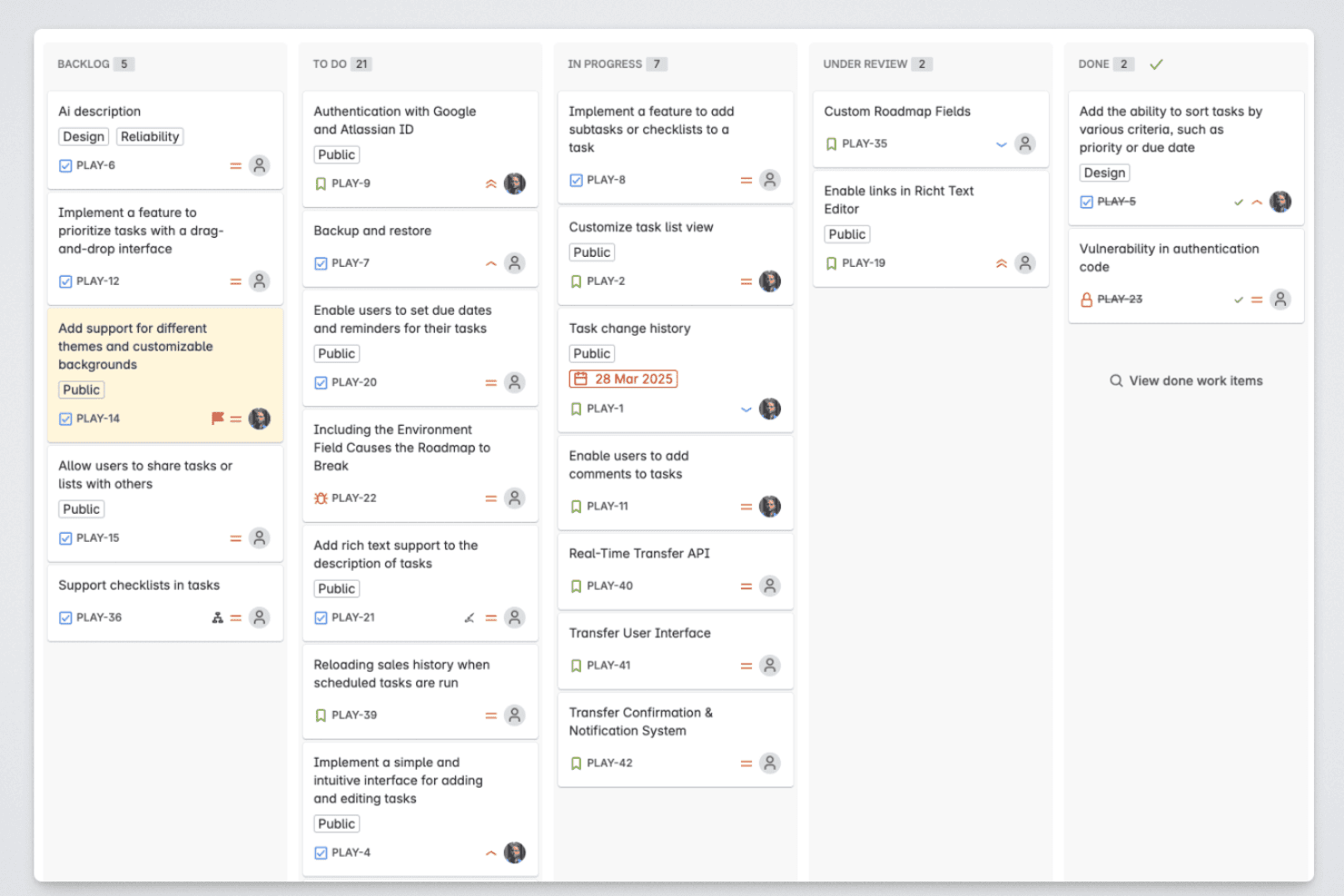
Released lets product managers organize roadmap items across backlog, in-progress, review, and completed stages. Released is a Jira-native roadmap tool that lets product teams publish live roadmaps, collect customer feedback, and generate AI-powered release notes directly from their Jira data.
Who Is Released Best For?
Released is a strong fit for product managers at Jira Cloud teams who need to communicate roadmap progress and product updates to external audiences like customers and partners.
Why I Picked Released
I've included Released in my top picks because its audience-specific roadmap portals are genuinely differentiated from what most roadmap tools offer. I can publish one portal for customers showing high-level themes, another for executives with full timeline detail, and a third for sales, all pulling live from the same Jira data with no manual updates. Granular access controls let me make each view public, password-protected, or invite-only, so I'm never sharing more than I intend to with any given audience.
Released Key Features
- Jira-native hierarchy mapping: Automatically maps initiatives, epics, and stories directly from Jira fields and structures.
- Customer feedback collection: Lets users submit ideas and vote on features through a branded feedback portal tied to Jira items.
- AI-generated release notes: Drafts release notes from completed Jira tickets with customizable templates and brand voice settings.
- Slack and Confluence publishing: Publishes product updates and roadmap changes to Slack channels and Confluence pages in real time.
Released Integrations
Released offers native integrations with Jira Cloud, Jira Product Discovery, Slack, and Confluence.
Pros and Cons
Pros:
- Customer feedback voting built into roadmap
- AI-generated release notes from Jira data
- Audience-specific portals for external stakeholder sharing
Cons:
- Limited roadmap view options available
- Only works with Jira Cloud
Learn more about Released: Best for flexible roadmap creation
- Free demo available
- Pricing upon request
Visit WebsiteCustomer Rating:4.4/5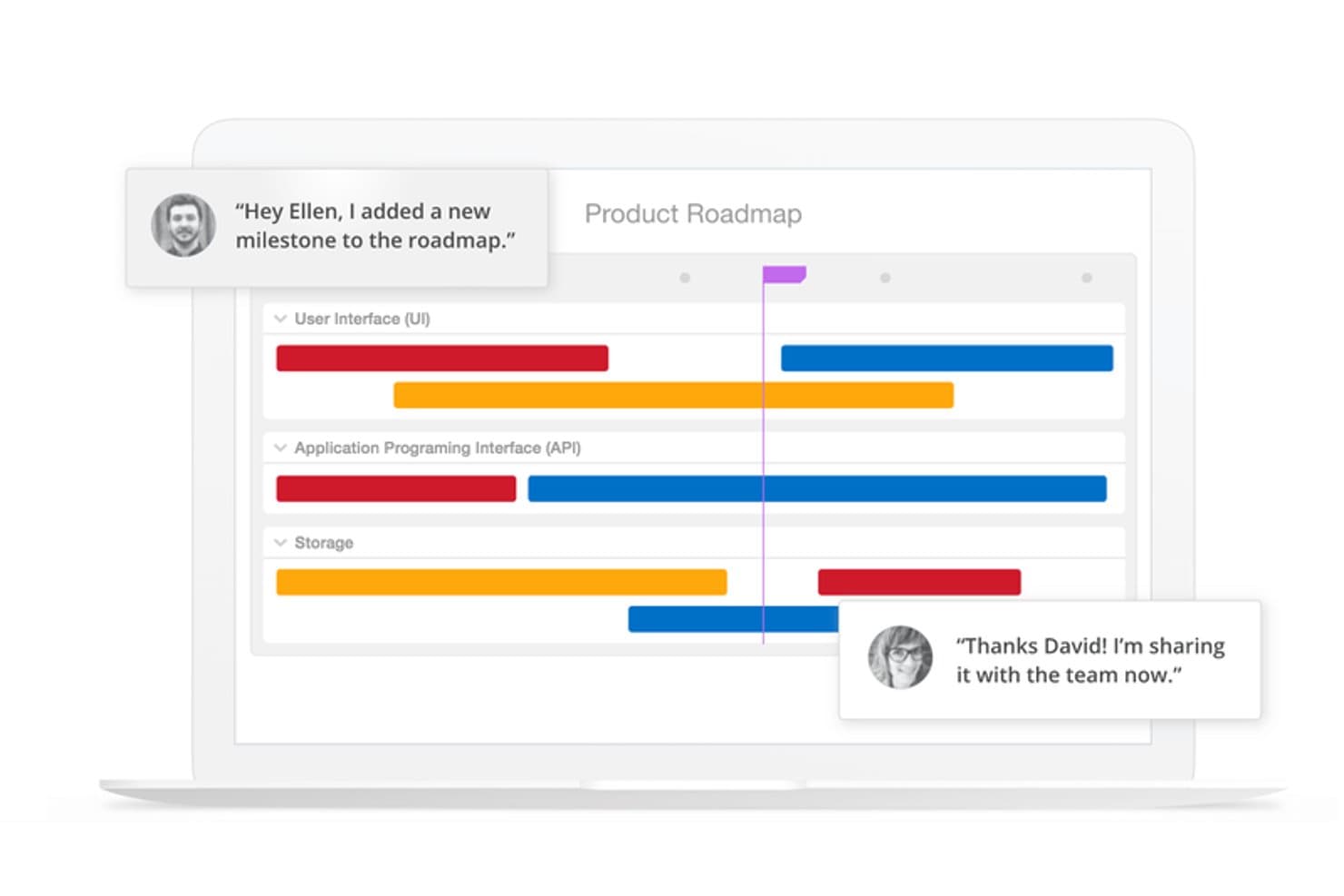
ProductPlan lets teams collaborate on roadmaps with real-time comments. ProductPlan is a roadmap software platform that combines visual timeline building, portfolio management, prioritization scoring, OKR linking, and AI-assisted idea discovery.
Who Is ProductPlan Best For?
ProductPlan is a strong fit for product teams that need to present strategy across multiple stakeholder audiences without maintaining separate roadmap versions for each one.
Why I Picked ProductPlan
ProductPlan earns its spot as one of the best on my shortlist because of how much flexibility it packs into the roadmap-building experience itself. I love that you can structure timelines using bars, containers, lanes, and milestones, then instantly switch between Timeline, List, Table, and Portfolio views without rebuilding anything. What really sets it apart is the Portfolio View: you can regroup multiple roadmaps by objective, team, or custom field and save named views for different audiences, all from one live dataset.
ProductPlan Key Features
- OKR linking: Connect individual initiatives to portfolio-level objectives and cascade strategy down to team roadmaps.
- Idea intake forms: Let customers and stakeholders submit ideas directly without requiring an account, keeping feedback centralized.
- Launch management checklists: Attach task-based launch checklists with owners, due dates, and statuses directly to roadmap items.
- Two-way Jira and Azure DevOps sync: Push date changes back to your dev tools in one click, with epics mapping to containers and stories mapping to bars.
ProductPlan Integrations
ProductPlan has native two-way integrations with Jira and Azure DevOps, plus integrations with GitHub, Confluence, Slack, and Microsoft Teams. It also supports an API, webhooks, and Zapier for custom connectivity.
Pros and Cons
Pros:
- Portfolio rollups connect roadmaps to objectives
- Live audience views reduce presentation rework
- Flexible timelines support complex roadmap structures
Cons:
- No dedicated capacity planning view documented
- Prioritization relies on one scoring model
Learn more about ProductPlan: Best with OKR planning
- 7-day free trial + free demo available
- From $24/user/month (billed annually)
Visit WebsiteCustomer Rating:4.2/5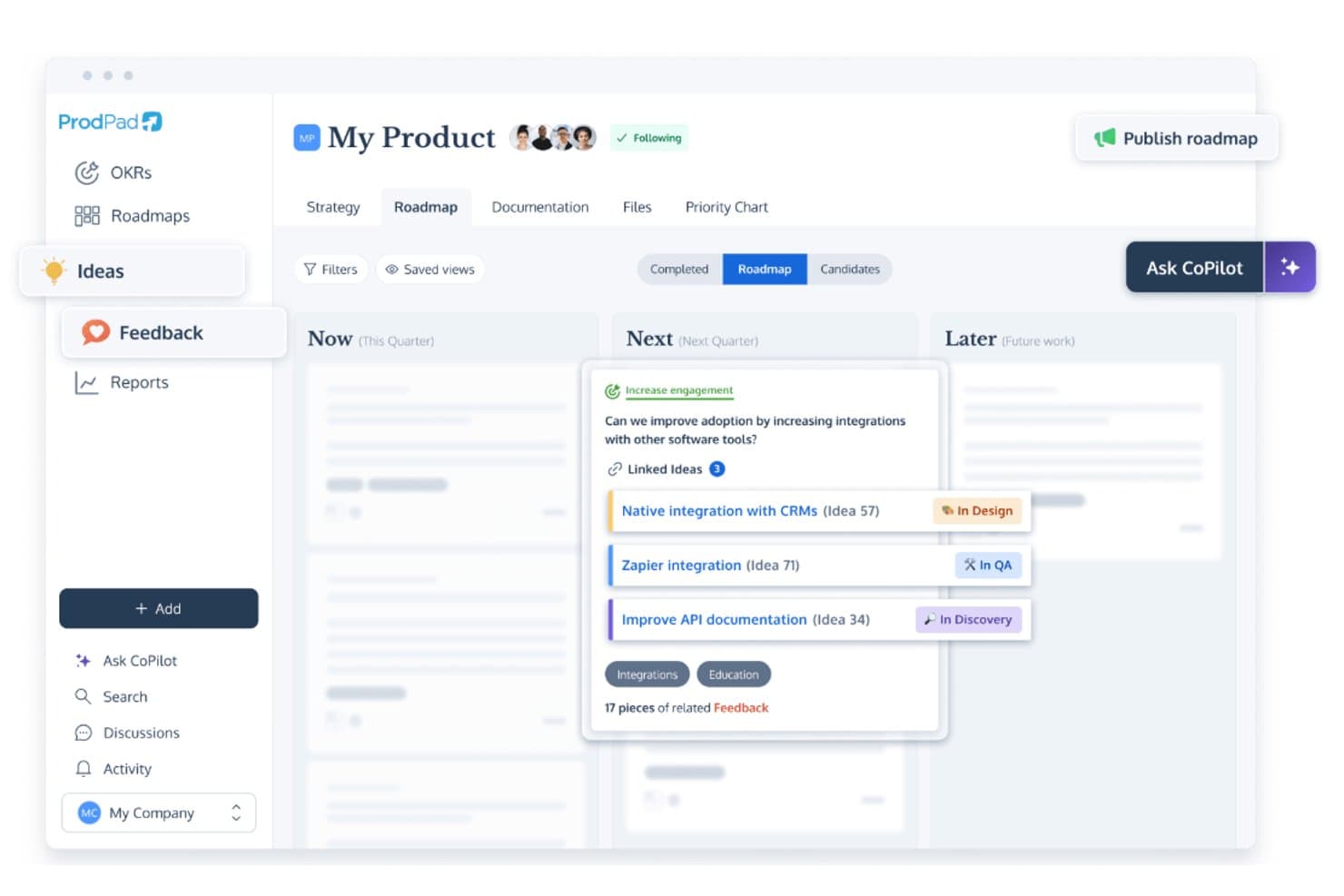
ProdPad links roadmap ideas to feedback and tracks development status. ProdPad is a product roadmap tool built around a Now-Next-Later framework, with native OKR linking, idea management, customer feedback capture, and flexible roadmap publishing.
Who Is ProdPad Best For?
ProdPad is a strong fit for product teams that plan around business outcomes and need their roadmap directly tied to OKRs.
Why I Picked ProdPad
I picked ProdPad as one of the best because it's the only roadmap tool I've used where OKRs aren't bolted on as an afterthought. You can link every roadmap Initiative directly to an Objective, and the Group by Objective view ranks those Objectives by how many active Initiatives support them, so you can immediately spot strategic gaps. Key Results carry live On Track, Behind, or At Risk statuses, and you can set a target outcome metric before building, then track actual results post-release.
ProdPad Key Features
- Now-Next-Later roadmap: Organize Initiatives across three strategic time horizons—Now, Next, and Later—without committing to fixed dates or timelines.
- Roadmap publishing app: Share live roadmaps via hosted URLs, embeddable iframes, or PDF exports, with password protection and per-Initiative visibility controls.
- Impact/effort matrix: Plot and compare ideas visually on a prioritization chart with Quick Wins and Time Sinks quadrants to guide backlog decisions.
- CoPilot AI: A built-in AI assistant that drafts specs, summarizes customer feedback, flags duplicate ideas, and suggests Initiatives—included at no extra cost on every plan.
ProdPad Integrations
ProdPad integrates with Jira, Azure DevOps, GitHub, Linear, Slack, Microsoft Teams, Salesforce, Intercom, and Confluence. It also supports an API, webhooks, and Zapier.
Pros and Cons
Pros:
- Flexible publishing serves different audiences
- Feedback traces customer needs to initiatives
- Native OKR links clarify roadmap decisions
Cons:
- Initiative updates depend on manual upkeep
- No dates hinder release timeframe tracking
Learn more about ProdPad: Best to build roadmaps for presenting
- 14-day free trial available
- From $19/user/month (billed annually)
Visit WebsiteCustomer Rating:4/5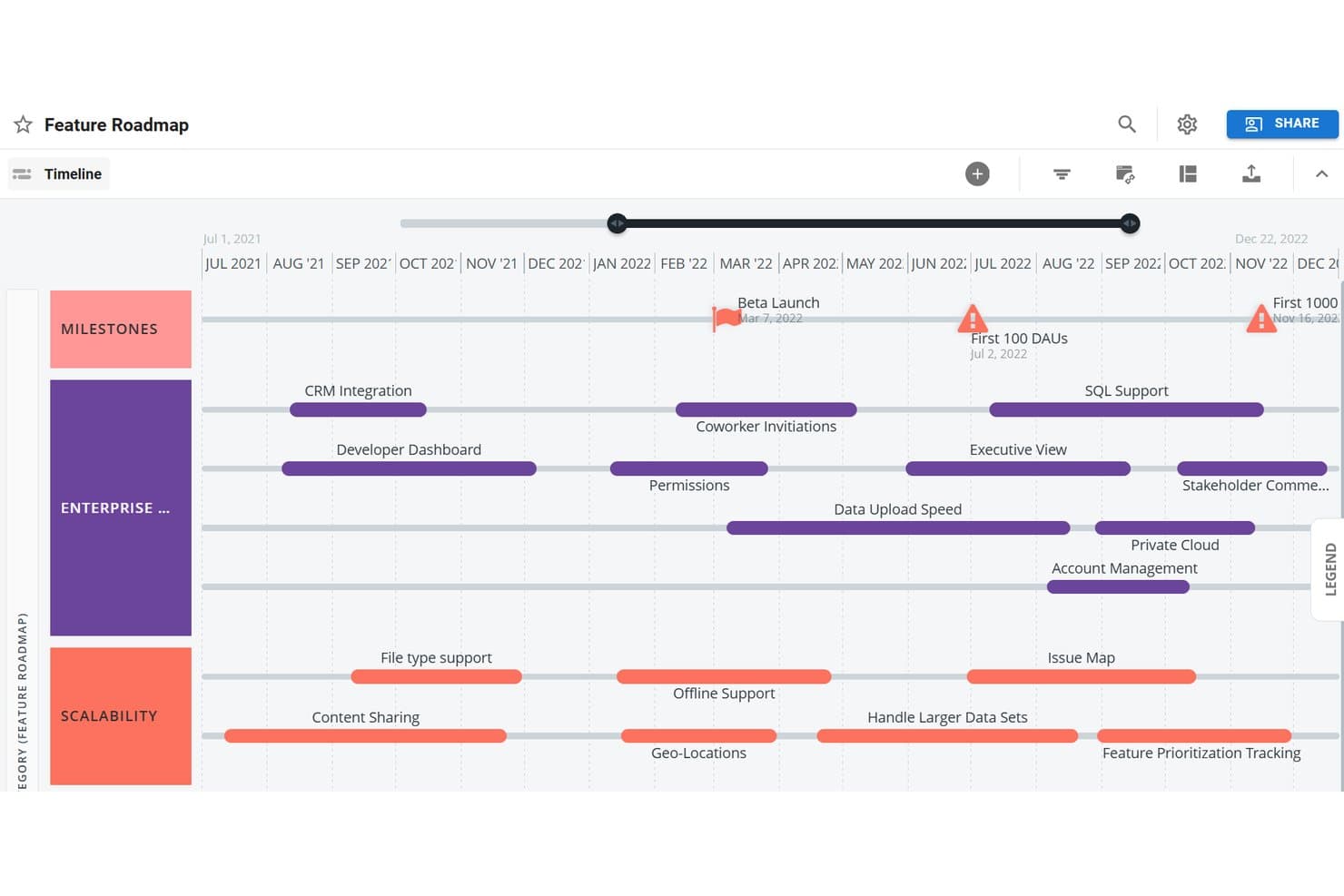
Tempo Roadmapping Software visualizes features on a timeline by category. Tempo Roadmapping Software is a visual roadmap builder that offers timeline, swimlane, and table views alongside prioritization frameworks, customer feedback collection, and branded publishing options.
Who Is Tempo Roadmapping Software Best For?
Tempo Roadmapping Software is a strong fit for product managers and executive stakeholders who need polished, presentation-ready roadmaps to align cross-functional teams and communicate strategy to leadership.
Why I Picked Tempo Roadmapping Software
Tempo Roadmapping Software earns its spot on my shortlist because it's purpose-built for creating roadmaps that look polished in front of an audience. I love that you can export timeline views as slide-ready PNGs in 16:9 or 4:3, so dropping a roadmap into a board deck takes seconds. The branded publish-to-URL feature lets you add your logo, a vision statement, and a custom legend before sharing, so stakeholders see a finished product, not a raw tool screenshot.
Tempo Roadmapping Software Key Features
- Customer feedback inbox: Collect and organize customer feedback directly in the tool, then link it to roadmap ideas so every item traces back to a real request.
- Idea Manager with weighted scoring: Score and rank ideas using built-in Value vs. Effort, RICE, or custom weighted models before promoting them onto your roadmap.
- Portfolio roadmap roll-up: Combine individual team roadmaps into a single high-level view so you can track cross-team initiatives in one place.
- Confluence embedding: Embed a published roadmap URL directly into Confluence pages so stakeholders always access it in context.
Tempo Roadmapping Software Integrations
Tempo Roadmapping Software offers native integrations with Jira and Azure DevOps, plus one-way imports from Asana, monday.com, Trello, GitHub, GitLab, Shortcut, and Pivotal Tracker. It also supports Confluence embedding and a REST API for custom integrations.
Pros and Cons
Pros:
- Portfolio roll-ups unify team roadmaps
- Customer feedback links directly to ideas
- Board-ready exports support stakeholder presentations
Cons:
- Real-time collaboration remains limited
- Published roadmaps are image-based
Learn more about Tempo Roadmapping Software: Best for AI-driven portfolio prioritization
- Free demo available
- Pricing upon request
Visit WebsiteCustomer Rating:4.8/5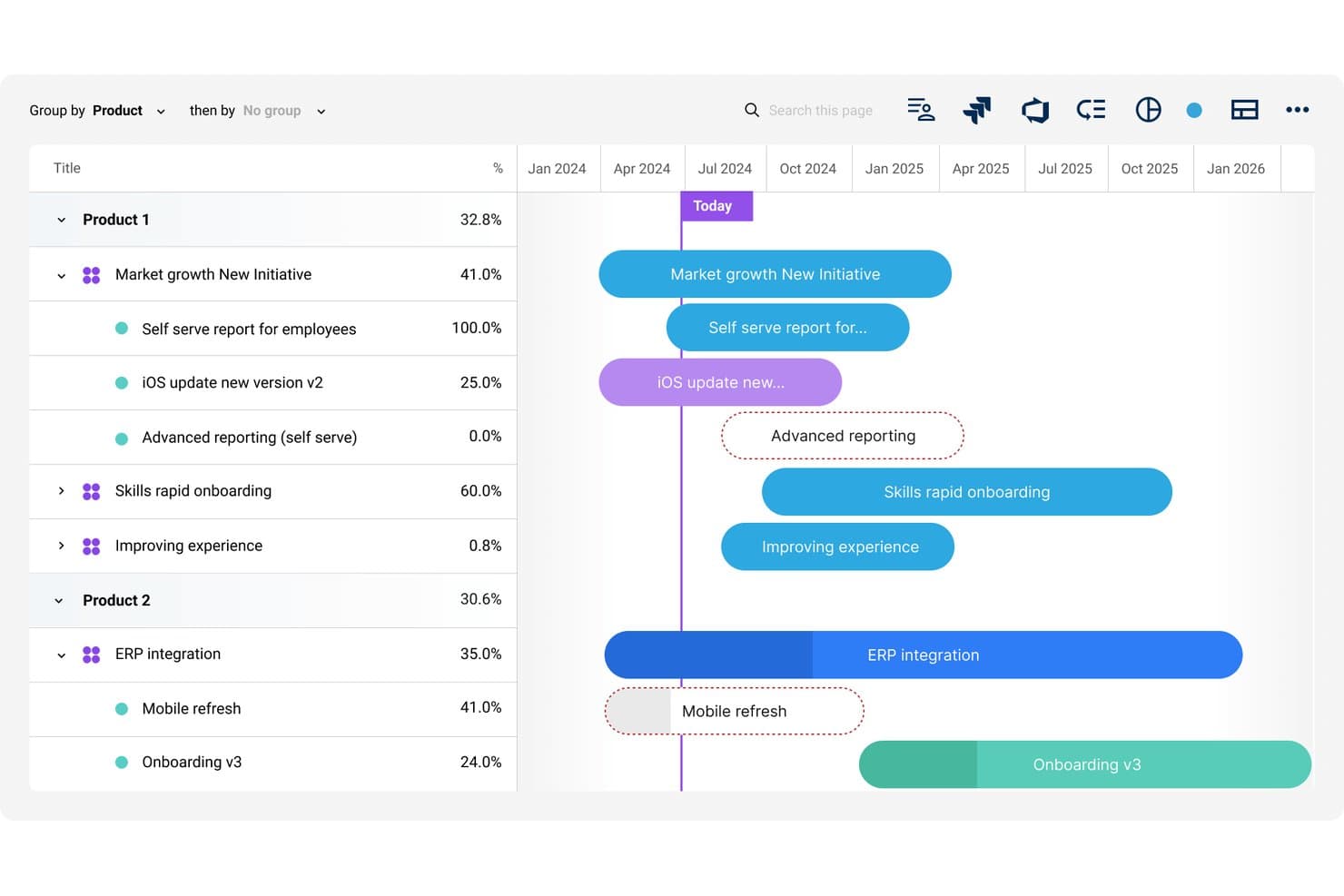
Dragonboat visualizes multi-product roadmaps with timeline progress tracking. Dragonboat is a product portfolio roadmap platform that combines visual roadmap creation, AI-assisted prioritization, OKR tracking, customer feedback intake, and capacity planning across multi-product and multi-team environments.
Who Is Dragonboat Best For?
Dragonboat is a strong fit for product teams managing multiple products or portfolios who need to connect strategy, prioritization, and delivery in one place.
Why I Picked Dragonboat
I picked Dragonboat as one of the best because its AI-assisted prioritization works at the portfolio level, not just per product. I love how it uses scoring models like RICE and its own MoAR method to surface which initiatives align best with your OKRs, then automatically updates your roadmap placements to reflect those recommendations. The "1-Click AI Planner" is what seals it for me: it builds resource plans across multiple teams from the same data powering your roadmap.
Dragonboat Key Features
- Multiple roadmap views: Choose from five built-in formats—including Kanban, Gantt, swimlane, and a 3D Dynamic view—to display your roadmap for any audience.
- Evergreen slide decks: Auto-generated presentation slides pull from live roadmap data, so you're never rebuilding decks from scratch before a meeting.
- Customer feedback intake: Connect tools like Salesforce, Zendesk, and Slack to pull in customer requests, then use AI to tag and surface themes across your portfolio.
- Capacity planning with what-if scenarios: Model resource demand by role, run scenario comparisons, and account for carry-over work before committing to a plan.
Dragonboat Integrations
Dragonboat offers 200+ integrations, including Jira, Azure DevOps, Asana, Slack, Microsoft Teams, Salesforce, Zendesk, Confluence, and Tableau. Its API and MCP server support custom connections and AI clients such as Claude and ChatGPT.
Pros and Cons
Pros:
- Flexible roadmap views support executive storytelling
- Live slide decks keep stakeholder views current
- Portfolio-wide AI prioritization links strategy to capacity
Cons:
- Taxonomy setup can overwhelm smaller product teams
- Some controls are difficult to locate
Learn more about Dragonboat: Best for centralizing product feedback
- Free plan + free demo available
- From $19/user/month (billed annually)
Visit WebsiteCustomer Rating:4.5/5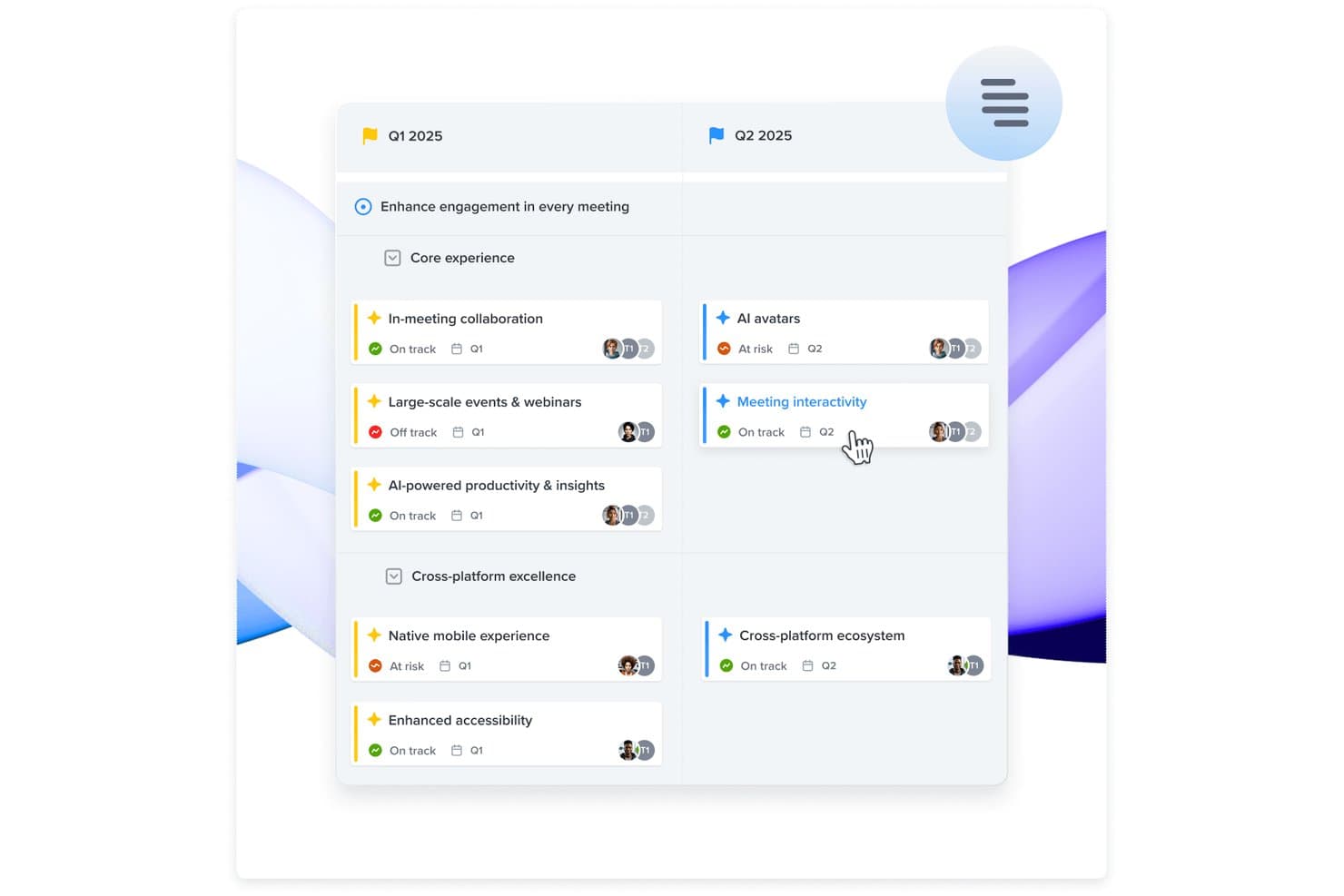
Productboard organizes roadmap initiatives by quarter with status tracking. Productboard is a product management platform that combines visual roadmap building, customer feedback collection, and feature prioritization across timeline, column, and grid-based board layouts.
Who Is Productboard Best For?
Productboard is a strong fit for product teams that need to connect customer feedback directly to roadmap decisions, especially at mid-size to enterprise companies where strategic alignment across multiple stakeholders is a constant challenge.
Why I Picked Productboard
I picked Productboard as one of the best because it's genuinely built around the idea that your roadmap should grow out of customer feedback, not the other way around. I love how feedback from Zendesk, Gong, Slack, and a dozen other sources flows into a central insights repository, where you can link each piece directly to a feature or initiative. The Customer Importance Score then surfaces which items carry the most weight across your user base, so your prioritization decisions are traceable to real signal rather than gut feel.
Productboard Key Features
- Timeline and column boards: Build visual roadmaps across date-based timelines or abstract column layouts like Now/Next/Later, and switch between them without losing your board settings.
- Custom prioritization formulas: Model frameworks like RICE, WSJF, and ICE using custom number fields on grid boards, then sort and group your backlog by score.
- Two-way Jira sync: Connect Productboard to Jira with bidirectional field mapping so status changes in Jira automatically update your product items.
- Customer Portal: Publish a branded, external-facing portal where customers vote on features and submit ideas, with all responses feeding directly back into your product items.
Productboard Integrations
Productboard offers 25+ native integrations, including Jira, Azure DevOps, Slack, Microsoft Teams, Zendesk, Intercom, Gong, and Salesforce. It also provides REST API v2.0, and Zapier connectivity.
Pros and Cons
Pros:
- Supports tailored timeline and column views
- Links customer insights to feature priorities
- Centralizes feedback behind roadmap decisions
Cons:
- Dependencies lack automatic schedule adjustments
- Hierarchy takes time to understand
Learn more about Productboard: Best for scalability and flexibility
- Free demo available
- Pricing upon request
Visit WebsiteCustomer Rating:4.4/5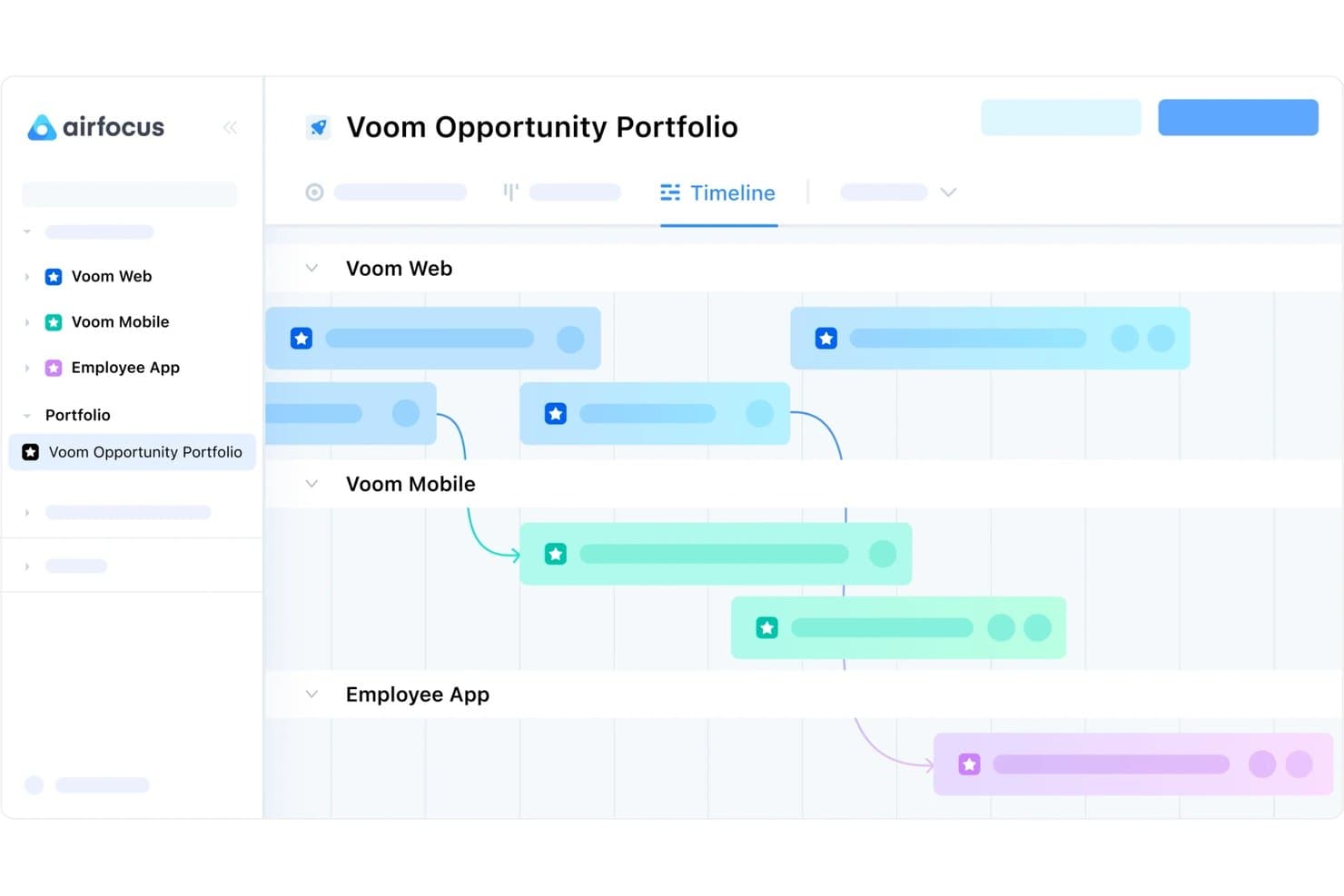
airfocus lets users manage cross-product roadmaps on a shared timeline. airfocus is a product roadmap tool that combines timeline and Gantt views, multi-framework prioritization, audience-specific publishing, and deep Jira and Azure DevOps sync in a modular, configurable workspace.
Who Is airfocus Best For?
airfocus is a strong fit for scaling product organizations that need to manage multiple teams, roadmaps, and workspaces without sacrificing flexibility in how they prioritize and present work.
Why I Picked airfocus
airfocus earns its spot on my shortlist because no other tool I've tested matches its depth of configurability across both roadmap structure and prioritization. I love that you can run RICE, weighted scoring, and Priority Poker across different teams simultaneously while leadership sees a single portfolio rollup. The unlimited workspaces and multi-layer hierarchy mean a 30-product org can scale without rebuilding its setup from scratch.
airfocus Key Features
- Two-way Jira and Azure DevOps sync: Connect airfocus items to Jira or ADO with field-level control over sync direction, status mapping, and parent-child hierarchy links.
- Priority Poker: Stakeholders score roadmap items independently, and airfocus surfaces disagreements as data to guide prioritization discussions.
- Customer feedback portal: A branded, public-facing portal lets customers submit ideas, vote on features, and view release announcements, with feedback linking directly to roadmap items.
- Audience-specific views: Build separate roadmap views for executives, engineering, marketing, and customers from the same underlying data without duplicating work.
airfocus Integrations
airfocus offers native integrations with Jira, Azure DevOps, GitHub, Linear, Asana, Intercom, Zendesk, Slack, Microsoft Teams, and Salesforce (Enterprise). It also supports webhooks, open APIs, MCP, and Zapier for custom connectivity.
Pros and Cons
Pros:
- Publishes tailored views for every audience
- Connects prioritization scores directly to roadmaps
- Scales across products, teams, and workspaces
Cons:
- Lacks live co-editing presence indicators
- Extensive configuration takes time to master
 Best all-in-one product management solution
- 14-day free trial + free demo available
- From $24/user/month
Visit WebsiteCustomer Rating:4.4/5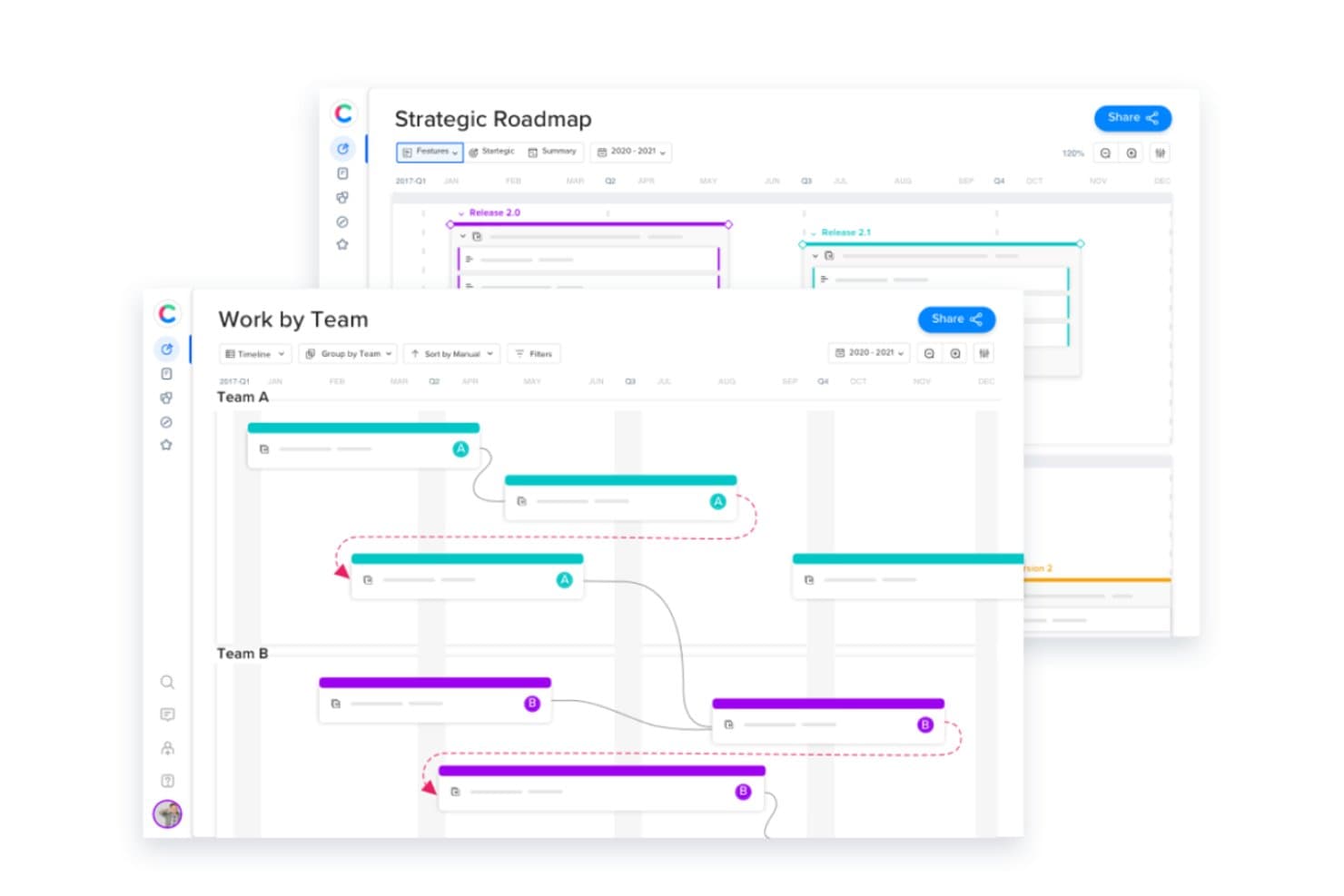
Craft.io lets users view roadmaps and timelines grouped by team. Craft.io is a product management platform that brings together visual roadmapping, backlog management, prioritization frameworks, OKR linking, and customer feedback into a single connected workspace.
Who Is Craft.io Best For?
Craft.io is a strong fit for product managers at growing teams who need strategy, prioritization, and roadmapping in one place rather than spread across multiple tools.
Why I Picked Craft.io
Craft.io earns its spot on my shortlist because it's genuinely all-in-one: strategy, prioritization, roadmapping, and feedback all live in the same backlog-driven workspace. What I particularly like is that every roadmap view, whether a swimlane, timeline, or strategic OKR-linked view, updates automatically when the backlog changes. I also use LiveShare links to give executives a real-time, filtered view without granting full access.
Craft.io Key Features
- LiveShare links: Generate a real-time, read-only URL that stakeholders can access without logging in, with filters applied per audience.
- Capacity planning: View and simulate team capacity by role or individual to catch over-allocation before it affects a release.
- Customer feedback hub: Collect, group, and link feedback directly to features in your backlog from a centralized intake form.
- Custom prioritization formula builder: Create your own scoring method beyond built-in frameworks like RICE or WSJF to match your team's decision criteria.
Craft.io Integrations
Native integrations include Jira, Azure DevOps, GitHub, GitLab, Linear, Figma, Salesforce, Slack, Microsoft Teams, and Google Sheets. Craft.io also offers a public API for custom integrations and supports Zapier.
Pros and Cons
Pros:
- LiveShare keeps stakeholders aligned
- Custom scoring supports nuanced prioritization
- Backlog updates every roadmap view
Cons:
- Advanced views take time to configure
- Granular timeframe variance reporting remains limited
Learn more about Craft.io: Best for Agile development teams
- Free plan + 14-day free trial available
- From $7.91/user/month
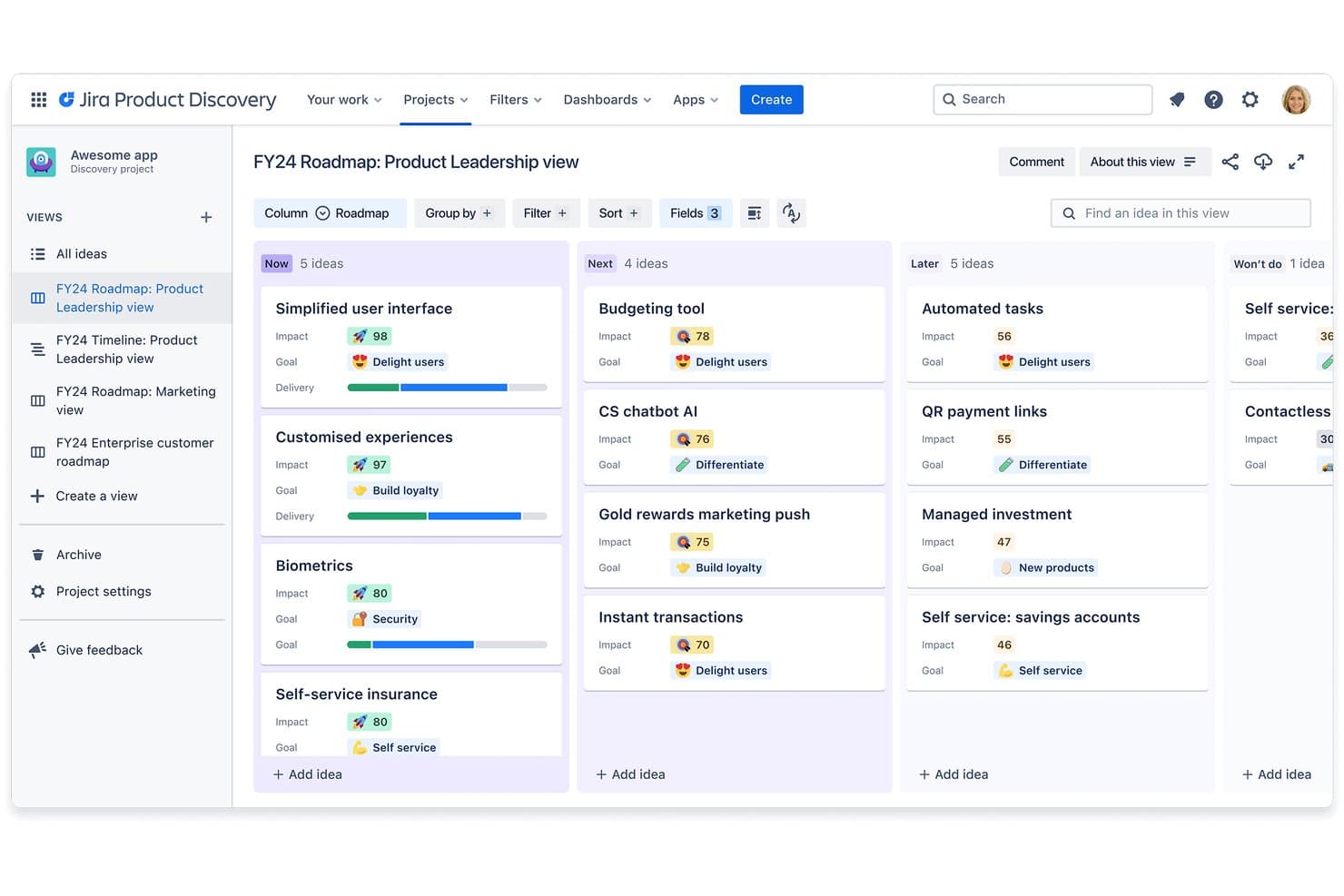
JIRA by Atlassian organizes product ideas into roadmap stages visually. Jira is a project and product management platform by Atlassian that spans three roadmapping surfaces—a built-in timeline view, cross-team Plans, and the dedicated Jira Product Discovery app—for planning, prioritizing, and tracking work from idea to delivery.
Who Is Jira Best For?
Jira is a strong fit for product and engineering teams that live inside the Atlassian ecosystem and need roadmapping, prioritization, and delivery tracking in one connected workflow.
Why I Picked Jira
I've included Jira in my top picks because no other roadmap tool connects discovery to delivery as natively for Agile teams. I love how Jira Product Discovery lets you link customer insights directly to epics and issues, so your roadmap updates as engineering work progresses, without any manual syncing. Jira Plans adds cross-team capacity tracking and dependency visualization across multiple sprints, which is exactly what dev leads need when coordinating parallel workstreams.
Jira Key Features
- Published view sharing: Share live, read-only roadmap links with internal or external stakeholders who don't have a Jira license, with full control over which fields and data are visible.
- Customer insights linking: Attach customer evidence directly to ideas in Jira Product Discovery using a Chrome extension, third-party apps, or Jira Service Management requests.
- What-if scenario planning: Model different scheduling or resourcing options in Jira Plans without affecting live issues, then commit only the changes you want to push through.
- Matrix view for prioritization: Plot ideas across two axes—such as impact vs. effort—with bubble size representing a third variable, giving your team a visual way to compare and rank work.
Jira Integrations
Jira has native integrations with Confluence, Bitbucket, Trello, Jira Service Management, Atlassian Goals, Atlassian Projects, and Azure DevOps. It also offers 3,000+ Marketplace integrations, plus rich APIs for custom connections.
Pros and Cons
Pros:
- Publishes live roadmaps for external stakeholders
- Plans visualizes cross-team dependencies and capacity
- Links customer insights directly to delivery work
Cons:
- Executive strategy storytelling often needs separate slides
- Roadmapping is split across three surfaces
Learn more about JIRA by Atlassian:
Quando utilizar uma ferramenta online de roteiros
Uma ferramenta online de roteiros dá à sua equipa uma visão única e sempre atualizada do que está a ser desenvolvido, porquê e quando, para que não tenha de procurar atualizações em conversas do Slack e apresentações desatualizadas. Se algum dos cenários abaixo lhe for familiar, provavelmente está na altura de adicionar uma à sua infraestrutura:
- O seu roteiro vive em cinco sítios diferentes: Tem uma versão no Notion, outra numa apresentação e uma terceira que alguém exportou para uma folha de cálculo. Uma ferramenta de roteiros centraliza tudo para que as partes interessadas consultem sempre uma única fonte de informação.
- Está a gerir feedback das equipas de Vendas e Suporte sem uma forma clara de mostrar as contrapartidas: Uma ferramenta de roteiros permite associar os pedidos à estratégia, para que possa justificar as decisões de priorização sem um debate de 3 horas no Slack.
- Em todos os sprints, a equipa de engenharia pergunta por que motivo algo está no roteiro: Está a explicar novamente o contexto em vez de desenvolver. Um roteiro partilhado com objetivos associados elimina essas perguntas antes de começar a reunião diária.
- Está a preparar uma reunião do conselho de administração e os diapositivos já estão desatualizados: Uma ferramenta online de roteiros permite obter uma visão em tempo real, para que aquilo que a liderança vê corresponda ao trabalho que a sua equipa está efetivamente a realizar.
- Está a gerir várias linhas de produtos em diferentes fusos horários: Uma única ferramenta online com edição em tempo real mantém as equipas distribuídas alinhadas, sem uma reunião semanal apenas para comparar informações.
Outras opções de ferramentas online de roteiros
Eis uma lista das ferramentas que não chegaram ao topo, mas que continuam a merecer a sua consideração:
- 11ClickUpBest for customizable workspaces
- 12SmartsheetBest for enterprise-grade roadmap governance
- 13WrikeBest for cross-functional roadmap execution
- 14TargetprocessBest for strategic portfolio management
- 15HyggerBest for task prioritization
- 16NotionBest for roadmaps tied to wikis and project docs
- 17Aha! RoadmapsBest for strategy-linked, multi-audience roadmaps
- 18monday devBest for dev-to-exec roadmap visibility
- 19Jira Product DiscoveryBest for Jira-connected discovery and roadmapping
How I Evaluate Online Roadmap Tools
I split my evaluation into three parts, giving core functionality the most weight: map initiatives across releases, adjust dates as priorities shift, and share live views with engineering and executives. Next, I look for customer-feedback links or OKR alignment. Finally, I consider onboarding, support, and pricing value as teams scale.
Core Functionality (Table Stakes For This List)
When I'm selecting tools for my list, I score each one on a scale from 0 (does not offer the functionality) to 5 (excels in this area) for each core functionality listed below. I then convert the total into a percentage to help assess each tool's overall fit, with extra weight on any functionalities I’ve deemed essential.
- Visual Roadmap (Essential): I look for flexible timelines that group initiatives by release, team, or goal, so plans remain readable as priorities shift.
- Sharing & Publishing (Essential): I assess live links, exports, and audience controls for sharing a current roadmap with engineering, executives, or customers.
- Drag-and-Drop Editing: I check whether teams can move or resize roadmap items directly when sequencing changes, without re-entering dates.
- Prioritization Support: I look for ways to score or rank initiatives by value, effort, or custom criteria before placing them on the roadmap.
- Multiple Views: I compare timeline, swimlane, list, or other available layouts to see whether teams can tailor plans to different audiences.
- Real-Time Collaboration: I check how edits, comments, and updates appear to collaborators as product, design, and engineering teams plan together.
Once I have a list of tools that meet the criteria, I consider what sets each platform apart.
Differentiating Factors (What Sets Vendors Apart)
Here's how I compare and contrast different vendors:
Standout Features
I look for direct links between roadmap items and company OKRs, so every feature on the timeline traces back to a strategic goal. When a stakeholder asks "why this quarter?", that link answers instantly. I also evaluate customer feedback integration—whether the tool lets you tag requests and tie them to specific initiatives. Productboard and Aha!, for example, both offer feedback portals, but I check how easily votes surface during prioritization. AI-assisted scoring matters too, especially when backlogs grow past what a weekly review can handle.
Beyond Features
I check whether a tool syncs bidirectionally with Jira or Azure DevOps, since one-way pushes lead to stale roadmap data the moment a sprint scope changes. Scaling also matters—some tools charge per editor while offering free viewer seats, which keeps costs predictable as you add stakeholders. I evaluate onboarding resources like guided templates and customer success support, because cross-functional adoption stalls when the learning curve is too steep.
O que é uma ferramenta online de roteiros?
Uma ferramenta online de roteiros é uma plataforma baseada na web utilizada para criar, gerir e partilhar roteiros visuais, permitindo que as equipas planeiem e comuniquem eficazmente os seus objetivos estratégicos e os prazos dos projetos. Algumas das funcionalidades que tornam isto possível são as várias visualizações de cronogramas, o acompanhamento de marcos, as funcionalidades de colaboração, a integração com ferramentas de gestão de projetos e a possibilidade de personalizar e partilhar roteiros.
Estas ferramentas proporcionam um ambiente dinâmico e colaborativo para que as equipas definam e comuniquem planos estratégicos, alinhem as partes interessadas quanto aos prazos e acompanhem o progresso em tempo real.
Perguntas frequentes sobre ferramentas de roteiros de produto online
Ainda tem perguntas sobre a criação de roteiros de produto e as ferramentas online que a facilitam? Respondi aqui a algumas perguntas comuns sobre o tema.
Como é que as ferramentas de roteiros de produto online apoiam a colaboração entre equipas de produto e partes interessadas?
As ferramentas de roteiros de produto online facilitam a colaboração ao centralizarem atualizações, comentários e feedback. Pode partilhar o mesmo roteiro visual com a sua equipa e as partes interessadas, atribuir tarefas e acompanhar o progresso em tempo real. As notificações e permissões integradas mantêm todos alinhados e garantem que apenas as pessoas certas podem efetuar alterações.
Que integrações devo procurar numa ferramenta de roteiros de produto online?
Procure ferramentas de roteiros de produto que se integrem com plataformas de gestão de projetos, como Jira, Trello ou Asana, e ferramentas de comunicação, como Slack ou Microsoft Teams. As integrações com plataformas de análise, armazenamento de ficheiros e sistemas de controlo de versões também podem ajudar a sua equipa a manter tudo sincronizado e a evitar atualizações manuais.
Quão seguras são as ferramentas de roteiros de produto online para partilhar planos de produto sensíveis?
A maioria das ferramentas de roteiros de produto online oferece uma segurança robusta, com encriptação, acesso baseado em funções e autenticação de utilizadores. Deve verificar a conformidade com a norma SOC 2, o suporte de SSO e as definições detalhadas de permissões, para manter protegidas as informações sensíveis sobre o produto. Consulte sempre a documentação de segurança do fornecedor antes de partilhar planos confidenciais.
Posso personalizar os modelos de roteiros de produto nestas ferramentas para os adaptar ao meu fluxo de trabalho?
Sim, a maioria das ferramentas de roteiros de produto online permite personalizar modelos, esquemas e campos para os adaptar ao processo da sua equipa. Normalmente, pode adicionar marcos personalizados, definir diferentes vistas (como linha cronológica, faixas ou Kanban) e utilizar códigos de cores nos itens para maior clareza. Isto ajuda a adaptar a ferramenta à forma como a sua equipa trabalha melhor.
Qual é a melhor forma de obter o apoio das partes interessadas ao adotar uma nova ferramenta de roteiros de produto?
Comece por envolver as partes interessadas desde cedo no processo de seleção e recolha as suas opiniões sobre necessidades e dificuldades. Mostre de que forma a nova ferramenta irá facilitar as atualizações, a comunicação e os relatórios para todos. Disponibilize demonstrações práticas e formação simples, para que as partes interessadas se sintam confortáveis e reconheçam o valor imediato.