

As ferramentas de criação de esboços de interface com IA utilizam inteligência artificial para ajudar a criar, editar e aperfeiçoar esboços de interface digitais de forma mais rápida e com menos esforço manual. Se está à procura das melhores ferramentas de criação de esboços de interface com IA, é provável que queira acelerar o processo de conceção, reduzir tarefas repetitivas e melhorar a colaboração entre equipas — sem sacrificar a qualidade ou o controlo.
Com tantas opções disponíveis, é fácil perder-se entre listas de funcionalidades e promessas de marketing. Este guia ajuda-o a separar o essencial do acessório, permitindo-lhe comparar rapidamente as principais soluções para escolher a ferramenta certa para o seu fluxo de trabalho, equipa e objetivos do projeto.
Why Trust Our Software Recommendations
6,700+
Reviews
20
Industry experts
16+
Evaluation factors
14
Years
Our team has been testing and reviewing software since 2012. As product managers ourselves, we know how difficult—and important—it is to choose the right software.
For this guide, we evaluated tools using hands-on testing and independent research, scoring tools using our selection criteria.
Our reviews reflect our human editorial judgment, not a sales pitch.
Expert reviewers:
- Andrew LumbySenior TPM
- Cristiano ValimSenior UI/UX Lead


Tabela de comparação das ferramentas de criação de esboços de interface com IA
Esta tabela de comparação resume os detalhes de preços das minhas principais escolhas de ferramentas de criação de esboços de interface com IA:
| Tool | Best For | Trial Info | Price | ||
|---|---|---|---|---|---|
| 1 | Best for real-time collaborative editing | Free plan + 14-day free trial + free demo available | From $8/user/month (billed annually) | Website | |
| 2 | Best for drag-and-drop components | Free plan available | From $10/user/month (billed annually) | Website | |
| 3 | Best for sketching ideas before going digital | Free plan available | From $39/month (billed annually) | Website | |
| 4 | Best for combining AI with a manual design canvas | Free plan available | From $14/user/month | Website | |
| 5 | Best for AI wireframes tied to your design system | Free plan + 14-day free trial + demo available | From $49/user/month | Website | |
| 6 | Best for open-source, self-hosted AI design workflows | Free plan + 14-day free trial + free demo available | From $7/user/month | Website | |
| 7 | Best for ideation with built-in UI kits | Free plan available | From $9/user/month (billed annually) | Website | |
| 8 | Best for generating multiple variants from prompts | Free plan available | From $12/month (billed annually) | Website | |
| 9 | Best for Figma and React component exports | Free plan available | From $14/month | Website | |
| 10 | Best for wireframing from AI coding tool handoff | 14-day free trial available | From $12/month (billed annually) | Website |


Avaliações das ferramentas de criação de esboços de interface com IA
Abaixo encontra os meus resumos detalhados das melhores ferramentas de criação de esboços de interface com IA que entraram na minha lista. As minhas avaliações analisam detalhadamente as funcionalidades, os melhores casos de utilização e as integrações de cada ferramenta, para o ajudar a encontrar a opção mais adequada para si.
 1Best for real-time collaborative editing
Miro
- Free plan + 14-day free trial + free demo available
- From $8/user/month (billed annually)
Visit WebsiteCustomer Rating:4.8/5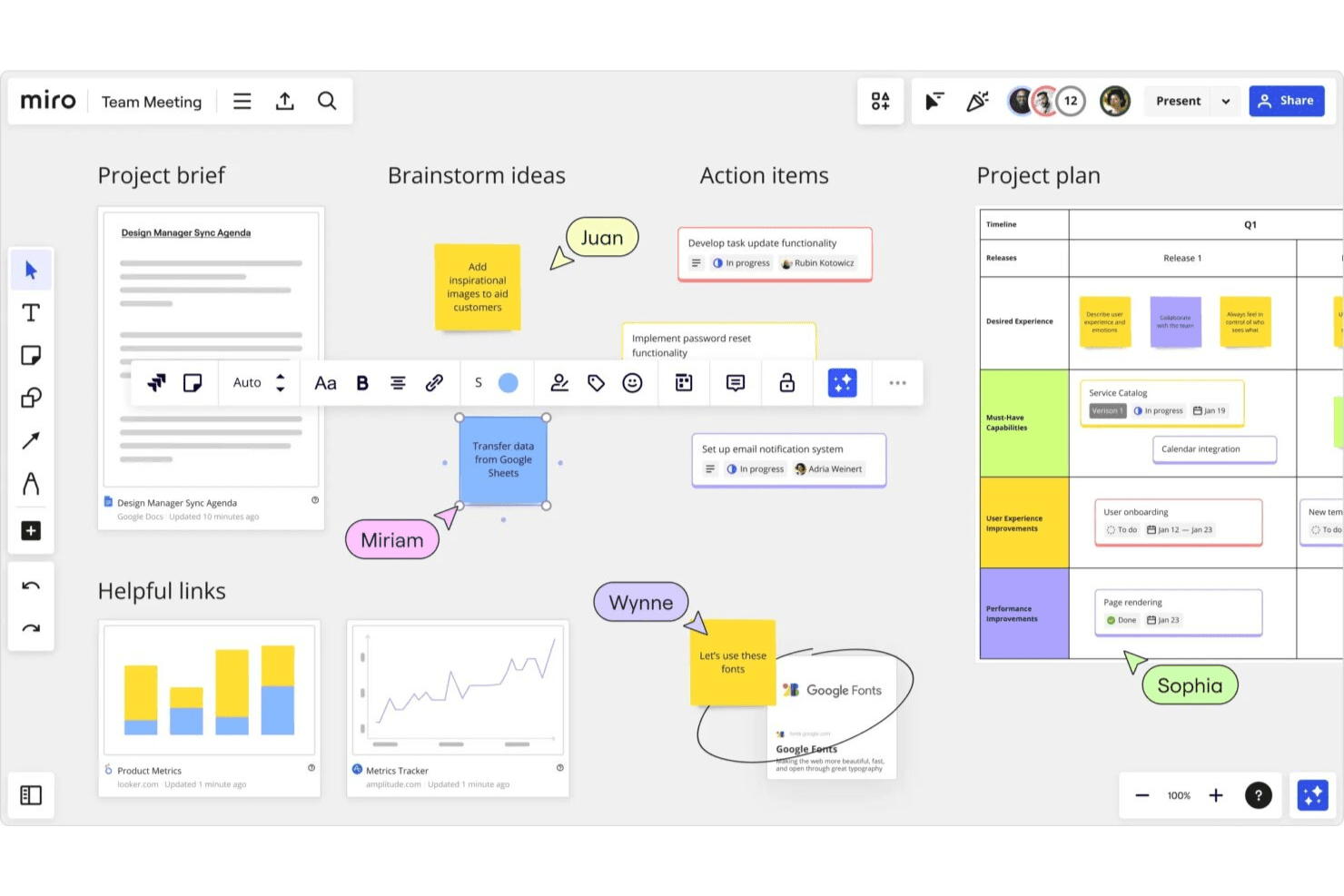
Miro enables teams to turn ideas into structured wireframes fast. Miro is a collaborative whiteboarding and visual workspace platform that combines AI wireframe generation, drag-and-drop editing, a 4,700+ shape component library, and clickable prototype creation from text prompts, sketches, or screenshots.
Who Is Miro Best For?
Miro is a strong fit for cross-functional product teams—especially product managers and designers—who need to wireframe, collaborate, and iterate together in real time.
Why I Picked Miro
Miro earns its spot as one of the best on my shortlist because real-time collaboration is genuinely baked into every stage of the wireframing process, not bolted on after the fact. I love that multiple teammates can co-edit a prototype live, drop comments directly on screens, and run voting sessions without ever leaving the canvas. What makes it especially useful is that your wireframes sit alongside sticky notes, PRDs, and research findings on the same board, so the AI can pull from that context when generating screens.
Miro Key Features
- Screenshot-to-prototype conversion: Drop any screenshot onto the board and Miro rebuilds its text, buttons, and layout as fully editable prototype elements.
- PRD and doc-to-wireframe generation: Generate prototype screens directly from PRDs, sticky notes, Confluence docs, or Notion pages already on your board.
- MCP server code handoff: Coding agents like Cursor and Claude Code can read your prototype screens alongside briefs and user stories to generate working code.
- AI usability review: Miro reviews your prototype and flags usability gaps before you move into real user testing.
Miro Integrations
Miro supports 250+ integrations, including Figma, Adobe XD, Confluence, Notion, Jira, Asana, and Linear. Its MCP server supports prototype-to-code handoff with coding agents.
Pros and Cons
Pros:
- Converts screenshots into editable screens
- Supports live co-editing and voting
- Turns PRDs into editable prototypes
Cons:
- AI credits limit repeated screen generation
- Prototype fidelity trails dedicated design tools
 Best for drag-and-drop components
- Free plan available
- From $10/user/month (billed annually)
Visit WebsiteCustomer Rating:4.6/5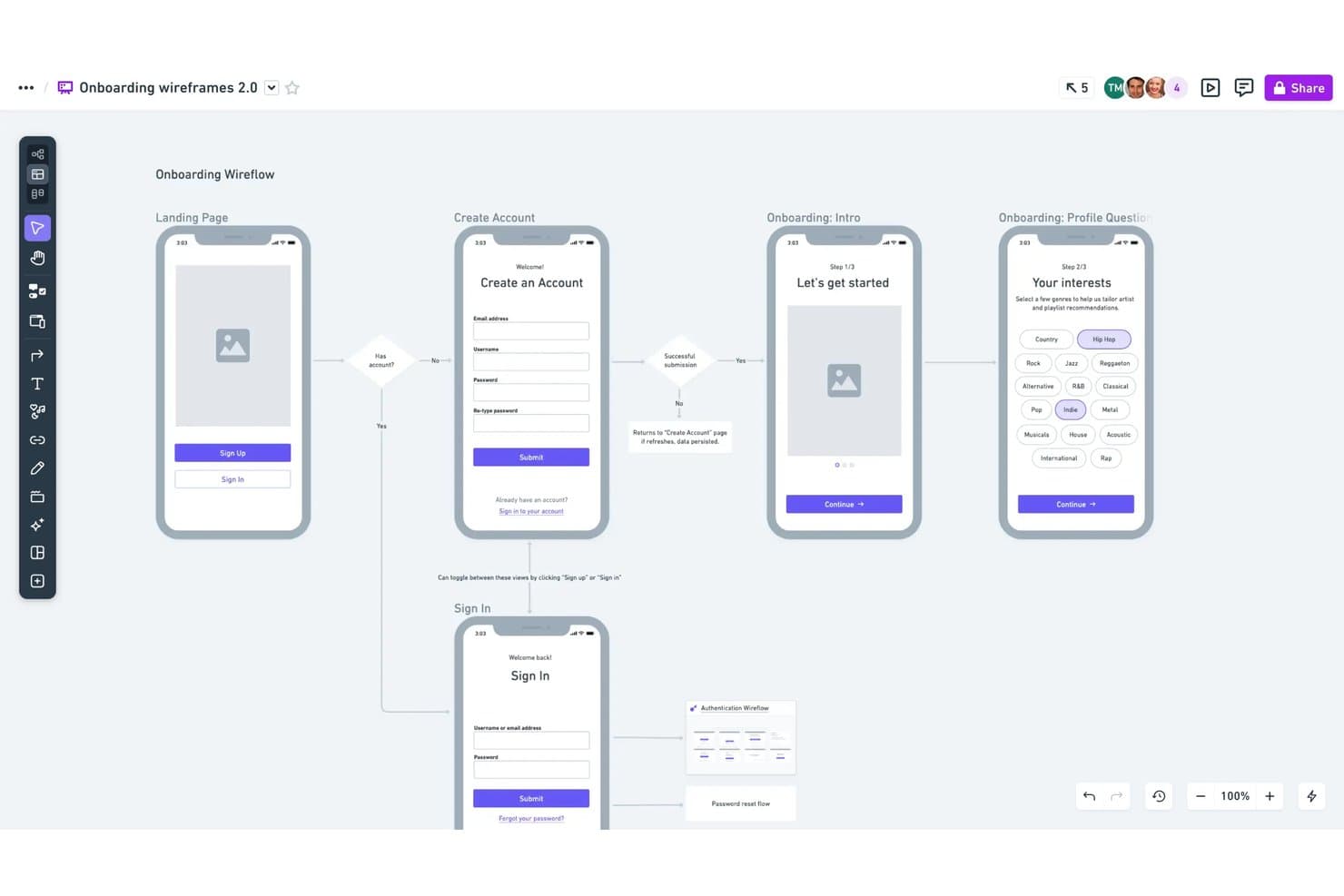
Whimsical lets users map onboarding flows with linked wireframe screens. Whimsical is an AI wireframing tool that combines text-to-wireframe generation, a drag-and-drop component editor, and real-time collaboration with support for flowcharts, mind maps, and docs in a single workspace.
Who Is Whimsical Best For?
Whimsical suits product managers and UX designers who want a fast, low-fidelity wireframing workspace where drag-and-drop components, flowcharts, and docs all live in one place.
Why I Picked Whimsical
Whimsical earns its spot on my shortlist because its drag-and-drop component system is genuinely one of the best I've seen for low-fidelity wireframing. Every component comes with adjustable properties and states, so I can switch a button from default to hover or toggle a phone frame between iOS and Android without leaving the canvas. I also like that the Claude-powered AI generates editable wireflows, not just static screens, so I can prompt a full user journey and then reshape individual frames by hand.
Whimsical Key Features
- Text-to-wireflow generation: Describe a full user journey in a prompt and Whimsical's Claude-powered AI builds connected multi-screen wireflows you can edit directly on the canvas.
- Configurable device frames: Choose from browser, phone, tablet, and smartwatch frames with toggleable iOS and Android variants to match your target platform.
- One-workspace multi-artifact support: Create wireframes, flowcharts, mind maps, and docs in a single shared board without switching tools.
- MCP and coding-agent integration: Connect Whimsical to Claude Code, Cursor, or Codex to generate wireframes from external agents and turn them into working prototypes.
Whimsical Integrations
Whimsical integrates with Claude, ChatGPT, Claude Code, Cursor, Codex, Grok, GitHub, Linear, Jira, Notion, and Figma. Its MCP support connects AI coding agents to Whimsical for generating wireframes and building prototypes.
Pros and Cons
Pros:
- Real-time collaboration across every plan
- Adjustable component states and properties
- Editable AI-generated wireflows
Cons:
- Screenshot conversion requires external tools
- Deliberately limited to low-fidelity output
Learn more about Whimsical: Best for sketching ideas before going digital
- Free plan available
- From $39/month (billed annually)
Visit WebsiteCustomer Rating:4.6/5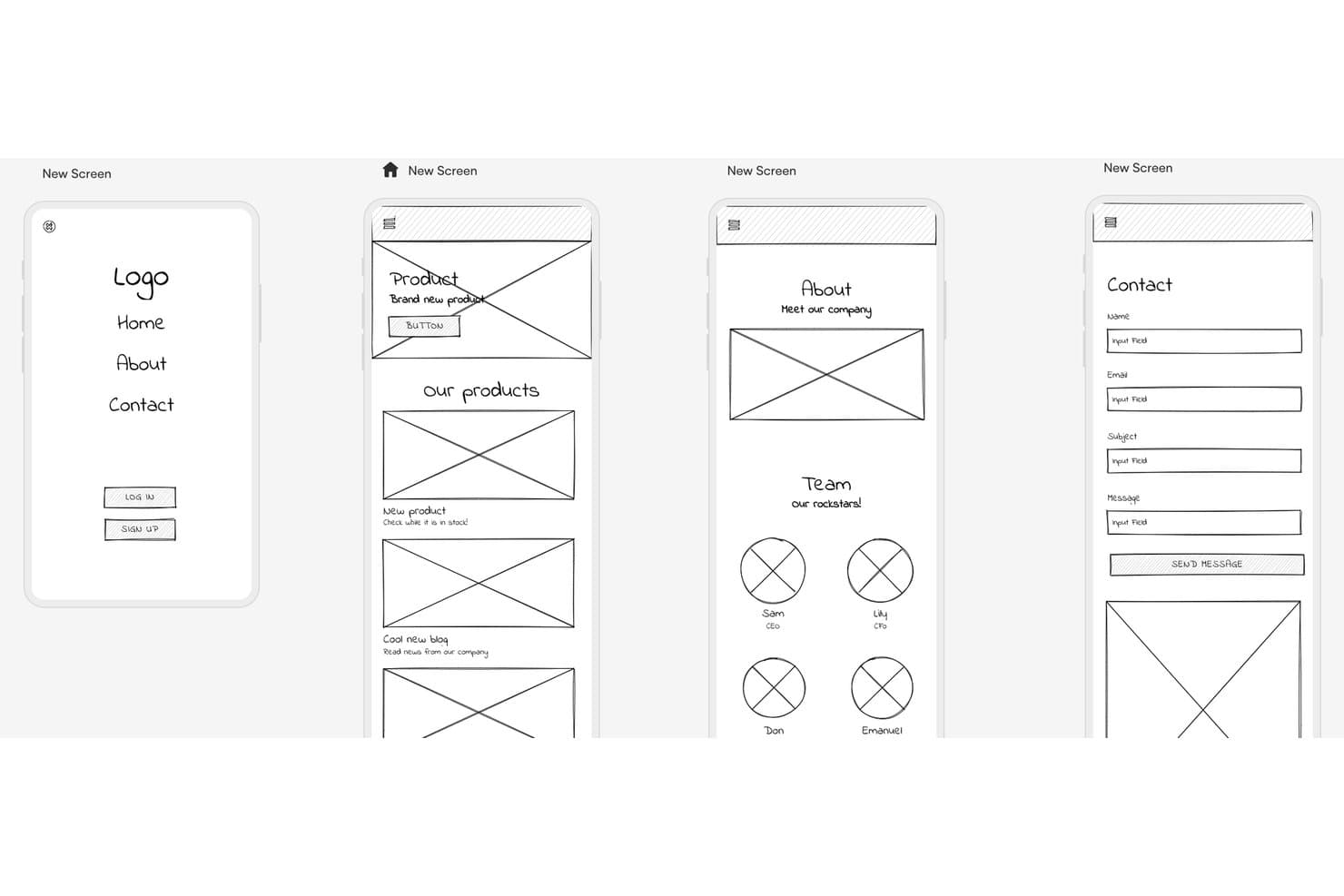
Uizard lets users wireframe multi-screen mobile apps quickly. Uizard is an AI wireframing tool that generates multi-screen prototypes from text prompts, hand-drawn sketches, and screenshots, with a built-in component library, one-click wireframe mode, and real-time collaboration.
Who Is Uizard Best For?
Uizard is a great fit for product managers and startup founders who need to turn rough ideas into shareable prototypes fast, without a design background.
Why I Picked Uizard
I've included Uizard in my top picks because its Wireframe Scanner is genuinely one of a kind: you photograph a paper sketch or whiteboard drawing, and Uizard converts it into an editable digital mockup in seconds. I love that Wireframe Mode lets you toggle between a polished mockup and a bare-bones wireframe with one click, so you can stay in rough-concept territory as long as you need. Autodesigner 2.0 also lets you generate multi-screen prototypes from a text prompt, which keeps the momentum going from first idea to shareable flow.
Uizard Key Features
- Autodesigner 2.0: A chat-style AI generator that builds multi-screen editable prototypes from text prompts on paid plans.
- Screenshot Scanner: Converts screenshots of existing apps or websites into editable mockups for quick remixing.
- Clickable prototypes: Links screens together with interactions so you can share a working flow without leaving the tool.
- Real-time collaboration: Lets multiple users edit simultaneously, with commenting and unlimited free viewers on every plan.
Uizard Integrations
Uizard has a Figma Community plugin for importing designs, plus image-based screen imports from Adobe and Sketch. Native integrations and a public API aren’t clearly documented.
Pros and Cons
Pros:
- Switches between polished mockups and wireframes
- Generates multi-screen prototypes from text prompts
- Converts paper sketches into editable wireframes
Cons:
- Exports lack layers and full-project code
- Screenshot conversions can deviate noticeably
Learn more about Uizard: Best for combining AI with a manual design canvas
- Free plan available
- From $14/user/month
Visit WebsiteCustomer Rating:4.8/5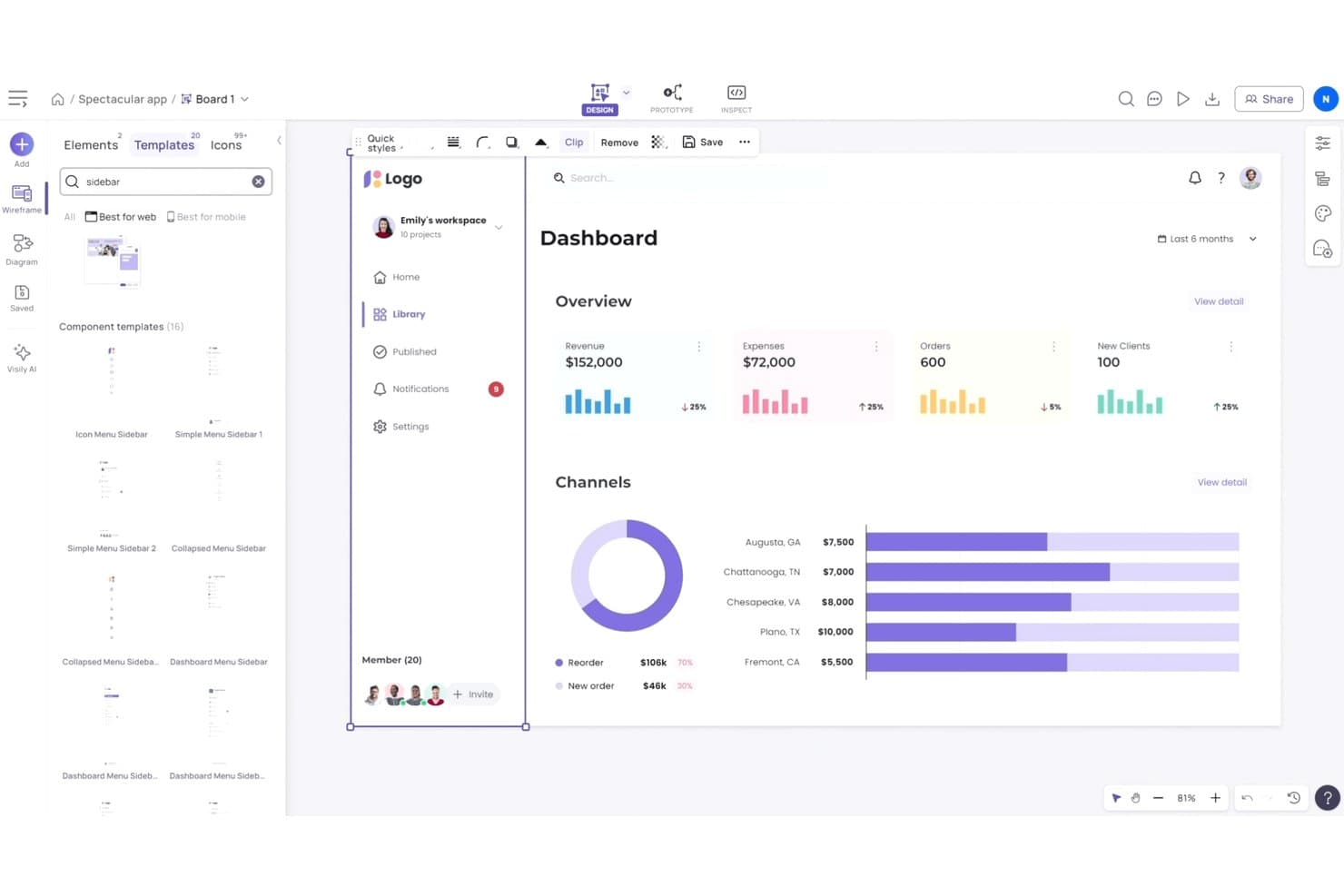
Visily lets users browse and apply sidebar templates to wireframes. Visily is an AI wireframing tool that generates editable screens from text prompts, screenshots, sketches, and diagrams, paired with a free-form drag-and-drop canvas, a 1,500+ template library, and built-in prototyping and code export.
Who Is Visily Best For?
Visily is a strong fit for product managers and startup founders who need to move quickly from written requirements to shareable screens without relying on a dedicated designer.
Why I Picked Visily
I've included Visily in my top picks because it's the only tool where AI generation and hands-on canvas editing feel like equals rather than one bolting onto the other. I love that you can paste a screenshot of a competitor's app and get a fully editable wireframe in minutes, then jump straight into manual drag-and-drop to reshape it without spending a single AI credit. Plan Mode is also genuinely useful: it surfaces follow-up questions and proposes a structured screen plan before generating anything, which keeps requirements grounded before pixels appear.
Visily Key Features
- AI Chat Assistant: Generates UI screens, components, and diagrams from text prompts, image references, and canvas context within a shared design group that keeps styles consistent across screens.
- Sketch-to-wireframe conversion: Upload a hand-drawn sketch and Visily converts it into a fully editable digital wireframe you can refine on the canvas.
- AI Auto-Prototype: Automatically detects logical connections between screens and elements to build a clickable, previewable prototype without spending AI credits.
- Export to code: Exports designs as React, Vue, or HTML—with an AI layout mode that produces responsive code and a static mode that's free to use.
Visily Integrations
Visily connects with Figma through its plugin, captures webpages through a Chrome extension, and supports MCP connections to Cursor, Claude Code, Codex, and Lovable. It also exports designs to React, Vue, and HTML.
Pros and Cons
Pros:
- Builds clickable prototypes without extra credits
- Balances AI generation with manual control
- Converts screenshots into editable wireframes
Cons:
- Manual positioning replaces automatic layout controls
- AI edits regenerate entire screens
Learn more about Visily: Best for AI wireframes tied to your design system
- Free plan + 14-day free trial + demo available
- From $49/user/month
Visit WebsiteCustomer Rating:4.2/5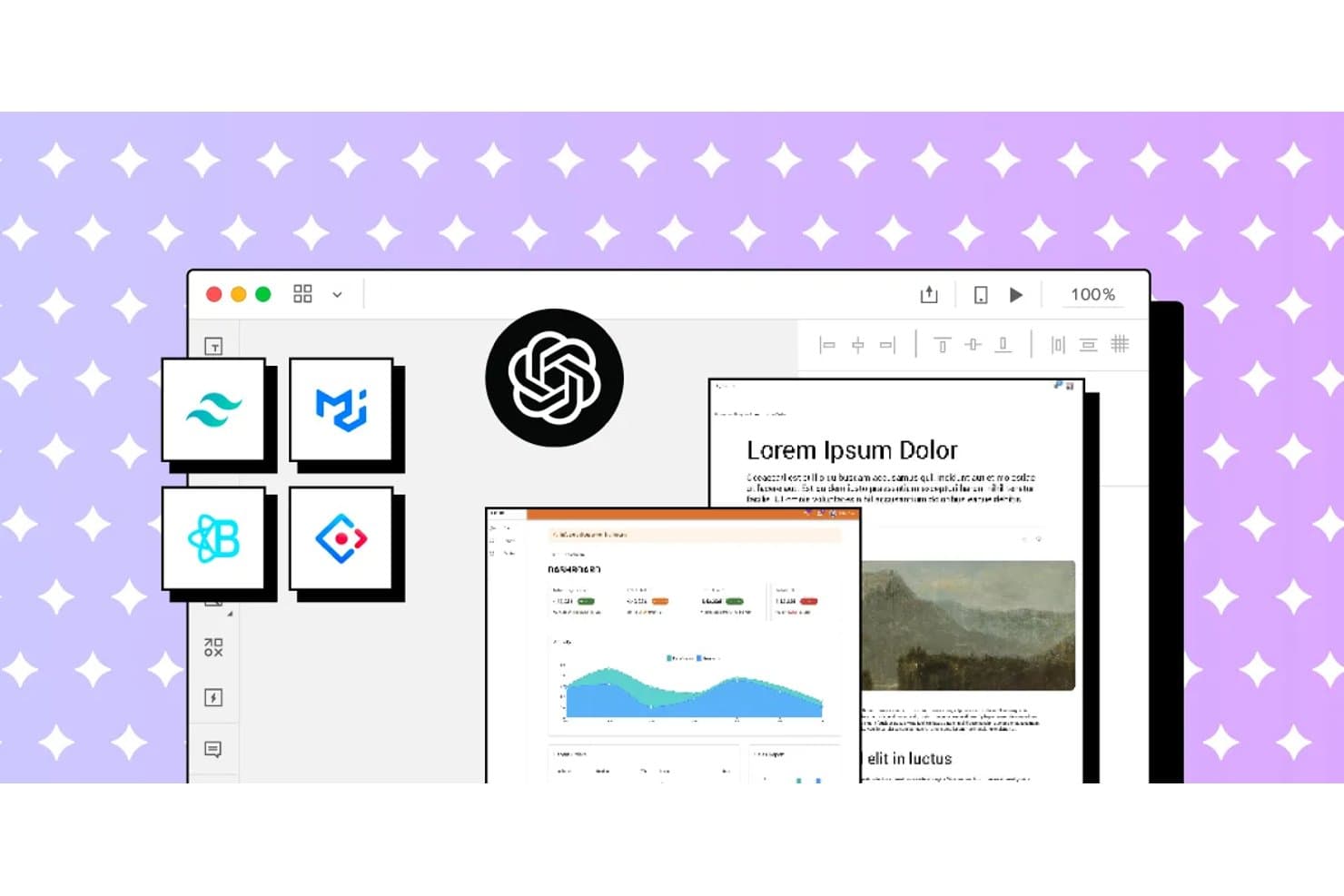
UXPin integrates AI and design system tools for rapid wireframing. UXPin is a browser-based AI wireframing and prototyping tool that generates UI from text prompts, sketches, and URLs using real, code-backed React components drawn from your existing design system.
Who Is UXPin Best For?
UXPin is a strong fit for UX designers and front-end developers who need AI-generated wireframes that stay in sync with a production React component library.
Why I Picked UXPin
I picked UXPin as one of the best because it's the only AI wireframing tool I've seen that generates UI from real, code-backed React components rather than static shapes. When you prompt Forge with a layout idea or upload a sketch, it builds screens using your actual design system, whether that's MUI, shadcn/ui, or a custom library synced via Storybook. The JSX it produces goes straight to developers without translation, and Wire can export the whole thing as a runnable Vite + React app.
UXPin Key Features
- URL-to-UI generation: Paste any live URL and Forge reconstructs its layout using your design system's components.
- UX Review scoring: Forge scores selected screens for clarity, hierarchy, consistency, and accessibility, with written observations.
- Advanced prototyping logic: Add variables, expressions, conditional logic, and external data sources like JSON or Google Sheets to any prototype.
- Spec mode for handoff: Developers inspect elements to copy dimensions, colors, auto-generated CSS, and JSX directly from the canvas.
UXPin Integrations
UXPin integrates with Storybook, Git, Figma, Sketch, Slack, Jira, FullStory, npm, CodeSandbox, and StackBlitz. Storybook and Git support depends on the plan, while Figma connects through UXPin’s plugin.
Pros and Cons
Pros:
- Supports interactive logic beyond static wireframes
- Preserves design-system rules during AI generation
- Generates screens with production React components
Cons:
- Higher-fidelity output complicates early rough concepts
- AI struggles with large multi-screen prompts
Learn more about UXPin: Best for open-source, self-hosted AI design workflows
- Free plan + 14-day free trial + free demo available
- From $7/user/month
Visit WebsiteCustomer Rating:4.5/5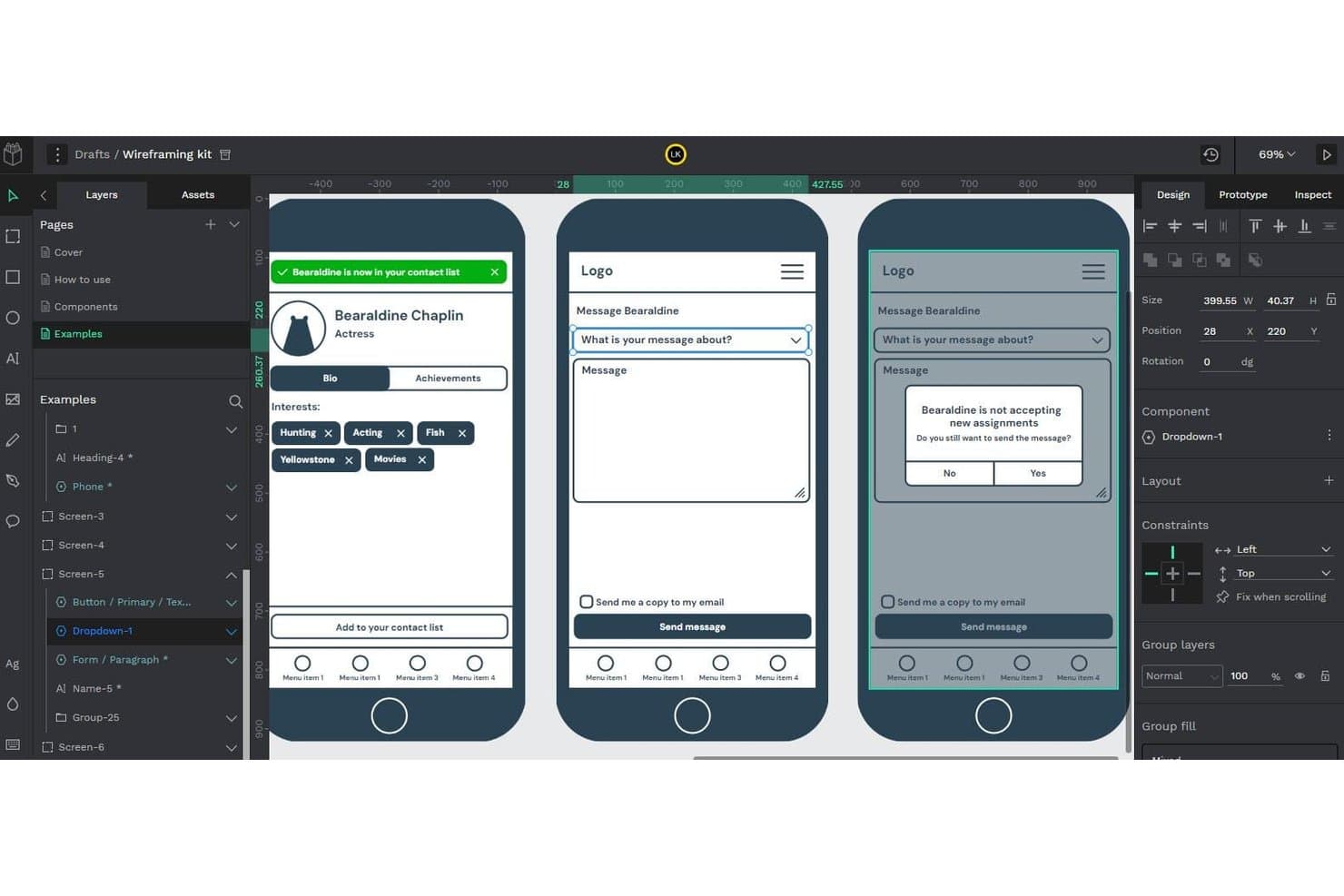
Penpot lets users build and preview interactive wireframe flows. Penpot is an open-source, browser-based design and prototyping tool that supports wireframing, component libraries, real-time collaboration, and AI-assisted design workflows via its MCP Server integration.
Who Is Penpot Best For?
Penpot is a strong fit for design and engineering teams that need full control over their tools, data, and AI workflows through self-hosting.
Why I Picked Penpot
I've included Penpot in my top picks because it's the only open-source tool on this list that lets you connect your own LLM to a live design file via the Penpot MCP Server, keeping AI traffic within infrastructure you control. I particularly like that the MCP Server can generate new screens directly from your existing design system, so outputs inherit your real tokens and components. For teams where data sovereignty isn't negotiable, that self-hosted AI workflow is genuinely hard to replicate with a closed platform.
Penpot Key Features
- Flex and CSS grid layout: Design responsive frames using web-standard CSS Flex and Grid, so your layouts map directly to how developers will build them.
- Real-time multiplayer editing: Multiple team members can work in the same file simultaneously, with comments available in both design and view mode.
- Native design tokens (W3C DTCG format): Create, apply, and export design tokens as JSON, with full support for themes and variants across your design system.
- Inspect mode with CSS export: View measurements, copy CSS snippets, and export assets from a read-only view built for developer handoff.
Penpot Integrations
Penpot integrates with Claude Desktop, Claude Code, Cursor, VS Code, OpenAI Codex, and GitHub Copilot through its MCP Server, plus Figma and Storybook through documented workflows. It also provides REST API, webhooks, and an open Plugins API for custom integrations.
Pros and Cons
Pros:
- CSS-based layouts improve developer handoff
- Design-system tokens guide generated screens
- Self-hosted AI workflows protect design data
Cons:
- MCP workflow remains experimental and constrained
- AI wireframing requires external agent setup
Learn more about Penpot: Best for ideation with built-in UI kits
- Free plan available
- From $9/user/month (billed annually)
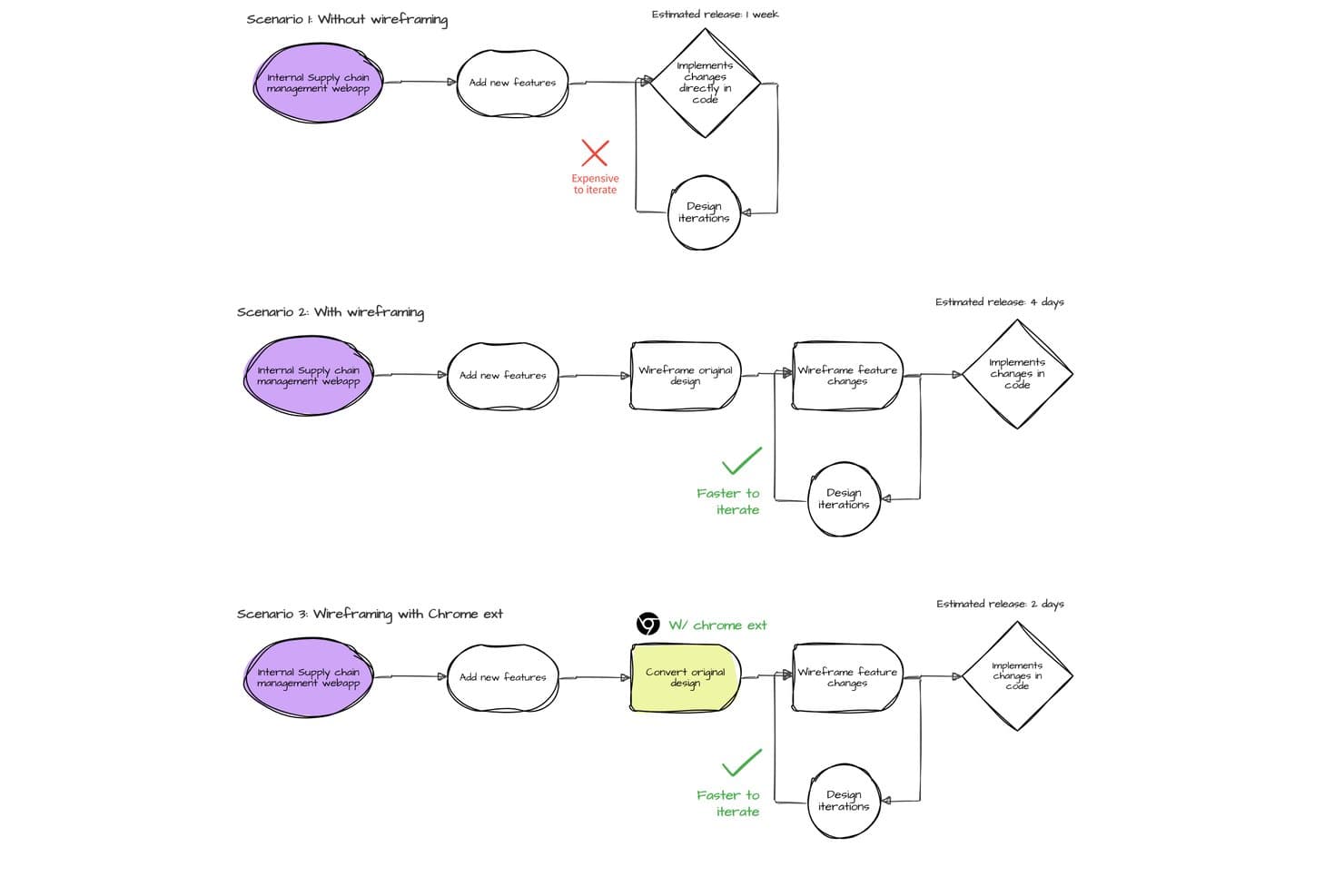
MockFlow compares wireframing workflows to show faster iteration and release times. MockFlow is an AI wireframing tool that lets you generate editable wireframes from text prompts, screenshots, URLs, and hand-drawn sketches, with an extensive built-in UI kit library spanning web, mobile, desktop, and enterprise design systems.
Who Is MockFlow Best For?
MockFlow is a strong fit for product managers and startup founders who need to go from rough idea to structured wireframe fast, without depending on a dedicated designer.
Why I Picked MockFlow
MockFlow earns its spot on my shortlist because of its sheer depth of built-in UI kits, covering everything from iOS and Android to enterprise design systems like Salesforce Lightning and SAP UI. I love that you can sketch a rough idea, generate a multi-screen wireframe with Mida, and then instantly switch the style from sketchy lo-fi to hi-fi without rebuilding anything. The Concept Builders feature is a standout for ideation: AI collaborators like "Onboarding Flow Designer" remember context across a session, making early-stage exploration feel structured rather than scattered.
MockFlow Key Features
- Screenshot and URL to wireframe: Upload a screenshot or paste a live URL and MockFlow converts it into an editable wireframe you can build on immediately.
- Multi-screen AI generation: Describe a flow and Mida produces multiple linked screens at once, with one design system applied consistently across all of them.
- Real-time co-editing with comments: Team members can edit boards simultaneously, leave pinned comments with video replies, and apply design suggestions in one click.
- Code export in multiple frameworks: Build mode outputs production-ready code in React, Tailwind, TypeScript, Bootstrap, and more, with AI prompt export for tools like Claude Code and Cursor.
MockFlow Integrations
MockFlow offers 20+ connectors on Max, including Slack, Jira, Confluence, Trello, Notion, GitHub, Linear, Google Drive, Google Docs, and Microsoft Teams. It also supports Figma, Cursor, VS Code, MCP servers, and an API for custom integrations.
Pros and Cons
Pros:
- Editable Figma and code handoff preserve structure
- Extensive enterprise and mobile UI kits
- Text prompts generate linked multi-screen flows
Cons:
- Complex prototypes lack advanced transitions
- Precise multi-selection and resizing feel awkward
Learn more about MockFlow: Best for generating multiple variants from prompts
- Free plan available
- From $12/month (billed annually)
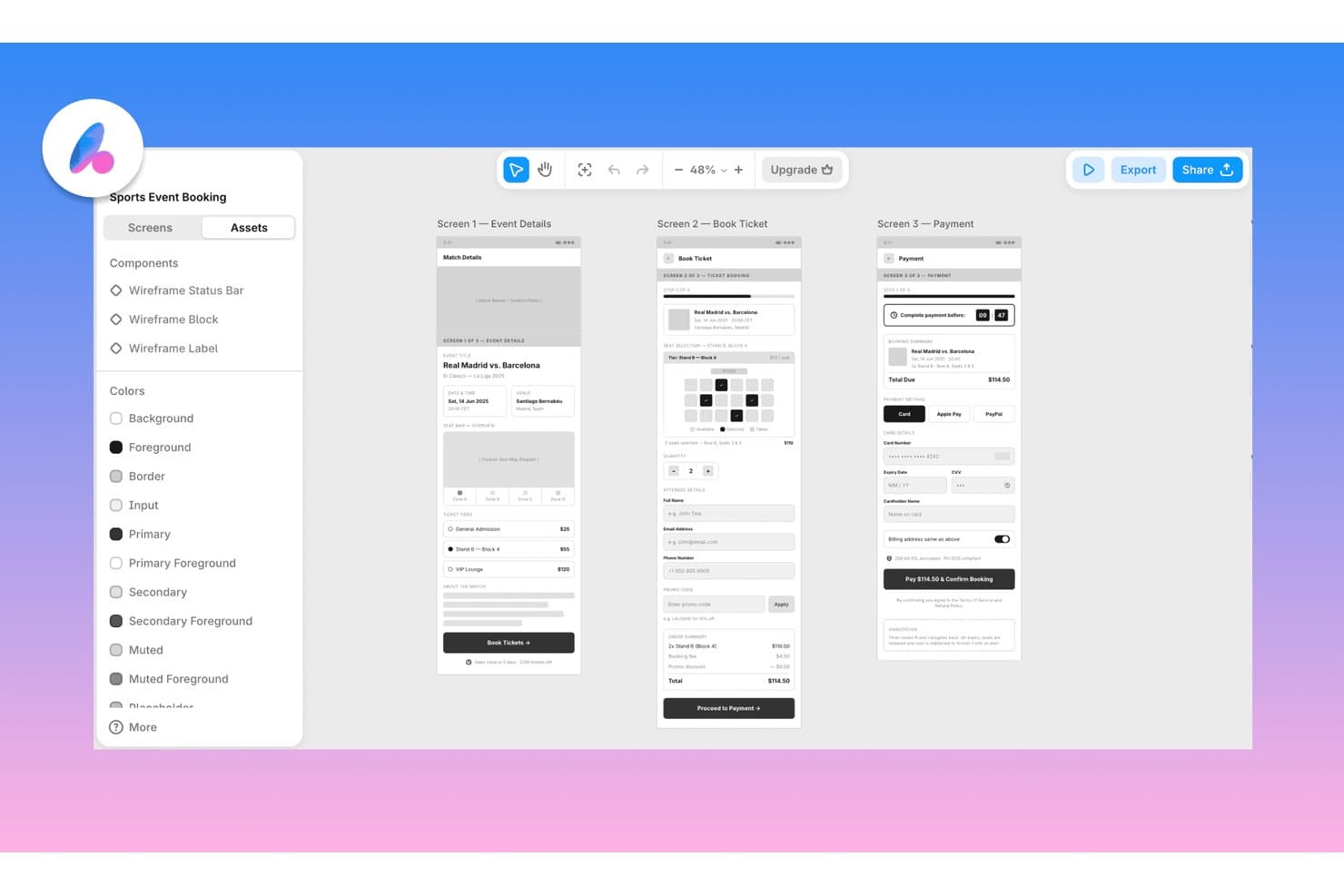
Banani lets users wireframe multi-screen app flows with AI assistance. Banani is a browser-based AI wireframing tool that generates multi-screen flows and design variants from text prompts, PRDs, sketches, screenshots, and Figma links, with export to Figma, HTML/CSS, and AI coding agents.
Who Is Banani Best For?
Banani is a strong fit for product managers and founders who need to go from idea to multi-screen design fast, without relying on a dedicated designer.
Why I Picked Banani
I've included Banani in my top picks because it's the only tool I've used that generates multiple distinct layout variants from a single prompt, giving you real design directions to compare rather than one output to accept or reject. Feed it a PRD and the AI agent autonomously plans and builds every screen in the flow, keeping components and tokens consistent across the lot. I also like that it accepts sketches and screenshots as inputs, so you can get from a napkin idea to a reviewable multi-screen prototype in minutes.
Banani Key Features
- Fidelity switching: Toggle between low-, mid-, and high-fidelity output, or convert a desktop layout to mobile, without leaving the tool.
- Design system generator: Build a complete set of styles, tokens, and components from a prompt or reference, then export directly to Figma or code.
- MCP export to coding agents: Push your designs to AI coding agents like Claude Code, Cursor, and Codex through a model context protocol connection.
- Sketch and screenshot input: Upload a hand-drawn sketch or screenshot and the AI converts it into an editable wireframe you can expand into a full flow.
Banani Integrations
Banani integrates with Figma and AI coding agents Claude Code, Cursor, and Codex through MCP. Enterprise plans support custom integrations, but no public API is documented.
Pros and Cons
Pros:
- Converts sketches into editable wireframes
- Turns PRDs into connected screen flows
- Generates multiple layout variants
Cons:
- Live collaboration features remain unclear
- Traditional component library is absent
Learn more about Banani:
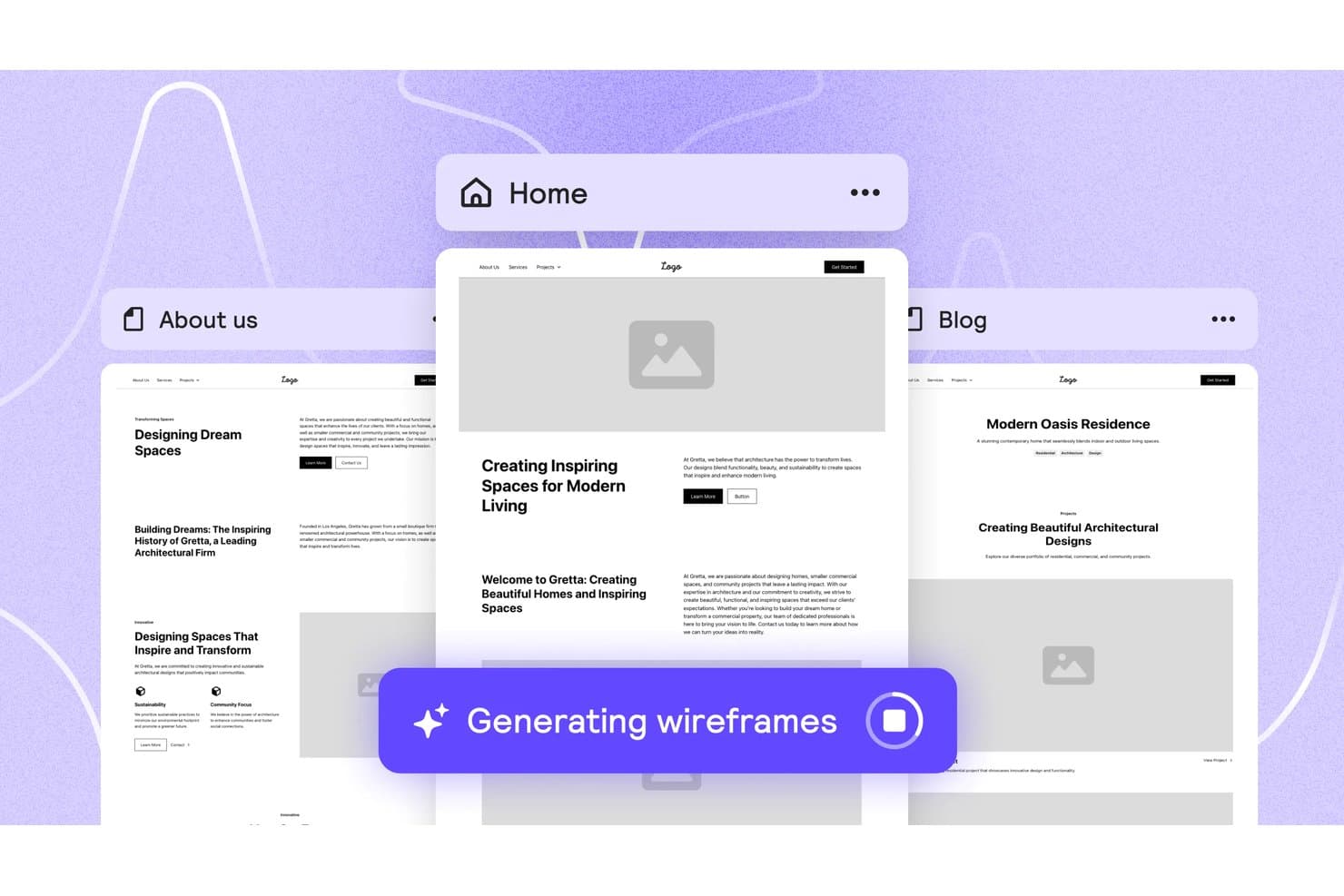
Relume auto-generates multi-page wireframes from a single prompt. Relume is an AI wireframing and website-building tool that generates sitemaps, multi-page wireframes, and styled design concepts from a text brief, with exports to Figma, Webflow, and React.
Who Is Relume Best For?
Relume is a strong fit for designers and front-end developers who want to move from a text brief to export-ready Figma or React components without starting from scratch.
Why I Picked Relume
I picked Relume as one of the best because its Figma and React export pipeline is genuinely built for handoff, not just output. When I generate a wireframe, the Figma plugin imports it as editable auto-layout with variables and variants intact, and the React export uses Tailwind CSS and shadcn/ui, so it drops cleanly into Next.js or Astro without cleanup. I also love that the same project exports to both formats from one place, which cuts a real step out of the design-to-dev workflow.
Relume Key Features
- Brief-to-sitemap generation: Relume takes a text brief, uploaded files, or URLs and turns them into a multi-page sitemap with sections mapped out before wireframing begins.
- Style guide builder: After wireframing, you can apply colors, typography, spacing, and button styles across every page in one step to produce a styled design concept.
- Component shuffling and variant swapping: You can swap a section's component for an alternative variant or shuffle it entirely while keeping the existing copy in place.
- Relume Library MCP: Paid plans include an MCP server that lets AI editors like Cursor, Windsurf, and VS Code pull React components directly from the Relume library.
Relume Integrations
Relume integrates with Figma, Webflow, React, HTML, and Claude Design, plus MCP connectivity for Cursor, Claude, Windsurf, and VS Code. No public API is documented.
Pros and Cons
Pros:
- Styled concepts support faster stakeholder validation
- Curated components keep layouts consistent
- Briefs become multi-page wireframes quickly
Cons:
- Component-bound editing limits freeform changes
- No sketch or screenshot conversion
Learn more about Relume: Best for wireframing from AI coding tool handoff
- 14-day free trial available
- From $12/month (billed annually)
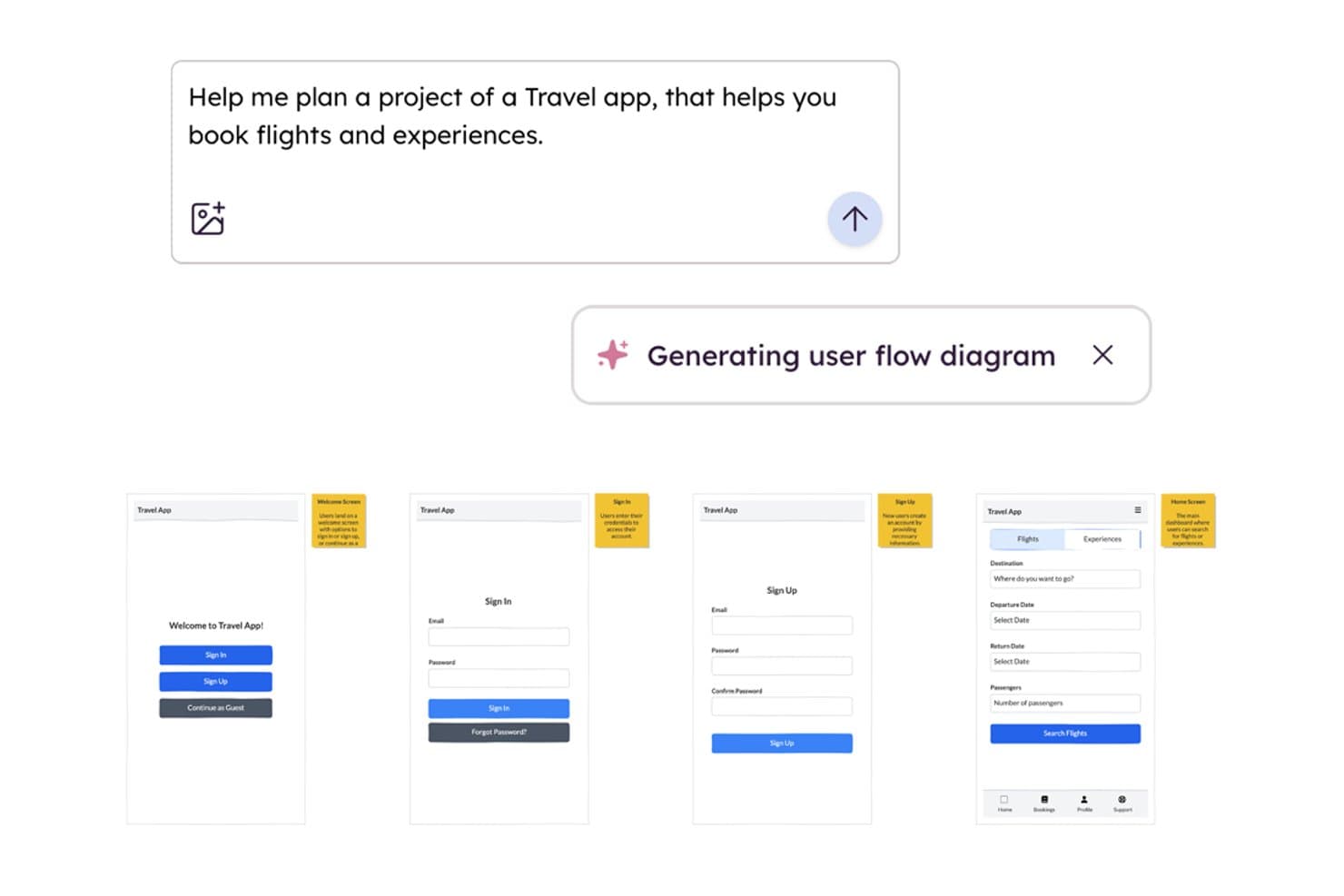
Balsamiq AI generates wireframe user flows from a text prompt. Balsamiq is a low-fidelity AI wireframing tool that converts screenshots, sketches, text prompts, and front-end code into editable wireframes, with built-in collaboration, clickable HTML prototypes, and an MCP server for handoff to AI coding tools.
Who Is Balsamiq AI Best For?
Balsamiq AI is a strong fit for product managers and startup founders who need to move fast from idea to testable concept without a design background.
Why I Picked Balsamiq AI
I picked Balsamiq AI because its MCP server makes it the clearest path from wireframe to AI-assisted development I've seen. Once your screens are ready, tools like Cursor or Claude can read the boards directly, generate user stories, write QA plans, and flag missing states like error or empty screens. I also like the code-to-wireframe feature: paste in React or HTML and get an editable wireframe back, which makes it easy to reverse-engineer existing front-ends before iterating.
Balsamiq AI Key Features
- Screenshot-to-wireframe conversion: Upload a screenshot of any app or website and Balsamiq AI converts it into a set of editable wireframe elements in roughly 30 seconds.
- Alternates: Create and manage multiple layout variations of a single wireframe to compare ideas or gather stakeholder feedback without duplicating entire boards.
- Clickable HTML prototype generation: Select your wireframe screens and generate a functional HTML prototype where buttons, sliders, and navigation work as expected.
- AI credit pooling: Monthly AI credits are shared across your entire workspace, so teams can distribute usage flexibly rather than each editor working from a fixed individual quota.
Balsamiq AI Integrations
Balsamiq AI offers native integrations with Jira and Confluence, plus Slack sharing. Its MCP server connects boards to Claude, ChatGPT, Cursor, VS Code, and Codex for AI-assisted development handoff.
Pros and Cons
Pros:
- Generates clickable prototypes from low-fidelity screens
- Reverse-engineers front-end code into wireframes
- Converts screenshots and sketches into wireframes
Cons:
- No direct Figma or Sketch export
- Deliberately stops short of high-fidelity design
Learn more about Balsamiq AI:
Outras ferramentas de criação de esboços de interface com IA
Eis algumas opções adicionais de ferramentas de criação de esboços de interface com IA que não entraram na minha lista, mas que ainda vale a pena conhecer:
- 11Mockitt DesignBest for turning PRDs into multi-screen prototypes
- 12FramerBest for wireframe-to-live-site in one canvas
- 13MockplusBest for team wireframing without design skills
- 14UXMagicBest for sketching to screen with PRD input
- 15Figma MakeBest for prompt-to-prototype in the Figma ecosystem
- 16Jeda.aiBest for wireframing from docs and PRD uploads
How I Evaluate AI Wireframing Tools
To make this list, a tool’s AI needs to handle real wireframe work, like generating layouts from prompts and converting sketches into wireframes. From there, I evaluate three things. Core functionality carries the most weight, like editing layouts with drag-and-drop and adding UI components. Then I consider standout features like design-system awareness, and fit with your team’s existing tools.
Core Functionality (Table Stakes For This List)
When I'm selecting tools for my list, I score each one on a scale from 0 (does not offer the functionality) to 5 (excels in this area) for each core functionality listed below. I then convert the total into a percentage to help assess each tool's overall fit, with extra weight on any functionalities I’ve deemed essential.
- AI Wireframe Generation (Essential): I assess how prompts, sketches, or screenshots become relevant screen layouts, such as a sign-up flow, and how much restructuring they need.
- Drag-and-Drop Editing (Essential): I look for controls to move, resize, and arrange elements while refining a mobile checkout or dashboard without rebuilding it.
- UI Component Library: I consider whether the library covers practical patterns like forms, navigation, and cards for the web and mobile layouts teams create.
- Fidelity Options: I evaluate how easily teams can move from a rough layout to a styled, near-prototype screen without reconstructing it.
- Export and Handoff: I check which formats teams can share or export, and whether the handoff preserves useful structure for design or development.
- Team Collaboration: I look for ways teammates can review, comment on, and co-edit a concept during a product discovery session.
Once I have a list of tools that meet the criteria, I consider what sets each platform apart.
Differentiating Factors (What Sets Vendors Apart)
Here's how I compare and contrast different vendors:
Standout Features
I look for design-system awareness—whether a tool can ingest your existing component library so generated layouts actually match your brand patterns instead of starting from scratch. PRD-to-wireframe import is another separator. Tools like Uizard and Visily let you feed in a requirements doc and get structured screens back, which cuts the translation step PMs usually handle manually. I also evaluate AI style variation generation, where one prompt produces multiple layout options your team can compare side by side during discovery.
Beyond Features
I evaluate how quickly a tool moves from prompt to something a stakeholder can react to—teams running discovery sprints can't wait days for a polished mockup. Integration with your existing toolchain matters just as much; a Figma or Jira connection means generated wireframes feed into real workflows instead of living on an island. I also check how each vendor handles uploaded designs and prompts, since teams prototyping pre-launch products need clear data-privacy commitments before putting sensitive concepts into a cloud-based AI tool.
Como escolher ferramentas de criação de esboços de interface com IA
É fácil ficar preso a longas listas de funcionalidades e estruturas de preços complexas. Para o ajudar a manter o foco enquanto analisa o seu processo específico de seleção de software, eis uma lista de verificação dos fatores a ter em conta:
| Fator | O que deve considerar |
|---|---|
| FatorEscalabilidade | O que deve considerarA ferramenta acompanhará o crescimento da sua equipa? Considere os limites de utilizadores, os limites de projetos e as necessidades de colaboração para uma futura expansão. |
| FatorIntegrações | O que deve considerarA ferramenta liga-se ao seu conjunto de ferramentas atual (por exemplo, Jira, Figma e Slack)? Procure integrações nativas, não apenas opções de API ou Zapier. |
| FatorPersonalização | O que deve considerarPode adaptar modelos, componentes ou fluxos de trabalho ao seu processo? Avalie até que ponto pode ajustar a ferramenta às necessidades da sua equipa. |
| FatorFacilidade de utilização | O que deve considerarCom que rapidez podem os novos utilizadores tornar-se produtivos? Procure uma navegação intuitiva, uma rotulagem clara e requisitos mínimos de formação. |
| FatorImplementação e integração inicial | O que deve considerarQue recursos estão disponíveis para a configuração e a formação? Avalie a disponibilidade de tutoriais, guias de integração inicial e apoio ao cliente durante a implementação. |
| FatorCusto | O que deve considerarOs níveis de preços são transparentes e previsíveis? Esteja atento a taxas ocultas, preços baseados no número de utilizadores ou limitações de funcionalidades que possam afetar o seu orçamento. |
| FatorMedidas de segurança | O que deve considerarA ferramenta cumpre as normas de segurança da sua organização? Verifique a existência de SSO, encriptação de dados e conformidade com os regulamentos relevantes. |
| FatorDisponibilidade do apoio | O que deve considerarQue canais de apoio são disponibilizados e durante que período? Considere se precisa de apoio 24 horas por dia, 7 dias por semana, conversação em direto ou gestão dedicada da conta. |
O que são ferramentas de criação de esboços de interface com IA?
As ferramentas de criação de wireframes com IA são plataformas de software que utilizam inteligência artificial para ajudar os utilizadores a gerar, editar e aperfeiçoar rapidamente wireframes digitais para websites ou aplicações. Estas ferramentas automatizam a criação de layouts, sugerem elementos de design para a Web e, frequentemente, interpretam comandos de texto para produzir estruturas visuais. Foram concebidas para equipas de produto, designers e programadores que pretendem acelerar as fases iniciais do design e colaborar de forma mais eficiente em conceitos de interfaces de utilizador.
Funcionalidades das ferramentas de criação de wireframes com IA
Ao selecionar ferramentas de criação de wireframes com IA, procure as seguintes funcionalidades principais:
- Layouts gerados por IA: Crie automaticamente estruturas de wireframes a partir de comandos de texto ou requisitos, poupando tempo no design manual.
- Biblioteca de componentes de arrastar e largar: Aceda a uma vasta gama de elementos de interface de utilizador pré-criados que podem ser rapidamente colocados e organizados na tela.
- Colaboração em tempo real: Permita que vários utilizadores trabalhem simultaneamente no mesmo wireframe, com atualizações em direto e comentários.
- Histórico de versões: Acompanhe as alterações, compare iterações anteriores e reverta para versões anteriores conforme necessário.
- Opções de exportação: Transfira wireframes em vários formatos, como PNG, PDF ou SVG, para partilhar ou editar posteriormente.
- Galeria de modelos: Comece os projetos com modelos de wireframes prontos a utilizar para tipos de páginas comuns, como uma página de destino e uma página inicial.
- Capacidades de integração: Ligue-se a outras ferramentas, como plataformas de gestão de projetos, documentação ou design, para centralizar os fluxos de trabalho.
- Ferramentas de feedback e anotação: Permita que as partes interessadas deixem comentários, sugestões ou marcações diretamente nos wireframes.
- Suporte para design responsivo: Crie wireframes que se adaptem a diferentes tamanhos de ecrã e dispositivos, pré-visualizando layouts para telemóveis, tablets e computadores.
- Controlos de acesso: Faça a gestão das permissões dos utilizadores para garantir que as pessoas certas podem visualizar, editar ou comentar os wireframes.
Benefícios das ferramentas de criação de wireframes com IA
A implementação de ferramentas de criação de wireframes com IA proporciona vários benefícios à sua equipa e à sua empresa. Eis alguns dos benefícios que pode esperar:
- Iteração de design mais rápida: Os layouts e modelos gerados por IA ajudam as equipas a explorar rapidamente várias opções de design sem começarem do zero.
- Colaboração melhorada: As funcionalidades de edição e comentários em tempo real permitem que designers, programadores e partes interessadas trabalhem facilmente em conjunto.
- Interfaces de utilizador consistentes: As bibliotecas de componentes e os modelos pré-criados promovem a consistência do design entre projetos e equipas.
- Redução do esforço manual: A geração automatizada de wireframes a partir de comandos de texto minimiza as tarefas repetitivas e acelera as fases iniciais do design.
- Feedback mais fácil por parte das partes interessadas: As ferramentas integradas de anotação e partilha simplificam a revisão e o fornecimento de contributos diretamente nos wireframes.
- Melhor integração com os fluxos de trabalho: As integrações nativas com ferramentas de gestão de projetos e design ajudam as equipas a manter a criação de wireframes ligada ao processo mais amplo de desenvolvimento de produtos.
- Controlo de versões melhorado: As funcionalidades de histórico de versões permitem às equipas acompanhar alterações, comparar iterações e reverter para designs anteriores conforme necessário.
Custos e preços das ferramentas de criação de wireframes com IA
A seleção de ferramentas de criação de wireframes com IA exige uma compreensão dos vários modelos de preços e planos disponíveis. Os custos variam consoante as funcionalidades, o tamanho da equipa, os extras e outros fatores. A tabela abaixo resume os planos comuns, os respetivos preços médios e as funcionalidades normalmente incluídas nas soluções de ferramentas de criação de wireframes com IA:
Tabela de comparação de planos para ferramentas de criação de wireframes com IA
| Tipo de plano | Preço médio | Funcionalidades comuns |
|---|---|---|
| Tipo de planoPlano gratuito | Preço médio$0 | Funcionalidades comunsFerramentas básicas de criação de wireframes, funcionalidades de IA limitadas, acesso para um único utilizador e opções básicas de exportação. |
| Tipo de planoPlano pessoal | Preço médio$5-$15/utilizador/mês | Funcionalidades comunsCriação completa de wireframes com IA, bibliotecas de componentes ampliadas, mais formatos de exportação e integrações limitadas. |
| Tipo de planoPlano empresarial | Preço médio$15-$30/utilizador/mês | Funcionalidades comunsColaboração em equipa, integrações avançadas, histórico de versões, suporte prioritário e controlos de administração. |
| Tipo de planoPlano empresarial de grande escala | Preço médio$30-$60/utilizador/mês | Funcionalidades comunsIntegrações personalizadas, segurança reforçada, gestão dedicada de conta, suporte à integração e garantias de SLA. |
Perguntas frequentes sobre ferramentas de criação de esboços de estrutura com IA
Eis algumas respostas a perguntas frequentes sobre ferramentas de criação de esboços de estrutura com IA:
As ferramentas de criação de esboços de estrutura com IA podem substituir o software de design tradicional?
Não, as ferramentas de criação de esboços de estrutura com IA não substituem completamente o software de design tradicional. Aceleram a ideação inicial e a criação de layouts, mas a maioria das equipas continua a utilizar ferramentas de design dedicadas para trabalhos detalhados de interface, prototipagem e produção dos recursos finais.
Qual é a precisão dos esboços de estrutura gerados por IA?
Os esboços de estrutura gerados por IA são geralmente precisos no que diz respeito a layouts básicos e padrões de interface comuns. No entanto, podem exigir ajustes manuais para fluxos de trabalho complexos, marcas únicas ou interfaces altamente personalizadas. Reveja e aperfeiçoe sempre os resultados da IA antes de os partilhar com as partes interessadas.
As ferramentas de criação de esboços de estrutura com IA exigem experiência em design?
Não, a maioria das ferramentas de criação de esboços de estrutura com IA foi concebida tanto para designers como para pessoas sem conhecimentos de design. As suas interfaces intuitivas e sugestões baseadas em IA ajudam os utilizadores com pouca experiência em design a criar esboços de estrutura funcionais, embora os conhecimentos de design possam melhorar os resultados.
As ferramentas de criação de esboços de estrutura com IA são seguras para projetos sensíveis?
Sim, muitas ferramentas de criação de esboços de estrutura com IA disponibilizam funcionalidades de segurança, como encriptação de dados, SSO e conformidade com as normas de privacidade. Reveja sempre a documentação de segurança do fornecedor e confirme que cumpre os requisitos da sua organização antes de utilizar a ferramenta em projetos sensíveis.
Posso colaborar em tempo real com a minha equipa utilizando estas ferramentas?
Sim, a maioria das ferramentas de criação de esboços de estrutura com IA permite a colaboração em tempo real. Vários utilizadores podem editar, comentar e rever esboços de estrutura em simultâneo, facilitando a recolha de feedback e a iteração rápida com equipas distribuídas.
Para que formatos de ficheiro posso exportar os esboços de estrutura?
A maioria das ferramentas de criação de esboços de estrutura com IA permite exportá-los em formatos como PNG, PDF e SVG. Algumas também permitem a partilha através de ligações Web ou a integração direta com outras plataformas de design e gestão de projetos. Verifique sempre as opções de exportação antes de escolher uma ferramenta.