

Programvare for AI-produktveikart hjelper deg med å prioritere oppgaver, ta datadrevne beslutninger og redusere støyen som fører til forsinkelser og tapte muligheter. Når produktplanleggingen din baserer seg på statiske verktøy eller spredte innspill, er det lett å overse kritiske avhengigheter, gjøre dobbeltarbeid eller miste oversikten over tilbakemeldinger fra kunder.
Jeg har brukt tid på å gjennomgå og teste disse verktøyene i virkelige miljøer for å gi deg en ærlig og objektiv vurdering av de beste tilgjengelige alternativene. Fokuset mitt har vært på hvor godt AI-funksjonene støtter effektiv planlegging, samarbeid og gjennomføring – ikke på overdrivelser.
I denne artikkelen får du tydelig innsikt i AI-funksjonene til hvert verktøy, hvordan de påvirker planleggingsprosessen din, og hvilke situasjoner de fungerer best i. La oss finne den beste løsningen på utfordringene dine innen produktstyring.
Why Trust Our Software Recommendations
6,700+
Reviews
20
Industry experts
16+
Evaluation factors
14
Years
Our team has been testing and reviewing software since 2012. As product managers ourselves, we know how difficult—and important—it is to choose the right software.
For this guide, we evaluated tools using hands-on testing and independent research, scoring tools using our selection criteria.
Our reviews reflect our human editorial judgment, not a sales pitch.
Expert reviewers:
- Andrew LumbySenior TPM
- Cristiano ValimSenior UI/UX Lead


Sammenligningstabell for programvare for AI-produktveikart
Denne sammenligningstabellen oppsummerer prisdetaljene for mine beste utvalgte programmer for AI-produktveikart:
| Tool | Best For | Trial Info | Price | ||
|---|---|---|---|---|---|
| 1 | Best for audience-specific public roadmaps | 30-day free trial + free plan available | From $1.10/user/month | Website | |
| 2 | Best for custom AI agents | Free plan + 14-day free trial available | From $10/user/month (billed annually) | Website | |
| 3 | Best for sprint planning | 15-day free trial | From $1/user/month (12 user minimum) | Website | |
| 4 | Best for AI-driven feedback synthesis | Free plan + free demo available | From $10/user/month (billed annually) | Website | |
| 5 | Best for AI-assisted prioritization | Free demo available | Pricing upon request | Website | |
| 6 | Best for strategic roadmapping | 14-day free trial + free demo available | From $24/user/month | Website | |
| 7 | Best for product idea funneling | 30-day free trial + free demo available | From $9/user/month | Website | |
| 8 | Best for all-in-one project management | Free plan available | From $10/user/month | Website | |
| 9 | Best for feedback-driven roadmap evidence chains | Free demo available | From $7.99/month (billed annually) | Website | |
| 10 | Best for visual collaboration | Free plan + 14-day free trial available | From $8/user/month (billed annually) | Website |


Vurdering av den beste programvaren for AI-produktveikart
Nedenfor finner du mine detaljerte sammendrag av den beste programvaren for AI-produktveikart som kom med på kortlisten min. Vurderingene ser på de viktigste funksjonene, fordeler og ulemper, integrasjoner og ideelle bruksområder for hvert verktøy, slik at du kan finne det beste alternativet for deg.
 Best for audience-specific public roadmaps
- 30-day free trial + free plan available
- From $1.10/user/month
Visit WebsiteCustomer Rating:5/5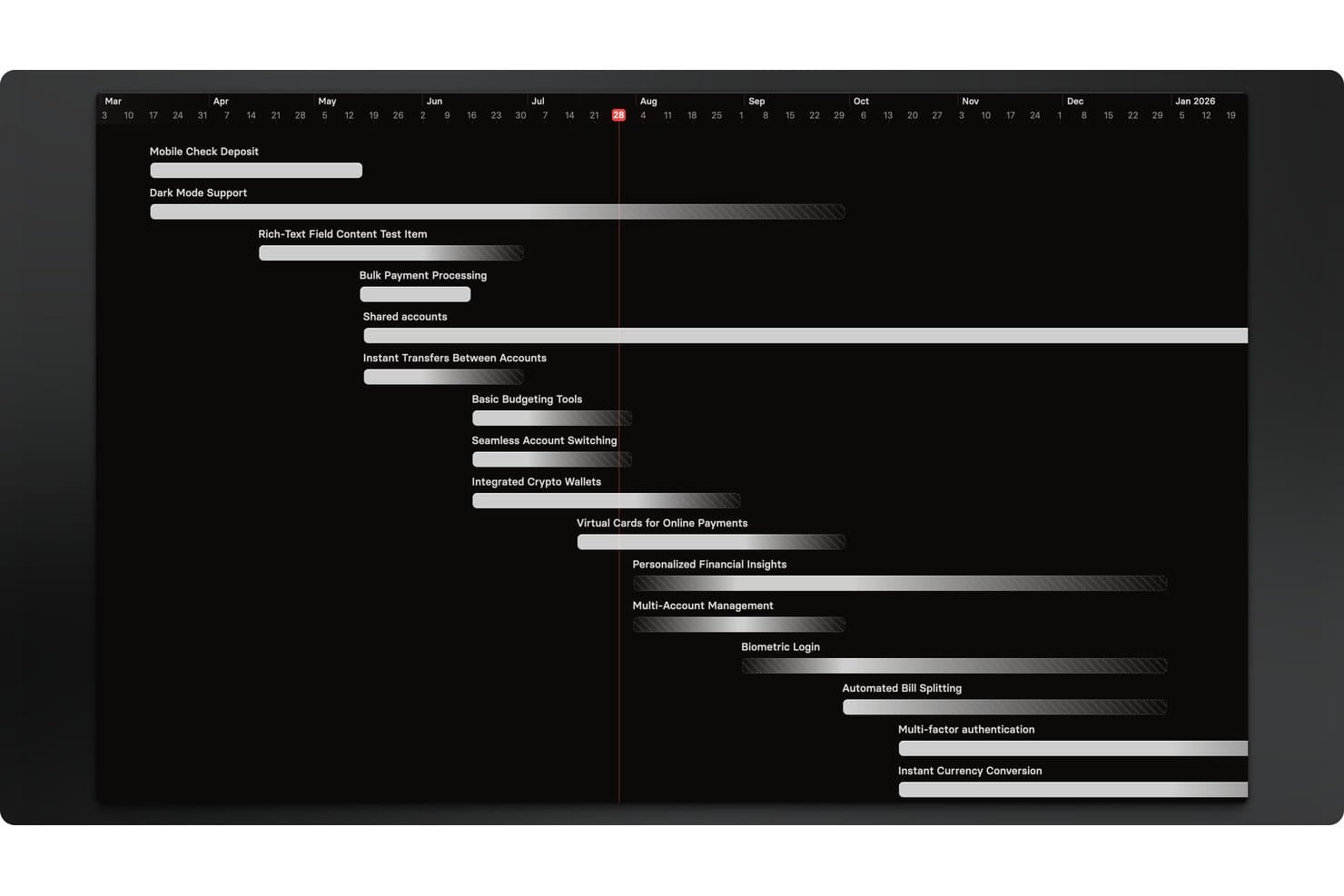
Released offers a timeline roadmap view that displays multiple product features scheduled across months. Released is a Jira-native roadmap publishing and customer communication tool that uses AI to generate release notes and lets teams share live, audience-specific roadmap views with customers, executives, and partners.
Who Is Released Best For?
Released is a natural fit for product managers at Jira Cloud teams who need to publish external-facing roadmaps and release notes without adopting a separate product management platform.
Why I Picked Released
Released earns its spot on my shortlist because of how it handles audience-specific roadmap publishing. I love that you can serve a completely different view to customers, executives, and partners, all pulling from the same live Jira data with no manual exports. The access controls are granular: public, password-protected, or invite-only, set per audience. The AI release notes generator means my team can draft polished, on-brand summaries from completed Jira tickets in seconds.
Released Key Features
- Customer feedback portals: Collect feedback from users via public or private portals that feed directly into your Jira backlog.
- Jira Product Discovery integration: Seamlessly connect feedback and ideas to initiatives tracked in Jira Product Discovery.
- Embeddable roadmap widgets: Embed interactive roadmaps within your app, support portal, or documentation with copy-paste code.
- Confluence publishing: Push release notes and product updates directly to Confluence spaces to keep internal teams informed.
Released Integrations
Released offers native integrations with Jira, Confluence, and Slack. API is available for custom integrations.
Pros and Cons
Pros:
- Embeddable roadmaps for customer-facing portals
- AI-generated release notes from completed tickets
- Audience-specific roadmap views from Jira data
Cons:
- Locked into the Jira Cloud ecosystem
- Limited AI beyond release note generation
Learn more about Released: Best for custom AI agents
- Free plan + 14-day free trial available
- From $10/user/month (billed annually)
Visit WebsiteCustomer Rating:4.3/5
Wrike offers a Klaxoon integration for enhanced mind mapping capabilities. For teams seeking to elevate their product management strategies, Wrike offers a dynamic AI-enabled platform that transforms how you plan and execute your product roadmap. Designed to meet the needs of diverse industries, from technology to finance, Wrike empowers you with customizable dashboards, real-time analytics, and seamless collaboration tools. By integrating AI into your workflow, Wrike addresses challenges like inefficient resource allocation and fragmented communication, providing a streamlined approach to achieving your strategic objectives.
Why I Picked Wrike
I picked Wrike for its standout feature: AI-powered automation that enhances your product roadmap management. This tool offers custom AI agents that automate repetitive tasks, freeing your team to focus on strategic initiatives. Moreover, Wrike's AI-powered highlights widget provides critical insights by summarizing dashboard data, ensuring your team makes informed decisions. These features make Wrike a compelling choice for those looking to optimize project management through AI.
Wrike Key Features
In addition to its AI capabilities, Wrike offers several features that enhance your product roadmap management:
- Adjustable Gantt Charts: Allows your team to visualize project timelines and track progress effectively.
- Customizable Templates: Provides ready-to-use templates for various methodologies, including Agile and Scrum.
- Real-Time Analytics: Offers dashboards for data-driven decision-making and monitoring of project health.
- In-Platform Communication: Facilitates seamless collaboration with features like in-app chat and integrated messaging.
Wrike Integrations
Integrations include Slack, Gmail, Zoom, Miro, Dropbox, Adobe InDesign, Adobe XD, Google Sheets, Microsoft Excel, and Salesforce.
Pros and Cons
Pros:
- In-platform communication features available
- Supports multiple project views, including Gantt and Kanban
- Integrates with popular tools like Slack and Salesforce
Cons:
- Lack of real-time phone or chat support for immediate assistance
- Limited time-tracking capabilities on lower-tier plans
 Best for sprint planning
- 15-day free trial
- From $1/user/month (12 user minimum)
Visit WebsiteCustomer Rating:4.1/5
Zoho Sprints uses AI to plan, track, and manage Agile team projects. Zoho Sprints is an Agile project management tool for development teams and project managers to manage their agile workflow efficiently. It plans, tracks, and delivers projects and uses AI to facilitate sprint planning and improve team collaboration.
Why I picked Zoho Sprints: Its focus on sprint-based workflows includes tools for backlog refinement, sprint planning, and progress tracking while offering automation platform capabilities that reduce bottlenecks and improve process optimization. Its structure supports teams undergoing digital transformation by helping them manage iterative delivery and maintain visibility across projects. It includes automation features that reduce manual steps in repetitive task assignment and updates, supporting intelligent process automation at the team level.
Standout features & integrations:
Features include an interactive scrum board that improves task visibility. It also gives visibility into dependencies and supports structured planning aligned with agile process automation practices. Its customizable workflows can support teams working with BPM-inspired structures and iterative process intelligence improvements.
Integrations include Slack, GitHub, Bitbucket, Jira, Microsoft Teams, Zapier, Google Workspace, Zoho CRM, Trello, and Asana.
Pros and Cons
Pros:
- Extensive backlog management tools
- AI-driven task automation
- Live board updates automatically
Cons:
- Can’t track roadmap changes
- Basic roadmap view
Learn more about Zoho Sprints: Best for AI-driven feedback synthesis
- Free plan + free demo available
- From $10/user/month (billed annually)
Visit WebsiteCustomer Rating:4.6/5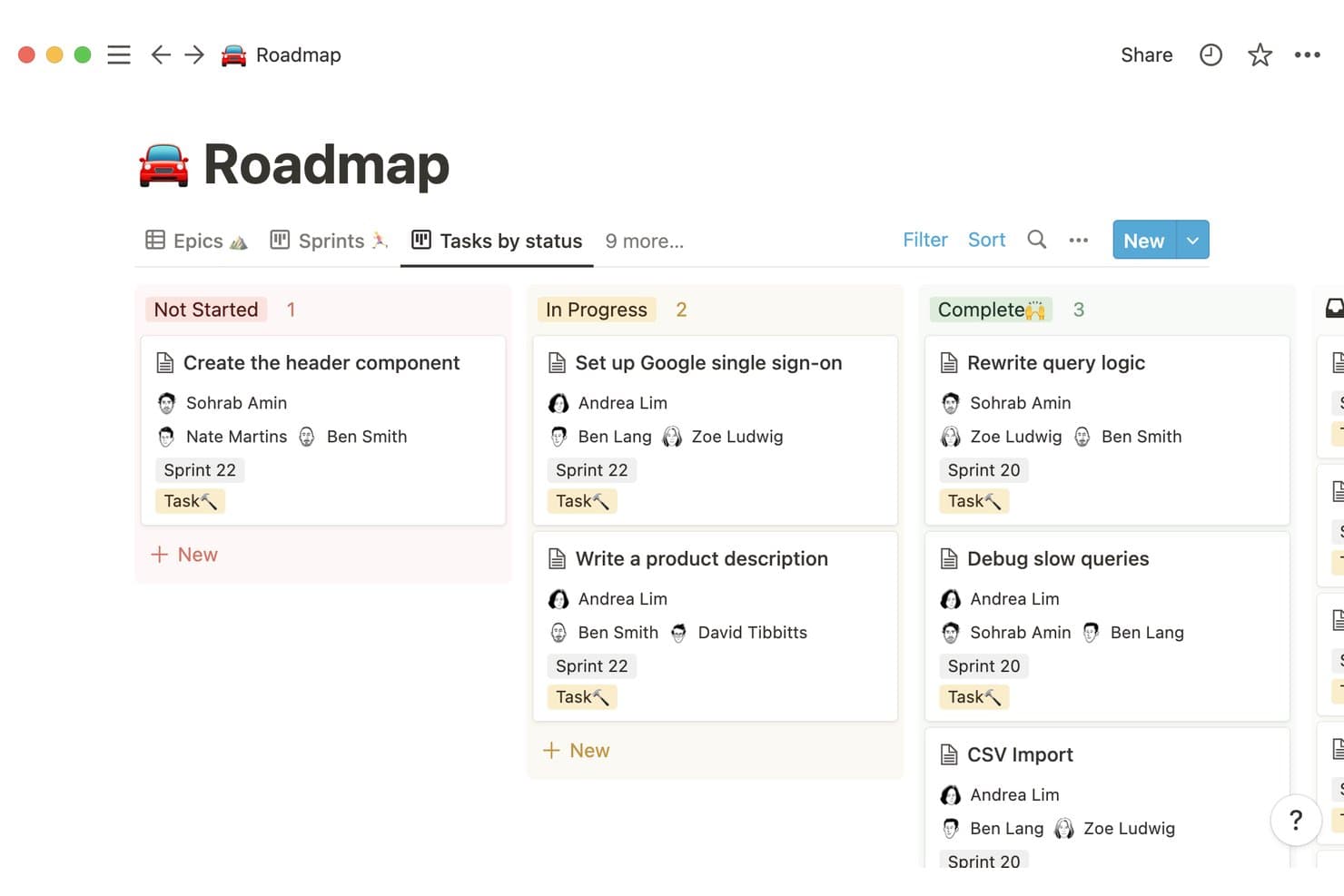
Notion organizes tasks by status across sprints in a kanban roadmap view. Notion is a connected workspace platform that combines docs, databases, and AI to help teams build and manage product roadmaps alongside their research, planning, and feedback data.
Who Is Notion Best For?
Notion is a great fit for product teams that already centralize their docs and research in one workspace and want AI to surface patterns from customer feedback without switching tools.
Why I Picked Notion
I've included Notion in my top picks because its AI can scan across your entire workspace, pulling signals from customer interview notes, support tickets, and feedback docs to surface themes you'd otherwise spend hours finding manually. Notion AI's Q&A feature lets you ask plain-language questions like "what are users saying about onboarding?" and get synthesized answers drawn from your actual data. That makes it genuinely useful when you're trying to justify roadmap priorities without rebuilding your entire research workflow.
Notion Key Features
- Notion AI Q&A: Ask plain-language questions across your workspace to surface synthesized answers from your docs, notes, and databases.
- Linked databases: Connect feedback tables, roadmap boards, and research docs so updates in one place reflect across your entire workspace.
- Timeline view: Visualize roadmap phases and dependencies in a Gantt-style layout built directly inside your Notion pages.
- Collaborative docs: Co-edit roadmap documents in real time with inline comments and mentions to keep stakeholders aligned.
Notion Integrations
Native integrations are not clearly documented. Notion offers an API for custom integrations.
Pros and Cons
Pros:
- Combines collaborative docs with timeline planning
- Links research insights directly to roadmap decisions
- Synthesizes feedback themes across workspace content
Cons:
- AI insights depend on well-organized source content
- Lacks purpose-built product prioritization frameworks
Learn more about Notion: Best for AI-assisted prioritization
- Free demo available
- Pricing upon request
Visit WebsiteCustomer Rating:4.5/5
Productboard uses AI to help teams prioritize features and plan roadmaps. Productboard is a product management platform for collecting customer insights, assessing feature priorities, and creating clear roadmaps. It centralizes feedback from multiple channels and uses AI to summarize themes, identify patterns, and support process improvement across end-to-end product planning.
Why I picked Productboard: Its strength in consolidating user feedback and transforming it into actionable prioritization inputs. The AI assistant helps categorize feedback, generate summaries, and offer suggestions usable in workflow management and early process design. This makes it effective for teams needing an organized way to evaluate ideas against business goals while maintaining clarity around customer needs. Its AI-driven insights are also helpful for gathering and organizing customer feedback efficiently.
Standout features & integrations:
Features include feedback collection from multiple sources, an insights board that groups similar comments using AI, prioritization frameworks, and multiple roadmap views for communicating plans.
Integrations include Jira, Slack, Microsoft Teams, Trello, Salesforce, Zendesk, Intercom, GitHub, Asana, and Google Analytics.
Pros and Cons
Pros:
- Roadmap views for alignment
- Clear feedback-to-feature linkage
- AI-assisted insight grouping
Cons:
- Limited customization options
- Can be complex for beginners
Learn more about Productboard: Best for strategic roadmapping
- 14-day free trial + free demo available
- From $24/user/month
Visit WebsiteCustomer Rating:4.4/5
Craft.io helps teams build strategic, AI-driven product roadmaps. Craft.io is a product management platform to help product teams create strategic roadmaps and manage product development. It connects customer insights, strategy, and delivery while incorporating AI assistance to reduce inefficiencies and improve operational efficiency.
Why I picked Craft.io: I picked Craft.io for its strong structure for strategic planning and its ability to link decisions directly to product outcomes. Its AI capabilities help summarize feedback, support prioritization, and offer guidance that reinforces process improvement. Teams can evaluate feature ideas using structured scoring and align them with goals, making Craft.io well-suited for organizations that need clarity around prioritization and strategic alignment.
Standout features & integrations:
Features include a roadmap visualization tool that helps you see the big picture. Craft.io also provides built-in templates for structured process mapping and supports workflow management across feature lifecycles through customizable views and drag-and-drop planning.
Integrations include Jira, Slack, Microsoft Teams, GitHub, Trello, Google Drive, Confluence, monday.com, Azure DevOps, and Salesforce.
Pros and Cons
Pros:
- Feedback insights for planning
- AI-supported prioritization
- Clear roadmap visualization tools
Cons:
- Limited export options
- Slow with large data
Learn more about Craft.io: 7Best for product idea funneling
Aha!
- 30-day free trial + free demo available
- From $9/user/month
Visit WebsiteCustomer Rating:4.4/5
Aha! Roadmaps help product teams plan and align strategy with AI tools. Aha! Roadmaps is a product management platform that helps teams create and manage strategic roadmaps. It supports end-to-end planning across goals, initiatives, and feature releases while offering AI assistance to organize feedback and improve operational efficiency
Why I picked Aha! Roadmaps: This tool stands out for its strong ability to centralize product ideas and connect them to strategy in a structured, transparent system. The AI assistant helps capture and categorize feedback, assists with prioritization, and supports teams in reducing inefficiencies across workflow management. This makes it well-suited for teams that want clearer insight into idea evaluation and strategic alignment without relying on multiple disconnected apps.
Standout features & integrations:
Features include idea portals for collecting customer and internal feedback, strategy-to-roadmap linking, AI-assisted task organization, and multiple roadmap formats (including timelines and Gantt-style views). Its whiteboards support early-stage process modeling and drag-and-drop planning.
Integrations include Jira, Salesforce, Slack, GitHub, Trello, Asana, Microsoft Teams, Google Workspace, Dropbox, and Zendesk.
Pros and Cons
Pros:
- Flexible roadmap templates
- AI assistance for organization
- Links ideas to strategy
Cons:
- Progress indicators are not fully customizable
- Too many link layers between tasks
Learn more about Aha!:

ClickUp helps teams manage tasks, goals, and workflows in one platform. ClickUp is a work and project management platform that helps teams manage tasks, documents, goals, and workflows in a centralized workspace. It includes AI-assisted writing, task handling, and automation platform features that support workflow automation, reduce inefficiencies, and improve operational efficiency.
Why I picked ClickUp: Its versatility for managing everything from simple tasks to complex processes within a single system. Its AI capabilities assist with generating task summaries, drafting content, and suggesting improvements, while automations support process improvement and reduce manual work. This makes it suitable for teams that want both project visibility and unified workflow management without switching between multiple apps.
Standout features & integrations:
Features include a customizable dashboard that lets you arrange your workspace to suit your needs. You can track time spent on tasks to improve productivity. ClickUp also offers whiteboards for collaborative process mapping and process design, alongside drag-and-drop editing to shape project structures.
Integrations include Slack, Google Drive, Trello, Dropbox, GitHub, Microsoft Teams, Asana, Evernote, Calendly, and Zoom.
Pros and Cons
Pros:
- Goal alignment tools
- Built-in time tracking
- Customizable dashboard
Cons:
- Exporting roadmaps has constraints
- Roadmap sharing options are limited
Learn more about ClickUp: Best for feedback-driven roadmap evidence chains
- Free demo available
- From $7.99/month (billed annually)
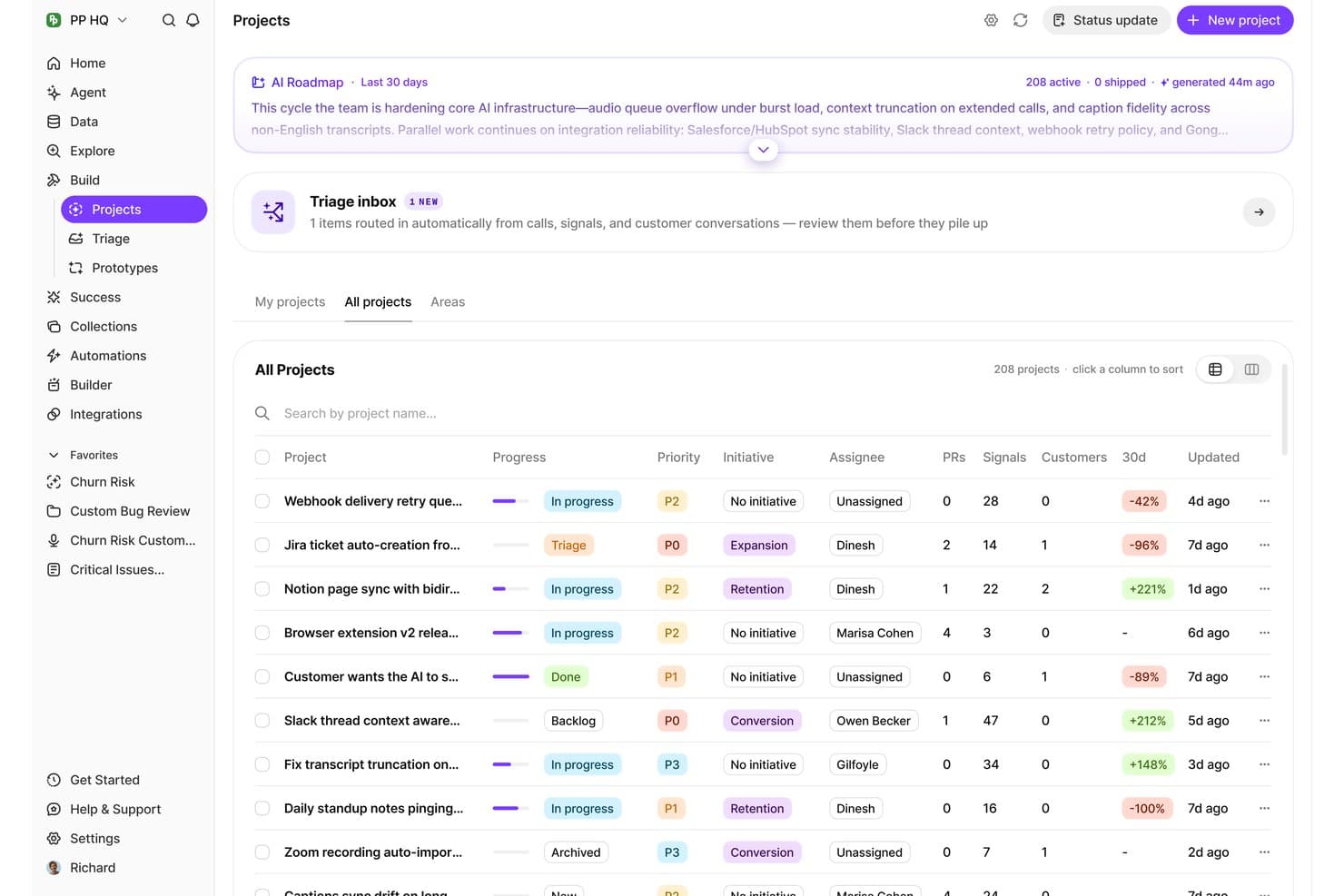
BuildBetter organizes all AI-surfaced projects with priority, signals, and progress. BuildBetter is an AI product management platform that captures, analyzes, and synthesizes customer feedback from calls, interviews, and other sources into structured product insights, roadmap evidence, and prioritization signals.
Who Is BuildBetter Best For?
BuildBetter is a strong fit for product managers who need to connect customer feedback directly to roadmap decisions with a clear, traceable evidence trail.
Why I Picked BuildBetter
I've included BuildBetter in my top picks because it's the only tool I've seen that builds a direct, traceable link between raw customer feedback and roadmap decisions. Its Signal extraction feature pulls themes and evidence from calls and interviews automatically, so when a stakeholder asks why a feature is prioritized, you can point to real quotes. I also like how its Evidence Chains tie specific feedback clusters to roadmap items, giving every priority a verifiable source.
BuildBetter Key Features
- Call and interview transcription: Automatically transcribes recorded customer calls and user interviews to make them searchable and analyzable.
- AI-generated insight summaries: Condenses long transcripts and feedback sessions into concise, structured summaries for quick review.
- Cross-source feedback aggregation: Pulls feedback from multiple channels, including calls, surveys, and support tickets, into a single workspace.
- Searchable feedback library: Stores all processed customer conversations in a queryable archive so you can find relevant quotes and themes on demand.
BuildBetter Integrations
BuildBetter offers documented integrations with Jira, Linear, Slack, HubSpot, Salesforce, Pendo, Zoom, and Microsoft Teams, plus a REST API for custom integrations.
Pros and Cons
Pros:
- Aggregates customer signals across sources
- AI extracts themes from calls and interviews
- Traceable feedback-to-roadmap evidence chains
Cons:
- Evidence quality depends on source coverage
- More feedback-centric than visual roadmapping
Learn more about BuildBetter: 10Best for visual collaboration
Miro
- Free plan + 14-day free trial available
- From $8/user/month (billed annually)
Visit WebsiteCustomer Rating:4.8/5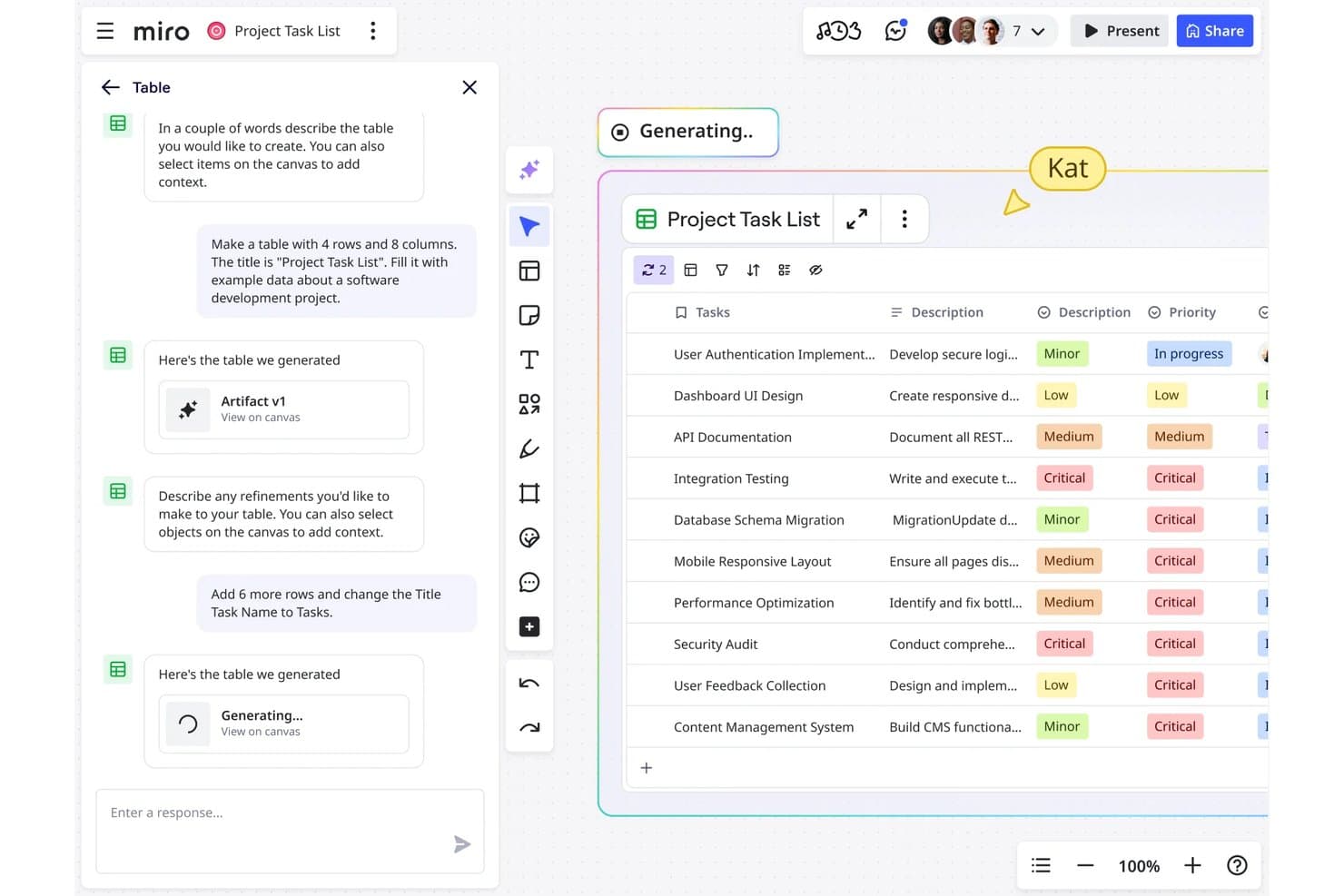
Miro lets users generate and refine project task tables using AI chat. Miro is a visual collaboration platform that combines infinite canvases, AI-assisted diagramming, and roadmap planning tools to support product teams in mapping ideas, aligning stakeholders, and structuring product strategy.
Who Is Miro Best For?
Miro is a strong fit for cross-functional product teams that rely heavily on visual thinking to align stakeholders and map out strategy together.
Why I Picked Miro
Visual collaboration is where Miro genuinely shines, and that's exactly why it earns a spot on this list. I love how its infinite canvas lets product teams run async roadmapping sessions, turning scattered sticky notes and diagrams into a structured product strategy in real time. Miro's AI-assisted diagramming can generate flowcharts and mind maps from a prompt, which cuts down the time it takes to move from raw ideas to shareable artifacts your stakeholders can actually react to.
Miro Key Features
- Smart diagramming: An AI-powered tool that converts text descriptions into structured diagrams, flowcharts, and timelines directly on the canvas.
- Voting and prioritization sessions: Built-in voting features let teams rank and prioritize ideas or backlog items together during live or async sessions.
- Pre-built product templates: A library of templates for user story maps, sprint planning, and product strategy frameworks that teams can customize and reuse.
- Integrations with dev and PM tools: Native connections to Jira, Asana, and Azure DevOps sync tasks and issues between Miro boards and your existing workflow tools.
Miro Integrations
Miro offers native integrations with Jira, Asana, and Azure DevOps, helping product teams connect visual roadmaps with delivery workflows.
Pros and Cons
Pros:
- Templates support product strategy and prioritization workshops
- AI diagrams turn ideas into roadmap artifacts
- Visual canvas aligns cross-functional roadmap discussions
Cons:
- AI outputs require manual refinement for accuracy
- Canvas-first planning limits dedicated roadmap analytics
Annen programvare for AI-produktveikart
Her er noen flere alternativer innen programvare for AI-produktveikart som ikke kom med på kortlisten min, men som likevel er verdt å se nærmere på:
- 11DragonboatBest for portfolio management
- 12airfocusBest for prioritization frameworks
- 13ProductPlanBest for stakeholder-ready roadmap views
- 14ChiselBest for multi-source feedback-to-roadmap synthesis
How I Evaluate AI Product Roadmap Software
To make this list, a tool's AI needs to handle real product work, like synthesizing feedback into themes or forecasting delivery dates. From there, I evaluate three things. Core functionality carries the most weight, like building roadmaps and organizing releases. Then I look at standout features, like scenario planning, and what a tool offers beyond its feature set, like transparent data handling.
Core Functionality (Table Stakes For This List)
When I'm selecting tools for my list, I score each one on a scale from 0 (does not offer the functionality) to 5 (excels in this area) for each core functionality listed below. I then convert the total into a percentage to help assess each tool's overall fit, with extra weight on any functionalities I’ve deemed essential.
- AI Prioritization (Essential): I look for scoring that weighs customer impact, strategic fit, effort, and evidence when ranking features or initiatives.
- Roadmap Planning (Essential): I evaluate timeline, release, and theme views that support scenario planning for different stakeholders and planning horizons.
- Feedback Synthesis: I check whether AI groups feedback, detects sentiment, and surfaces recurring requests from sources such as surveys and support tickets.
- AI Summaries: I assess summaries that turn roadmap changes, strategy documents, and release plans into clear stakeholder updates.
- Timeline Forecasting: I look for forecasts that account for capacity, dependencies, historical velocity, and schedule risks when estimating delivery dates.
- Product Data Integrations: I consider connections with project trackers, feedback tools, analytics platforms, and other sources that inform roadmap recommendations.
Once I have a list of tools that meet the criteria, I consider what sets each platform apart.
Differentiating Factors (What Sets Vendors Apart)
Here's how I compare and contrast different vendors:
Standout Features
Scenario planning simulations let you model "what-if" changes to scope, timing, or resources before committing to a direction. I look for tools where adjusting one variable updates projected impacts across the whole plan. Stakeholder-specific views matter just as much—I check whether a single plan can generate tailored presentations for executives, sales, and customers without duplicating work. I also evaluate revenue and impact attribution, which ties roadmap items to projected business outcomes so you can justify priorities with data, not gut feel.
Beyond Features
I check whether AI scoring models expose their inputs and weights, because opaque prioritization erodes trust fast when a VP asks why you ranked one initiative over another. Data governance matters just as much—I look for clear policies on whether customer feedback ingested for synthesis trains shared models, plus SOC 2 or GDPR compliance for teams handling sensitive user data. I also evaluate how well a tool fits an existing stack, since two-way sync with delivery and analytics platforms keeps AI insights current.
Slik velger du programvare for AI-produktveikart
Det er lett å gå seg vill i lange funksjonslister og kompliserte prisstrukturer. For å hjelpe deg med å holde fokus mens du går gjennom den unike prosessen din for valg av programvare, får du her en sjekkliste over faktorer du bør ha i tankene:
| Faktor | Hva du bør vurdere |
| Skalerbarhet | Vil programvaren vokse sammen med teamet ditt? Kontroller om den støtter et økende antall brukere og prosjekter uten ekstra kostnader. |
| Integrasjoner | Fungerer den med de eksisterende verktøyene dine? Sørg for kompatibilitet med teamets nåværende programvare og arbeidsflyter. |
| Tilpasningsmuligheter | Kan du tilpasse den til behovene dine? Se etter alternativer for å justere innstillinger, visninger og arbeidsflyter slik at de passer prosessen din. |
| Brukervennlighet | Er den brukervennlig for teamet ditt? Ta hensyn til læringskurven og om opplæring er nødvendig for effektiv bruk. |
| Implementering og innføring | Hvor raskt kan du komme i gang? Vurder oppsettstiden og tilgjengeligheten av ressurser som veiledninger og kundestøtte. |
| Kostnad | Passer den budsjettet ditt? Sammenlign prisplaner, inkludert skjulte kostnader, og vurder langsiktig verdi opp mot utgiftene. |
| Sikkerhetstiltak | Er dataene dine beskyttet? Se etter kryptering, samsvar med personvern- og dataregelverk og tilgangskontroller. |
| Tilgjengelig kundestøtte | Er det enkelt å få hjelp? Kontroller om leverandøren tilbyr direkte kundestøtte, responstider og nyttig dokumentasjon. |
Hva er programvare for AI-produktveikart?
Programvare for AI-produktveikart er et verktøy som hjelper team med å planlegge og prioritere produktutvikling ved hjelp av kunstig intelligens. Produktledere, utviklingsteam og strateger bruker vanligvis disse verktøyene til å samordne prosjekter med forretningsmål og forbedre beslutningstaking.
Funksjonene omfatter AI-drevet prioritering, prediktiv analyse og automatisert rapportering, som bidrar til strategisk planlegging, effektiv ressursallokering og innsiktsfull utforming av veikart. Samlet sett forbedrer disse verktøyene produktiviteten og sikrer at produktinitiativer er i tråd med organisasjonens mål.
Funksjoner i programvare for AI-produktveikart
Når du velger programvare for AI-produktveikart, bør du se etter følgende nøkkelfunksjoner:
- AI-drevet prioritering: Rangerer automatisk oppgaver og funksjoner basert på dataanalyse, slik at team kan fokusere på initiativer med stor effekt.
- Prediktiv analyse: Gir innsikt i potensielle prosjektrisikoer og tidslinjer, slik at beslutninger kan tas proaktivt.
- Automatisert rapportering: Genererer rapporter med minimalt manuelt arbeid, sparer tid og sikrer nøyaktige data.
- Ressursprognoser: Bidrar til effektiv fordeling av teamets ressurser ved å forutse fremtidige behov basert på aktuelle data.
- Sentimentanalyse: Evaluerer tilbakemeldinger fra brukere for å forstå kundenes behov og forbedre produktutviklingen.
- Samarbeid i sanntid: Gjør det mulig for teammedlemmer å arbeide sammen samtidig, noe som forbedrer kommunikasjonen og produktiviteten.
- Tilpassbare maler: Tilbyr forhåndsbygde maler som kan tilpasses spesifikke prosjektbehov og arbeidsflyter.
- Visualisering av veikart: Gir en tydelig og interaktiv oversikt over prosjektets tidslinjer, slik at teamets innsats kan samordnes med strategiske mål.
- Avhengighetssporing: Identifiserer og håndterer gjensidige prosjektavhengigheter for å forhindre flaskehalser og sikre jevn fremdrift.
Fordeler med programvare for AI-produktveikart
Implementering av programvare for AI-produktveikart gir flere fordeler for teamet og virksomheten din. Her er noen av fordelene du kan se frem til:
- Bedre beslutningstaking: AI-drevet innsikt hjelper deg med å prioritere oppgaver og ta informerte valg som er i tråd med strategiske mål.
- Økt produktivitet: Automatisert rapportering og oppgavehåndtering sparer tid og reduserer manuelt arbeid, slik at teamet kan fokusere på aktiviteter med høy verdi.
- Bedre samarbeid: Samarbeidsverktøy i sanntid gjør det mulig for teamet å arbeide effektivt sammen, noe som forbedrer kommunikasjonen og prosjektresultatene.
- Bedre ressursallokering: Funksjoner for ressursprognoser sikrer optimal utnyttelse av teamets ressurser og forhindrer overbelastning og utbrenthet.
- Proaktiv risikohåndtering: Prediktiv analyse gjør det mulig å identifisere potensielle prosjektrisikoer tidlig, slik at du kan håndtere problemer før de oppstår.
- Kundefokusert utvikling: Sentimentanalyse hjelper deg med å forstå brukernes behov og tilpasse produktutviklingen slik at den møter kundenes forventninger.
Kostnader og priser for programvare for AI-produktveikart
Ved valg av programvare for AI-produktveikart må du forstå de ulike prismodellene og abonnementene som er tilgjengelige. Kostnadene varierer basert på funksjoner, teamstørrelse, tillegg og mer. Tabellen nedenfor oppsummerer vanlige abonnementer, gjennomsnittsprisene deres og typiske funksjoner som er inkludert i løsninger for programvare for AI-produktveikart:
Sammenligningstabell for abonnementer for programvare for AI-produktveikart
| Abonnementstype | Gjennomsnittspris | Vanlige funksjoner |
| Gratisabonnement | $0 | Grunnleggende veikartvisualisering, oppgavehåndtering og begrensede integrasjoner. |
| Personlig abonnement | $3-$19/bruker/måned | Avanserte veikartverktøy, AI-drevet prioritering og forbedret samarbeid. |
| Forretningsabonnement | $10-$79/bruker/måned | Tilpassbare maler, prediktiv analyse og omfattende rapportering. |
| Enterprise-abonnement | $499-$1200/bruker/måned | Full integrasjonspakke, dedikert brukerstøtte og sikkerhetsfunksjoner på virksomhetsnivå. |
Vanlige spørsmål om AI-programvare for produktveikart
Her er svar på vanlige spørsmål om AI-programvare for produktveikart:
Hvordan forbedrer AI nøyaktigheten til produktveikart?
AI forbedrer nøyaktigheten til produktveikart ved å bruke dataanalyse til å forutsi trender og prioriteringer. Det hjelper deg med å identifisere hvilke funksjoner som vil ha størst effekt, basert på historiske data og tilbakemeldinger fra brukere. Dette fører til mer informerte beslutninger og sikrer at veikartet samsvarer med forretningsmålene dine. AI kan for eksempel analysere tilbakemeldinger fra kunder for å foreslå hvilke funksjoner som bør prioriteres, slik at du sparer tid og ressurser.
Kan AI-programvare for produktveikart integreres med eksisterende verktøy?
Ja, de fleste AI-programmer for produktveikart kan integreres med eksisterende verktøy som Jira, Slack og Trello. Disse integrasjonene hjelper deg med å opprettholde de nåværende arbeidsflytene dine, samtidig som de forbedres med AI-funksjoner. Før du velger et verktøy, bør du kontrollere om det støtter integrasjonene teamet ditt er avhengig av. Dette sikrer en smidigere overgang og maksimerer fordelene med programvaren.
Hvor sikker er AI-programvare for produktveikart?
AI-programvare for produktveikart tilbyr generelt sterke sikkerhetsfunksjoner som kryptering og tilgangskontroller. Når du vurderer alternativer, bør du kontrollere om programvaren overholder relevante dataforskrifter. Vurder å spørre leverandørene om sikkerhetsrutinene deres og om de tilbyr funksjoner som tofaktorautentisering. Dette sikrer at dataene dine forblir beskyttet, og at teamet ditt kan bruke verktøyet med trygghet.
Hvordan sikrer jeg at teamet mitt tar i bruk ny AI-programvare?
For å sikre at programvaren blir tatt i bruk, bør du involvere teamet ditt i utvelgelsesprosessen og tilby tilstrekkelig opplæring. Velg et verktøy med et intuitivt grensesnitt og tilgjengelige ressurser som veiledninger og brukerstøtte. Oppmuntre tilbakemeldinger og ta opp eventuelle bekymringer tidlig. Denne fremgangsmåten hjelper teamet ditt med å føle eierskap og gjør det mer sannsynlig at de tar i bruk den nye programvaren.