

De beste AI-verktøyene for produktstyring støtter arbeidsflyter ved å automatisere oppdateringer av oppgavelister, fremheve brukerinnsikt og samle teamene rundt tydelige prioriteringer. Disse verktøyene løser reelle hindringer som duplisert dokumentasjon, oversittede frister og fragmentert kommunikasjon.
Etter å ha gjennomgått og testet dusinvis av plattformer har jeg identifisert de beste alternativene som faktisk forbedrer beslutningstaking og samarbeid. I veiledningen nedenfor går jeg gjennom de viktigste funksjonene til hvert verktøy og viser hvordan de kan passe inn i arbeidsflyten din for produktstyring – enten du trenger bedre analyse, smidigere veikartlegging eller mer effektiv koordinering av teamet.
Hvorfor du kan stole på våre programvareanbefalinger
6,700+
Reviews
20
Industry experts
16+
Evaluation factors
14
Years
Teamet vårt har testet og anmeldt programvare siden 2012. Vi er selv produktledere, så vi vet hvor vanskelig og hvor viktig det er å velge riktig programvare.
I denne guiden har vi vurdert verktøyene gjennom praktisk testing og uavhengig research og gitt dem poeng ut fra våre utvelgelseskriterier.
Anmeldelsene våre bygger på vår egen redaksjonelle vurdering. De er ikke et salgsargument.
Ekspertanmeldere:
- Andrew LumbySenior TPM
- Cristiano ValimSenior UI/UX Lead


Sammenligningstabell for AI-verktøy innen produktstyring
Denne sammenligningstabellen oppsummerer prisdetaljene for mine beste utvalgte AI-verktøy for produktstyring.
| Tool | Best For | Trial Info | Price | ||
|---|---|---|---|---|---|
| 1 | Best for omnichannel AI feedback synthesis | Free demo available | Pricing upon request | Website | |
| 2 | Best for customizable product workflows | Free plan available | From $9/user/month (billed annually) | Website | |
| 3 | Best for project lifecycle management | 14-day free trial | From $10/user/month | Website | |
| 4 | Best for behavioral analytics | Free plan available | Pricing upon request | Website | |
| 5 | Best for VoC-to-roadmap theme tracing | Free demo available | From $25,000/year (billed annually) | Website | |
| 6 | Best for visual ideation & stakeholder mapping | Free plan + 14-day free trial available | From $8/user/month (billed annually) | Website | |
| 7 | Best for multi-team portfolio prioritization | Free demo available | Pricing upon request | Website | |
| 8 | Best for user feedback | Free demo available | Pricing upon request | Website | |
| 9 | Best for revenue-aware churn and upsell prediction | Free plan + 30-day free trial + free demo available | Pricing upon request | Website | |
| 10 | Best for customer-to-roadmap impact scoring | Free plan + free demo available | Pricing upon request | Website |


Anmeldelser av de beste AI-verktøyene for produktstyring
Nedenfor finner du mine detaljerte sammendrag av de beste AI-verktøyene for produktstyring som kom med på kortlisten. Anmeldelsene mine gir et detaljert innblikk i de viktigste funksjonene, fordelene & ulempene, integrasjonene og de ideelle bruksområdene for hvert verktøy, slik at du kan finne det beste alternativet for deg og teamet ditt.
 Best for omnichannel AI feedback synthesis
- Free demo available
- Pricing upon request
Visit WebsiteCustomer Rating:4.8/5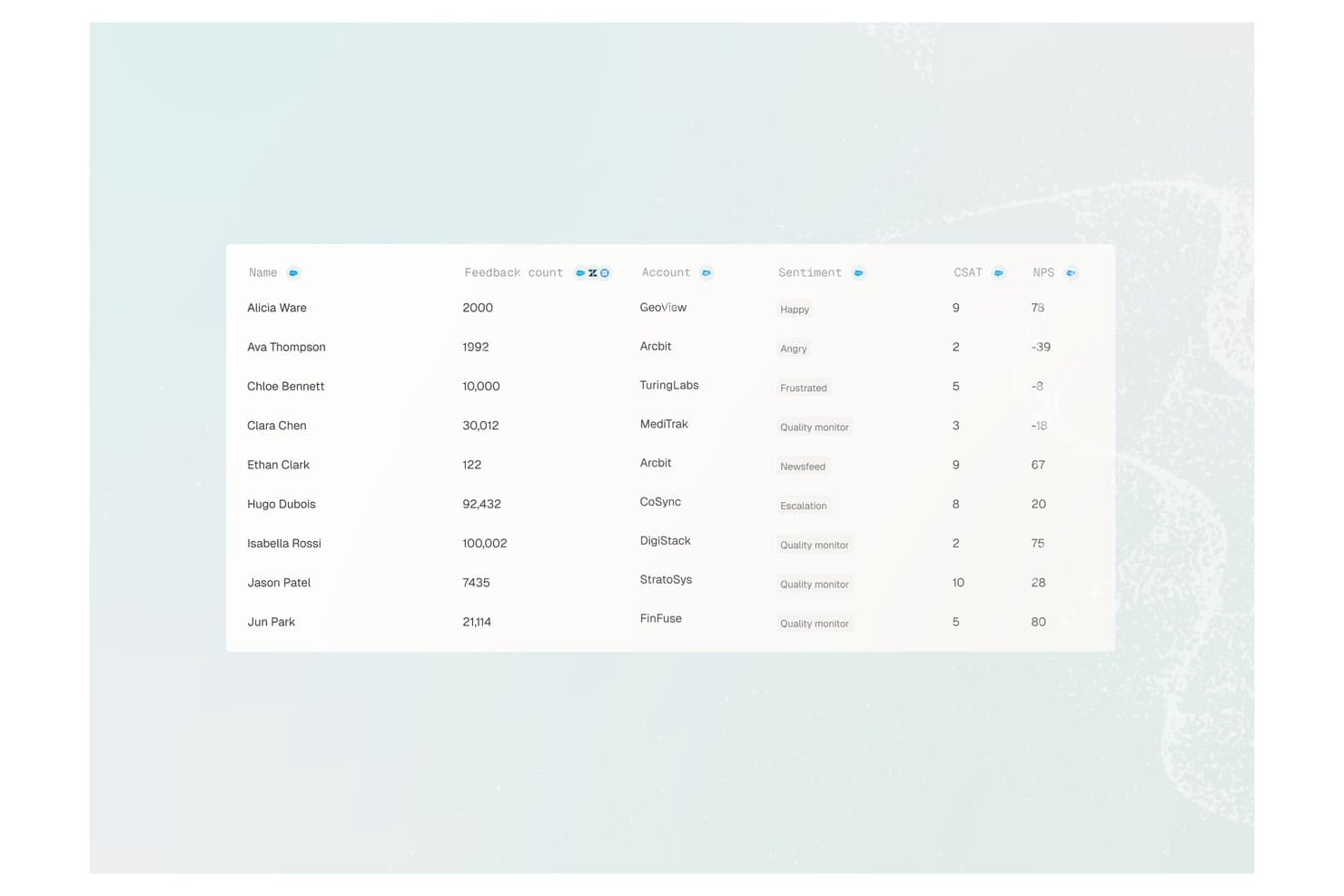
Enterpret offers a customer feedback analytics table displaying user names, feedback counts, account names, sentiment labels, CSAT scores, and NPS values. Enterpret is a customer intelligence platform that uses AI to aggregate, classify, and analyze feedback from 50+ channels — including support tickets, reviews, calls, and communities — into structured, searchable product insights.
Who Is Enterpret Best For?
Enterpret is a strong fit for mid-market and enterprise product teams that process high volumes of customer feedback across multiple channels every month.
Why I Picked Enterpret
I picked Enterpret as one of the best because its Adaptive Taxonomy automatically classifies incoming feedback from 50+ sources without manual tagging. I also love the Customer Context Graph, which ties every theme back to specific accounts and revenue weight, so my team knows which feedback signals actually drive retention. The MCP Server lets me query all of that structured context directly from Claude or Cursor.
Enterpret Key Features
- AI-powered dashboards: Searchable, customizable dashboards display feedback themes and sentiment insights from all connected channels.
- Automated alerting: Real-time notifications flag shifts in customer sentiment or new emerging topics across feedback sources.
- Data warehouse integration: Native connectors let you sync structured feedback data with platforms like Snowflake for analytics.
- Workflow integrations: Push synthesized customer insights directly into Jira, Slack, and other product management tools.
Enterpret Integrations
Enterpret offers native integrations with Zendesk, Intercom, Salesforce, Gong, Slack, Qualtrics, Linear, Jira, Google Play Store, and the Apple App Store. An API is available for custom integrations.
Pros and Cons
Pros:
- Synthesizes feedback across 50+ channels simultaneously
- Revenue-weighted insights tie feedback to business impact
- Adaptive taxonomy auto-classifies feedback without manual effort
Cons:
- Limited built-in product workflow management features
- Initial taxonomy setup requires significant configuration time
Learn more about Enterpret: Best for customizable product workflows
- Free plan available
- From $9/user/month (billed annually)
Visit WebsiteCustomer Rating:4.6/5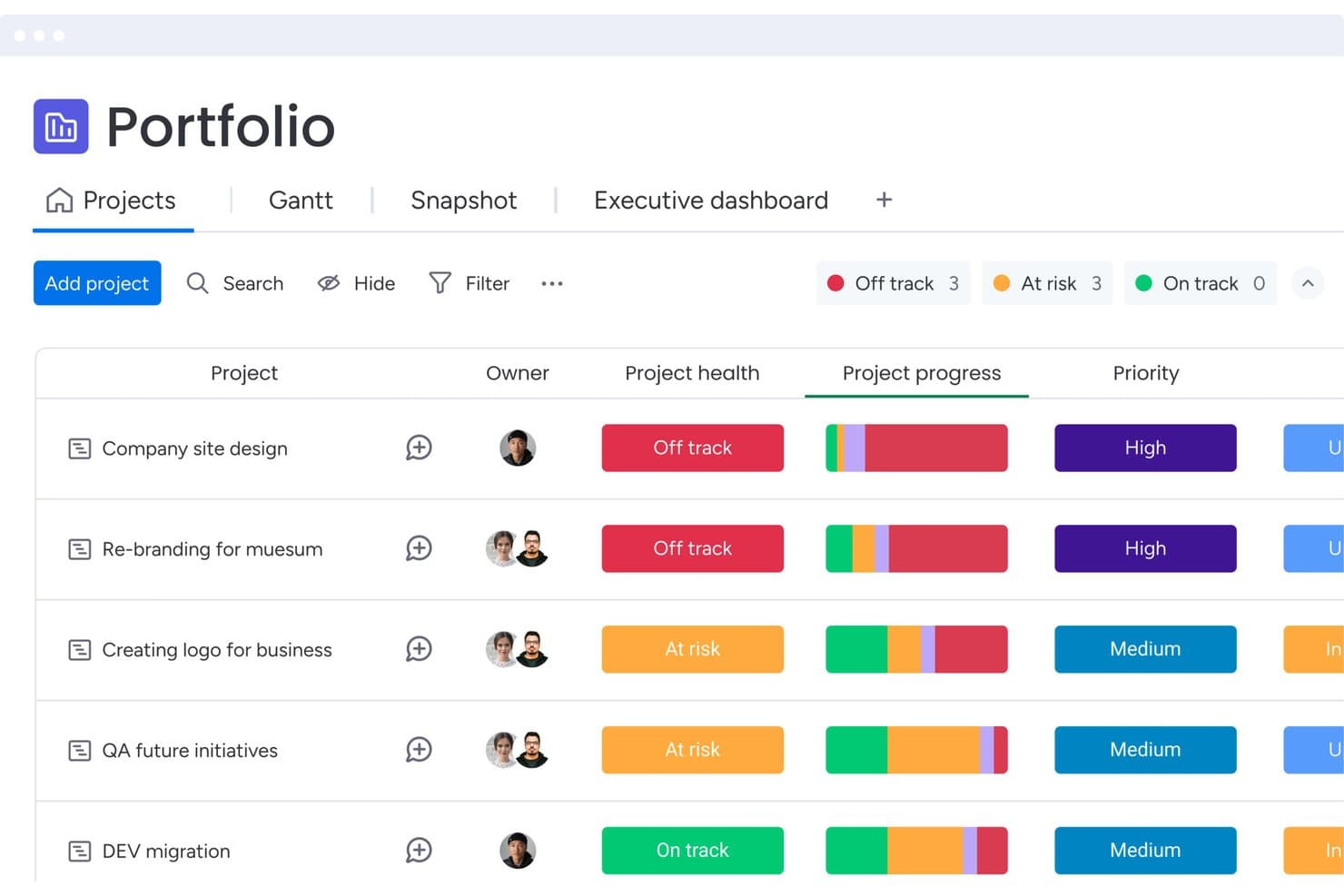
monday AI Workspace tracks project health and priority across portfolios. monday AI Workspace is a work management platform that brings together AI-assisted content generation, customizable workflow automation, natural language querying via Sidekick, and feedback aggregation across boards—all within a single, connected product and project management environment.
Who Is monday AI Workspace Best For?
monday AI Workspace suits cross-functional product teams that need a highly configurable workspace to manage backlogs, feedback, and PRD drafting without switching between tools.
Why I Picked monday AI Workspace
I've included monday AI Workspace in my top picks because it's one of the few work management platforms that lets you build a product workflow that fits your team's exact process, rather than forcing your team to fit a fixed structure. I particularly like how the AI Blocks can auto-tag and sentiment-score incoming feature requests directly on your feedback board, so your backlog reflects customer signal without a manual triage pass. Pair that with Sidekick's document drafting for PRDs and sprint summaries, and you've got a solid content generation layer for delivery work.
monday AI Workspace Key Features
- Custom agent builder: Build your own AI agents with configurable triggers, knowledge sources, and action logic to automate product team workflows.
- AI meeting notetaker: Automatically captures and summarizes meeting notes, keeping your team's decisions and action items documented without manual effort.
- MCP integration: Connects external AI assistants like Claude, ChatGPT, and Gemini directly to your monday.com data for cross-board querying.
- Release notes agent: Automatically drafts release notes for engineering and product teams based on completed work items.
monday AI Workspace Integrations
monday AI Workspace supports 850+ integrations and apps, including GitHub, Jira, Figma, Zendesk, Salesforce, Slack, and Google Calendar. It also offers open APIs and SDKs for custom integrations, plus MCP connectivity with Claude, ChatGPT, Gemini, and other AI assistants.
Pros and Cons
Pros:
- Permission-aware AI supports governed collaboration
- PRD drafting accelerates specification work
- Customizable workflows fit varied product processes
Cons:
- Sidekick may misinterpret larger boards
- AI prioritization requires manual scoring frameworks
Learn more about monday AI Workspace: Best for project lifecycle management
- 14-day free trial
- From $10/user/month
Visit WebsiteCustomer Rating:4.3/5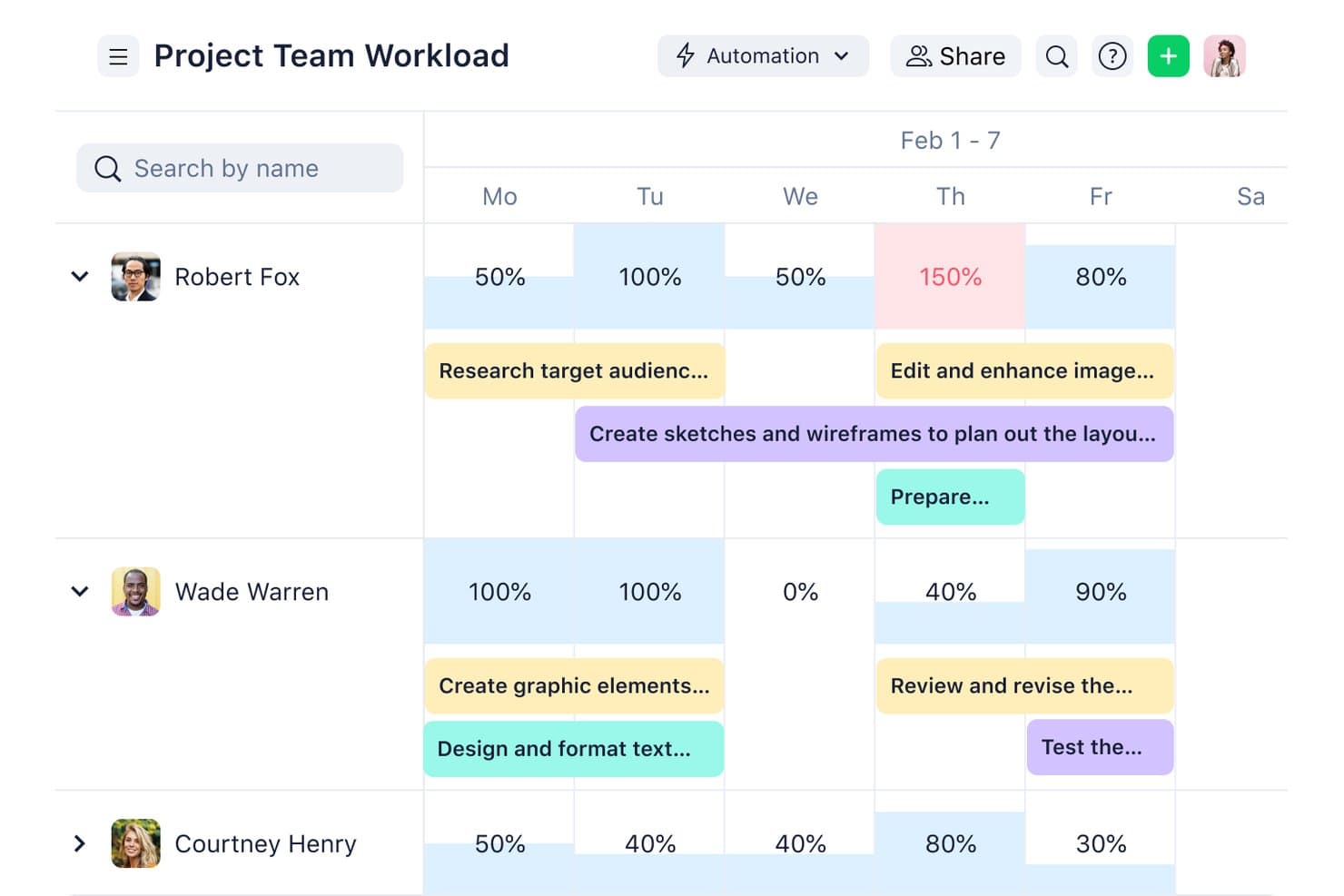
Wrike visualizes team workload percentages across a weekly timeline. Wrike is a work management platform that covers project intake, planning, Agile and Waterfall delivery, resource management, and portfolio reporting, with AI layered in to automate task triage, flag risks, and summarize work across teams.
Who Is Wrike Best For?
Wrike is a strong fit for cross-functional teams managing complex project portfolios who need structured delivery workflows, resource visibility, and AI-assisted project oversight.
Why I Picked Wrike
I've included Wrike in my top picks because it covers the full project lifecycle in one place, from intake and planning through delivery, resource management, and portfolio reporting. I particularly like how AI Agents handle task triage and request validation automatically, cutting the manual overhead that slows launch cycles. Wrike Copilot adds real-time risk flagging and milestone monitoring across active projects, so nothing falls through when you're managing multiple product initiatives at once.
Wrike Key Features
- AI Agents: No-code agents that handle request validation, task triage, and auto-assignment without manual intervention.
- Wrike MCP Server: Connects outside AI assistants like Claude and ChatGPT to live Wrike data using plain-language queries.
- Natural-language automation builder: Describe a workflow in plain language and Wrike generates the automation rule, form, or process.
- Portfolio reporting: Cross-project dashboards that surface resource loads, budget tracking, and milestone status across active initiatives.
Wrike Integrations
Wrike offers 400+ prebuilt connectors, including Jira, GitHub, Zendesk, Salesforce, HubSpot, Tableau, Power BI, Slack, Microsoft Teams, and Google Workspace. It also provides an open API and MCP Server connections for ChatGPT, Claude, Gemini, and Microsoft Copilot.
Pros and Cons
Pros:
- Provides portfolio-level resource and milestone visibility
- Summarizes work and flags delivery risks
- Covers the entire project delivery lifecycle
Cons:
- Lacks AI-driven product prioritization frameworks
- Does not synthesize customer feedback
 Best for behavioral analytics
- Free plan available
- Pricing upon request
Visit WebsiteCustomer Rating:4.5/5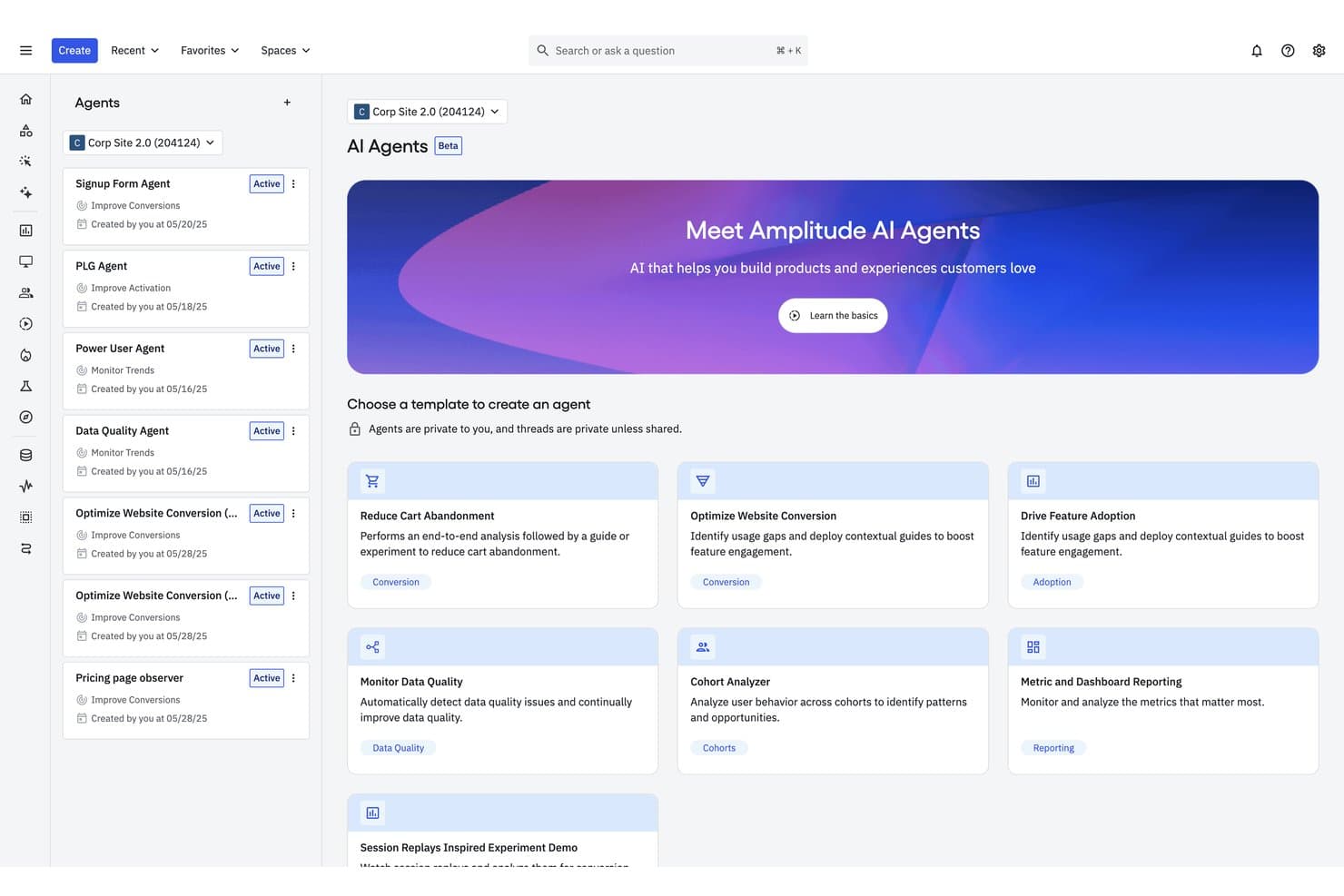
Amplitude's AI Agents help teams automate product analysis tasks. Amplitude is a behavioral analytics platform that combines AI-powered insight synthesis, natural language querying, automated feedback aggregation, and agentic AI tools for drafting PRDs and investigating product metrics.
Who Is Amplitude Best For?
Amplitude is a strong fit for product analysts and product managers at mid-to-large consumer apps who need behavioral data and customer feedback unified in one place.
Why I Picked Amplitude
Amplitude earns its spot on my shortlist because no other tool connects what users say to what they actually do as tightly as it does. I love how AI Feedback ingests raw data from 15+ sources like Zendesk, G2, and Reddit, then automatically links those feedback clusters to behavioral cohorts and session replays. The Global Agent takes that further, letting me ask plain-language questions across usage data, experiments, and feedback to get a root-cause narrative, not just a chart.
Amplitude Key Features
- Session Replay Agent: Automatically reviews large batches of user sessions, identifies friction points, and estimates their potential revenue impact.
- MCP server integration: Connects Amplitude data to external AI tools like Claude, Cursor, ChatGPT, and Notion so your whole team can query insights without leaving their workflow.
- Predictive cohorts: Uses a transformer-based model to forecast how likely individual users are to take a specific action within 7, 30, 60, or 90 days.
- Custom agents: Lets you configure purpose-built AI agents with their own instructions and schedules to run recurring analyses automatically.
Amplitude Integrations
Amplitude offers 159+ integrations, including Slack, Notion, Atlassian, Linear, GitHub, Sentry, Claude, Cursor, ChatGPT, and more. Its MCP server and APIs support custom integrations and queries through compatible AI tools.
Pros and Cons
Pros:
- Explains insights with source traceability
- Generates PRDs from customer evidence
- Connects feedback themes to user behavior
Cons:
- Predictive analytics favors marketing use cases
- Offers no native roadmap scoring
Learn more about Amplitude: Best for VoC-to-roadmap theme tracing
- Free demo available
- From $25,000/year (billed annually)
Visit WebsiteCustomer Rating:4.8/5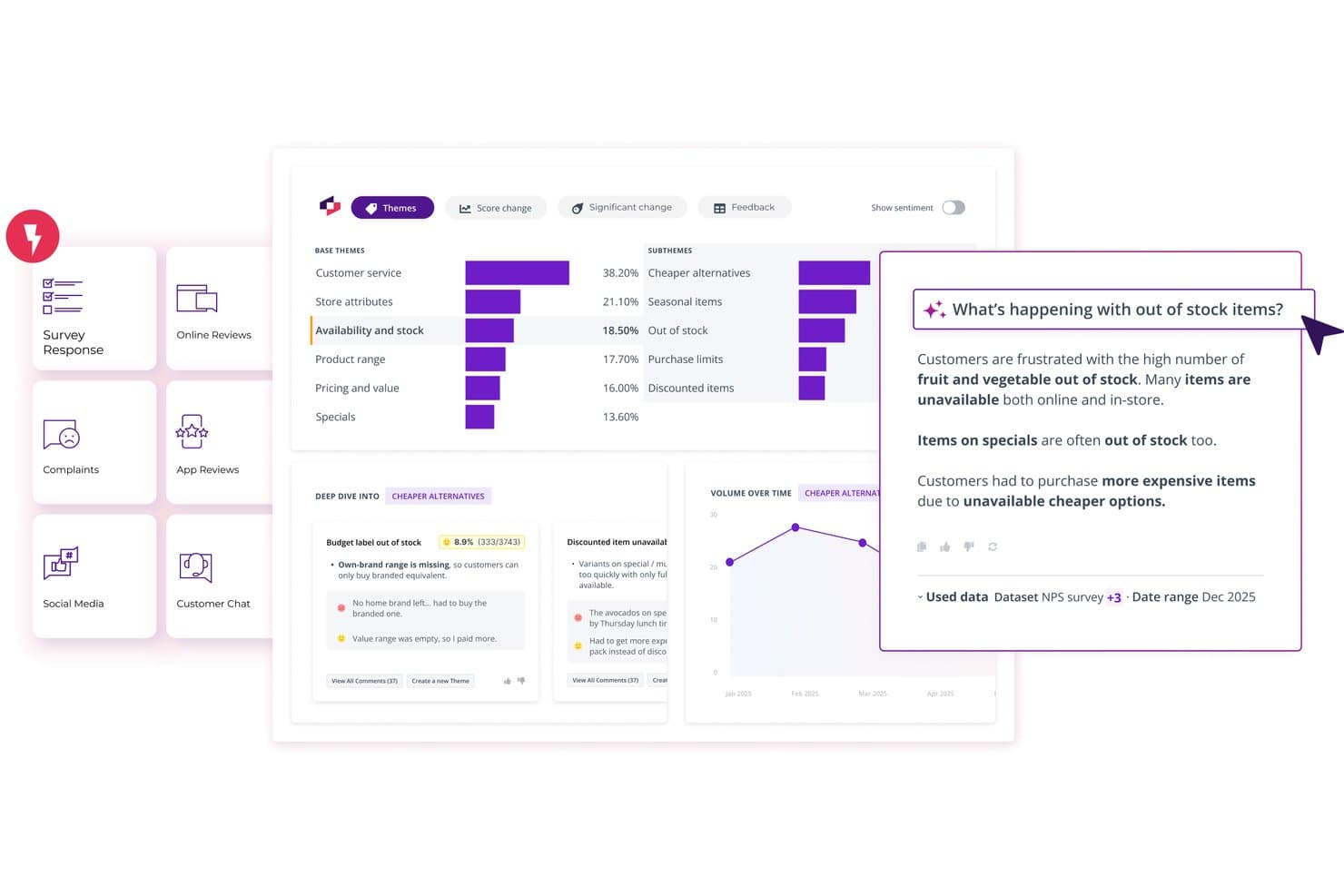
Thematic surfaces AI-powered customer feedback insights by theme. Thematic is a customer intelligence platform that aggregates feedback from surveys, support tickets, call transcripts, and reviews, then uses AI to surface and rank themes by business impact.
Who Is Thematic Best For?
Thematic is a strong fit for enterprise CX and insights teams that need to trace customer feedback themes directly to roadmap decisions.
Why I Picked Thematic
I've included Thematic in my top picks because it's the clearest path from raw customer feedback to a defensible roadmap decision. Its Theming Agent surfaces issues bottom-up from actual customer language, and the Impact Analysis ranks those themes by NPS, CSAT, or revenue at risk rather than raw mention volume. I love that every theme traces back to the original comments, so when a stakeholder questions a prioritization call, the evidence is one click away.
Thematic Key Features
- Agentic Answers: Ask plain-language questions about your customer data and get cited, multi-section answers drawn directly from source comments.
- Lenses: View and compare themes across multiple datasets—surveys, reviews, and call transcripts—in a single unified dashboard.
- Revenue at Risk scoring: Assigns an estimated dollar figure to each feedback theme based on churn likelihood and customer value inputs.
- MCP Server: Connects Thematic's theme and trend data to AI tools like Claude or ChatGPT so you can query insights from within your existing workflow.
Thematic Integrations
Thematic offers native integrations with Salesforce, Zendesk, Intercom, Qualtrics, SurveyMonkey, Snowflake, BigQuery, Google Sheets, Power BI, and Tableau. It also supports API, sFTP, CSV, and Excel connectivity for custom data workflows.
Pros and Cons
Pros:
- Agentic Answers supports cited natural-language research
- Impact scores prioritize themes beyond mention volume
- Traceable themes link directly to comments
Cons:
- Theme maintenance still needs human review
- No PRD or user-story drafting
Learn more about Thematic: 6Best for visual ideation & stakeholder mapping
Miro
- Free plan + 14-day free trial available
- From $8/user/month (billed annually)
Visit WebsiteCustomer Rating:4.8/5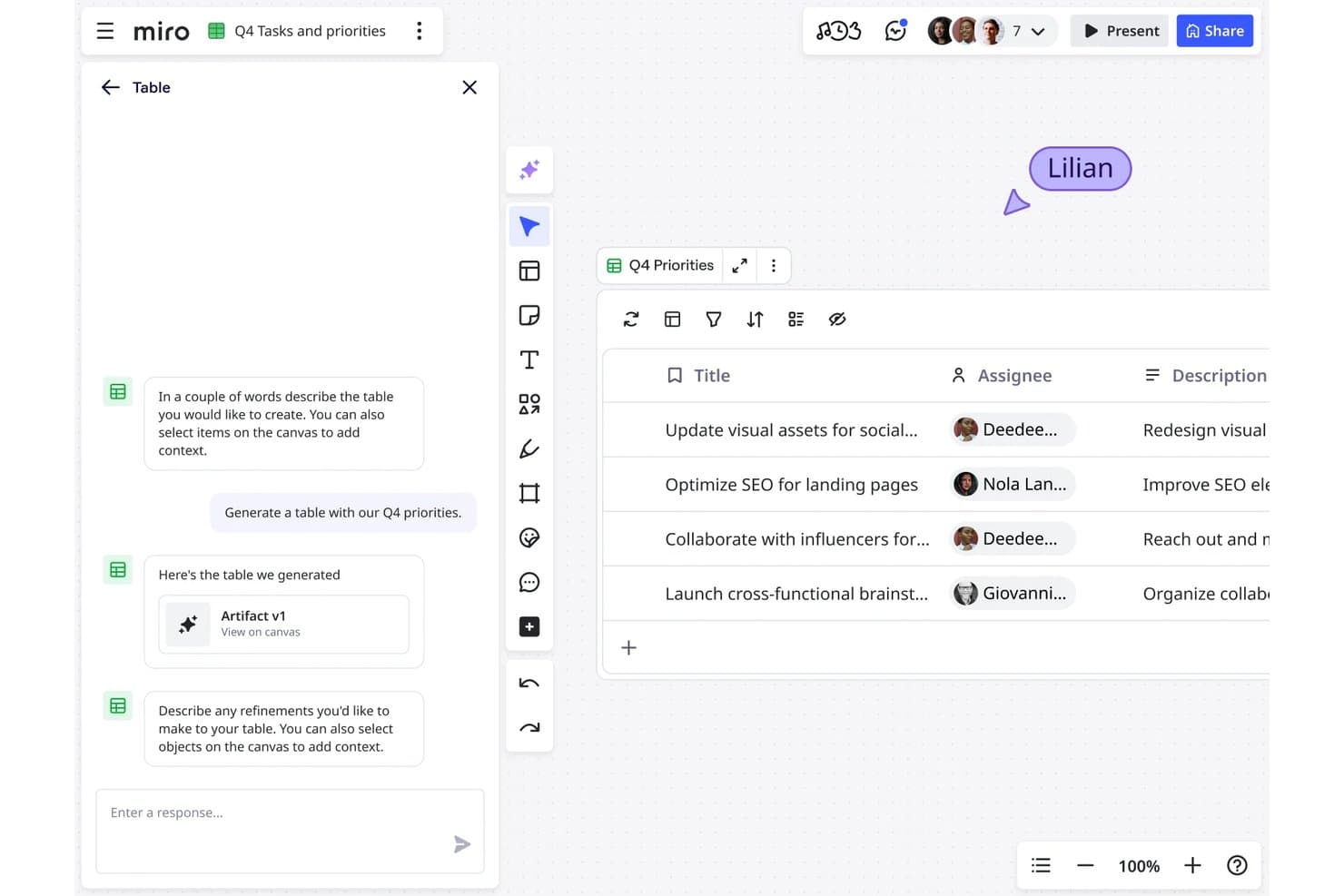
Miro lets users generate AI-powered task tables with assignees instantly. Miro is a collaborative AI innovation workspace that combines an infinite canvas with tools for visual ideation, research synthesis, content generation, and product planning across the full development lifecycle.
Who Is Miro Best For?
Miro suits cross-functional product teams that rely heavily on visual collaboration to run discovery, synthesis, and stakeholder alignment sessions together.
Why I Picked Miro
Miro earns its spot on my shortlist because no other tool matches it for turning messy discovery work into shared, visual clarity across a whole cross-functional team. I love how the Research Synthesis playbook clusters interview transcripts, survey responses, and feedback into themes automatically, with every insight linked back to its original source. Custom Sidekicks, like the built-in Roadmap Strategist, let you interrogate your entire canvas in plain language and generate prioritization matrices, personas, or roadmap summaries right where your stakeholders are already working.
Miro Key Features
- AI Flows: Multi-step, collaborative AI workflows that let teams build pipelines from customer interviews to sprint plans or brainstorms to PRDs, with editable prompts and swappable models at each step.
- Miro Specs: Converts PRDs, prototypes, and diagrams into technical specs and RFCs, syncing bidirectionally with coding tools like Cursor, Windsurf, and Claude Code via MCP.
- Feedback aggregation via Miro Insights: Automatically imports feedback from sources like Intercom, Zendesk, Gong, Salesforce, and Slack, then tags and clusters it with AI.
- AI governance controls: Admins can restrict AI features per user, set moderation filters, block sensitive data in prompts, and review an audit trail of AI activity across the workspace.
Miro Integrations
Miro offers 250+ Marketplace integrations, including Jira, Asana, Linear, ClickUp, Azure DevOps, Slack, Salesforce, and HubSpot. It also provides APIs, SDKs, connectors, and an MCP server for custom integrations.
Pros and Cons
Pros:
- Collaborative AI workflows support shared refinement
- Feedback synthesis preserves source traceability
- Visual ideation aligns cross-functional stakeholders
Cons:
- Large boards can become cluttered
- AI prioritization lacks configurable scoring
 Best for multi-team portfolio prioritization
- Free demo available
- Pricing upon request
Visit WebsiteCustomer Rating:4.4/5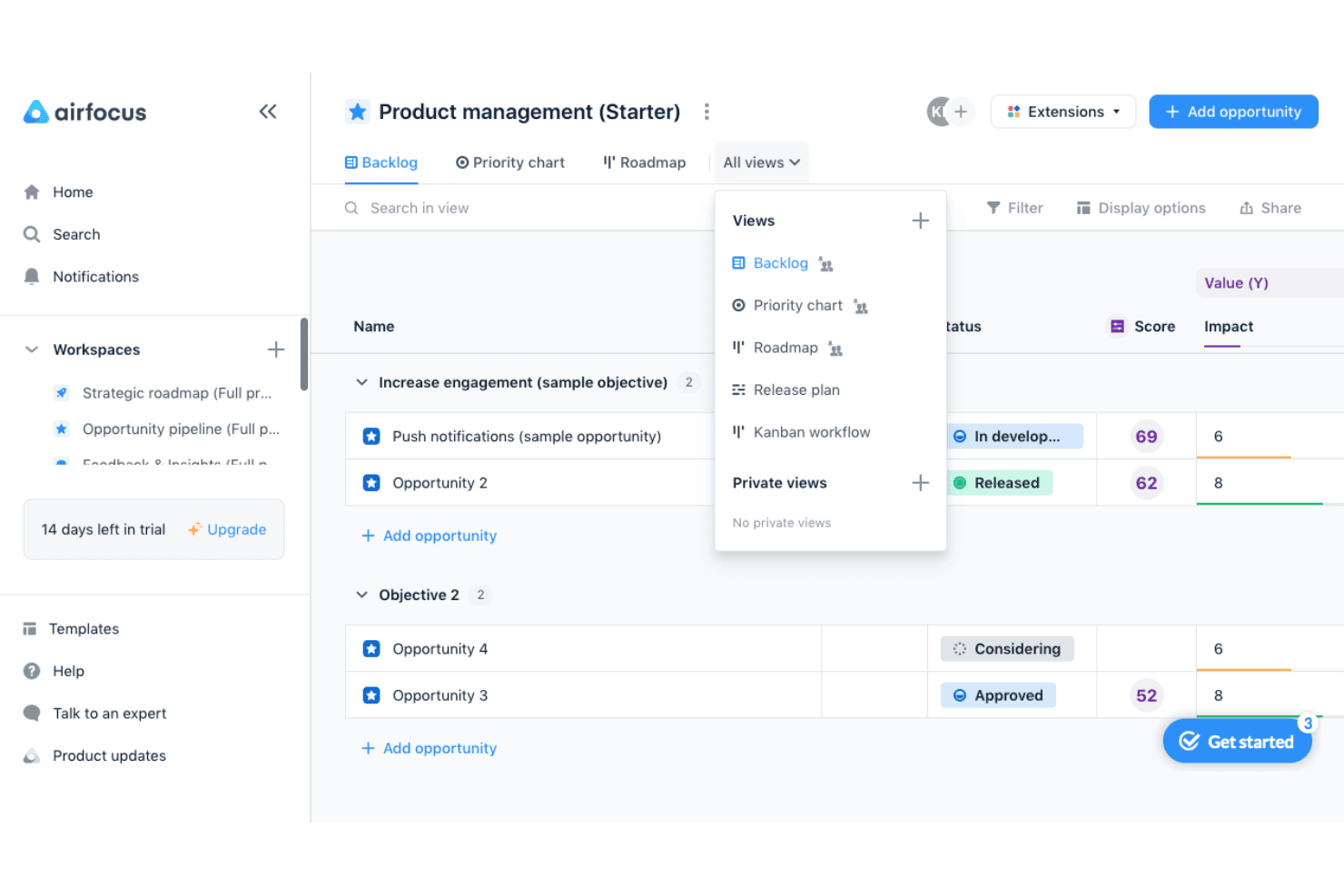
airfocus helps product teams prioritize opportunities and switch between backlog, priority chart, roadmap, release plan, and Kanban views. airfocus is an AI-powered product management platform built for multi-team organizations, combining portfolio management, feedback aggregation, configurable prioritization frameworks, and an AI insights layer that synthesizes customer data across channels.
Who Is airfocus Best For?
airfocus is a strong fit for heads of product and product operations leads managing multiple teams who need a single place to align priorities, aggregate feedback, and report on portfolio progress.
Why I Picked airfocus
airfocus earns its spot on my shortlist because its Insights Agent does something I haven't seen many tools do as well: it reads across every feedback channel you collect, from Zendesk tickets to call transcripts, and links each synthesized insight back to its original source. That traceability matters when you're managing multiple teams, because you can actually show stakeholders why a priority moved. I also like that the airfocus agent answers direct prioritization questions, like which opportunities to pursue in Q1 based on live OKRs and feedback scores, rather than just surfacing raw data and leaving you to interpret it.
airfocus Key Features
- Priority Poker: Stakeholders score items independently and asynchronously, with outliers automatically flagged for discussion.
- Slash commands for content generation: Generate PRDs, user stories, problem statements, and release notes directly inside item descriptions.
- AI Autofill: Automatically tags and routes incoming feedback to the correct fields, labels, and team owners across your workspace.
- MCP server: Connects airfocus to external AI tools like Claude, ChatGPT, and Cursor, giving them permission-controlled read and write access to your product data.
airfocus Integrations
airfocus offers native integrations with Jira, Azure DevOps, Linear, Zendesk, Salesforce, Intercom, Slack, and Microsoft Teams, plus a permission-controlled MCP server for Claude and ChatGPT. It also supports Zapier.
Pros and Cons
Pros:
- Priority Poker improves stakeholder alignment
- Custom scoring supports nuanced prioritization decisions
- Traceable insights connect themes to sources
Cons:
- Automation setup can feel complex
- No predictive forecasting for roadmap decisions

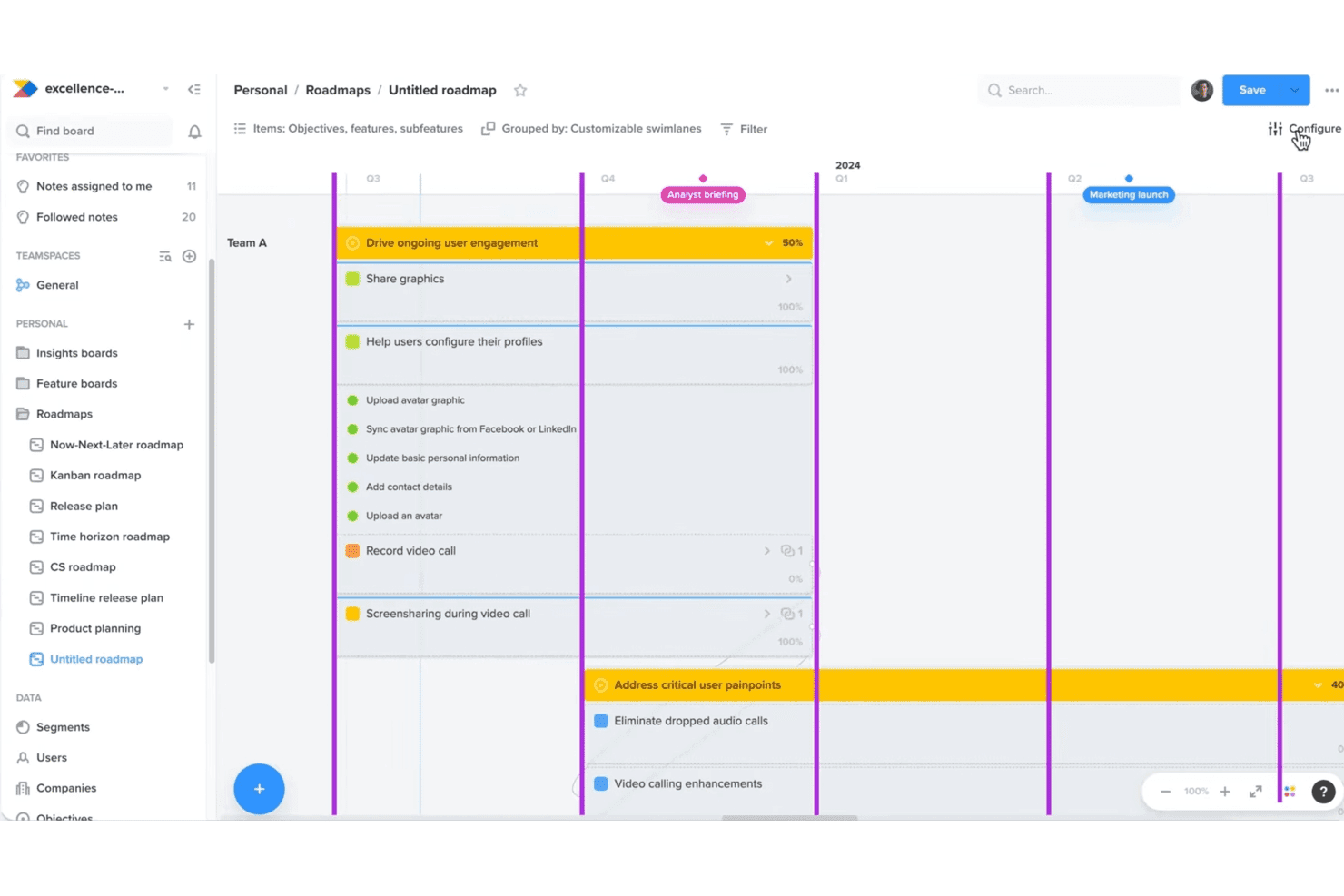
Productboard helps teams align roadmaps with customer needs and goals. Productboard is an agentic AI product management system built around its Spark AI agent, combining feedback aggregation, insight synthesis, prioritization scoring, and AI-assisted spec writing in one platform.
Who Is Productboard Best For?
Productboard is a strong fit for product teams that treat customer feedback as their primary input for roadmap decisions.
Why I Picked Productboard
Productboard earns its spot on my shortlist because no other tool I've tested does as much with raw customer feedback as Spark does. It pulls signals from Zendesk, Gong, Intercom, and app store reviews, then groups them into evidence-ranked opportunities written as problem statements, not just feature requests. I also like that every output links back to the source notes, so I can trace exactly which customers drove a prioritization decision.
Productboard Key Features
- Spark spec writing: Drafts PRDs and product briefs through a guided conversation, drawing on your strategy, personas, customer evidence, and connected codebase.
- MCP connectors: Query live data from tools like Amplitude, Linear, Slack, Pendo, and GitHub directly inside Productboard's chat panel.
- Customizable prioritization formulas: Build your own RICE, ICE, WSJF, or Value/Effort scoring frameworks using custom fields and drivers.
- Post-launch impact measurement: Compares shipped features against defined success metrics at 7, 14, and 30 days, with segment-level adoption analysis and recommended next steps.
Productboard Integrations
Productboard offers 25+ native integrations, including Zendesk, Intercom, Gong, Slack, Microsoft Teams, Jira, Azure DevOps, Amplitude, Mixpanel, and GitHub. It also supports a public REST API, MCP server, and Zapier.
Pros and Cons
Pros:
- Custom scoring supports varied prioritization frameworks
- Specs retain traceable customer proof points
- Feedback becomes evidence-ranked problem statements
Cons:
- Change history can complicate navigation
- Portfolio roadmaps can strain at scale
Learn more about Productboard: Best for revenue-aware churn and upsell prediction
- Free plan + 30-day free trial + free demo available
- Pricing upon request
Visit WebsiteCustomer Rating:4.4/5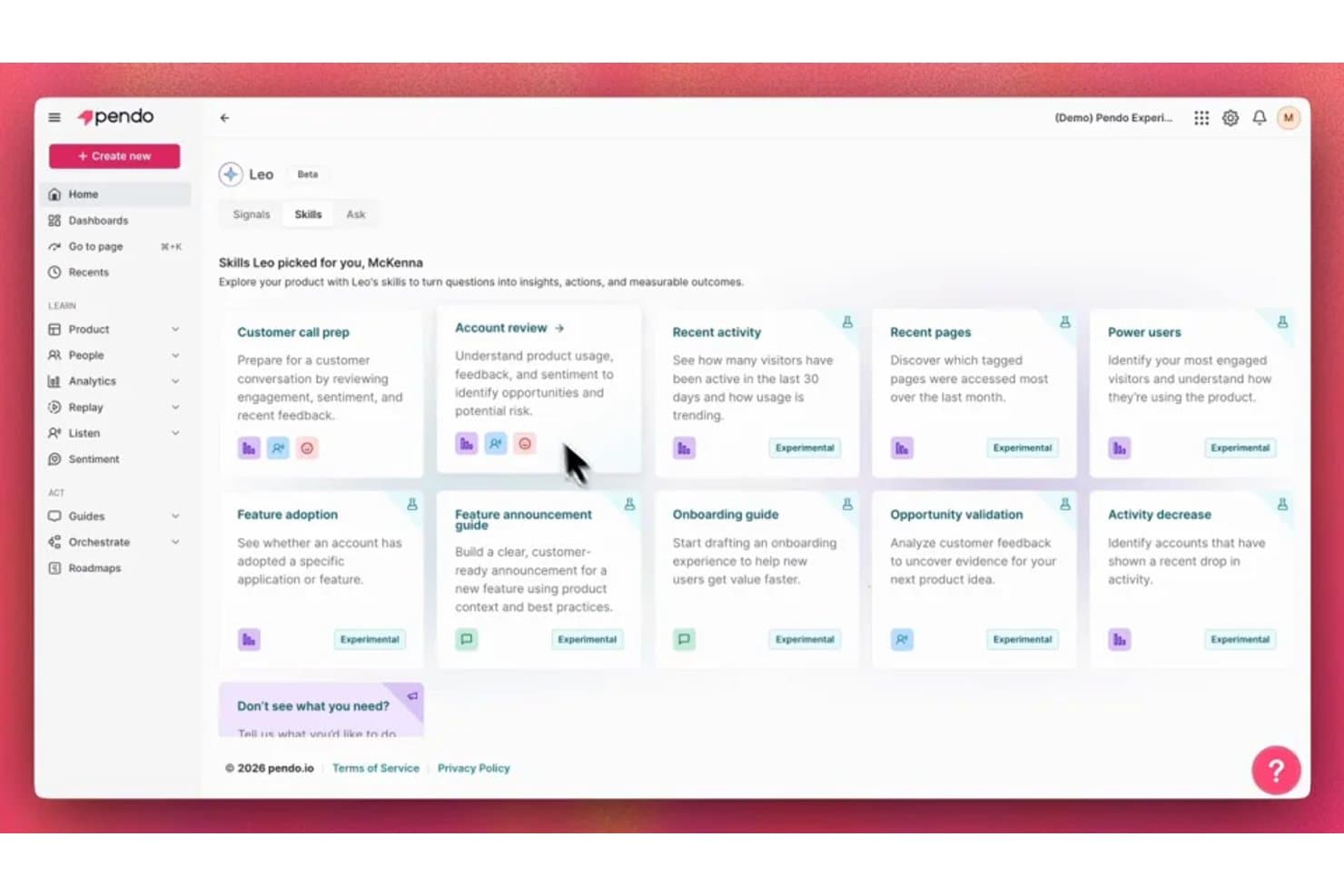
Pendo's Leo AI surfaces personalized skills to turn product questions into insights. Pendo is an AI-powered product analytics and discovery platform that combines in-app behavioral tracking, feedback aggregation, NLP-based insight synthesis, churn and upsell prediction, and an AI assistant (Leo) for querying usage data across your product portfolio.
Who Is Pendo Best For?
Pendo is a strong fit for heads of product and product operations leads at mid-market to enterprise SaaS companies who need to tie feature usage and customer feedback directly to revenue risk.
Why I Picked Pendo
I picked Pendo as one of the best because no other tool on this list ties customer feedback directly to ARR and churn risk the way Pendo does. Its Predict module continuously retrains churn and upsell models on live product usage and CRM data, flagging at-risk accounts with explained reasons rather than black-box scores. I also love how the Topics tab in Listen ranks feedback themes by revenue, so you can see which bug or feature request is sitting on the most at-risk ARR before you prioritize anything.
Pendo Key Features
- Listen Feedback Agent: Answers product questions with AI-generated theme summaries, linking each insight to source quotes, account context, and session replays.
- Leo Signals: Proactively monitors usage and retention, alerting you to shifts like unexpected feature uptake or accounts going quiet without requiring manual report builds.
- Natural language querying via MCP: Lets you query Pendo analytics, funnels, and feedback from Claude, ChatGPT, or Cursor through a published MCP server.
- AI guide builder: Generates in-app guides and tooltip sequences from plain-language descriptions, without needing design or engineering input.
Pendo Integrations
Pendo lists 51 integrations, including Jira, Salesforce, Zendesk, Gong, Snowflake, Slack, Claude, ChatGPT, and Cursor through MCP. It also offers an API and Zapier for custom connectivity.
Pros and Cons
Pros:
- Leo answers usage questions in plain language
- Explainable churn scores guide account interventions
- Revenue-ranked feedback exposes at-risk ARR
Cons:
- No native PRD or specification drafting
- Roadmap prioritization still relies on manual scoring
Learn more about Pendo: 10Best for customer-to-roadmap impact scoring
DevRev
- Free plan + free demo available
- Pricing upon request
Visit WebsiteCustomer Rating:4.5/5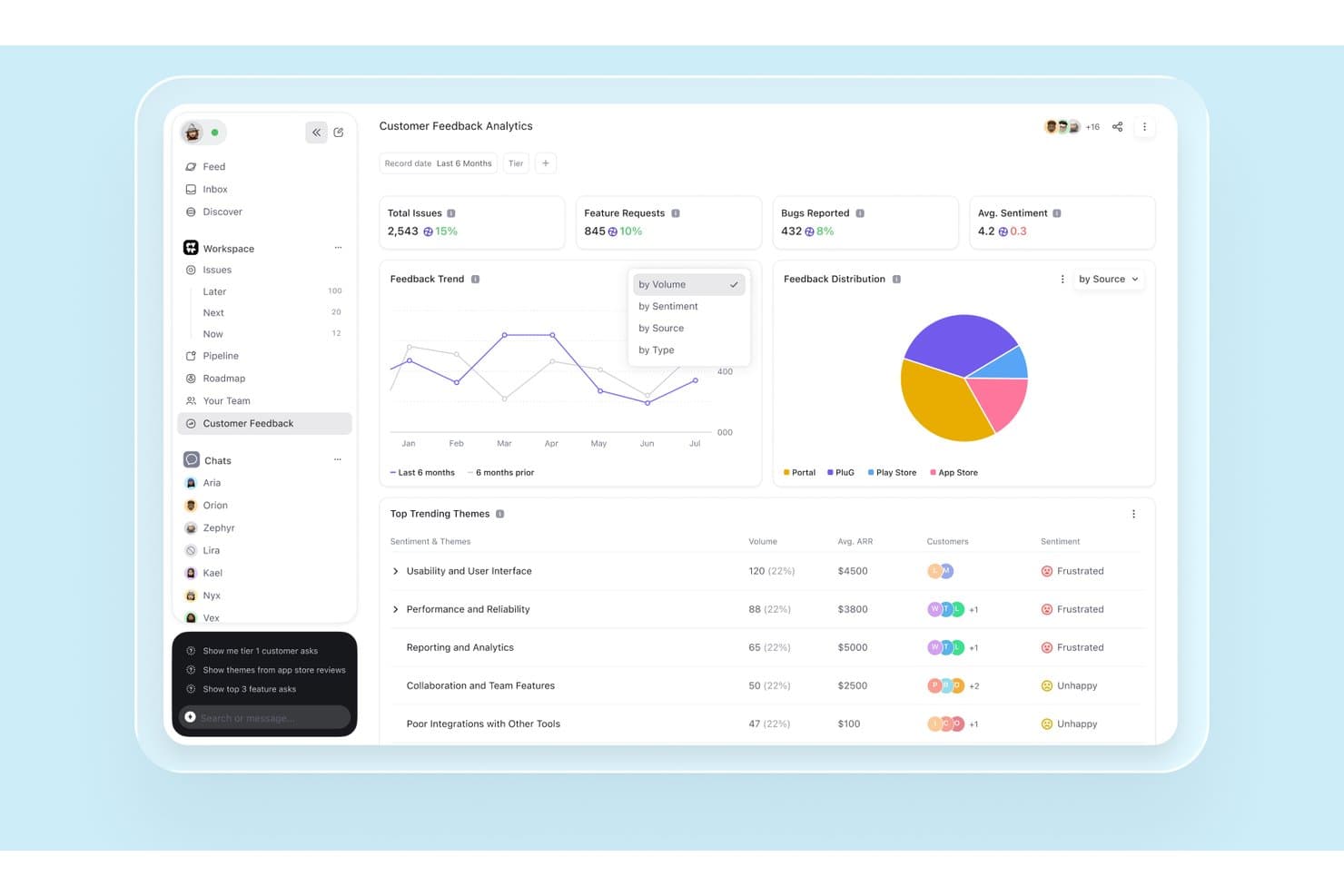
DevRev surfaces AI-driven customer feedback trends and sentiment analytics. DevRev is an AI knowledge graph platform that unifies support tickets, CRM data, session analytics, and engineering work to support customer feedback synthesis, impact-based prioritization, and product roadmap planning.
Who Is DevRev Best For?
DevRev fits product operations teams at mid-market and enterprise companies that need to connect support ticket volume directly to roadmap prioritization.
Why I Picked DevRev
I've included DevRev in my top picks because its impact scoring system does something I haven't seen many tools pull off: it builds a live score for each roadmap enhancement using linked opportunity revenue, account ARR and churn status, and ticket volume simultaneously. That means if 40 enterprise accounts are filing tickets about the same friction point, that signal surfaces directly in the prioritization view, not buried in a spreadsheet. I also like how the full traceability chain runs from ticket to enhancement to release, with automatic customer notification when the feature ships.
DevRev Key Features
- AI ticket clustering: Groups similar support tickets to surface candidate product enhancements and rank issues by customer impact.
- Voice-of-customer traceability: Links each ticket to an enhancement, then to a release, with automatic customer notification when the feature ships.
- Conversational analytics (Text2SQL): Lets you ask natural-language questions that are translated into SQL and run against the unified knowledge graph for auditable answers.
- Real-time account sentiment scoring: Scores each customer interaction, rolls sentiment up to the account level, and routes at-risk accounts into alert workflows.
DevRev Integrations
DevRev offers one-click connectors for Slack, Notion, Jira Cloud, Google Drive and Calendar, Microsoft Teams, OneDrive, and SharePoint, plus 100+ marketplace integrations including Salesforce, HubSpot, ServiceNow, and Jira Service Management. APIs and custom connectors are available.
Pros and Cons
Pros:
- Cited answers span support and product data
- Connects customer revenue to feature priorities
- Links ticket volume to roadmap impact
Cons:
- No configurable RICE or ICE scoring
- No dedicated PRD or spec generator
Learn more about DevRev:
Andre AI-verktøy for produktstyring
Her er noen flere alternativer for AI-verktøy innen produktstyring som ikke kom med på kortlisten min, men som likevel er verdt å sjekke ut:
- 11ClaudeBest for AI-drafted PRDs with cited sources
- 12BuildBetterBest for evidence-backed feedback synthesis
- 13ClickUpBest for all-in-one project management
- 14Aha!Best for end-to-end discovery-to-roadmap tracing
- 15Craft.ioBest for AI-drafted PRDs via guided discovery
- 16NotionBest for cross-team alignment
- 17CannyBest for revenue-linked feedback traceability
- 18LinearBest for traceable voice-of-customer workflows
- 19DovetailBest for research data organization
- 20GleapBest for revenue-weighted backlog scoring
How I Evaluate AI Product Management Tools
To make this list, a tool’s AI needs to handle real product work, like drafting PRDs or clustering feedback. From there, I evaluate three things. Core functionality carries the most weight, like aggregating feedback and querying product data. Then I look at standout features, like explainable AI recommendations, and what a tool offers beyond its feature set, like data privacy and security.
Core Functionality (Table Stakes For This List)
When I'm selecting tools for my list, I score each one on a scale from 0 (does not offer the functionality) to 5 (excels in this area) for each core functionality listed below. I then convert the total into a percentage to help assess each tool's overall fit, with extra weight on any functionalities I’ve deemed essential.
- Insight Synthesis (Essential): I assess how well AI turns feedback, research, and usage data into themes that guide roadmap decisions.
- AI Prioritization (Essential): I look for explainable rankings that weigh customer impact, effort, risk, and business goals across initiatives.
- Content Generation: I evaluate drafts for PRDs, user stories, specs, and release notes that reflect product context and require limited editing.
- Natural Language Queries: I check whether teams can ask questions about feedback, analytics, and documentation without building complex reports.
- Predictive Analytics: I look for forecasts linking signals such as adoption or churn risk to feature impact and roadmap choices.
- Feedback Aggregation: I assess how AI collects, tags, and clusters input from sources such as support tickets, interviews, and surveys.
Once I have a list of tools that meet the criteria, I consider what sets each platform apart.
Differentiating Factors (What Sets Vendors Apart)
Here's how I compare and contrast different vendors:
Standout Features
Voice-of-customer traceability matters most to me. I check whether a tool links every prioritized feature back to the original feedback, interview clip, or support ticket that sparked it. That audit trail is what gives stakeholders confidence in roadmap decisions. Explainable AI recommendations go hand in hand here. When a tool surfaces why it scored one initiative above another, my team can challenge or endorse the ranking instead of trusting a black box. I also evaluate customizable scoring frameworks, since a startup running ICE and an enterprise using weighted RICE need different models inside the same platform.
Beyond Features
Data privacy matters because these tools ingest support tickets, interview transcripts, and usage logs. I check for SOC 2 compliance, GDPR readiness, and whether the vendor lets you opt out of AI model training on your data. I also evaluate how well a tool connects with your existing stack—Jira, Salesforce, Intercom—since one-way imports create manual work that slows teams down. Bi-directional, real-time integrations are what I look for.
Slik velger du AI-verktøy for produktstyring
Det er lett å gå seg vill i lange funksjonslister og komplekse prismodeller. For å hjelpe deg med å holde fokus mens du går gjennom den unike prosessen din for programvarevalg, får du her en sjekkliste over faktorer du bør ha i tankene:
| Faktor | Hva du bør vurdere |
|---|---|
| FaktorSkalerbarhet | Hva du bør vurdereKan verktøyet vokse sammen med teamet ditt? Vurder om det kan håndtere flere brukere, prosjekter og datamengder etter hvert som behovene dine øker. |
| FaktorIntegrasjoner | Hva du bør vurdereKan det kobles til verktøyene du allerede bruker? Kontroller at det er kompatibelt med den eksisterende teknologistakken din for å unngå datasiloer og manuelle omveier. |
| FaktorTilpasningsmuligheter | Hva du bør vurdereKan du tilpasse verktøyet til arbeidsflyten din? Se etter alternativer for å tilpasse dashbord, rapporter og innstillinger slik at de samsvarer med prosessene i teamet ditt. |
| FaktorBrukervennlighet | Hva du bør vurdereEr verktøyet intuitivt for teamet ditt? Et komplisert grensesnitt kan gjøre innføringen tregere. Se etter enkelhet og tydelighet i navigasjon og utforming. |
| FaktorImplementering og innføring | Hva du bør vurdereHvor raskt kan du komme i gang? Vurder tilgjengeligheten av veiledninger, brukerstøtte og ressurser som hjelper teamet ditt med å komme raskt i gang. |
| FaktorKostnad | Hva du bør vurdereHvordan passer prisen inn i budsjettet ditt? Vurder både innledende og løpende kostnader, og sammenlign dem med verdien og funksjonene som tilbys i hver plan. |
| FaktorSikkerhetstiltak | Hva du bør vurdereEr dataene og personvernet ditt beskyttet? Se etter kryptering, samsvarsstandarder og kontroller for brukertilgang for å beskytte informasjonen din. |
| FaktorTilgjengelig brukerstøtte | Hva du bør vurdereHvilke alternativer for brukerstøtte er tilgjengelige? Vurder åpningstider, kanaler og responstid for brukerstøtten for å sikre at du får hjelp når du trenger det. |
Hva er AI-verktøy for produktstyring?
AI-verktøy for produktstyring er programvareløsninger som hjelper produktteam med å planlegge, utvikle og levere produkter mer effektivt ved hjelp av kunstig intelligens. Produktledere, designere og utviklere bruker vanligvis disse verktøyene til å forbedre samarbeid, beslutningstaking og integrering av tilbakemeldinger fra brukere.
Funksjoner som dataanalyse, automatisert oppgavehåndtering og innsamling av tilbakemeldinger fra brukere bidrar til å effektivisere arbeidsflyter, forbedre produktkvaliteten og samordne teamets innsats. Samlet sett gir disse verktøyene betydelig verdi ved å optimalisere produktstyringsprosessen og skape bedre resultater.
Funksjoner i AI-verktøy for produktstyring
Når du velger AI-verktøy for produktstyring, bør du se etter følgende viktige funksjoner:
- Produktveikart: Hjelper team med å planlegge og visualisere tidslinjer for produktutvikling, slik at alle interessenter er samkjørte.
- Innsamling av tilbakemeldinger fra brukere: Samler inn innsikt fra brukere for å informere om produktforbedringer og prioritere funksjoner.
- Dataanalyse: Gir innsikt i brukeratferd og produktytelse, noe som bidrar til datadrevet beslutningstaking.
- Automatisert oppgavehåndtering: Støtter prosjektarbeidsflyter ved å automatisere rutineoppgaver og prioritere aktiviteter basert på tidsfrister.
- Samarbeid i sanntid: Gjør det mulig for teammedlemmer å arbeide sammen samtidig, noe som forbedrer kommunikasjon og produktivitet.
- Tilpassbare oversikter: Gjør det mulig for brukere å tilpasse visningen slik at de kan fokusere på de mest relevante måltallene og opplysningene.
- AI-drevet innsikt: Bruker kunstig intelligens til å tilby prediktiv analyse og anbefalinger for produktstrategier.
- Integrasjonsmuligheter: Kobler seg til andre verktøy i teknologistakken din, noe som reduserer datasiloer og manuell dataregistrering.
- Sikkerhetstiltak: Beskytter sensitive data med kryptering og overholdelse av bransjestandarder.
- Ressurser for opplæring: Tilbyr veiledninger, maler og støtte for å hjelpe team med raskt å ta i bruk verktøyet og få utbytte av det.
Fordeler med AI-verktøy for produktstyring
Implementering av AI-verktøy for produktstyring kan gi flere fordeler for teamet og virksomheten din. Her er noen av fordelene du kan se frem til:
- Bedre beslutningstaking: Dataanalyse og AI-drevet innsikt hjelper teamet med å ta velinformerte beslutninger ved å tilby tydelige og handlingsrettede data.
- Forbedret samarbeid: Funksjoner for samarbeid i sanntid gjør det mulig for teammedlemmer å arbeide effektivt sammen, noe som forbedrer kommunikasjon og produktivitet.
- Økt effektivitet: Automatisert oppgavehåndtering reduserer manuelt arbeid, slik at teamet kan fokusere på oppgaver med høy prioritet og forbedre den samlede arbeidsflyten.
- Bedre forståelse av brukerne: Innsamling av tilbakemeldinger fra brukere gir deg dypere innsikt i kundenes behov, slik at du kan tilpasse produktene mer effektivt til preferansene deres.
- Tilpassbare arbeidsflyter: Tilpassbare oversikter og funksjoner lar teamet tilpasse verktøyet til spesifikke prosjektbehov, noe som øker fleksibiliteten.
- Raskere produktiterasjoner: Rask tilgang til data og tilbakemeldinger fra brukere muliggjør rask testing og iterasjon, noe som forkorter utviklingssyklusen.
- Datasikkerhet: Sikkerhetstiltak sørger for at sensitiv informasjon er beskyttet, slik at teamet kan arbeide uten bekymringer.
Kostnader og priser for AI-verktøy for produktstyring
Valg av AI-verktøy for produktstyring krever en forståelse av de ulike prismodellene og abonnementene som er tilgjengelige. Kostnadene varierer basert på funksjoner, teamstørrelse, tillegg og mer. Tabellen nedenfor oppsummerer vanlige abonnementer, gjennomsnittsprisene deres og typiske funksjoner som er inkludert i løsninger for AI-verktøy for produktstyring:
Sammenligningstabell for abonnementer for AI-verktøy for produktstyring
| Abonnementstype | Gjennomsnittspris | Vanlige funksjoner |
|---|---|---|
| AbonnementstypeGratisabonnement | Gjennomsnittspris$0 | Vanlige funksjonerGrunnleggende analyse, begrenset tilbakemelding fra brukere og standardstøtte. |
| AbonnementstypePersonlig abonnement | Gjennomsnittspris$5-$25/bruker/måned | Vanlige funksjonerTilpassbare oversikter, oppgavehåndtering og grunnleggende integrasjoner. |
| AbonnementstypeForretningsabonnement | Gjennomsnittspris$30-$60/bruker/måned | Vanlige funksjonerAvansert analyse, samarbeid i sanntid og forbedrede sikkerhetsfunksjoner. |
| AbonnementstypeEnterprise-abonnement | Gjennomsnittspris$80-$150/bruker/måned | Vanlige funksjonerFull tilpasning, dedikert støtte og omfattende integrasjonsmuligheter. |
Vanlige spørsmål om verktøy for AI-produktstyring
Her er noen svar på vanlige spørsmål om verktøy for AI-produktstyring:
Hvordan kan verktøy for AI-produktstyring forbedre samarbeid i teamet?
Verktøy for AI-produktstyring forbedrer samarbeidet ved å tilby oppdateringer i sanntid og delte arbeidsområder, slik at teamet kan arbeide effektivt sammen. Disse verktøyene omfatter ofte funksjoner som samarbeidende veikart og kommunikasjonskanaler, noe som bidrar til å holde alle samkjørte og informerte om prosjektets fremdrift og endringer.
Hva bør jeg vurdere når jeg integrerer verktøy for AI-produktstyring med eksisterende systemer?
Når du integrerer verktøy for AI-produktstyring med eksisterende systemer, må du sørge for at de er kompatible med den nåværende teknologistakken for å unngå datasiloer. Undersøk om verktøyet støtter API-er eller ferdigbygde integrasjoner med programvare som Jira, Slack eller Salesforce, slik at dataflyten på tvers av plattformene blir sømløs.
Hvordan hjelper verktøy for AI-produktstyring med å prioritere funksjoner?
Disse verktøyene hjelper med å prioritere funksjoner ved å analysere tilbakemeldinger fra brukere, forretningsmål og markedstrender. De omfatter ofte prioriteringsmatriser eller poengsystemer som gjør det mulig for teamet å evaluere og rangere funksjoner basert på strategisk betydning, etterspørsel fra brukerne og potensiell effekt.
Er verktøy for AI-produktstyring egnet for smidige utviklingsteam?
Ja, verktøy for AI-produktstyring egner seg godt for smidige team og tilbyr funksjoner som sprintplanlegging, håndtering av produktkøen og Kanban-tavler. Disse verktøyene støtter iterativ utvikling ved å gi innsikt og tilbakemeldinger i sanntid, slik at teamet raskt kan tilpasse seg endrede krav.
Hvilke sikkerhetstiltak bør jeg se etter i verktøy for AI-produktstyring?
Se etter verktøy som tilbyr kryptering, tilgangskontroller og samsvar med bransjestandarder som GDPR eller SOC 2. Når du sørger for at verktøyet har robuste sikkerhetstiltak på plass, beskytter du sensitive data og reduserer risikoen for datainnbrudd eller uautorisert tilgang.
Hvordan kan verktøy for AI-produktstyring støtte datadrevet beslutningstaking?
Verktøy for AI-produktstyring støtter datadrevne beslutninger ved å gi analyser og innsikt i brukeratferd, funksjoners ytelse og markedstrender. Disse verktøyene hjelper teamet med å identifisere forbedringsmuligheter og ta informerte beslutninger basert på sanntidsdata og prediktiv analyse.