

De beste nettbaserte veikartverktøyene hjelper deg med å bygge, dele og oppdatere produktveikart i sanntid – slik at teamene holder seg samkjørte selv når prioriteringene endres. Uten slike verktøy ligger veikart ofte i statiske presentasjoner eller utdaterte regneark som fører til misforståelser og undergraver planleggingen.
Jeg har testet over 25 veikartverktøy og vet hvilke som tilbyr fleksible visninger, samarbeidsfunksjoner og integrasjoner som produktteam faktisk bruker.
I denne veiledningen finner du plattformer som gjør det enkelt å visualisere strategien, justere tidsplaner og holde alle orientert, fra ledelsen til leveranseteamene.
Why Trust Our Software Recommendations
6,700+
Reviews
20
Industry experts
16+
Evaluation factors
14
Years
Our team has been testing and reviewing software since 2012. As product managers ourselves, we know how difficult—and important—it is to choose the right software.
For this guide, we evaluated tools using hands-on testing and independent research, scoring tools using our selection criteria.
Our reviews reflect our human editorial judgment, not a sales pitch.
Expert reviewers:
- Andrew LumbySenior TPM
- Cristiano ValimSenior UI/UX Lead


Sammenligningstabell for nettbaserte veikartverktøy
| Tool | Best For | Trial Info | Price | ||
|---|---|---|---|---|---|
| 1 | Best for mapping product workflows | Free plan + 14-day free trial available | From $8/user/month (billed annually) | Website | |
| 2 | Best for branded, audience-based roadmap portals | 30-day free trial + free plan available | From $1.10/user/month | Website | |
| 3 | Best for customizable workspaces | Free plan available | From $9/user/month (billed annually) | Website | |
| 4 | Best for flexible roadmap creation | Free demo available | Pricing upon request | Website | |
| 5 | Best with OKR planning | 14-day free trial + free demo available | Pricing upon request | Website | |
| 6 | Best for AI-driven portfolio prioritization | Free demo available | Pricing upon request | Website | |
| 7 | Best for centralizing product feedback | Free demo available | Pricing upon request | Website | |
| 8 | Best for scalability and flexibility | Free demo available | Pricing upon request | Website | |
| 9 | Best all-in-one product management solution | 14-day free trial + free demo available | From $24/user/month | Website | |
| 10 | Best to build roadmaps for presenting | 14-day free trial + free demo available | From $10/user/month | Website |


Oversikt over de 10 beste nettbaserte veikartverktøyene
Her er mine oversikter over de 10 beste nettbaserte veikartverktøyene jeg har valgt å fremheve. Jeg har tatt med det beste bruksområdet for hver plattform, fremtredende funksjoner, integrasjoner samt fordeler og ulemper. Jeg har også lagt til et skjermbilde av grensesnittet for å gi deg et inntrykk av de ulike verktøyene.
 1Best for mapping product workflows
Miro
- Free plan + 14-day free trial available
- From $8/user/month (billed annually)
Visit WebsiteCustomer Rating:4.8/5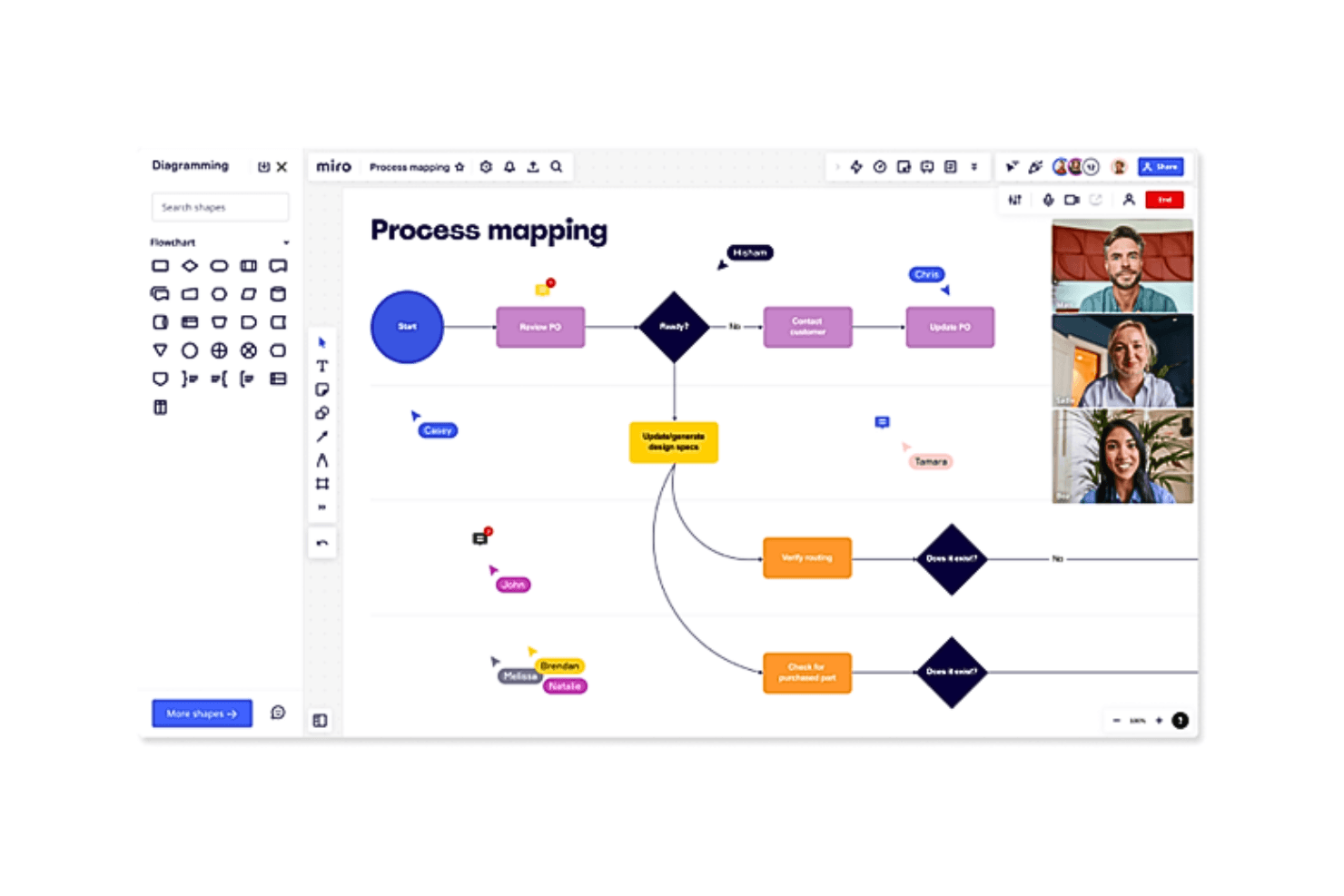
Outline both your product roadmap and core development processes and workflows in the same system Miro is a collaborative visual workspace that combines an infinite canvas with purpose-built roadmapping tools, including Timeline, Kanban, and Table views, template libraries, and real-time co-editing for cross-functional product planning.
Who Is Miro Best For?
Miro works well for cross-functional product teams that need to map workflows, dependencies, and timelines alongside discovery artifacts like journey maps and wireframes—all in one shared workspace.
Why I Picked Miro
Miro earns its spot on my shortlist because it lets product teams build roadmaps directly alongside the discovery and planning artifacts they're already working in—journey maps, dependency diagrams, wireframes—all on the same infinite canvas. I particularly like how one dataset can render as a Timeline, Kanban, or Table view simultaneously, so engineering leads and executive stakeholders each see the same roadmap in the format that works for them. The AI-powered "Roadmap Strategist" Sidekick, which generates Timeline structures from content already on the board, makes it practical for mapping complex product workflows without starting from scratch.
Miro Key Features
- Two-way dev tool sync: Miro syncs bidirectionally with Jira, Asana, Azure DevOps, Linear, and ClickUp so roadmap changes reflect in your dev tools automatically.
- Real-time co-editing: Up to ~200 simultaneous editors can work on the same board with live cursors and inline commenting.
- Miro Insights: An AI-powered feedback tool that pulls customer data from CRMs, support tickets, and surveys to surface ranked feature opportunities with source traceability.
- Planner capacity view: The Jira and Azure DevOps Planner shows a capacity and load figure per column, flagging overloaded sprints when story points exceed your set limit.
Miro Integrations
Miro offers 250+ integrations, including native two-way sync with Jira, Asana, Azure DevOps, Linear, and ClickUp, plus Microsoft 365, Google Workspace, Power BI, Looker, and Tableau. Its APIs and SDKs support custom integrations.
Pros and Cons
Pros:
- Real-time collaboration supports roughly 200 participants
- Synced timeline, table, and kanban views
- Maps workflows beside roadmap timelines
Cons:
- Dependencies don’t automatically shift dates
- Prioritization relies on templates, not scoring
 Best for branded, audience-based roadmap portals
- 30-day free trial + free plan available
- From $1.10/user/month
Visit WebsiteCustomer Rating:5/5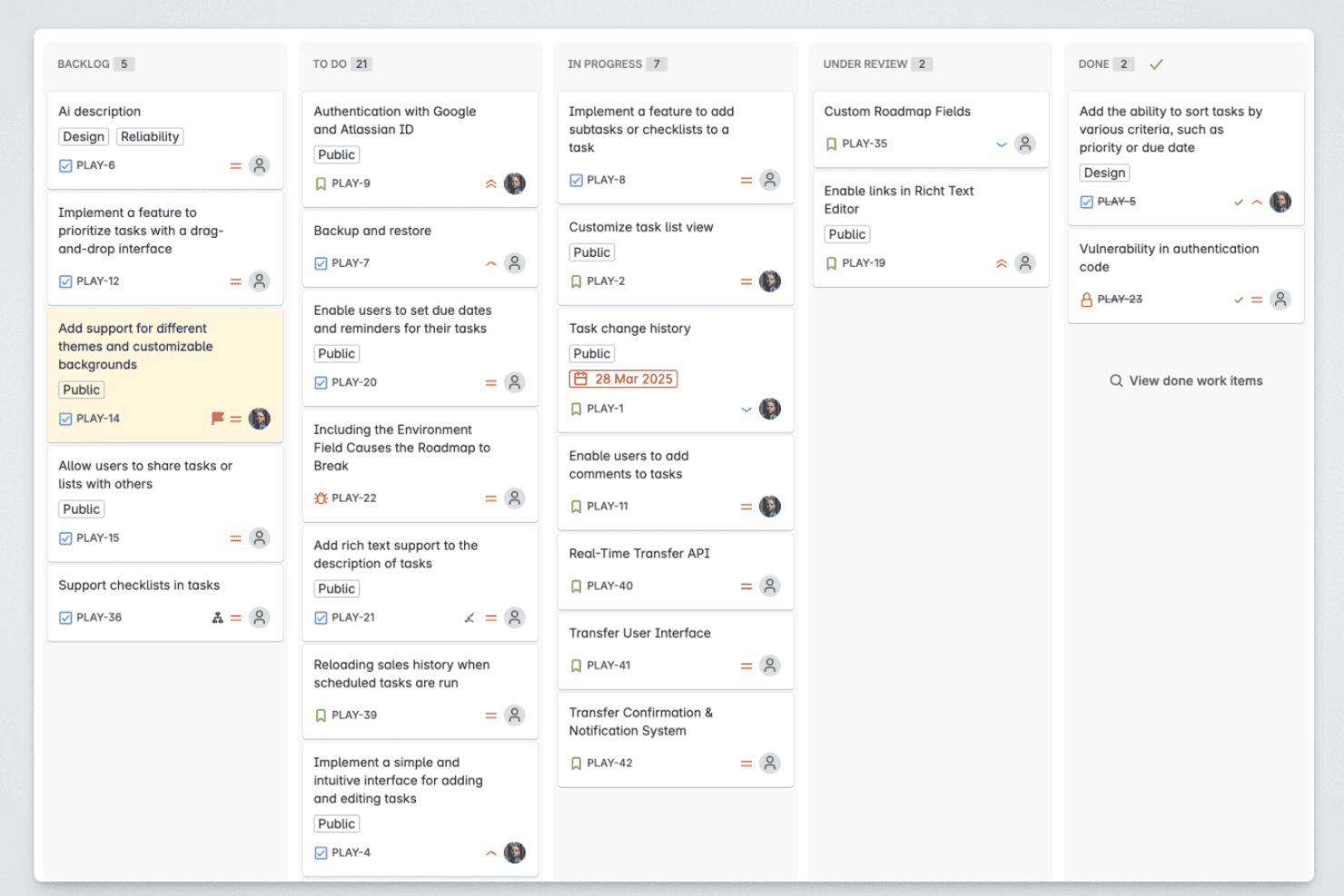
Released lets product managers organize roadmap items across backlog, in-progress, review, and completed stages. Released is a Jira-native roadmap tool that lets product teams publish live roadmaps, collect customer feedback, and generate AI-powered release notes directly from their Jira data.
Who Is Released Best For?
Released is a strong fit for product managers at Jira Cloud teams who need to communicate roadmap progress and product updates to external audiences like customers and partners.
Why I Picked Released
I've included Released in my top picks because its audience-specific roadmap portals are genuinely differentiated from what most roadmap tools offer. I can publish one portal for customers showing high-level themes, another for executives with full timeline detail, and a third for sales, all pulling live from the same Jira data with no manual updates. Granular access controls let me make each view public, password-protected, or invite-only, so I'm never sharing more than I intend to with any given audience.
Released Key Features
- Jira-native hierarchy mapping: Automatically maps initiatives, epics, and stories directly from Jira fields and structures.
- Customer feedback collection: Lets users submit ideas and vote on features through a branded feedback portal tied to Jira items.
- AI-generated release notes: Drafts release notes from completed Jira tickets with customizable templates and brand voice settings.
- Slack and Confluence publishing: Publishes product updates and roadmap changes to Slack channels and Confluence pages in real time.
Released Integrations
Released offers native integrations with Jira Cloud, Jira Product Discovery, Slack, and Confluence.
Pros and Cons
Pros:
- Customer feedback voting built into roadmap
- AI-generated release notes from Jira data
- Audience-specific portals for external stakeholder sharing
Cons:
- Limited roadmap view options available
- Only works with Jira Cloud
Learn more about Released: Best for customizable workspaces
- Free plan available
- From $9/user/month (billed annually)
Visit WebsiteCustomer Rating:4.6/5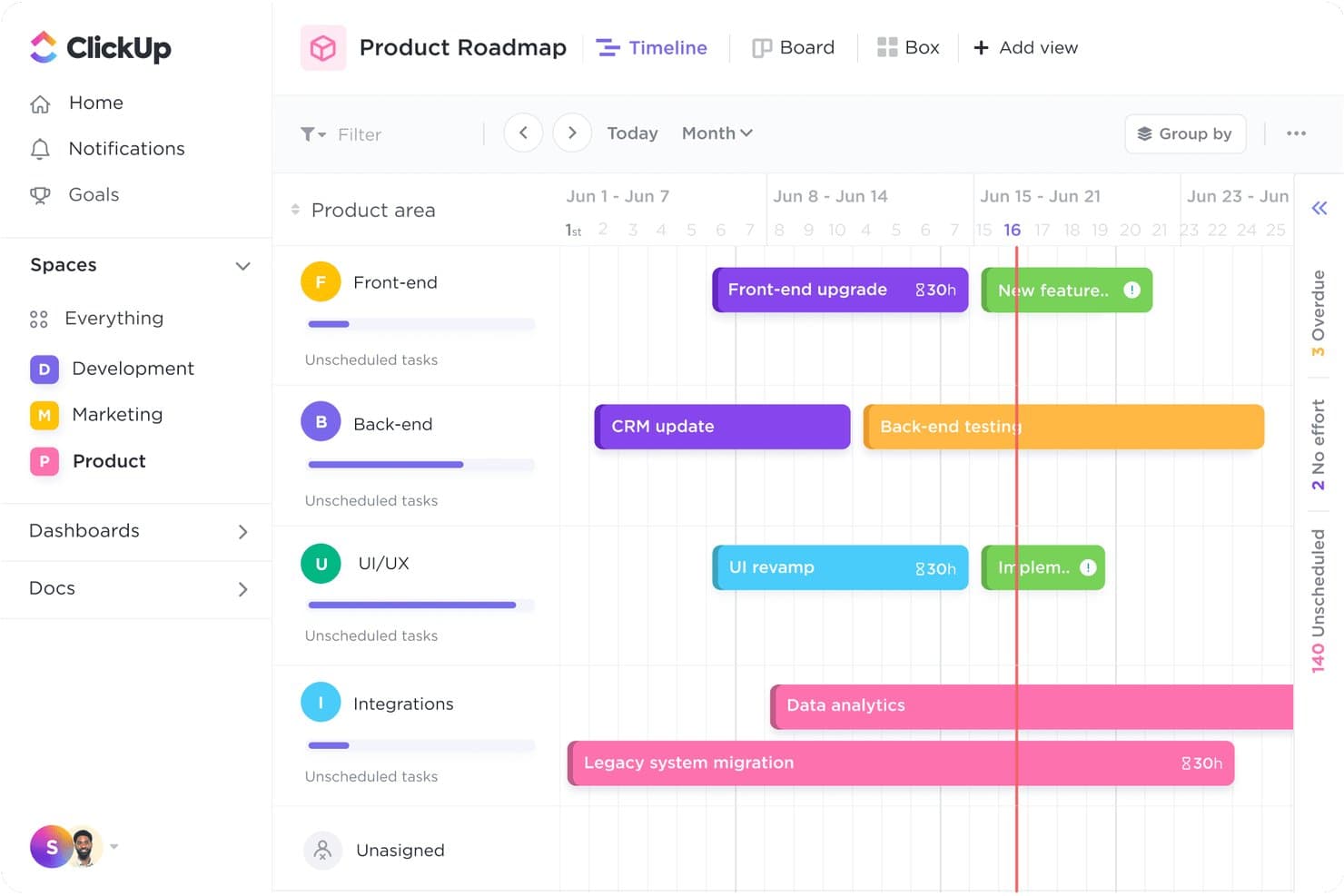
ClickUp's Timeline view maps tasks across product areas by week. ClickUp is a work management platform that lets teams build product roadmaps using Gantt and Timeline views, custom fields and statuses, prioritization frameworks, and 15+ view layouts across a single connected workspace.
Who Is ClickUp Best For?
ClickUp is a strong fit for cross-functional product teams that need to manage roadmaps, tasks, docs, and goals in a single configurable workspace.
Why I Picked ClickUp
I've included ClickUp in my top picks because no other tool on this list lets you shape a roadmap workspace so completely to match how your team actually works. With 15+ views, custom task types, and a Product Roadmap template that ships with pre-built Impact, Effort, and Confidence fields, you can build a quarterly roadmap that reflects your real prioritization process. I also like that Gantt dependencies auto-reschedule downstream tasks when you drag an item, which keeps cross-functional timelines accurate without manual cleanup.
ClickUp Key Features
- Goals and OKR tracking: Link tasks and projects directly to goals, with progress updating automatically as work gets done.
- ClickUp Brain AI assistant: Query your workspace for blocked dependencies, at-risk tasks, and overloaded assignees in plain language.
- Whiteboard view: Collaborate visually on a shared canvas where shapes and sticky notes can be converted into tasks.
- In-app chat: Communicate with teammates directly inside ClickUp without switching to a separate messaging tool.
ClickUp Integrations
ClickUp offers 200+ integrations, including Jira, GitHub, GitLab, Bitbucket, Slack, Figma, Intercom, Zendesk, and Google Calendar. It also provides a public API and Zapier connectivity for custom workflows.
Pros and Cons
Pros:
- Fifteen-plus views suit different stakeholders
- Gantt dependencies reschedule downstream roadmap work
- Custom fields mirror your prioritization framework
Cons:
- Busy interface can obscure roadmap priorities
- No dedicated customer-facing roadmap portal
Learn more about ClickUp: Best for flexible roadmap creation
- Free demo available
- Pricing upon request
Visit WebsiteCustomer Rating:4.4/5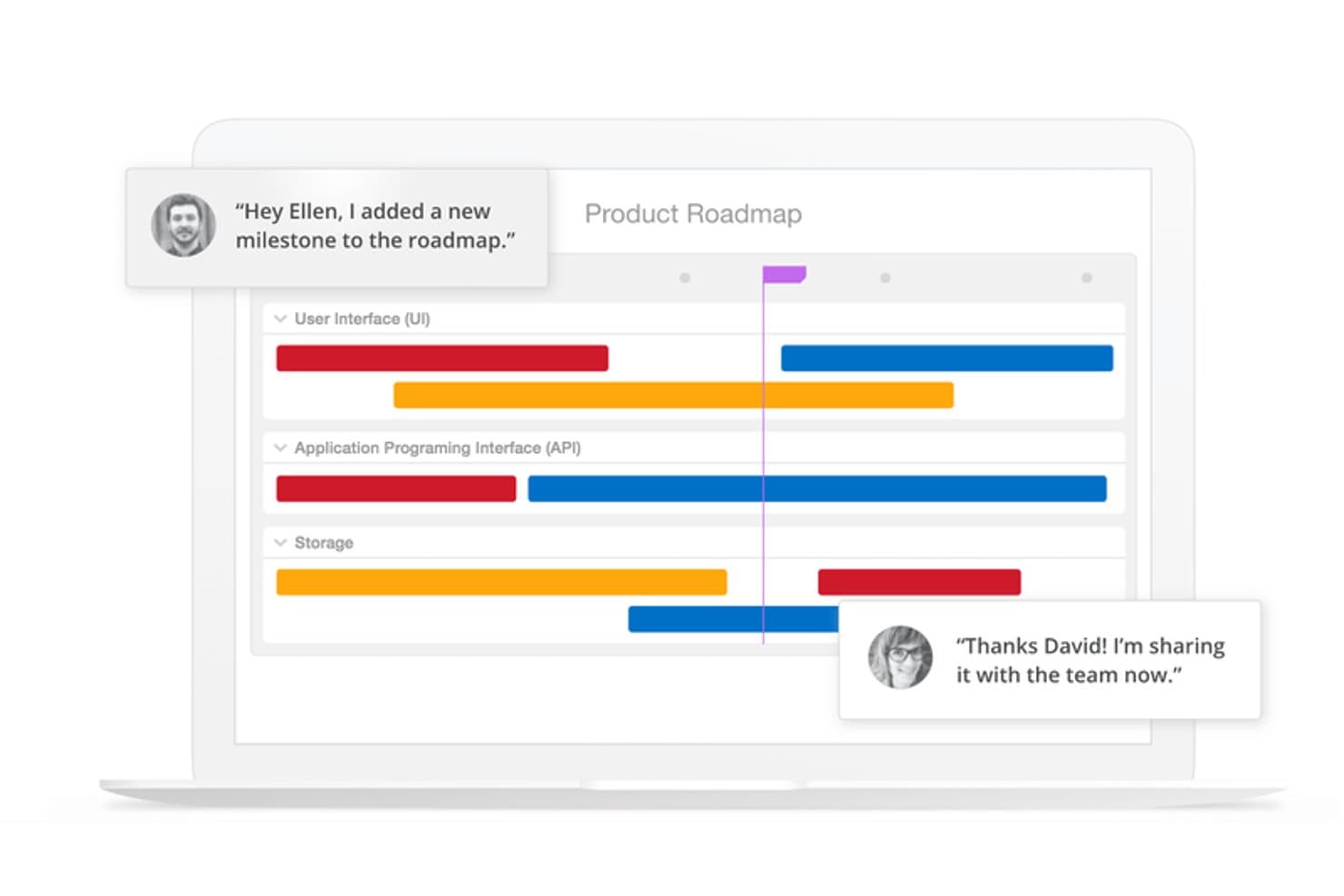
ProductPlan lets teams collaborate on roadmaps with real-time comments. ProductPlan is a roadmap software platform that combines visual timeline building, portfolio management, prioritization scoring, OKR linking, and AI-assisted idea discovery.
Who Is ProductPlan Best For?
ProductPlan is a strong fit for product teams that need to present strategy across multiple stakeholder audiences without maintaining separate roadmap versions for each one.
Why I Picked ProductPlan
ProductPlan earns its spot as one of the best on my shortlist because of how much flexibility it packs into the roadmap-building experience itself. I love that you can structure timelines using bars, containers, lanes, and milestones, then instantly switch between Timeline, List, Table, and Portfolio views without rebuilding anything. What really sets it apart is the Portfolio View: you can regroup multiple roadmaps by objective, team, or custom field and save named views for different audiences, all from one live dataset.
ProductPlan Key Features
- OKR linking: Connect individual initiatives to portfolio-level objectives and cascade strategy down to team roadmaps.
- Idea intake forms: Let customers and stakeholders submit ideas directly without requiring an account, keeping feedback centralized.
- Launch management checklists: Attach task-based launch checklists with owners, due dates, and statuses directly to roadmap items.
- Two-way Jira and Azure DevOps sync: Push date changes back to your dev tools in one click, with epics mapping to containers and stories mapping to bars.
ProductPlan Integrations
ProductPlan has native two-way integrations with Jira and Azure DevOps, plus integrations with GitHub, Confluence, Slack, and Microsoft Teams. It also supports an API, webhooks, and Zapier for custom connectivity.
Pros and Cons
Pros:
- Portfolio rollups connect roadmaps to objectives
- Live audience views reduce presentation rework
- Flexible timelines support complex roadmap structures
Cons:
- No dedicated capacity planning view documented
- Prioritization relies on one scoring model
Learn more about ProductPlan: Best with OKR planning
- 14-day free trial + free demo available
- Pricing upon request
Visit WebsiteCustomer Rating:4.2/5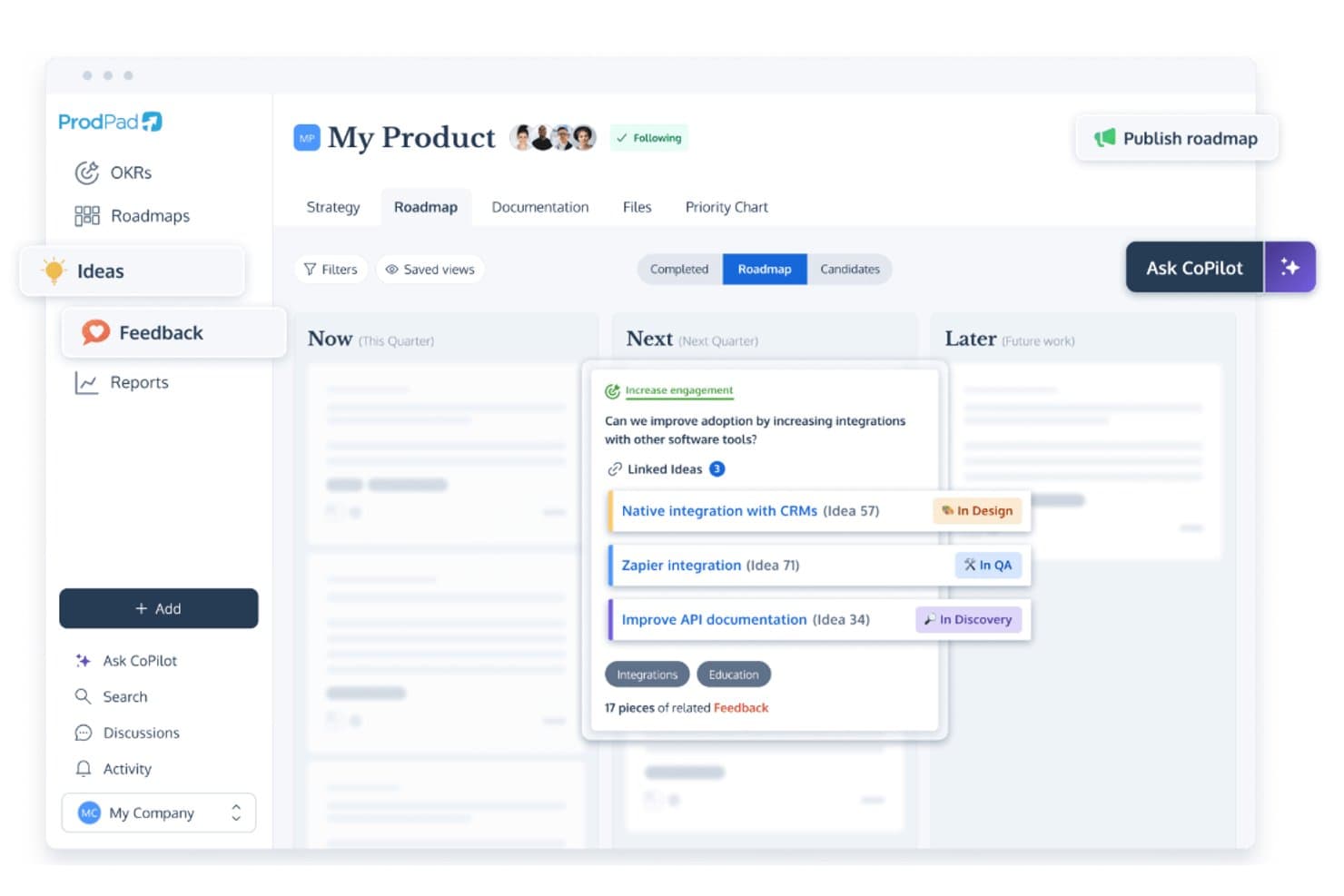
ProdPad links roadmap ideas to feedback and tracks development status. ProdPad is a product roadmap tool built around a Now-Next-Later framework, with native OKR linking, idea management, customer feedback capture, and flexible roadmap publishing.
Who Is ProdPad Best For?
ProdPad is a strong fit for product teams that plan around business outcomes and need their roadmap directly tied to OKRs.
Why I Picked ProdPad
I picked ProdPad as one of the best because it's the only roadmap tool I've used where OKRs aren't bolted on as an afterthought. You can link every roadmap Initiative directly to an Objective, and the Group by Objective view ranks those Objectives by how many active Initiatives support them, so you can immediately spot strategic gaps. Key Results carry live On Track, Behind, or At Risk statuses, and you can set a target outcome metric before building, then track actual results post-release.
ProdPad Key Features
- Now-Next-Later roadmap: Organize Initiatives across three strategic time horizons—Now, Next, and Later—without committing to fixed dates or timelines.
- Roadmap publishing app: Share live roadmaps via hosted URLs, embeddable iframes, or PDF exports, with password protection and per-Initiative visibility controls.
- Impact/effort matrix: Plot and compare ideas visually on a prioritization chart with Quick Wins and Time Sinks quadrants to guide backlog decisions.
- CoPilot AI: A built-in AI assistant that drafts specs, summarizes customer feedback, flags duplicate ideas, and suggests Initiatives—included at no extra cost on every plan.
ProdPad Integrations
ProdPad integrates with Jira, Azure DevOps, GitHub, Linear, Slack, Microsoft Teams, Salesforce, Intercom, and Confluence. It also supports an API, webhooks, and Zapier.
Pros and Cons
Pros:
- Flexible publishing serves different audiences
- Feedback traces customer needs to initiatives
- Native OKR links clarify roadmap decisions
Cons:
- Initiative updates depend on manual upkeep
- No dates hinder release timeframe tracking
Learn more about ProdPad: Best for AI-driven portfolio prioritization
- Free demo available
- Pricing upon request
Visit WebsiteCustomer Rating:4.8/5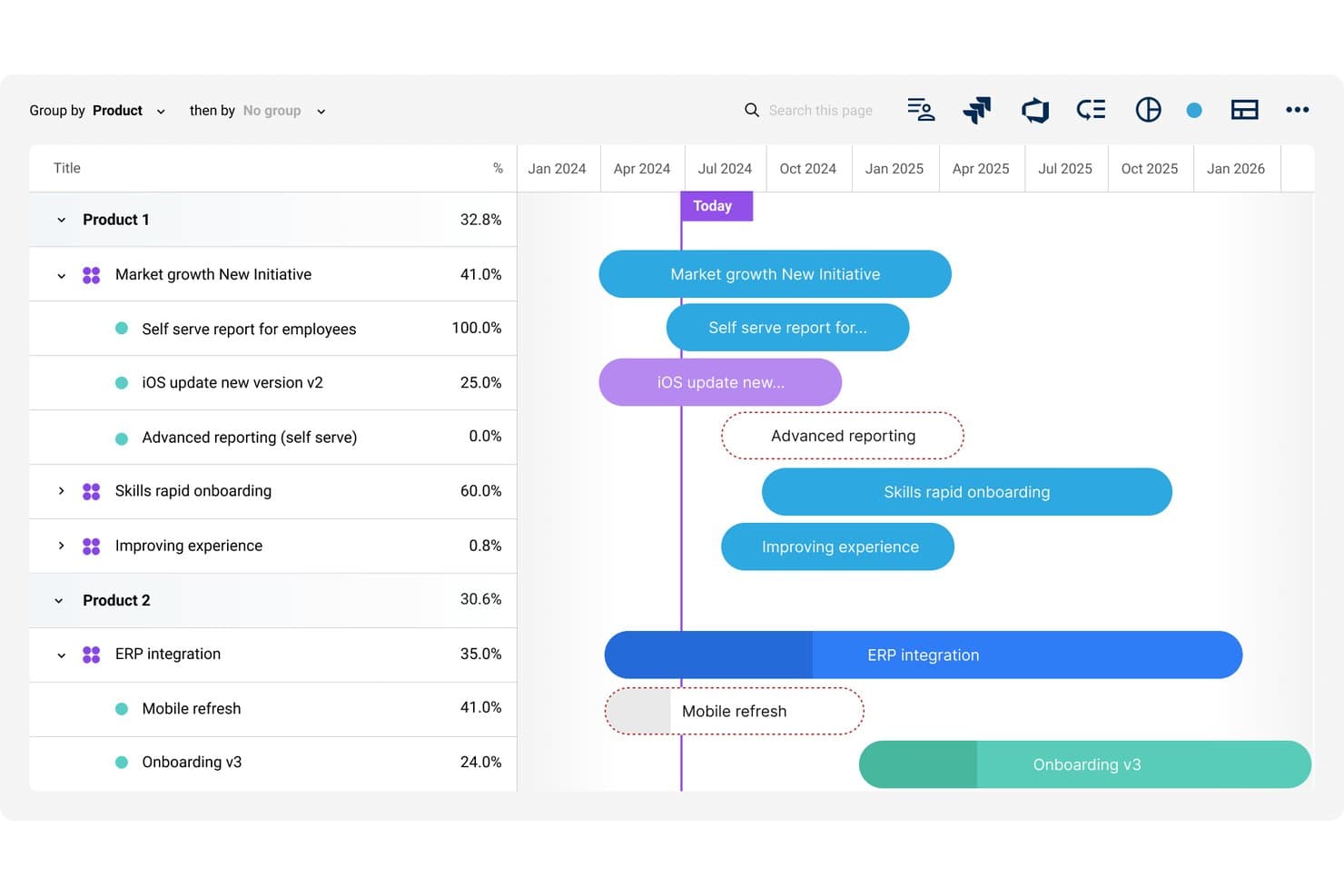
Dragonboat visualizes multi-product roadmaps with timeline progress tracking. Dragonboat is a product portfolio roadmap platform that combines visual roadmap creation, AI-assisted prioritization, OKR tracking, customer feedback intake, and capacity planning across multi-product and multi-team environments.
Who Is Dragonboat Best For?
Dragonboat is a strong fit for product teams managing multiple products or portfolios who need to connect strategy, prioritization, and delivery in one place.
Why I Picked Dragonboat
I picked Dragonboat as one of the best because its AI-assisted prioritization works at the portfolio level, not just per product. I love how it uses scoring models like RICE and its own MoAR method to surface which initiatives align best with your OKRs, then automatically updates your roadmap placements to reflect those recommendations. The "1-Click AI Planner" is what seals it for me: it builds resource plans across multiple teams from the same data powering your roadmap.
Dragonboat Key Features
- Multiple roadmap views: Choose from five built-in formats—including Kanban, Gantt, swimlane, and a 3D Dynamic view—to display your roadmap for any audience.
- Evergreen slide decks: Auto-generated presentation slides pull from live roadmap data, so you're never rebuilding decks from scratch before a meeting.
- Customer feedback intake: Connect tools like Salesforce, Zendesk, and Slack to pull in customer requests, then use AI to tag and surface themes across your portfolio.
- Capacity planning with what-if scenarios: Model resource demand by role, run scenario comparisons, and account for carry-over work before committing to a plan.
Dragonboat Integrations
Dragonboat offers 200+ integrations, including Jira, Azure DevOps, Asana, Slack, Microsoft Teams, Salesforce, Zendesk, Confluence, and Tableau. Its API and MCP server support custom connections and AI clients such as Claude and ChatGPT.
Pros and Cons
Pros:
- Flexible roadmap views support executive storytelling
- Live slide decks keep stakeholder views current
- Portfolio-wide AI prioritization links strategy to capacity
Cons:
- Taxonomy setup can overwhelm smaller product teams
- Some controls are difficult to locate
Learn more about Dragonboat: Best for centralizing product feedback
- Free demo available
- Pricing upon request
Visit WebsiteCustomer Rating:4.5/5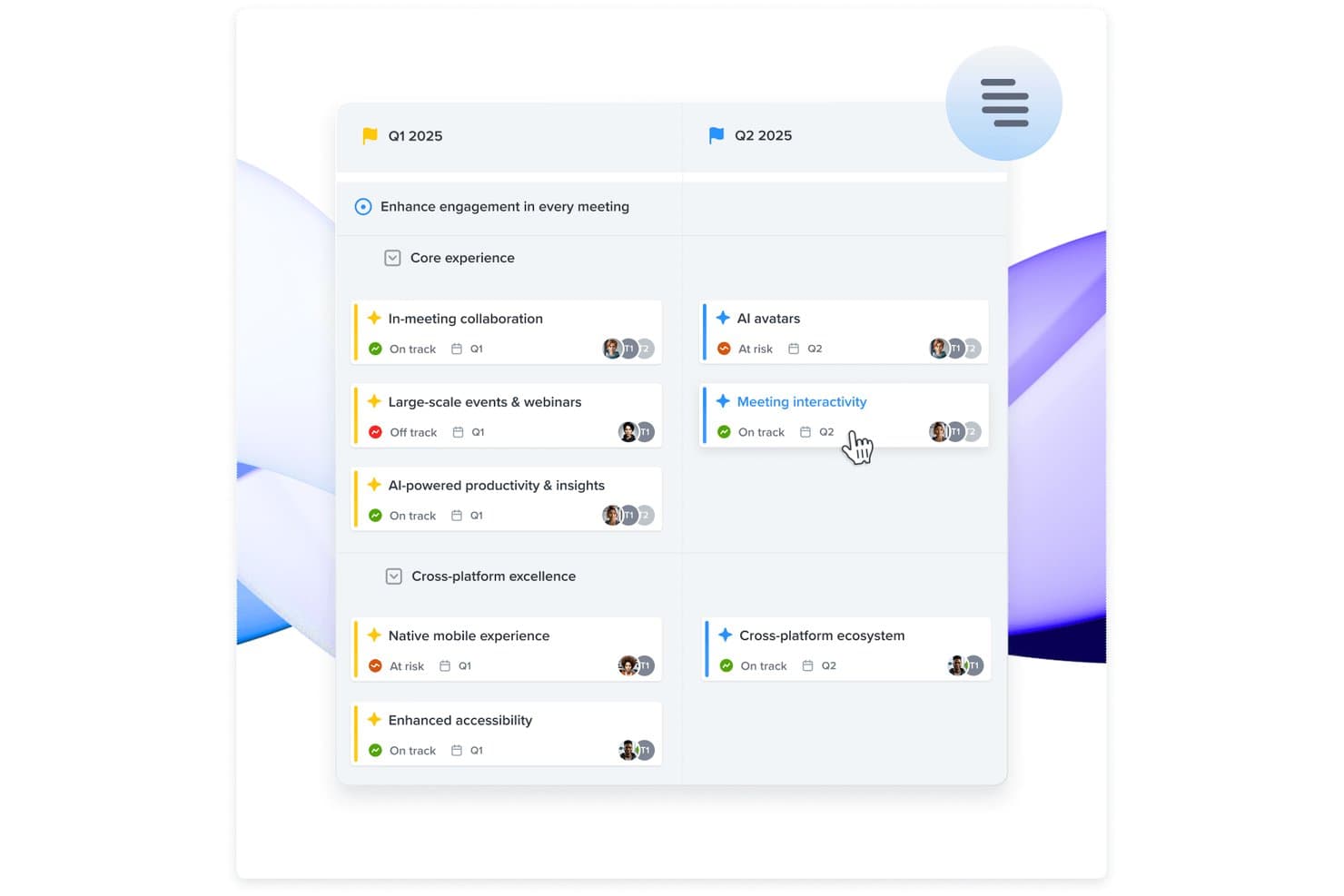
Productboard organizes roadmap initiatives by quarter with status tracking. Productboard is a product management platform that combines visual roadmap building, customer feedback collection, and feature prioritization across timeline, column, and grid-based board layouts.
Who Is Productboard Best For?
Productboard is a strong fit for product teams that need to connect customer feedback directly to roadmap decisions, especially at mid-size to enterprise companies where strategic alignment across multiple stakeholders is a constant challenge.
Why I Picked Productboard
I picked Productboard as one of the best because it's genuinely built around the idea that your roadmap should grow out of customer feedback, not the other way around. I love how feedback from Zendesk, Gong, Slack, and a dozen other sources flows into a central insights repository, where you can link each piece directly to a feature or initiative. The Customer Importance Score then surfaces which items carry the most weight across your user base, so your prioritization decisions are traceable to real signal rather than gut feel.
Productboard Key Features
- Timeline and column boards: Build visual roadmaps across date-based timelines or abstract column layouts like Now/Next/Later, and switch between them without losing your board settings.
- Custom prioritization formulas: Model frameworks like RICE, WSJF, and ICE using custom number fields on grid boards, then sort and group your backlog by score.
- Two-way Jira sync: Connect Productboard to Jira with bidirectional field mapping so status changes in Jira automatically update your product items.
- Customer Portal: Publish a branded, external-facing portal where customers vote on features and submit ideas, with all responses feeding directly back into your product items.
Productboard Integrations
Productboard offers 25+ native integrations, including Jira, Azure DevOps, Slack, Microsoft Teams, Zendesk, Intercom, Gong, and Salesforce. It also provides REST API v2.0, and Zapier connectivity.
Pros and Cons
Pros:
- Supports tailored timeline and column views
- Links customer insights to feature priorities
- Centralizes feedback behind roadmap decisions
Cons:
- Dependencies lack automatic schedule adjustments
- Hierarchy takes time to understand
Learn more about Productboard: Best for scalability and flexibility
- Free demo available
- Pricing upon request
Visit WebsiteCustomer Rating:4.4/5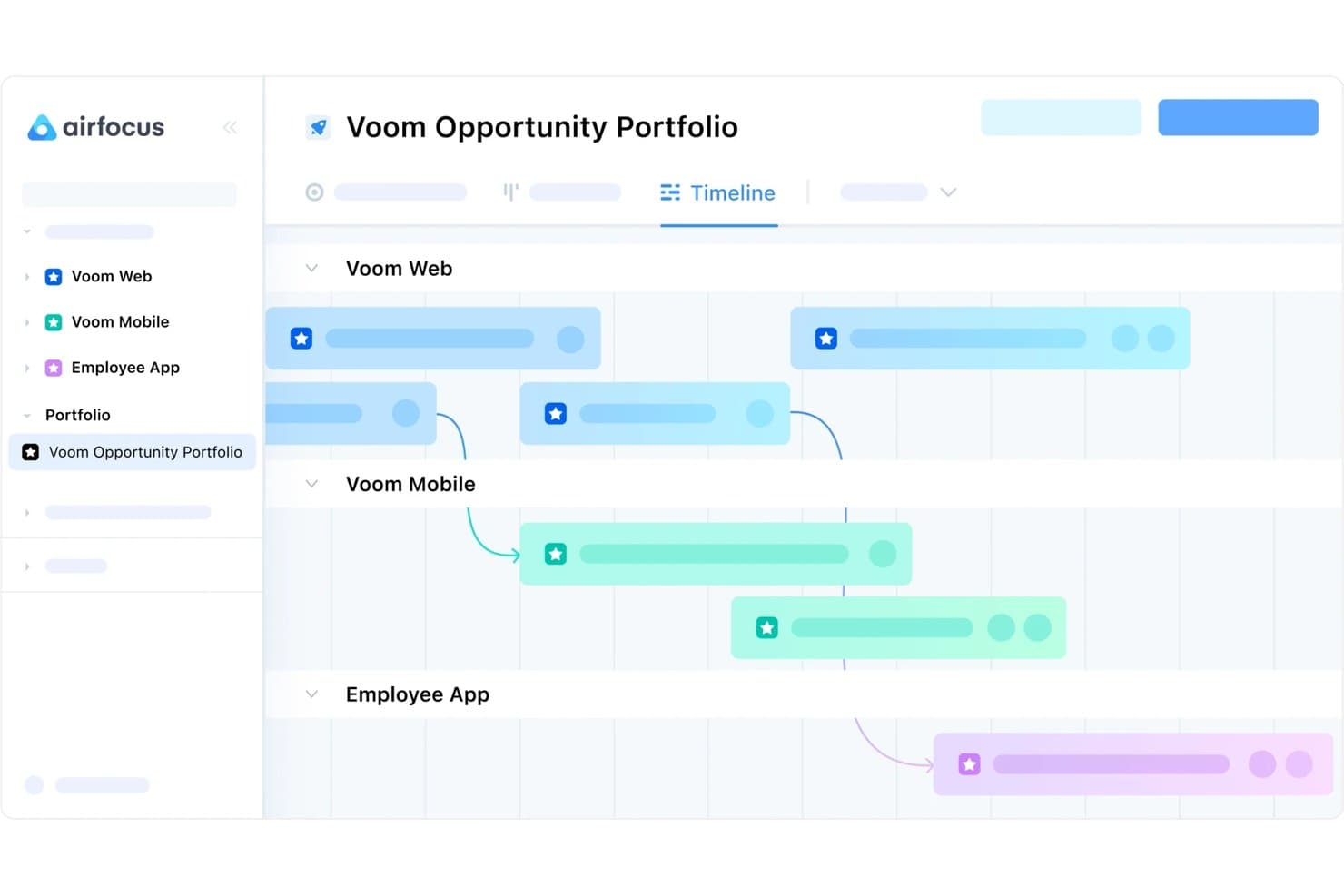
airfocus lets users manage cross-product roadmaps on a shared timeline. airfocus is a product roadmap tool that combines timeline and Gantt views, multi-framework prioritization, audience-specific publishing, and deep Jira and Azure DevOps sync in a modular, configurable workspace.
Who Is airfocus Best For?
airfocus is a strong fit for scaling product organizations that need to manage multiple teams, roadmaps, and workspaces without sacrificing flexibility in how they prioritize and present work.
Why I Picked airfocus
airfocus earns its spot on my shortlist because no other tool I've tested matches its depth of configurability across both roadmap structure and prioritization. I love that you can run RICE, weighted scoring, and Priority Poker across different teams simultaneously while leadership sees a single portfolio rollup. The unlimited workspaces and multi-layer hierarchy mean a 30-product org can scale without rebuilding its setup from scratch.
airfocus Key Features
- Two-way Jira and Azure DevOps sync: Connect airfocus items to Jira or ADO with field-level control over sync direction, status mapping, and parent-child hierarchy links.
- Priority Poker: Stakeholders score roadmap items independently, and airfocus surfaces disagreements as data to guide prioritization discussions.
- Customer feedback portal: A branded, public-facing portal lets customers submit ideas, vote on features, and view release announcements, with feedback linking directly to roadmap items.
- Audience-specific views: Build separate roadmap views for executives, engineering, marketing, and customers from the same underlying data without duplicating work.
airfocus Integrations
airfocus offers native integrations with Jira, Azure DevOps, GitHub, Linear, Asana, Intercom, Zendesk, Slack, Microsoft Teams, and Salesforce (Enterprise). It also supports webhooks, open APIs, MCP, and Zapier for custom connectivity.
Pros and Cons
Pros:
- Publishes tailored views for every audience
- Connects prioritization scores directly to roadmaps
- Scales across products, teams, and workspaces
Cons:
- Lacks live co-editing presence indicators
- Extensive configuration takes time to master
 Best all-in-one product management solution
- 14-day free trial + free demo available
- From $24/user/month
Visit WebsiteCustomer Rating:4.4/5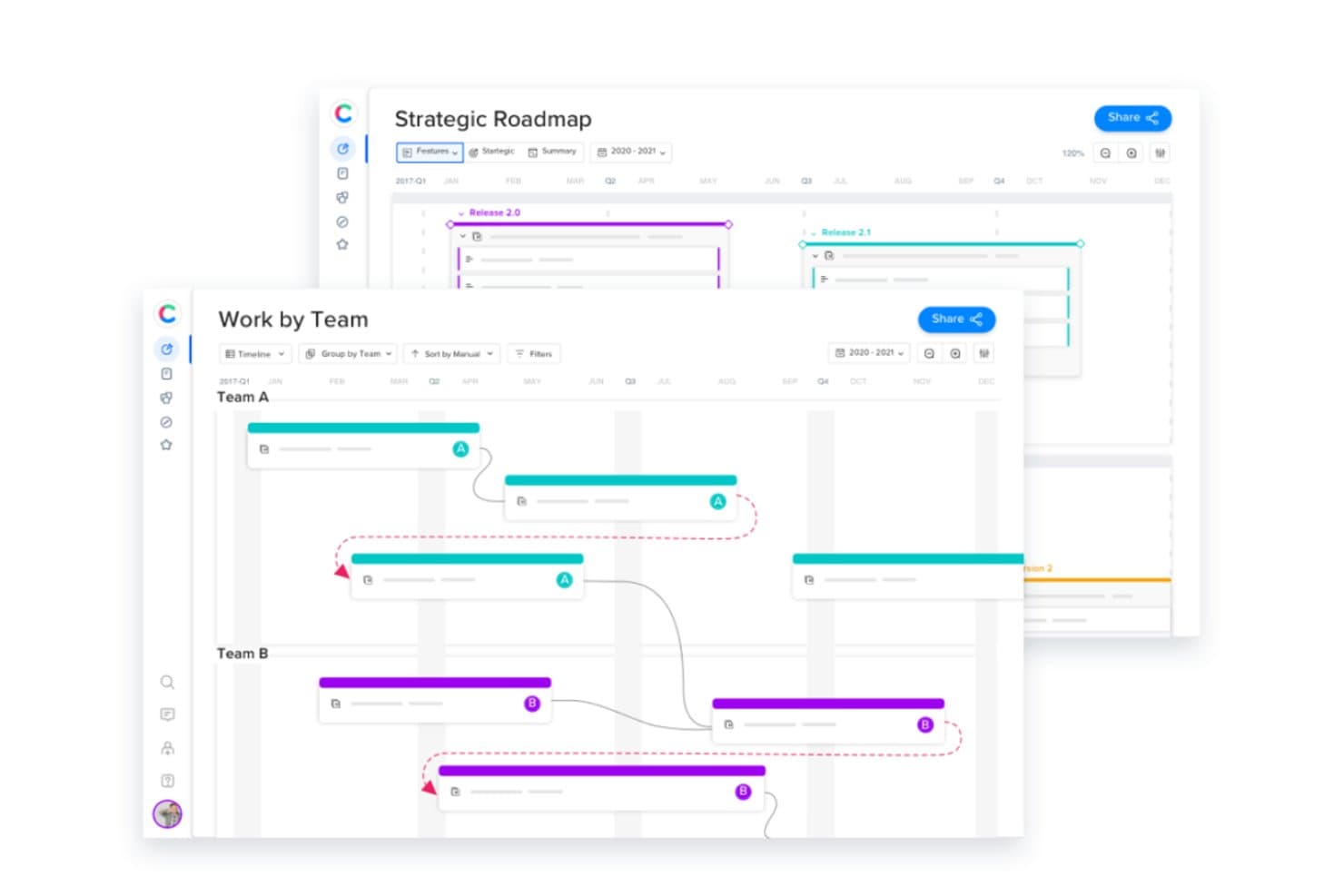
Craft.io lets users view roadmaps and timelines grouped by team. Craft.io is a product management platform that brings together visual roadmapping, backlog management, prioritization frameworks, OKR linking, and customer feedback into a single connected workspace.
Who Is Craft.io Best For?
Craft.io is a strong fit for product managers at growing teams who need strategy, prioritization, and roadmapping in one place rather than spread across multiple tools.
Why I Picked Craft.io
Craft.io earns its spot on my shortlist because it's genuinely all-in-one: strategy, prioritization, roadmapping, and feedback all live in the same backlog-driven workspace. What I particularly like is that every roadmap view, whether a swimlane, timeline, or strategic OKR-linked view, updates automatically when the backlog changes. I also use LiveShare links to give executives a real-time, filtered view without granting full access.
Craft.io Key Features
- LiveShare links: Generate a real-time, read-only URL that stakeholders can access without logging in, with filters applied per audience.
- Capacity planning: View and simulate team capacity by role or individual to catch over-allocation before it affects a release.
- Customer feedback hub: Collect, group, and link feedback directly to features in your backlog from a centralized intake form.
- Custom prioritization formula builder: Create your own scoring method beyond built-in frameworks like RICE or WSJF to match your team's decision criteria.
Craft.io Integrations
Native integrations include Jira, Azure DevOps, GitHub, GitLab, Linear, Figma, Salesforce, Slack, Microsoft Teams, and Google Sheets. Craft.io also offers a public API for custom integrations and supports Zapier.
Pros and Cons
Pros:
- LiveShare keeps stakeholders aligned
- Custom scoring supports nuanced prioritization
- Backlog updates every roadmap view
Cons:
- Advanced views take time to configure
- Granular timeframe variance reporting remains limited
Learn more about Craft.io: Best to build roadmaps for presenting
- 14-day free trial + free demo available
- From $10/user/month
Visit WebsiteCustomer Rating:4/5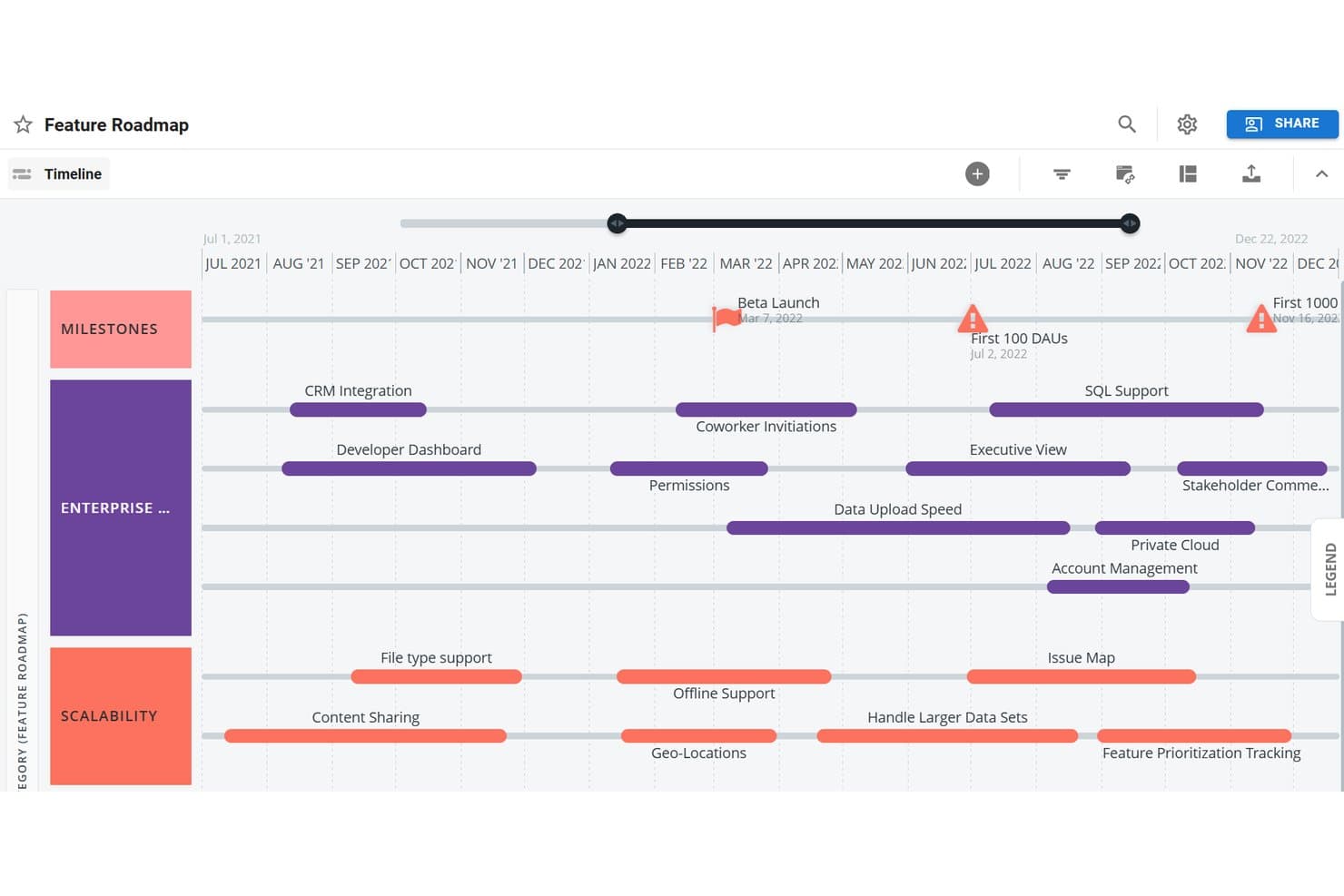
Tempo Roadmapping Software visualizes features on a timeline by category. Tempo Roadmapping Software is a visual roadmap builder that offers timeline, swimlane, and table views alongside prioritization frameworks, customer feedback collection, and branded publishing options.
Who Is Tempo Roadmapping Software Best For?
Tempo Roadmapping Software is a strong fit for product managers and executive stakeholders who need polished, presentation-ready roadmaps to align cross-functional teams and communicate strategy to leadership.
Why I Picked Tempo Roadmapping Software
Tempo Roadmapping Software earns its spot on my shortlist because it's purpose-built for creating roadmaps that look polished in front of an audience. I love that you can export timeline views as slide-ready PNGs in 16:9 or 4:3, so dropping a roadmap into a board deck takes seconds. The branded publish-to-URL feature lets you add your logo, a vision statement, and a custom legend before sharing, so stakeholders see a finished product, not a raw tool screenshot.
Tempo Roadmapping Software Key Features
- Customer feedback inbox: Collect and organize customer feedback directly in the tool, then link it to roadmap ideas so every item traces back to a real request.
- Idea Manager with weighted scoring: Score and rank ideas using built-in Value vs. Effort, RICE, or custom weighted models before promoting them onto your roadmap.
- Portfolio roadmap roll-up: Combine individual team roadmaps into a single high-level view so you can track cross-team initiatives in one place.
- Confluence embedding: Embed a published roadmap URL directly into Confluence pages so stakeholders always access it in context.
Tempo Roadmapping Software Integrations
Tempo Roadmapping Software offers native integrations with Jira and Azure DevOps, plus one-way imports from Asana, monday.com, Trello, GitHub, GitLab, Shortcut, and Pivotal Tracker. It also supports Confluence embedding and a REST API for custom integrations.
Pros and Cons
Pros:
- Portfolio roll-ups unify team roadmaps
- Customer feedback links directly to ideas
- Board-ready exports support stakeholder presentations
Cons:
- Real-time collaboration remains limited
- Published roadmaps are image-based
Learn more about Tempo Roadmapping Software:
Når bør du bruke et nettbasert veikartverktøy?
Et nettbasert veikartverktøy gir teamet ditt én samlet og alltid oppdatert oversikt over hva som bygges, hvorfor det bygges og når det skal skje, slik at dere slipper å lete etter oppdateringer i Slack-tråder og utdaterte presentasjoner. Hvis noen av scenarioene nedenfor høres kjent ut, er det sannsynligvis på tide å legge til et slikt verktøy i verktøykassen deres:
- Veikartet ditt finnes på fem forskjellige steder: Du har én versjon i Notion, en annen i en presentasjon og en tredje som noen har eksportert til et regneark. Et veikartverktøy samler alt på ett sted, slik at interessentene alltid bruker én felles kilde.
- Du håndterer tilbakemeldinger fra salg og kundestøtte uten en tydelig måte å vise avveiningene på: Et veikartverktøy lar deg knytte forespørsler til strategien, slik at du kan begrunne prioriteringsbeslutninger uten en tre timer lang Slack-diskusjon.
- Hver sprint spør utviklingsteamet hvorfor noe står på veikartet: Du forklarer konteksten på nytt i stedet for å bygge. Et delt veikart med koblede mål avklarer disse spørsmålene før møtet begynner.
- Du forbereder deg til et styremøte, og presentasjonen er allerede utdatert: Med et nettbasert veikartverktøy kan du hente frem en oppdatert visning, slik at det ledelsen ser, samsvarer med det teamet ditt faktisk arbeider med.
- Du håndterer flere produktlinjer på tvers av tidssoner: Et enkelt nettbasert verktøy med redigering i sanntid holder distribuerte team samkjørte uten et ukentlig møte bare for å sammenligne notater.
Andre alternativer for nettbaserte veikartverktøy
Her er en liste over verktøyene som ikke nådde opp, men som fortsatt er verdt å vurdere:
- 11JIRA by AtlassianBest for Agile development teams
- 12SmartsheetBest for enterprise-grade roadmap governance
- 13WrikeBest for cross-functional roadmap execution
- 14TargetprocessBest for strategic portfolio management
- 15HyggerBest for task prioritization
- 16NotionBest for roadmaps tied to wikis and project docs
- 17Aha! RoadmapsBest for strategy-linked, multi-audience roadmaps
- 18monday devBest for dev-to-exec roadmap visibility
- 19Jira Product DiscoveryBest for Jira-connected discovery and roadmapping
How I Evaluate Online Roadmap Tools
I split my evaluation into three parts, with core functionality carrying the most weight: move initiatives, adjust dates, and share live views. Next, I look for standout features such as customer-feedback links. Finally, I consider support, onboarding, and pricing value.
Core Functionality (Table Stakes For This List)
When I'm selecting tools for my list, I score each one on a scale from 0 (does not offer the functionality) to 5 (excels in this area) for each core functionality listed below. I then convert the total into a percentage to help assess each tool's overall fit, with extra weight on any functionalities I’ve deemed essential.
- Visual Roadmaps (Essential): I look for flexible timelines that map releases, initiatives, dependencies, and custom groupings across multiple planning horizons.
- Drag-and-Drop Editing (Essential): I assess whether teams can move or resize roadmap items quickly while dates and related details update correctly.
- Sharing & Publishing: I check for live links, exports, embeds, and presentation views suited to internal teams, customers, and executives.
- Prioritization Frameworks: I look for scoring by value, effort, or custom criteria, with results informing sequencing and roadmap placement.
- Multiple Views: I compare timeline, swimlane, list, kanban, and other layouts for planning, delivery tracking, and stakeholder communication.
- Real-Time Collaboration: I assess shared editing, comments, and visible updates when product, design, engineering, and leadership review plans together.
Once I have a list of tools that meet the criteria, I consider what sets each platform apart.
Differentiating Factors (What Sets Vendors Apart)
Here's how I compare and contrast different vendors:
Standout Features
I look for direct links between roadmap items and company OKRs, since that connection lets me show leadership exactly how a proposed feature supports a strategic objective. Customer feedback integration matters just as much—I evaluate whether a tool can tag incoming requests and tie them to specific roadmap items, so prioritization decisions stay grounded in real user input rather than gut feel. I also check for external-facing portals that let you share progress with customers or partners without exposing internal notes or scoring data.
Beyond Features
I evaluate how well a tool syncs with Jira, Azure DevOps, or GitHub—bidirectional field mapping prevents duplicate data entry and keeps roadmap dates honest. Scalability matters too: I check whether a platform supports portfolio-level rollups across multiple products and whether its licensing model penalizes you for adding view-only stakeholders. Finally, I consider onboarding support, because a tool that ships with guided templates and customer success resources gets cross-functional buy-in faster than one that drops you into a blank canvas.
Hva er et nettbasert veikartverktøy?
Et nettbasert veikartverktøy er en nettbasert plattform som brukes til å opprette, administrere og dele visuelle veikart, slik at team kan planlegge og kommunisere strategiske mål og prosjektplaner på en effektiv måte. Noen av funksjonene som gjør dette mulig, er flere visualiseringer av tidslinjer, milepælsoppfølging, samarbeidsfunksjoner, integrasjon med prosjektstyringsverktøy samt muligheten til å tilpasse og dele veikart.
Disse verktøyene gir teamene et dynamisk og samarbeidsbasert miljø for å beskrive og kommunisere strategiske planer, samkjøre interessenter om tidsplaner og følge fremdriften i sanntid.
Vanlige spørsmål om nettbaserte veikartverktøy
Har du fortsatt spørsmål om produktveikart og nettverktøyene som gjør det enklere å lage dem? Her har jeg besvart noen vanlige spørsmål om emnet.
Hvordan støtter nettbaserte veikartverktøy samarbeid mellom produktteam og interessenter?
Nettbaserte veikartverktøy gjør samarbeid enkelt ved å samle oppdateringer, kommentarer og tilbakemeldinger på ett sted. Du kan dele det samme visuelle veikartet med teamet og interessentene dine, tildele oppgaver og følge fremdriften i sanntid. Innebygde varsler og tillatelser sørger for at alle er samkjørte, og at bare de riktige personene kan gjøre endringer.
Hvilke integrasjoner bør jeg se etter i et nettbasert veikartverktøy?
Se etter veikartverktøy som kan integreres med prosjektstyringsplattformer som Jira, Trello eller Asana, og kommunikasjonsverktøy som Slack eller Microsoft Teams. Integrasjoner med analyseplattformer, fillagring og systemer for versjonskontroll kan også hjelpe teamet med å holde alt synkronisert og unngå manuelle oppdateringer.
Hvor sikre er nettbaserte veikartverktøy for deling av sensitive produktplaner?
De fleste nettbaserte veikartverktøy tilbyr høy sikkerhet med kryptering, rollebasert tilgang og brukerautentisering. Du bør se etter SOC 2-samsvar, støtte for SSO og detaljerte tillatelsesinnstillinger, slik at sensitiv produktinformasjon forblir beskyttet. Gå alltid gjennom leverandørens sikkerhetsdokumentasjon før du deler konfidensielle planer.
Kan jeg tilpasse veikartmaler i disse verktøyene slik at de passer til arbeidsflyten min?
Ja, de fleste nettbaserte veikartverktøy lar deg tilpasse maler, oppsett og felt slik at de passer til teamets arbeidsprosess. Du kan vanligvis legge til egendefinerte milepæler, angi ulike visninger, for eksempel tidslinje, svømmebane eller Kanban, og fargekode elementer for å skape bedre oversikt. Dette gjør det mulig å tilpasse verktøyet til måten teamet ditt fungerer best på.
Hva er den beste måten å få interessentene med på å ta i bruk et nytt veikartverktøy?
Start med å involvere interessentene tidlig i utvelgelsesprosessen og innhente synspunkter på behov og utfordringer. Vis hvordan det nye verktøyet vil gjøre oppdateringer, kommunikasjon og rapportering enklere for alle. Tilby praktiske demonstrasjoner og enkel opplæring, slik at interessentene føler seg komfortable og ser verdien med én gang.