

Du kan oppleve at du må holde oversikt over tidsplaner, ressurser og koordinering av teamet. Det er her agil PLM-programvare kommer inn, og hjelper deg med å forenkle disse utfordringene.
Etter min erfaring kan disse verktøyene gjøre en betydelig forskjell for hvordan du styrer prosjekter og samarbeider med teamet ditt. De bidrar til at alle er samkjørte, slik at alt går smidigere og mer effektivt.
I denne artikkelen deler jeg mine beste valg av agil PLM-programvare, basert på uavhengig testing og en inngående forståelse av produktstyringsverdenen. Du finner objektive, grundig undersøkte anmeldelser som fokuserer på det som virkelig er viktig for deg og teamet ditt.
Why Trust Our Software Recommendations
6,700+
Reviews
20
Industry experts
16+
Evaluation factors
14
Years
Our team has been testing and reviewing software since 2012. As product managers ourselves, we know how difficult—and important—it is to choose the right software.
For this guide, we evaluated tools using hands-on testing and independent research, scoring tools using our selection criteria.
Our reviews reflect our human editorial judgment, not a sales pitch.
Expert reviewers:
- Andrew LumbySenior TPM
- Cristiano ValimSenior UI/UX Lead


Sammenligningstabell for agil PLM-programvare
\u003cspan style=\u0022font-weight: 400;\u0022\u003eDenne sammenligningstabellen oppsummerer prisopplysningene for mine beste valg av agil PLM-programvare:\u003c/span\u003e
| Tool | Best For | Trial Info | Price | ||
|---|---|---|---|---|---|
| 1 | Best for its backlog prioritization options | 15-day free trial | From $1/user/month (12 user minimum) | Website | |
| 2 | Best for infinite canvases | Free plan available | From $9/month (billed annually) | Website | |
| 3 | Best for managing complex product lifecycles | Free plan + 14-day free trial available | From $10/user/month (billed annually) | Website | |
| 4 | Best for visual iterative development | Free plan + 14-day free trial available | From $8/user/month (billed annually) | Website | |
| 5 | Best for end-to-end digital thread across engineering | 30-day free trial | Pricing upon request | Website | |
| 6 | Best for PLM, QMS, and PIM in one platform | Free demo available | Pricing upon request | Website | |
| 7 | Best for CAD-connected lifecycle control | 30-day free trial | From $545/year | Website | |
| 8 | Best for global product launch coordination | Free demo available | Pricing upon request | Website | |
| 9 | Best for multi-discipline product data management | Free demo available | Pricing upon request | Website | |
| 10 | Best for Oracle Agile PLM migration | 10-day free trial | Pricing upon request | Website |


Anmeldelse av beste agile PLM-programvare
\u003cspan style=\u0022font-weight: 400\u0022\u003eNedenfor finner du mine detaljerte sammendrag av den beste agile PLM-programvaren som kom med på kortlisten min. Anmeldelsene mine gir et detaljert innblikk i de viktigste funksjonene, fordelene og ulempene, integrasjonene og ideelle bruksområdene for hvert verktøy, slik at du kan finne det beste for deg.\u003c/span\u003e
 Best for its backlog prioritization options
- 15-day free trial
- From $1/user/month (12 user minimum)
Visit WebsiteCustomer Rating:4.1/5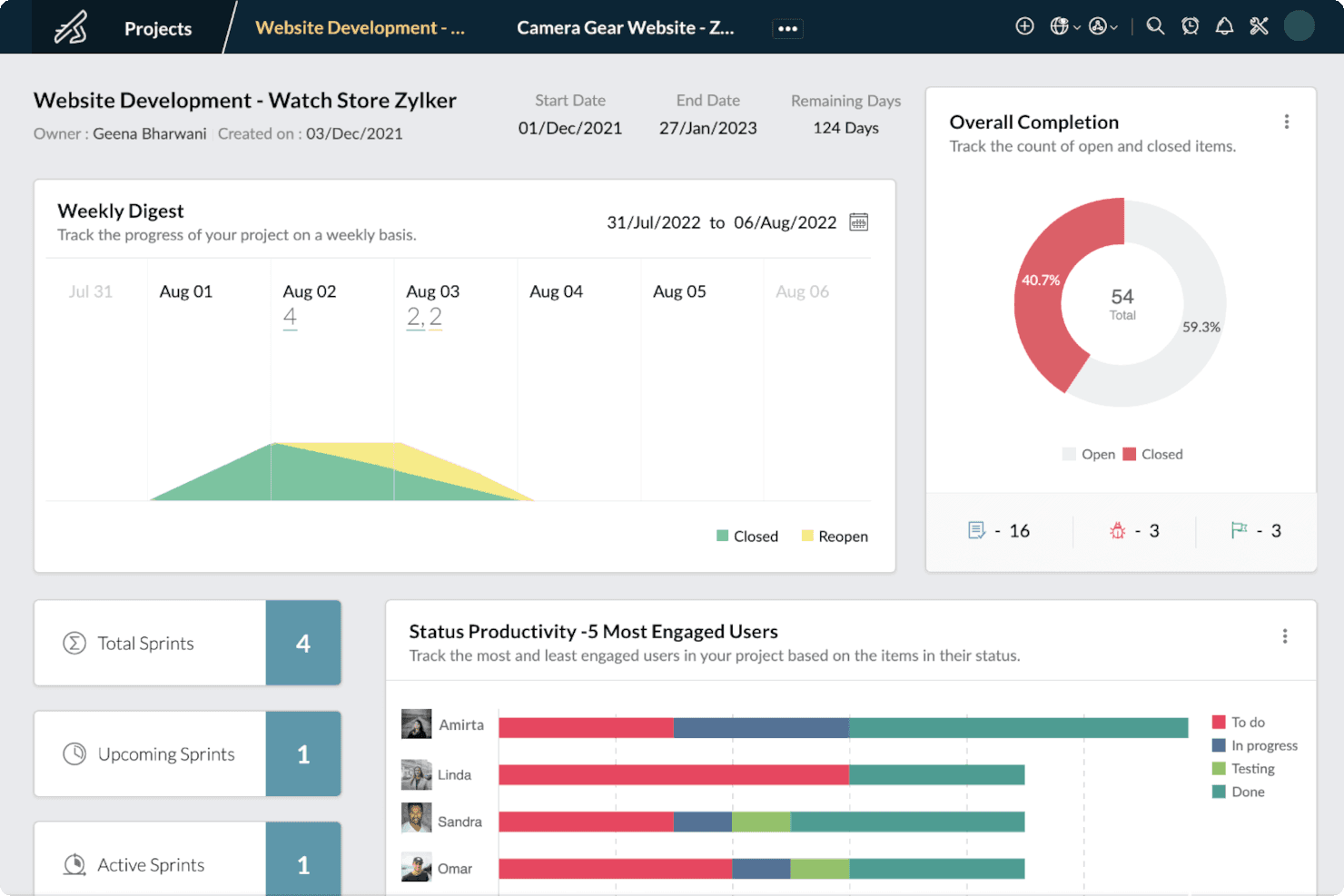
Zoho Sprints’ dashboard gives users a bird’s-eye view of their projects’ progress to gain insights useful for effectively managing projects. Zoho Sprints is an agile project management tool built around sprint planning, backlog management, and iterative delivery, with support for epics, custom workflows, Kanban and Scrum boards, and cross-functional collaboration features like portals, chat, and reporting.
Who Is Zoho Sprints Best For?
Zoho Sprints is a good fit for agile product teams that need structured backlog management and sprint planning without the overhead of a full PLM platform.
Why I Picked Zoho Sprints
I picked Zoho Sprints as one of the best because its backlog prioritization options give agile product teams a clear, structured path from raw requirements to sprint-ready work. I love how you can triage unplanned work directly from the backlog, breaking large epics into smaller stories and pulling them into sprints based on priority. Custom priorities, cluster tags, and work item links let you surface blockers and sequence work with real precision.
Zoho Sprints Key Features
- Custom workflow boards: Configure Scrum and Kanban boards with custom workflow stages to reflect how your team actually moves work from discovery to delivery.
- Work item linking: Connect related work items to surface dependencies and blockers across your backlog and active sprints.
- Client and vendor portals: Give external stakeholders, including clients and vendors, direct visibility into project progress without requiring a full user seat.
- Agile reporting suite: Access velocity charts, burndown and burnup charts, cumulative flow diagrams, and cycle time reports to track team performance across sprints.
Zoho Sprints Integrations
Zoho Sprints has documented integrations with Azure DevOps, Jira, GitHub, GitLab, SharePoint, and other Zoho apps. It supports REST APIs, webhooks, Zoho Flow, and Zapier, but no native CAD, ERP, or MES integrations are documented.
Pros and Cons
Pros:
- Custom workflows support cross-functional delivery
- Clear sprint planning from epics
- Strong backlog prioritization for agile teams
Cons:
- No BOM or ECO controls
- No structured product data management
Learn more about Zoho Sprints: Best for infinite canvases
- Free plan available
- From $9/month (billed annually)
Visit WebsiteCustomer Rating:4.5/5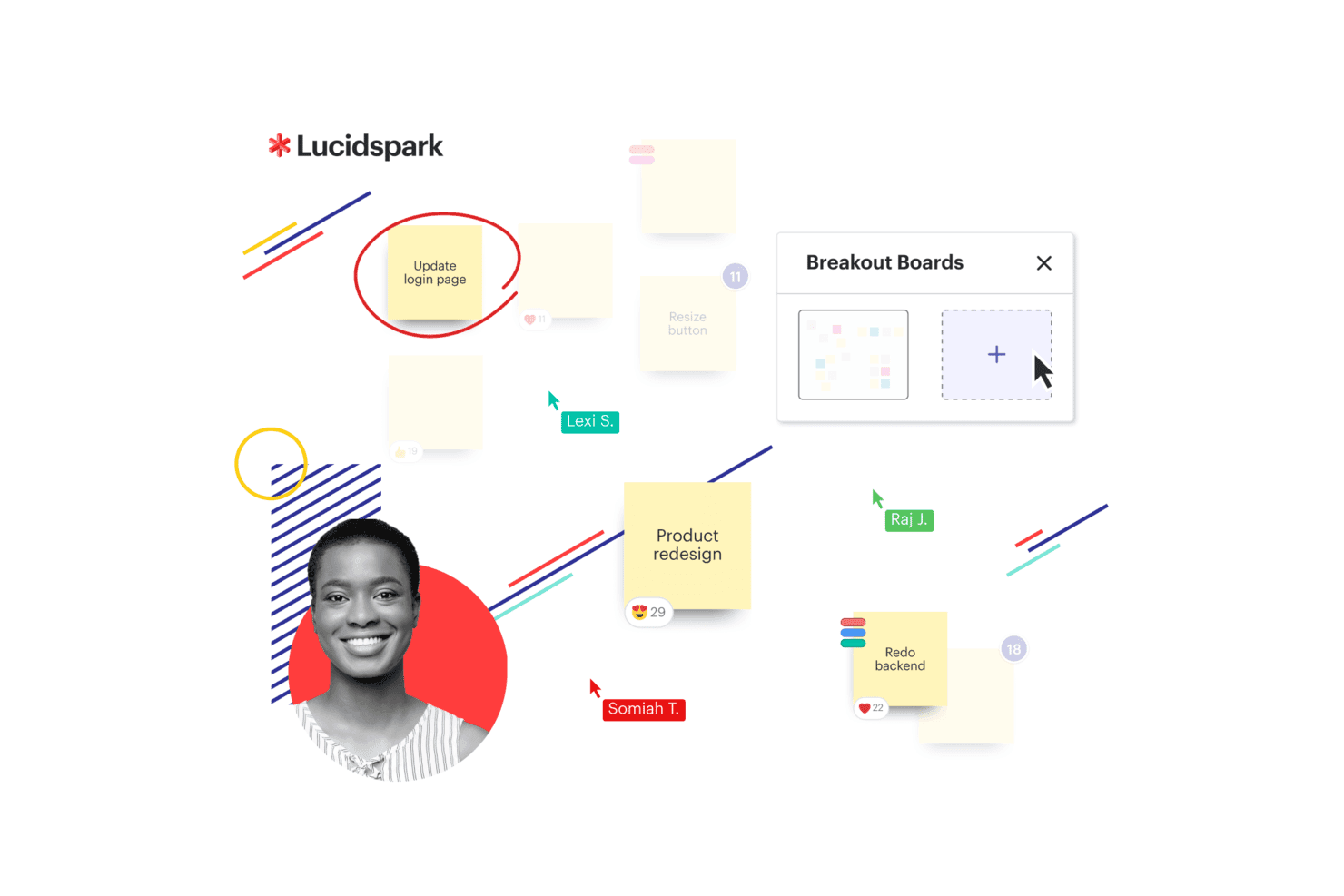
Lucidspark presents a Kanban board with workflow columns and task cards to help teams organize and track work visually. Lucidspark is a virtual whiteboard that supports agile planning workflows through an infinite canvas, sprint and retrospective templates, and real-time collaboration tools.
Who Is Lucidspark Best For?
Lucidspark is a good fit for agile teams that need a flexible visual workspace for sprint planning, retrospectives, and early-stage ideation.
Why I Picked Lucidspark
I've included Lucidspark in my top picks because its infinite canvas gives agile teams a genuinely unconstrained space for sprint planning and retrospectives. I like how Dynamic Mind Maps let you branch out ideas without hitting layout limits, and Visual Activities with voting sessions help teams reach decisions together during ceremonies. Lucid Cards then turn those ideas directly into Jira or Azure DevOps tasks, keeping planning and delivery connected.
Lucidspark Key Features
- AI-assisted brainstorming: An AI layer generates ideas, clusters themes, and summarizes session output directly on the canvas.
- Sprint and retrospective templates: Pre-built agile ceremony templates for standups, backlog refinement, and sprint planning that teams can run without setup from scratch.
- Visual Activities with voting: Structured on-canvas activities let participants submit and vote on ideas, helping teams prioritize during planning sessions.
- Guest collaborator access: External stakeholders can join a board without a paid account, keeping cross-functional reviews in one shared space.
Lucidspark Integrations
Lucidspark offers more than 100 marketplace integrations, including Jira, Azure DevOps, Okta, and GRID. It also provides an API for custom integrations, but no CAD, ERP, or MES connectors are documented.
Pros and Cons
Pros:
- Turns planning concepts into actionable tasks
- Maps early product ideas on infinite canvases
- Supports remote agile ceremonies with voting
Cons:
- No BOM, compliance, or change workflows
- No product data or revision control
Learn more about Lucidspark: Best for managing complex product lifecycles
- Free plan + 14-day free trial available
- From $10/user/month (billed annually)
Visit WebsiteCustomer Rating:4.3/5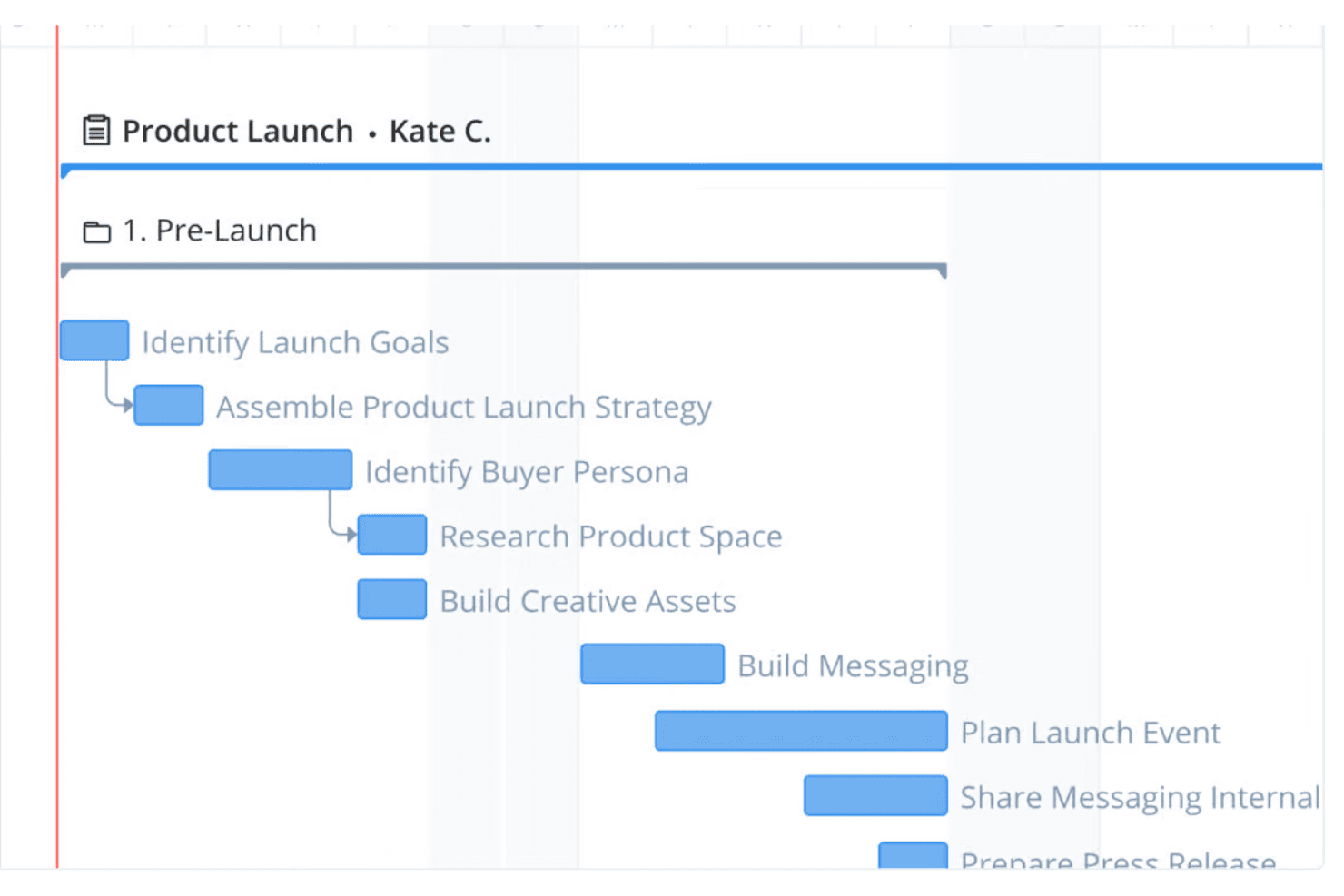
Wrike provides interactive Gantt charts for project scheduling across the entire product lifecycle, from planning to launch. Wrike is a cloud-based work management platform that brings together task tracking, workflow automation, cross-functional collaboration, and reporting across complex, multi-team programs.
Who Is Wrike Best For?
Wrike suits cross-functional product teams that need flexible program tracking and collaboration across complex NPI or product launch processes.
Why I Picked Wrike
I've included Wrike in my top picks because its configurable workflows and multi-view program tracking make it genuinely useful for managing complex product lifecycles across cross-functional teams. I like how custom request forms can model stage-gate approval processes, routing work automatically between teams without any custom code. Wrike's 15+ work views, including Gantt and Kanban, let my team track NPI progress from a single shared workspace rather than juggling separate tools.
Wrike Key Features
- No-code workflow automation: Build custom approval workflows and request forms using plain-language rules, without writing any code.
- Cross-functional dashboards: Share real-time dashboards across teams to track NPI program status, task progress, and blockers in one view.
- Role-based access control: Assign full, limited, or guest user roles to control what each stakeholder can view, edit, or approve.
- ERP and dev-tool integrations: Connect Wrike to NetSuite, Microsoft Dynamics 365, Jira, GitHub, and more via native or two-way sync connectors.
Wrike Integrations
Wrike lists 400+ integrations, including NetSuite, Microsoft Dynamics 365, Jira, GitHub, Tableau, and Power BI. CAD and MES integrations aren’t listed, so PLM buyers may need custom connectivity through Wrike Integrate.
Pros and Cons
Pros:
- External collaborators improve stakeholder visibility
- Dashboards coordinate complex lifecycle programs
- Flexible workflows model change approvals
Cons:
- No BOM or engineering change control
- No structured product data management
 4Best for visual iterative development
Miro
- Free plan + 14-day free trial available
- From $8/user/month (billed annually)
Visit WebsiteCustomer Rating:4.8/5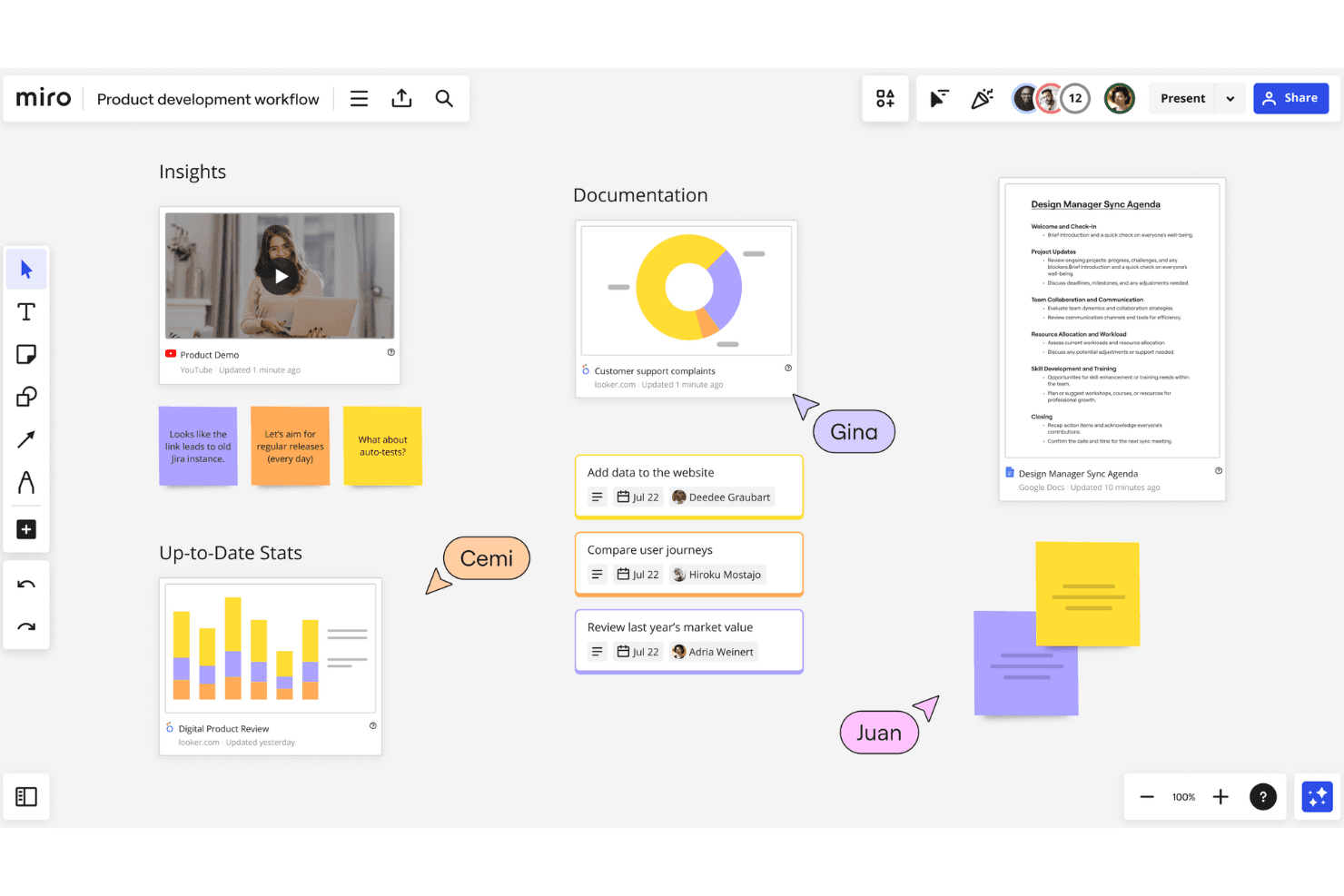
Miro offers a flexible, infinite whiteboard for multiple users to collaborate and innovate at the same time. Miro is a visual collaboration workspace that supports agile product development through tools like roadmapping, sprint planning, dependency mapping, wireframing, and iterative workflow templates.
Who Is Miro Best For?
Miro is a strong fit for agile product teams that rely on visual collaboration—think roadmapping, sprint planning, and iterative design work—rather than structured engineering or lifecycle data management.
Why I Picked Miro
Miro is one of my top picks because I love how it turns abstract product thinking into a shared visual workspace that teams can actually act on. Its sprint planning and PI planning templates give agile teams a structured canvas for iterative development, while the dependency mapping tool makes it easy to spot bottlenecks before a sprint kicks off. I also rely on Miro's roadmapping timelines to connect high-level product vision to delivery milestones across distributed teams.
Miro Key Features
- Kanban board: A visual task management board that lets teams track work items across custom columns and workflow stages in real time.
- PI planning template: A pre-built canvas for running program increment planning sessions across multiple agile teams, with built-in team boards and objectives tracking.
- Two-way Jira sync: A live integration that keeps Miro cards and Jira issues in sync, reflecting updates from either tool without manual entry.
- Talktrack: An async presentation tool that lets you record a narrated walkthrough of a board so stakeholders can review strategy on their own time.
Miro Integrations
Miro supports 250+ integrations, including two-way sync with Jira, Asana, Linear, ClickUp, and Azure DevOps, plus Slack and Microsoft Teams. Its MCP access supports custom connectivity, but no CAD, ERP, or MES integrations are documented.
Pros and Cons
Pros:
- Collaborative roadmapping aligns stakeholders
- Dependency mapping exposes delivery bottlenecks
- Visual sprint and PI planning
Cons:
- No ECR/ECO approval workflows
- No centralized product data repository
 Best for end-to-end digital thread across engineering
- 30-day free trial
- Pricing upon request
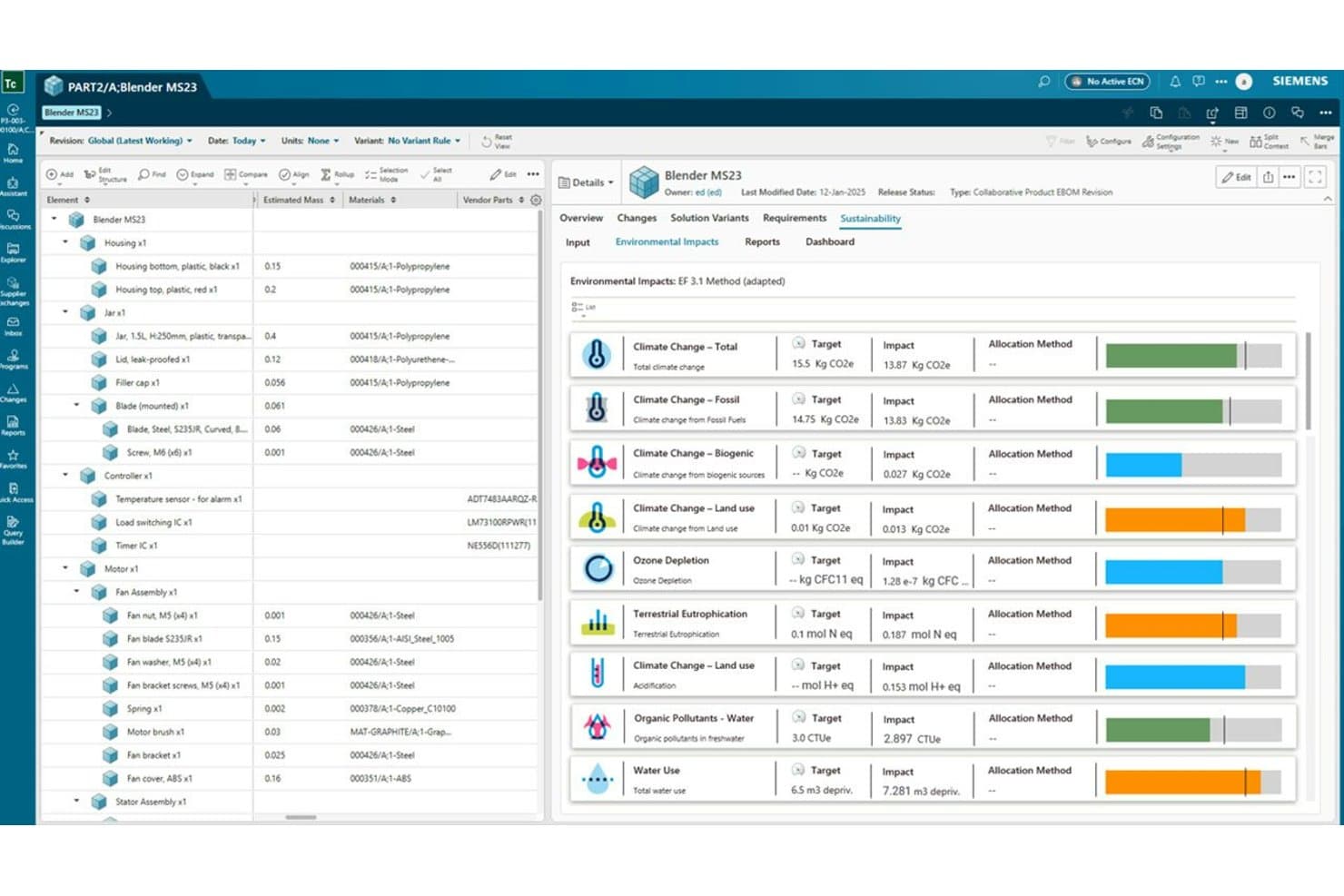
Siemens Teamcenter tracks environmental impacts across a product's full lifecycle. Siemens Teamcenter is a PLM platform that connects product data, BOM management, change workflows, requirements, and cross-functional collaboration across engineering, manufacturing, and service teams through a unified digital thread.
Who Is Siemens Teamcenter Best For?
Teamcenter is a strong fit for engineering-led organizations in aerospace, defense, and manufacturing that need to connect product data across development, manufacturing, and service from a single platform.
Why I Picked Siemens Teamcenter
Siemens Teamcenter earns its spot on my shortlist because no other PLM platform I've evaluated builds a digital thread as deliberately across engineering, manufacturing, and service. I'm particularly impressed by how Teamcenter connects MCAD and ECAD data, BOM revisions, and change workflows into a single traceable record, so when an engineer updates a design, that change flows through to manufacturing planning without manual hand-offs. The Enterprise BOM and manufacturing planning module makes the engineering-to-manufacturing handoff genuinely trackable, not just documented.
Siemens Teamcenter Key Features
- MCAD and ECAD data management: Centralizes mechanical and electrical design data with check-in/check-out, where-used lookup, and 3D viewing across your team.
- Effectivity rules on product structures: Lets you define when specific product configurations apply, controlling which version of a structure is valid at any point.
- Consumer licenses: Read-only access licenses give non-authoring stakeholders visibility into product data without requiring full seats.
- Quality and compliance management: The Premium tier includes built-in tools for tracking quality processes and compliance requirements alongside your product data.
Siemens Teamcenter Integrations
Teamcenter supports MCAD and ECAD integrations across tiers, while Premium adds ERP and other enterprise-system integration. Siemens doesn’t clearly document specific third-party vendors or a public API.
Pros and Cons
Pros:
- Supports controlled change and requirements workflows
- Tracks revisions across complex product structures
- Connects engineering, manufacturing, and service
Cons:
- Quality controls require the Premium tier
- Complex navigation slows new-user adoption
Learn more about Siemens Teamcenter: Best for PLM, QMS, and PIM in one platform
- Free demo available
- Pricing upon request
Visit WebsiteCustomer Rating:4.5/5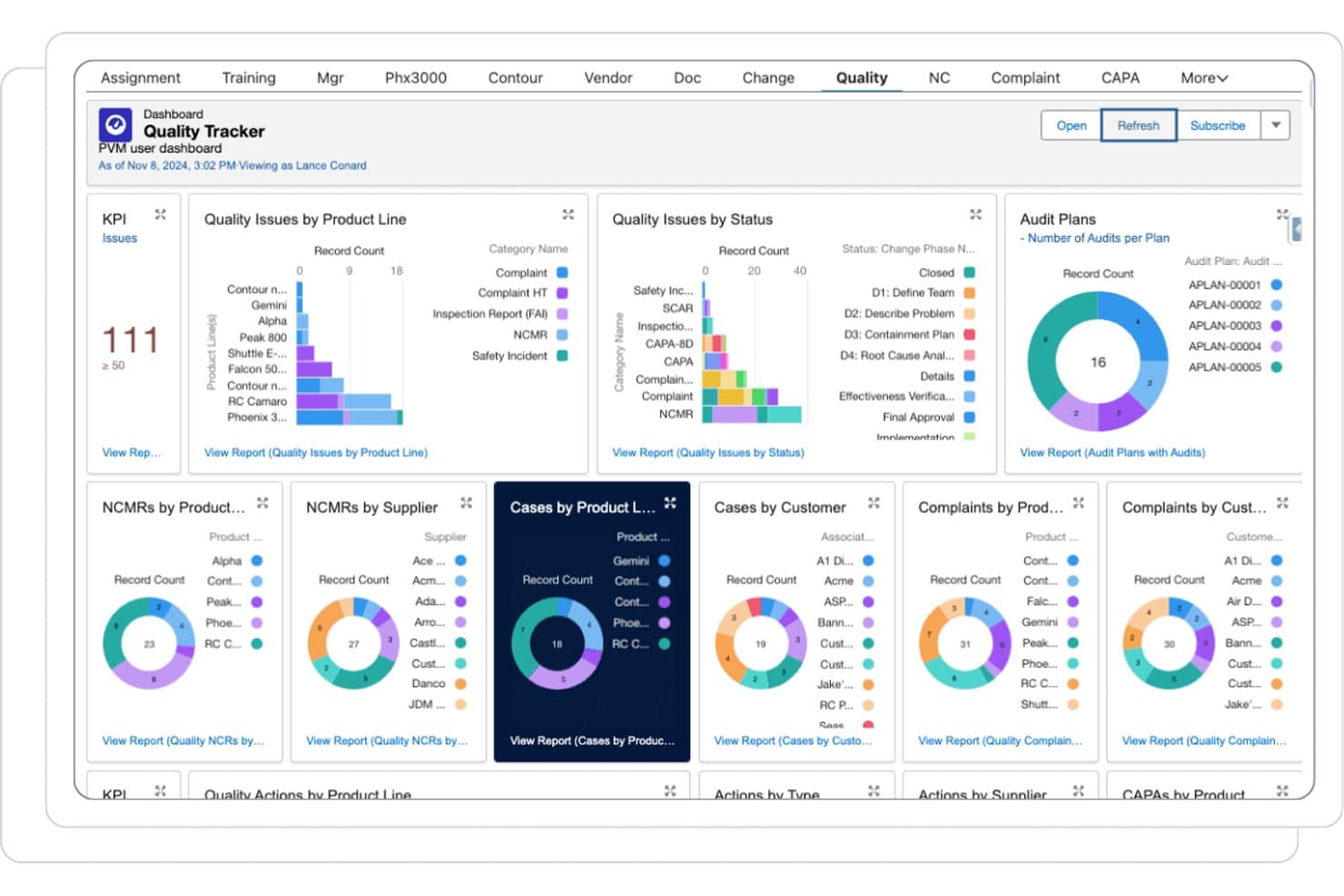
Propel centralizes quality tracking across audits, complaints, and NCMRs. Propel is a cloud-native PLM platform built on Salesforce that unifies product data management, BOM and change workflows, quality management, and product information management in a single system.
Who Is Propel Best For?
Propel is a strong fit for product, engineering, and quality teams in regulated industries—like medical devices and electronics—who need PLM, QMS, and PIM in a single cloud platform.
Why I Picked Propel
I picked Propel as one of the best because it's the only platform on this list that combines PLM, QMS, and PIM in a single Salesforce-native system. In practice, that means my team can manage engineering change orders, run CAPA workflows, and update product content without switching tools. I especially like Propel One AI, which summarizes engineering changes and flags issues mid-review, cutting change assessment time significantly.
Propel Key Features
- Multi-level BOM management: View and edit hierarchical BOMs in tree or table format, with redline comparison, cost rollup, and AML/AVL tracking.
- Supplier Community portal: A branded, secure portal where suppliers and contract manufacturers can exchange data, complete onboarding, and participate in audits with full audit trails.
- Visual Collaboration markup: View and annotate 2D/3D CAD files, PDFs, and images directly within the platform without leaving the change record.
- Component Insights: Syncs with SiliconExpert to surface real-time part data, availability, and risk signals at the component level.
Propel Integrations
Propel integrates with SolidWorks, Creo, Altium Designer, Windchill, Autodesk Vault, Teamcenter, and ERP systems through Manufacturing Hub. It also provides APIs, an iPaaS ecosystem, and custom connectors.
Pros and Cons
Pros:
- Supplier portal preserves collaboration audit trails
- AI summarizes changes and flags review issues
- Unifies PLM, QMS, and PIM workflows
Cons:
- Reviewers report occasional performance instability
- Multi-tenant cloud limits deployment flexibility
Learn more about Propel: Best for CAD-connected lifecycle control
- 30-day free trial
- From $545/year
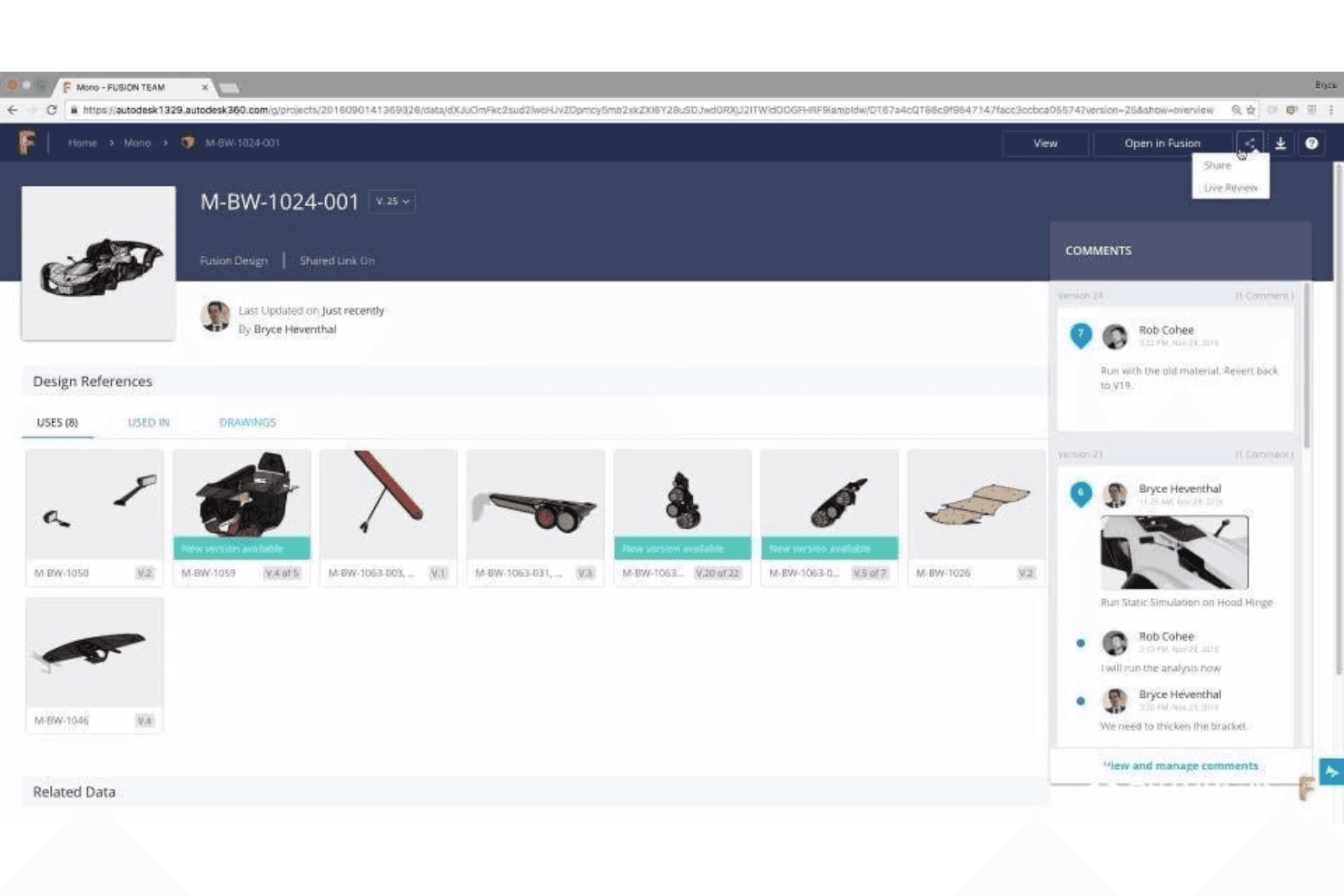
Save all product design references for all team members and stakeholders. Autodesk Fusion Manage is a cloud PLM platform that connects CAD data, BOM management, change workflows, quality processes, and supplier collaboration in one system built for engineering-driven product teams.
Who Is Autodesk Fusion Manage Best For?
Autodesk Fusion Manage is a strong fit for engineering-led manufacturers who already work in the Autodesk ecosystem and need CAD data, BOM management, and change workflows in one connected cloud system.
Why I Picked Autodesk Fusion Manage
Autodesk Fusion Manage earns its spot on my shortlist because the Vault Connector gives engineering teams something most PLM tools can't match: a live sync between CAD files in Vault Professional and the broader PLM workspace, so BOM states, revision history, and lifecycle status stay aligned without manual handoffs. I also like the no-code visual workflow editor for ECR/ECO processes, which lets teams configure multi-stage change approvals and escalation alerts without waiting on IT.
Autodesk Fusion Manage Key Features
- NPI project templates: Pre-configured new product introduction templates with standard phase-gate milestones and automated workflows to guide cross-functional teams from concept to launch.
- Supplier collaboration portal: Suppliers can access active workflows, mark up documents in real time, and respond to RFQs directly within the platform.
- Quality management module: Automates NCR, RMA, CAPA, and FMEA processes to connect non-conformance events to corrective actions in one traceable workflow.
- Real-time dashboards and KPIs: Live status views show task ownership, milestone progress, and key metrics across teams, with one-click export for reporting.
Autodesk Fusion Lifecycle Integrations
Autodesk Fusion Lifecycle offers native integrations with Autodesk Inventor, AutoCAD, Revit, SAP, Oracle, and Microsoft Dynamics through Vault PLM. Its open API supports custom connections to ERP, CRM, and other business systems.
Pros and Cons
Pros:
- NPI templates guide phase-gate product launches
- No-code workflows support controlled ECO approvals
- Vault Connector keeps CAD revisions aligned
Cons:
- Configuration can overwhelm first-time administrators
- Full PDM requires a separate Vault product
Learn more about Autodesk Fusion Lifecycle: Best for global product launch coordination
- Free demo available
- Pricing upon request
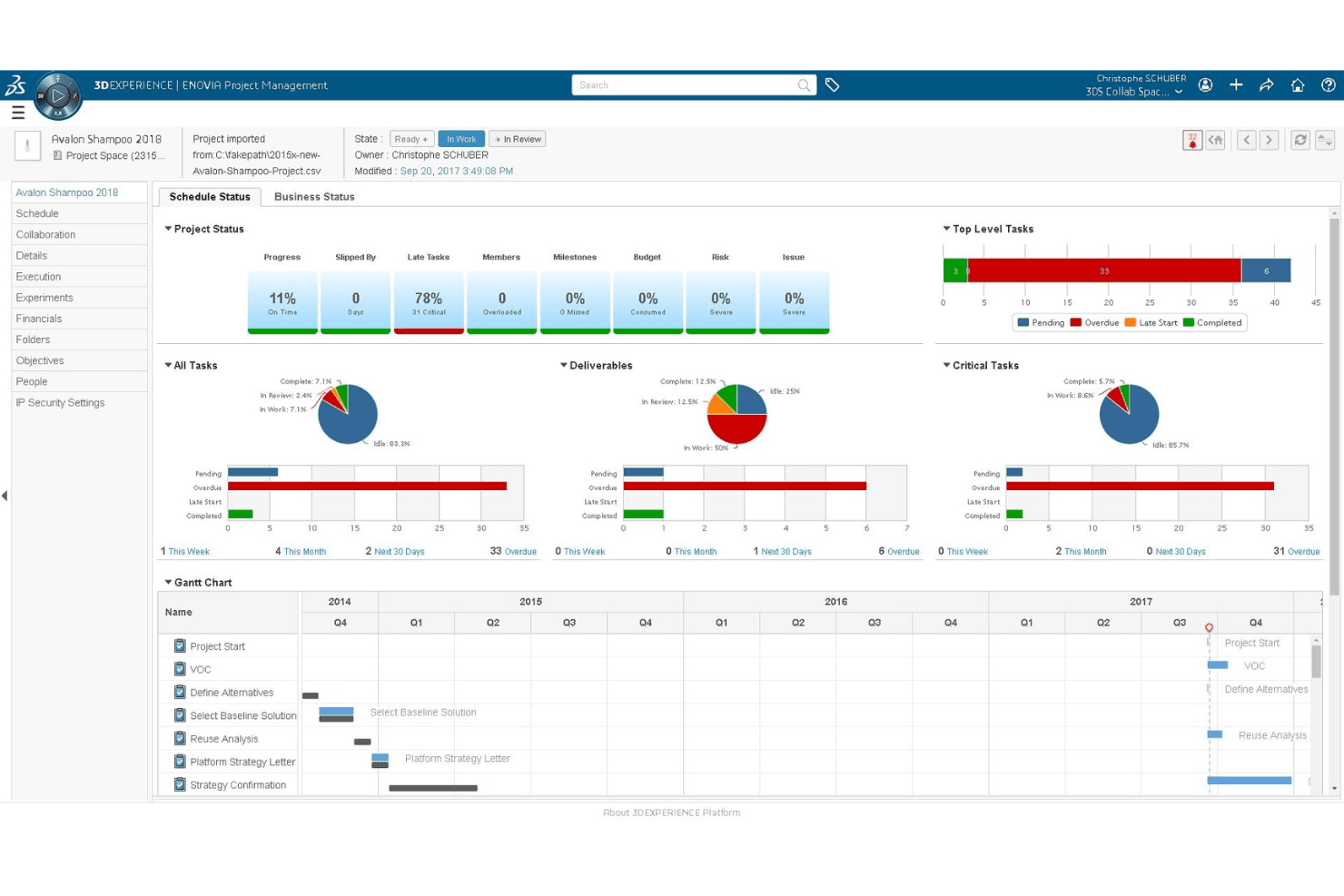
Companies can monitor their product’s development status. Dassault ENOVIA is an enterprise PLM platform built on the 3DEXPERIENCE cloud that covers product data management, BOM management, change workflows, quality and compliance, and cross-functional collaboration across engineering, design, and supply chain teams.
Who Is Dassault ENOVIA Best For?
ENOVIA is a strong fit for engineering-led organizations managing complex, multi-discipline products across global teams and supplier networks.
Why I Picked Dassault ENOVIA
I've included ENOVIA in my top picks because it handles global product launch coordination better than almost anything else I've seen, especially when engineering, quality, and supply chain teams are all in motion at once. Its Change Intelligence feature gives a 360° view of change impact across linked eBOM and mBOM structures, so a design update in one region doesn't quietly break a manufacturing plan in another. I also like the Artwork app, which directly targets label compliance errors that cause costly product recalls during launch.
Dassault ENOVIA Key Features
- Change Intelligence diagnostics: Analyzes trends and provides a 360° view of change impact across linked eBOM and mBOM structures to catch downstream issues early.
- Business process management workflows: Low-code tools let you configure and automate approval and decision workflows without heavy development work.
- Multi-CAD 3D product structure browsing: A dedicated role lets users navigate and view product structures built across multiple CAD tools in a shared 3D environment.
- AI virtual companions: Built-in AI assistants AURA, LEO, and MARIE surface relevant data and guide users through tasks directly within their workflows.
Dassault ENOVIA Integrations
Dassault ENOVIA offers native integrations with CATIA V5, SOLIDWORKS, Altium, DELMIA, and SIMULIA. APIs and developer tools support custom integrations, while documented native ERP and MES connectors are not available.
Pros and Cons
Pros:
- Maintains traceability across complex product structures
- Supports supplier collaboration beyond email
- Connects eBOM and mBOM change impacts
Cons:
- File operations can slow during heavy use
- Steep learning curve for new users
Learn more about Dassault ENOVIA: Best for multi-discipline product data management
- Free demo available
- Pricing upon request
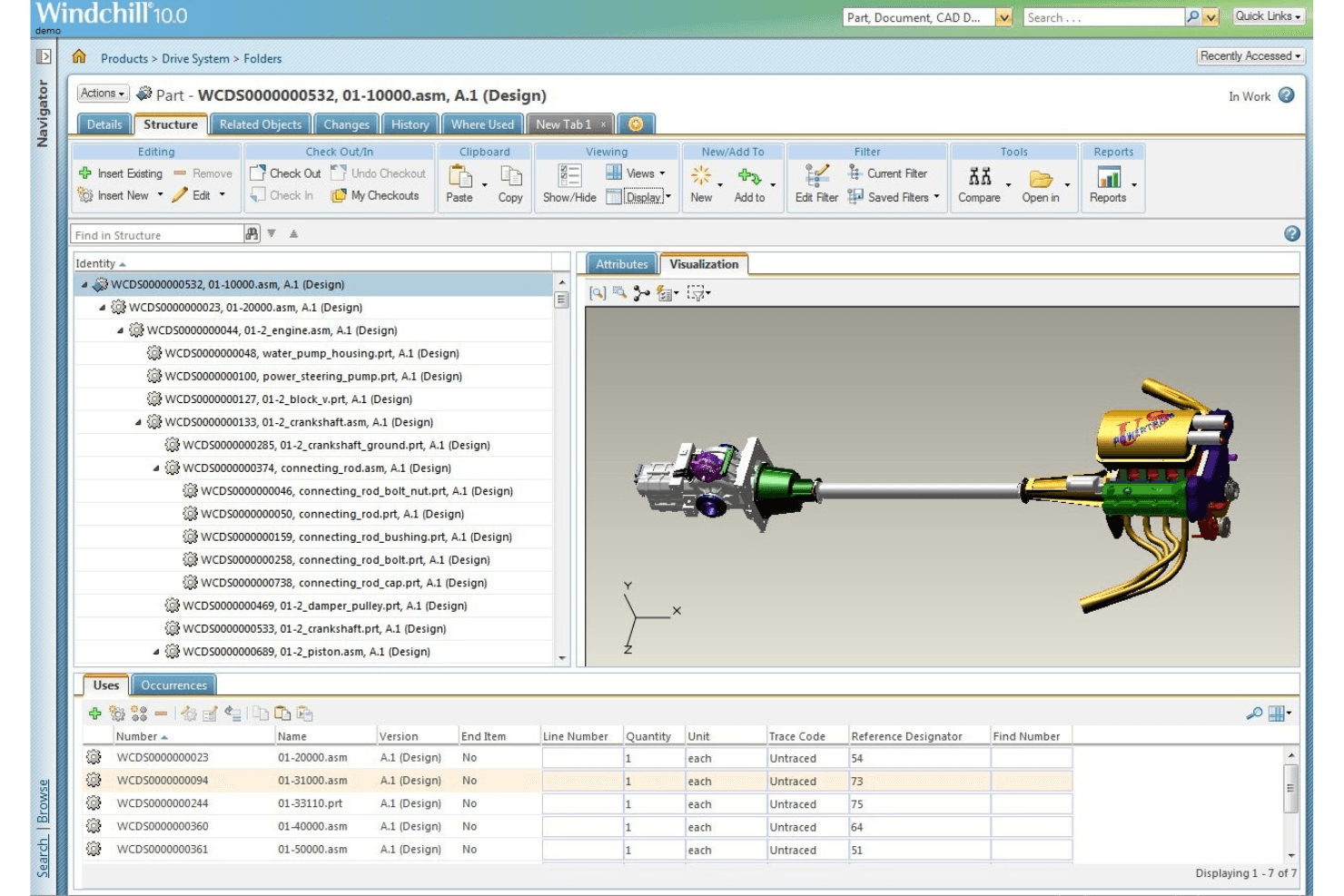
Store all product versions securely on the platform. PTC Windchill is a PLM platform that centralizes product data management across mechanical, electrical, and software disciplines, with tools for BOM management, engineering change workflows, cross-functional collaboration, and compliance tracking.
Who Is PTC Windchill Best For?
Windchill is a strong fit for mid-to-large manufacturers in regulated industries like aerospace, automotive, and MedTech that need to manage product data across mechanical, electrical, and software disciplines in one system.
Why I Picked PTC Windchill
I picked PTC Windchill as one of the best because it's one of the few PLM platforms that genuinely handles mechanical, electrical, and software data in a single system of record. I'm particularly impressed by AI Part Intelligence, which identifies duplicate or similar parts across disciplines before they create BOM conflicts. The AI-assisted eBOM-to-mBOM alignment also stands out, automatically converting engineering structures into manufacturing BOMs with reusable work instructions.
PTC Windchill Key Features
- AI assistants: Plain-language AI tools that answer product questions, summarize documents, and explain engineering changes across the product record.
- Windchill Navigate: Role-based apps that give occasional users secure, simplified access to product data without requiring full PLM expertise.
- Risk & reliability module: Built-in FMEA, fault tree analysis, and corrective action tools for managing product risk within the PLM environment.
- Windchill+ SaaS deployment: A cloud-hosted, continuously updated version of Windchill with FedRAMP authorization for organizations with security requirements.
PTC Windchill Integrations
PTC Windchill offers native integrations with Creo, Onshape, SAP, ThingWorx, Codebeamer, and ServiceMax. It also connects with Jetstream for secure collaboration with external partners.
Pros and Cons
Pros:
- Supports regulated quality and change workflows
- AI identifies duplicate parts before BOM conflicts
- Unifies mechanical, electrical, and software data
Cons:
- Dense screens complicate document management
- Implementation demands significant time and resources
Learn more about PTC Windchill:
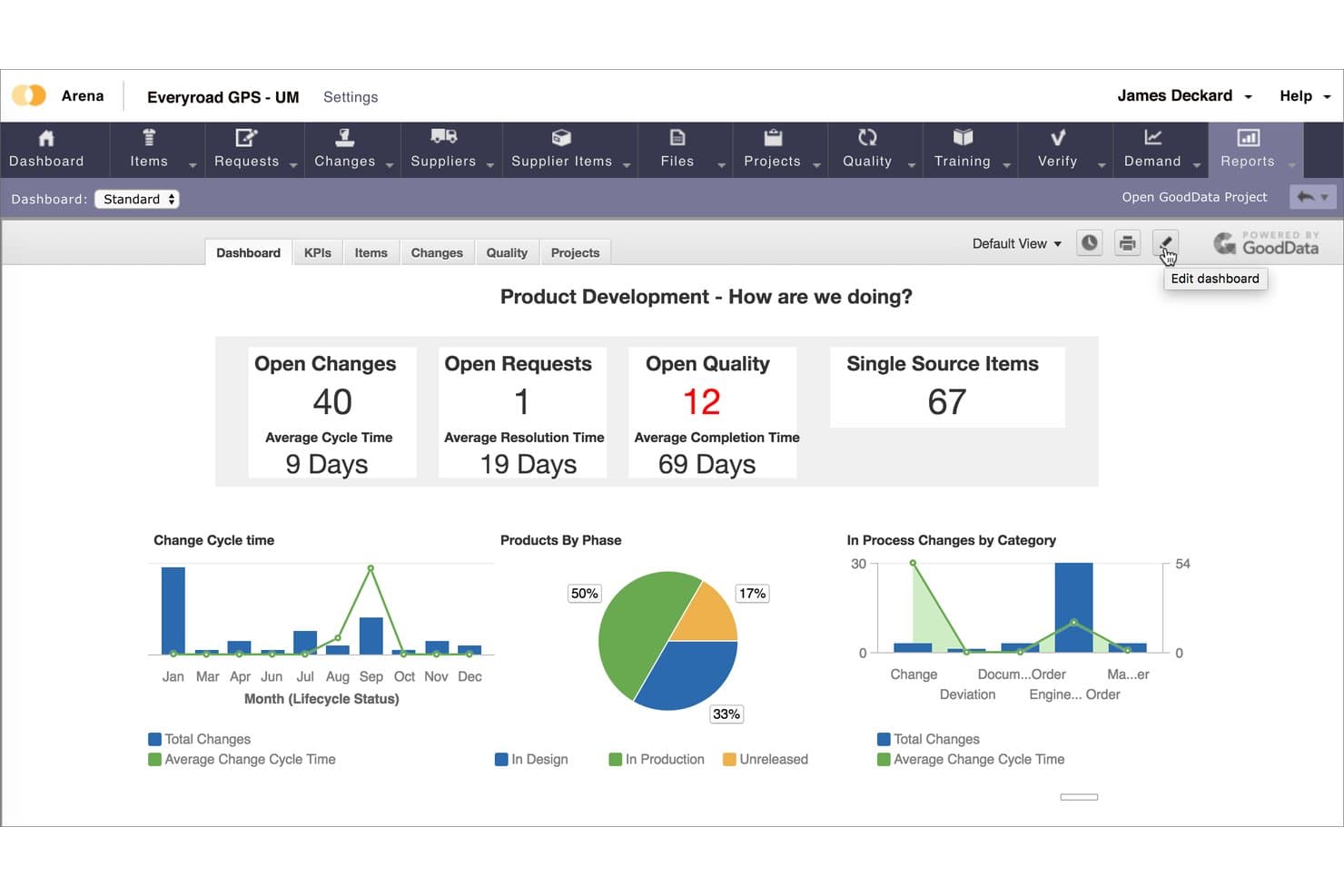
Arena PLM is a cloud-native product lifecycle management platform that unifies product data management, BOM and change control, quality management, and supplier collaboration in a single system built for hardware and regulated-industry teams.
Who Is Arena PLM Best For?
Arena PLM is a strong fit for hardware and regulated-industry teams—particularly in medical devices, aerospace, and high-tech electronics—that are ready to move off Oracle Agile PLM and want a cloud-native system that unifies PLM and QMS in one place.
Why I Picked Arena PLM
Arena PLM earns its spot on my shortlist because it's the most direct Oracle Agile PLM replacement I've found, with over 100 companies already migrated and a defined transition method to get there. I'm particularly drawn to how it unifies PLM and QMS in one cloud-native system, linking CAPAs, NCMRs, and DHF/DMR records directly to the BOM rather than managing them in separate tools. Arena Validate adds another layer I value for regulated teams, covering 21 CFR Part 820 with pre-built IQ/OQ documentation and 1,600+ test cases per release.
Arena PLM Key Features
- Supply Chain Intelligence: Scans approved manufacturer and vendor lists weekly to flag component risk and sourcing gaps using Accuris data.
- Arena Connect: An embedded integration platform with 200+ pre-built connectors, a visual workflow builder, and webhook-based triggers for syncing Arena with ERP, CAD, and other tools.
- Role-based supplier licensing: Gives external suppliers controlled access to BOMs, AMLs, 3D CAD files, change orders, and quality records within the platform.
- Arena Projects: Phase-gate project workflows with configurable milestones and tasks linked directly to ECOs, requirements, and quality actions.
Arena PLM Integrations
Arena PLM has a native Onshape connection and Arena Connect with 200+ pre-built connectors, including Jira, Microsoft Teams, and Slack. Marketplace integrations include SOLIDWORKS, Altium, SAP, Oracle EBS, and Microsoft Dynamics 365, with APIs and webhooks for custom integrations.
Pros and Cons
Pros:
- Suppliers participate in controlled change reviews
- Quality records link directly to product BOMs
- Oracle Agile migration method reduces replacement risk
Cons:
- Search can be slow and unreliable
- Approval workflows require too many clicks
Learn more about Arena PLM:
Annen agil PLM-programvare
\u003cspan style=\u0022font-weight: 400\u0022\u003eHer er noen flere alternativer innen agil PLM-programvare som ikke kom med på kortlisten min, men som likevel er verdt å undersøke:\u003c/span\u003e
- 11SAP PLMBest for SAP-native product lifecycle and ERP sync
- 12ArasBest for low-code PLM customization and digital thread
- 13DuroBest for CAD-native cloud BOM and ECO workflows
- 14OpenBOMBest for CAD-connected BOM and change tracking
- 15Oracle Fusion Cloud Product Lifecycle ManagementBest for existing Oracle ERP and SCM users
- 16Infor PLMBest for ERP-native BOM and lifecycle control
- 17BildBest for CAD-native ECO workflows and revision control
How I Evaluate Agile PLM Software
I split my evaluation into three parts, with core functionality carrying the most weight: the tool must centralize and version-control product data and support structured ECR/ECO approval workflows. From there, I look for standout features like AI-driven change impact analysis. Finally, I consider implementation support and pricing transparency.
Core Functionality (Table Stakes For This List)
When I'm selecting tools for my list, I score each one on a scale from 0 (does not offer the functionality) to 5 (excels in this area) for each core functionality listed below. I then convert the total into a percentage to help assess each tool's overall fit, with extra weight on any functionalities I've deemed essential.
- Product Data Management (Essential): I check whether the platform centralizes specs, CAD files, and revision history so teams aren't chasing down the latest version across shared drives.
- Change & Workflow Management (Essential): I evaluate how each tool routes ECRs and ECOs through approval steps, looking for configurable stages and role-based sign-offs.
- Bill of Materials Management: I look for multi-level BOM support that handles variants and distinguishes between engineering and manufacturing structures as a product matures.
- Cross-Functional Collaboration: Shared workspaces where engineering, quality, and manufacturing can comment, assign tasks, and hand off work on the same product record matter here.
- Compliance & Traceability: I look at how easy it is to pull an auditable trail of every change, approval, and revision to satisfy internal reviews or regulatory requirements.
- System Integration: I evaluate connections to CAD tools, ERP platforms, and MES systems, checking whether data syncs bidirectionally or requires manual re-entry.
Once I have a list of tools that meet the criteria, I consider what sets each platform apart.
Differentiating Factors (What Sets Vendors Apart)
Here's how I compare and contrast different vendors:
Standout Features
AI-driven change impact analysis is the first thing I look for. When an engineer proposes swapping a component, I want the system to predict ripple effects across BOMs, supplier lead times, and cost before anyone hits "approve." I also evaluate supplier collaboration portals, since letting contract manufacturers view specs and respond to change requests inside the system cuts weeks off NPI cycles. Digital thread visualization ties these together by mapping a traceable link from requirements through CAD to quality records, which matters when audits demand full traceability.
Beyond Features
I evaluate each vendor's industry-specific depth first. A medical device team needs validated FDA 21 CFR Part 11 templates out of the box, while an automotive supplier needs IATF 16949 frameworks ready to configure. Deployment model matters just as much—cloud options reduce IT overhead, but on-premise or hybrid setups may be necessary for data sovereignty or legacy CAD integration. I also check licensing structures, since named-user versus concurrent models can dramatically shift total cost as cross-functional teams scale. Finally, I look at migration tooling and onboarding support, because most PLM rollouts involve moving years of product data out of legacy PDM systems or spreadsheets.
Slik velger du agil PLM-programvare
Det er lett å gå seg vill i lange funksjonslister og kompliserte prisstrukturer. For å hjelpe deg med å holde fokus mens du arbeider deg gjennom din unike prosess for valg av programvare, får du her en sjekkliste over faktorer du bør ha i bakhodet:
| Faktor | Hva du bør vurdere |
|---|---|
| FaktorSkalerbarhet | Hva du bør vurdereKan programvaren vokse sammen med virksomheten din? Se etter verktøy som kan håndtere flere brukere og større datamengder uten problemer. |
| FaktorIntegrasjoner | Hva du bør vurdereFungerer den godt sammen med andre verktøy du bruker? Kontroller kompatibiliteten med eksisterende systemer og API-er. |
| FaktorTilpasningsmuligheter | Hva du bør vurdereKan du tilpasse den til prosessene dine? Sørg for at du kan justere arbeidsflyter og innstillinger slik at de passer behovene dine. |
| FaktorBrukervennlighet | Hva du bør vurdereVil teamet ditt ta den i bruk uten problemer? Se etter intuitive grensesnitt som krever minimal opplæring. |
| FaktorImplementering og opplæring | Hva du bør vurdereHvor raskt kan du komme i gang? Vurder tiden og ressursene som kreves for å gå live og se resultater. |
| FaktorKostnad | Hva du bør vurdereEr den innenfor budsjettet ditt? Sammenlign prismodeller og se opp for skjulte gebyrer i langsiktige kontrakter. |
| FaktorSikkerhetstiltak | Hva du bør vurdereEr dataene dine beskyttet? Sørg for at programvaren overholder sikkerhetsstandarder og tilbyr kryptering. |
| FaktorTilgjengelig kundestøtte | Hva du bør vurdereFår du hjelp når du trenger det? Kontroller tilgjengeligheten til støttekanaler som chat, e-post og telefon. |
Hva er agil PLM-programvare?
Agile PLM-programvare er et verktøy som brukes til å administrere hele livssyklusen til et produkt, fra idé til avvikling. Fagpersoner som produktledere, ingeniører og designere bruker disse verktøyene til å forbedre samarbeid og effektivitet i produktutviklingen. Funksjoner som prosjekt tidslinjer, teamsamarbeid og samsvarsadministrasjon bidrar til å organisere oppgaver og sikre at produktene oppfyller standardene. Alt i alt gjør disse verktøyene det enklere og mer oversiktlig å administrere komplekse produktdata og arbeidsflyter.
Funksjoner
Når du velger Agile PLM-programvare, bør du se etter følgende viktige funksjoner:
- Prosjekttidslinjer: Følg med på og administrer tidsfrister for å sikre levering av produkter til rett tid, og juster tidsplanene etter behov.
- Teamsamarbeid: Legg til rette for kommunikasjon og koordinering mellom teammedlemmer for å øke produktiviteten og kreativiteten.
- Versjonshistorikk: Oppretthold en oversikt over endringer og oppdateringer for å sikre nøyaktighet og sporbarhet for produktdata.
- Samsvarsadministrasjon: Sikre at produktene oppfyller bransjestandarder og forskrifter, slik at risikoen for manglende samsvar reduseres.
- Dataintegrasjon: Koble til andre systemer og verktøy for å effektivisere dataflyten og forbedre tilgjengeligheten til informasjon.
- Tilpassbare arbeidsflyter: Tilpass prosessene etter virksomhetens spesifikke behov og forbedre driftseffektiviteten.
- Sanntidsanalyse: Få tilgang til oppdaterte datainnsikter for å ta informerte beslutninger og identifisere områder som kan forbedres.
- Brukervennlig grensesnitt: Forenkle navigering og bruk for å oppmuntre til bruk og redusere opplæringstiden.
- Sikkerhetstiltak: Beskytt sensitive data med kryptering og samsvar med sikkerhetsstandarder.
- Skalerbarhet: Håndter vekst i antall brukere og datamengde uten at det går ut over ytelse eller funksjonalitet.
Fordeler
Implementering av Agile PLM-programvare gir flere fordeler for teamet og virksomheten din. Her er noen av fordelene du kan se frem til:
- Forbedret samarbeid: Styrk teamarbeidet ved å tilby verktøy som legger til rette for kommunikasjon og koordinering mellom teammedlemmer.
- Økt effektivitet: Få fart på produktutviklingen med funksjoner som prosjekttidslinjer og tilpassbare arbeidsflyter.
- Bedre samsvar: Reduser risikoen for manglende samsvar med innebygd samsvarsadministrasjon og sporing av forskrifter.
- Bedre beslutningstaking: Ta informerte valg med sanntidsanalyse og dataintegrasjonsfunksjoner som gir verdifull innsikt.
- Datasikkerhet: Beskytt sensitiv informasjon med sikkerhetstiltak som sikrer personvern for data og samsvar med standarder.
- Skalerbarhet: Støtt virksomhetens vekst uten ytelsesproblemer takket være skalerbar programvare som tilpasser seg et økt antall brukere og større datamengder.
Kostnader og priser
Valg av Agile PLM-programvare krever en forståelse av de ulike prismodellene og abonnementene som er tilgjengelige. Kostnadene varierer basert på funksjoner, teamstørrelse, tillegg og mer. Tabellen nedenfor oppsummerer vanlige abonnementer, gjennomsnittsprisene deres og typiske funksjoner som er inkludert i Agile PLM-programvareløsninger:
Sammenligningstabell for Agile PLM-programvare
| Abonnementstype | Gjennomsnittspris | Vanlige funksjoner |
|---|---|---|
| AbonnementstypeGratisabonnement | Gjennomsnittspris$0 | Vanlige funksjonerGrunnleggende prosjektstyring, begrenset brukerstøtte og grunnleggende datalagring. |
| AbonnementstypePersonlig abonnement | Gjennomsnittspris$5-$25/bruker/måned | Vanlige funksjonerForbedrede samarbeidsverktøy, tilpassbare arbeidsflyter og standardrapportering. |
| AbonnementstypeForretningsabonnement | Gjennomsnittspris$30-$60/bruker/måned | Vanlige funksjonerAvansert analyse, integrasjon med andre verktøy og samsvarsadministrasjon. |
| AbonnementstypeVirksomhetsabonnement | Gjennomsnittspris$70-$150/bruker/måned | Vanlige funksjonerFull tilpasning, dedikert brukerstøtte og sikkerhetstiltak på virksomhetsnivå. |
Vanlige spørsmål om agil PLM-programvare
Her er noen svar på vanlige spørsmål om agil PLM-programvare:
Hva gir PLM-programvare bedrifter?
PLM-programvare gir bedriften din smidighet, slik at du kan håndtere kompleksitet, skalere når du er klar og møte kundenes etterspørsel, samtidig som du tilpasser deg uventede endringer. Denne programvaren gir sporbarhet for produktene, noe som kan øke hastigheten på produktutviklingen, ettersom interessenter som arbeider i ulike land, på forskjellige kontorer, i ulike tidssoner og på ulike språk, kan samarbeide effektivt. Du kan også bruke agil PLM-programvare til å fremme innovasjon, fordi den kan gi forbrukerdata i sanntid under utviklingen av nye produkter.
Trenger jeg teknisk ekspertise for å implementere agil PLM-programvare?
Nei, du trenger ikke omfattende teknisk ekspertise for å implementere agil PLM-programvare. De fleste løsningene er utformet med brukervennlige grensesnitt og tilbyr støtte under innføringsprosessen. Det er imidlertid en fordel å ha noen med IT-kompetanse til å håndtere integrasjoner og løse eventuelle tekniske problemer som oppstår.
Hvilken annen produktprogramvare bør jeg bruke?
Som du kan se av denne artikkelen, er PLM-programvare et effektivt verktøy for å overvåke produktutviklingen gjennom hele produktets livssyklus. Produktstyring kan imidlertid innebære mer enn å utvikle produktet. For å sikre at du ikke går glipp av en viktig del av rollen din, kan du lese disse artiklene for å finne en liste over produktprogramvareverktøy som kan hjelpe deg med å utmerke deg.