

10 migliori soluzioni di automazione UI recensite nel 2026

Shortlist dei Migliori Strumenti di Automazione UI


I migliori strumenti di automazione UI semplificano i test software riducendo gli errori manuali, accelerando i cicli di rilascio e dando ai team maggiore fiducia nella qualità del prodotto. Senza di essi, i product manager devono affrontare ritardi dovuti a casi di test ripetitivi, risultati incoerenti tra browser o dispositivi diversi e spreco di ore di ingegneria per correggere problemi che avrebbero potuto essere rilevati prima.
La piattaforma giusta automatizza questi passaggi, si integra nel tuo flusso di lavoro e libera il tuo team per concentrarsi sulla consegna delle funzionalità. Dopo aver testato numerosi strumenti in team di prodotto dinamici, ho identificato le opzioni più affidabili per aiutarti a migliorare precisione, velocità e collaborazione.
Perché Fidarsi delle Nostre Recensioni Software
Testiamo e recensiamo software per il product management dal 2020. Come product manager sappiamo quanto sia fondamentale e difficile fare la scelta giusta in termini di software. Investiamo in una ricerca approfondita per aiutare il nostro pubblico a prendere decisioni migliori sugli acquisti di software. Abbiamo testato oltre 2.000 strumenti per diversi casi d’uso e scritto più di 1.000 recensioni approfondite.Scopri come assicuriamo la trasparenza & la nostra metodologia di recensione software.
Riepilogo dei Migliori Strumenti di Automazione UI
Questa tabella comparativa riassume i dettagli dei prezzi delle mie migliori scelte di strumenti per l’automazione UI, aiutandoti a trovare la soluzione migliore per il tuo budget e le tue esigenze di business.rn
| Tool | Best For | Trial Info | Price | ||
|---|---|---|---|---|---|
| 1 | Ideale per test su richiesta | Not available | Prezzo su richiesta | Website | |
| 2 | Ideale per una creazione rapida dei test | Prova gratuita disponibile + demo gratuita | Prezzo su richiesta | Website | |
| 3 | Ideale per la gestione dei test su larga scala nelle aziende | Demo gratuita disponibile | Prezzi disponibili su richiesta | Website | |
| 4 | Ideale per il testing continuo su larga scala in ambito enterprise | Prova gratuita di 14 giorni + demo gratuita | Prezzi su richiesta | Website | |
| 5 | Ideale per applicazioni Java e GUI desktop | Demo gratuita disponibile | Da $4.800/anno (fatturazione annuale) | Website | |
| 6 | Ideale per l'automazione cross-browser pensata per gli sviluppatori | Piano gratuito disponibile | Gratuito | Website | |
| 7 | Ideale per il testing senza codice | Prova gratuita di 14 giorni | Da $3,419/utente/anno | Website | |
| 8 | Ideale per l'automazione su Windows | Piano gratuito disponibile | Open-source e gratuito | Website | |
| 9 | Ideale per la validazione visiva basata sull’IA | Prova gratuita disponibile | Prezzo su richiesta | Website | |
| 10 | Ideale per test di regressione visiva semplici | Prova gratuita di 14 giorni + demo gratuita disponibile | Da $109/mese (fatturazione annuale) | Website |
Recensioni dei Migliori Strumenti di Automazione UI
Qui sotto trovi i miei riepiloghi dettagliati dei migliori strumenti di automazione UI selezionati. Le mie recensioni offrono uno sguardo dettagliato alle funzionalità chiave, ai pro e contro, alle integrazioni e agli utilizzi ideali di ciascuno strumento per aiutarti a trovare quello più adatto a te.rn

Testlio
Ideale per test su richiesta
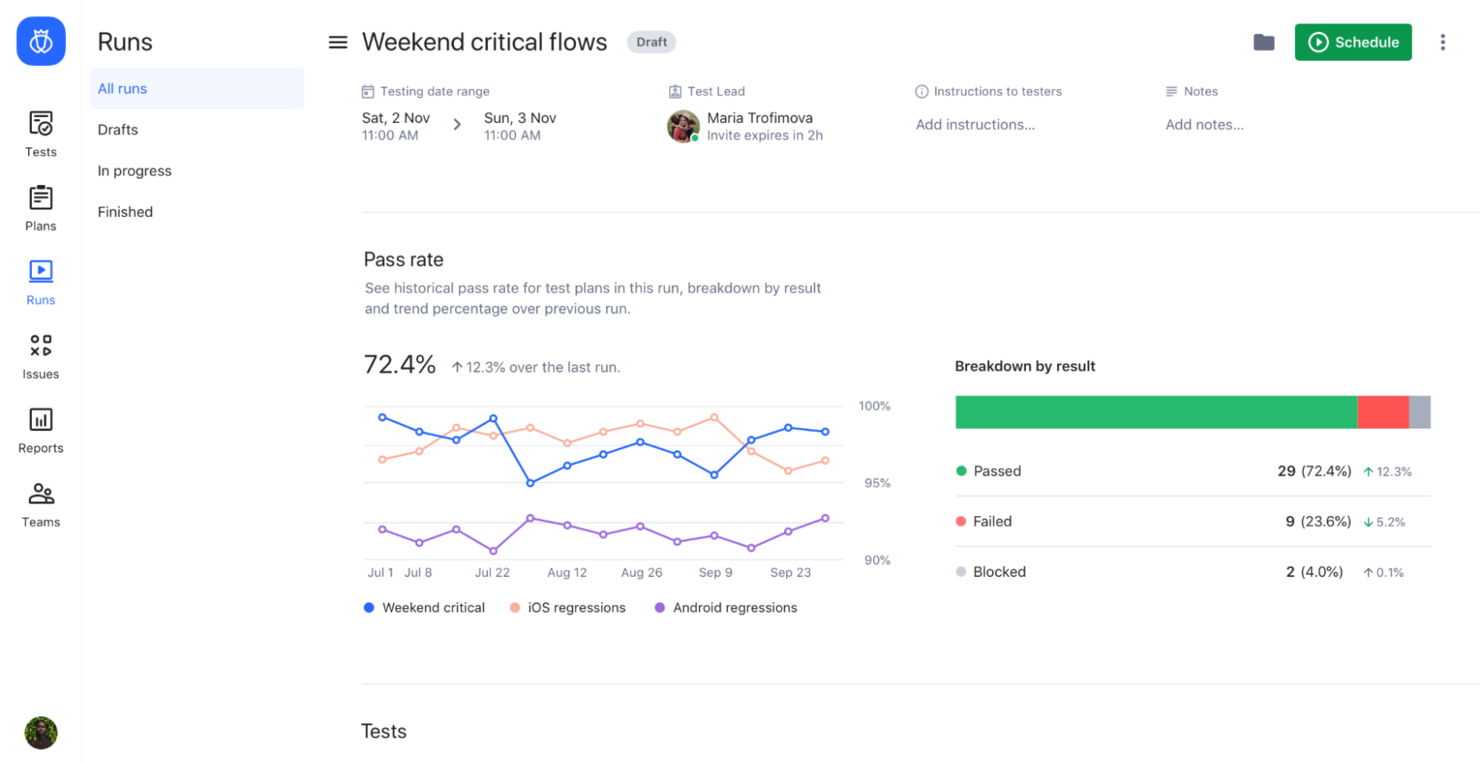
Testlio è una piattaforma di testing progettata per i team di assicurazione qualità e gli sviluppatori che cercano soluzioni di test flessibili e su richiesta. Mette in contatto tester con progetti che richiedono test funzionali e di usabilità, offrendo un ambiente di testing dinamico.
Perché ho scelto Testlio: Testlio offre servizi di testing su richiesta, consentendoti di accedere a una rete globale di tester quando necessario. Questa flessibilità è ideale per i team che hanno bisogno di cicli di testing rapidi senza impegni a lungo termine.
La piattaforma supporta sia i test funzionali che quelli esplorativi, garantendo un'ampia copertura. I suoi strumenti dettagliati di reportistica forniscono approfondimenti sui risultati dei test, aiutando il tuo team a prendere decisioni basate sui dati.
Funzionalità distintive & integrazioni:
Funzionalità comprendono una rete globale di tester disponibili per progetti su richiesta. Testlio supporta sia i test manuali che quelli automatici, offrendo flessibilità nell'approccio di testing. Le sue funzionalità di reportistica dettagliata forniscono preziose informazioni sugli esiti dei test e sulle aree di miglioramento.
Integrazioni includono JIRA, Jenkins, Slack, Trello, Asana, GitHub, GitLab, TestRail, Azure DevOps e ServiceNow.
Pros and Cons
Pros:
- Supporta sia testing manuale che automatico
- Servizi di test su richiesta flessibili
- Ideale per cicli di test rapidi
Cons:
- Controllo limitato sulla selezione dei tester
- Gestione complessa di progetti di grandi dimensioni

Ideale per una creazione rapida dei test

Tricentis Testim è uno strumento di test automatizzato dell'interfaccia utente ideale per sviluppatori e team QA che vogliono creare ed eseguire test rapidamente. Offre capacità di creazione veloce, consentendo agli utenti di realizzare ed eseguire test in modo efficiente su applicazioni web.
Perché ho scelto Tricentis Testim: La funzione di creazione rapida di Tricentis Testim permette al tuo team di creare test senza una configurazione complessa. Dispone di un'interfaccia intuitiva che semplifica il processo di realizzazione dei test.
Le funzionalità di auto-riparazione aiutano a mantenere i test aggiornati adattandosi automaticamente alle modifiche dell'interfaccia utente. La capacità di Tricentis Testim di gestire scenari di test complessi lo rende versatile per diverse esigenze di testing.
Funzionalità e integrazioni principali:
Funzionalità includono capacità di auto-riparazione che adattano automaticamente i test in caso di modifiche dell’interfaccia utente. Tricentis Testim supporta l'esecuzione parallela dei test, velocizzando il ciclo di test grazie all'avvio simultaneo di vari test. I dettagliati report dello strumento forniscono informazioni sui risultati dei test, aiutandoti a individuare aree di miglioramento.
Integrazioni includono Jenkins, JIRA, GitHub, GitLab, CircleCI, Slack, Trello, Asana, Microsoft Teams e Azure DevOps.
Pros and Cons
Pros:
- Creazione rapida dei test
- Funzionalità di auto-riparazione
- Supporta scenari complessi
Cons:
- I localizzatori guidati dall’IA possono talvolta identificare erroneamente elementi dinamici
- Le dashboard di reporting non sono altamente personalizzabili

OpenText
Ideale per la gestione dei test su larga scala nelle aziende
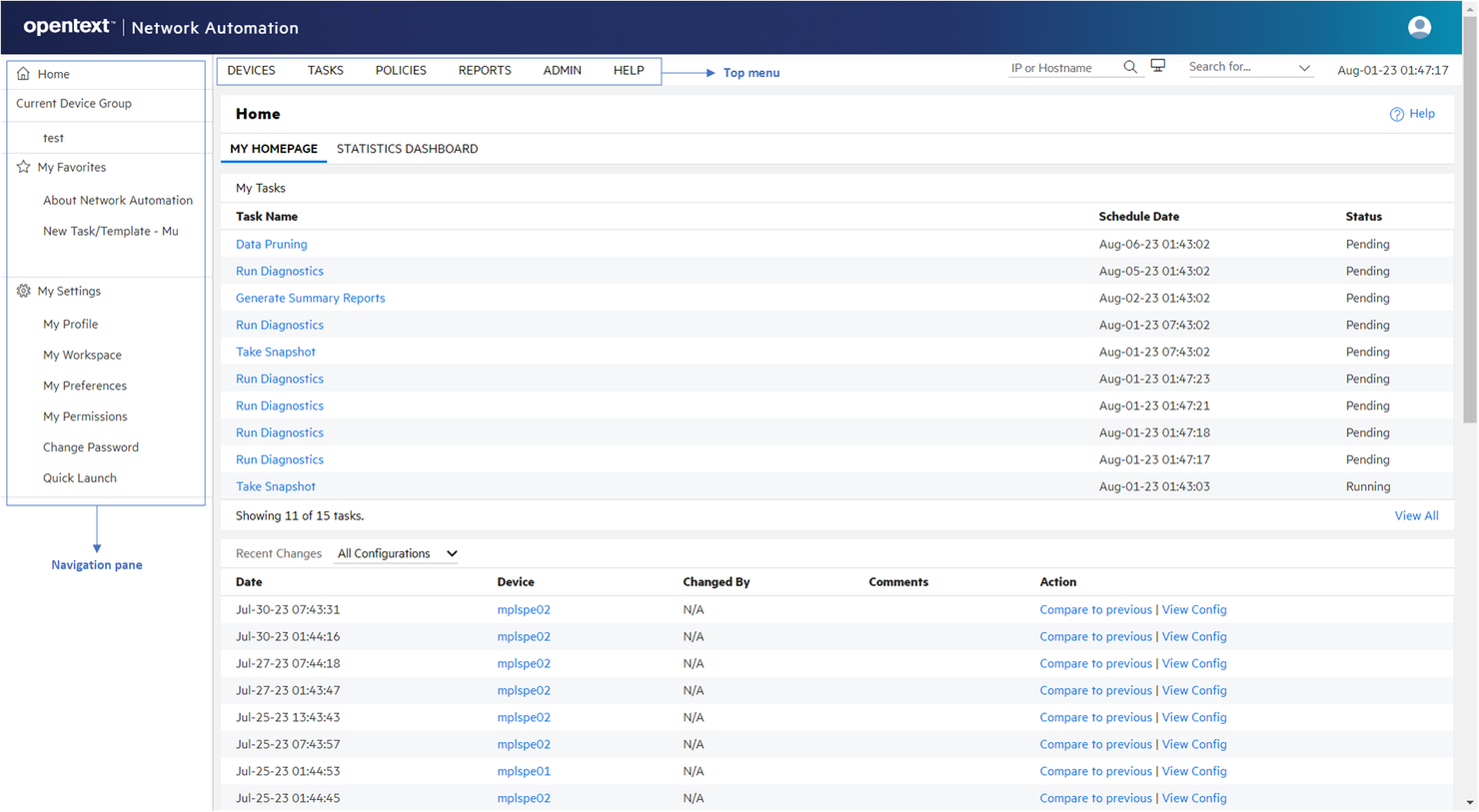
OpenText è una soluzione di automazione dei test funzionali progettata per grandi aziende e team IT. Offre funzioni essenziali per il business come l'automazione dei test, il testing delle prestazioni e il testing di carico per garantire la qualità e l’affidabilità delle applicazioni.
Perché ho scelto OpenText: OpenText è pensato per soddisfare le esigenze di livello enterprise, offrendo un ampio supporto per ambienti di test su larga scala. Lo strumento propone funzionalità avanzate di testing di carico, rendendolo adatto alle applicazioni con alte richieste.
La sua capacità di gestire scenari di test complessi è ideale per le grandi organizzazioni. Le funzionalità di reportistica forniscono approfondimenti dettagliati, aiutando il tuo team a prendere decisioni informate.
Caratteristiche principali & integrazioni:
Funzionalità includono capacità avanzate di testing di carico che aiutano a garantire le prestazioni delle applicazioni sotto stress. OpenText supporta scenari di test complessi, permettendo un collaudo approfondito delle applicazioni enterprise. Offre inoltre solide funzionalità di reportistica che forniscono approfondimenti sui risultati dei test e sulle metriche delle prestazioni.
Integrazioni includono Jenkins, JIRA, SAP Solution Manager, Microsoft Visual Studio, Eclipse, Git, Selenium, IBM Rational, HP ALM e Docker.
Pros and Cons
Pros:
- Supporta scenari di test complessi
- Capacità avanzate di testing di carico
- Ideale per ambienti di grandi dimensioni
Cons:
- I costi delle licenze possono aumentare rapidamente con l’utilizzo
- La documentazione è spesso densa e poco adatta ai principianti

Ideale per il testing continuo su larga scala in ambito enterprise
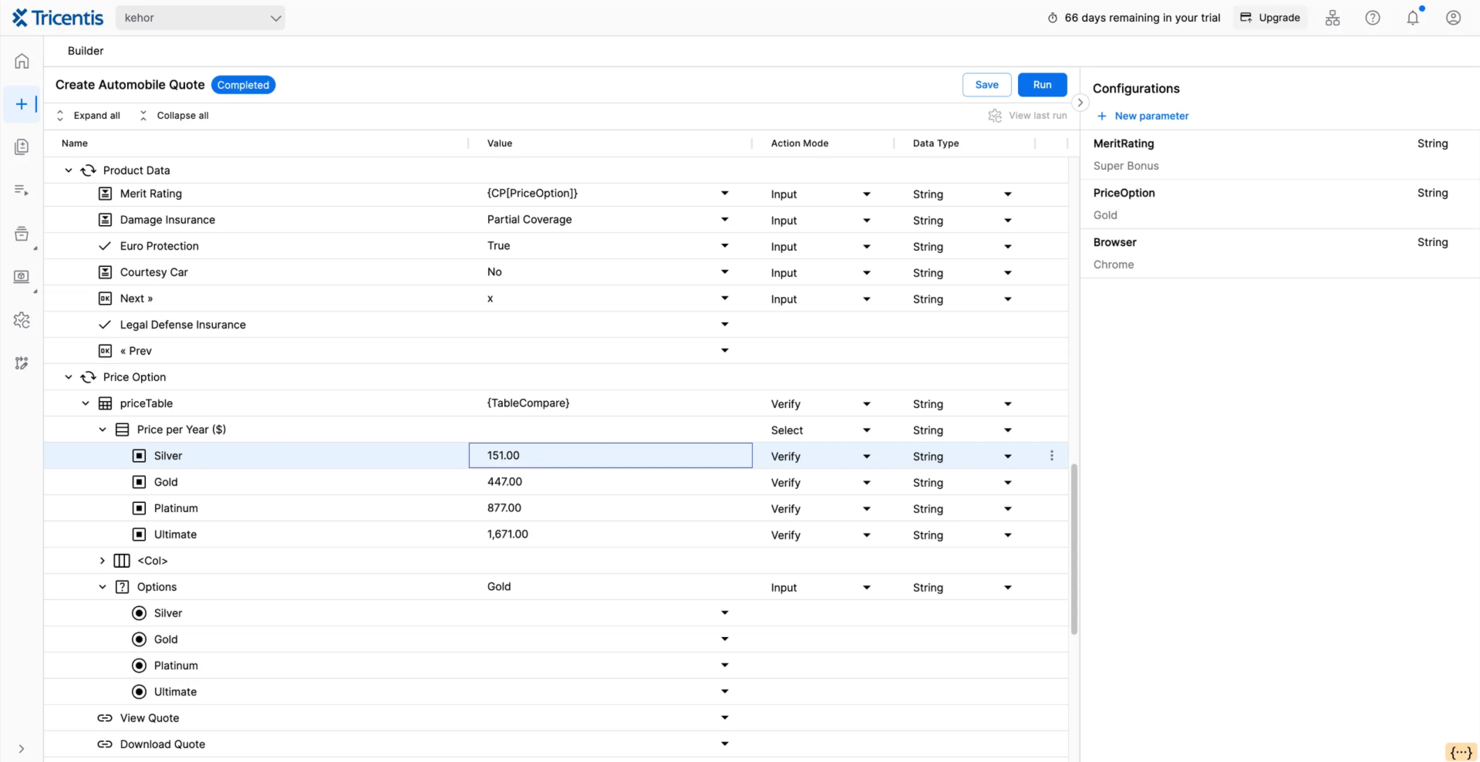
Tricentis Tosca è uno strumento di testing continuo progettato per i team QA aziendali e gli sviluppatori. Esegue test automatizzati end-to-end, garantendo la qualità e le prestazioni delle applicazioni durante tutto il ciclo di vita dello sviluppo.
Perché ho scelto Tricentis Tosca: Tricentis Tosca si distingue nel testing continuo, offrendo una piattaforma dedicata all'automazione su diversi tipi di applicazioni. L'automazione dei test basata su modelli riduce la necessità di scripting approfondito, rendendolo accessibile a team con diversi livelli di competenza tecnica.
Il suo approccio al testing basato sul rischio aiuta a dare priorità ai casi di test, concentrandosi sulle aree più critiche. La capacità dello strumento di supportare numerose piattaforme e tecnologie ne amplia la versatilità.
Funzionalità principali & integrazioni:
Funzionalità includono l'automazione dei test basata su modelli, che semplifica il processo di creazione dei test riducendo la necessità di scripting. Tricentis Tosca supporta il testing basato sul rischio, consentendo di concentrarsi sulle aree a maggiore impatto. Grazie all'ampio supporto cross-platform, garantisce compatibilità con varie tecnologie e ambienti.
Integrazioni includono Jenkins, JIRA, Azure DevOps, GitHub, GitLab, ServiceNow, Confluence, SAP Solution Manager, IBM Rational e Selenium.
Pros and Cons
Pros:
- Supporta più piattaforme e tecnologie
- L'automazione basata su modelli riduce lo scripting
- Il testing basato sul rischio dà priorità alle aree critiche
Cons:
- I costi di licenza sono elevati per i team più piccoli
- Flessibilità limitata nella gestione di applicazioni non standard

QF-Test
Ideale per applicazioni Java e GUI desktop
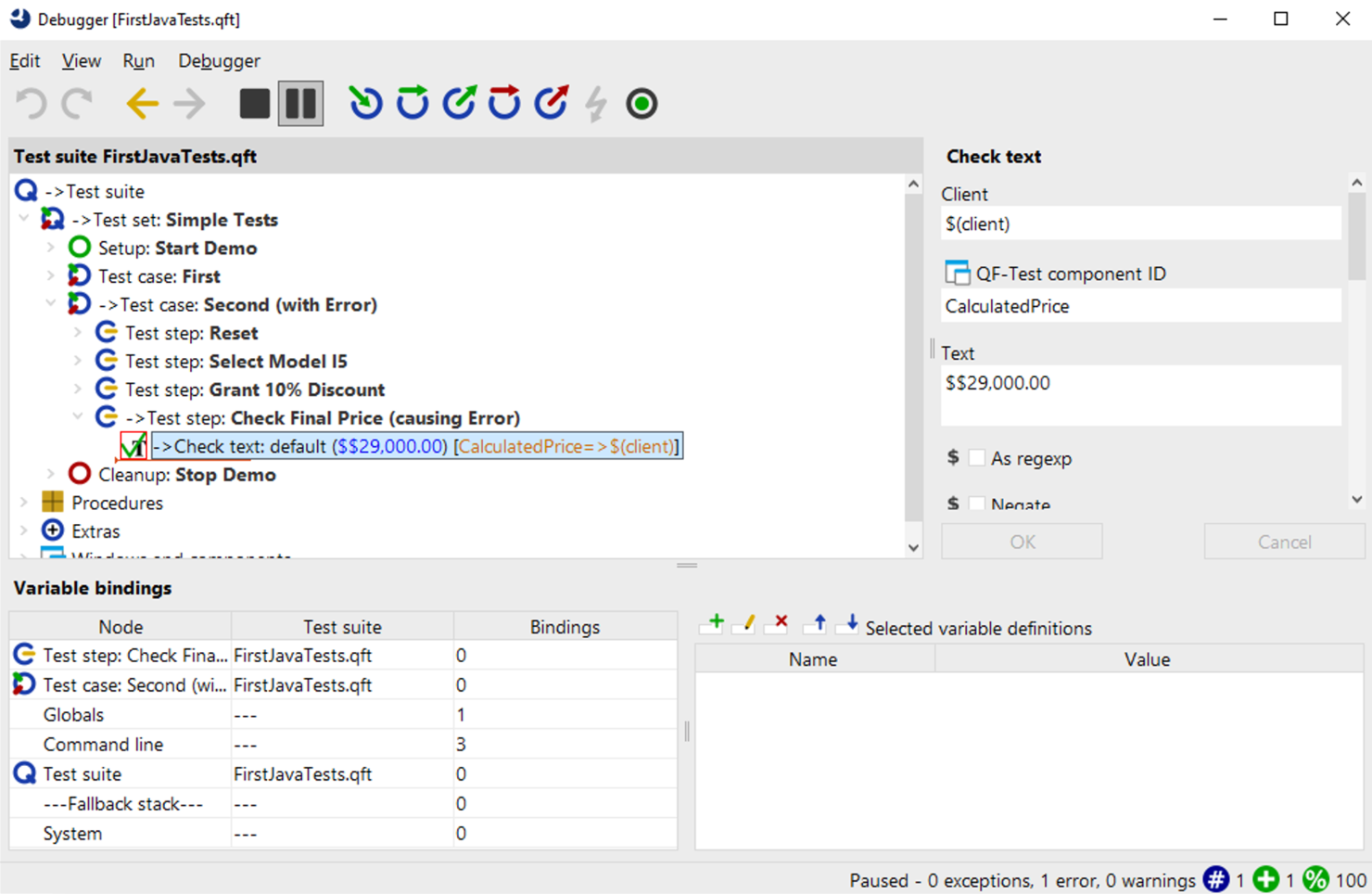
QF-Test è uno strumento di test automatizzato progettato per il test di applicazioni desktop, pensato per team QA e sviluppatori. Supporta il testing delle interfacce grafiche su varie piattaforme, fornendo le funzioni essenziali per garantire la stabilità e le prestazioni dell'applicazione.
Perché ho scelto QF-Test: QF-Test è specializzato nel testing di applicazioni desktop, diventando così uno strumento prezioso per i team che lavorano con applicazioni Java e Web. Lo strumento offre un ambiente di creazione dei test senza script, permettendo di automatizzare i test senza bisogno di grande esperienza di programmazione.
Il suo supporto per un'ampia gamma di piattaforme garantisce flessibilità nel test di diversi ambienti desktop. Il debugger integrato aiuta a identificare e risolvere rapidamente i problemi, migliorando il processo di test.
Funzionalità e integrazioni principali:
Funzionalità includono un debugger per i test che aiuta a individuare e risolvere i problemi in modo efficiente. QF-Test offre supporto per test basati sui dati per ampliare la copertura dei test. Dispone anche di una funzione di reportistica personalizzabile, che consente di generare report adattati alle proprie esigenze.
Integrazioni includono Jenkins, JIRA, Confluence, Git, SVN, Maven, Eclipse, IntelliJ IDEA, TestRail e Bugzilla.
Pros and Cons
Pros:
- Compatibilità con numerose piattaforme
- Debugger integrato per i test
- Opzioni di reportistica personalizzabili
Cons:
- Richiede una configurazione tecnica
- Configurazione iniziale complessa


Playwright è uno strumento open-source per l'automazione dei test end-to-end, utilizzato principalmente da sviluppatori e team di controllo qualità. Supporta i test cross-browser, permettendo di garantire la qualità delle applicazioni su diversi browser e piattaforme.
Perché ho scelto Playwright: Playwright offre un ampio supporto cross-browser, rendendolo ideale per i team che necessitano di testare su più browser. La sua capacità di gestire più contesti browser in un singolo test aumenta l'efficienza dei test.
Lo strumento offre funzionalità di testing API insieme ai test UI, fornendo una soluzione di test su misura. La funzione di auto-wait riduce l'instabilità dei test, garantendo risultati più affidabili.
Funzionalità e integrazioni principali:
Funzionalità includono il testing headless che permette esecuzioni di test efficienti. Playwright supporta diversi linguaggi di programmazione, adattandosi a diversi ambienti di sviluppo. La funzione di intercettazione della rete consente di controllare le richieste di rete durante i test.
Le integrazioni includono GitHub, Azure DevOps, Jenkins, CircleCI, Travis CI, GitLab, Bitbucket, AWS, Google Cloud e Docker.
Pros and Cons
Pros:
- Gestisce più contesti
- Auto-wait riduce l'instabilità dei test
- Open-source e gratuito
Cons:
- Richiede conoscenze di programmazione
- Nessun reporting integrato

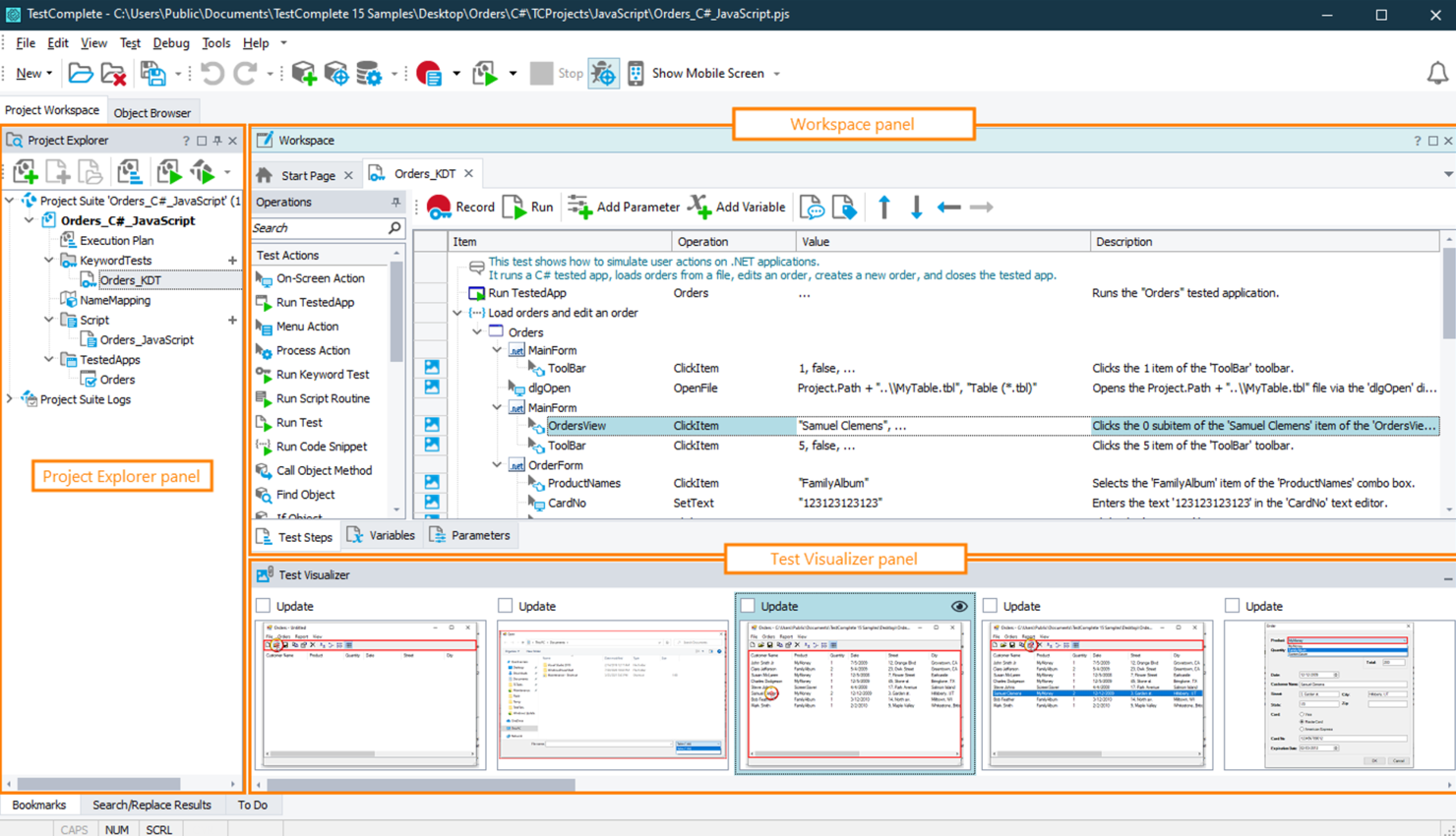
TestComplete è uno strumento di test automatizzato dell'interfaccia utente progettato per sviluppatori e team QA che devono testare applicazioni desktop, web e mobile. Offre la creazione di test senza codice, consentendo agli utenti di automatizzare i test senza ampie conoscenze di programmazione, che è centrale nella sua proposta di valore.
Perché ho scelto TestComplete: TestComplete offre un ambiente di test senza codice, permettendo al tuo team di creare test tramite un'interfaccia intuitiva. La funzionalità di test guidato da parole chiave semplifica la creazione di test anche per chi non programma, mentre il supporto a numerosi linguaggi di scripting soddisfa gli utenti più tecnici.
Il motore di riconoscimento degli oggetti di TestComplete garantisce un'automazione dei test accurata ed affidabile. La sua capacità di eseguire test in parallelo aiuta a ridurre significativamente i tempi di test.
Funzionalità principali e integrazioni:
Funzionalità includono un motore di riconoscimento degli oggetti basato su intelligenza artificiale che migliora l'accuratezza dei test. TestComplete supporta sia i test guidati da parole chiave sia quelli guidati dai dati, offrendo flessibilità nella creazione dei test. L'esecuzione parallela dei test accelera il processo consentendo l'esecuzione simultanea dei test.
Integrazioni includono Jenkins, Git, JIRA, Azure DevOps, Selenium, TestRail, Bugzilla, SoapUI, ReadyAPI e Zephyr.
Pros and Cons
Pros:
- Esecuzione parallela riduce i tempi di test
- Supporta più linguaggi di scripting
- Riconoscimento oggetti basato su intelligenza artificiale
Cons:
- Richiede molte risorse per test di grandi dimensioni
- Richiede conoscenze tecniche per le funzionalità avanzate

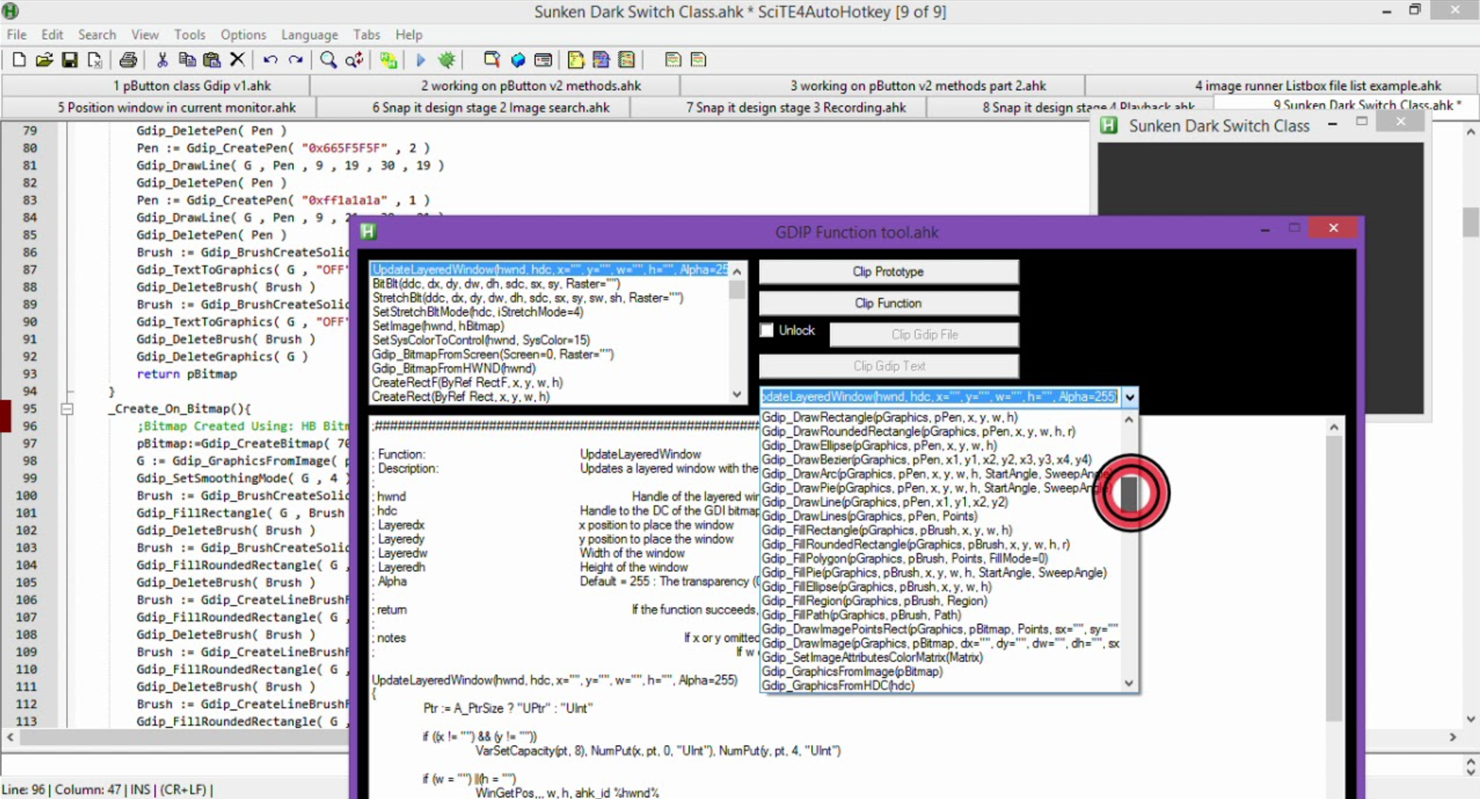
AutoHotkey è un linguaggio di scripting progettato per automatizzare attività su sistemi Windows, utilizzato principalmente da utenti individuali e professionisti IT. Automatizza attività ripetitive, scorciatoie da tastiera e clic del mouse, migliorando produttività ed efficienza.
Perché ho scelto AutoHotkey: AutoHotkey eccelle nell'automazione su Windows, offrendo un ambiente di scripting flessibile per creare script di automazione personalizzati. Puoi automatizzare attività come sequenze ripetitive di tasti e azioni del mouse, riducendo lo sforzo manuale.
La capacità di creare tasti rapidi e macro rende questo strumento versatile per diverse esigenze di automazione. Il suo carattere open-source consente un'ampia personalizzazione, adattandosi ai requisiti specifici degli utenti.
Funzionalità e integrazioni di rilievo:
Funzionalità includono la possibilità di creare tasti rapidi complessi per varie attività, permettendo di automatizzare facilmente azioni di routine. AutoHotkey supporta la creazione di script per automatizzare sia compiti di base che avanzati. La sua comunità di utenti offre una vasta gamma di script condivisi e risorse che ne aumentano l'usabilità.
Integrazioni non sono elencate per questo strumento.
Pros and Cons
Pros:
- Linguaggio di scripting altamente personalizzabile
- Supporta automazioni di attività complesse
- Gratuito e open-source
Cons:
- Richiede conoscenze di scripting
- Limitato ai sistemi Windows


Applitools è una piattaforma di test e monitoraggio visivo rivolta a sviluppatori e team QA che hanno bisogno di garantire la coerenza e la qualità visiva delle applicazioni. Esegue test visivi dell'interfaccia utente e test cross-browser, aiutando i team a individuare bug visivi e regressioni in modo efficiente.
Perché ho scelto Applitools: Applitools è specializzato in intelligenza artificiale visiva, offrendo capacità avanzate per garantire l'integrità visiva delle tue applicazioni. Il confronto visivo guidato dall'IA aiuta a rilevare anche le minime differenze visive su diverse piattaforme.
La funzione di test cross-browser assicura che le tue applicazioni appaiano in modo coerente su vari dispositivi. La capacità di Applitools di integrarsi con framework di test esistenti lo rende versatile per diversi flussi di lavoro.
Funzionalità e integrazioni principali:
Funzionalità includono il confronto visivo guidato dall'IA, che rileva differenze visive sottili che i test manuali potrebbero perdere. Applitools supporta i test cross-browser, garantendo coerenza visiva tra più dispositivi. Il suo cruscotto offre una visualizzazione centralizzata dei risultati dei test, facilitando il monitoraggio e l’analisi dei cambiamenti visivi.
Integrazioni includono Selenium, Cypress, WebDriverIO, Appium, TestCafe, Jenkins, GitHub, GitLab, CircleCI e Travis CI.
Pros and Cons
Pros:
- Confronto visivo guidato dall’IA
- Garantisce coerenza visiva cross-browser
- Si integra con i framework esistenti
Cons:
- L'integrazione con alcuni strumenti CI/CD richiede configurazioni aggiuntive
- Il prezzo può essere proibitivo per team più piccoli

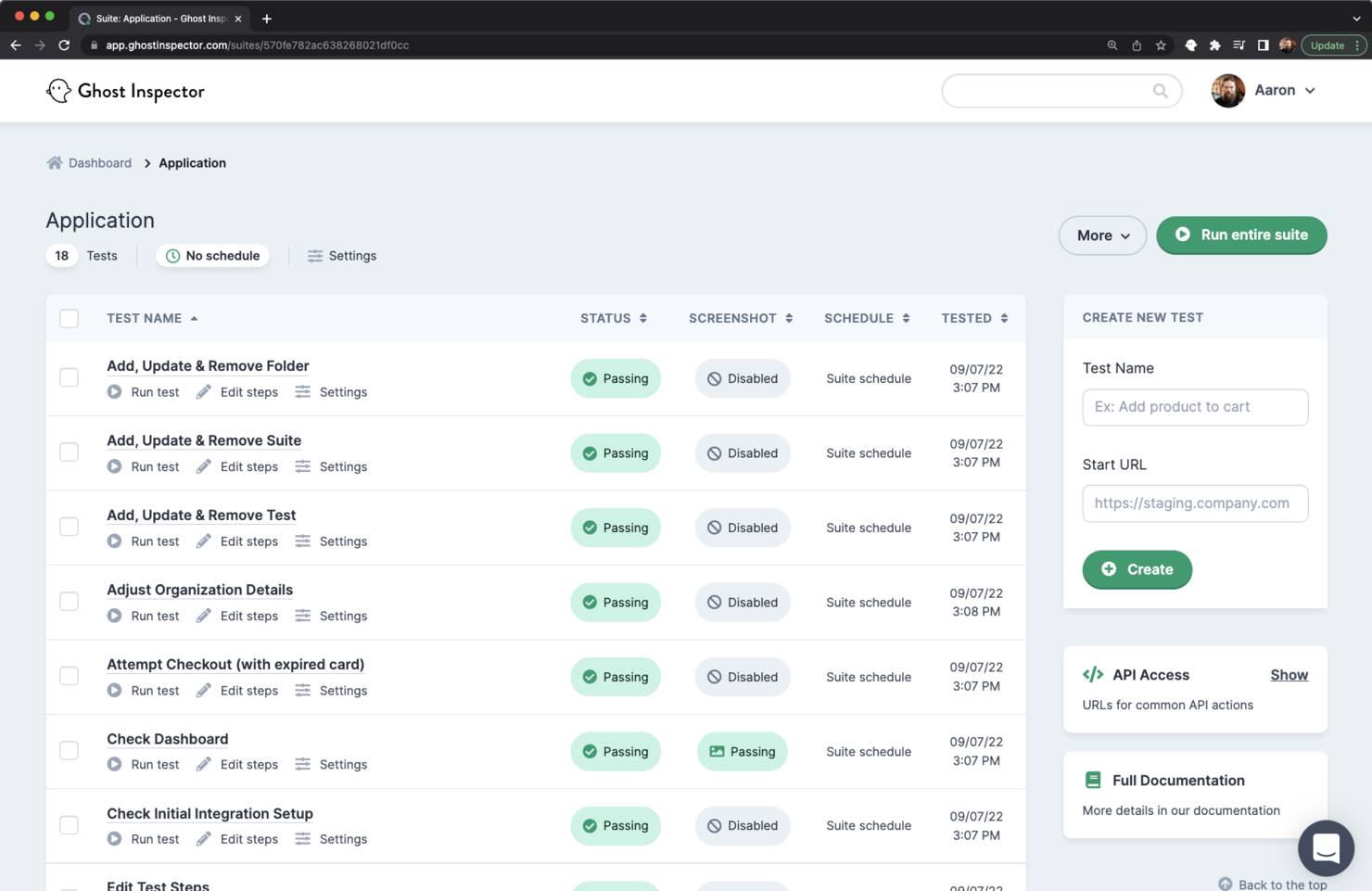
Ghost Inspector è uno strumento di testing automatizzato basato su cloud progettato per i team di QA e gli sviluppatori che devono garantire l’integrità visiva delle applicazioni web. Svolge test funzionali e visivi, consentendo agli utenti di individuare regressioni visive e garantire esperienze utente coerenti.
Perché ho scelto Ghost Inspector: Ghost Inspector eccelle nei test visivi, permettendo al tuo team di automatizzare e monitorare l’aspetto visivo delle applicazioni web. Lo strumento offre un’interfaccia semplice per creare e gestire i test senza richiedere elevate competenze di programmazione.
La funzione di confronto degli screenshot aiuta a identificare rapidamente le discrepanze visive. La possibilità di eseguire i test direttamente dal browser lo rende accessibile e facile da usare.
Funzionalità principali & integrazioni:
Funzionalità includono la possibilità di creare e gestire test tramite un’interfaccia intuitiva, rendendolo accessibile a utenti con diversi livelli di competenza tecnica. Ghost Inspector fornisce il confronto degli screenshot per aiutarti a individuare cambiamenti e regressioni visive. La possibilità di eseguire i test direttamente dal browser semplifica il processo di testing.
Integrazioni disponibili con Slack, Jenkins, GitHub, GitLab, Bitbucket, JIRA, Trello, Asana, Microsoft Teams e Zapier.
Pros and Cons
Pros:
- Forti capacità di test visivi
- Interfaccia semplice per la creazione dei test
- Accessibile anche agli utenti non tecnici
Cons:
- Potrebbe richiedere aggiustamenti manuali ai test
- Supporto limitato ai test su dispositivi mobili
Altri Strumenti di Automazione UI
Ecco alcune altre opzioni di strumenti per l’automazione UI che non sono rientrate nella mia shortlist, ma che vale comunque la pena considerare:rn
- Sahi Pro
Ideale per il testing di applicazioni web legacy e complesse
- Telerik Test Studio
Ideale per app .NET
- Robot Framework
Ideale per i test basati su parole chiave


Come valuto gli strumenti di automazione UI
Suddivido la mia valutazione in requisiti fondamentali—come la riproduzione su diversi browser e i selettori autoriparanti—e fattori differenzianti che distinguono gli strumenti per i team di prodotto.
Funzionalità di base (Requisiti indispensabili per questa lista)
Quando seleziono gli strumenti per la mia lista, assegno a ciascuno un punteggio da 0 (non offre la funzionalità) a 5 (eccelle in quest’area) per ognuna delle funzionalità fondamentali elencate qui sotto. Poi, calcolo il punteggio totale in percentuale. Ogni strumento deve ottenere un punteggio minimo totale del 65% per essere considerato nell’elenco.
- Registrazione e riproduzione dei test: Cerco strumenti che permettano di eseguire un flusso di checkout o un percorso di onboarding e di riprodurre fedelmente quel percorso come test automatizzato.
- Copertura su browser e dispositivi: Ogni strumento viene valutato sulla capacità di eseguire test su Chrome, Firefox, Safari e su veri dispositivi mobili—non solo in un singolo ambiente.
- Creazione di test senza codice/basso codice: Verifico che un PM possa costruire e modificare un test senza scrivere codice, utilizzando editor visuali o strumenti drag-and-drop.
- Rilevamento elementi e autoriparazione: Quando un team di sviluppo rinomina una classe di bottone o modifica la struttura di un form, cerco strumenti in grado di adattare automaticamente i locator senza interrompere la suite di test.
- Integrazione CI/CD e con altri strumenti: Valuto quanto facilmente ogni strumento si integri con pipeline di rilascio come Jenkins o GitHub Actions, oltre che con piattaforme PM e QA come Jira e TestRail.
- Reporting e analisi dei test: Qui sono importanti log dettagliati degli errori, screenshot e dashboard di tendenza—cerco report che un PM possa condividere con gli stakeholder senza bisogno di ulteriori formattazioni.
Una volta stilata la lista degli strumenti che soddisfano questi criteri, considero cosa distingue ciascuna piattaforma.
Fattori differenzianti (Cosa distingue i fornitori)
Ecco come confronto e metto a confronto i diversi fornitori:
Caratteristiche distintive
La generazione di test tramite intelligenza artificiale è un importante fattore di differenziazione—cerco strumenti in grado di trasformare una user story o un PRD in un test pronto all’uso, risparmiando ore nella preparazione dello sprint. Anche il test di regressione visiva è fondamentale quando il team rilascia aggiornamenti UI frequenti; intercettare un modale disallineato o un layout rotto prima che lo facciano gli utenti evita molti problemi. Valuto anche le funzionalità collaborative come workspace condivisi e la possibilità di inserire commenti, che permettono a PM e QA di revisionare insieme i test senza dover passare da uno strumento all’altro.
Oltre le caratteristiche
Qui conta il tempo necessario a ottenere valore. Verifico che un PM possa registrare ed eseguire il suo primo test in giornata senza dover aspettare il supporto degli sviluppatori. La trasparenza dei prezzi è un ulteriore aspetto che considero; alcuni fornitori fanno pagare ogni esecuzione del test mentre altri prevedono tariffe per utente, e il modello più adatto dipende dal ritmo di rilascio del team. Valuto infine anche la stabilità dei test su larga scala, perché una suite che passa in locale ma fallisce in modo intermittente su centinaia di esecuzioni CI compromette rapidamente la fiducia nel processo di rilascio.
Come Scegliere gli Strumenti di Automazione UI
È facile perdersi in lunghe liste di funzionalità e strutture di prezzo complesse. Per aiutarti a rimanere concentrato durante il tuo processo di selezione, ecco un elenco di fattori da considerare:
| Fattore | Cosa Considerare |
|---|---|
| Scalabilità | Lo strumento può crescere con il tuo team? Verifica se supporta un aumento dei casi di test e degli utenti senza perdita di prestazioni. Valuta se può gestire progetti su larga scala. |
| Integrazioni | Funziona con i tuoi strumenti esistenti? Controlla la compatibilità con pipeline CI/CD, sistemi di controllo versione e bug tracker per un’integrazione fluida nei flussi di lavoro. |
| Personalizzazione | È possibile adattarlo alle tue esigenze? Cerca la possibilità di personalizzare gli script di test, le dashboard e i report in base ai processi e alle richieste del tuo team. |
| Facilità d’uso | Quanto è intuitivo? Valuta se l’interfaccia è semplice da usare e se gli utenti possono imparare e navigare rapidamente senza bisogno di formazione o supporto approfondito. |
| Implementazione e onboarding | Quanto tempo serve per iniziare? Considera le risorse e il tempo necessari all’avvio e se sono disponibili guide, tutorial e supporto in fase di onboarding. |
| Costo | Rientra nel tuo budget? Confronta i modelli di prezzo, incluse le tariffe di abbonamento e gli eventuali costi nascosti per funzioni extra o utenti aggiuntivi, per determinarne la convenienza. |
| Tutele di sicurezza | I tuoi dati sono protetti? Assicurati che lo strumento rispetti gli standard di sicurezza e offra funzionalità come crittografia e controlli di accesso per proteggere le informazioni. |
| Disponibilità del supporto | Che tipo di assistenza è offerta? Cerca supporto 24/7, account manager dedicati e molteplici canali di assistenza per risolvere rapidamente eventuali problemi. |
Cosa Sono gli Strumenti di Automazione UI?
Gli strumenti di automazione UI sono soluzioni software che automatizzano il testing delle interfacce utente delle applicazioni. Questi strumenti sono comunemente utilizzati da tester QA, sviluppatori e product manager per assicurarsi che le applicazioni funzionino correttamente e offrano valore migliorando l'efficienza e l'accuratezza dei test.
Funzionalità come l'esecuzione automatizzata dei test, la compatibilità tra browser e la reportistica dettagliata contribuiscono a ridurre lo sforzo del testing manuale, garantire la coerenza dell'interfaccia e fornire approfondimenti utili. In generale, questi strumenti migliorano la qualità e l'affidabilità delle applicazioni software automatizzando le attività di test ripetitive.
Caratteristiche degli strumenti di automazione UI
Quando selezioni strumenti di automazione UI per il software testing, presta attenzione alle caratteristiche che migliorano efficienza e accuratezza nella tua suite di test:
- Esecuzione automatica dei test: Esegue i test automaticamente, riducendo l'impegno manuale e supportando l'integrazione continua nello sviluppo software.
- Compatibilità tra browser: Valida le applicazioni su Chrome, Firefox e altri browser per assicurare una performance costante.
- Funzionalità di self-healing: Si adatta ai cambiamenti degli elementi UI, minimizzando i bisogni di debug e riducendo la manutenzione dei test.
- Esecuzione parallela dei test: Consente di eseguire più test contemporaneamente su diversi sistemi operativi, incluso Linux, accelerando la consegna.
- Creazione di test senza script: Le opzioni low-code facilitano la progettazione dei test senza conoscenze approfondite di Python o Ruby.
- Test visivi potenziati da AI: Rileva differenze sottili nelle interazioni utente e garantisce la precisione visiva su dispositivi ed emulatori.
- Reportistica dettagliata: Fornisce approfondimenti in tempo reale sui risultati dei test, aiutando a individuare più velocemente i problemi.
- Integrazione con CI/CD pipelines: Si integra direttamente con framework di automazione esistenti e flussi di lavoro di sviluppo software.
- Dashboard personalizzabili: Le viste di reportistica estendibili possono essere adattate a progetti specifici, agevolando la collaborazione.
- Supporto playback e IDE: Opzioni di registrazione e riproduzione unite all'integrazione con IDE danno al team flessibilità nella gestione e modifica dei casi di test.
Vantaggi degli strumenti di automazione UI
Implementare strumenti di automazione UI offre numerosi vantaggi per il tuo team e il tuo business. Ecco alcuni benefici a cui puoi aspirare:
- Efficienza aumentata: I test automatizzati accorciano i cicli di test e riducono le attività manuali ripetitive.
- Migliore accuratezza: Funzionalità come i test self-healing e il supporto Selenium WebDriver garantiscono esecuzioni affidabili e costanti.
- Copertura estesa: Il testing tra browser su Chrome, Firefox e su più sistemi operativi aumenta l'affidabilità dell'applicazione.
- Cicli di rilascio più rapidi: L'esecuzione parallela dei test e l'integrazione con CI/CD velocizzano la distribuzione.
- Migliori approfondimenti: La reportistica dettagliata e le dashboard in tempo reale forniscono dati utili per il debug.
- Semplicità d'uso: La creazione di test senza codice e con poco codice permette a più membri del team di partecipare senza competenze di programmazione avanzate.
- Qualità costante: I confronti guidati dall'AI mantengono l'integrità dell'interfaccia, assicurando che le interazioni utente restino fluide su layout HTML, emulatori e dispositivi.
Costi e prezzi degli strumenti di automazione UI
Scegliere strumenti di automazione UI richiede la comprensione dei diversi modelli e piani tariffari disponibili. I costi variano in base a funzionalità, dimensione del team, componenti aggiuntivi e altro. La tabella qui sotto riassume i piani comuni, i prezzi medi e le caratteristiche tipiche incluse nelle soluzioni di automazione UI:
Tabella di confronto dei piani per strumenti di automazione UI
| Tipo di piano | Prezzo medio | Caratteristiche comuni |
|---|---|---|
| Piano gratuito | $0/user/month | Esecuzione base dei test, reportistica limitata e supporto della community. |
| Piano personale | $5-$25/user/month | Esecuzione automatizzata dei test, test cross-browser e analisi di base. |
| Piano business | $50-$100/user/month | Esecuzione parallela dei test, reportistica dettagliata e integrazione con CI/CD pipelines. |
| Piano enterprise | $150-$300/user/month | Dashboard personalizzabili, funzionalità di sicurezza avanzata e supporto clienti dedicato. |
Domande frequenti sugli strumenti di automazione UI
Ecco alcune risposte alle domande più comuni sugli strumenti di automazione UI:rn
Gli strumenti di automazione UI possono gestire i test delle app mobili?
Sì, molti strumenti di automazione UI supportano il testing delle app mobili. Assicurati che lo strumento che scegli sia compatibile con le piattaforme di tuo interesse, come iOS o Android. Cerca funzionalità come l’emulazione dei dispositivi e il testing su dispositivi reali per garantire una copertura completa.
Quali sono le sfide più comuni nell'implementazione dell'automazione UI?
Le sfide più comuni includono la manutenzione degli script di test con l’evoluzione dell’applicazione, l’integrazione dello strumento con i sistemi esistenti e la garanzia della compatibilità cross-browser. Programma aggiornamenti regolari e scegli uno strumento con un buon supporto e documentazione per mitigare questi problemi.
Come posso garantire l'affidabilità dei miei test automatizzati?
Per garantire l’affidabilità, utilizza pratiche di progettazione dei test robuste come il testing guidato dai dati e la parametrizzazione. Aggiorna regolarmente i test per riflettere le modifiche dell’applicazione e utilizza strumenti con capacità di auto-riparazione per ridurre al minimo la manutenzione.
Ci sono problemi di sicurezza nell'uso degli strumenti di automazione UI?
Si possono presentare problematiche di sicurezza se lo strumento accede a dati sensibili durante i test. Scegli strumenti che offrano funzionalità di gestione sicura dei dati come crittografia e controlli degli accessi. Esamina sempre le politiche di sicurezza dello strumento e la conformità agli standard del settore.
Come integrano gli strumenti di automazione UI con le pipeline CI/CD?
La maggior parte degli strumenti di automazione UI supporta l’integrazione con le pipeline CI/CD tramite plugin o API. Questa integrazione consente di automatizzare i test all’interno del flusso di sviluppo, garantendo feedback più rapidi e cicli di rilascio più efficienti.
Prossimi passi:
Se stai cercando strumenti di automazione UI, collegati con un consulente SoftwareSelect per raccomandazioni gratuite.
Compila un modulo e avrai una breve chiamata in cui approfondiranno le tue necessità specifiche. Poi riceverai una lista ristretta di software da valutare. Ti supporteranno anche durante tutto il processo di acquisto, comprese le trattative sul prezzo.