

Le priorità, le priorità: questa è la sfida continua di ogni responsabile di prodotto e il motivo per cui il software per la prioritizzazione dei prodotti è così importante nella gestione quotidiana. Con un numero limitato di ore al giorno, un piano di sviluppo ben organizzato e una definizione delle priorità delle attività assolutamente chiara sono il carburante che mantiene una squadra di prodotto al massimo della produttività.
Per questo ho messo a frutto la mia esperienza nella definizione delle priorità e nella gestione delle squadre, testando e recensendo rigorosamente i migliori strumenti per la prioritizzazione dei prodotti, così non dovrai farlo tu!
Che cos'è il software per la prioritizzazione dei prodotti?
Il software per la prioritizzazione dei prodotti è uno strumento specializzato progettato per facilitare il processo decisionale all'interno delle squadre di sviluppo dei prodotti. Aiuta a identificare e classificare le attività o le funzionalità in base a fattori quali l'allineamento strategico, l'impatto sui clienti e la fattibilità, assicurando che la squadra si concentri sui progetti più preziosi e di maggiore impatto.
In genere, il software per la prioritizzazione dei prodotti offre funzionalità come meccanismi di valutazione, integrazione dei feedback degli utenti e strumenti di collaborazione. Queste funzionalità consentono alle squadre di assegnare valori quantitativi a diversi criteri, aiutando a valutare e confrontare obiettivamente i vari elementi del piano di sviluppo del prodotto tenendo conto dei contributi degli utenti.
Perché fidarsi dei nostri consigli sui software
6,700+
Reviews
20
Industry experts
16+
Evaluation factors
14
Years
Il nostro team testa e recensisce software dal 2012. In quanto product manager noi stessi, sappiamo quanto sia difficile — e importante — scegliere il software giusto.
Per questa guida, abbiamo valutato gli strumenti attraverso test pratici e ricerche indipendenti, assegnando un punteggio agli strumenti in base ai nostri criteri di selezione.
Le nostre recensioni riflettono il nostro giudizio editoriale umano, non un discorso di vendita.
Revisori esperti:
- Andrew LumbySenior TPM
- Cristiano ValimSenior UI/UX Lead


Tabella comparativa dei software per la prioritizzazione dei prodotti
La tabella seguente confronta i dettagli dei prezzi dei migliori software per la prioritizzazione dei prodotti che ho selezionato.
| Tool | Best For | Trial Info | Price | ||
|---|---|---|---|---|---|
| 1 | Ideale per approfondimenti guidati dai clienti | Demo gratuita disponibile | Prezzi su richiesta | Website | |
| 2 | Ideale per stabilire le priorità delle funzionalità in base agli utenti | Piano gratuito disponibile | A partire da $29/mese (con fatturazione annuale) | Website | |
| 3 | Ideale per l'analisi della clientela basata sull'intelligenza artificiale | Demo gratuita disponibile | Prezzi su richiesta | Website | |
| 4 | Ideale per la valutazione delle funzionalità basata su formule | Demo gratuita + prova di 30 giorni disponibile | A partire da $59/utente/mese (con fatturazione annuale) | Website | |
| 5 | Ideale per identificare le attività giuste con i grafici | Prova gratuita di 14 giorni + demo gratuita disponibile | A partire da $44/postazione/mese (fatturato annualmente) | Website | |
| 6 | Ideale per la pianificazione collegata ai ricavi, dai riscontri dei clienti ai piani di sviluppo | Demo gratuita disponibile | Prezzi su richiesta | Website | |
| 7 | Ideale per la definizione delle priorità delle funzionalità basata sul feedback | Demo gratuita disponibile | Prezzi su richiesta | Website | |
| 8 | Piattaforma modulare per la gestione dei prodotti che consente di pianificare il lavoro e definire le priorità delle funzionalità sulla base del feedback dei clienti. | Demo gratuita disponibile | Prezzi su richiesta | Website | |
| 9 | Ideale per la definizione delle priorità inclusiva e valutata dal team | Prova gratuita di 14 giorni + demo gratuita disponibile | A partire da $19/utente/mese (fatturato annualmente) | Website | |
| 10 | Ideale per roadmap di portafoglio con collegamenti ai feedback | Prova gratuita di 14 giorni | A partire da $19/utente/mese (con fatturazione annuale) | Website |


Panoramica dei 10 migliori software per la prioritizzazione dei prodotti
Ecco una breve descrizione di ciascuna piattaforma per la prioritizzazione dei prodotti, per mostrare il caso d’uso migliore di ogni strumento, alcune funzionalità degne di nota e schermate che offrono un’istantanea dell’interfaccia utente.
 Ideale per approfondimenti guidati dai clienti
- Demo gratuita disponibile
- Prezzi su richiesta
Visit WebsiteCustomer Rating:4.8/5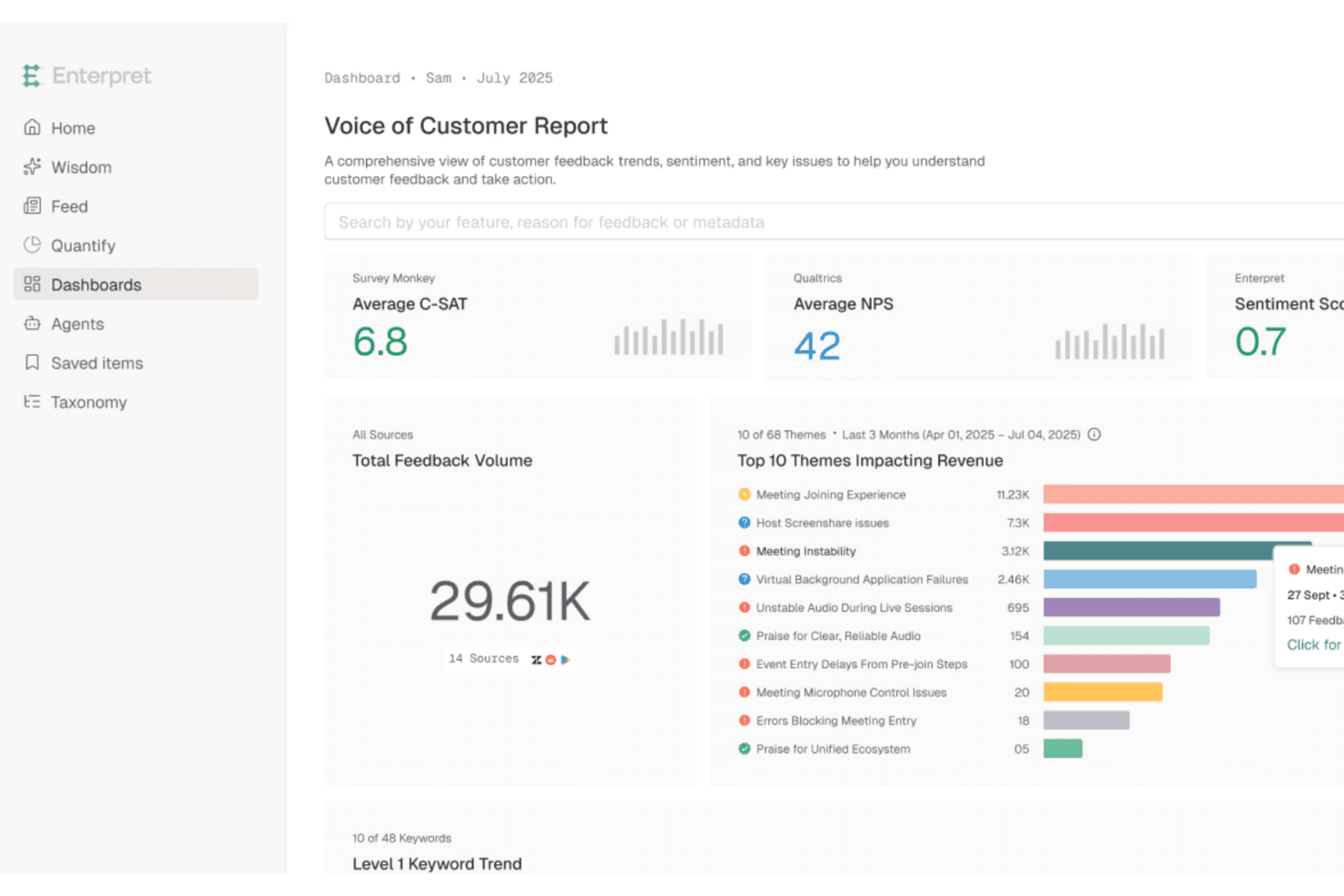
Enterpret classifica le funzionalità più richieste dai clienti utilizzando approfondimenti unificati sul feedback Enterpret è una piattaforma di intelligence sul feedback dei clienti che aggrega gli input provenienti da ticket di assistenza, chiamate di vendita, sondaggi, recensioni e dati sul prodotto, quindi utilizza l'AI per categorizzare i temi e collegarli a segnali di impatto aziendale come abbandono, fidelizzazione e ricavi.
Per chi è più adatto Enterpret?
Enterpret è particolarmente adatto ai team di prodotto di aziende del mercato medio e di grandi imprese che devono quantificare il feedback dei clienti su larga scala prima di decidere cosa sviluppare successivamente.
Perché ho scelto Enterpret
Ho incluso Enterpret tra le mie migliori scelte perché fa qualcosa che la maggior parte degli strumenti di prioritizzazione non fa: indica esattamente quale impatto aziendale si cela dietro ogni elemento del feedback dei clienti. La sua tassonomia adattiva utilizza l'AI per ordinare il feedback ricevuto in temi e sottotemi tra ticket di assistenza, chiamate di vendita, sondaggi e recensioni, quindi collega tali temi a segnali come abbandono e ricavi. Questo significa che puoi vedere non solo ciò che i clienti chiedono, ma anche quanto ti costa ignorarlo.
Funzionalità principali di Enterpret
- Tassonomia adattiva: l'AI categorizza automaticamente il feedback ricevuto in temi e sottotemi che si aggiornano man mano che arriva nuovo feedback.
- Grafo del contesto del cliente: collega i record del feedback a funzionalità specifiche del prodotto, segmenti di clientela e risultati come abbandono e adozione.
- Misurazione dell'impatto aziendale: monitora metriche come fidelizzazione, CSAT e ricavi prima e dopo una correzione o un lancio per mostrare cosa è cambiato.
- Approfondimenti AI di Enterpret: consente di interrogare l'intero set di dati sul feedback in linguaggio naturale per ottenere rapidamente risposte specifiche.
Integrazioni di Enterpret
Enterpret si integra con Jira Software Cloud, Linear, Salesforce, HubSpot, Zendesk, Intercom e Slack. Supporta inoltre i webhook e il caricamento di file CSV per fonti di feedback personalizzate.
Pros and Cons
Pros:
- Centralizza il feedback per segnali della domanda più chiari
- Collega le richieste ai ricavi e all'abbandono
- L'AI individua i temi nelle conversazioni con i clienti
Cons:
- Nessun sistema integrato di valutazione o di definizione delle priorità
- Nessuna visualizzazione per la pianificazione della roadmap o del backlog
Learn more about Enterpret: Ideale per stabilire le priorità delle funzionalità in base agli utenti
- Piano gratuito disponibile
- A partire da $29/mese (con fatturazione annuale)
Visit WebsiteCustomer Rating:4.8/5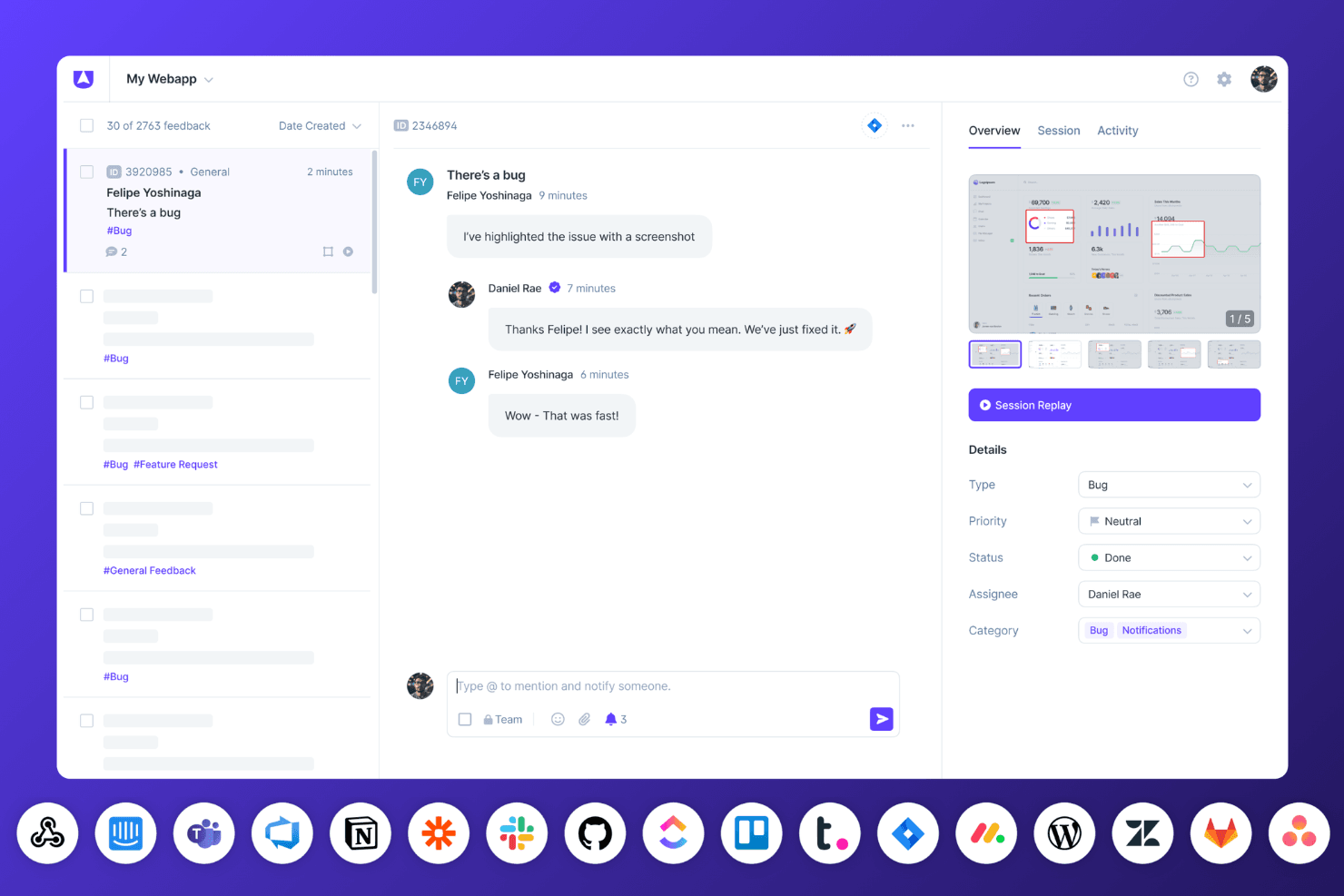
La dashboard di Userback per il monitoraggio dei bug mostra le riproduzioni delle sessioni, le conversazioni del team e gli aggiornamenti di stato in tempo reale con integrazioni collegate. Userback è una piattaforma per il feedback dei clienti che centralizza le richieste di funzionalità, i voti degli utenti, le riproduzioni delle sessioni e i sondaggi in una roadmap pubblica direttamente collegata a ciò che gli utenti hanno richiesto.
Per chi è più adatto Userback?
Userback è particolarmente adatto ai team di prodotto che vogliono utilizzare i voti dei clienti e la riproduzione delle sessioni per stabilire cosa sviluppare successivamente.
Perché ho scelto Userback
Ho scelto Userback come una delle migliori soluzioni perché colma il divario tra ciò che gli utenti richiedono e ciò che viene effettivamente sviluppato. Apprezzo particolarmente il fatto che il Portale delle funzionalità consenta ai clienti di inviare richieste, votare e monitorare le proprie idee attraverso una roadmap pubblica direttamente collegata ai dati dei voti. Abbinando questa funzione alla riproduzione delle sessioni collegata ai singoli report di feedback, si ottiene una visione particolarmente concreta di quali richieste riflettano problemi reali.
Funzionalità principali di Userback
- Analisi basate sull'IA del feedback: Analizza il feedback ricevuto per individuare schemi e sentimenti, mettendo in evidenza ciò che interessa maggiormente agli utenti.
- Riproduzione delle sessioni collegata al feedback: Registra le sessioni degli utenti e le collega direttamente ai singoli report di feedback per fornire un contesto aggiuntivo.
- Sincronizzazione bidirezionale con Jira, Linear e ClickUp: Mantiene automaticamente sincronizzati il feedback e i ticket di sviluppo tra gli strumenti.
- Regole di instradamento: Indirizza automaticamente bug, richieste di funzionalità e feedback generico al progetto o all'integrazione corretti.
Integrazioni di Userback
Userback offre integrazioni native con Jira, Linear, ClickUp, Asana, Azure DevOps, GitHub, GitLab, Monday.com, Trello e Wrike, con sincronizzazione bidirezionale per Jira, Linear e ClickUp. L'API REST e i webhook sono disponibili a partire dal piano Business Plus; inoltre, supporta Zapier.
Pros and Cons
Pros:
- I voti dei clienti influenzano direttamente le priorità delle funzionalità
- Le riproduzioni delle sessioni rivelano i problemi reali degli utenti
- Il feedback include screenshot, log e registrazioni
Cons:
- Nessun framework RICE o di valutazione ponderata
- La roadmap pubblica non offre visualizzazioni per stabilire le priorità basate sulle tempistiche
Learn more about Userback: Ideale per l'analisi della clientela basata sull'intelligenza artificiale
- Demo gratuita disponibile
- Prezzi su richiesta
Visit WebsiteCustomer Rating:4.8/5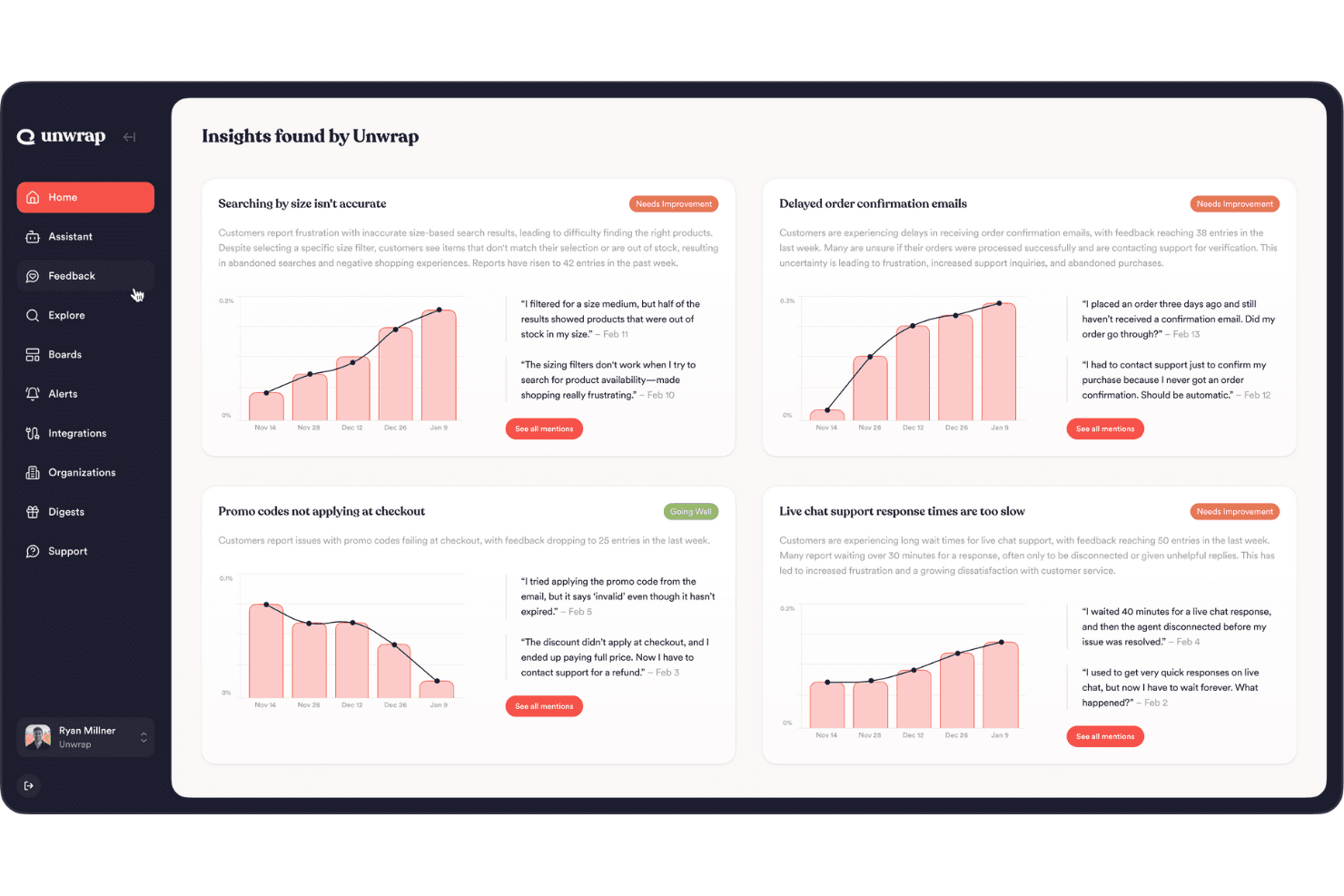
Unwrap offre un'analisi automatizzata dei riscontri per ottenere informazioni utili sui clienti. Unwrap è una piattaforma di analisi della voce del cliente basata sull'intelligenza artificiale che aggrega i riscontri provenienti da migliaia di fonti, assegna automaticamente etichette ai temi in base al significato e mette in evidenza i problemi emergenti per aiutare i team di prodotto a comprendere ciò che i clienti desiderano maggiormente.
Per chi è più adatto Unwrap?
Unwrap è particolarmente adatto ai responsabili delle operazioni di prodotto e ai responsabili di prodotto di aziende di medie e grandi dimensioni che devono interpretare grandi volumi di riscontri dei clienti prima di decidere cosa sviluppare in seguito.
Perché ho scelto Unwrap
Ho incluso Unwrap tra le mie scelte principali perché è lo strumento più efficace di questo elenco per trasformare i riscontri grezzi dei clienti in un quadro chiaro di ciò che conviene sviluppare in seguito. La sua funzione di etichettatura automatica raggruppa in base al significato i riscontri provenienti da oltre 3.000 fonti; così, invece di analizzare manualmente ticket di assistenza e recensioni, si ottengono temi classificati in base alla frequenza e al tasso di crescita. Mi piace anche il modo in cui gli Avvisi segnalano automaticamente i problemi emergenti, ad esempio rilevando un aumento di 3 volte su base annua per uno specifico bug prima ancora che il team se ne accorga.
Funzionalità principali di Unwrap
- Etichettatura automatica: Raggruppa in base al significato i riscontri provenienti da oltre 3.000 fonti, eliminando la necessità di creare o gestire manualmente tassonomie di etichette.
- Avvisi: Invia notifiche proattive quando un nuovo problema è in tendenza o un problema noto sta accelerando, così il team può intervenire prima che la situazione peggiori.
- Azioni collegate: Collega direttamente i temi dei riscontri agli elementi di lavoro in Jira o Asana, consentendo di monitorare come cambia la percezione dei clienti dopo il rilascio di una funzionalità.
- Strumenti di ricerca: Un modulo integrato per la raccolta dei riscontri che consente di ottenere contributi diretti dai clienti insieme ai dati aggregati provenienti da fonti esterne.
Integrazioni di Unwrap
Unwrap si integra con Jira e Asana tramite le Azioni collegate, collegando i temi dei riscontri dei clienti agli elementi di lavoro. Offre inoltre accesso tramite API per integrazioni personalizzate e si collega a oltre 3.000 fonti di riscontri.
Pros and Cons
Pros:
- L'intelligenza artificiale raggruppa i riscontri non strutturati in base al significato
- Gli Avvisi mettono proattivamente in evidenza i problemi emergenti dei clienti
- I pannelli di controllo condivisi favoriscono l'accesso di un'ampia gamma di parti interessate
Cons:
- Nessun quadro strutturato per la definizione delle priorità
- Nessuna visualizzazione della pianificazione o del lavoro arretrato
Learn more about Unwrap: 4Ideale per la valutazione delle funzionalità basata su formule
Aha!
- Demo gratuita + prova di 30 giorni disponibile
- A partire da $59/utente/mese (con fatturazione annuale)
Visit WebsiteCustomer Rating:4.6/5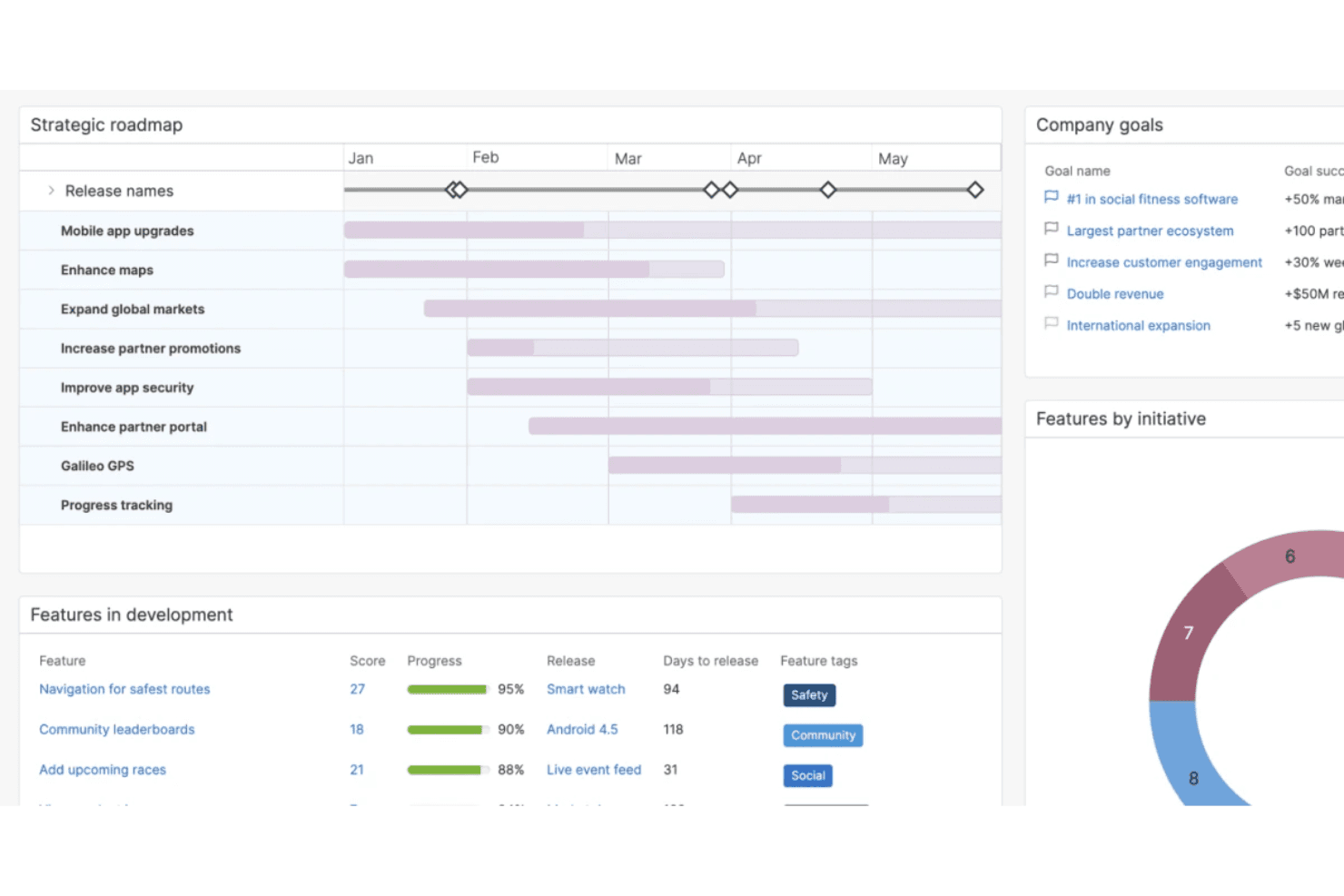
Aha! semplifica la creazione di una strategia, la definizione degli obiettivi e la definizione delle priorità per le decisioni sui prodotti. Aha! è una piattaforma per la roadmap dei prodotti e la definizione delle priorità che combina schede di valutazione personalizzate, portali per le idee, visualizzazione della roadmap, gestione del backlog e integrazioni con gli strumenti di distribuzione in un'unica suite.
Per chi è più adatto Aha!?
Aha! è particolarmente adatto ai team di prodotto che devono creare formule di valutazione personalizzate, come i modelli RICE o valore/sforzo, direttamente nel proprio flusso di lavoro per la definizione delle priorità.
Perché ho scelto Aha!
Ho scelto Aha! come una delle migliori soluzioni perché il suo motore delle schede di valutazione consente di creare formule di valutazione da zero, non solo di modificare un modello preimpostato. Puoi scrivere equazioni avanzate usando la logica RICE o valore/sforzo, aggiungere la logica condizionale
if()e applicare quelle schede di valutazione contemporaneamente a funzionalità, iniziative e idee. Apprezzo in particolare il fatto che l'editor delle formule convalidi la sintassi in tempo reale, così puoi individuare gli errori prima che alterino silenziosamente i risultati della definizione delle priorità.Funzionalità principali di Aha!
- Portale per le idee: un portale personalizzato e votabile in cui i clienti inviano e votano le idee, che puoi promuovere direttamente a funzionalità nella tua roadmap.
- Sincronizzazione bidirezionale con Jira e Azure DevOps: le modifiche effettuate in Aha! o nel tuo strumento di distribuzione aggiornano automaticamente entrambi i lati, mantenendo allineati le priorità della roadmap e il lavoro di sviluppo.
- Zone intelligenti della lavagna: inserire un record in una zona definita su una lavagna aggiorna in tempo reale i relativi campi della roadmap, consentendo ai team di discutere visivamente i compromessi.
- Analisi dei temi del feedback tramite IA: raggruppa automaticamente idee e feedback ricevuti in temi, così puoi individuare schemi ricorrenti nei contributi dei clienti senza dover aggiungere tag manualmente.
Integrazioni di Aha!
Aha! offre oltre 40 integrazioni, tra cui Jira, Azure DevOps, Salesforce, Zendesk, Slack, Power BI e Google Analytics. La sua API supporta integrazioni personalizzate, mentre i valori delle schede di valutazione possono essere associati ai campi corrispondenti negli strumenti collegati.
Pros and Cons
Pros:
- Le formule personalizzate supportano la valutazione RICE e valore-sforzo
- I voti dei clienti si collegano direttamente alle decisioni sulla roadmap
- Le viste per gli stakeholder chiariscono i compromessi tra funzionalità concorrenti
Cons:
- Le modifiche ai punteggi possono cancellare i dati storici delle metriche
- La configurazione dei report personalizzati richiede tempo
Learn more about Aha!: Ideale per identificare le attività giuste con i grafici
- Prova gratuita di 14 giorni + demo gratuita disponibile
- A partire da $44/postazione/mese (fatturato annualmente)
Visit WebsiteCustomer Rating:4.2/5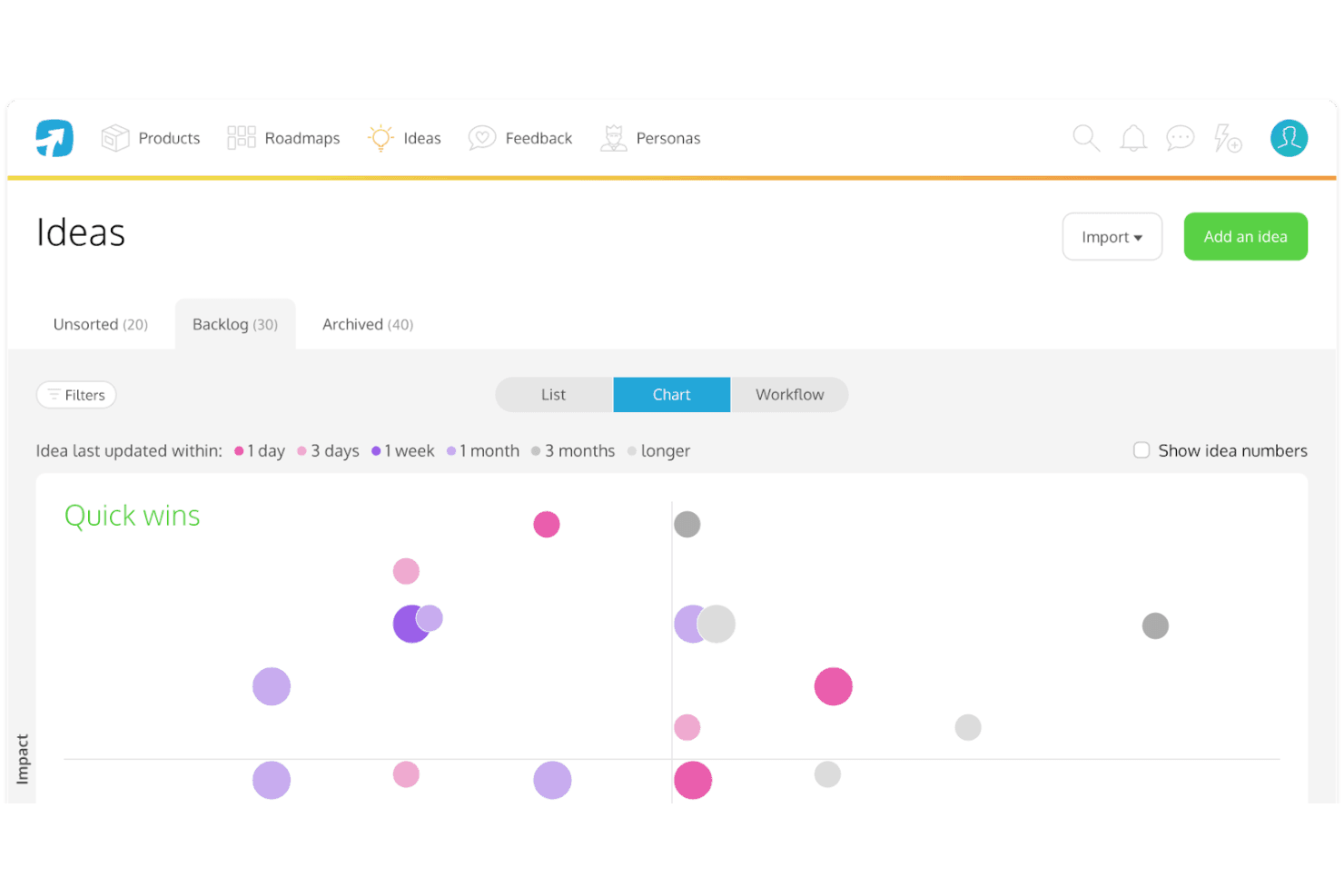
Il grafico di ProdPad sull’“impatto rispetto allo sforzo” ti aiuta a trovare le funzionalità di prodotto giuste su cui concentrarti. ProdPad è una piattaforma per la definizione delle priorità dei prodotti e la pianificazione delle roadmap che collega il feedback dei clienti, le idee e gli OKR attraverso la valutazione dell'impatto rispetto allo sforzo, le roadmap Ora–Poi–Più avanti e l'analisi del feedback assistita dall'IA.
Per chi è più adatto ProdPad?
ProdPad è particolarmente adatto ai product manager e ai responsabili di prodotto che hanno bisogno di collegare in un unico luogo il feedback dei clienti, gli OKR e le decisioni relative alla roadmap.
Perché ho scelto ProdPad
ProdPad si è guadagnato un posto nella mia rosa dei preferiti perché i suoi grafici dell'impatto rispetto allo sforzo rendono davvero semplice capire quali idee meritano attenzione in questo momento. Mi piace il fatto che ogni idea sia collegata direttamente agli OKR e al feedback dei clienti, così non è necessario indovinare quali siano le priorità. La funzionalità AI Signals individua automaticamente i temi emergenti tra grandi volumi di feedback, il che significa che i dati dei grafici riflettono ciò che interessa davvero ai clienti, non solo ciò che fa più rumore.
Funzionalità principali di ProdPad
- Roadmap Ora–Poi–Più avanti: Un formato strutturato per le roadmap che organizza le iniziative in base all'orizzonte temporale senza vincolarti a date fisse o a visualizzazioni della sequenza temporale.
- AI Signals: Una funzionalità di IA che identifica automaticamente i temi emergenti tra grandi volumi di feedback dei clienti per far emergere schemi che altrimenti potresti non notare.
- Posti illimitati gratuiti per i revisori: Chiunque nella tua organizzazione può partecipare come revisore senza costi, inviando idee, aggiungendo feedback e commentando il lavoro esistente.
- Sincronizzazione bidirezionale con Jira e Azure DevOps: Le modifiche apportate in ProdPad vengono riportate negli strumenti di distribuzione e viceversa, mantenendo allineate strategia ed esecuzione senza aggiornamenti manuali.
Integrazioni di ProdPad
ProdPad offre integrazioni native con Jira, Azure DevOps, GitHub, Linear, Slack, Microsoft Teams, Salesforce e Intercom. Supporta inoltre connessioni personalizzate tramite la sua API e Zapier.
Pros and Cons
Pros:
- Collega feedback, idee e OKR
- I grafici impatto-sforzo chiariscono i compromessi
- L'IA individua i temi nel feedback
Cons:
- Nessun framework RICE o WSJF confermato
- Nessuna visualizzazione della sequenza temporale per la pianificazione con date
Learn more about ProdPad: Ideale per la pianificazione collegata ai ricavi, dai riscontri dei clienti ai piani di sviluppo
- Demo gratuita disponibile
- Prezzi su richiesta
Visit WebsiteCustomer Rating:4.8/5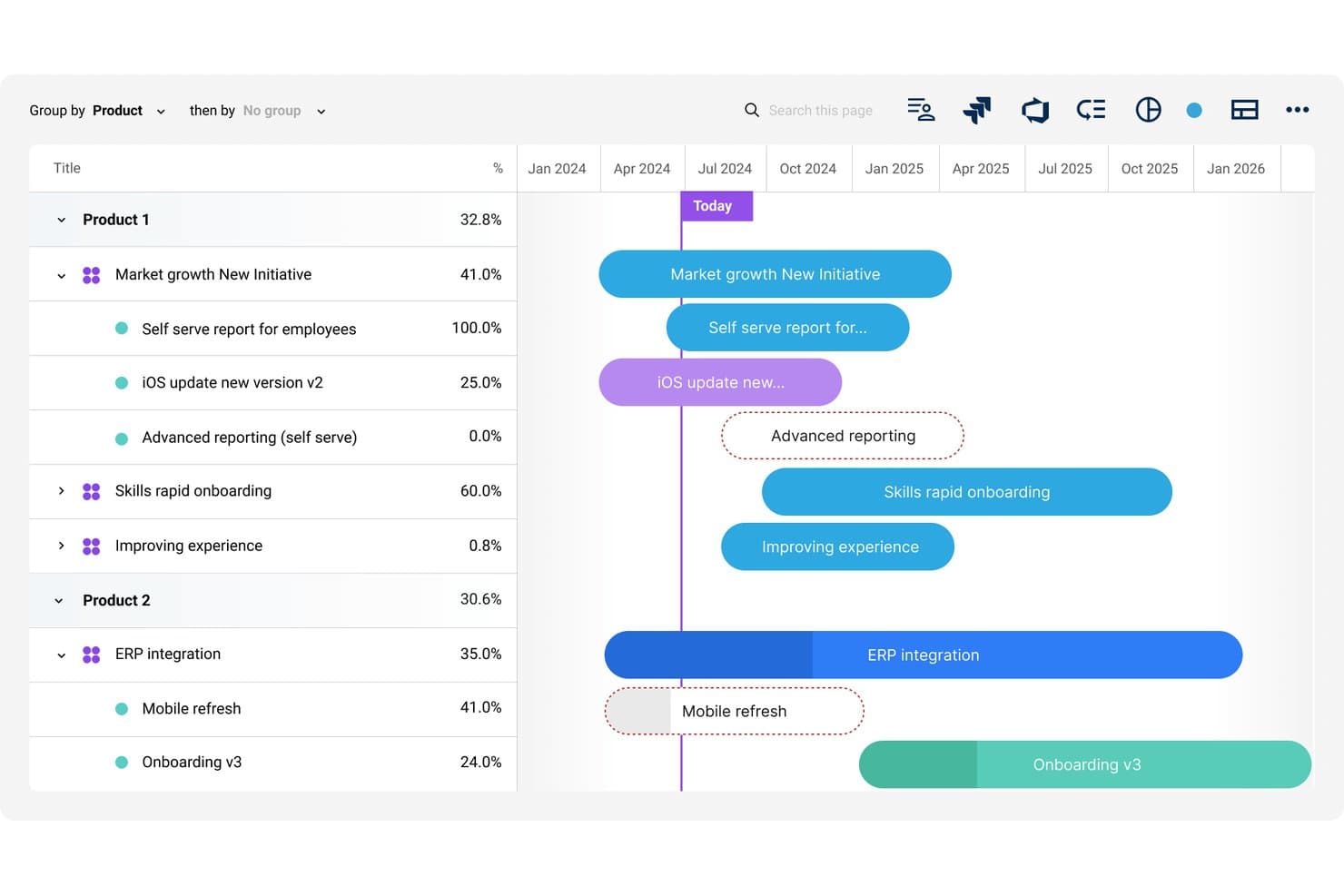
Dragonboat visualizza i piani di sviluppo di più prodotti con il monitoraggio dell'avanzamento sulla linea temporale. Dragonboat è una piattaforma per la gestione del portafoglio prodotti che collega strategia, riscontri dei clienti e piani di sviluppo attraverso la definizione delle priorità assistita dall'IA, la pianificazione di scenari e integrazioni bidirezionali con gli strumenti di distribuzione.
Per chi è più indicato Dragonboat?
Dragonboat è particolarmente adatto ai team di prodotto di aziende di medie dimensioni e grandi imprese che devono collegare direttamente i riscontri dei clienti e i dati sui ricavi alle decisioni sui piani di sviluppo di più linee di prodotto.
Perché ho scelto Dragonboat
Ho scelto Dragonboat come uno dei migliori perché è l'unico strumento che abbia visto collegare direttamente i riscontri dei clienti ai dati sui ricavi prima che qualsiasi elemento venga inserito nel piano di sviluppo. L'app di raccolta importa le richieste da Salesforce, Zendesk e Slack, quindi aggiunge il contesto dei ricavi del CRM, permettendoti di vedere esattamente quali clienti e quali dimensioni delle trattative sono associati a ciascuna richiesta di funzionalità. Abbinando questa funzione alla modellazione di scenari assistita dall'IA nel Pianificatore, puoi eseguire confronti ipotetici tra iniziative concorrenti prima di impegnarti in un unico piano.
Funzionalità principali di Dragonboat
- Visualizzazioni dei piani di sviluppo dell'intero portafoglio: Raggruppa scommesse strategiche, iniziative e funzionalità in un unico piano di sviluppo del portafoglio, con presentazioni specifiche per il pubblico dei diversi interlocutori.
- Classificazione dei riscontri basata sull'IA: Classifica, sottopone a triage e riepiloga automaticamente grandi volumi di riscontri in arrivo, organizzandoli per temi affinché il tuo team possa agire più rapidamente sulla base degli schemi ricorrenti.
- Pianificazione di scenari ipotetici: Crea e confronta fianco a fianco piani di portafoglio alternativi senza sovrascrivere il piano attualmente ufficiale.
- Sincronizzazione bidirezionale con gli strumenti di distribuzione: Invia il contesto strategico, come gli OKR e le priorità, a Jira e ADO, mentre gli aggiornamenti sullo stato e sull'ambito tornano automaticamente indietro.
Integrazioni di Dragonboat
Dragonboat supporta oltre 200 integrazioni, inclusa la sincronizzazione bidirezionale con Jira, Azure DevOps e Rally, oltre a Salesforce, Zendesk, Slack, Microsoft Teams, UserVoice e Pendo Listen. Offre inoltre un'API e un connettore MCP per la connettività personalizzata.
Pros and Cons
Pros:
- I dati sui ricavi rendono più precisa la definizione delle priorità delle funzionalità
- L'IA confronta scenari di portafoglio concorrenti
- I piani di sviluppo del portafoglio allineano le priorità degli interlocutori
Cons:
- I framework di valutazione integrati restano poco chiari
- La struttura per grandi imprese può risultare eccessiva per i team più piccoli
Learn more about Dragonboat: Ideale per la definizione delle priorità delle funzionalità basata sul feedback
- Demo gratuita disponibile
- Prezzi su richiesta
Visit WebsiteCustomer Rating:4.5/5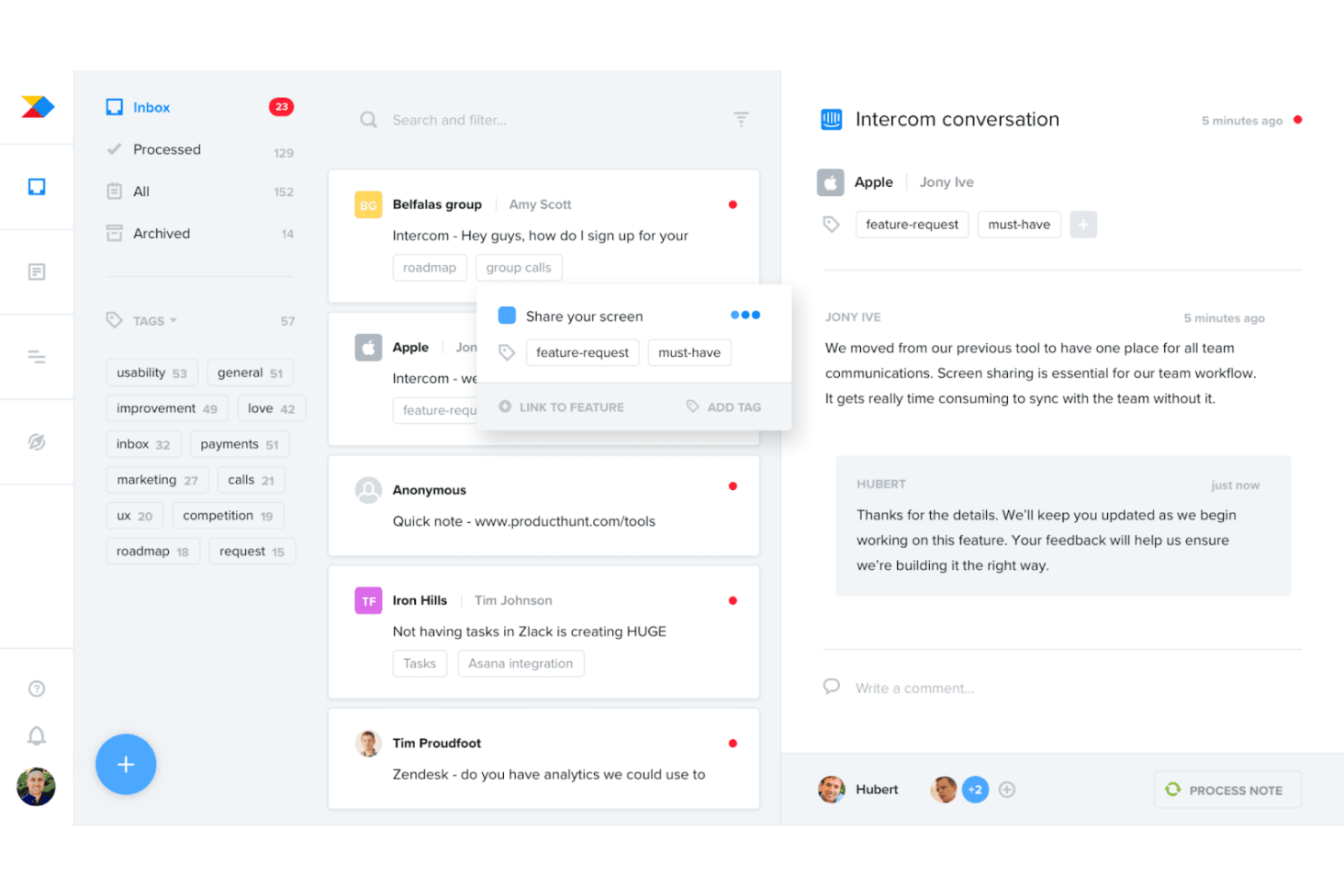
Productboard ti aiuta a raccogliere e consolidare il feedback dei clienti per comprendere i tuoi utenti e identificare i modelli ricorrenti. Productboard è una piattaforma per la definizione delle priorità dei prodotti e delle roadmap che centralizza il feedback dei clienti proveniente da oltre 25 fonti, lo collega direttamente alle funzionalità e utilizza formule di punteggio personalizzabili per aiutare i team di prodotto a decidere cosa sviluppare dopo.
Per chi è più adatto Productboard?
Productboard è particolarmente adatto ai product manager e ai responsabili di prodotto che devono collegare direttamente il feedback dei clienti alla definizione delle priorità delle funzionalità e alle decisioni sulla roadmap.
Perché ho scelto Productboard
Productboard si è guadagnato un posto nella mia selezione perché è l'unico strumento che ho utilizzato che considera il feedback dei clienti come input diretto per la definizione delle priorità, anziché come un elemento secondario. Raccoglie il feedback da oltre 25 fonti, come Zendesk, Gong e Intercom, e collega ogni informazione direttamente alle funzionalità valutate. Apprezzo in particolare il punteggio delle esigenze dei clienti, che consente di visualizzare l'intensità della domanda per segmento e di analizzare nel dettaglio le citazioni degli utenti che determinano ogni punteggio.
Funzionalità principali di Productboard
- Vista del portafoglio con OKR: Un'unica vista mostra obiettivi, iniziative e funzionalità nell'intero portafoglio, con monitoraggio dei progressi e dei rischi su una timeline.
- Segmenti di clienti dinamici: Consente di suddividere il feedback e i punteggi per segmento di utenti, mostrando quali funzionalità sono più importanti per specifici gruppi di clienti.
- Portale clienti: Un portale pubblico in cui i clienti possono convalidare le idee e visualizzare ciò che è stato rilasciato, mantenendo gli utenti coinvolti nel processo di esplorazione.
- Sincronizzazione bidirezionale con Jira e Azure DevOps: Invia le funzionalità agli strumenti di sviluppo e riporta gli aggiornamenti sullo stato in Productboard, mantenendo allineati strategia e sviluppo.
Integrazioni di Productboard
Productboard offre oltre 25 integrazioni native, tra cui Jira, Azure DevOps, Zendesk, Intercom, Slack, Microsoft Teams, Gong, G2, Amplitude e Mixpanel. Fornisce inoltre API 2.0 e Zapier per connessioni personalizzate.
Pros and Cons
Pros:
- Collega direttamente il feedback dei clienti ai punteggi delle funzionalità
- Segmenta la domanda per tipologia di cliente
- Aggiorna automaticamente le roadmap degli stakeholder
Cons:
- I framework di prioritizzazione denominati non sono integrati
- I portafogli di grandi dimensioni possono diventare difficili da navigare
Learn more about Productboard: Piattaforma modulare per la gestione dei prodotti che consente di pianificare il lavoro e definire le priorità delle funzionalità sulla base del feedback dei clienti.
- Demo gratuita disponibile
- Prezzi su richiesta
Visit WebsiteCustomer Rating:4.4/5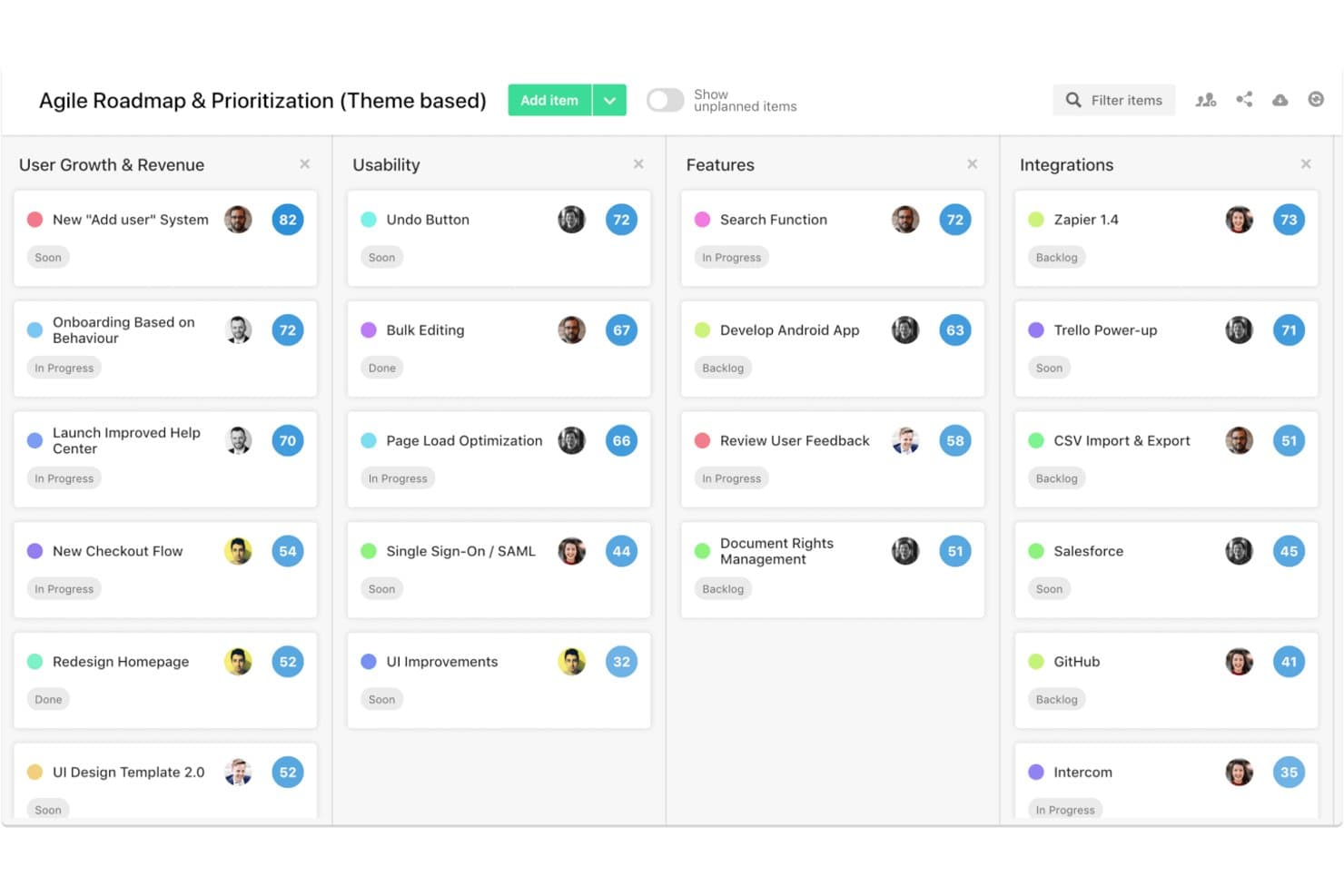
airfocus è una piattaforma per la definizione delle priorità dei prodotti che combina framework di valutazione personalizzabili, roadmap con visualizzazioni multiple, portali per il feedback dei clienti e strumenti collaborativi di valutazione di gruppo come Priority Poker.
Per chi è più adatto airfocus?
airfocus è particolarmente adatto ai team di prodotto di organizzazioni di medie e grandi dimensioni che devono allineare più stakeholder sulle priorità utilizzando metodi di valutazione strutturati e basati sui dati.
Perché ho scelto airfocus
Ho incluso airfocus tra le mie scelte principali perché Priority Poker è uno degli strumenti di valutazione di gruppo più pratici che abbia visto in questa categoria. Consente agli stakeholder di valutare gli elementi in modo indipendente, mette in evidenza le divergenze nei dati e registra il modo in cui il gruppo è giunto a una decisione finale. Se a questo si aggiungono i portali per la votazione dei clienti e un punteggio degli insight che integra direttamente il volume dei feedback reali nel processo di definizione delle priorità, si ottiene uno strumento che rende l'input dei clienti un elemento fondamentale del processo di valutazione.
Funzionalità principali di airfocus
- App per la valutazione delle priorità: valuta gli elementi rispetto a criteri strategici raggruppati in fattori ponderati per creare un processo di valutazione strutturato e ripetibile.
- Formule di prioritizzazione personalizzate: definisci la tua logica di valutazione utilizzando campi personalizzati e strumenti per la creazione di formule, in modo da adattarla al framework specifico del tuo team.
- Portali di feedback dei clienti personalizzati con il tuo marchio: crea portali protetti da password in cui i clienti possono inviare, votare e commentare idee per nuove funzionalità.
- Roadmap con visualizzazioni multiple: passa dalle visualizzazioni a bacheca, sequenza temporale, Gantt, tabella, grafico, elenco e documento per presentare le priorità a qualsiasi pubblico.
Integrazioni di airfocus
airfocus offre integrazioni con Jira Cloud, Azure DevOps Cloud, Trello, Asana, Linear, GitHub, Intercom, Zendesk, Slack e Microsoft Teams. Supporta inoltre la sincronizzazione bidirezionale con gli strumenti di distribuzione, un'API aperta, webhook e Zapier.
Pros and Cons
Pros:
- La votazione dei clienti contribuisce ai punteggi di prioritizzazione
- Priority Poker mette in evidenza le divergenze nelle valutazioni degli stakeholder
- I framework personalizzati si adattano a strategie di prodotto complesse
Cons:
- Le funzionalità aziendali limitano la sintesi automatizzata dei feedback
- L'attenzione alla roadmap supera la profondità delle funzionalità di esecuzione
 Ideale per la definizione delle priorità inclusiva e valutata dal team
- Prova gratuita di 14 giorni + demo gratuita disponibile
- A partire da $19/utente/mese (fatturato annualmente)
Visit WebsiteCustomer Rating:4.4/5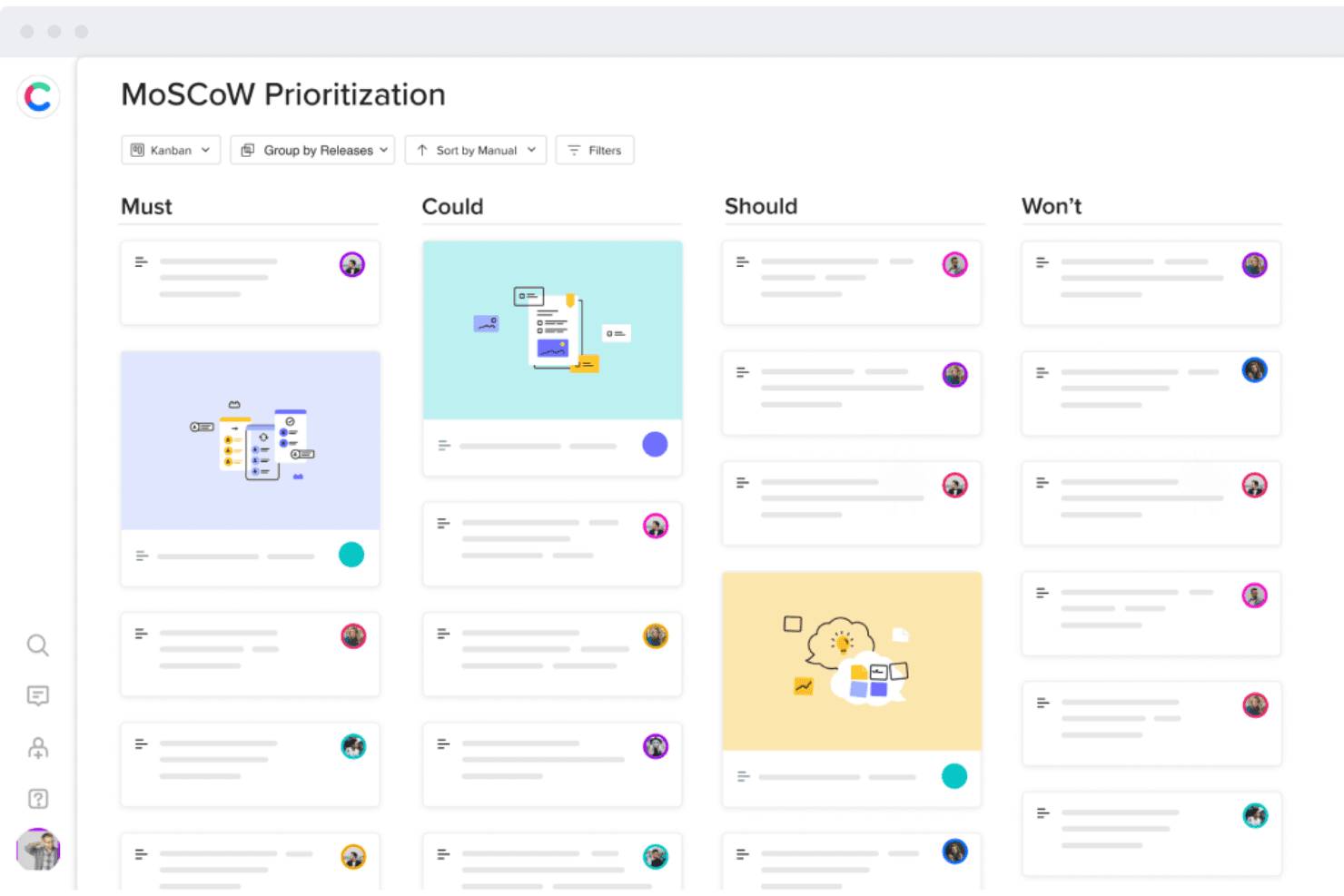
Craft.io aiuta a definire le priorità delle funzionalità in base al metodo MoSCoW o al punteggio RICE. Craft.io è una piattaforma di gestione dei prodotti che combina la definizione delle priorità con più framework, la visualizzazione delle roadmap, la gestione del backlog e la valutazione collaborativa da parte degli stakeholder lungo l'intero ciclo di vita del prodotto.
Per chi è più adatto Craft.io?
Craft.io è particolarmente adatto ai team di prodotto di aziende di medie e grandi dimensioni che necessitano di definire le priorità in modo strutturato coinvolgendo più stakeholder e linee di prodotto.
Perché ho scelto Craft.io
Ho incluso Craft.io tra le mie scelte principali perché il suo modello inclusivo di definizione delle priorità è davvero diverso da quello della maggior parte degli strumenti che ho utilizzato. Invece di affidare a una sola persona la valutazione delle funzionalità in modo isolato, Craft.io consente a ciascun gruppo di stakeholder di inviare i propri punteggi ponderati, così sia un vicepresidente del prodotto sia un responsabile dell'ingegneria possono contribuire senza prevalere l'uno sull'altro. Abbinando questa funzionalità ai framework RICE, MoSCoW e WSJF integrati e a un generatore di formule personalizzate, si ottiene un processo strutturato e gestito dal team per decidere ciò che i clienti desiderano davvero di più.
Funzionalità principali di Craft.io
- Tipi di visualizzazione della roadmap: Cinque visualizzazioni distinte della roadmap — Tabella, Cronologia, Kanban, Swimlane e Rilascio — consentono di adattare il modo in cui si presentano le priorità a pubblici diversi.
- Portale del feedback: Un hub centralizzato in cui gli stakeholder possono inviare idee di prodotto, votarle e monitorarne lo stato, con collegamenti diretti agli elementi del backlog.
- Gerarchia dei dati: Una gerarchia degli elementi multilivello (fino a quattro livelli nel piano Enterprise) consente di organizzare iniziative, funzionalità e attività in una struttura nidificata e ordinata.
- Integrazioni con gli strumenti di distribuzione: La sincronizzazione bidirezionale con Jira, Azure DevOps, GitHub, GitLab e Linear mantiene la roadmap del prodotto collegata ai flussi di lavoro dell'ingegneria.
Integrazioni di Craft.io
Craft.io si integra con Jira, Azure DevOps, GitHub, GitLab, Linear, Zendesk, Figma, Slack e Microsoft Teams. I piani Enterprise includono un'API per le integrazioni personalizzate, mentre è disponibile anche Zapier.
Pros and Cons
Pros:
- La definizione delle priorità valutata dal team allinea gli stakeholder
- Più framework supportano compromessi obiettivi
- Le roadmap comunicano le priorità a pubblici diversi
Cons:
- Le funzionalità avanzate richiedono componenti aggiuntivi a pagamento
- I recensori segnalano problemi di sincronizzazione e difficoltà di navigazione
Learn more about Craft.io: Ideale per roadmap di portafoglio con collegamenti ai feedback
- Prova gratuita di 14 giorni
- A partire da $19/utente/mese (con fatturazione annuale)
Visit WebsiteCustomer Rating:4/5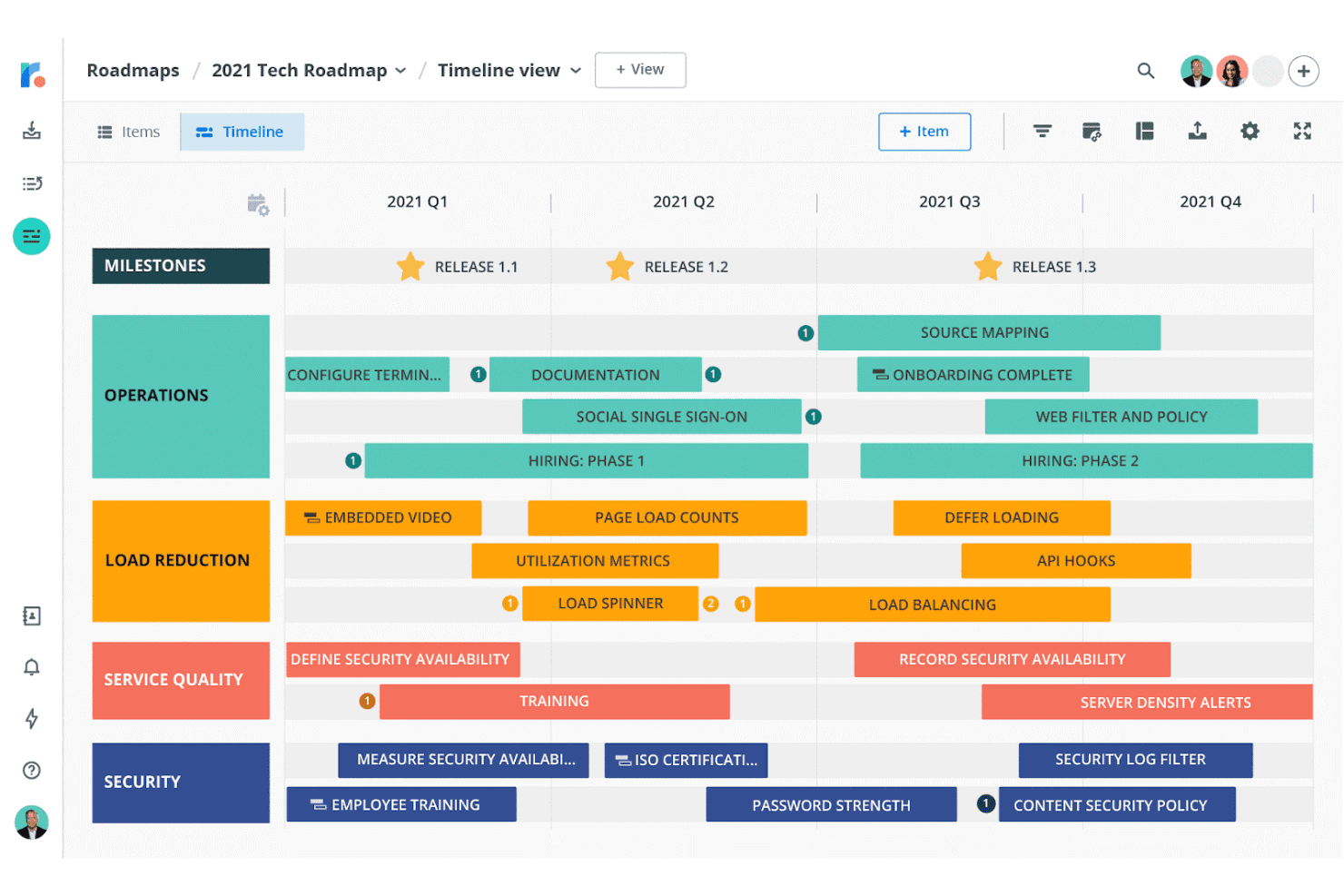
Roadmunk offre modelli basati sui modelli RICE e Kano per aiutarti a definire le priorità delle idee. Tempo Roadmapping Software è una piattaforma per la pianificazione e la definizione delle priorità dei prodotti che combina una casella di posta per i feedback dei clienti, un gestore delle idee con sistemi integrati di valutazione RICE e valore rispetto allo sforzo e roadmap con più visualizzazioni che confluiscono in tempistiche a livello di portafoglio.
Per chi è più indicato Tempo Roadmapping Software?
Tempo Roadmapping Software è particolarmente adatto ai product manager e ai responsabili di prodotto che devono collegare direttamente i feedback dei clienti a roadmap prioritarie tra più team.
Perché ho scelto Tempo Roadmapping Software
Ho scelto Tempo Roadmapping Software perché è uno dei pochi strumenti che consente di seguire l'intero percorso di un feedback inviato da un cliente, fino a un'idea valutata e classificata, per poi arrivare a una roadmap di portafoglio pubblicata. Mi piace il modo in cui la casella di posta dei feedback si collega direttamente al Gestore delle idee, dove è possibile applicare la valutazione RICE o valore rispetto allo sforzo e riunire le roadmap dei singoli team in un'unica visualizzazione del portafoglio. Questa tracciabilità end-to-end è ciò che gli fa conquistare il primo posto tra le soluzioni per roadmap di portafoglio con collegamenti ai feedback.
Funzionalità principali di Tempo Roadmapping Software
- Matrice di valutazione valore rispetto allo sforzo: Una visualizzazione a matrice interattiva rappresenta graficamente le idee, consentendo di individuare immediatamente gli elementi di alto valore e basso sforzo.
- Sincronizzazione bidirezionale con Jira e Azure DevOps: Le modifiche apportate in Jira o Azure DevOps vengono riportate nella roadmap, mantenendo allineate consegna e strategia senza aggiornamenti manuali.
- Portali per i feedback dei clienti: I portali personalizzabili consentono ai clienti di inviare direttamente i propri feedback, che è poi possibile classificare in base alla fonte e collegare a idee specifiche nell'elenco delle attività.
- Visualizzazione da parte di un numero illimitato di parti interessate: Chiunque non disponga di una licenza a pagamento può comunque visualizzare roadmap condivise o esportate, permettendo di coinvolgere tutti i revisori necessari senza costi aggiuntivi.
Integrazioni di Tempo Roadmapping Software
Tempo Roadmapping Software offre 9 integrazioni documentate, tra cui Jira, Azure DevOps, Trello, Asana, Monday.com, Pivotal Tracker, Shortcut, GitHub e GitLab. La sua API supporta integrazioni personalizzate, mentre la sincronizzazione bidirezionale con Jira e Azure DevOps è disponibile su piani selezionati.
Pros and Cons
Pros:
- I feedback collegano le idee all'elenco delle attività valutato
- Framework RICE e valore-sforzo integrati
- Più visualizzazioni della roadmap supportano l'allineamento delle parti interessate
Cons:
- La gerarchia più dettagliata delle iniziative rimane limitata
- Nessun confronto tra scenari o definizione delle priorità tramite IA
Learn more about Tempo Roadmapping Software:
Altre opzioni
Ecco alcune altre opzioni che non sono entrate nell’elenco principale, ma che vale la pena prendere in considerazione.
- 11CannyIdeale per formule di calcolo personalizzate
- 12StoriesOnBoardIdeale per la definizione delle priorità delle funzionalità basata sulle mappe delle storie
- 13ProductPlanIdeale per stabilire le priorità delle roadmap con la ricerca basata sull'intelligenza artificiale
- 14PendoIdeale per la votazione delle funzionalità da parte dei clienti collegata ai ricavi
- 15PlanviewIdeale per la definizione delle priorità su scala di portafoglio aziendale
- 16Jira Product DiscoveryIdeale per definire le priorità delle funzionalità collegate a Jira
- 17Ducalis.ioIdeale per la valutazione basata sui ruoli e l'allineamento degli elettori
Come valuto gli strumenti per la definizione delle priorità dei prodotti
La mia valutazione si divide in tre parti: funzionalità principali (a cui assegno il peso maggiore), verificando se uno strumento è in grado di assegnare punteggi e classificare le iniziative utilizzando metodi strutturati e generare tabelle di marcia visive condivisibili; funzionalità distintive, come la modellazione di scenari ipotetici; e fattori che vanno oltre le funzionalità, come il supporto all'inserimento e l'adeguatezza del modello di prezzo per i team interfunzionali.
Funzionalità principali (requisiti fondamentali per questo elenco)
Quando seleziono gli strumenti da inserire nel mio elenco, assegno a ciascuno un punteggio su una scala da 0 (non offre la funzionalità) a 5 (eccelle in quest'area) per ogni funzionalità principale elencata di seguito. Converto quindi il totale in una percentuale per contribuire a valutare l'adeguatezza complessiva di ciascuno strumento, attribuendo un peso aggiuntivo a tutte le funzionalità che ho ritenuto essenziali.
- Metodo di definizione delle priorità (essenziale): verifico se uno strumento supporta RICE, il calcolo ponderato dei punteggi o le matrici valore rispetto allo sforzo, con criteri personalizzabili e pesi modificabili.
- Visualizzazione della tabella di marcia (essenziale): ogni strumento deve produrre tabelle di marcia condivisibili e filtrabili, che posso adattare ai dirigenti, ai responsabili tecnici o ai team a contatto con i clienti.
- Aggregazione di riscontri e contributi: cerco strumenti che consentano di collegare direttamente le richieste dei clienti o i contributi del team vendite alle iniziative, in modo che i punteggi riflettano segnali reali della domanda.
- Gestione delle iniziative e dell'elenco delle attività: un elenco delle attività ben strutturato, con gerarchie, campi personalizzati e azioni collettive, è importante quando si gestiscono centinaia di idee per nuove funzionalità.
- Collaborazione interfunzionale: valuto se i portatori di interesse possono votare, assegnare punteggi o commentare all'interno dello strumento, invece di fare affidamento su conversazioni parallele.
- Integrazione con gli strumenti di esecuzione: la sincronizzazione bidirezionale con piattaforme come Jira o Azure DevOps mantiene collegate le decisioni sulle priorità all'esecuzione a livello di sprint, senza aggiornamenti manuali.
Una volta ottenuto un elenco di strumenti che soddisfano i criteri, considero ciò che distingue ciascuna piattaforma.
Fattori distintivi (ciò che differenzia i fornitori)
Ecco come confronto i diversi fornitori:
Funzionalità distintive
La modellazione di scenari ipotetici è la prima funzionalità che verifico. Prima di definire le priorità di un trimestre, voglio poter trascinare un'iniziativa fuori dall'ambito e vedere come questo modifica le tempistiche e i punteggi di tutto il resto. Anche i portali per la votazione dei clienti sono importanti, perché sostituiscono le richieste aneddotiche con segnali quantificabili della domanda, direttamente collegati alle iniziative a cui è stato assegnato un punteggio. Cerco campi per la stima dei ricavi e dell'impatto che consentano di associare a ogni elemento valori previsti di fidelizzazione o risparmio sui costi, fornendo a finanza e dirigenza un linguaggio condiviso per discutere dei compromessi.
Oltre le funzionalità
Il modello di prezzo è molto importante in questo caso. Le licenze per utente diventano rapidamente costose quando si invitano responsabili tecnici, progettisti e rappresentanti commerciali a contribuire alla definizione delle priorità. Verifico se uno strumento offre livelli per visualizzatori o commentatori, così da non pagare il prezzo pieno per i portatori di interesse che devono solo votare o esaminare i punteggi. Il supporto all'inserimento è l'altro fattore che valuto attentamente. Uno strumento con modelli RICE o WSJF integrati e una configurazione guidata fa risparmiare settimane rispetto a uno che presenta un'area di lavoro vuota.
Come ho scelto il miglior software per la prioritizzazione dei prodotti
Che cosa cerco quando seleziono il miglior sistema per la prioritizzazione dei prodotti? Ecco una sintesi dei miei criteri di valutazione:
Interfaccia utente (UI)
Il lancio di nuove funzionalità è difficile, ma gli strumenti che utilizzi per farlo non dovrebbero esserlo. Cerco soluzioni dotate di un'interfaccia utente intuitiva, in modo che i membri della squadra possano trovare facilmente le funzionalità giuste e tornare a concentrarsi su ciò che conta di più: creare un prodotto eccellente.
Usabilità
Tutti gli strumenti per la prioritizzazione che ho selezionato rientrano in due categorie: sono progettati appositamente per le squadre di prodotto oppure sono altamente personalizzabili, consentendo di creare una soluzione su misura per le proprie esigenze. Sono facili da usare e dovrebbero rendere il processo di definizione delle priorità un gioco da ragazzi.
Integrazioni
Ho scelto strumenti che si integrano con tutte le piattaforme più diffuse per lo sviluppo e la prototipazione dei prodotti, così puoi integrarli nel tuo ecosistema software.
Prezzi
Ho selezionato strumenti che ti aiutano a pianificare e definire le priorità delle nuove funzionalità dall'inizio alla fine, indipendentemente dal metodo di prioritizzazione, così puoi ottenere il massimo dal tuo investimento.
Quali sono le caratteristiche principali del software per la prioritizzazione dei prodotti?
Ecco alcune delle caratteristiche più importanti da considerare quando si seleziona una soluzione per la prioritizzazione delle funzionalità.
- Pianificazione dei progetti e dei flussi di lavoro: non è possibile dare priorità alle attività se prima non le si pianifica. Il software dovrebbe consentire di pianificare facilmente i progetti e i flussi di lavoro.
- Monitoraggio delle attività: i responsabili di progetto dovrebbero tenere sempre sotto controllo le attività, così da poter identificare i colli di bottiglia e allocare le risorse giuste per superare eventuali ostacoli.
- Comunicazione e collaborazione: il lavoro di squadra aiuta a dare priorità alle attività e a completarle entro le scadenze. L'app dovrebbe consentire ai membri del team di comunicare e collaborare per portare a termine le attività.
- Personalizzazione: i progetti del team possono differire per ambito e flusso di lavoro. La soluzione dovrebbe aiutare a personalizzare il proprio approccio creando sottoattività e dipendenze, oltre a consentire la creazione di modelli per risparmiare tempo su progetti futuri simili.
- Arretrato: organizzare i risultati da consegnare aiuta a dare priorità alle proprie iniziative. Lo strumento dovrebbe consentire di creare arretrati di rilascio, sprint e prodotto, così da poter definire le aspettative e raggiungere gli obiettivi del prodotto.
Perché è necessario uno schema di prioritizzazione?
Come ha affermato Steve Cochran, Responsabile tecnologico di ConnectWise:
Nella maggior parte delle aziende esiste un punto di partenza e un obiettivo finale, con diversi passaggi intermedi. Senza uno schema di prioritizzazione, è quasi impossibile completare questi passaggi e raggiungere l'obiettivo finale in tempi ragionevoli e senza problemi. Invece di dare priorità ai progetti in base alla rapidità con cui è possibile avviarli, organizzate i team in modo che siano in linea con le reali esigenze dell'azienda, evitando di concentrarvi solo sulle attività a breve termine. Assicuratevi che lo schema delle priorità sia chiaramente definito e visibile a tutti; in caso contrario, rischiate di utilizzare le vostre risorse in modo subottimale sulla base dei singoli obiettivi dei prodotti, facendo deragliare nel frattempo la roadmap complessiva.
Lancia funzionalità migliori con gli strumenti per la prioritizzazione dei prodotti
Il software per la prioritizzazione dei prodotti aiuta a lanciare funzionalità che soddisfano i clienti e aumentano il valore aziendale. Scopri di più sui modelli per la prioritizzazione delle funzionalità, su come dare priorità alle funzionalità del prodotto e su quale sia il metodo migliore. Scoprirai metodi di valutazione delle priorità come il modello di punteggio ponderato, il poker delle priorità, il metodo MoSCoW, il punteggio RICE, la matrice valore rispetto allo sforzo e altri modelli per la prioritizzazione dei prodotti.
Elenco di strumenti correlati:
- Software per gli indicatori delle funzionalità
- Software per il feedback degli utenti
- Software per la roadmap del prodotto
Iscriviti alla newsletter per i responsabili di prodotto per ricevere direttamente nella tua casella di posta suggerimenti su come lanciare prodotti straordinari.