

10 migliori software gratuiti per mappe di calore recensiti nel 2026

Elenco dei migliori software gratuiti per mappe di calore


Il software gratuito per mappe di calore consente di monitorare i clic, la profondità di scorrimento e l’attività sulla pagina, così puoi individuare problemi e opportunità relativi alla UX senza incidere sul budget.
Per responsabili di prodotto, professionisti del marketing e team UX, è un modo conveniente per capire esattamente come gli utenti interagiscono con il tuo sito, individuando CTA ignorate, percorsi di navigazione poco chiari o sezioni che non riescono a catturare l’attenzione.
Dopo aver testato e confrontato diversi strumenti gratuiti, ho selezionato opzioni che offrono informazioni affidabili, funzionalità essenziali e una configurazione semplice, senza costi nascosti, aiutandoti a migliorare il coinvolgimento e le conversioni mantenendo la spesa a zero.
Perché fidarsi dei nostri consigli sui software
Il nostro team testa e recensisce software dal 2012. In quanto product manager noi stessi, sappiamo quanto sia difficile — e importante — scegliere il software giusto.
Per questa guida, abbiamo valutato gli strumenti attraverso test pratici e ricerche indipendenti, assegnando un punteggio agli strumenti in base ai nostri criteri di selezione.
Le nostre recensioni riflettono il nostro giudizio editoriale umano, non un discorso di vendita.
Riepilogo dei migliori software gratuiti per mappe di calore
Questa tabella comparativa riassume i dettagli sui prezzi delle mie migliori selezioni di software gratuiti per mappe di calore, per aiutarti a trovare quello più adatto al tuo budget e alle esigenze della tua attività.
| Tool | Best For | Trial Info | Price | ||
|---|---|---|---|---|---|
| 1 | Ideale per l'analisi del tasso di conversione | Prova gratuita di 7 giorni + piano gratuito disponibile | Da $32/mese (fatturato annualmente) | Website | |
| 2 | Ideale per il design continuo del prodotto | Demo gratuita disponibile | Prezzo su richiesta | Website | |
| 3 | Ideale per il tracciamento degli utenti in tempo reale | Prova gratuita di 30 giorni + piano gratuito disponibile | Da $55/mese | Website | |
| 4 | Ideale per l’analisi SEO e UX | Prova gratuita di 14 giorni + piano gratuito disponibile | Da $32/mese | Website | |
| 5 | Ideale per l'integrazione del feedback degli utenti | Piano gratuito disponibile | Da $39/mese (fatturazione annuale) | Website | |
| 6 | Ideale per la riproduzione delle sessioni con funnel avanzati | Piano gratuito + demo gratuita disponibile | Prezzo su richiesta | Website | |
| 7 | Ideale per l'analisi delle app mobili | Piano gratuito disponibile | Prezzo su richiesta | Website | |
| 8 | Ideale per registrazioni dettagliate delle sessioni basate su eventi | Prova gratuita di 14 giorni disponibile | I piani partono da $65/mese | Website | |
| 9 | Ideale per le funzionalità di test A/B | Prova gratuita di 30 giorni disponibile | A partire da $29/mese | Website | |
| 10 | Ideale per testare l'esperienza prodotto | Prova gratuita di 14 giorni + piano gratuito disponibile | Da $175/mese (fatturazione annuale) | Website |
Recensione dei migliori software gratuiti per mappe di calore
Di seguito trovi i miei riepiloghi dettagliati dei migliori software gratuiti per mappe di calore inclusi nel mio elenco. Le mie recensioni offrono un’analisi approfondita delle funzionalità principali, dei vantaggi e degli svantaggi, delle integrazioni e dei casi d’uso ideali di ogni strumento, per aiutarti a trovare quello più adatto a te.

Ideale per l'analisi del tasso di conversione

Lucky Orange è uno strumento di ottimizzazione delle conversioni che fornisce alle aziende approfondimenti sul comportamento degli utenti tramite mappe di calore e registrazioni delle sessioni. È utilizzato principalmente da marketer digitali e proprietari di siti web che desiderano migliorare i propri tassi di conversione.
Perché ho scelto Lucky Orange: Ciò che distingue questo strumento è che anche il piano gratuito è funzionale per siti di piccole dimensioni — non si tratta solo di una prova. Ottieni valore immediato: la possibilità di vedere dove gli utenti reali incontrano difficoltà tramite mappe di calore e registrazioni, analizzare i funnel e comprendere dove gli utenti abbandonano i campi del modulo. Certo, alcune funzionalità — come l'elevato volume di sessioni e la maggiore durata di conservazione dei dati — sono disponibili solo nei piani a pagamento, ma il livello gratuito consente comunque ai team di testare i flussi, individuare punti di attrito nell'esperienza utente e decidere se investire di più. Inoltre, il modello di prezzo privilegia l'utilizzo (quote di sessione e lunghezza della retention) rispetto al blocco delle funzionalità, offrendo così maggiore prevedibilità durante la crescita.
Funzionalità e integrazioni principali:
Funzionalità includono il supporto tramite chat che ti permette di interagire in tempo reale con i visitatori. Puoi utilizzare sondaggi e questionari per raccogliere feedback direttamente dal tuo sito. Lo strumento offre anche l'analisi dei moduli, mostrandoti dove gli utenti abbandonano il processo di compilazione.
Integrazioni includono Shopify, WordPress, HubSpot, Google Analytics, BigCommerce, Adobe Commerce, Squarespace, Weebly, Wix e Joomla.
Cosa è gratuito? Lucky Orange offre un piano gratuito che ti consente di monitorare 100 sessioni al mese con una conservazione dei dati per 30 giorni. A differenza di altri strumenti che rimuovono le funzionalità nei piani gratuiti, qui puoi comunque utilizzare elementi fondamentali come mappe di calore, registrazioni delle sessioni, funnel, analisi dei moduli e chat dal vivo — rendendolo un'ottima soluzione per testare la piattaforma senza spese. In aggiunta, è disponibile una prova gratuita di 7 giorni dei piani a pagamento se desideri valutare limiti più alti e una retention estesa in base alle tue esigenze.
Pros and Cons
Pros:
- Offre chat con i visitatori in tempo reale
- Fornisce analisi dettagliate dei moduli
- Include mappe di calore dinamiche
Cons:
- Il costo può crescere per siti ad alto traffico o uso dettagliato
- Visibilità limitata su elementi di navigazione complessi

Ideale per il design continuo del prodotto
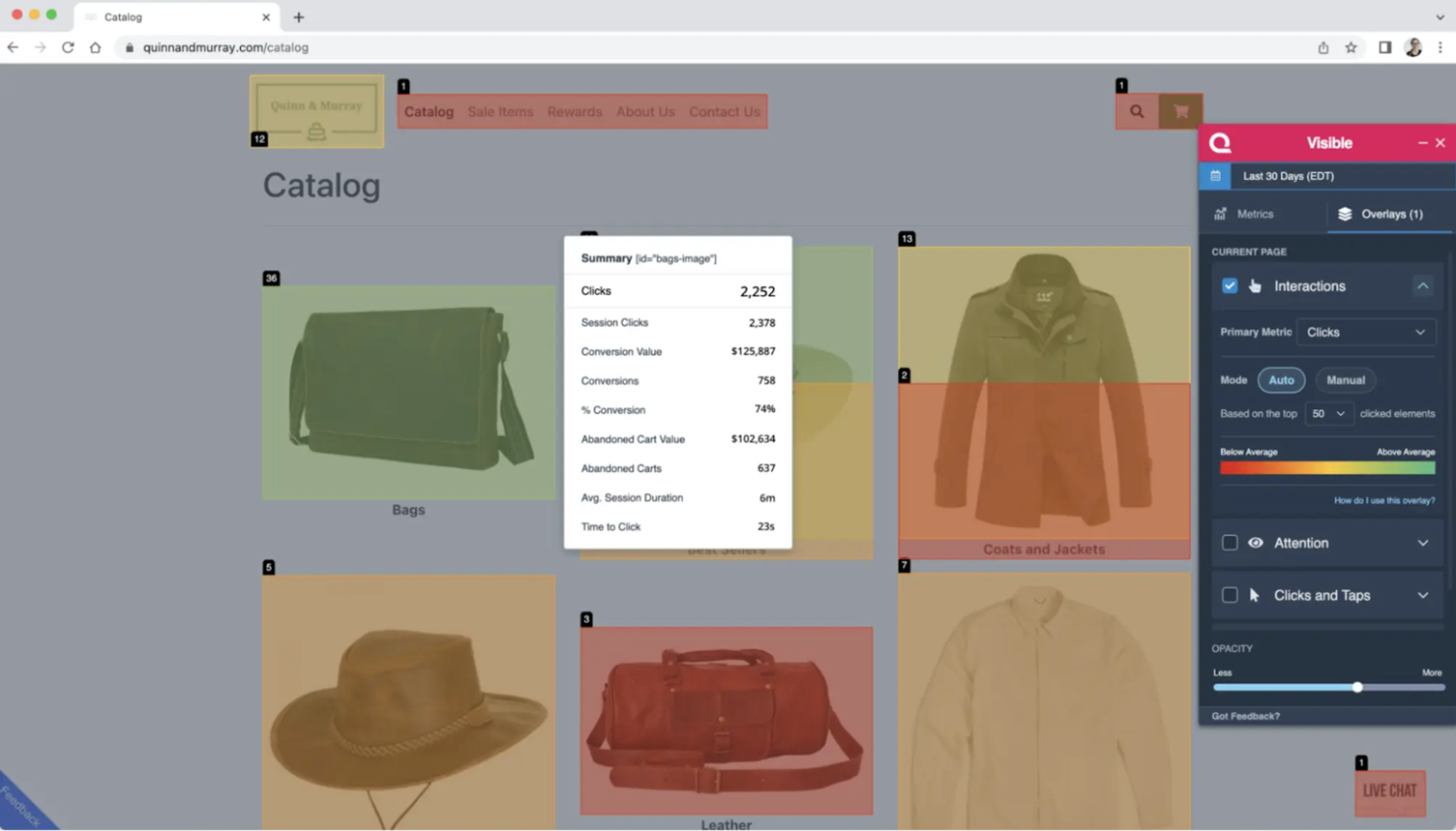
Quantum Metric è una piattaforma di analisi dell'esperienza digitale progettata per grandi aziende che desiderano migliorare i loro prodotti digitali attraverso insight continui. Serve team di diversi settori offrendo analisi in tempo reale e riproduzioni di sessioni per comprendere il comportamento degli utenti.
Perché ho scelto Quantum Metric: Si concentra sul design continuo del prodotto, offrendo dati in tempo reale che ti aiutano a iterare e migliorare il tuo prodotto sulla base delle interazioni degli utenti. Con funzionalità come le sessioni registrate, puoi vedere esattamente come gli utenti navigano nel tuo sito e individuare i punti di attrito. Lo strumento offre anche il rilevamento delle anomalie, avvisandoti di comportamenti degli utenti inaspettati. Questo ciclo di feedback continuo garantisce che il tuo prodotto si evolva in base alle esigenze degli utenti.
Funzionalità principali & integrazioni:
Funzionalità includono il rilevamento delle anomalie, che ti avvisa di comportamenti utente insoliti che potrebbero indicare problemi. L'analisi dei funnel ti aiuta a tracciare i percorsi degli utenti e a individuare dove si verificano abbandoni, permettendoti di ottimizzare i percorsi di conversione. Le analisi in tempo reale forniscono dati aggiornati al minuto sulle interazioni degli utenti, aiutandoti a prendere decisioni informate rapidamente.
Integrazioni includono Salesforce, Adobe Analytics, Google Analytics, Optimizely, Tealium, Segment, Slack, Jira, ServiceNow e Splunk.
Cosa è gratuito? Quantum Metric non offre un piano gratuito per sempre. Puoi richiedere una demo o una valutazione, che ti consente di esplorare le sue funzionalità principali con alcune restrizioni sull'accesso ai dati e sulle capacità di analisi.
Pros and Cons
Pros:
- Offre analisi in tempo reale
- Fornisce avvisi di rilevamento anomalie
- Supporta l'analisi dei funnel
Cons:
- Nessun piano gratuito
- Personalizzazione limitata delle dashboard

Ideale per il tracciamento degli utenti in tempo reale
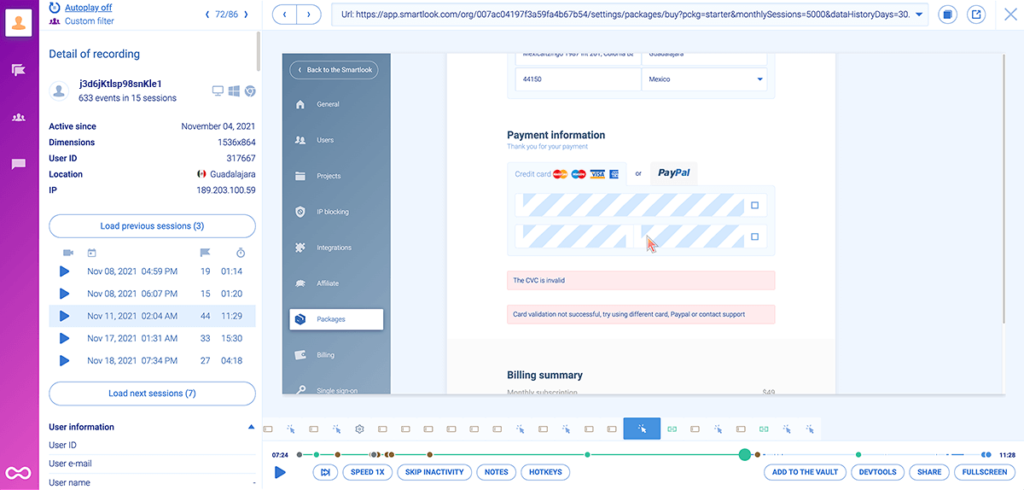
Smartlook è uno strumento di analisi del prodotto progettato per le aziende che desiderano comprendere il comportamento degli utenti sia sulle piattaforme web che mobile. È ideale per i team che hanno bisogno di approfondimenti dettagliati su come gli utenti interagiscono con il loro prodotto.
Perché ho scelto Smartlook: Offre funzionalità di tracciamento degli utenti in tempo reale attraverso le registrazioni delle sessioni, permettendoti di vedere esattamente come gli utenti navigano sul tuo sito. Le heatmap forniscono dati visivi su clic e scroll degli utenti, aiutandoti a individuare le aree più popolari delle tue pagine. Il monitoraggio degli eventi consente di controllare azioni specifiche dell’utente, e l’analisi dei funnel mostra dove gli utenti abbandonano il processo di conversione. Queste caratteristiche lo rendono una scelta solida per comprendere le interazioni in tempo reale.
Caratteristiche principali & integrazioni:
Caratteristiche includono registrazioni delle sessioni che catturano ogni interazione dell’utente, monitoraggio degli eventi che consente di controllare azioni specifiche e analisi dei funnel per comprendere i percorsi di conversione. Le mappe di calore forniscono una rappresentazione visiva dell’attività degli utenti, aiutandoti a individuare le zone più coinvolgenti del sito. Sono disponibili anche report sugli arresti anomali e analisi per app mobile per ampliare la comprensione del comportamento degli utenti.
Integrazioni includono Salesforce, Slack, Intercom, Zendesk, Google Analytics, HubSpot, WordPress, Shopify, Adobe Commerce e Pipedrive.
Cosa è gratis? Il piano gratuito di Smartlook include 3.000 sessioni mensili, analisi di prodotto di base, dati storici nelle heatmap, supporto sia per applicazioni web che mobile, conservazione dei dati per un mese e integrazione con Slack. È possibile provare anche i piani avanzati con una prova gratuita, senza necessità di carta di credito.
Pros and Cons
Pros:
- Tracciamento utenti in tempo reale
- Registrazioni dettagliate delle sessioni
- Heatmap visive
Cons:
- Alcune funzionalità richiedono piani premium
- Problemi di integrazione occasionali

Plerdy
Ideale per l’analisi SEO e UX
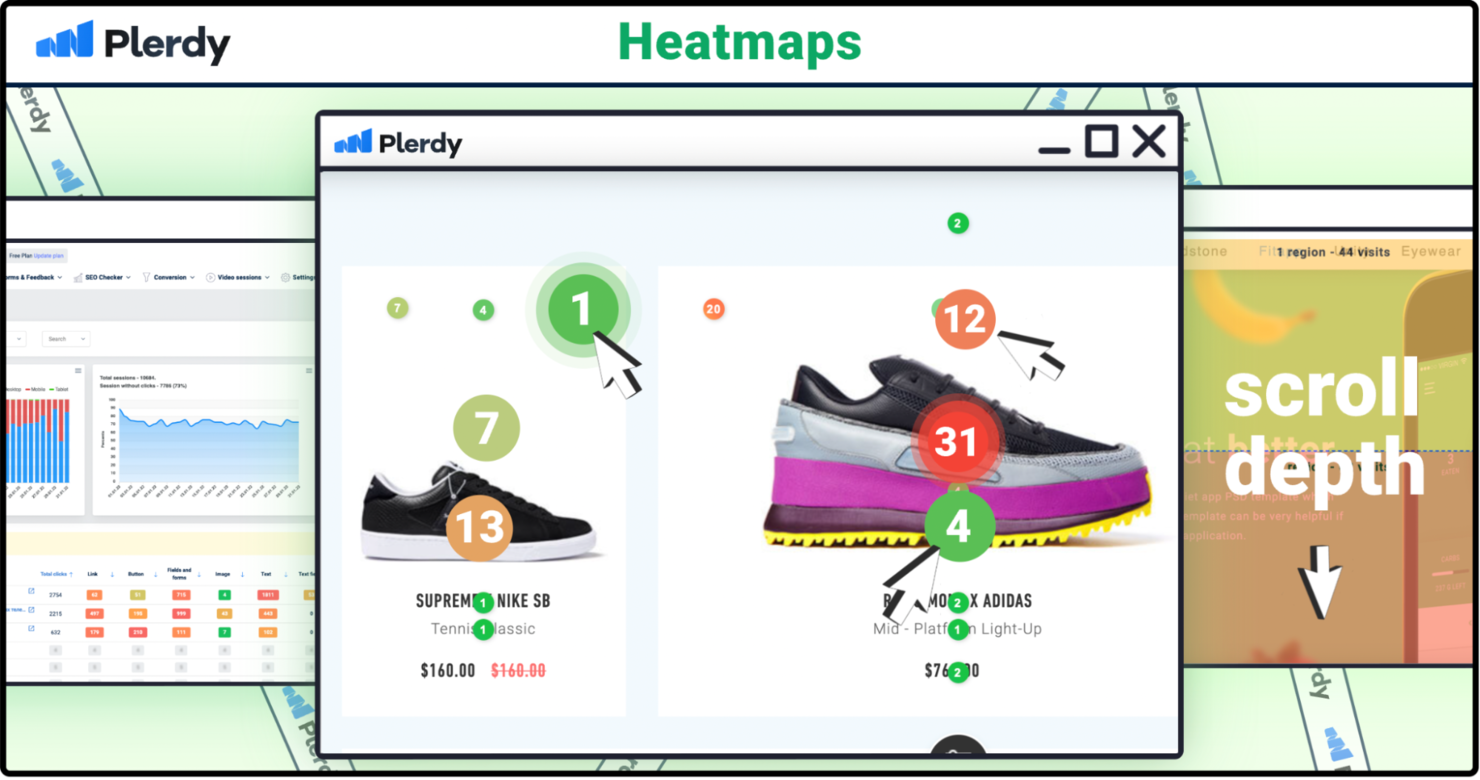
Plerdy è uno strumento di ottimizzazione del tasso di conversione che supporta marketer digitali, specialisti SEO e team UX offrendo analisi sia su come si comportano gli utenti sul tuo sito che su come il tuo sito appare nei risultati di ricerca. Aiuta con heatmap, registrazioni delle sessioni, pop-up, audit SEO, tracciamento degli eventi e altro ancora.
Perché ho scelto Plerdy: Anche il suo piano gratuito offre più di una semplice anteprima: puoi ottenere veri segnali UX senza pagare. Con visualizzazioni heatmap limitate ma utili, alcune registrazioni delle sessioni e controlli di audit SEO, puoi già vedere dove le persone cliccano rispetto a dove scorrono, quali moduli vengono ignorati e dove potrebbero nascondersi problemi di ricerca. Il piano gratuito non è illimitato e funzionalità come traffico più elevato, più sessioni video, più pop-up o audit SEO estesi sono disponibili nei piani a pagamento. Ma per testare, individuare attriti e ottenere insight iniziali, supera di gran lunga molti strumenti entry-level.
Caratteristiche e integrazioni principali:
Funzionalità includono moduli pop-up per aiutare a catturare lead e far crescere la tua mailing list. Il tracciamento degli eventi consente di monitorare azioni specifiche degli utenti, fornendo analisi approfondite sul loro comportamento. I funnel di conversione evidenziano i punti di abbandono, aiutandoti a perfezionare i percorsi utente.
Integrazioni includono Google Analytics, Google Tag Manager, HubSpot, Slack, WordPress, Shopify, Adobe Commerce, Wix, Drupal e Joomla.
Cosa offre gratuitamente? Plerdy offre un piano gratuito permanente che include un numero limitato di visualizzazioni giornaliere delle heatmap (≈100), circa 500 registrazioni video/sessioni, audit SEO di base, alcuni pop-up/moduli e tracciamento conversioni limitato. Hai anche una prova gratuita dei piani a pagamento per esplorare capacità aggiuntive e funzionalità prima di decidere.
Pros and Cons
Pros:
- Offre segnalazioni SEO
- Include heatmap dettagliate
- Fornisce analisi del funnel di conversione
Cons:
- La configurazione iniziale può essere complessa
- Alcune funzionalità richiedono conoscenze tecniche

Ideale per l'integrazione del feedback degli utenti
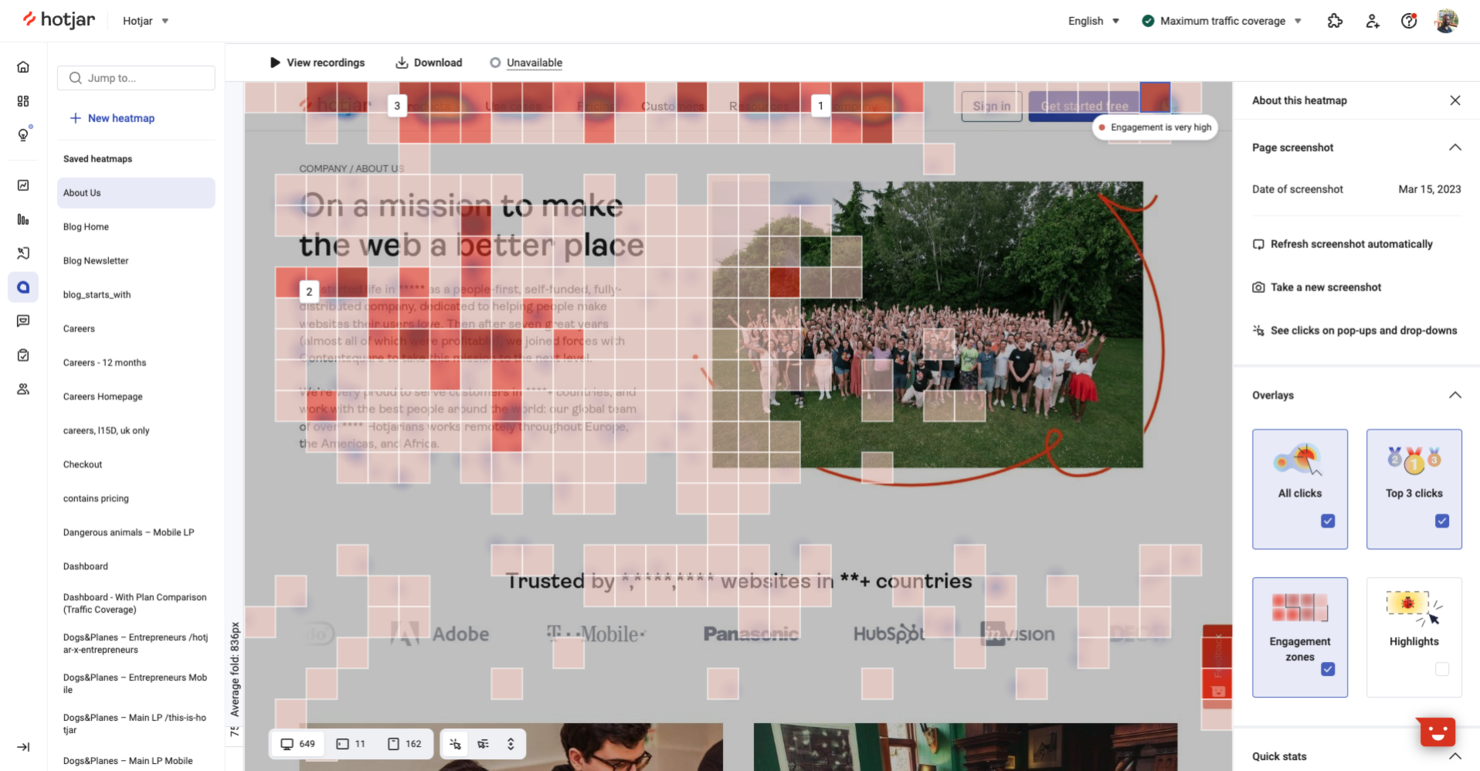
Hotjar è uno strumento di analisi del comportamento che aiuta le aziende a comprendere le interazioni degli utenti sui loro siti web. Si rivolge a team di marketing, designer UX e product manager fornendo insight sul comportamento degli utenti e raccolta di feedback.
Perché ho scelto Hotjar: Integra il feedback degli utenti direttamente nelle sue analisi, offrendo preziosi dati qualitativi. Grazie a funzionalità come sondaggi e questionari, puoi raccogliere opinioni degli utenti insieme ai dati delle heatmap. Questa combinazione permette di vedere non solo cosa fanno gli utenti, ma anche perché lo fanno. L’integrazione tra strumenti di feedback e analisi fornisce un quadro più completo dell’esperienza utente.
Funzionalità e integrazioni principali:
Funzionalità includono heatmap che rappresentano visivamente le interazioni degli utenti. Le registrazioni delle sessioni ti permettono di guardare sessioni reali per individuare i punti critici. I funnel di conversione mostrano dove gli utenti abbandonano il percorso, aiutandoti ad ottimizzare i passaggi verso la conversione.
Integrazioni includono HubSpot, Slack, Zapier, Optimizely, Unbounce, Google Analytics, Segment, WordPress, Shopify e Squarespace.
Cosa è gratuito? Hotjar offre un piano gratuito per sempre con sessioni e heatmap giornaliere limitate, permettendoti di esplorare le sue funzionalità principali senza alcun costo.
Pros and Cons
Pros:
- Raccolta di feedback in tempo reale
- Configurazione e installazione semplici
- Rappresentazione visiva dei dati
Cons:
- Conservazione limitata dei dati
- Il piano base manca di funzionalità avanzate

Ideale per la riproduzione delle sessioni con funnel avanzati
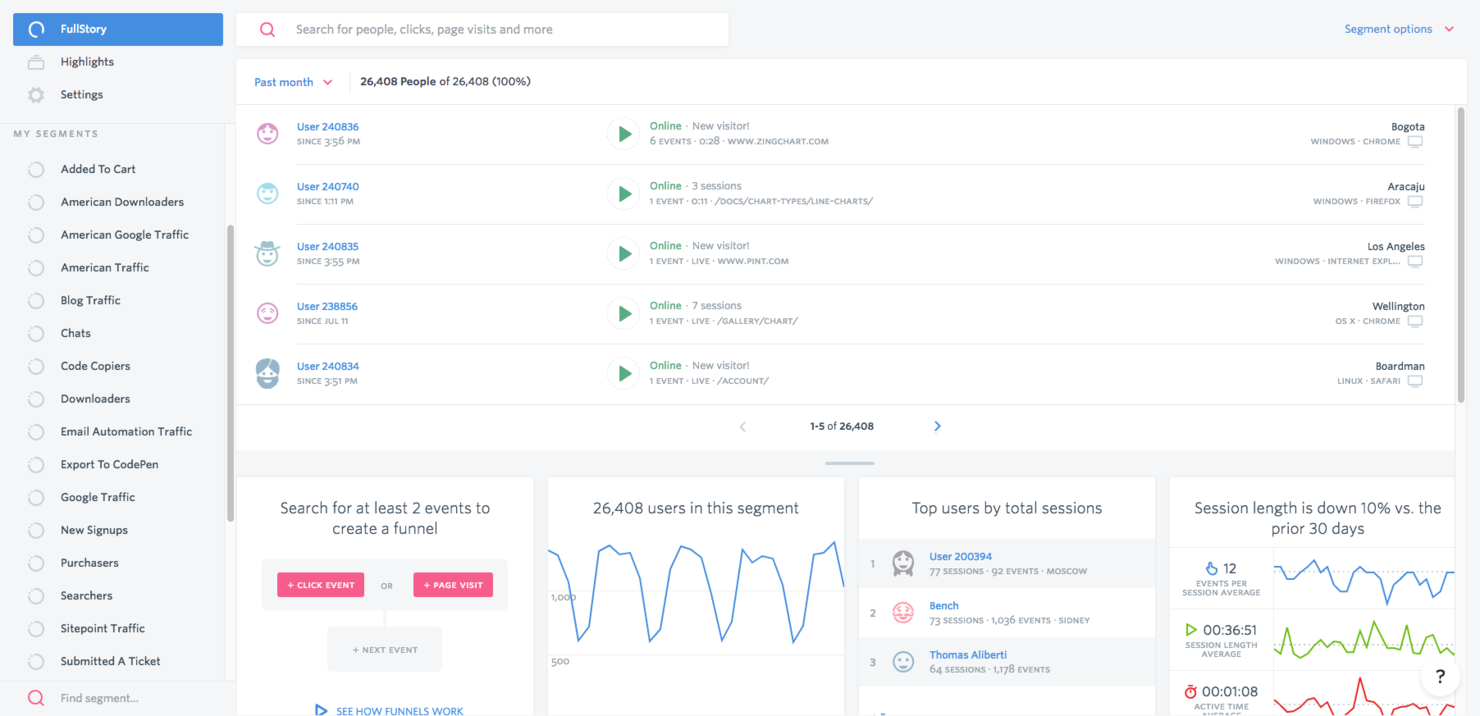
Fullstory è un software di heatmap che offre approfondimenti sul comportamento degli utenti tramite analisi e riproduzione delle sessioni. Si rivolge a diversi settori, tra cui retail, finanza e SaaS, aiutando le aziende a migliorare l'esperienza utente e a risolvere rapidamente eventuali problemi.
Perché ho scelto Fullstory: Si distingue per la riproduzione delle sessioni, che permette di osservare in tempo reale le interazioni degli utenti sul sito. Questa funzionalità aiuta a individuare le frustrazioni degli utenti e a ottimizzare i percorsi di navigazione. Le informazioni sul percorso del cliente e il rilevamento delle frizioni sono elementi chiave, offrendo una visione completa del comportamento degli utenti.
Particolarmente interessante è che anche il piano gratuito include limiti generosi per le sessioni e un anno intero di conservazione dei dati—vantaggi che molti concorrenti riservano ai piani a pagamento. Queste funzionalità rendono Fullstory una scelta solida per migliorare l’esperienza digitale e aumentare l’engagement, sia che tu stia testando il piano gratuito o passando a funzioni avanzate.
Funzionalità e integrazioni principali:
Le funzionalità includono l’intelligenza del percorso utente che mappa le interazioni degli utenti sul tuo sito. Il rilevamento delle frizioni evidenzia le aree dove gli utenti incontrano difficoltà, consentendo di apportare le modifiche necessarie. L’analisi del sentimento fornisce informazioni sulle emozioni degli utenti, aiutando a personalizzare le esperienze.
Le integrazioni comprendono Salesforce, Slack, Google Analytics, Jira, Segment, Optimizely, Zendesk, HubSpot, Shopify e WordPress.
Cosa offre il piano gratuito? FullstoryFree offre 30.000 sessioni al mese, 10 utenti, 5.000 eventi lato server e un anno intero di conservazione delle registrazioni e analisi—un vantaggio che molti strumenti sbloccano solo con i piani a pagamento. Puoi anche testare le funzionalità premium con una prova gratuita senza necessità di carta di credito.
Pros and Cons
Pros:
- Riproduzione dettagliata delle sessioni
- Informazioni sul percorso del cliente
- Capacità di rilevamento delle frizioni
Cons:
- Curva di apprendimento ripida per i principianti
- Opzioni di personalizzazione limitate

UXCam
Ideale per l'analisi delle app mobili

UXCam è uno strumento di analisi per app mobili che aiuta i team di prodotto e gli sviluppatori a comprendere le interazioni degli utenti e a migliorare l'esperienza dell'app. Si concentra nel fornire informazioni sul comportamento degli utenti tramite registrazioni delle sessioni e heatmap, rivolgendosi principalmente a sviluppatori di app mobili e designer UX.
Perché ho scelto UXCam: È specializzato nell'analisi delle app mobili, offrendo funzionalità come replay delle sessioni e heatmap che mostrano le interazioni degli utenti all'interno della tua app. Puoi tracciare i flussi degli utenti per capire come navigano nell'app, identificando eventuali punti di attrito. Lo strumento offre anche analisi degli arresti anomali, aiutandoti a diagnosticare e risolvere rapidamente i problemi. Queste funzionalità sono essenziali per ottimizzare le prestazioni e la soddisfazione degli utenti dell'app mobile.
Caratteristiche salienti & integrazioni:
Caratteristiche includono replay delle sessioni che ti permettono di vedere le interazioni degli utenti in tempo reale, offrendo preziose informazioni sul comportamento. Le heatmap visualizzano dove gli utenti toccano e scorrono all'interno dell'app, aiutandoti a ottimizzare il layout e il design. L'analisi dei crash offre report dettagliati sugli arresti anomali dell'app, consentendoti di affrontare rapidamente i problemi e migliorare la stabilità.
Integrazioni includono Google Analytics, Mixpanel, Segment, Firebase, Amplitude, Adjust, AppsFlyer, Optimizely, Intercom e Slack.
Cosa è gratuito? Nel piano gratuito, UXCam offre un set di strumenti sorprendentemente utile per app mobili nelle fasi iniziali. Ottieni replay delle sessioni, heatmap e rilevamento di problemi UX di base (crash, tap di rabbia, blocco UI, ecc.), il che permette di individuare quasi subito dove gli utenti incontrano difficoltà. La quota gratuita di sessioni è sufficiente per testare ipotesi, eseguire il debug dei flussi e osservare il comportamento reale degli utenti senza pagare. È disponibile anche una prova gratuita delle funzionalità premium.
Pros and Cons
Pros:
- Include il rilevamento di crash e tap di rabbia
- Visualizza tap e scroll con heatmap
- Supporta il tracciamento dei flussi utente in-app
Cons:
- Il piano gratuito è limitato a 3.000 sessioni/mese
- Conservazione dei dati solo 30 giorni nel piano gratuito

Ideale per registrazioni dettagliate delle sessioni basate su eventi
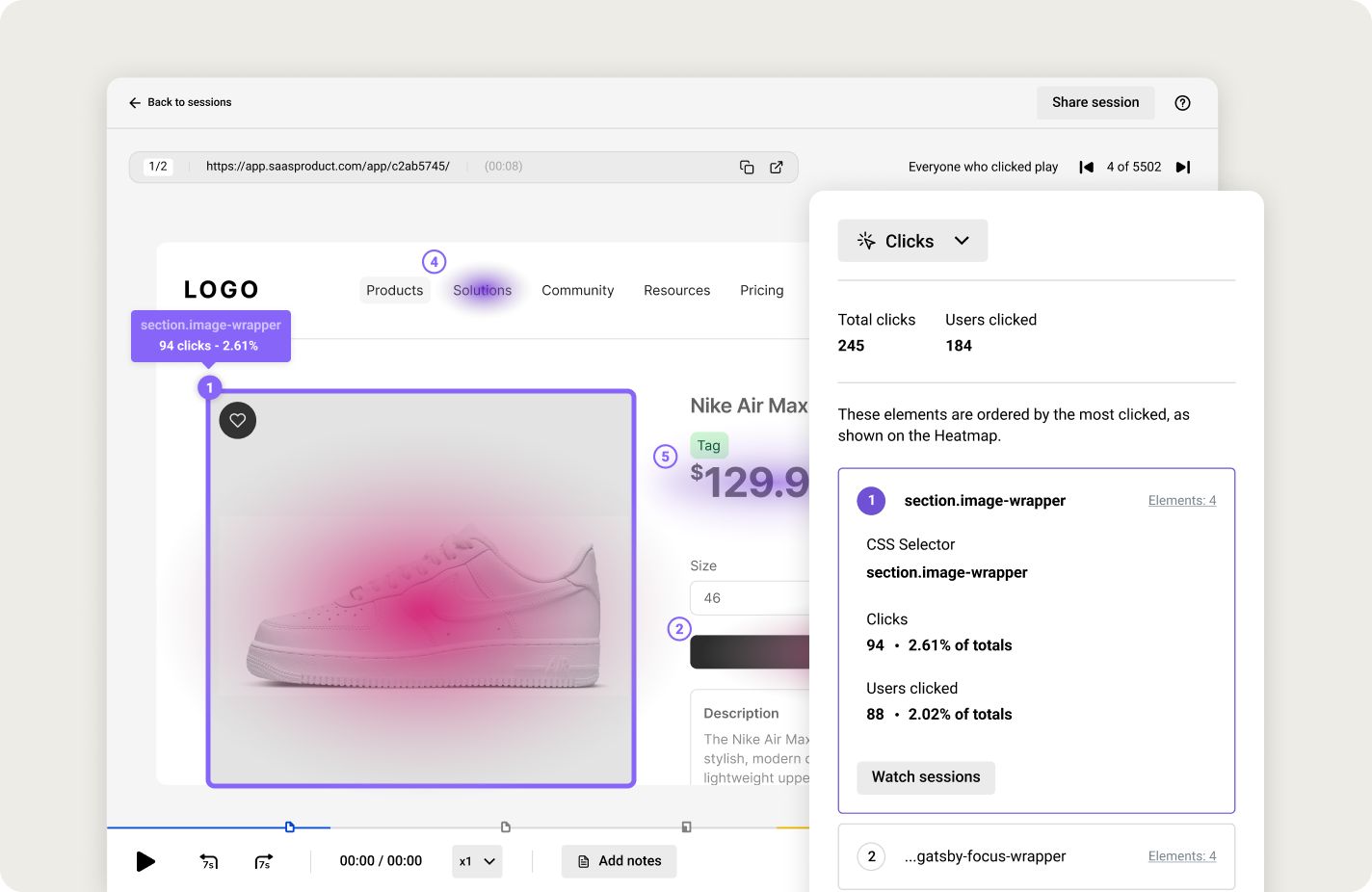
LiveSession è uno strumento di analisi progettato per le aziende che necessitano di approfondimenti dettagliati sulle interazioni degli utenti sulle loro piattaforme digitali. Serve aziende di ecommerce, fornitori SaaS e agenzie digitali offrendo registrazioni dettagliate delle sessioni e analisi del comportamento degli utenti.
Perché ho scelto LiveSession: Il piano gratuito è davvero utilizzabile per piccoli team o siti di dimensioni ridotte, non è solo una prova temporanea: puoi ottenere veri insight senza pagare. Avrai registrazioni dettagliate delle sessioni e filtri avanzati che ti permettono di andare oltre il semplice “chi ha cliccato dove” per individuare frustrazioni o abbandoni. Gli strumenti di segmentazione aggiungono un ulteriore livello di profondità, aiutandoti a testare i flussi e identificare le aree problematiche. Il limite di 1.000 sessioni e 30 giorni di conservazione dati del piano gratuito significa che lo supererai velocemente se hai molto traffico, ma come soluzione iniziale o proof-of-concept è più completo di molte offerte gratuite concorrenti.
Funzionalità e integrazioni principali:
Funzionalità includono filtri avanzati che ti consentono di restringere le sessioni in base a criteri specifici. I tag personalizzati ti aiutano a organizzare e categorizzare le sessioni per un’analisi più semplice. Lo strumento offre anche il monitoraggio degli errori, permettendoti di individuare e correggere i problemi riscontrati dagli utenti.
Integrazioni includono Slack, Google Analytics, Intercom, HubSpot, WordPress, Shopify, Squarespace, Zendesk, Jira e Salesforce.
Cosa è gratuito? Il piano gratuito per sempre di LiveSession include 1.000 sessioni al mese, supporto per un massimo di 3 utenti su 2 progetti e conservazione dati per 30 giorni. Copre le funzionalità principali come replay delle sessioni, clickmap e filtri, offrendo ai piccoli team una vera opportunità di esplorare il comportamento degli utenti prima di decidere se passare ai piani a pagamento. Se vuoi provare le funzionalità premium come dashboard, eventi personalizzati e una conservazione dati più lunga, è disponibile anche una prova gratuita dei piani a pagamento.
Pros and Cons
Pros:
- Analisi dettagliata delle sessioni
- Opzioni di filtro avanzate
- Sistema di tagging personalizzato
Cons:
- Personalizzazione limitata nei report
- Curva di apprendimento più ripida per i nuovi utenti

Ideale per le funzionalità di test A/B
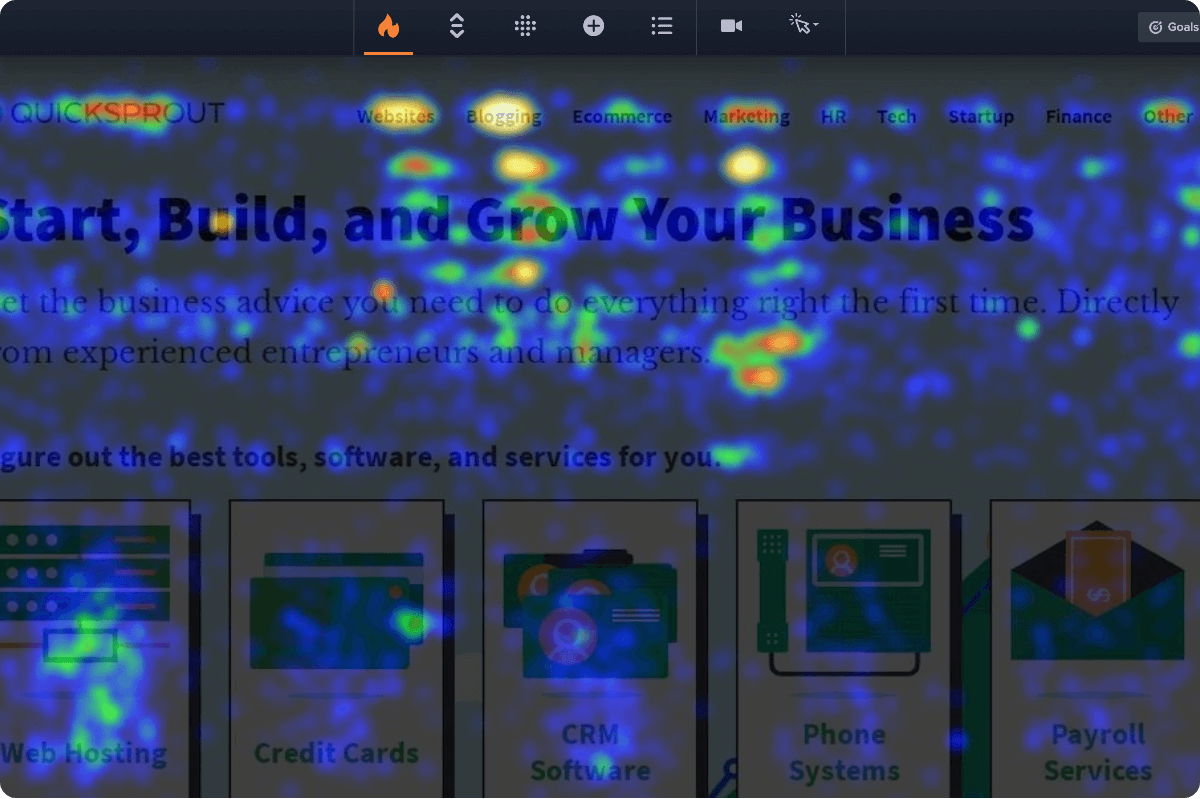
Crazy Egg è uno strumento di ottimizzazione dei siti web che fornisce informazioni sul comportamento degli utenti tramite heatmap e test A/B. Si rivolge a marketer e proprietari di siti web che desiderano migliorare le prestazioni e il coinvolgimento degli utenti sul proprio sito.
Perché ho scelto Crazy Egg: Si distingue per i test A/B, che ti permettono di sperimentare diverse versioni del sito per vedere quale funziona meglio. Le heatmap offrono una visione visiva delle interazioni degli utenti, mostrando dove i visitatori cliccano e scorrono. Lo strumento include anche una funzione confetti che suddivide i clic in base alle fonti di riferimento, aiutandoti a comprendere i pattern di traffico. Durante la prova gratuita hai accesso completo a tutte le funzionalità—heatmap, registrazioni, esperimenti, oltre a diversi strumenti visivi come confetti o overlay—per vedere come i visitatori cliccano, scorrono e navigano. È un ottimo modo per testare ciò che è davvero utile per il tuo sito senza pagare in anticipo.
Funzionalità e integrazioni principali:
Funzionalità includono scrollmap che mostrano fino a dove scorrono gli utenti nella pagina, fornendo informazioni sull’engagement con i contenuti. I report overlay evidenziano gli elementi cliccabili e la loro efficacia. Lo strumento offre inoltre registrazioni degli utenti, che ti permettono di osservare in tempo reale le interazioni sul tuo sito.
Integrazioni includono WordPress, Shopify, Wix, Adobe Commerce, Squarespace, Weebly, BigCommerce, HubSpot, Google Analytics e Optimizely.
Cosa offre gratuitamente? Crazy Egg offre una prova gratuita di 30 giorni, che ti consente di esplorare le sue funzionalità principali con alcune limitazioni sul numero di snapshot e utenti.
Pros and Cons
Pros:
- Offre test A/B approfonditi
- Fornisce informazioni dettagliate con scrollmap
- Include il tracciamento dei clic tramite confetti
Cons:
- Nessun piano gratuito
- Alcune funzionalità richiedono conoscenze tecniche

Sprig
Ideale per testare l'esperienza prodotto
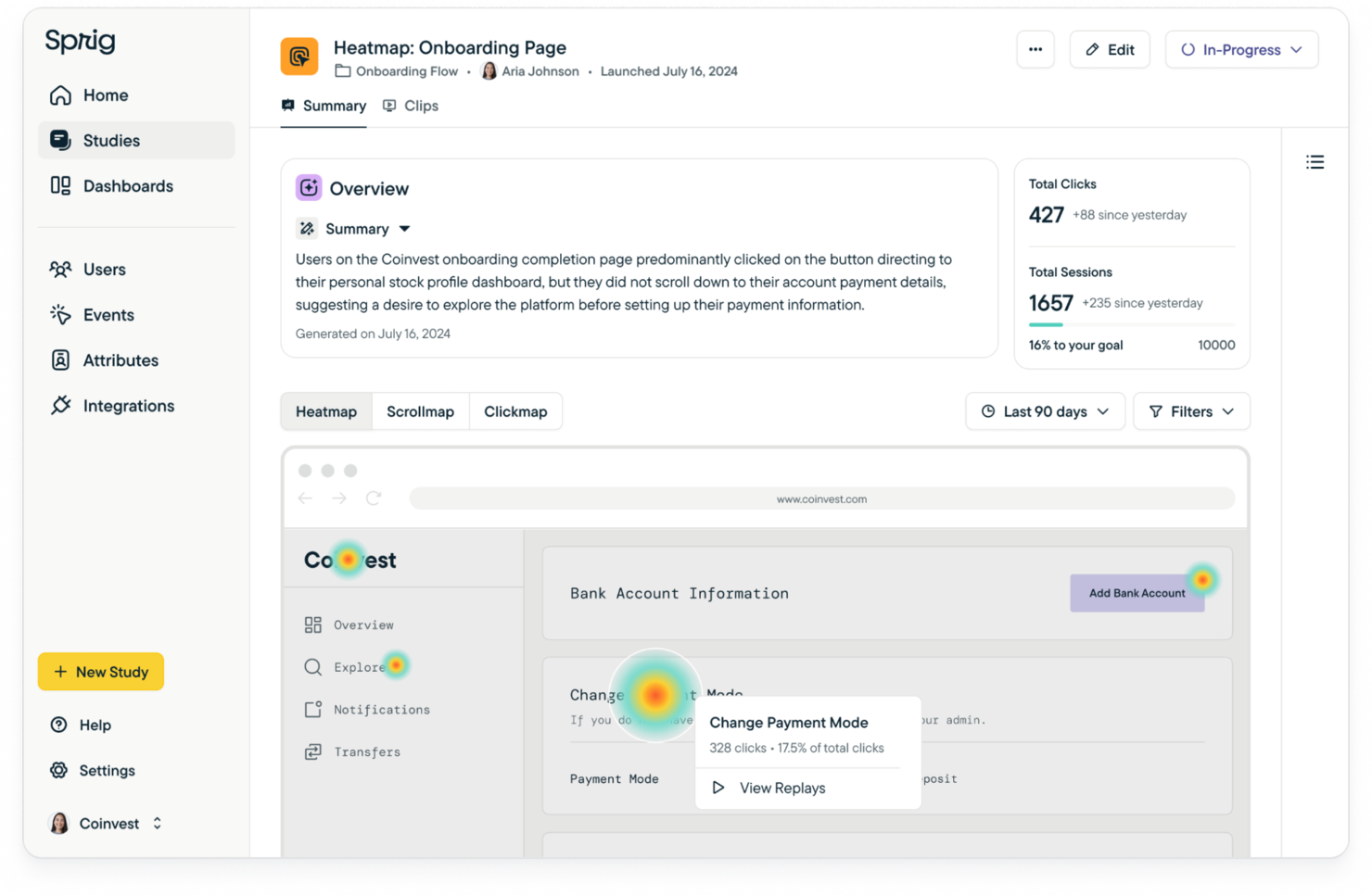
Sprig è una piattaforma di ricerca pensata per team di prodotto e UX che necessitano di strumenti di feedback, tracciamento dei comportamenti e insight per migliorare l'esperienza utente. Aiuta con sondaggi dettagliati, feedback in-app, replay dei comportamenti e heatmap, tutto integrato con l'AI per accelerare la generazione di insight.
Perché ho scelto Sprig: Il piano gratuito offre più di un semplice assaggio. Si ottengono delle “unità di studio” che permettono di effettuare piccoli replay, sondaggi, heatmap—anche risposte di feedback—così puoi già vedere cosa fanno e dicono gli utenti. Offre abbastanza per testare ipotesi, individuare i punti di frizione e ottenere dati qualitativi preliminari. Ovviamente, i piani a pagamento sbloccano limiti più elevati, più risposte, targeting avanzato e delivery mobile, quindi se vuoi espandere o approfondire dovrai passare a un livello superiore. Ma per i lavori nelle prime fasi, è sorprendentemente completo.
Funzionalità e integrazioni di rilievo:
Funzionalità includono micro-sondaggi che raccolgono feedback degli utenti nei momenti chiave. Le interviste video consentono conversazioni approfondite con gli utenti, fornendo insight qualitativi. I test di concetto aiutano a validare idee e design prima della realizzazione completa, assicurando l'allineamento con le aspettative degli utenti.
Integrazioni includono Adobe Analytics, Mixpanel, Slack, Figma, Jira, Looker, Optimizely, Segment, Google Analytics e Amplitude.
Cosa è gratis? Il piano gratuito di Sprig prevede quote mensili limitate: 50 clip di replay, circa 25 risposte ai sondaggi, 100 acquisizioni di heatmap e alcune risposte di feedback. Consente l'accesso agli strumenti di base—sondaggi, feedback, replay e heatmap. Se desideri più risposte, più clip, più unità o integrazioni e mobile, c’è una prova gratuita dei piani a pagamento.
Pros and Cons
Pros:
- Raccolta rapida di feedback
- Supporta le interviste video
- Test di concetto efficaci
Cons:
- Funzionalità di ricerca e analisi avanzate limitate
- Serve tempo per padroneggiare tutte le funzionalità
Altri software gratuiti per mappe di calore
Ecco alcune ulteriori opzioni di software gratuiti per mappe di calore che non sono state incluse nel mio elenco, ma che vale comunque la pena valutare:
- Contentsquare
Ideale per l'analisi visiva dei percorsi con intelligenza artificiale
- Matomo
Ideale per la conformità alla privacy dei dati
- WatchThemLive
Ideale per l'analisi video


Come valuto i software di heatmap gratuiti
Divido la mia valutazione in ciò che uno strumento deve assolutamente fare—come generare heatmap di click e scroll in un vero piano gratuito—e ciò che lo distingue per i team di prodotto che confrontano le opzioni.
Funzionalità di base (Requisiti minimi per questa lista)
Quando seleziono gli strumenti per la mia lista, valuto ciascuno su una scala da 0 (non offre la funzionalità) a 5 (eccelle in quest'area) per ogni funzionalità di base elencata di seguito. Poi, calcolo il punteggio totale dello strumento in percentuale. Ogni tool deve totalizzare un punteggio minimo complessivo del 65% per essere considerato per l'inclusione.
- Tipi di visualizzazione delle heatmap: Cerco strumenti che offrano almeno heatmap di click, scroll e movimento, poiché ogni tipo rivela un diverso livello di comportamento dell'utente su una pagina.
- Piano gratuito permanente: Lo strumento deve offrire un vero piano gratuito, non una prova a tempo limitato. Controllo che i limiti di sessioni o pageview siano sufficientemente alti per raccogliere dati utili.
- Tracciamento di sessioni e pagine: Ogni tool deve tracciare le interazioni su più pagine e supportare URL dinamici o applicazioni a pagina singola, dove i team di prodotto pubblicano tipicamente nuove funzionalità.
- Segmentazione per dispositivo e viewport: Le heatmap separate per desktop, tablet e mobile sono essenziali perché il comportamento del tocco su una schermata di checkout è diverso da quello del cursore sulla stessa pagina.
- Implementazione dello script di tracciamento: Valuto quanto rapidamente si può attivare uno snippet di tracciamento, che si tratti di un singolo tag JavaScript, di un container GTM o di un plugin CMS nativo.
- Filtri e segmentazione dei dati: Gli strumenti dovrebbero permettere di suddividere i dati delle heatmap per fonte di traffico, intervallo di date o segmento utente, in modo da confrontare il comportamento tra diversi gruppi o durante specifici lanci di release.
Dopo aver raccolto la lista di strumenti che rispettano questi criteri, considero ciò che distingue ciascuna piattaforma.
Fattori di differenziazione (Cosa distingue i fornitori)
Ecco come confronto e metto a confronto i diversi fornitori:
Funzionalità distintive
Le registrazioni di sessione sono un elemento di rilievo perché permettono di osservare i veri percorsi degli utenti dietro un hotspot sulla tua heatmap. Quando una pagina di checkout mostra molta attività di scroll, rivedere le sessioni consente di capire se gli utenti stanno cercando informazioni o sono semplicemente confusi. L'analisi dei funnel aggiunge un ulteriore livello collegando i dati delle heatmap a precisi punti di abbandono in un flusso di registrazione o onboarding. Cerco anche widget di feedback integrati che associano i dati comportamentali alle risposte degli utenti, offrendo ai PM sia il “cosa” che il “perché” in un unico strumento.
Oltre alle funzionalità
I controlli di privacy sono importanti quando le heatmap rilevano le interazioni degli utenti nel tuo prodotto. Verifico se uno strumento offre offuscamento automatico dei dati personali (PII masking) e anonimizzazione degli indirizzi IP, poiché spesso i team di prodotto tracciano pagine che contengono dati sensibili. Anche le integrazioni con lo stack tecnologico hanno un peso rilevante—collegare i dati delle heatmap a strumenti come Amplitude, Jira o Slack mantiene il flusso di informazioni all’interno dei workflow esistenti. Infine, valuto il percorso di scalabilità del piano gratuito: uno strumento che ti costringe subito a un contratto enterprise non appena aggiungi un secondo sito genera una frizione che il tuo team non si può permettere.
Come scegliere un software gratuito per mappe di calore
È facile perdersi in lunghi elenchi di funzionalità e strutture tariffarie complesse. Per aiutarti a rimanere concentrato mentre affronti il tuo processo personalizzato di selezione del software, ecco un elenco di fattori da tenere a mente:
| Fattore | Cosa considerare |
|---|---|
| Scalabilità | Il software crescerà insieme alla tua attività? Verifica se è in grado di gestire un aumento del volume di dati e del numero di utenti senza costi aggiuntivi o problemi di prestazioni. |
| Integrazioni | Si collega agli strumenti che già utilizzi? Verifica la compatibilità con il tuo CRM, CMS e le tue piattaforme di analisi per garantire un’integrazione fluida del flusso di lavoro. |
| Personalizzazione | Puoi adattarlo alle tue esigenze specifiche? Cerca un software che consenta di personalizzare dashboard e report in base ai requisiti specifici della tua attività. |
| Semplicità d’uso | È intuitivo per il tuo team? Considera la curva di apprendimento e se il tuo team può iniziare a utilizzarlo efficacemente senza una formazione approfondita. |
| Implementazione e avvio | Quanto velocemente puoi iniziare? Valuta il processo di configurazione, la disponibilità di risorse per l’avvio e se il fornitore offre formazione o assistenza durante l’implementazione. |
| Costo | Rientra nel tuo budget? Valuta il costo totale di possesso, comprese eventuali commissioni nascoste, e confrontalo con il tuo budget per assicurarti che sia una scelta economicamente sostenibile. |
| Misure di sicurezza | I tuoi dati e le informazioni degli utenti sono protetti? Assicurati che il software sia conforme alle normative sulla protezione dei dati e offra funzionalità di sicurezza avanzate per proteggere le informazioni sensibili. |
Che cos’è un software gratuito per mappe di calore?
Il software gratuito per mappe di calore è uno strumento che visualizza le interazioni degli utenti sui siti web attraverso mappe codificate a colori. Questi strumenti vengono generalmente utilizzati da esperti di marketing, designer UX e product manager per comprendere il comportamento degli utenti e migliorare il design del sito.
Le funzionalità di monitoraggio dei clic, mappatura dello scorrimento e riproduzione delle sessioni aiutano a identificare il coinvolgimento degli utenti e a ottimizzare l'esperienza utente. Nel complesso, questi strumenti forniscono informazioni preziose che favoriscono decisioni migliori per il miglioramento delle piattaforme digitali.
Funzionalità del software gratuito per mappe di calore
Quando scegli un software gratuito per mappe di calore, presta attenzione alle seguenti funzionalità chiave:
- Monitoraggio dei clic: visualizza dove fanno clic gli utenti sul tuo sito, aiutandoti a identificare le aree più popolari e a ottimizzarle per un maggiore coinvolgimento.
- Mappatura dello scorrimento: mostra fino a che punto gli utenti scorrono una pagina, indicando la visibilità dei contenuti e l'interesse degli utenti.
- Riproduzione delle sessioni: registra le interazioni degli utenti, consentendoti di guardare le sessioni in tempo reale e comprendere il comportamento degli utenti.
- Analisi del funnel di conversione: monitora i percorsi degli utenti e i punti di abbandono, aiutandoti a ottimizzare i tassi di conversione.
- Mappe di calore: forniscono una mappa codificata a colori delle interazioni degli utenti, offrendo informazioni sul comportamento e sul coinvolgimento degli utenti.
- Test A/B: consente di testare diverse versioni del sito per determinare quale funziona meglio per il tuo pubblico.
- Analisi dei moduli: analizza le interazioni degli utenti con i moduli, evidenziando i potenziali punti di abbandono e migliorando i tassi di completamento dei moduli.
- Integrazione del feedback degli utenti: raccoglie il feedback degli utenti direttamente dal sito, fornendo informazioni qualitative insieme ai dati quantitativi.
- Dashboard personalizzabili: consentono di adattare le visualizzazioni analitiche alle esigenze aziendali specifiche, migliorando l'interpretazione dei dati.
- Analisi in tempo reale: offre informazioni immediate sulle interazioni degli utenti, consentendo di prendere decisioni e apportare modifiche rapidamente.
Vantaggi del software gratuito per mappe di calore
L'implementazione di un software gratuito per mappe di calore offre diversi vantaggi al tuo team e alla tua azienda. Ecco alcuni dei vantaggi che puoi aspettarti:
- Maggiore coinvolgimento degli utenti: analizzando il monitoraggio dei clic e la mappatura dello scorrimento, puoi ottimizzare il layout del sito per aumentare l'interazione degli utenti.
- Tassi di conversione migliorati: l'analisi del funnel di conversione aiuta a identificare i punti in cui gli utenti abbandonano, consentendoti di apportare modifiche che migliorano i tassi di conversione.
- Migliore esperienza utente: la riproduzione delle sessioni e le mappe di calore forniscono informazioni sul comportamento degli utenti, consentendoti di migliorare l'esperienza utente complessiva.
- Decisioni basate sui dati: l'analisi in tempo reale e le dashboard personalizzabili forniscono informazioni immediate, supportando decisioni rapide e consapevoli.
- Maggiore completamento dei moduli: l'analisi dei moduli evidenzia i potenziali punti di abbandono, aiutandoti ad apportare le modifiche necessarie per aumentare i tassi di completamento.
- Feedback prezioso degli utenti: l'integrazione del feedback degli utenti direttamente con l'analisi aiuta a comprendere le esigenze e le preferenze degli utenti, guidando i miglioramenti del prodotto.
Costi e prezzi del software gratuito per mappe di calore
La scelta di un software gratuito per mappe di calore richiede la comprensione dei vari modelli e piani tariffari disponibili. I costi variano in base alle funzionalità, alle dimensioni del team, ai componenti aggiuntivi e ad altri fattori. La tabella seguente riassume i piani più comuni, i relativi prezzi medi e le funzionalità tipicamente incluse nelle soluzioni software gratuite per mappe di calore:
Tabella comparativa dei piani per il software gratuito per mappe di calore
| Tipo di piano | Prezzo medio | Funzionalità comuni |
|---|---|---|
| Piano gratuito | $0 | Mappe di calore di base, registrazioni delle sessioni limitate e dati fondamentali sulle interazioni degli utenti. |
| Piano personale | $5-$25/user/month | Mappe di calore avanzate, mappe dello scorrimento, test A/B di base e integrazioni limitate. |
| Piano aziendale | $50-$100/user/month | Mappe di calore avanzate, riproduzioni complete delle sessioni, analisi del funnel di conversione e strumenti per il feedback degli utenti. |
| Piano aziendale avanzato | $150-$300/user/month | Dashboard personalizzabili, analisi complete, assistenza prioritaria e integrazioni complete. |
Domande frequenti sul software gratuito per mappe di calore
Ecco alcune risposte alle domande comuni sul software gratuito per mappe di calore:
Quanto sono precise le mappe di calore nel monitoraggio del comportamento degli utenti?
Le mappe di calore forniscono una rappresentazione visiva delle interazioni degli utenti, ma potrebbero non catturare ogni dettaglio. Mostrano tendenze e schemi generali, aiutandoti a capire dove gli utenti fanno clic e scorrono la pagina. Tuttavia, potrebbero non monitorare con precisione i percorsi individuali o le interazioni con contenuti dinamici.
Le mappe di calore possono monitorare il comportamento degli utenti sui dispositivi mobili?
Sì, molti strumenti per mappe di calore possono monitorare il comportamento degli utenti sui dispositivi mobili. Possono fornire informazioni sulle interazioni degli utenti da dispositivi mobili, come tocchi e scorrimenti. È importante scegliere uno strumento che supporti la raccolta di dati mobili per garantire un’analisi completa su tutti i dispositivi.
Quali sono i limiti dell'utilizzo delle mappe di calore?
Le mappe di calore possono mostrare dove gli utenti fanno clic e scorrono la pagina, ma spesso non forniscono informazioni sul motivo per cui gli utenti si comportano in un determinato modo. Non monitorano i percorsi dei singoli utenti su più pagine e potrebbero avere difficoltà con i contenuti dinamici. Affiancare le mappe di calore alle registrazioni delle sessioni e all’analisi del funnel può fornire informazioni più approfondite.
In che modo le mappe di calore aiutano a ottimizzare un sito web?
Le mappe di calore aiutano a identificare quali parti del tuo sito web attirano maggiormente l’attenzione e dove gli utenti perdono interesse. Comprendendo questi schemi, puoi prendere decisioni informate sulle modifiche al layout, sul posizionamento dei contenuti e sui miglioramenti del design, così da aumentare il coinvolgimento degli utenti e i tassi di conversione.
È necessaria una competenza tecnica per utilizzare un software per mappe di calore?
La maggior parte degli strumenti per mappe di calore è progettata per essere facile da usare e non richiede conoscenze tecniche approfondite. Tuttavia, comprendere i dati e prendere decisioni informate sulla base delle informazioni ottenute potrebbe richiedere alcune competenze analitiche. Un supporto completo e risorse formative possono aiutare a rendere più semplice la curva di apprendimento.
L'utilizzo di un software per mappe di calore comporta problemi di privacy?
Gli strumenti per mappe di calore raccolgono dati sulle interazioni degli utenti, il che può sollevare problemi di privacy. È essenziale scegliere uno strumento conforme alle normative sulla protezione dei dati come il GDPR. Assicurati che il software renda anonimi i dati degli utenti e offra opzioni per escludere dal monitoraggio le informazioni sensibili.
Cosa succede ora:
Se stai cercando un software gratuito per mappe di calore, contatta un consulente di SoftwareSelect per ricevere consigli gratuiti.
Compili un modulo e fai una breve conversazione durante la quale il consulente approfondirà le tue esigenze specifiche. In seguito riceverai una selezione ristretta di software da esaminare. Ti offrirà inoltre supporto durante l'intero processo di acquisto, comprese le trattative sul prezzo.