

10 mejores herramientas de prototipado rápido para equipos de UX en 2026

10 Lista de las mejores herramientas de creación rápida de prototipos


Como gerente de producto, conozco de primera mano la importancia de la creación rápida de prototipos. Es emocionante ver cómo las ideas toman forma rápidamente y recopilar comentarios iniciales de las partes interesadas o los usuarios. Pero cuando las herramientas no están a la altura, el desarrollo de productos puede estancarse y las cosas pueden descontrolarse rápidamente.
Podrías perder horas lidiando con interfaces poco intuitivas o incumplir plazos ajustados porque la herramienta de creación de prototipos no se integraba bien con el flujo de trabajo existente de tu equipo. Peor aún, los ciclos de comentarios pueden estancarse cuando compartir diseños parece requerir más trabajo del que vale la pena.
Al echar la vista atrás, me di cuenta de que muchos de estos problemas se debían a no tener acceso a las herramientas adecuadas de creación rápida de prototipos, capaces de adaptarse al ritmo acelerado del desarrollo de productos y a las exigencias del diseño de UX.
Por eso he recopilado las mejores herramientas para la creación rápida de prototipos. Estas soluciones te ayudarán a dar vida rápidamente a los conceptos, agilizar los comentarios y mantener a tu equipo centrado en crear experiencias de usuario excelentes. Sigue leyendo para encontrar la opción que mejor se adapte a tus necesidades y flujos de trabajo.
Por Qué Confiar en Nuestras Reseñas de Software
Llevamos revisando y probando software de gestión de productos desde 2020. Como product managers, sabemos lo crucial y complicado que es tomar la decisión correcta al seleccionar software. Invertimos en investigación profunda para ayudar a nuestra audiencia a tomar mejores decisiones de compra de software. Hemos probado más de 2,000 herramientas para distintos casos de uso y escrito más de 1,000 reseñas exhaustivas. Conozca cómo mantenemos la transparencia & nuestra metodología de reseñas de software.
Tabla comparativa de las mejores herramientas de creación rápida de prototipos
Aquí tienes una tabla que puedes utilizar para comparar todas las herramientas que acabamos de analizar en las reseñas generales.
| Tool | Best For | Trial Info | Price | ||
|---|---|---|---|---|---|
| 1 | Mejor para hojas de ruta visuales de productos | Plan gratuito disponible | Desde $8/miembro/mes (facturado anualmente) | Website | |
| 2 | El mejor software colaborativo de diseño para retroalimentación de proyectos y flujos de trabajo de aprobación | Plan gratuito para siempre disponible para un usuario | Desde $8/usuario/mes | Website | |
| 3 | Mejor herramienta de prototipado rápido para incrustar hotspots y transiciones | Plan gratuito + demo gratuita disponible | Desde $12/mes (facturado anualmente) | Website | |
| 4 | Mejor herramienta de prototipado rápido para simplificar el proceso de entrega de diseño | Prueba gratuita de 14 días + demo gratis disponible | Desde $49/mes (facturado anualmente) | Website | |
| 5 | La mejor herramienta de prototipado rápido para puntos de ruptura adaptables y layouts líquidos | Plan gratuito disponible | Desde $19/usuario/mes | Website | |
| 6 | La mejor herramienta para prototipado rápido de sitios web de e-commerce | Plan gratuito + demostración gratis disponible | Desde $15/mes (facturado anualmente) | Website | |
| 7 | La mejor herramienta de prototipado rápido con una aplicación nativa para macOS | Prueba gratuita de 30 días disponible | Desde $12/usuario/mes (facturado anualmente) | Website | |
| 8 | La mejor herramienta de prototipado rápido para implementar lógica condicional | Prueba gratuita disponible | Desde $25/usuario/mes | Website | |
| 9 | Ideal para crear prototipos de diseño de videojuegos | Plan gratuito disponible | Desde $25/asiento/mes (facturado anualmente) | Website | |
| 10 | Mejor herramienta de prototipado rápido con bibliotecas completas de componentes UI | Prueba gratuita de 15 días + demo gratuita disponible | Desde $29/usuario/mes (facturado anualmente) | Website |

Reseñas de las 10 mejores herramientas de creación rápida de prototipos
Vayamos a los detalles. Estas son las mejores herramientas de creación de prototipos, con capturas de pantalla para que puedas previsualizar la interfaz de usuario.

Miro
Mejor para hojas de ruta visuales de productos

Miro es una plataforma digital de colaboración que ayuda a los equipos a generar ideas, planificar y crear prototipos más rápido. Su lienzo interactivo permite visualizar ideas, crear flujos de usuario y mapear hojas de ruta de productos en tiempo real. Como herramienta de prototipado rápido, Miro facilita tanto la exploración creativa como la planificación estructurada, para que puedas pasar del concepto al entregable con rapidez y claridad.
Por qué elegí Miro: Elegí Miro porque ayuda a los equipos a cerrar la brecha entre la ideación y la ejecución. El Espacio de Innovación con IA de la plataforma añade una capa extra de velocidad al generar ideas, organizar pensamientos y construir primeros prototipos directamente en el tablero. Esto lo hace especialmente valioso cuando necesitas validar ideas rápidamente y mantener las discusiones de diseño avanzando.
También me gusta cómo Miro permite crear hojas de ruta visuales, lo cual es esencial en ciclos de prototipado rápido. Puedes conectar ideas, dependencias y hitos en una sola vista, ayudando a alinear a los equipos de diseño y producto en torno a objetivos comunes. Combinado con funciones para talleres y mapeo de la experiencia del cliente, Miro asegura que todos permanezcan sincronizados en cada iteración.
Características y Integraciones Destacadas de Miro
Las características incluyen espacio de innovación con IA, visualización de hojas de ruta, talleres de diseño, mapeo de la experiencia del cliente, lienzos interactivos, automatización de procesos y prototipado mejorado con IA para visuales más limpios.
Las integraciones incluyen Microsoft 365, Google Workspace, Atlassian Jira, Atlassian Confluence, Microsoft Teams, Slack, AWS, GitHub, Azure DevOps, Asana, Trello y Figma.
Pros and Cons
Pros:
- Es compatible con más de 250 integraciones de software
- Permite diseño colaborativo y lluvia de ideas
- Ofrece un espacio de innovación potenciado con IA
Cons:
- Funcionalidad offline limitada
- Curva de aprendizaje para nuevos usuarios
New Product Updates from Miro
Miro Adds Japan Data Residency for Enterprise Customers
Miro has introduced Japan data residency for enterprise customers, offering in-region storage for production data, backups, and metadata, plus in-region compute infrastructure. For more information, visit Miro's official site.

Figma
El mejor software colaborativo de diseño para retroalimentación de proyectos y flujos de trabajo de aprobación
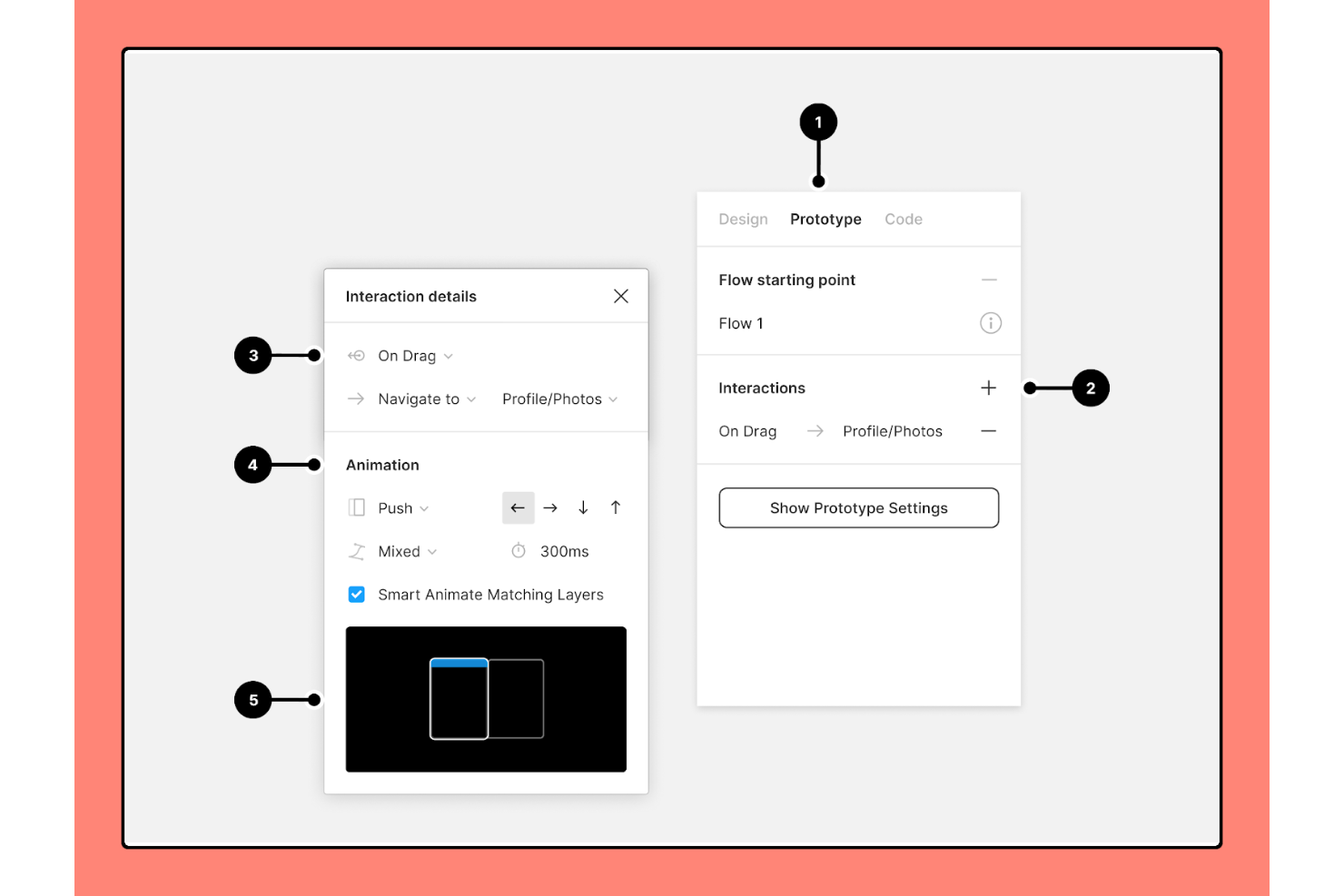
Cage es una plataforma de colaboración de medios y flujo de trabajo de proyectos diseñada para diseñadores, agencias y equipos internos, con herramientas para anotar archivos, gestionar proyectos y presentar trabajos a los clientes para recibir comentarios y aprobaciones.
¿Para quién es mejor Cage?
Cage es una buena opción para agencias creativas y equipos internos de diseño que comparten trabajos regularmente con clientes o partes interesadas para revisión y aprobación.
Por qué elegí Cage
He incluido Cage entre mis mejores opciones porque sus herramientas de flujo de trabajo para comentarios y aprobaciones están diseñadas específicamente para la revisión de diseños, algo que las herramientas genéricas de proyectos no ofrecen. Me gusta especialmente cómo los revisores pueden colocar anotaciones con marcas de tiempo directamente en fotogramas de video o fijar comentarios en áreas específicas de una imagen, por lo que los comentarios siempre están ligados al instante o elemento exacto en cuestión. También utilizo el flujo de aprobación para obtener aprobaciones con marcas de tiempo de los clientes, lo que le da a mi equipo un registro claro cuando un proyecto pasa a producción.
Características clave de Cage
- Historial de versiones: Visualiza todas las versiones anteriores de un archivo junto con los comentarios y conversaciones asociados a cada una.
- Presentaciones con marca: Empaqueta trabajos de diseño en una presentación de marca y fácil de compartir para revisiones con clientes.
- Creación de tareas en archivos: Convierte un comentario dejado en un archivo directamente en una tarea asignable sin salir de la pantalla de revisión.
- Permisos de revisor configurables: Controla qué pueden ver o con qué pueden interactuar los colaboradores externos y clientes dentro de un proyecto compartido.
Pros and Cons
Pros:
- Incluye funciones de gestión de tareas
- Buenas funciones de colaboración visual
- Amplia gama de formatos de archivo
Cons:
- Personalizaciones limitadas
- La función de auditoría necesita mejoras

Marvel
Mejor herramienta de prototipado rápido para incrustar hotspots y transiciones

Marvel es un nombre fundamental en la industria de los mockups y wireframes. Con una plataforma intuitiva y colaborativa, Marvel ayuda a que los gestores de producto y desarrolladores sinergicen y creen prototipos excelentes.
Por qué elegí Marvel: Encuentro la simplicidad de Marvel maravillosa porque puedes convertir fácilmente maquetas de diseño en prototipos realistas en minutos. Además, Marvel cuenta con funciones integradas de mockup y wireframing que te permiten pasar de una idea a un MVP (producto mínimo viable) de forma muy rápida.
Marvel es compatible con todas las pantallas, incluidos todos los dispositivos Apple y Android y escritorios. Con Marvel, puedes insertar hotspots fácilmente y mejorar el compromiso de los usuarios. Los hotspots se refieren a áreas donde tus usuarios pueden tocar o hacer clic. Además, Marvel te ayuda a vincular pantallas mediante hotspots y a dar una sensación de orientación espacial a los usuarios móviles.
Características y integraciones destacadas de Marvel
Características incluyen wireframing, diseño de mockups, prototipado rápido, pruebas de usuario, colaboración en tiempo real, una API para desarrolladores, transiciones avanzadas, gestos, descargas offline, pruebas de usuario y otras.
Integraciones incluyen más de 10 herramientas, como Ballpark, Dropbox Paper, Jira, Sketch, Slack, Userflows y otras.
Pros and Cons
Pros:
- Comentarios en los prototipos
- Enlaces fácilmente compartibles a los prototipos
- Interfaz limpia y sencilla
Cons:
- Funciones limitadas en la aplicación móvil
- Las animaciones no son muy fluidas

UXPin
Mejor herramienta de prototipado rápido para simplificar el proceso de entrega de diseño
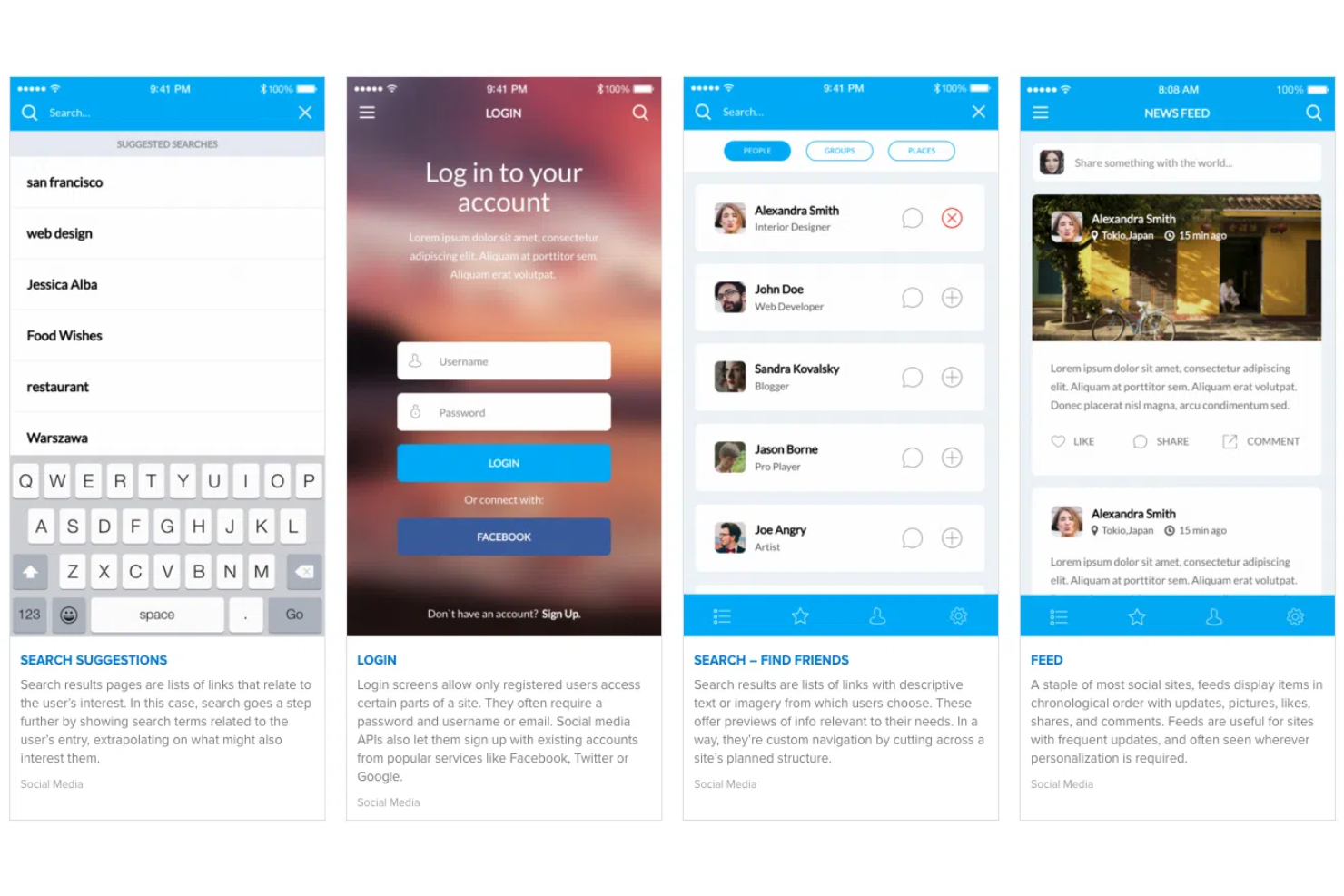
UXPin se esfuerza por agilizar la creación de prototipos y el desarrollo de productos. UXPin comenzó en Polonia y se ha expandido a nivel mundial. La tecnología patentada Merge de UXPin ayuda a construir prototipos de alta fidelidad simplificando las entregas en el proceso de diseño.
Por qué elegí UXPin: Destaco UXPin por sus fantásticas capacidades de traspaso de diseño. La entrega de diseño es la etapa en el proceso de desarrollo de producto en la que el equipo de diseño finaliza un prototipo y los desarrolladores comienzan la programación o desarrollo real. UXPin ayuda a agilizar el ciclo de entrega automatizando especificaciones de diseño, CSS (hojas de estilo en cascada) y guías de estilos.
UXPin permite a los desarrolladores comenzar con gran ventaja al completar automáticamente los detalles de CSS. Además, UXPin genera documentación contextual que ayuda a los desarrolladores a inspeccionar los diseños con precisión. Por último, las transiciones avanzadas y los flujos de navegación de UXPin influyen positivamente en el aspecto y la experiencia de tus prototipos interactivos.
Funciones e integraciones destacadas de UXPin
Funciones incluyen auto-distribución, prototipado basado en componentes, diseño UI/UX, creación de wireframes, lógica basada en prototipado con definiciones de variables e interacciones condicionales, mapas de calor y pruebas de usabilidad.
Integraciones incluyen más de 10 herramientas, como Asana, Google Sheets, Microsoft Dynamics 365, NPM, Salesforce, Storybook, Zendesk y otras.
Pros and Cons
Pros:
- Carga de fuentes personalizadas
- Prototipos protegidos por contraseña
- Anotación de prototipos
Cons:
- Lags ocasionales en la plataforma
- Curva de aprendizaje algo pronunciada

La mejor herramienta de prototipado rápido para puntos de ruptura adaptables y layouts líquidos

Justinmind ha evolucionado de forma rápida y constante hasta convertirse en una plataforma completa de diseño UI/UX. Es interesante señalar que desarrolladores y diseñadores usaron Justinmind para crear todo el sitio web y el portafolio de productos de Justinmind, lo que demuestra que el equipo fundador tiene una gran confianza en su tecnología.
Por qué elegí Justinmind: Me encantan las funciones de respuesta que ofrece Justinmind. Los diseños líquidos son una de esas características que te permiten definir contenedores “líquidos” para que los elementos se adapten a distintos tamaños de pantalla, relaciones de aspecto u orientaciones de dispositivo. Además, la función de auto-redimensionamiento garantiza que los elementos de la interfaz de usuario en una app móvil o web se ajusten automáticamente para ofrecer una buena experiencia de usuario.
Además, Justinmind incluye una función de vista previa instantánea que es sumamente útil para simular el comportamiento de los prototipos mientras diseñas un sitio web o aplicación. Justinmind te da un control total sobre el diseño adaptable mediante puntos de ruptura, que son “puntos” predefinidos para que el contenido del sitio web se adapte. Por último, Justinmind también permite exportar en formatos HTML, PNG, SVG, TIFF y JPG.
Características y conexiones destacadas de Justinmind
Características incluyen prototipado adaptable, wireframing, prototipado rápido, plantillas inteligentes, transiciones y gestos móviles, animaciones, lógica condicional, variables, campos funcionales, cuadrículas de datos, pruebas con datos reales, traspaso de diseño, gestión de usuarios, entre otros.
Integraciones incluyen más de 10 herramientas como Adobe Photoshop, Adobe XD, Azure DevOps, Clicktale, Figma, Jira, Sketch, UserZoom y otras más.
Pros and Cons
Pros:
- La versión gratuita permite prototipos ilimitados
- Interfaz intuitiva de arrastrar y soltar
- Gran cantidad de recursos gratuitos para prototipado
Cons:
- Problemas al exportar
- Curva de aprendizaje algo pronunciada

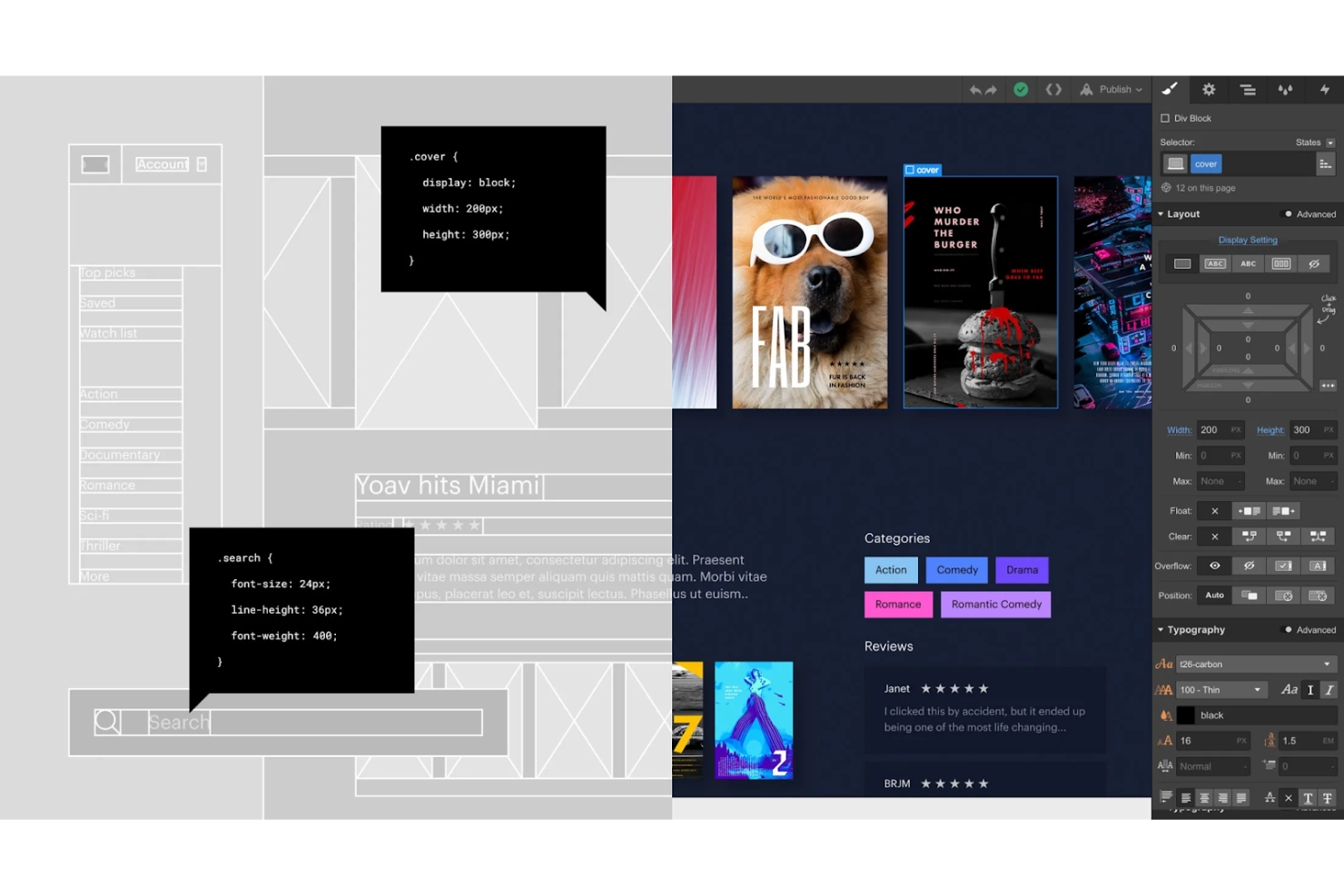
La visión de Webflow es crear la herramienta de desarrollo sin código más robusta del mundo para que las personas sin conocimientos técnicos puedan producir diseños profesionales, independientemente de su experiencia en diseño de productos. Fundada en 2013, Webflow se ha convertido en una plataforma de diseño integral con funciones de e-commerce, CMS y edición de sitios web.
Por qué elegí Webflow: Como ex gerente de producto sin formación técnica, soy un firme defensor de las plataformas de diseño sin código o con poco código. Webflow elimina la dificultad de escribir grandes cantidades de código para implementar prototipos funcionales.
Webflow es una gran bendición para la creación rápida de prototipos de sitios web de e-commerce. Con Webflow, puedes controlar aspectos críticos como el carrito de compras en línea, el flujo de checkout y toda la experiencia de compra de principio a fin. Webflow también te ayuda a dominar otros aspectos de un negocio de e-commerce, como los correos electrónicos transaccionales y la actualización de información de productos.
Características y Integraciones Destacadas de Webflow
Características incluyen un lienzo visual, marketing de contenidos, publicación de sitios web, optimización SEO, interacciones y animaciones inmersivas, un CMS y un conjunto completo de cursos incluidos en la Webflow University.
Integraciones incluyen más de 10 herramientas como Arengu, Chatwoot, Getform, Monto, Off Script, Pixie, Shopify, Zapier y otras.
Pros and Cons
Pros:
- Excelente CMS
- Plantillas categorizadas por industria
- Webflow University cuenta con una gran cantidad de recursos de calidad
Cons:
- No permite personalizar el código
- Sólo admite Stripe como pasarela de pago

Sketch
La mejor herramienta de prototipado rápido con una aplicación nativa para macOS

Sketch nació en 2010 como respuesta a la frustración del equipo fundador ante la falta de herramientas disponibles para el diseño de interfaces de usuario. Desde entonces, Sketch ha dado pasos agigantados al ofrecer increíbles herramientas de diseño para autónomos y empresas en todo el mundo. Entre su amplia gama de herramientas de diseño, la creación de prototipos interactivos de sitios web de Sketch es una característica imprescindible.
Por qué elegí Sketch: Me encanta la potencia y la absoluta simplicidad de Sketch. Con Sketch, puedes construir recorridos de usuario fácilmente conectando pantallas y elementos de la interfaz. Puedes reutilizar elementos de UI e interacciones en lugar de construir desde cero cada vez. Me encanta la función de múltiples puntos de inicio que te permite mostrar varios flujos e ideas a los clientes.
Sketch ayuda a crear interacciones auténticas mediante puntos calientes que permiten hacer clic en secciones enteras en lugar de elementos individuales. Como resultado, el prototipado rápido de aplicaciones móviles adquiere una ventaja única. Para crear prototipos interactivos de sitios web, Sketch incluye interacciones únicas como aparecer con desvanecimiento y deslizar hacia arriba para mejorar la interacción del usuario. Por último, Sketch dispone de una aplicación nativa para macOS que permite a los usuarios aprovechar el ecosistema de Apple para aumentar la productividad y la personalización.
Características y integraciones destacadas de Sketch
Características incluyen pruebas A/B, superposiciones, prototipado rápido, recorridos de usuario, una app nativa para macOS y una vista web de componentes: una visión completa de todos los colores, símbolos, estilos de texto y capas, incrustación de fuentes, controles de esquinas y más.
Integraciones incluyen más de 15 herramientas, como Abstract, Flinto, Flow, InVision, Marvel, Maze, Origami, Plant, ProtoPie, Prott, Zeplin y otros.
Pros and Cons
Pros:
- Reutilización de recursos entre diseños
- Excelente control de versiones
- Amplia biblioteca de complementos
Cons:
- Limitado a usuarios de macOS
- Herramientas de medición limitadas

Axure
La mejor herramienta de prototipado rápido para implementar lógica condicional
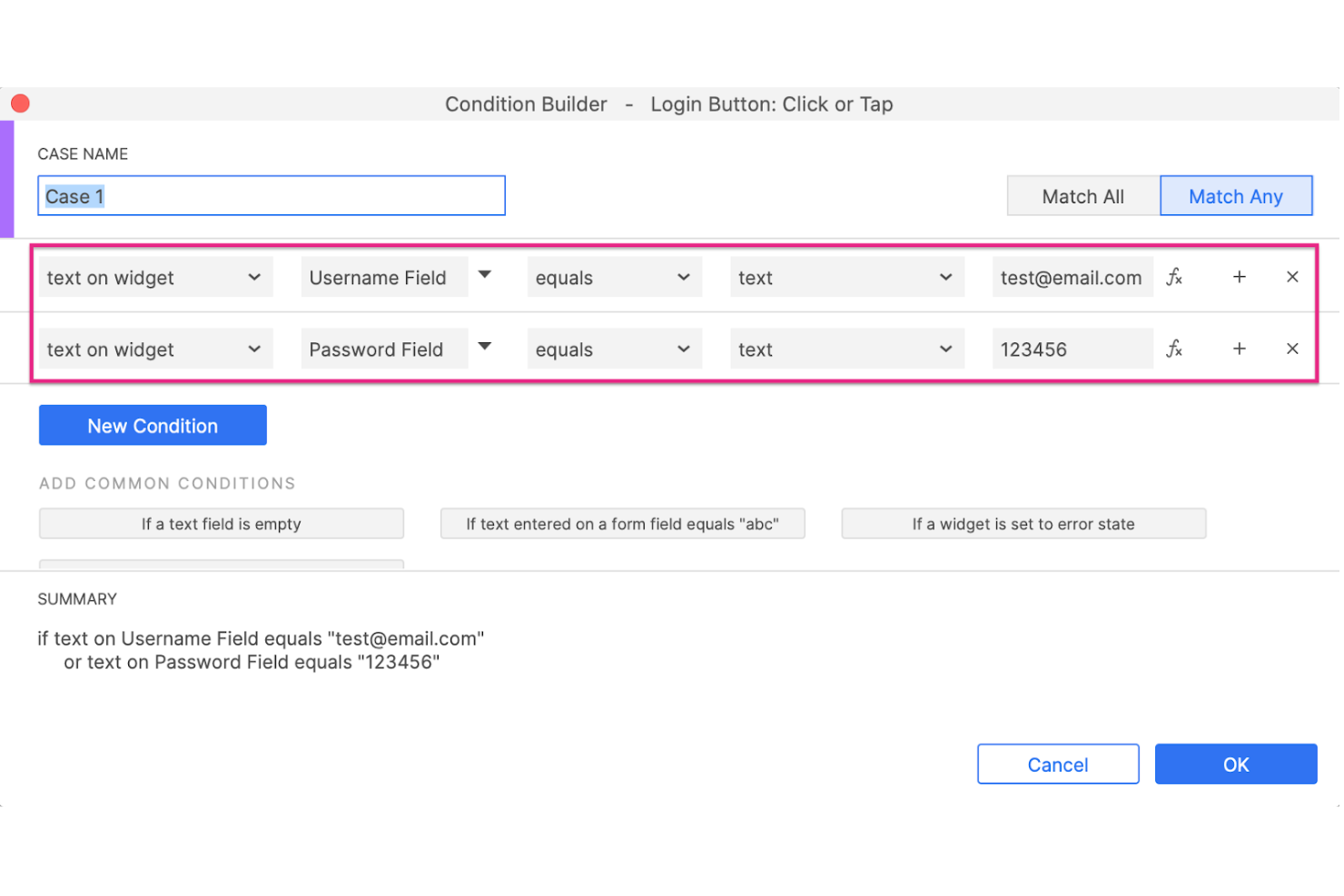
La RP en “Axure RP” significa Prototipado Rápido. El equipo de Axure ha creado una potente plataforma de diseño que permite que varios interesados coediten un solo archivo RP. La última versión de Axure, Axure RP 10, cuenta con funciones únicas como manipulación de widgets y una mayor flexibilidad de diseño.
Por qué elegí Axure RP: Elegí Axure RP principalmente por sus infinitas posibilidades interactivas. Con Axure RP, puedes conseguir posibilidades de interacción ilimitadas ajustando varios eventos de interacción como mover, abrir enlace, rotar, establecer imagen, enfocar, etc.
Axure RP también incluye excelentes funciones de lógica condicional, como habilitar o deshabilitar botones basándose en verificaciones condicionales predefinidas. Por ejemplo, si estás diseñando un prototipo para un sitio web de comercio electrónico, podrías implementar un bloque de lógica condicional para desactivar el botón de compra cuando no haya existencias.
Funciones y integraciones destacadas de Axure RP
Funciones incluyen prototipado rápido, contenido dinámico, lógica condicional, eventos de interacción, paneles dinámicos, interfaces de datos, vistas adaptativas, diagramas de flujo, prototipado funcional, comentarios en pantalla sobre prototipos, inspección para desarrolladores y más.
Integraciones incluyen más de 10 herramientas como Adobe XD, Figma, Jira, Microsoft Teams, Sketch, Slack y otras.
Pros and Cons
Pros:
- Widgets personalizables
- Potente prototipado funcional
- Amplios recursos de aprendizaje en línea
Cons:
- Sin servicio de atención al cliente por chat en vivo
- Curva de aprendizaje pronunciada


El eslogan de ProtoPie es 'Crea prototipos de forma fácil.' El equipo detrás de ProtoPie se esfuerza por crear herramientas de diseño que todos puedan utilizar. Desde sus inicios, ProtoPie ha evolucionado hasta convertirse en una sólida herramienta de creación rápida de prototipos para diversos sectores, como el automovilístico, los videojuegos, los teléfonos inteligentes, los relojes inteligentes y los televisores.
Por qué elegí ProtoPie: Hace tiempo, solía jugar mucho y las peculiaridades de mi gerente de producto siempre me hacían pensar en cómo probarían los desarrolladores algo tan complejo como todo un mundo virtual, con personajes y conversaciones dentro de un juego. Ahí entra ProtoPie, que ayuda a crear prototipos rápidos de juegos para ordenadores de escritorio, dispositivos móviles e incluso consolas como la PS5 y Xbox.
Con ProtoPie, puedes crear prototipos inmersivos para cualquier mando de juego. ProtoPie permite definir interacciones dinámicas, como variables, lógica y fórmulas. Las variables ayudan a realizar un seguimiento de la puntuación de un juego o de la salud de un personaje.
Funciones destacadas e integraciones de ProtoPie
Entre las funciones se incluyen la creación rápida de prototipos, la introducción de texto interactiva, el asistente de voz con AI, la galería de fotos, el diseño de interacciones de desplazamiento y deslizamiento, la animación de la interfaz de usuario, las interacciones de hacer ping y rotar, el panel arrastrable, los activadores de sonido y mucho más.
Entre las integraciones se incluyen herramientas de diseño de software como Adobe XD, Figma y Sketch, así como dispositivos de hardware como Arduino, el volante Logitech G29 y otros.
Pros and Cons
Pros:
- Amplios recursos de aprendizaje
- Animaciones de Lottie
- Creación integral de prototipos interactivos
Cons:
- No ofrece compatibilidad con cámaras web en ordenadores de escritorio
- La vista de escritorio está un poco abarrotada

Proto.io
Mejor herramienta de prototipado rápido con bibliotecas completas de componentes UI

Proto.io se esfuerza por mejorar el desarrollo de productos creando herramientas de diseño fáciles de usar para el wireframing y la creación de prototipos. Con Proto.io, puedes crear sin esfuerzo y de forma rápida prototipos para Windows, iOS y watchOS con elementos de interfaz visualmente atractivos.
Por qué elegí Proto.io: Proto.io ofrece cifras impresionantes, ya que la herramienta proporciona más de 250 elementos de interfaz, más de 1.000 plantillas y más de 6.000 recursos digitales. Por lo tanto, puedes inspirarte rápidamente en lugar de reinventar la rueda.
Con Proto.io, puedes crear prototipos funcionales llenos de vida gracias a más de 80 eventos como al pasar el ratón, al mostrar en pantalla, al tocar, etc., para definir comportamientos personalizados. Además, Proto.io ofrece excelentes transiciones y animaciones para crear prototipos realistas.
Características destacadas e integraciones de Proto.io
Características incluyen diseño UI/UX, wireframing, creación de maquetas, prototipado rápido, una interfaz de arrastrar y soltar, animaciones e interacciones avanzadas, una gran biblioteca de componentes de interfaz, eventos personalizados, carga de fuentes personalizadas, entre otros.
Integraciones incluyen Adobe Fonts, Adobe Photoshop, Adobe XD, Figma, Google Fonts, Sketch, entre otros.
Pros and Cons
Pros:
- Excelente control de versiones
- Prototipos fácilmente compartibles
- Bibliotecas de UI para tipos de dispositivos específicos
Cons:
- Función de importación con fallos
- Rendimiento ocasionalmente deficiente
Otras opciones
Estas son algunas opciones adicionales que vale la pena considerar y que no llegaron a formar parte de la lista de las mejores herramientas de creación rápida de prototipos:
- Origami Studio
Mejor herramienta de prototipado rápido para aprovechar APIs nativas de hardware
- Framer
Mejor opción para crear prototipos de sitios web interactivos
- Ignite UI by Infragistics
Ideal para el diseño de prototipos de aplicaciones web


Cómo evalúo las herramientas de prototipado rápido
Cuando un PM necesita un prototipo interactivo que se pueda compartir antes de una revisión con las partes interesadas, analizo dos niveles: las capacidades básicas que califican una herramienta y los diferenciadores que separan a las mejores del resto.
Funcionalidad clave (Requisitos básicos para esta lista)
Al seleccionar herramientas para mi lista, califico cada una en una escala de 0 (no ofrece la funcionalidad) a 5 (destaca en esta área) para cada funcionalidad clave mencionada a continuación. Luego, calculo la puntuación total de la herramienta en porcentaje. Cada herramienta debe alcanzar una puntuación total mínima del 65% para ser considerada para su inclusión.
- Prototipado interactivo: Evalúo si puedes construir flujos interactivos con transiciones y estados realistas, como simular un proceso de compra que el usuario realmente pueda recorrer.
- Construcción low-code/no-code: La herramienta debe permitir que un PM arrastre y suelte pantallas sin escribir código, de modo que la validación del concepto no se detenga esperando recursos de diseño.
- Componentes reutilizables y plantillas: Busco bibliotecas de componentes compartidos o plantillas iniciales que permitan crear pantallas consistentes rápidamente, similar a lo que ofrecen Figma y Axure con sus sistemas de diseño.
- Colaboración y compartición: Los comentarios en tiempo real y los enlaces de prototipos compartibles son importantes aquí, especialmente cuando un PM necesita una aprobación rápida de una parte interesada que no accederá a una herramienta de diseño.
- Pruebas de usuario y captura de feedback: Compruebo si la herramienta permite recoger retroalimentación directamente sobre el prototipo, como anotaciones en contexto o sesiones integradas de pruebas de usabilidad.
- Transferencia de diseño a desarrollo: La herramienta debe generar especificaciones, recursos o fragmentos de código exportables que los ingenieros puedan consultar, reduciendo el ida y vuelta entre la aprobación del prototipo y la planificación de sprints.
Una vez tengo una lista de herramientas que cumplen este criterio, considero qué distingue a cada plataforma.
Factores diferenciadores (Lo que distingue a los proveedores)
Así es como comparo y contrasto diferentes proveedores:
Características destacadas
La generación impulsada por inteligencia artificial es un verdadero diferenciador. Algunas herramientas convierten un prompt de texto o un boceto básico en una pantalla funcional, permitiendo a los PM pasar de la idea al prototipo en minutos. El modo de presentación también es importante: cuando necesitas mostrar un concepto a ejecutivos durante una revisión de producto, una guía integrada es mejor que juntar capturas de pantalla. También evalúo la vista previa multiplataforma, ya que un flujo de compra que funciona en escritorio puede sentirse completamente diferente en una pantalla móvil.
Más allá de las características
Evalúo qué tan rápido un PM puede pasar de cero a un prototipo compartible. Una herramienta con una curva de aprendizaje elevada compromete el propósito del prototipado rápido. Las integraciones también pesan mucho: verifico conexiones con Jira, Linear, Slack y Confluence, pues un prototipo que vive fuera del flujo de trabajo del PM genera pasos adicionales. Los modelos de precios también son importantes, especialmente la estructura por editor frente a por visualizador, porque una herramienta que cobra a cada parte interesada que abre un enlace de revisión puede limitar el ciclo de feedback en equipos grandes.
¿Qué es una herramienta de creación rápida de prototipos?
Una herramienta de creación rápida de prototipos es una solución de software que permite crear rápidamente prototipos funcionales para productos digitales o físicos. Mediante funciones como la funcionalidad de arrastrar y soltar, la compatibilidad con diversos elementos interactivos, la colaboración en tiempo real y la posibilidad de generar prototipos para varios dispositivos, estas herramientas se centran en ofrecer a diseñadores y desarrolladores una forma rápida y eficiente de convertir sus ideas en prototipos tangibles, fomentando la iteración rápida y las pruebas con usuarios.
Las principales ventajas de utilizar herramientas de creación rápida de prototipos incluyen iteraciones de diseño más rápidas, una reducción del tiempo de comercialización y la posibilidad de recopilar comentarios de los usuarios en una fase temprana del proceso de desarrollo.
Características de las herramientas de creación rápida de prototipos
Al seleccionar herramientas de creación rápida de prototipos, presta atención a las siguientes características clave:
- Diseño interactivo: Permite a los usuarios crear prototipos con elementos en los que se puede hacer clic, lo que facilita visualizar las interacciones de los usuarios.
- Colaboración en tiempo real: Permite que los miembros del equipo trabajen juntos simultáneamente, mejorando la comunicación y acelerando el proceso de diseño.
- Capacidades de integración: Se conecta con otras herramientas de software, optimizando los flujos de trabajo y manteniendo la coherencia entre plataformas.
- Compatibilidad con RA y RV: Permite crear prototipos en realidad aumentada y realidad virtual, ayudando a los equipos a evaluar los diseños en entornos inmersivos.
- Diseño de interfaces de voz: Facilita la creación de prototipos para dispositivos activados por voz, en consonancia con las tendencias modernas de las interfaces de usuario.
- Personalización: Ofrece opciones para adaptar la herramienta a las necesidades específicas del proyecto, mejorando la experiencia del usuario y la alineación con la estrategia general de desarrollo del producto.
- Facilidad de uso: Cuenta con una interfaz intuitiva, lo que reduce la curva de aprendizaje y la hace accesible para todos los miembros del equipo.
- Recopilación de comentarios: Incluye herramientas para recopilar las opiniones de las partes interesadas y los usuarios, lo que ayuda en el proceso de diseño iterativo.
- Medidas de seguridad: Protege los datos de diseño confidenciales mediante funciones de cifrado y cumplimiento normativo, garantizando que la información permanezca segura.
- Tecnologías detalladas de impresión 3D: La creación rápida de prototipos se ha convertido en sinónimo de fabricación aditiva e impresión 3D, y algunos métodos habituales son:
- FDM (Modelado por deposición fundida): Rentable para modelos básicos y prototipos en las primeras etapas. Es ideal para crear diseños sencillos con termoplásticos.
- SLA (Estereolitografía): Produce piezas precisas y de alta resolución con acabados superficiales suaves, ideales para prototipos de alta fidelidad y diseños que requieren tolerancias estrictas.
- SLS (Sinterización selectiva por láser): Produce prototipos resistentes y funcionales, adecuados para pruebas exigentes, utilizando materiales en polvo como el nailon.
Beneficios de las herramientas de creación rápida de prototipos
- Iteraciones de diseño más rápidas: Permite crear y probar prototipos rápidamente, reduciendo el tiempo dedicado a las revisiones y acelerando el ciclo de desarrollo.
- Colaboración mejorada: Las funciones de colaboración en tiempo real mejoran el trabajo en equipo y la comunicación, lo que da lugar a diseños más cohesionados e innovadores.
- Ahorro de costes: Permite identificar los defectos de diseño en una fase temprana del proceso, minimizando los cambios costosos y reduciendo el riesgo de retrasos en el proyecto.
- Experiencia del usuario mejorada: Permite recopilar comentarios mediante prototipos interactivos para perfeccionar las interfaces de usuario, dando como resultado productos más fáciles de usar.
- Mayor participación de las partes interesadas: Permite compartir prototipos fácilmente para mantener informadas a las partes interesadas, fomentar su apoyo y alinear los objetivos del proyecto.
- Mayor flexibilidad: Las herramientas personalizables se adaptan a diversos requisitos del proyecto, lo que permite a los equipos satisfacer necesidades de diseño específicas.
- Preparación para el futuro: Permite mantener la competitividad aprovechando funciones vanguardistas como la compatibilidad con RA y RV, garantizando que los diseños cumplan las expectativas modernas.
Preguntas frecuentes
¿Qué sigue?
Si estás investigando herramientas de creación rápida de prototipos, ponte en contacto con un asesor de SoftwareSelect para obtener recomendaciones gratuitas.
Rellenas un formulario y tienes una breve conversación en la que analizan los detalles específicos de tus necesidades. Después, recibirás una lista de programas que podrás revisar. Incluso te apoyarán durante todo el proceso de compra, incluidas las negociaciones de precios.