

Como responsable de producto, conoces los retos de convertir una idea en un prototipo funcional. Las herramientas de creación de prototipos para Android pueden facilitar este proceso y ayudarte a visualizar y perfeccionar tus conceptos rápidamente.
Según mi experiencia, estas herramientas son invaluables para fomentar la colaboración y acelerar el desarrollo. Permiten que tu equipo pruebe e itere los diseños antes de comprometerse con un costoso trabajo de desarrollo.
He probado y analizado de forma independiente diversas herramientas de creación de prototipos para Android para ofrecerte una lista imparcial de las mejores opciones. En este artículo encontrarás información sobre las funciones, la experiencia de usuario y lo que hace que cada herramienta destaque.
Sigue leyendo para descubrir las mejores soluciones para las necesidades de tu equipo.
Por qué confiar en nuestras recomendaciones de software
6,700+
Reviews
20
Industry experts
16+
Evaluation factors
14
Years
Nuestro equipo lleva probando y evaluando software desde 2012. Como gestores de producto, sabemos lo difícil —y lo importante— que es elegir el software adecuado.
Para esta guía, evaluamos las herramientas mediante pruebas prácticas e investigación independiente, puntuando las herramientas según nuestros criterios de selección.
Nuestras reseñas reflejan nuestro criterio editorial humano, no un discurso de ventas.
Revisores expertos:
 Hannah ClarkSenior TPM
- Cristiano ValimSenior UI/UX Lead

Tabla comparativa de herramientas de creación de prototipos para Android
Esta tabla comparativa resume los detalles de precios de mi selección de las mejores herramientas de creación de prototipos para Android.
| Tool | Best For | Trial Info | Price | ||
|---|---|---|---|---|---|
| 1 | Ideal para crear prototipos con un plan de equipo gratuito sin caducidad | Plan gratuito disponible | Desde $24.90/usuario/mes (facturado anualmente) | Website | |
| 2 | Ideal para facilitar la entrega del diseño al desarrollo | Plan gratuito + demostración gratuita disponible | Desde $12/usuario/mes (facturado anualmente) | Website | |
| 3 | Ideal para integrarse con otros productos del conjunto de herramientas de Adobe | Prueba gratuita disponible | Precios bajo consulta | Website | |
| 4 | Ideal para simulaciones realistas de aplicaciones | Prueba gratuita de 15 días | Desde $29/mes | Website | |
| 5 | Ideal para recibir comentarios de las partes interesadas sobre conceptos iniciales | Plan gratuito disponible | Desde $9/user/month (facturado anualmente) | Website | |
| 6 | Ideal para la colaboración en tiempo real | Plan gratuito disponible | Desde $16/usuario/mes (facturado anualmente) | Website | |
| 7 | Ideal para la gestión de sistemas de diseño | Plan gratuito + prueba gratuita de 14 días disponible | Desde $40/usuario/mes (facturado anualmente) | Website | |
| 8 | Mejor para diseños que se adaptan de forma responsiva | Plan gratuito disponible | Desde $19/usuario/mes | Website | |
| 9 | Ideal para prototipos complejos con funciones avanzadas | Plan gratuito disponible | Desde $29/usuario/mes (facturado anualmente) | Website | |
| 10 | Ideal para crear prototipos móviles altamente interactivos | Plan gratuito disponible | Desde $25/mes (facturado anualmente) | Website |


Análisis de las mejores herramientas de creación de prototipos para Android
A continuación encontrarás mis resúmenes detallados de las mejores herramientas de creación de prototipos para Android que llegaron a mi lista final. Mis análisis ofrecen una visión detallada de las funciones principales, ventajas y desventajas, integraciones y casos de uso ideales de cada herramienta para ayudarte a encontrar la mejor opción para ti.
 Ideal para crear prototipos con un plan de equipo gratuito sin caducidad
- Plan gratuito disponible
- Desde $24.90/usuario/mes (facturado anualmente)
Visit WebsiteCustomer Rating:4.5/5This rating combines scores from multiple user review sites to reflect overall customer sentiment about the product.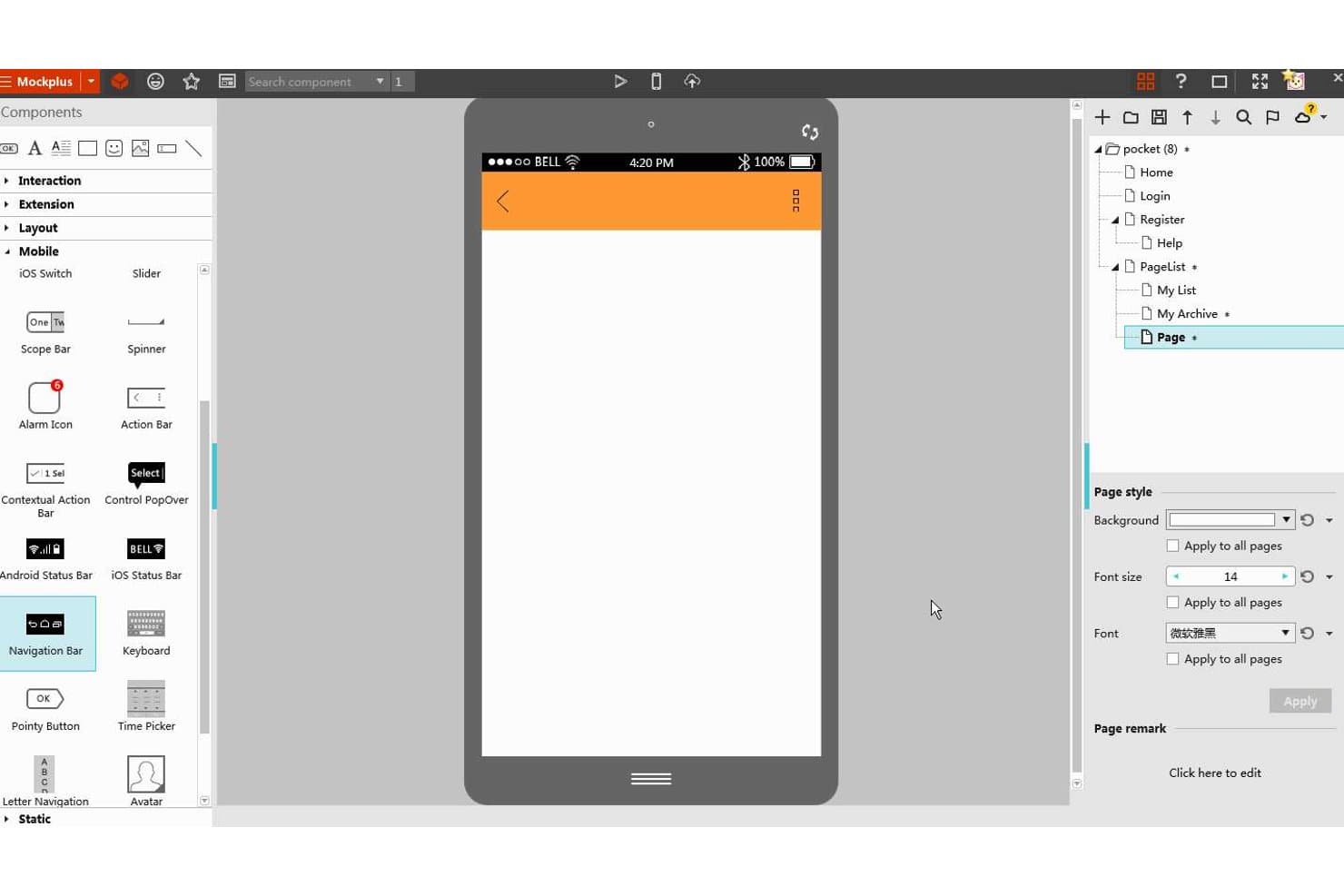
Mockplus permite a los usuarios diseñar prototipos de aplicaciones Android con componentes de interfaz de usuario para móviles. Mockplus RP es una herramienta de creación de estructuras alámbricas sin código y basada en el navegador que combina la creación de estructuras alámbricas mediante arrastrar y soltar, una biblioteca integrada de componentes de Material Design, la vinculación interactiva de pantallas y la colaboración y entrega basadas en la nube.
¿Para quién es más adecuado Mockplus?
Mockplus RP es una opción excelente para pequeños equipos de diseño y empresas emergentes que necesitan pasar rápidamente de la estructura alámbrica al prototipo interactivo sin una curva de aprendizaje pronunciada ni un presupuesto elevado para herramientas.
Por qué elegí Mockplus
He incluido Mockplus entre mis opciones principales porque su plan de equipo gratuito sin caducidad permite que hasta 10 usuarios editen de forma colaborativa en tiempo real sin fecha de vencimiento, algo poco habitual en las herramientas de creación de prototipos. Me gusta especialmente su biblioteca específica de Material Design, añadida en 2023, que permite a los equipos arrastrar componentes prediseñados de Material 3 con vistas previas de estilo en directo directamente a las mesas de trabajo de Android. Su Modo de conexión y la vista de guion gráfico también permiten representar visualmente flujos de navegación completos, de modo que las partes interesadas pueden seguir la lógica de pantalla a pantalla antes de escribir una sola línea de código.
Características principales de Mockplus
- Edición colaborativa en tiempo real: Varios miembros del equipo pueden editar el mismo prototipo simultáneamente, y los cambios se sincronizan en directo entre todos los colaboradores.
- Importación de archivos de Axure: Puedes importar archivos de Axure directamente a RP, conservando aproximadamente el 95 % de los detalles originales de la interfaz de usuario y las interacciones.
- Entrega a desarrolladores basada en la nube: La publicación en Mockplus Cloud genera automáticamente especificaciones, cotas, recursos descargables y fragmentos de código para Android, iOS y la web.
- Control de acceso basado en roles: Los equipos pueden asignar uno de cuatro roles de permisos —Superadministrador, Administrador, Miembro o invitado— para gestionar quién puede ver, editar o comentar los proyectos.
Integraciones de Mockplus
Mockplus se integra con Figma, Sketch, Adobe XD, Photoshop y Axure mediante complementos de Mockplus Cloud. También se conecta con Jira, Slack, Confluence y Lark, pero no hay una API pública documentada.
Pros and Cons
Pros:
- Los componentes de Material 3 agilizan la creación de estructuras alámbricas para Android
- El guion gráfico muestra claramente la navegación entre varias pantallas
- La edición colaborativa en tiempo real es compatible con equipos de diseño distribuidos
Cons:
- Los activadores de gestos no tienen documentada la profundidad del deslizamiento
- La generación de código nativo para Android sigue sin estar confirmada
Learn more about Mockplus: Ideal para facilitar la entrega del diseño al desarrollo
- Plan gratuito + demostración gratuita disponible
- Desde $12/usuario/mes (facturado anualmente)
Visit WebsiteCustomer Rating:4.4/5This rating combines scores from multiple user review sites to reflect overall customer sentiment about the product.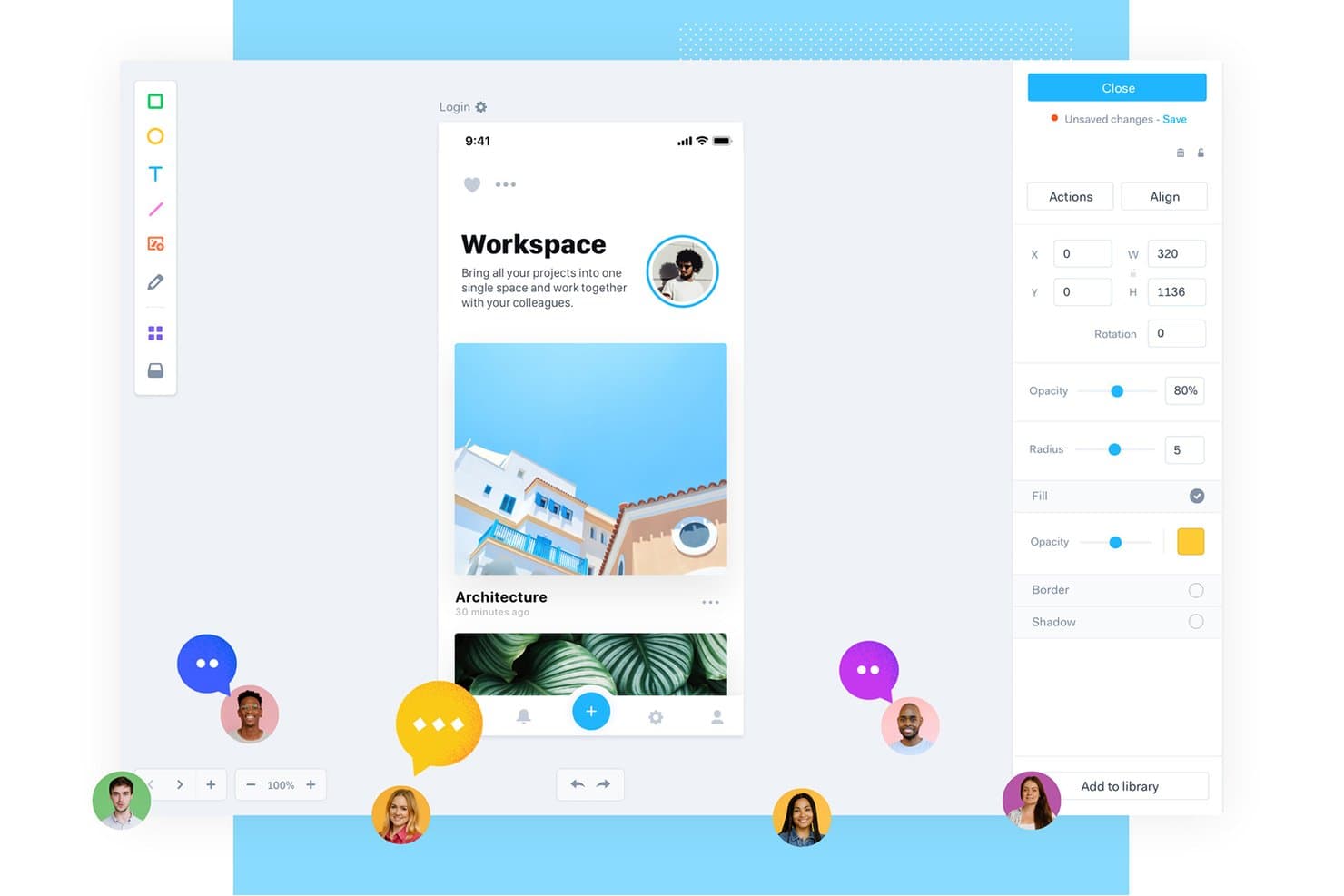
Marvel permite a los usuarios crear prototipos de aplicaciones móviles con herramientas de colaboración en tiempo real. Marvel es una herramienta de diseño y creación de prototipos basada en el navegador que abarca la creación de wireframes, la vinculación interactiva de pantallas, los comentarios colaborativos y la entrega a desarrolladores, incluida la generación de código XML para Android.
¿Para quién es más adecuado Marvel?
Marvel es adecuado para gerentes de producto y equipos interdisciplinarios pequeños que necesitan pasar del concepto inicial a la entrega a desarrolladores sin depender de un equipo de diseño dedicado.
Por qué elegí Marvel
He incluido Marvel entre mis principales opciones porque su entrega automática a desarrolladores realmente lo distingue: genera fragmentos de código XML para Android directamente a partir de tus diseños, por lo que los desarrolladores obtienen medidas exactas, especificaciones tipográficas y recursos exportables en WEBP y SVG sin necesidad de marcar dimensiones manualmente. También me gusta que las anotaciones fijadas permiten a las partes interesadas dejar comentarios precisos a nivel de pantalla antes de escribir una sola línea de código. Esa combinación de especificaciones listas para el desarrollo y comentarios estructurados hace que Marvel sea una opción sólida para equipos pequeños que avanzan rápidamente del concepto a la creación.
Características principales de Marvel
- Vinculación de pantallas basada en puntos interactivos: Dibuja áreas en las que se puede hacer clic en cualquier pantalla y vincúlalas con otras pantallas para crear prototipos multipantalla sin escribir código.
- Reproducción de prototipos en el dispositivo: La aplicación de Marvel para Android permite abrir y reproducir prototipos directamente en un dispositivo Android para obtener una vista previa en un dispositivo real.
- Sincronización con Sketch y Figma: Los complementos específicos permiten importar mesas de trabajo de Sketch o marcos de Figma directamente en proyectos de Marvel para mantener los diseños actualizados.
- Roles y permisos de usuario: Asigna roles, desde administrador hasta revisor externo, para controlar quién puede editar, comentar o ver cada proyecto.
Integraciones de Marvel
Marvel admite integraciones con Sketch, Figma, Jira, Confluence, Slack, Microsoft Teams y Zeroheight. También ofrece una API de GraphQL y conectividad con Zapier.
Pros and Cons
Pros:
- Genera fragmentos de entrega XML para Android
- Las anotaciones fijadas aclaran los comentarios a nivel de pantalla
- La aplicación para Android permite previsualizar prototipos con puntos interactivos
Cons:
- No ofrece lógica condicional ni gestión de estados
- No incluye una biblioteca nativa de componentes de Material Design
Learn more about Marvel: Ideal para integrarse con otros productos del conjunto de herramientas de Adobe
- Prueba gratuita disponible
- Precios bajo consulta
Visit WebsiteCustomer Rating:4.2/5This rating combines scores from multiple user review sites to reflect overall customer sentiment about the product.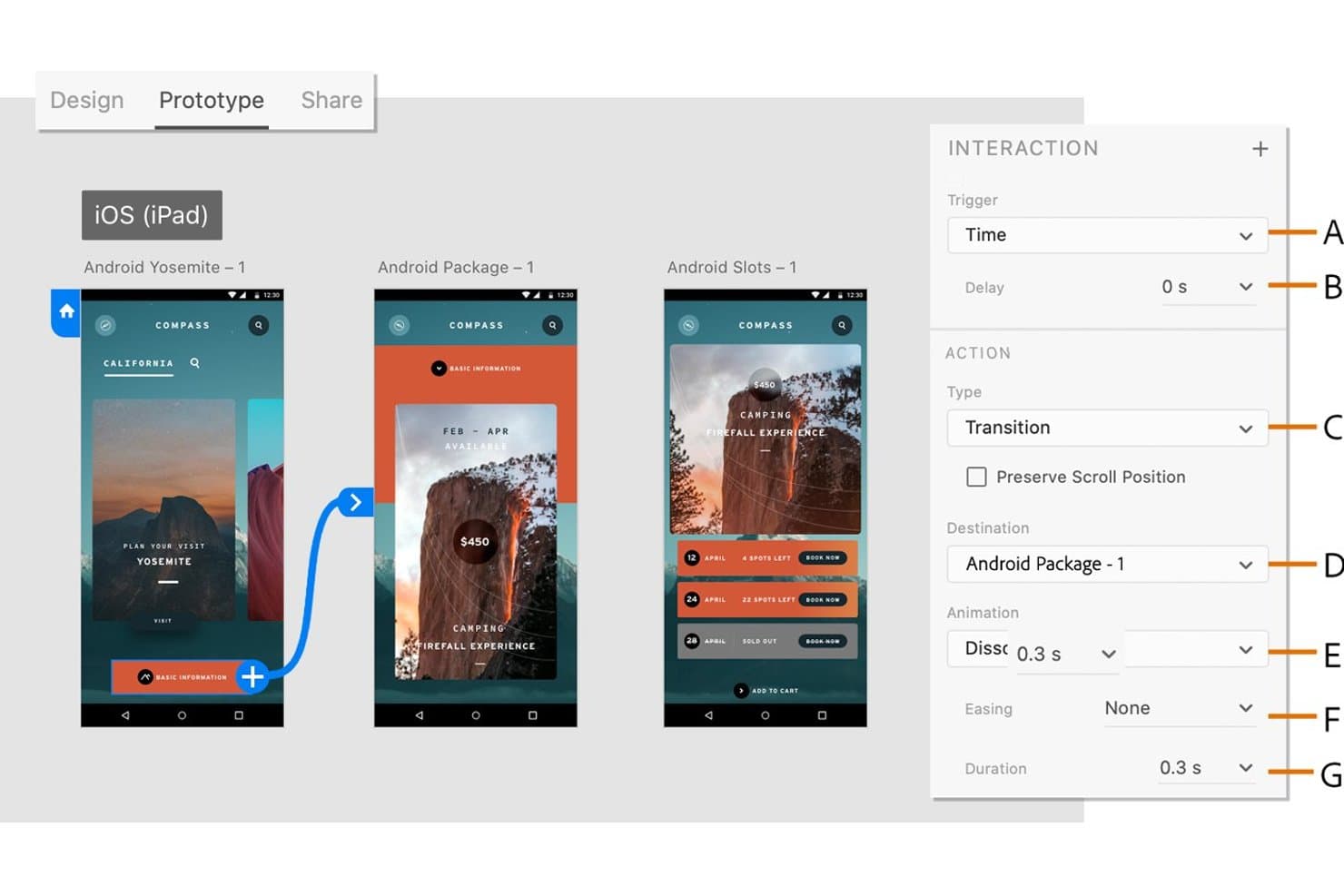
Adobe XD permite a los usuarios definir transiciones temporizadas entre las pantallas de un prototipo de Android. Adobe XD es una herramienta de diseño y creación de prototipos de UI/UX basada en vectores que admite la vinculación interactiva de pantallas, la simulación de gestos y animaciones, el diseño basado en componentes y el uso compartido colaborativo de prototipos.
¿Para quién es más adecuado Adobe XD?
Adobe XD es una opción excelente para equipos de diseño que ya trabajan dentro del ecosistema de Adobe, donde el intercambio fluido de recursos entre Photoshop, Illustrator y After Effects es una necesidad diaria del flujo de trabajo.
Por qué elegí Adobe XD
He incluido Adobe XD entre mis principales opciones porque se integra de forma natural en equipos que ya trabajan con el conjunto de herramientas de Adobe, donde extraer vectores de Illustrator o incorporar movimiento de After Effects a un prototipo forma parte de la actividad diaria. La función Auto-Animate de XD gestiona bien la simulación de gestos y transiciones, haciendo coincidir los nombres de las capas entre las mesas de trabajo para producir interacciones fluidas y convincentes al estilo de Android sin herramientas adicionales. Las bibliotecas de Creative Cloud mantienen sincronizados los componentes y recursos compartidos en Photoshop, Illustrator y XD al mismo tiempo.
Características principales de Adobe XD
- Estados de los componentes: Define estados predeterminados, de desplazamiento, de alternancia y personalizados para los componentes, con interacciones ya configuradas para alternar los estados automáticamente.
- Exportación para densidades de Android: Exporta recursos en todas las densidades estándar de Android, desde ldpi hasta xxxhdpi, además de SVG con atributos de presentación para su uso directo en Android Studio.
- Historial de versiones: Asigna nombres, añade descripciones y busca versiones guardadas de los documentos, con versiones guardadas automáticamente que se conservan durante 60 días o indefinidamente cuando se marcan.
- Acceso a kits de UI: Descarga kits prediseñados para Google Material, iOS, estructuras alámbricas y otras plataformas directamente desde el menú Archivo.
Integraciones de Adobe XD
Adobe XD cuenta con integraciones nativas con Photoshop, Illustrator, After Effects y las bibliotecas de Creative Cloud. También admite integraciones del mercado con Jira y complementos para Slack y Zoom.
Pros and Cons
Pros:
- Exporta recursos en todas las densidades de Android
- Simula gestos, transiciones y comportamiento de desplazamiento
- Admite comentarios anclados y coedición en tiempo real
Cons:
- La vista previa de Android excluye los flujos de trabajo USB de Windows
- La transferencia no proporciona código nativo de Android
 Ideal para simulaciones realistas de aplicaciones
- Prueba gratuita de 15 días
- Desde $29/mes
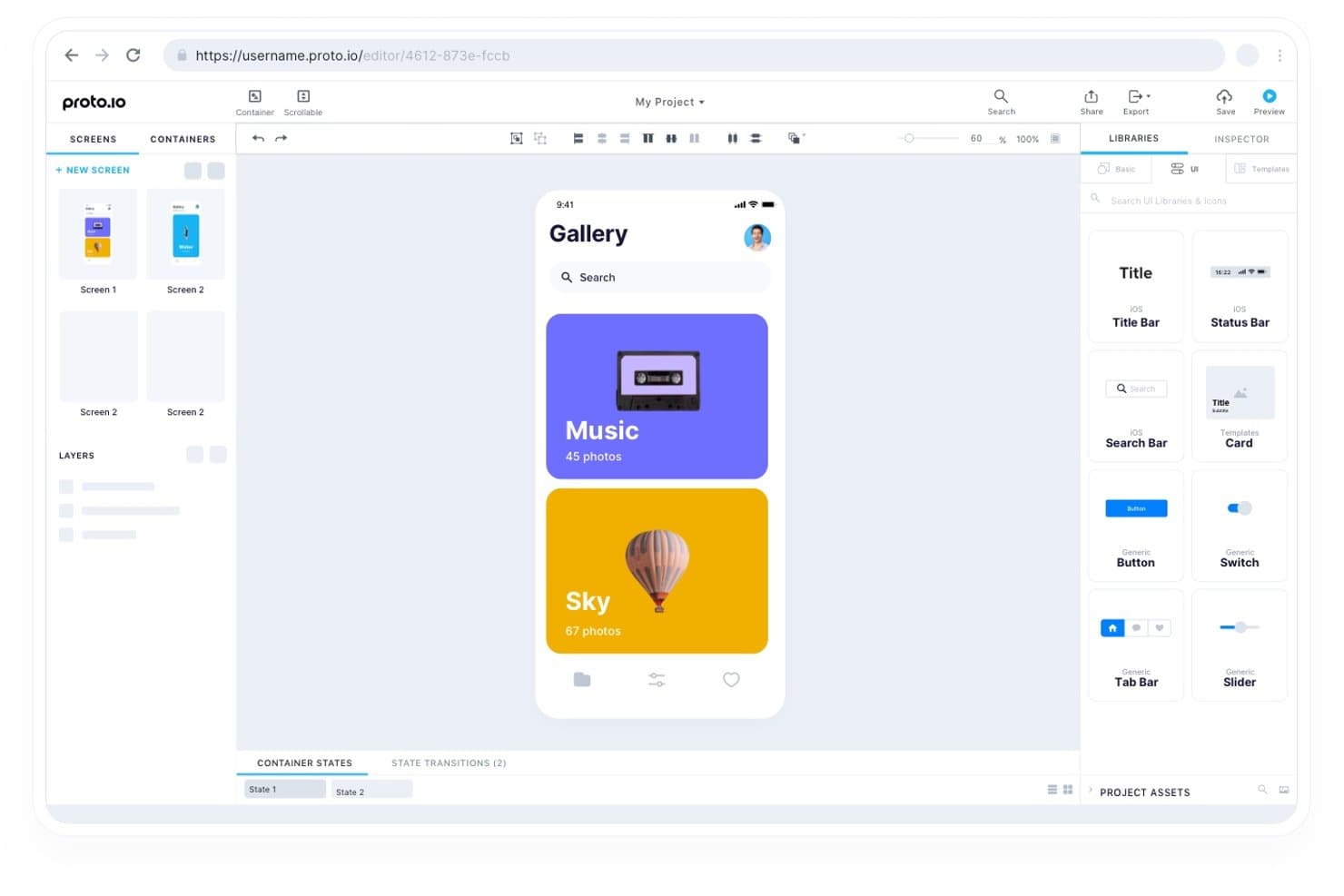
Proto.io permite a los usuarios diseñar pantallas de aplicaciones móviles con componentes de interfaz de usuario de arrastrar y soltar. Proto.io es una herramienta de creación de prototipos basada en la web que permite crear maquetas interactivas de aplicaciones mediante componentes de interfaz de usuario de arrastrar y soltar, simulación de gestos multitáctiles, animaciones de línea de tiempo y lógica condicional en plataformas iOS, Android y web.
¿Para quién es más adecuado Proto.io?
Proto.io es ideal para diseñadores de UX/UI y responsables de equipos de diseño que necesitan mostrar el comportamiento de una aplicación de forma indistinguible de un producto real, sin escribir una sola línea de código.
Por qué elegí Proto.io
Proto.io merece estar entre las mejores opciones de mi lista porque sus variables y su lógica condicional permiten crear prototipos que realmente se comportan como aplicaciones terminadas, abarcando estados como sesión iniciada y sesión cerrada sin escribir una sola línea de código. Me impresiona especialmente el sistema de animación de línea de tiempo, que admite curvas de suavizado elásticas y archivos Lottie, por lo que las transiciones se sienten nativas en lugar de simuladas. Si a esto le añadimos la compatibilidad total con gestos multitáctiles, incluidos pellizcar, deslizar y arrastrar con límites de ajuste, las partes interesadas rara vez necesitan imaginar cómo se sentirá la aplicación real.
Características principales de Proto.io
- Kit de interfaz de usuario de Material: Una biblioteca prediseñada de componentes de Material Design, incluida la navegación lateral, que puedes arrastrar directamente al lienzo.
- Contenedores reutilizables: Componentes personalizados que se actualizan automáticamente en todas las pantallas cuando editas el original.
- Control de versiones con retroceso: El editor guarda copias de seguridad cada minuto y conserva puntos de guardado con nombre que puedes restaurar en cualquier momento.
- Controles de acceso basados en roles: Asigna roles de propietario, administrador, diseñador o revisor a nivel de proyecto para gestionar quién puede editar y quién puede comentar.
Integraciones de Proto.io
Proto.io ofrece integraciones nativas con Figma, Sketch, Adobe XD, Photoshop, Jira, Confluence, Trello, UserTesting, UserZoom y Lookback. Estas conexiones permiten importar diseños, documentar proyectos, realizar un seguimiento de problemas y llevar a cabo pruebas de usabilidad.
Pros and Cons
Pros:
- La navegación condicional realista refleja los estados de las aplicaciones Android
- Los gestos multitáctiles y las animaciones elásticas se sienten nativos
- Las partes interesadas pueden revisar flujos interactivos en directo
Cons:
- La entrega a desarrolladores carece de mediciones y exportaciones de código
- La aplicación complementaria para Android parece anticuada
Learn more about Proto.io: Ideal para recibir comentarios de las partes interesadas sobre conceptos iniciales
- Plan gratuito disponible
- Desde $9/user/month (facturado anualmente)
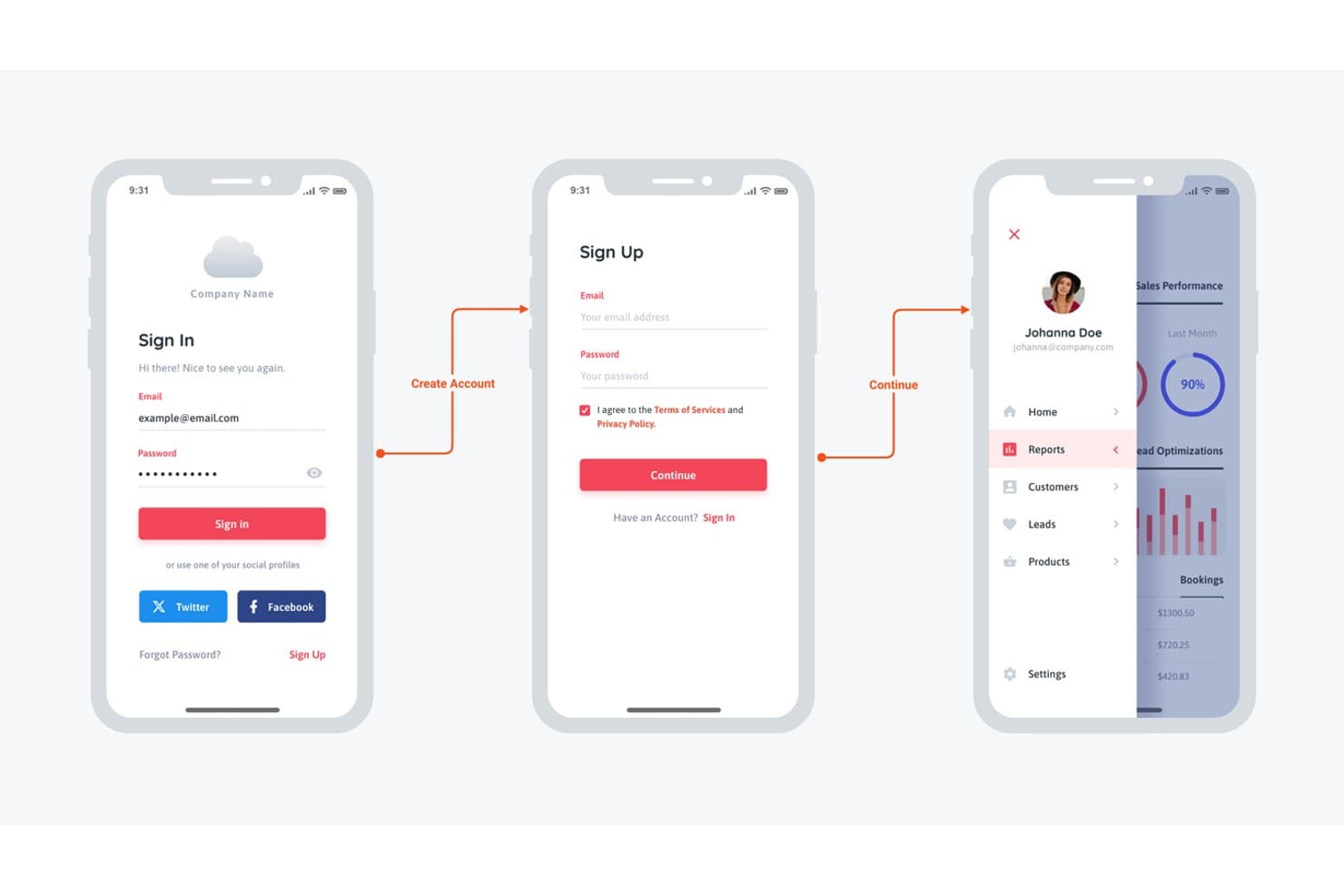
Moqups permite a los usuarios diseñar maquetas de inicio de sesión y panel para aplicaciones móviles. Moqups es una herramienta de creación de esquemas y maquetas basada en el navegador que combina la creación de prototipos, la elaboración de diagramas y la pizarra digital en un único espacio de trabajo, con una biblioteca de componentes de Material Design 3 y compatibilidad con interacciones de clic para conceptos de aplicaciones móviles.
¿Para quién es más adecuado Moqups?
Moqups es una excelente opción para los responsables de producto que necesitan llevar a cabo ciclos de revisión con las partes interesadas sobre conceptos iniciales de aplicaciones sin involucrar a los diseñadores en cada iteración.
Por qué elegí Moqups
He incluido Moqups entre mis principales opciones porque gestiona los comentarios de las partes interesadas sobre conceptos iniciales de aplicaciones Android mejor que casi cualquier otra herramienta que he probado. El sistema de comentarios permite a los revisores añadir notas directamente sobre los objetos de la maqueta, y los invitados ilimitados pueden participar sin ocupar una plaza de pago, por lo que obtener la aprobación de un director de producto o cliente no requiere configurar ninguna cuenta. Si a esto le sumamos una biblioteca actualizada de componentes de Material Design 3 (incluidas incorporaciones de M3 Expressive como botones divididos y barras de herramientas acopladas), puedes presentar rápidamente conceptos realistas de pantallas Android a las partes interesadas.
Características principales de Moqups
- Biblioteca de componentes de Material Design 3: Un kit completo de M3, que incluye incorporaciones de M3 Expressive como botones divididos, barras de herramientas acopladas y menús FAB ampliados, disponible en temas claros y oscuros con restricciones de redimensionamiento integradas.
- Interacciones de objetos: Muestra, oculta o alterna la visibilidad de los elementos en pantalla para simular menús desplegables, modales y alternadores sin salir del navegador.
- Componentes sincronizados: Componentes reutilizables con anulaciones de instancia que propagan automáticamente las ediciones a todas las instancias vinculadas.
- Panel de entrega para desarrolladores: Muestra las medidas, los colores, las fuentes y el código CSS o JSX copiable de cualquier objeto seleccionado en el lienzo.
Integraciones de Moqups
Moqups ofrece integraciones documentadas con Jira Cloud, Confluence Cloud, Trello, Slack, Google Drive, Dropbox y Box, además de un complemento para Figma y la importación desde Balsamiq.
Pros and Cons
Pros:
- Los componentes actuales de Material 3 son compatibles con diseños de Android
- Las partes interesadas comentan directamente sobre los objetos de la maqueta
- Los componentes sincronizados mantienen patrones de pantalla coherentes
Cons:
- No hay simulación documentada de deslizamientos ni animaciones
- La entrega omite la salida XML de Android y Compose
Learn more about Moqups: Ideal para la colaboración en tiempo real
- Plan gratuito disponible
- Desde $16/usuario/mes (facturado anualmente)
Visit WebsiteCustomer Rating:4.7/5This rating combines scores from multiple user review sites to reflect overall customer sentiment about the product.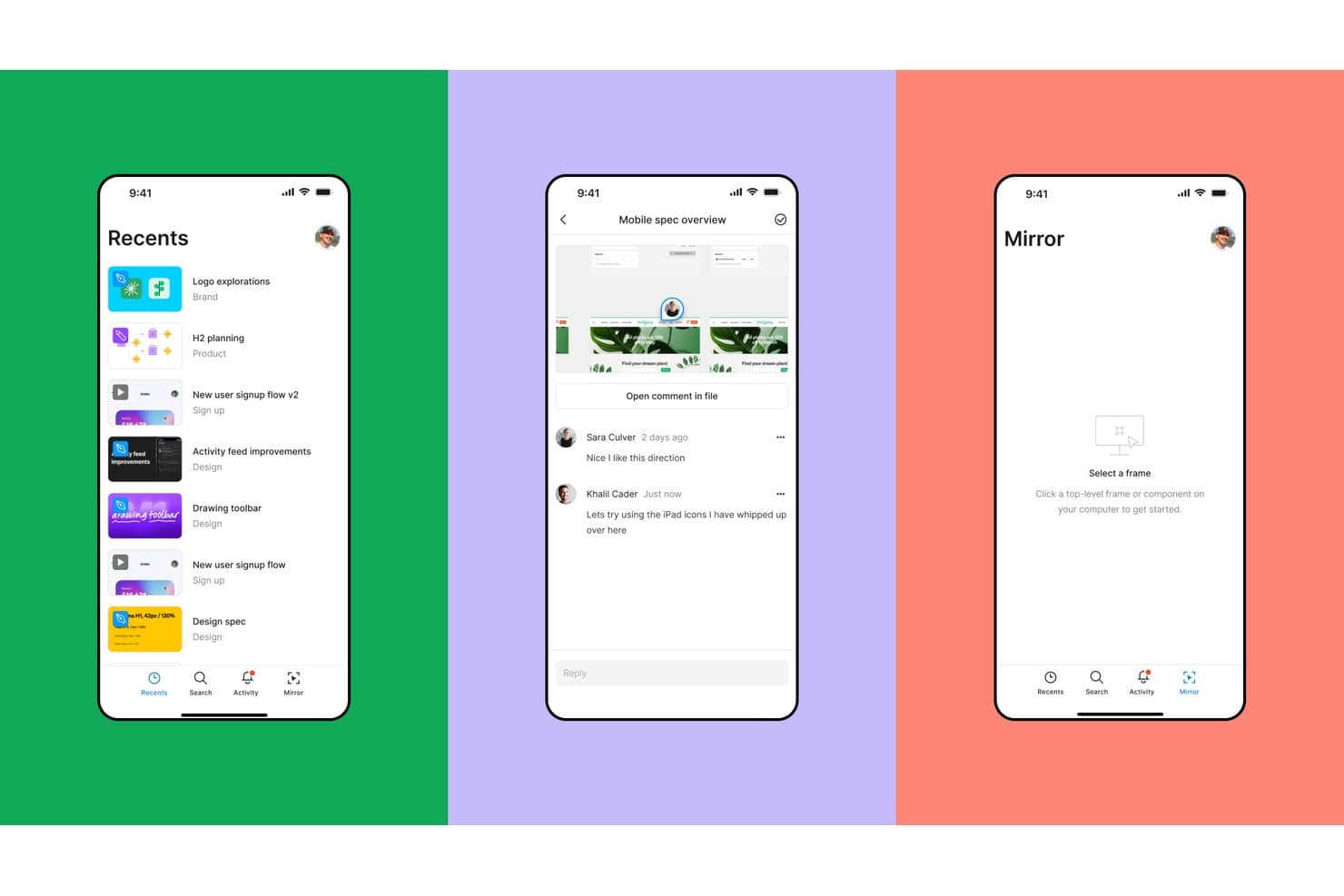
Figma permite a los usuarios explorar, comentar y reflejar diseños en dispositivos móviles. Figma es una herramienta de diseño y creación de prototipos basada en el navegador que combina la vinculación interactiva de pantallas, la lógica condicional basada en variables, un kit oficial de componentes Google Material 3 y la edición multijugador en tiempo real en un solo entorno.
¿Para quién es más adecuado Figma?
Figma es una excelente opción para equipos de diseño y gerentes de producto que necesitan que varios colaboradores revisen, editen y comenten prototipos de Android en tiempo real.
Por qué elegí Figma
Figma ocupa un lugar en mi lista de favoritos porque ninguna otra herramienta que haya probado iguala su edición multijugador en tiempo real para las revisiones de prototipos de Android. Puedo tener a un gerente de producto, un desarrollador y dos diseñadores dentro del mismo archivo de prototipo simultáneamente, dejando comentarios fijados directamente en los componentes de Material 3 mientras sigo perfeccionando el flujo. La lógica condicional basada en variables también significa que puedo simular el cambio entre el modo claro y oscuro o un proceso de incorporación de varios pasos sin duplicar docenas de marcos.
Características principales de Figma
- Kit de componentes Material 3: El kit oficial de Material 3 de Google, diseñado con Compose como prioridad, incluye variables de color, tipografía y capas de estado, además de pantallas de Android de ejemplo que puedes utilizar directamente en tus archivos de prototipo.
- Flujos de prototipo: Cada recorrido del usuario, como la incorporación o el proceso de pago, puede delimitarse en un flujo con nombre, con su propio enlace compartible y descripción para las pruebas de usabilidad.
- Animación inteligente: Figma anima las capas coincidentes entre marcos, incluyendo posición, escala, opacidad y rotación, con controles ajustables de aceleración y duración.
- Fragmentos de código del modo de desarrollo: El panel de inspección genera fragmentos de Jetpack Compose y XML con unidades dp y sp, lo que proporciona a los desarrolladores de Android especificaciones listas para consultar directamente desde el archivo de diseño.
Integraciones de Figma
Figma se integra con GitHub, Jira, Storybook, VS Code, Supabase y el complemento Material Theme Builder. Su servidor MCP se conecta con Claude, Cursor, Codex y OpenAI para flujos de trabajo de diseño y desarrollo asistidos por IA.
Pros and Cons
Pros:
- Revisiones de prototipos de Android multijugador en tiempo real
- Componentes oficiales de Material 3 diseñados con Compose como prioridad
- La lógica condicional simula estados complejos de la aplicación
Cons:
- No permite simular sensores, inclinación ni voz
- Actualizaciones manuales para kits de Material personalizados
 Ideal para la gestión de sistemas de diseño
- Plan gratuito + prueba gratuita de 14 días disponible
- Desde $40/usuario/mes (facturado anualmente)
Visit WebsiteCustomer Rating:4.2/5This rating combines scores from multiple user review sites to reflect overall customer sentiment about the product.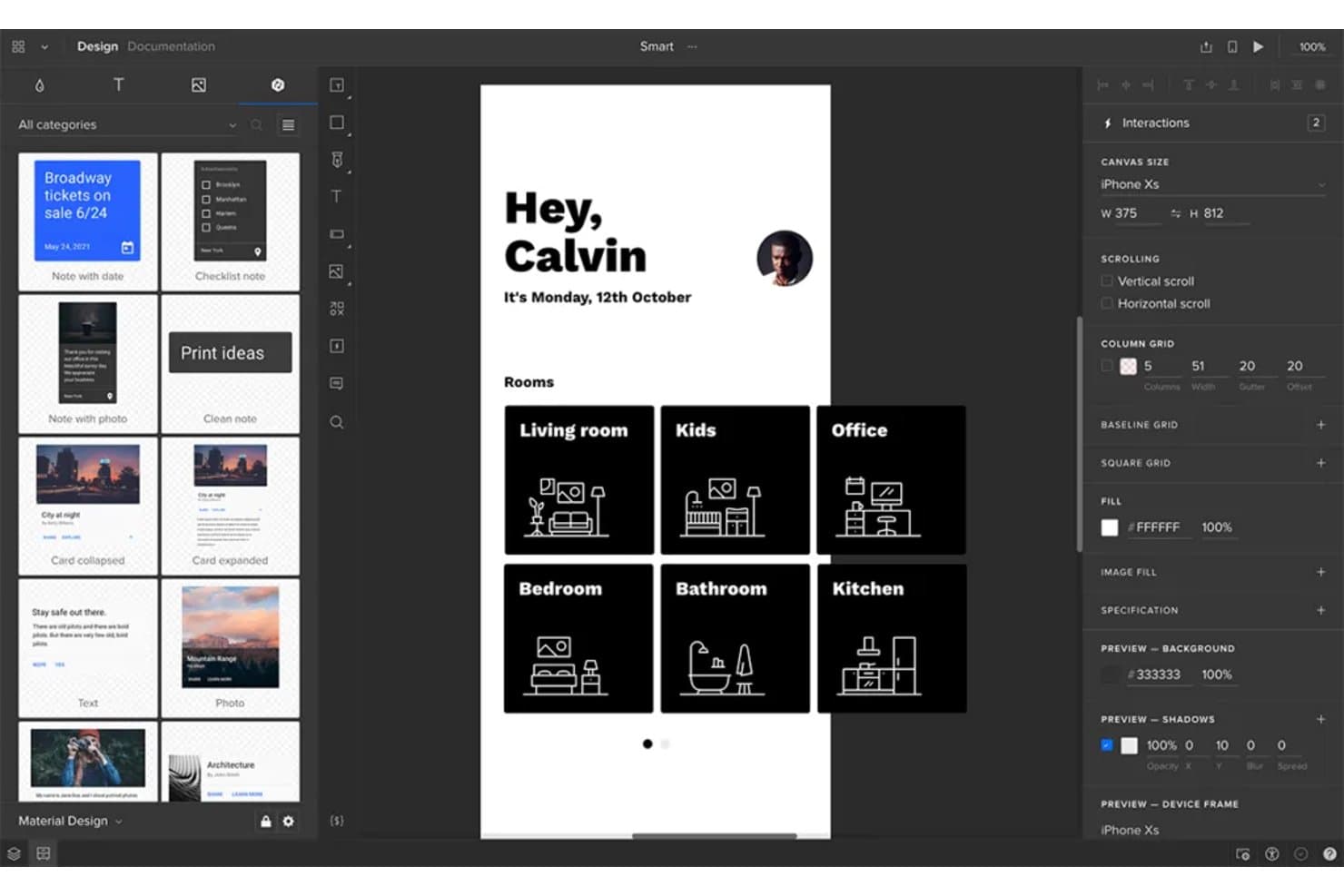
UXPin permite a los usuarios crear prototipos de pantallas de aplicaciones Android con diseños de navegación basados en salas. UXPin es una herramienta de creación de prototipos de alta fidelidad que permite crear prototipos interactivos de aplicaciones utilizando componentes reales respaldados por código, con compatibilidad con lógica condicional, variables, activadores de gestos y vista previa en el dispositivo mediante su aplicación Android Mirror.
¿Para quién es más adecuado UXPin?
UXPin es una opción excelente para equipos de diseño que gestionan una biblioteca de componentes compartida entre varios productos o flujos de trabajo.
Por qué elegí UXPin
UXPin ocupa un lugar en mi lista de opciones por la importancia que concede a la gestión de sistemas de diseño. Con Merge, puedes sincronizar componentes React reales directamente desde Git, Storybook o npm, de modo que tu biblioteca de Material Design en UXPin se mantenga sincronizada con lo que los desarrolladores están creando. También considero que Forge AI es especialmente útil: genera pantallas utilizando tu biblioteca de componentes real, no formas genéricas, lo que significa que cada pantalla de Android generada por IA ya respeta las reglas de tu sistema de diseño.
Características principales de UXPin
- Lógica condicional y variables: Configura interacciones de tipo si-entonces y si-entonces-si-no que respondan a las entradas del usuario, los valores almacenados y los cambios de estado en todo tu prototipo.
- Aplicación UXPin Mirror: Obtén una vista previa de tu prototipo de Android en un dispositivo real y en tiempo real, sin necesidad de un cable USB ni de una red Wi-Fi compartida.
- Comentarios colaborativos: Las partes interesadas y los invitados pueden dejar comentarios en hilos directamente en las pantallas del prototipo sin necesidad de tener una cuenta de pago.
- Kit de interfaz de Material Design: Una biblioteca integrada de componentes de Material interactivos y redimensionables, incluidos botones, tarjetas y navegación, con interacciones preconfiguradas listas para usar.
Integraciones de UXPin
UXPin se integra con Storybook, GitHub, Bitbucket, npm, Figma, Sketch, Slack, Jira, FullStory, StackBlitz y CodeSandbox.
Pros and Cons
Pros:
- Los flujos realistas utilizan variables y lógica condicional
- Mirror permite previsualizar prototipos de Android en dispositivos físicos
- La compatibilidad con comentarios de invitados facilita los comentarios específicos de las partes interesadas
Cons:
- Los componentes basados en React no reproducen el comportamiento nativo de Android
- Las variables complejas ralentizan la configuración inicial del prototipo
Learn more about UXPin: Mejor para diseños que se adaptan de forma responsiva
- Plan gratuito disponible
- Desde $19/usuario/mes
Visit WebsiteCustomer Rating:4.2/5This rating combines scores from multiple user review sites to reflect overall customer sentiment about the product.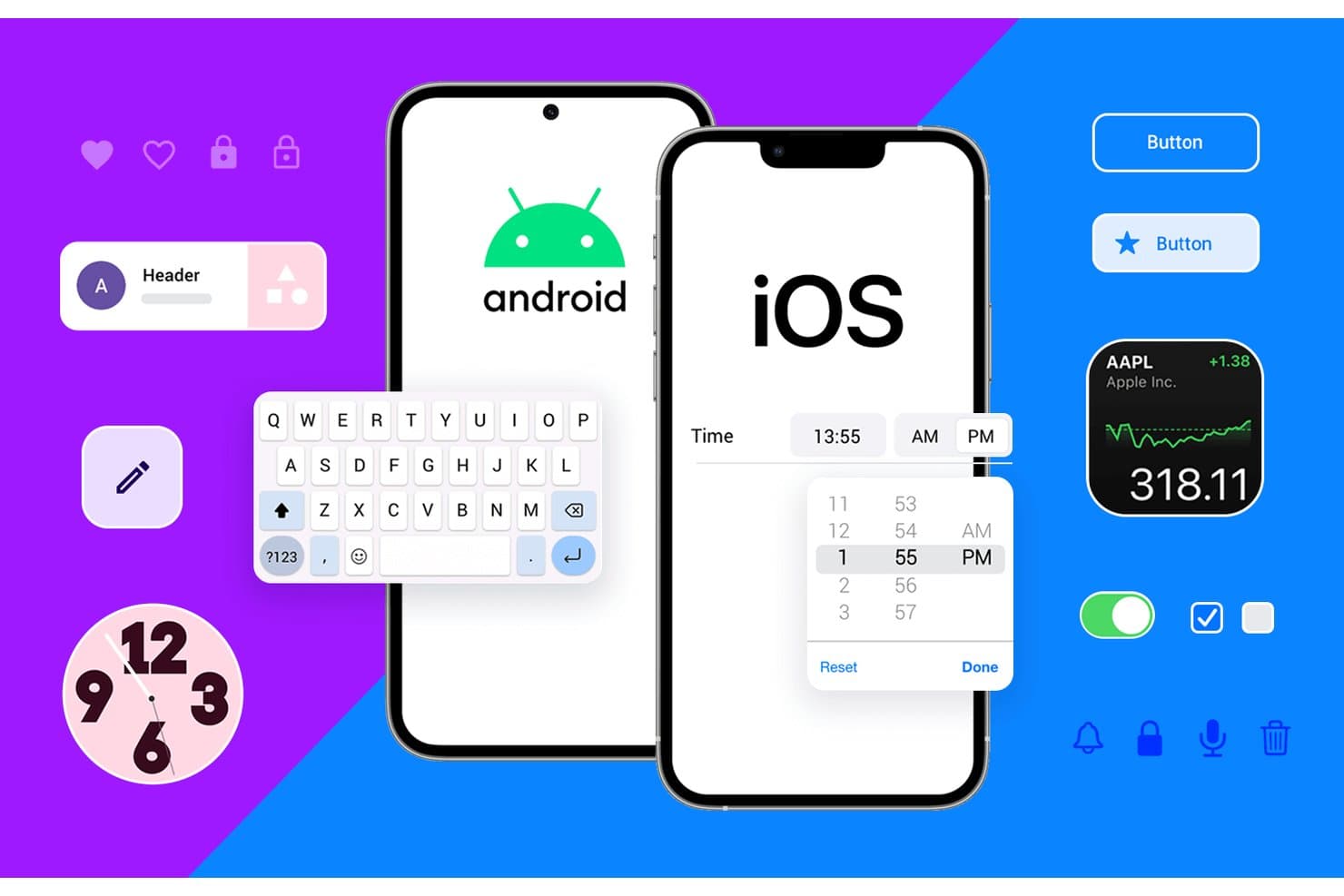
Justinmind permite crear prototipos de componentes de interfaz de usuario tanto para Android como para iOS. Justinmind es una herramienta de creación de prototipos para escritorio, disponible para macOS y Windows, que combina la creación de esquemas, la simulación interactiva y un kit de interfaz de usuario de Android Material Design 3 con lógica condicional, variables y controles de diseño adaptable.
¿Para quién es más adecuado Justinmind?
Justinmind es una opción excelente para equipos de experiencia de usuario y diseño de productos que necesitan crear prototipos de flujos complejos de aplicaciones Android, basados en lógica y para múltiples tamaños de pantalla, sin escribir código.
Por qué elegí Justinmind
Justinmind está en mi lista de opciones principales porque sus herramientas de diseño adaptable están realmente pensadas para crear prototipos de Android en múltiples pantallas. Puedo fijar encabezados, establecer anchos de elementos como porcentajes y configurar eventos de puntos de interrupción para que el mismo prototipo se redistribuya automáticamente en un teléfono, una tableta y un diseño plegable. Junto con un kit de Material Design 3 que contiene más de 350 componentes interactivos y marcos de dispositivos actuales como el Pixel 9 y el Galaxy S25, puedo validar diseños de Android reales en cualquier tamaño de pantalla antes de escribir una sola línea de código.
Características principales de Justinmind
- Constructor de lógica condicional: Establece reglas que controlan cuándo y cómo se ejecutan las interacciones, para que puedas crear prototipos de distintos estados de la aplicación, como vistas con sesión iniciada o errores de validación de formularios.
- Importación de datos CSV: Carga datos reales en tu prototipo mediante archivos CSV para simular contenido dinámico, como listas de usuarios o catálogos de productos.
- Herramienta de diagramas de flujo de usuario: Traza visualmente las rutas de navegación entre pantallas para documentar y validar la estructura completa del flujo de tu aplicación.
- Panel de entrega a desarrollo: Comparte una vista basada en navegador que muestra a los desarrolladores las dimensiones, el espaciado, los códigos hexadecimales de color, CSS y los recursos descargables sin necesidad de instalaciones adicionales.
Integraciones de Justinmind
Justinmind ofrece integraciones con Figma, Sketch, Adobe XD, Jira, Azure DevOps y Confluence, además de una API/SDK para complementos personalizados.
Pros and Cons
Pros:
- Más de 350 componentes de Material permiten crear pantallas de Android realistas
- Los puntos de interrupción adaptables validan diseños para teléfonos, tabletas y dispositivos plegables
- Las condiciones y variables simulan estados complejos de las aplicaciones
Cons:
- El editor exclusivo para escritorio limita la colaboración basada en navegador
- La entrega a desarrollo no incluye resultados en XML nativo ni Compose
Learn more about Justinmind: Ideal para prototipos complejos con funciones avanzadas
- Plan gratuito disponible
- Desde $29/usuario/mes (facturado anualmente)
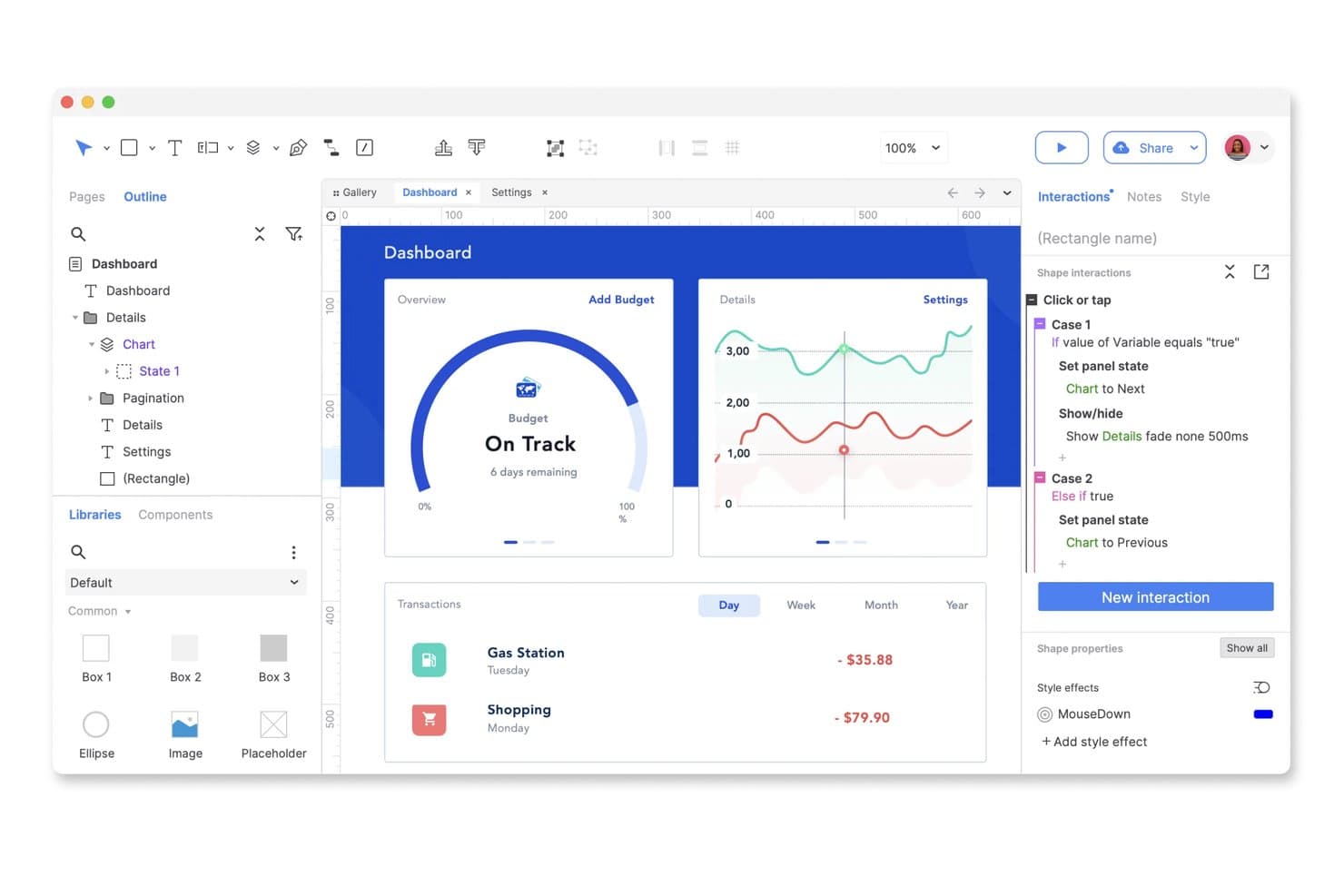
Axure RP permite crear prototipos interactivos de paneles mediante lógica condicional. Axure RP es una herramienta de creación de prototipos para escritorio que permite crear prototipos interactivos de alta fidelidad mediante lógica condicional, paneles dinámicos, variables e interacciones basadas en gestos.
¿Para quién es más adecuado Axure RP?
Axure RP es una excelente opción para diseñadores de UX con experiencia y responsables de equipos de diseño que necesitan crear y probar prototipos complejos basados en lógica antes de entregarlos al equipo de desarrollo.
Por qué elegí Axure RP
Axure RP está en mi lista de favoritos porque ninguna otra herramienta se acerca a su sistema de lógica condicional y paneles dinámicos para crear prototipos complejos basados en lógica. Lo he utilizado para simular estados reales de aplicaciones, como alternar entre vistas con sesión iniciada y sin sesión iniciada, mediante variables, repetidores y condiciones de ramificación, sin escribir una sola línea de código. La compatibilidad con eventos de deslizamiento y arrastre en los paneles dinámicos también permite crear prototipos de flujos de navegación basados en gestos que realmente se sienten como una aplicación Android funcional.
Características principales de Axure RP
- Vistas adaptables: Diseña diseños para teléfonos, tabletas y equipos de escritorio en una sola página mediante tamaños de dispositivo preestablecidos o personalizados, con cadenas de herencia independientes para distintas plataformas.
- Comentarios de Axure Cloud: Las partes interesadas pueden dejar comentarios encadenados directamente en las pantallas del prototipo, marcarlos como resueltos y recibir notificaciones a través de Slack o Microsoft Teams.
- Modo de inspección: Los desarrolladores pueden acceder a líneas de cota, medidas, detalles tipográficos, colores hexadecimales y recursos de imagen descargables a través de Axure Cloud sin costo adicional.
- Desprotección y registro de páginas: El plan Team permite la coautoría con historial de versiones, puntos de restauración y notas de registro para mantener organizados los archivos de diseño entre los colaboradores.
Integraciones de Axure RP
Axure RP se integra con Figma, Sketch, Adobe XD, Jira, Confluence, Slack y Microsoft Teams. Estas conexiones permiten importar diseños, insertar prototipos, vincular tickets y enviar notificaciones de revisión.
Pros and Cons
Pros:
- Simula estados complejos de aplicaciones Android sin código
- Admite interacciones de deslizamiento, arrastre, desplazamiento y pulsación prolongada
- Proporciona líneas de cota detalladas y recursos de diseño descargables
Cons:
- Requiere bibliotecas de terceros para los componentes de Material Design
- No puede exportar código XML de Android ni de Jetpack Compose
Learn more about Axure RP: 10Ideal para crear prototipos móviles altamente interactivos
ProtoPie
- Plan gratuito disponible
- Desde $25/mes (facturado anualmente)
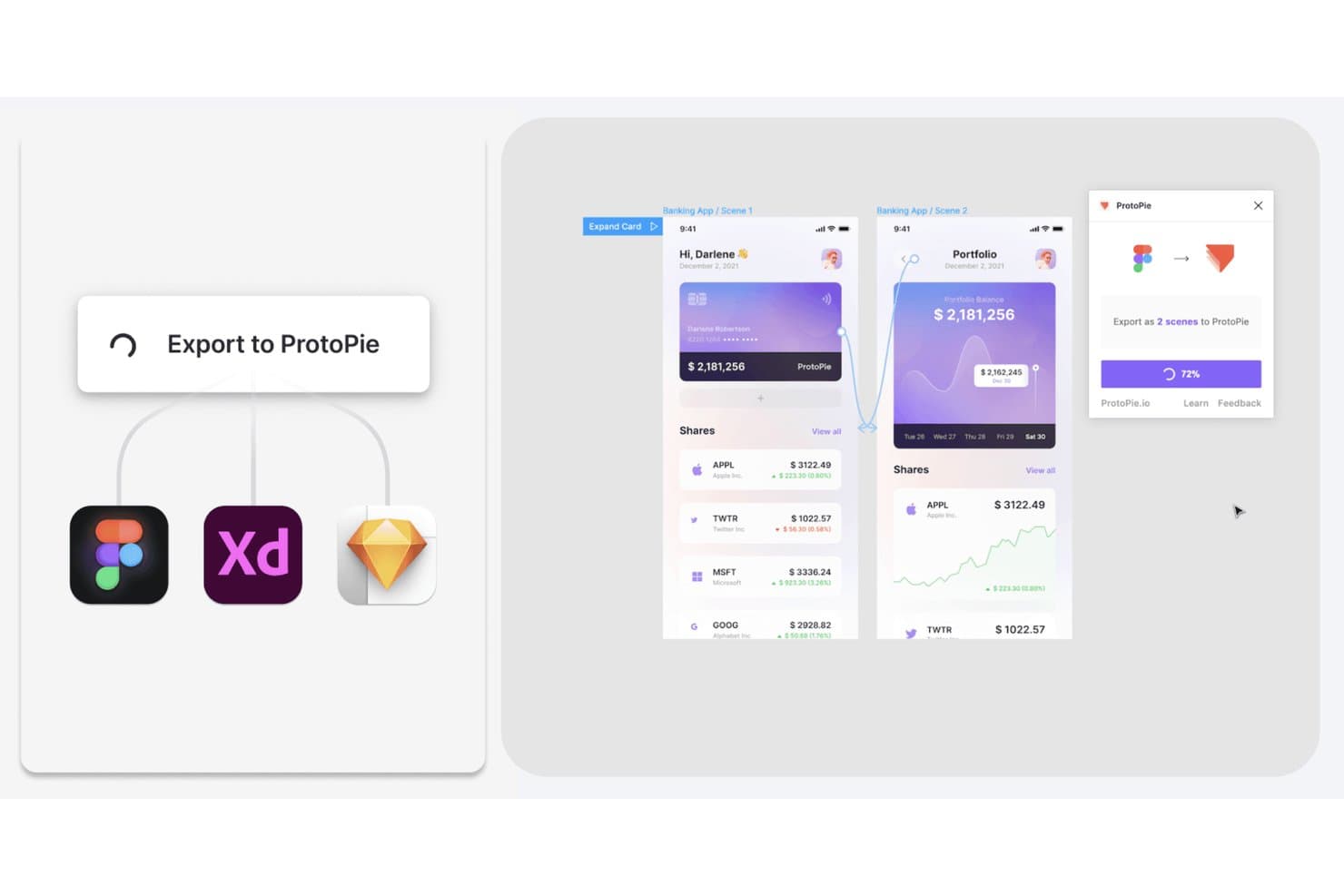
ProtoPie permite a los usuarios exportar diseños de Figma, XD y Sketch como prototipos interactivos. ProtoPie es una herramienta de prototipado sin código que te permite crear prototipos altamente interactivos para dispositivos móviles y múltiples dispositivos mediante lógica, variables, activadores condicionales, gestos y entradas de sensores.
¿Para quién es más adecuado ProtoPie?
ProtoPie es una excelente opción para diseñadores de UX/UI y responsables de equipos de diseño que necesitan crear prototipos de interacciones móviles complejas basadas en gestos sin escribir código.
Por qué elegí ProtoPie
ProtoPie ocupa un lugar en mi lista de favoritos porque ninguna otra herramienta que haya probado iguala su profundidad en la simulación de gestos y sensores para prototipos móviles. Puedo configurar gestos de pellizco, multitáctiles, inclinación e incluso activadores específicos de Android para las teclas de retroceso y volumen sin tocar una sola línea de código. Además, la lógica condicional y las variables me permiten crear prototipos de flujos de decisión reales, como validar un campo de contraseña o proteger una pantalla mediante una regla, para que las partes interesadas vean algo que se comporta como una aplicación publicada.
Características principales de ProtoPie
- Importación de Figma con vinculación de componentes: Importa marcos de Figma como escenas, manteniendo vinculados los componentes y las variantes, de modo que al volver a importar se conservan las ediciones realizadas en ProtoPie.
- ProtoPie Player para Android mediante USB: Previsualiza prototipos en un dispositivo Android físico mediante un cable USB con la depuración USB activada, un método de conexión exclusivo de Android.
- Grabación de interacciones e inspección de la línea de tiempo: Las grabaciones generadas automáticamente capturan escenarios de uso reales y registran activadores, respuestas, funciones de aceleración y propiedades de las capas en una línea de tiempo paso a paso para los desarrolladores.
- Creación de interacciones mediante indicaciones para ProtoPie AI: Crea interacciones a partir de indicaciones en lenguaje natural para capas específicas, con controles de detener y revertir incluidos.
Integraciones de ProtoPie
ProtoPie se integra con Figma, Sketch y Adobe XD mediante complementos.
Pros and Cons
Pros:
- Simula gestos, sensores y teclas físicas de Android
- Permite probar flujos complejos con variables y condiciones
- Captura la sincronización de las interacciones para la entrega a los desarrolladores
Cons:
- Ofrece una cobertura limitada de componentes nativos de Android
- Requiere volver a ejecutar los prototipos después de realizar cambios en el escritorio
Learn more about ProtoPie:
Otras herramientas de creación de prototipos para Android
Estas son algunas opciones adicionales de herramientas de creación de prototipos para Android que no llegaron a mi lista final, pero que aun así merece la pena conocer:
- 11FlutterFlow La mejor opción para crear prototipos con código Flutter exportable
- 12Mockitt PrototypeIdeal para la creación de prototipos todo en uno con generación mediante IA
- 13FramerIdeal para crear prototipos que se publican en un sitio web activo
- 14VisilyIdeal para wireframes generados por IA sin conocimientos de diseño
- 15DraftbitIdeal para crear prototipos con código de aplicaciones reales como resultado
Cómo evalúo las herramientas de creación de prototipos para Android
Divido mi evaluación en tres partes, y la funcionalidad principal tiene el mayor peso, específicamente, si una herramienta puede vincular pantallas en flujos navegables y simular gestos. Después, busco funciones destacadas como la lógica condicional y las variables. Por último, considero la flexibilidad de precios y la asistencia durante la incorporación.
Funcionalidad principal (elementos imprescindibles para esta lista)
Al seleccionar herramientas para mi lista, puntúo cada una en una escala de 0 (no ofrece la funcionalidad) a 5 (sobresale en esta área) para cada funcionalidad principal que se indica a continuación. Después convierto el total en un porcentaje para ayudar a evaluar la adecuación general de cada herramienta, con un peso adicional para las funcionalidades que he considerado esenciales.
- Vinculación interactiva de pantallas (esencial): Compruebo si se pueden conectar flujos de varias pantallas con puntos interactivos en los que se puede hacer clic, rutas ramificadas y patrones de navegación reutilizables.
- Simulación de gestos y animaciones: Los prototipos realistas necesitan admitir deslizamientos, desplazamientos y toques, con curvas de aceleración y tiempos ajustables que imiten el movimiento nativo de Android.
- Componentes de diseño específicos para Android: Busco bibliotecas integradas de Material Design que se mantengan actualizadas y admitan temas personalizados para el sistema de diseño de tu equipo.
- Previsualización en el dispositivo: Herramientas como Figma y ProtoPie ofrecen aplicaciones complementarias para realizar previsualizaciones en directo en dispositivos Android, y evalúo la velocidad de sincronización y el acceso sin conexión.
- Recopilación colaborativa de comentarios: Evalúo si las partes interesadas pueden dejar comentarios organizados por hilos y asociados a cada pantalla, con menciones y seguimiento de la resolución durante los ciclos de revisión.
- Especificaciones para la entrega a desarrollo: Una buena entrega implica capas inspeccionables, recursos de Android exportables y especificaciones generadas automáticamente con detalles sobre espaciado, tokens de color y fuentes.
Una vez que tengo una lista de herramientas que cumplen los criterios, considero qué distingue a cada plataforma.
Factores diferenciadores (lo que distingue a los proveedores)
Así es como comparo y contrasto los distintos proveedores:
Funciones destacadas
La lógica condicional y las variables son lo primero que evalúo más allá de los conceptos básicos. Herramientas como ProtoPie permiten simular estados reales de una aplicación, por ejemplo, alternar entre una experiencia con la sesión iniciada y otra con la sesión cerrada, lo que proporciona datos mucho más realistas en las pruebas de usabilidad. También busco análisis integrados de pruebas de usabilidad, como mapas de calor y grabaciones de sesiones, ya que permiten a los PM cuantificar dónde los usuarios dudan o abandonan sin necesidad de una plataforma de investigación independiente. La simulación de voz y sensores también es importante, especialmente para los equipos que crean aplicaciones Android que dependen de la inclinación del dispositivo o de la entrada de la cámara.
Más allá de las funciones
Evalúo qué tan bien se conecta cada herramienta con los flujos de trabajo de PM y desarrollo. Las integraciones nativas con Jira o Asana permiten vincular directamente las pantallas de los prototipos con los elementos del backlog, lo que mantiene la planificación de los sprints basada en diseños reales. La flexibilidad de precios es igual de importante: los modelos por usuario pueden disparar los costes en equipos en crecimiento, por lo que compruebo si existen planes gratuitos o planes por proyecto para la validación en etapas iniciales. También analizo la asistencia durante la incorporación, ya que los PM sin formación en diseño necesitan plantillas guiadas y foros comunitarios activos para iterar sobre los prototipos sin tener que esperar a un diseñador.
Cómo elegir una herramienta de creación de prototipos para Android
Es fácil perderse entre largas listas de funciones y estructuras de precios complejas. Para ayudarte a mantener la atención mientras avanzas en tu proceso único de selección de software, aquí tienes una lista de factores que debes tener en cuenta:
| Factor | Qué debes considerar |
|---|---|
| FactorEscalabilidad | Qué debes considerar¿La herramienta crecerá con tu equipo? Comprueba si puede gestionar más usuarios y proyectos a medida que aumenten tus necesidades. |
| FactorIntegraciones | Qué debes considerar¿Se conecta con tus herramientas actuales? Busca una integración fluida con tu software de diseño, comunicación y gestión de proyectos. |
| FactorPersonalización | Qué debes considerar¿Puedes adaptarla a tu flujo de trabajo? Evalúa la posibilidad de personalizar plantillas e interfaces para que se ajusten a los procesos de tu equipo. |
| FactorFacilidad de uso | Qué debes considerar¿Es fácil de usar para todo el mundo? Ten en cuenta la curva de aprendizaje y si tu equipo puede adoptarla fácilmente sin una formación exhaustiva. |
| FactorImplementación e incorporación | Qué debes considerar¿Con qué rapidez puedes empezar? Revisa el proceso de incorporación, la disponibilidad de tutoriales y el soporte durante la configuración inicial para evitar retrasos. |
| FactorCoste | Qué debes considerar¿Se ajusta a tu presupuesto? Compara los planes de precios, comprueba si existen tarifas ocultas y asegúrate de que las funciones justifican el coste. |
| FactorMedidas de seguridad | Qué debes considerar¿Están protegidos tus diseños? Asegúrate de que la herramienta ofrece cifrado, almacenamiento seguro de datos y actualizaciones de seguridad periódicas para mantener tu trabajo protegido. |
| FactorDisponibilidad de soporte | Qué debes considerar¿Hay ayuda disponible cuando la necesitas? Comprueba el horario de soporte, los canales disponibles (como chat o teléfono) y los tiempos de respuesta para asegurarte de que la asistencia sea accesible. |
¿Qué son las herramientas de creación de prototipos para Android?
Las herramientas de creación de prototipos para Android son soluciones de software que ayudan a diseñadores y desarrolladores a crear maquetas interactivas de aplicaciones Android. Estas herramientas suelen ser utilizadas por responsables de producto, diseñadores de UX/UI y desarrolladores para visualizar los diseños de las aplicaciones y probar las interacciones de los usuarios antes del desarrollo. Funciones como el diseño interactivo, la compatibilidad con gestos táctiles y la colaboración en tiempo real ayudan a los equipos a crear y perfeccionar prototipos de aplicaciones de forma eficiente. En general, estas herramientas permiten iterar y mejorar rápidamente los diseños de las aplicaciones, ahorrando tiempo y recursos.
Funciones
Al seleccionar herramientas de creación de prototipos para Android, presta atención a las siguientes funciones clave:
- Diseño interactivo: Permite a los usuarios crear prototipos dinámicos que simulan interacciones reales de los usuarios, ayudando a los equipos a visualizar la funcionalidad de la aplicación.
- Compatibilidad con gestos táctiles: Permite probar interacciones basadas en el tacto, algo fundamental para desarrollar aplicaciones Android intuitivas.
- Colaboración en tiempo real: Facilita el trabajo en equipo al permitir que varios usuarios trabajen simultáneamente en el mismo prototipo, mejorando la comunicación y la eficiencia.
- Compatibilidad multiplataforma: Garantiza que los prototipos puedan probarse y visualizarse en distintos dispositivos, mejorando las pruebas de usabilidad.
- Capacidades de integración: Se conecta con otras herramientas de diseño y gestión de proyectos, agilizando el flujo de trabajo y garantizando la coherencia entre plataformas.
- Plantillas personalizables: Proporciona plantillas de diseño prediseñadas que pueden adaptarse a las necesidades específicas del proyecto, ahorrando tiempo y esfuerzo.
- Almacenamiento basado en la nube: Ofrece almacenamiento en línea seguro para los prototipos, garantizando un acceso y una colaboración sencillos desde cualquier lugar.
- Capacidades de pruebas con usuarios: Permite recopilar comentarios de los usuarios, garantizando que los diseños satisfagan sus necesidades y expectativas.
- Control de versiones: Registra los cambios y permite volver a versiones anteriores, facilitando la gestión de las iteraciones del diseño.
- Medidas de seguridad: Protege los datos de diseño confidenciales mediante cifrado y actualizaciones periódicas, garantizando la seguridad del trabajo creativo.
Ventajas
La implementación de herramientas de creación de prototipos para Android ofrece varias ventajas para tu equipo y tu empresa. Estas son algunas de las que puedes esperar:
- Mejora de la colaboración: Las funciones de colaboración en tiempo real ayudan a los miembros del equipo a trabajar juntos de forma más eficaz, reduciendo los malentendidos y acelerando el proceso de diseño.
- Iteración más rápida: El diseño interactivo y el control de versiones permiten a los equipos probar y perfeccionar rápidamente las ideas, lo que da lugar a productos finales mejores.
- Ahorro de costes: Al detectar los fallos de diseño de forma temprana mediante las capacidades de pruebas con usuarios, los equipos pueden evitar revisiones costosas durante el desarrollo.
- Mejora de la experiencia del usuario: La compatibilidad con gestos táctiles garantiza que los prototipos imiten las interacciones reales, dando lugar a aplicaciones más intuitivas y fáciles de usar.
- Mayor accesibilidad: El almacenamiento basado en la nube hace que los prototipos sean accesibles desde cualquier lugar, favoreciendo el trabajo remoto y ampliando las oportunidades de colaboración.
- Flujo de trabajo optimizado: Las capacidades de integración conectan los prototipos con otras herramientas, creando un flujo de trabajo más eficiente y reduciendo las tareas repetitivas.
- Seguridad de los datos: Las medidas de seguridad protegen los datos de diseño, proporcionando a los equipos la tranquilidad de que su propiedad intelectual está a salvo.
Costes y precios
La selección de herramientas de creación de prototipos para Android requiere comprender los distintos modelos de precios y planes disponibles. Los costes varían según las funciones, el tamaño del equipo, los complementos y otros factores. La tabla siguiente resume los planes habituales, sus precios medios y las funciones típicas incluidas en las soluciones de herramientas de creación de prototipos para Android:
Tabla comparativa de planes para herramientas de creación de prototipos para Android
| Tipo de plan | Precio medio | Funciones habituales |
|---|---|---|
| Tipo de planPlan gratuito | Precio medio$0 | Funciones habitualesCreación de prototipos básica, plantillas limitadas y acceso para un solo usuario. |
| Tipo de planPlan personal | Precio medio$5-$25/usuario/mes | Funciones habitualesDiseño interactivo, compatibilidad con gestos táctiles e integraciones básicas. |
| Tipo de planPlan empresarial | Precio medio$30-$60/usuario/mes | Funciones habitualesColaboración en tiempo real, integraciones avanzadas y plantillas personalizadas. |
| Tipo de planPlan corporativo | Precio medio$100+/usuario/mes | Funciones habitualesPersonalización completa, asistencia específica, medidas de seguridad y análisis avanzados. |
Preguntas frecuentes sobre herramientas de creación de prototipos para Android
Aquí tienes algunas respuestas a preguntas frecuentes sobre las herramientas de creación de prototipos para Android:
¿Se pueden utilizar sin conexión las herramientas de creación de prototipos para Android?
Sí, algunas herramientas de creación de prototipos para Android ofrecen funciones sin conexión, pero no es algo universal. Si trabajas con frecuencia sin acceso a Internet, busca herramientas compatibles con la edición sin conexión que sincronicen tus cambios cuando vuelvas a estar conectado. Consulta las especificaciones de la herramienta para confirmar esta función, ya que puede variar según el proveedor.
¿Las herramientas de creación de prototipos para Android permiten la colaboración en equipo?
Sí, la mayoría de las herramientas de creación de prototipos para Android permiten la colaboración en equipo. Permiten que varios usuarios trabajen simultáneamente en un proyecto, lo que facilita que tu equipo comparta comentarios y realice cambios en tiempo real. Esta función resulta especialmente útil para equipos remotos o cuando se trabaja con partes interesadas ubicadas en distintos lugares.
¿Las herramientas de creación de prototipos para Android son adecuadas para principiantes?
Sí, muchas herramientas de creación de prototipos para Android son fáciles de usar para principiantes. Busca herramientas con interfaces intuitivas, tutoriales y plantillas que te ayuden a empezar. Algunas plataformas ofrecen recorridos interactivos y foros de la comunidad donde puedes hacer preguntas y aprender de las experiencias de otras personas, lo que facilita la curva de aprendizaje de los nuevos usuarios.
¿Puedo importar diseños de otro software a las herramientas de creación de prototipos para Android?
Sí, la mayoría de las herramientas de creación de prototipos para Android permiten importar diseños desde programas de diseño populares como Sketch, Figma o Adobe XD. Esta función te ayuda a integrar el trabajo existente en tu proceso de creación de prototipos, ahorrando tiempo y garantizando la coherencia entre tus proyectos. Comprueba la compatibilidad y las opciones de importación antes de elegir una herramienta.