

Al adentrarte en el mundo del desarrollo de productos, probablemente te enfrentas a plazos ajustados y a la presión de innovar. El software de prototipado 3D puede aliviar estos desafíos al ayudar a tu equipo a visualizar ideas rápidamente y tomar decisiones fundamentadas.
Según mi experiencia, seleccionar las herramientas adecuadas es crucial para los responsables de producto que quieren mejorar la precisión del diseño y acelerar el desarrollo. He probado y analizado diversas opciones, centrándome en lo que realmente te importa.
En este artículo, compartiré mis principales recomendaciones de software de prototipado 3D y destacaré sus características y ventajas únicas. Tanto si diriges una pequeña startup como una gran empresa, aquí encontrarás algo que se adapte a tus necesidades.
Por qué confiar en nuestras recomendaciones de software
6,700+
Reviews
20
Industry experts
16+
Evaluation factors
14
Years
Nuestro equipo lleva probando y evaluando software desde 2012. Como gestores de producto, sabemos lo difícil —y lo importante— que es elegir el software adecuado.
Para esta guía, evaluamos las herramientas mediante pruebas prácticas e investigación independiente, puntuando las herramientas según nuestros criterios de selección.
Nuestras reseñas reflejan nuestro criterio editorial humano, no un discurso de ventas.
Revisores expertos:
 Hannah ClarkSenior TPM
- Cristiano ValimSenior UI/UX Lead

Resumen del mejor software de prototipado 3D
Esta tabla comparativa resume los detalles de precios de mis principales selecciones de software de prototipado 3D para ayudarte a encontrar la mejor opción según tu presupuesto y las necesidades de tu empresa.
| Tool | Best For | Trial Info | Price | ||
|---|---|---|---|---|---|
| 1 | Ideal para ramificar y fusionar variantes de diseño | Plan gratuito disponible y prueba gratuita de hasta 6 meses | Desde $1,500/usuario/año (facturado anualmente) | Website | |
| 2 | Prueba gratuita de 30 días disponible | Desde $110/mes | Website | ||
| 3 | La mejor opción para CAD paramétrico con licencia perpetua | Prueba gratuita de 30 días disponible | Precios disponibles previa solicitud | Website | |
| 4 | Ideal para la creación de prototipos CAD paramétricos sin costo | Plan gratuito disponible | Desde $0/mes | Website | |
| 5 | Ideal para el modelado de superficies NURBS y SubD de forma libre | Prueba gratuita de 90 días | Desde $995/usuario (compra única) | Website | |
| 6 | Ideal para la continuidad CAD del diseño a la fabricación | Prueba gratuita de 14 días | Desde $2,310/usuario/año (facturado anualmente). | Website | |
| 7 | La mejor opción para el diseño 3D de calidad aeroespacial y automotriz | Demostración gratuita disponible | Desde $7,229/usuario/año (facturación anual) | Website | |
| 8 | La mejor opción para CAD paramétrico de nivel de ingeniería a gran escala | Prueba gratuita de 14 días | Desde $3,350/usuario/año (facturado anualmente) | Website | |
| 9 | Ideal para CAD, simulación y CAM integrados | Demostración gratuita + prueba gratuita disponible | Desde $2,820/usuario/año (facturado anualmente) | Website | |
| 10 | Ideal para el diseño de ensamblajes mecánicos a gran escala | Prueba gratuita de 30 días | Desde $320/mes | Website |





Análisis del mejor software de prototipado 3D
A continuación encontrarás mis resúmenes detallados del mejor software de prototipado 3D que llegó a mi selección. Mis análisis ofrecen una visión detallada de las características clave, ventajas y desventajas, integraciones y casos de uso ideales de cada herramienta para ayudarte a encontrar la mejor opción para ti.
 Ideal para ramificar y fusionar variantes de diseño
- Plan gratuito disponible y prueba gratuita de hasta 6 meses
- Desde $1,500/usuario/año (facturado anualmente)
Visit WebsiteCustomer Rating:4.5/5This rating combines scores from multiple user review sites to reflect overall customer sentiment about the product.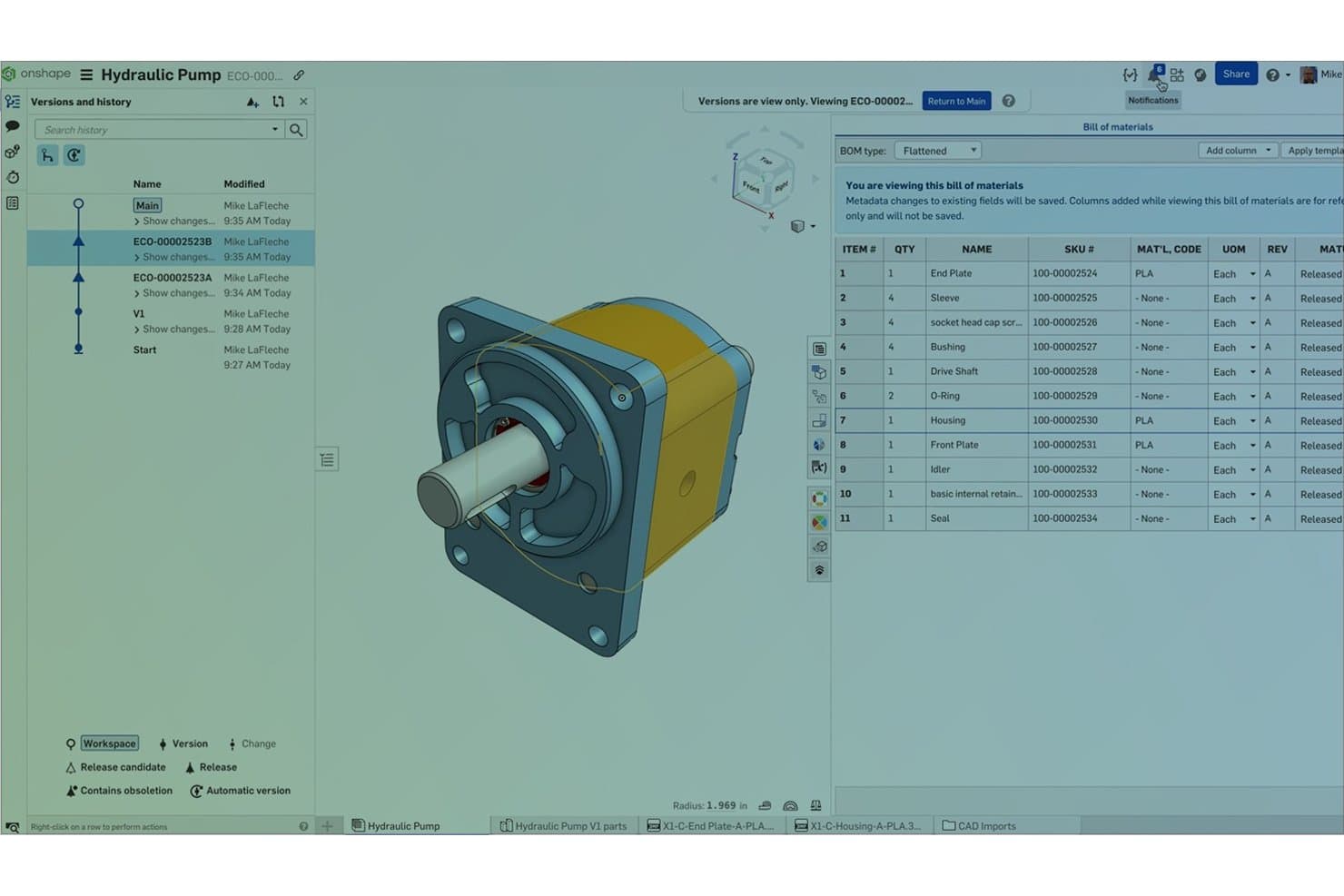
Onshape registra las versiones de las piezas y los datos de la lista de materiales de los ensamblajes de bombas hidráulicas. Onshape es una plataforma de CAD 3D y creación de prototipos nativa de la nube que abarca el modelado paramétrico y de superficies, el diseño de ensamblajes, la simulación, el renderizado y la fabricación asistida por computadora (CAM), todo dentro de un entorno basado en navegador con control de versiones integrado.
¿Para quién es más adecuado Onshape?
Onshape es ideal para ingenieros mecánicos y equipos de productos de hardware que necesitan explorar varias variantes de diseño simultáneamente sin la sobrecarga de gestionar archivos.
Por qué elegí Onshape
He incluido Onshape entre mis principales opciones porque sus funciones de ramificación y fusión al estilo de Git son realmente diferentes de todo lo demás en el CAD en la nube. Puedo crear una rama para probar un cambio en el grosor de una carcasa, mantener intacto el diseño principal y, después, previsualizar y fusionar selectivamente solo la geometría que quiero conservar. Junto con las configuraciones, un estudio de piezas puede contener múltiples entradas de variantes, y los resultados de la simulación se actualizan automáticamente cuando cambio entre ellas.
Características principales de Onshape
- Edición colaborativa en tiempo real: Varios miembros del equipo pueden editar simultáneamente la misma pieza o ensamblaje, sin bloqueo de archivos ni conflictos de versiones.
- Render Studio: Renderizado fotorrealista basado en la nube y con tecnología NVIDIA Iray, que no requiere hardware gráfico local para producir resultados.
- Simulación de ensamblajes: El análisis estático lineal y modal se ejecuta directamente en los ensamblajes, y las relaciones de posición se convierten automáticamente en condiciones de simulación.
- FeatureScript: Un lenguaje de programación integrado que permite al equipo crear funciones personalizadas y automatizar pasos repetitivos del modelado.
Integraciones de Onshape
Onshape ofrece integraciones nativas con Altium Designer, Altium 365, Arena PLM, Slack, Google Drive, Dropbox y OneDrive. Su tienda de aplicaciones incluye más de 30 productos de socios, mientras que el acceso a la API REST y los webhooks permiten crear integraciones personalizadas.
Pros and Cons
Pros:
- La ramificación conserva los conceptos de diseño originales
- Las configuraciones permiten comparar rápidamente las variantes
- La colaboración en tiempo real simplifica las revisiones de diseño
Cons:
- Se requiere acceso a Internet para modelar
- Las trayectorias de herramienta de CAM requieren regeneración manual después de los cambios
Learn more about Onshape:
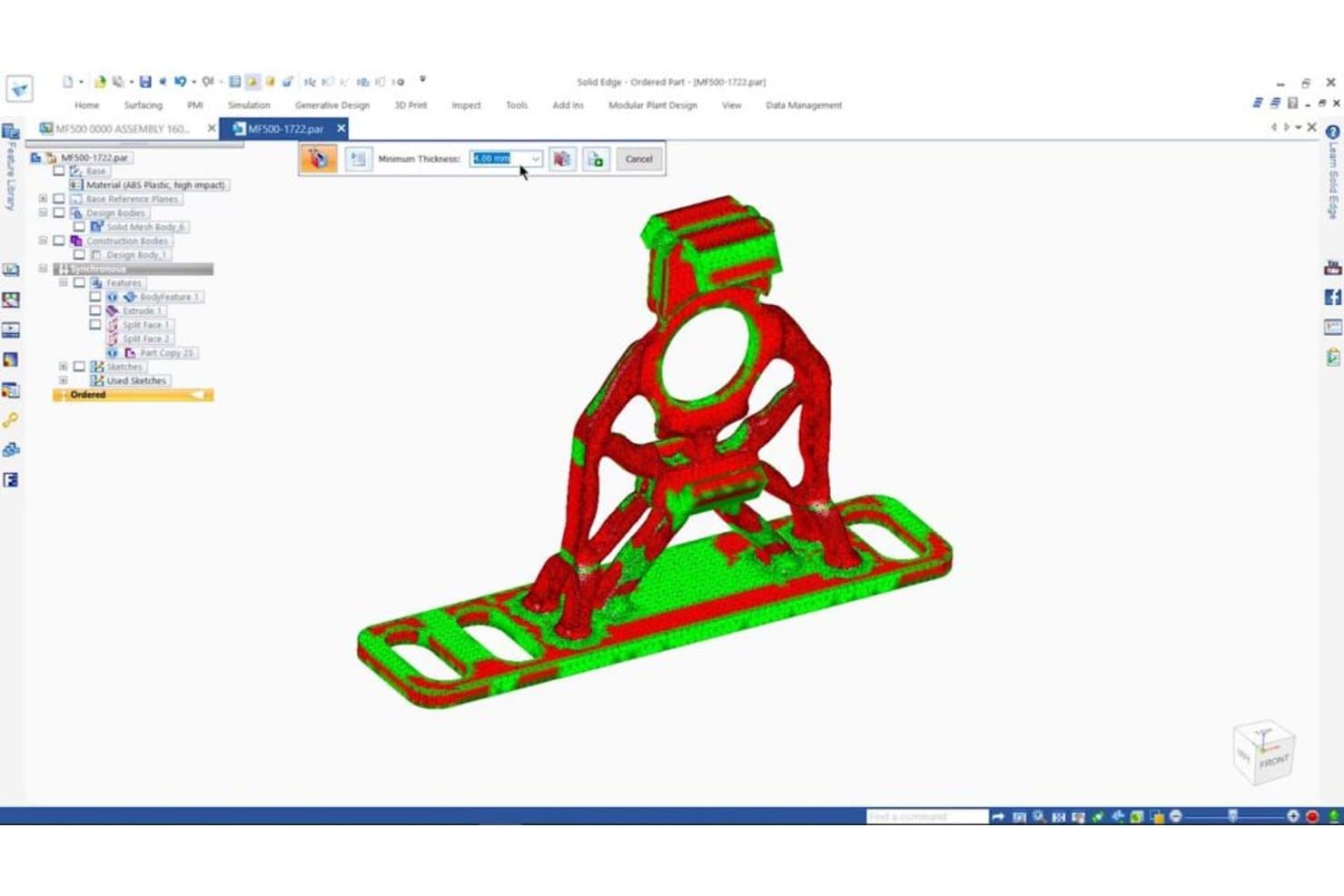
Solid Edge identifica problemas de paredes delgadas en piezas 3D antes de imprimirlas. Solid Edge es una plataforma profesional de CAD 3D de Siemens que combina el modelado paramétrico, la edición directa mediante tecnología síncrona, el modelado de superficies de forma libre Sub-D, la simulación, el diseño generativo y herramientas de preparación para la fabricación en un solo entorno.
¿Para quién es más adecuado Solid Edge?
Solid Edge es una excelente opción para ingenieros mecánicos y diseñadores de productos que necesitan tanto control paramétrico como la flexibilidad de editar geometría sin tener que reconstruir todo el historial de su modelo.
Por qué elegí Solid Edge
Solid Edge ocupa un lugar en mi lista de favoritos porque su tecnología síncrona cambia realmente la forma de iterar sobre modelos 3D: puedes empujar y tirar de la geometría, editar archivos CAD importados y cambiar dimensiones sin activar una reconstrucción completa del árbol de historial. También me encanta el modelado Sub-D integrado para trabajos de superficies de forma libre, que permite esculpir formas orgánicas y pasar directamente al control paramétrico en la misma sesión. El diseño generativo también está integrado, por lo que puedes definir casos de carga y restricciones de material y obtener una geometría optimizada sin cambiar de herramienta.
Características principales de Solid Edge
- Modelado de mallas convergentes: Combina geometría sólida estándar y modelos de malla triangular en el mismo entorno sin convertir entre formatos.
- Ensamblaje con ajuste magnético mediante AI: Detecta automáticamente las restricciones correctas al colocar piezas en un ensamblaje, lo que reduce el tiempo de configuración manual.
- Definición basada en modelos (MBD): Añade anotaciones de fabricación (PMI) directamente al modelo 3D y exporta archivos PDF 3D universales para los equipos posteriores.
- Integración con servicios de impresión 3D: Envía diseños a 3YOURMIND desde Solid Edge para comparar precios y plazos de entrega en tiempo real entre distintos materiales y servicios de impresión.
Integraciones de Solid Edge
Solid Edge se integra con Teamcenter, Teamcenter X, Teamcenter Share, Solid Edge CAM Pro, Simcenter FloEFD, KeyShot, 3YOURMIND y Microsoft 3D Builder. También se conecta con Dropbox, OneDrive, Google Drive y Box para compartir archivos.
Pros and Cons
Pros:
- Las ediciones síncronas aceleran las iteraciones de prototipos
- El modelado Sub-D permite crear formas orgánicas de productos
- Los flujos de trabajo con mallas admiten geometría de prototipos escaneados
Cons:
- Los ensamblajes grandes pueden volverse lentos
- Las funciones avanzadas requieren conocimientos más profundos de CAD
Learn more about Solid Edge: La mejor opción para CAD paramétrico con licencia perpetua
- Prueba gratuita de 30 días disponible
- Precios disponibles previa solicitud
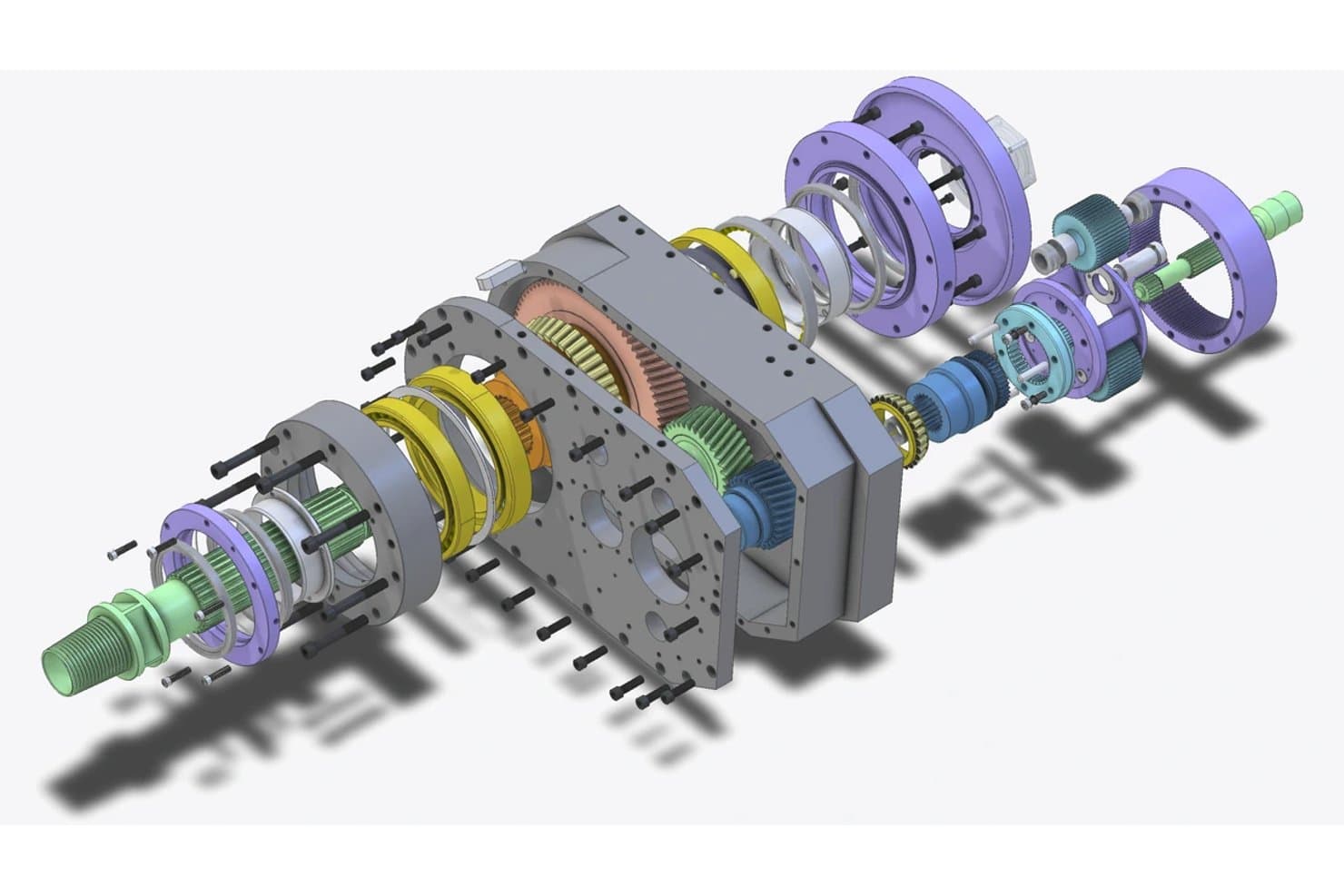
Alibre Design genera vistas explosionadas detalladas de ensamblajes mecánicos complejos. Alibre Design es una herramienta CAD paramétrica basada en Windows, creada en torno al modelado 3D basado en operaciones, el diseño de chapa metálica y estructuras soldadas, las restricciones de ensamblaje y la generación de planos técnicos en 2D.
¿Para quién es más adecuado Alibre Design?
Alibre Design es una opción excelente para ingenieros mecánicos y diseñadores de productos que desean un CAD paramétrico de nivel profesional sin costes de suscripción recurrentes.
Por qué elegí Alibre Design
Alibre Design ocupa un lugar en mi lista final porque es una de las pocas herramientas CAD paramétricas de nivel profesional que puedes adquirir en propiedad, sin necesidad de suscripción. Me gusta especialmente el modelo de licencia perpetua combinado con un conjunto de funciones realmente completo: la edición del historial paramétrico permite actualizar las dimensiones y ver cómo el modelo se reconstruye en tiempo real, mientras que el espacio de trabajo específico para chapa metálica genera al instante desarrollos planos listos para exportar a láser o CNC. Para crear prototipos de hardware físico, el espacio de trabajo de ensamblajes, con restricciones de movimiento mecánico y detección de interferencias, permite validar el ajuste y el funcionamiento antes de mecanizar una sola pieza.
Funciones principales de Alibre Design
- Espacio de trabajo para estructuras soldadas: Un entorno específico para el diseño de perfiles estructurales que incluye una biblioteca de perfiles, herramientas para recortar y extender, metadatos por estructura y listas de corte automáticas.
- Alibre Script: Un entorno de scripting en Python que automatiza tareas de modelado, genera geometría basada en lógica y extrae datos de fuentes de Excel, CSV o SQL.
- Publicación interactiva en PDF 3D: Exporta diseños como PDF 3D interactivos que permiten a las partes interesadas girar, desplazar, ampliar y visualizar cortes de sección sin necesidad de tener instalado un software CAD.
- Amplia importación de formatos CAD propietarios: Lee archivos directamente de SolidWorks, Inventor, Creo, CATIA, NX y Rhino mediante el conjunto de traducción HOOPS.
Integraciones de Alibre Design
Alibre Design se integra con KeyShot, EZ-CAM, MeshCAM Pro, FEMdesigner AD, SimWise FEA/4D, SimWise Motion y SimLab Composer. Su API de C++/.NET y Alibre Script conectan los diseños con Excel, CSV y SQL para crear flujos de trabajo personalizados.
Pros and Cons
Pros:
- Las ediciones paramétricas permiten iteraciones rápidas de prototipos
- Las restricciones de ensamblaje validan el ajuste antes de la fabricación
- Los archivos locales son adecuados para equipos de diseño que deben proteger su propiedad intelectual
Cons:
- Los flujos de trabajo nativos con mallas limitan la creación de prototipos basados en escaneos
- Las capacidades limitadas de modelado de superficies de forma libre restringen el trabajo de diseño industrial
Learn more about Alibre Design: Ideal para la creación de prototipos CAD paramétricos sin costo
- Plan gratuito disponible
- Desde $0/mes
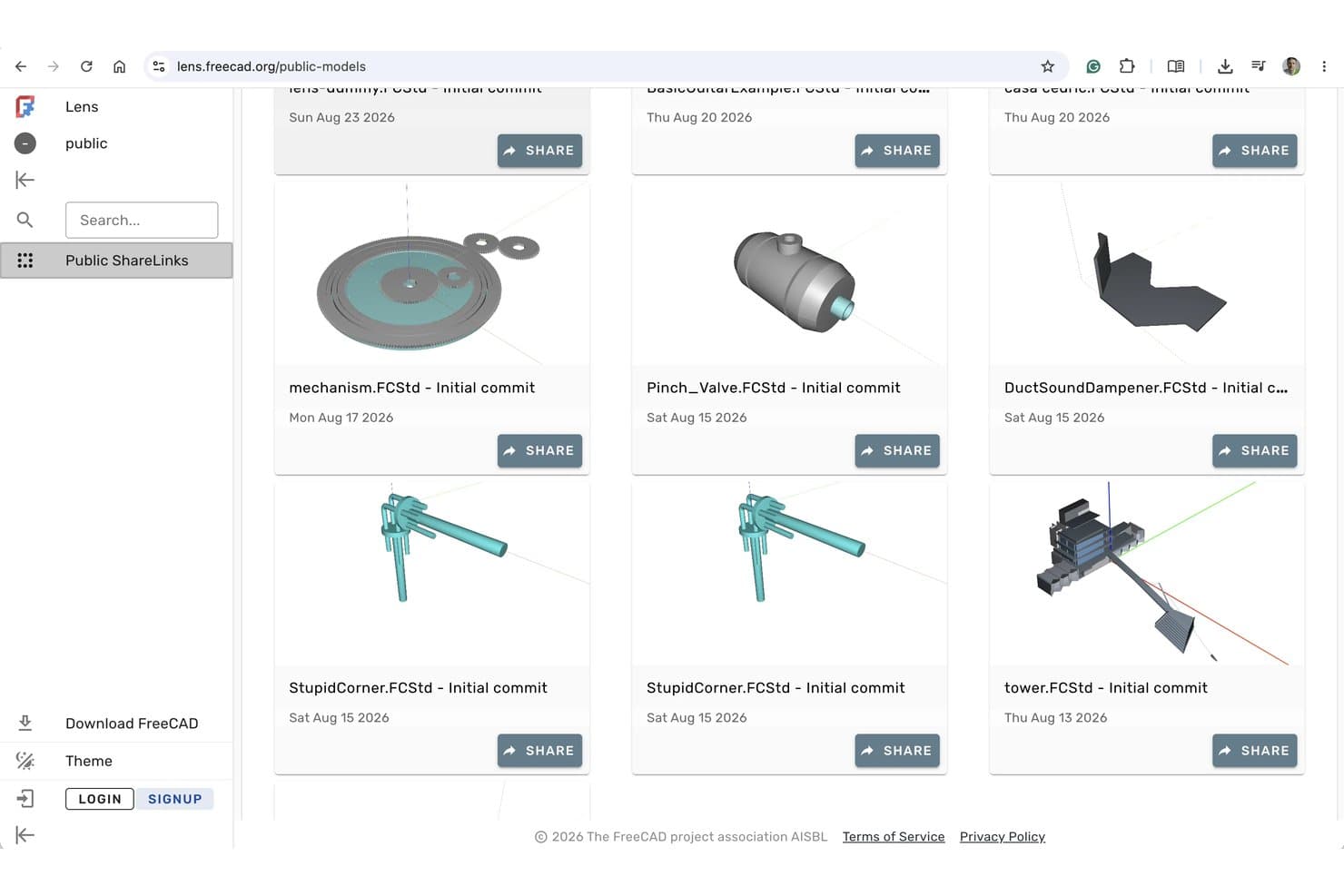
FreeCAD Lens permite a los usuarios compartir y explorar públicamente modelos 3D en línea. FreeCAD es una herramienta de modelado 3D paramétrico de código abierto que abarca el modelado de sólidos, el modelado de superficies, el ensamblaje, la generación de trayectorias de herramientas CAM, el análisis FEM y el dibujo técnico 2D mediante un sistema modular de bancos de trabajo.
¿Para quién es más adecuado FreeCAD?
FreeCAD es una excelente opción para diseñadores de productos e ingenieros mecánicos que necesitan capacidades CAD paramétricas completas sin disponer de presupuesto para licencias.
Por qué elegí FreeCAD
FreeCAD merece estar entre los mejores de mi lista porque ofrece un entorno CAD paramétrico completo sin costo, sin límites de puestos y sin necesidad de registrarse. Me encanta que los bancos de trabajo Diseño de piezas y Croquis permitan crear sólidos basados en restricciones e iterar mediante el historial del modelo, de modo que cambiar aguas arriba el grosor de una pared o el diámetro de un orificio recalcula todo el modelo. El banco de trabajo CAM integrado también genera trayectorias de herramientas CNC reales, y el banco de trabajo de mallas permite reparar archivos STL antes de enviarlos a una impresora 3D.
Características principales de FreeCAD
- Banco de trabajo de análisis FEM: Ejecuta análisis de elementos finitos utilizando los solucionadores CalculiX y Elmer para validar el rendimiento estructural, térmico y electrostático de tus diseños.
- Banco de trabajo de dibujo técnico: Genera planos de producción 2D con validación de formas y formato de cotas directamente a partir de tus modelos 3D.
- Contenedores de propiedades VarSet: Almacena variables personalizadas que controlan las dimensiones paramétricas de tu modelo, de forma similar a los alias controlados mediante hojas de cálculo.
- Administrador de complementos: Instala y actualiza bancos de trabajo, macros y motores de renderizado de la comunidad sin salir de FreeCAD.
Integraciones de FreeCAD
FreeCAD no cuenta con integraciones nativas. Se conecta con OpenSCAD, Gmsh, Netgen, CalculiX, Elmer y motores de renderizado externos mediante bancos de trabajo y complementos, mientras que los scripts de Python permiten crear herramientas personalizadas.
Pros and Cons
Pros:
- Las ediciones paramétricas conservan la intención del diseño
- Las herramientas CAM y de malla facilitan la fabricación
- El análisis FEM valida el comportamiento estructural y térmico
Cons:
- Los ensamblajes grandes pueden sufrir problemas de rendimiento
- Las vistas previas fotorrealistas requieren configuración adicional
Learn more about FreeCAD:- Ideal para el modelado de superficies NURBS y SubD de forma libre
- Prueba gratuita de 90 días
- Desde $995/usuario (compra única)
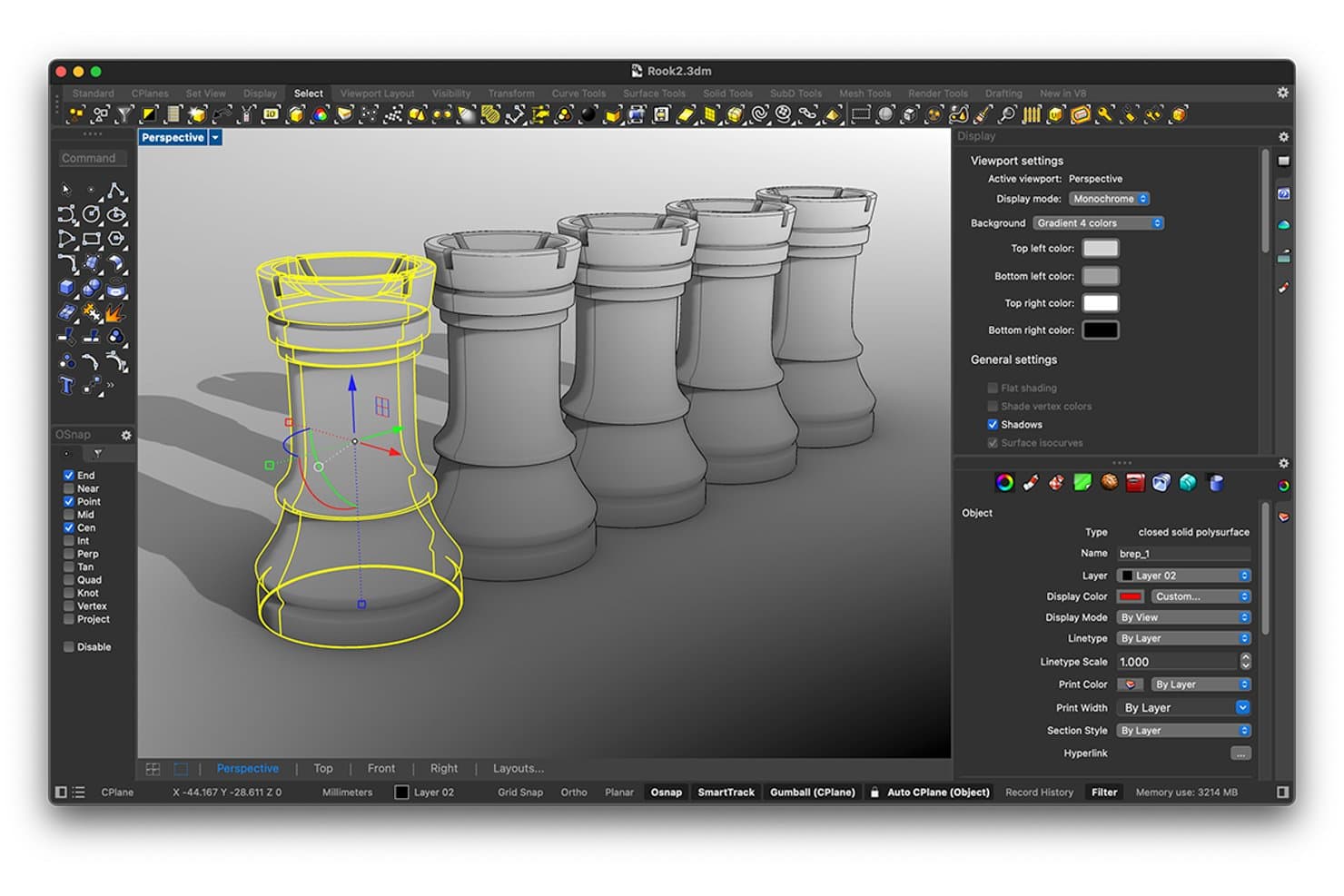
Rhinoceros permite a los usuarios modelar e inspeccionar piezas de ajedrez 3D con herramientas de precisión. Rhinoceros es una herramienta de modelado 3D compatible con la creación de geometría NURBS, SubD, de malla y sólida, además de renderizado, exportación para fabricación y modelado paramétrico mediante su entorno integrado de programación visual Grasshopper.
¿Para quién es más adecuado Rhinoceros?
Rhinoceros es una opción excelente para diseñadores de productos e industriales que necesitan un control preciso sobre superficies orgánicas complejas y geometría de forma libre.
Por qué elegí Rhinoceros
Rhinoceros ocupa un lugar destacado entre mis opciones porque sus capacidades de modelado NURBS y SubD son realmente insuperables para trabajar con superficies de forma libre. Me encanta cómo los pliegues SubD permiten ajustar bordes similares a redondeos en formas orgánicas sin convertirlas en geometría rígida, y cómo ShrinkWrap crea mallas estancas alrededor incluso de la geometría mixta más compleja para la impresión 3D. Grasshopper, incluido sin coste adicional, añade iteraciones paramétricas y generativas que he utilizado para explorar decenas de variaciones de superficies antes de comprometerme con una sola dirección.
Características principales de Rhinoceros
- Detección de bordes abiertos: Identifica los bordes abiertos del modelo que podrían impedir la creación de una malla estanca antes de enviarlo a una impresora 3D o a un flujo de trabajo CNC.
- ShrinkWrap: Crea una malla estanca alrededor de geometría mixta, incluidas mallas abiertas, NURBS y SubD, específicamente para obtener resultados listos para la fabricación.
- API de Rhino.Compute: Expone Rhino y Grasshopper como una API REST sin estado, lo que permite ejecutar el procesamiento de geometría en servidores en la nube o locales.
- Análisis de curvatura y franjas de cebra: Visualiza la continuidad y la suavidad de las superficies del modelo para detectar problemas de mezcla antes de la fabricación.
Integraciones de Rhinoceros
Rhinoceros se integra con Autodesk Revit mediante Rhino.Inside.Revit, Autodesk BIM 360 y AutoCAD en Windows. Es compatible con más de 40 formatos de archivo y proporciona la API REST de Rhino.Compute para flujos de trabajo personalizados de geometría.
Pros and Cons
Pros:
- NURBS gestiona superficies orgánicas de productos
- Grasshopper permite generar variaciones conceptuales paramétricas
- ShrinkWrap crea mallas estancas para impresión
Cons:
- No incluye de forma nativa relaciones de ensamblaje ni simulación de movimiento
- La revisión con las partes interesadas carece de coedición en la nube
Learn more about Rhinoceros :  Ideal para la continuidad CAD del diseño a la fabricación
- Prueba gratuita de 14 días
- Desde $2,310/usuario/año (facturado anualmente).
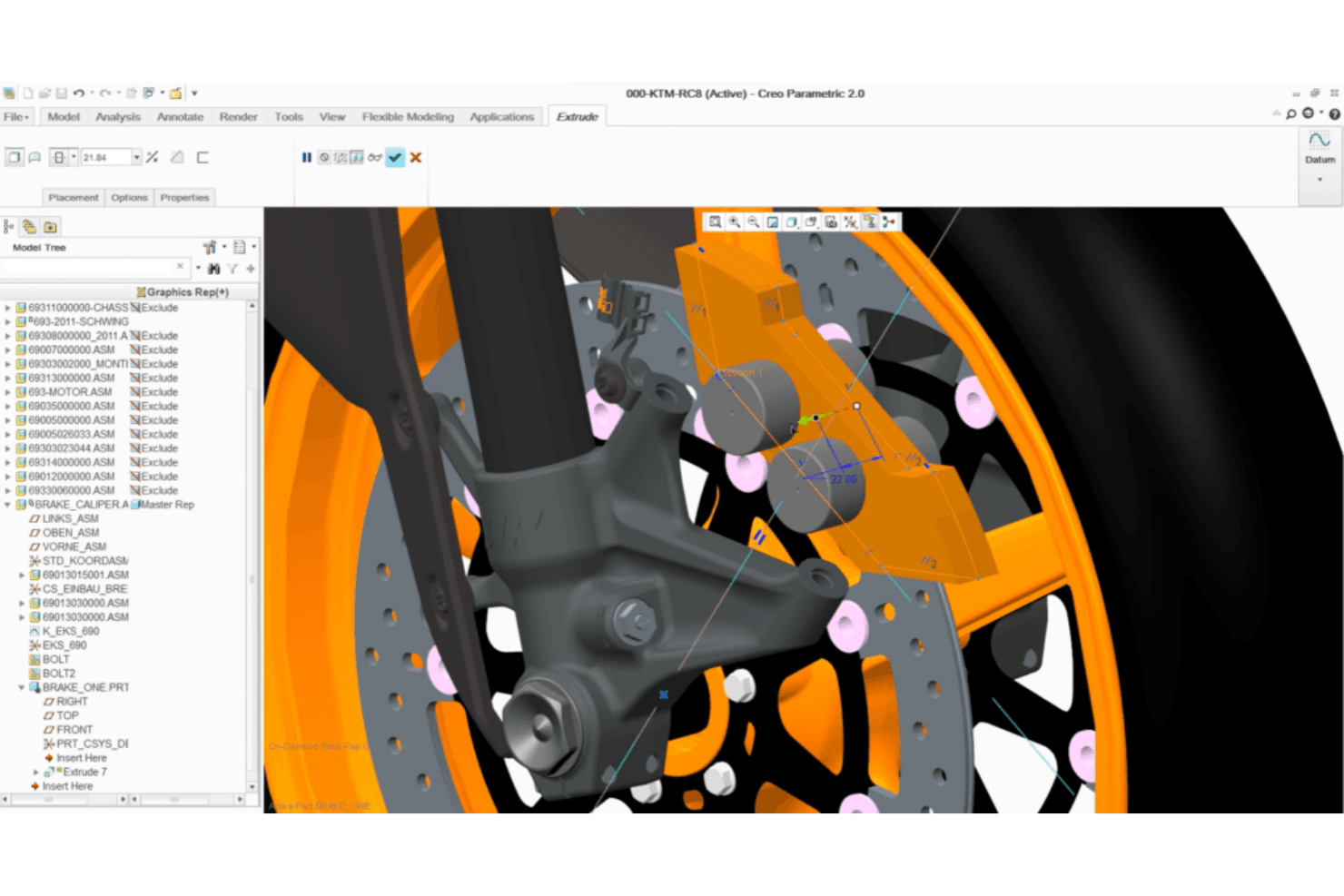
Creo Parametric permite modelar en detalle un ensamblaje 3D de una pinza de freno. Creo Parametric es una plataforma CAD 3D paramétrica que combina el modelado de piezas y ensamblajes, el diseño de superficies, la simulación, GD&T y herramientas integradas de CAM y fabricación aditiva en un único entorno asociativo.
¿Para quién es más adecuado Creo Parametric?
Creo Parametric es una opción adecuada para ingenieros mecánicos y diseñadores de productos que necesitan un único entorno para llevar un diseño desde el modelado inicial hasta la simulación, la aplicación de tolerancias y la generación de resultados para fabricación.
Por qué elegí Creo Parametric
Creo Parametric ocupa un lugar en mi lista de favoritos porque es una de las pocas herramientas que lleva un diseño desde el modelado paramétrico inicial hasta la simulación, la aplicación de tolerancias GD&T y la generación de resultados para fabricación sin salir del entorno. Me gusta especialmente que el CAM integrado y la extensión de fabricación aditiva permitan generar trayectorias de herramientas CNC o exportar una pieza optimizada mediante retículas a un archivo 3MF desde el mismo modelo que se creó como prototipo. El asesor de GD&T, que aplica las normas ASME e ISO dentro del entorno de modelado, es una función que rara vez encuentro igualada a este nivel.
Características principales de Creo Parametric
- Creo Simulation Live: Proporciona información casi instantánea sobre aspectos estructurales, térmicos y modales mediante la tecnología de Ansys mientras se modela, sin salir del entorno de diseño.
- Diseño generativo (GTO y GDX): Genera y compara automáticamente opciones de diseño optimizadas en función de los materiales y los procesos de fabricación, incluidos el mecanizado, la fundición y la forja.
- Gestión avanzada de ensamblajes: Admite diseño descendente, simulación de la dinámica de mecanismos bajo cargas reales y comprobación de interferencias y holguras para productos complejos de varias piezas.
- Visualización en RA: Permite compartir y revisar diseños a escala real mediante realidad aumentada, incluida en el paquete básico.
Integraciones de Creo Parametric
Creo Parametric cuenta con integraciones nativas con PTC Windchill PLM, PTC Mathcad Prime, Ansys y conexiones de Creo Unite para SOLIDWORKS, CATIA, Siemens NX e Inventor.
Pros and Cons
Pros:
- La aplicación de tolerancias de nivel industrial permite crear prototipos precisos
- Las actualizaciones paramétricas agilizan la iteración del diseño
- Las comprobaciones del ensamblaje detectan pronto los problemas de ajuste
Cons:
- Los flujos de trabajo centrados en la ingeniería ralentizan a los revisores ocasionales
- Las extensiones de pago aumentan la complejidad de la creación de prototipos
Learn more about Creo Parametric: La mejor opción para el diseño 3D de calidad aeroespacial y automotriz
- Demostración gratuita disponible
- Desde $7,229/usuario/año (facturación anual)
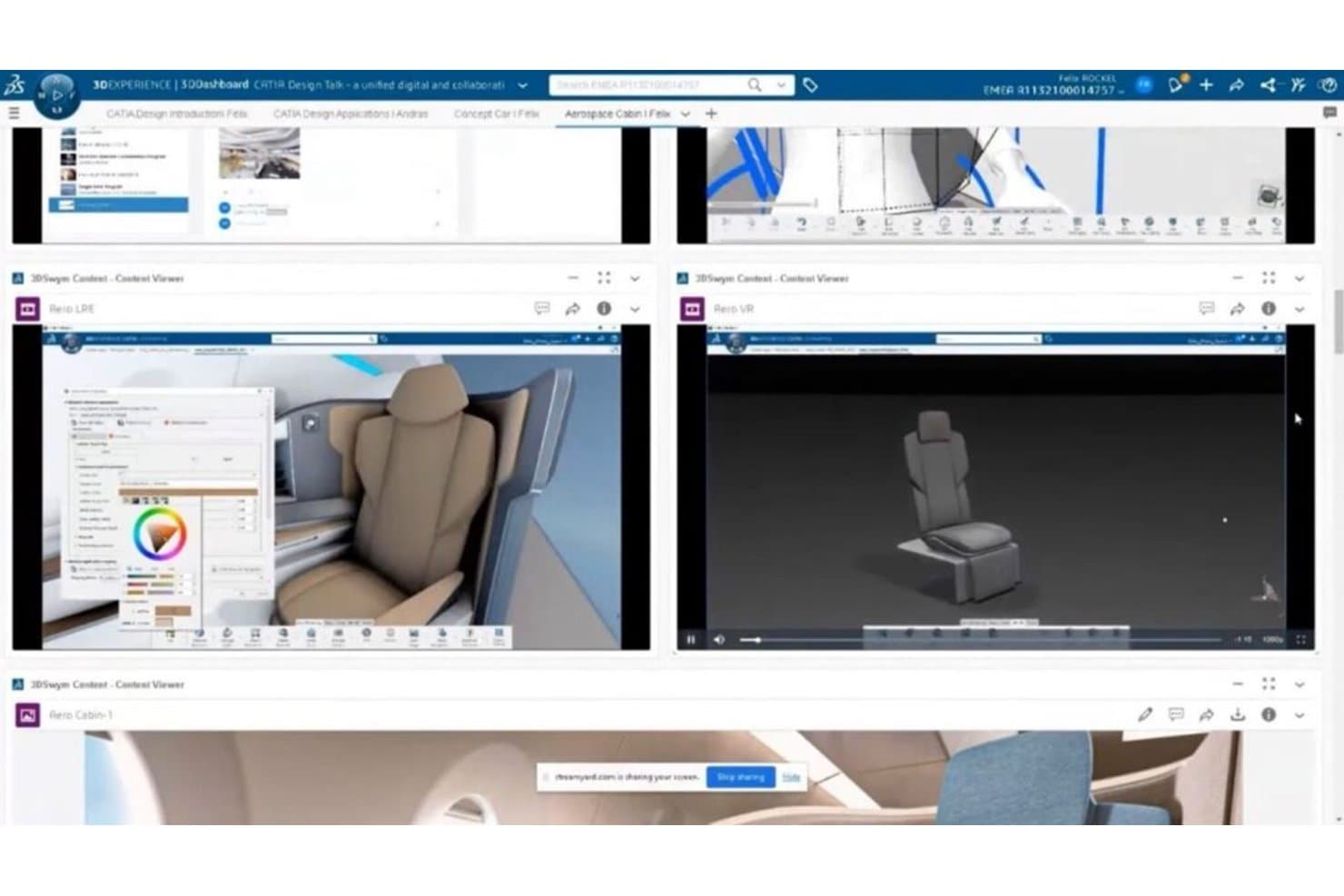
CATIA permite a los usuarios diseñar y revisar prototipos 3D de cabinas desde múltiples vistas. CATIA es una plataforma profesional de CAD 3D y creación de prototipos de Dassault Systèmes que abarca el modelado paramétrico de sólidos, el diseño de superficies de Clase A, la ingeniería de ensamblajes, el diseño generativo y la simulación, tanto en entornos de escritorio como en la nube.
¿Para quién es más adecuado CATIA?
CATIA es la opción preferida de los ingenieros mecánicos y diseñadores de productos de los sectores aeroespacial y automotriz que necesitan una precisión de nivel de producción en toda la cadena de diseño y fabricación.
Por qué elegí CATIA
CATIA ocupa un lugar en mi lista de favoritos porque ninguna otra herramienta que haya probado se acerca a su nivel para el diseño 3D de calidad aeroespacial y automotriz, especialmente cuando la calidad de las superficies de Clase A es innegociable. Me encanta cómo el núcleo de modelado paramétrico se combina con las herramientas de creación de superficies de Clase A de CATIA, lo que permite a los ingenieros validar geometrías aerodinámicas con el nivel de precisión que exige el diseño de una aeronave completa. Las funciones de diseño generativo impulsadas por IA, incluidas las opciones Generativo basado en funciones y Generativo estructural, permiten después que mi equipo explore piezas conceptuales optimizadas directamente a partir de especificaciones funcionales.
Características principales de CATIA
- Diseño de ensamblajes: Cree y gestione ensamblajes complejos de múltiples piezas con seguimiento integrado de la lista de materiales y detección de interferencias en tiempo real.
- Acotación y anotación 3D: Almacene tolerancias y anotaciones basadas en el modelo directamente en el modelo 3D para obtener documentación lista para la producción.
- Funciones de visualización AR/VR: Revise diseños en entornos de realidad virtual y mixta, incluidas sesiones inmersivas de colaboración multiusuario.
- Colaboración en la nube en tiempo real: Trabaje simultáneamente con sus compañeros en modelos 3D compartidos sin flujos de registro ni desprotección de archivos.
Integraciones de CATIA
CATIA ofrece integraciones nativas con SIMULIA, DELMIA, ENOVIA, 3DEXCITE, CATIA Magic/Cameo, Dymola, Tuleap y DraftSight. Su API C++ CAA, la automatización de Knowledgeware y el ecosistema de socios permiten crear integraciones personalizadas.
Pros and Cons
Pros:
- Las superficies de Clase A permiten crear prototipos de calidad aeroespacial
- Los historiales paramétricos aceleran las iteraciones de diseño
- Los ensamblajes grandes permiten validar el ajuste y el movimiento
Cons:
- Las exportaciones de fabricación estándar requieren funciones adicionales
- Las interfaces complejas ralentizan a los colaboradores que usan la herramienta por primera vez
Learn more about CATIA:- 8La mejor opción para CAD paramétrico de nivel de ingeniería a gran escala
Creo
- Prueba gratuita de 14 días
- Desde $3,350/usuario/año (facturado anualmente)
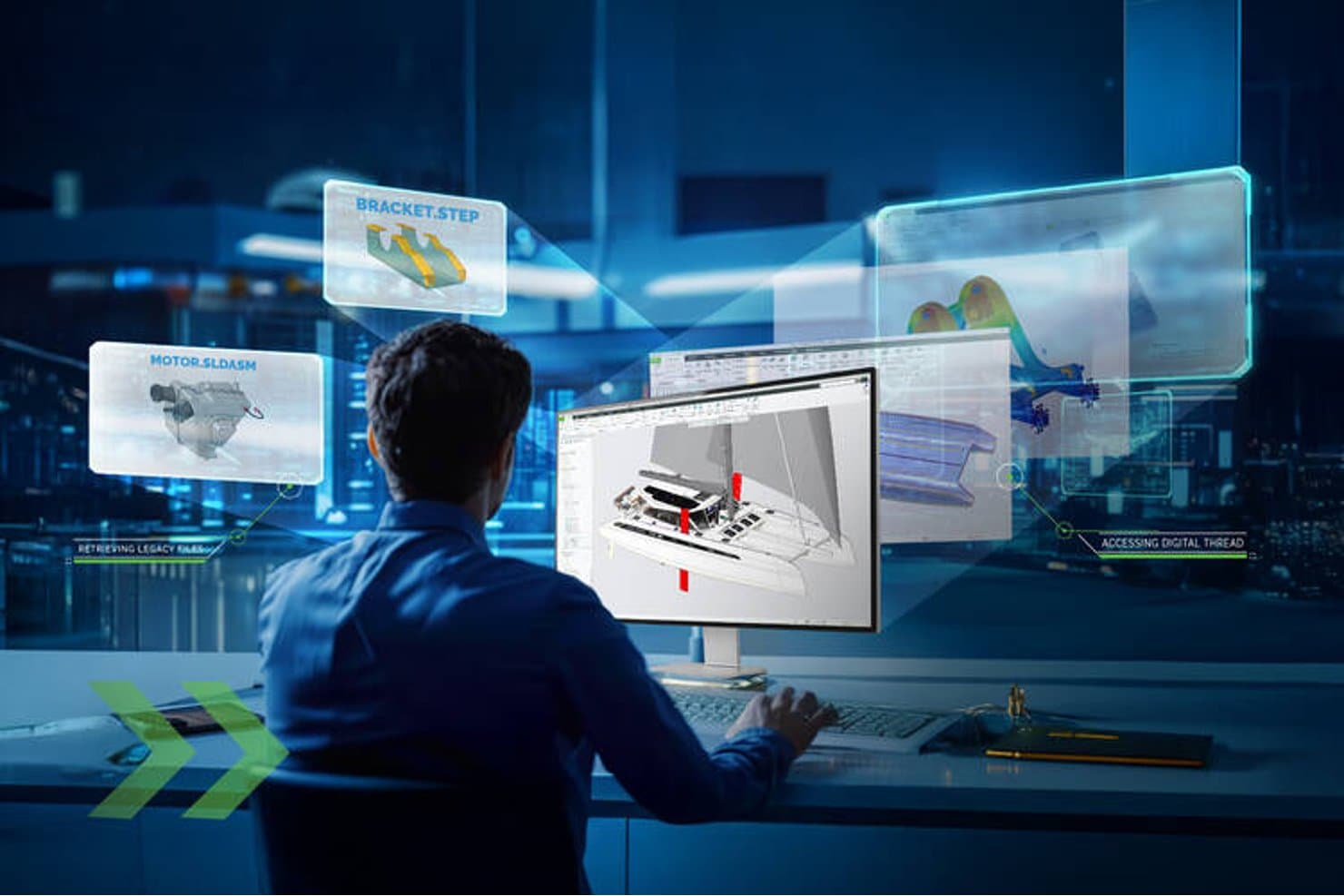
Creo permite a los usuarios acceder a archivos heredados e hilos digitales en el diseño 3D. Creo es una plataforma CAD 3D paramétrica de PTC que abarca el modelado de piezas y ensamblajes, el diseño de superficies, la chapa metálica, la simulación, el diseño generativo y el CAM en un único entorno conectado.
¿Para quién es más adecuado Creo?
Creo es una excelente opción para ingenieros mecánicos y diseñadores de productos que necesitan modelado paramétrico, simulación y CAM de nivel de producción en un único entorno.
Por qué elegí Creo
Creo ocupa un lugar en mi lista de opciones porque ninguna otra herramienta gestiona el CAD paramétrico de nivel de ingeniería a gran escala como lo hace esta. Me impresiona especialmente cómo el historial paramétrico aplica automáticamente los cambios de diseño a la simulación y al CAM, de modo que, cuando una tolerancia cambia en una fase avanzada del desarrollo, todo el modelo se actualiza sin necesidad de rehacer el trabajo manualmente. La suite de ensamblajes grandes y la recuperación de ensamblajes un 70 % más rápida en Creo 13 significan que puedo trabajar con confianza en productos complejos de varias piezas sin la pérdida de rendimiento que frena el ritmo en otras herramientas.
Características principales de Creo
- Creo Simulation Live: Ejecuta análisis estructurales, térmicos y modales en tiempo real —con tecnología de Ansys— directamente dentro de su entorno de modelado.
- Definición basada en el modelo (MBD): Integra GD&T, tolerancias e información de fabricación directamente en el modelo 3D, sustituyendo los dibujos 2D tradicionales.
- Extensión de fabricación aditiva: Genera estructuras reticulares, organiza la bandeja de la impresora y exporta archivos 3MF y STL listos para imprimir desde Creo.
- Creo Unite: Abre de forma nativa archivos de SOLIDWORKS, CATIA, Siemens NX e Inventor, sin convertirlos previamente.
Integraciones de Creo
Creo cuenta con integraciones nativas con Windchill, Ansys, Vuforia View, Vuforia Studio y PTC Control Center, además de compatibilidad con Creo Unite para archivos de SOLIDWORKS, CATIA, Siemens NX e Inventor. Creo Toolkit proporciona una API para integraciones personalizadas.
Pros and Cons
Pros:
- Las ediciones paramétricas se propagan por los procesos de fabricación posteriores
- Los ensamblajes grandes siguen siendo manejables a escala
- La compatibilidad integrada con GD&T permite una precisión lista para la producción
Cons:
- La implementación en escritorio para Windows limita la accesibilidad
- Los modelos grandes pueden provocar bloqueos molestos
Learn more about Creo:  Ideal para CAD, simulación y CAM integrados
- Demostración gratuita + prueba gratuita disponible
- Desde $2,820/usuario/año (facturado anualmente)
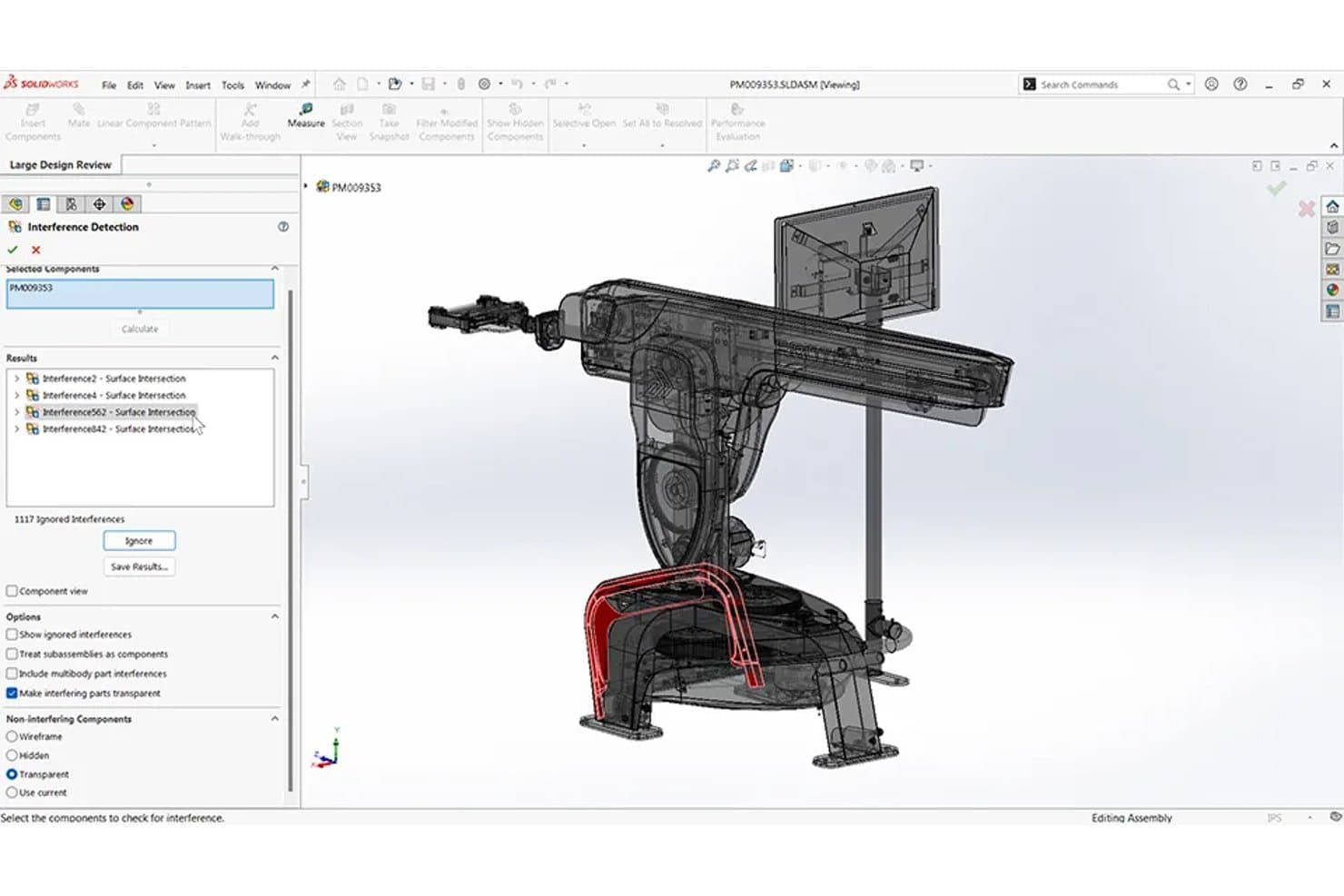
SOLIDWORKS detecta interferencias de ensamblaje en diseños de prototipos 3D. SOLIDWORKS es una plataforma de CAD paramétrico en 3D que abarca el modelado de piezas y ensamblajes, la simulación, la fabricación asistida por computadora (CAM) y el renderizado fotorrealista en un solo entorno.
¿Para quién es más adecuado SOLIDWORKS?
SOLIDWORKS es una excelente opción para ingenieros mecánicos y diseñadores de productos que necesitan CAD, simulación y CAM en un solo entorno.
Por qué elegí SOLIDWORKS
SOLIDWORKS ocupa un lugar en mi lista de favoritos porque es una de las pocas herramientas que mantiene el CAD, la simulación y el CAM realmente conectados en un solo entorno. Me encanta que la simulación esté vinculada directamente al modelo paramétrico, de modo que realizar un análisis de esfuerzo o térmico en una pieza modificada no requiera volver a importar nada. El estudio de topología es especialmente útil para la creación de prototipos, ya que genera automáticamente formas más ligeras y optimizadas para soportar cargas. Si añadimos SOLIDWORKS CAM con el mecanizado basado en tolerancias, se puede pasar de un prototipo digital directamente a trayectorias de herramientas listas para CNC sin cambiar de plataforma.
Características clave de SOLIDWORKS
- Configuraciones y tablas de diseño: Almacena varias versiones de una pieza o ensamblaje en un solo archivo, con una hoja de cálculo integrada que controla las dimensiones y opciones de cada variante.
- Compartición mediante servicios en la nube: Comparte modelos mediante un enlace para que las partes interesadas puedan revisar y anotar diseños en 3D directamente en un navegador, sin necesidad de instalar software.
- Detección de interferencias: Identifica automáticamente las colisiones entre componentes en ensamblajes y entre sólidos en piezas multicuerpo antes de crear prototipos físicos.
- Compatibilidad con ensamblajes grandes: Gestiona ensamblajes complejos de varias piezas con el modo de revisión de diseños grandes, SmartMates y herramientas de análisis de movimiento integradas.
Integraciones de SOLIDWORKS
Las integraciones incluyen la plataforma 3DEXPERIENCE, SOLIDWORKS PDM, DELMIAWorks, SOLIDWORKS Electrical, CircuitWorks y herramientas ECAD mediante los formatos IDF, IDX y PADS. El Programa de Socios de Soluciones y la API de SOLIDWORKS permiten integraciones personalizadas y disponibles en el mercado.
Pros and Cons
Pros:
- Los cambios paramétricos se propagan por los ensamblajes
- Los estudios de topología optimizan los prototipos para reducir el peso
- El CAM nativo prepara trayectorias de herramientas listas para CNC
Cons:
- Los ensamblajes grandes requieren hardware de alta gama
- Los flujos de trabajo de 3DEXPERIENCE pueden frustrar a los usuarios
Learn more about SolidWorks: Ideal para el diseño de ensamblajes mecánicos a gran escala
- Prueba gratuita de 30 días
- Desde $320/mes
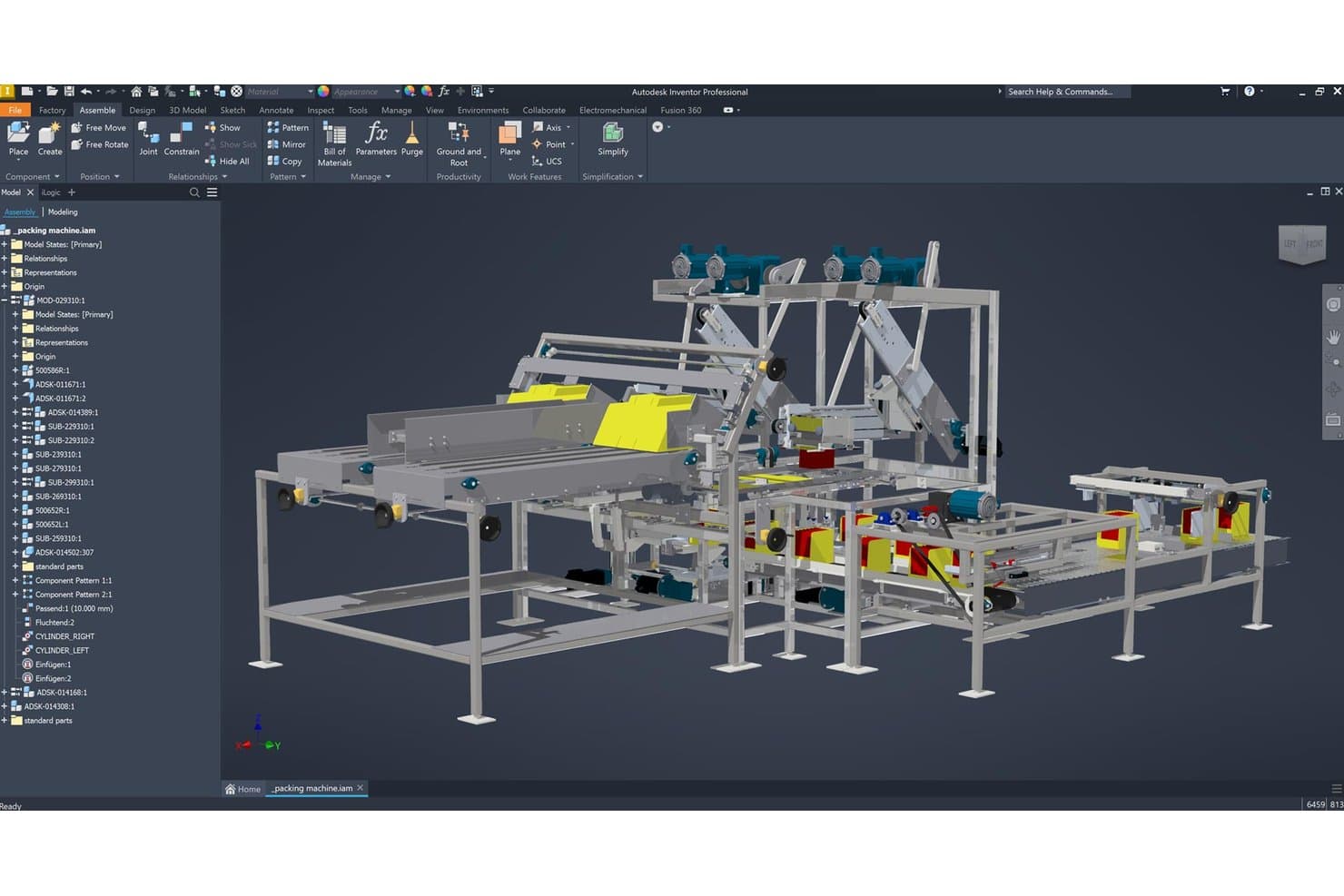
Autodesk Inventor permite a los usuarios ensamblar visualmente prototipos de máquinas complejas en 3D. Autodesk Inventor es una herramienta CAD mecánica basada en Windows que combina el modelado paramétrico, directo, de forma libre y basado en reglas con la gestión de ensamblajes a gran escala, la simulación y la documentación de fabricación.
¿Para quién es más adecuado Autodesk Inventor?
Inventor es una opción excelente para ingenieros mecánicos y diseñadores de productos que trabajan en productos físicos complejos y con múltiples componentes, y que requieren precisión de nivel de producción y gestión de ensamblajes a gran escala.
Por qué elegí Autodesk Inventor
Autodesk Inventor ocupa un lugar en mi lista porque ninguna otra herramienta que haya probado gestiona los ensamblajes mecánicos a gran escala con la misma profundidad. He trabajado con ensamblajes de miles de piezas en los que las restricciones relacionales, la comprobación de interferencias y la Simulación dinámica de Inventor detectaron problemas de ajuste y funcionamiento antes de construir un solo prototipo. También confío en su conjunto de herramientas de Definición basada en el modelo para incorporar tolerancias de nivel de producción directamente en el modelo 3D, lo que mantiene la documentación de fabricación estrechamente vinculada al diseño.
Funciones principales de Autodesk Inventor
- Automatización basada en reglas de iLogic: Cree reglas de diseño basadas en lógica mediante una interfaz visual de arrastrar y soltar para automatizar la configuración y los cambios de parámetros en piezas y ensamblajes.
- Simulación dinámica: Evalúe el movimiento, la velocidad y la aceleración de los componentes del ensamblaje para validar el comportamiento mecánico antes de crear prototipos físicos.
- Definición basada en el modelo (MBD): Incorpore dimensiones 3D, anotaciones y tolerancias directamente en el modelo para mantener la documentación de fabricación vinculada a la geometría.
- Generador de formas: Ejecute una optimización topológica en las piezas para identificar el material que se puede eliminar manteniendo el rendimiento estructural bajo condiciones de carga definidas.
Integraciones de Autodesk Inventor
Autodesk Inventor cuenta con integraciones nativas con Autodesk Fusion, AutoCAD, Revit, Vault, Inventor Nastran e Inventor CAM, además de flujos de trabajo ECAD/MCAD y traductores para STEP, JT, Parasolid, OBJ y Solid Edge. Su API y la compatibilidad con iLogic permiten crear integraciones personalizadas.
Pros and Cons
Pros:
- Gestiona ensamblajes con miles de componentes
- Incorpora tolerancias de producción en modelos 3D
- Automatiza diseños configurables mediante iLogic
Cons:
- Requiere Windows y un equipo con recursos considerables
- No ofrece coedición colaborativa en tiempo real
Learn more about Autodesk Inventor:
Otro software de prototipado 3D
Estas son algunas opciones adicionales de software de prototipado 3D que no llegaron a mi selección, pero que merece la pena conocer:
Cómo evalúo el software de prototipado 3D
Divido mi evaluación en tres partes, comenzando por la funcionalidad principal—específicamente, si una herramienta puede crear geometría 3D precisa y permitir iteraciones rápidas de diseño—, ya que estos aspectos tienen el mayor peso. A partir de ahí, examino características destacadas como la automatización del diseño generativo. Por último, considero la incorporación, los precios y la adecuación al ecosistema.
Funcionalidad principal (requisitos básicos para esta lista)
Al seleccionar herramientas para mi lista, califico cada una en una escala de 0 (no ofrece la funcionalidad) a 5 (sobresale en esta área) para cada funcionalidad principal indicada a continuación. Después convierto el total en un porcentaje para ayudar a evaluar la adecuación general de cada herramienta, otorgando un peso adicional a las funcionalidades que he considerado esenciales.
- Creación de modelos 3D (esencial): Evalúo si una herramienta admite sólidos paramétricos, superficies de forma libre o ambos, ya que una carcasa sencilla y una empuñadura esculpida para un dispositivo portátil requieren motores de geometría muy diferentes.
- Compatibilidad con la iteración de diseños (esencial): La ramificación rápida, el historial de versiones y las ediciones paramétricas son importantes en este aspecto. Compruebo con qué rapidez puedo crear una variación del diseño sin tener que reconstruirlo desde cero.
- Exportación para fabricación: La herramienta debería generar de forma fiable archivos STL, STEP y otros formatos que las impresoras y los talleres de CNC acepten realmente. También busco funciones integradas de reparación de mallas o validación de exportaciones.
- Herramientas de precisión dimensional: Las restricciones precisas y la acotación numérica son lo que diferencia un boceto conceptual de una pieza fabricable. Busco anotaciones de tolerancia y el bloqueo paramétrico de las dimensiones clave.
- Renderizado o vista previa visual: Las partes interesadas necesitan ver los acabados de los materiales y el factor de forma antes de que exista una muestra física. Evalúo la calidad del sombreado, las bibliotecas de materiales y si los renders son lo bastante claros para una revisión de diseño.
- Modelado de ensamblajes o de múltiples piezas: La mayoría de los productos de hardware incluyen más de un componente. Busco restricciones relacionales entre piezas, detección de interferencias y la posibilidad de gestionar ensamblajes a medida que aumentan en complejidad.
Una vez que tengo una lista de herramientas que cumplen los criterios, considero qué distingue a cada plataforma.
Factores diferenciadores (lo que distingue a los proveedores)
Así es como comparo y contrasto los distintos proveedores:
Características destacadas
La automatización del diseño generativo es lo primero que busco. Herramientas como Fusion 360 permiten definir restricciones de peso y material y, después, explorar algorítmicamente docenas de opciones de geometría que nunca dibujarías a mano. La visualización de prototipos mediante AR/VR es igualmente valiosa cuando las partes interesadas necesitan evaluar la ergonomía o el factor de forma a escala real antes de aprobar una construcción física. También compruebo si una herramienta ofrece un ecosistema de complementos y API que se conecte con plataformas PLM o CAM, ya que eso determina con qué fluidez un diseño validado pasa a producción.
Más allá de las características
Los modelos de licencia son muy importantes en este caso. Los precios basados en puestos pueden aumentar rápidamente cuando necesitas que revisores ajenos a tu equipo principal de diseño accedan a los modelos, por lo que compruebo si los proveedores ofrecen niveles solo de visualización u opciones flexibles de puestos. También evalúo en qué medida cada herramienta encaja en una cadena de herramientas existente—Fusion 360 y Onshape, por ejemplo, gestionan las transferencias a PLM y CAM de forma diferente, y una integración deficiente implica conversiones manuales de archivos que introducen errores dimensionales. Por último, la rapidez de incorporación es un factor diferenciador real cuando los gerentes de producto sin experiencia en CAD necesitan contribuir a las revisiones de diseño.
Cómo elegir un software de prototipado 3D
Es fácil perderse entre largas listas de características y estructuras de precios complejas. Para ayudarte a mantener la concentración mientras avanzas en tu proceso único de selección de software, aquí tienes una lista de factores que debes tener en cuenta:
| Factor | Qué debes considerar |
|---|---|
| FactorEscalabilidad | Qué debes considerar¿El software puede crecer junto con tu equipo? Comprueba si admite el número de usuarios que esperas tener en el futuro sin costes adicionales significativos ni problemas de rendimiento. |
| FactorIntegraciones | Qué debes considerar¿Se conecta con tus herramientas actuales? Asegúrate de que el software pueda integrarse con CAD, PLM u otros sistemas que utilices para evitar interrupciones en el flujo de trabajo. |
| FactorPersonalización | Qué debes considerar¿Puedes adaptarlo a tus necesidades? Busca plantillas e interfaces personalizables que se adapten a los flujos de trabajo y las preferencias específicas de tu equipo. |
| FactorFacilidad de uso | Qué debes considerar¿La interfaz es intuitiva para todos los miembros del equipo? Da prioridad a un software con un diseño fácil de usar que reduzca la curva de aprendizaje y aumente la productividad. |
| FactorImplementación e incorporación | Qué debes considerar¿Cuánto tardarás en ponerlo en funcionamiento? Evalúa la disponibilidad de recursos de formación y el tiempo necesario para incorporar eficazmente a tu equipo. |
| FactorCoste | Qué debes considerar¿Cómo se ajustan los precios a tu presupuesto? Compara el coste total de propiedad, incluidas las posibles tarifas ocultas, y considera el valor que el software aporta a tus operaciones. |
| FactorMedidas de seguridad | Qué debes considerar¿Tus diseños están protegidos? Asegúrate de que el software ofrezca sólidas funciones de seguridad, como cifrado y cumplimiento de las normativas de protección de datos. |
¿Qué es el software de creación de prototipos 3D?
El software de creación de prototipos 3D es una herramienta que se utiliza para crear modelos digitales tridimensionales de productos. Los diseñadores, ingenieros y responsables de producto suelen utilizar estas herramientas para visualizar conceptos y perfeccionar diseños antes de la producción. Las funciones de modelado, simulación y colaboración ayudan a mejorar la precisión del diseño, reducir errores y acelerar el desarrollo. En general, estas herramientas mejoran la eficiencia y la eficacia del proceso de diseño.
Características
Al seleccionar un software de creación de prototipos 3D, presta atención a las siguientes características clave:
- Capacidades de modelado: Permiten a los usuarios crear modelos 3D detallados, proporcionando una visualización clara del diseño.
- Herramientas de simulación: Permiten probar modelos en distintas condiciones, lo que ayuda a identificar posibles problemas desde el principio.
- Funciones de colaboración: Facilitan el trabajo en equipo al permitir que varios usuarios trabajen simultáneamente en un diseño.
- Opciones de integración: Se conectan con herramientas existentes, como los sistemas CAD, para garantizar un flujo de trabajo fluido.
- Plantillas personalizables: Ofrecen plantillas prediseñadas que pueden adaptarse a las necesidades específicas de cada proyecto, lo que permite ahorrar tiempo.
- Almacenamiento en la nube: Proporciona acceso remoto y seguro a los diseños, garantizando que los miembros del equipo puedan acceder a los archivos desde cualquier lugar.
- Interfaz fácil de usar: Garantiza que los usuarios puedan navegar fácilmente por el software, reduciendo la curva de aprendizaje.
- Medidas de seguridad: Protegen los datos de diseño confidenciales mediante cifrado y el cumplimiento de las normativas de protección de datos.
- Tours interactivos del producto: Ayudan a los nuevos usuarios a aprender rápidamente a utilizar el software mediante tutoriales guiados.
- Capacidades de exportación: Permiten guardar los modelos en varios formatos, lo que facilita compartirlos con las partes interesadas.
Beneficios
La implementación de un software de creación de prototipos 3D ofrece varios beneficios para tu equipo y tu empresa. Estos son algunos de los que puedes esperar:
- Mayor precisión del diseño: Las capacidades de modelado ayudan a crear diseños precisos, reduciendo los errores en el producto final.
- Ciclos de desarrollo más rápidos: Las herramientas de simulación permiten realizar pruebas e iteraciones rápidas, acelerando el proceso de diseño.
- Colaboración mejorada: Las funciones de colaboración permiten que los miembros del equipo trabajen juntos en tiempo real, mejorando la comunicación.
- Ahorro de costes: Identificar los problemas de diseño de forma temprana mediante simulaciones puede evitar errores costosos durante la producción.
- Mayor accesibilidad: El almacenamiento en la nube garantiza que los miembros del equipo puedan acceder a los diseños y compartirlos desde cualquier lugar, facilitando el trabajo remoto.
- Curva de aprendizaje simplificada: Una interfaz fácil de usar ayuda a los nuevos usuarios a ponerse al día rápidamente, minimizando el tiempo de inactividad.
- Seguridad de los datos: Las medidas de seguridad protegen los datos de diseño confidenciales, manteniendo la confidencialidad y el cumplimiento normativo.
Costes y precios
Seleccionar un software de creación de prototipos 3D requiere comprender los distintos modelos de precios y planes disponibles. Los costes varían según las funciones, el tamaño del equipo, los complementos y otros factores. La tabla siguiente resume los planes habituales, sus precios medios y las funciones que suelen incluir las soluciones de software de creación de prototipos 3D:
Tabla comparativa de planes de software de creación de prototipos 3D
| Tipo de plan | Precio medio | Funciones habituales |
|---|---|---|
| Tipo de planPlan gratuito | Precio medio$0 | Funciones habitualesCapacidades básicas de modelado, almacenamiento limitado y asistencia de la comunidad. |
| Tipo de planPlan personal | Precio medio$10-$30/usuario/mes | Funciones habitualesHerramientas avanzadas de modelado, almacenamiento en la nube y funciones de colaboración limitadas. |
| Tipo de planPlan empresarial | Precio medio$50-$100/usuario/mes | Funciones habitualesHerramientas completas de modelado y simulación, colaboración en equipo e integraciones. |
| Tipo de planPlan corporativo | Precio medio$150+/usuario/mes | Funciones habitualesFunciones personalizables, asistencia especializada, seguridad avanzada y análisis. |
Preguntas frecuentes sobre software de prototipado 3D
Estas son algunas respuestas a preguntas frecuentes sobre el software de prototipado 3D:
¿Se puede utilizar el software de prototipado 3D en un Mac?
Sí, muchas soluciones de software de prototipado 3D son compatibles con Mac. Comprueba siempre los requisitos del sistema antes de realizar la compra para asegurarte de que sean compatibles con tu Mac. Algunos programas pueden requerir configuraciones de hardware específicas, así que verifica que tu Mac cumpla estos requisitos para evitar problemas de rendimiento.
¿Se necesita formación para utilizar el software de prototipado 3D?
Sí, a menudo se necesita cierta formación para utilizar eficazmente el software de prototipado 3D. Muchos proveedores ofrecen tutoriales, seminarios web y documentación para ayudarte a empezar. Si eres nuevo en el modelado 3D, considera invertir tiempo en aprender los conceptos básicos para aprovechar al máximo el potencial del software y mejorar tu productividad.
¿Qué sectores se benefician del uso del software de prototipado 3D?
Sectores como la arquitectura, la automoción, la industria aeroespacial y la electrónica de consumo se benefician enormemente del software de prototipado 3D. Este ayuda a estos sectores a visualizar diseños complejos, probar la funcionalidad de los productos y realizar los ajustes necesarios antes de la producción. Esto reduce los costes y mejora la calidad del producto final. Si trabajas en alguno de estos campos, incorporar el prototipado 3D puede mejorar tu proceso de diseño.
Lo siguiente:
Si estás investigando software de prototipado 3D, contacta gratis con un asesor de SoftwareSelect para recibir recomendaciones.
Rellenas un formulario y mantienes una breve conversación en la que analizan en detalle tus necesidades. Después recibirás una lista breve de programas que podrás revisar. Además, te ayudarán durante todo el proceso de compra, incluidas las negociaciones de precios.