

Las herramientas gratuitas para crear estructuras alámbricas son plataformas de software que permiten crear bocetos y prototipos digitales para sitios web o aplicaciones sin tener que pagar, ya sea mediante un plan gratuito o una prueba gratuita. Si buscas formas de diseñar los flujos de usuario, compartir ideas visualmente o colaborar en diseños iniciales sin limitaciones presupuestarias, necesitas opciones que no bloqueen las funciones esenciales tras un muro de pago. Esta lista te ayudará a comparar rápidamente las mejores herramientas gratuitas para crear estructuras alámbricas disponibles en 2026, para que puedas elegir la opción adecuada para el flujo de trabajo, el estilo de colaboración y las necesidades de proyecto de tu equipo.
Por qué confiar en nuestras recomendaciones de software
6,700+
Reviews
20
Industry experts
16+
Evaluation factors
14
Years
Nuestro equipo lleva probando y evaluando software desde 2012. Como gestores de producto, sabemos lo difícil —y lo importante— que es elegir el software adecuado.
Para esta guía, evaluamos las herramientas mediante pruebas prácticas e investigación independiente, puntuando las herramientas según nuestros criterios de selección.
Nuestras reseñas reflejan nuestro criterio editorial humano, no un discurso de ventas.
Revisores expertos:
 Hannah ClarkSenior TPM
- Cristiano ValimSenior UI/UX Lead

Tabla comparativa de herramientas gratuitas para crear estructuras alámbricas
Aunque todas las herramientas para crear estructuras alámbricas de mi lista ofrecen opciones gratuitas, también cuentan con planes de pago por si deseas actualizar tu suscripción:
| Tool | Best For | Trial Info | Price | ||
|---|---|---|---|---|---|
| 1 | Ideal para la colaboración en equipo en tiempo real | Plan gratuito disponible | Desde $16/usuario/mes (facturado anualmente) | Website | |
| 2 | Mejor para la generación de wireframes con IA | Plan gratuito disponible | Desde $11/editor/mes (facturado anualmente) | Website | |
| 3 | Ideal para sesiones de lluvia de ideas con bocetos de baja fidelidad | Prueba gratuita de 14 días | Desde $16/usuario/mes (facturado anualmente) | Website | |
| 4 | Mejor para ideación rápida con paquetes de UI | Plan gratuito disponible | Desde $14/usuario/mes (facturado anualmente) | Website | |
| 5 | Ideal para diseños preparados para la accesibilidad | Plan gratuito + prueba gratuita de 14 días disponible | Desde $29/usuario/mes (facturado anualmente) | Website | |
| 6 | Ideal para la colaboración en un lienzo infinito | Plan gratuito + prueba gratuita de 14 días disponible | Desde $8/usuario/mes (facturado anualmente) | Website | |
| 7 | Mejor para vistas previas interactivas de alta fidelidad | Prueba gratuita + plan gratis disponible | Desde $10/mes (facturación anual) | Website | |
| 8 | Ideal para flujos de trabajo de diseño de código abierto | Plan gratuito y prueba gratuita de 14 días disponible | Desde $7/usuario/mes | Website | |
| 9 | Ideal para flujos de trabajo de diseño nativos de macOS | Prueba gratuita de 30 días | Desde $12/usuario/mes (facturado anualmente) | Website | |
| 10 | Ideal para lógica y condiciones avanzadas | Prueba gratuita de 30 días | Desde $29/usuario/mes (facturado anualmente) | Website |


Análisis de las mejores herramientas gratuitas para crear estructuras alámbricas
A continuación se muestran mis resúmenes detallados de las herramientas gratuitas para crear estructuras alámbricas que llegaron a mi lista. En mis análisis examino detalladamente las funciones, los mejores casos de uso y los precios de cada herramienta para ayudarte a encontrar la más adecuada para ti.
 Ideal para la colaboración en equipo en tiempo real
- Plan gratuito disponible
- Desde $16/usuario/mes (facturado anualmente)
Visit WebsiteCustomer Rating:4.7/5
El lienzo de Figma muestra diseños de UI de varias pantallas con un panel de capas, activos y previsualizaciones de prototipos. Figma es una plataforma de diseño basada en la nube creada para equipos que necesitan colaborar en wireframes y prototipos en tiempo real. Es especialmente útil para equipos de producto, diseñadores UX y agencias que desean co-crear, comentar e iterar juntos desde cualquier lugar. Si buscas una herramienta gratuita de wireframing que facilite el trabajo en equipo y la retroalimentación en vivo, Figma destaca por sus funciones de edición y compartición en modo multijugador.
¿Para Quién es Mejor Figma?
Figma es ideal para equipos de producto y UX distribuidos que necesitan colaborar en wireframes y prototipos en tiempo real.
Por Qué Elegí Figma
Elegí Figma porque sus funciones de colaboración en tiempo real lo diferencian de otras herramientas gratuitas de wireframing. Con la edición multijugador, puedo ver los cambios de mis compañeros al instante y dejar comentarios directamente en los wireframes, lo que acelera mucho la retroalimentación grupal y las iteraciones. Al ser una plataforma basada en navegador, todos pueden acceder y contribuir a los proyectos sin preocuparse por instalaciones de software o incompatibilidades de versiones. Para equipos que necesitan co-crear wireframes y prototipos juntos, las herramientas de colaboración y compartición en vivo de Figma son difíciles de igualar.
Características Clave de Figma
Otras funciones de Figma lo convierten en una opción versátil para wireframing gratuito más allá de la colaboración en tiempo real:
- Bibliotecas de componentes: Crea y reutiliza elementos de diseño en múltiples proyectos para mantener la coherencia de los wireframes.
- Auto layout (diseño automático): Organiza y redimensiona marcos y objetos automáticamente para diseños de wireframe responsivos.
- Historial de versiones: Accede y restaura versiones previas de tus wireframes en cualquier momento.
- Soporte de plugins: Amplía la funcionalidad con una amplia variedad de plugins tanto de la comunidad como oficiales para wireframing y prototipado.
Integraciones de Figma
Las integraciones incluyen Slack, Jira, Microsoft Teams, Notion, Asana, Dropbox, Trello, Confluence, GitLab y más.
¿Qué es Gratis?
Figma ofrece un plan gratuito para siempre que incluye archivos personales ilimitados, colaboradores ilimitados en archivos públicos, y hasta tres archivos de Figma y tres de FigJam por espacio de trabajo. El plan gratuito limita la colaboración en equipo a dos editores y no incluye funciones avanzadas de prototipado ni características de administración
Pros and Cons
Pros:
- La colaboración en tiempo real admite editores ilimitados
- Amplias plantillas gratuitas de wireframes disponibles
- Gran biblioteca de plugins para funciones adicionales
Cons:
- Sin edición offline en la versión gratuita
- Las funciones avanzadas de prototipado requieren un plan de pago
 Mejor para la generación de wireframes con IA
- Plan gratuito disponible
- Desde $11/editor/mes (facturado anualmente)
Visit WebsiteCustomer Rating:4.8/5
El panel de Visily muestra wireframes generados por IA con plantillas, componentes y disposiciones editables. Si quieres acelerar la creación de wireframes con IA, Visily merece la pena. Esta herramienta atrae a equipos de producto y a personas sin experiencia en diseño que necesitan transformar ideas, capturas de pantalla o indicaciones de texto en wireframes rápidamente. Las funciones impulsadas por IA de Visily ayudan a los equipos a pasar del concepto al wireframe interactivo con un esfuerzo manual mínimo.
¿Para quién es mejor Visily?
Visily es ideal para gestores de productos, fundadores y equipos en etapas iniciales que desean generar wireframes a partir de texto, imágenes o bocetos usando IA.
Por qué elegí Visily
Elegí Visily porque su generación de wireframes mediante IA destaca para los equipos que quieren pasar de la idea al wireframe con el mínimo trabajo manual. La herramienta te permite crear wireframes a partir de indicaciones de texto, capturas de pantalla o incluso bocetos hechos a mano, lo que es especialmente útil para no diseñadores o equipos que trabajan rápido. También me gusta que la IA de Visily pueda sugerir disposiciones y componentes de interfaz basados en tu entrada, ayudándote a empezar aunque no sepas por dónde hacerlo. Estas características la convierten en una opción práctica para quien busque una herramienta gratuita de wireframing que aproveche la IA para acelerar el proceso de diseño.
Características clave de Visily
Otras funciones hacen de Visily una opción flexible para equipos que buscan herramientas gratuitas de wireframing:
- Herramientas de colaboración: Múltiples usuarios pueden comentar, editar y compartir comentarios en tiempo real dentro del mismo proyecto.
- Biblioteca de plantillas: Accede a una amplia selección de plantillas prediseñadas para wireframes de web y apps móviles.
- Gestión de componentes: Organiza, reutiliza y personaliza componentes de interfaz en diferentes proyectos.
- Opciones de exportación: Exporta wireframes a PNG, PDF o enlaces compartibles para una revisión sencilla por parte de los interesados.
Integraciones de Visily
Las integraciones incluyen Figma, Notion, Slack, Jira, Google SSO, Okta y más.
¿Qué es gratis?
Visily ofrece un plan gratuito para siempre con proyectos y editores ilimitados. Algunas funciones avanzadas, opciones de exportación y soporte prioritario solo están disponibles en los planes de pago.
Pros and Cons
Pros:
- La IA genera wireframes a partir de texto o imágenes
- Amplia biblioteca de plantillas para web y móvil
- Gestión y reutilización integrada de componentes
Cons:
- Ocasionalmente la IA interpreta mal las entradas complejas
- Las opciones para wireframing de apps móviles son menos amplias
Learn more about Visily: Ideal para sesiones de lluvia de ideas con bocetos de baja fidelidad
- Prueba gratuita de 14 días
- Desde $16/usuario/mes (facturado anualmente)
Visit WebsiteCustomer Rating:4.3/5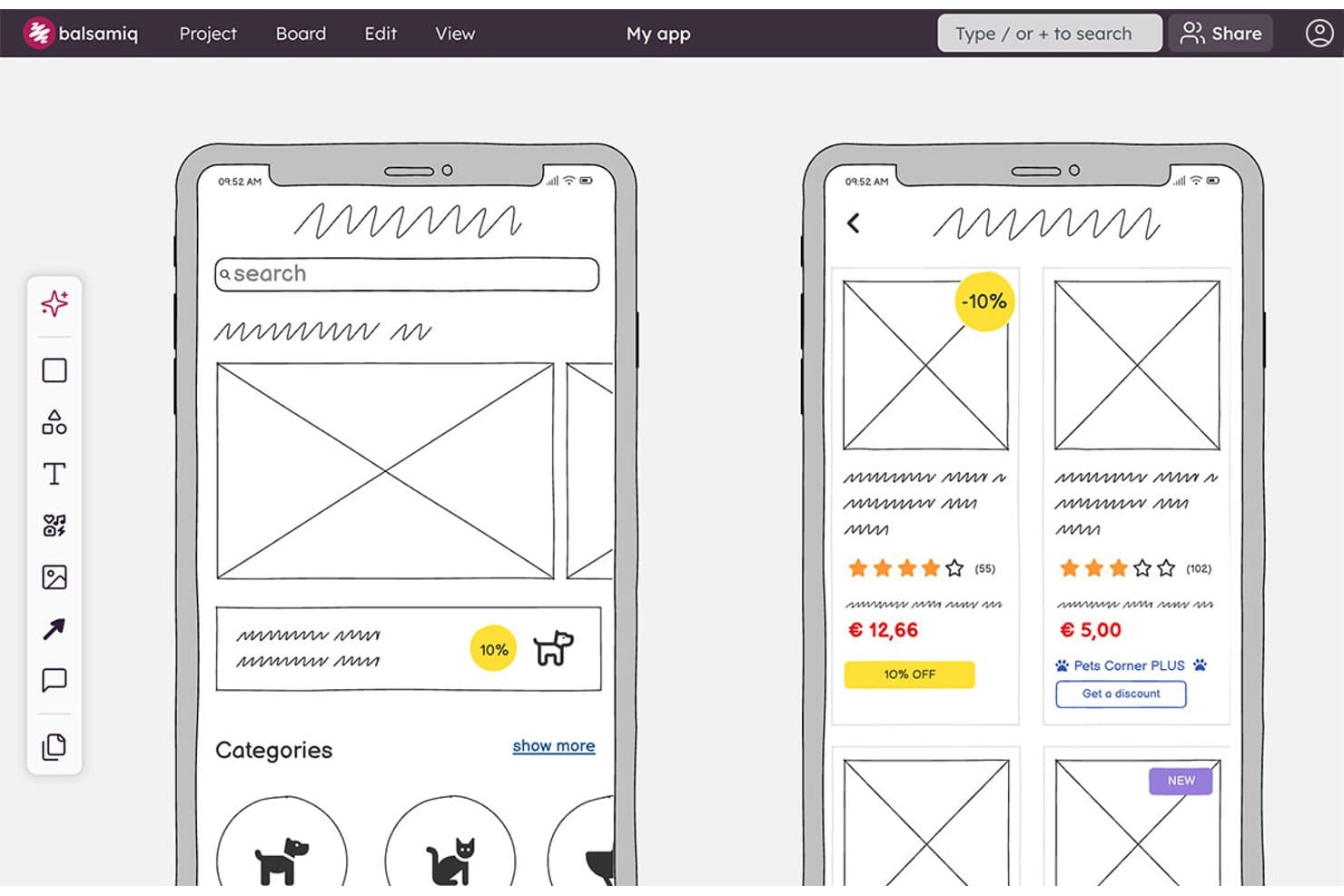
Balsamiq permite a los usuarios crear bocetos de pantallas de aplicaciones móviles con tarjetas de productos y categorías. Balsamiq es una herramienta de creación de bocetos y prototipos basada en navegador, con una biblioteca de interfaces deliberadamente de baja fidelidad, componentes reutilizables, enlaces en tableros en los que se puede hacer clic, generación de bocetos de interfaz con IA, colaboración en tiempo real e integraciones con Jira y Confluence.
¿Para quién es más adecuado Balsamiq?
Responsables de producto y diseñadores de UX/UI que necesitan alinear a las partes interesadas en torno a conceptos preliminares antes del desarrollo.
Por qué elegí Balsamiq
Elegí Balsamiq para la categoría de mejores herramientas gratuitas para crear bocetos de interfaz porque mantiene la lluvia de ideas centrada en la estructura en lugar del perfeccionamiento visual. Su biblioteca de interfaces deliberadamente de baja fidelidad, sus guías inteligentes y sus cuadrículas de 1 a 12 columnas me ayudan a bosquejar flujos rápidamente antes del desarrollo. También uso alternativas para comparar conceptos en un mismo tablero, mientras que la IA puede convertir una indicación o un boceto dibujado a mano en un boceto de interfaz editable.
Características principales de Balsamiq
- Enlaces públicos de revisión: Comparte tableros con personas que no han iniciado sesión y que pueden comentar.
- Comentarios en hilos: Añade respuestas, reacciones y hilos de comentarios resueltos.
- Aplicaciones para Jira y Confluence: Inserta tableros y prototipos editables en espacios de trabajo conectados.
- Formatos de exportación: Descarga proyectos como archivos PDF interactivos, PNG o BMPR.
Integraciones de Balsamiq
Balsamiq ofrece integraciones nativas con Jira y Confluence, incluidas aplicaciones para la nube y el centro de datos. También permite insertar contenido en Notion y compartir proyectos a través de Slack.
¿Qué incluye el plan gratuito?
Balsamiq ofrece una prueba gratuita de 14 días sin necesidad de tarjeta de crédito. No tiene un plan gratuito permanente y, después, necesitarás una suscripción de pago para seguir editando tus proyectos.
Pros and Cons
Pros:
- Baja fidelidad deliberada para mantener la lluvia de ideas centrada
- Los flujos en los que se puede hacer clic permiten validar pronto la usabilidad
- Las partes interesadas pueden comentar sin tener cuentas
Cons:
- No hay un plan gratuito permanente
- Los componentes compartidos requieren duplicar plantillas
Learn more about Balsamiq: Mejor para ideación rápida con paquetes de UI
- Plan gratuito disponible
- Desde $14/usuario/mes (facturado anualmente)
Visit WebsiteCustomer Rating:4.3/5
El editor de MockFlow muestra componentes de UI de arrastrar y soltar, plantillas y herramientas de construcción de layout. Si necesitas convertir ideas en wireframes rápidamente, MockFlow está diseñado para la velocidad y la flexibilidad. Los exclusivos paquetes de UI de la plataforma permiten a los equipos de producto y diseñadores intercambiar componentes prediseñados para diferentes plataformas y estilos. MockFlow es ideal para quienes desean pasar de la lluvia de ideas a conceptos visuales sin perder tiempo en la configuración.
¿Para quién es mejor MockFlow?
MockFlow es adecuado para equipos de producto y diseñadores UX que necesitan idear y prototipar rápidamente utilizando una amplia variedad de paquetes de UI preconstruidos.
Por qué elegí MockFlow
Elegí MockFlow porque sus capacidades de ideación rápida destacan para equipos que necesitan pasar rápidamente del concepto al wireframe. Los paquetes de UI de la plataforma te permiten cambiar instantáneamente entre sistemas de diseño y tipos de dispositivos, lo cual es especialmente útil para proyectos multiplataforma. También aprecio las herramientas integradas de lluvia de ideas y de mapa del sitio que ayudan a estructurar las ideas en las primeras etapas antes de comprometerse con wireframes detallados. Estas características hacen de MockFlow una opción sólida para quienes priorizan la velocidad y la flexibilidad en su flujo de trabajo gratuito de wireframing.
Características clave de MockFlow
Otras características que destacan en MockFlow para wireframing gratuito incluyen:
- Historial de versiones: Rastrea y restaura versiones anteriores de tus wireframes en cualquier momento.
- Herramientas de comentarios y retroalimentación: Recoge sugerencias de colaboradores directamente sobre los wireframes para una iteración más rápida.
- Opciones de exportación: Descarga wireframes en múltiples formatos, incluyendo PNG, PDF y HTML.
- Compartir wireframes: Comparte proyectos con miembros del equipo o partes interesadas usando enlaces seguros y basados en permisos.
Integraciones de MockFlow
Las integraciones incluyen Trello, Slack, Microsoft Teams, Microsoft Office 365, Atlassian Jira, Atlassian Confluence, Google Docs, Google Meet, Figma y Visual Studio.
¿Qué es gratis?
MockFlow ofrece un plan gratuito para siempre que permite un usuario y un proyecto a la vez. Algunas funciones avanzadas, paquetes de UI e integraciones solo están disponibles en los planes de pago.
Pros and Cons
Pros:
- Gran biblioteca de paquetes de UI para prototipos rápidos
- Herramientas integradas de mapa del sitio y flujo de usuario
- Historial de versiones incluido en el plan gratuito
Cons:
- El plan gratuito limita el número de proyectos
- Sin funciones avanzadas de animación ni interacción
Learn more about MockFlow: Ideal para diseños preparados para la accesibilidad
- Plan gratuito + prueba gratuita de 14 días disponible
- Desde $29/usuario/mes (facturado anualmente)
Visit WebsiteCustomer Rating:4.2/5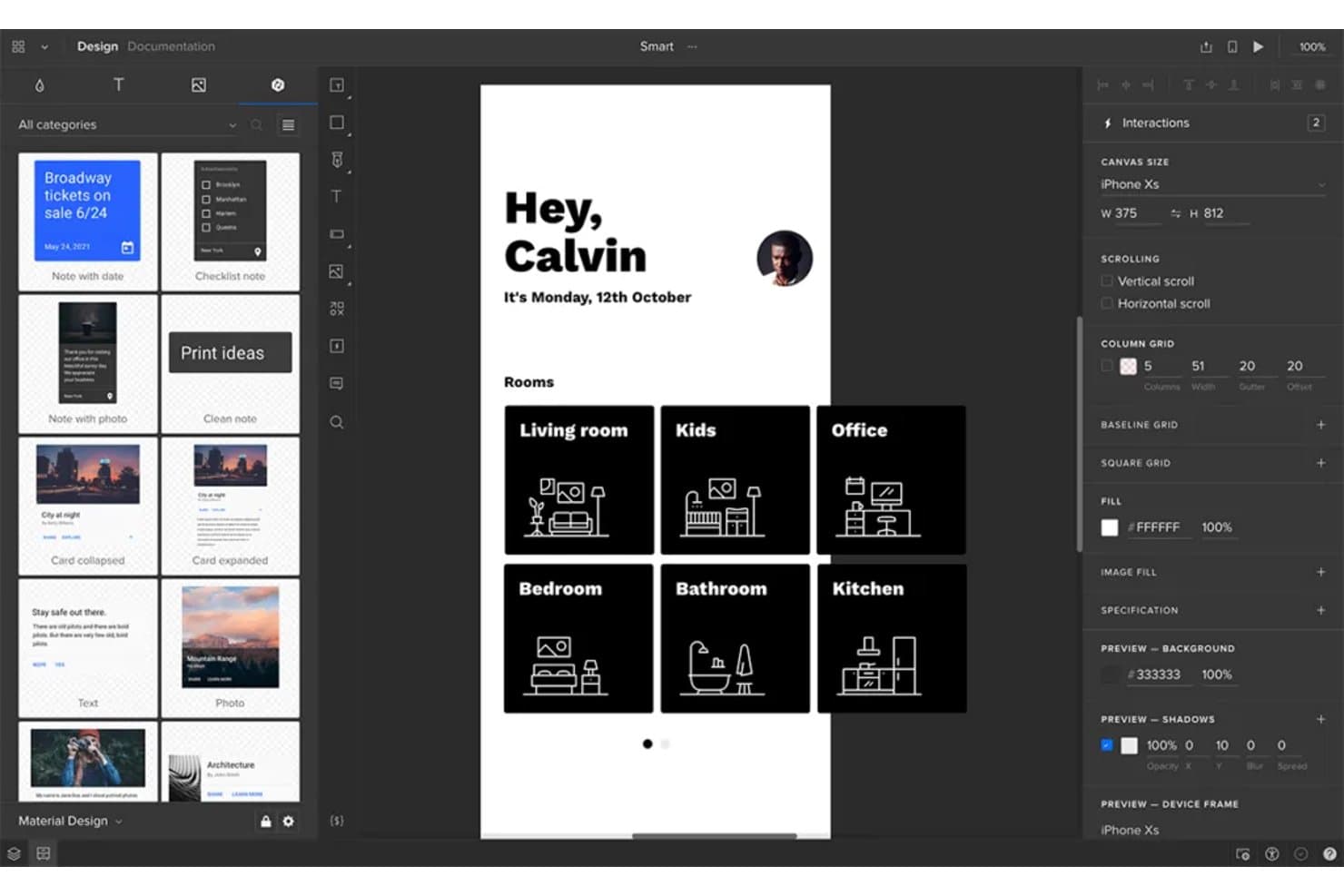
UXPin permite a los usuarios diseñar y crear prototipos interactivos de estructuras alámbricas de aplicaciones móviles. UXPin es una plataforma de creación de estructuras alámbricas y prototipos interactivos con cuadrículas de diseño, diseño automático, componentes reutilizables, flujos en los que se puede hacer clic, lógica condicional y renderizado basado en HTML, CSS y JavaScript.
¿Para quién es más adecuado UXPin?
UXPin es adecuado para diseñadores de UX/UI que necesitan prototipos accesibles e interactivos que conecten las primeras estructuras alámbricas con experiencias de producto realistas.
Por qué elegí UXPin
Elegí UXPin porque sus estructuras alámbricas permiten realizar comprobaciones de accesibilidad antes de comenzar el desarrollo. Utilizo el comprobador de contraste WCAG integrado y el simulador de daltonismo para detectar problemas de visibilidad y, después, valido los flujos con controles de formulario interactivos y lógica condicional.
Características principales de UXPin
- Cuadrículas de diseño: Utiliza cuadrículas de columnas, líneas base y cuadrados con márgenes y medianiles personalizados.
- Diseño automático: Establece reglas de dirección, espaciado, relleno, alineación, ajuste de línea y redimensionamiento.
- Componentes reutilizables: Crea componentes y comparte estilos entre proyectos mediante bibliotecas de equipo.
- Opciones de exportación: Exporta diseños como PNG, PDF o HTML, con opciones de mapa del sitio y documentación.
Integraciones de UXPin
UXPin ofrece integraciones nativas con Figma, Sketch, Jira Cloud, Slack y FullStory, además de conexiones para desarrolladores mediante Git, Storybook y npm.
¿Qué es gratis?
UXPin ofrece una prueba gratuita de 14 días con acceso a todas las funciones y sin necesidad de tarjeta de crédito. En su página de precios actual no aparece un plan gratuito permanente, por lo que necesitarás un plan Core, Growth o Enterprise de pago cuando termine la prueba.
Pros and Cons
Pros:
- Comprobadores integrados de contraste WCAG y daltonismo
- Los controles de formulario funcionales permiten validar los flujos desde el principio
- Las partes interesadas pueden revisar sin crear cuentas
Cons:
- La interfaz puede resultar técnica para usuarios ocasionales
- El plan gratuito limita el trabajo continuo en proyectos
Learn more about UXPin: 6Ideal para la colaboración en un lienzo infinito
Miro
- Plan gratuito + prueba gratuita de 14 días disponible
- Desde $8/usuario/mes (facturado anualmente)
Visit WebsiteCustomer Rating:4.8/5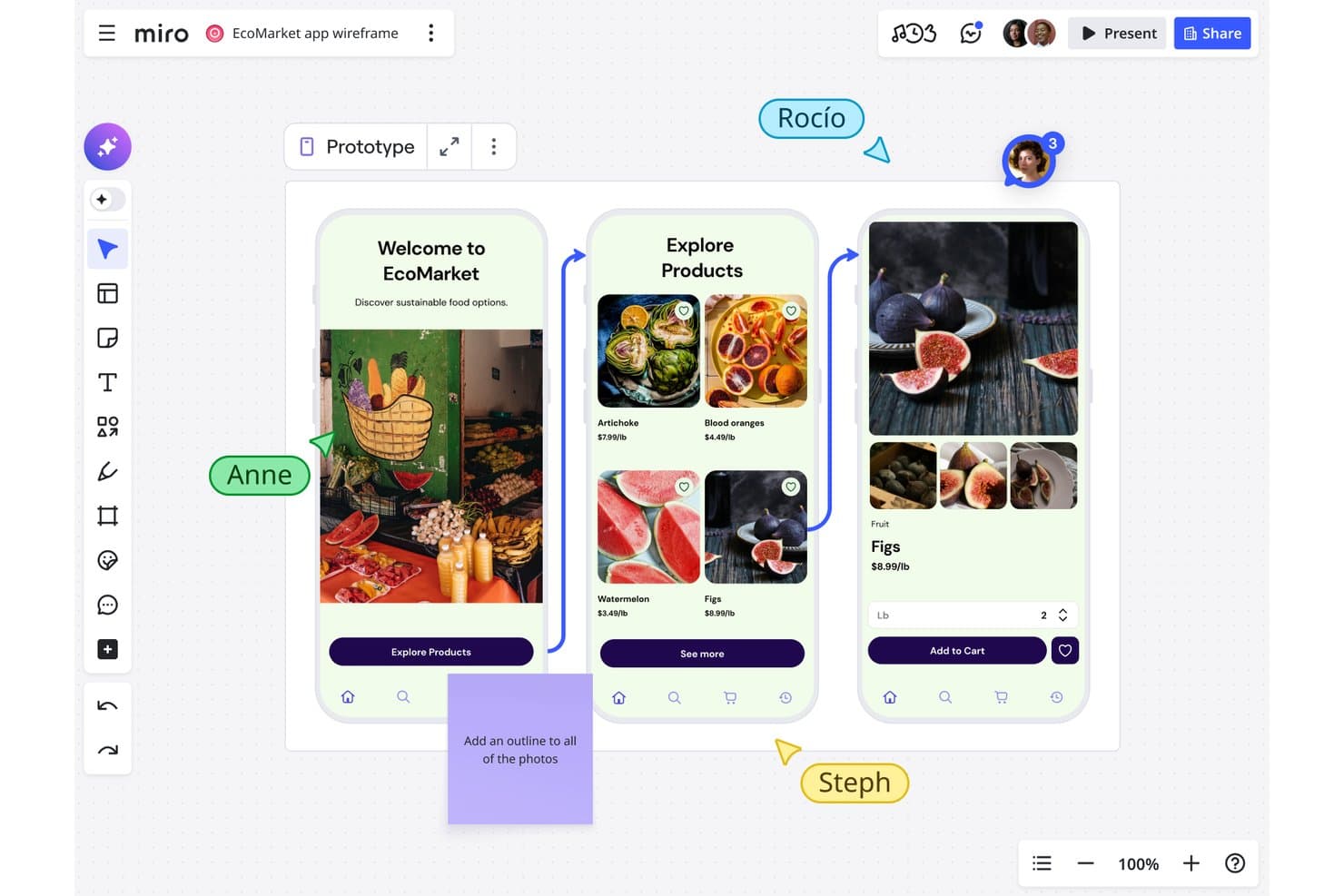
Miro permite a los usuarios crear esquemas colaborativos de flujos de aplicaciones móviles en tiempo real. Miro es una plataforma gratuita para crear esquemas y colaborar visualmente, con una biblioteca de prototipado, componentes de interfaz de usuario de arrastrar y soltar, plantillas, vinculación de objetos y coedición en tiempo real.
¿Para quién es más adecuado Miro?
Miro es adecuado para gestores de producto y equipos de startups que necesitan esbozar ideas, mapear flujos de usuario y colaborar en un lienzo infinito.
Por qué elegí Miro
Elegí Miro porque la colaboración en su lienzo infinito mantiene juntos los esquemas, los flujos de usuario, la investigación y los mapas de recorrido. Utilizo la biblioteca de prototipado gratuita para organizar marcos de dispositivos, componentes de interfaz e iconos en diseños estáticos. Los cursores en directo, los comentarios y el modo de presentación ayudan a mi equipo a revisar pantallas con las partes interesadas, aunque los prototipos interactivos requieren el plan Empresa.
Características principales de Miro
- Vinculación de objetos: Conecta objetos con marcos, tableros o URL externas.
- Guías inteligentes: Alinea objetos y mantiene automáticamente un espaciado uniforme.
- Plantillas de esquemas: Empieza con diseños prediseñados para aplicaciones, sitios web y páginas de destino.
- Aplicación de cuadrícula: Organiza el contenido de la interfaz en cuadrículas de hasta 2.500 celdas.
Integraciones de Miro
Miro ofrece más de 250 integraciones, incluidas Microsoft 365, Google Workspace, Slack, Adobe, Figma, Confluence, Jira y Notion. Su API REST y sus SDK admiten integraciones personalizadas.
¿Qué incluye el plan gratuito?
Miro ofrece un plan gratuito permanente con miembros de equipo ilimitados y hasta tres tableros editables. También hay disponible una prueba de 14 días, mientras que las funciones avanzadas requieren un plan de pago.
Pros and Cons
Pros:
- El lienzo infinito conecta los flujos y la investigación
- La coedición en tiempo real facilita las revisiones con las partes interesadas
- La biblioteca de prototipado estático permite crear diseños rápidamente
Cons:
- Los prototipos interactivos requieren un plan de pago
- Tres tableros editables limitan los proyectos en curso
 Mejor para vistas previas interactivas de alta fidelidad
- Prueba gratuita + plan gratis disponible
- Desde $10/mes (facturación anual)
Visit WebsiteCustomer Rating:4.4/5
La vista de diseño de Framer muestra pantallas de UI interactivas con controles de animación y edición de layout. Framer es una plataforma de diseño basada en navegador creada para equipos que necesitan wireframes y prototipos interactivos de alta fidelidad. Es especialmente atractiva para diseñadores de productos y profesionales de UX que quieren crear vistas previas realistas con animaciones y transiciones avanzadas. Si buscas ir más allá de los wireframes estáticos y mostrar a los interesados exactamente cómo se sentirá un producto, Framer ofrece las herramientas necesarias para lograrlo.
¿Para Quién Es Mejor Framer?
Framer es ideal para diseñadores de producto y equipos UX en startups o agencias digitales que necesitan crear vistas previas interactivas y de alta fidelidad para proyectos web y móviles.
Por Qué Elegí Framer
Elegí Framer porque destaca por ofrecer vistas previas interactivas de alta fidelidad, algo poco común entre las herramientas de wireframing gratuitas. Framer te permite crear wireframes que van mucho más allá del diseño estático al admitir animaciones avanzadas, transiciones y componentes interactivos directamente en el navegador. Valoro que puedas elaborar prototipos clicables que simulan con precisión la experiencia final del usuario, facilitando así la comunicación de la intención de diseño a los involucrados. Para los equipos que desean probar y mostrar flujos de producto realistas sin salir de la etapa de wireframing, Framer ofrece una ventaja única.
Funciones Clave de Framer
Otras funciones que hacen de Framer una opción versátil para wireframing gratuito incluyen:
- Biblioteca de componentes: Accede a una colección de elementos de UI preconstruidos para agilizar la creación de wireframes.
- Colaboración en equipo: Invita a los miembros del equipo a comentar y coeditar proyectos en tiempo real.
- Historial de versiones: Revisa y restaura iteraciones previas de tus wireframes a medida que evoluciona tu proyecto.
- Vista previa móvil: Visualiza y prueba tus wireframes directamente en dispositivos móviles para obtener retroalimentación precisa.
Integraciones de Framer
Las integraciones incluyen Formspark, Hotjar, HubSpot, Intercom, Mailchimp, Marketo, Meta Pixel, Typeform, Google Analytics y más.
¿Qué Es Gratis?
Framer ofrece un plan gratuito para siempre que permite proyectos ilimitados, pero limita a dos editores por equipo. Algunas funciones avanzadas y opciones de exportación solo están disponibles en los planes de pago.
Pros and Cons
Pros:
- Los prototipos interactivos admiten animaciones avanzadas
- Amplia biblioteca de componentes UI preconstruidos
- Vista previa en dispositivos móviles para pruebas precisas
Cons:
- El plan gratuito limita a dos editores
- No hay aplicación de escritorio offline disponible
 Ideal para flujos de trabajo de diseño de código abierto
- Plan gratuito y prueba gratuita de 14 días disponible
- Desde $7/usuario/mes
Visit WebsiteCustomer Rating:4.5/5
La interfaz de Penpot muestra un diseño de UI basado en componentes con controles de disposición y paneles de edición colaborativa. Penpot es una plataforma de diseño y wireframing de código abierto creada para equipos que valoran la transparencia y la flexibilidad. Es una excelente opción para diseñadores y desarrolladores que desean tener control total sobre sus flujos de trabajo y sus datos. Si buscas una herramienta gratuita que permita el diseño colaborativo sin ataduras a proveedores, Penpot destaca sobre las demás.
¿Para Quién Es Mejor Penpot?
Penpot es ideal para equipos de diseño y desarrollo que buscan una solución de wireframing de código abierto y autohospedada, que fomente el trabajo colaborativo y la propiedad de los datos.
Por Qué Elegí Penpot
Elegí Penpot porque es la única herramienta de wireframing de código abierto que realmente permite el diseño colaborativo sin encerrar a los equipos en un ecosistema propietario. Su opción de autohospedaje da a las organizaciones control total sobre sus datos y su seguridad, lo cual es poco común entre las herramientas de diseño gratuitas. También valoro cómo el sistema de diseño basado en SVG de Penpot facilita la colaboración entre diseñadores y desarrolladores en la misma plataforma. Para los equipos que priorizan la transparencia y la flexibilidad en sus flujos de trabajo, Penpot ofrece una alternativa única a las soluciones de código cerrado.
Características Clave de Penpot
Algunas otras funciones hacen que Penpot destaque como una herramienta gratuita de wireframing:
- Bibliotecas de componentes: Crea, reutiliza y comparte componentes de diseño en los proyectos para mantener la coherencia.
- Espacios de trabajo en equipo: Organiza proyectos y recursos en espacios compartidos para un acceso sencillo por parte del equipo.
- Prototipado interactivo: Vincula wireframes y agrega interacciones para simular los flujos del usuario.
- Opciones de exportación: Exporta diseños en formatos SVG, PNG o PDF para traspaso o documentación.
Integraciones de Penpot
Las integraciones incluyen GitHub, GitLab, Bitbucket, Slack y más.
¿Qué es Gratis?
Penpot ofrece un plan gratuito para siempre con usuarios y proyectos ilimitados. Algunas funciones avanzadas y opciones de soporte pueden estar reservadas para planes de pago, pero las herramientas principales de wireframing y diseño son totalmente accesibles sin límite de tiempo.
Pros and Cons
Pros:
- Totalmente de código abierto con opción de autohospedaje
- Proyectos y usuarios ilimitados en el plan gratuito
- Diseño basado en SVG para traspaso a desarrolladores
Cons:
- Menos plantillas en comparación con herramientas comerciales
- El rendimiento puede disminuir con archivos grandes
Learn more about Penpot: Ideal para flujos de trabajo de diseño nativos de macOS
- Prueba gratuita de 30 días
- Desde $12/usuario/mes (facturado anualmente)
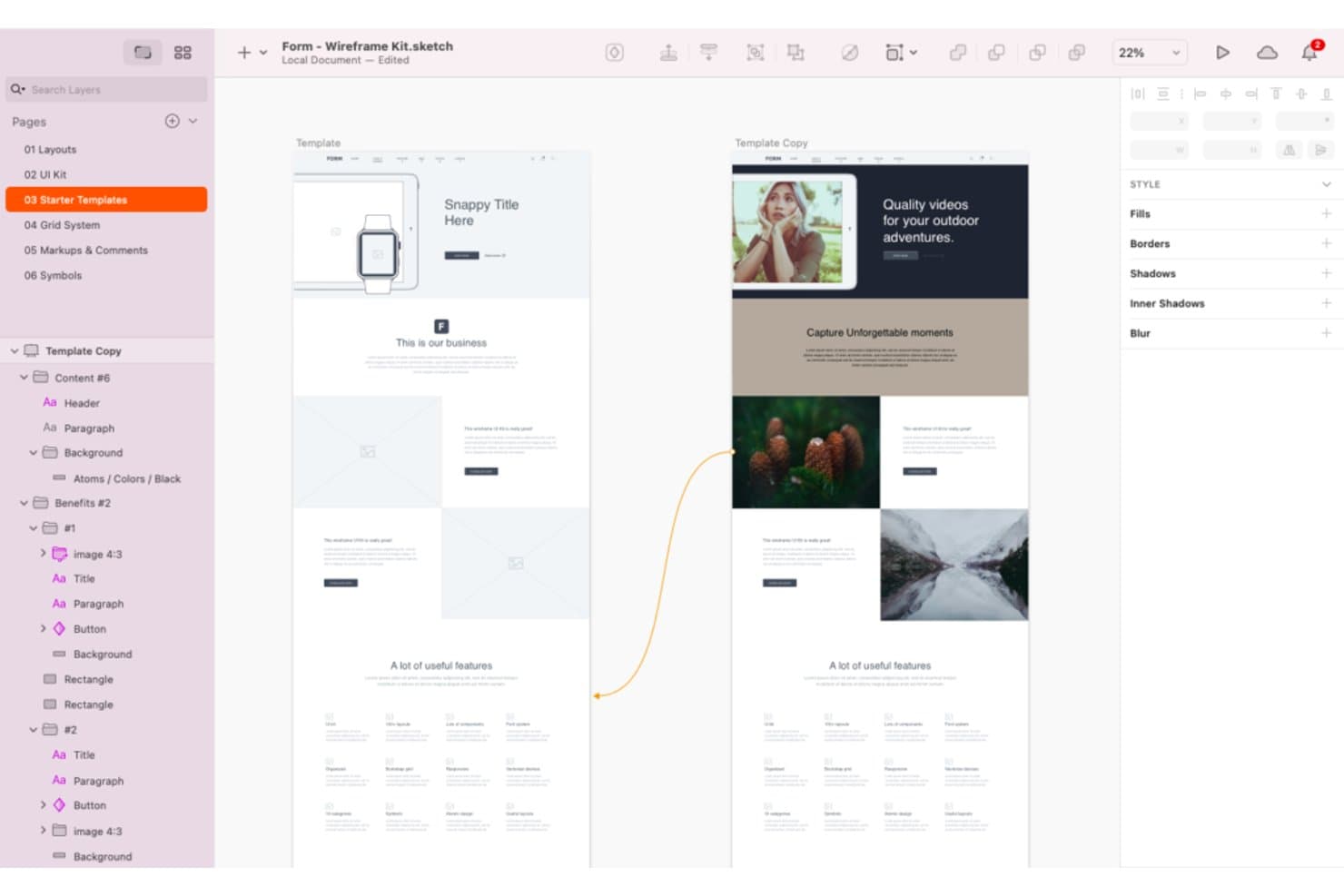
Sketch ofrece una amplia variedad de herramientas y plantillas para crear estructuras alámbricas. Sketch es una plataforma de creación de estructuras alámbricas y diseño de interfaces con herramientas vectoriales, marcos, Símbolos y Bibliotecas reutilizables, prototipos interactivos, colaboración en tiempo real y entrega para desarrolladores.
¿Para quién es mejor Sketch?
Sketch es ideal para diseñadores de UX/UI y equipos de producto independientes que trabajan principalmente en macOS.
Por qué elegí Sketch
Elegí Sketch porque incorpora flujos de trabajo de diseño nativos de macOS a la creación de estructuras alámbricas, con Marcos, Pilas, cuadrículas y herramientas vectoriales precisos. Utilizo Símbolos y Bibliotecas para crear componentes reutilizables de navegación, formularios y tarjetas en distintos conceptos de producto. Sus puntos de acceso, superposiciones, áreas de desplazamiento y transiciones de Animación inteligente me permiten probar los flujos de usuario antes de comenzar el desarrollo.
Funciones principales de Sketch
- Vistas previas en el navegador: Comparte enlaces de prototipos y páginas protegidos con contraseña y fechas de caducidad.
- Entrega para desarrolladores: Permite que los desarrolladores inspeccionen diseños, copien valores y descarguen recursos en un navegador.
- Comentarios en hilos: Fija, menciona y resuelve comentarios en lienzos o prototipos.
- Barra de comandos: Inserta o intercambia elementos de diseño desde un menú controlado por el teclado.
Integraciones de Sketch
Sketch admite integraciones con Slack, Jira, Notion, GitHub, Miro y Zeplin mediante complementos, contenido incrustado, uso compartido de enlaces o ContentSync. Su servidor MCP de Sketch se conecta con Claude, Cursor, VS Code y Codex para flujos de trabajo personalizados.
¿Qué es gratis?
Sketch no ofrece un plan gratuito para siempre, pero proporciona una prueba gratuita de 30 días sin requerir una tarjeta de crédito. Después de la prueba, necesitarás una suscripción de pago, mientras que los desarrolladores y otros colaboradores aún pueden acceder a los archivos compartidos mediante herramientas gratuitas de visualización y entrega.
Pros and Cons
Pros:
- Los flujos de trabajo nativos de Mac permiten diseñar sin conexión
- Los componentes reutilizables mantienen la coherencia de las estructuras alámbricas
- Los flujos de prototipos incluyen superposiciones y desplazamiento
Cons:
- La edición exclusiva para Mac excluye a los compañeros que usan distintos sistemas operativos
- No hay un plan gratuito para siempre para la edición continua
Learn more about Sketch: 10Ideal para lógica y condiciones avanzadas
Axure RP
- Prueba gratuita de 30 días
- Desde $29/usuario/mes (facturado anualmente)
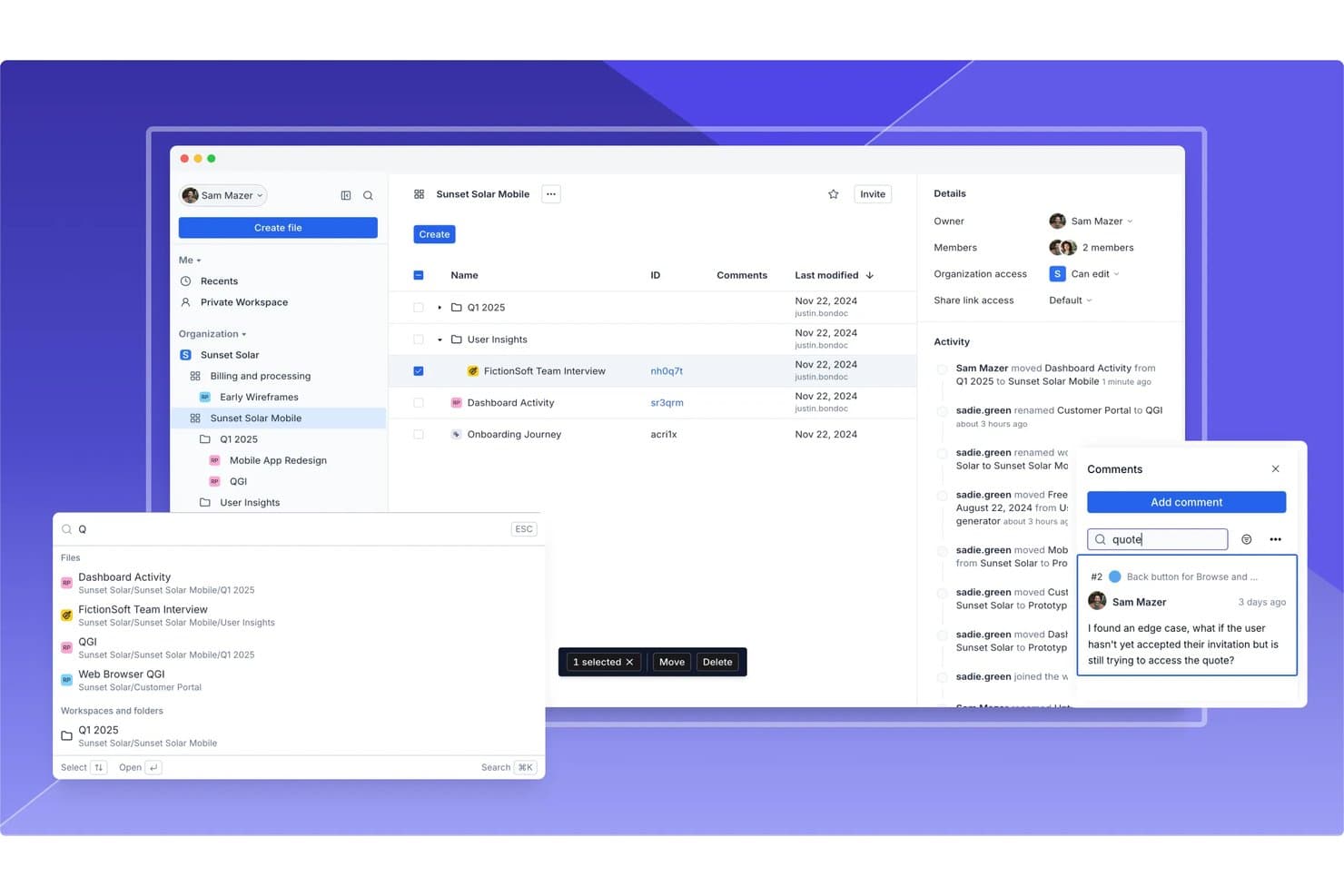
Axure RP permite la colaboración en equipo mediante comentarios, registros de actividad y uso compartido de archivos. Axure RP es una herramienta de escritorio para crear wireframes y prototipos, con bibliotecas de widgets, vistas adaptables, diagramas de flujo, formularios funcionales, paneles dinámicos, componentes reutilizables y publicación en la nube.
¿Para quién es más adecuado Axure RP?
Los gerentes de producto y los equipos de UX que crean flujos de usuario complejos y comprobables valorarán las condiciones, variables y paneles dinámicos de Axure RP.
Por qué elegí Axure RP
Elegí Axure RP porque es ideal para trabajar con lógica y condiciones avanzadas, incluso cuando un wireframe necesita comportarse como un producto funcional. Utilizo variables, acciones condicionales y paneles dinámicos para probar tablas filtradas, formularios de varios pasos y estados adaptables antes del desarrollo. Su prueba de 30 días con todas las funciones me permite evaluar estos flujos sin comprometerme de antemano.
Características principales de Axure RP
- Vistas adaptables: Crea diseños para escritorio, tableta y teléfono en una sola página.
- Formularios funcionales: Añade campos de texto, menús desplegables y botones de opción a los wireframes.
- Componentes reutilizables: Aplica grupos de widgets compartidos en varias páginas con anulaciones locales.
- Publicación en la nube: Comparte prototipos alojados con revisores mediante enlaces con acceso controlado.
Integraciones de Axure RP
Axure RP ofrece integraciones documentadas con Jira, Confluence, Slack, Microsoft Teams, Figma, Sketch y Adobe XD. También admite conexiones con servicios de pruebas de usabilidad de terceros.
¿Qué es gratis?
Axure RP ofrece una prueba gratuita de 30 días con todas las funciones, no un plan gratuito permanente. Cuando finalice la prueba, necesitarás un plan de pago para seguir utilizando el software.
Pros and Cons
Pros:
- Modela flujos de usuario complejos sin código
- Admite componentes reutilizables en distintos proyectos
- Crea formularios funcionales y tablas filtradas
Cons:
- Requiere más tiempo para aprender que las herramientas más sencillas
- La creación en escritorio limita la colaboración en equipo en tiempo real
Learn more about Axure RP :
Otras herramientas gratuitas para crear estructuras alámbricas
Estas son algunas opciones adicionales de herramientas gratuitas para crear estructuras alámbricas que no llegaron a mi lista, pero que aun así merece la pena probar:
- 11draw.ioLa mejor opción para la integración con Google Drive
- 12LucidchartIdeal para revisar y compartir estructuras alámbricas entre equipos multifuncionales
- 13JustinmindIdeal para funciones de prototipado interactivo
- 14CanvaIdeal para edición visual de arrastrar y soltar
- 15WhimsicalIdeal para crear wireframes dentro de los flujos de trabajo de herramientas de gestión de proyectos
- 16MockplusIdeal para sistemas de diseño basados en componentes
- 17UizardIdeal para convertir bocetos en wireframes mediante IA
- 18Proto.ioIdeal para la previsualización de wireframes de aplicaciones móviles
- 19MoqupsIdeal para compartir proyectos en el navegador
Cómo evalúo las herramientas gratuitas de creación de wireframes
Primero, defino qué se considera gratuito. Las herramientas de creación de wireframes cumplen los requisitos si ofrecen un plan gratuito para siempre o una prueba de 14 días que cubra las funciones principales. A partir de ahí, doy mayor importancia a la creación de diseños y al arrastre de elementos, y después a las integraciones con sistemas de tickets y a cómo escala el plan gratuito.
Funcionalidad principal (requisitos básicos para esta lista)
Además de mis requisitos para los planes gratuitos, utilizo un sistema de puntuación para seleccionar las herramientas de mi lista. Puntúo cada una en una escala de 0 (no ofrece la funcionalidad) a 5 (sobresale en esta área) para cada funcionalidad principal que se indica a continuación, según lo disponible en el plan gratuito. Después convierto el total en un porcentaje para ayudar a evaluar la adecuación general de cada herramienta, dando un peso adicional a las funcionalidades que he considerado esenciales.
- Creación de wireframes (esencial): Busco bibliotecas de formas, cuadrículas, herramientas de alineación y elementos de interfaz adecuados para flujos como la incorporación de usuarios o el proceso de pago.
- Edición mediante arrastrar y soltar (esencial): Evalúo la facilidad con la que se pueden colocar, cambiar de tamaño, reordenar y alinear elementos al esbozar pantallas sin código.
- Colaboración en tiempo real: Compruebo si ofrece edición compartida, presencia en tiempo real o comentarios que faciliten los comentarios de los equipos de producto, diseño e ingeniería.
- Componentes reutilizables: Evalúo las plantillas, los símbolos o las bibliotecas de componentes para patrones repetidos como la navegación, los formularios y los paneles.
- Exportación y uso compartido: Busco enlaces que se puedan compartir y exportaciones prácticas a imágenes o PDF para las revisiones con las partes interesadas y los debates sobre requisitos.
- Interactividad básica: Evalúo los enlaces entre pantallas para modelar recorridos, rutas de navegación y casos límite antes de que comience el desarrollo.
Una vez que tengo una lista de herramientas que cumplen los criterios, considero qué diferencia a cada plataforma.
Factores diferenciadores (lo que distingue a los proveedores)
Así es como comparo y contrasto los distintos proveedores:
Funciones destacadas
Busco flujos de trabajo controlados mediante el teclado que me permitan añadir formas y componentes rápidamente durante sesiones de descubrimiento con tiempo limitado. Herramientas como Figma y Balsamiq gestionan bien este aspecto con interfaces que dependen en gran medida de los atajos. El modo de presentación es otro factor diferenciador: evalúo si los responsables de producto pueden guiar a las partes interesadas por un flujo en el que se puede hacer clic sin cambiar de aplicación. El acceso mediante navegador desde distintos dispositivos también es importante, ya que los equipos distribuidos necesitan revisar los wireframes desde cualquier dispositivo sin instalar software.
Más allá de las funciones
Compruebo si las partes interesadas pueden abrir un enlace compartido sin crear una cuenta; los ejecutivos y los clientes rara vez se registran solo para dejar comentarios. La sostenibilidad del nivel gratuito también es importante: evalúo los límites de proyectos y colaboradores para confirmar que un responsable de producto puede gestionar varias iniciativas sin encontrarse con un muro de pago a mitad del sprint. Herramientas como Figma y Miro gestionan bien el acceso de solo lectura, mientras que otras restringen a los revisores invitados en los planes gratuitos.
Cómo elegir herramientas gratuitas para crear estructuras alámbricas
Es fácil perderse entre largas listas de funciones y complejas estructuras de precios. Para ayudarte a mantener la concentración mientras avanzas en tu proceso particular de selección de software, aquí tienes una lista de factores que debes tener en cuenta:
| Factor | Qué debes tener en cuenta |
| Escalabilidad | ¿La herramienta será compatible con tu equipo a medida que crezca? Comprueba los límites de usuarios, los límites de proyectos y las opciones de actualización. |
| Integraciones | ¿La herramienta se conecta con tus herramientas actuales de diseño, desarrollo o gestión de proyectos? Confirma las integraciones nativas. |
| Personalización | ¿Puedes adaptar el espacio de trabajo, las plantillas o los flujos de trabajo de la herramienta para que coincidan con el proceso de tu equipo? |
| Facilidad de uso | ¿Con qué rapidez pueden los nuevos usuarios empezar a trabajar de forma productiva? Busca una navegación intuitiva y una fricción mínima durante la incorporación. |
| Implementación e incorporación | ¿Qué recursos se necesitan para empezar? Ten en cuenta la formación, la migración y la asistencia para los usuarios que utilizan la herramienta por primera vez. |
| Coste | ¿Hay costes ocultos a medida que aumentan tus necesidades? Revisa los límites del plan gratuito y qué situaciones desencadenan una actualización de pago. |
| Medidas de seguridad | ¿La herramienta ofrece una protección de datos adecuada para tu organización? Comprueba el cifrado, los controles de acceso y el cumplimiento normativo. |
| Disponibilidad de asistencia | ¿Qué canales de asistencia están disponibles si surgen problemas? Busca chat en directo, correo electrónico o foros de la comunidad. |
¿Qué son las herramientas gratuitas para crear estructuras alámbricas?
Las herramientas gratuitas para crear estructuras alámbricas son aplicaciones de software que permiten a los usuarios crear esquemas visuales o maquetas de interfaces digitales sin tener que pagar. Estas herramientas ayudan a los equipos a planificar diseños, definir flujos de usuario y comunicar ideas de diseño al principio de un proyecto. Normalmente, las herramientas gratuitas para crear estructuras alámbricas ofrecen funciones básicas como elementos de arrastrar y soltar, interactividad básica y colaboración, lo que las hace accesibles para particulares o equipos pequeños con presupuestos limitados.
Funciones
Repasemos las funcionalidades que suelen incluir las herramientas para crear bocetos de interfaz y cuáles suelen estar disponibles en los planes gratuitos y de pago.
Funcionalidades que suelen incluir gratuitamente las herramientas para crear bocetos de interfaz
- Editor de arrastrar y soltar: Permite colocar y organizar rápidamente elementos de interfaz en un lienzo sin programar, lo que facilita plasmar ideas visualmente.
- Bibliotecas básicas de formas y elementos de interfaz: Proporciona un conjunto de componentes estándar, como botones, campos de entrada e iconos, para ayudar a crear bocetos de interfaz más rápido.
- Compatibilidad con varias páginas o pantallas: Permite crear y organizar varios bocetos de interfaz dentro de un mismo proyecto, facilitando los flujos con varias pantallas.
- Enlaces o interactividad sencillos: Permite añadir puntos interactivos o enlaces entre pantallas para simular la navegación y los flujos de usuario básicos.
- Colaboración en tiempo real: Permite que varios usuarios vean y editen juntos los bocetos de interfaz, facilitando el trabajo en equipo y los comentarios en el mismo espacio de trabajo.
- Herramientas para comentarios y opiniones: Ofrece la posibilidad de dejar notas o comentarios directamente en los bocetos de interfaz, agilizando la comunicación con las partes interesadas.
- Acceso basado en la nube: Almacena los proyectos en línea para que los usuarios puedan acceder a los bocetos de interfaz y editarlos desde cualquier dispositivo con conexión a Internet.
- Exportación a imagen o PDF: Permite guardar los bocetos de interfaz como imágenes o archivos PDF para compartirlos fuera de la plataforma o incluirlos en presentaciones.
Funcionalidades que suelen incluir mediante pago las herramientas para crear bocetos de interfaz
- Prototipado y animación avanzados: Admite transiciones complejas, microinteracciones y flujos animados para simular mejor las experiencias de usuario reales.
- Herramientas para transferir diseños: Proporcionan a los desarrolladores fragmentos de código, especificaciones y descargas de recursos para simplificar la transición del diseño al desarrollo.
- Historial de versiones y restauración: Registra los cambios a lo largo del tiempo y permite volver a versiones anteriores de un boceto de interfaz cuando sea necesario.
- Bibliotecas de recursos personalizadas: Permite a los equipos crear y gestionar sus propios componentes reutilizables, garantizando la coherencia entre proyectos.
- Integración con pruebas de usuario: Permite recopilar directamente opiniones de usuarios o datos analíticos sobre prototipos interactivos dentro de la herramienta.
- Permisos basados en roles: Permite a los administradores controlar quién puede ver, editar o comentar los proyectos, facilitando la gestión de equipos más grandes y proyectos sensibles.
- Integración con herramientas de terceros: Se conecta con plataformas de gestión de proyectos, diseño o desarrollo para integrarse en flujos de trabajo más amplios.
- Edición sin conexión: Permite trabajar en los bocetos de interfaz sin conexión a Internet y sincroniza los cambios cuando vuelve a haber conexión.
- Atención al cliente prioritaria: Ofrece tiempos de respuesta más rápidos y canales de asistencia específicos para los usuarios de pago.
- Marca personalizada: Permite a las organizaciones añadir sus propios logotipos, colores o dominios al espacio de trabajo de creación de bocetos de interfaz para ofrecer una experiencia de marca.
Ventajas
La implementación de herramientas gratuitas para crear bocetos de interfaz ofrece varias ventajas para tu equipo y tu empresa. Estas son algunas de las que puedes esperar:
- Menores costes iniciales: Los planes gratuitos permiten a los equipos empezar a diseñar sin aprobación presupuestaria ni riesgo financiero, lo que los hace accesibles para empresas emergentes y pequeñas empresas.
- Validación más rápida de ideas: Los editores de arrastrar y soltar y las bibliotecas básicas de elementos de interfaz ayudan a los equipos a visualizar rápidamente los conceptos y realizar iteraciones en los diseños antes de comenzar el desarrollo.
- Mejora de la colaboración: La edición en tiempo real, los comentarios y el acceso basado en la nube permiten que varias partes interesadas aporten sus opiniones y se mantengan alineadas durante todo el proceso de diseño.
- Curva de aprendizaje accesible: Las interfaces sencillas y las plantillas integradas facilitan que los nuevos usuarios comiencen, incluso sin experiencia previa en diseño.
- Acceso remoto y flexible: El almacenamiento en la nube y las herramientas basadas en el navegador permiten a los usuarios trabajar desde cualquier lugar y dispositivo.
- Facilidad para compartir y recibir opiniones: Las opciones de exportación y los enlaces públicos o privados para compartir facilitan la recopilación de aportaciones de clientes, compañeros de equipo o revisores externos.
- Compatibilidad con flujos de trabajo ágiles: La posibilidad de crear, actualizar y compartir rápidamente los bocetos de interfaz encaja bien con los enfoques iterativos y ágiles de gestión de proyectos.
Costes y precios
Entiendo que has llegado a este artículo buscando las mejores opciones de herramientas para crear bocetos de interfaz disponibles de forma gratuita. Sin embargo, como los planes gratuitos solo ofrecen funcionalidades limitadas, es muy probable que en el futuro tengas que ampliar tu plan.
La tabla siguiente resume los planes habituales, sus precios medios y las funcionalidades que suelen incluir las herramientas para crear bocetos de interfaz:
Tabla comparativa de planes para herramientas de creación de esquemas
| Tipo de plan | Precio medio | Funciones habituales |
| Plan gratuito | $0 | Creación básica de esquemas, usuarios limitados, bibliotecas de interfaz sencillas, uso compartido básico y almacenamiento en la nube. |
| Plan personal | $5-$15/usuario/mes | Proyectos ilimitados, más recursos de interfaz, opciones de exportación, asistencia prioritaria e integraciones limitadas. |
| Plan empresarial | $15-$30/usuario/mes | Colaboración en equipo, creación avanzada de prototipos, historial de versiones, transferencia al equipo de desarrollo e integraciones de terceros. |
| Plan para empresas | $30-$60/usuario/mes | Marca personalizada, permisos basados en roles, seguridad mejorada, asistencia especializada y funciones de cumplimiento normativo. |
Preguntas frecuentes sobre herramientas gratuitas de creación de esquemas
Estas son algunas respuestas a preguntas habituales sobre las herramientas gratuitas de creación de esquemas:
¿Puedo utilizar herramientas gratuitas de creación de esquemas para proyectos comerciales?
Sí, la mayoría de las herramientas gratuitas de creación de esquemas permiten utilizar su plataforma para proyectos comerciales. No obstante, revisa siempre las condiciones del servicio de la herramienta para confirmar que no existen restricciones sobre el uso comercial ni requisitos de atribución de la herramienta en los materiales que entregues.
¿Cuáles son las principales limitaciones de las herramientas gratuitas de creación de esquemas?
Las herramientas gratuitas de creación de esquemas suelen limitar el número de proyectos, usuarios u opciones de exportación disponibles. Las funciones avanzadas, como la transferencia al equipo de desarrollo, el historial de versiones y las integraciones con otros programas, suelen estar reservadas para los planes de pago.
¿Qué nivel de seguridad ofrecen las herramientas gratuitas de creación de esquemas para proyectos confidenciales?
La seguridad varía según el proveedor, pero la mayoría de las herramientas gratuitas de creación de esquemas reconocidas ofrecen medidas de protección básicas, como conexiones cifradas y uso compartido protegido mediante contraseña. Para proyectos muy confidenciales, comprueba si cuentan con certificaciones de cumplimiento y funciones de seguridad avanzadas, que quizá solo estén disponibles en los planes de pago.
¿Puedo colaborar con otras personas en tiempo real mediante herramientas gratuitas de creación de esquemas?
Sí, muchas herramientas gratuitas de creación de esquemas admiten la colaboración en tiempo real, lo que permite que varios usuarios editen y comenten los esquemas simultáneamente. Algunas herramientas pueden limitar el número de colaboradores o exigir que todos los usuarios creen una cuenta.
¿Es fácil pasar de un plan gratuito a uno de pago?
Sí, la mayoría de las herramientas de creación de esquemas facilitan el cambio de un plan gratuito a uno de pago. Normalmente, tus proyectos y datos existentes se conservan y obtienes acceso inmediato a funciones adicionales después de la actualización.