

Como responsable de producto, te enfrentas a muchos desafíos: plazos ajustados, coordinación del equipo y asignación de recursos. La solución de gestión de proyectos adecuada puede ayudarte, pero a veces la herramienta que utilizas no se adapta a tus necesidades. Si consideras que Wrike no está a la altura, no eres el único.
Según mi experiencia, encontrar el software adecuado puede transformar la forma de trabajar de tu equipo. He probado y analizado de forma independiente varias alternativas a Wrike para ayudarte a encontrar una herramienta que se adapte mejor a los desafíos de tu empresa.
En este artículo, compartiré mis principales opciones y profundizaré en las funciones, ventajas y desventajas de cada una. Mi objetivo es ayudarte a encontrar una solución que mejore la productividad de tu equipo y se ajuste a tus necesidades específicas.
¿Qué es Wrike?
Wrike es un software de gestión de proyectos que ayuda a los equipos a organizar tareas, proyectos y colaboración. Lo utilizan a menudo responsables de proyectos, profesionales del marketing y especialistas en TI que necesitan gestionar flujos de trabajo complejos. El seguimiento de tareas, los diagramas de Gantt y las funciones de colaboración en tiempo real ayudan a mejorar la eficiencia del equipo y la visibilidad de los proyectos. En general, Wrike ofrece una plataforma centralizada para aumentar la productividad y la coordinación de tu equipo.
Por qué confiar en nuestras recomendaciones de software
6,700+
Reviews
20
Industry experts
16+
Evaluation factors
14
Years
Nuestro equipo lleva probando y evaluando software desde 2012. Como gestores de producto, sabemos lo difícil —y lo importante— que es elegir el software adecuado.
Para esta guía, evaluamos las herramientas mediante pruebas prácticas e investigación independiente, puntuando las herramientas según nuestros criterios de selección.
Nuestras reseñas reflejan nuestro criterio editorial humano, no un discurso de ventas.
Revisores expertos:
 Hannah ClarkSenior TPM
- Cristiano ValimSenior UI/UX Lead

Tabla comparativa de alternativas a Wrike
Esta tabla comparativa resume los detalles de precios de mis principales alternativas a Wrike.
| Tool | Best For | Trial Info | Price | ||
|---|---|---|---|---|---|
| 1 | Ideal para la automatización de flujos de trabajo creativos | Demostración gratuita disponible | Precio a consultar | Website | |
| 2 | Mejor para la gestión de proyectos centrada en la privacidad | Prueba gratuita de 15 días + plan gratuito + demo gratuita disponible | Desde $4/usuario/mes (facturado anualmente) | Website | |
| 3 | Ideal para espacios de trabajo personalizables | Plan gratuito + demostración gratuita disponible | Desde $7/usuario/mes (facturado anualmente) | Website | |
| 4 | Ideal para tareas estructuradas y flujos de trabajo entre equipos | Plan gratuito disponible | Desde $10.99/usuario/mes (facturado anualmente) | Website | |
| 5 | Ideal para el trabajo con clientes y el seguimiento de la rentabilidad | Prueba gratuita de 14 días | Desde $9.99/usuario/mes (facturado anualmente) | Website | |
| 6 | Forfait gratuit + essai gratuit de 14 jours disponible | À partir de $7.91/utilisateur/mois | Website | ||
| 7 | Forfait gratuit + essai gratuit de 14 jours disponible | À partir de $7.91/utilisateur/mois | Website | ||
| 8 | Ideal para la visibilidad de los proyectos de los clientes | Prueba gratuita de 14 días + demostración gratuita disponible | Desde 9,99 $/usuario/mes (facturado anualmente) | Website | |
| 9 | Ideal para la previsión de capacidad y demanda a largo plazo | Prueba gratuita de 14 días disponible | Desde $9/usuario/mes (facturado anualmente) | Website | |
| 10 | Ideal para operaciones empresariales creativas y de marketing | Demostración gratuita disponible | Precio bajo solicitud | Website |


Análisis de las mejores alternativas a Wrike
A continuación encontrarás mis resúmenes detallados de las mejores alternativas a Wrike que incluí en mi lista. Mis análisis ofrecen una visión detallada de las funciones clave, ventajas y desventajas, integraciones y casos de uso ideales de cada herramienta para ayudarte a encontrar la que mejor se adapte a ti.
 Ideal para la automatización de flujos de trabajo creativos
- Demostración gratuita disponible
- Precio a consultar
Visit WebsiteCustomer Rating:4.6/5This rating combines scores from multiple user review sites to reflect overall customer sentiment about the product.
El panel de proyectos de Screendragon ayuda a los equipos creativos a automatizar flujos de trabajo y seguir el progreso en tiempo real. Screendragon es una plataforma de gestión de flujos de trabajo diseñada para operaciones creativas y de marketing. Ayuda a los equipos a automatizar procesos, gestionar proyectos de forma visual y agilizar las revisiones de contenido. Con un generador de flujos de trabajo sin código, Screendragon soporta operaciones globales y ofrece información en tiempo real sobre el rendimiento y la asignación de recursos.
Por qué es una buena alternativa a Wrike: Elegí Screendragon porque ayuda a automatizar tareas repetitivas y reducir el trabajo manual, permitiendo que tu equipo se enfoque en la producción creativa. El generador visual de flujos de trabajo facilita la personalización de los procesos sin necesidad de conocimientos técnicos, mientras que las herramientas de aprobación integradas simplifican la revisión de contenidos. También me gusta cómo sus paneles de análisis ofrecen visibilidad en tiempo real de los hitos del proyecto, ayudando a mantener el rumbo en varias regiones.
Características destacadas e integraciones:
Características incluyen un generador de flujos de trabajo sin código, gestión digital de aprobaciones y formularios personalizados dinámicos para automatizar revisiones y recopilar datos. Los controles avanzados de permisos y la seguridad a nivel empresarial lo hacen ideal para equipos grandes.
Integraciones incluyen Jira, Google Drive, Egnyte, Box, Adobe, Flock, OneDrive, NetSuite, PeopleSoft, Salesforce, Microsoft Dynamics 365 y SAP.
Pros and Cons
Pros:
- Analítica de flujos de trabajo en tiempo real
- Generador visual de flujos de trabajo sin código
- Aprobaciones y retroalimentación centralizadas
Cons:
- Configuración inicial que puede ser laboriosa
- Mayor curva de aprendizaje para principiantes
Learn more about Screendragon: Mejor para la gestión de proyectos centrada en la privacidad
- Prueba gratuita de 15 días + plan gratuito + demo gratuita disponible
- Desde $4/usuario/mes (facturado anualmente)
Visit WebsiteCustomer Rating:4.3/5This rating combines scores from multiple user review sites to reflect overall customer sentiment about the product.
El tablero Kanban de Zoho Projects muestra los estados de las tareas, dependencias y un seguimiento visual del progreso a lo largo de las fases de un proyecto de construcción. Zoho Projects ofrece una combinación única de simplicidad y funcionalidad, lo que lo convierte en una opción atractiva para pequeñas y medianas empresas que buscan una alternativa a Wrike. Atiende sectores como TI, educación y servicios profesionales, proporcionando soluciones a desafíos como la gestión de tareas y la colaboración. Con su interfaz fácil de usar y su enfoque en la privacidad, Zoho Projects ayuda a los equipos a gestionar flujos de trabajo sin comprometer la seguridad de los datos.
Por qué elegí Zoho Projects
Elegí Zoho Projects como alternativa a Wrike por su fuerte enfoque en la privacidad y la seguridad de los datos, una preocupación importante para muchas empresas hoy en día. Las funciones de gestión de tareas de la plataforma, que incluyen diagramas de Gantt y dependencias de tareas, permiten visualizar los cronogramas de proyectos y gestionar proyectos complejos con facilidad. Además, sus capacidades de seguimiento del tiempo permiten una facturación precisa y análisis de productividad, cubriendo una necesidad clave para los equipos que facturan a los clientes según las horas trabajadas.
Características clave de Zoho Projects
Además de su sólida gestión de tareas y seguimiento del tiempo, Zoho Projects ofrece varias funciones adicionales que lo convierten en una opción atractiva.
- Seguimiento de incidencias: Esta función te permite gestionar y resolver los problemas relacionados con el proyecto de manera eficiente, asegurando que tu equipo pueda abordar los inconvenientes a medida que surjan.
- Colaboración en equipo: Zoho Projects incluye funciones de chat y foros, fomentando la comunicación e intercambio de ideas entre los miembros del equipo.
- Tableros personalizables: Puedes crear tableros hechos a medida para las necesidades de tu equipo, lo que proporciona información rápida sobre el progreso del proyecto y las métricas de rendimiento.
- Utilización de recursos: Esta función te ayuda a asignar recursos de manera eficaz, garantizando que los miembros del equipo no estén sobrecargados ni desaprovechados.
Integraciones de Zoho Projects
Las integraciones incluyen Zoho CRM, Zoho People, Zoho Desk, Zoho Invoice, Zoho Analytics, Google Calendar, Microsoft Teams, Salesforce, Dropbox y Slack.
Pros and Cons
Pros:
- Precios asequibles para equipos pequeños
- Fuertes dependencias de tareas y diagramas de Gantt
- Seguimiento del tiempo y facturación integrados
Cons:
- Menos integraciones con terceros disponibles
- La interfaz puede resultar recargada
Learn more about Zoho Projects: Ideal para espacios de trabajo personalizables
- Plan gratuito + demostración gratuita disponible
- Desde $7/usuario/mes (facturado anualmente)
Visit WebsiteCustomer Rating:4.6/5This rating combines scores from multiple user review sites to reflect overall customer sentiment about the product.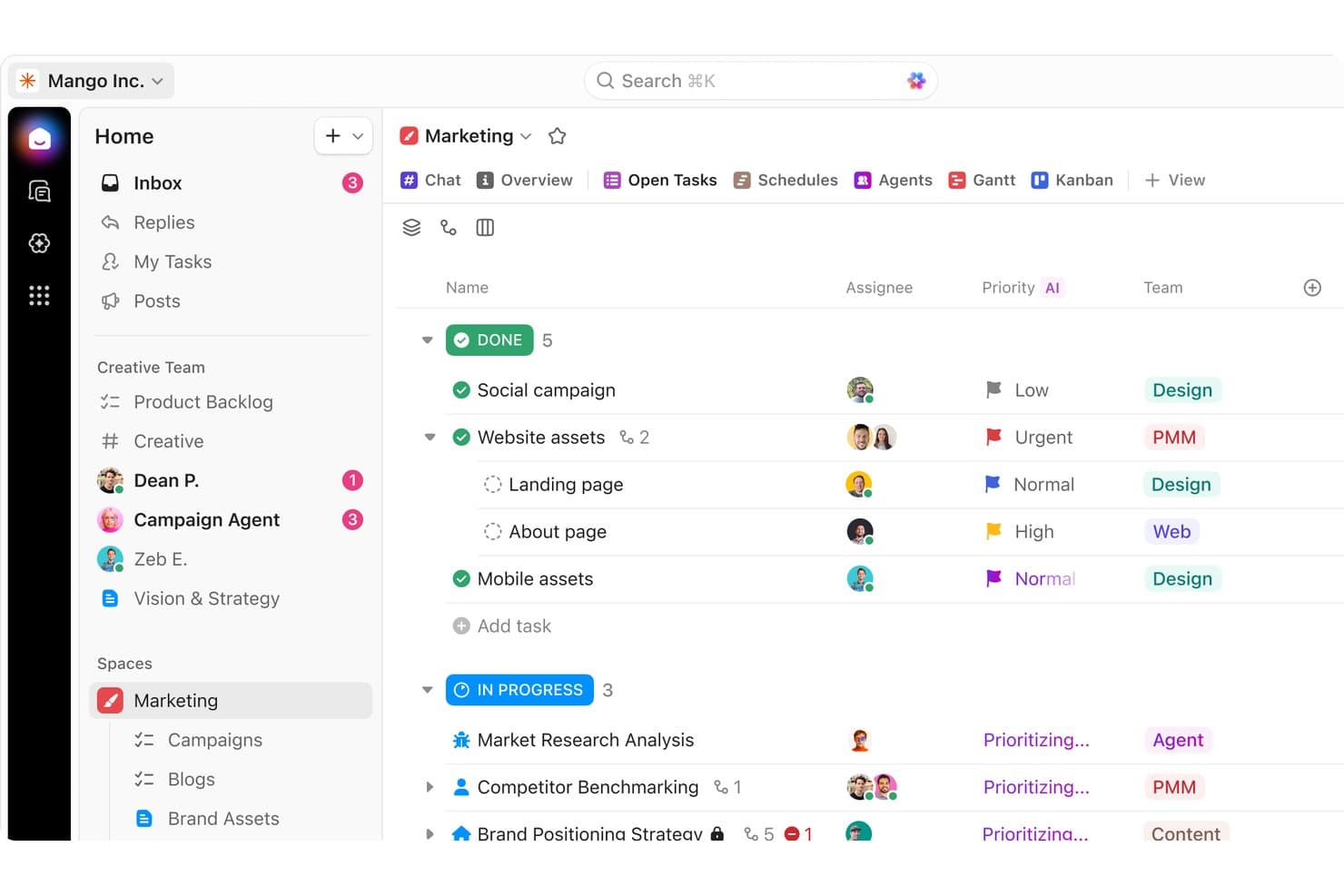
ClickUp organiza las tareas de marketing por estado, prioridad y equipo en una sola vista. ClickUp es una plataforma de gestión de proyectos para equipos de producto y empresas en crecimiento que combina tareas, documentos, objetivos y colaboración, ayudándote a coordinar el trabajo sin tener que integrar herramientas independientes.
¿Para quién es más adecuado ClickUp?
ClickUp es adecuado para equipos de producto y equipos multifuncionales que necesitan vistas de tareas, flujos de trabajo, documentos y objetivos personalizables.
Por qué ClickUp es una buena alternativa a Wrike
Elegí ClickUp porque sus espacios de trabajo personalizables permiten que mi equipo adapte las vistas de tareas, los estados y los flujos de trabajo a cada proceso de producto. Usamos los documentos junto con las tareas para conectar los requisitos del producto con el trabajo de entrega, mientras que los objetivos mantienen las iniciativas de la hoja de ruta vinculadas a resultados medibles. Esa flexibilidad nos ayuda a reemplazar las estructuras rígidas de los proyectos por configuraciones de espacios de trabajo adecuadas para el descubrimiento, la entrega y las operaciones.
Características principales de ClickUp
- Seguimiento del tiempo: Registra el tiempo directamente en las tareas.
- Automatizaciones: Activa acciones a partir de eventos de las tareas.
- Paneles: Supervisa las métricas del proyecto en paneles personalizados.
- Formularios: Recopila solicitudes y convierte los envíos en tareas.
Integraciones de ClickUp
ClickUp ofrece integraciones nativas con GitHub, GitLab, Bitbucket, Slack, Microsoft Teams, Google Drive, Dropbox, Google Calendar, Figma y HubSpot, y se conecta con Zapier. También proporciona una API pública para integraciones personalizadas.
Pros and Cons
Pros:
- Los estados personalizados se adaptan a diversos flujos de trabajo de productos
- Los documentos conectan los requisitos con las tareas de entrega
- Los objetivos vinculan las iniciativas con resultados medibles
Cons:
- La configuración extensa puede complicar la gobernanza del espacio de trabajo
- Las interfaces densas pueden ocultar detalles esenciales de las tareas
Learn more about ClickUp: Ideal para tareas estructuradas y flujos de trabajo entre equipos
- Plan gratuito disponible
- Desde $10.99/usuario/mes (facturado anualmente)
Visit WebsiteCustomer Rating:4.4/5This rating combines scores from multiple user review sites to reflect overall customer sentiment about the product.
Asana ayuda a los equipos a gestionar tareas y colaborar en proyectos de manera eficaz. Asana es una herramienta de gestión de proyectos diseñada para ayudar a los equipos a organizar, supervisar y gestionar su trabajo. Es ampliamente utilizada por equipos de distintos sectores para la gestión de tareas, la planificación de proyectos y la colaboración en equipo.
Por qué es una buena alternativa a Wrike: Asana destaca en la colaboración en equipo y la gestión de tareas gracias a funciones como la asignación de tareas, las fechas de vencimiento y las cronologías de proyectos. Estas herramientas ayudan a tu equipo a mantenerse organizado y cumplir los plazos de manera eficiente. La interfaz intuitiva de Asana facilita su adaptación y uso, lo que mejora la productividad del equipo. Su enfoque en la colaboración y la facilidad de uso la distingue como alternativa a Wrike.
Funciones e integraciones destacadas:
Las funciones incluyen vistas de tareas personalizables que te permiten organizar el trabajo de la forma que mejor se adapte a tu equipo. La función de cronología te ayuda a visualizar los calendarios de los proyectos y supervisar el progreso. Asana también ofrece seguimiento de objetivos para mantener a tu equipo alineado con los objetivos del proyecto.
Las integraciones incluyen Slack, Microsoft Teams, Google Drive, Dropbox, Zoom, Salesforce, Trello, Jira, GitHub y Zapier.
Pros and Cons
Pros:
- Asignación y seguimiento de tareas sencillos
- Interfaz de usuario intuitiva
- Vistas de proyectos personalizables
Cons:
- Funciones limitadas de generación de informes avanzados
- No es ideal para proyectos complejos
Learn more about Asana: Ideal para el trabajo con clientes y el seguimiento de la rentabilidad
- Prueba gratuita de 14 días
- Desde $9.99/usuario/mes (facturado anualmente)
Visit WebsiteCustomer Rating:4.4/5This rating combines scores from multiple user review sites to reflect overall customer sentiment about the product.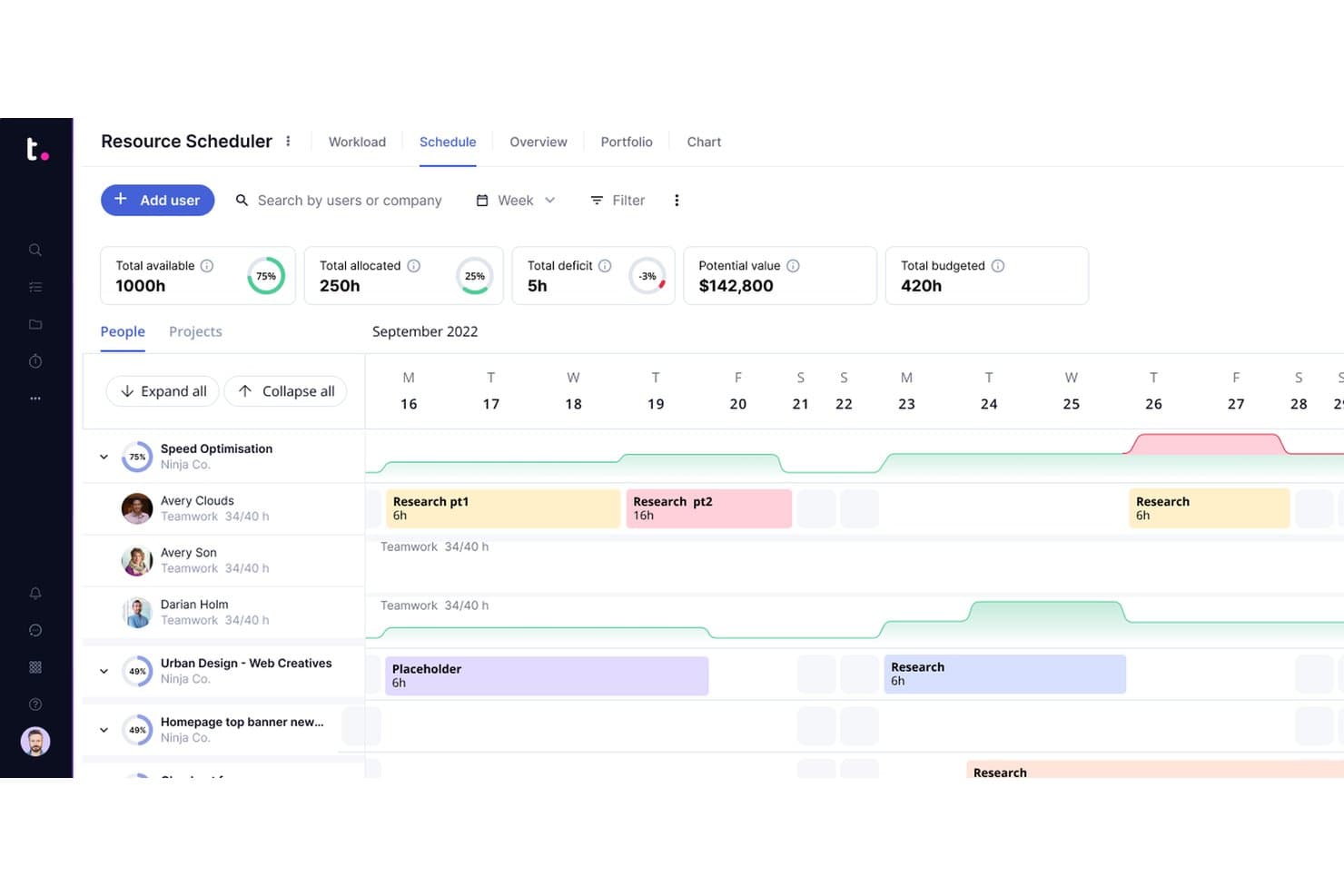
Teamwork.com permite a los usuarios programar y asignar visualmente los recursos del equipo. Teamwork.com es una plataforma de gestión de proyectos para agencias, consultorías y equipos de servicios que necesitan coordinar proyectos de clientes, realizar un seguimiento de las cargas de trabajo y conectar los planes de entrega con los objetivos empresariales.
¿Para quién es más adecuado Teamwork.com?
Teamwork.com es adecuado para agencias y consultorías que necesitan gestionar la entrega a clientes, la capacidad del equipo y la rentabilidad de los proyectos en un solo lugar.
Por qué Teamwork.com es una buena alternativa a Wrike
Elegí Teamwork.com porque mi equipo puede conectar los proyectos de los clientes con los presupuestos, el seguimiento del tiempo facturable y los informes de rentabilidad. Utilizo la planificación de la carga de trabajo para equilibrar las asignaciones entre cuentas y detectar las brechas de capacidad antes de que se retrase la entrega. Esto me proporciona una visión más clara de si cada proyecto está alcanzando sus objetivos financieros.
Características principales de Teamwork.com
- Listas de tareas: Organiza el trabajo del proyecto en grupos de tareas accionables.
- Diagramas de Gantt: Representa visualmente los plazos de las tareas y las dependencias del proyecto.
- Plantillas de proyectos: Reutiliza estructuras predefinidas para proyectos recurrentes.
- Paneles personalizados: Supervisa las actualizaciones del proyecto mediante vistas configurables.
Integraciones de Teamwork.com
Teamwork.com ofrece más de 150 integraciones nativas y de socios, incluidas QuickBooks, Xero, HubSpot, Google Drive, Microsoft OneDrive, Slack, Microsoft Teams, Harvest y Stripe. También se conecta con Zapier y proporciona una API para integraciones personalizadas.
Pros and Cons
Pros:
- Conecta la entrega de proyectos con el seguimiento de la rentabilidad
- Planificación sólida de la carga de trabajo para equipos que trabajan con clientes
- Las plantillas reutilizables facilitan los proyectos recurrentes de clientes
Cons:
- Las funciones financieras pueden resultar abrumadoras para los equipos más pequeños
- Los informes avanzados requieren tiempo para configurarse
Learn more about Teamwork.com: 6
6Jira
- Forfait gratuit + essai gratuit de 14 jours disponible
- À partir de $7.91/utilisateur/mois
Visit WebsiteCustomer Rating:4.4/5This rating combines scores from multiple user review sites to reflect overall customer sentiment about the product.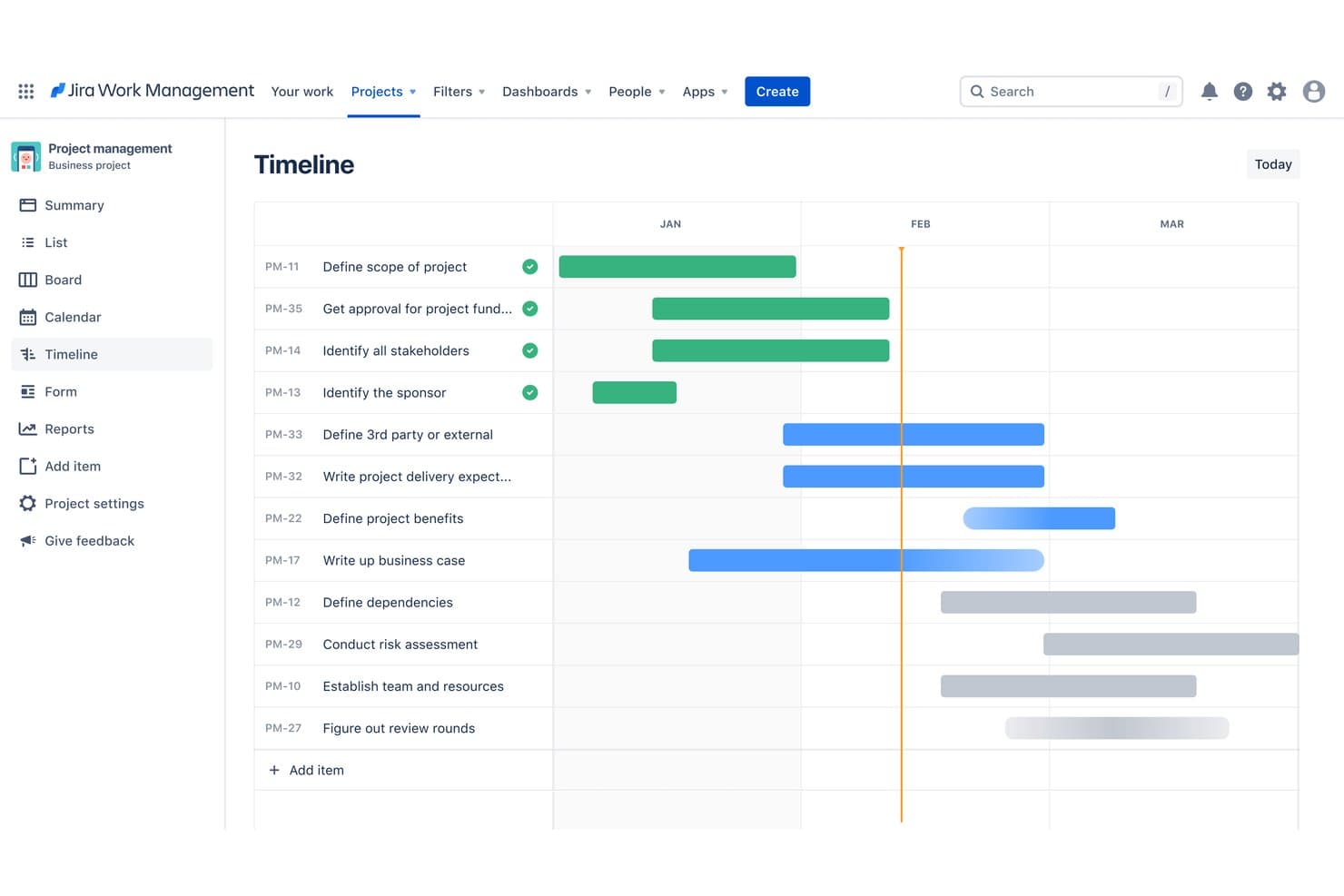
La vue chronologique de Jira répartit les tâches sur plusieurs mois et suit leur progression. Jira est une plateforme de gestion de projets destinée aux équipes produit et logicielles, qui regroupe les backlogs, la planification des sprints, le suivi des problèmes et les flux de travail de livraison dans un seul espace de travail.
À qui Jira convient-il le mieux ?
Jira convient aux équipes produit et d'ingénierie qui ont besoin d'une planification agile, d'une gestion des backlogs, d'une coordination des sprints et de flux de travail de livraison alignés sur les développeurs.
Pourquoi Jira est une bonne alternative à Wrike
J'ai choisi Jira parce qu'il prend en charge la planification agile et alignée sur les développeurs grâce aux backlogs produit, aux tableaux Scrum et Kanban et à la planification des sprints. Mon équipe utilise les types de problèmes, les flux de travail et le suivi des versions pour relier les exigences produit au travail d'ingénierie. Nous pouvons affiner une fonctionnalité, l'affecter à un sprint et suivre sa livraison depuis un seul système.
Fonctionnalités clés de Jira
- Tableaux de bord personnalisés : créez des vues personnalisées avec des gadgets et des graphiques configurables.
- Règles d'automatisation : déclenchez automatiquement des actions lorsque des événements ou des conditions définis se produisent.
- Rapports : générez des graphiques de vélocité, de burndown, de flux cumulé et de contrôle.
- Intégrations : connectez Jira aux outils de développement, de collaboration et de documentation.
Intégrations de Jira
Jira propose plus de 3 000 intégrations sur sa place de marché, notamment avec Confluence, Trello, Bitbucket, Slack, Microsoft Teams, GitHub, Azure DevOps, Jenkins, Salesforce et Figma. Il fournit également une API pour les intégrations personnalisées et se connecte à Zapier.
Pros and Cons
Pros:
- La planification Scrum et Kanban convient aux équipes produit
- Les backlogs sont directement reliés au travail de livraison
- Les rapports de version facilitent les compromis d'ingénierie
Cons:
- Les flux de travail des problèmes nécessitent une configuration initiale minutieuse
- Les vues de portefeuille interfonctionnelles semblent moins naturelles
- 7
Jira
- Forfait gratuit + essai gratuit de 14 jours disponible
- À partir de $7.91/utilisateur/mois
Visit WebsiteCustomer Rating:4.4/5This rating combines scores from multiple user review sites to reflect overall customer sentiment about the product.La vue chronologique de Jira répartit les tâches sur plusieurs mois et suit leur progression. Jira est une plateforme de gestion de projets destinée aux équipes produit et logicielles, qui regroupe les backlogs, la planification des sprints, le suivi des problèmes et les flux de travail de livraison dans un seul espace de travail.
À qui Jira convient-il le mieux ?
Jira convient aux équipes produit et d'ingénierie qui ont besoin d'une planification agile, d'une gestion des backlogs, d'une coordination des sprints et de flux de travail de livraison alignés sur les développeurs.
Pourquoi Jira est une bonne alternative à Wrike
J'ai choisi Jira parce qu'il prend en charge la planification agile et alignée sur les développeurs grâce aux backlogs produit, aux tableaux Scrum et Kanban et à la planification des sprints. Mon équipe utilise les types de problèmes, les flux de travail et le suivi des versions pour relier les exigences produit au travail d'ingénierie. Nous pouvons affiner une fonctionnalité, l'affecter à un sprint et suivre sa livraison depuis un seul système.
Fonctionnalités clés de Jira
- Tableaux de bord personnalisés : créez des vues personnalisées avec des gadgets et des graphiques configurables.
- Règles d'automatisation : déclenchez automatiquement des actions lorsque des événements ou des conditions définis se produisent.
- Rapports : générez des graphiques de vélocité, de burndown, de flux cumulé et de contrôle.
- Intégrations : connectez Jira aux outils de développement, de collaboration et de documentation.
Intégrations de Jira
Jira propose plus de 3 000 intégrations sur sa place de marché, notamment avec Confluence, Trello, Bitbucket, Slack, Microsoft Teams, GitHub, Azure DevOps, Jenkins, Salesforce et Figma. Il fournit également une API pour les intégrations personnalisées et se connecte à Zapier.
Pros and Cons
Pros:
- La planification Scrum et Kanban convient aux équipes produit
- Les backlogs sont directement reliés au travail de livraison
- Les rapports de version facilitent les compromis d'ingénierie
Cons:
- Les flux de travail des problèmes nécessitent une configuration initiale minutieuse
- Les vues de portefeuille interfonctionnelles semblent moins naturelles
 Ideal para la visibilidad de los proyectos de los clientes
- Prueba gratuita de 14 días + demostración gratuita disponible
- Desde 9,99 $/usuario/mes (facturado anualmente)
Visit WebsiteCustomer Rating:4.5/5This rating combines scores from multiple user review sites to reflect overall customer sentiment about the product.
Teamwork permite a los equipos planificar, supervisar y gestionar tareas en una sola vista visual. Teamwork es un software de gestión de proyectos para agencias y equipos de atención al cliente que combina la planificación de proyectos, la gestión de la carga de trabajo, la colaboración y la comunicación con clientes en un solo espacio de trabajo.
¿Para quién es más adecuado Teamwork?
Agencias y equipos de atención al cliente que necesitan una visibilidad clara de los proyectos de los clientes, las cargas de trabajo, los plazos y la comunicación.
Por qué Teamwork es una buena alternativa a Wrike
Elegí Teamwork porque puedo hacer un seguimiento de la visibilidad de los proyectos de los clientes en las tareas, los plazos, las cargas de trabajo y las comunicaciones. Mi equipo utiliza paneles de proyectos y vistas de carga de trabajo para detectar los riesgos con antelación, mientras que el acceso de los clientes mantiene las aprobaciones y las actualizaciones de los proyectos en un solo espacio de trabajo.
Características principales de Teamwork
- Seguimiento del tiempo: Registra las horas facturables y no facturables asociadas a proyectos y tareas.
- Plantillas de proyectos: Reutiliza estructuras predefinidas, listas de tareas y configuraciones de proyectos.
- Dependencias de tareas: Vincula tareas para mostrar qué trabajo debe realizarse primero.
- Seguimiento del presupuesto: Supervisa los costes previstos, el tiempo registrado y el gasto de los proyectos.
Integraciones de Teamwork
Teamwork ofrece más de 150 integraciones nativas, incluidas Slack, Microsoft Teams, Salesforce, HubSpot, Xero, QuickBooks Online, Jira, Google Calendar, Outlook Calendar y Dropbox. También es compatible con Zapier y proporciona una API para integraciones personalizadas.
Pros and Cons
Pros:
- Los portales de clientes mantienen visibles las aprobaciones y las actualizaciones
- Las vistas de carga de trabajo muestran los conflictos de recursos con antelación
- El seguimiento del presupuesto conecta las horas con el gasto
Cons:
- Los permisos de los clientes requieren una configuración cuidadosa del espacio de trabajo
- Los informes avanzados pueden requerir una configuración manual
Learn more about Teamwork: Ideal para la previsión de capacidad y demanda a largo plazo
- Prueba gratuita de 14 días disponible
- Desde $9/usuario/mes (facturado anualmente)
Visit WebsiteCustomer Rating:4.4/5This rating combines scores from multiple user review sites to reflect overall customer sentiment about the product.
Birdview ayuda a los equipos a coordinar tareas, plazos y recursos para lograr una entrega más fluida. Birdview es una plataforma de gestión de proyectos y automatización de servicios profesionales diseñada para equipos internos y empresas de servicios profesionales de diversos sectores, como ingeniería, consultoría empresarial y servicios de TI. Sus principales funciones empresariales incluyen la planificación de recursos, la gestión de proyectos, la facturación y la colaboración, con el objetivo de mejorar la entrega de proyectos y la utilización de recursos.
Por qué es una buena alternativa a Wrike: Birdview destaca en la planificación avanzada de recursos gracias a funciones como la gestión de proyectos basada en IA, los paneles personalizables y las herramientas detalladas de asignación de recursos. Estas capacidades permiten a tu equipo optimizar la utilización de recursos y los plazos de los proyectos. Con más de 300 paneles preconfigurados, puedes analizar los datos de forma eficaz. Birdview también ofrece servicios personalizados de incorporación y asistencia, lo que garantiza una implementación fluida para tu equipo.
Funciones e integraciones destacadas:
Las funciones incluyen flujos de trabajo personalizables que te permiten adaptar la plataforma a las necesidades de tu equipo. La plataforma proporciona herramientas de inteligencia empresarial para realizar análisis exhaustivos de datos. Los paneles personalizables te permiten supervisar las operaciones y la salud financiera de forma eficiente.
Las integraciones incluyen Salesforce, QuickBooks, Slack, Microsoft Teams, Trello, Asana, Dropbox, Google Workspace, Jira y HubSpot.
Pros and Cons
Pros:
- Herramientas avanzadas de planificación de recursos
- Paneles personalizables
- Gestión de proyectos basada en IA
Cons:
- Funciones complejas para equipos pequeños
- Curva de aprendizaje más pronunciada para los nuevos usuarios
Learn more about Birdview: Ideal para operaciones empresariales creativas y de marketing
- Demostración gratuita disponible
- Precio bajo solicitud
Visit WebsiteCustomer Rating:4.1/5This rating combines scores from multiple user review sites to reflect overall customer sentiment about the product.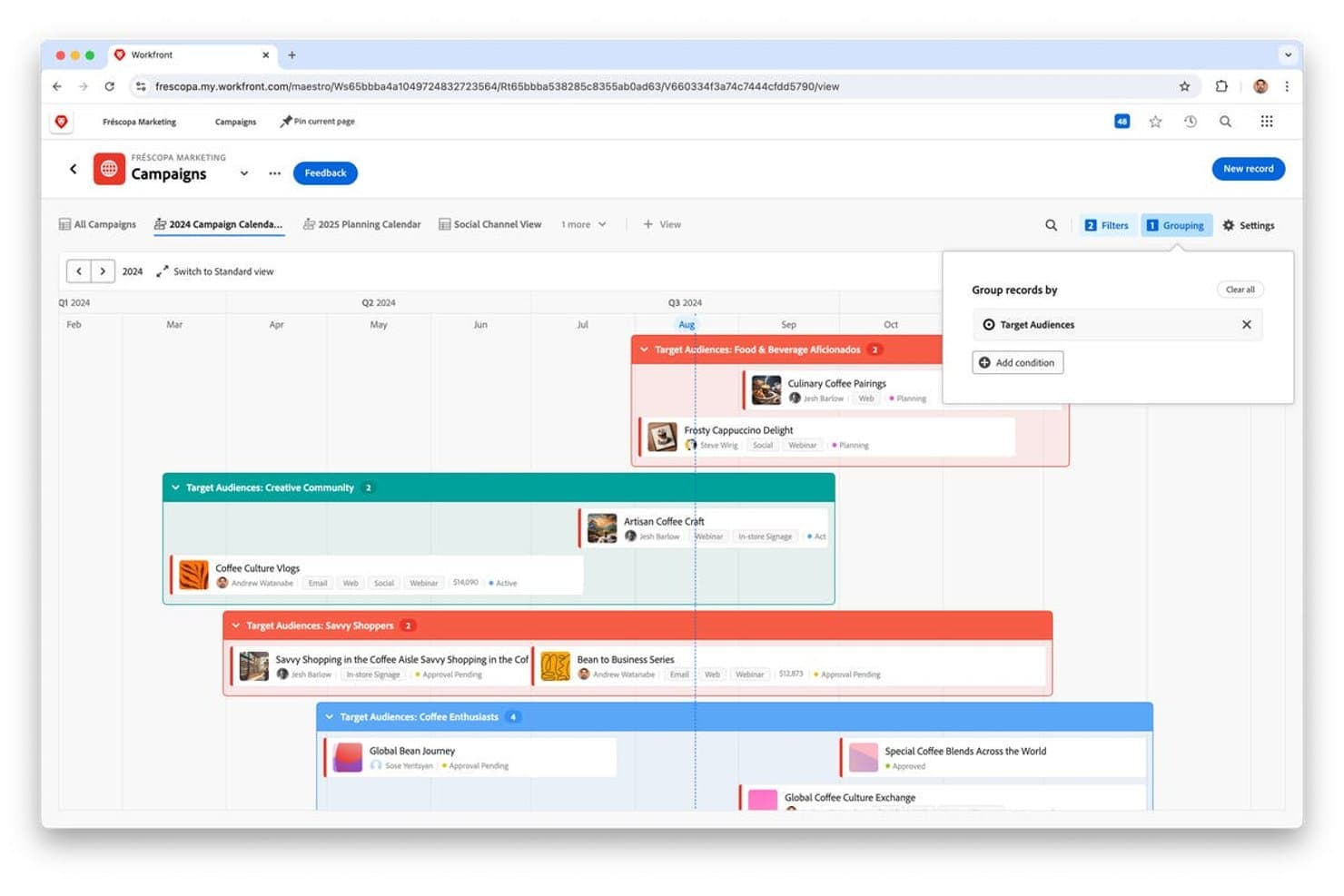
Adobe Workfront agrupa las campañas por público objetivo en un calendario con vista de línea de tiempo. Adobe Workfront es una plataforma empresarial de gestión de proyectos para equipos creativos y de marketing que conecta la planificación, la colaboración, la gestión de recursos y la entrega en carteras de trabajo complejas.
¿Para quién es más adecuado Adobe Workfront?
Adobe Workfront es adecuado para equipos empresariales de operaciones creativas y de marketing que coordinan carteras complejas, flujos de trabajo interfuncionales y la entrega de campañas de gran volumen.
Por qué Adobe Workfront es una buena alternativa a Wrike
Elegí Adobe Workfront porque conecta la planificación de carteras empresariales con las operaciones creativas y de marketing. Mi equipo utiliza la gestión de recursos para asignar especialistas a distintas campañas, mientras que los flujos de trabajo de revisión y aprobación mantienen el proceso de revisión en marcha. Es adecuado para organizaciones complejas que coordinan entregas creativas de gran volumen entre departamentos.
Características principales de Adobe Workfront
- Formularios personalizados: Captura detalles estandarizados de proyectos y solicitudes mediante campos adaptados.
- Colas de solicitudes: Dirige las solicitudes de trabajo entrantes a colas organizadas para su revisión.
- Paneles: Muestra métricas de proyectos, tareas y actualizaciones en paneles configurables.
- Informes: Crea informes personalizados para hacer un seguimiento de hitos, cargas de trabajo y estado de los proyectos.
Integraciones de Adobe Workfront
Adobe Workfront ofrece integraciones integradas con Adobe Creative Cloud, Adobe Experience Manager Assets, Adobe Express, GenStudio for Performance Marketing, Slack, Microsoft Teams, Google Drive y Jira. La compatibilidad integrada también incluye Box y SharePoint, mientras que Workfront Fusion y las API REST públicas y de suscripción a eventos permiten establecer conexiones personalizadas.
Pros and Cons
Pros:
- La gobernanza de carteras abarca trabajos complejos de campañas
- La revisión mantiene las revisiones creativas en un solo flujo de trabajo
- La planificación de recursos revela carencias en la capacidad de los especialistas
Cons:
- La configuración requiere una administración considerable
- Las vistas de gran volumen pueden parecer lentas
Learn more about Adobe Workfront:
Otras alternativas a Wrike
Estas son algunas alternativas adicionales a Wrike que no llegaron a mi lista, pero que merece la pena tener en cuenta:
- 11RavetreeIdeal para gestionar múltiples proyectos
- 12SmartsheetIdeal para el seguimiento de proyectos basado en hojas de cálculo
- 13ScoroIdeal para la gestión empresarial integral
- 14CeloxisIdeal para la planificación de proyectos y recursos basada en diagramas de Gantt
- 15AcceloLa mejor para automatización de servicios profesionales
- 16GoodDayIdeal para el seguimiento de OKR y proyectos de bajo costo
- 17WorkamajigLa mejor opción todo-en-uno para proyectos, facturación y planificación de recursos
- 18Nifty PMIdeal para la gestión de proyectos y la colaboración
Cómo evalúo las alternativas a Wrike
Mi evaluación se divide en tres partes, y la funcionalidad principal es la que tiene más peso: ¿puede la herramienta planificar proyectos y visualizar el trabajo en varias vistas? Después, compruebo si tiene funciones diferenciadoras, como la puntuación de priorización mediante IA y la sincronización bidireccional con Jira. Por último, valoro factores ajenos a las funciones, como la asistencia para la migración y la flexibilidad de precios.
Funcionalidad principal (requisitos básicos para esta lista)
Al seleccionar las herramientas para mi lista, puntúo cada una en una escala de 0 (no ofrece la funcionalidad) a 5 (sobresale en esta área) para cada una de las funcionalidades principales que se indican a continuación. Después convierto el total en un porcentaje para ayudar a evaluar la adecuación general de cada herramienta, con un peso adicional para cualquier funcionalidad que haya considerado esencial.
- Gestión de tareas y proyectos (esencial): Busco tareas, subtareas, dependencias, fechas de entrega, campos personalizados, plantillas y enlaces entre proyectos relacionados.
- Visualización de flujos de trabajo (esencial): Evalúo las vistas de lista, tablero y cronograma, además de los filtros que ayudan a los equipos a realizar un seguimiento de lanzamientos, campañas y trabajos de entrega.
- Colaboración y comunicación: Compruebo si ofrece comentarios organizados por hilos, @menciones, intercambio de archivos y debates de aprobación vinculados a trabajos específicos.
- Automatización de flujos de trabajo: Busco reglas que dirijan solicitudes, actualicen estados, asignen responsables y activen pasos de seguimiento en distintos proyectos.
- Informes y paneles: Evalúo paneles personalizables que muestren el estado de los proyectos, la carga de trabajo, los plazos y el rendimiento de los equipos.
- Gestión de recursos entre equipos: Compruebo si las vistas de capacidad muestran la asignación entre equipos y proyectos, así como los plazos de entrega que se solapan.
Una vez que tengo una lista de herramientas que cumplen los criterios, considero qué diferencia a cada plataforma.
Factores diferenciadores (lo que distingue a los proveedores)
Así es como comparo y contrasto los distintos proveedores:
Funciones destacadas
Compruebo si una herramienta ofrece seguimiento nativo de OKR, lo que permite a los responsables de producto vincular los elementos de la hoja de ruta con resultados medibles, en lugar de gestionar esa relación en una hoja de cálculo independiente. La sincronización bidireccional con Jira es igual de importante: sin ella, las actualizaciones de ingeniería permanecen en un sistema mientras que las decisiones de producto viven en otro. También evalúo herramientas de planificación de escenarios que permiten modelar qué ocurre si adelantas una funcionalidad o pierdes a un miembro del equipo a mitad del trimestre.
Más allá de las funciones
Evalúo si una herramienta puede escalar en varias líneas de productos sin obligar a los equipos a trabajar en espacios de trabajo separados que acaben con la visibilidad entre carteras. La asistencia para la migración también es importante: los proveedores que ofrecen guías de importación específicas para Wrike y una incorporación personalizada reducen semanas la transición. También compruebo la transparencia de los precios, ya que los equipos de operaciones de producto necesitan costes predecibles por usuario para prever los presupuestos sin encontrarse con restricciones empresariales inesperadas a mitad del despliegue.
¿Por qué buscar una alternativa a Wrike?
Aunque Wrike es una buena opción de software de gestión de proyectos, hay varios motivos por los que algunos usuarios buscan soluciones alternativas. Es posible que estés buscando una alternativa a Wrike porque…
- Necesitas más opciones de personalización
- Tu equipo considera que Wrike es demasiado complejo
- Buscas mejores capacidades de integración
- Tu presupuesto no se ajusta a los precios de Wrike
- Necesitas funciones específicas para tu sector
- Tu equipo necesita una interfaz de usuario más sencilla
Si alguna de estas situaciones te resulta familiar, has llegado al lugar adecuado. Mi lista incluye varias opciones de software de gestión de proyectos más adecuadas para los equipos que se enfrentan a estos desafíos con Wrike y buscan soluciones alternativas.
Funciones principales de Wrike
Estas son algunas de las funciones principales de Wrike, que te ayudarán a contrastar y comparar lo que ofrecen las soluciones alternativas:
- Gestión de tareas: Crea y organiza tareas y subtareas fácilmente para mejorar el flujo de trabajo.
- Herramientas de colaboración: Conecta con tus compañeros de equipo mediante @menciones y ciclos de comentarios para las aprobaciones.
- Seguimiento del tiempo: Registra el tiempo dedicado a las tareas con temporizadores y descripciones integrados.
- Gestión de recursos: Supervisa la asignación del equipo y ajusta las tareas mediante la función de arrastrar y soltar.
- Gestión de documentos: Gestiona los archivos adjuntos con revisión y control de versiones para las aprobaciones de los clientes.
- Paneles personalizados: Crea paneles para acceder a información filtrada y supervisar las tareas.
- Vista de carga de trabajo: Visualiza las horas y los porcentajes de asignación para optimizar las cargas de trabajo del equipo.
- Modo de comparación: Compara versiones de archivos en paralelo para detectar diferencias fácilmente.
- Formularios de solicitud: Crea formularios personalizados para recopilar información de usuarios externos.
- Informes y análisis: Genera informes detallados para obtener información sobre el rendimiento del proyecto.