

10 mejores soluciones de software de gestión ágil del ciclo de vida del producto en 2026

10 Selección de los mejores software PLM ágiles


Es posible que tengas que coordinar plazos, recursos y equipos. Ahí es donde entra en juego el software PLM ágil, que ayuda a simplificar estos desafíos.
Según mi experiencia, estas herramientas pueden marcar una diferencia significativa en la forma en que gestionas los proyectos y colaboras con tu equipo. Ayudan a que todos estén al tanto, haciendo que todo funcione de manera más fluida y eficiente.
En este artículo, compartiré mis principales opciones de software PLM ágil, basadas en pruebas independientes y en un profundo conocimiento del mundo de la gestión de productos. Encontrarás reseñas imparciales y bien documentadas que se centran en lo que realmente importa para ti y tu equipo.
Por qué confiar en nuestras recomendaciones de software
Nuestro equipo lleva probando y evaluando software desde 2012. Como gestores de producto, sabemos lo difícil —y lo importante— que es elegir el software adecuado.
Para esta guía, evaluamos las herramientas mediante pruebas prácticas e investigación independiente, puntuando las herramientas según nuestros criterios de selección.
Nuestras reseñas reflejan nuestro criterio editorial humano, no un discurso de ventas.
Resumen de los mejores software PLM ágiles
\u003cspan style=\u0022font-weight: 400\u0022\u003eEste cuadro comparativo resume los detalles de precios de mis principales selecciones de software PLM ágil para ayudarte a encontrar la mejor opción para tu presupuesto y las necesidades de tu empresa.\u003c/span\u003e
| Tool | Best For | Trial Info | Price | ||
|---|---|---|---|---|---|
| 1 | Ideal por sus opciones para priorización de backlog | Prueba gratuita de 15 días | Desde $1/usuario/mes (mínimo 12 usuarios) | Website | |
| 2 | Ideal para lienzos infinitos | Prueba gratuita + plan gratuito disponible | Desde $9/usuario/mes (facturación anual) | Website | |
| 3 | Ideal para gestionar ciclos de vida de productos complejos | Prueba gratuita de 14 días + plan gratuito disponible | Desde $10/usuario/mes (facturado anualmente) | Website | |
| 4 | Ideal para el desarrollo visual e iterativo | Plan gratuito disponible | Desde $8/miembro/mes (facturación anual) | Website | |
| 5 | Ideal para un control preciso del ciclo de vida | Prueba gratuita de 30 días | Desde $545/año | Website | |
| 6 | Mejores capacidades de lanzamiento global de productos | Demostración gratuita disponible | Precios bajo solicitud | Website | |
| 7 | Ideal para la gestión de datos de productos | Demo gratuita disponible | Precios previa solicitud | Website | |
| 8 | Las mejores soluciones para todo el ciclo de vida del producto | Ofrecen una prueba gratuita | Precio a consultar | Website |


Reseña de los mejores software PLM ágiles
\u003cspan style=\u0022font-weight: 400\u0022\u003eA continuación encontrarás mis resúmenes detallados de los mejores software PLM ágiles que llegaron a mi selección. Mis reseñas ofrecen un análisis detallado de las funciones principales, ventajas y desventajas, integraciones y casos de uso ideales de cada herramienta para ayudarte a encontrar la mejor opción para ti.\u003c/span\u003e

Ideal por sus opciones para priorización de backlog
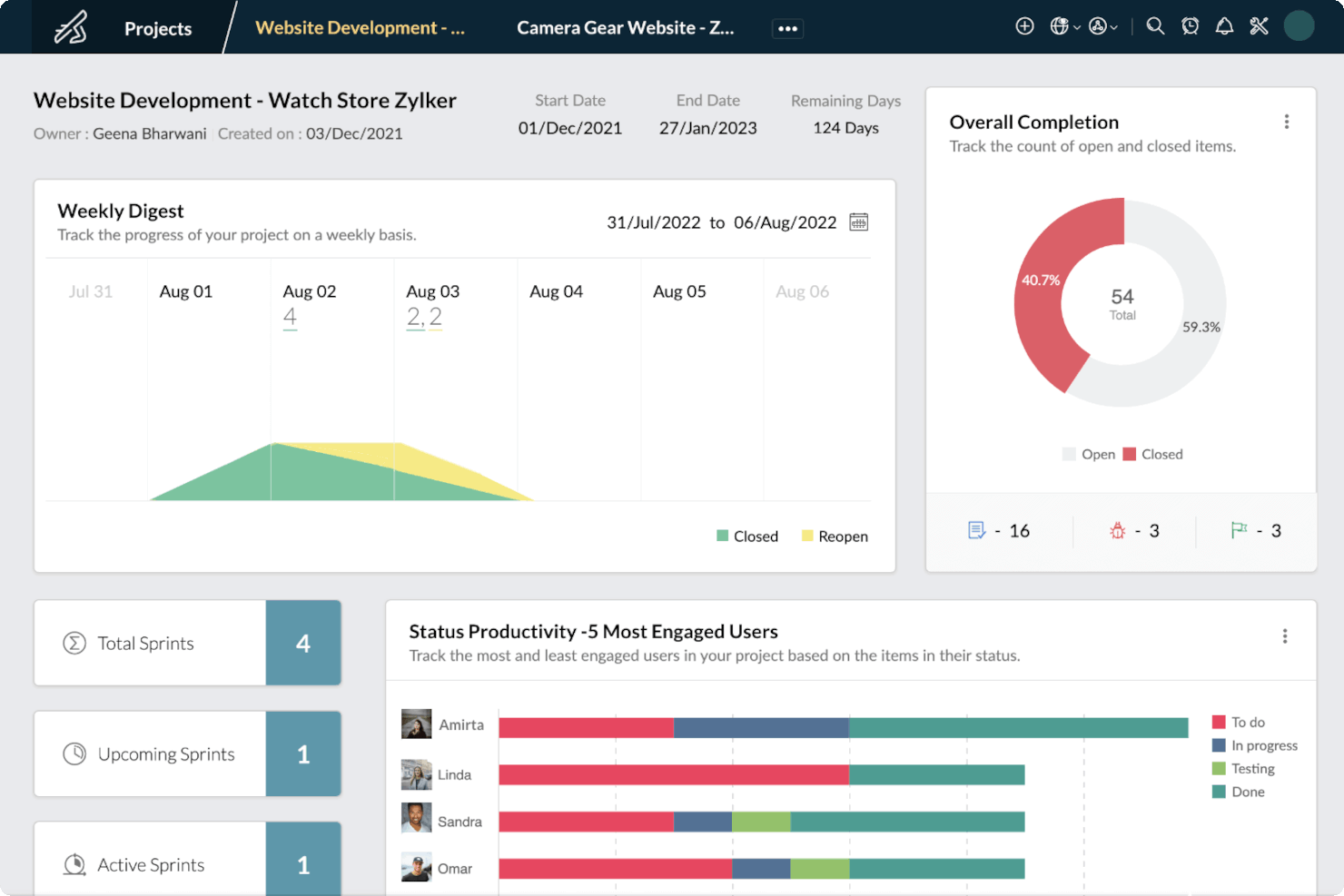
Zoho Sprints es una solución de gestión de proyectos diseñada para equipos ágiles que desean monitorear y administrar eficientemente sus productos. Los usuarios pueden utilizar los tableros Scrum y Kanban para gestionar el ciclo de vida de un producto, aunque la plataforma en sí no está pensada como una solución PLM. Sin embargo, vale la pena mencionar Zoho Sprints en esta lista ya que incluye numerosas características PLM, como gestión de tareas, colaboración y funciones de generación de informes.
Por qué elegí Zoho Sprints: Zoho Sprints ofrece a los usuarios una visión general del progreso de sus proyectos y la posibilidad de hacer seguimiento a los cronogramas de lanzamiento. La plataforma está disponible en cuatro planes diferentes, siendo el plan Gratuito el más limitado y el plan Premium el más completo. La diferencia de precio entre los planes de pago es lo suficientemente pequeña como para que valga la pena suscribirse directamente al plan Premium. El plan Gratuito solo ofrece una gestión de backlog y generación de informes limitada, mientras que el plan de pago más barato incluye muchas más funciones de gestión y reportes, e incluso integración con Zoho Analytics para obtener más información sobre ciertos productos. Zoho Sprints cuenta con aún más funciones e integraciones que pueden convertir la plataforma en una solución de software PLM improvisada.
Las empresas que utilizan Zoho Sprints como solución PLM pueden emplear los tableros Scrum y Kanban para monitorear proyectos. Zoho Sprints mejora la colaboración entre los miembros del equipo y visualiza los flujos de trabajo a través de tarjetas Kanban. Las diferentes funciones disponibles para la gestión del ciclo de vida del producto incluyen tableros Scrum y Kanban, gestión de Épicas, gestión de ítems de trabajo, gestión de lanzamientos e integraciones. La mayoría de estas funciones están detrás de una barrera de pago de bajo costo, asequible para la mayoría de las empresas, incluso considerando el plan Premier.
Aunque Zoho Sprints no está diseñado como un software PLM, sigue contando con muchas características e integraciones compatibles que ayudan a los usuarios a gestionar ciclos de vida de productos. Si se opta por utilizar esta solución, lo ideal es suscribirse al plan Premium y explorar las integraciones que ofrece para contar con una mejor plataforma de monitoreo de productos.
Características e integraciones destacadas de Zoho Sprints
Las características incluyen planificación de funcionalidades (roadmapping), gestión de proyectos, reportes y análisis, programación/seguimiento de tareas, gestión de clientes, priorización y notificaciones.
Las integraciones incluyen Microsoft Office 365, Microsoft Teams, Google Drive, Zendesk y ServiceNow. También se admiten integraciones a través de Zapier y Zoho Flow. Al formar parte del ecosistema de Zoho, permite la conexión con varios de los propios servicios de Zoho para ventas, marketing, CRM, atención al cliente y otras opciones.
Zoho Sprints tiene un coste desde $3/usuario/mes para hasta 100 usuarios y ofrece una prueba gratuita de 15 días.
Pros and Cons
Pros:
- Gran escalabilidad de funcionalidades al añadir otros productos de Zoho
- Precios accesibles
- Interfaz fácil de usar
Cons:
- Zoho Sprints no tiene una app móvil dedicada
- Algunas limitaciones de personalización
New Product Updates from Zoho Sprints
Zoho Sprints Adds Dashboard View for Custom Modules
Zoho Sprints adds a Dashboard view for custom modules with charts and tables for visualizing module records. This gives teams a clearer way to review custom data. For more information, visit Zoho Sprints’ official site.
 .
.
Ideal para lienzos infinitos
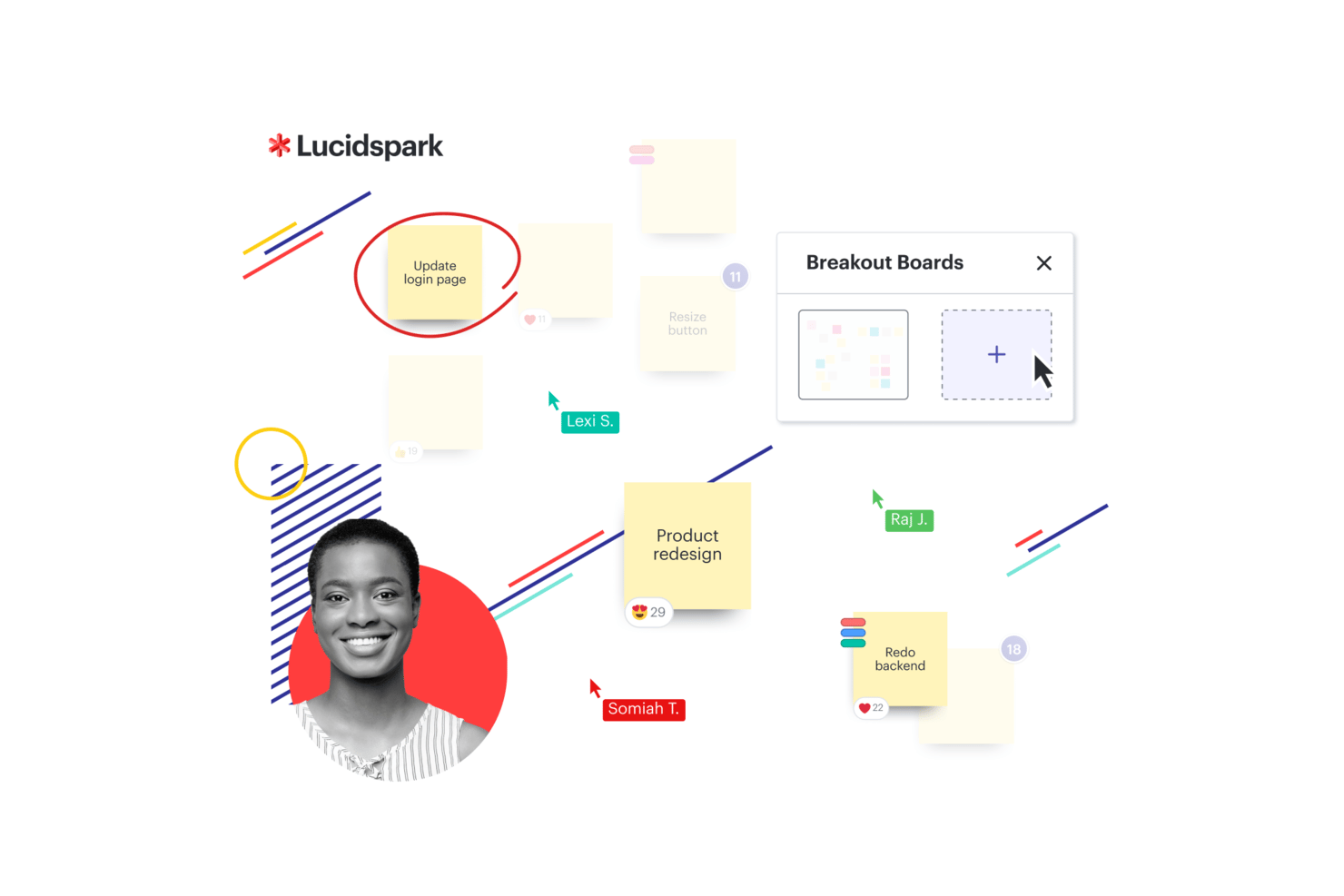
Para equipos que buscan una opción ágil de software PLM, Lucidspark ofrece un pizarrón virtual diseñado para la colaboración y el desarrollo de ideas. Se utiliza en sectores como la educación y la salud, y admite la planificación de proyectos y el desarrollo ágil. Con integraciones para herramientas como Atlassian y Google Sheets, Lucidspark ayuda a los equipos a mantener los flujos de trabajo conectados y respalda la toma de decisiones informadas.
Por qué elegí Lucidspark
Elegí Lucidspark por su fortaleza en la colaboración en tiempo real y en el trabajo creativo, ambos aspectos clave para los procesos ágiles de PLM. El lienzo infinito brinda a los equipos el espacio necesario para intercambiar ideas y organizarlas libremente, lo que favorece la ideación temprana. Además, se integra con más de 100 aplicaciones, incluyendo Atlassian, facilitando la coordinación del trabajo entre herramientas y el mantenimiento de flujos de trabajo ágiles.
Características clave de Lucidspark
Además de su lienzo infinito y sus extensas integraciones, encontré otras funciones valiosas:
- Mapas mentales dinámicos: Permiten a tu equipo organizar y conectar ideas visualmente, ayudando a una planificación integral de proyectos.
- Capacidades de IA: Apoyan la automatización de tareas repetitivas y potencian las sesiones de lluvia de ideas con sugerencias inteligentes.
- Actividades interactivas: Facilitan la participación del equipo y la toma de decisiones a través de herramientas como votaciones y juegos colaborativos.
- Plantillas de recursos: Ofrecen diseños prediseñados para agilizar los procesos y asegurar la coherencia en la ejecución de los proyectos.
Integraciones de Lucidspark
Las integraciones incluyen Atlassian, Google Sheets, Microsoft Teams, Slack, ServiceNow, Google Cloud, Amazon, Nvidia, Dropbox y Gmail.
Pros and Cons
Pros:
- Plantillas de flujo Kanban disponibles para equipos
- Colaboración en tiempo real para equipos
- Se integra con Google Drive y Jira
Cons:
- Los planes de equipo comienzan desde $10 mensuales por usuario
- Se requiere facturación anual para acceder

Wrike
Ideal para gestionar ciclos de vida de productos complejos
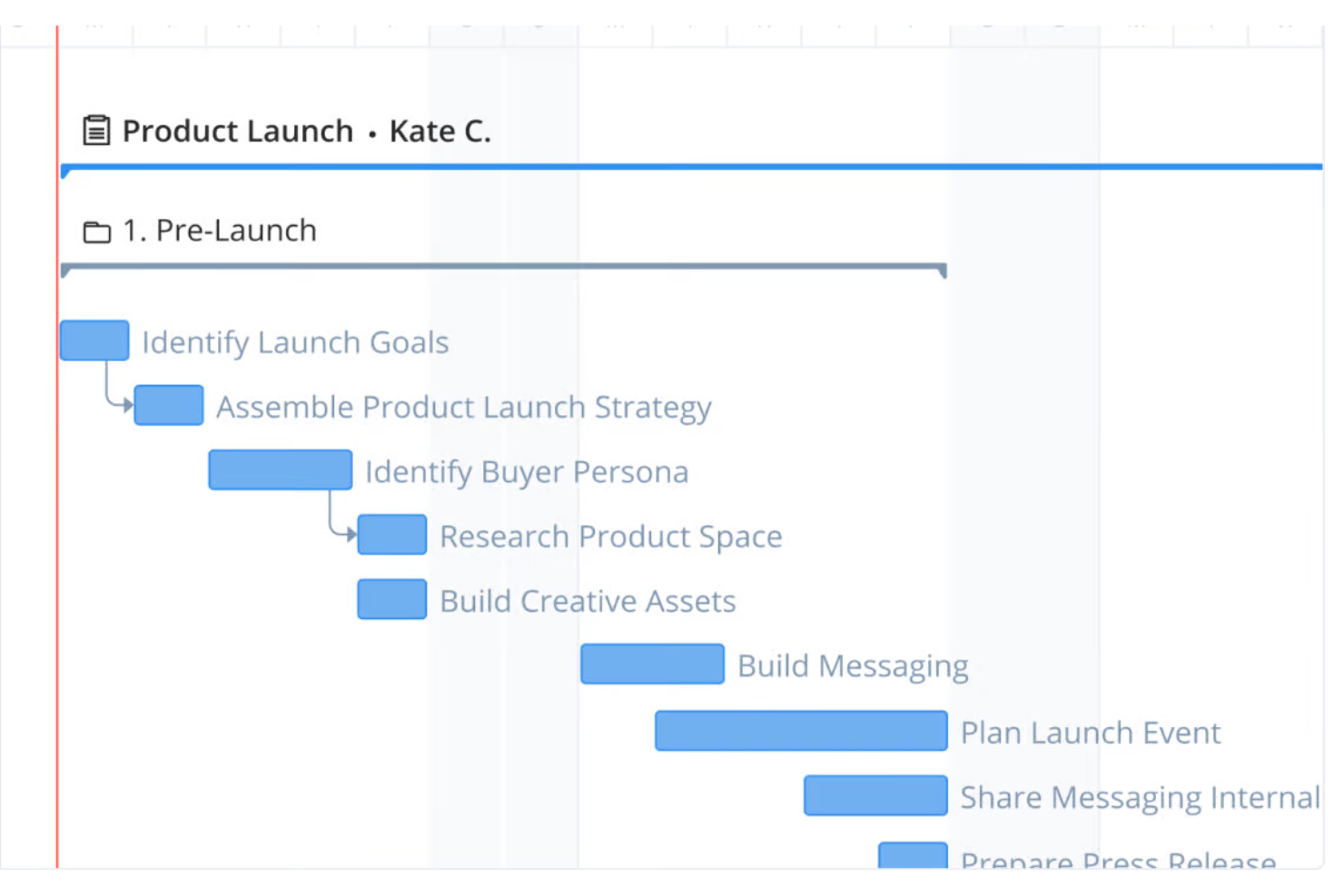
Wrike es una sólida plataforma de gestión de proyectos y colaboración diseñada para mejorar los flujos de trabajo y la productividad del equipo. Con sus funciones versátiles, Wrike soporta diversas metodologías de gestión de proyectos, incluyendo Agile, lo que lo convierte en una opción ideal para la gestión del ciclo de vida de productos (PLM).
Por qué elegí Wrike: Me gusta la flexibilidad de la plataforma para gestionar ciclos de vida de productos complejos. Wrike ofrece flujos de trabajo personalizables que se adaptan a metodologías Agile, permitiendo a los equipos ajustarse rápidamente a los cambios de requisitos. Sus tableros Kanban y diagramas de Gantt proporcionan representaciones visuales de las etapas del producto, ayudando a los equipos a seguir el progreso, identificar cuellos de botella y tomar decisiones basadas en datos.
Además, las funciones de colaboración de Wrike mejoran la comunicación y coordinación entre los miembros del equipo. La edición en tiempo real, los comentarios en las tareas y las menciones @ aseguran que todos estén alineados. Sus sólidas capacidades de informes y análisis también permiten a los equipos generar reportes detallados sobre el desempeño del proyecto, monitorear métricas clave y utilizar estas ideas para optimizar los procesos.
Funciones y conexiones destacadas de Wrike
Las funciones incluyen seguimiento del tiempo, gestión de recursos, vistas de carga de trabajo, paneles personalizados, plantillas de proyectos, integración con calendarios, formularios de solicitudes, revisión y aprobaciones, acceso desde app móvil, uso compartido de archivos, roles y permisos de usuario, automatización con Wrike Integrate, dependencias de tareas, seguimiento de hitos y gestión de riesgos.
Las conexiones incluyen Slack, Google Drive, Microsoft Teams, Salesforce, Adobe Creative Cloud, Dropbox, Jira, Trello, Asana, HubSpot, GitHub, Bitbucket, Okta, OneLogin, Box, Zapier, Outlook, Zoom, Evernote y Marketo.
Pros and Cons
Pros:
- Opciones de personalización extensas
- Posibilidad de automatizar flujos de trabajo
- Buenos diagramas de Gantt y tableros Kanban visuales
Cons:
- La plataforma puede requerir tiempo para aprenderla
- No cuenta con función de chat en la plataforma para comunicación rápida fuera de las tareas del proyecto
New Product Updates from Wrike

Wrike Activity Reports Add Actor Type Details
Wrike’s Activity Report now displays actor type details, helping admins identify whether changes came from the UI, Automation, Wrike Agents, API, or AI via MCP. For more information, visit Wrike's official site.

Miro
Ideal para el desarrollo visual e iterativo
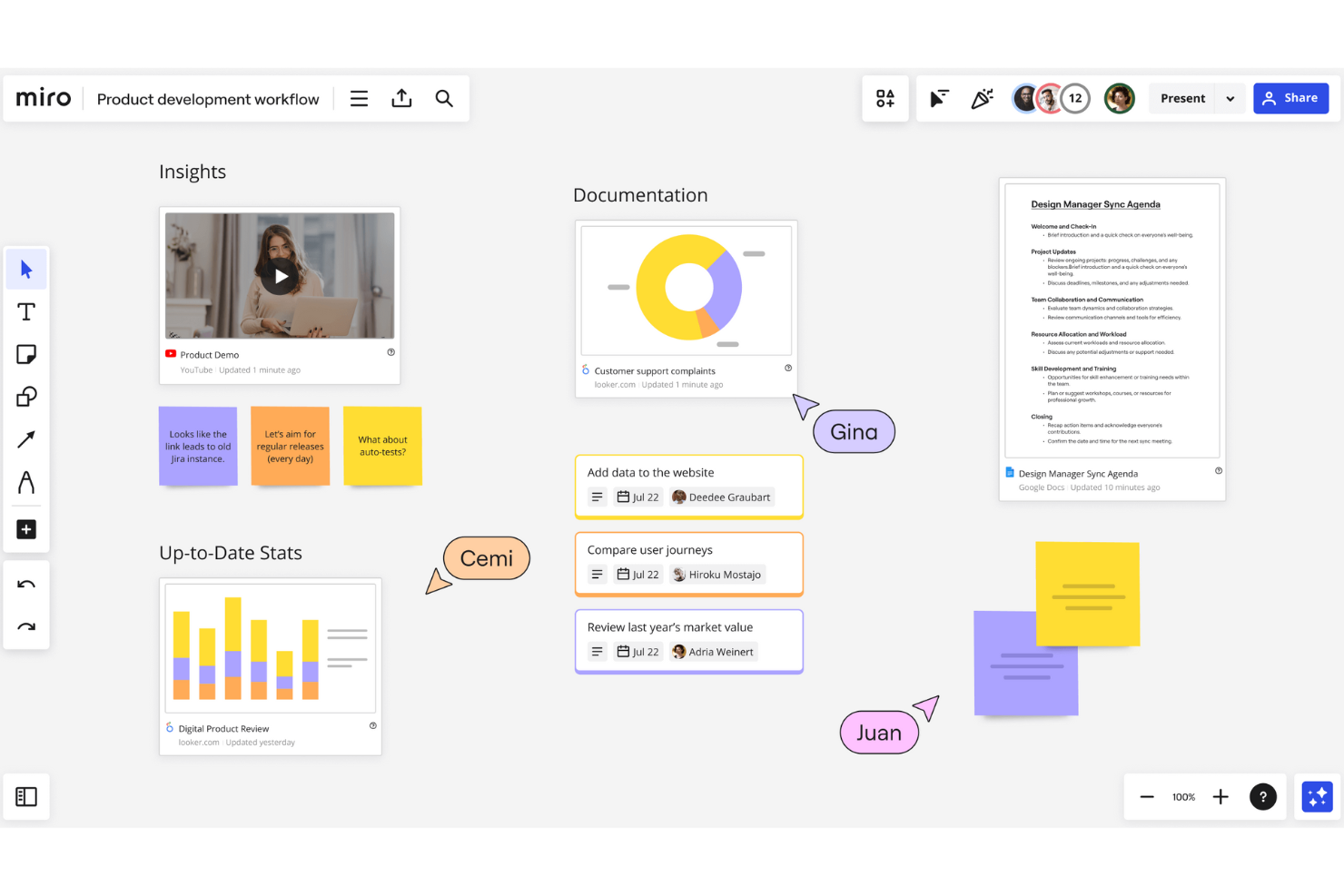
Miro es un espacio de trabajo colaborativo en línea que ofrece una amplia gama de herramientas y funciones para la gestión de proyectos, diagramas, mapeo de procesos, visualización de contenidos y más
Por qué elegí Miro: Como software PLM ágil, Miro destaca por su capacidad para facilitar la colaboración en tiempo real y el desarrollo iterativo. El conjunto de herramientas de la plataforma, como pizarras digitales, mapas mentales y tableros Kanban, permite a los equipos hacer lluvias de ideas, planificar y gestionar proyectos con flexibilidad. Con la interfaz intuitiva de Miro, los equipos pueden visualizar fácilmente flujos de trabajo complejos, priorizar tareas y hacer seguimiento del progreso a través de plantillas personalizables y marcos ágiles. Esta adaptabilidad garantiza que los equipos puedan responder rápidamente a los cambios.
Miro también admite mapeo detallado de historias de usuario, planificación de sprints y sesiones retrospectivas. Al proporcionar una plataforma centralizada donde todos los interesados pueden colaborar, compartir comentarios y tomar decisiones informadas en tiempo real, la plataforma asegura que todo el ciclo de vida del producto se gestione eficientemente.
Funciones destacadas e integraciones de Miro
Las funciones incluyen herramientas de brainstorming, modo de presentación, diagramas de flujo, creación de diagramas, integración de videollamadas, compartir pantalla, tableros Kanban, mapas mentales, flujos de trabajo ágiles, colaboración remota de equipos, notas adhesivas digitales, herramientas de gestión de proyectos, bucles de retroalimentación y herramientas de dibujo.
Las integraciones incluyen Microsoft Teams, Google Drive, Slack, Box, Airtable, Notion, Azure, Webex, Jira, Asana, Monday.com, Confluence, Zoom y Figma.
Pros and Cons
Pros:
- Los usuarios pueden colaborar en tiempo real sobre el mismo lienzo
- Pizarra infinita para procesos iterativos
- Plantillas de flujo de trabajo predefinidas
Cons:
- Debido a su flexibilidad, puede requerir tiempo aprender a usar la plataforma
- Algunas integraciones sólo están disponibles en planes de nivel superior
New Product Updates from Miro
Miro Adds Japan Data Residency for Enterprise Customers
Miro has introduced Japan data residency for enterprise customers, offering in-region storage for production data, backups, and metadata, plus in-region compute infrastructure. For more information, visit Miro's official site.


Autodesk Fusion Lifecycle, ahora conocido como Fusion 360, proporciona a los usuarios una base de datos central de productos.
Por qué elegí Autodesk Fusion Lifecycle: La plataforma centraliza la gestión de datos de productos, permitiendo un control preciso y completo del ciclo de vida del producto. Tu base de datos centralizada significa que tienes una única fuente fiable de información para tus datos de producto, eliminando confusiones e inexactitudes. Tus equipos verán la información más reciente y solo la utilizarán al realizar sus tareas.
Autodesk Fusion Lifecycle ayuda a empresas de cualquier tamaño a controlar datos y procesos según los roles o privilegios de los empleados mediante el uso de configuraciones de permisos. Los gerentes pueden extender el acceso a las partes interesadas de la cadena de suministro y contratistas para establecer una colaboración eficiente. La plataforma también mejora tus procesos al proporcionarte métricas precisas y continuas del proyecto.
Características destacadas e integraciones de Autodesk Fusion Lifecycle
Características incluyen gestión de tareas, control de versiones, gestión de proyectos, datos de diseño de manufactura, gestión de diseños, herramientas CAD y visualización de datos.
Integraciones incluyen OpenBOM, AWS Secrets Manager, Autodesk PD&M Collection, Bantam Tools, HSMWorks, Modecsoft, Autodesk A360, SimLab Composer, CAMplete TruePath y Causeway Flow.
Autodesk Fusion Lifecycle cuesta desde $545/año. Autodesk Fusion Lifecycle ofrece una prueba gratuita de 30 días.
Pros and Cons
Pros:
- Es fácil de entender para los nuevos usuarios.
- La plataforma permite a los usuarios crear dibujos 3D más rápido.
- Tiene una interfaz de usuario intuitiva.
Cons:
- La plataforma puede tener tiempos de ejecución lentos y ocasionales fallos.
- Algunas opciones de diseño requieren complementos modificadores.


Dassault ENOVIA permite a las empresas lanzar sus productos en todo el mundo de manera simultánea.
Por qué elegí Dassault ENOVIA: El lanzamiento típico de un producto implica introducirlo primero en mercados desarrollados y después expandirse a otras naciones. Esta plataforma ayuda a los usuarios a lanzar sus productos a nivel global al mismo tiempo, lo que genera mayor lealtad de los clientes y mayores ingresos. También acorta el tiempo de salida al mercado al reutilizar funciones de diseño.
Dassault ENOVIA cubre empresas medianas y grandes que operan en diversas industrias, como transporte, equipos industriales y marina. Ofrece una solución integral para la gestión del ciclo de vida del producto. Además, puede ayudar a estas organizaciones a ahorrar costos y mejorar la productividad porque es una solución SaaS y no requiere hardware adicional.
Características sobresalientes e integraciones de Dassault ENOVIA
Características incluyen gestión de diseño de alta tecnología, planificación de productos, calidad y cumplimiento, gestión de programas, relaciones estratégicas con proveedores, gestión de configuración y cambios, y clasificación y gestión de propiedad intelectual.
Integraciones incluyen Adlib, API C++ y ENOVIA X-BOM para SAP.
Dassault ENOVIA ofrece precios personalizados bajo solicitud.
Pros and Cons
Pros:
- Es fácil de usar para principiantes sin ninguna asistencia.
- Los gestores de producto tendrán un mejor control sobre el cronograma del producto.
- Los equipos pueden colaborar fácilmente y comprender el estado del producto en cualquier momento.
Cons:
- A veces presenta problemas de rendimiento debido a todas sus capacidades.
- No hay una sección de preguntas frecuentes para ayudar a resolver dudas.


PTC Windchill proporciona a los usuarios soluciones de gestión del ciclo de vida y de los datos de los productos.
Por qué elegí PTC Windchill: la herramienta ayuda a las organizaciones a distribuir, transferir, publicar y compartir información en tiempo real. También puede utilizar esta información para visualizar los datos del producto. Esto garantiza que sus equipos dispongan de todos los conocimientos prácticos que necesitan para mejorar el desarrollo de productos.
PTC Windchill proporciona software integral de gestión del ciclo de vida del producto (PLM) para empresas de todos los tamaños. Permite a sus equipos detectar problemas de diseño en las primeras etapas del ciclo de vida y resolverlos antes de pasar a la siguiente fase. La función de prueba de credibilidad del software ayuda a los usuarios a proteger la propiedad intelectual de la organización.
Características destacadas e integraciones de PTC Windchill
Las características incluyen gestión de la calidad y de la lista de materiales (BOM), gestión de la subcontratación, estructura de la plataforma, visualización y análisis de datos, base de conocimientos técnicos, gestión de la fiabilidad y de los requisitos, y gestión de la colaboración.
Las integraciones incluyen XDocs DITA CCMS, TouchBase, Procurence Meercat, ProWritingAid, OpenBOM, See Electrical, Rimsys, Arbortext, PTC Move, PTC Implementer, OpsHub y Kovair Software.
PTC Windchill ofrece precios personalizados previa solicitud.
Pros and Cons
Pros:
- Los usuarios pueden realizar búsquedas rápidas de los datos que necesitan.
- Mantener el ciclo de vida del producto mediante el proceso de solicitud de cambios es sencillo.
- La interfaz de usuario facilita el seguimiento y la localización del historial del producto.
Cons:
- Los usuarios podrían experimentar bloqueos de la plataforma al utilizar espacios de trabajo con modelos pesados.
- Es posible que los usuarios nuevos necesiten orientación para empezar a utilizar la plataforma.


SAP PLM proporciona a las empresas soluciones para gestionar todos sus procesos de ciclo de vida de producto.
Por qué elegí SAP PLM: Desde el inicio del ciclo de vida de tu producto, incluyendo la ideación y la lluvia de ideas, hasta la fabricación y el servicio, las funciones de SAP PLM pueden mejorar tus procesos. Simplifica la presentación de propuestas de proyectos, las tareas, el progreso y los cronogramas, para que puedas supervisar los datos desde una sola plataforma. Puedes utilizar la plataforma para diseñar, planificar y gestionar la producción de productos con mayor control y visibilidad.
SAP PLM es un software a nivel empresarial que forma parte de SAP Business Suite, lo que proporciona una excelente integración con las demás plataformas de la suite. También ofrece funciones que permiten tomar decisiones más rápidas y acertadas sobre los planes de producto para satisfacer los requisitos personalizados de distintos interesados. Los gestores de programas, productos y proyectos pueden colaborar para asegurar que todos los participantes clave conozcan el estado del producto.
Funciones y integraciones destacadas de SAP PLM
Funciones incluyen coordinación de planes de proyecto, control de documentos de proyecto, gestión comercial de proyectos, colaboración y visualización empresarial de productos, ingeniería de productos y gestión de carteras de proyectos.
Integraciones incluyen todas las plataformas de SAP Business Suite.
SAP PLM ofrece precios personalizados bajo solicitud. SAP PLM dispone de una prueba gratuita, pero no proporciona los detalles de forma inmediata.
Pros and Cons
Pros:
- Los usuarios pueden realizar fácilmente las etapas iniciales de presupuestación, como cotizaciones
- La plataforma se adapta bien a diversos proyectos, como el diseño y la ingeniería de software
- Excelente para remitir a los usuarios a informes e instrucciones
Cons:
- Puede ser complicado de aprender y utilizar
- La cantidad de funcionalidades puede ser excesiva para proyectos más pequeños
Cómo evalúo el software Agile PLM
Divido mi evaluación en dos capas: las capacidades básicas que toda herramienta debe cumplir—como la gestión de listas de materiales (BOM) multinivel y los flujos de trabajo ECO—y los diferenciadores que separan las mejores opciones.
Funcionalidad principal (Requisitos imprescindibles para esta lista)
Cuando selecciono herramientas para mi lista, califico cada una en una escala del 0 (no ofrece la funcionalidad) al 5 (destaca en esta área) para cada funcionalidad principal que se enumera a continuación. Después, calculo la puntuación total de la herramienta en porcentaje. Cada herramienta debe alcanzar una puntuación total mínima del 65% para ser considerada para su inclusión.
- Gestión de BOM: Evalúo si la herramienta maneja listas de materiales multinivel con historial de revisiones, búsquedas de uso y múltiples vistas de BOM, como las transiciones de EBOM a MBOM para la transferencia de fabricación.
- Gestión de cambios: Aquí es importante contar con un flujo de trabajo sólido de ECR/ECO/ECN con aprobaciones basadas en roles y análisis de impacto—especialmente para equipos que gestionan docenas de órdenes de cambio por sprint.
- Control de Documentos y CAD: Verifico la presencia de un repositorio adecuado con check-in/check-out, control de revisiones y conectores nativos con herramientas CAD como SolidWorks, PTC Creo o Autodesk Inventor.
- Gestión de datos de productos: El maestro de artículos debe admitir atributos configurables, estados de ciclo de vida y clasificaciones de piezas para que los equipos puedan gobernar los datos entre sitios y departamentos.
- Cumplimiento y calidad: Analizo cómo cada herramienta rastrea los requisitos regulatorios como RoHS, REACH o estándares FDA y si los procesos de calidad, como CAPA, están vinculados a los registros de productos.
- Integración con ERP y sistemas: Los conectores preintegrados con ERPs como SAP, Oracle o NetSuite son importantes, junto con APIs abiertas que permiten a los equipos sincronizar BOM y datos de artículos a sistemas MES o de compras.
Una vez que tengo una lista de herramientas que cumplen los criterios, considero qué distingue a cada plataforma.
Factores diferenciadores (Lo que diferencia a los proveedores)
Así es como comparo y contrasto diferentes proveedores:
Características sobresalientes
Los portales de colaboración con proveedores son un diferenciador importante: busco herramientas que permitan a fabricantes subcontratados y proveedores acceder a BOM compartidos y notificaciones ECO sin necesidad de una licencia completa. Las capacidades de inteligencia artificial también son relevantes, especialmente para señalar riesgos de obsolescencia de componentes antes de que detengan la producción. Un visor 3D en navegador es valioso para revisiones interfuncionales donde interesados como compras o calidad necesitan marcar diseños sin tener acceso a un software CAD.
Más allá de las características
La adecuación sectorial es clave en PLM: evalúo si un proveedor ofrece plantillas preconfiguradas y marcos de cumplimiento para sectores verticales como dispositivos médicos (ISO 13485) o aeroespacial (ITAR). La implementación y el tiempo hasta el valor son otros factores clave. Los despliegues de PLM pueden extenderse durante meses, por lo que reviso si existen herramientas de migración que gestionen BOM heredados desde hojas de cálculo o sistemas antiguos. Las certificaciones de seguridad como SOC 2 Tipo II y el soporte para firmas electrónicas con registros completos de auditoría también influyen en mi evaluación, especialmente en sectores regulados.
Cómo elegir un software PLM ágil
Es fácil perderse entre largas listas de funciones y estructuras de precios complejas. Para ayudarte a mantener la atención mientras avanzas en tu proceso único de selección de software, aquí tienes una lista de factores que debes tener en cuenta:
| Factor | Qué tener en cuenta |
|---|---|
| Escalabilidad | ¿Puede el software crecer junto con tu empresa? Busca herramientas capaces de gestionar un aumento de usuarios y datos sin problemas. |
| Integraciones | ¿Funciona bien con las demás herramientas que utilizas? Comprueba la compatibilidad con tus sistemas y API existentes. |
| Personalización | ¿Puedes adaptarlo para que se ajuste a tus procesos? Asegúrate de poder modificar los flujos de trabajo y la configuración para adaptarlos a tus necesidades. |
| Facilidad de uso | ¿Tu equipo lo adoptará fácilmente? Busca interfaces intuitivas que requieran una formación mínima. |
| Implementación e incorporación | ¿Con qué rapidez puedes comenzar? Evalúa el tiempo y los recursos necesarios para ponerlo en marcha y obtener resultados. |
| Coste | ¿Está dentro de tu presupuesto? Compara los modelos de precios y presta atención a las tarifas ocultas en los contratos a largo plazo. |
| Medidas de seguridad | ¿Están protegidos tus datos? Asegúrate de que el software cumpla con los estándares de seguridad y ofrezca cifrado. |
| Disponibilidad de asistencia | ¿Habrá ayuda cuando la necesites? Verifica la disponibilidad de canales de asistencia como chat, correo electrónico y teléfono. |
¿Qué es un software PLM ágil?
El software PLM ágil es una herramienta utilizada para gestionar todo el ciclo de vida de un producto, desde su concepción hasta su retiro. Profesionales como gerentes de producto, ingenieros y diseñadores utilizan estas herramientas para mejorar la colaboración y la eficiencia en el desarrollo de productos. Funciones como los cronogramas de proyectos, la colaboración en equipo y la gestión del cumplimiento normativo ayudan a organizar las tareas y garantizar que los productos cumplan con los estándares. En general, estas herramientas simplifican y organizan mejor la gestión de datos y flujos de trabajo complejos de los productos.
Funciones
Al seleccionar un software PLM ágil, presta atención a las siguientes funciones clave:
- Cronogramas de proyectos: Realiza un seguimiento y gestiona los plazos para garantizar la entrega puntual de los productos y ajusta los cronogramas según sea necesario.
- Colaboración en equipo: Facilita la comunicación y la coordinación entre los miembros del equipo para mejorar la productividad y la creatividad.
- Historial de versiones: Mantén un registro de los cambios y las actualizaciones para garantizar la precisión y la trazabilidad de los datos del producto.
- Gestión del cumplimiento normativo: Garantiza que los productos cumplan con los estándares y las normativas del sector, reduciendo el riesgo de incumplimiento.
- Integración de datos: Conecta con otros sistemas y herramientas para agilizar el flujo de datos y mejorar la accesibilidad de la información.
- Flujos de trabajo personalizables: Adapta los procesos para satisfacer las necesidades específicas de tu empresa y mejorar la eficiencia operativa.
- Análisis en tiempo real: Accede a información actualizada de los datos para tomar decisiones fundamentadas e identificar áreas de mejora.
- Interfaz fácil de usar: Simplifica la navegación y el uso para fomentar la adopción y reducir el tiempo de capacitación.
- Protecciones de seguridad: Protege los datos confidenciales mediante el cifrado y el cumplimiento de los estándares de seguridad.
- Escalabilidad: Admite el crecimiento del número de usuarios y datos sin comprometer el rendimiento ni la funcionalidad.
Beneficios
Implementar un software PLM ágil ofrece varios beneficios para tu equipo y tu empresa. Estos son algunos de los que puedes esperar:
- Colaboración mejorada: Mejora el trabajo en equipo proporcionando herramientas que facilitan la comunicación y la coordinación entre los miembros del equipo.
- Mayor eficiencia: Acelera el desarrollo de productos con funciones como los cronogramas de proyectos y los flujos de trabajo personalizables.
- Mejor cumplimiento normativo: Reduce el riesgo de incumplimiento con la gestión del cumplimiento normativo integrada y el seguimiento de las normativas.
- Mejor toma de decisiones: Toma decisiones fundamentadas con análisis en tiempo real y funciones de integración de datos que ofrecen información valiosa.
- Seguridad de los datos: Protege la información confidencial con protecciones de seguridad, garantizando la privacidad de los datos y el cumplimiento de los estándares.
- Escalabilidad: Apoya el crecimiento de tu empresa sin problemas de rendimiento gracias a un software escalable que se adapta al aumento de usuarios y datos.
Costos & Precios
Seleccionar un software PLM ágil requiere comprender los diversos modelos de precios y planes disponibles. Los costos varían según las funciones, el tamaño del equipo, los complementos y otros factores. La tabla siguiente resume los planes habituales, sus precios promedio y las funciones típicas incluidas en las soluciones de software PLM ágil:
Tabla comparativa de planes de software PLM ágil
| Tipo de plan | Precio promedio | Funciones habituales |
|---|---|---|
| Plan gratuito | $0 | Gestión básica de proyectos, asistencia limitada para usuarios y almacenamiento básico de datos. |
| Plan personal | $5-$25/usuario/mes | Herramientas de colaboración mejoradas, flujos de trabajo personalizables e informes estándar. |
| Plan empresarial | $30-$60/usuario/mes | Análisis avanzados, integración con otras herramientas y gestión del cumplimiento normativo. |
| Plan corporativo | $70-$150/usuario/mes | Personalización completa, asistencia específica y protecciones de seguridad de nivel empresarial. |
Preguntas frecuentes sobre el software PLM ágil
\u003cspan style=\u0022font-weight: 400\u0022\u003eEstas son algunas respuestas a preguntas frecuentes sobre el software PLM ágil:\u003c/span\u003e
¿Qué proporciona el software PLM a las empresas?
El software PLM proporciona agilidad a tu empresa para ayudar a gestionar la complejidad, crecer cuando estés preparado y satisfacer la demanda de los clientes mientras te adaptas a cambios inesperados. Este software proporciona trazabilidad de los productos, lo que puede aumentar la velocidad de desarrollo de productos, ya que las partes interesadas que trabajan en distintos países, oficinas, zonas horarias e idiomas colaboran de manera eficiente. También puedes utilizar el software PLM ágil para mejorar la innovación, ya que puede proporcionar datos de los consumidores en tiempo real durante el desarrollo de nuevos productos.
¿Necesito conocimientos técnicos para implementar un software PLM ágil?
\u003cspan style=\u0022font-weight: 400\u0022\u003eNo, no necesitas amplios conocimientos técnicos para implementar un software PLM ágil. La mayoría de las soluciones están diseñadas con interfaces fáciles de usar y ofrecen asistencia durante el proceso de incorporación. Sin embargo, es útil contar con alguien familiarizado con las tecnologías de la información para gestionar las integraciones y resolver cualquier problema técnico que surja.\u003c/span\u003e
¿Qué otro software de productos debería utilizar?
Como puedes ver en este artículo, el software PLM es una herramienta eficaz para supervisar el desarrollo de tu producto durante todo su ciclo de vida. Pero la gestión de productos puede implicar mucho más que desarrollar el producto. Para asegurarte de no pasar por alto un componente clave de tu función, puedes consultar estos artículos y descubrir una lista de herramientas de software para productos que te ayudarán a destacar.
\u003cul\u003e
\t\u003cli\u003e\u003ca href=\u0022https://cpoclub.com/tools/best-product-feedback-software/\u0022\u003eLos 10 mejores programas para recibir comentarios sobre productos\u003c/a\u003e\u003c/li\u003e
\t\u003cli\u003e\u003ca href=\u0022https://cpoclub.com/tools/best-user-onboarding-software/\u0022\u003eLos 10 mejores programas de incorporación de usuarios para ayudar a los clientes a conocer tu producto\u003c/a\u003e\u003c/li\u003e
\t\u003cli\u003e\u003ca href=\u0022https://cpoclub.com/tools/best-wireframing-tools/\u0022\u003eLas 10 mejores herramientas de creación de wireframes para diseñar aplicaciones y sitios web\u003c/a\u003e\u003c/li\u003e
\u003c/ul\u003e
Lo siguiente:
Si estás investigando software PLM ágil, habla gratis con un asesor de SoftwareSelect para recibir recomendaciones.
Rellenas un formulario y mantienes una breve conversación en la que se detallan tus necesidades específicas. Después recibirás una lista breve de programas para revisar. Incluso te ayudarán durante todo el proceso de compra, incluidas las negociaciones de precios.