

10 Mejores Herramientas de Gestión de Productos Ágiles para 2026

10 Lista de las mejores herramientas de gestión ágil de productos


Existen tantas herramientas diferentes de gestión ágil de productos que elegir la mejor para ti puede ser complicado. Buscas mejorar la colaboración del equipo, tener un tiempo de lanzamiento al mercado más rápido y utilizar un enfoque de desarrollo que haga hincapié en las crecientes y cambiantes necesidades del cliente, pero necesitas la herramienta adecuada para tu equipo. ¡Te tengo cubierto! En este artículo comparto mi experiencia personal gestionando cientos de productos, utilizando muchas plataformas diferentes con grandes equipos, y te presento mis recomendaciones de los mejores softwares de gestión ágil de productos.
¿Qué es un software de gestión ágil de productos?
La gestión ágil de productos es una herramienta especializada que se alinea con los principios de la metodología ágil y proporciona una plataforma en la que los equipos de producto pueden planificar, hacer seguimiento y gestionar el trabajo de manera colaborativa e iterativa, asegurando que el desarrollo del producto se mantenga alineado con las necesidades del cliente y la dinámica del mercado.
Entre sus principales características se incluyen la planificación de sprints, la gestión del backlog, el seguimiento de historias de usuario, herramientas de colaboración y reportes y análisis. En definitiva, este software ayuda a los equipos a priorizar y ofrecer funcionalidades en ciclos cortos e iterativos, fomentando la flexibilidad y la capacidad de respuesta en el proceso de desarrollo del producto.
Por Qué Confiar en Nuestras Reseñas de Software
Llevamos revisando y probando software de gestión de productos desde 2020. Como product managers, sabemos lo crucial y complicado que es tomar la decisión correcta al seleccionar software. Invertimos en investigación profunda para ayudar a nuestra audiencia a tomar mejores decisiones de compra de software. Hemos probado más de 2,000 herramientas para distintos casos de uso y escrito más de 1,000 reseñas exhaustivas. Conozca cómo mantenemos la transparencia & nuestra metodología de reseñas de software.
Resúmenes de los mejores softwares de gestión ágil de productos
Aquí tienes una breve descripción de cada una de las mejores soluciones de productos ágiles que aparecen en este top 30.

Ideal para reuniones diarias ágiles, sprints y retrospectivas
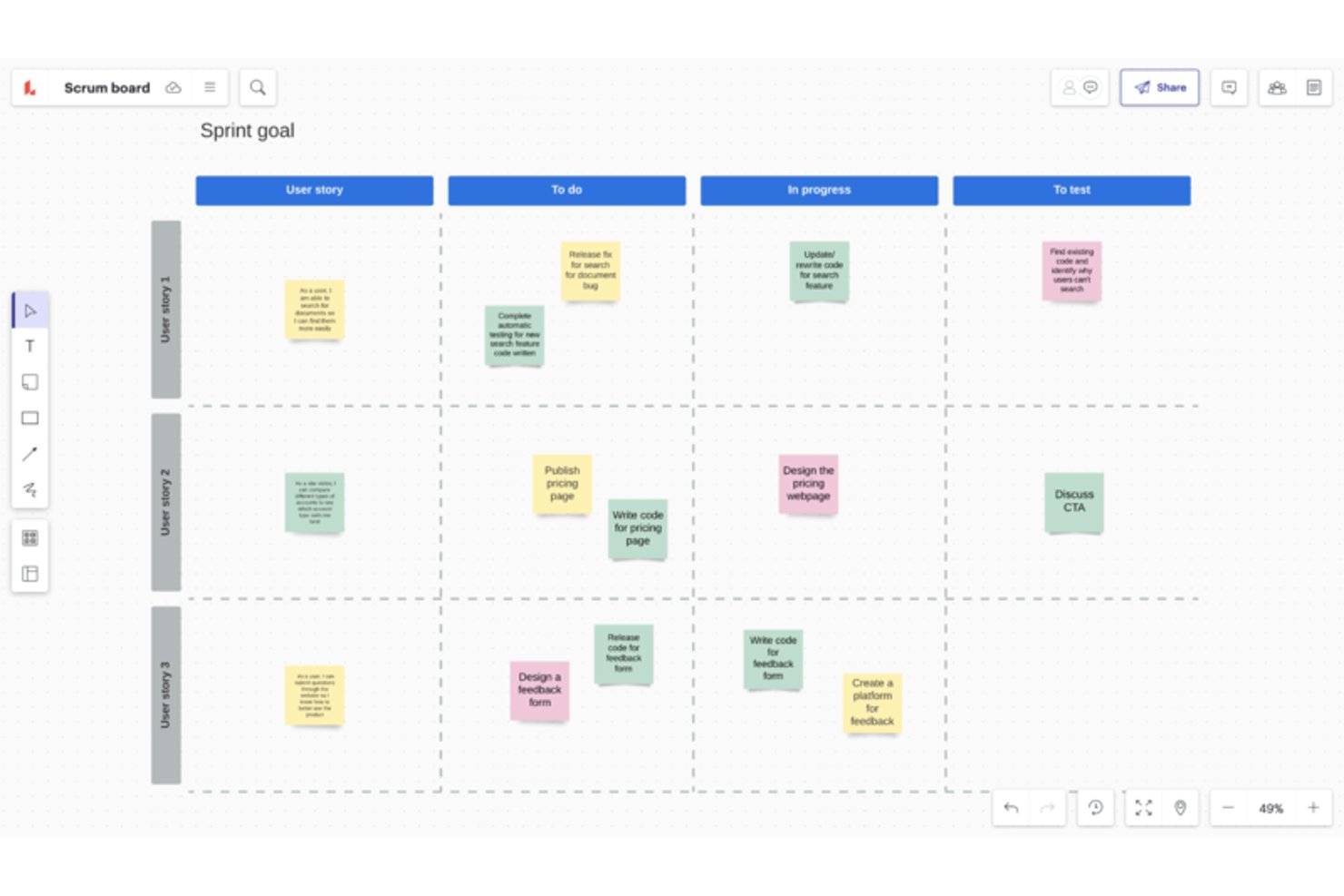
Lucidspark es una herramienta de pizarra visual que añade funciones para ceremonias ágiles —plantillas de planificación de sprints, estimación de puntos de historia, actividades retrospectivas y mapeo de dependencias entre equipos— a sistemas existentes como Jira y Azure DevOps.
¿Para quién es más adecuado Lucidspark?
Lucidspark es una excelente opción para Scrum Masters y coaches ágiles que facilitan ceremonias como la planificación de sprints, las retrospectivas y las reuniones diarias en equipos distribuidos.
Por qué elegí Lucidspark
Lucidspark ocupa un lugar en mi lista de favoritos como el mejor lienzo infinito para reuniones diarias ágiles, planificación de sprints y retrospectivas porque está diseñado en torno a las propias ceremonias. Me encanta la actividad de estimación del equipo, en la que todo el equipo coloca simultáneamente sus votos de puntos de historia en las tarjetas y los revisa en grupo; reproduce la sensación de una sesión presencial de planning poker sin los incómodos intercambios. Las herramientas de facilitación integradas, como la votación cronometrada, el modo privado anónimo y los tableros para grupos, hacen que dirigir una retrospectiva con un equipo distribuido resulte realmente estructurado en lugar de caótico.
Características principales de Lucidspark
- Sincronización bidireccional con Jira y Azure DevOps: Los cambios realizados en Lucidspark actualizan el proyecto conectado de Jira o Azure DevOps, y los cambios realizados allí se reflejan automáticamente en tu tablero.
- Mapeo de dependencias: Los equipos pueden dibujar dependencias directamente en el lienzo, y esos vínculos se sincronizan bidireccionalmente con Jira o Azure DevOps para ofrecer visibilidad entre equipos.
- Tablas dinámicas: Las tarjetas extraídas de tu backlog pueden organizarse en tablas para estimar el esfuerzo, hacer seguimiento de los responsables y revisar la capacidad del equipo.
- Generación de ideas con Lucid AI: La IA integrada puede generar tableros, resumir notas adhesivas, ordenar ideas y mostrar un asistente de chat para apoyar las sesiones de planificación.
Integraciones de Lucidspark
Lucidspark ofrece más de 100 integraciones, incluida la sincronización bidireccional con Jira Cloud y Azure DevOps Cloud, además de Airtable, Asana, Google Sheets, monday.com y Smartsheet. También se conecta con Microsoft Teams, Slack y Microsoft Copilot, y admite un servidor MCP y una plataforma para desarrolladores para crear integraciones personalizadas.
Pros and Cons
Pros:
- Facilita sesiones estructuradas de planificación de sprints
- Hace visibles las dependencias entre equipos
- Admite la participación anónima en retrospectivas
Cons:
- No sustituye a un sistema de backlog
- No ofrece informes de velocidad nativos

Wrike
Ideal para integraciones
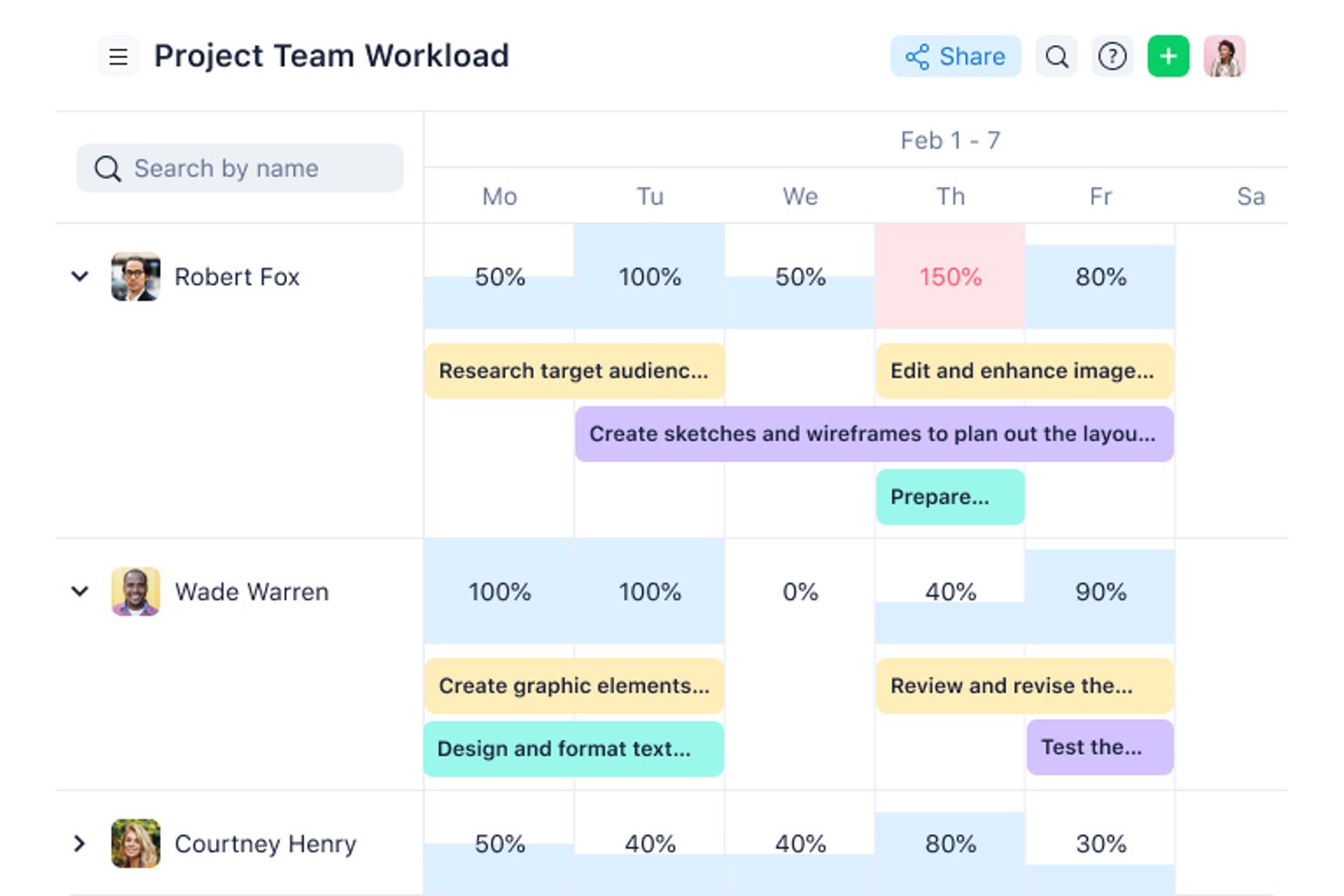
Wrike es una plataforma de gestión del trabajo que admite flujos de trabajo ágiles mediante tableros Kanban, diagramas de Gantt, plantillas de sprint personalizables y paneles interfuncionales.
¿Para quién es más adecuado Wrike?
Wrike es una opción excelente para equipos interfuncionales que necesitan conectar flujos de trabajo ágiles entre una amplia variedad de herramientas, desde Jira y GitHub hasta Salesforce y Slack.
Por qué elegí Wrike
He incluido Wrike entre mis opciones principales porque la profundidad de sus integraciones es realmente difícil de igualar cuando los flujos de trabajo ágiles abarcan varias herramientas. Con más de 400 conectores prediseñados que cubren herramientas de desarrollo como Jira y GitHub, CRM como Salesforce y plataformas de inteligencia empresarial como Tableau, puedo mantener sincronizados los tableros de sprint, los paneles y los informes en toda la pila tecnológica. La sincronización bidireccional con Jira es lo que más me llama la atención, ya que los equipos de ingeniería pueden actualizar los tickets en Jira mientras el trabajo de producto se mantiene actualizado automáticamente en Wrike.
Características principales de Wrike
- Plantilla de espacio Scrum: Un espacio ágil prediseñado que añade tipos de elementos personalizados —épicas, funcionalidades, historias, errores y sprints— junto con flujos de trabajo personalizados y reglas de automatización.
- Vista de tablero Kanban: Disponible en todos los planes, incluido el gratuito, con etapas de flujo de trabajo personalizables y límites de WIP para gestionar el trabajo en curso.
- Diagramas de Gantt interactivos: Disponibles en el plan Team y superiores, estos diagramas se vinculan directamente con tareas activas y admiten dependencias entre tareas para realizar un seguimiento de los plazos.
- Wrike Copilot: Un asistente de IA que responde preguntas, señala riesgos del proyecto y ayuda a priorizar el trabajo en todo el espacio de trabajo ágil.
Integraciones de Wrike
Wrike ofrece más de 400 integraciones, incluidas Jira, GitHub, GitLab, Bitbucket, Azure, Slack, Microsoft Teams y Google Workspace. Su sistema de sincronización bidireccional con más de 22 sistemas incluye Jira y GitHub, mientras que una API permite crear integraciones personalizadas.
Pros and Cons
Pros:
- Los tableros Kanban incluyen límites de WIP configurables
- Las cronologías de Gantt conectan las dependencias de la hoja de ruta con las tareas
- Los paneles permiten obtener una visibilidad interfuncional de los sprints
Cons:
- La priorización del backlog carece de RICE y WSJF
- El seguimiento de sprints depende de tipos de elementos personalizados
New Product Updates from Wrike

Wrike Activity Reports Add Actor Type Details
Wrike’s Activity Report now displays actor type details, helping admins identify whether changes came from the UI, Automation, Wrike Agents, API, or AI via MCP. For more information, visit Wrike's official site.
 .
.
Ideal para la colaboración remota durante los sprints
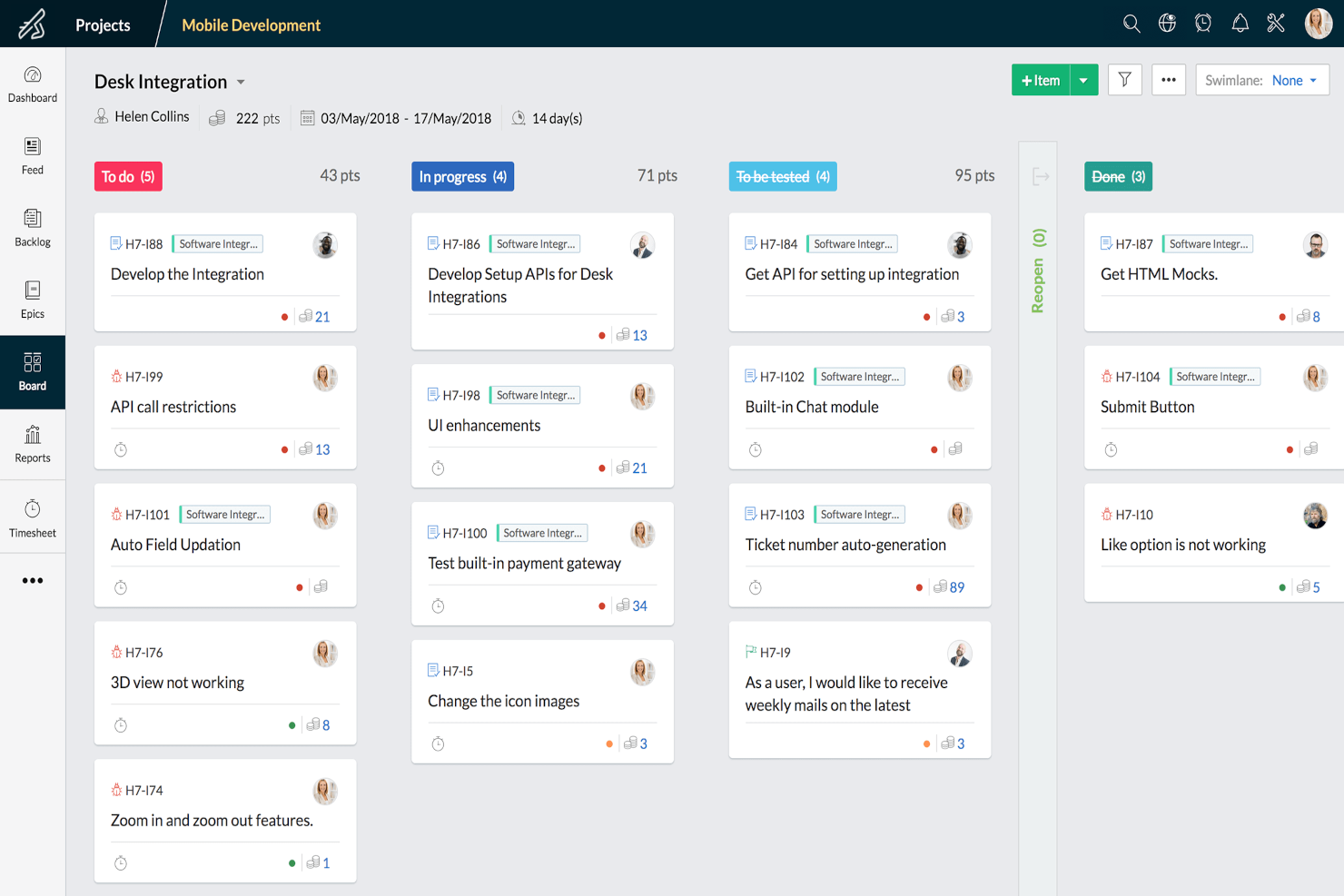
Zoho Sprints es una herramienta de gestión ágil de proyectos que combina tableros de Scrum y Kanban, gestión de la cartera de trabajo pendiente, planificación de sprints, seguimiento de versiones y funciones integradas de colaboración en equipo, como chat, canal y reuniones.
¿Para quién es más adecuado Zoho Sprints?
Zoho Sprints es una opción ideal para los responsables de Scrum, propietarios de productos y gestores de productos de equipos distribuidos que necesitan herramientas de colaboración integradas junto con su flujo de trabajo de sprints.
Por qué elegí Zoho Sprints
He incluido Zoho Sprints entre mis opciones principales porque su conjunto integrado de herramientas de colaboración lo diferencia de las herramientas que dependen de complementos de terceros para el trabajo en equipo remoto. Durante un sprint, tu equipo puede realizar reuniones diarias mediante Zoho Meeting integrado, compartir actualizaciones a través del canal del equipo y chatear directamente en la plataforma sin cambiar de pestaña. También me gusta que los portales para clientes y proveedores permiten que colaboradores externos se incorporen al flujo de trabajo sin necesitar una licencia completa.
Funciones principales de Zoho Sprints
- Tableros de Scrum y Kanban: Ambos tipos de tablero incluyen límites de WIP y carriles, disponibles en todos los planes, incluido el nivel gratuito.
- Informes de trabajo pendiente y velocidad: Los gráficos integrados realizan un seguimiento del progreso del sprint y pronostican la capacidad futura utilizando datos históricos de velocidad.
- Planificador de estimaciones: Una función al estilo de la planificación mediante cartas que permite a los miembros del equipo votar colaborativamente sobre las estimaciones de los elementos de trabajo.
- Integraciones con herramientas de ingeniería: Sincronización bidireccional con Azure DevOps, además de conexiones con GitHub, GitLab, Bitbucket y Jenkins para los flujos de trabajo de los equipos de desarrollo.
Integraciones de Zoho Sprints
Zoho Sprints se integra con Azure DevOps, GitHub, GitLab, Bitbucket, Jenkins, Jira, Trello, Microsoft 365, las aplicaciones de Google, Zoho Cliq y Zoho Meeting. Su API REST, los webhooks y las funciones personalizadas permiten realizar integraciones adicionales.
Pros and Cons
Pros:
- La compatibilidad integrada con reuniones facilita los rituales remotos de los sprints
- Informes detallados de velocidad y flujo
- Los tableros de Scrum y Kanban incluyen límites de WIP
Cons:
- No incluye una hoja de ruta visual específica para la estrategia
- La asignación de dependencias entre equipos sigue siendo limitada
New Product Updates from Zoho Sprints
Zoho Sprints Adds Dashboard View for Custom Modules
Zoho Sprints adds a Dashboard view for custom modules with charts and tables for visualizing module records. This gives teams a clearer way to review custom data. For more information, visit Zoho Sprints’ official site.
 .
.
Celoxis
Mejor para asignación de recursos multifuncionales
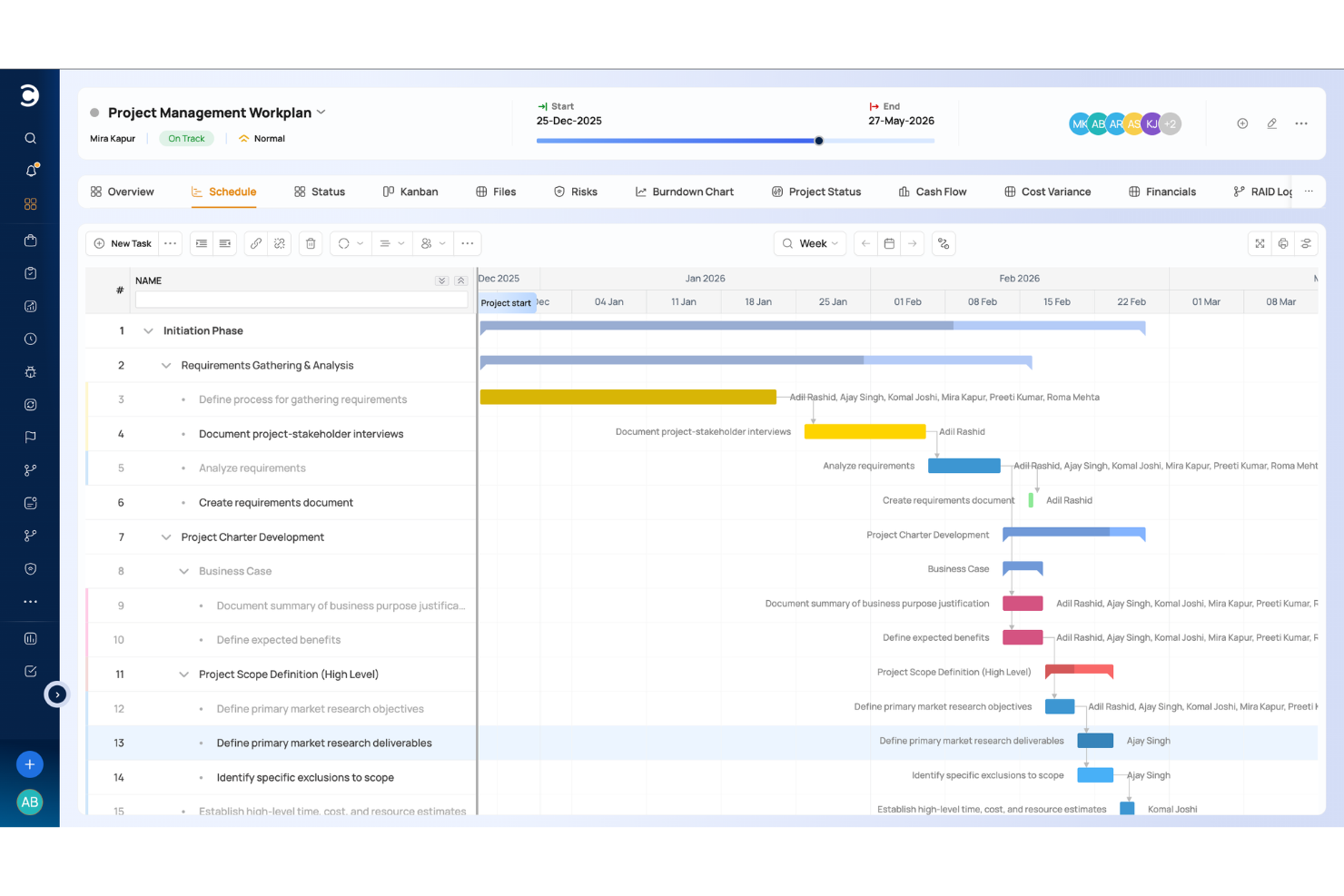
Celoxis es una plataforma de gestión de portafolio de proyectos (PPM) que cubre la planificación ágil de proyectos, gestión de recursos, seguimiento de portafolios, personalización de flujos de trabajo e informes de nivel empresarial para una variedad de equipos y tipos de proyectos.
¿Para Quién es Mejor Celoxis?
Celoxis es ideal para organizaciones medianas y grandes que manejan múltiples proyectos que involucran equipos multifuncionales con necesidades complejas de recursos e informes.
Por Qué Elegí Celoxis
Celoxis se gana su lugar en mi lista porque facilita la asignación de recursos entre departamentos que ejecutan diferentes tipos de proyectos de manera simultánea. Puedo asignar recursos por rol y distribuirlos según porcentaje de disponibilidad, lo que evita la sobre-reserva entre ingeniería, diseño y QA. La reserva provisional me permite apartar capacidad de forma tentativa antes de que se confirme un proyecto, por lo que la planificación de sprints nunca comienza a ciegas respecto al personal disponible.
Características Clave de Celoxis
- Tableros Kanban: Visualiza tareas de sprint y gestiona el trabajo en curso con tarjetas de tareas arrastrables.
- Diagramas de Gantt interactivos: Planea cronogramas de proyectos con dependencias de tareas, hitos y programación por arrastrar y soltar.
- Formularios de solicitud de proyectos: Recoge y aprueba nuevas solicitudes de proyectos mediante formularios de ingreso y flujos de trabajo personalizables.
- Aplicaciones de flujo de trabajo personalizadas: Crea formularios y flujos de trabajo sin código para riesgos, errores, solicitudes de cambios y otros procesos.
Integraciones de Celoxis
Celoxis se integra con herramientas como Microsoft Project, Jira, QuickBooks Online, Salesforce, Okta, Slack y GitHub, con integraciones adicionales disponibles a través de Zapier. También proporciona una API para integraciones personalizadas.
Pros and Cons
Pros:
- Disponible en implementaciones en la nube o en local
- Los diagramas de Gantt se actualizan automáticamente con los cambios en las tareas
- Hace seguimiento de presupuestos, costos y rentabilidad de proyectos
Cons:
- La elaboración de informes requiere configuración para flujos de trabajo complejos
- La aplicación móvil tiene menos funciones que la de escritorio

airfocus
La mejor opción con priorización integrada
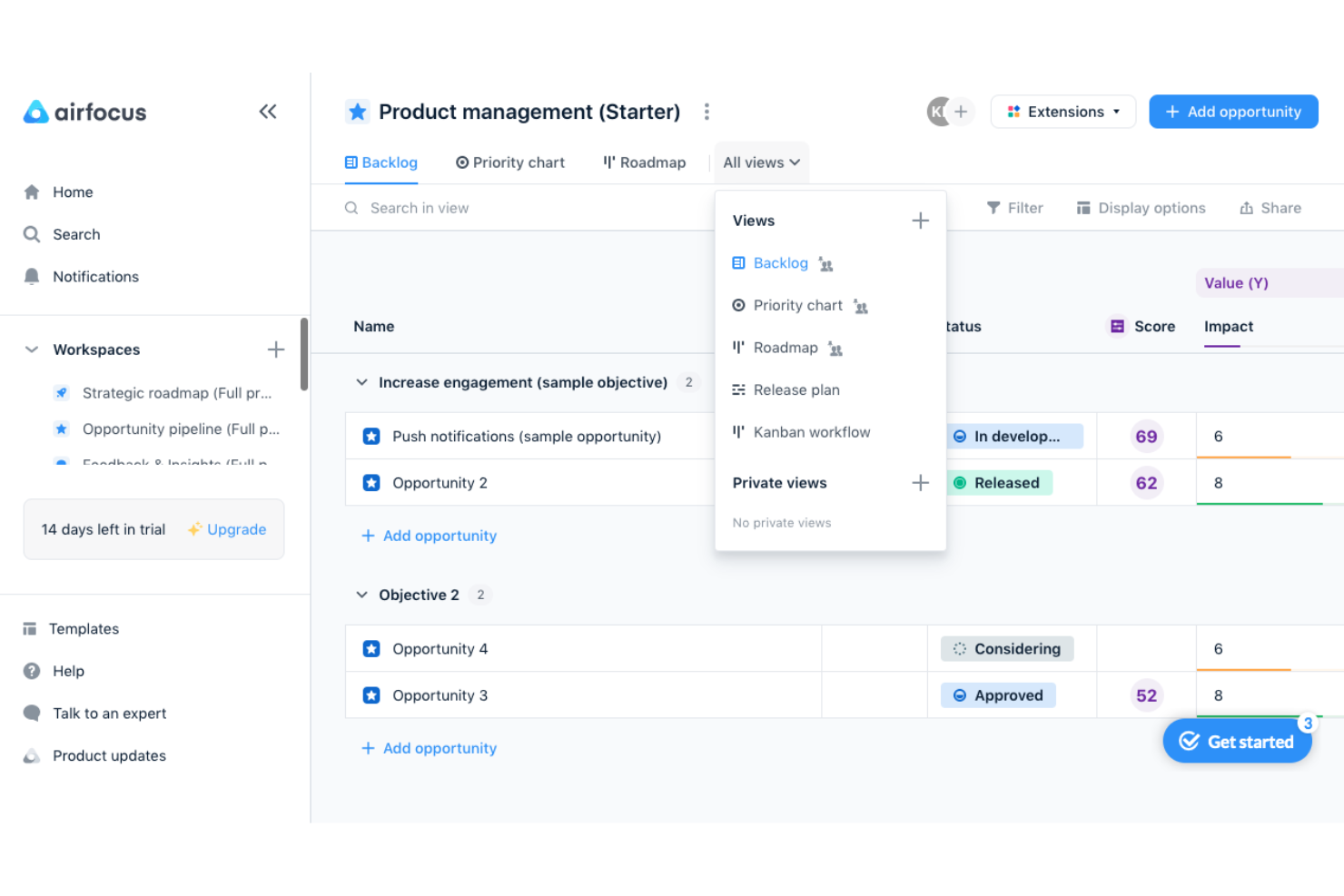
airfocus es una plataforma de gestión de productos que combina la creación de hojas de ruta, la priorización de la lista de pendientes, el seguimiento de OKR y la gestión de comentarios en una única capa estratégica que se conecta con herramientas de desarrollo como Jira y Azure DevOps.
¿Para quién es más adecuado airfocus?
airfocus es adecuado para gerentes y responsables de producto que priorizan la estrategia y la creación de hojas de ruta por encima de la ejecución de ciclos de trabajo, especialmente aquellos que ya gestionan la entrega en Jira o Azure DevOps.
Por qué elegí airfocus
airfocus ocupa un lugar en mi lista de opciones porque su priorización integrada va mucho más allá de una simple lista ordenada por rango. Me gusta especialmente la aplicación Priority Poker, que permite a tu equipo puntuar los elementos de la lista de pendientes de forma colaborativa, así como las fórmulas de puntuación personalizadas que permiten ponderar factores como el valor para el cliente, la adecuación estratégica y el esfuerzo entre sí. Cuando mi lista de pendientes tiene 80 elementos compitiendo por entrar en el siguiente ciclo de trabajo, la vista de gráfico de prioridades deja clara la decisión correcta de un vistazo.
Características principales de airfocus
- Vinculación de OKR con la lista de pendientes: La aplicación Objectives & OKRs conecta directamente los objetivos estratégicos con los elementos de la hoja de ruta para que tus prioridades sigan vinculadas a los objetivos empresariales.
- Sincronización bidireccional con herramientas de desarrollo: airfocus se sincroniza bidireccionalmente con Jira, Azure DevOps, Linear y GitHub, para que los equipos de ingeniería mantengan su flujo de trabajo actual.
- Portales para las partes interesadas: Puedes compartir hojas de ruta mediante portales personalizados y protegidos con contraseña sin conceder a las partes interesadas acceso completo a la herramienta.
- Detección de desviaciones estratégicas mediante IA: El agente de IA señala cuándo la ejecución se está alejando de tus objetivos declarados y muestra bloqueos y riesgos en toda la cartera.
Integraciones de airfocus
airfocus ofrece integraciones documentadas con Jira, Azure DevOps, Linear, Shortcut, GitHub, Trello, Asana, Microsoft Planner, Slack y Microsoft Teams. También admite Zapier, webhooks, una API abierta y un servidor MCP.
Pros and Cons
Pros:
- La puntuación personalizada aclara las difíciles compensaciones de la lista de pendientes
- Priority Poker permite tomar decisiones de priorización compartidas
- Las hojas de ruta conectan la estrategia con el contexto de ejecución
Cons:
- El seguimiento de ciclos de trabajo depende de herramientas externas de entrega
- No hay informes de velocidad nativos disponibles
New Product Updates from airfocus

airfocus Adds Rich Text Fields, MCP Tools, and Admin Controls
airfocus adds rich text fields with bidirectional Jira sync, Check-in access for the agent and MCP server, an MCP Link Items tool, and admin-only integration management to improve product documentation, AI-assisted planning, and enterprise governance. For more information, visit airfocus’ official site.
 .
.
ClickUp
La mejor herramienta ágil gratuita con informes de iteraciones integrados
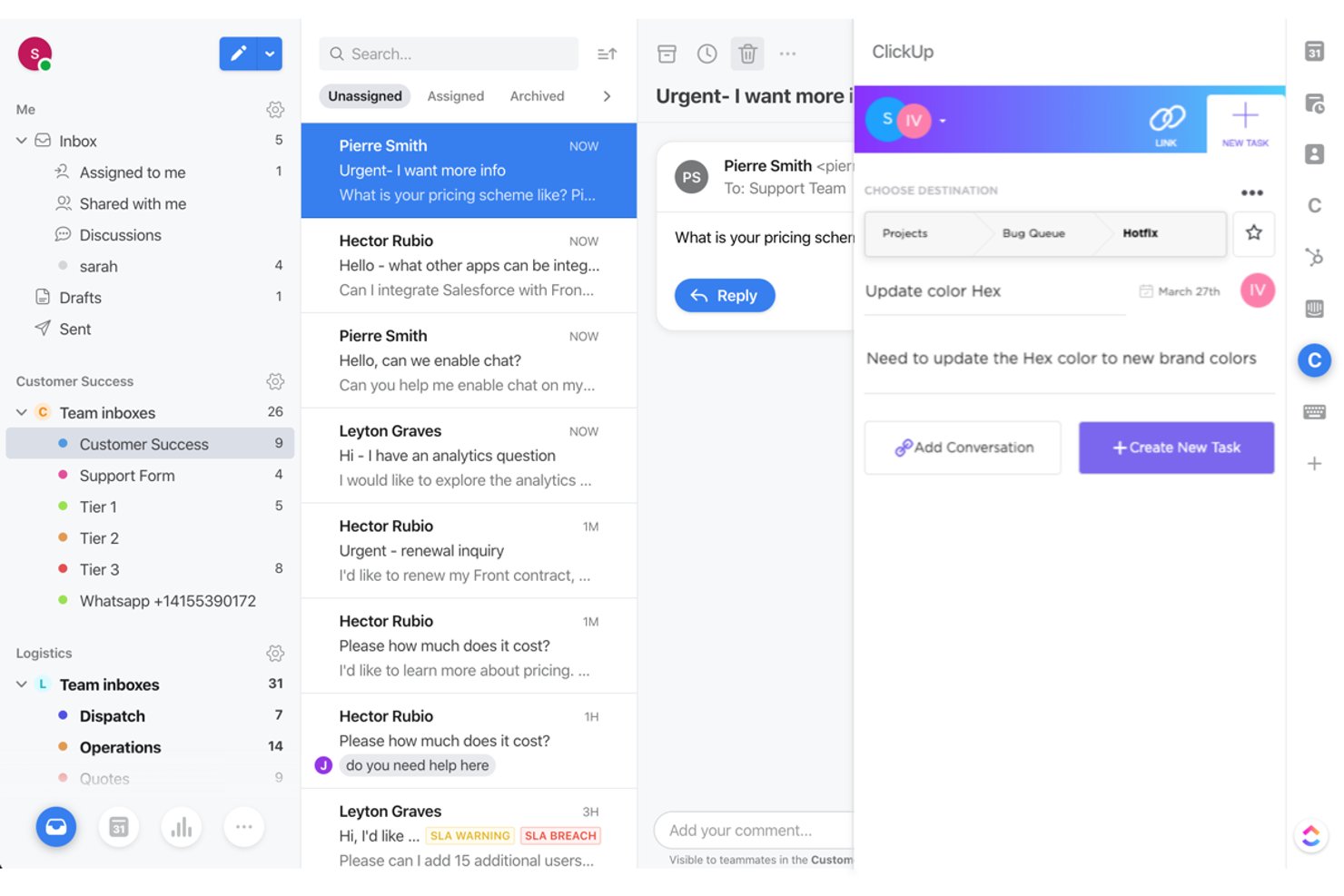
ClickUp es una plataforma integral de gestión ágil de proyectos que combina la gestión de la lista de pendientes, la planificación de iteraciones, los tableros Kanban, la creación de hojas de ruta y la generación integrada de informes ágiles, incluidos gráficos de trabajo pendiente, velocidad y flujo acumulado.
¿Para quién es más adecuado ClickUp?
ClickUp es una opción excelente para equipos ágiles pequeños y medianos que desean planificación de iteraciones, gestión de la lista de pendientes e informes integrados sin pagar por varias herramientas.
Por qué elegí ClickUp
Elegí ClickUp como una de las mejores opciones porque su plan gratuito incluye la gestión de iteraciones y reportes ágiles integrados que la mayoría de las herramientas reserva para los planes de pago. Me encanta que los gráficos de trabajo pendiente, velocidad y flujo acumulado estén disponibles desde el principio, para que mi equipo pueda supervisar el estado de la iteración sin crear paneles personalizados. Las automatizaciones de iteraciones también gestionan automáticamente las tareas pendientes y las transiciones de tareas, lo que reduce el trabajo administrativo entre iteraciones.
Características principales de ClickUp
- Campos personalizados y jerarquía de tareas: Organiza el trabajo en Espacios, Carpetas, Listas y Tareas, con campos personalizados como listas desplegables, fórmulas y moneda para adaptarse a la estructura de tu lista de pendientes.
- Automatizaciones de iteraciones: Configura reglas sin código de tipo 'Cuando > Entonces' que gestionan automáticamente las tareas pendientes, las transiciones de estado y la configuración de las iteraciones entre ciclos.
- Seguimiento de dependencias entre equipos: Vincula tareas entre Listas y Espacios como bloqueadoras o dependientes, con indicadores visuales en las vistas de Lista, Gantt y Cronología en todos los planes.
- Gestión de objetivos y carteras: Supervisa el progreso hacia los objetivos vinculando directamente los Objetivos con las tareas, lo que te ofrece una visión actualizada de cómo el trabajo se relaciona con los resultados.
Integraciones de ClickUp
ClickUp afirma ofrecer más de 1.000 integraciones, incluidas GitHub, Figma, Google Drive, Dropbox, Outlook, Salesforce, Zoom, Slack y HubSpot. También ofrece una API pública para integraciones personalizadas.
Pros and Cons
Pros:
- Informes integrados de trabajo pendiente y velocidad
- La gestión gratuita de iteraciones es compatible con equipos pequeños
- Las dependencias entre equipos abarcan varios espacios de trabajo
Cons:
- La priorización de la lista de pendientes requiere campos de puntuación personalizados
- Los proyectos grandes pueden resultar desordenados
New Product Updates from ClickUp
ClickUp Adds Meetings Hub, Super Agent Templates, and ZoomInfo Integration
ClickUp adds a searchable Meetings Hub, new ways to clone and template Super Agents, and a ZoomInfo integration through the App Center. These updates improve meeting retrieval, agent reuse, and access to sales intelligence. For more information, visit ClickUp’s official site.
 .
.
Jira
Ideal para ampliar las prácticas ágiles entre equipos y carteras

Jira es una plataforma ágil de gestión de proyectos que combina la gestión de listas de tareas pendientes, la planificación de sprints, la creación de hojas de ruta y tableros Scrum y Kanban configurables con informes de velocidad integrados y automatización del flujo de trabajo asistida por IA.
¿Para quién es más adecuado Jira?
Jira es una opción excelente para equipos de producto e ingeniería que necesitan coordinar varios equipos, gestionar listas de tareas pendientes complejas y ampliar las prácticas ágiles en toda la organización.
Por qué elegí Jira
Jira ocupa un lugar en mi lista de favoritos porque ninguna otra herramienta amplía las prácticas ágiles de forma tan fluida desde un solo equipo hasta una cartera con varios equipos. Me gusta especialmente cómo la vinculación de objetivos con la lista de tareas pendientes permite a los equipos de producto conectar directamente los OKR con el trabajo de los sprints, de modo que la estrategia y la ejecución se mantienen alineadas sin actualizaciones manuales. Rovo AI aporta un valor real al señalar los riesgos de dependencias y desglosar automáticamente las iniciativas a medida que el trabajo avanza por el flujo de trabajo.
Características principales de Jira
- Tableros Scrum y Kanban: Tableros totalmente configurables con carriles, límites de trabajo en curso y estados de columna personalizados para los flujos de trabajo Scrum y Kanban.
- Automatización sin código: La automatización basada en reglas está disponible en todos los planes, lo que permite a los equipos activar acciones y agentes de IA sin escribir código.
- Informes integrados de velocidad y trabajo pendiente: Los informes de sprint, los gráficos de velocidad y los diagramas de flujo acumulado disponibles de forma inmediata hacen un seguimiento del rendimiento del equipo en cada sprint.
- Acceso de invitados: Los colaboradores externos pueden ver y contribuir en proyectos de Jira sin consumir una licencia de usuario de pago.
Integraciones de Jira
Jira ofrece integraciones nativas con Confluence, Bitbucket, Figma, Slack, Gmail y herramientas de Google y Microsoft. Su mercado de aplicaciones proporciona más de 3.000 integraciones, y su API permite conexiones personalizadas.
Pros and Cons
Pros:
- Amplía la gobernanza ágil entre varios equipos
- Vincula directamente los objetivos estratégicos con el trabajo de la lista de tareas pendientes
- Los informes de velocidad integrados respaldan las retrospectivas de sprint
Cons:
- La puntuación avanzada de prioridades requiere herramientas independientes
- Los flujos de trabajo configurables pueden abrumar a los equipos pequeños

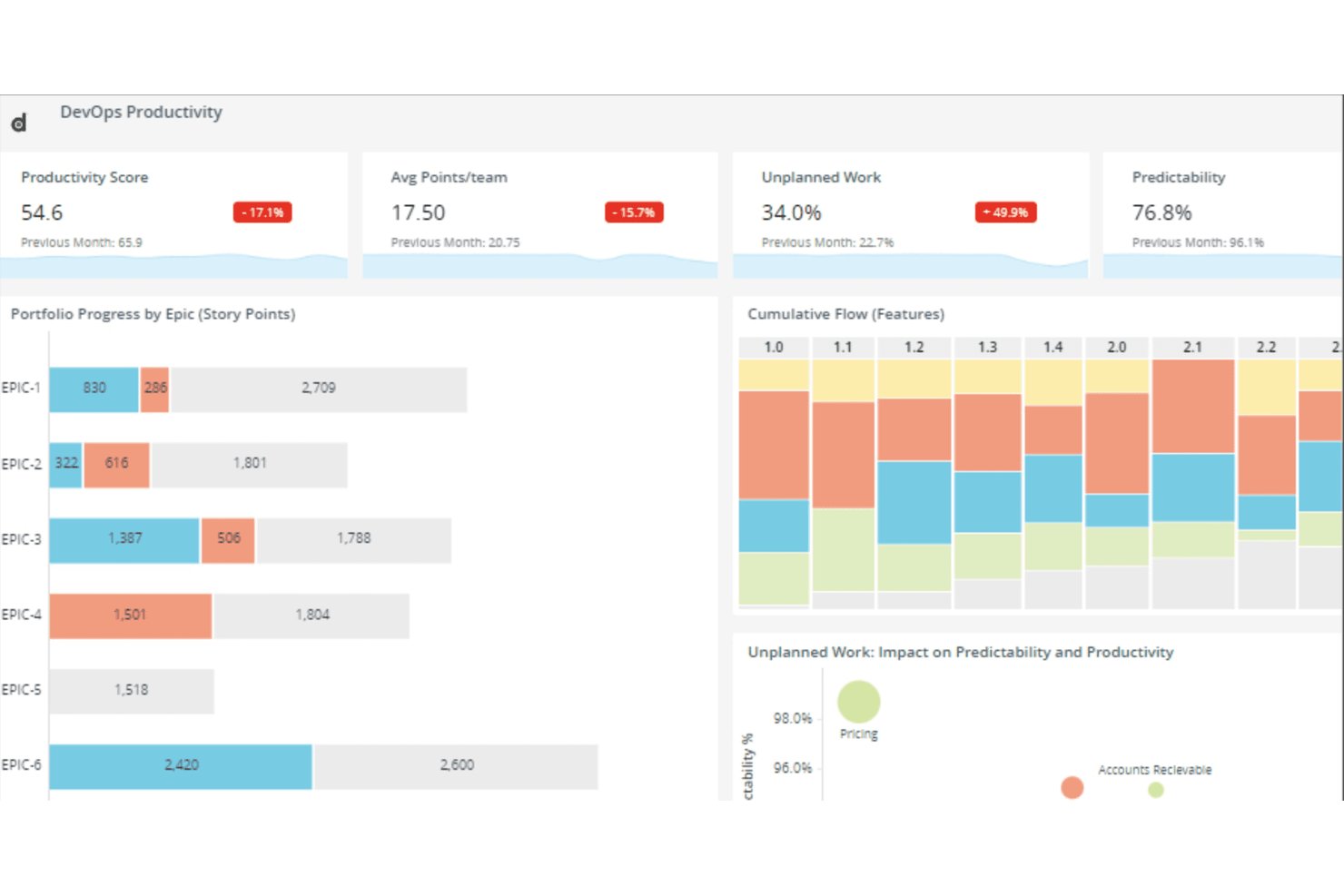
Digital.ai Agility es una plataforma empresarial de planificación ágil que cubre la planificación de carteras, programas y equipos en un solo lugar, con compatibilidad integrada con SAFe, planificación de PI, gestión de listas de tareas pendientes, elaboración de hojas de ruta, seguimiento de dependencias e informes de rendimiento.
¿Para quién es más adecuado Digital.ai Agility?
Digital.ai Agility es una opción muy adecuada para las PMO empresariales y los responsables de programas ágiles que implementan SAFe a gran escala en varios equipos y carteras.
Por qué elegí Digital.ai Agility
Digital.ai Agility merece estar en mi lista de opciones porque ninguna otra herramienta que haya analizado gestiona SAFe a gran escala de forma tan nativa. La planificación de PI integrada funciona en los niveles de cartera, programa y equipo sin necesidad de complementos de terceros, y la trazabilidad de los OKR a la lista de tareas pendientes permite conectar directamente los objetivos estratégicos con las épicas y las historias. También me gusta que el seguimiento de dependencias entre equipos esté incluido en todas las ediciones, de modo que los equipos pueden ver los bloqueos ascendentes y descendentes antes de que se conviertan en riesgos para la entrega.
Características principales de Digital.ai Agility
- Módulo IdeaSpace: Un espacio dedicado a capturar, desarrollar y priorizar ideas centradas en el cliente antes de que entren en la lista de tareas pendientes de ejecución.
- Análisis de Agility Lens: Un lago de datos Premium que agrega datos de Digital.ai y de herramientas de terceros, con más de 100 métricas prediseñadas y exploración autoservicio.
- Sincronización bidireccional: Las ediciones Pro y Premium se conectan con Jira, Azure DevOps, ServiceNow y Rally mediante la sincronización de datos en ambas direcciones a través de Agility Sync.
- Opciones de implementación flexibles: Todas las ediciones admiten la implementación tanto local como alojada, lo que las hace viables para sectores regulados y equipos gubernamentales.
Integraciones de Digital.ai Agility
Digital.ai Agility admite integraciones bidireccionales con Jira, Azure DevOps, ServiceNow, Rally y Salesforce mediante Agility Sync, disponible en Pro y Premium. También ofrece una integración con GitHub y un marco para integraciones personalizadas.
Pros and Cons
Pros:
- Planificación de PI de SAFe integrada
- La planificación de la cartera al equipo favorece la alineación empresarial
- Los informes detallados mejoran la coordinación entre equipos
Cons:
- La navegación recargada ralentiza el trabajo diario
- Las capacidades varían considerablemente entre las ediciones

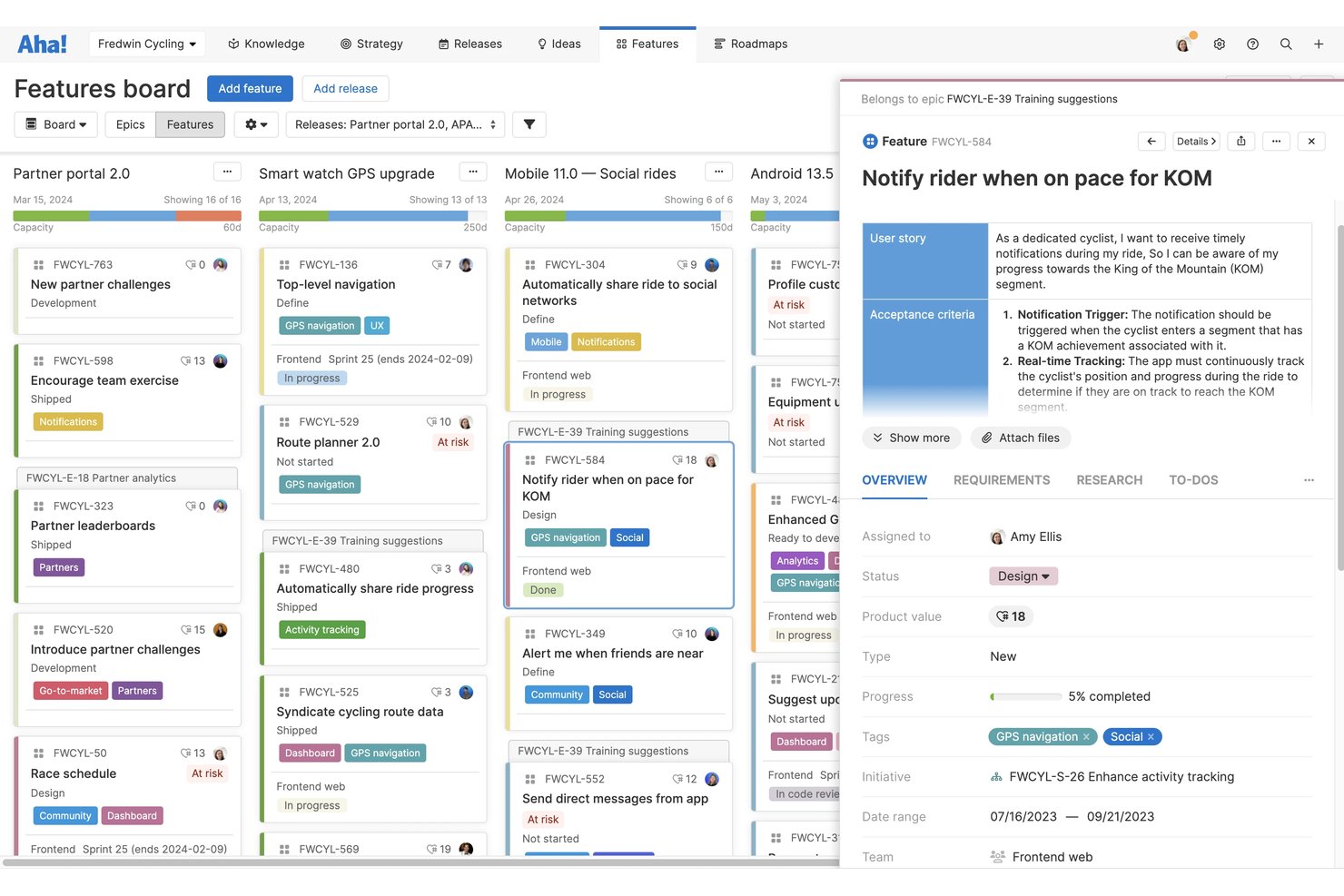
¡Aha! es un conjunto ágil de gestión de productos que conecta la estrategia, la planificación de hojas de ruta, la recopilación colectiva de ideas y la entrega de sprints en un conjunto de productos integrados: Roadmaps, Ideas, Develop y Discovery.
¿Para quién es más adecuado Aha!?
Aha! es una opción excelente para gerentes de producto y propietarios de producto de empresas medianas y grandes que necesitan conectar la estrategia de alto nivel con la entrega a nivel de sprint en un solo lugar.
Por qué elegí Aha!
Elegí Aha! como una de las mejores opciones porque es la única herramienta de mi lista que realmente rastrea un objetivo estratégico hasta llegar a una historia de sprint. Puedes establecer un objetivo empresarial, vincularlo a una iniciativa, dividirlo en funcionalidades y llevarlo directamente a un sprint de Develop, con informes de trabajo pendiente y tiempo de ciclo que cierran el circuito. También me encanta que la priorización basada en tarjetas de puntuación mantenga las decisiones sobre el trabajo pendiente vinculadas a la estrategia en lugar de basarse en la intuición.
Funciones principales de Aha!
- Portal de ideas: Gestiona portales con la imagen de tu marca donde los usuarios pueden enviar, votar y hacer seguimiento de ideas, con actualizaciones automáticas de estado enviadas a quienes las presentan.
- Asistente de IA (Elle): Genera historias de usuario, crea registros, analiza temas de comentarios y produce estructuras alámbricas en todo el conjunto de Aha! utilizando créditos de IA compartidos.
- Compatibilidad con el marco SAFe: Planifica y coordina el trabajo entre varios equipos mediante la compatibilidad integrada con el marco ágil escalado en Aha! Develop.
- Informes de rendimiento de sprints: Accede directamente en Aha! Develop a gráficos de trabajo pendiente, trabajo completado, tiempo de ciclo y rendimiento para hacer seguimiento del estado de los sprints y de las tendencias de entrega.
Integraciones de Aha!
Aha! documenta más de 40 integraciones de Roadmaps y más de 35 integraciones de Develop, incluidas Jira, Azure DevOps, GitHub, Azure Pipelines, Salesforce y Zendesk. Una API abierta permite crear integraciones personalizadas y exportar datos.
Pros and Cons
Pros:
- Conecta directamente la estrategia con las historias de sprint
- Prioriza los trabajos pendientes mediante la toma de decisiones basada en tarjetas de puntuación
- Recopila ideas mediante portales de comentarios con la imagen de tu marca
Cons:
- Las carteras grandes pueden abrumar a los usuarios
- La gestión diaria de sprints resulta menos ligera
La mejor opción para la planificación de carteras ágiles escaladas
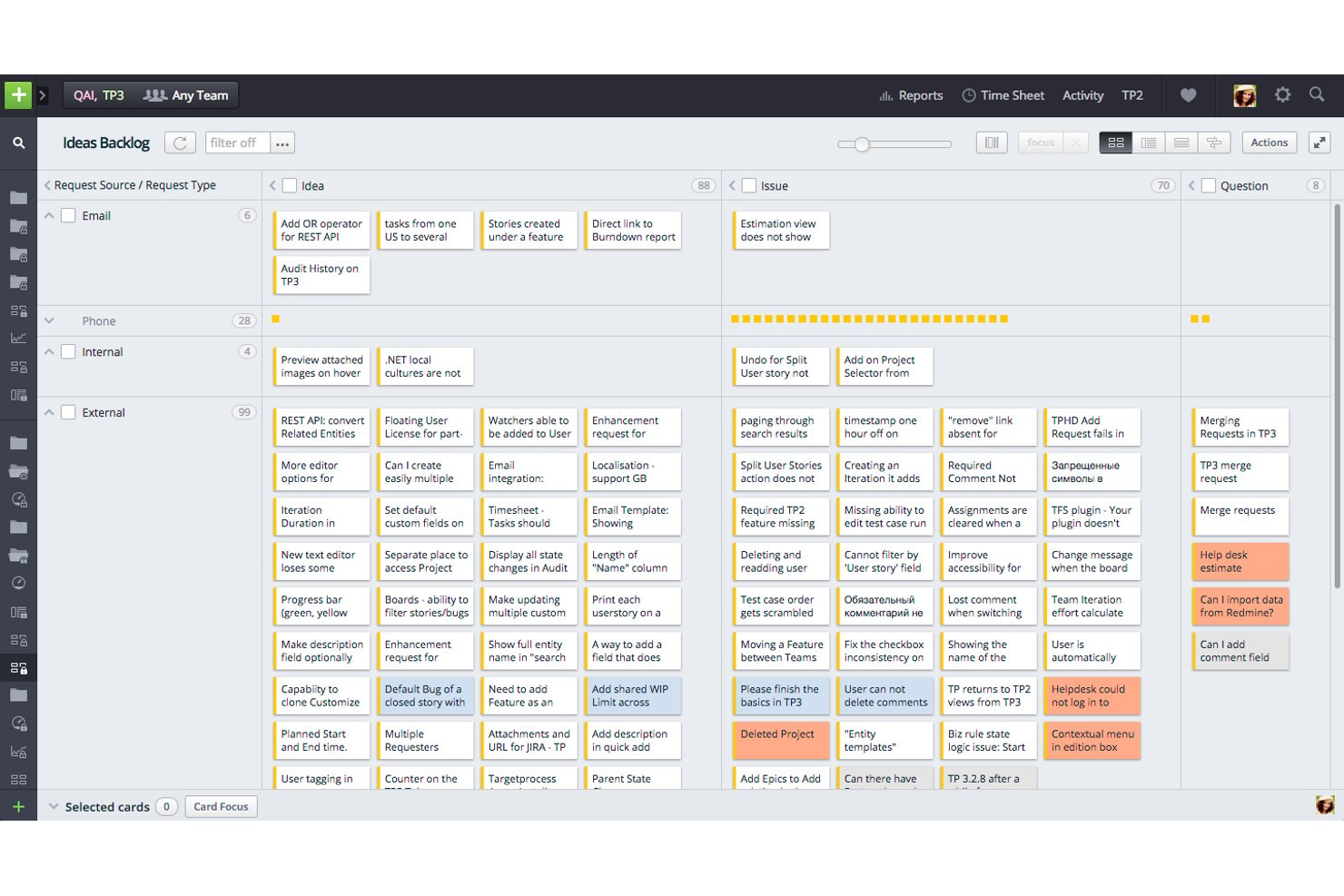
IBM Targetprocess es una plataforma de gestión de proyectos ágiles diseñada para equipos a escala empresarial, que ofrece gestión de listas de trabajo multinivel, planificación de sprints e iteraciones, estructuras de cartera alineadas con SAFe, creación de hojas de ruta y trazabilidad de OKR a la lista de trabajo entre equipos, ART y trenes de soluciones.
¿Para quién es más adecuado Targetprocess?
Targetprocess es una excelente opción para equipos empresariales que utilizan SAFe o marcos ágiles escalados, donde gestionar el trabajo entre ART, trenes de soluciones y carteras forma parte de la actividad diaria.
Por qué elegí Targetprocess
Elegí Targetprocess como una de las mejores opciones porque es la única herramienta de mi lista que representa toda la jerarquía de SAFe, desde los épicos de cartera hasta las historias a nivel de equipo, sin necesidad de soluciones alternativas. Me gusta especialmente cómo los OKR se conectan directamente con los elementos de la lista de trabajo, de modo que el progreso de un resultado clave se actualiza automáticamente a medida que los equipos completan el trabajo. La solución de planificación de PI vincula los objetivos a nivel de ART con las iteraciones de cada equipo, exactamente lo que necesitan los programas ágiles a gran escala.
Características principales de Targetprocess
- Gestión de listas de trabajo multinivel: Organiza el trabajo entre épicos de cartera, funcionalidades e historias con priorización mediante arrastrar y soltar y operaciones por lotes.
- Evaluaciones de medición y crecimiento de SAFe: Realiza evaluaciones de madurez en los niveles de equipo, ART, tren de soluciones y cartera para realizar un seguimiento de la adopción ágil.
- Planificación de escenarios: Modela y compara opciones estratégicas a nivel de cartera antes de comprometerte con una dirección.
- Informes y paneles personalizados: Crea informes visuales y tabulares con fórmulas personalizadas, informes de BI y gráficos de trabajo pendiente en todos los equipos y programas.
Integraciones de IBM Targetprocess
IBM Targetprocess incluye decenas de integraciones, entre ellas Jira, Azure DevOps, GitHub, Jenkins, Miro, Slack y Microsoft Teams. También proporciona una API REST para integraciones personalizadas y permite vincular confirmaciones de Git.
Pros and Cons
Pros:
- La jerarquía profunda de SAFe permite una planificación escalada
- Los OKR conectan la estrategia con la ejecución de la lista de trabajo
- Los informes configurables respaldan las decisiones a nivel de cartera
Cons:
- La estructura empresarial abruma a los equipos de producto más pequeños
- Los revisores informan que la navegación resulta confusa para tareas sencillas
Cuadro comparativo de software de gestión ágil de productos
Aquí tienes una tabla donde puedes comparar todas las herramientas que acabamos de cubrir en los resúmenes.
| Tool | Best For | Trial Info | Price | ||
|---|---|---|---|---|---|
| 1 | Ideal para reuniones diarias ágiles, sprints y retrospectivas | Prueba gratuita + plan gratuito disponible | Desde $9/usuario/mes (facturado anualmente) | Website | |
| 2 | Ideal para integraciones | Plan gratuito + demostración gratuita + prueba de 14 días disponibles | Desde 10 $/usuario/mes (facturado anualmente) | Website | |
| 3 | Ideal para la colaboración remota durante los sprints | Prueba gratuita de 15 días | Desde $1/usuario/mes (mínimo de 12 usuarios) | Website | |
| 4 | Mejor para asignación de recursos multifuncionales | Prueba gratuita de 14 días + demo gratis disponible | Desde $10/usuario/mes (facturado anualmente) | Website | |
| 5 | La mejor opción con priorización integrada | Demostración gratuita disponible | Precios bajo solicitud | Website | |
| 6 | La mejor herramienta ágil gratuita con informes de iteraciones integrados | Plan gratuito disponible | Desde $7/usuario/mes (facturado anualmente) | Website | |
| 7 | Ideal para ampliar las prácticas ágiles entre equipos y carteras | Plan gratuito + demostración gratuita + prueba de 14 días disponibles | Desde $9.05/usuario/mes | Website | |
| 8 | Ideal para SAFe empresarial y la planificación de PI | Demostración gratuita disponible | Precios bajo solicitud | Website | |
| 9 | Ideal para vincular directamente la estrategia con los sprints | Not available | Website | ||
| 10 | La mejor opción para la planificación de carteras ágiles escaladas | Demostración gratuita disponible | Precio bajo solicitud | Website |
Otras opciones
Aquí tienes algunas más que no llegaron a la lista principal, por si necesitas sugerencias adicionales de software que aplique la metodología ágil en el ciclo de vida de un producto.
- OnePlan
La mejor opción para la gestión de listas de trabajo pendiente de funcionalidades
- Miro
Ideal para la gestión ágil de productos en tiempo real
- monday AI Workspace
Ideal para alertas de riesgos de sprints impulsadas por IA
- Zenhub
Ideal para el seguimiento ágil de sprints nativo de GitHub
- GitLab
Ideal para la planificación y entrega ágil de equipos de desarrollo
- Linear
Ideal para la planificación de sprints y ciclos dirigida por ingeniería
- Shortcut
Ideal para metodologías híbridas de Scrum y Kanban
- Jira Align
Ideal para el seguimiento de dependencias y PI en toda la empresa
- Planview AgilePlace
Ideal para el flujo Kanban a escala de cartera
- Azure Boards
Ideal para el seguimiento ágil integrado con DevOps


Cómo elegí el mejor software de gestión ágil de productos
¿Te preguntas cómo seleccioné el mejor software de gestión ágil de productos para esta lista? Empecé revisando softwares de gestión ágil de productos con muchas valoraciones positivas de usuarios.
Exploré cada plataforma para comprender qué funciones ofrecían y qué las diferenciaba de la competencia. Elegí las mejores para finalizar mi lista larga.
A partir de ahí, apliqué los siguientes criterios de evaluación para ver cómo se comparaba cada plataforma entre sí. Me apoyé en mis años de experiencia en la gestión ágil de productos para elegir las soluciones con mayor potencial de aportar valor. Así llegué a mi lista corta.
Cómo evalúo el software de gestión ágil de productos
Divido mi evaluación en dos niveles: las capacidades ágiles básicas—como la planificación de sprints y la gestión del backlog—que toda herramienta debe tener, y los diferenciadores que separan las mejores opciones.
Funcionalidad Principal (Requisitos Básicos Para Esta Lista)
Cuando selecciono herramientas para mi listado, califico cada una en una escala de 0 (no ofrece la funcionalidad) a 5 (destaca en esta área) para cada función principal que aparece a continuación. Luego, calculo la puntuación total de la herramienta en porcentaje. Cada herramienta necesita alcanzar una puntuación mínima total del 65% para ser considerada para su inclusión.
- Gestión del Backlog: Evalúo cómo cada herramienta permite crear, clasificar y refinar los elementos del backlog—si puedes arrastrar y soltar para reordenar prioridades, aplicar modelos de puntuación como RICE y filtrar por campos personalizados.
- Planificación y Seguimiento de Sprints: Cada herramienta debe permitir a los equipos definir sprints, estimar puntos de historia, asignar capacidad y monitorizar el progreso mediante vistas de tablero—similar a cómo Jira y Azure DevOps estructuran sus flujos de trabajo de sprints.
- Planificación Ágil del Producto (Roadmapping): Busco hojas de ruta que se conecten directamente con épicas y lanzamientos, para que cuando un sprint entregue una funcionalidad, los interesados puedan ver cómo se alinea con el plan general del producto en tiempo real.
- Jerarquía de Historias de Usuario y Épicas: Una estructura clara de desglose del trabajo es importante. Verifico si los equipos pueden organizar el trabajo desde temas e iniciativas de alto nivel hasta épicas, historias y subtareas, mostrando relaciones padre-hijo de manera visible.
- Reportes y Analítica Ágil: Las herramientas deben incluir reportes ágiles estándar—gráficas de trabajo restante, tendencias de velocidad, diagramas de flujo acumulativo—que ayudan a scrum masters y product owners a detectar cuellos de botella entre sprints.
- Integraciones con Herramientas de Desarrollo: Verifico si existen sincronizaciones nativas y bidireccionales con plataformas de ingeniería como GitHub, GitLab y Bitbucket, para que los equipos de producto y los desarrolladores se mantengan alineados sin actualizar el estado manualmente en distintos sistemas.
Una vez que tengo una lista de herramientas que cumplen con los criterios, considero qué hace única a cada plataforma.
Factores Diferenciadores (Lo que Distingue a Los Proveedores)
Así comparo y contrasto a los diferentes proveedores:
Funciones Destacadas
Busco herramientas que conecten el trabajo de los sprints con OKR o métricas North Star, de modo que cada épica tenga relación con un resultado empresarial medible. La gestión de ideas y comentarios es otro factor diferenciador—herramientas como Productboard y Aha! te permiten canalizar solicitudes de clientes directamente a tu backlog para priorizarlas. El soporte para portafolios y SAFe también es importante para organizaciones grandes que realizan PI planning con varios equipos y flujos de valor.
Más Allá de Las Funciones
La profundidad de la integración es relevante más allá de contar con un simple conector. Evalúo si las herramientas ofrecen sincronizaciones bidireccionales con plataformas de desarrollo como GitHub y GitLab, además de conexiones con herramientas de diseño y analítica que tu equipo ya utiliza. El ajuste a la escalabilidad es igualmente importante—una herramienta que funciona bien para un solo equipo scrum puede ser insuficiente cuando coordinas sprints entre cinco grupos. También reviso si incluyen plantillas ágiles integradas y recursos para la incorporación, ya que un tiempo de implementación más corto significa que tu equipo pasará menos tiempo configurando flujos de trabajo y más tiempo entregando productos.
Preguntas frecuentes sobre gestión ágil de productos
Encuentra respuestas a preguntas comunes que otras personas hacen sobre este tema.
¿Cuáles son las características clave del software de gestión ágil de productos?
Cuando eliges una solución de software de gestión ágil de productos, busca lo siguiente:
- Plantillas de hojas de ruta de productos: Los requisitos de flujo de trabajo simples deben automatizarse o acelerarse en el entorno Ágil ideal; las plantillas son una manera de priorizar la agilidad.
- Colaboración sencilla entre los participantes: La iteración, priorización y las reuniones diarias funcionan mejor cuando los participantes tienen transparencia sobre el trabajo del equipo.
- Métricas del backlog del producto: Los equipos necesitan poder revisar qué elementos se requieren y desean para que puedan tomar decisiones rápidamente y priorizar funciones.
- Historias de usuario robustas y flexibles: El proceso Ágil depende en gran medida de que los integrantes del equipo puedan comprender el recorrido del cliente.
- Roles y permisos del scrum master: Si el desarrollo ágil de productos sigue la ruta scrum, poder elevar fácilmente a un scrum master es fundamental.
¿Cuáles son los beneficios del software de gestión ágil de productos?
El software de gestión ágil de productos ayuda a los equipos de desarrollo de productos a iterar, recopilar retroalimentación oportuna y mantenerse receptivos al cambio para crear productos que a los clientes les encanten. Los sistemas de gestión Ágil ayudan a los equipos a mantenerse organizados y enfocados, comunicarse claramente entre sí y priorizar las acciones en función de lo más importante en cada etapa del ciclo de vida del desarrollo del producto.
Hablando de beneficios, puedes aprender cómo el uso de feature flagging puede beneficiar a tu equipo en la gestión de la escalabilidad del producto.
¿Quién usa el software de gestión ágil de productos?
En términos generales, el software de gestión ágil de productos es utilizado por los product managers y sus equipos. Más específicamente, el propietario del producto, el scrum master y otros participantes (potencialmente personal de IT, operaciones y marketing según la configuración de la organización) tendrán acceso a estas herramientas de gestión Ágil para poder colaborar e iterar durante el proceso de desarrollo.
Si buscas contratar a un product manager, lee cómo crear una descripción del puesto eficaz para atraer al mejor talento.
¿Cómo implemento la gestión ágil de portafolios de productos?
Si estás leyendo esto, significa que participas en la creación de varios productos al mismo tiempo. Sin duda te beneficiarás de la gestión de portafolios de productos, pero debes seguir ciertos principios para garantizar el éxito. Estos son:
- Probar, aprender y adaptarse
- Escalar la transparencia
- Experimentación continua
Una vez comprendas estos principios, deberás decidir si crear o comprar tu marco de trabajo, establecer una estrategia de implementación y preparar tu organización para los nuevos procesos. Puedes leer todo sobre este proceso de implementación y los principios del portafolio en nuestra guía de implementación del portafolio de productos.
¿Qué sigue?
Definitivamente puedes aprender más sobre este tema. Por ejemplo, tenemos un excelente artículo sobre qué es un epic Ágil que incluye una plantilla útil. También te animaría a leer cómo usar el mapeo de historias de usuario para mejorar la priorización del backlog en Agile.
Listas de herramientas relacionadas:
- Herramientas de gestión de productos
- Software gratis de gestión de productos
- Herramientas para el backlog de productos
Mantente al día con más consejos de la industria suscribiéndote al boletín de Product Manager.