

Las mejores alternativas a Notion ofrecen espacios de trabajo flexibles, sólidas funciones de colaboración y flujos de trabajo personalizables que ayudan a tu equipo a gestionar proyectos y conocimientos en un solo lugar. Si estás buscando alternativas a Notion, probablemente quieras herramientas que se adapten a los procesos específicos de tu equipo, permitan un mejor seguimiento de los proyectos o solucionen carencias que hayas encontrado en el conjunto de funciones de Notion. En esta lista encontrarás opciones que destacan en la gestión visual de proyectos, la organización del conocimiento y la documentación de equipos, para que puedas comparar y elegir la opción adecuada para tus necesidades de gestión de productos.
¿Qué es Notion?
Notion es una plataforma de espacio de trabajo que combina herramientas para tomar notas, gestionar proyectos y colaborar en una sola interfaz. Los equipos utilizan Notion para organizar documentos, gestionar listas de tareas y centralizar conocimientos. Su estructura flexible te permite crear flujos de trabajo, bases de datos y wikis personalizados según tus necesidades. Notion es popular entre principiantes, responsables de producto, equipos de proyectos y cualquiera que quiera una solución integral para organizar el trabajo y la información.
Tabla comparativa de alternativas a Notion
Compara los detalles de precios de mis principales alternativas a Notion en la siguiente tabla.
| Tool | Best For | Trial Info | Price | ||
|---|---|---|---|---|---|
| 1 | Ideal para el seguimiento basado en bases de datos relacionales | Plan gratuito + demostración gratuita + prueba de 14 días disponibles | Desde $20/usuario/mes | Website | |
| 2 | Ideal para la automatización de tareas y proyectos basada en IA | Plan gratuito disponible | Desde $10/usuario/mes (facturado anualmente) | Website | |
| 3 | Ideal para documentación técnica conectada con Jira | Prueba gratuita + plan gratuito disponible | Desde $5.42/usuario/mes | Website | |
| 4 | Ideal para el seguimiento integral de tareas y objetivos | Plan gratuito disponible | Desde $7/usuario/mes (facturado anualmente) | Website | |
| 5 | Ideal para flujos de trabajo basados en IA que convierten reuniones en documentos | Plan gratuito disponible | Desde $8/usuario/mes (facturado anualmente) | Website | |
| 6 | Ideal para conectar datos de producto y documentos | Prueba gratuita de 14 días | Desde $12/usuario/mes (facturado anualmente) | Website | |
| 7 | Ideal para espacios de trabajo autoalojados y con propiedad de los datos | Plan gratuito disponible | Desde $12.50/usuario/mes (facturado anualmente) | Website | |
| 8 | Plan gratuito disponible | Desde $4/mes | Website | ||
| 9 | Ideal para flujos de trabajo de IA de reuniones a documentos | Plan gratuito disponible | Desde $14.16/usuario/mes (facturado anualmente) | Website | |
| 10 | Ideal para el seguimiento y la automatización de proyectos nativos de documentos | Plan gratuito disponible | Desde $12/usuario/mes (facturado anualmente) | Website |


Por qué confiar en nuestras recomendaciones de software
6,700+
Reviews
20
Industry experts
16+
Evaluation factors
14
Years
Nuestro equipo lleva probando y evaluando software desde 2012. Como gestores de producto, sabemos lo difícil —y lo importante— que es elegir el software adecuado.
Para esta guía, evaluamos las herramientas mediante pruebas prácticas e investigación independiente, puntuando las herramientas según nuestros criterios de selección.
Nuestras reseñas reflejan nuestro criterio editorial humano, no un discurso de ventas.
Revisores expertos:
 Hannah ClarkSenior TPM
- Cristiano ValimSenior UI/UX Lead

Reseñas de alternativas a Notion
A continuación encontrarás mis resúmenes detallados de las alternativas a Notion que llegaron a mi lista. Mis reseñas ofrecen un análisis detallado de las funciones, los mejores casos de uso y las integraciones de cada plataforma para ayudarte a encontrar la mejor opción para ti.
 Ideal para el seguimiento basado en bases de datos relacionales
- Plan gratuito + demostración gratuita + prueba de 14 días disponibles
- Desde $20/usuario/mes
Visit WebsiteCustomer Rating:4.6/5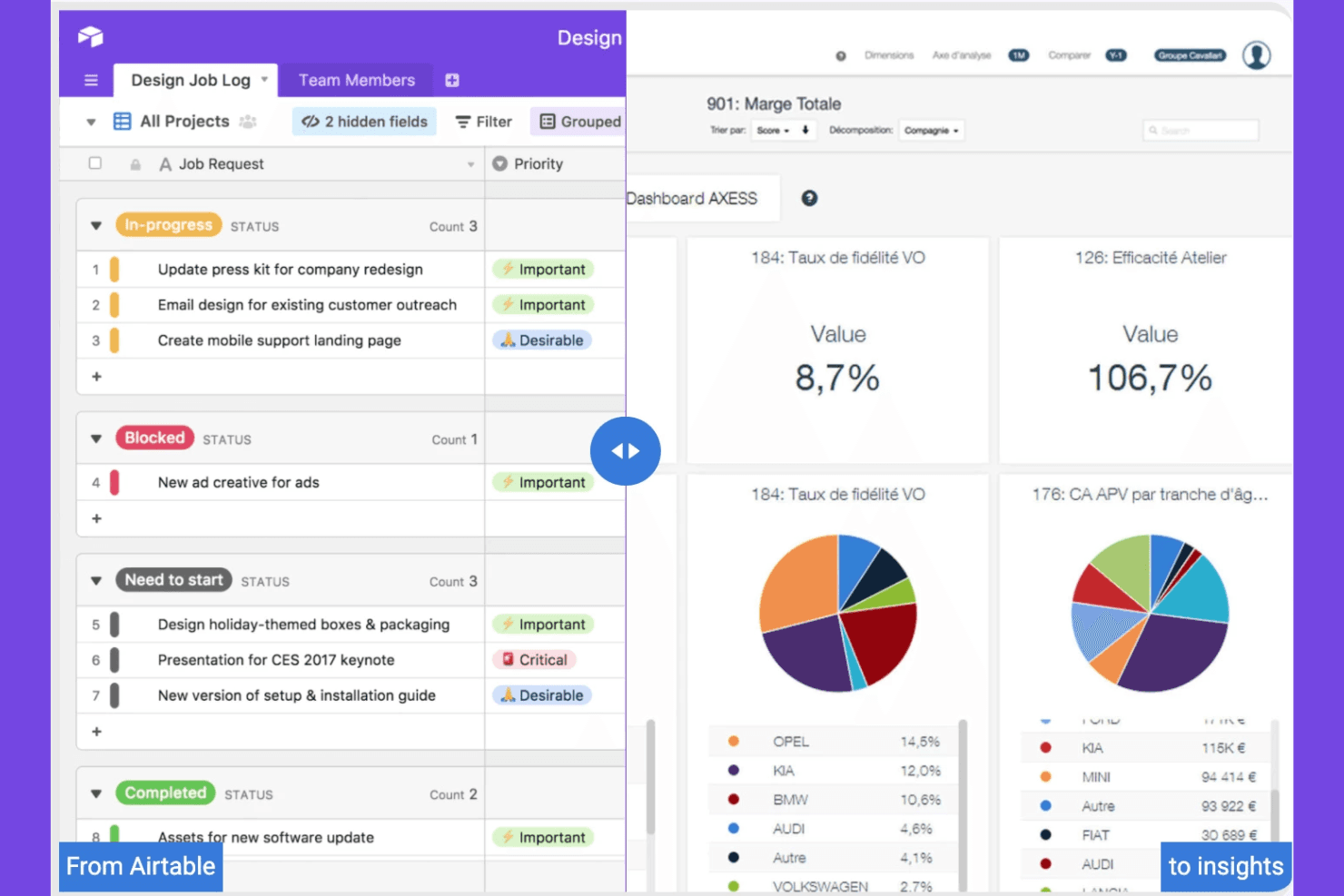
Airtable organiza proyectos y flujos de trabajo con una interfaz flexible. Airtable es una plataforma de espacio de trabajo colaborativo para equipos de productos y operaciones que necesitan conectar los datos de planificación, investigación y ejecución en una alternativa flexible a Notion.
¿Para quién es mejor Airtable?
Equipos de operaciones de producto que necesitan registros vinculados, flujos de trabajo personalizados y vistas compartidas para coordinar la investigación, la planificación y la entrega.
Por qué Airtable es una buena alternativa a Notion para directores de producto
Elegí Airtable porque su seguimiento basado en una base de datos relacional conecta la investigación de productos, las prioridades y los registros de entrega en un solo espacio de trabajo. Utilizo registros vinculados para conectar los conocimientos de los clientes con las oportunidades, los elementos de la hoja de ruta y las tareas de lanzamiento, mientras que las vistas filtradas proporcionan a cada equipo el contexto que necesita. Las interfaces personalizadas ayudan a las partes interesadas a revisar el progreso sin editar los datos subyacentes.
Características principales de Airtable
- Automatizaciones: Activa acciones a partir de cambios en los registros y eventos programados.
- Creador de formularios: Recopila envíos estructurados mediante formularios compartibles.
- Vista de calendario: Muestra los registros basados en fechas en un diseño de calendario.
- Vista de Gantt: Traza las cronologías y dependencias de los registros en distintos proyectos.
Integraciones de Airtable
Airtable documenta integraciones nativas con Box, Google Drive, Dropbox y OneDrive, además de extensiones de socios para Miro, Typeform, Formstack, Loom y Pexels. Se conecta con Zapier y ofrece una API web para integraciones personalizadas.
Pros and Cons
Pros:
- Vincula los conocimientos de los clientes con los registros de la hoja de ruta
- Ofrece vistas adaptadas para cada parte interesada
- Captura solicitudes estructuradas mediante formularios personalizables
Cons:
- Requiere diseñar cuidadosamente el esquema desde el principio
- Las bases complejas se vuelven difíciles de mantener
Learn more about Airtable: Ideal para la automatización de tareas y proyectos basada en IA
- Plan gratuito disponible
- Desde $10/usuario/mes (facturado anualmente)
Visit WebsiteCustomer Rating:4.7/5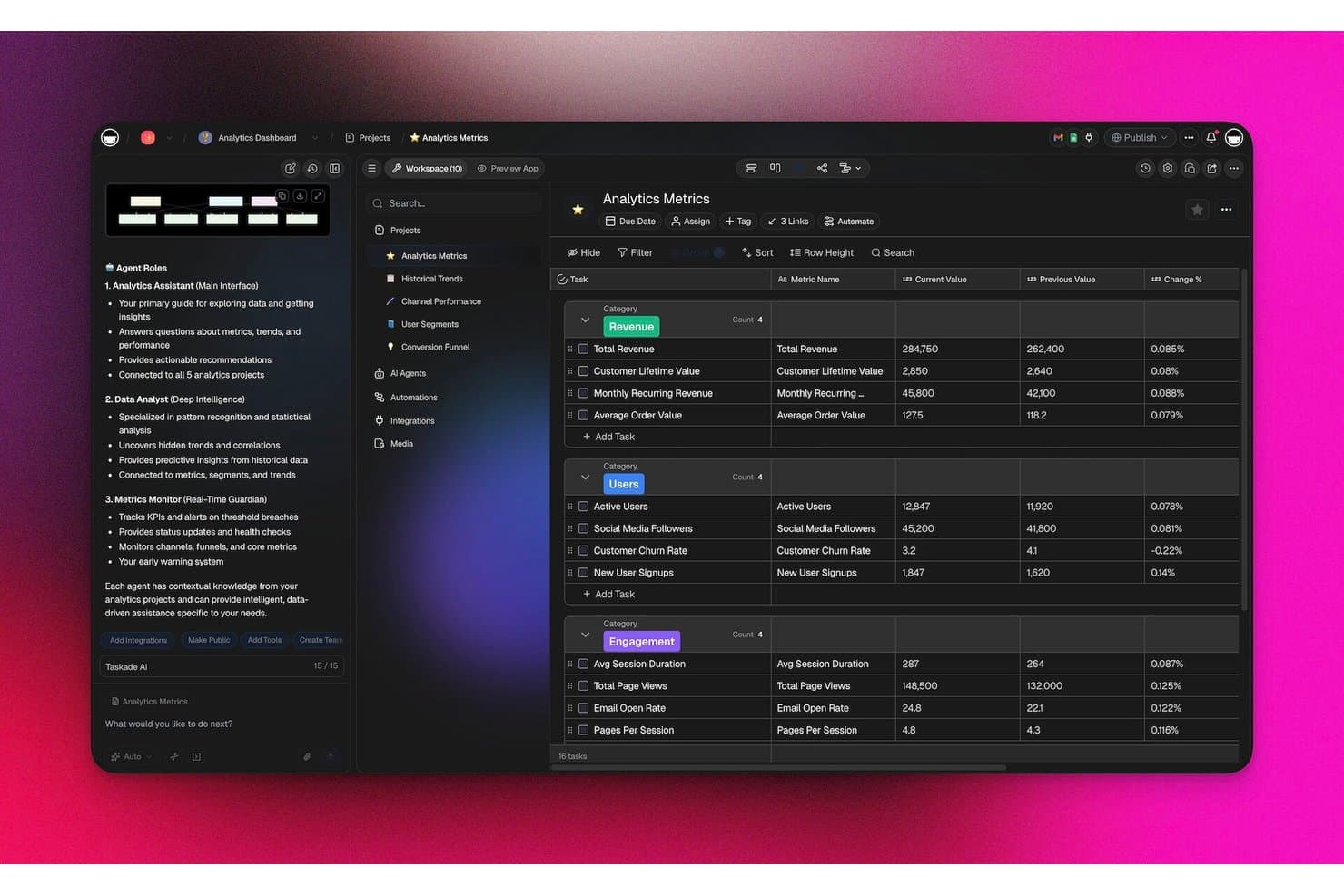
Taskade realiza un seguimiento de las métricas analíticas con agentes de IA en un panel estructurado. Taskade es una plataforma colaborativa de gestión de proyectos para equipos de producto que necesitan una alternativa flexible a Notion para organizar hojas de ruta, tareas, flujos de trabajo y trabajo interfuncional en un solo espacio de trabajo.
¿Para quién es más adecuado Taskade?
Taskade es adecuado para equipos de producto y operaciones que necesitan flujos de trabajo asistidos por IA, coordinación de tareas y planificación de proyectos en un espacio de trabajo flexible.
Por qué Taskade es una buena alternativa a Notion para CPO
Elegí Taskade porque su automatización de tareas y proyectos basada en IA ayuda a mi equipo a convertir los planes de producto en flujos de trabajo ejecutables. Utilizo agentes de IA para crear listas de tareas, resumir actualizaciones de proyectos y coordinar procesos recurrentes en espacios de trabajo compartidos. Sus estructuras de tareas anidadas y plantillas de flujos de trabajo nos ayudan a pasar de las decisiones de la hoja de ruta al trabajo de entrega asignado sin tener que reconstruir el proceso cada vez.
Características principales de Taskade
- Múltiples vistas de proyecto : Cambia entre diseños de lista, tablero, calendario, mapa mental y cronograma.
- Campos personalizados : Añade estados, prioridades, fechas, etiquetas y otros detalles del proyecto.
- Comentarios y menciones : Comenta directamente las tareas y notifica a compañeros de equipo específicos.
- Integraciones de terceros : Conecta Taskade con herramientas como Google Calendar, Slack y Zapier.
Integraciones de Taskade
Taskade ofrece más de 100 integraciones bidireccionales, incluidas Slack, Microsoft Teams, GitHub, Google Calendar, Gmail, Google Sheets, HubSpot, Salesforce, Jira y Linear, y se conecta con Zapier. También admite webhooks, solicitudes HTTP y una API pública para integraciones personalizadas.
Pros and Cons
Pros:
- Los agentes de IA automatizan los flujos de trabajo recurrentes de producto
- Los proyectos anidados conectan las hojas de ruta con tareas ejecutables
- Varias vistas admiten distintos rituales de planificación
Cons:
- No admite el trabajo sin conexión
- La documentación detallada parece menos desarrollada que la de Notion
Learn more about Taskade: Ideal para documentación técnica conectada con Jira
- Prueba gratuita + plan gratuito disponible
- Desde $5.42/usuario/mes
Visit WebsiteCustomer Rating:4.1/5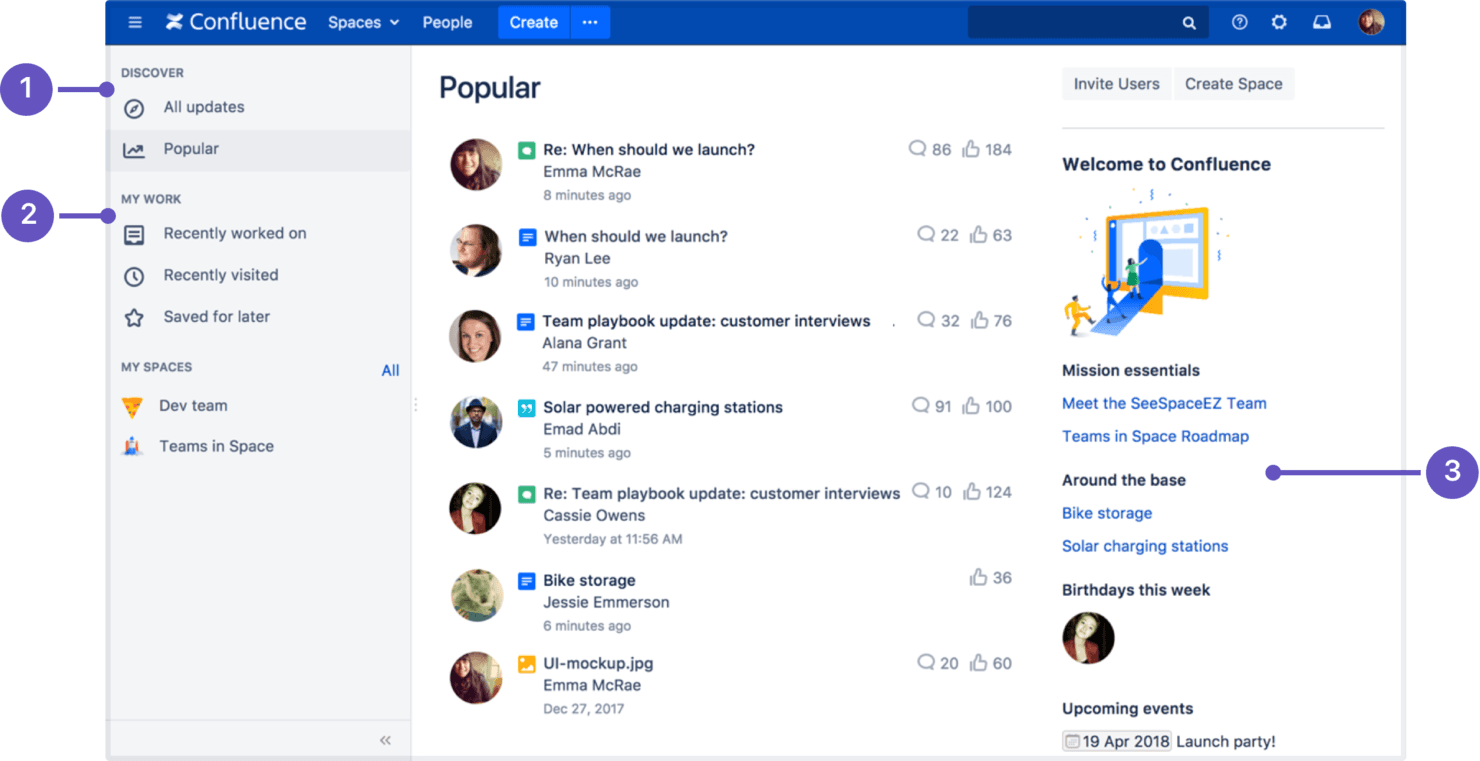
Confluence organiza el conocimiento, los documentos y la colaboración del equipo. Confluence es una plataforma colaborativa de gestión del conocimiento para equipos de producto y técnicos que organiza la estrategia, los requisitos, las decisiones y el contexto de los proyectos en un único espacio de trabajo con búsqueda.
¿Para quién es más adecuado Confluence?
Confluence es adecuado para equipos de producto e ingeniería que necesitan documentación técnica conectada con Jira, registros de decisiones y conocimiento de proyectos en un único espacio de trabajo.
Por qué Confluence es una buena alternativa a Notion para CPO
Elegí Confluence porque está diseñado para la documentación técnica conectada con Jira. Utilizo páginas enlazadas para los requisitos de producto y los registros de decisiones, y luego los conecto con las incidencias de Jira para que el trabajo de ingeniería conserve su contexto original. Esto proporciona a mi equipo un único lugar con búsqueda para rastrear la estrategia, las decisiones y las actualizaciones de entrega.
Funciones principales de Confluence
- Plantillas: Empieza las páginas con formatos prediseñados para planes, informes y notas de reuniones.
- Paneles visuales: Organiza ideas, flujos de trabajo y conceptos en paneles visuales colaborativos.
- Permisos: Controla el acceso de visualización y edición a nivel de espacio o página.
- Historial de versiones: Revisa los cambios y restaura versiones anteriores de las páginas.
Integraciones de Confluence
Confluence cuenta con una integración nativa con Jira e integraciones oficiales con Slack y Microsoft Teams. También ofrece una API para integraciones personalizadas, mientras que las aplicaciones de Atlassian Marketplace amplían la conectividad con herramientas adicionales.
Pros and Cons
Pros:
- El historial de versiones conserva las decisiones de producto auditables
- Las plantillas agilizan la documentación de requisitos y decisiones
- La jerarquía de páginas facilita las bases de conocimiento técnico
Cons:
- Las jerarquías de páginas se vuelven difíciles de manejar a gran escala
- Las especificaciones complejas requieren soluciones alternativas poco prácticas con tablas
 Ideal para el seguimiento integral de tareas y objetivos
- Plan gratuito disponible
- Desde $7/usuario/mes (facturado anualmente)
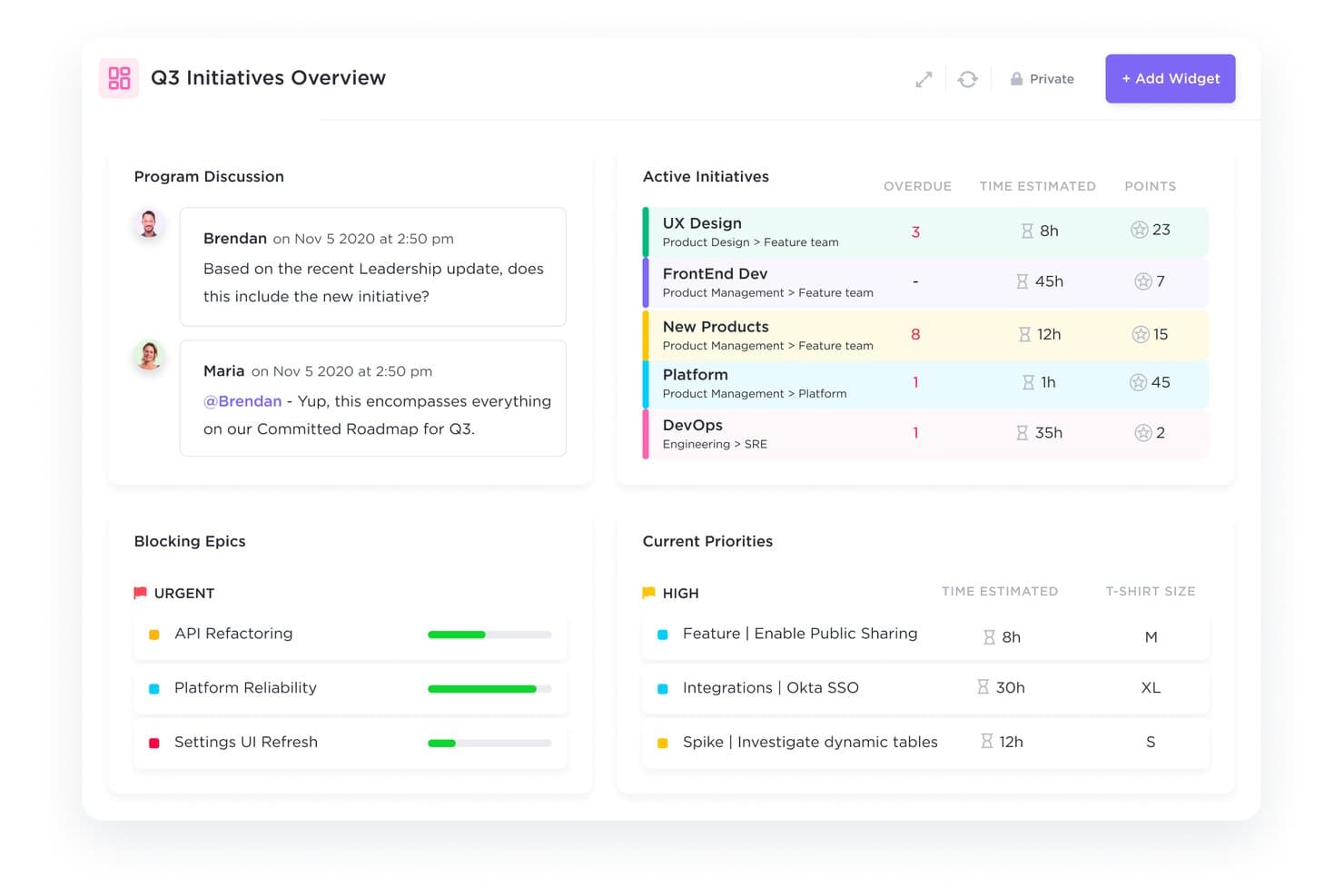
ClickUp unifica el seguimiento de las iniciativas y las prioridades del tercer trimestre en un solo panel. ClickUp es una plataforma de gestión de proyectos para equipos de producto que reúne tareas, documentos, prioridades y colaboración en un solo espacio de trabajo, ayudando a los CPO a sustituir los flujos de trabajo fragmentados de Notion por una ejecución más clara.
¿Para quién es más adecuado ClickUp?
ClickUp es adecuado para operaciones de producto y equipos multifuncionales que necesitan gestionar tareas, objetivos, documentos y prioridades en un espacio de trabajo compartido.
Por qué ClickUp es una buena alternativa a Notion para CPOs
Elegí ClickUp porque combina la ejecución de tareas con el seguimiento de objetivos en un solo espacio de trabajo. Utilizo estados de tareas personalizados, dependencias y objetivos para conectar las iniciativas de producto con resultados medibles. Mi equipo puede convertir las prioridades de la hoja de ruta en trabajo asignado y después revisar el progreso respecto a los objetivos trimestrales sin mantener registros independientes en Notion.
Funciones clave de ClickUp
- Paneles: Crea vistas personalizables para las métricas de los proyectos y los datos de carga de trabajo.
- Automatizaciones: Configura activadores y acciones para las actualizaciones recurrentes del flujo de trabajo.
- Seguimiento del tiempo: Registra el tiempo dedicado a las tareas con temporizadores integrados.
- Formularios: Recopila solicitudes estructuradas y convierte los envíos en tareas.
Integraciones de ClickUp
ClickUp ofrece integraciones nativas con Slack, Microsoft Teams, GitHub, GitLab, Bitbucket, Google Drive, Google Calendar, Figma, Miro y Zoom, y se conecta con Zapier. También proporciona una API para integraciones personalizadas.
Pros and Cons
Pros:
- Conecta el trabajo de la hoja de ruta con objetivos medibles
- Los estados personalizados y las dependencias aclaran la responsabilidad de la entrega
- Los paneles muestran la carga de trabajo y el progreso de las iniciativas
Cons:
- Los espacios de trabajo densos pueden ocultar información clave
- Los documentos no ofrecen la experiencia de publicación ligera de Notion
Learn more about ClickUp : 5Ideal para flujos de trabajo basados en IA que convierten reuniones en documentos
Tana
- Plan gratuito disponible
- Desde $8/usuario/mes (facturado anualmente)
Visit WebsiteCustomer Rating:4.7/5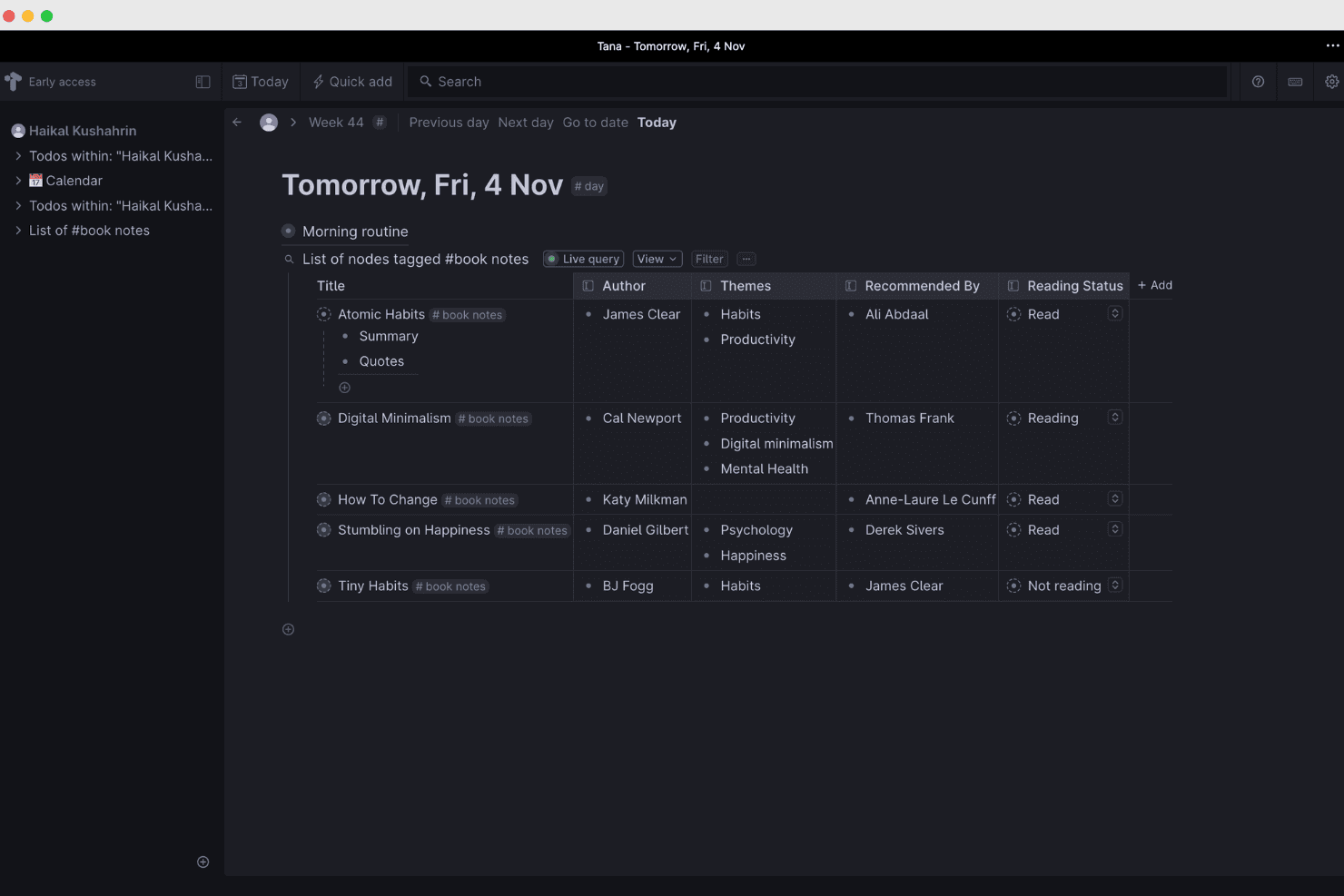
Tana organiza y conecta el conocimiento mediante flujos de trabajo basados en IA. Tana es un espacio de trabajo flexible para la gestión del conocimiento dirigido a líderes de producto que necesitan conectar notas de reuniones, decisiones, investigaciones y planes en un único sistema estructurado, en lugar de perder el contexto entre páginas y documentos dispersos de Notion.
¿Para quién es más adecuado Tana?
Los equipos de producto que convierten reuniones grabadas en informes estructurados, decisiones y documentos de seguimiento obtendrán el máximo provecho de Tana.
Por qué Tana es una buena alternativa a Notion para directores de producto
Elegí Tana porque sus flujos de trabajo basados en IA para convertir reuniones en documentos transforman las conversaciones grabadas en notas estructuradas, decisiones y documentos de seguimiento. Utilizo su IA para extraer elementos de acción y organizarlos como nodos conectados, de modo que las ideas obtenidas en el descubrimiento de producto y las decisiones sobre la hoja de ruta permanezcan vinculadas en lugar de quedar enterradas en las transcripciones de las reuniones.
Características principales de Tana
- Superetiquetas: Aplica etiquetas estructuradas para convertir los nodos en plantillas reutilizables.
- Campos personalizados: Añade propiedades como estado, responsable, prioridad o fecha límite.
- Notas diarias: Captura información en un espacio de trabajo diario organizado automáticamente.
- Búsquedas filtradas: Encuentra nodos por etiquetas, campos, texto u otros criterios.
Integraciones de Tana
Tana ofrece integraciones nativas con Google Calendar, Microsoft Outlook, GitHub, Slack, Linear, Jira y HubSpot. También admite servidores MCP personalizados para conectar servicios adicionales.
Pros and Cons
Pros:
- Convierte las transcripciones de reuniones en elementos de acción vinculados
- Las superetiquetas conservan el contexto estructurado del producto
- La búsqueda abarca notas, campos y etiquetas
Cons:
- La configuración requiere aprender el modelo de nodos de Tana
- La captura de reuniones puede pausarse o bloquearse
Learn more about Tana: Ideal para conectar datos de producto y documentos
- Prueba gratuita de 14 días
- Desde $12/usuario/mes (facturado anualmente)
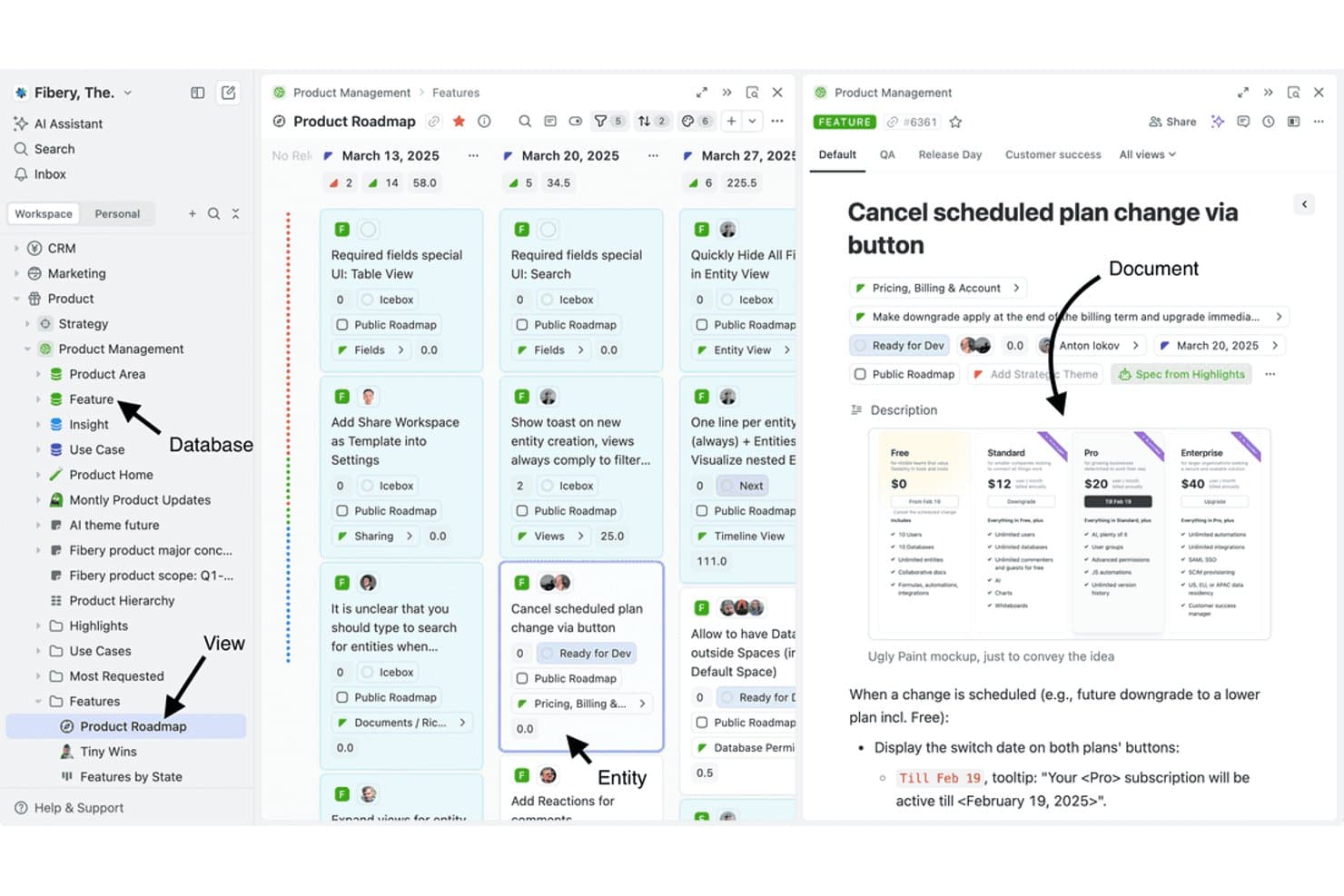
Fibery vincula documentos, bases de datos y vistas en un único espacio de trabajo de producto. Fibery es una plataforma flexible de gestión del conocimiento para equipos de producto que conecta espacios de trabajo, datos de producto, documentación y flujos de trabajo, lo que la convierte en una sólida alternativa a Notion para CPO a la hora de alinear la estrategia, el descubrimiento y la entrega.
¿Para quién es más adecuado Fibery?
Fibery es adecuado para equipos de producto que necesitan datos de producto, documentación y flujos de trabajo vinculados en un único espacio de trabajo flexible.
Por qué Fibery es una buena alternativa a Notion para CPO
Elegí Fibery porque conecta los datos de producto y los documentos en un único espacio de trabajo. Utilizo bases de datos vinculadas para relacionar clientes, hallazgos, funcionalidades y resultados, mientras que los documentos conectados mantienen las decisiones de producto junto a los registros que explican. Mi equipo puede seguir el recorrido de un hallazgo del descubrimiento a la priorización y la entrega sin duplicar el contexto.
Características principales de Fibery
- Vistas personalizadas: Muestra los registros en diseños de tabla, Kanban, cronología o calendario.
- Automatizaciones de flujos de trabajo: Activa acciones cuando los registros cambian o se cumplen determinadas condiciones.
- Fórmulas: Calcula valores mediante expresiones y campos personalizables.
- Integraciones: Conecta Fibery con herramientas como Slack, GitHub y Google Drive.
Integraciones de Fibery
Fibery se integra con Slack, GitHub y Google Drive, ayudando a los equipos de producto a conectar conversaciones, trabajo de desarrollo y documentación en un único espacio de trabajo.
Pros and Cons
Pros:
- Vincula directamente los datos de producto con la documentación
- Las bases de datos personalizadas permiten adaptar los flujos de trabajo de producto
- Varias vistas conectan la estrategia con la entrega
Cons:
- El diseño del espacio de trabajo requiere bastante tiempo de configuración
- Algunos detalles de la interfaz parecen poco pulidos
Learn more about Fibery: Ideal para espacios de trabajo autoalojados y con propiedad de los datos
- Plan gratuito disponible
- Desde $12.50/usuario/mes (facturado anualmente)
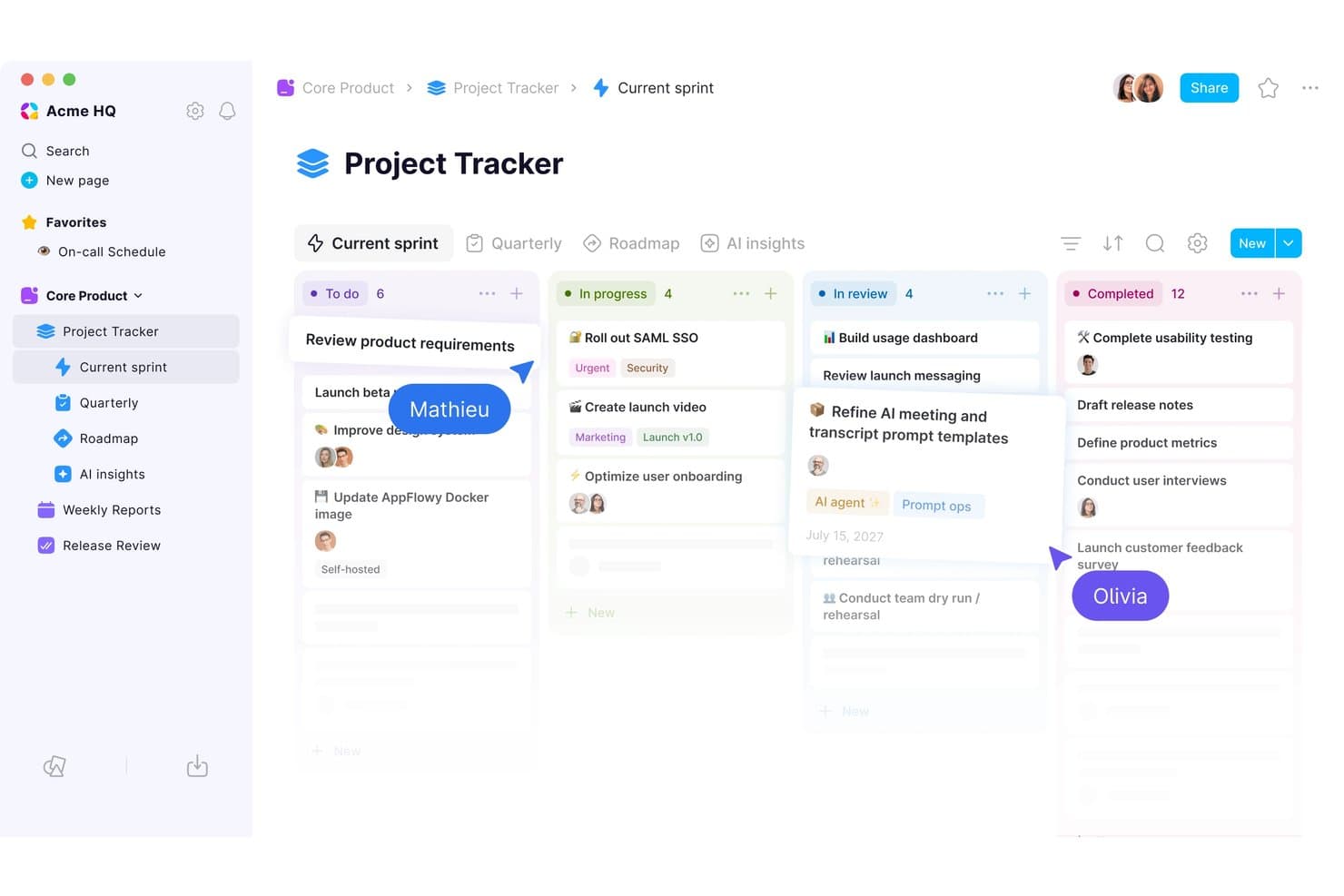
El tablero kanban de AppFlowy mantiene las tareas de la iteración organizadas por estado. AppFlowy es un espacio de trabajo de gestión del conocimiento de código abierto para equipos de producto que necesitan organizar la estrategia de producto, la investigación, la documentación y el contexto de los proyectos como alternativa flexible a Notion.
¿Para quién es más adecuado AppFlowy?
Equipos de producto y organizaciones preocupadas por la privacidad que necesitan espacios de trabajo autoalojados con control sobre sus datos.
Por qué AppFlowy es una buena alternativa a Notion para CPO
Elegí AppFlowy porque sus espacios de trabajo autoalojados y con propiedad de los datos dan a mi equipo control directo sobre la investigación de productos, los documentos de estrategia y los registros de decisiones. Como plataforma de código abierto, nos permite mantener el contexto confidencial del producto en nuestra infraestructura y adaptar el espacio de trabajo a nuestras prácticas de gestión del conocimiento.
Características principales de AppFlowy
- Editor de texto enriquecido: Crea documentos con encabezados, tablas, bloques de código e incorporaciones.
- Vistas de bases de datos: Organiza registros en diseños de tabla, tablero, calendario o lista.
- Páginas anidadas: Estructura documentos relacionados dentro de jerarquías de páginas expandibles.
- Plantillas: Inicia proyectos con diseños reutilizables para trabajos recurrentes.
Integraciones de AppFlowy
AppFlowy no documenta claramente integraciones nativas con herramientas de trabajo externas. Es compatible con Zapier y proporciona una API REST para integraciones personalizadas.
Pros and Cons
Pros:
- La implementación autoalojada mantiene el control de los datos del producto
- El código abierto permite personalizar el espacio de trabajo
- Las páginas anidadas organizan el contexto de la estrategia y la investigación
Cons:
- Las funciones de colaboración están por detrás de las alternativas consolidadas
- La experiencia móvil sigue siendo menos madura que la de Notion
Learn more about AppFlowy:
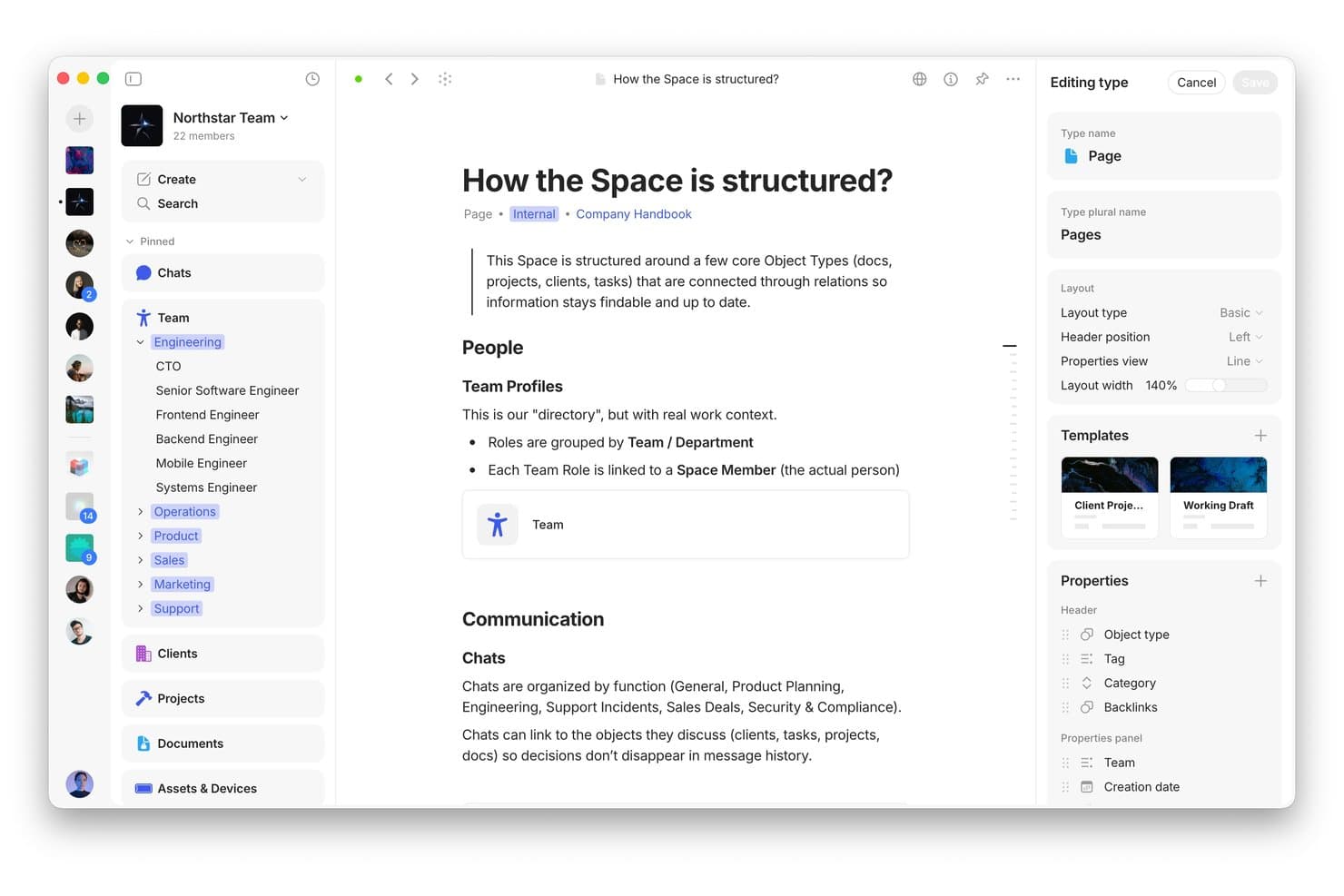
Anytype estructura el conocimiento del equipo con tipos de objetos vinculados y diseños personalizados. Anytype es un espacio de trabajo flexible para la gestión del conocimiento, dirigido a líderes de producto que necesitan conectar la estrategia, la investigación, las decisiones y la documentación sin dispersar el conocimiento del producto entre herramientas desconectadas.
¿Para quién es más adecuado Anytype?
Anytype es adecuado para gerentes de producto y equipos de investigación que necesitan un espacio de trabajo privado y local para vincular el conocimiento del producto, las decisiones y la documentación.
Por qué Anytype es una buena alternativa a Notion para CPO
Elegí Anytype porque el almacenamiento local de su espacio de trabajo, centrado en la privacidad, mantiene el conocimiento del producto en tus dispositivos. Utilizo objetos vinculados para conectar la investigación, las decisiones, las hojas de ruta y la documentación sin depender de un espacio de trabajo centralizado en la nube. El acceso sin conexión también permite que mi equipo revise el contexto del producto durante talleres o viajes.
Funciones principales de Anytype
- Tipos de objetos: Crea páginas estructuradas para productos, proyectos, personas y documentos.
- Propiedades: Añade campos personalizados para registrar estados, responsables, fechas y otros metadatos.
- Colecciones: Agrupa objetos relacionados en espacios de trabajo seleccionados para facilitar la navegación.
- Plantillas: Reutiliza estructuras predefinidas al crear documentación de producto recurrente.
Integraciones de Anytype
Las integraciones nativas con herramientas de terceros no están documentadas con claridad. Anytype incluye una API local para crear integraciones personalizadas, automatizaciones, complementos y herramientas para desarrolladores.
Pros and Cons
Pros:
- El almacenamiento local mantiene privado el conocimiento del producto
- Los objetos vinculados conectan la investigación, las decisiones y las hojas de ruta
- El acceso sin conexión facilita los talleres y los viajes
Cons:
- La colaboración en tiempo real parece menos desarrollada que en Notion
- Los flujos de trabajo basados en objetos requieren un modelado cuidadoso del espacio de trabajo
Learn more about Anytype: Ideal para flujos de trabajo de IA de reuniones a documentos
- Plan gratuito disponible
- Desde $14.16/usuario/mes (facturado anualmente)
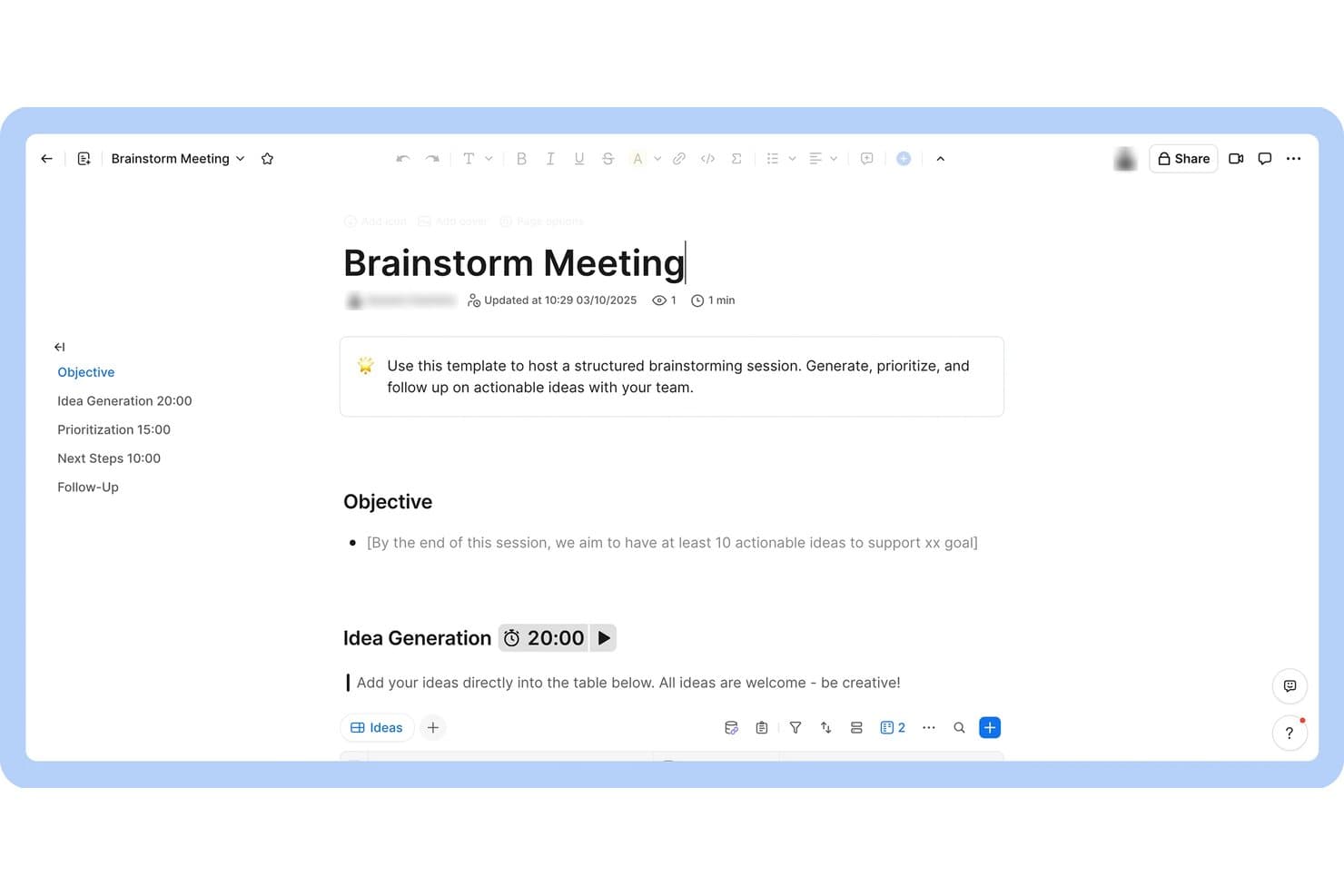
Zoom Docs estructura las sesiones de lluvia de ideas con agendas cronometradas y tablas de ideas. Zoom Docs es una plataforma colaborativa de gestión del conocimiento para equipos de producto que convierte el contexto de las reuniones en documentación organizada, decisiones y elementos de acción en un solo espacio de trabajo.
¿Para quién es mejor Zoom Docs?
Zoom Docs es adecuado para equipos de producto que necesitan convertir las conversaciones de las reuniones en documentación compartida, decisiones y acciones de seguimiento.
Por qué Zoom Docs es una buena alternativa a Notion para CPO
Elegí Zoom Docs porque admite directamente el caso de uso «Ideal para flujos de trabajo de IA de reuniones a documentos». Mi equipo convierte el contexto de las reuniones en documentación organizada, decisiones y elementos de acción en un solo espacio de trabajo colaborativo. Esto nos ayuda a capturar las decisiones de producto inmediatamente después de las revisiones de la hoja de ruta o las sesiones de descubrimiento.
Funciones principales de Zoom Docs
- Editor de texto enriquecido : Da formato a las páginas con encabezados, listas, tablas, imágenes e inserciones.
- Plantillas de páginas : Inicia nuevos documentos a partir de plantillas reutilizables para flujos de trabajo recurrentes.
- Comentarios y menciones : Añade comentarios en línea y menciona con @ a tus compañeros durante las revisiones.
- Controles de acceso : Establece permisos a nivel de página para ver o editar.
Integraciones de Zoom Docs
Zoom Docs, que ahora tiene la marca Zoom Canvas, cuenta con un conector oficial de Coda para importar páginas de Coda y se conecta con Zapier. Las integraciones nativas más allá de estas no están documentadas claramente.
Pros and Cons
Pros:
- El contexto de las reuniones se convierte en documentación lista para la acción
- La IA redacta, resume y perfecciona las páginas
- Los comentarios y las menciones facilitan las revisiones de decisiones
Cons:
- Arquitectura del conocimiento menos madura que la de Notion
- El espacio de trabajo parece estar vinculado a los flujos de trabajo de reuniones
Learn more about Zoom Docs: Ideal para el seguimiento y la automatización de proyectos nativos de documentos
- Plan gratuito disponible
- Desde $12/usuario/mes (facturado anualmente)
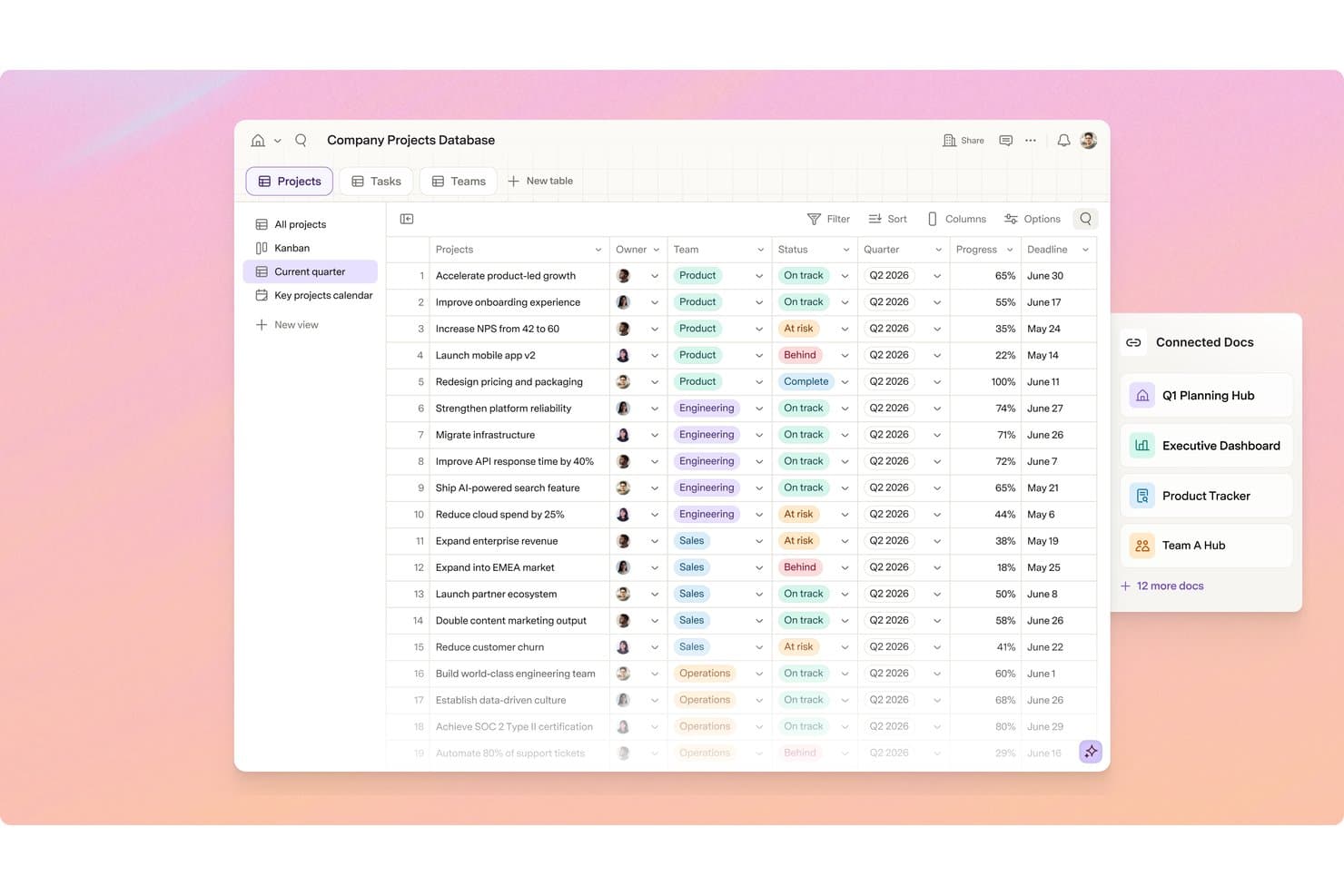
Superhuman Docs realiza el seguimiento de proyectos entre equipos con estado, progreso y fechas límite. Superhuman Docs es una plataforma de documentación y gestión de proyectos para líderes de producto que necesitan organizar conocimientos, coordinar el trabajo y automatizar flujos de trabajo sin la complejidad de las herramientas de proyectos tradicionales.
¿Para quién es más adecuado Superhuman Docs?
Los equipos de producto que quieren seguimiento de proyectos, documentación y automatización de flujos de trabajo en un único espacio de trabajo nativo de documentos encontrarán en Superhuman Docs una opción práctica.
Por qué Superhuman Docs es una buena alternativa a Notion para CPO
Elegí Superhuman Docs porque su seguimiento de proyectos y sus automatizaciones nativas de documentos mantienen el contexto del producto junto a la ejecución. Utilizo documentos estructurados para conectar las decisiones de la hoja de ruta, las notas de descubrimiento y las actualizaciones de entrega en un único espacio de trabajo. Las automatizaciones de flujos de trabajo pueden actualizar la información de los proyectos y notificar a las partes interesadas cuando cambian las prioridades o los estados.
Características principales de Superhuman Docs
- Tablas : Crea registros estructurados con campos, filtros y ordenación.
- Vistas de tablero y cronograma : Cambia los datos del proyecto entre diferentes diseños visuales.
- Dependencias de tareas : Vincula elementos de trabajo para mostrar las restricciones de secuencia.
- Comentarios anclados : Deja comentarios junto al contenido relevante del documento.
Integraciones de Superhuman Docs
Superhuman Docs admite más de 800 integraciones, incluidas Jira, Salesforce y Asana, con sincronización bidireccional entre las herramientas conectadas y Docs. También admite conexiones del Protocolo de Contexto de Modelos (MCP) con ChatGPT, Claude y Cursor.
Pros and Cons
Pros:
- Los documentos mantienen el contexto de la hoja de ruta junto a los datos del proyecto
- Las tablas admiten vistas de tablero y cronograma de proyectos
- Las automatizaciones convierten los cambios de estado en actualizaciones
Cons:
- Los límites de documentos pueden interrumpir flujos de trabajo más grandes
- La aplicación móvil puede ralentizarse o bloquearse
Learn more about Superhuman Docs:
Otras alternativas a Notion
Estas son algunas alternativas adicionales a Notion que no llegaron a mi lista, pero que merece la pena conocer:
- 11MiroIdeal para la lluvia de ideas y la planificación visual
- 12monday AI WorkspaceIdeal para paneles de proyectos con múltiples tableros
- 13ProductboardIdeal para priorizar los comentarios sobre productos impulsados por IA
- 14NuclinoIdeal para documentación de estilo wiki sin complejidad
- 15ObsidianIdeal para crear grafos de conocimiento con enfoque local
- 16LinearIdeal para el seguimiento de incidencias del equipo de desarrollo sin documentación
- 17AsanaIdeal para la coordinación de proyectos interfuncionales
- 18AFFiNEIdeal para documentos y pizarras en un mismo lienzo
- 19DocmostIdeal para edición colaborativa en tiempo real
Cómo evalúo las alternativas a Notion
Divido mi evaluación en tres partes. Primero —y esto es lo que más peso tiene— compruebo si una herramienta puede crear bases de datos estructuradas y relacionales, y admitir la creación de documentos basados en bloques. Después busco funciones destacadas, como la redacción asistida por IA y la sincronización bidireccional con ingeniería. Por último, considero la relación calidad-precio y la asistencia durante la incorporación.
Funcionalidad principal (requisitos básicos para esta lista)
Al seleccionar herramientas para mi lista, puntúo cada una en una escala del 0 (no ofrece la funcionalidad) al 5 (sobresale en este ámbito) para cada una de las funcionalidades principales que se indican a continuación. Después convierto el total en un porcentaje para ayudar a evaluar la adecuación general de cada herramienta, dando un peso adicional a las funcionalidades que he considerado esenciales.
- Bases de datos flexibles (esencial): Evalúo las propiedades personalizadas, los registros relacionales, las fórmulas y las vistas para hojas de ruta, listas de funcionalidades pendientes y planificación de lanzamientos.
- Edición de documentos (esencial): Busco páginas basadas en bloques que combinen requisitos, notas de investigación, contenido incrustado, contenido anidado y artículos de bases de conocimiento.
- Vistas de tareas y proyectos: Evalúo los tableros vinculados, calendarios, cronogramas, filtros y agrupaciones para la planificación de sprints y el seguimiento de las entregas.
- Colaboración en tiempo real: Compruebo la edición simultánea, los comentarios, las menciones, los indicadores de presencia y los permisos para revisiones interfuncionales.
- Enlaces cruzados y relaciones: Busco páginas y registros conectados que vinculen los conocimientos sobre los clientes, las decisiones, los requisitos y el trabajo de entrega.
- Plantillas y estructura: Evalúo las plantillas reutilizables y los espacios anidados para mantener la coherencia en los informes de producto, las notas de reuniones y la documentación del equipo.
Una vez que tengo una lista de herramientas que cumplen los criterios, considero qué distingue a cada plataforma.
Factores diferenciadores (lo que distingue a los proveedores)
Así es como comparo y contrasto distintos proveedores:
Funciones destacadas
Busco una IA integrada que pueda redactar PRD y extraer elementos de acción de las notas de reuniones; esto ahorra horas de limpieza posterior a las reuniones. La sincronización bidireccional con sistemas de seguimiento de ingeniería como Jira o Linear es igual de importante, porque los cambios en la hoja de ruta deberían reflejarse en los tableros de sprints sin actualizaciones manuales. También evalúo la recopilación nativa de comentarios, donde las solicitudes de los clientes se incorporan directamente a las bases de datos de priorización en lugar de permanecer en hojas de cálculo dispersas.
Más allá de las funciones
Evalúo la rapidez con la que los compañeros que no son PM —ingenieros, diseñadores y especialistas de marketing— pueden adoptar una herramienta sin una incorporación compleja. Si una plataforma requiere una semana de formación antes de que un diseñador la abra, la adopción se estanca. El coste total de propiedad es igual de importante. Compruebo si las funciones de IA, las integraciones o el almacenamiento conllevan cargos ocultos que aumentan el gasto a medida que crece el equipo. También analizo la asistencia para la migración, porque una herramienta que no puede importar correctamente las bases de datos vinculadas y las páginas anidadas de Notion añade semanas de trabajo adicional antes de que se perciba algún valor.
¿Por qué buscar una alternativa a Notion?
Aunque Notion es una buena opción entre las herramientas de gestión de productos, hay varias razones por las que algunos usuarios buscan soluciones alternativas. Es posible que estés buscando una alternativa a Notion porque…
- Necesitas permisos o controles de acceso más avanzados
- Tu equipo necesita integraciones más completas con herramientas de desarrollo
- Quieres un sistema de documentación más estructurado o jerárquico
- Necesitas mejores capacidades de edición sin conexión
- Tu organización tiene requisitos estrictos de residencia de datos
- Prefieres una herramienta con funciones integradas de seguimiento de proyectos
Si alguna de estas situaciones te resulta familiar, has llegado al lugar adecuado. Mi lista incluye varias opciones de herramientas de gestión de productos más adecuadas para equipos que se enfrentan a estos desafíos con Notion y buscan soluciones alternativas.
Características principales de Notion
Estas son algunas de las características principales de Notion, para ayudarte a contrastar y comparar lo que ofrecen las soluciones alternativas:
- Páginas y subpáginas: Crea páginas ilimitadas y anídalas para organizar la información en una jerarquía flexible para wikis, documentos o espacios de proyectos.
- Bases de datos: Crea tablas, paneles, calendarios y listas personalizados para hacer un seguimiento de las tareas, gestionar proyectos o almacenar datos estructurados con filtros y ordenación.
- Colaboración en tiempo real: Edita páginas simultáneamente con tus compañeros de equipo, deja comentarios y menciona a usuarios para mantener a todo el mundo coordinado.
- Plantillas: Accede a una biblioteca de plantillas prediseñadas para notas de reuniones, especificaciones de productos, hojas de ruta y mucho más, y acelera la creación de contenido.
- Inserción de contenido multimedia enriquecido: Añade imágenes, vídeos, fragmentos de código e inserciones de herramientas como Figma, Google Drive y Loom directamente en cualquier página.
- Permisos y uso compartido: Establece controles de acceso detallados para páginas y bases de datos, comparte contenido con personas o grupos y gestiona enlaces públicos.
- Funciones integradas de software de gestión de proyectos: Organiza tu lista de tareas, establece fechas de vencimiento y realiza un seguimiento del progreso mediante paneles kanban, calendarios o listas dentro de cualquier espacio de trabajo.
- API e integraciones: Conecta Notion con otras herramientas mediante su API pública o integraciones nativas con Slack, GitHub y mucho más.
- Historial de versiones: Revisa y restaura versiones anteriores de cualquier página para recuperar contenido perdido o realizar un seguimiento de los cambios a lo largo del tiempo.
- Aplicaciones móviles y de escritorio: Accede a tu espacio de trabajo y edítalo desde aplicaciones específicas para iOS, Android, Mac y Windows, para trabajar estés donde estés.