

Gestionar proyectos y documentación puede ser complicado, especialmente si tus herramientas actuales no se ajustan a tus necesidades. Confluence es popular, pero no siempre es la opción adecuada para todos los equipos. Puede que estés buscando algo que se adapte mejor a tus desafíos específicos, ya necesites una mayor facilidad de uso, más opciones de integración o un precio más conveniente.
He dedicado tiempo a revisar y probar varias alternativas a Confluence (para que tú no tengas que hacerlo), centrándome en las características y los factores que diferencian a Confluence de las demás opciones de software disponibles. En este artículo, compartiré mis principales recomendaciones, basadas en una investigación imparcial y pruebas en situaciones reales.
Cubro opciones de software que podrían ser justo lo que necesitas para tus necesidades de colaboración y documentación, ayudando a tu equipo a trabajar de forma más eficiente. Empecemos.
¿Qué es Confluence?
Confluence es un software de colaboración y documentación que ayuda a los equipos a compartir conocimientos y organizar el trabajo. Lo utilizan habitualmente los gestores de proyectos, los desarrolladores y los equipos empresariales que necesitan mantener a todos informados y coordinados. Con funciones como la creación de páginas, la colaboración en equipo y las capacidades de integración, Confluence facilita una gestión eficiente de los proyectos y el intercambio de información. En general, ofrece una plataforma para que tu equipo trabaje unido de forma eficaz.
Por qué confiar en nuestras recomendaciones de software
6,700+
Reviews
20
Industry experts
16+
Evaluation factors
14
Years
Nuestro equipo lleva probando y evaluando software desde 2012. Como gestores de producto, sabemos lo difícil —y lo importante— que es elegir el software adecuado.
Para esta guía, evaluamos las herramientas mediante pruebas prácticas e investigación independiente, puntuando las herramientas según nuestros criterios de selección.
Nuestras reseñas reflejan nuestro criterio editorial humano, no un discurso de ventas.
Revisores expertos:
 Hannah ClarkSenior TPM
- Cristiano ValimSenior UI/UX Lead

Tabla comparativa de alternativas a Confluence
Esta tabla comparativa resume los detalles de precios de mis principales alternativas seleccionadas a Confluence:
| Tool | Best For | Trial Info | Price | ||
|---|---|---|---|---|---|
| 1 | Ideal para modos de edición de documentos independientes | Demostración gratuita disponible | Precios bajo petición | Website | |
| 2 | Ideal para un espacio de trabajo todo en uno | Plan gratuito + demostración gratuita disponible | Desde $10/usuario/mes (facturado anualmente) | Website | |
| 3 | Ideal para wikis de equipo nativas de Microsoft 365 | Prueba gratuita de 30 días | Desde $5.00/usuario/mes (facturado anualmente) | Website | |
| 4 | Ideal para migrar wikis de Confluence autoalojados | Plan gratuito + prueba gratuita de 30 días disponible | Desde €2.50/usuario/mes (facturado anualmente) | Website | |
| 5 | La mejor opción para gestionar el conocimiento con flujos de trabajo de verificación | Demostración gratuita disponible | Precios disponibles bajo solicitud | Website | |
| 6 | Ideal para documentos vinculados directamente a tareas y sprints | Plan gratuito + demostración gratuita disponible | Desde $7/usuario/mes (facturado anualmente) | Website | |
| 7 | Ideal para mantener los documentos actualizados mediante actualizaciones señaladas por la IA | Demostración gratuita + prueba gratuita de 14 días disponible | Desde $10/usuario/mes (facturado anualmente) | Website | |
| 8 | Ideal para documentos conectados a tableros de proyectos activos | Plan gratuito disponible | Desde $9/usuario/mes (facturado anualmente) | Website | |
| 9 | La mejor opción para bases de conocimientos de equipos autoalojadas | Plan gratuito + prueba gratuita de 30 días disponible | Desde $10/mes | Website | |
| 10 | Ideal para la documentación como código con flujos de trabajo de sincronización con Git | Prueba gratuita de 14 días + plan gratuito disponible | Desde $65/sitio/mes + $12/usuario/mes (facturado anualmente) | Website |


Llevamos probando y revisando software de gestión de productos desde 2020. Como gestores de producto, sabemos lo fundamental y difícil que es tomar la decisión correcta al seleccionar un software. Invertimos en una investigación exhaustiva para ayudar a nuestra audiencia a tomar mejores decisiones de compra de software.
Hemos probado más de 2.000 herramientas para distintos casos de uso de gestión de productos y hemos redactado más de 1.000 reseñas exhaustivas de software. Descubre cómo mantenemos la transparencia y consulta nuestra metodología de evaluación de software.
Reseñas de las mejores alternativas a Confluence
A continuación encontrarás mis resúmenes detallados de las mejores alternativas a Confluence que llegaron a mi selección. Mis reseñas ofrecen un análisis detallado de las características principales, ventajas y desventajas, integraciones y casos de uso ideales de cada herramienta para ayudarte a encontrar la mejor opción para ti.
 Ideal para modos de edición de documentos independientes
- Demostración gratuita disponible
- Precios bajo petición
Visit WebsiteCustomer Rating:4.7/5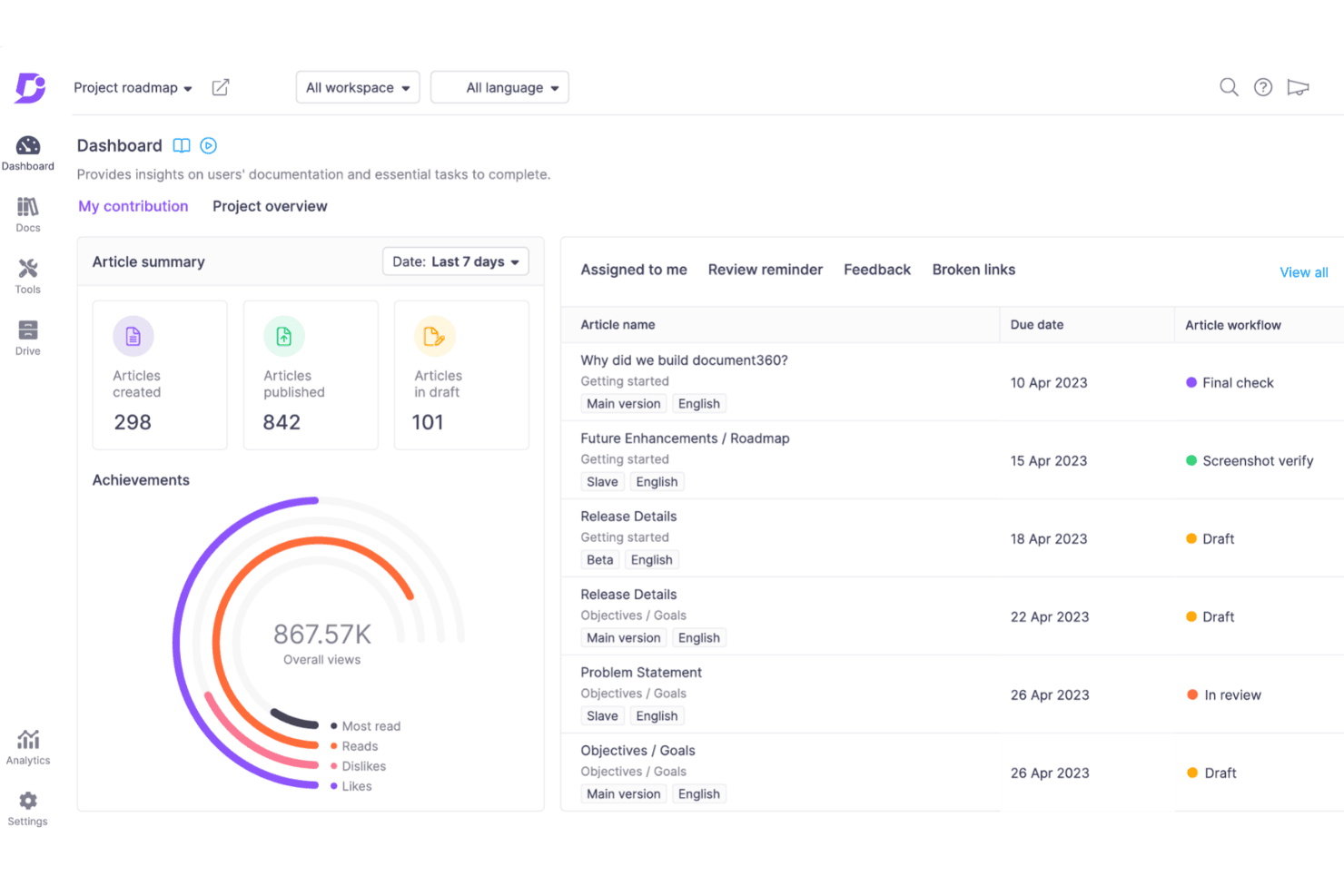
Document360 te ofrece una visión clara del progreso de tu documentación, el estado de los artículos y las asignaciones del equipo en un único panel centralizado. Document360 es una plataforma de gestión del conocimiento para equipos de producto, soporte y operaciones que ayuda a crear documentación interna, SOPs, bases de conocimiento y centros de ayuda orientados al cliente sin la expansión descontrolada de las herramientas generales de colaboración.
¿Para quién es más adecuado Document360?
Document360 es adecuado para equipos de producto, soporte y operaciones que necesitan experiencias de edición independientes para colaboradores técnicos y no técnicos.
Por qué Document360 es una buena alternativa a Confluence
Elegí Document360 porque sus dos modos de edición de documentos se adaptan a equipos de producto mixtos. Mi equipo puede usar Markdown para la documentación técnica y un editor WYSIWYG para SOPs, notas de la versión y contenido de soporte. Esta separación permite que los ingenieros y los colaboradores no técnicos mantengan la misma base de conocimiento sin obligar a todos a utilizar un único flujo de edición.
Funciones clave de Document360
- Búsqueda avanzada: Filtra los resultados por tipo de contenido, idioma, categoría y autor.
- Flujos de trabajo personalizados: Asigna las etapas de creación, revisión y publicación a los miembros del equipo.
- Historial de revisiones: Compara ediciones, restaura versiones y consulta la atribución de los usuarios.
- Análisis de la base de conocimiento: Realiza un seguimiento de las visualizaciones, búsquedas, comentarios y comportamiento de los lectores.
Integraciones de Document360
El panel de integraciones nativas de Document360 es compatible con Zendesk, Freshdesk, Intercom, Drift, Slack, Microsoft Teams, Crowdin, Google Analytics, Segment, GitHub y Zapier. También proporciona una API REST para integraciones personalizadas.
Pros and Cons
Pros:
- Admite la edición en Markdown y WYSIWYG
- Separa los flujos de trabajo técnicos y no técnicos
- Proporciona controles detallados de publicación y revisión
Cons:
- La gobernanza avanzada puede requerir una configuración cuidadosa
- El análisis se centra principalmente en el comportamiento en la base de conocimiento
Learn more about Document360: Ideal para un espacio de trabajo todo en uno
- Plan gratuito + demostración gratuita disponible
- Desde $10/usuario/mes (facturado anualmente)
Visit WebsiteCustomer Rating:4.6/5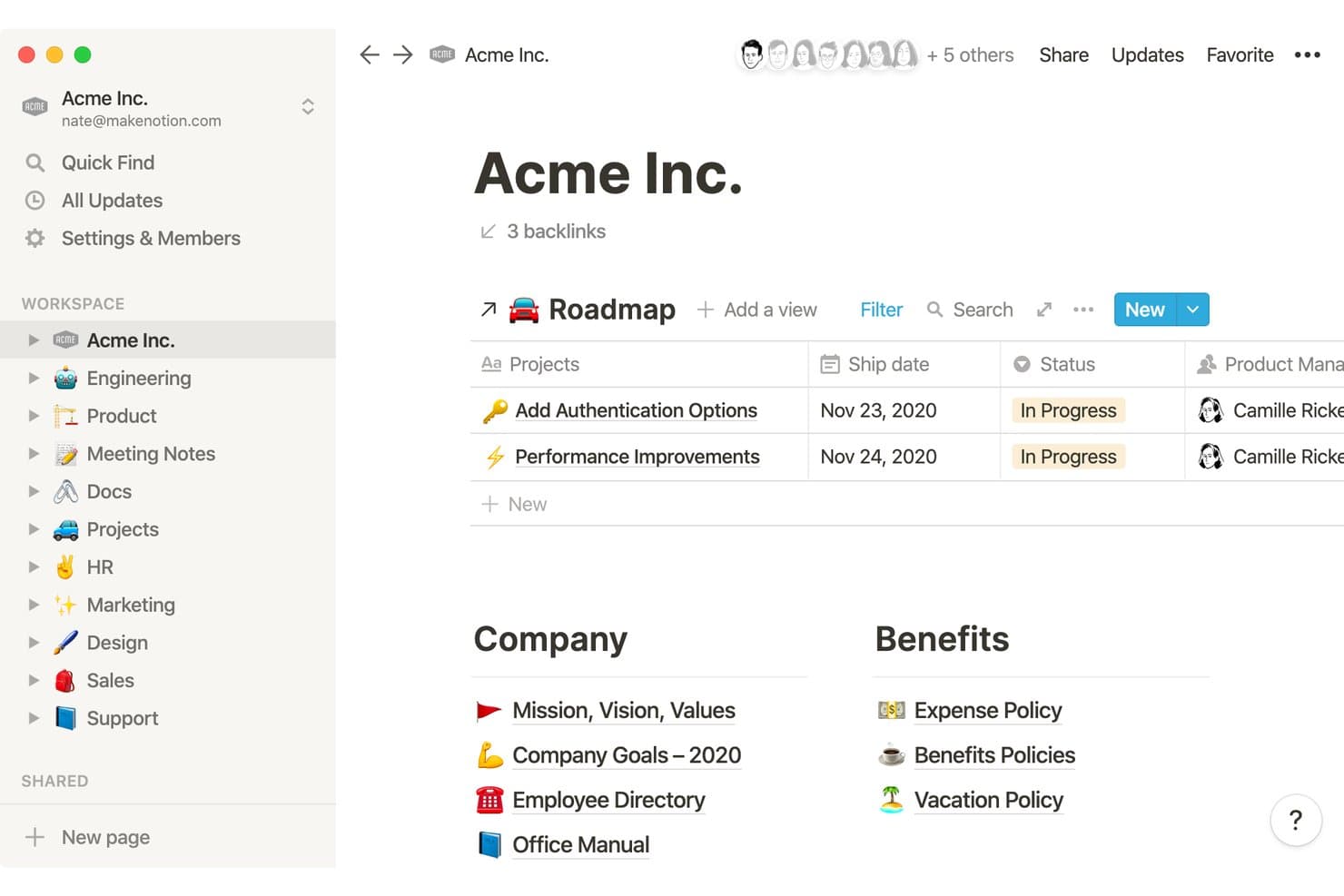
Notion organiza las wikis de la empresa, las hojas de ruta y los documentos de RR. HH. en un solo espacio de trabajo. Notion es un espacio de trabajo flexible para la gestión del conocimiento dirigido a equipos de producto, startups y empresas en crecimiento que necesitan conectar la documentación, el contexto de los proyectos, el conocimiento del equipo y el trabajo colaborativo en un solo lugar.
¿Para quién es más adecuado Notion?
Equipos de producto que necesitan un espacio de trabajo único para la documentación del producto, el contexto de los proyectos, el intercambio de conocimientos y la colaboración interfuncional.
Por qué Notion es una buena alternativa a Confluence
Elegí Notion porque su espacio de trabajo todo en uno conecta la documentación del producto, las bases de datos de proyectos, las notas de reuniones y el conocimiento del equipo. Utilizo bases de datos vinculadas para mostrar las decisiones de la hoja de ruta junto con los requisitos, mientras que las páginas wiki mantienen el contexto organizado y fácil de buscar. Esto permite a mi equipo gestionar la información de descubrimiento y entrega sin dividirla entre herramientas independientes.
Características principales de Notion
- Plantillas de páginas: Crea formatos reutilizables para informes, políticas y guías de incorporación.
- Comentarios y menciones: Comenta el contenido de las páginas y notifica a miembros específicos del equipo.
- Permisos detallados: Controla el acceso a nivel del espacio de trabajo, del espacio del equipo, de la página o del bloque.
- Capturador web: Guarda páginas web directamente en Notion desde tu navegador.
Integraciones de Notion
Notion admite integraciones con Typeform, Salesforce, Slack, GitHub, Jira y Zapier. También proporciona una API para crear conexiones personalizadas.
Pros and Cons
Pros:
- Las bases de datos vinculadas conectan la documentación con el trabajo del producto
- Las plantillas reutilizables estandarizan los rituales recurrentes de producto
- Los permisos a nivel de bloque permiten compartir conocimientos de forma selectiva
Cons:
- Las bases de datos complejas requieren una arquitectura de la información bien planificada
- La edición sin conexión sigue siendo limitada en los espacios de trabajo diseñados principalmente para la web
Learn more about Notion: Ideal para wikis de equipo nativas de Microsoft 365
- Prueba gratuita de 30 días
- Desde $5.00/usuario/mes (facturado anualmente)
Visit WebsiteCustomer Rating:4/5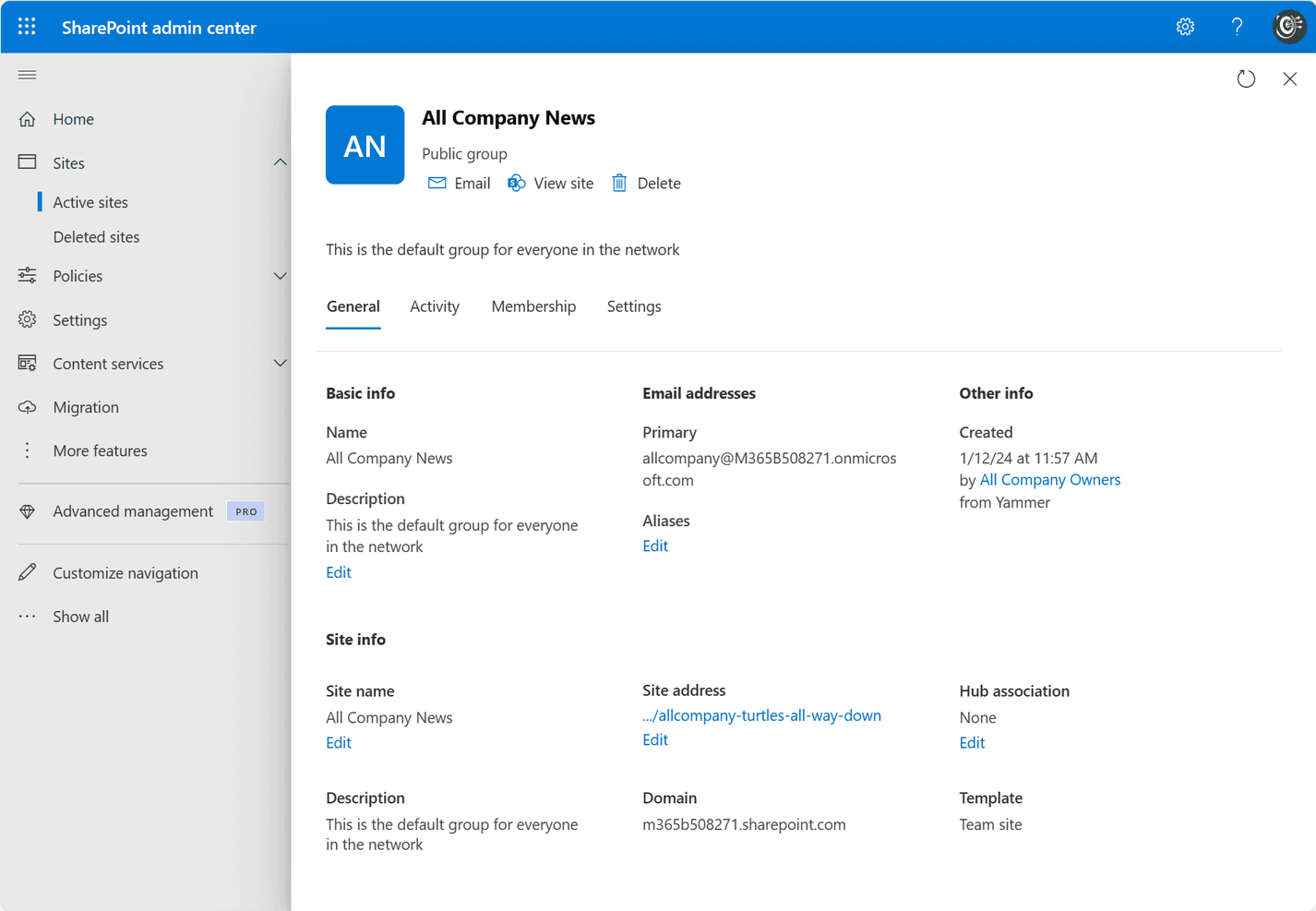
Microsoft SharePoint permite a los equipos crear, gestionar y compartir contenido en toda su organización. SharePoint es una plataforma de gestión del conocimiento y colaboración para equipos de Microsoft 365 que centraliza la documentación, las políticas y el conocimiento de los proyectos, al tiempo que mejora el acceso al contenido, la gobernanza y la capacidad de descubrimiento.
¿Para quién es más adecuado SharePoint?
SharePoint es adecuado para equipos de producto que ya trabajan en Microsoft 365 y necesitan wikis estructuradas para hojas de ruta, registros de decisiones y orientación sobre la entrega.
Por qué SharePoint es una buena alternativa a Confluence
Elegí SharePoint porque es la mejor opción para wikis de equipo nativas de Microsoft 365. Utilizo sitios de equipo, páginas estructuradas y bibliotecas de documentos para organizar las decisiones de producto, las directrices de las hojas de ruta y los estándares de entrega. El historial de versiones y los permisos granulares ayudan a mi equipo a mantener una documentación fiable sin perder el contexto.
Características principales de SharePoint
- Microsoft Search: Encuentra páginas, archivos, personas y sitios en todo Microsoft 365.
- Listas de SharePoint: Realizan un seguimiento de la información estructurada con columnas y vistas personalizables.
- Aprobación de contenido: Dirige las páginas y los documentos enviados a través de flujos de trabajo de revisión.
- Integración con Microsoft 365: Se conecta con Teams, OneDrive, Power Automate y Power BI.
Integraciones de SharePoint
SharePoint cuenta con integraciones nativas en todo el ecosistema de Microsoft, incluidas Microsoft Teams, OneDrive, Power Automate y Power BI.
Pros and Cons
Pros:
- Los permisos granulares permiten una documentación controlada
- El historial de versiones protege las directrices cambiantes del producto
- Las listas organizan el conocimiento estructurado del producto
Cons:
- La creación de wikis resulta menos intuitiva
- La arquitectura del sitio requiere una administración cuidadosa
Learn more about SharePoint: Ideal para migrar wikis de Confluence autoalojados
- Plan gratuito + prueba gratuita de 30 días disponible
- Desde €2.50/usuario/mes (facturado anualmente)
Visit WebsiteCustomer Rating:4.4/5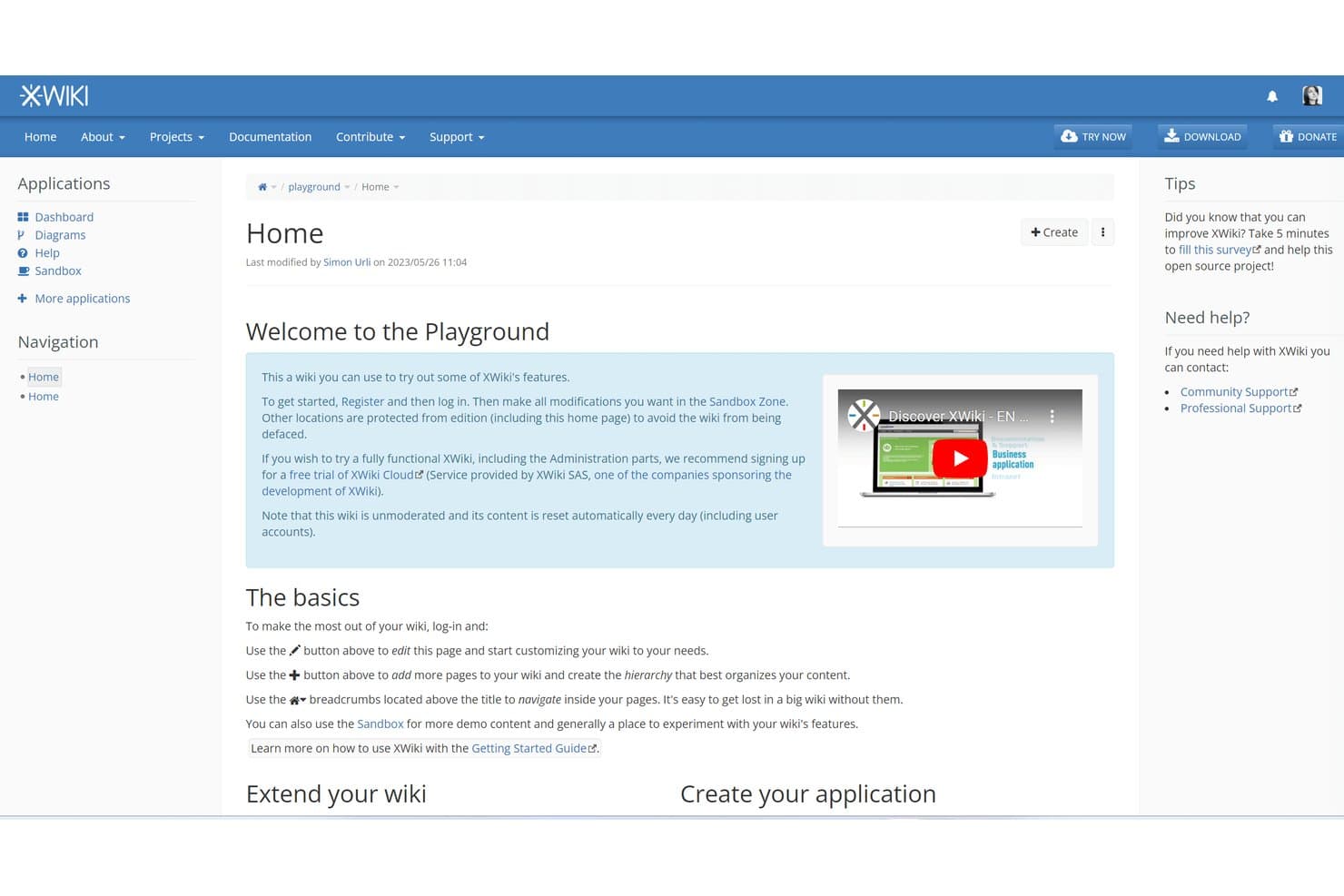
XWiki ofrece un wiki de prueba para que los usuarios exploren sus funciones libremente. XWiki es una plataforma de gestión del conocimiento de código abierto para equipos que buscan una alternativa personalizable a Confluence para organizar la documentación, el conocimiento interno y la colaboración en un solo lugar.
¿Para quién es más adecuado XWiki?
XWiki es adecuado para equipos que migran desde Confluence autoalojado y necesitan una plataforma de gestión del conocimiento de código abierto y personalizable.
Por qué XWiki es una buena alternativa a Confluence
Elegí XWiki porque permite a los equipos migrar wikis de Confluence autoalojados sin renunciar al control de su base de conocimiento. Utilizo sus herramientas de migración de Confluence para trasladar espacios, páginas y archivos adjuntos a una plataforma de código abierto. Sus páginas anidadas, el historial de versiones y los controles de acceso ayudan a conservar los flujos de trabajo de documentación habituales después de la migración.
Características principales de XWiki
- Editor WYSIWYG : Crea y da formato a páginas sin escribir código de marcado.
- Plantillas de página : Crea estructuras de página reutilizables para documentación recurrente.
- Macros : Añade componentes de contenido dinámico a las páginas wiki.
- Importador de documentos de Office : Convierte archivos de Office en páginas wiki editables.
Integraciones de XWiki
XWiki es compatible con Jira mediante su macro oficial JIRA Macro y la integración con CKEditor, además de OpenProject mediante la aplicación OpenProject Integration (Pro). También proporciona una API REST para integraciones personalizadas.
Pros and Cons
Pros:
- La implementación de código abierto mantiene el control de los datos
- Las herramientas de migración de Confluence conservan los espacios y los archivos adjuntos
- Las macros y las plantillas permiten flujos de trabajo de documentación personalizados
Cons:
- La interfaz parece anticuada frente a alternativas más recientes
- La administración requiere una considerable experiencia técnica
Learn more about XWiki: 5La mejor opción para gestionar el conocimiento con flujos de trabajo de verificación
Guru
- Demostración gratuita disponible
- Precios disponibles bajo solicitud
Visit WebsiteCustomer Rating:3.5/5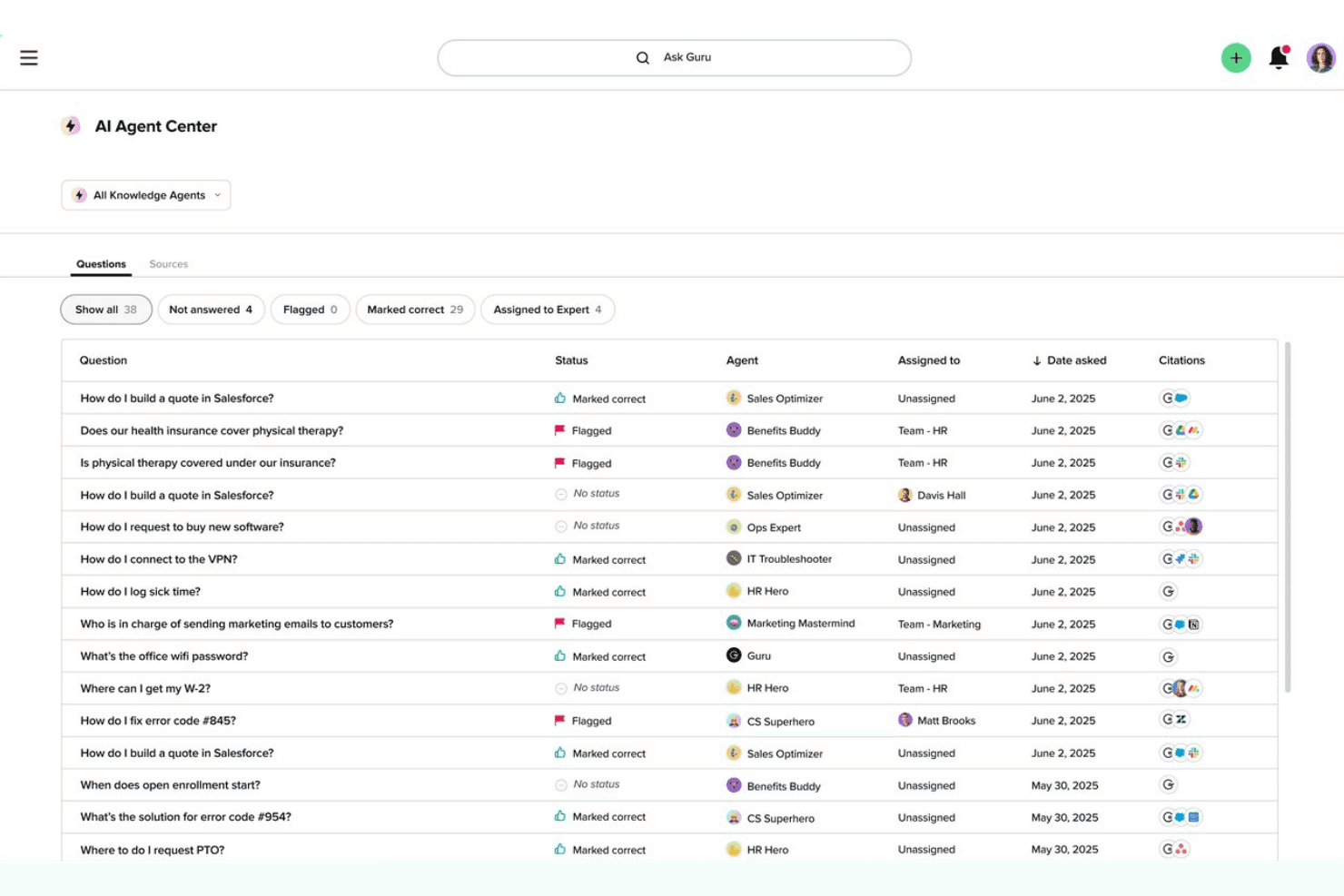
El Centro de agentes de IA de Guru ofrece un registro de preguntas con estados, agentes asignados y fuentes de citas en todos los departamentos. Como alternativa a Confluence, Guru ofrece a los equipos de producto, soporte y operaciones una plataforma de gestión del conocimiento para organizar la información de la empresa, encontrar respuestas rápidamente y reducir las preguntas repetidas.
¿Para quién es Guru más adecuado?
Guru es adecuado para equipos de producto, soporte y operaciones que necesitan respuestas internas confiables, con una asignación clara de responsables y una verificación programada del contenido.
Por qué Guru es una buena alternativa a Confluence
Elegí Guru porque su enfoque de conocimiento gobernado mantiene las respuestas internas actualizadas y asigna responsabilidades claras. Utilizo flujos de trabajo de verificación para asignar responsables del contenido y programar revisiones periódicas, mientras que las alertas de conocimiento señalan las instrucciones obsoletas. Esto se adapta a los equipos de producto que documentan procesos de lanzamiento, hallazgos de descubrimiento y respuestas de soporte que necesitan una validación periódica.
Características principales de Guru
- Búsqueda con IA: Encuentra respuestas en el contenido conectado de la empresa.
- Extensión del navegador: Captura y permite acceder al conocimiento desde cualquier página web.
- Integraciones con Slack y Microsoft Teams: Busca en Guru sin salir de las conversaciones del equipo.
- Tarjetas de conocimiento: Almacena información en bloques de contenido concisos y reutilizables.
Integraciones de Guru
Guru documenta más de 100 integraciones prediseñadas, incluidas Slack, Microsoft Teams, Salesforce, Jira, Google Drive, GitHub, HubSpot, Zendesk, Confluence y Páginas de Notion, y se conecta con Zapier. También es compatible con Workato, Prismatic y la API de Guru para integraciones personalizadas.
Pros and Cons
Pros:
- Los flujos de trabajo de verificación asignan responsables y fechas de revisión
- La extensión del navegador captura el conocimiento allí donde se realiza el trabajo
- Las tarjetas de conocimiento ofrecen respuestas concisas y reutilizables
Cons:
- La precisión de la búsqueda puede variar según las fuentes de contenido
- Los documentos extensos no se adaptan bien a las tarjetas
Learn more about Guru: Ideal para documentos vinculados directamente a tareas y sprints
- Plan gratuito + demostración gratuita disponible
- Desde $7/usuario/mes (facturado anualmente)
Visit WebsiteCustomer Rating:4.6/5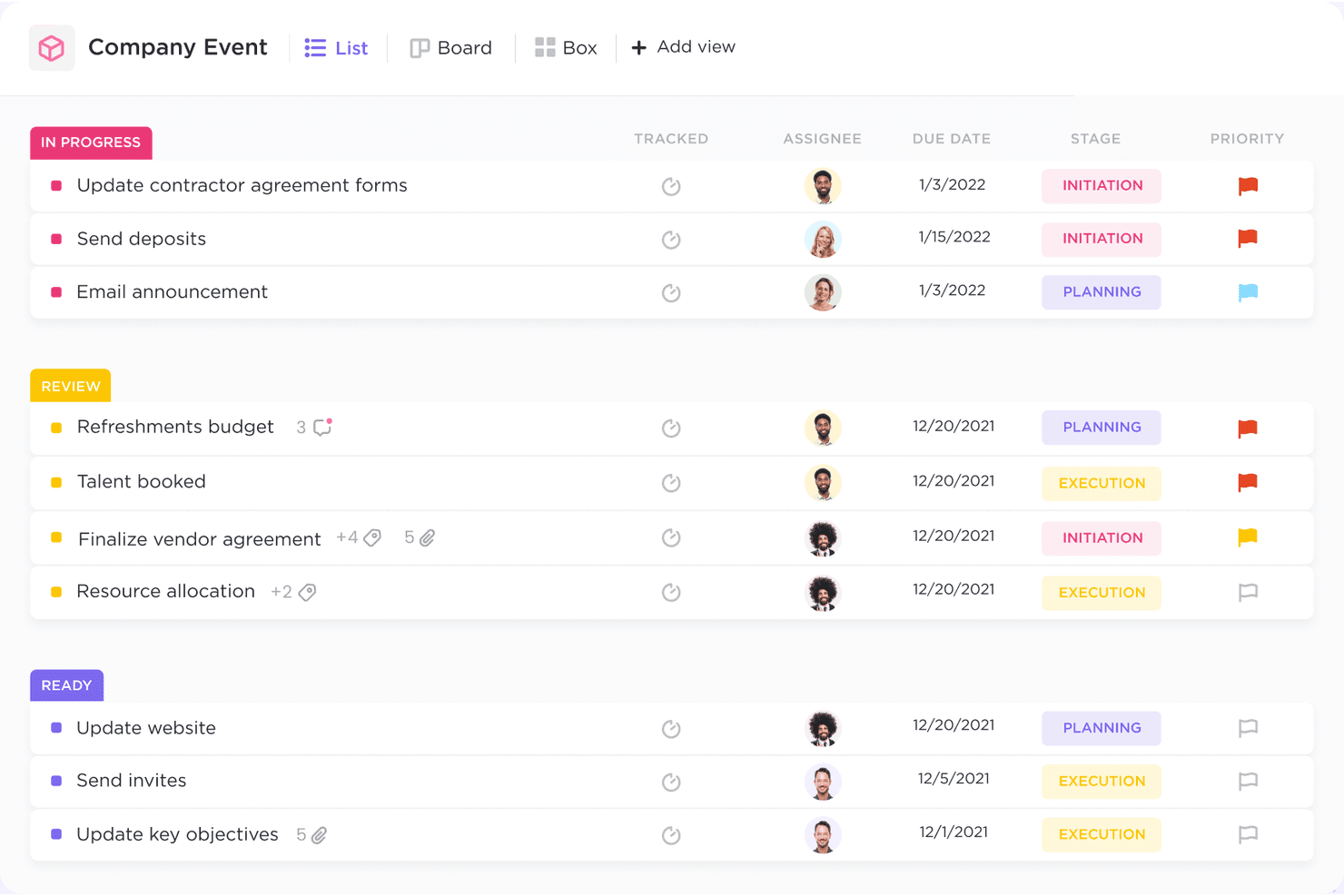
ClickUp ayuda a los equipos a gestionar tareas, hacer un seguimiento del progreso y colaborar eficazmente en un solo lugar. ClickUp es una plataforma flexible de gestión del conocimiento y colaboración en proyectos para equipos de producto que necesitan organizar la documentación, las decisiones y el conocimiento operativo junto con su trabajo diario.
¿Para quién es más adecuado ClickUp?
ClickUp es adecuado para equipos de producto que necesitan conectar la documentación con la planificación de sprints, la asignación de tareas y los flujos de trabajo de entrega.
Por qué ClickUp es una buena alternativa a Confluence
Elegí ClickUp porque sus documentos se conectan directamente con las tareas, los responsables y el trabajo de los sprints. Mi equipo mantiene las decisiones de producto junto a la ejecución, convirtiendo las notas de descubrimiento en tareas asignadas y vinculando los requisitos con los elementos de los sprints. Los comentarios conservan el contexto de la entrega dentro del mismo espacio de trabajo de gestión del conocimiento.
Características principales de ClickUp
- Páginas anidadas: Organiza el conocimiento con carpetas, páginas y subpáginas.
- Búsqueda global: Encuentra contenido en todos los espacios de trabajo, listas, tareas y documentos.
- Plantillas de página: Crea estructuras reutilizables para guías, wikis y resúmenes.
- Permisos: Controla quién puede ver, comentar o editar el contenido.
Integraciones de ClickUp
ClickUp ofrece integraciones nativas con Slack, Microsoft Teams, Google Drive, Dropbox, GitHub, GitLab, Bitbucket, Jira y Zoom. También se conecta con Zapier y Make, y proporciona una API para integraciones personalizadas.
Pros and Cons
Pros:
- Los documentos se conectan directamente con las tareas asignadas
- Las páginas anidadas organizan claramente el conocimiento del producto
- Los comentarios conservan las decisiones junto al trabajo de entrega
Cons:
- Los espacios de trabajo grandes pueden parecer visualmente abarrotados
- La edición de documentos está por detrás de las herramientas wiki especializadas
Learn more about ClickUp: Ideal para mantener los documentos actualizados mediante actualizaciones señaladas por la IA
- Demostración gratuita + prueba gratuita de 14 días disponible
- Desde $10/usuario/mes (facturado anualmente)
Visit WebsiteCustomer Rating:4.7/5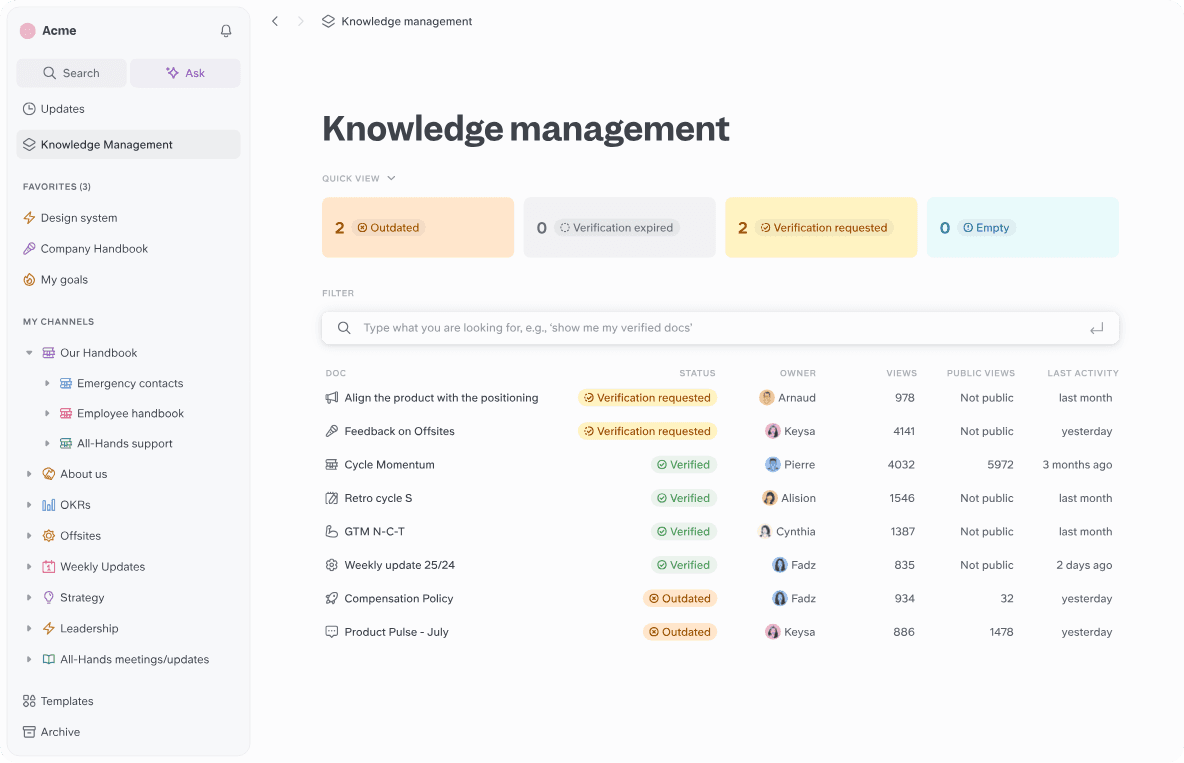
Slite ayuda a los equipos a crear, organizar y verificar sus conocimientos en un único espacio de trabajo colaborativo. Slite es una plataforma de gestión del conocimiento para equipos de producto que centraliza los documentos de la empresa, las decisiones y el contexto de los proyectos en un espacio de trabajo colaborativo.
¿Para quién es más adecuado Slite?
Los responsables de producto y los equipos de operaciones pueden usar Slite para mantener alineadas las decisiones, las especificaciones y el conocimiento interno a medida que cambia el trabajo de producto.
Por qué Slite es una buena alternativa a Confluence
Elegí Slite porque ayuda a los equipos de producto a mantener los documentos actualizados mediante actualizaciones señaladas por la IA. Utilizo su base de conocimientos para centralizar las especificaciones, las decisiones y el contexto de los proyectos, y después reviso las indicaciones de la IA cuando la información puede requerir atención. Esto ofrece a mi equipo una forma práctica de detectar las directrices obsoletas antes de que influyan en nuevos trabajos de producto.
Características principales de Slite
- Páginas anidadas: Organiza documentos relacionados en jerarquías de páginas estructuradas.
- Búsqueda de texto completo: Encuentra contenido relevante en todo tu espacio de trabajo mediante búsquedas por palabras clave.
- Permisos de documentos: Controla quién puede ver o editar documentos específicos.
- Plantillas: Crea documentos repetibles a partir de formatos de página reutilizables.
Integraciones de Slite
Slite ofrece integraciones nativas con GitHub, Linear, Asana, Airtable, Canva, Grain, Pitch, Lucidchart, Notion y Slack. También se conecta con Zapier y proporciona una API para integraciones personalizadas.
Pros and Cons
Pros:
- La IA señala la información obsoleta para su revisión
- Edición colaborativa y sencilla para la documentación de productos
- Las páginas anidadas organizan las especificaciones y las decisiones
Cons:
- La búsqueda puede no encontrar algunas coincidencias de palabras clave
- Formato limitado para necesidades avanzadas de documentación
Learn more about Slite: Ideal para documentos conectados a tableros de proyectos activos
- Plan gratuito disponible
- Desde $9/usuario/mes (facturado anualmente)
Visit WebsiteCustomer Rating:4.6/5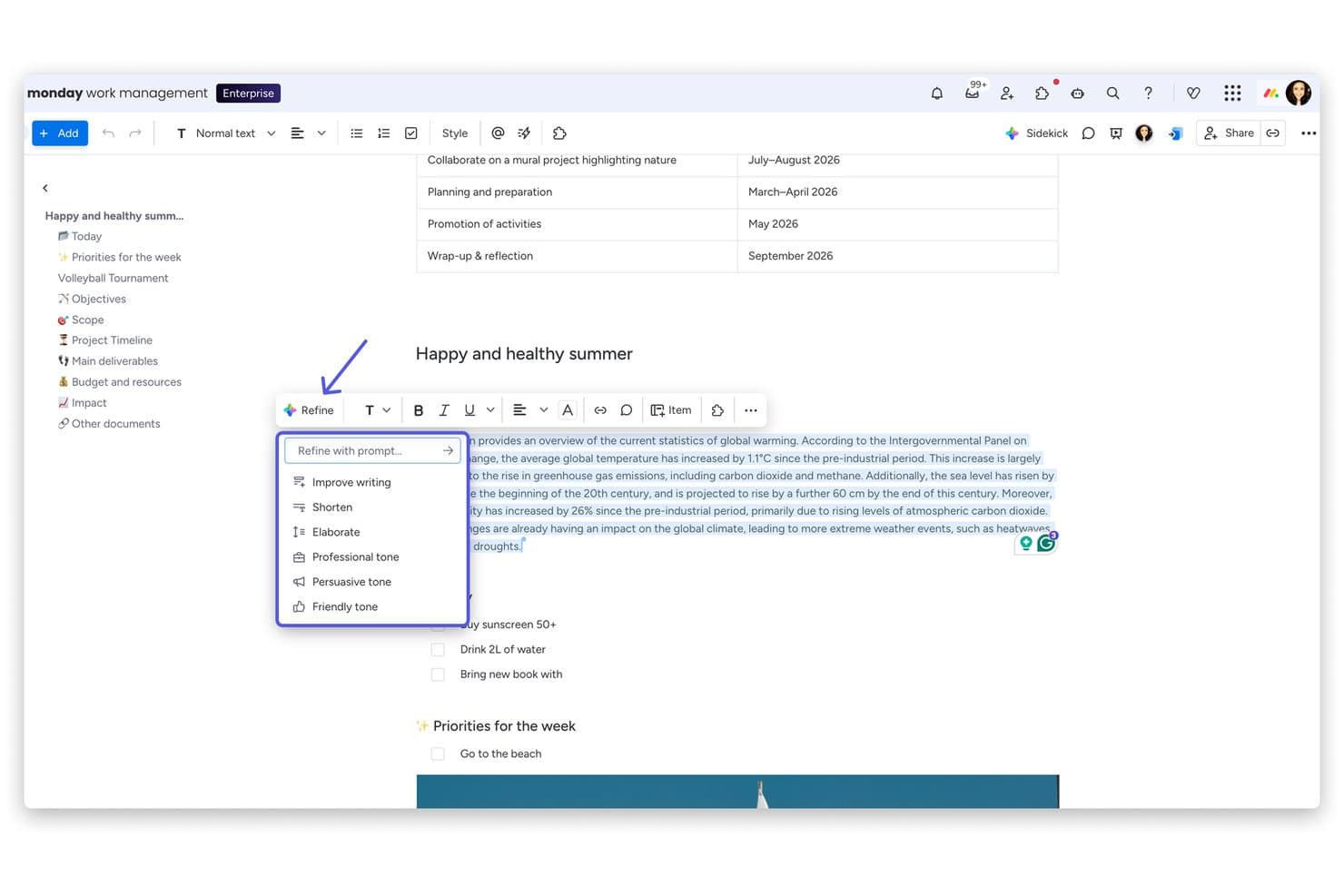
monday AI Workspace ofrece un menú “Perfeccionar” con tecnología de IA y opciones como Mejorar la redacción, Acortar, Ampliar y ajustar el tono directamente dentro de su editor de documentos. monday AI Workspace es una plataforma colaborativa de gestión del conocimiento para equipos de producto que conecta el contexto de los proyectos, la documentación y los flujos de trabajo del equipo en un solo espacio de trabajo.
¿Para quién es más adecuado monday AI Workspace?
Equipos de producto que necesitan vincular la documentación directamente con tableros de proyectos activos, flujos de trabajo y actualizaciones de entrega.
Por qué monday AI Workspace es una buena alternativa a Confluence
Elegí monday AI Workspace porque su enfoque de “Ideal para documentos conectados a tableros de proyectos activos” mantiene la documentación del producto vinculada al trabajo de entrega. Utilizo los documentos de trabajo para registrar decisiones, insertar elementos de los tableros y conectar directamente el contexto de la hoja de ruta con los proyectos activos. Mi equipo puede actualizar los requisitos junto a los cambios de estado en lugar de mantener páginas de Confluence separadas.
Funciones clave de monday AI Workspace
- Herramientas de escritura con IA: Genera, resume y perfecciona contenido dentro de los documentos de trabajo.
- Plantillas personalizables: Inicia documentos con formatos reutilizables para trabajos recurrentes.
- Permisos de acceso: Controla quién puede ver o editar el contenido del espacio de trabajo.
- Historial de versiones: Revisa versiones anteriores de los documentos y restaura cambios.
Integraciones de monday AI Workspace
monday AI Workspace ofrece más de 850 integraciones y aplicaciones, incluidas Slack, Jira, Google Drive, Microsoft Teams, GitHub, Asana, Trello y Zapier. También proporciona una API para integraciones personalizadas.
Pros and Cons
Pros:
- Vincula la documentación directamente con el trabajo activo del proyecto
- Los tableros personalizados admiten diversos flujos de trabajo de producto
- La IA resume y perfecciona el contenido de los documentos de trabajo
Cons:
- La organización del conocimiento parece más débil que en Confluence
- La estructura centrada en tableros complica la documentación independiente
Learn more about monday AI Workspace: La mejor opción para bases de conocimientos de equipos autoalojadas
- Plan gratuito + prueba gratuita de 30 días disponible
- Desde $10/mes
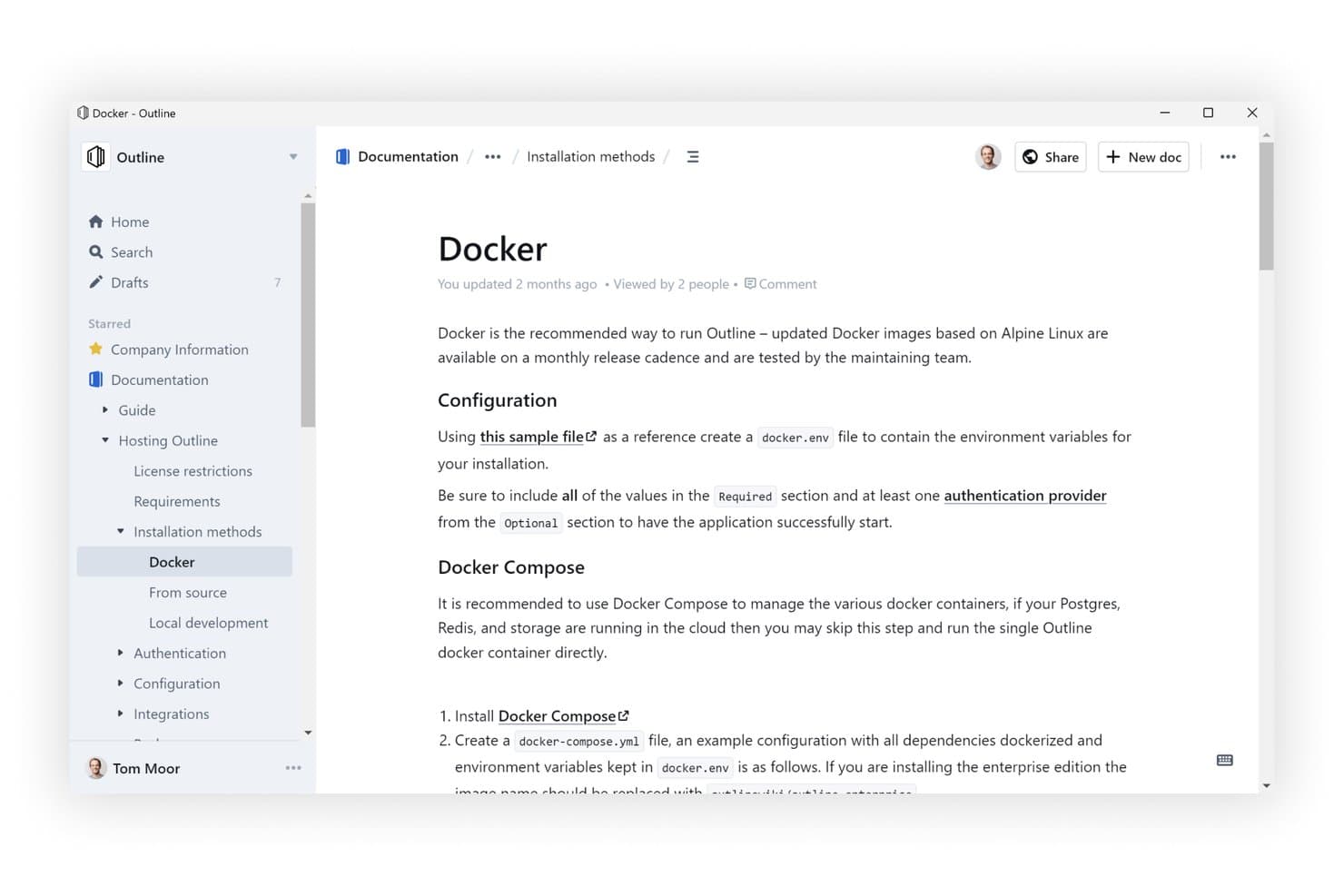
Outline ofrece una interfaz limpia y jerárquica de base de conocimientos con documentos anidados. Outline es una base de conocimientos autoalojada para equipos que necesitan un mayor control sobre la documentación interna, la información compartida y el conocimiento colaborativo del lugar de trabajo.
¿Para quién es más adecuada Outline?
Outline es adecuada para equipos técnicos que quieren una base de conocimientos colaborativa que puedan alojar y controlar por sí mismos.
Por qué Outline es una buena alternativa a Confluence
Elegí Outline porque es la mejor opción para las bases de conocimientos de equipos autoalojadas. Utilizo sus colecciones y su editor de Markdown para organizar especificaciones de productos, notas de investigación y registros de decisiones en un solo espacio de trabajo. El autoalojamiento proporciona a mi equipo un mayor control sobre la documentación interna y el conocimiento compartido del lugar de trabajo.
Características principales de Outline
- Colaboración en tiempo real: Edita documentos conjuntamente y debate los cambios mediante comentarios e hilos.
- Respuestas a preguntas mediante IA: Haz preguntas y recibe respuestas basadas en los documentos de tu espacio de trabajo.
- Integración con Slack: Busca, comparte y haz preguntas sobre documentos desde Slack.
- Uso compartido público: Publica documentos con marca, dominios y controles de acceso personalizados.
Integraciones de Outline
Outline admite integraciones con Slack, Figma y Loom, además de una API abierta para integraciones personalizadas.
Pros and Cons
Pros:
- Experiencia rápida y cuidada de edición de documentos
- El autoalojamiento mantiene la documentación bajo tu control
- Los enlaces de retorno y la búsqueda instantánea conectan el conocimiento
Cons:
- El autoalojamiento requiere conocimientos especializados para configurar la autenticación
- Las implementaciones autoalojadas carecen de varios espacios de trabajo
Learn more about Outline: 10Ideal para la documentación como código con flujos de trabajo de sincronización con Git
GitBook
- Prueba gratuita de 14 días + plan gratuito disponible
- Desde $65/sitio/mes + $12/usuario/mes (facturado anualmente)
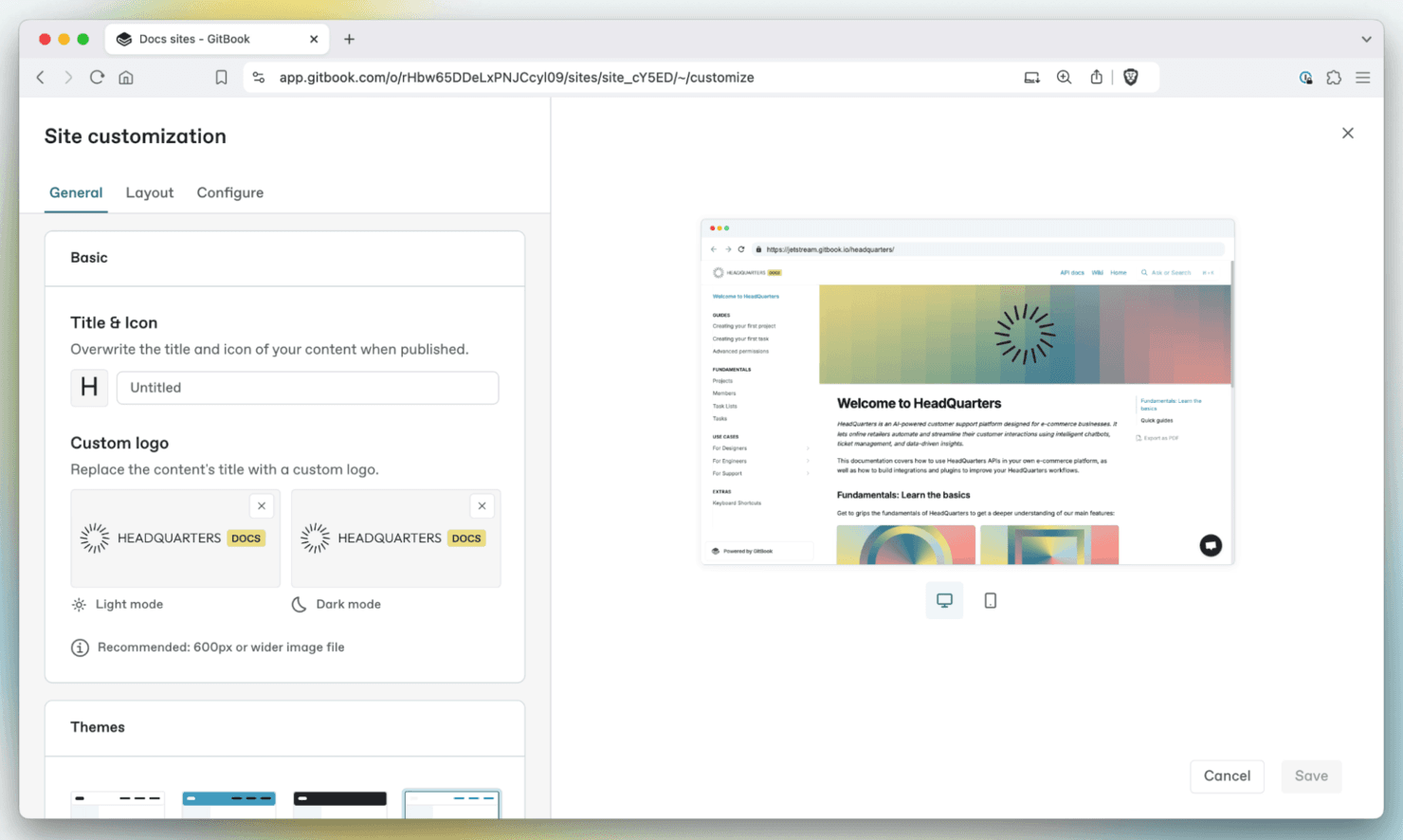
GitBook ayuda a los equipos a crear, organizar y publicar documentación con una plataforma limpia y colaborativa. GitBook es una plataforma de gestión del conocimiento para equipos de producto, ingeniería y áreas técnicas que necesitan crear, organizar y compartir documentación fiable sin el desorden de las wikis tradicionales.
¿Para quién es más adecuado GitBook?
Equipos de producto e ingeniería que mantienen documentación técnica mediante flujos de trabajo basados en Git y ciclos de lanzamiento frecuentes.
Por qué GitBook es una buena alternativa a Confluence
Elegí GitBook porque admite la documentación como código mediante flujos de trabajo de sincronización con Git. Utilizo la edición basada en Git, las solicitudes de incorporación de cambios y el historial de versiones para mantener la documentación del producto alineada con los lanzamientos de software. Sus espacios estructurados también ayudan a los equipos a publicar referencias de API, notas de lanzamiento y guías técnicas internas desde un único centro de documentación.
Características principales de GitBook
- Búsqueda avanzada: Encuentra páginas y términos en todos los espacios conectados.
- Dominios personalizados: Publica documentación en tu propio dominio.
- Autenticación de visitantes: Restringe el contenido a lectores autorizados.
- Comentarios sobre la página: Recopila comentarios de los lectores y sugerencias de mejora.
Integraciones de GitBook
GitBook ofrece integraciones integradas con GitHub, GitLab, Slack, Linear, Jira, Intercom, Google Analytics, Segment, PostHog y Sentry. Admite la sincronización bidireccional con GitHub y GitLab, además de una plataforma para crear integraciones personalizadas.
Pros and Cons
Pros:
- La edición basada en Git permite mantener la documentación alineada con los lanzamientos
- El historial de versiones ayuda a los equipos a revisar los cambios en el contenido
- Los espacios estructurados son adecuados para referencias de API y guías técnicas
Cons:
- La configuración de la sincronización con Git puede suponer un desafío para los colaboradores no técnicos
- La jerarquía de páginas puede volverse difícil de gestionar a gran escala
Learn more about GitBook:
Otras alternativas a Confluence
Estas son algunas alternativas adicionales a Confluence que no llegaron a mi selección, pero que aún merece la pena considerar:
- 11ArchbeeIdeal para documentación técnica con flujos de trabajo sincronizados con Git
- 12Superhuman DocsIdeal para documentación con bases de datos integradas y sincronización con Jira
- 13TettraIdeal para preguntas y respuestas y wikis de equipos que priorizan Slack
- 14BloomfireIdeal para la búsqueda empresarial de conocimientos basada en IA
- 15StonlyIdeal para documentación de atención al cliente impulsada por IA
- 16HelpjuiceIdeal para la búsqueda impulsada por IA en centros de ayuda internos
- 17SlabIdeal para documentos que se verifican y se mantienen actualizados
- 18BookStackIdeal para documentación autoalojada sin gastos de licencia
- 19Wiki.jsIdeal para soluciones wiki de código abierto
- 20MintlifyIdeal para equipos de documentación para desarrolladores nativos de Git
Cómo evalúo las alternativas a Confluence
Divido mi evaluación en tres partes: primero, la funcionalidad principal, donde compruebo que una herramienta permita a los equipos editar páginas de forma colaborativa en tiempo real y organizar el contenido en jerarquías anidadas—estos aspectos tienen el mayor peso. Después, busco funciones destacadas, como asistentes de conocimiento basados en IA y plantillas listas para productos. Por último, considero la asistencia para la migración y la relación calidad-precio.
Funcionalidad principal (requisitos básicos para esta lista)
Al seleccionar herramientas para mi lista, puntúo cada una en una escala de 0 (no ofrece la funcionalidad) a 5 (sobresale en esta área) para cada una de las funcionalidades principales que se indican a continuación. Después convierto el total en un porcentaje para ayudar a evaluar la adecuación general de cada herramienta, con un peso adicional para las funcionalidades que he considerado esenciales.
- Edición colaborativa (esencial): Busco edición colaborativa en tiempo real, comentarios insertados, menciones y flujos de trabajo de revisión para especificaciones y notas de reuniones.
- Jerarquía del contenido (esencial): Evalúo las páginas o espacios anidados, la reorganización mediante arrastrar y soltar, y las estructuras para documentación de productos en crecimiento.
- Búsqueda y descubrimiento: Compruebo la búsqueda de texto completo en páginas y archivos adjuntos, los filtros, la relevancia y las vistas previas para localizar decisiones rápidamente.
- Permisos y uso compartido: Evalúo los roles a nivel de página y espacio, el acceso de los grupos, la herencia y el uso compartido externo controlado.
- Integraciones con herramientas: Busco conexiones nativas con herramientas de gestión de proyectos, comunicación y desarrollo, incluidos enlaces integrados útiles o actualizaciones bidireccionales.
- Historial de versiones: Compruebo las ediciones atribuidas, las marcas de tiempo, las comparaciones y las opciones de restauración cuando cambian los requisitos o las decisiones.
Una vez que tengo una lista de herramientas que cumplen los criterios, considero qué distingue a cada plataforma.
Factores diferenciadores (lo que distingue a los proveedores)
Así es como comparo y contrasto los distintos proveedores:
Funciones destacadas
Busco un asistente de conocimiento basado en IA que pueda resumir páginas extensas y responder preguntas a partir de documentos existentes—algo útil cuando un gestor de productos necesita ponerse al día con una especificación a mitad del sprint. Las vistas de tabla al estilo de una base de datos también son importantes, ya que hacer un seguimiento de las funcionalidades o los elementos de un lanzamiento dentro del mismo documento elimina la necesidad de alternar entre una wiki y una hoja de cálculo. También evalúo las herramientas integradas de pizarra o diagramación, porque representar los flujos de usuario junto a los requisitos escritos mantiene el contexto en un solo lugar.
Más allá de las funciones
La asistencia para la migración es lo que más importa: compruebo si una herramienta ofrece importadores automatizados de Confluence que conserven las jerarquías de páginas, porque reconstruir manualmente los espacios anidados puede paralizar a un equipo durante semanas. También evalúo la usabilidad interfuncional, ya que la documentación de producto afecta a diseñadores, ejecutivos e ingenieros que no tolerarán una curva de aprendizaje pronunciada. La transparencia de precios completa mi análisis; busco costes ocultos relacionados con los límites de almacenamiento o los complementos de integración que aumenten la factura a medida que crece el equipo.
¿Por qué buscar una alternativa a Confluence?
Aunque Confluence es una buena opción de software de colaboración y documentación, hay varios motivos por los que algunos usuarios buscan soluciones alternativas. Puede que estés buscando una alternativa a Confluence porque…
- Es demasiado complejo para equipos pequeños
- Necesitas un mejor acceso sin conexión
- Las opciones de personalización son limitadas
- Quieres una navegación más intuitiva
- La integración con otras herramientas es insuficiente
Si te identificas con alguna de estas situaciones, has llegado al lugar adecuado. Mi lista incluye varias opciones de software de colaboración y documentación más adecuadas para equipos que se enfrentan a estos desafíos con Confluence y buscan soluciones alternativas.
Características principales de Confluence
Estas son algunas de las características principales de Confluence de Atlassian, que te ayudarán a contrastar y comparar lo que ofrecen las soluciones alternativas:
- Edición colaborativa: Edita páginas con tu equipo simultáneamente sin conflictos de versiones, algo ideal para el trabajo asíncrono.
- Comentarios integrados: Añade comentarios directamente sobre el texto y los elementos visuales para mantener las conversaciones contextualizadas y orientadas a la acción.
- Notificaciones inteligentes: Menciona a tus compañeros de equipo, asigna tareas y vincula actualizaciones sin complicaciones con Jira y otras herramientas.
- Pizarras: Colabora visualmente en un lienzo infinito, convirtiendo las ideas en elementos de acción o páginas estructuradas.
- Bases de datos: Utiliza tablas flexibles con vistas sincronizadas para realizar un seguimiento del conocimiento y gestionar flujos de trabajo de proyectos sencillos.
- Herramientas de IA: Resume notas, organiza documentos o estructura automáticamente el contenido con la asistencia de IA integrada.
- Permisos de contenido: Configura los permisos de visualización y edición por página o espacio para gestionar la visibilidad y proteger la información confidencial.
- Plantillas y control de versiones: Utiliza plantillas basadas en buenas prácticas y un historial completo de cambios para agilizar la documentación.
- Calendarios de equipo: Comparte la disponibilidad y las fechas límite para coordinar los horarios entre equipos.
- Seguridad empresarial: Diseñado para crecer con tu organización, con cumplimiento normativo, registros de auditoría y controles de administración.