

Si eres responsable de producto, conoces los desafíos de mantener a tu equipo alineado y tus proyectos encaminados. Puede que ProductPlan no esté cubriendo tus necesidades. Ya sea por sus funciones limitadas, problemas de escalabilidad o dificultades de integración, buscas algo que se adapte mejor al flujo de trabajo de tu equipo.
He dedicado tiempo a probar y analizar diversas soluciones de software para encontrar las mejores alternativas a ProductPlan. En este artículo, compartiré mis principales opciones. Analizaré qué hace única a cada una y cómo pueden abordar tus necesidades específicas.
Mi objetivo es ofrecerte una guía imparcial y bien documentada que te ayude a elegir la herramienta adecuada para el éxito de tu equipo.
¿Qué es ProductPlan?
ProductPlan es una herramienta fundamental para la gestión de productos que ayuda a los equipos a planificar y visualizar sus estrategias de producto. Los usuarios, generalmente responsables de producto y jefes de proyecto, pueden considerar que ProductPlan no satisface sus necesidades por uno o varios de los siguientes motivos:
- Es demasiado caro para su presupuesto
- Su equipo necesita más opciones de personalización
- Necesitan una mejor integración con otras herramientas
- Necesitan compatibilidad con equipos más grandes
- El equipo trabaja en una ubicación geográfica diferente y necesita funciones de asistencia global
- Necesitan funciones de generación de informes más avanzadas
Si alguna de estas situaciones te resulta familiar, has llegado al lugar adecuado. Mi lista contiene varias opciones fundamentales de gestión de productos más adecuadas para equipos que se enfrentan a estos desafíos específicos con ProductPlan y buscan las mejores soluciones de software alternativas para la gestión de productos.
Por qué confiar en nuestras recomendaciones de software
6,700+
Reviews
20
Industry experts
16+
Evaluation factors
14
Years
Nuestro equipo lleva probando y evaluando software desde 2012. Como gestores de producto, sabemos lo difícil —y lo importante— que es elegir el software adecuado.
Para esta guía, evaluamos las herramientas mediante pruebas prácticas e investigación independiente, puntuando las herramientas según nuestros criterios de selección.
Nuestras reseñas reflejan nuestro criterio editorial humano, no un discurso de ventas.
Revisores expertos:
 Hannah ClarkSenior TPM
- Cristiano ValimSenior UI/UX Lead

Tabla comparativa de alternativas a ProductPlan
Esta tabla comparativa resume los detalles de precios de mis principales alternativas a ProductPlan:
| Tool | Best For | Trial Info | Price | ||
|---|---|---|---|---|---|
| 1 | Ideal para publicar hojas de ruta actualizadas basadas en Jira | Prueba gratuita de 30 días + plan gratuito disponible | Desde $1.10/usuario/mes | Website | |
| 2 | Ideal para empresas tecnológicas medianas y grandes | Plan gratuito + prueba gratuita de 14 días + demostración gratuita disponible | Desde $19/usuario/mes (facturado anualmente) | Website | |
| 3 | Ideal para puntuar funcionalidades en relación con objetivos estratégicos | Prueba gratuita de 30 días + demostración gratuita disponible | Desde $9/usuario/mes | Website | |
| 4 | Ideal para equipos de producto pequeños y medianos | Prueba gratuita de 14 días + demostración gratuita disponible | Desde $44/usuario/mes (facturado anualmente) | Website | |
| 5 | Ideal para recopilar comentarios de clientes | Plan gratuito disponible | Desde $79/mes (facturado anualmente) | Website | |
| 6 | Ideal para la planificación basada en flujos de trabajo altamente personalizables | Plan gratuito disponible | Desde $11/usuario/mes | Website | |
| 7 | Ideal para la planificación de hojas de ruta basada en IA a nivel de cartera | Demostración gratuita disponible | Precios bajo solicitud | Website | |
| 8 | Ideal para modelos personalizados de puntuación de prioridades | Demostración gratuita disponible | Precios bajo petición | Website | |
| 9 | Ideal para vincular los comentarios de los clientes con los elementos de la hoja de ruta | Prueba gratuita de 14 días + demostración gratuita disponible | Desde $19/usuario/mes (facturado anualmente) | Website | |
| 10 | Ideal para alinear los comentarios con la hoja de ruta | Prueba gratuita de 14 días + demostración gratuita disponible | Desde $10/usuario/mes | Website |


Probamos y analizamos software de gestión de productos desde 2020. Como responsables de producto, sabemos lo importante y difícil que es tomar la decisión correcta al seleccionar un software. Invertimos en una investigación exhaustiva para ayudar a nuestra audiencia a tomar mejores decisiones de compra de software.
Hemos probado más de 2.000 herramientas para diferentes casos de uso de la gestión de productos y hemos redactado más de 1.000 análisis exhaustivos de software. Descubre cómo mantenemos la transparencia & consulta nuestra metodología de análisis de software.
Mejores reseñas de alternativas a ProductPlan
A continuación, encontrarás mis resúmenes detallados de las mejores alternativas a ProductPlan que llegaron a mi lista final. Mis reseñas ofrecen un análisis detallado de las funciones clave, ventajas & desventajas, integraciones y casos de uso ideales de cada herramienta para ayudarte a encontrar la mejor opción para ti.
 Ideal para publicar hojas de ruta actualizadas basadas en Jira
- Prueba gratuita de 30 días + plan gratuito disponible
- Desde $1.10/usuario/mes
Visit WebsiteCustomer Rating:5/5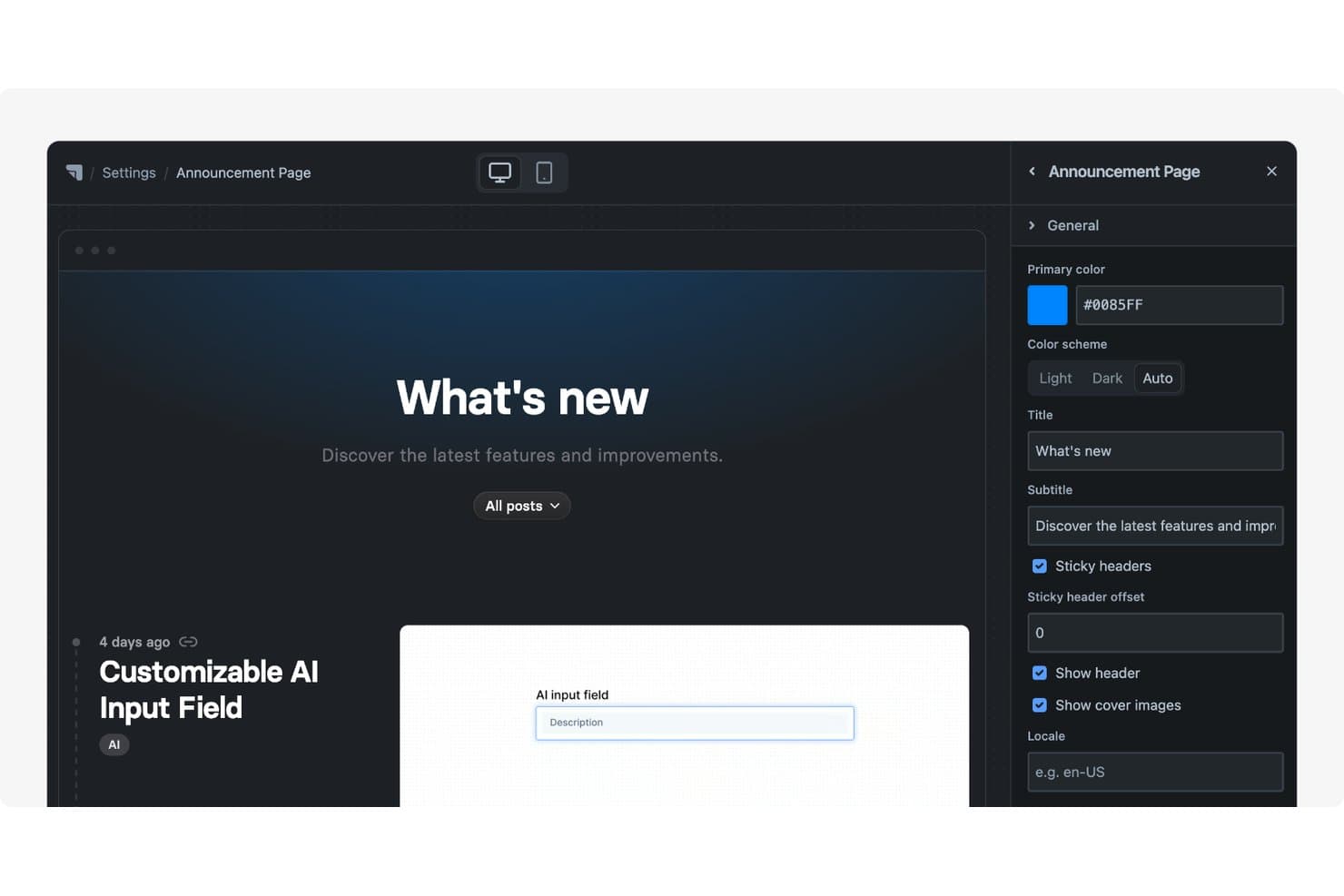
Released ofrece una página de anuncios personalizable con título, subtítulo, combinación de colores y ajustes del encabezado editables mediante un panel lateral. Released es una plataforma de gestión de productos para equipos que quieren convertir el trabajo de Jira en hojas de ruta orientadas al cliente, compartir planes de producto y alinear a las partes interesadas sin reemplazar su flujo de trabajo de entrega existente.
¿Para quién es mejor Released?
Responsables de producto y equipos de producto que utilizan Jira y necesitan publicar hojas de ruta actualizadas orientadas al cliente.
Por qué Released es una buena alternativa a ProductPlan
Elegí Released porque es la mejor opción para publicar hojas de ruta actualizadas basadas en Jira. Mi equipo puede convertir el trabajo de Jira en hojas de ruta orientadas al cliente y compartir planes de producto mientras mantiene Jira como fuente de verdad para la entrega. Las partes interesadas ven el progreso actual sin que los responsables de producto tengan que mantener manualmente una hoja de ruta independiente.
Funciones principales de Released
- Portal de comentarios de clientes: Recopila ideas, votos y comentarios mediante espacios públicos o privados.
- Notas de la versión con IA: Redacta notas de la versión a partir de tickets de Jira completados.
- Registro de cambios con marca personalizada: Publica actualizaciones de producto que se pueden buscar en tu dominio.
- Inserción del portal: Añade hojas de ruta, registros de cambios o formularios de comentarios a sitios web y documentos.
Integraciones de Released
Released está diseñado para Jira y ofrece integraciones con Slack, Framer, Webflow y Confluence, incluida una integración nativa de Scroll Sites para Confluence. También admite el seguimiento de solicitudes de incorporación de cambios de GitHub y conexiones personalizadas basadas en API.
Pros and Cons
Pros:
- Las hojas de ruta actualizadas reutilizan el trabajo existente de Jira
- Las conversaciones sobre comentarios enlazan directamente con tareas de Jira
- La IA redacta notas de la versión a partir de tickets
Cons:
- Requiere Jira para obtener los datos fuente de la entrega
- Menos herramientas de priorización estratégica que ProductPlan
Learn more about Released: Ideal para empresas tecnológicas medianas y grandes
- Plan gratuito + prueba gratuita de 14 días + demostración gratuita disponible
- Desde $19/usuario/mes (facturado anualmente)
Visit WebsiteCustomer Rating:4.5/5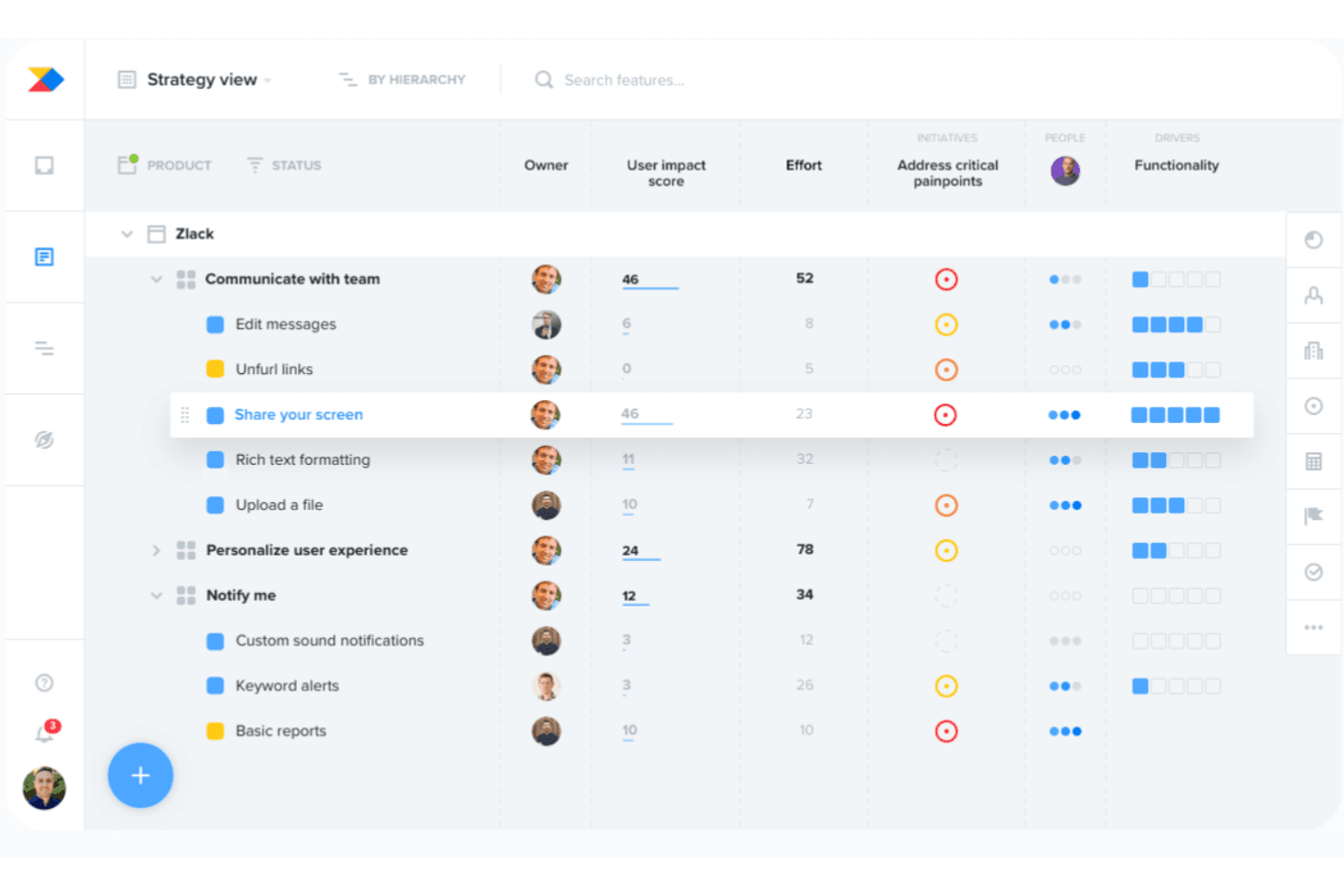
Productboard alinea el desarrollo con las necesidades de los clientes mediante una priorización basada en AI. Productboard es una plataforma de gestión de productos para empresas tecnológicas medianas y grandes que conecta la información de los clientes, la priorización y las hojas de ruta para ayudar a los equipos de producto a alinear sus decisiones con los objetivos empresariales.
¿Para quién es más adecuado Productboard?
Productboard es adecuado para responsables de producto de empresas tecnológicas medianas y grandes que necesitan información compartida, priorización y planificación de hojas de ruta.
Por qué Productboard es una buena alternativa a ProductPlan
Elegí Productboard porque conecta la información de los clientes, la priorización y las hojas de ruta en una sola plataforma de gestión de productos. Mi equipo puede vincular los comentarios de los clientes con las decisiones sobre el producto y, después, alinear las prioridades de la hoja de ruta con los objetivos empresariales. Es especialmente adecuado para empresas tecnológicas medianas y grandes que gestionan carteras de productos complejas.
Características principales de Productboard
- Jerarquía de productos: Organiza productos, componentes y funcionalidades en estructuras anidadas.
- Vistas de cronograma: Muestra iniciativas, funcionalidades y lanzamientos en cronogramas flexibles.
- Mapeo de dependencias: Visualiza las relaciones y dependencias entre los elementos planificados.
- Integración con Jira: Sincroniza los planes de producto con las incidencias de Jira y los flujos de trabajo de entrega.
Integraciones de Productboard
Productboard se integra con Jira para conectar los planes de producto con las incidencias de ingeniería y los flujos de trabajo de entrega.
Pros and Cons
Pros:
- Centraliza los comentarios de los clientes en las decisiones sobre el producto
- Vincula directamente la información con las funcionalidades priorizadas
- Admite la planificación de hojas de ruta a nivel de cartera
Cons:
- Requiere una configuración considerable antes de una adopción generalizada
- Algunos flujos de trabajo resultan rígidos para los equipos
Learn more about Productboard: 3Ideal para puntuar funcionalidades en relación con objetivos estratégicos
Aha!
- Prueba gratuita de 30 días + demostración gratuita disponible
- Desde $9/usuario/mes
Visit WebsiteCustomer Rating:4.4/5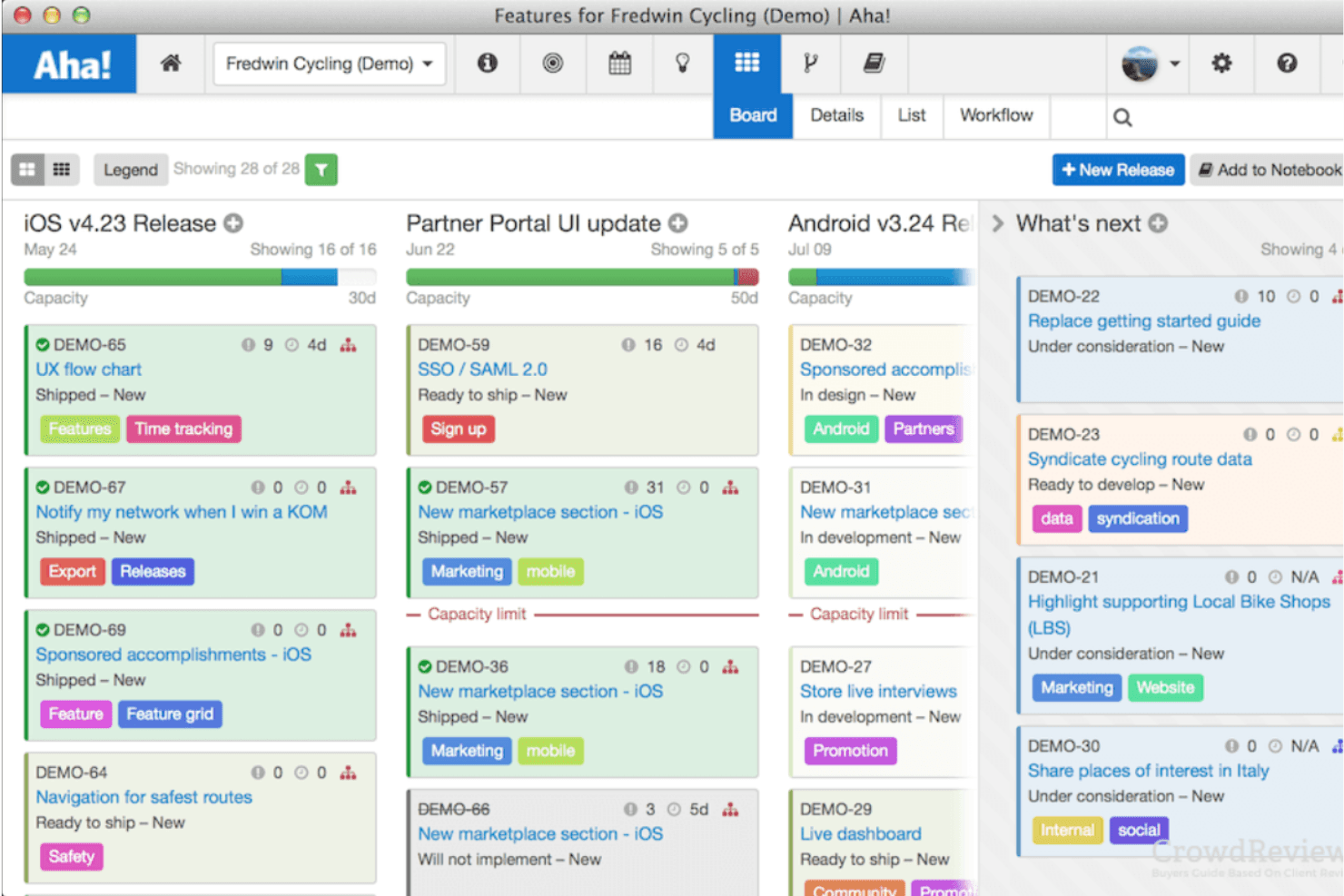
Aha! ayuda a priorizar proyectos con tarjetas de puntuación y hojas de ruta estratégicas. Aha! es un software de planificación de hojas de ruta de productos para gerentes de producto que necesitan conectar las necesidades de los clientes, las prioridades empresariales y los planes de entrega, manteniendo a las partes interesadas alineadas.
¿Para quién es más adecuado Aha!?
Aha! es adecuado para gerentes de producto que necesitan evaluar ideas de funcionalidades en relación con objetivos estratégicos y alinear a las partes interesadas en torno a las decisiones de la hoja de ruta.
Por qué Aha! es una buena alternativa a ProductPlan
Elegí Aha! porque puedo puntuar las ideas de funcionalidades en relación con objetivos estratégicos mediante tarjetas de puntuación personalizadas. Utilizo sus iniciativas y modelos estratégicos para conectar los elementos de la hoja de ruta con los objetivos de la empresa y, después, comparar solicitudes contrapuestas durante la priorización. Esto resulta útil cuando un equipo debe explicar por qué una funcionalidad tiene mayor prioridad que otra.
Funciones principales de Aha!
- Vistas de la hoja de ruta: Muestra los planes en formatos de cronograma, tabla dinámica, Gantt o carriles.
- Planificación de lanzamientos: Agrupa las funcionalidades en lanzamientos con fechas, hitos y capacidad.
- Seguimiento de dependencias: Vincula elementos de trabajo relacionados y supervisa las dependencias de entrega.
- Portal de comentarios de los clientes: Recopila, organiza y comparte ideas de los clientes con los colaboradores.
Integraciones de Aha!
Aha! ofrece más de 65 integraciones en sus productos, incluidas Jira, Azure DevOps, GitHub, Salesforce, Slack, Microsoft Teams, Zendesk, Asana y Trello, además de Zapier. También proporciona la API de Aha! para integraciones personalizadas.
Pros and Cons
Pros:
- Puntúa las funcionalidades en relación con objetivos estratégicos
- Conecta las iniciativas con los objetivos de la empresa
- Ofrece varios formatos para presentar hojas de ruta
Cons:
- La navegación puede resultar densa para los usuarios nuevos
- La configuración requiere tiempo antes del lanzamiento
Learn more about Aha!: Ideal para equipos de producto pequeños y medianos
- Prueba gratuita de 14 días + demostración gratuita disponible
- Desde $44/usuario/mes (facturado anualmente)
Visit WebsiteCustomer Rating:4.2/5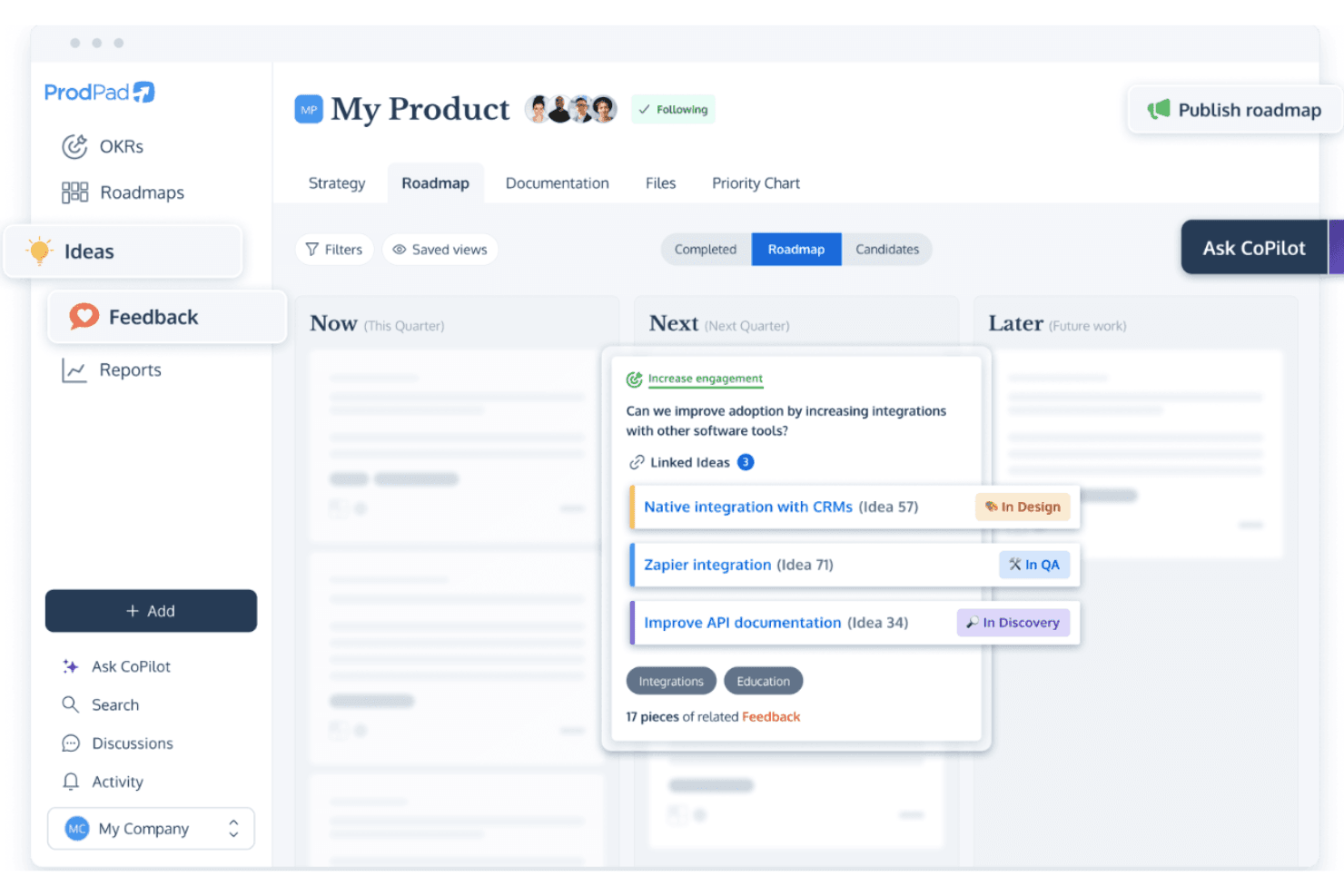
ProdPad admite hojas de ruta flexibles y gestión de ideas para la planificación ágil. ProdPad es una plataforma de gestión de productos y hojas de ruta para equipos pequeños y medianos que conecta los comentarios de los clientes, la priorización, el descubrimiento de productos y la planificación de la entrega en un solo espacio de trabajo.
¿Para quién es más adecuado ProdPad?
Responsables de producto de empresas en crecimiento que necesitan conectar la información de los clientes, el descubrimiento de productos, la priorización y la planificación de la entrega.
Por qué ProdPad es una buena alternativa a ProductPlan
Elegí ProdPad porque conecta los comentarios de los clientes, el descubrimiento de productos, la priorización y la planificación de la entrega en un solo espacio de trabajo. Para equipos de producto pequeños y medianos, mi equipo puede convertir la información de los clientes en decisiones priorizadas sobre la hoja de ruta y, después, conectar esas decisiones con los planes de entrega. Esto mantiene visibles las evidencias del descubrimiento a medida que cambian las prioridades de la hoja de ruta.
Características principales de ProdPad
- Vistas de la hoja de ruta: Cambia entre formatos de cronograma, lista y carriles.
- Campos personalizados: Añade campos estructurados para capturar detalles del producto.
- Dependencias: Mapea las relaciones entre los elementos de la hoja de ruta.
- Integraciones: Conecta ProdPad con herramientas de entrega como Jira.
Integraciones de ProdPad
ProdPad se integra con Jira para conectar la planificación del producto y las decisiones sobre la hoja de ruta con el trabajo de entrega.
Pros and Cons
Pros:
- Los comentarios de los clientes se vinculan directamente con las decisiones sobre la hoja de ruta
- Los artefactos del descubrimiento aportan información a los debates sobre la priorización
- Varias vistas de la hoja de ruta facilitan la comunicación con las partes interesadas
Cons:
- La planificación de la entrega parece más limitada que en las suites de ejecución
- Las opciones de informes pueden requerir configuración adicional
Learn more about ProdPad: Ideal para recopilar comentarios de clientes
- Plan gratuito disponible
- Desde $79/mes (facturado anualmente)
Visit WebsiteCustomer Rating:4.6/5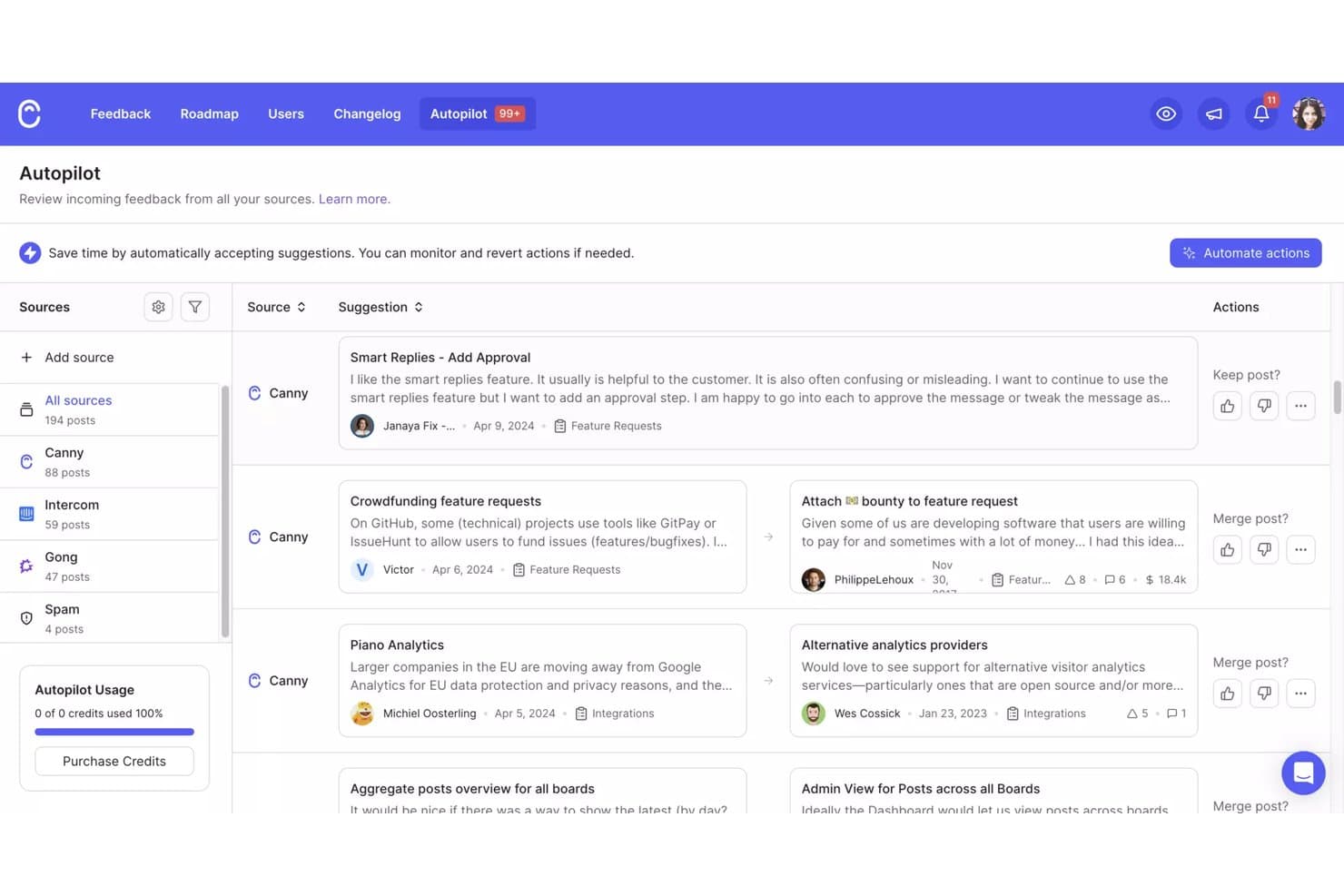
El piloto automático de Canny consolida los comentarios de varias fuentes para su revisión. Canny es una plataforma de gestión de productos para equipos que necesitan organizar las aportaciones sobre el producto, priorizar las decisiones de la hoja de ruta y mantener a clientes y partes interesadas alineados sobre lo que viene.
¿Para quién es más adecuado Canny?
Los equipos de producto de empresas SaaS en crecimiento pueden usar Canny para centralizar las solicitudes de los clientes, identificar necesidades recurrentes y fundamentar las decisiones de la hoja de ruta.
Por qué Canny es una buena alternativa a ProductPlan
Elegí Canny porque uso sus tableros de comentarios y votaciones para recopilar solicitudes de los clientes, agrupar necesidades recurrentes y cuantificar la demanda. También conecto las solicitudes validadas con las actualizaciones de la hoja de ruta y las publicaciones del registro de cambios, para que los clientes puedan ver cómo sus aportaciones influyen en las decisiones sobre el producto. Esto convierte a Canny en una buena alternativa a ProductPlan cuando los comentarios de los clientes impulsan la priorización.
Principales funciones de Canny
- Campos personalizados: Añade detalles estructurados a las entradas de comentarios.
- Estados personalizados: Define las etapas del flujo de trabajo para evaluar las solicitudes.
- Segmentación de usuarios: Filtra los comentarios según los atributos de los clientes.
- Integraciones: Conecta Canny con herramientas como Slack y Jira.
Integraciones de Canny
Canny ofrece más de 50 integraciones, incluidas Jira Cloud, Linear, GitHub, ClickUp, Asana, Azure DevOps Services, Slack, Salesforce, HubSpot e Intercom. Proporciona una API para integraciones personalizadas y se conecta con Zapier.
Pros and Cons
Pros:
- Centraliza las solicitudes con votaciones públicas
- Vincula los comentarios de los clientes con las actualizaciones de la hoja de ruta
- Segmenta la demanda según los atributos de los clientes
Cons:
- Las vistas de la hoja de ruta parecen secundarias frente a la gestión de comentarios
- Los informes avanzados requieren más análisis manual
Learn more about Canny: Ideal para la planificación basada en flujos de trabajo altamente personalizables
- Plan gratuito disponible
- Desde $11/usuario/mes
Visit WebsiteCustomer Rating:4.6/5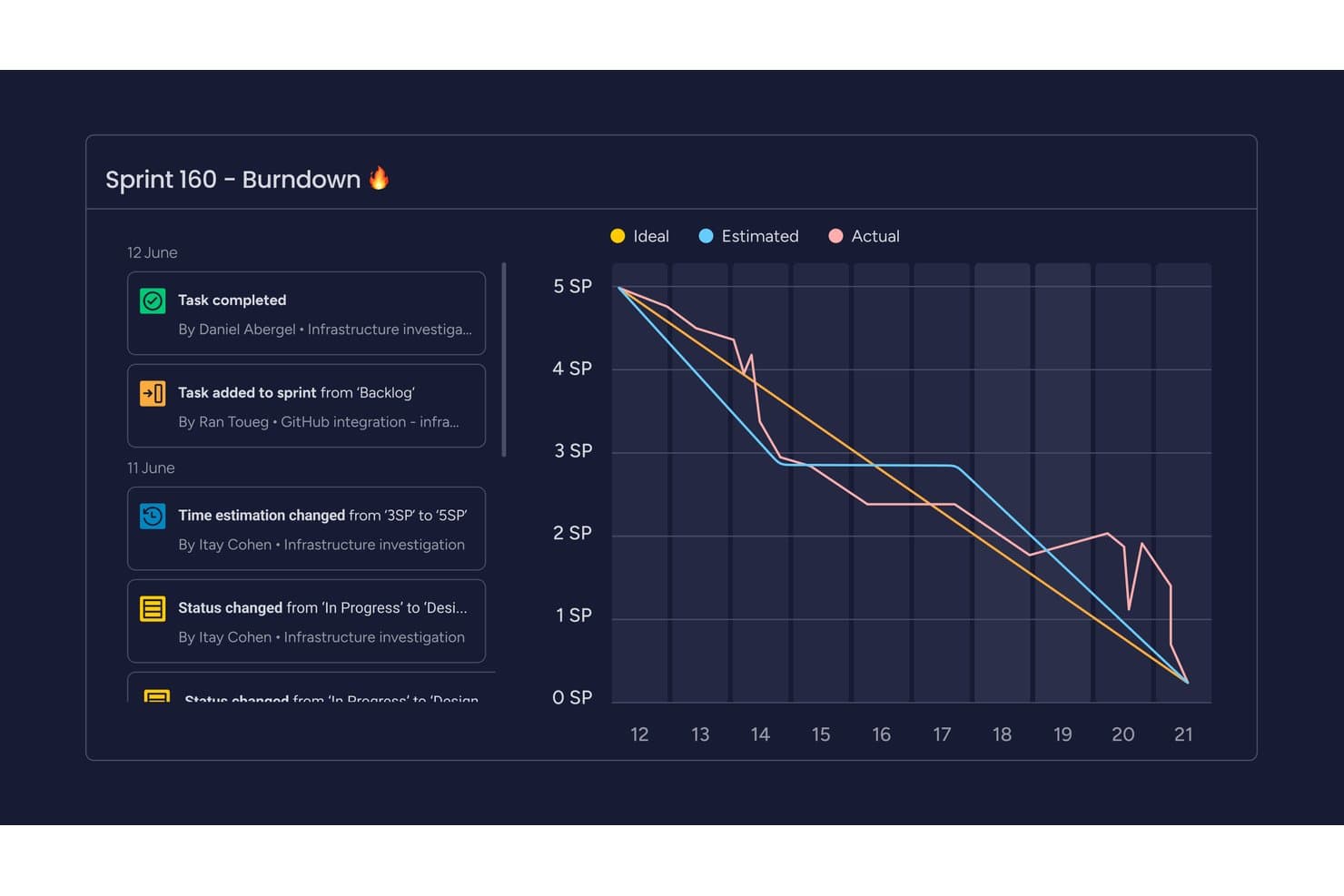
monday AI Workspace realiza un seguimiento del progreso del sprint con un gráfico de trabajo pendiente visual. monday AI Workspace es una plataforma flexible de gestión del trabajo para equipos de producto que necesitan conectar hojas de ruta, comentarios de clientes, planes de entrega y prioridades interfuncionales en un solo lugar.
¿Para quién es más adecuado monday AI Workspace?
Equipos de operaciones de producto que necesitan flujos de trabajo personalizables para gestionar la recepción de solicitudes, la priorización, los lanzamientos y las dependencias interfuncionales.
Por qué monday AI Workspace es una buena alternativa a ProductPlan
Elegí monday AI Workspace porque su planificación basada en flujos de trabajo altamente personalizables se adapta a las operaciones de producto. Utilizo tableros conectados para vincular los comentarios de los clientes, las hojas de ruta, los planes de entrega y las dependencias interfuncionales. Los flujos de trabajo personalizados de recepción y priorización también ayudan a mi equipo a trasladar las solicitudes desde el descubrimiento hasta el lanzamiento sin perder el contexto.
Características principales de monday AI Workspace
- Vistas de cronograma y Gantt: Visualiza las fechas de la hoja de ruta, los hitos y los calendarios de entrega.
- Seguimiento de dependencias: Vincula elementos y señala el trabajo de seguimiento bloqueado.
- Vista de carga de trabajo: Consulta la capacidad del equipo en las iniciativas de la hoja de ruta.
- Paneles: Supervisa el progreso de los proyectos con widgets personalizables.
Integraciones de monday AI Workspace
monday AI Workspace ofrece más de 850 integraciones y aplicaciones, incluidas Slack, Salesforce, HubSpot, Google Calendar, Microsoft Teams, GitHub, GitLab, Zendesk y Mailchimp. Es compatible con Zapier, integraciones del marketplace y una API de GraphQL para integraciones personalizadas.
Pros and Cons
Pros:
- Los tableros personalizados conectan el descubrimiento con la entrega
- Las vistas flexibles permiten la planificación de hojas de ruta interfuncionales
- Los paneles muestran el progreso de las iniciativas de producto
Cons:
- Está menos orientado específicamente a la planificación de carteras de productos
- El desglose de tareas puede limitar el trabajo de producto complejo
Learn more about monday AI Workspace: Ideal para la planificación de hojas de ruta basada en IA a nivel de cartera
- Demostración gratuita disponible
- Precios bajo solicitud
Visit WebsiteCustomer Rating:4.8/5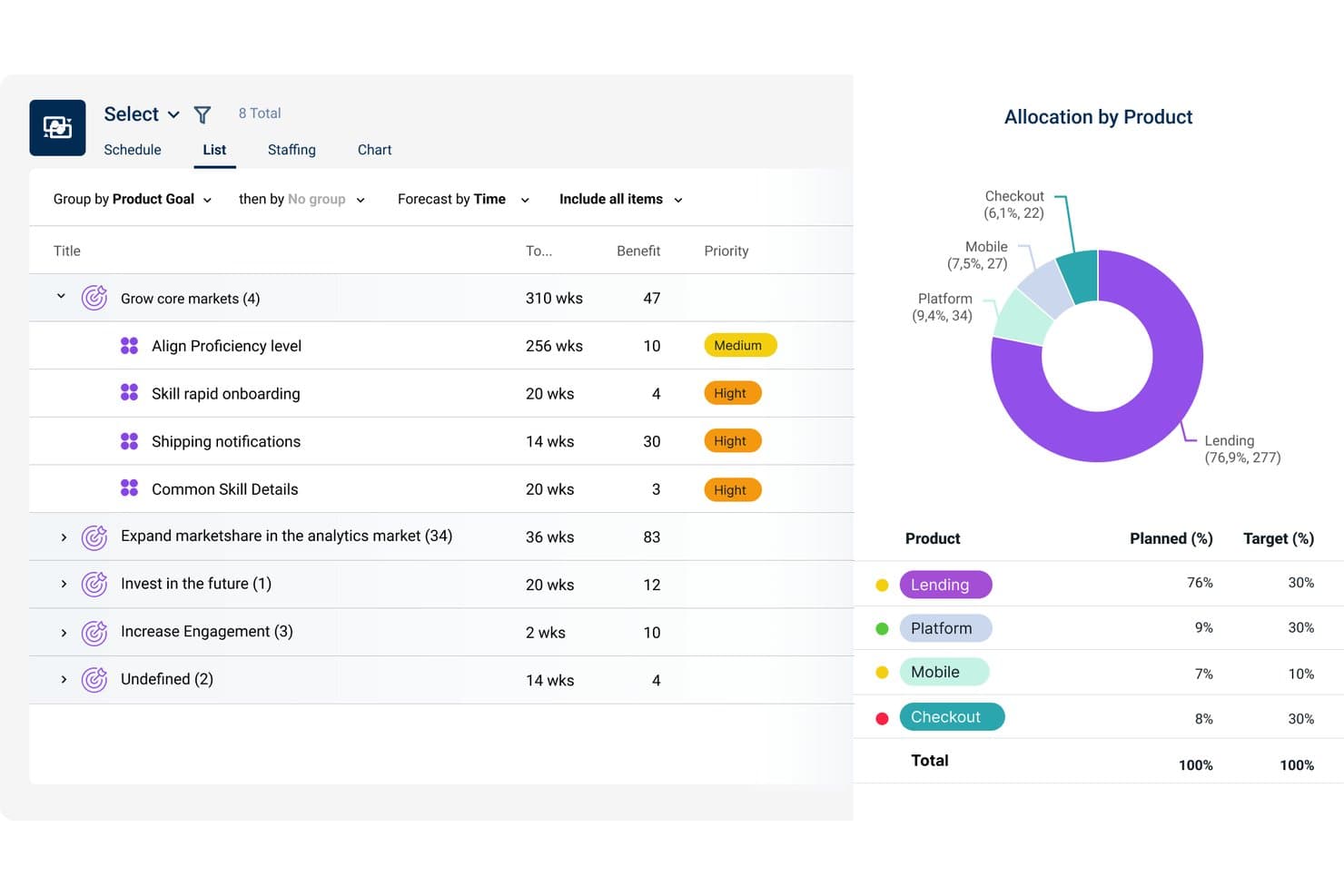
Dragonboat visualiza la asignación de productos frente a los objetivos en las carteras. Dragonboat es una plataforma de gestión de carteras de productos para líderes de producto que necesitan conectar la estrategia, la priorización, la planificación de la capacidad y la entrega entre equipos, manteniendo los resultados empresariales en perspectiva.
¿Para quién es más adecuado Dragonboat?
Los líderes de carteras de productos de organizaciones en crecimiento pueden utilizar Dragonboat para conectar las prioridades estratégicas, la planificación de la capacidad y la entrega entre equipos.
Por qué Dragonboat es una buena alternativa a ProductPlan
Elegí Dragonboat porque su planificación de hojas de ruta basada en IA a nivel de cartera conecta las prioridades estratégicas con la planificación de la capacidad y la entrega. Lo utilizo para comparar iniciativas entre equipos, equilibrar la capacidad disponible y mantener las hojas de ruta vinculadas a resultados empresariales medibles. Esto lo hace útil cuando las alternativas a ProductPlan deben respaldar decisiones de cartera que vayan más allá de los plazos de las funcionalidades.
Características principales de Dragonboat
- Integraciones con Jira y Azure DevOps: Sincroniza los elementos de la hoja de ruta con las herramientas de entrega.
- Mapeo de dependencias: Visualiza las relaciones entre las iniciativas y los elementos de trabajo.
- Vistas personalizadas de la hoja de ruta: Filtra y agrupa las hojas de ruta por los campos seleccionados.
- Seguimiento del progreso: Supervisa el estado de las iniciativas, los hitos y las actualizaciones de entrega.
Integraciones de Dragonboat
Dragonboat admite integraciones con Jira y Azure DevOps, lo que permite a los equipos sincronizar los elementos de la hoja de ruta con las herramientas de entrega.
Pros and Cons
Pros:
- Los resúmenes de cartera conectan las hojas de ruta con las necesidades de recursos
- La planificación de escenarios vincula las prioridades con resultados medibles
- Las vistas flexibles mantienen la alineación entre los distintos públicos de partes interesadas
Cons:
- La planificación de la capacidad presenta dificultades ante cambios en el tamaño de los equipos
- Compartir vistas externas requiere un esfuerzo adicional
Learn more about Dragonboat: Ideal para modelos personalizados de puntuación de prioridades
- Demostración gratuita disponible
- Precios bajo petición
Visit WebsiteCustomer Rating:4.4/5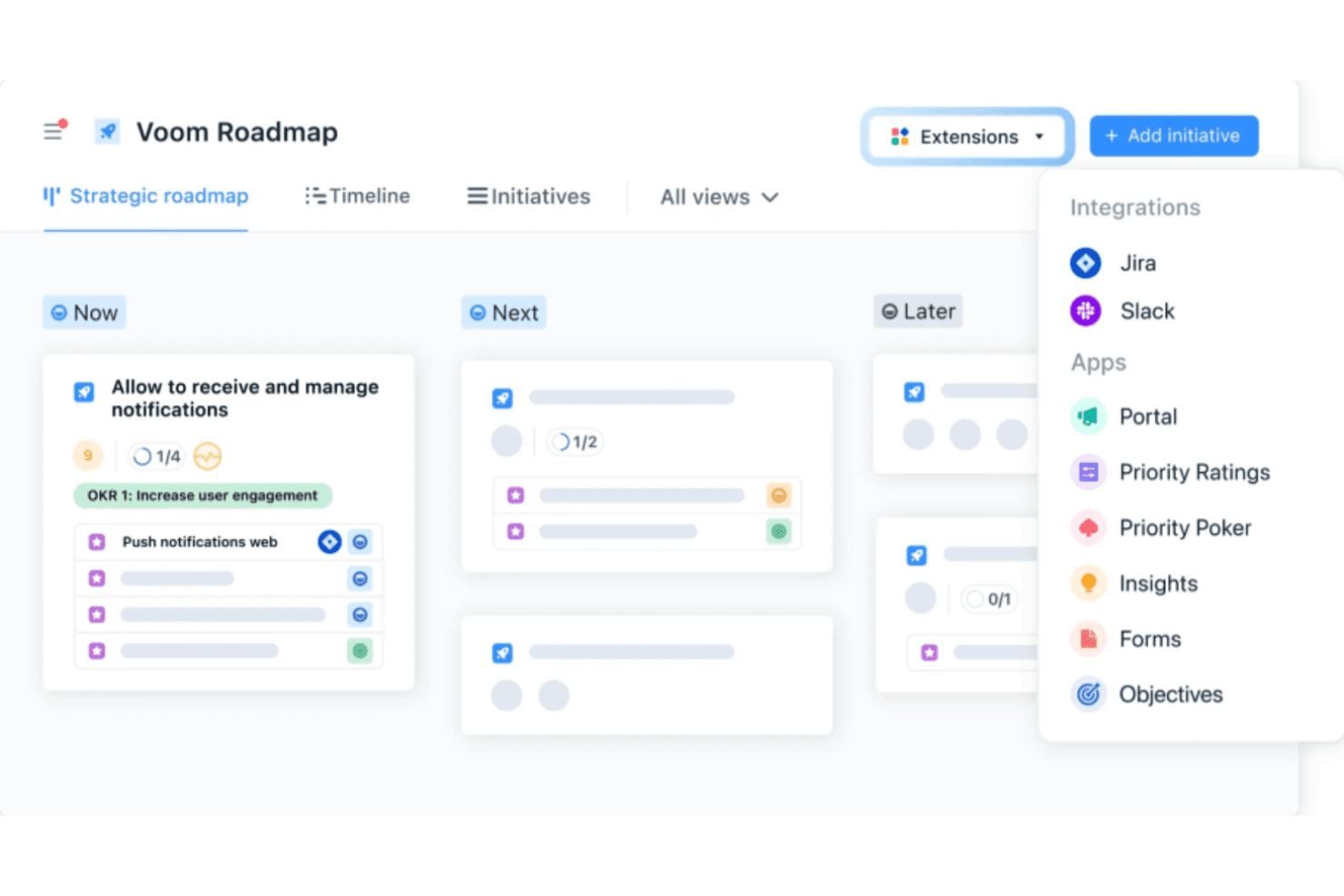
airfocus utiliza IA para la priorización y ofrece marcos personalizables para hojas de ruta flexibles. airfocus es una plataforma de gestión de productos para equipos que necesitan conectar la estrategia de producto, los comentarios de los clientes, las hojas de ruta y las decisiones de entrega en un solo espacio de trabajo.
¿Para quién es más adecuado airfocus?
Responsables de producto y equipos de operaciones de producto que necesitan modelos de puntuación configurables para comparar iniciativas en función de la estrategia, el valor para el cliente y las limitaciones de entrega.
Por qué airfocus es una buena alternativa a ProductPlan
Elegí airfocus porque está diseñado para modelos personalizados de puntuación de prioridades. Utilizo criterios ponderados, campos personalizados y vistas de priorización para comparar iniciativas según el valor para el cliente, la adecuación estratégica y el esfuerzo de entrega. Mi equipo puede ajustar los modelos de puntuación a medida que cambian los objetivos del producto y, después, utilizar los resultados para respaldar las decisiones sobre la hoja de ruta.
Características principales de airfocus
- Portal de comentarios: Recopila y organiza los comentarios de los clientes en un espacio compartido.
- Hojas de ruta de productos: Crea hojas de ruta visuales con vistas de cronología flexibles.
- Gestión de dependencias: Vincula elementos de trabajo relacionados para realizar un seguimiento de las dependencias de entrega.
- Integraciones: Conecta airfocus con herramientas como Jira, Azure DevOps y Slack.
Integraciones de airfocus
airfocus se integra con Jira, Azure DevOps y Slack.
Pros and Cons
Pros:
- Los modelos de puntuación ponderada comparan las iniciativas de forma coherente
- Los comentarios de los clientes se conectan directamente con la priorización
- El seguimiento de dependencias facilita las decisiones sobre la hoja de ruta
Cons:
- La edición de la cronología resulta poco práctica a gran escala
- La configuración inicial de la puntuación requiere una configuración considerable
 Ideal para vincular los comentarios de los clientes con los elementos de la hoja de ruta
- Prueba gratuita de 14 días + demostración gratuita disponible
- Desde $19/usuario/mes (facturado anualmente)
Visit WebsiteCustomer Rating:4.4/5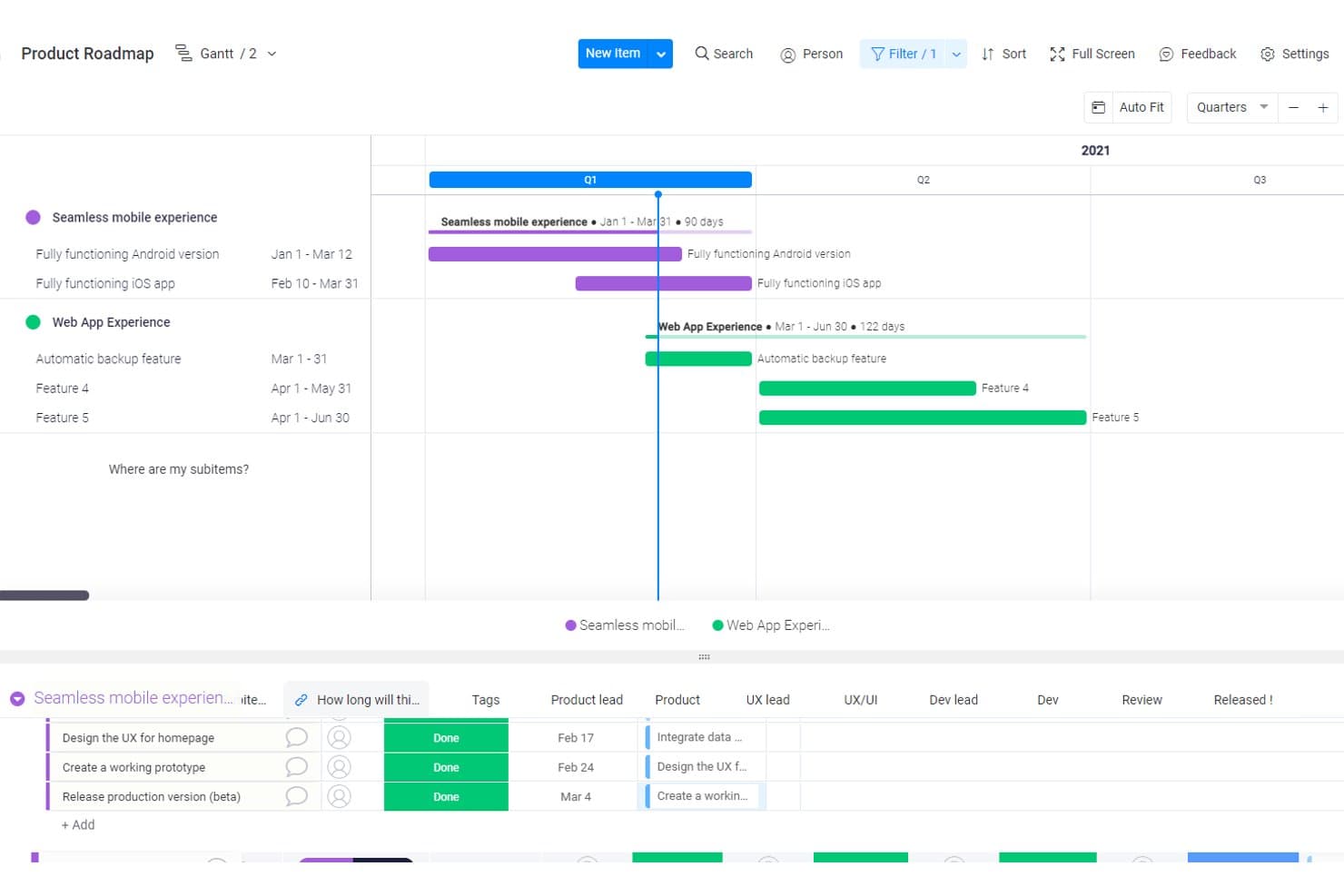
Craft.io visualiza las hojas de ruta de productos con cronogramas de Gantt y subelementos. Craft.io es un software de planificación de hojas de ruta para equipos de producto que necesitan conectar la estrategia, la priorización, la planificación de la cartera y la colaboración interfuncional en un solo espacio de trabajo.
¿Para quién es más adecuado Craft.io?
Craft.io es adecuado para equipos de producto que necesitan conectar los comentarios de los clientes con las decisiones de priorización y la planificación de hojas de ruta.
Por qué Craft.io es una buena alternativa a ProductPlan
Elegí Craft.io porque está diseñado para vincular los comentarios de los clientes con los elementos de la hoja de ruta. Utilizo su repositorio de comentarios, sus perspectivas de los clientes y sus herramientas de priorización para conectar las solicitudes con las iniciativas de producto. Así, mi equipo puede mostrar por qué es importante un elemento de la hoja de ruta, por ejemplo, relacionando las quejas repetidas sobre la incorporación con una mejora planificada del flujo de trabajo.
Funciones principales de Craft.io
- Vistas de hoja de ruta: Crea hojas de ruta de cronograma, carriles y cartera.
- Jerarquía de productos: Organiza productos, capacidades, funciones y lanzamientos.
- Asignación de dependencias: Vincula elementos de trabajo relacionados y muestra las dependencias de entrega.
- Integración con Jira: Sincroniza los elementos de la hoja de ruta con los datos de entrega de Jira.
Integraciones de Craft.io
Craft.io ofrece una integración nativa con Jira que sincroniza los elementos de la hoja de ruta con los datos de entrega. También admite integraciones personalizadas mediante una API.
Pros and Cons
Pros:
- Conecta los comentarios directamente con los elementos de la hoja de ruta
- Vincula las iniciativas con los resultados estratégicos
- Admite la planificación de dependencias y capacidad
Cons:
- La amplitud de funciones puede abrumar a los usuarios nuevos
- La calidad de los comentarios depende de un etiquetado coherente
Learn more about Craft.io: Ideal para alinear los comentarios con la hoja de ruta
- Prueba gratuita de 14 días + demostración gratuita disponible
- Desde $10/usuario/mes
Visit WebsiteCustomer Rating:4/5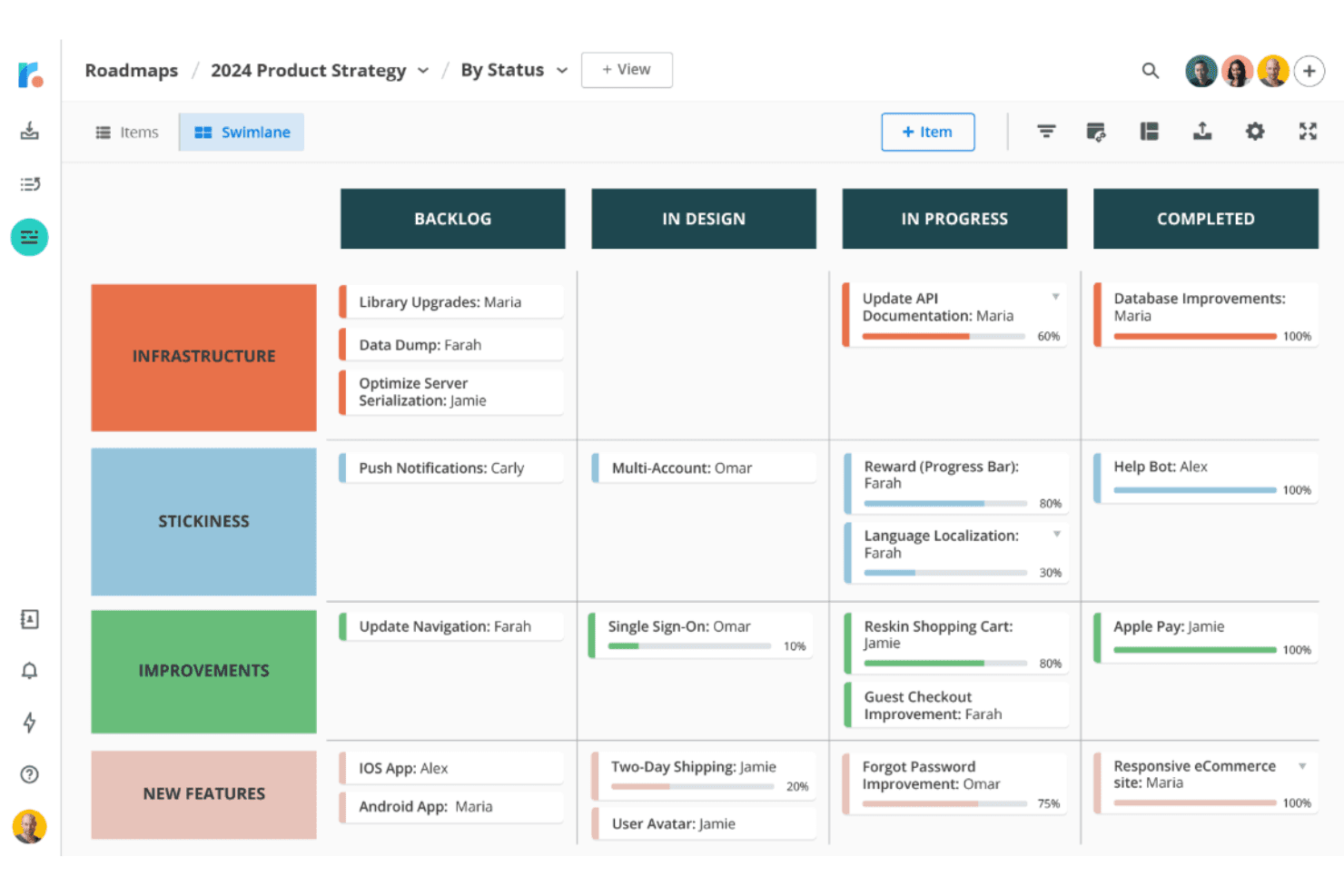
Roadmunk integra los comentarios de los usuarios en hojas de ruta claras y orientadas al cliente. El software de elaboración de hojas de ruta de Tempo ayuda a los equipos de producto a crear hojas de ruta visuales y compartibles que conectan las prioridades estratégicas con los planes de entrega y mantienen alineadas a las partes interesadas en carteras complejas.
¿Para quién es más adecuado el software de elaboración de hojas de ruta de Tempo?
Los gerentes de producto que necesitan convertir los comentarios de los clientes en hojas de ruta priorizadas y compartibles encontrarán que es una buena opción.
Por qué el software de elaboración de hojas de ruta de Tempo es una buena alternativa a ProductPlan
Elegí el software de elaboración de hojas de ruta de Tempo porque su alineación entre los comentarios y la hoja de ruta conecta las aportaciones de los clientes con las prioridades del producto. Utilizo los comentarios de los clientes para dar forma a hojas de ruta visuales y compartibles, y después vinculo las prioridades estratégicas con los planes de entrega. Esto ofrece a las partes interesadas una visión clara de por qué es importante una iniciativa y de dónde encaja en toda la cartera.
Características principales del software de elaboración de hojas de ruta de Tempo
- Vistas de cronograma : Muestra las iniciativas en formatos de hojas de ruta basados en el tiempo.
- Campos personalizados : Añade metadatos para temas, responsables, estados y prioridades.
- Mapeo de dependencias : Vincula iniciativas para mostrar las relaciones de entrega.
- Integración con Jira : Sincroniza los elementos de la hoja de ruta con proyectos y tareas de Jira.
Integraciones del software de elaboración de hojas de ruta de Tempo
El software de elaboración de hojas de ruta de Tempo ofrece integraciones nativas con Jira, Azure DevOps, GitHub, GitLab, Asana, Shortcut y Trello. Sus integraciones con Jira y Azure DevOps permiten sincronizar los elementos de la hoja de ruta con el trabajo de entrega, incluidas las fechas y los campos personalizados.
Pros and Cons
Pros:
- Priorización de ideas vinculada a los comentarios
- Múltiples vistas de la hoja de ruta a partir de un único conjunto de datos
- Las hojas de ruta compartibles clarifican la alineación de las partes interesadas
Cons:
- No incluye periodos nativos de planificación de sprints
- Algunos revisores informan de fallos ocasionales
Learn more about Tempo Roadmapping Software:
Otras alternativas a ProductPlan
Estas son algunas alternativas adicionales a ProductPlan que no llegaron a mi lista final, pero que aún merece la pena considerar:
- 11IBM TargetprocessIdeal para la planificación SAFe y de carteras empresariales
- 12Jira Product DiscoveryLa mejor opción para la planificación de hojas de ruta nativa de Jira
- 13SmartsheetIdeal para la alineación del equipo en hojas de cálculo con la hoja de ruta
- 14UservoiceIdeal para priorizar los comentarios ponderados por ingresos
- 15ClickUpIdeal para el trabajo integral y la planificación de hojas de ruta
- 16AirtableIdeal para crear hojas de ruta en torno a modelos de datos personalizados
- 17PendoIdeal para la planificación de hojas de ruta a partir de comentarios ponderados por ingresos
- 18LinearIdeal para cronogramas de hojas de ruta vinculados a la ejecución
- 19FeaturebaseIdeal para cerrar el ciclo de las solicitudes de funcionalidades
- 20SleekplanIdeal para la planificación de hojas de ruta impulsada por comentarios
Cómo evalúo una alternativa a ProductPlan
Divido mi evaluación en tres partes: funcionalidad principal, características destacadas y aspectos adicionales. Primero, compruebo si una herramienta puede crear hojas de ruta visuales con cronogramas y puntuar iniciativas según criterios estratégicos; estos aspectos tienen el mayor peso. Después, analizo si ofrece creación de hojas de ruta asistida por IA o segmentación de clientes en los comentarios, además de cómo funcionan los precios y la incorporación para equipos multifuncionales.
Funcionalidad principal (requisitos básicos para esta lista)
Al seleccionar herramientas para mi lista, puntúo cada una en una escala de 0 (no ofrece la funcionalidad) a 5 (sobresale en esta área) para cada funcionalidad principal que se indica a continuación. Después, convierto el total en un porcentaje para ayudar a evaluar la adecuación general de cada herramienta, con un peso adicional para cualquier funcionalidad que haya considerado esencial.
- Visualización de la hoja de ruta (esencial): Busco hojas de ruta editables con cronogramas que muestren claramente las iniciativas, las funcionalidades, las dependencias y los lanzamientos.
- Marco de priorización (esencial): La puntuación debe comparar el valor, el esfuerzo, el impacto o la adecuación estratégica de distintas iniciativas.
- Uso compartido con las partes interesadas: Evalúo vistas de presentación cuidadas, enlaces compartibles, exportaciones y controles de visibilidad específicos para cada audiencia.
- Integraciones de desarrollo: Compruebo si existen conexiones bidireccionales con herramientas como Jira, vinculando los elementos de la hoja de ruta con el trabajo de entrega.
- Vistas de la hoja de ruta: Varias vistas de cronograma, carriles, kanban o cartera deben satisfacer las necesidades de planificación y comunicación.
- Recopilación de comentarios: Busco solicitudes categorizadas, votaciones y vínculos entre las ideas de los clientes y los elementos priorizados de la hoja de ruta.
Una vez que tengo una lista de herramientas que cumplen los criterios, considero qué diferencia a cada plataforma.
Factores diferenciadores (qué distingue a los proveedores)
Así es como comparo y contrasto los distintos proveedores:
Características destacadas
Busco una creación de hojas de ruta asistida por IA que vaya más allá de las palabras de moda: herramientas como Productboard y Aha! permiten redactar notas de lanzamiento o sugerir puntuaciones de prioridad, lo que ahorra horas antes de una revisión con las partes interesadas. La segmentación de clientes en los comentarios es igualmente valiosa; evalúo si una herramienta puede ponderar las solicitudes según el valor de la cuenta o el nivel del plan, para que los clientes de mayor impacto determinen la lista de tareas pendientes. También compruebo si ofrece planificación de capacidad que detecte el exceso de compromisos antes de la planificación del sprint, no después.
Aspectos adicionales
Los modelos de precios son importantes en este caso. Los precios por editor, con plazas gratuitas para los lectores, permiten compartir las hojas de ruta con los equipos de ventas, asistencia y dirección sin inflar los costes; algo que los modelos por plaza penalizan. También evalúo la rapidez de la incorporación, ya que una herramienta que ofrece plantillas y asistencia para la migración permite que un equipo sea productivo en días, no en semanas. Para las organizaciones en crecimiento, compruebo si los permisos basados en roles y las hojas de ruta jerárquicas se pueden ampliar de un solo equipo a una cartera completa sin tener que rehacer la configuración.
Funciones de ProductPlan: compara software alternativo de hojas de ruta
Estas son algunas de las funciones clave de ProductPlan que te ayudarán a contrastar y comparar lo que ofrecen las soluciones alternativas:
- Creación visual de hojas de ruta: Diseña hojas de ruta intuitivas que ofrezcan a tu equipo una visión general de tu estrategia de producto, haciendo que incluso los planes complejos sean accesibles y prácticos.
- Interfaz de arrastrar y soltar: Ajusta fácilmente las tareas o los plazos, ayudando a tu equipo a mantenerse ágil y adaptarse a los cambios de prioridades sin perder el enfoque.
- Seguimiento de hitos: Mantén a tu equipo alineado mediante el seguimiento visual del progreso hacia objetivos fundamentales, asegurándote de cumplir los plazos de forma eficiente. ¿Tienes un presupuesto limitado? Consulta nuestra lista de mejores programas gratuitos de seguimiento de hitos.
- Herramientas de priorización: Evalúa y clasifica las iniciativas para centrarte en lo más importante, permitiendo tomar mejores decisiones sobre la trayectoria de tu producto.
- Espacio de trabajo colaborativo: Fomenta la colaboración en tiempo real con los miembros del equipo y las partes interesadas en una herramienta de creación de hojas de ruta basada en la nube, garantizando la alineación y el respaldo.
- Hojas de ruta compartibles: Mejora la comunicación entre departamentos o con colaboradores externos compartiendo hojas de ruta claras y concisas que reflejen tus planes más recientes.
- Biblioteca de plantillas: Aprovecha las plantillas prediseñadas que siguen las mejores prácticas, ahorrando tiempo y ayudando a tu equipo a adoptar estilos de hojas de ruta probados en el sector.
- Campos personalizados: Adapta las hojas de ruta a las necesidades específicas de tu equipo añadiendo puntos de datos o métricas concretos, creando una experiencia personalizada para tu flujo de trabajo de gestión de productos.
- Controles de acceso seguros: Protege la información confidencial con permisos personalizables, asegurándote de que solo los miembros adecuados del equipo puedan acceder a las hojas de ruta o editarlas.
- Acceso a la API: Integra ProductPlan con tus herramientas SaaS favoritas, como los productos de Atlassian, para sincronizar tareas, trabajos pendientes, priorización de productos y sprints, logrando una experiencia fluida de gestión de productos.
- Notificaciones: Mantente informado con actualizaciones que mantengan a tu equipo al tanto de los cambios, asegurándote de que todos trabajen con la hoja de ruta más reciente.
- Diagramas de Gantt y tableros Kanban: Visualiza las tareas y el progreso mediante varios formatos, ofreciendo a los equipos la flexibilidad de trabajar de la manera que mejor se adapte a ellos.