

Ücretsiz fikir yönetimi yazılımı, ekibinizin başlangıç maliyeti olmadan fikirleri toplamasına, düzenlemesine ve geliştirmesine olanak tanır; bu, ücretsiz bir plan veya ücretsiz deneme aracılığıyla olabilir. İnovasyonu teşvik etmenin, geri bildirim toplamanın veya beyin fırtınasını kolaylaştırmanın yollarını arıyorsanız doğru ücretsiz aracı bulmak, bir taahhütte bulunmadan önce çözümleri test etmenize yardımcı olabilir. Bu listede, fikir toplama ve iş birliğini destekleyen güvenilir platformları bulabilir, böylece 2026 yılında ekibinizin ihtiyaçlarına ve bütçesine en uygun seçeneği belirleyebilirsiniz.
Why Trust Our Software Recommendations
6,700+
Reviews
20
Industry experts
16+
Evaluation factors
14
Years
Our team has been testing and reviewing software since 2012. As product managers ourselves, we know how difficult—and important—it is to choose the right software.
For this guide, we evaluated tools using hands-on testing and independent research, scoring tools using our selection criteria.
Our reviews reflect our human editorial judgment, not a sales pitch.
Expert reviewers:
- Andrew LumbySenior TPM
- Cristiano ValimSenior UI/UX Lead


Ücretsiz Fikir Yönetimi Yazılımı Karşılaştırma Tablosu
Kısa listeme giren en iyi ücretsiz fikir yönetimi yazılımlarıyla ilgili ayrıntılı özetlerim aşağıda yer alıyor.
Score legend (out of 5)
- Excellent4.5–5
- Good4–4.4
- Average3–3.9
- Below average2–2.9
- Poor1–1.9
Sorted by: Default
| Tool | Starting Price | Website | |||||||
|---|---|---|---|---|---|---|---|---|---|
Best for multi-channel idea capture | 4.5 out of 5 | 5 | 4 | 5 | 4 | 4 | 5 | $7/user/month Free plan available | Website |
Best for PM-led idea-to-delivery tracking | 4.3 out of 5 | 5 | 3 | 5 | 4 | 4 | 5 | $8.48/user/month Free plan + 7-day free trial available | Website |
Best for turning whiteboard ideas into tracked tasks | 3.3 out of 5 | 4 | 2 | 3 | 4 | 4 | 3 | $7/user/month Free plan + 14-day free trial + free demo available | Website |
Best for building idea workflows in one workspace | 2.8 out of 5 | 4 | 2 | 3 | 3 | 2 | 3 | $10/user/month Free plan + trial available | Website |
Best for product feedback management | 4.2 out of 5 | 4 | 4 | 3 | 4 | 5 | 5 | $19/month Free plan + free demo + free trial available | Website |
Best for collaborative ideation mapping | 2.5 out of 5 | 3 | 1 | 3 | 3 | 3 | 2 | $8/user/month Free plan + 14-day trial available | Book Demo |
Best for kanban-based idea tracking on a free plan | 2.8 out of 5 | 3 | 3 | 1 | 4 | 4 | 2 | $5/user/month Free plan + free trial available | Website |
Best for custom-formula idea prioritization | 3.8 out of 5 | 4 | 1 | 4 | 5 | 5 | 4 | $12/user/month Free plan available; 14-day free trial; free demo available | Website |
Best for open-source feature voting boards | 3.3 out of 5 | 3 | 4 | 2 | 4 | 4 | 3 | $25/month Free plan available | Website |
Best for idea-to-roadmap tracking on a free plan | 3.3 out of 5 | 4 | 3 | 2 | 4 | 3 | 4 | $29/month Free plan available | Website |


Ücretsiz Fikir Yönetimi Yazılımı İncelemeleri
Kısa listeme giren en iyi ücretsiz fikir yönetimi yazılımlarıyla ilgili ayrıntılı özetlerim aşağıda yer alıyor. İncelemelerim, sizin için en uygun seçeneği bulmanıza yardımcı olmak amacıyla her platformun özelliklerine, en iyi kullanım alanlarına ve fiyatlandırmasına ayrıntılı bir bakış sunuyor.
 Best for multi-channel idea capture
- Free plan available
- From $7/user/month
Visit WebsiteCustomer Rating:4.7/5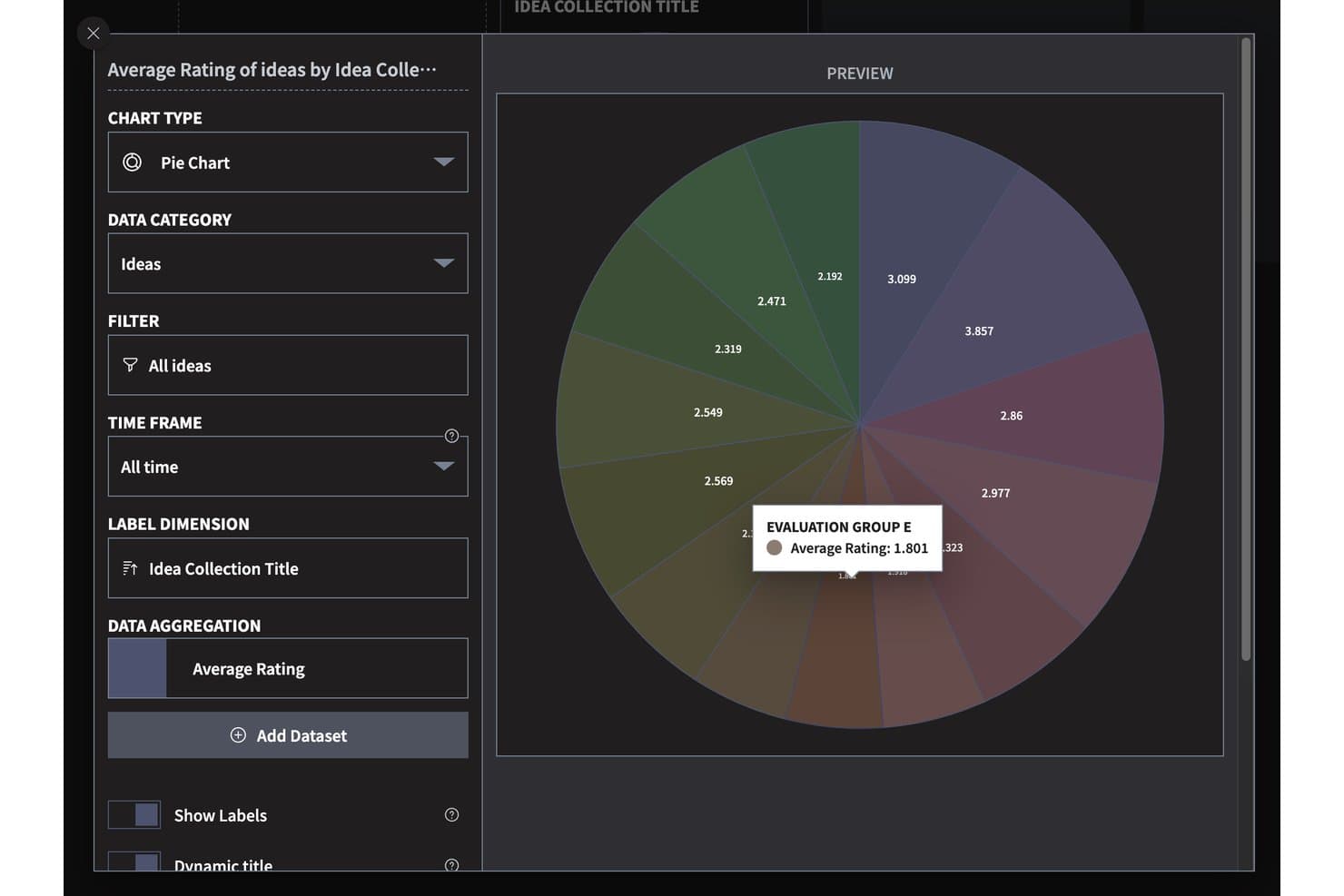
Ideanote visualizes idea ratings across collections with a pie chart. Ideanote is free idea management software with custom submission forms, idea collections, voting and scoring, configurable workflows, AI-assisted organization, and multiple views for reviewing submissions.
Who Is Ideanote Best For?
Product managers and innovation teams that need to gather ideas from employees and customers and evaluate submissions through structured workflows will find Ideanote a good fit.
Why I Picked Ideanote
I picked Ideanote for multi-channel idea capture because I can collect input through custom forms, embedded widgets, shareable links, and anonymous or no-signup submissions. Its free plan gives a small team up to 10 users, 250 ideas, and five collections. I can then sort submissions with tags and AI-assisted clustering.
Ideanote Key Features
- Threaded comments: Discuss ideas with attachments, , likes, and translations.
- Idea templates: Choose from 100+ ready-made templates or save your own.
- Duplicate detection: Use AI to identify, merge, or link similar ideas.
- Reporting: Review engagement, trends, ROI, KPI targets, and pipeline funnels.
Ideanote Integrations
Ideanote lists integrations with Microsoft Teams, Power Automate, Power BI, webhooks, and Splunk; integration access appears limited to the top tier. It also offers a public REST API and Zapier.
What’s Free?
Ideanote offers a free-forever plan for up to 10 users, 250 ideas, and five collections. Integrations appear limited to the top tier.
Pros and Cons
Pros:
- AI clustering helps group related submissions
- Reviewers praise flexible feedback widgets
- Multiple anonymous and no-signup submission paths
Cons:
- External guests count toward user cap
- Free plan stops at 250 ideas
Learn more about Ideanote: 2Best for PM-led idea-to-delivery tracking
Jira
- Free plan + 7-day free trial available
- From $8.48/user/month
Visit WebsiteCustomer Rating:4.4/5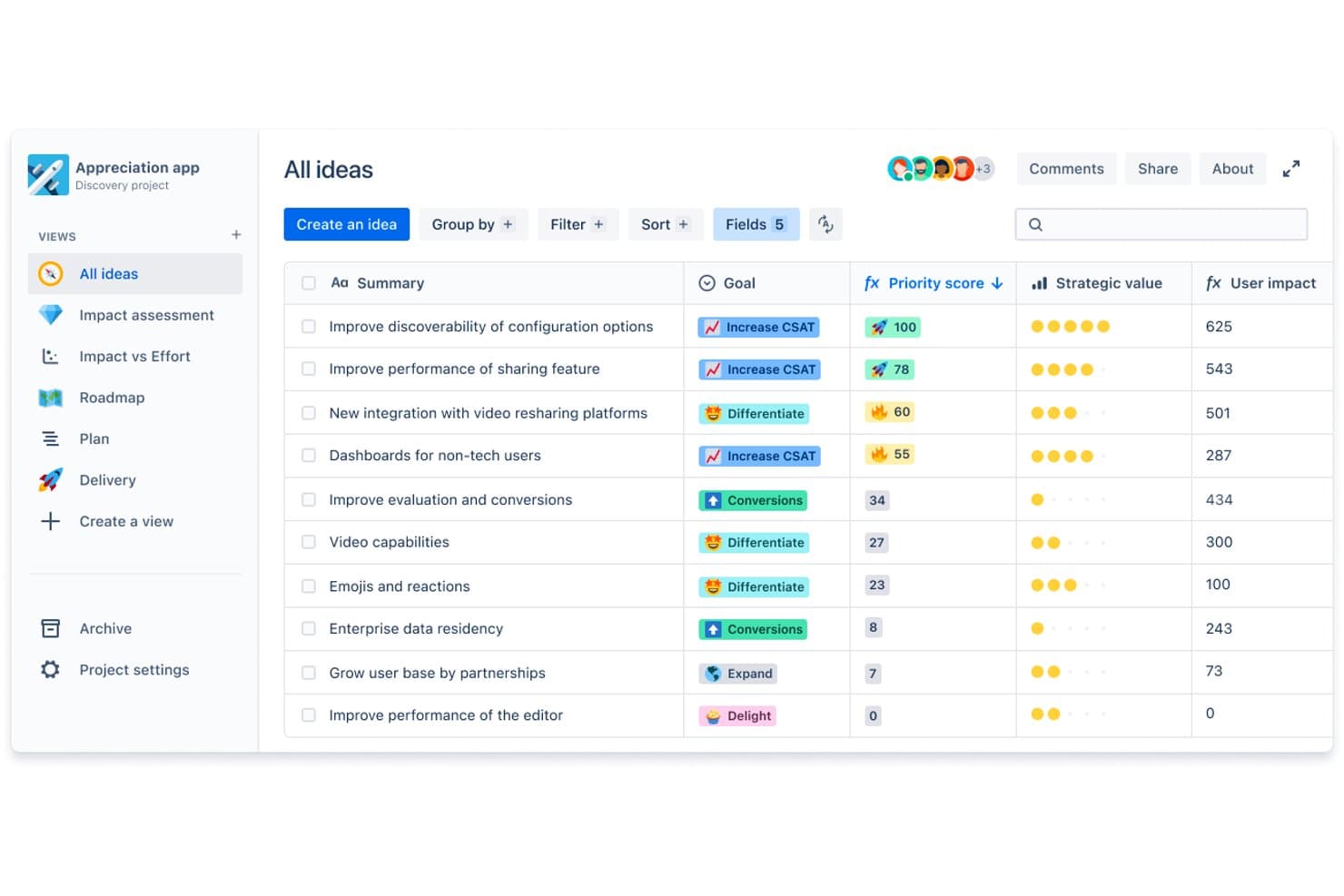
Jira lets users prioritize ideas by score, goal, and strategic value. Jira’s free plan supports idea management through an issue-tracking platform with work-item capture, backlog organization, prioritization, boards, and configurable workflows.
Who Is Jira Best For?
Jira is a good fit for product managers who need PM-led idea-to-delivery tracking across discovery priorities and engineering work.
Why I Picked Jira
I picked Jira, best for PM-led idea-to-delivery tracking, because its free plan lets my team capture ideas as issues, prioritize them in a backlog, and move approved work through configurable workflows on boards. When customer feedback points to a product change, I can track its priority and delivery status as it moves from discovery into engineering.
Jira Key Features
- Custom fields: Add fields to idea records for details such as customer segment or opportunity area.
- Labels: Tag ideas with searchable terms to group related submissions.
- Dashboards: Build configurable views with gadgets that summarize project data.
- Automation rules: Set rule-based actions that respond to events such as an issue being created.
Jira Integrations
Jira offers 3,000+ Marketplace apps, including Slack, Microsoft Teams, GitHub, and Confluence, to connect idea tracking with team discussions and delivery work. Jira also provides APIs for custom integrations.
What’s Free?
Jira has a free-forever Cloud plan for up to 10 users, with 2 GB of storage, 150 automation steps monthly, and 100 emails daily per site. All users are admins, and permissions and space- or work-item-level settings require a paid plan.
Pros and Cons
Pros:
- Approved ideas follow configurable delivery workflows
- Custom fields capture customer and opportunity context
- Ideas move from backlog into sprint planning
Cons:
- Free plan lacks granular permissions
- Workflow setup adds overhead for small teams
 Best for turning whiteboard ideas into tracked tasks
- Free plan + 14-day free trial + free demo available
- From $7/user/month (billed annually)
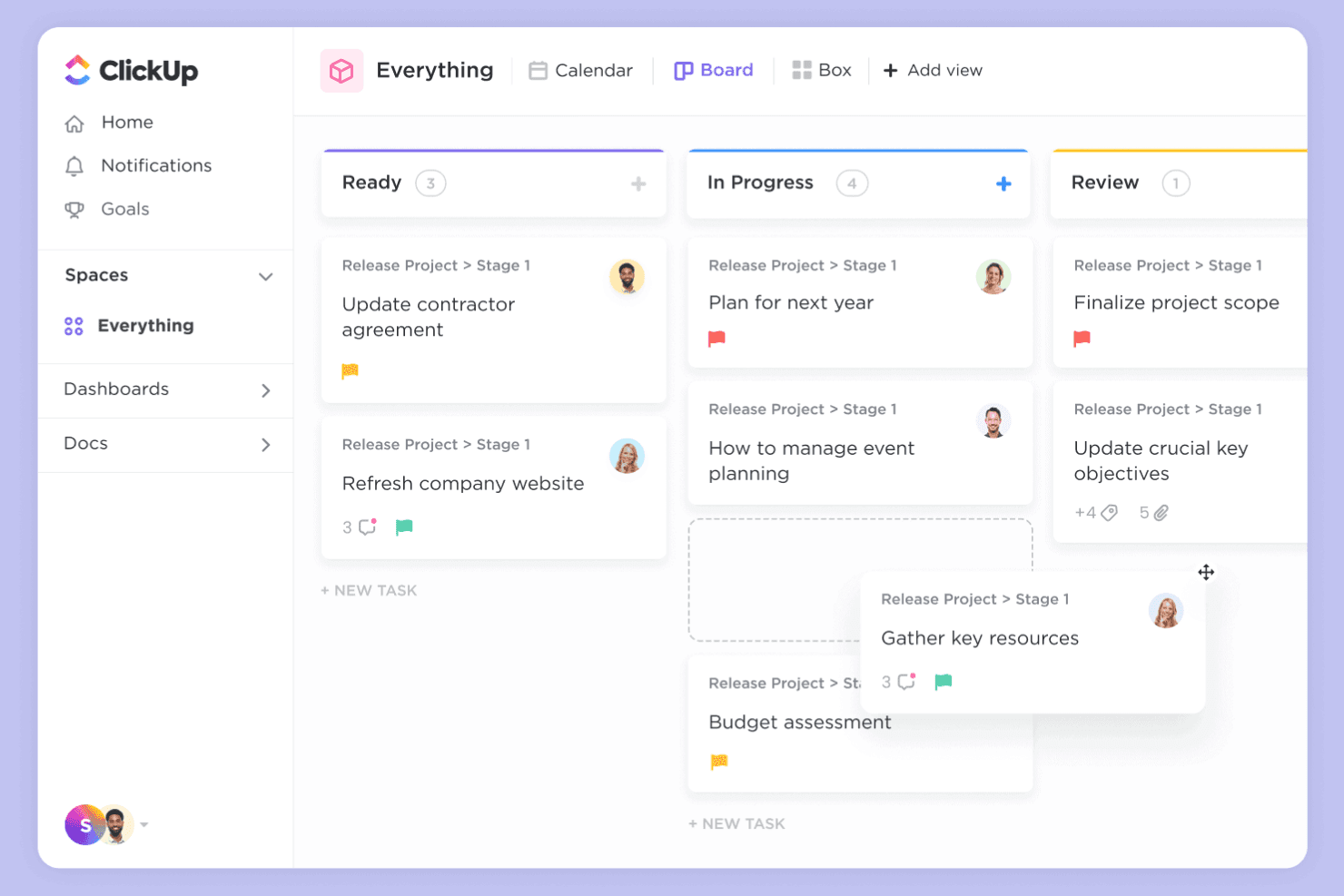
ClickUp combines whiteboards and tasks for idea-to-execution workflows. ClickUp is a work management platform with a free plan for idea management, combining collaborative Whiteboards and Docs with task lists, custom fields, and workflow views.
Who Is ClickUp Best For?
Product managers coordinating discovery across design and engineering can use ClickUp to capture proposals and assign follow-up work.
Why I Picked ClickUp
I picked ClickUp because it’s best for turning whiteboard ideas into tracked tasks. I use Whiteboards to map feature proposals, then create assigned tasks in lists and add custom fields for impact or ownership. Workflow views help me track each idea from review through delivery.
ClickUp Key Features
- Docs: Draft and organize product briefs, research notes, and decision records.
- Comments: Discuss ideas directly on relevant records and reply in threads.
- Forms: Collect structured idea submissions through customizable forms.
- Integrations: Connect ClickUp with tools such as Slack and GitHub.
ClickUp Integrations
ClickUp integrations include Slack and GitHub, which can connect idea discussions and development work to your workflow.
What's Free?
ClickUp’s Free Forever plan has no time limit and includes unlimited tasks and members. It limits you to three Whiteboards and 60 MB of storage.
Pros and Cons
Pros:
- Free plan includes unlimited tasks and members
- Forms collect structured idea submissions
- Whiteboard ideas become assigned tasks
Cons:
- Free plan includes only 60 MB storage
- Free plan limits teams to three Whiteboards
Learn more about ClickUp: Best for building idea workflows in one workspace
- Free plan + trial available
- From $10/user/month
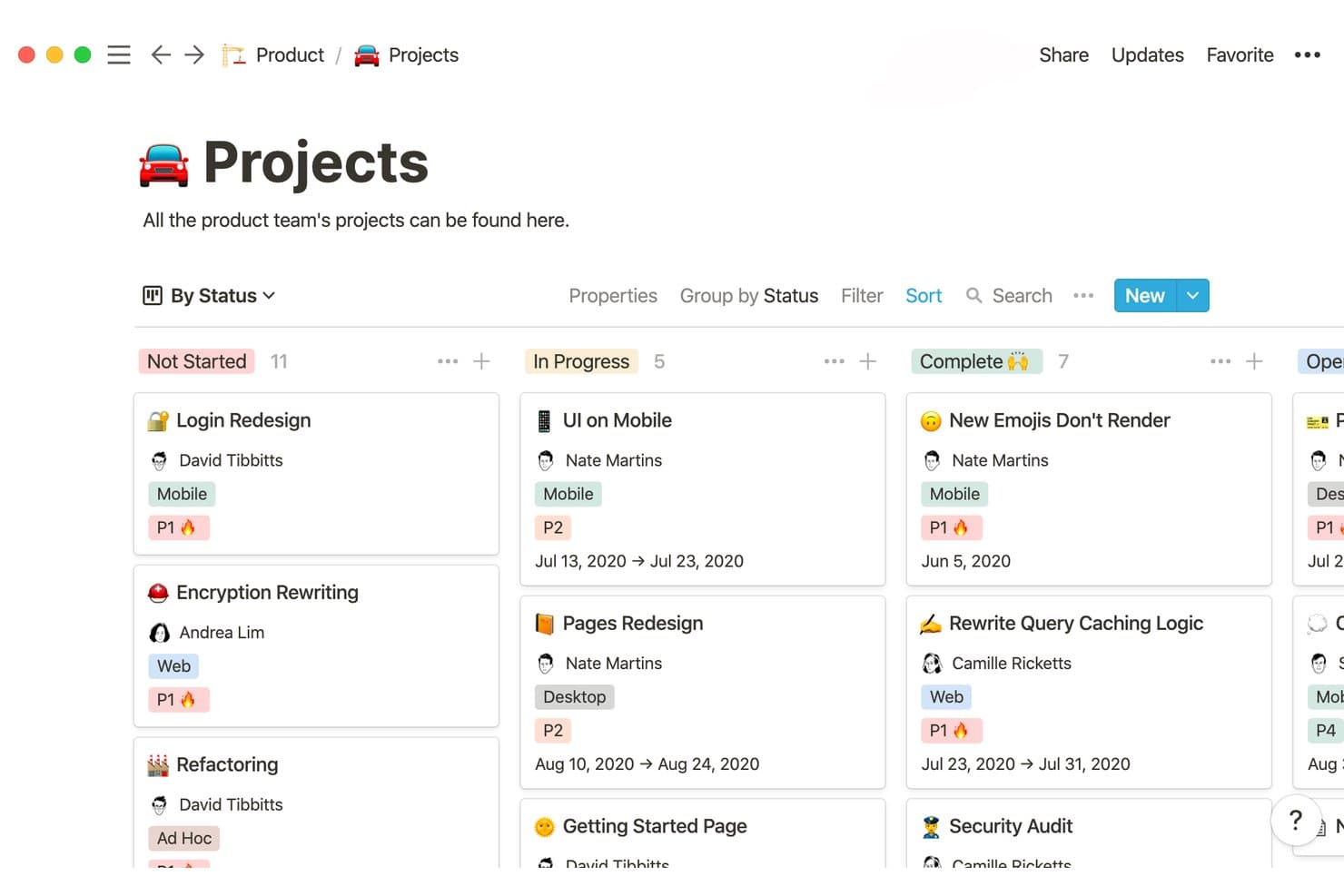
Notion organizes product projects by status in a visual board view. Notion is a workspace with a free plan for idea management, combining collaborative pages, databases, templates, and comments to capture and organize product concepts.
Who Is Notion Best For?
Product teams that want to refine early concepts alongside research, planning documents, and team discussions in a flexible workspace.
Why I Picked Notion
I picked Notion for building idea workflows in one workspace because its pages and databases let my team capture concepts, organize them, and connect them with research and planning documents. We use templates to give submissions a consistent structure and comments to discuss ideas alongside the relevant context. Its free plan supports this kind of shared idea management.
Notion Key Features
- Form view: Collect idea submissions through a form linked to a database.
- Board view: Display ideas as cards grouped by a selected property.
- Filters and sorts: Narrow idea lists and arrange records by selected properties.
- Workspace search: Find ideas and related information across your workspace.
Notion Integrations
Notion’s Slack integration lets you send messages to idea databases and receive workspace notifications. Its Connections directory lists Google Drive and GitHub connections, and the public API supports custom integrations.
What's Free?
Notion has a free-forever plan, with unlimited pages and blocks for one person. Workspaces with multiple members have block limits, and the plan caps file uploads at 5 MB each and external guests at 10.
Pros and Cons
Pros:
- Board views group concepts by status
- Ideas connect directly with research pages
- Forms standardize idea submissions
Cons:
- Shared workspaces face free-plan block limits
- No native idea voting or scoring
Learn more about Notion: Best for product feedback management
- Free plan + free demo + free trial available
- From $19/month (billed annually)
Visit WebsiteCustomer Rating:4.2/5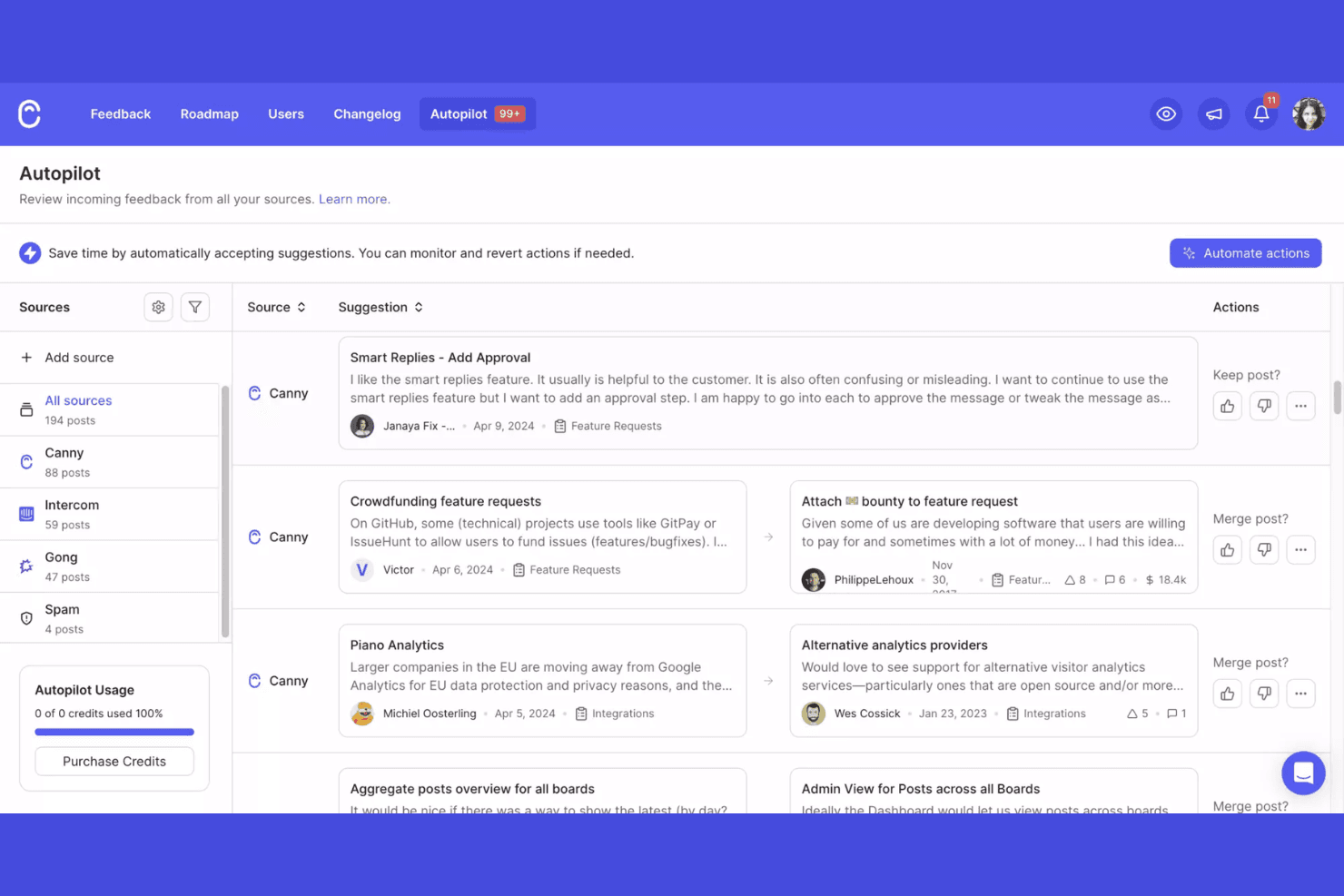
Canny collects, tracks, and prioritizes product feedback. Canny is a free idea management platform where teams collect customer suggestions, organize feature requests, gather votes, and manage product roadmaps.
Who Is Canny Best For?
Canny suits product management teams that need a dedicated system for collecting and prioritizing customer feedback.
Why I Picked Canny
I rate Canny as “Best for product feedback management” because it connects customer requests with prioritization. Public feedback boards let users submit and vote on ideas, while status updates show whether requests are under review, planned, or shipped. When customers ask for the same workflow change, I use votes and request records to assess demand before shaping the roadmap.
Canny Key Features
- Internal comments: Discuss ideas privately with your team on each post.
- User segmentation: Filter feedback by groups such as paying customers.
- Product changelog: Publish updates and format entries with rich text and images.
- Integrations: Collect feedback from tools such as Slack, Jira, and Intercom.
Canny Integrations
Canny integrates with Slack, Jira, and Intercom to collect customer feedback from tools your team already uses.
What’s Free?
Canny has a free-forever plan, limited to 25 tracked users and five Owner or Manager admins, with unlimited Contributors. It restricts integrations to Feedback and Notifications and excludes changelog emails and custom domains.
Pros and Cons
Pros:
- Unlimited contributors can submit feedback
- Status updates show roadmap progress
- Public boards capture and rank requests
Cons:
- Custom domains and changelog emails are excluded
- Free plan tracks only 25 users
Learn more about Canny: 6Best for collaborative ideation mapping
Miro
- Free plan + 14-day trial available
- From $8/user/month (billed annually)
Visit WebsiteCustomer Rating:4.8/5
Miro enables visual brainstorming and real-time team collaboration. If you’re looking for a visual-first way to capture, organize, and develop ideas, Miro is worth considering. The platform is especially useful for distributed teams, product managers, and facilitators who want to brainstorm and map out concepts together in real time. Miro’s infinite canvas and collaborative features help teams turn scattered thoughts into actionable plans.
Who Is Miro Best For?
Miro is a strong fit for distributed teams and facilitators who need a visual platform for collaborative brainstorming and idea management.
Why I Picked Miro
I picked Miro because its visual collaboration capabilities make it uniquely suited for distributed teams managing ideas together. The infinite canvas lets teams map out ideas, group feedback, and build workflows in a way that’s easy to follow during remote sessions. I appreciate how features like sticky notes, voting, and real-time co-editing help teams quickly capture and prioritize input from anywhere. These strengths directly support the needs of teams looking for a flexible, visual approach to idea management.
Miro Key Features
Some other features in Miro that stand out for idea management teams include:
- Template library: Access a wide range of pre-built templates for brainstorming, mind mapping, and agile workflows.
- Commenting and tagging: Add comments and tags directly to ideas or objects on the board for context and easy organization.
- Presentation mode: Share boards in a guided, slide-like format to walk stakeholders through ideas and plans.
- Version history: Track changes and restore previous versions of boards to manage evolving ideas over time.
Miro Integrations
Integrations include Microsoft 365, Google Workspace, Atlassian, ServiceNow, GitHub Copilot, OpenAI Codex, Replit, Gemini CLI, Claude Code, Cursor, and more.
What's Free?
Miro offers a free-forever plan with unlimited team members and access to 3 editable boards per workspace. The free plan includes core integrations, 5,000+ templates, and basic export options, but advanced features and unlimited boards require a paid plan.
Pros and Cons
Pros:
- Version history for tracking idea evolution
- Built-in voting and prioritization tools
- Infinite canvas for unlimited idea mapping
Cons:
- Occasional lag with complex or crowded boards
- Export options are restricted on free tier
 Best for kanban-based idea tracking on a free plan
- Free plan + free trial available
- From $5/user/month (billed annually)
Visit WebsiteCustomer Rating:4.5/5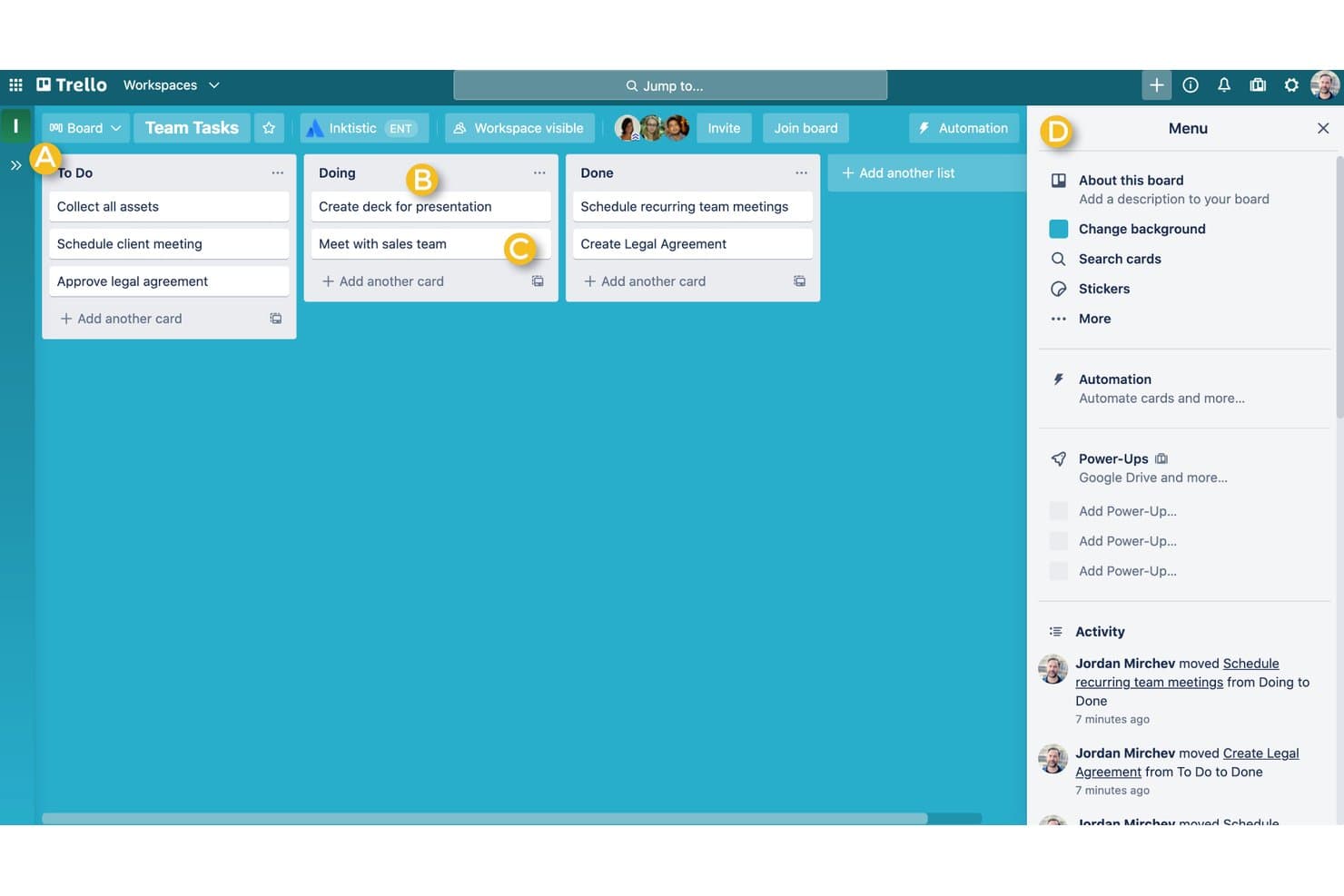
Trello offers a Kanban-style board with To Do, Doing, and Done columns to help individuals manage tasks visually. Trello is a visual work management platform that can serve as free idea management software, with boards, lists, cards, labels, comments, and attachments for capturing and organizing ideas.
Who Is Trello Best For?
Product teams that want to capture and sort early-stage ideas visually before deciding which ones deserve discovery or delivery work.
Why I Picked Trello
I picked Trello because it fits the USP: Best for kanban-based idea tracking on a free plan. I use lists for idea intake, triage, and approved concepts, then move cards as discovery progresses. Labels help my team group proposals by customer segment or opportunity area.
Trello Key Features
- Card comments: Add discussion and updates directly to an idea card.
- File attachments: Attach supporting documents and images to cards.
- Checklists: Break an idea’s review into trackable checklist items.
- Due dates: Add dates to cards for review or follow-up.
Trello Integrations
Trello offers 200+ integrations through Power-Ups, including Slack, Google Drive, and Jira for idea discussions, supporting files, and handoffs. Its REST API supports custom integrations.
What’s Free?
Trello offers a free-forever plan with unlimited cards and Power-Ups, but each Workspace is limited to 10 collaborators and 10 open boards. File attachments are limited to 10 MB each.
Pros and Cons
Pros:
- Checklists structure lightweight concept reviews
- Cards keep feedback beside each proposal
- Kanban stages make idea triage visible
Cons:
- Workspace caps constrain larger contributor groups
- Cards offer limited portfolio-level idea scoring
 Best for custom-formula idea prioritization
- Free plan available; 14-day free trial; free demo available
- From $12/user/month (billed annually)
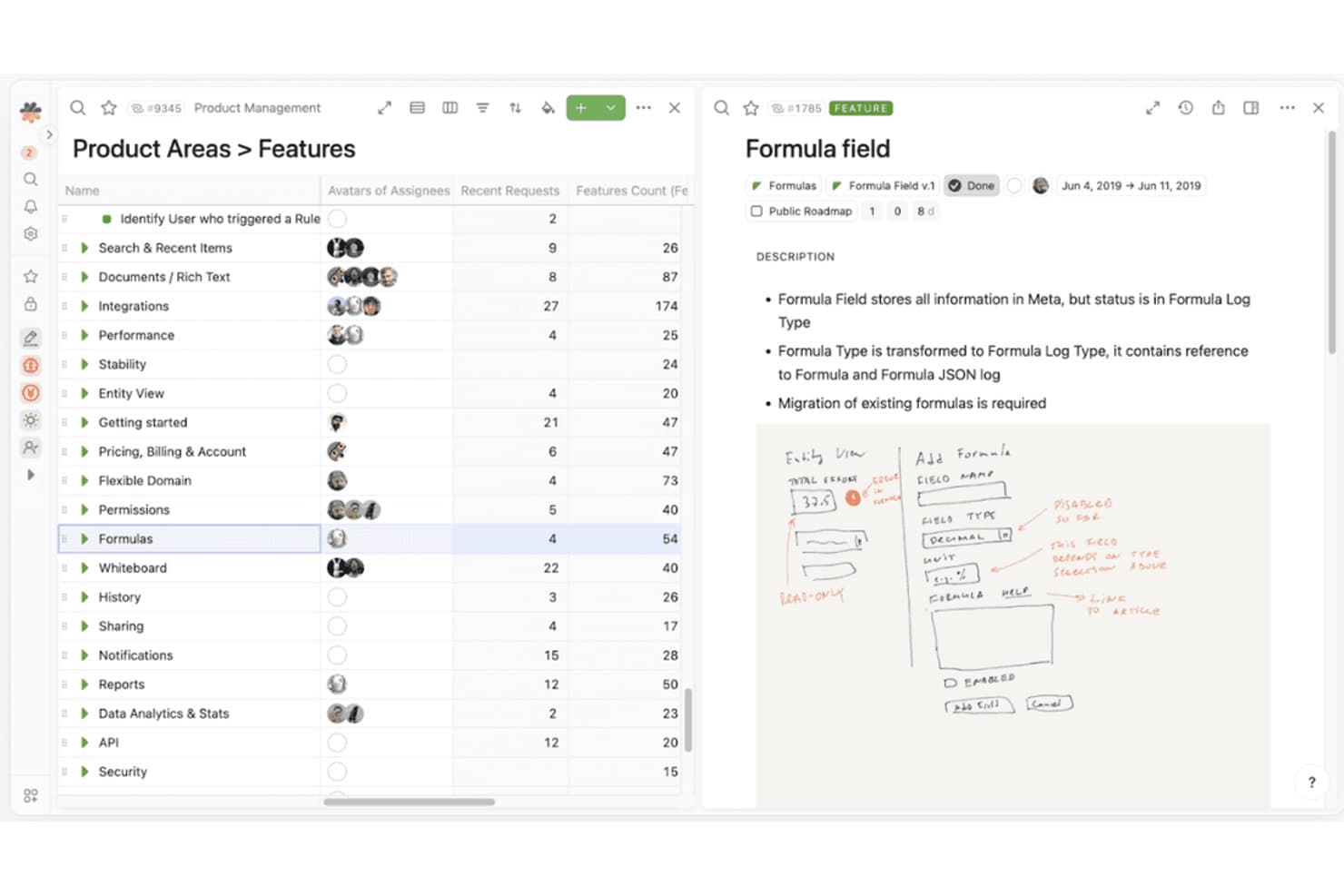
Fibery organizes product features with detailed metadata and visual notes. Fibery is a free-plan idea management platform where product teams capture and organize ideas in customizable databases, link them to feedback and initiatives, and manage evaluation with configurable views and workflows.
Who Is Fibery Best For?
Product teams that want to tailor idea scoring to their own criteria are a good fit for Fibery’s custom-formula idea prioritization.
Why I Picked Fibery
I picked Fibery because its custom-formula idea prioritization lets teams score ideas against their own product criteria. I use customizable databases to link ideas with customer feedback and initiatives, then apply formulas to compare proposals against signals such as customer value or strategic fit. Configurable views help teams review those scores alongside the ideas they’re evaluating.
Fibery Key Features
- Workflow automation: Trigger actions when an idea’s fields or status change.
- Collaborative docs: Draft and edit product documents with your team.
- Integrations: Connect Fibery with external tools such as Slack and GitHub.
- API access: Use the API to connect Fibery with custom applications.
Fibery Integrations
Fibery offers integrations with Slack and GitHub, plus an API for custom integrations.
What's Free?
Fibery offers a $0 Free plan, and every workspace gets a 14-day Pro trial before choosing Free or a paid plan. The Free plan allows up to 10 users and 10 guests, 10 databases, 1 GB of storage, and 250 monthly automation runs.
Pros and Cons
Pros:
- Configurable views compare proposals and scores
- Links ideas to customer feedback and initiatives
- Custom formulas score ideas against team criteria
Cons:
- Scoring requires teams to define formulas
- Free plan limits database and automation capacity
Learn more about Fibery:
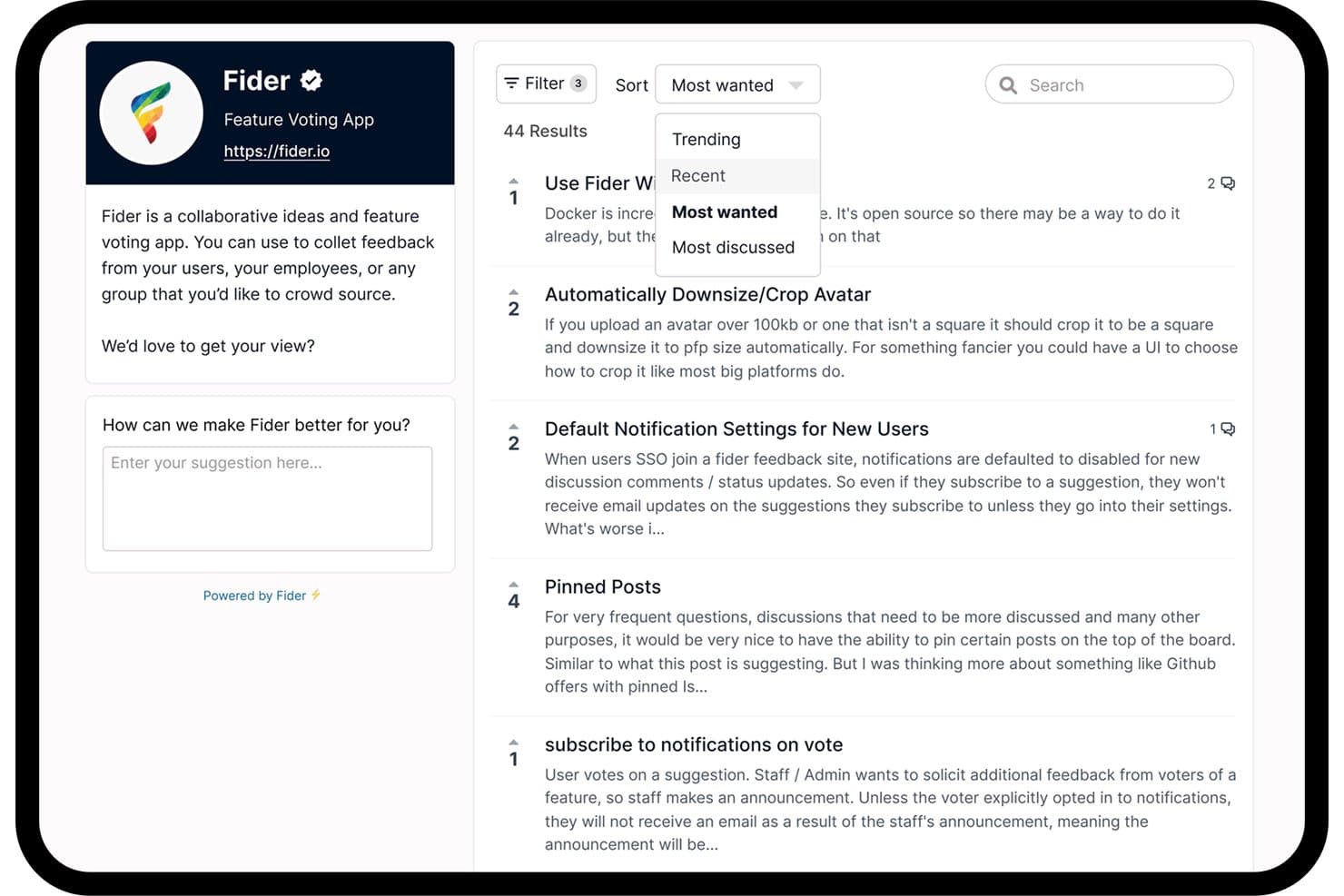
Fider lets users sort and filter community feature requests by popularity. Fider is a free idea management platform with customer-facing feedback portals for submitting product suggestions, discussing ideas, and voting on requests.
Who Is Fider Best For?
For product teams gathering customer input, Fider is Best for open-source feature voting boards.
Why I Picked Fider
I picked Fider for open-source feature voting boards because its customer-facing portal lets users submit product suggestions, discuss ideas, and vote on requests. I like how those discussions and votes help me spot recurring customer needs before shaping the roadmap.
Fider Key Features
- Board customization: Set a board title, welcome message, and branding options.
- Tags: Apply tags to feedback items, including private tags for internal organization.
- Multiple languages: Configure the board to support multiple languages.
- API access: Connect Fider with internal systems through its API.
Fider Integrations
Native integrations are not clearly documented. Fider supports custom integrations through its API.
What’s Free?
Fider offers a free-forever plan with unlimited customers and members, plus feedback discussions and votes. The plan has a fair-use limit of 250 feedback items; Pro costs $25 per month and removes that limit.
Pros and Cons
Pros:
- Free plan supports unlimited customers and members
- Customers can discuss and vote on ideas
- Open-source feature voting boards
Cons:
- Focuses on feedback rather than end-to-end idea workflows
- Free plan caps feedback at 250 items
Learn more about Fider:
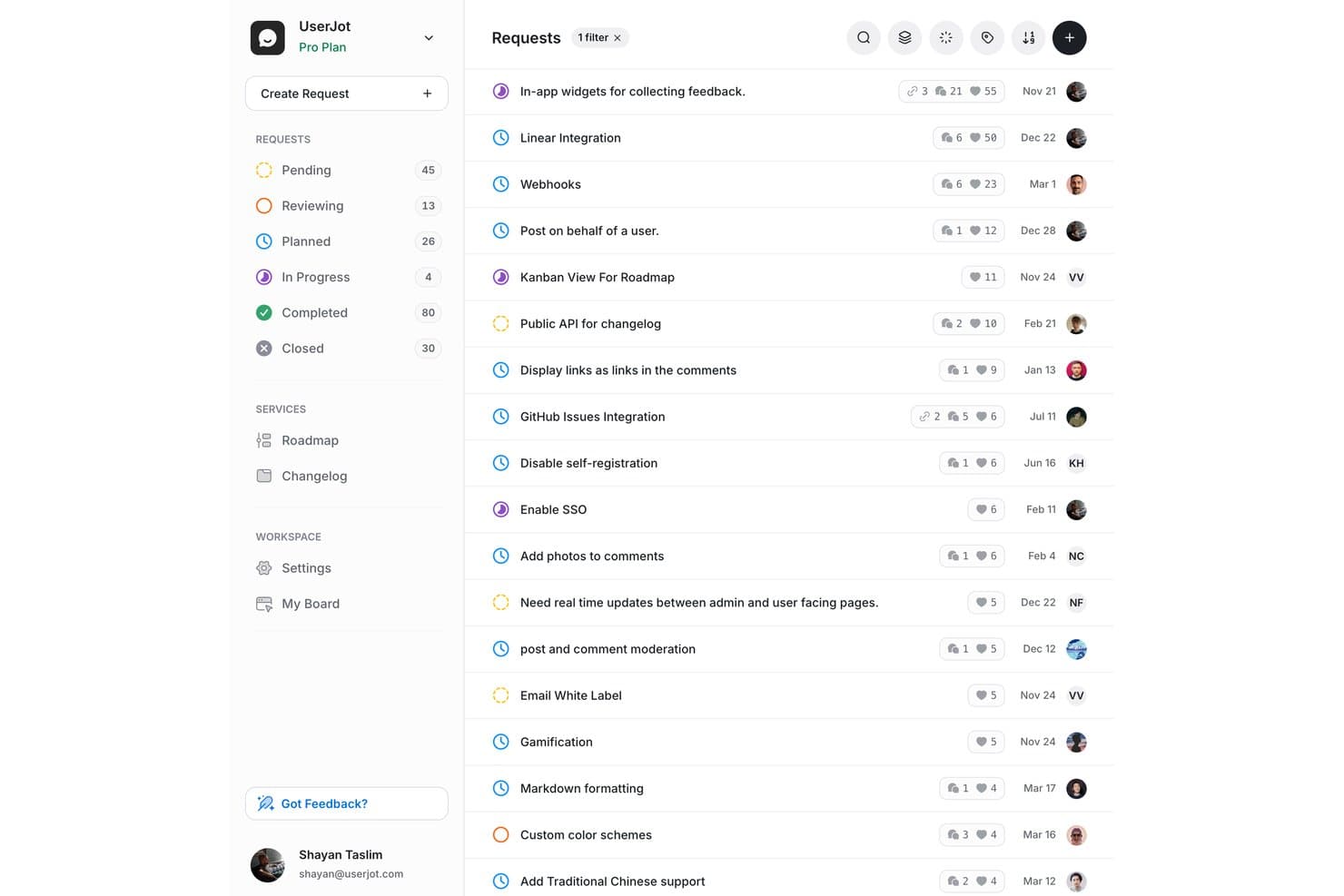
UserJot lets users track and prioritize feature requests by status and votes. UserJot is idea management software with feedback boards for feature requests, user voting, a public roadmap, and changelog publishing.
Who Is UserJot Best For?
UserJot suits small product teams that want customers to submit and vote on feature requests through a public feedback board.
Why I Picked UserJot
I picked UserJot as “Best for idea-to-roadmap tracking on a free plan” because it links customer requests to product decisions. Its feedback boards collect feature ideas, and voting helps surface demand before teams add selected requests to a public roadmap. Changelog publishing then shares shipped updates with customers.
UserJot Key Features
- Duplicate detection: Identify similar requests to reduce repeat submissions.
- Auto-tagging: Automatically label incoming feedback posts.
- Email-to-post: Turn emailed feedback into board posts.
- Canny import: Import boards, posts, votes, comments, and changelog entries.
UserJot Integrations
UserJot integrations include Slack and Discord, with one integration on Starter and unlimited integrations on Professional. The REST API and remote MCP server are available on paid plans for custom connections.
What’s Free?
UserJot’s free plan is free forever, with unlimited users and posts, two feedback boards, three admin roles, a public roadmap, and a public changelog. Integrations aren’t included on the free plan.
Pros and Cons
Pros:
- Changelog helps share shipped updates with customers
- Public roadmap included at no cost
- Unlimited users and posts on the free plan
Cons:
- Growing feedback programs may require board consolidation
- Two-board limit may restrict topic separation
Learn more about UserJot:
Diğer Ücretsiz Fikir Yönetimi Yazılımları
Kısa listeme giremeyen ancak yine de göz atmaya değer bazı ek ücretsiz fikir yönetimi yazılımı seçeneklerini burada bulabilirsiniz:
- 11Ducalis.ioBest for scoring and prioritizing feedback requests
- 12FeaturevoteBest for no-login customer feature voting
- 13FeaturebaseBest for closing the feedback loop with a changelog
- 14SupahubBest for startups collecting unlimited user votes free
- 15Aha! IdeasBest for scorecard-driven idea prioritization
- 16SleekplanBest for solo founders shipping a free feedback portal
- 17WishKitBest for in-app feature voting on Apple platforms
How I Evaluate Free Idea Management Software
First, I define what counts as free. Idea management software counts as free only when its plan stays available long term, not just during a trial. From there, I split my evaluation into three parts: core functionality, which carries the most weight, like collecting ideas and tracking their status; standout features, like public roadmaps; and what a tool offers beyond its feature set, like room for the team to grow on the free plan.
Core Functionality (Table Stakes For This List)
In addition to my free plan requirements, I use a scoring system to select tools for my list. I score each one on a scale from 0 (does not offer the functionality) to 5 (excels in this area) for each core functionality listed below, based on what's available on the free plan. I then convert the total into a percentage to help assess each tool's overall fit, with extra weight on any functionalities I've deemed essential.
- Idea Capture & Submission (Essential): I look for a shared space where teammates or customers can submit ideas, such as requests gathered from support conversations.
- Voting & Feedback: I check whether contributors can both vote and comment, helping teams understand which requests have support and why.
- Status & Workflow Tracking: I look for clear stages, such as submitted, under review, and planned, so contributors can follow an idea's progress.
- Categorization & Organization: I evaluate whether teams can tag and filter ideas by theme, such as onboarding feedback or reliability requests.
- Basic Prioritization Tools: I consider whether teams can sort by votes or use another simple criterion, such as impact, to compare ideas.
Once I have a list of tools that meet the criteria, I consider what sets each platform apart.
Differentiating Factors (What Sets Vendors Apart)
Here's how I compare and contrast different vendors:
Standout Features
I look for idea merging and deduplication, since duplicate submissions fragment vote counts and bury signal. Tools like Fider and Nolt handle this differently, so I check how cleanly merged entries preserve comments. I also evaluate changelog integration—when shipped features automatically appear in a "what's new" feed, it closes the loop without manual updates. Public roadmap displays matter too. I check whether the board shows planned, in-progress, and completed stages so customers see their input acted on.
Beyond Features
I check whether the free plan supports enough admin seats for my actual team. A single-admin cap forces shared logins, which muddies accountability on feedback decisions. I also evaluate data portability—if a tool won't let you export ideas and votes on its free tier, you're trapped when you outgrow it. Setup speed matters too; lean teams need a board live in minutes, not days, so I look for guided onboarding or sensible defaults that get you collecting feedback fast.
Ücretsiz Fikir Yönetimi Yazılımı Nasıl Seçilir?
Uzun özellik listeleri ve karmaşık fiyatlandırma yapıları arasında kaybolmak kolaydır. Benzersiz yazılım seçimi süreciniz üzerinde çalışırken odağınızı korumanıza yardımcı olmak için göz önünde bulundurmanız gereken faktörlerin bir kontrol listesi aşağıdadır:
| Faktör | Dikkat Edilmesi Gerekenler |
|---|---|
| FaktörÖlçeklenebilirlik | Dikkat Edilmesi GerekenlerAraç, ekip büyüklüğünüzü ve büyümenizi destekleyecek mi? Kullanıcı sınırlarını, gönderim kotalarını ve yükseltme seçeneklerini kontrol edin. |
| FaktörEntegrasyonlar | Dikkat Edilmesi GerekenlerMevcut araçlarınıza (ör. Slack, Jira, e-posta) bağlanıyor mu? Ücretsiz plandaki yerel entegrasyonları doğrulayın. |
| FaktörÖzelleştirilebilirlik | Dikkat Edilmesi Gerekenlerİş akışlarını, formları ve marka görünümünü ihtiyaçlarınıza uyarlayabiliyor musunuz? Bazı ücretsiz planlar özelleştirme seçeneklerini kısıtlar. |
| FaktörKullanım kolaylığı | Dikkat Edilmesi GerekenlerArayüz tüm kullanıcılar için sezgisel mi? Kullanıma sunmadan önce sorunlu noktaları belirlemek için küçük bir grupla test edin. |
| FaktörUygulama ve işe alıştırma | Dikkat Edilmesi GerekenlerEkibiniz ne kadar hızlı çalışmaya başlayabilir? Rehberli kurulum, şablonlar ve mevcut eğitim kaynakları sunan seçenekleri arayın. |
| FaktörMaliyet | Dikkat Edilmesi GerekenlerÜcretsiz plandan sonra ne olur? Yükseltme fiyatlarını, gizli ücretleri ve ödeme duvarlarının arkasında kalan özellikleri inceleyin. |
| FaktörGüvenlik önlemleri | Dikkat Edilmesi GerekenlerAraç temel veri koruması, kullanıcı izinleri ve gizlilik denetimleri sunuyor mu? Hassas fikirleri işlerken riski değerlendirin. |
| FaktörDestek erişilebilirliği | Dikkat Edilmesi GerekenlerÜcretsiz kullanıcılar hangi destek kanallarına erişebilir? Bazı sağlayıcılar canlı sohbet veya e-posta desteğini ücretli planlarla sınırlar. |
Ücretsiz Fikir Yönetimi Yazılımı Nedir?
Ücretsiz fikir yönetimi yazılımı, ekiplerin yenilikçi fikirleri ve ürün fikirlerini başlangıç maliyeti olmadan toplamasına, düzenlemesine ve değerlendirmesine olanak tanıyan dijital bir araçtır. Bu inovasyon yönetimi yazılımı platformları fikir üretimini, oylamayı ve durum takibini destekler; bu da onları ürün geliştirme ve sürekli iyileştirme için kullanışlı kılar. Çoğu araç, kullanıcı dostu ve bulut tabanlı erişimin yanı sıra temel ekip çalışması ve iş birliği özellikleri sunan ücretsiz bir sürüm sağlar. Bu araçlar genellikle proje yönetimi yazılımları ve proje yönetimi araçlarıyla örtüşerek ekiplerin fikirleri eyleme dönüştürmek için yapılandırılmış bir metodoloji uygulamasına yardımcı olur.
Özellikler
Fikir yönetimi yazılımlarında yaygın olarak bulunan özellikleri ve ücretsiz planlara kıyasla ücretli planlarda genellikle hangilerinin sunulduğunu inceleyelim.
Genellikle Ücretsiz Fikir Yönetimi Yazılımı Özellikleri
- Fikir gönderme: Kullanıcıların basit bir form veya portal aracılığıyla yeni fikirler göndermesine olanak tanıyarak ekip üyelerinden ya da paydaşlardan görüş almayı kolaylaştırır.
- Oy verme veya beğenme: Kullanıcıların fikirlere oy vermesini veya fikirleri beğenmesini sağlayarak ekiplerin popüler önerileri hızlıca belirlemesine ve en önemli konulara öncelik vermesine yardımcı olur.
- Temel yorum yapma: Kullanıcıların gönderilen fikirlere yorum veya geri bildirim eklemesine olanak tanıyarak platform içindeki tartışmaları ve açıklığa kavuşturma süreçlerini destekler.
- Fikirleri kategorilere ayırma: Fikirleri düzenlemek için temel etiketler veya kategoriler sunarak ilgili önerileri filtrelemeyi ve aramayı kolaylaştırır.
- Durum takibi: Kullanıcıların fikirlerinin ilerlemesini görebilmesi için basit durum etiketleri (örneğin “İnceleniyor” veya “Uygulandı”) sunar.
- Kullanıcı yönetimi: Sınırlı sayıda kullanıcının eklenmesini ve yönetilmesini destekleyerek küçük ekiplerin ek maliyet olmadan iş birliği yapmasına olanak tanır.
- Temel bildirimler: Fikirler gönderildiğinde, güncellendiğinde veya bunlara yorum yapıldığında e-posta ya da uygulama içi uyarılar göndererek katılımcıların bilgi sahibi olmasını sağlar.
- Basit raporlama: Fikir etkinliğini ve etkileşimini genel hatlarıyla incelemek için temel dışa aktarma veya özet raporları içerir.
Genellikle Ücretli Fikir Yönetimi Yazılımı Özellikleri
- Gelişmiş iş akışı otomasyonu: Çok adımlı inceleme, onay ve yönlendirme süreçlerini otomatikleştirerek manuel çalışmayı azaltır ve fikirlerin değerlendirme aşamalarından verimli şekilde ilerlemesini sağlar.
- Özel markalama: Kuruluşların logo, renk ve alan adları da dahil olmak üzere fikir portalının görünümünü ve izlenimini tamamen özelleştirmesine olanak tanıyarak markalı bir deneyim sunar.
- Harici araçlarla entegrasyon: Kesintisiz veri akışı için platformu proje yönetimi, CRM veya iletişim araçları gibi diğer iş sistemlerine bağlar.
- Ayrıntılı izinler: Kullanıcı rolleri ve erişim üzerinde ayrıntılı kontrol sağlayarak karmaşık ekip yapılarını ve hassas bilgilerin işlenmesini destekler.
- Analiz panoları: Fikir eğilimlerini, katılım oranlarını ve inovasyon sonuçlarını zaman içinde izlemek için gelişmiş görselleştirmeler ve analizler sunar.
- Özel alanlar ve formlar: Kuruluşunuzla ilgili belirli bilgileri toplamak için özel alanlara sahip, ihtiyaca göre düzenlenmiş gönderim formları oluşturulmasını sağlar.
- Çoklu dil desteği: Birden fazla dili destekleyerek küresel ekiplerin katılımını ve iş birliği yapmasını kolaylaştırır.
- Moderasyon ve istenmeyen içerik denetimleri: Kaliteyi korumak için uygunsuz veya yinelenen gönderileri incelemeye, filtrelemeye ve yönetmeye yönelik araçlar içerir.
- API erişimi: Özel entegrasyonlar ve veri dışa aktarımları için API uç noktaları sunarak gelişmiş iş akışlarını ve raporlama ihtiyaçlarını destekler.
- Özel destek: Kurumsal kullanıcılar için işe alıştırma desteği ve sorun giderme dahil olmak üzere öncelikli veya özel müşteri desteği sağlar.
Avantajlar
Ücretsiz fikir yönetimi yazılımını uygulamak, ekibiniz ve işletmeniz için çeşitli avantajlar sağlar. Yararlanabileceğiniz avantajlardan bazıları şunlardır:
- Başlangıç engelinin azalması: Ücretsiz planlar, ekiplerin bütçe onayı veya ön yatırım gerektirmeden fikirleri toplamaya ve düzenlemeye başlamasını sağlar.
- Merkezi fikir toplama: Tüm öneriler ve geri bildirimler tek bir yerde toplanarak görüşleri incelemeyi, önceliklendirmeyi ve bunlara göre harekete geçmeyi kolaylaştırır.
- Ekip etkileşiminin artması: Oy verme, yorum yapma ve durum takibi özellikleri katılımı teşvik eder ve herkesin fikirlerin ilerleyişi hakkında bilgi sahibi olmasını sağlar.
- Daha hızlı karar alma: Yerleşik kategorilendirme ve temel raporlama, ekiplerin yüksek potansiyele sahip fikirleri hızlıca belirlemesine ve bunları ilerletmesine yardımcı olur.
- Erişilebilir iş birliği: Kullanıcı yönetimi ve bildirimler, küçük veya farklı konumlara dağılmış ekiplerin katkıda bulunmasına ve güncel kalmasına olanak tanır.
- Risksiz deneme: Ekipler, ücretli bir çözüme geçmeden veya ölçeği büyütmeden önce farklı iş akışlarını ve süreçleri test edebilir.
- Basitleştirilmiş işe alıştırma: Basit arayüzler ve temel işe alıştırma kaynakları, ekiplerin hızlıca başlamasına ve kısa sürede değer elde etmesine yardımcı olur.
Maliyetler & Fiyatlandırma
Bu makaleye, ücretsiz olarak kullanılabilen en iyi fikir yönetimi yazılımı seçeneklerini arayarak geldiğinizi biliyorum. Ancak ücretsiz planlar yalnızca sınırlı özellikler sunduğundan, gelecekte planınızı yükseltmeniz gerekme ihtimali oldukça yüksektir.
Aşağıdaki tablo, fikir yönetimi yazılımlarında bulunan yaygın planları, ortalama fiyatlarını ve genellikle dahil edilen özellikleri özetlemektedir:
Fikir Yönetimi Yazılımı İçin Plan Karşılaştırma Tablosu
| Plan Türü | Ortalama Fiyat | Yaygın Özellikler |
|---|---|---|
| Plan TürüÜcretsiz Plan | Ortalama Fiyat$0 | Yaygın ÖzelliklerTemel fikir gönderimi, oylama, yorum yapma, basit kategorilendirme, sınırlı sayıda kullanıcı ve temel bildirimler. |
| Plan TürüBireysel Plan | Ortalama Fiyat$5–$15/kullanıcı/ay | Yaygın ÖzelliklerTüm ücretsiz özellikler, daha fazla kullanıcı kontenjanı, geliştirilmiş raporlama, özel alanlar ve sınırlı entegrasyonlar. |
| Plan Türüİşletme Planı | Ortalama Fiyat$15–$40/kullanıcı/ay | Yaygın ÖzelliklerGelişmiş iş akışı otomasyonu, analiz panoları, özel markalama, daha fazla entegrasyon ve öncelikli destek. |
| Plan TürüKurumsal Plan | Ortalama Fiyat$40–$80/kullanıcı/ay | Yaygın ÖzelliklerTüm işletme özellikleri, ayrıntılı izinler, API erişimi, özel başlangıç desteği, gelişmiş güvenlik ve çoklu dil desteği. |
Ücretsiz Fikir Yönetimi Yazılımı Hakkında Sıkça Sorulan Sorular
Ücretsiz fikir yönetimi yazılımı hakkında sık sorulan bazı soruların yanıtları aşağıdadır:
Ücretsiz fikir yönetimi yazılımı büyük ekipleri destekleyebilir mi?
Hayır, çoğu ücretsiz planın kullanıcı veya gönderim sınırları vardır ve bu planlar küçük ekipler ya da pilot projeler için daha uygundur. Büyük bir kuruluşu desteklemeniz gerekiyorsa muhtemelen ücretli bir plana yükseltmeniz gerekir.
Ücretsiz fikir yönetimi yazılımında gizli maliyetler var mı?
Evet, bazı sağlayıcılar temel özellikleri, entegrasyonları veya desteği ücretli planlarla sınırlar. Ücretsiz planın sınırlamalarını her zaman inceleyin ve karar vermeden önce yükseltme istemlerini veya kullanım sınırlarını kontrol edin.
Ücretsiz plandan ücretli plana yükseltirsem verilerimi taşıyabilir miyim?
Evet, çoğu sağlayıcı yükseltme sırasında verilerinizi ve ayarlarınızı korumanıza izin verir. Ancak seçtiğiniz sağlayıcıyla taşıma seçeneklerini ve olası veri dışa aktarma sınırlamalarını doğrulamanız önemlidir.
Ücretsiz fikir yönetimi yazılımında verilerim güvende mi?
Veri güvenliği sağlayıcıya göre değişir. Ücretsiz planlar temel korumalar sunabilir; ancak SSO, şifreleme veya denetim günlükleri gibi gelişmiş güvenlik özellikleri genellikle ücretli katmanlara ayrılmıştır.
Ücretsiz planın ihtiyaçlarımı karşılamadığı bir noktaya gelirsem ne olur?
Daha fazla özelliğin, kullanıcının veya depolama alanının kilidini açmak için genellikle ücretli bir plana yükseltebilirsiniz. İhtiyaçlarınız değişirken kesinti yaşamamak için yükseltme seçeneklerini ve fiyatlandırmayı önceden inceleyin.