

Ürün maketi oluşturucu, fiziksel numunelere ihtiyaç duymadan gerçekçi ürün görselleri oluşturmanıza yardımcı olan dijital bir araçtır. Günümüzdeki birçok araç, tek tıklamayla yüksek kaliteli maketler ve profesyonel görünümlü bir maket görseli oluşturmanıza olanak tanıyan bir yapay zekâ maketi oluşturucu olarak çalışır. Bu platformlar gerçek hayattaki ürün ortamlarını simüle ederek ekiplerin tasarımları daha etkili bir şekilde sunmasına, markalaşmayı test etmesine ve manuel tasarım çalışmasına ihtiyaç duymadan yaratıcı iş akışlarını hızlandırmasına yardımcı olur. Doğru aracı seçmek, ekibinizin fikirleri görselleştirmesine, daha hızlı iş birliği yapmasına ve kararları destekleyen profesyonel sunumlar hazırlamasına yardımcı olabilir. Bu listede farklı tasarım ihtiyaçlarına uygun çeşitli maket oluşturucular bulacaksınız; böylece sürecinize ve iş hedeflerinize en uygun olanı seçebilirsiniz.
Why Trust Our Software Recommendations
6,700+
Reviews
20
Industry experts
16+
Evaluation factors
14
Years
Our team has been testing and reviewing software since 2012. As product managers ourselves, we know how difficult—and important—it is to choose the right software.
For this guide, we evaluated tools using hands-on testing and independent research, scoring tools using our selection criteria.
Our reviews reflect our human editorial judgment, not a sales pitch.
Expert reviewers:
- Andrew LumbySenior TPM
- Cristiano ValimSenior UI/UX Lead


Ürün Maketi Oluşturucu Karşılaştırma Tablosu
Bu karşılaştırma tablosu, öne çıkan ürün maketi oluşturucu seçimlerimin fiyatlandırma ayrıntılarını özetler:
Score legend (out of 5)
- Excellent4.5–5
- Good4–4.4
- Average3–3.9
- Below average2–2.9
- Poor1–1.9
Sorted by: Default
| Tool | Starting Price | Website | ||||||||||||||||||
|---|---|---|---|---|---|---|---|---|---|---|---|---|---|---|---|---|---|---|---|---|
Best for design-team device frame mockups | Not rated | 4 | 3 | 3 | 5 | 4 | 2 | Not rated | Not rated | Not rated | Not rated | Not rated | Not rated | Not rated | Not rated | Not rated | Not rated | Not rated | $3/user/month Free plan available | Website |
Best for quick drag-and-drop mockup creation | Not rated | Not rated | Not rated | Not rated | 5 | Not rated | Not rated | 4 | 1 | 2 | 3 | 5 | Not rated | Not rated | Not rated | Not rated | Not rated | Not rated | $144/user/year Free trial + free plan available | Website |
Best for prompt-driven product scene creation | Not rated | Not rated | Not rated | Not rated | Not rated | Not rated | Not rated | Not rated | Not rated | Not rated | Not rated | Not rated | 4 | 4 | 3 | 4 | 4 | 5 | $3.99/user/month Free plan available | Website |
Best for brand-kit-driven mockup consistency | Not rated | Not rated | Not rated | Not rated | Not rated | Not rated | Not rated | Not rated | Not rated | Not rated | Not rated | Not rated | 3 | 4 | 2 | 4 | 2 | 4 | $7.99/user/month Free plan available | Website |
Best for wireframe-style mockup creation | Not rated | Not rated | Not rated | Not rated | 4 | Not rated | Not rated | 5 | 3 | 3 | 4 | 4 | Not rated | Not rated | Not rated | Not rated | Not rated | Not rated | $16/user/month 14-day free trial | Website |
Best with advanced scene customization | Not rated | Not rated | Not rated | Not rated | 2 | Not rated | Not rated | 5 | Not rated | 3 | 2 | 5 | Not rated | Not rated | Not rated | Not rated | Not rated | Not rated | $9/month Free plan available | Website |
Best with AI-driven UX enhancement tools | Not rated | Not rated | Not rated | Not rated | 3 | Not rated | Not rated | 5 | 4 | 5 | 2 | 3 | Not rated | Not rated | Not rated | Not rated | Not rated | Not rated | $14/month Free plan available | Website |
Best for collaborative design workflows | Not rated | Not rated | Not rated | Not rated | 4 | Not rated | Not rated | 4 | 3 | 3 | 4 | 3 | Not rated | Not rated | Not rated | Not rated | Not rated | Not rated | $7/user/month Free plan available | Website |
Best for print-ready AI-generated mockup scenes | Not rated | Not rated | Not rated | Not rated | Not rated | Not rated | Not rated | Not rated | Not rated | Not rated | Not rated | Not rated | 1 | 3 | 4 | 5 | 4 | 4 | $10/month Free plan available | Website |
Best for e-commerce AI scene and 3D mockups | Not rated | Not rated | Not rated | Not rated | Not rated | Not rated | Not rated | Not rated | Not rated | Not rated | Not rated | Not rated | 3 | 5 | 4 | 3 | 3 | 4 | $5.7/month Free plan available | Website |


Ürün Maketi Oluşturucu İncelemeleri
Aşağıda kısa listemde yer alan ürün maketi oluşturucularına ilişkin ayrıntılı özetlerimi bulabilirsiniz. İncelemelerim, ihtiyaçlarınıza en uygun aracı bulmanıza yardımcı olmak için her aracın özelliklerine, en iyi kullanım alanlarına ve yeteneklerine ayrıntılı bir bakış sunar.
 Best for design-team device frame mockups
- Free plan available
- From $3/user/month
Visit WebsiteCustomer Rating:4.7/5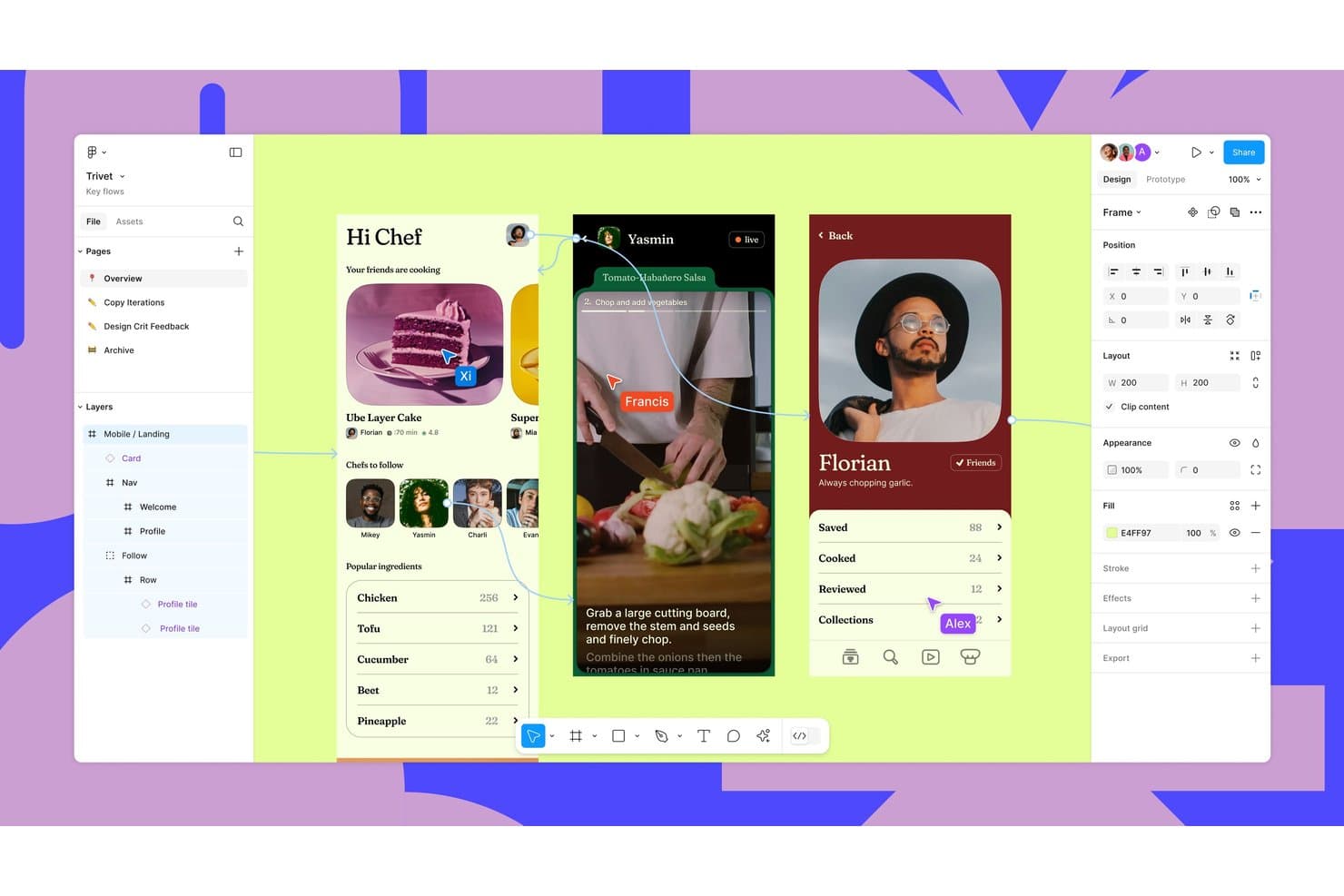
Figma supports collaborative design with real-time multiplayer cursors and prototyping. Figma is a browser-based design and collaboration platform that supports product mockup creation through its Community library of 4,700+ device templates, third-party plugins like Artboard Studio and Mockuups Studio, and AI-powered image editing tools.
Who Is Figma Best For?
Figma is a strong fit for product and UX teams that already live in Figma and need to drop app screens into device frames for stakeholder presentations without switching tools.
Why I Picked Figma
I've included Figma in my top picks because it's the only tool on this list where your mockup workflow lives inside the same file as your actual designs. When your team is presenting app screens to stakeholders, you can pull from 4,700+ community device frame templates and drop your live designs directly into labeled placeholders without switching tools. Plugins like Mokker add 3D device rendering with lighting and shadows for more polished outputs.
Figma Key Features
- Figma Buzz bulk create: Upload a CSV or XLSX file to map data columns to design layers and generate one asset per row automatically.
- AI image editing tools: Edit designs using text prompts, remove backgrounds, expand images, and boost resolution directly within your Figma file.
- Figma Community template library: Access 4,700+ device mockup templates plus packaging, apparel, and print files published by community members.
- Real-time multiplayer collaboration: Co-edit files simultaneously with teammates, leave comments, and share links with unlimited free viewers.
Figma Integrations
Figma supports integrations with Cursor, VS Code and Google Drive links for Buzz bulk-create data.
Pros and Cons
Pros:
- Layer-level editing supports branded mockup variations
- Real-time collaboration simplifies stakeholder mockup reviews
- 4,700-plus device templates support rapid screen presentations
Cons:
- Plugin quality varies across photorealistic mockups
- Manual placement replaces native smart-object warping
 Best for quick drag-and-drop mockup creation
- Free trial + free plan available
- From $144/user/year (billed annually)
Visit WebsiteCustomer Rating:4.6/5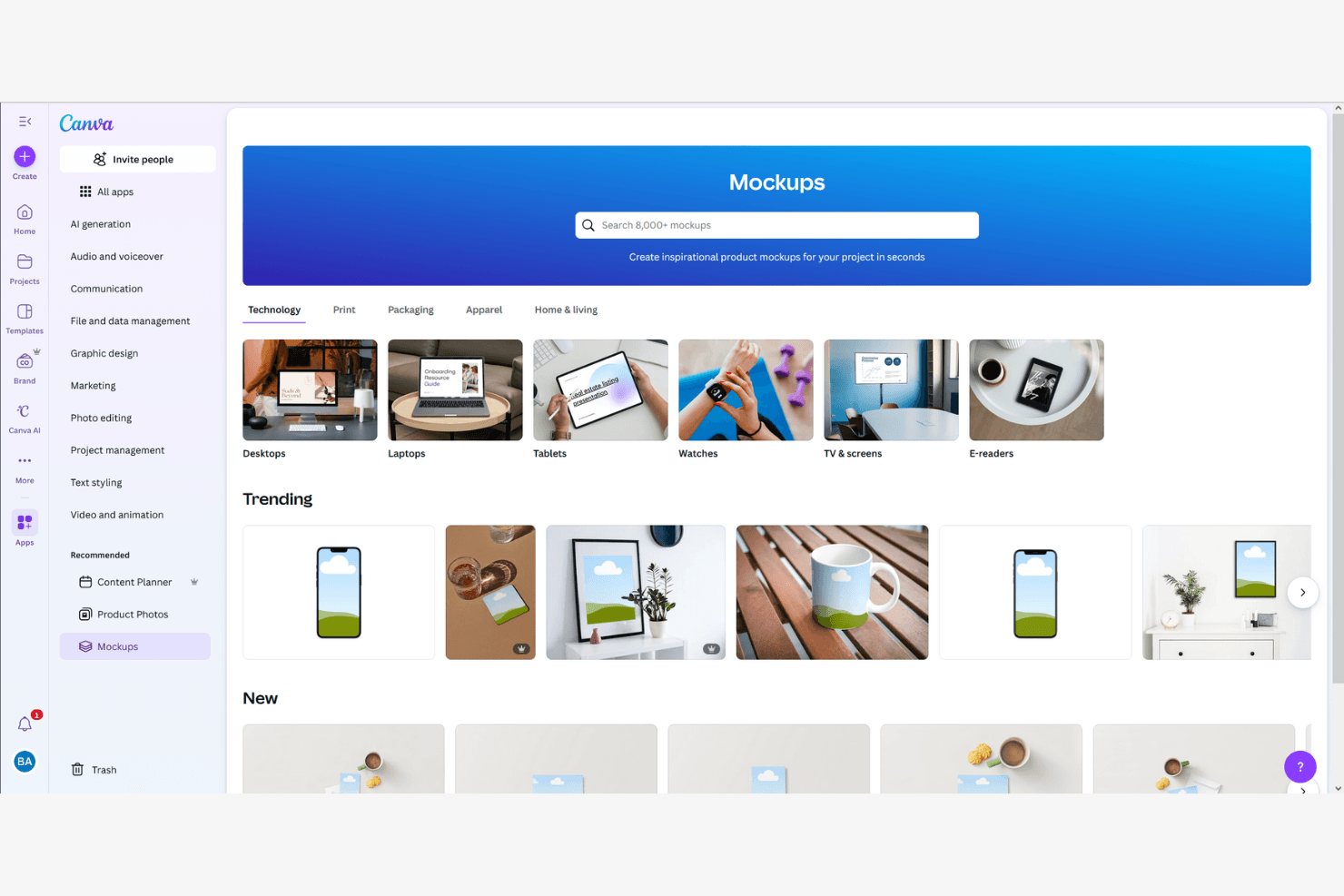
Canva lets users create product mockups across tech and lifestyle categories. Canva is a browser-based design tool that combines a drag-and-drop editor, an AI mockup generator, and a library of over 400 mockup scenes and 3.6 million templates for creating visual product mockups, pitch decks, and marketing assets.
Who Is Canva Best For?
Canva is a strong fit for product managers, founders, and product marketers who need to turn rough concepts into polished visuals fast—without relying on a designer.
Why I Picked Canva
I picked Canva as one of the best because its drag-and-drop mockup creation genuinely removes the bottleneck of waiting on design resources. Its library of 400+ mockup scenes lets you drop a UI screenshot onto a phone frame or product surface in seconds, and the AI Mockup Generator can produce a polished website or app mockup from a single click. I also love that Magic Design generates full layouts from a text prompt, so you can go from concept to stakeholder-ready visual before your next standup.
Canva Key Features
- Brand Kit: Store your brand's colors, fonts, and logos in one place so every mockup your team produces stays on-brand without extra effort.
- Real-time co-editing: Multiple teammates can work on the same design simultaneously, with comments and to keep feedback in context.
- Magic Resize: Instantly reformat a design to fit different canvas dimensions, so one mockup can cover multiple presentation formats.
- 300+ app integrations: Connect Canva to tools like Slack, Asana, HubSpot, and Google Workspace directly from the editor.
Canva Integrations
Integrations include Slack, Asana, Microsoft Teams, and Google Workspace.
Pros and Cons
Pros:
- AI generates visuals from simple prompts
- Massive library of ready-made mockup templates
- Drag-and-drop mockup creation needs no training
Cons:
- No developer handoff or spec exports
- No interactive prototype or user flow support
Learn more about Canva: Best for prompt-driven product scene creation
- Free plan available
- From $3.99/user/month (billed annually)
Visit WebsiteCustomer Rating:4.4/5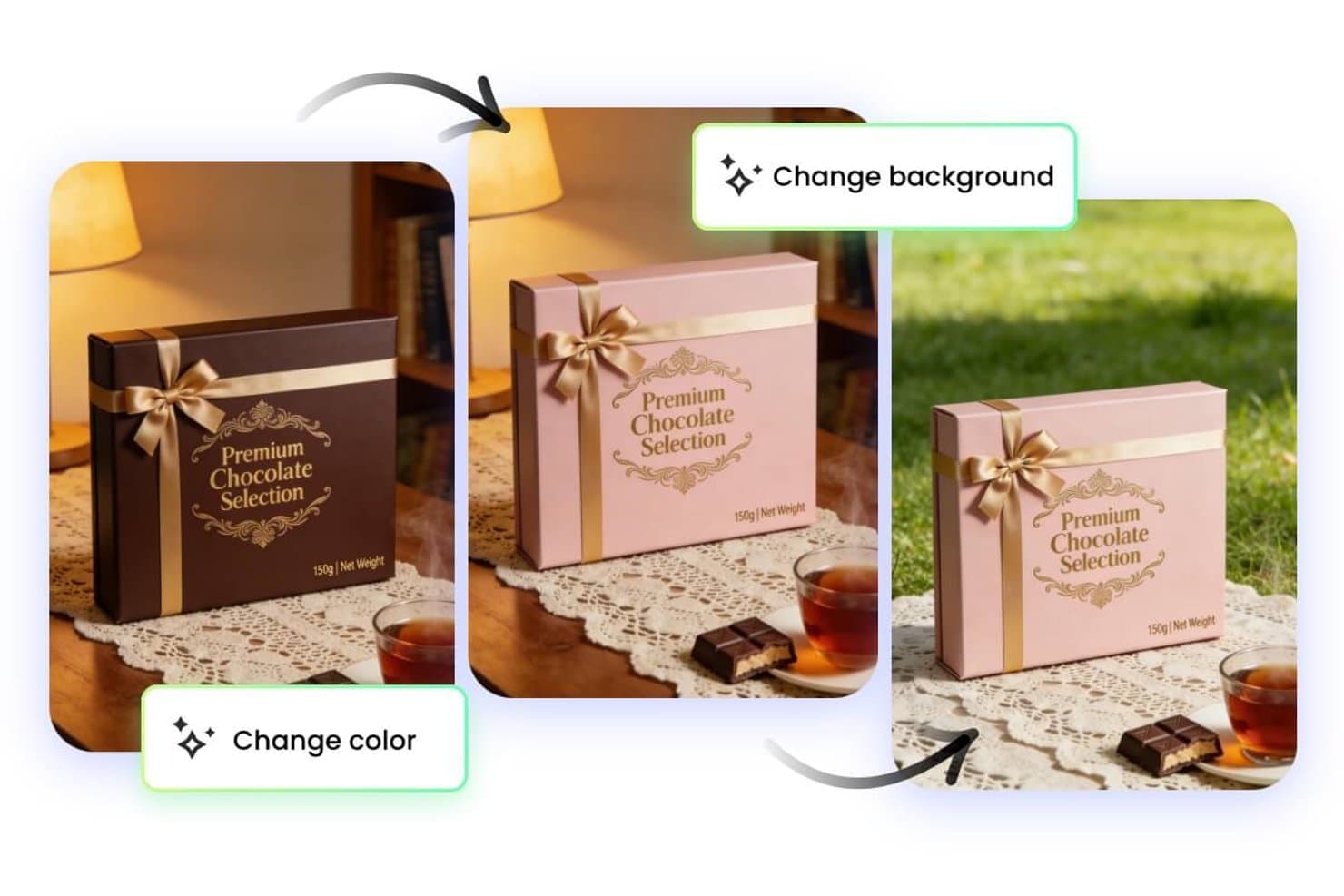
Fotor lets users change mockup colors and backgrounds instantly. Fotor is an AI-powered photo editing and mockup generation tool that lets you create product scenes, remove backgrounds, and generate lifestyle imagery using text prompts.
Who Is Fotor Best For?
Fotor is a great fit for solo creators and small ecommerce teams who want to generate polished product scenes quickly without a dedicated design background.
Why I Picked Fotor
Fotor earns its spot on my shortlist because of how well its text-to-image prompt engine translates simple descriptions into polished, contextual product scenes. I particularly like the AI background generator, which lets you swap a plain studio shot into a lifestyle setting (think a skincare bottle on a marble bathroom counter) without any manual compositing. The AI object removal tool also keeps product shots clean before scenes are generated.
Fotor Key Features
- Batch image editing: Apply edits, filters, or resizing adjustments to multiple product photos at once from a single workspace.
- AI image enhancer: Automatically sharpen, denoise, and upscale product images to meet platform resolution requirements.
- One-click background remover: Instantly isolate product subjects from existing photos to prepare them for new scene generation.
- Pre-built photo effect templates: Apply curated visual styles and color treatments to product shots using a library of ready-made templates.
Fotor Integrations
Native integrations are not currently listed.
Pros and Cons
Pros:
- Batch editing supports multiple product variants
- Background removal prepares products for mockups
- Prompt-driven scenes suit rapid concept testing
Cons:
- No documented native mockup workflow integrations
- Generated scenes can require prompt refinement
Learn more about Fotor: Best for brand-kit-driven mockup consistency
- Free plan available
- From $7.99/user/month (billed annually)
Visit WebsiteCustomer Rating:4.5/5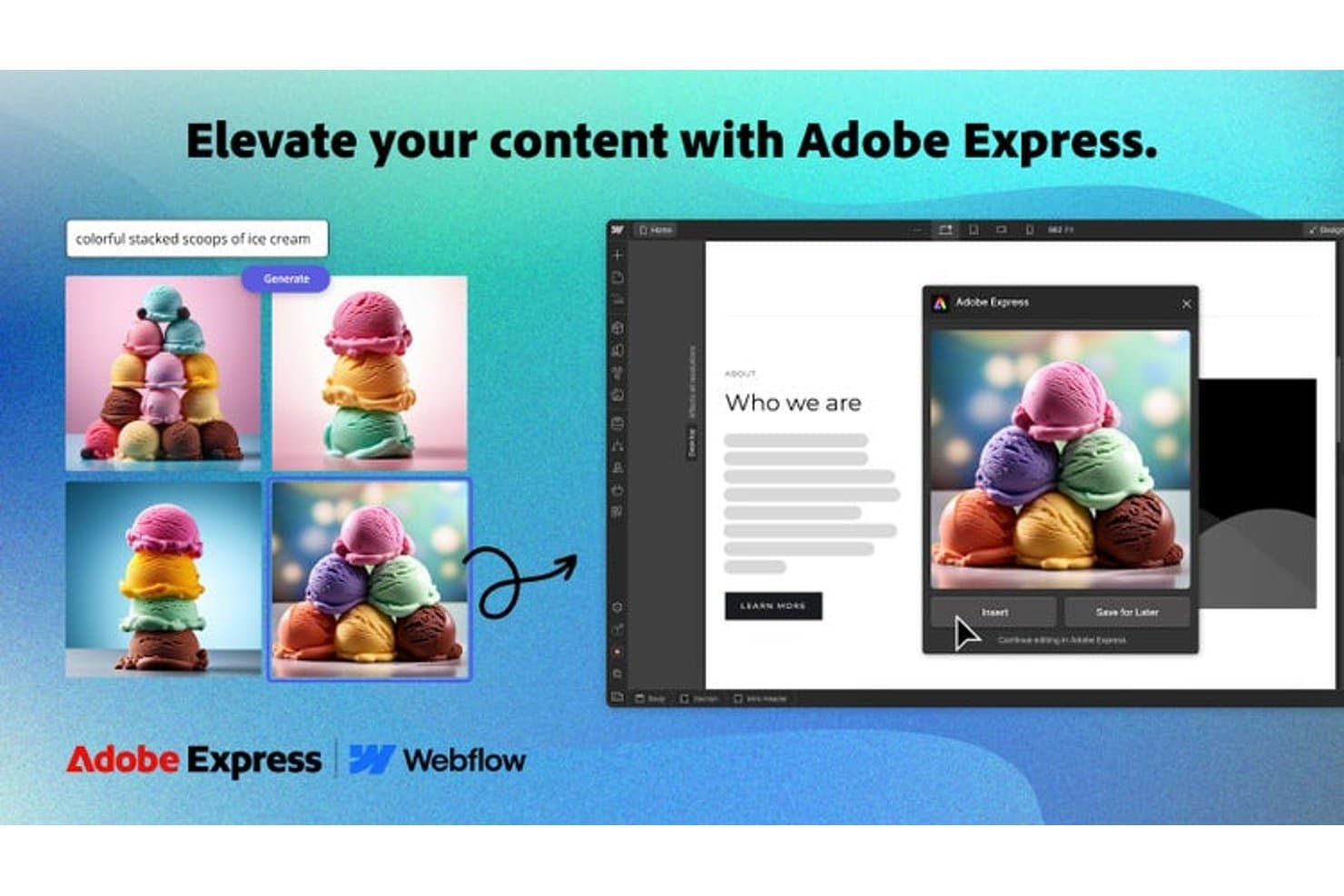
Adobe Express generates AI images directly into web mockups. Adobe Express is a design and mockup creation tool that lets you build product visuals using branded templates, a built-in brand kit, and a library of customizable assets across print, digital, and social formats.
Who Is Adobe Express Best For?
Adobe Express is a strong fit for brand and marketing teams that need to produce consistent, on-brand mockups at scale without relying on a dedicated designer.
Why I Picked Adobe Express
I picked Adobe Express because its brand kit feature is genuinely useful for keeping mockups consistent across every asset your team produces. You upload your logos, set your brand colors, and define your typography once, and Adobe Express applies that kit automatically to any template you work from. I also like that it supports mockups across print, digital, and social formats from a single workspace, so a product launch doesn't require juggling three different tools.
Adobe Express Key Features
- One-click background remover: Instantly strips the background from product images so you can place them on any mockup scene without manual editing.
- AI-powered text effects: Applies stylized, editable text treatments directly onto mockup designs using Adobe's generative AI tools.
- Content scheduler: Lets you publish or schedule mockup-ready assets directly to social channels from within the platform.
- Template resizing tool: Automatically resizes any mockup design to fit multiple formats and dimensions in a single action.
Adobe Express Integrations
Adobe Express maintains an ecosystem of native add-ons and integrations, including Slack, Microsoft Copilot, ChatGPT, Figma, Bynder, Frontify, Hootsuite, Sprout Social, and Google Drive.
Pros and Cons
Pros:
- Background removal simplifies product image placement
- Templates cover print, digital, and social formats
- Brand kits preserve visual consistency across mockups
Cons:
- Advanced product presentation controls remain limited
- Dedicated mockup scenes feel less realistic
Learn more about Adobe Express: Best for wireframe-style mockup creation
- 14-day free trial
- From $16/user/month (billed annually)
Visit WebsiteCustomer Rating:4.3/5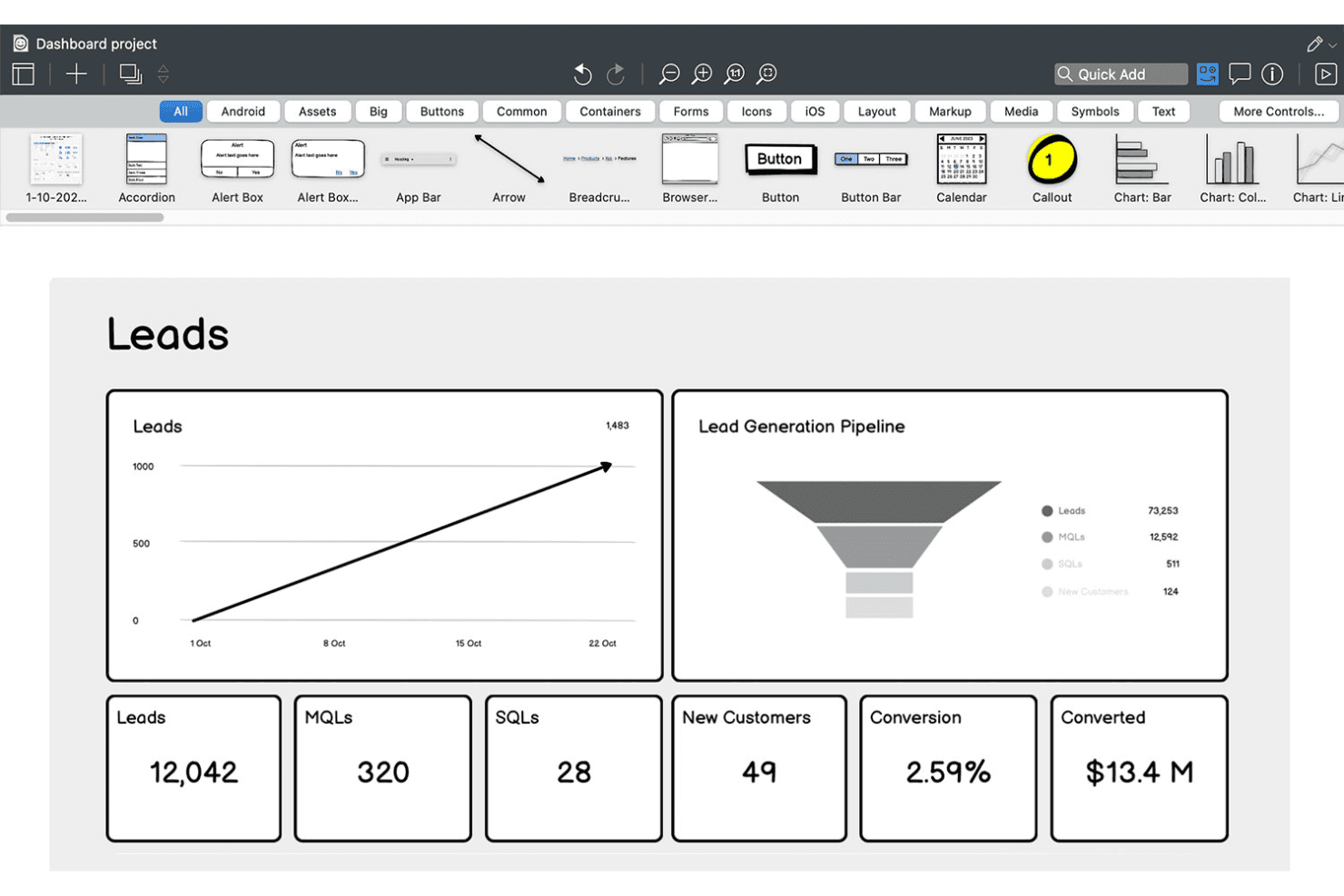
Balsamiq lets users wireframe sales dashboards with charts and KPIs. Balsamiq is a low-fidelity wireframing and mockup tool that lets you sketch out UI concepts using a drag-and-drop editor, a hand-drawn component library, and AI-assisted wireframe generation from text prompts, screenshots, or rough sketches.
Who Is Balsamiq Best For?
Balsamiq is a natural fit for product managers, founders, and business analysts who need to communicate UI concepts quickly without relying on a designer.
Why I Picked Balsamiq
Balsamiq earns its spot on my shortlist because its hand-drawn, sketch-style wireframing keeps early product conversations focused on structure and flow, not pixel polish. I love that the AI layer lets you drop in a rough napkin sketch or a screenshot of a competitor's app and get an editable wireframe back in seconds. The one-click prototype generation from existing screens is something I find genuinely useful when I need to walk stakeholders through a user flow without burning time on transitions or animations.
Balsamiq Key Features
- Unlimited reviewers: Any number of stakeholders can view and comment on wireframes without needing a paid editor seat.
- Tailwind-inspired UI controls: A library of 138 Tailwind-style buttons, inputs, toggles, and dropdowns is available directly in the UI Elements panel.
- MCP server integration: Connects Balsamiq boards to AI coding tools like Claude, Cursor, and GitHub Copilot to generate code, user stories, and QA plans from wireframes.
- Jira and Confluence embedding: Wireframes and clickable prototypes embed directly into Jira issues and Confluence pages for in-context stakeholder review.
Balsamiq Integrations
Balsamiq offers native integrations with Jira, Confluence, and Slack, plus Trello integration and embeds for Notion and Linear. Its MCP server connects Claude, Cursor, VS Code/GitHub Copilot, and ChatGPT to Balsamiq boards.
Pros and Cons
Pros:
- Low-fidelity style keeps focus on structure
- Unlimited reviewers can comment without paid seat
- Fast AI-powered wireframe from text or sketch
Cons:
- Prototyping lacks animation or advanced interactivity
- No high-fidelity or design system features
Learn more about Balsamiq: Best with advanced scene customization
- Free plan available
- From $9/month (billed annually)
Visit WebsiteCustomer Rating:3.3/5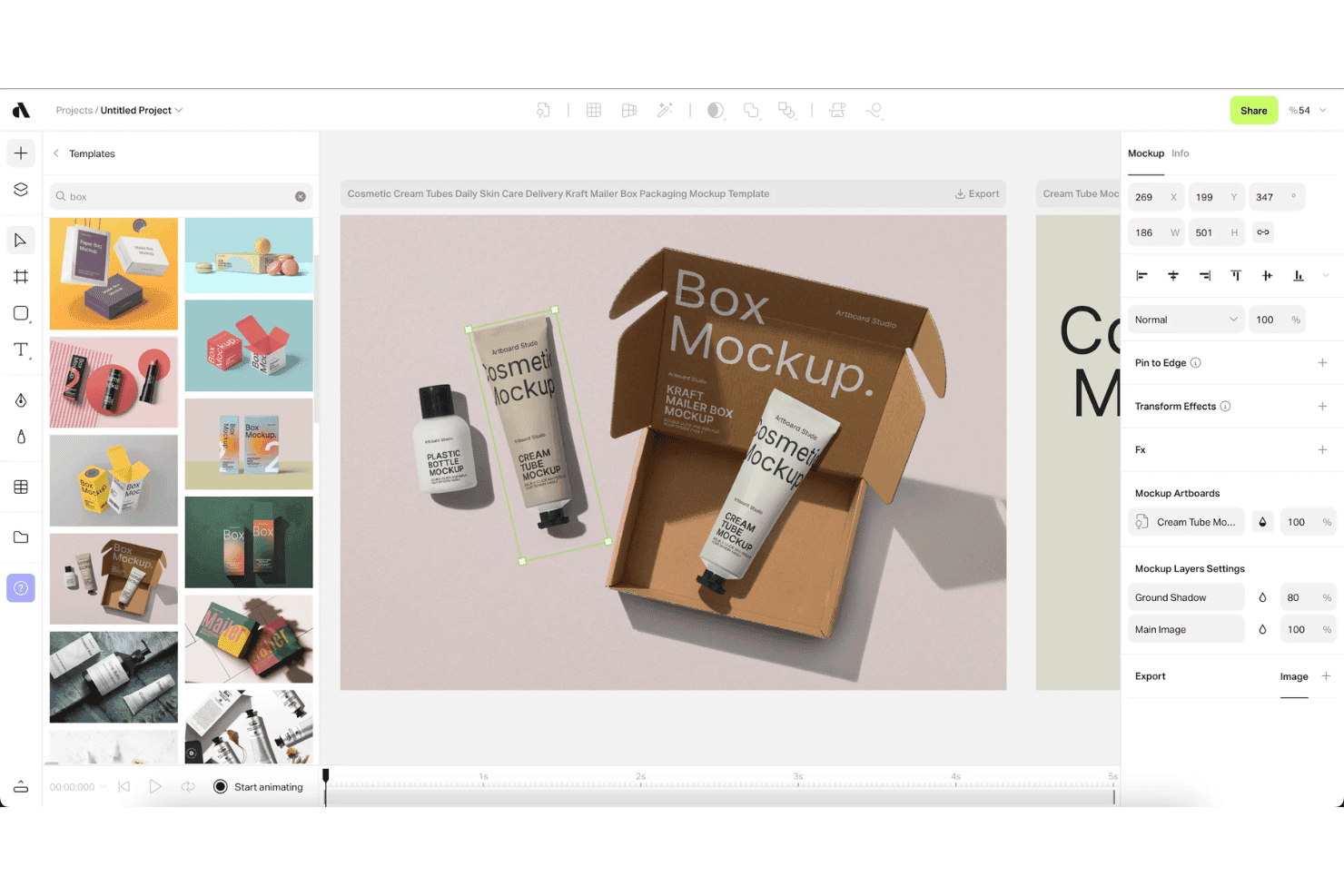
Artboard Studio lets users apply packaging mockups using drag-and-drop templates. Artboard Studio is a browser-based mockup generator and motion design editor that combines a 5,000+ mockup library, AI-powered scene generation, video mockup support, and creative automation tools.
Who Is Artboard Studio Best For?
Artboard Studio is a strong fit for product marketing managers and founders who need polished product visuals, launch assets, and pitch deck imagery without relying on a dedicated design team.
Why I Picked Artboard Studio
Artboard Studio earns its spot on my shortlist because of how deep its scene customization goes. I'm talking about a 5,000+ mockup library with smart object layers that auto-adjust perspective, lighting, and shadow, plus an AI mockup generator that builds entire scenes from a text prompt. What really sets it apart is video mockup support combined with a timeline-based motion design editor, so I can produce animated product visuals and launch assets, not just static images.
Artboard Studio Key Features
- Figma and Adobe Express plugins: Access Artboard Studio's full mockup library directly inside Figma or Adobe Express without switching between apps.
- Bulk export: Export multiple mockup variations simultaneously in PNG, JPEG, WEBP, MP4, MOV, GIF, or WebM formats.
- Google Sheets and Shopify integration: Sync real-time data from Google Sheets or Shopify to auto-populate and update mockup content at scale.
- Project version history: Save and revisit previous versions of your projects, with shareable presentation links for stakeholder reviews.
Artboard Studio Integrations
Artboard Studio has four documented integrations: Figma, Adobe Express, Google Sheets, and Shopify. Native integrations with Jira, Confluence, Notion, Slack, or Zapier, plus a public API, aren’t documented.
Pros and Cons
Pros:
- Video motion design editor for animated assets
- Huge variety of device and branding mockups
- AI-powered scene and mockup generation
Cons:
- No developer handoff or code export options
- No interactive prototyping features available
Learn more about Artboard Studio:
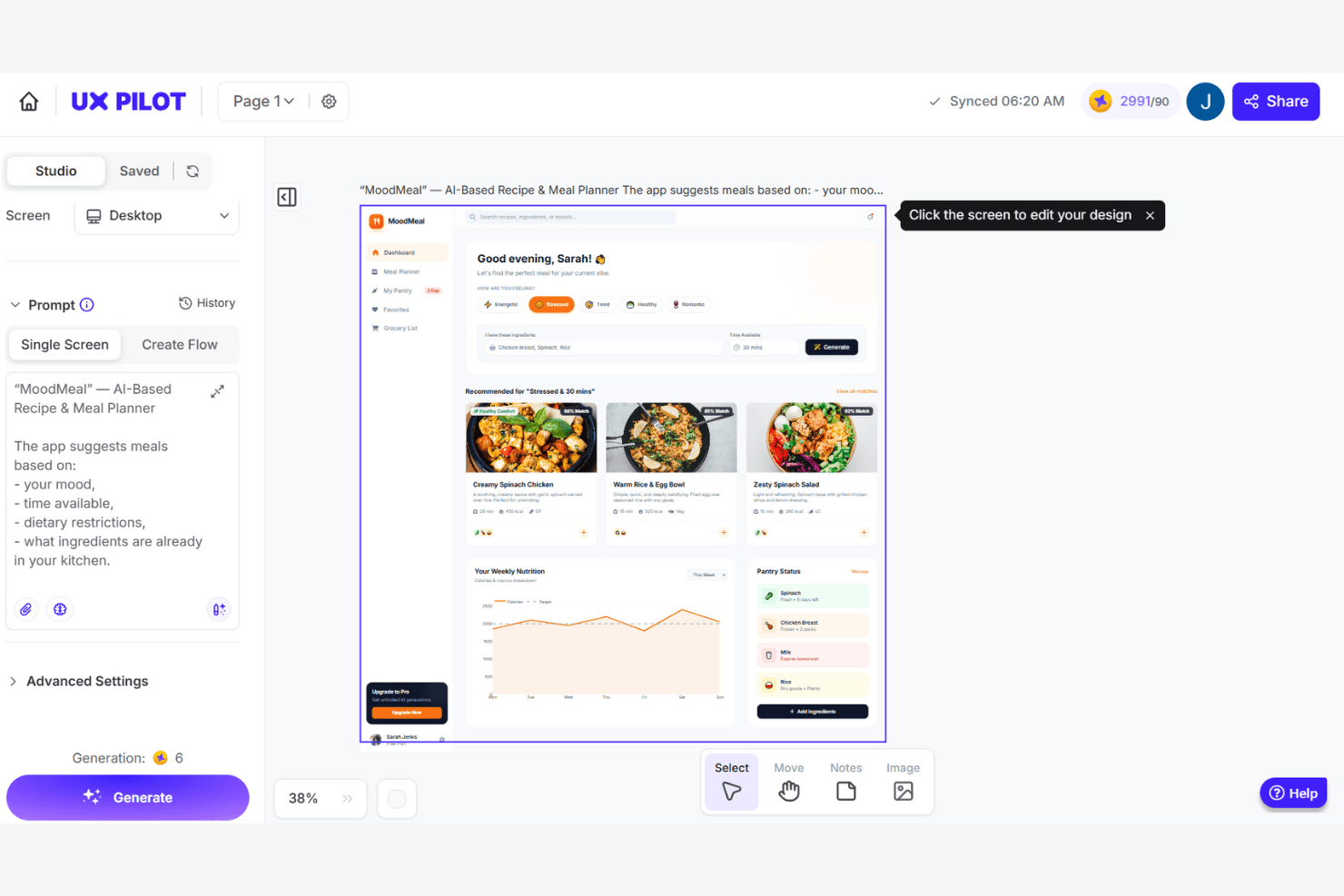
UX Pilot generates AI-based app UI designs from a text prompt. UX Pilot is an AI-powered mockup and UI generation platform that creates wireframes, high-fidelity screens, and multi-screen product flows from text prompts, PRDs, sketches, or reference screenshots.
Who Is UX Pilot Best For?
UX Pilot is a strong fit for product managers and non-designer founders who need to turn written specs or rough ideas into polished, multi-screen UI flows without a design background.
Why I Picked UX Pilot
I've included UX Pilot in my top picks because its AI-driven UX enhancement tools go beyond generation into validation. Predictive heatmaps simulate eye-tracking patterns on your screens before a single user sees them, surfacing hierarchy issues early. The automated design review then flags contrast, spacing, and platform-guideline conflicts across iOS, Android, and web in one pass—a combination I rarely see at this price point.
UX Pilot Key Features
- PRD-to-design automation: Upload a product requirements document and UX Pilot generates a complete, multi-screen UI flow directly from your written specs.
- Autoflow multi-screen generation: Describe a product concept in a text prompt and get a logically consistent, end-to-end user journey built across multiple linked screens.
- React Focus Mode: Build and publish fully interactive React prototypes with a visual editor, natural language chat edits, and one-click AI code fixes.
- GitHub sync: Export your full React codebase and sync it directly to a GitHub repository for a clean handoff to engineering.
UX Pilot Integrations
UX Pilot offers native integrations with Figma and GitHub for editable design exports and code handoff. Enterprise customers can access an API for custom integrations.
Pros and Cons
Pros:
- Figma plugin preserves layers and auto-layout
- PRD-to-design turns specs into screens fast
- Predictive heatmaps surface hierarchy issues early
Cons:
- Multi-screen flows can lack style consistency
- Credits deducted for failed or incomplete outputs
Learn more about UX Pilot: Best for collaborative design workflows
- Free plan available
- From $7/user/month (billed annually)
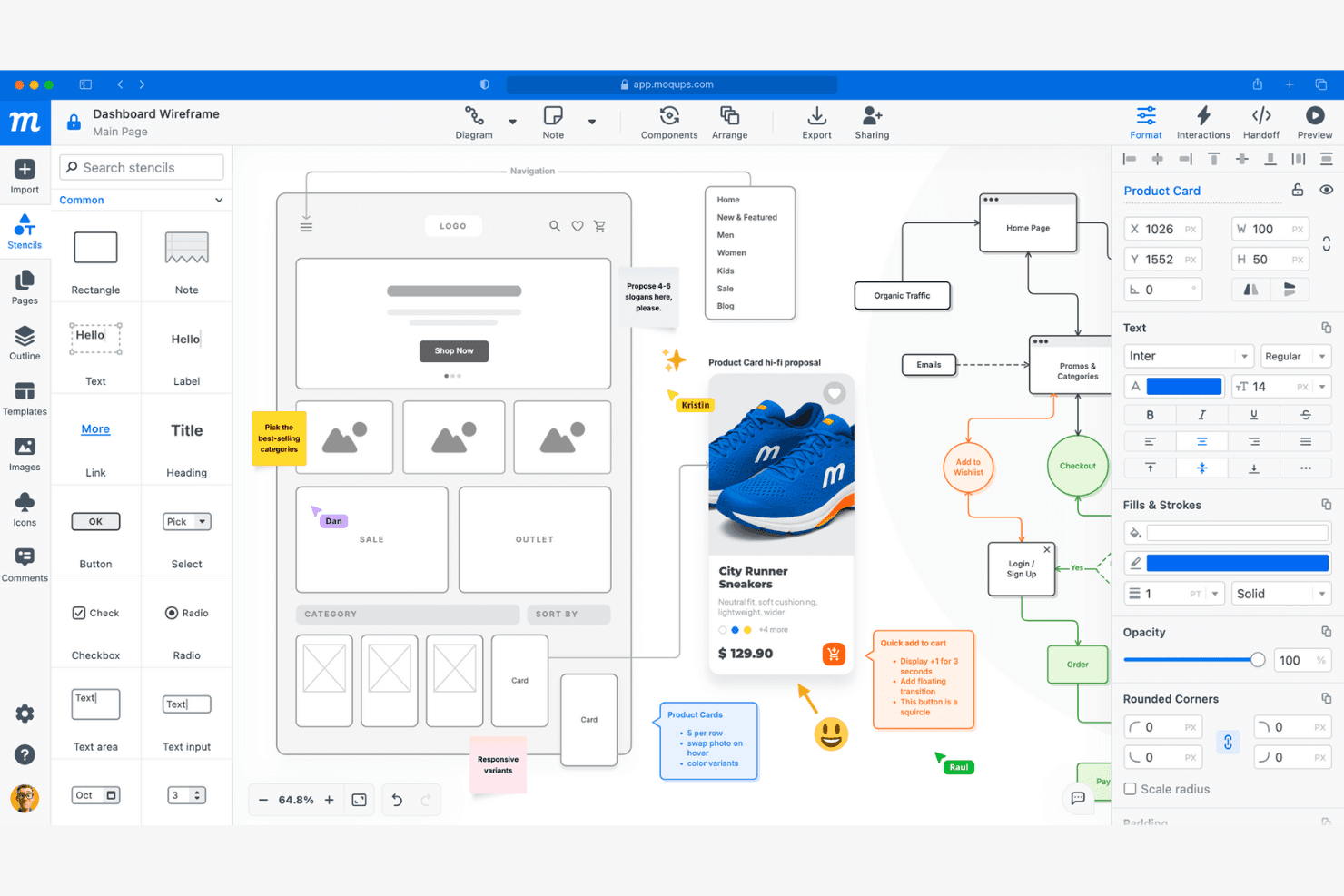
Moqups lets users wireframe, annotate, and collaborate on UI designs. Moqups is a browser-based mockup and wireframing tool that combines drag-and-drop UI design, interactive prototyping, diagramming, and real-time collaboration in a single cloud platform.
Who Is Moqups Best For?
Moqups is a great fit for cross-functional product teams—especially product managers and founders—who need a browser-based tool that keeps design, feedback, and iteration in one shared space.
Why I Picked Moqups
Moqups earns its spot on my shortlist because of how well it keeps cross-functional teams aligned without anyone needing to leave their existing workflow. I love that product managers can embed live wireframes directly into Jira issues and Confluence pages, so engineers and stakeholders always see the current design alongside tickets. Real-time co-editing, threaded pinned comments, and in-app chat mean my team can give and receive feedback without bouncing between tools.
Moqups Key Features
- Synced components: Edit a component once and changes automatically apply across every page in your project.
- Developer handoff panel: Generates CSS and JSX code snippets alongside object specs like coordinates, fonts, and colors for engineering handoff.
- Browser extension: Converts live webpages or screenshots into fully editable Moqups layouts directly from Chrome or Firefox.
- Interactive prototype preview mode: Activates all hotspots and object interactions so stakeholders can click through flows before development begins.
Moqups Integrations
Moqups documents integrations with Jira Cloud, Confluence Cloud, Google Drive, Slack, Dropbox, Box, Trello, Figma via plugin, and Balsamiq import, plus Chrome and Firefox extensions. Jira and Confluence integrations require a Business plan or higher.
Pros and Cons
Pros:
- Drag-and-drop editor enables fast mockup creation
- Synced components update across all project pages
- Real-time co-editing supports team collaboration
Cons:
- Interactive prototypes lack conditional logic
- No version control or branching available
Learn more about Moqups: Best for print-ready AI-generated mockup scenes
- Free plan available
- From $10/month (billed annually)
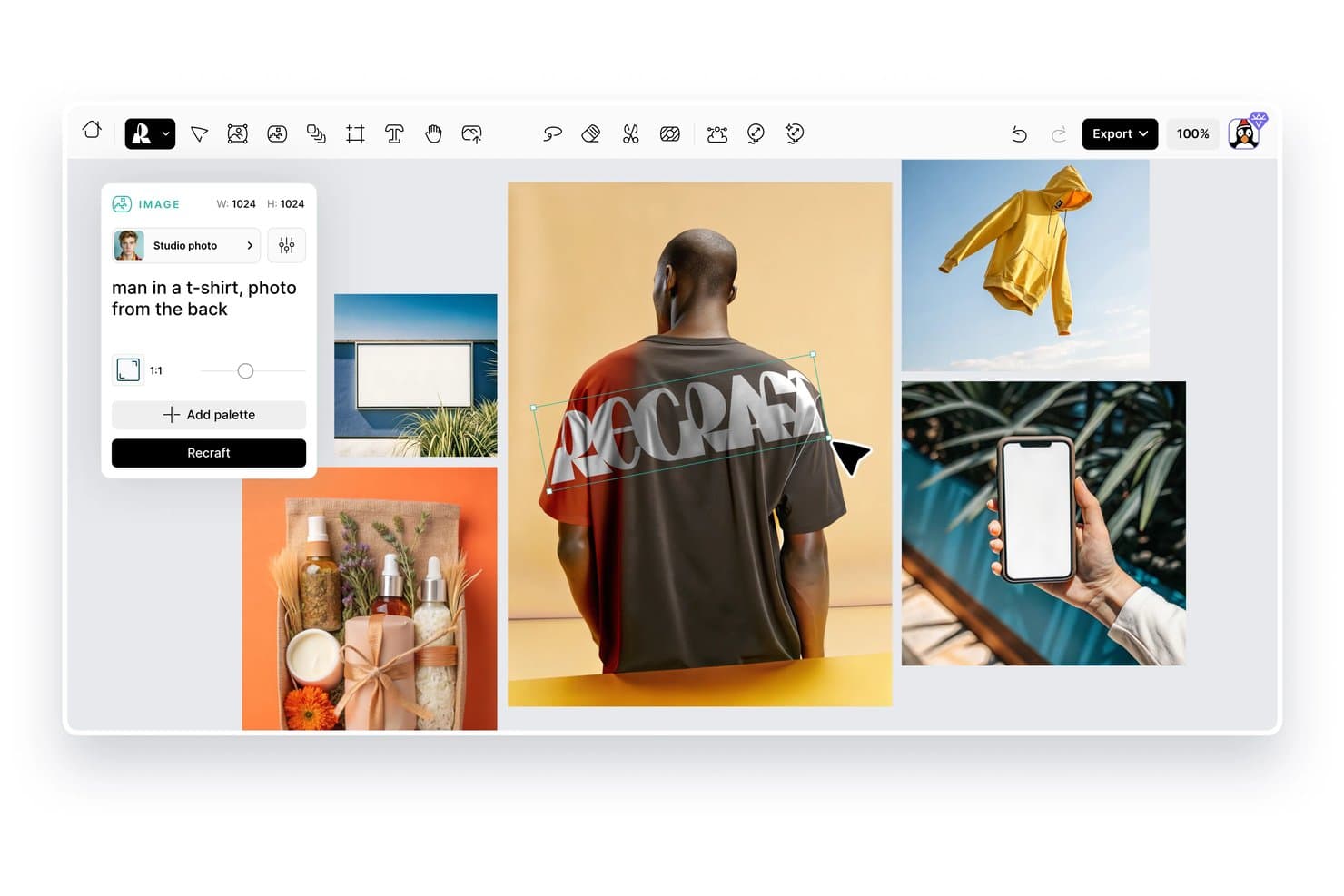
Recraft lets users generate product mockup images from text prompts. Recraft is an AI design tool that lets you generate and edit product mockup scenes, vector illustrations, and brand visuals using text prompts and image controls.
Who Is Recraft Best For?
Recraft is a strong fit for designers and brand teams who need print-ready mockup scenes with precise visual controls and AI-generated imagery.
Why I Picked Recraft
Recraft earns its spot on my shortlist because it generates print-ready mockup scenes at a quality level that's genuinely hard to replicate with standard design tools. I love how its vector output and style locking features let me keep brand visuals consistent across multiple mockup variations without manual rework. The AI scene generation also handles realistic lighting and surface texture in product placements, which matters when you're preparing assets for packaging or print campaigns.
Recraft Key Features
- Text-to-image generation: Create original product visuals and mockup scenes from written prompts without starting from scratch in a design tool.
- Style library: Save and apply custom visual styles across generated images to keep brand assets consistent across different outputs.
- Background removal tool: Isolate product images from their backgrounds automatically so you can drop them into new scenes or compositions.
- Image upscaling: Increase the resolution of generated mockup images to meet high-quality output requirements for print or large-format display.
Recraft Integrations
Recraft offers official native plugins/add-ons/extensions for Figma, Framer, Google Docs, Google Slides, Chrome, and OpenClaw. Its REST API supports custom integrations, and enterprise plans support MCP connections to internal tools.
Pros and Cons
Pros:
- Realistic lighting improves product placement
- Vector output supports brand consistency
- Print-ready scenes suit packaging workflows
Cons:
- Scene control varies across prompts
- Generations can miss exact product details
Learn more about Recraft: 10Best for e-commerce AI scene and 3D mockups
Mockey
- Free plan available
- From $5.7/month (billed annually)
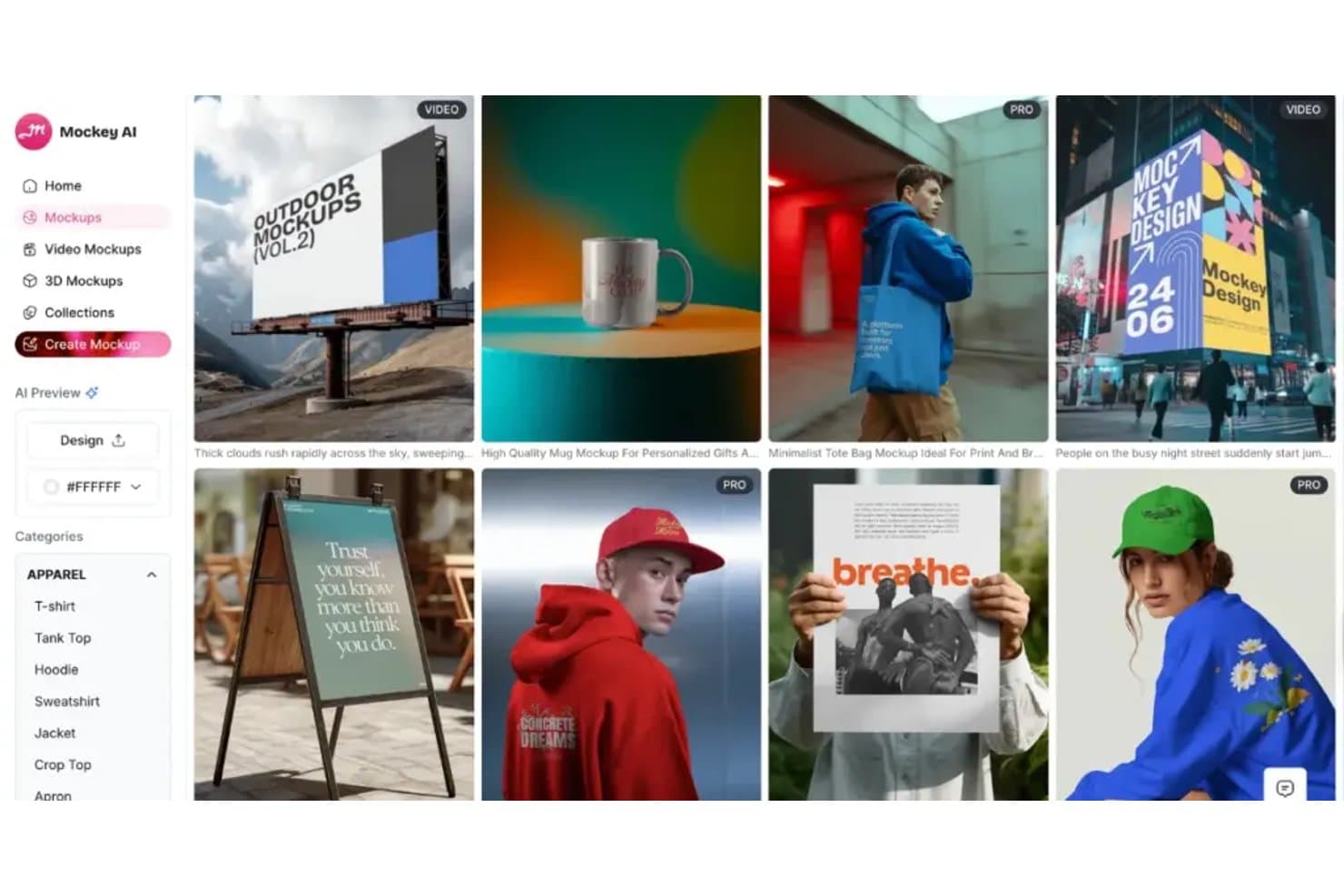
Mockey offers diverse mockup categories for apparel, outdoor, and print. Mockey is an AI-powered mockup generator that lets you place designs on products, scenes, and 3D renders across a large library of ecommerce-ready templates.
Who Is Mockey Best For?
Mockey is a strong fit for ecommerce sellers and product designers who need quick, polished AI-generated scene and 3D mockups without a complex design workflow.
Why I Picked Mockey
Mockey earns its spot on my shortlist because of how well it handles AI-generated scene placement and 3D mockups for ecommerce products. I love that you can drop a design onto a product and instantly get a lifestyle scene rendered around it, which saves the time and cost of a full photo shoot. The 3D mockup rendering is particularly strong for things like packaging, apparel, and print-on-demand items.
Mockey Key Features
- Bulk mockup generation: Upload multiple designs at once and generate mockups across several product templates in a single batch.
- Background remover: Automatically strips the background from uploaded product or design images before placing them into a mockup scene.
- Custom color editor: Adjust the color of mockup products directly within the editor to match specific brand or design requirements.
- Social media format export: Download finished mockups in preset dimensions sized for platforms like Instagram, Facebook, and Pinterest.
Mockey Integrations
Mockey offers native integrations including a Shopify App, a Figma Plugin, and Etsy Shop.
Pros and Cons
Pros:
- 3D renders suit packaging and apparel
- Bulk generation supports multiple product designs
- AI-generated scenes reduce photoshoot costs
Cons:
- Template breadth may vary by product
- Scene results depend on source design quality
Learn more about Mockey:
Diğer Ürün Maketi Oluşturucuları
İşte kısa listeme girmeyen ancak yine de incelemeye değer bazı ek ürün maketi oluşturucu seçenekleri:
- 11RotatoBest for app screen animations and video exports
- 12BoxshotBest for print-spec packaging renders at scale
- 13RenderforestBest for all-in-one branding and mockup creation
- 14KittlBest for creative template variety
- 15PlaceitBest for lifestyle scene mockup selection
- 16Mockuuups StudioBest for desktop app integration
- 17MediamodifierBest for bulk mockup generation
- 18PixeliedBest for non-designers creating brand mockups
- 19ProVisualBest for browser-based 3D product rendering
- 20PackifyBest for brief-to-dieline packaging mockups
How I Evaluate Product Mockup Generators
I split my evaluation into three parts, giving the most weight to core functionality: placing artwork in realistic device, packaging, or print scenes and exporting presentation-ready previews. Next, I consider differentiators such as AI-generated backgrounds or saved brand kits. Finally, I weigh licensing, plan value, client-review needs, and onboarding support.
Core Functionality (Table Stakes For This List)
When I'm selecting tools for my list, I score each one on a scale from 0 (does not offer the functionality) to 5 (excels in this area) for each core functionality listed below. I then convert the total into a percentage to help assess each tool's overall fit, with extra weight on any functionalities I’ve deemed essential.
- Template Library (Essential): I look for realistic options across devices, apparel, packaging, and print, so teams can match mockups to the product or campaign.
- Smart Placement (Essential): I assess how reliably uploaded artwork or screenshots fit a surface’s shape and perspective, such as a label on curved packaging.
- Customization: I check whether teams can adjust backgrounds, colors, textures, or scene elements to reflect a brand or campaign.
- High-Resolution Export: I consider whether exports suit their intended use, from social posts and stakeholder decks to print previews.
- Batch Generation: I look for ways to create multiple design or size variations from one source file for campaign reviews or product lines.
- Sharing And Review: I evaluate link sharing, embeds, and feedback options to see how teams can review concepts and gather stakeholder input.
Once I have a list of tools that meet the criteria, I consider what sets each platform apart.
Differentiating Factors (What Sets Vendors Apart)
Here's how I compare and contrast different vendors:
Standout Features
I check whether a tool offers AI background generation, which lets teams describe a scene in a text prompt and get a custom environment instead of scrolling through static presets. That's useful when you need a seasonal campaign backdrop or a lifestyle setting no stock template covers. I also evaluate API and automation access, since ecommerce sellers and print-on-demand teams often need to generate hundreds of mockups from a single design file without manual effort. Brand kit integration matters too—I look for saved palettes, logos, and fonts that keep every mockup on-brand across collaborators.
Beyond Features
I check whether mockup output is cleared for commercial and resale use, since agencies and print-on-demand sellers can run into licensing issues on lower-tier plans. Ecommerce connectivity matters too—tools that sync with Shopify or Etsy cut out repetitive upload steps when you're managing dozens of SKUs. I also evaluate onboarding support, because product managers without design backgrounds need guided templates and tutorials to get value fast.
Ürün Maketi Oluşturucu Nasıl Seçilir?
Uzun özellik listeleri ve karmaşık fiyatlandırma yapıları içinde kaybolmak kolaydır. Kendinize özgü yazılım seçim sürecinizde ilerlerken odaklanmanıza yardımcı olmak için göz önünde bulundurmanız gereken faktörlerin bir kontrol listesini aşağıda bulabilirsiniz:
| Faktör | Nelere Dikkat Edilmeli? |
|---|---|
| FaktörÖlçeklenebilirlik | Nelere Dikkat Edilmeli?Araç, büyüyen ürün kataloğunuzu veya ekip büyüklüğünüzü destekleyecek mi? Proje, kullanıcı veya depolama sınırlarını kontrol edin. |
| FaktörEntegrasyonlar | Nelere Dikkat Edilmeli?Araç, e-ticaret platformunuzla, tasarım yazılımınızla veya varlık yönetim sisteminizle bağlantı kuruyor mu? Yalnızca API erişimini değil, yerel entegrasyonları da doğrulayın. |
| FaktörÖzelleştirilebilirlik | Nelere Dikkat Edilmeli?Maketleri marka yönergelerinize veya benzersiz ürün türlerinize uyacak şekilde düzenleyebilir misiniz? Şablon esnekliğini ve düzenleme denetimlerini değerlendirin. |
| FaktörKullanım kolaylığı | Nelere Dikkat Edilmeli?Yeni kullanıcılar eğitim almadan ne kadar hızlı maket oluşturabilir? Yüklemeden dışa aktarmaya kadar sezgisel iş akışlarına ve az sayıda adıma sahip araçları tercih edin. |
| FaktörUygulama ve işe alıştırma | Nelere Dikkat Edilmeli?Ekibinizin işe başlamasına yardımcı olmak için hangi kaynaklar sunuluyor? Eğitimleri, işe alıştırma kılavuzlarını ve şablon kitaplıklarını göz önünde bulundurun. |
| FaktörMaliyet | Nelere Dikkat Edilmeli?Fiyatlandırma bütçenize ve kullanım ihtiyaçlarınıza uygun mu? Gizli ücretlere, indirme başına ödeme modellerine veya temel özellikler için gerekli yükseltmelere dikkat edin. |
| FaktörGüvenlik önlemleri | Nelere Dikkat Edilmeli?Sağlayıcı, yüklediğiniz tasarımları ve verileri nasıl koruyor? Şifreleme, gizlilik politikaları ve veri saklama uygulamalarını inceleyin. |
| FaktörDestek erişilebilirliği | Nelere Dikkat Edilmeli?Hangi destek kanalları sunuluyor ve hangi saatlerde hizmet veriliyor? Acil sorunlar için canlı sohbet, e-posta veya telefon desteğine ihtiyacınız olup olmadığını değerlendirin. |
Ürün Maketi Oluşturucu Nedir?
Ürün maketi oluşturucu, tasarımlarınızı gerçekçi ürün şablonlarının üzerine yerleştirmenizi sağlayan ve pazarlama, e-ticaret veya müşteri sunumları için görsel ön izlemeler oluşturan dijital bir araçtır. Bu platformlar, fiziksel numunelere veya ileri düzey tasarım becerilerine ihtiyaç duymadan resimlerinizin, markalama çalışmalarınızın veya ambalaj tasarımlarınızın giyim ürünleri, ambalajlar veya teknoloji cihazları gibi ürünlerde nasıl görüneceğini hızlıca görselleştirmenize yardımcı olur.
Ürün Maketi Oluşturucunun Özellikleri
Bir ürün maketi oluşturucu seçerken aşağıdaki temel özelliklere dikkat edin:
- Şablon kitaplığı: İhtiyaçlarınıza uygun bir maketi hızlıca bulabilmeniz için giyim ürünleri, ambalaj, teknoloji cihazları ve basılı materyaller gibi kategorileri kapsayan geniş bir hazır ürün şablonu seçkisi.
- Tasarım yükleme: Kendi resimlerinizi, logolarınızı veya markalama dosyalarınızı yükleyebilme ve anında görselleştirme için bunları doğrudan maket şablonlarına uygulayabilme.
- Sahne özelleştirme: Benzersiz ve markanızla uyumlu görseller oluşturabilmeniz için arka planları, aksesuarları, aydınlatmayı ve ürün konumunu ayarlamaya yönelik araçlar.
- Yüksek çözünürlüklü dışa aktarma: Tamamlanan maketleri baskı, web veya sunumlar için uygun yüksek çözünürlüklü biçimlerde indirme seçenekleri.
- Sürükle ve bırak düzenleyicisi: Basit sürükle ve bırak kontrolleriyle tasarımlarınızı ürün üzerinde konumlandırmanıza, yeniden boyutlandırmanıza ve döndürmenize olanak tanıyan sezgisel bir arayüz.
- Çoklu biçim desteği: Farklı kullanım alanlarına uyum sağlamak için maketleri PNG, JPG veya video biçimleri gibi çeşitli dosya türlerinde dışa aktarabilme.
- Toplu işleme: Tek bir tasarımı aynı anda birden fazla makete veya ürüne uygulamanızı sağlayarak tekrarlanan görevlerde zaman kazandıran özellikler.
- Markalama araçları: Tutarlı bir görünüm için maketlerinize filigran, marka renkleri veya özel metin eklemeye yönelik yerleşik seçenekler.
- Şablon filtreleme ve arama: Ürün türüne, stile veya sahneye göre doğru şablonu hızlıca bulmanıza yardımcı olan gelişmiş arama ve filtreleme seçenekleri.
- Sürüm geçmişi: İş birliğini ve yinelemeli tasarımı desteklemek üzere değişiklikleri izleme ve maketlerinizin önceki sürümlerine dönme olanağı.
Ürün Maketi Oluşturucunun Faydaları
Bir ürün maketi oluşturucu kullanmak ekibiniz ve işletmeniz için çeşitli faydalar sağlar. Yararlanabileceğiniz avantajlardan bazıları şunlardır:
- Daha hızlı tasarım doğrulama: Fiziksel numuneleri beklemeden resimlerinizin veya markalama çalışmalarınızın gerçek ürünlerde nasıl görüneceğini hızlıca görselleştirin.
- Maliyet tasarrufu: Yüksek kaliteli dijital maketler oluşturarak pahalı prototiplere veya fotoğraf çekimlerine duyulan ihtiyacı ortadan kaldırın.
- Geliştirilmiş müşteri sunumları: Müşterilere veya paydaşlara özenle hazırlanmış, gerçekçi görseller sunarak tasarım fikirlerini iletmeyi ve onay almayı kolaylaştırın.
- Daha fazla yaratıcı esneklik: Geniş bir şablon kitaplığı ve özelleştirme araçlarını kullanarak farklı ürün türleri, renkler ve sahneler üzerinde denemeler yapın.
- Tutarlı marka temsili: Pazarlama ve e-ticaret materyallerinde bütünlüklü bir görünüm sağlamak için marka varlıklarınızı ve yönergelerinizi tüm maketlere uygulayın.
- Sadeleştirilmiş iş akışı: Tekrarlanan görevleri azaltmak ve birden fazla maketin oluşturulmasını hızlandırmak için toplu işleme ve sürükle ve bırak düzenlemeyi kullanın.
- Geliştirilmiş iş birliği: Geri bildirimleri ve yinelemeli tasarım süreçlerini desteklemek için düzenlenebilir maketleri veya sürüm geçmişlerini ekip üyeleriyle paylaşın.
Ürün Maketi Oluşturucunun Maliyetleri ve Fiyatlandırması
Bir ürün maketi oluşturucu seçmek, mevcut çeşitli fiyatlandırma modellerini ve planları anlamayı gerektirir. Maliyetler özelliklere, ekip büyüklüğüne, eklentilere ve diğer unsurlara göre değişir. Aşağıdaki tablo, ürün maketi oluşturucu çözümlerinde yaygın olarak sunulan planları, ortalama fiyatlarını ve tipik özelliklerini özetlemektedir:
Ürün Maketi Oluşturucu Plan Karşılaştırma Tablosu
| Plan Türü | Ortalama Fiyat | Yaygın Özellikler |
|---|---|---|
| Plan TürüÜcretsiz Plan | Ortalama Fiyat$0 | Yaygın ÖzelliklerSınırlı şablon kitaplığına erişim, temel tasarım yüklemeleri, filigranlı indirmeler ve sınırlı dışa aktarma seçenekleri. |
| Plan TürüKişisel Plan | Ortalama Fiyat$5-$20/kullanıcı/ay | Yaygın ÖzelliklerTüm şablonlara erişim, yüksek çözünürlüklü indirmeler, temel sahne özelleştirme ve kişisel kullanım lisansı. |
| Plan Türüİşletme Planı | Ortalama Fiyat$20-$50/kullanıcı/ay | Yaygın ÖzelliklerEkip iş birliği araçları, toplu işleme, gelişmiş özelleştirme, öncelikli destek ve ticari kullanım hakları. |
| Plan TürüKurumsal Plan | Ortalama Fiyat$50-$100+/kullanıcı/ay | Yaygın ÖzelliklerÖzel entegrasyonlar, özel hesap yönetimi, geliştirilmiş güvenlik, işe alıştırma desteği ve SLA destekli yardım. |
Ürün Maketi Oluşturucu SSS'leri
Ürün maketi oluşturucu hakkında sık sorulan soruların bazı yanıtlarını burada bulabilirsiniz:
Ürün maketi oluşturucuları ticari projelerde kullanabilir miyim?
Evet, ücretli ürün maketi oluşturucularının çoğu ticari kullanıma izin verir; ancak her şablon ve dışa aktarma seçeneği için lisans koşullarını mutlaka incelemelisiniz. Bazı ücretsiz planlar kullanımı kısıtlayabilir veya kaynak belirtmenizi gerektirebilir. Bu nedenle maketleri pazarlama ya da e-ticaret çalışmalarında kullanmadan önce ayrıntıları kontrol edin.
Ürün maketi oluşturucu kullanmak için grafik tasarım becerilerine ihtiyacım var mı?
Hayır, çoğu ürün maketi oluşturucu tasarımcı olmayan kullanıcılar için geliştirilmiştir ve sezgisel sürükle ve bırak arayüzleri sunar. Tasarımınızı yükleyebilir, şablonların üzerine yerleştirebilir ve gelişmiş tasarım bilgisine veya yazılıma ihtiyaç duymadan sahneleri özelleştirebilirsiniz.
Maketlerimi hangi dosya biçimlerinde dışa aktarabilirim?
Ürün maketi oluşturucularının çoğu PNG ve JPG gibi yaygın biçimlerde dışa aktarmayı destekler; bazıları PDF veya video olarak dışa aktarma seçenekleri de sunar. Aracın baskı, web veya sunumlar gibi kullanım amacınız için ihtiyaç duyduğunuz dosya türlerini sağlayıp sağlamadığını kontrol edin.
Oluşturabileceğim veya indirebileceğim maket sayısıyla ilgili sınırlar var mı?
Evet, birçok platform abonelik planınıza göre sınırlar belirler. Ücretsiz planlar genellikle indirme sayısını kısıtlar veya filigran eklerken ücretli planlar çoğunlukla daha yüksek ya da sınırsız kullanım sunar. Plan ayrıntılarını inceleyerek çalışma ihtiyaçlarınızla uyumlu olduğundan emin olun.
Maketlerimdeki arka planı veya sahneyi özelleştirebilir miyim?
Evet, modern ürün maketi oluşturucularının çoğu benzersiz sahneler oluşturmak için arka planları, aksesuarları ve aydınlatmayı ayarlamanıza olanak tanır. Ancak özelleştirme düzeyi araçtan araca değişir. Bu nedenle düzenleyiciyi test ederek yaratıcı gereksinimlerinizi karşılayıp karşılamadığını görün.