

Ücretsiz hikâye panosu yazılımları veya ücretsiz sürümü bulunan hikâye panosu araçları, ister ücretsiz bir plan ister ücretsiz deneme yoluyla olsun, herhangi bir başlangıç maliyeti olmadan sahneleri, sekansları ve fikirleri görsel olarak planlamak için gerekli araçları sunar. Kavramları taslağa dökmeniz, ekibinizle iş birliği yapmanız veya yaratıcı fikirleri hayata geçirmeniz gerekiyorsa doğru ücretsiz hikâye panosu aracını seçmek iş akışınızı olumlu ya da olumsuz etkileyebilir.
Her yerde ücretli seçenekler ve özellik sınırlamaları varken hangi ücretsiz hikâye panosu yazılımının yapım öncesi sürecinizi gerçekten destekleyebileceğini ve bütçenize uyabileceğini anlamak zordur. Bu kılavuz, her seçenekten neler bekleyebileceğinizi ayrıntılı olarak açıklayarak projeleriniz için en iyi araçlara güvenle zaman ayırmanıza yardımcı olur.
Why Trust Our Software Recommendations
6,700+
Reviews
20
Industry experts
16+
Evaluation factors
14
Years
Our team has been testing and reviewing software since 2012. As product managers ourselves, we know how difficult—and important—it is to choose the right software.
For this guide, we evaluated tools using hands-on testing and independent research, scoring tools using our selection criteria.
Our reviews reflect our human editorial judgment, not a sales pitch.
Expert reviewers:
- Andrew LumbySenior TPM
- Cristiano ValimSenior UI/UX Lead


Karşılaştırma Tablosu: Ücretsiz Hikâye Panosu Yazılımı
Bu karşılaştırma tablosu, en iyi ücretsiz hikâye panosu yazılımı seçimlerimin fiyatlandırma ayrıntılarını özetler.
Sorted by: Default
| Tool | Starting Price | Website | |
|---|---|---|---|
Best for collaborative visual planning | 4.6 out of 5 | $144/user/year Free trial + free plan available | Website |
Best for organizing creative concepts visually | 4.7 out of 5 | $9.99/user/month Free plan + free trial + free demo available | Website |
Best for integrated production workflows | Not rated | $25/user/month Free plan available | Website |
Best for AI-powered storyboard generation | Not rated | $50/month Free plan + free trial available | Website |
Best for diverse scene and character libraries | Not rated | $14.99/month Free trial + free plan available | Website |
Best for cross-functional team collaboration | 4.8 out of 5 | $8/user/month Free plan + 14-day trial available | Book Demo |
Best for film-grade animatic storyboarding | Not rated | $90/month 14-day free trial | Website |
Best for hand-drawn illustration flexibility | Not rated | Free forever Free forever | Website |
Best for rapid sketching with drawing tools | Not rated | Free forever Free forever | Website |
Best for intuitive drag-and-drop sequences | Not rated | $7.99/month Not available | Website |


Ücretsiz Hikâye Panosu Yazılımı İncelemeleri
Aşağıda, seçkime dahil ettiğim ücretsiz hikâye panosu yazılımlarının ayrıntılı özetlerini bulabilirsiniz. İncelemelerim, size en uygun olanı bulmanıza yardımcı olmak için her aracın özelliklerine, yeteneklerine ve en uygun kullanım alanlarına ayrıntılı bir bakış sunar.
 Best for collaborative visual planning
- Free trial + free plan available
- From $144/user/year (billed annually)
Visit WebsiteCustomer Rating:4.6/5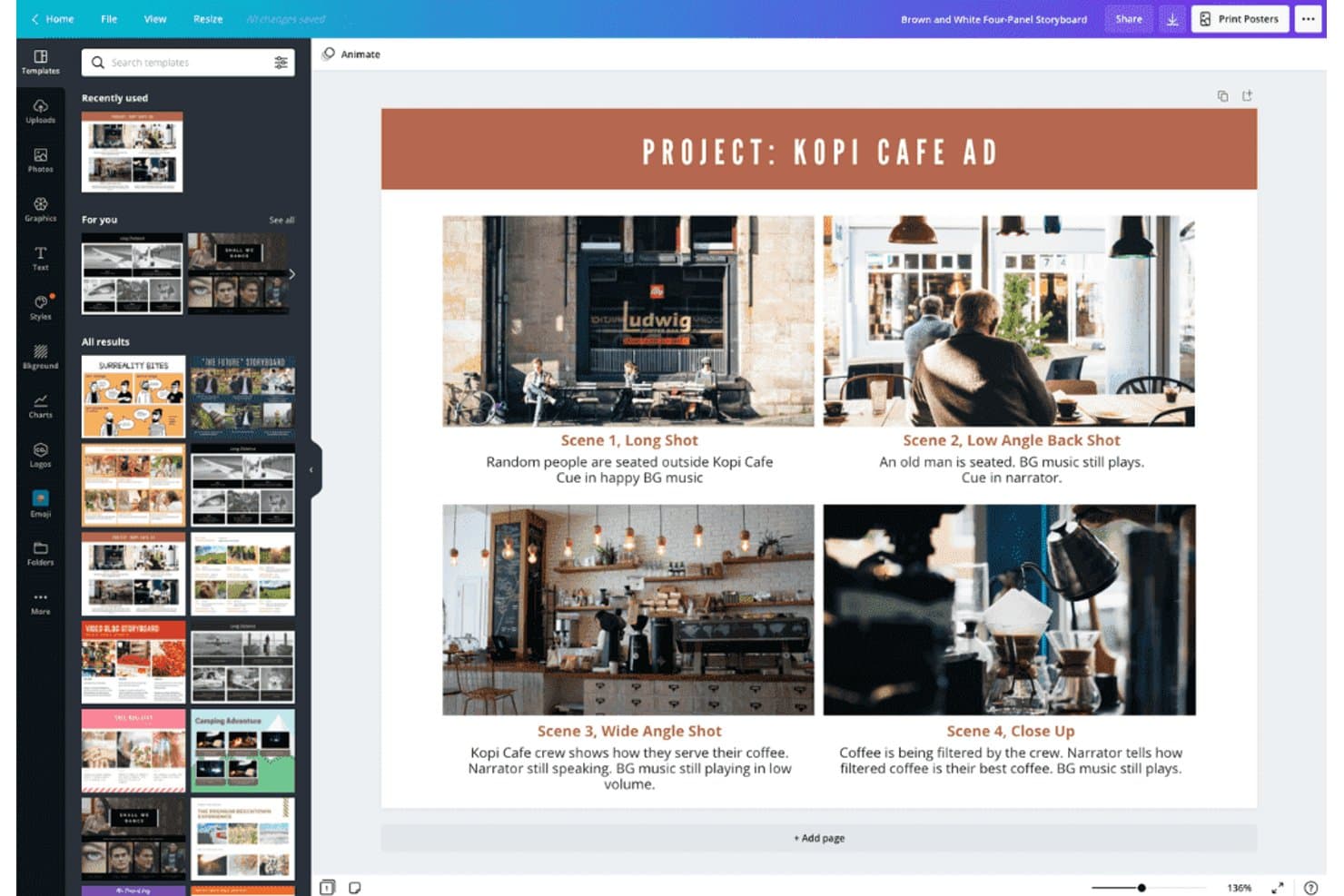
Canva lets users build storyboards with scenes, shots, and notes. Canva is a free storyboard software platform with film and video templates, multi-page panel layouts, drawing and image-import tools, annotations, whiteboards, collaborative editing, and presentation and export features.
Who Is Canva Best For?
Canva suits film and video creators and marketing teams that need to storyboard, collaborate on visual ideas, and present concepts without specialized production software.
Why I Picked Canva
I picked Canva because its storyboard templates turn scene planning into a collaborative visual workspace. I use multi-page film and video layouts to arrange shots, add annotations, and reorder sequences before production. Whiteboards, comments, and presentation mode also let my team refine a concept and present the visual flow from one shared design.
Canva Key Features
- Shape Assist: Converts freehand sketches into clean shapes, arrows, and diagrams.
- AI image generation: Creates visuals for storyboard scenes from text prompts.
- Flowchart connectors: Links shapes with straight, curved, or elbow connectors.
- Presenter view: Displays speaker notes and upcoming slides during presentations.
Canva Integrations
Canva offers documented integrations with Google Workspace, Microsoft Teams, Dropbox, OneDrive, Box, and Google Photos. It also supports marketplace integrations through the Canva Apps Marketplace, including Figma to Canva.
What's Free?
Canva offers a free-forever plan with 5 GB of storage, free templates and assets, and PDF, JPG, and PNG exports. Premium content, advanced brand tools, print-ready downloads, transparent backgrounds, and higher AI allowances require a paid plan.
Pros and Cons
Pros:
- Presentation mode supports creative pitches
- Extensive film and video storyboard templates
- Collaborative scene planning with live comments
Cons:
- Large projects can feel slow
- No structured shot metadata fields
Learn more about Canva: Best for organizing creative concepts visually
- Free plan + free trial + free demo available
- From $9.99/user/month (billed annually)
Visit WebsiteCustomer Rating:4.7/5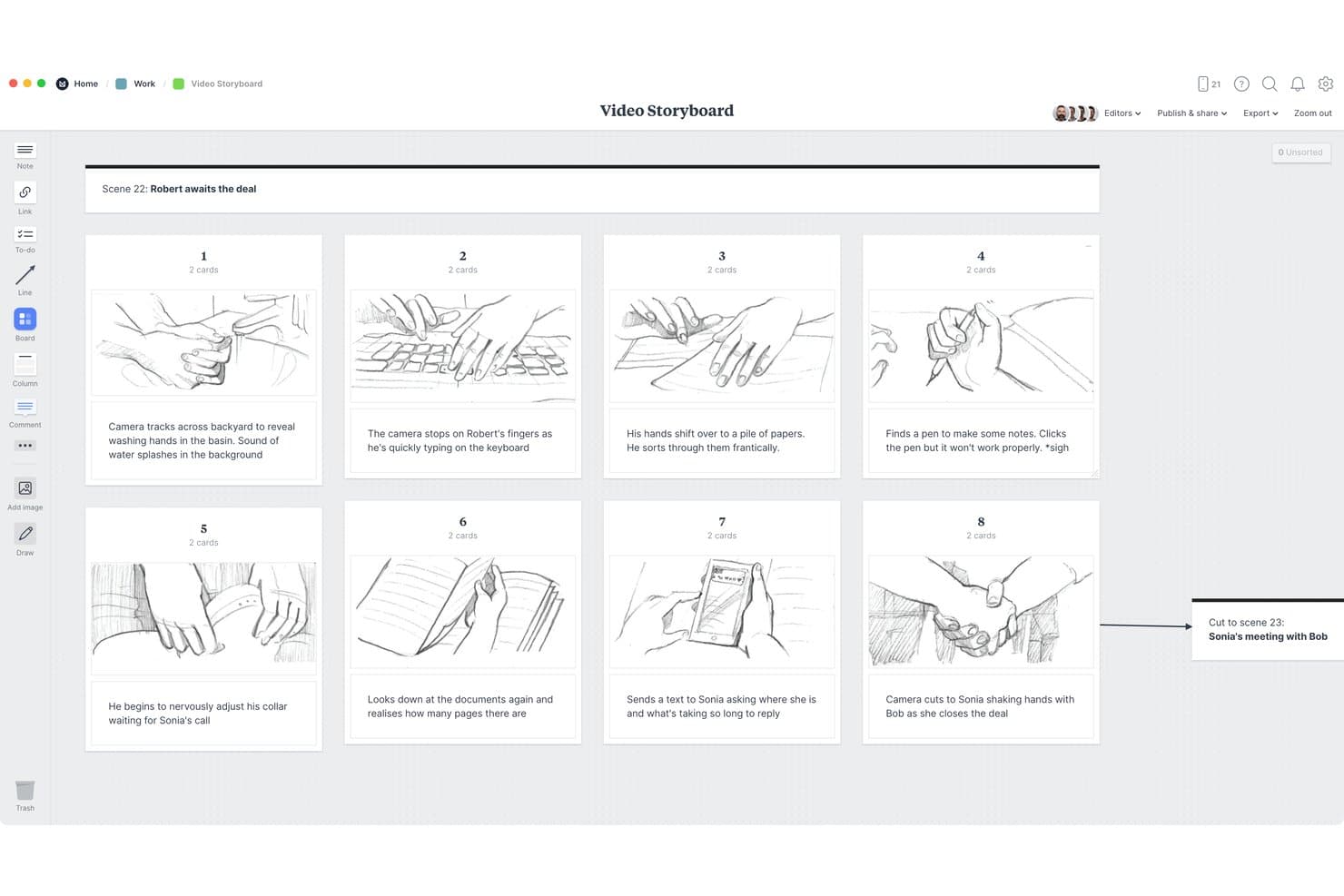
Milanote lets users build visual storyboards with sketches and scene notes. Milanote is free storyboard software built around an infinite visual workspace, with image and video cards, sketches, columns, templates, annotations, presentation mode, and collaborative sharing.
Who Is Milanote Best For?
Milanote suits marketing and creative teams that need to shape campaign concepts, scene sequences, and visual pitches on a flexible shared canvas.
Why I Picked Milanote
I picked Milanote because it turns storyboard planning into a flexible visual workspace. I use its infinite canvas, image and sketch cards, and columns to arrange scenes, references, and annotations side by side. Presentation mode then helps me walk stakeholders through a campaign concept or scene sequence without exposing editing tools.
Milanote Key Features
- Storyboard templates: Choose from 12 templates for film, UX, video, games, and marketing.
- Comment threads: Add replies, mentions, reactions, and notifications to board items.
- Export formats: Download boards as PDF, PNG, Word, Markdown, plain text, or ZIP.
- Read-only links: Share boards with viewers who don't have Milanote accounts.
Milanote Integrations
Milanote supports Pexels and link-card embeds for YouTube, Vimeo, Airtable, Marvel, and other documented services.
What's Free?
Milanote has a free-forever plan with no time limit. It includes up to 100 notes, images, or links and 10 file uploads, while larger usage requires a paid plan.
Pros and Cons
Pros:
- Read-only sharing simplifies stakeholder review
- Presentation mode clarifies creative pitches
- Flexible canvas supports mixed-media storyboards
Cons:
- Missing structured fields complicates shot planning
- Free card limits restrict larger projects
Learn more about Milanote: Best for integrated production workflows
- Free plan available
- From $25/user/month (billed annually)
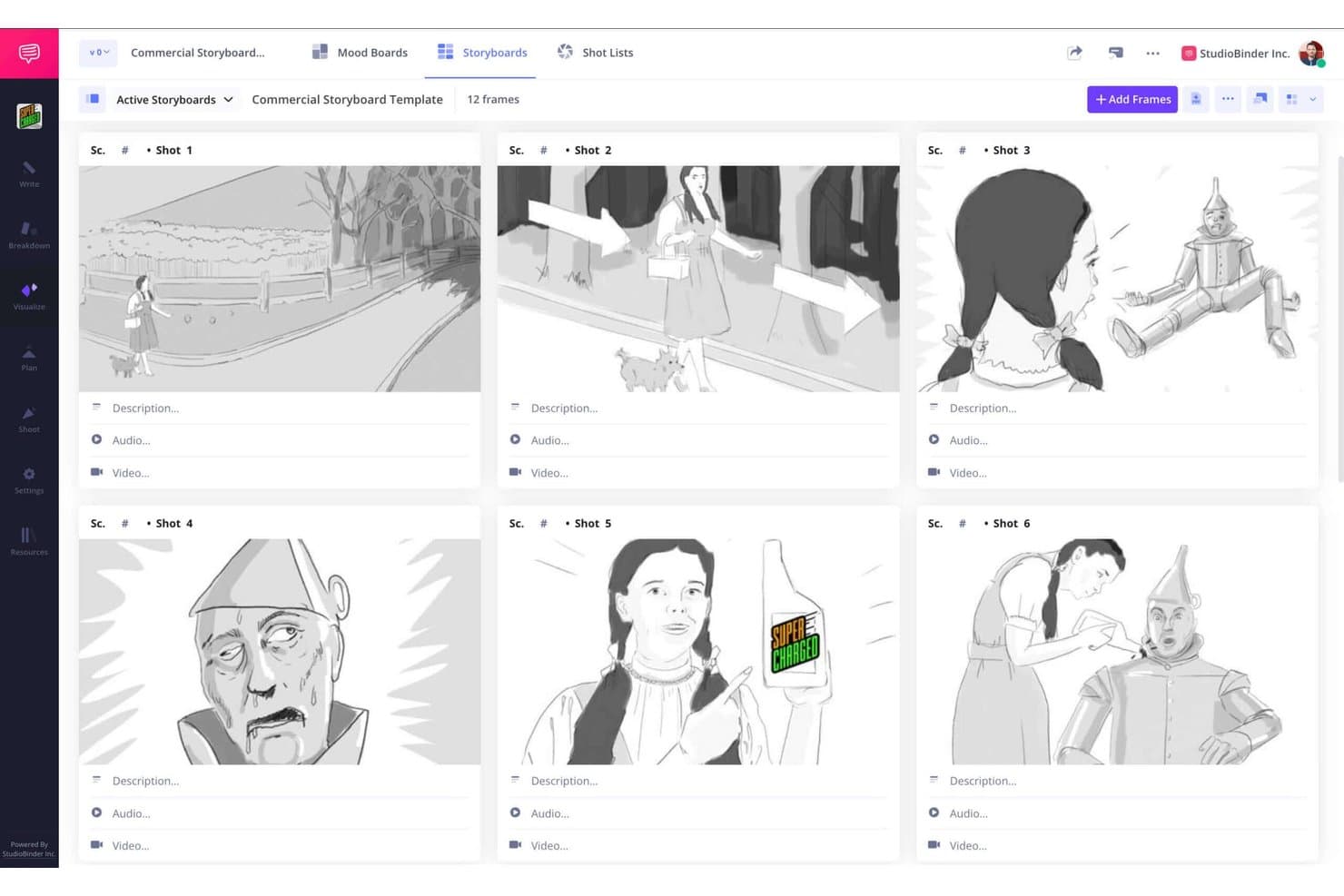
StudioBinder lets users build visual storyboards with sketches in a grid layout. StudioBinder is free storyboard software for film and video production that connects script-to-storyboard creation with scene panels, shot lists, mood boards, scheduling, and call sheets.
Who Is StudioBinder Best For?
Film and video production teams that need to connect storyboards with shot lists, scripts, schedules, and call sheets.
Why I Picked StudioBinder
I picked StudioBinder because it connects storyboards to integrated production workflows. I use its script-to-storyboard tools to turn scenes into sequential panels, then carry shot details into shot lists and schedules. Scene grouping, camera fields, and view-only sharing keep directors, crews, and collaborators aligned from planning through production.
StudioBinder Key Features
- Image import: Upload images, drag and drop files, or scan sketches with a webcam.
- Drag-and-drop sequencing: Reorder frames between scenes with automatic renumbering.
- Storyboard annotations: Add text boxes and structured fields for shot size, lens, angle, and sound.
- CSV export: Export storyboard data from the storyboard settings menu.
StudioBinder Integrations
StudioBinder connects with Final Draft for script import and export, and pulls Google Maps and live weather into call sheets.
What's Free?
StudioBinder offers a free-forever tier with access to core storyboard and production planning tools. Advanced scheduling, call sheets, and collaboration features require a paid subscription.
Pros and Cons
Pros:
- No-login collaborator viewing supports reviews
- Shot details carry into production planning
- Script-to-storyboard scene generation
Cons:
- No native freehand drawing canvas
- Free tier caps projects and storyboards
Learn more about StudioBinder: Best for AI-powered storyboard generation
- Free plan + free trial available
- From $50/month (billed annually)

Boords offers storyboard panels with scene art, camera moves, and shot notes. Boords is a cloud-based storyboard software that lets you generate, edit, and manage storyboards, create scripts, collaborate in real time, and utilize AI to speed up the storyboarding process.
Who Is Boords Best For?
Boords is a strong fit for creative teams and studios in media, marketing, and production who want to speed up storyboard creation using AI.
Why I Picked Boords
I picked Boords as one of the best because I can use its AI-powered storyboard generation to draft scenes instantly from scripts. I like how it lets me edit boards, generate images from text prompts, and quickly adjust scripts and visuals together.
Boords Key Features
- Frame labeling: Add captions and notes directly to each frame for clear scene direction.
- Version control: Easily track changes and revert to previous storyboard versions.
- Drag-and-drop rearranging: Move scenes and frames around by dragging to adjust storyboard order.
- Script-to-board sync: Link your script to frames so updates reflect instantly.
Boords Integrations
Boords offers native integrations with Slack, Notion, and Airtable. An API is available for custom integrations.
What's Free?
Boords offers a free-forever plan, but with limited export capabilities and restrictions on the number of boards you can create. Some advanced features are only available on paid plan.
Pros and Cons
Pros:
- Exports to PDF, animatic, or video formats
- Lets teams edit boards simultaneously online
- AI turns scripts into visuals automatically
Cons:
- Free plan leaves watermarks on exports
- Free plan has export limitations
Learn more about Boords: Best for diverse scene and character libraries
- Free trial + free plan available
- From $14.99/month
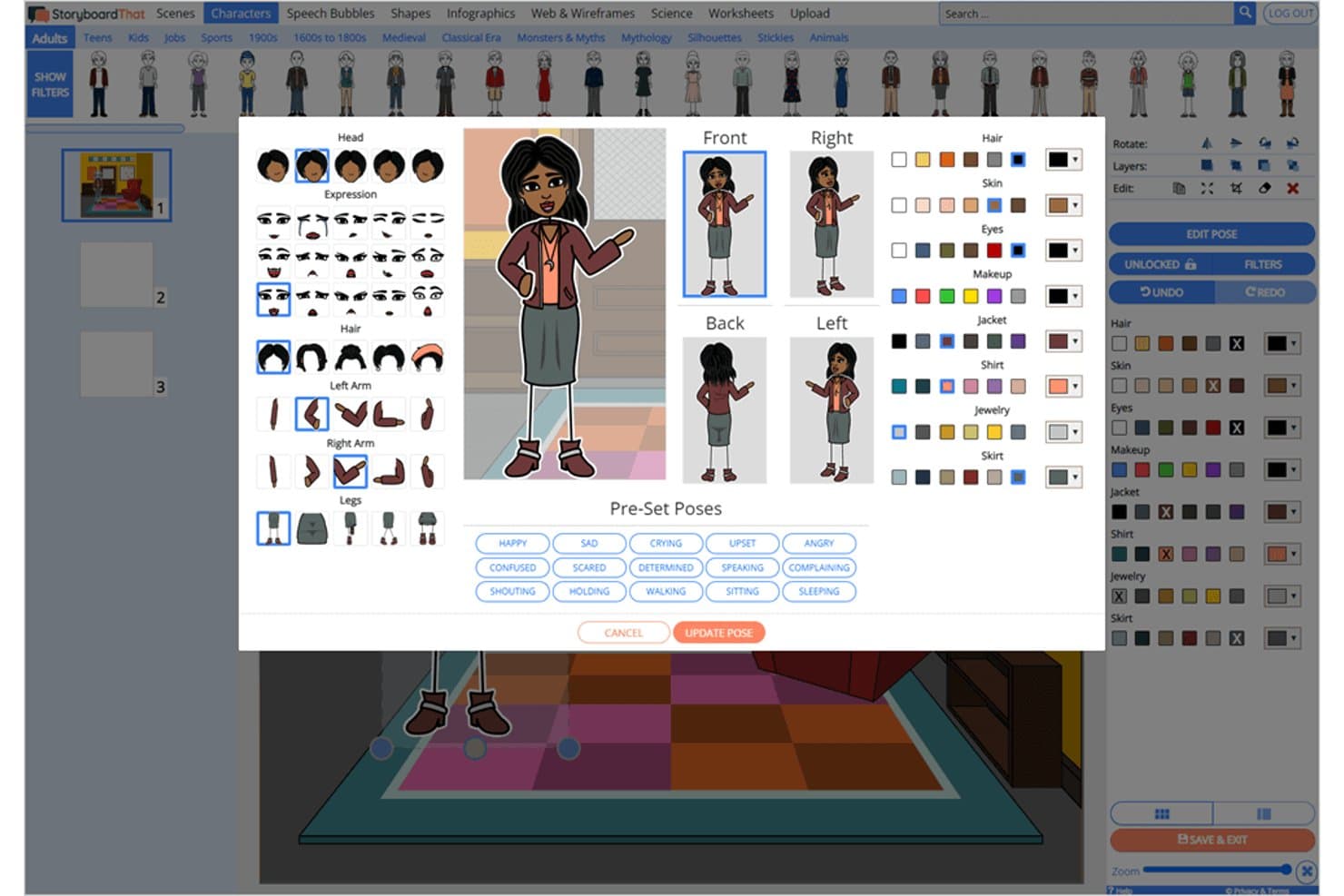
Storyboard That lets users customize character poses and appearances. Storyboard That is free storyboard software with a drag-and-drop, cell-based editor for sequential scenes, posable characters and settings, film and wireframe templates, text annotations, audio, and exports to PDF, PNG, GIF, and PowerPoint.
Who Is Storyboard That Best For?
Storyboard That suits marketing content teams and educators who need polished visual narratives without drawing skills.
Why I Picked Storyboard That
I picked Storyboard That because its diverse scene and character libraries let me build film sequences without drawing. I can pose characters, change expressions, and customize Smart Scenes for marketing concepts or video pitches. Film templates, camera-angle artwork, and 16x9 layouts help me turn those scenes into presentation-ready storyboards.
Storyboard That Key Features
- Cell reordering: Move panels into a new sequence with the dedicated Move Cells tool.
- Audio recording: Attach recorded audio to individual cells for slideshow playback.
- Image uploads: Add JPG, PNG, GIF, BMP, WMF, or SVG files up to 5 MB.
- Version history: Review and restore earlier saved versions on paid plans.
Storyboard That Integrations
Storyboard That supports Google Classroom, Clever, ClassLink, Canvas, Schoology, Blackbaud, Buzz, and D2L through documented integrations. It also embeds Google Docs, Sheets, Slides, Forms, YouTube, and Google Maps.
What's Free?
Storyboard That offers a free-forever basic account for one user, with two storyboards per week and a three-cell layout. It includes limited art, watermarked downloads, and public storyboards, while excluding image uploads, private boards, and commercial use.
Pros and Cons
Pros:
- Templates cover film, marketing, and wireframes
- Film layouts support presentation-ready visual pitches
- Posable characters make polished scenes accessible
Cons:
- No structured fields for shot details
- Free boards remain public and watermarked
Learn more about Storyboard That: 6Best for cross-functional team collaboration
Miro
- Free plan + 14-day trial available
- From $8/user/month (billed annually)
Visit WebsiteCustomer Rating:4.8/5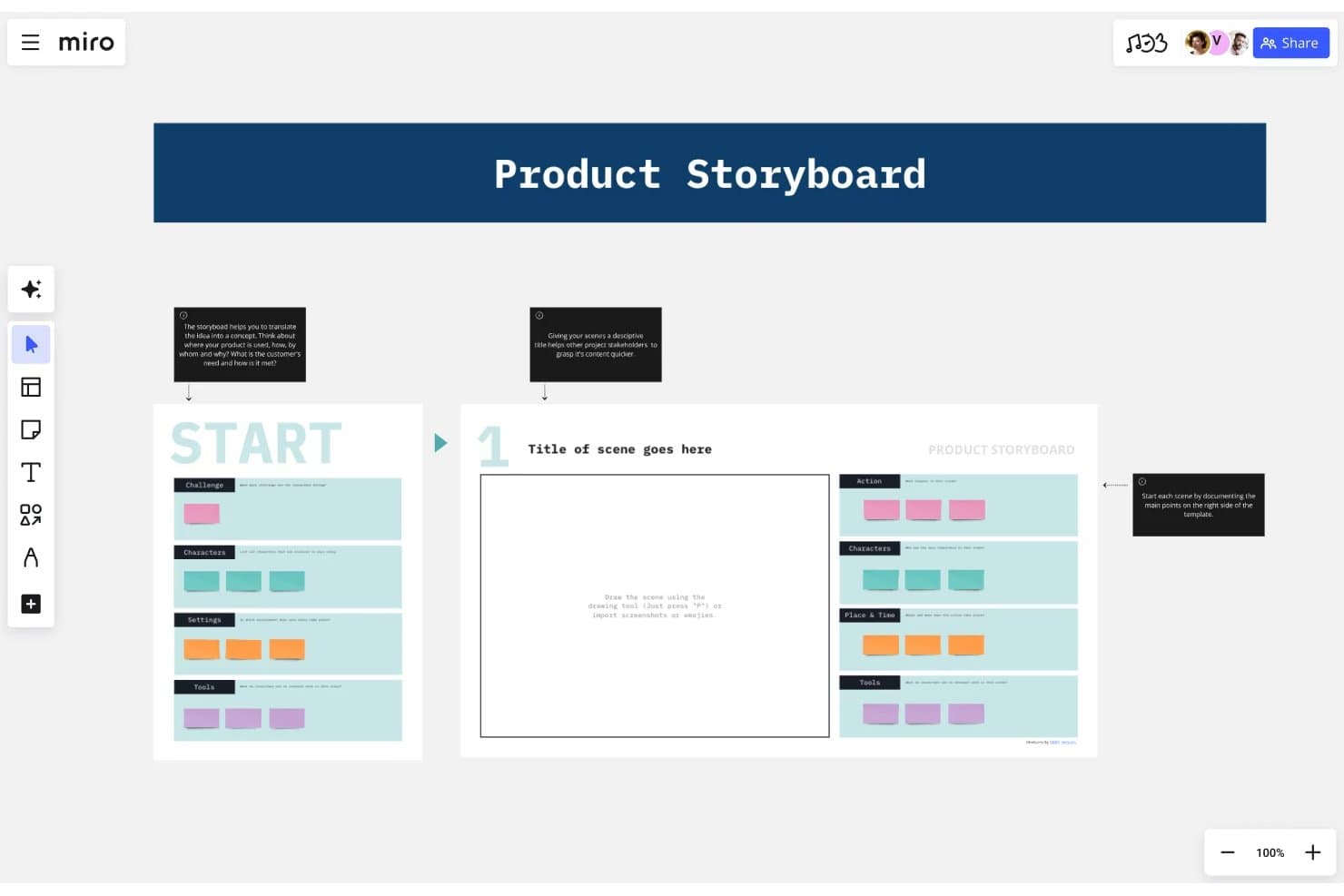
Miro's storyboard template helps teams map product scenes visually. Miro is a free storyboard software platform with an infinite canvas, resizable frames, drawing and image import tools, 7,000+ templates, presentation mode, and Talktrack walkthroughs.
Who Is Miro Best For?
Miro suits marketing content teams and cross-functional product groups that need to plan, present, and refine visual story sequences together.
Why I Picked Miro
I picked Miro because its infinite canvas lets my team arrange resizable storyboard frames for campaigns, product flows, and narrative concepts. Presentation mode and Talktrack turn those sequences into guided stakeholder walkthroughs. Its storyboard and wireframe templates help marketing, design, and product contributors shape the same concept together, making it best for cross-functional team collaboration.
Miro Key Features
- Pen tool: Draw freehand with a mouse, trackpad, or stylus.
- AI image generation: Create storyboard visuals from text prompts.
- Sticky notes: Add color-coded notes with tags and formatting.
- Export formats: Download boards as PDF, JPG, SVG, or CSV.
Miro Integrations
Miro offers 250+ integrations, including Figma, Adobe XD, Google Workspace, Microsoft 365, Slack, Jira, and Confluence. Its APIs and SDKs support custom integrations.
What's Free?
Miro offers a free-forever plan with unlimited team members and up to three editable boards. It includes 250+ integrations, but private boards, guest access, and unlimited editable boards require a paid plan.
Pros and Cons
Pros:
- Talktrack turns sequences into async walkthroughs
- Templates cover campaigns, products, and films
- Infinite canvas supports unlimited storyboard frames
Cons:
- Frames lack built-in shot and timing fields
- Free exports are low-resolution and watermarked
 Best for film-grade animatic storyboarding
- 14-day free trial
- From $90/month
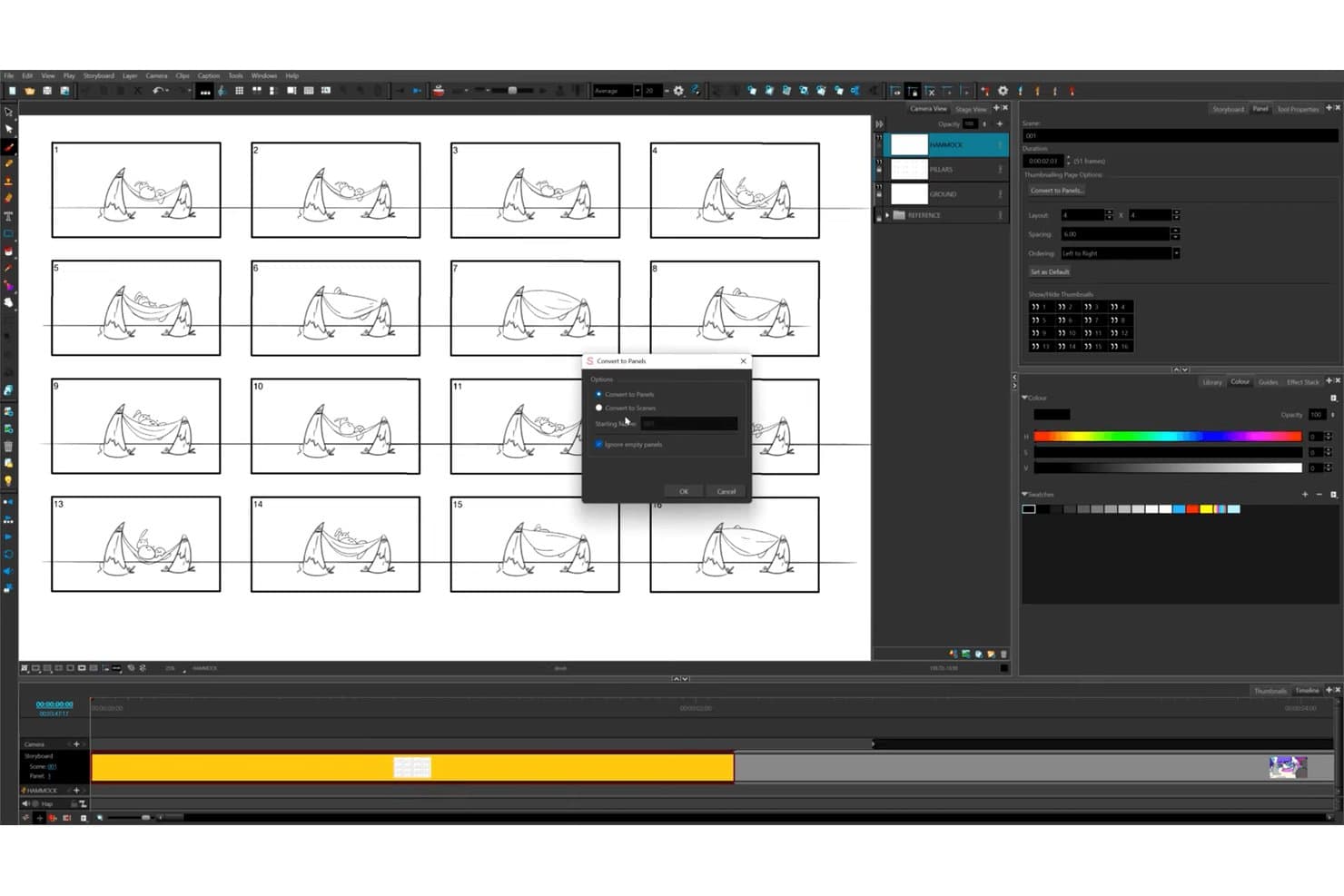
Toon Boom Storyboard Pro lets users convert thumbnails to panels or scenes quickly. Toon Boom Storyboard Pro is desktop storyboard software for film and animation, combining panel-based scene creation, drawing and image imports, animatics, shot notes, camera tools, and exports for editors.
Who Is Toon Boom Storyboard Pro Best For?
Film and animation teams that need detailed storyboards, animatics, camera planning, and editor-ready exports.
Why I Picked Toon Boom Storyboard Pro
I picked Toon Boom Storyboard Pro for film-grade animatic storyboarding because it combines panel and sequence planning with timeline-based camera moves, timing, and audio. I use Pitch Mode to present full-screen scenes with transitions and comments. Its 14-day full-feature trial includes export for testing real production workflows.
Toon Boom Storyboard Pro Key Features
- Thumbnailing page: Arrange rough thumbnails in a customizable grid before converting them into panels.
- Final Draft import: Convert screenplay scenes, action, characters, and dialogue into storyboard content.
- Panel captions: Add dialogue, action notes, slugging, and notes to individual panels.
- 3D environment tools: Import 3D assets, including USD and USDZ files, into scenes.
Toon Boom Storyboard Pro Integrations
Toon Boom Storyboard Pro integrates with Toon Boom Harmony, Final Draft, Adobe Photoshop, and Adobe Illustrator. It supports Avid, Adobe Premiere, Final Cut Pro 7, and Vegas workflows through EDL, AAF, and XML exports.
What's Free?
Toon Boom Storyboard Pro offers a 14-day free trial rather than a free-forever plan. The trial includes full features and export, so you can test production workflows before subscribing.
Pros and Cons
Pros:
- Detailed captions support shot planning
- Pitch Mode supports creative presentations
- Panel timing supports animatic production
Cons:
- No reusable industry template library
- No browser-based stakeholder review
Learn more about Toon Boom Storyboard Pro:
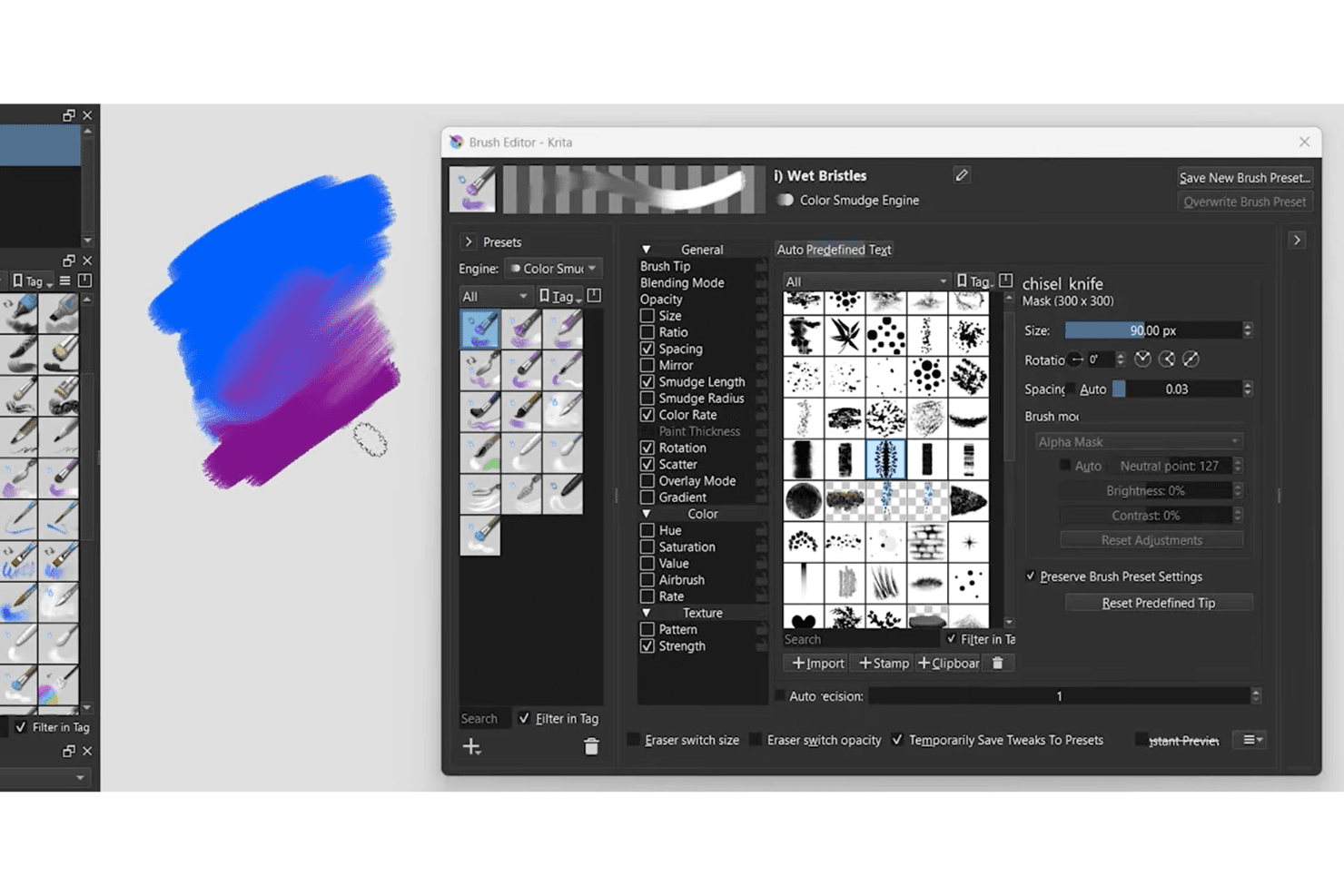
Krita brush editor offers customizable brush presets and digital painting tools. Krita is free, open-source storyboard software with a built-in Storyboard Docker for arranging illustrated scenes, adding durations and production notes, previewing animatics, and exporting boards as PDF or SVG.
Who Is Krita Best For?
Krita suits independent storyboard artists and small film or animation teams needing hand-drawn scene planning without subscription costs.
Why I Picked Krita
I picked Krita because it brings Best for hand-drawn illustration flexibility to structured storyboard planning. I use its Storyboard Docker to arrange scene cards, set durations, add production notes, and preview animatics. Its brush engines, perspective assistants, and reference-image tools help me develop visual sequences from rough thumbnails to polished panels.
Krita Key Features
- PSD file support: Opens and saves Photoshop documents.
- Audio and video export: Exports animations as videos or image sequences.
- Custom SVG templates: Creates reusable storyboard export layouts.
- Comic panel editing: Splits and merges vector panel shapes.
Krita Integrations
Krita doesn't have any native integrations. Its Python API supports custom scripts, dockers, and exporters, while Inkscape and Scribus serve as companion tools for templates and comics layouts.
What's Free?
Krita is free forever and open-source, with no trial expiry or user limit. It doesn’t include native integrations for project management, cloud collaboration, or review tools.
Pros and Cons
Pros:
- PSD support preserves existing artwork workflows
- Scene durations support accurate animatic timing
- Hand-drawn scenes gain polished visual depth
Cons:
- Non-artists face complex storyboard controls
- Storyboard review requires exported files
Learn more about Krita: Best for rapid sketching with drawing tools
- Free forever
- Free forever
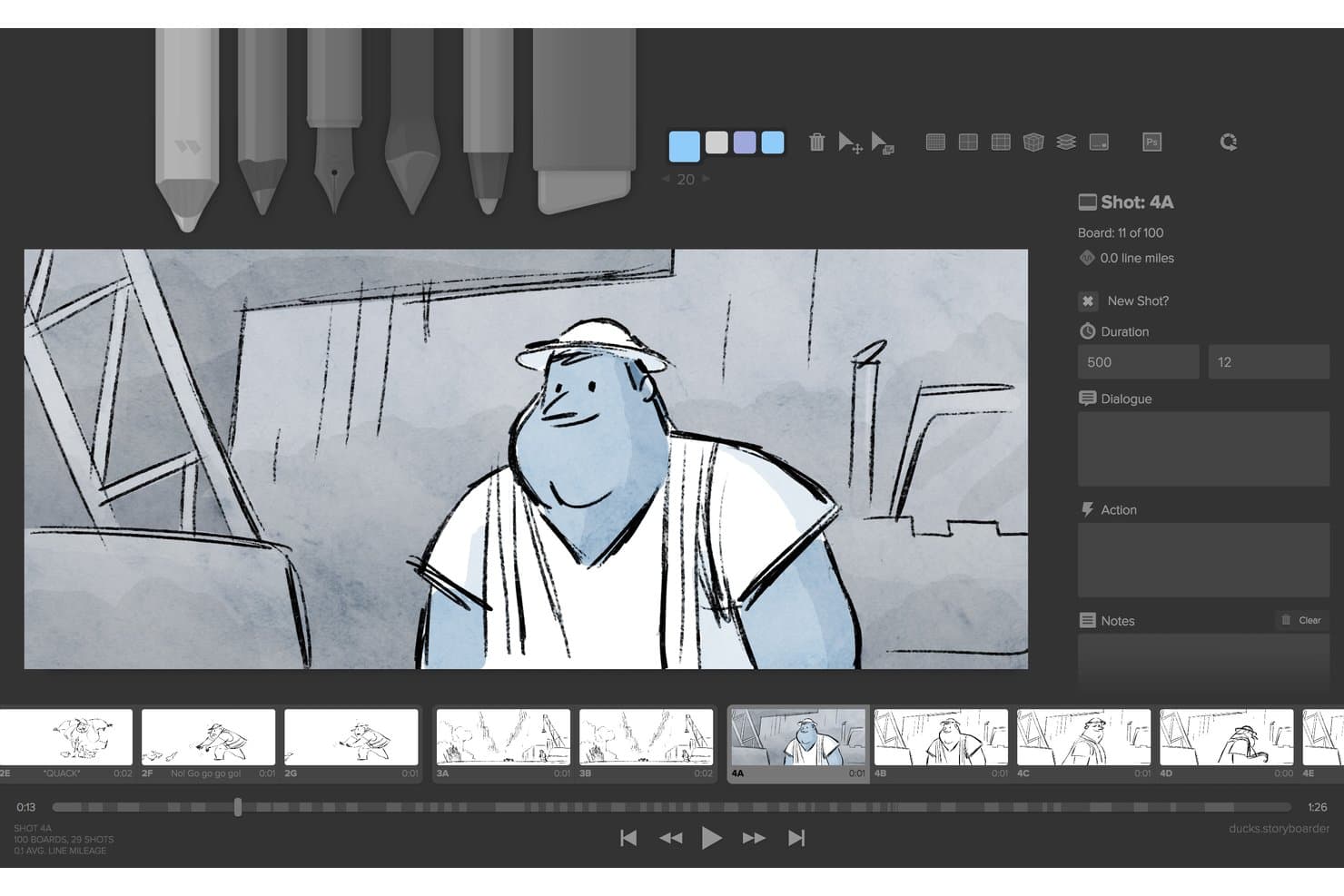
Storyboarder (Wonder Unit) lets users draw and annotate storyboard panels with shot details. Storyboarder is a free, open-source desktop storyboard app for macOS, Windows, and Linux, with drawing tools, script import, panel sequencing, timeline controls, shot notes, animatics, and film-editing exports.
Who Is Storyboarder Best For?
Film and video creators who need a free desktop tool for sketching shots, sequencing panels, and building animatics before production.
Why I Picked Storyboarder
I picked Storyboarder for rapid sketching with drawing tools because its six drawing tools, onion skinning, and framing guides keep shot ideas moving. I use Shot Generator’s 3D references to block camera angles before refining panels. Sketch Sprint also helps capture a timed sequence as an animated GIF.
Storyboarder Key Features
- Script import: Import Final Draft and Fountain screenplays to create boards by scene.
- Timeline mode: Resize boards to set shot durations and display audio waveforms.
- Audio recording: Attach audio files or record narration directly from a microphone.
- NLE export: Export storyboards to Premiere, Final Cut Pro, Avid, PDF, GIF, or video.
Storyboarder Integrations
Storyboarder integrates with Adobe Premiere, Final Cut Pro, Avid, Final Draft, Fountain, Photoshop, Krita, GIMP, Sketchbook, and Clip Studio. It also supports GitHub for version control and collaboration.
What's Free?
Storyboarder is free forever and open source for macOS, Windows, and Linux. There’s no user limit or paid tier listed, but its drawing-focused workflow may feel limited if you need advanced professional features such as extensive background layers.
Pros and Cons
Pros:
- Timeline animatics include timing and audio
- Shot Generator provides useful 3D camera references
- Rapid sketching with six focused drawing tools
Cons:
- No share links, comments, or collaboration
- Development appears stalled since 2021
Learn more about Storyboarder (Wonder Unit): Best for intuitive drag-and-drop sequences
- Not available
- From $7.99/month (billed annually)
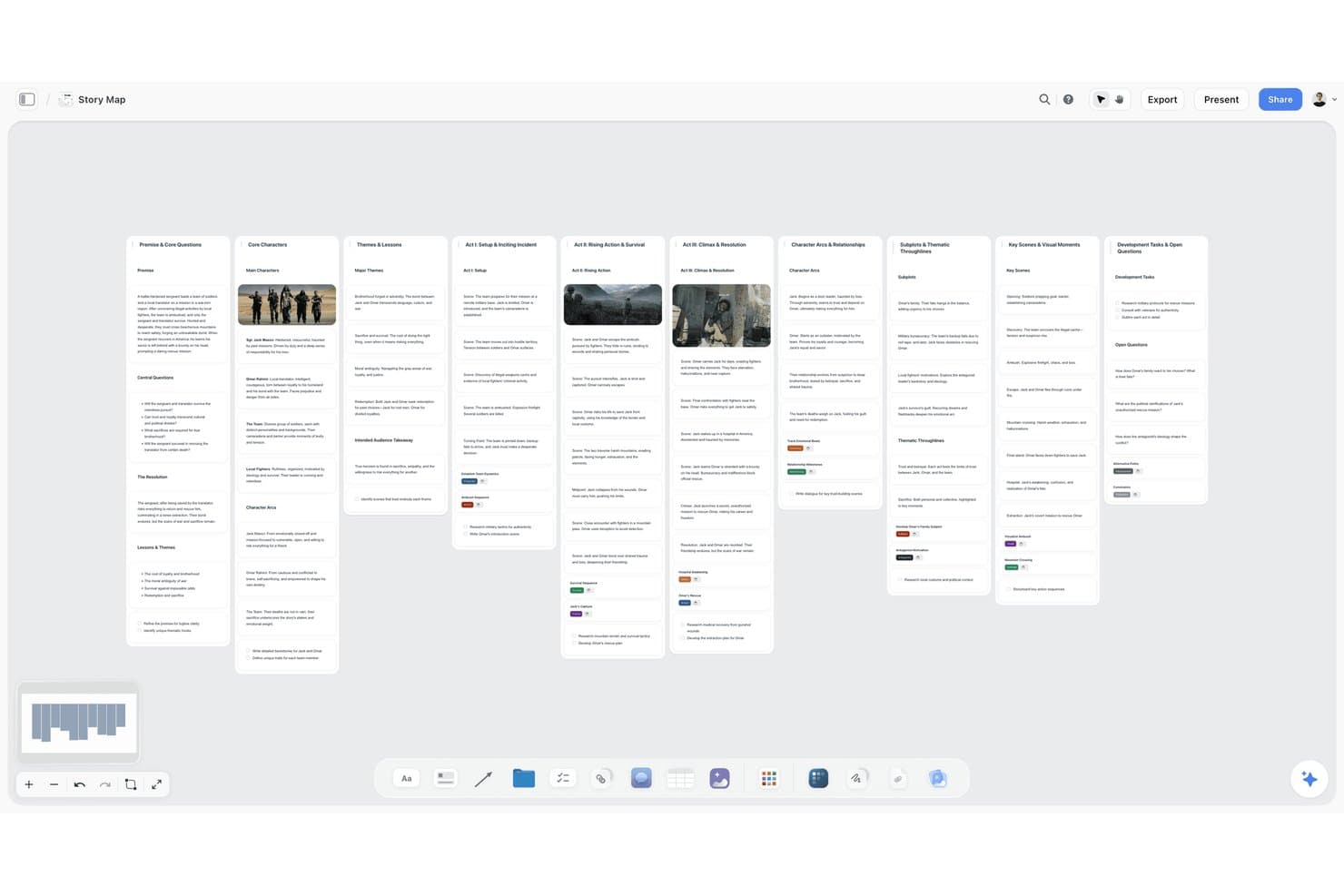
Storyflow organizes story structure across visual swimlane columns. Storyflow is an AI storyboard software platform with an infinite canvas, drag-and-drop frames, shot lists, scene annotations, media imports, collaborative sharing, and exports for pitches, treatments, and presentations.
Who Is Storyflow Best For?
Storyflow suits film, video, and marketing teams that need AI-assisted storyboards, shot lists, and pitch-ready visual plans on one canvas.
Why I Picked Storyflow
I picked Storyflow because its intuitive drag-and-drop sequences let me arrange frames, group scenes, and branch alternate takes on an infinite canvas. I use shot fields for camera, audio, timing, and action notes, then turn boards into pitch decks or treatments. Storyflow is currently paid-only during early access, with a Free plan planned.
Storyflow Key Features
- AI storyboard generation : Create boards from scripts, prompts, or campaign briefs.
- Media imports : Add images, PDFs, videos, audio, and embedded media to boards.
- Comments and sharing : Collect feedback through view-only links and board comments.
- Storyboard templates : Start with templates for storyboards, shot lists, and commercial planning.
Storyflow Integrations
Storyflow doesn't have any native integrations with project management, documentation, chat, or design tools. It supports YouTube and Vimeo embeds, Pinterest pins, and imports from Figma, Miro, FigJam, Mural, Notion, Google Docs, Word, and Markdown.
What's Free?
Storyflow doesn’t currently offer a free-forever plan or free trial. It’s paid-only during early access, although a Free plan is planned.
Pros and Cons
Pros:
- Shot fields organize camera and timing notes
- AI turns scripts into scene boards
- Drag-and-drop sequences support alternate takes
Cons:
- Drawing tools remain limited for sketching
- No free plan or trial currently
Learn more about Storyflow:
Diğer Ücretsiz Hikâye Panosu Yazılımları
Aşağıda, seçkime dahil olmayan ancak yine de göz atmaya değer bazı ek ücretsiz hikâye panosu yazılımı seçeneklerini bulabilirsiniz:
- 11StoryTribeBest for remote team story development
- 12MurphyBest for script-to-storyboard conversion
- 13KROCKBest for storyboard-to-animatic conversion
- 14FigJamBest for mapping user flows with team input
- 15FrameForge StudioBest for camera-accurate film shot planning
- 16LTX StudioBest AI-driven concept visualization
- 17PanelForgeBest for frame-by-frame animation workflows
How I Evaluate Free Storyboard Software
First, I define what counts as free. A free-forever plan or full-feature trial of at least seven days, with export and sharing, qualifies. From there, I split my evaluation into three parts: core functionality, weighted most, like creating and sequencing panels; standout features, like flowchart connectors; and what a tool offers beyond its features, like free-tier room to grow.
Core Functionality (Table Stakes For This List)
In addition to my free plan requirements, I use a scoring system to select tools for my list. I score each one on a scale from 0 (does not offer the functionality) to 5 (excels in this area) for each core functionality listed below, based on what's available on the free plan. I then convert the total into a percentage to help assess each tool's overall fit, with extra weight on any functionalities I've deemed essential.
- Panel Creation (Essential): I look for flexible panels that let a team map a product flow, pitch, or shoot as distinct scenes.
- Drawing And Image Import (Essential): I assess whether you can sketch a rough screen or add reference images to show what happens in each scene.
- Panel Sequencing: I check for drag-and-drop reordering, useful when research or feedback changes a customer journey or shot sequence.
- Notes And Annotations: Can you add dialogue, captions, or production notes to panels so collaborators understand the action and intent?
- Export And Sharing: I look for usable PDF or image exports, or share links that let stakeholders review a concept.
- Storyboard Templates: I consider whether templates help you start a common format, such as a video sequence or product flow.
Once I have a list of tools that meet the criteria, I consider what sets each platform apart.
Differentiating Factors (What Sets Vendors Apart)
Here's how I compare and contrast different vendors:
Standout Features
I look for flowchart and connector tools that let you link frames with arrows or logic paths. When a user journey branches—say, a returning customer versus a first-time visitor—linear panels can't capture that. Tools like Miro and FigJam handle this well. I also evaluate presentation or pitch modes, since converting a board into a walkthrough view saves time before a stakeholder review. Cross-tool import matters too; pulling in screenshots or wireframes from existing design files speeds up assembly and keeps context intact.
Beyond Features
I check whether stakeholders can view and comment on a board without creating an account. If your engineering lead needs to sign up just to leave feedback, review cycles stall. I also evaluate how well free tiers scale for agile teams—tools like Miro and Canva handle this differently, so I look at caps on boards, frames, and collaborators to see if a team can realistically run a full sprint cycle without hitting a paywall.
Ücretsiz Hikâye Panosu Yazılımı Nasıl Seçilir?
Uzun özellik listeleri ve karmaşık fiyatlandırma yapılarına kendinizi kaptırmanız kolaydır. Kendinize özgü yazılım seçim sürecinizde ilerlerken odağınızı korumanıza yardımcı olmak için göz önünde bulundurmanız gereken faktörleri içeren bir kontrol listesi hazırladık:
| Faktör | Göz Önünde Bulundurulması Gerekenler |
|---|---|
| FaktörÖlçeklenebilirlik | Göz Önünde Bulundurulması GerekenlerPlatform ekibiniz ve projelerinizle birlikte büyüyebilir mi, yoksa ücretsiz planda kullanıcı, proje veya depolama sınırlarına hızla mı ulaşırsınız? |
| FaktörEntegrasyonlar | Göz Önünde Bulundurulması GerekenlerAraç, dosya depolama veya proje yönetimi araçları gibi hâlihazırda kullandığınız uygulamalara yerleşik bağlantılar sunuyor mu? |
| FaktörÖzelleştirilebilirlik | Göz Önünde Bulundurulması GerekenlerEk ücret ödemeden hikâye şablonlarını, iş akışı adımlarını veya dışa aktarma ayarlarını yaratıcı sürecinize uyacak şekilde düzenleyebilir misiniz? |
| FaktörKullanım kolaylığı | Göz Önünde Bulundurulması GerekenlerTüm ekip üyeleri temel özellikleri hızlıca öğrenebilir mi, yoksa işe başlamak için kapsamlı bir eğitime mi ihtiyaç duyarlar? |
| FaktörUygulama ve işe alıştırma | Göz Önünde Bulundurulması GerekenlerMevcut materyalleri taşımak ve yeni kullanıcıları en az kesintiyle sürece dahil etmek için hangi destek, eğitim veya içe aktarma araçları sağlanıyor? |
| FaktörMaliyet | Göz Önünde Bulundurulması Gerekenler“Ücretsiz” seçeneğin gizli maliyetleri neler? Plan indirmeleri, filigranları, kullanıcıları veya iş birliğini kısıtlıyor mu? |
| FaktörGüvenlik önlemleri | Göz Önünde Bulundurulması GerekenlerHikâye panolarınız ve varlıklarınız, ekibinizin gereksinimlerini karşılayan temel güvenlik, kullanıcı rolleri veya gizlilik kontrolleriyle korunuyor mu? |
| FaktörDestek erişilebilirliği | Göz Önünde Bulundurulması GerekenlerSorunlar ortaya çıktığında zamanında teknik yardım veya gerçek kullanıcı desteğine erişebilir misiniz, yoksa topluluk forumları ve kendi kendine yardım kaynaklarıyla mı sınırlısınız? |
Ücretsiz Hikâye Panosu Yazılımı Nedir?
Ücretsiz hikâye panosu yazılımı, bireylerin veya ekiplerin ödeme yapmaları gerekmeden hikâyeleri ya da projeleri kareler veya paneller kullanarak görsel olarak düzenlemelerine, planlamalarına ve sıralamalarına olanak tanıyan dijital bir araçtır. Bu platformlar, kullanıcıların hikâye fikirlerini taslak hâline getirmelerine, düzenlemelerine ve değiştirmelerine yardımcı olarak yaratıcı iş birliğini ve proje görselleştirmesini destekler. Çoğu ücretsiz hikâye panosu aracı, panellere görsel, metin ve not ekleme gibi temel özellikler sunar; bu da onları görsel hikâye panosu sanatçıları, eğitimciler, içerik üreticileri ve tasarım ekipleri için pratik hâle getirir.
Ücretsiz Hikâye Panosu Yazılımının Özellikleri
Hikâye panosu yazılımlarında yaygın olarak bulunan özellikleri ve hangilerinin genellikle ücretsiz ya da ücretli planlara dâhil edildiğini inceleyelim.
Genellikle Ücretsiz Hikâye Panosu Yazılımı Özellikleri
- Sürükle ve bırak düzenleme: Hikâye panosu karelerini dijital çalışma alanında görsel olarak taşıyın, yeniden boyutlandırın ve düzenleyin; böylece sahneleri veya fikirleri kolayca yeniden sıralayabilirsiniz.
- Temel görsel ve metin desteği: Fikirlerin ve sahne ayrıntılarının net bir şekilde iletilmesi için görselleri, çizimleri ve metin notlarını doğrudan panellere ekleyin.
- Şablon kitaplığı: Proje kurulumunu hızlandırmak ve tutarlı düzenleri korumak için önceden tasarlanmış hikâye panosu şablonlarıyla başlayın.
- Kare çoğaltma: Baştan oluşturmak zorunda kalmadan sürekliliği korumak veya hikâye değişiklikleri üzerinde yineleme yapmak için mevcut kareleri hızlıca kopyalayın.
- Görsel biçimlerine dışa aktarma: Tamamlanmış hikâye panolarını sunumlarda veya iş birliğinde kullanmak üzere PNG ya da JPEG gibi standart biçimlerde kaydedin veya paylaşın.
- Ekip iş birliği: Başkalarını bir hikâye panosunu gerçek zamanlı veya eşzamansız olarak görüntülemeye, yorum yapmaya ya da katkıda bulunmaya davet edin.
- Temel sürüm geçmişi: Grup düzenlemelerini desteklemek veya hataları geri almak için önceki taslaklara ya da değişikliklere erişin ve bunları geri yükleyin.
Genellikle Ücretli Hikâye Panosu Yazılımı Özellikleri
- Ses ve video yerleştirme: Hikâye panosu karelerine müzik parçaları veya video klipleri ekleyerek nihai projenin daha zengin ve gerçekçi bir ön izlemesini sağlayın.
- Gelişmiş dışa aktarma seçenekleri: Hikâye panolarını diğer araçlarla sorunsuz entegrasyon için PDF, PSD veya üretime hazır dosyalar gibi özel biçimlere aktarın.
- Filigranı kaldırma: Profesyonel ve müşteriye sunulan kullanım senaryolarını desteklemek için tamamlanmış hikâye panolarını marka ibareleri veya filigranlar olmadan dışa aktarın.
- Sınırsız proje veya kare: Yaratıcı kapsamı sınırlayabilecek kısıtlamalar olmadan ihtiyaç duyduğunuz kadar proje veya hikâye panosu paneli oluşturun.
- Özel markalama: Tutarlı ve markalı bir müşteri teslimi oluşturmak için hikâye panolarına şirket logoları, renkleri veya şablonları ekleyin.
- Öncelikli destek veya eğitim: Sorunların daha hızlı çözülmesi için canlı ve öncelikli yardım kanallarına ya da uzmanlaşmış başlangıç ve eğitim materyallerine erişin.
- Etkileşimli yorum ve işaretleme: Ekip içi iletişimi kesinleştirmek için doğrudan hikâye panoları üzerinde çizim yapın, vurgulama gerçekleştirin veya kareye özel geri bildirim bırakın.
- Harici araçlarla entegrasyonlar: İş akışlarını kolaylaştırmak için dosya depolama, yaratıcı araç paketleri veya proje yönetimi araçları gibi üçüncü taraf platformlara bağlanın.
- Gelişmiş izinler ve erişim denetimleri: Hikâye panosu projelerini kimlerin görüntüleyebileceğini, düzenleyebileceğini veya paylaşabileceğini denetlemek için ayrıntılı kullanıcı rolleri ve izinleri belirleyin.
- Yapay zekâ destekli özellikler: Yaratıcı geliştirmeyi hızlandırmak için yapay zekâ tarafından oluşturulan hikâye panoları, senaryo önerileri veya otomatik animasyon taslakları gibi araçları kullanın.
Ücretsiz Hikâye Panosu Yazılımının Faydaları
Ücretsiz hikâye panosu yazılımını uygulamak, ekibiniz ve işletmeniz için çeşitli faydalar sağlar. Yararlanabileceğiniz birkaç fayda şunlardır:
- Maliyet tasarrufu: Başlangıç yatırımı yapmadan temel hikâye panosu özelliklerine erişin; bu sayede yeni girişimlerin ve küçük ekiplerin yaratıcı projeleri yönetmesi kolaylaşır.
- Görsel netlik: Sahneleri düzenleyerek ve sürükle ve bırak düzenleme ile şablonları kullanarak notlar ekleyerek fikirleri daha etkili bir şekilde iletin.
- Gerçek zamanlı iş birliği: Birçok platformda yerleşik olarak bulunan paylaşılan panoları, yorumları ve canlı güncellemeleri kullanarak uzaktaki ekip üyeleriyle birlikte çalışın.
- Daha hızlı geri bildirim döngüleri: Yaratıcı yinelemeleri ve onayları hızlandırmak için kareleri hızlıca çoğaltın, sahneleri güncelleyin veya taslakları inceleme amacıyla dışa aktarın.
- Kolay başlangıç: Genellikle freemium planlara dâhil edilen şablonlar, eğitimler ve sezgisel arayüzleri kullanarak yeni katkıda bulunanların hızla sürece uyum sağlamasını sağlayın.
- Esnek iş akışları: Yaratıcı ihtiyaçlar geliştikçe hikâye yapılarını yeniden düzenleyin ve uyarlayın ya da yeni kareler ekleyin; böylece farklı proje türlerini ve boyutlarını destekleyin.
- Her yerden erişim: Projeleri herhangi bir konumdan veya cihazdan taslak hâline getirmek, incelemek ya da güncellemek için bulut tabanlı hikâye panosu yazılımını kullanın.
Storyboard Yazılımının Maliyetleri ve Fiyatlandırması
Bu makaleye, ücretsiz olarak kullanılabilen en iyi storyboard yazılımı seçeneklerini arayarak geldiğinizi biliyorum. Ancak ücretsiz planlar yalnızca sınırlı özellikler sunduğundan, gelecekte planınızı yükseltmeniz gerekebilir.
Aşağıdaki tablo, storyboard yazılımlarındaki yaygın planları, ortalama fiyatlarını ve genellikle sunulan özellikleri özetlemektedir:
Storyboard Yazılımı İçin Plan Karşılaştırma Tablosu
| Plan Türü | Ortalama Fiyat | Yaygın Özellikler |
|---|---|---|
| Plan TürüÜcretsiz Plan | Ortalama Fiyat$0 | Yaygın ÖzelliklerTemel düzenleme araçları, sınırlı dışa aktarma seçenekleri, küçük ekipler için iş birliği, şablonlara erişim ve temel bulut depolama. |
| Plan TürüKişisel Plan | Ortalama Fiyat$5-$15/kullanıcı/ay | Yaygın ÖzelliklerEk dışa aktarma biçimleri, daha fazla depolama alanı, sürüm geçmişi, filigran kaldırma ve destek kanallarına erişim. |
| Plan Türüİşletme Planı | Ortalama Fiyat$15-$30/kullanıcı/ay | Yaygın ÖzelliklerSınırsız proje, ekip yönetimi araçları, özel markalama, gelişmiş yorum yapma, entegrasyonlar ve daha geniş varlık kütüphaneleri. |
| Plan TürüKurumsal Plan | Ortalama Fiyat$30-$60/kullanıcı/ay | Yaygın ÖzelliklerGelişmiş güvenlik, öncelikli destek, özel entegrasyonlar, denetim izleri, özel işe alıştırma süreci ve ayrıntılı kullanıcı izinleri. |
Ücretsiz Storyboard Yazılımı Hakkında Sık Sorulan Sorular
Ücretsiz storyboard yazılımı hakkında sık sorulan bazı soruların yanıtları aşağıdadır:
Ücretsiz storyboard yazılımı çözümleri güvenli midir?
Evet, ücretsiz storyboard yazılımı sağlayıcılarının çoğu şifreleme ve kullanıcı kimlik doğrulama gibi standart güvenlik önlemlerini kullanır; ancak gelişmiş korumaların veya uyumluluk özelliklerinin mevcut olup olmadığını ve ihtiyaçlarınız için yeterli düzeyde bulunup bulunmadığını her zaman kontrol etmelisiniz.
Ücretsiz storyboard yazılımını ticari projeler için kullanabilir miyim?
Evet, birçok ücretsiz storyboard aracı ticari kullanıma izin verir; ancak özellikle filigranlar veya markalı dışa aktarmalarla ilgili olarak, çıktılara yönelik sınırlamalar ya da zorunlu bir kaynak belirtme olup olmadığını kontrol etmek için sağlayıcının koşullarını her zaman inceleyin.
Ücretsiz storyboard yazılımında ne gibi sınırlamalar beklemeliyim?
Ücretsiz planlar genellikle proje sayısını, depolama alanını, dışa aktarma biçimlerini ve ekip üyelerini sınırlar; ayrıca storyboard’larınızda filigran gösterebilir. Bu nedenle bir araca güvenmeden önce bu kısıtlamaların iş akışınıza uygun olup olmadığını değerlendirmelisiniz.
Ücretsiz planlar genellikle gerçek zamanlı iş birliği özelliklerini içerir mi?
Bazı ücretsiz storyboard platformları gerçek zamanlı iş birliği özelliğini sunar; ancak ücretli sürümlere kıyasla erişim daha küçük ekiplerle sınırlı olabilir veya özellik kapsamı daha dar olabilir. Bir grup projesine başlamadan önce iş birliği seçeneklerini her zaman doğrulayın.
Ücretsiz bir storyboard planından ücretli bir plana geçmek ne kadar kolaydır?
Yükseltme işlemi genellikle kolaydır. Çoğu sağlayıcı, ücretli plana geçerken projelerinizi ve ayarlarınızı korumanıza olanak tanır; satın alma işleminden hemen sonra ek özelliklerin kilidini açar ve önceki sınırlamaları kaldırır.