

Kullanıcı içgörülerini yönetmek, her ürün yöneticisi için göz korkutucu bir görev olabilir. Kendinizi, tüm bunları anlamlandırmakta zorlanırken sonsuz notların ve geri bildirimlerin altında kalmış bulabilirsiniz. UX araştırma deposu araçları, bu değerli verileri merkezileştirip düzenlemenize yardımcı olarak ekibinizin iş birliği yapmasını ve bilinçli kararlar almasını kolaylaştırır.
Yazılım test etme ve inceleme deneyimime dayanarak, bu araçların ham verileri uygulanabilir içgörülere dönüştürmek için vazgeçilmez olduğunu gördüm. En iyi seçimlerimi paylaşırken her aracı farklı kılan özelliklere ve benzersiz ihtiyaçlarınızı nasıl karşılayabileceklerine odaklanacağım.
Ekibiniz için doğru çözümü seçmenize yardımcı olacak açık ve tarafsız bir inceleme sizi bekliyor.
Why Trust Our Software Recommendations
6,700+
Reviews
20
Industry experts
16+
Evaluation factors
14
Years
Our team has been testing and reviewing software since 2012. As product managers ourselves, we know how difficult—and important—it is to choose the right software.
For this guide, we evaluated tools using hands-on testing and independent research, scoring tools using our selection criteria.
Our reviews reflect our human editorial judgment, not a sales pitch.
Expert reviewers:
- Andrew LumbySenior TPM
- Cristiano ValimSenior UI/UX Lead


UX Araştırma Deposu Araçları Karşılaştırma Tablosu
Bu karşılaştırma tablosu, en iyi UX araştırma deposu aracı seçimlerimin fiyatlandırma ayrıntılarını özetler:
Score legend (out of 5)
- Excellent4.5–5
- Good4–4.4
- Average3–3.9
- Below average2–2.9
- Poor1–1.9
Sorted by: Default
| Tool | Starting Price | Website | |||||||
|---|---|---|---|---|---|---|---|---|---|
Best for DIY research ops at enterprise scale | 3.5 out of 5 | 3 | 3 | 4 | 4 | 3 | 4 | $20/user/month Free plan + free demo available | Website |
Best for AI-surfaced insights from live sessions | 3.5 out of 5 | 4 | 4 | 3 | 4 | 3 | 3 | Pricing upon request Free demo available | Website |
Best for multi-source feedback in one repo | 3.5 out of 5 | 4 | 3 | 4 | 3 | 3 | 4 | Pricing upon request Free demo available | Website |
Best for mixed-method research synthesis | 3.5 out of 5 | 3 | 4 | 3 | 4 | 3 | 4 | $208/user/month Free plan available | Website |
Best for video clips shared without onboarding | 3.7 out of 5 | 4 | 4 | 3 | 4 | 3 | 4 | $395/month Free demo available | Website |
Best for collaborative research repositories at scale | 4.5 out of 5 | 4 | 5 | 5 | 4 | 4 | 5 | Pricing upon request Free plan + free demo available | Website |
Best for qualitative analysis | 4.7 out of 5 | 5 | 5 | 4 | 5 | 4 | 5 | $15/user/month 15-day free trial | Website |
Best for all-in-one research ops and CRM | 4.0 out of 5 | 5 | 4 | 4 | 3 | 4 | 4 | $129/seat/month Free trial + free demo available | Website |
Best for end-to-end AI research synthesis | 4.8 out of 5 | 5 | 5 | 5 | 5 | 4 | 5 | Pricing upon request Free plan available | Website |
Best for flat-rate agency research repositories | 3.7 out of 5 | 4 | 3 | 4 | 4 | 3 | 4 | $20/month Free plan available | Website |


En İyi UX Araştırma Deposu Aracı İncelemeleri
Aşağıda, kısa listeme giren en iyi UX araştırma deposu araçlarının ayrıntılı özetlerini bulabilirsiniz. İncelemelerim, sizin için en uygun aracı bulmanıza yardımcı olmak amacıyla her aracın temel özelliklerine, artılarına ve eksilerine, entegrasyonlarına ve ideal kullanım alanlarına ayrıntılı bir bakış sunar.
 Best for DIY research ops at enterprise scale
- Free plan + free demo available
- From $20/user/month (billed annually)
Visit WebsiteCustomer Rating:4.6/5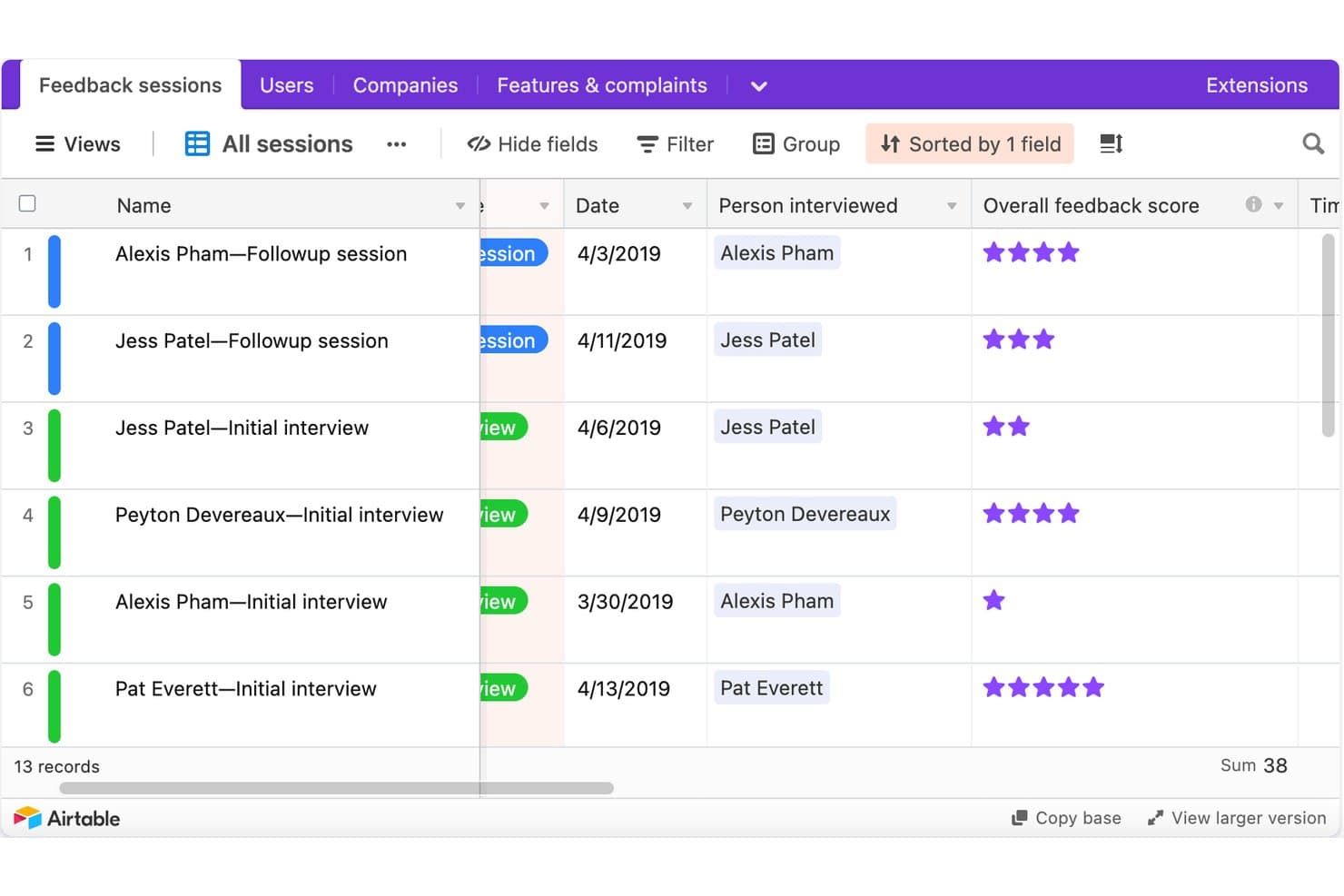
Airtable tracks UX research sessions with scores and dates. Airtable is a no-code relational database platform that research teams configure into a UX research repository, using linked tables, custom tagging fields, AI summarization, and stakeholder-facing interfaces to store and share findings.
Who Is Airtable Best For?
Airtable is a strong fit for design ops leads and product managers at enterprise organizations who have the bandwidth to build and maintain a custom research infrastructure.
Why I Picked Airtable
I've included Airtable in my top picks because it's the only tool on this list that lets enterprise research ops teams build exactly the repository structure they need from scratch. I love how a single Airtable base can house 2,000+ studies across 85+ researchers, linking raw observations to insights to recommendations in a traceable chain. Interface Designer then turns that same database into clean, read-only stakeholder dashboards without giving PMs or engineers edit access to the underlying data.
Airtable Key Features
- AI field summarization: AI fields automatically summarize interview notes and categorize feedback by sentiment directly inside your database records.
- Linked record tables: Connect studies, raw observations, insights, and recommendations in separate tables so every conclusion traces back to source evidence.
- Granular access permissions: Assign Owner, Creator, Editor, Commenter, or Read-only roles at the workspace and base level, with field- and record-level controls on Enterprise.
- Automation triggers: Set up automated Slack, email, or Teams notifications—like weekly study rollups—without writing any code.
Airtable Integrations
Airtable lists native integrations with Miro, Jira, Slack, Salesforce, Typeform, ChatGPT, Claude, Tableau Cloud, Zendesk, and Google Drive. Its API, scripting, custom extensions, and MCP connections support custom research workflows.
Pros and Cons
Pros:
- Creates tailored stakeholder research dashboards
- Scales across thousands of studies
- Links evidence to recommendations
Cons:
- No native transcript synthesis
- Requires ongoing taxonomy maintenance
Learn more about Airtable: Best for AI-surfaced insights from live sessions
- Free demo available
- Pricing upon request
Visit WebsiteCustomer Rating:4.5/5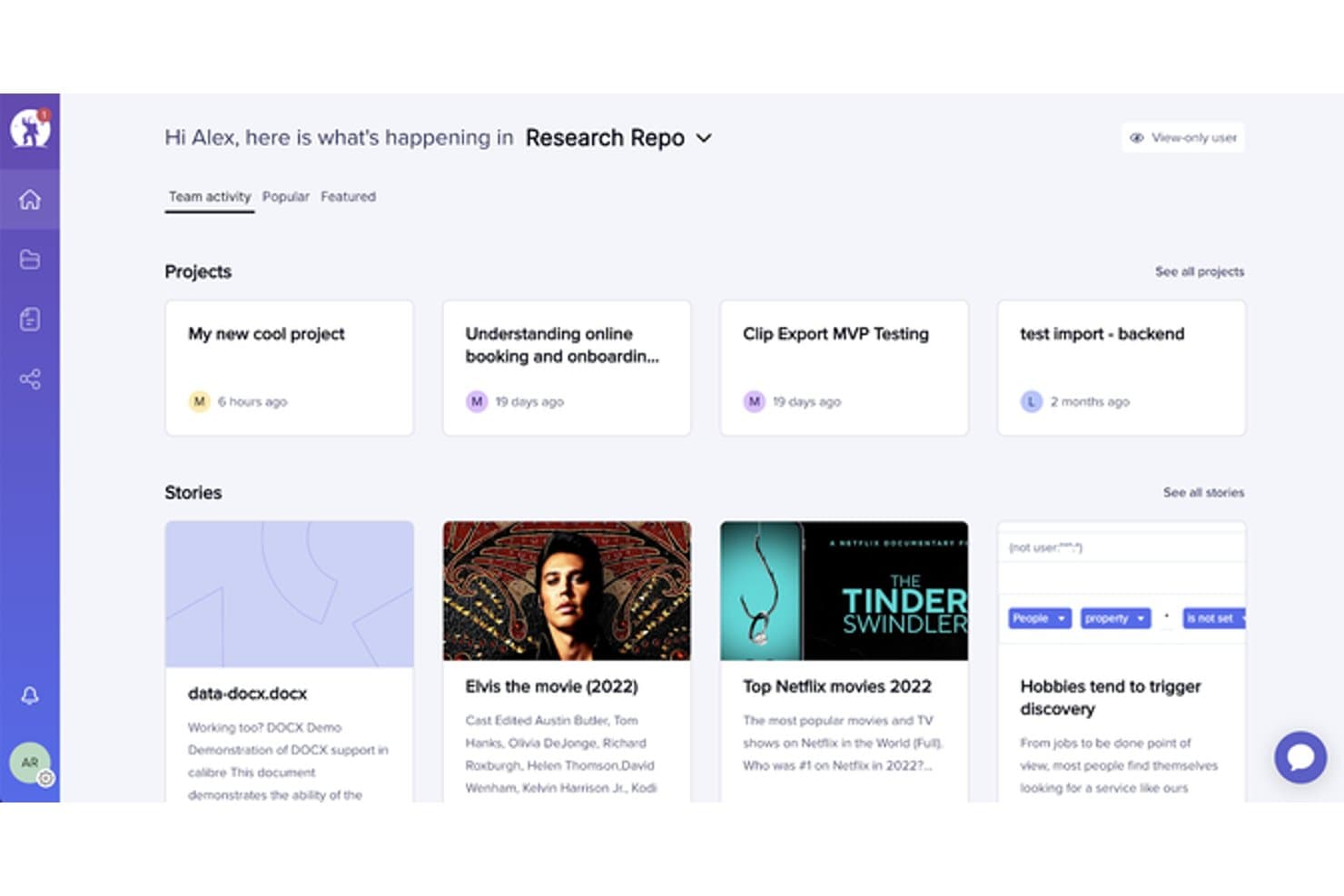
UserTesting organizes research projects and stories in a central repository. UserTesting is a user research platform that combines moderated and unmoderated testing, AI-powered insight synthesis, and a centralized research repository through its Insights Hub.
Who Is UserTesting Best For?
UserTesting fits product managers and designers at mid-size to enterprise companies who need fast video feedback from real users and want AI to do the heavy lifting of surfacing themes.
Why I Picked UserTesting
I picked UserTesting as one of the best because its AI does the synthesis work that usually falls on the researcher. After a live session wraps, Insights Discovery lets me ask questions like "What do we know about checkout friction?" across every past study, pulling answers from video and survey data without manual digging. Instant Insights and Smart tags automatically label moments by sentiment or theme, so key findings surface before I've even opened the transcript.
UserTesting Key Features
- Insights Hub: A centralized repository that organizes session videos, transcripts, surveys, and highlight reels into workspaces and folders across your team.
- Tag Manager: Create project-specific and global tags, bulk-apply them across studies, and control who can create or edit them based on their role.
- Collaborative Insights Reports: Build and co-edit shareable reports that pull in clips, tags, charts, and reels, then present them live using Presenter mode.
- Stakeholder integrations: Embed findings directly into Jira issues, Confluence pages, and Slack channels so non-researchers can act on research without leaving their tools.
UserTesting Integrations
UserTesting offers integrations with Figma, Jira, Jira Product Discovery, Confluence, Slack, Microsoft Teams, FigJam, Miro, and Atlassian Rovo. Its Results API supports custom integrations.
Pros and Cons
Pros:
- Collaborative reports package findings for stakeholders
- Evidence links connect themes to videos
- AI surfaces themes from live sessions
Cons:
- No built-in affinity mapping workspace
- Outside research artifact ingestion remains limited
Learn more about UserTesting: Best for multi-source feedback in one repo
- Free demo available
- Pricing upon request
Visit WebsiteCustomer Rating:4/5
EnjoyHQ centralizes research projects and stories in one dashboard. EnjoyHQ is a UX research repository tool that centralizes qualitative data from multiple sources—interviews, support tickets, surveys, NPS, and app reviews—into one searchable workspace with tagging, transcription, and insight reporting.
Who Is EnjoyHQ Best For?
EnjoyHQ suits UX researchers on teams that pull feedback from many sources—support tickets, NPS, surveys, and app reviews—and need one searchable place to organize it all.
Why I Picked EnjoyHQ
I picked EnjoyHQ as one of the best because it pulls feedback from more places than almost any other research repository I've used—support tickets via Zendesk and Intercom, NPS from tools like Delighted and Wootric, app reviews from the App Store and Google Play, and interview recordings, all landing in one searchable workspace. What I especially like is its dual-taxonomy system, where you can maintain one tag structure for researchers and a separate one for stakeholders. Workspace-wide boolean and fuzzy search across all those sources makes it genuinely fast to surface older findings.
EnjoyHQ Key Features
- Free unlimited transcription: EnjoyHQ transcribes video and audio files at no cost in roughly 35 languages, with speaker timestamps and clip-cutting built in.
- Analysis board: Highlighted snippets from your data land directly on a visual board where you can group them into color-coded themes and filter by tags or customer properties.
- Automation rules: You can set conditions that automatically route incoming feedback into the right project without manual sorting.
- Granular access permissions: Assign users different roles across different workspaces, and control which project sections read-only members can see.
EnjoyHQ Integrations
EnjoyHQ offers native integrations with Jira, Zendesk, Intercom, Qualtrics, Typeform, UserTesting, UserZoom, Zoom, Slack, and Trello. It also provides a public API and supports Zapier.
Pros and Cons
Pros:
- Granular permissions support broad stakeholder access
- Free unlimited transcription supports multilingual studies
- Centralizes feedback across diverse research sources
Cons:
- Product future remains uncertain under UserTesting ownership
- Manual theme synthesis lacks automated clustering
Learn more about EnjoyHQ: Best for mixed-method research synthesis
- Free plan available
- From $208/user/month
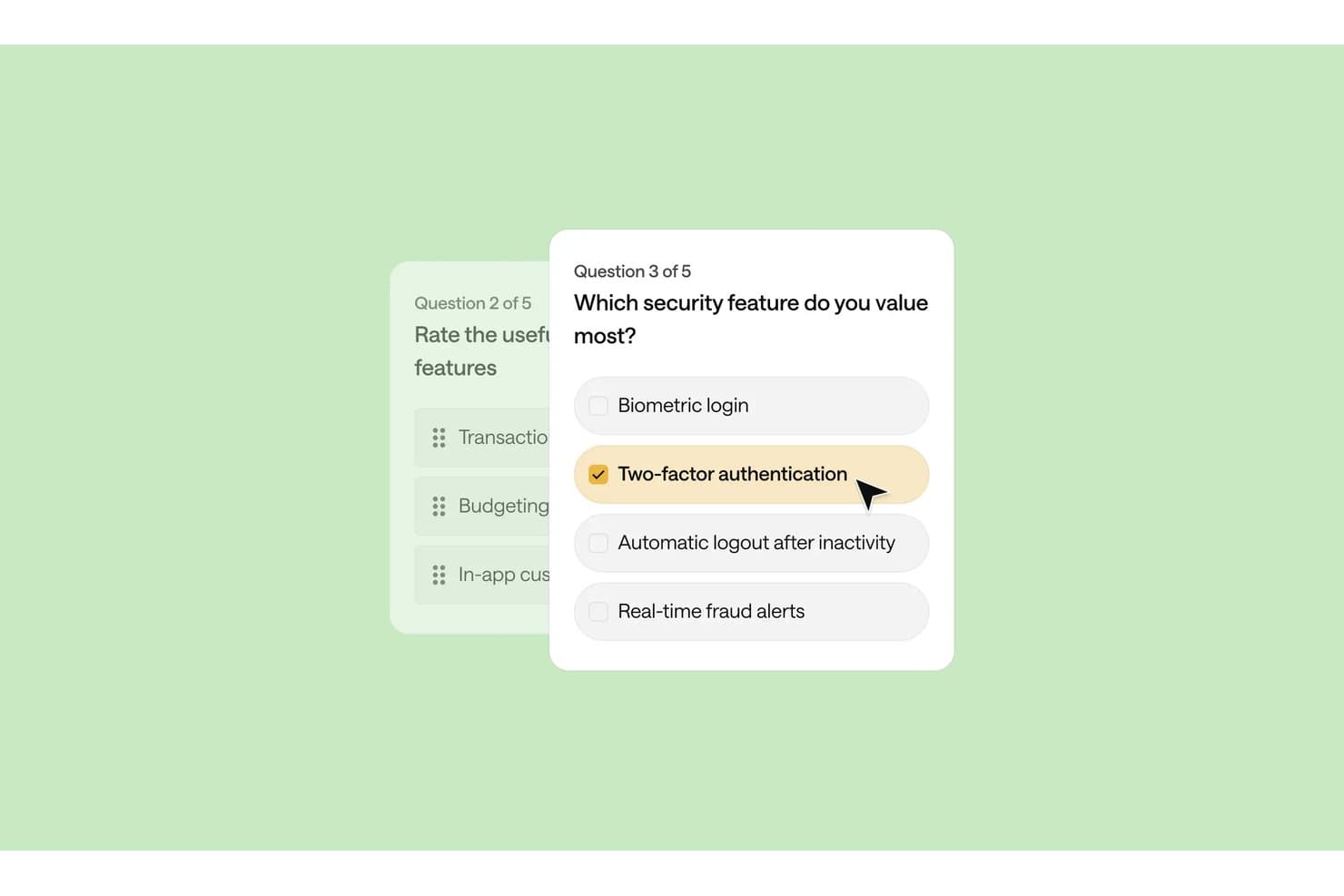
Optimal Workshop lets users build surveys with multiple-choice security questions. Optimal Workshop is a UX research platform that combines card sorting, tree testing, interviews, and qualitative analysis tools with an AI-powered repository for storing, tagging, and synthesizing research data across studies.
Who Is Optimal Workshop Best For?
Optimal Workshop suits UX researchers and research operations leads who need to run card sorting, tree testing, and qualitative interviews inside one platform and synthesize findings across methods.
Why I Picked Optimal Workshop
I picked Optimal Workshop as one of the best because it's one of the few tools that genuinely connects card sorting, tree testing, and qualitative interviews inside a single research repository. What I find especially useful is the Theme Builder, which lets me filter tagged observations across sessions and surface patterns as named themes with linked evidence. The AI Chat feature then takes that synthesized data and outputs it directly to Slack or Notion, so findings move from raw sessions to stakeholder-ready format without leaving the platform.
Optimal Workshop Key Features
- Chord diagram: Visualizes relationships between tags across your qualitative data, showing how observations connect to multiple themes at once.
- MCP integration: Connects AI tools like Claude, ChatGPT, and Gemini directly to your workspace so you can query and filter studies by type, participant segment, or timeframe.
- Highlight reels: Lets you clip and compile video moments from recorded sessions into shareable reels for stakeholders who weren't in the room.
- Participant recruitment panel: Gives you access to a built-in panel of over 10 million verified participants across 150+ countries, with built-in screening, scheduling, and incentive management.
Optimal Workshop Integrations
Optimal Workshop integrates with Slack, Notion, Confluence, Jira, Linear, Miro, Zoom, Google Meet, and Microsoft Teams for sharing findings and capturing interviews. Enterprise customers can connect Optimal’s API to data warehouses, BI tools, and internal dashboards.
Pros and Cons
Pros:
- Unlimited seats widen stakeholder access
- Linked evidence supports defensible research themes
- Strong card sorting and tree testing
Cons:
- Starter permissions limit repository governance
- Cross-study search remains immature
Learn more about Optimal Workshop: Best for video clips shared without onboarding
- Free demo available
- From $395/month
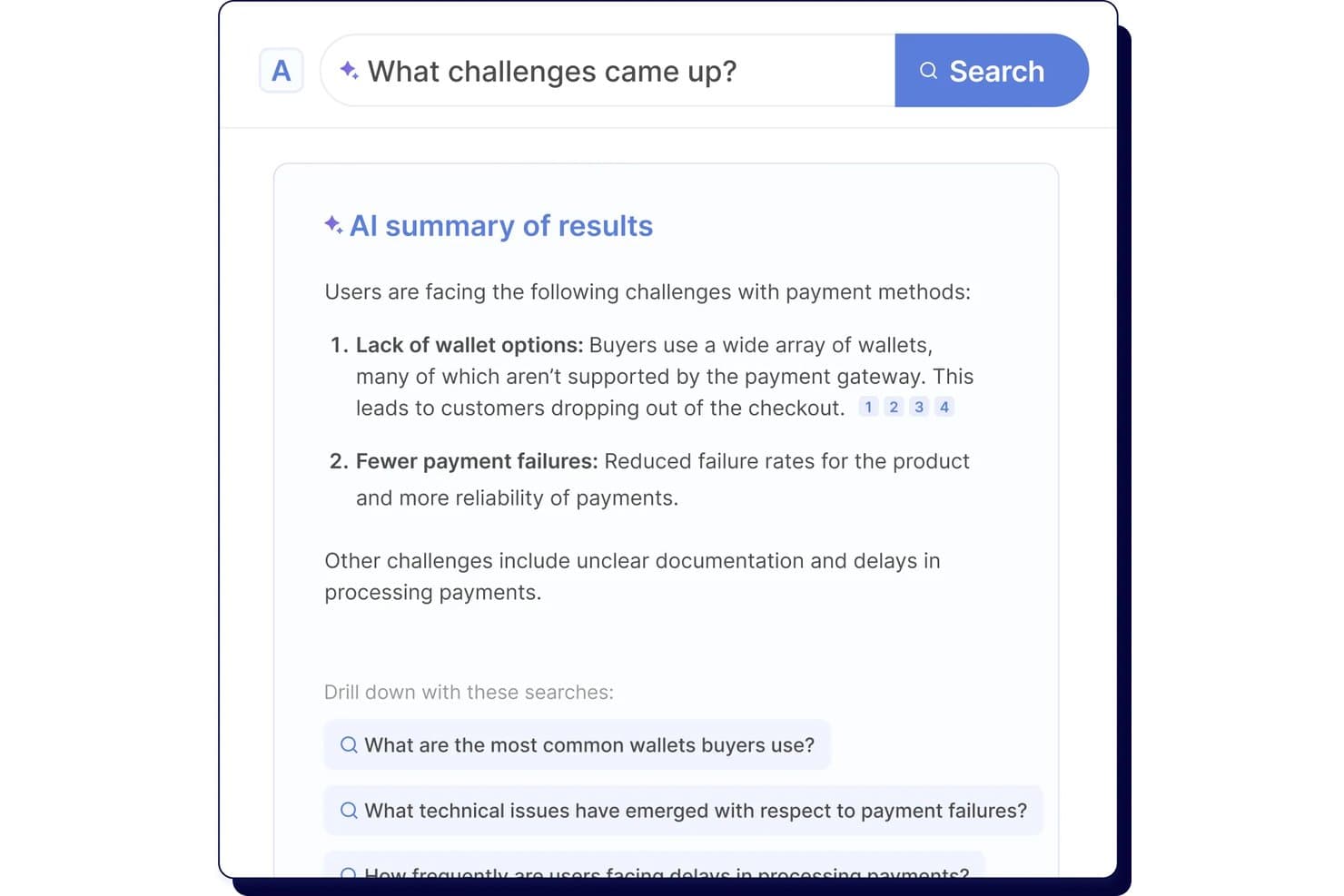
Looppanel's AI search surfaces key user research challenges instantly. Looppanel is a UX research repository platform that centralizes video recordings, transcripts, survey data, and documents, with AI-powered tagging, search, and synthesis tools for turning qualitative research into shareable insights.
Who Is Looppanel Best For?
Looppanel fits UX researchers and product teams who need to share video findings with stakeholders who won't log in to learn a new tool.
Why I Picked Looppanel
I've included Looppanel in my top picks because of how well it handles sharing video findings with people who will never log into a research tool. The Enterprise stakeholder search is built for exactly that: executives and PMs can browse and search across research without any onboarding. I also like that one-click video clips and auto-generated Research Reels let me surface a participant's exact words in seconds, then drop them straight into Slack with full source citations attached.
Looppanel Key Features
- Auto-tagging with theme grouping: AI automatically groups notes into themes across your project, which you can review and edit before finalizing.
- Ask Looppanel AI with citations: ask questions across your workspace and get AI-generated answers that link directly back to the source transcript quotes.
- Global Smart Search: searches notes, transcripts, reports, survey data, and insights across the entire workspace, surfacing relevant data even when it's untagged.
- Survey auto-analysis: automatically analyzes survey responses ranging from 5 to 500+ entries and surfaces key themes without manual sorting.
Looppanel Integrations
Looppanel offers 13 documented integrations, including Zoom, Microsoft Teams, Google Meet, Google Calendar, Slack, Jira, Confluence, HubSpot, Zendesk, and Qualtrics. Enterprise adds API access and custom integrations, while MCP connects Claude Desktop, ChatGPT, and Cursor.
Pros and Cons
Pros:
- Search finds untagged research data
- AI answers retain source citations
- Video clips make stakeholder sharing immediate
Cons:
- Advanced governance requires enterprise access
- Transcripts still contain frequent mistakes
Learn more about Looppanel: Best for collaborative research repositories at scale
- Free plan + free demo available
- Pricing upon request
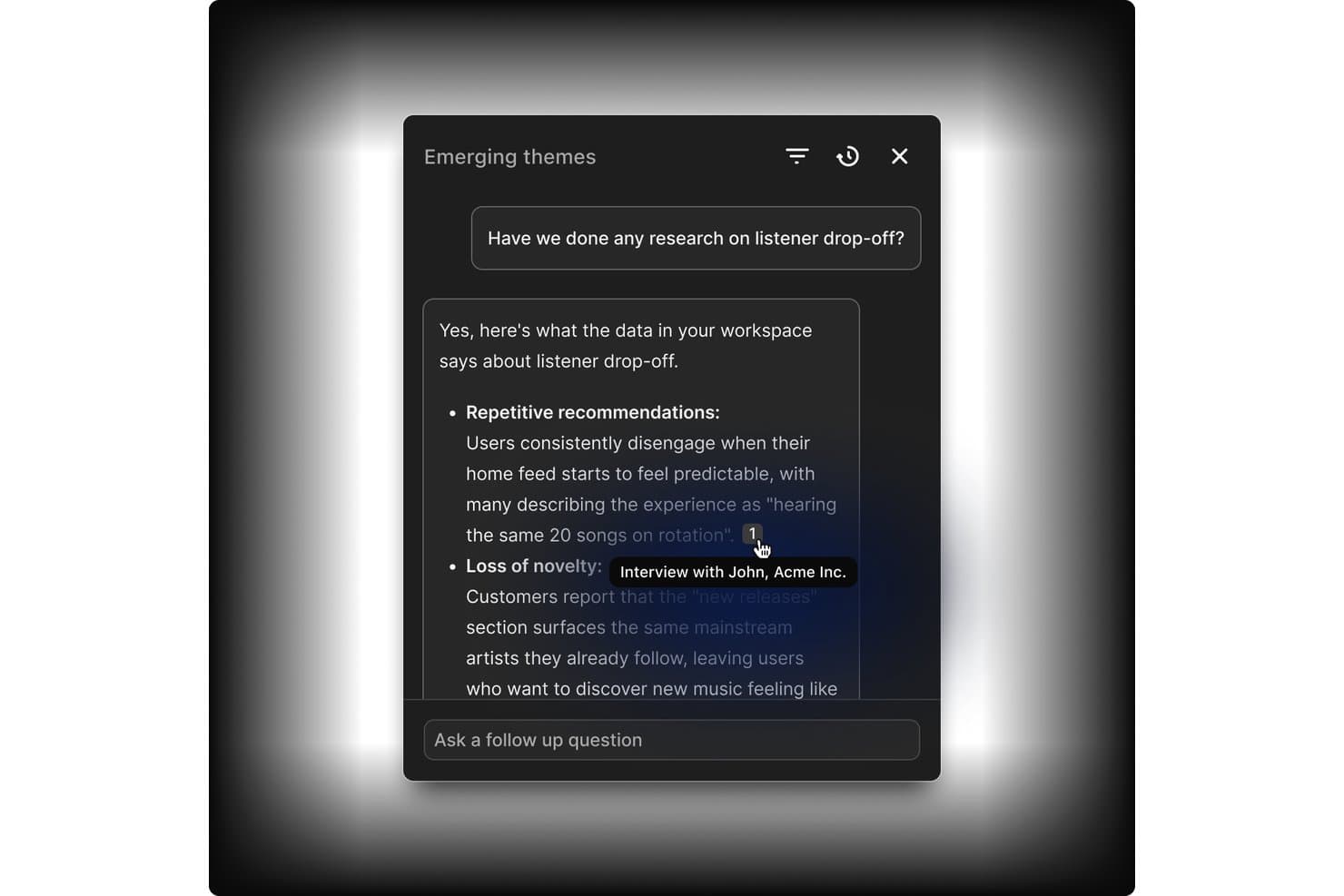
Dovetail links AI answers directly to source interview evidence. Dovetail is a customer intelligence platform that combines centralized research storage, AI-assisted tagging and synthesis, cross-study analysis, and stakeholder sharing into one collaborative research repository.
Who Is Dovetail Best For?
Dovetail fits enterprise research teams and DesignOps leads who need to manage research at scale across multiple studies, contributors, and stakeholders.
Why I Picked Dovetail
Dovetail earns its spot as one of the best on my shortlist because it's built to handle research at a scale that most tools simply aren't designed for. I love how workspace-level tag boards stay live across hundreds of projects simultaneously, so a taxonomy change made in one place reflects everywhere at once. Canvas AI clustering is also genuinely useful: when I'm pulling highlights from a dozen studies, the tool groups them by theme automatically, cutting hours of manual affinity mapping. Add free unlimited Viewer seats on Enterprise, and getting synthesized findings in front of engineering and product stakeholders becomes far less of an operational burden.
Dovetail Key Features
- Evidence-linked docs: Reports and chat answers cite exact video clips, timestamps, and quotes that link back to the original recording.
- Cross-project canvas: Pull highlights and references from multiple projects into a single infinite canvas for cross-study analysis.
- Contacts database: Store up to 50,000 research participants, link them to sessions and docs, and enrich records via Salesforce or HubSpot.
- Insight-to-roadmap linking: Send themes and data points directly to Jira or Linear as interactive embeds that link back to Dovetail.
Dovetail Integrations
Dovetail offers native integrations with Jira, Linear, Slack, Microsoft Teams, Notion, Figma, Productboard, Zoom, Google Meet, and Qualtrics. It also provides an API, CLI, MCP Server, and Zapier for custom connectivity.
Pros and Cons
Pros:
- Granular permissions support research governance
- Cross-study synthesis reveals recurring research themes
- Evidence-linked findings support stakeholder trust
Cons:
- Search reliability varies across larger datasets
- Advanced repository features require Enterprise
Learn more about Dovetail: Best for qualitative analysis
- 15-day free trial
- From $15/user/month (billed annually)
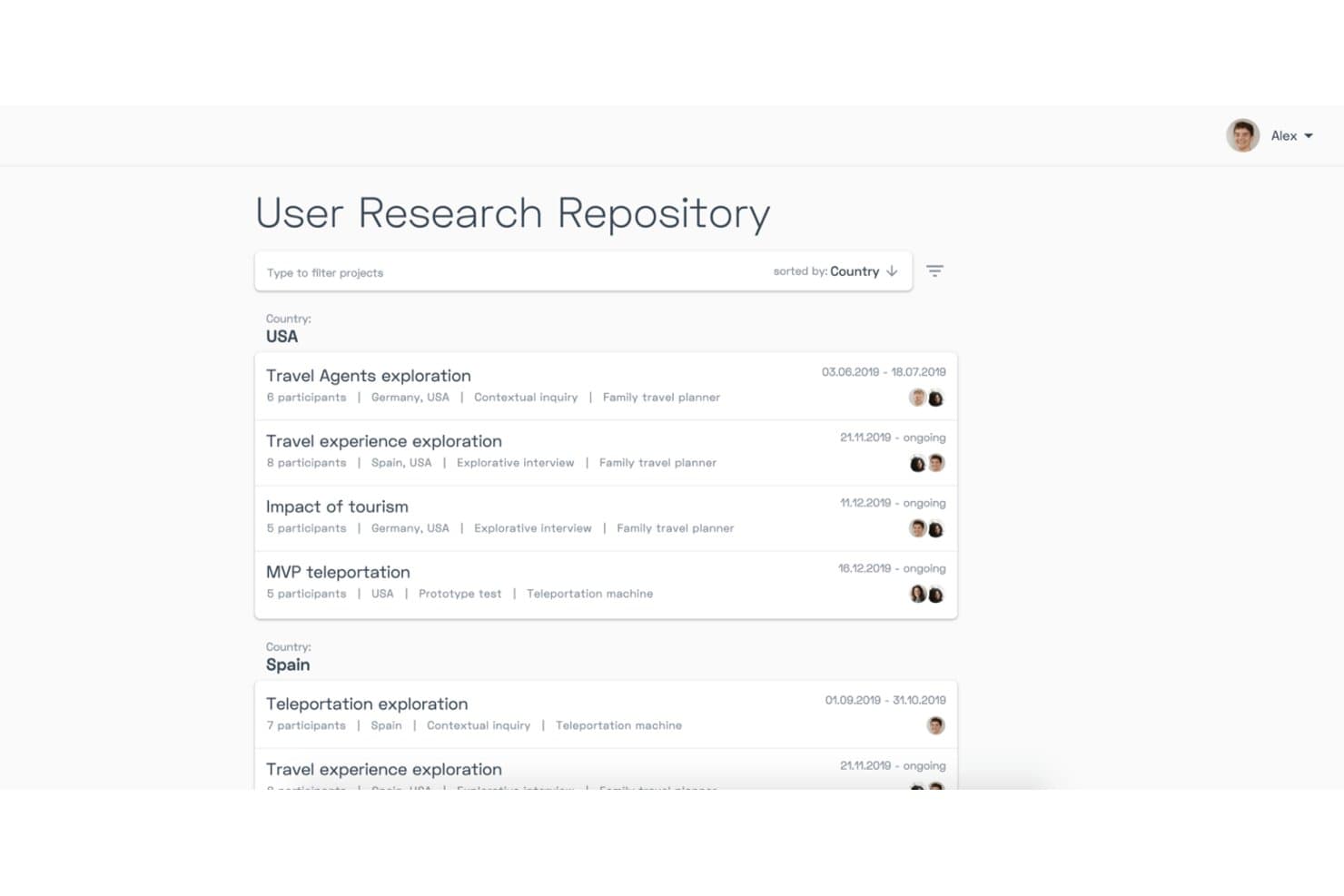
Condens organizes research projects by country with filters and metadata. Condens is a UX research repository and AI analysis platform that centralizes video, audio, notes, and text data, with tools for transcription, tagging, whiteboard synthesis, and AI-assisted qualitative analysis across studies.
Who Is Condens Best For?
Condens is a strong fit for UX researchers and product teams that do heavy qualitative work and need a structured, evidence-linked repository to synthesize findings at scale.
Why I Picked Condens
I picked Condens as one of the best because its qualitative analysis depth is genuinely hard to replicate elsewhere. I love how AI clustering groups transcript highlights into themes automatically, and how Smart Clusters keep updating as new data comes in, so synthesis isn't a one-time manual task. The whiteboard links every insight back to raw evidence, which means when stakeholders question a finding, I can trace it directly to the source clip.
Condens Key Features
- Global tag boards: A shared tag set that spans all projects, keeping your taxonomy consistent and preventing duplicate or conflicting tags across studies.
- Unlimited transcription: Every plan includes unlimited AI transcription in 85+ languages, with speaker recognition and timestamps built in.
- Insights Magazine: A customizable stakeholder hub where you can curate and publish findings for different audiences, with no login required for viewers.
- Cross-project participant profiles: Participant records that persist across studies, tracking demographics, consent, and session history in one place.
Condens Integrations
Condens offers documented integrations with Zoom, Google Drive, Microsoft Cloud, UserTesting, UXTweak, User Interviews, Zendesk, Slack, Microsoft Teams, and Figma. It also supports Notion, Jira, and Confluence embeds, plus an Enterprise API and Zapier.
Pros and Cons
Pros:
- No-login stakeholder findings access
- Unlimited transcription and storage
- Evidence-linked qualitative synthesis
Cons:
- Transcription can misrecognize names
- No built-in study recruitment
Learn more about Condens: Best for all-in-one research ops and CRM
- Free trial + free demo available
- From $129/seat/month

Great Question lets users tag and organize transcript highlights into a repository. Great Question is an all-in-one UX research platform that combines a research repository, participant CRM, recruitment, and study tools—including interviews, surveys, prototype tests, and AI-powered synthesis and search.
Who Is Great Question Best For?
Great Question is a strong fit for UX research teams that want to consolidate recruiting, CRM, study execution, and a searchable insight repository into one platform.
Why I Picked Great Question
I picked Great Question as one of the best because it's the only tool on this list that genuinely handles recruiting, participant CRM, study execution, and a searchable insight repository under one roof. I love how Ask AI lets me search across every study with natural-language questions and get verbatim, timestamped quotes back as evidence. The participant CRM tracks consent, study history, and custom attributes, so I'm never starting from scratch when I need to recruit for a follow-up study.
Great Question Key Features
- AI Synthesis: Automatically generates themed summaries, key insights, and a highlight reel from moderated interview studies with three or more transcripts.
- Global tag manager: Lets you create, color-code, group, and merge tags that apply across every study in your workspace for org-wide pattern tracking.
- Highlights Board: A drag-and-drop workspace where you group and organize video highlights into named, color-coded clusters for manual synthesis.
- Free unlimited Observer seats: Stakeholders can view the repository, attend live sessions, and browse findings without needing a paid seat.
Great Question Integrations
Great Question offers 20+ native integrations, including Zoom, Google Meet, Microsoft Teams, Slack, Figma, Google Workspace, Microsoft Outlook, Salesforce, Qualtrics, and Respondent. It also supports custom connections through its API and MCP server, plus Zapier.
Pros and Cons
Pros:
- Participant CRM connects recruitment with repository
- Free observers broaden stakeholder research access
- AI search returns cited transcript quotes
Cons:
- Repository excludes direct spreadsheet uploads
- AI synthesis only covers moderated interviews
Learn more about Great Question: Best for end-to-end AI research synthesis
- Free plan available
- Pricing upon request
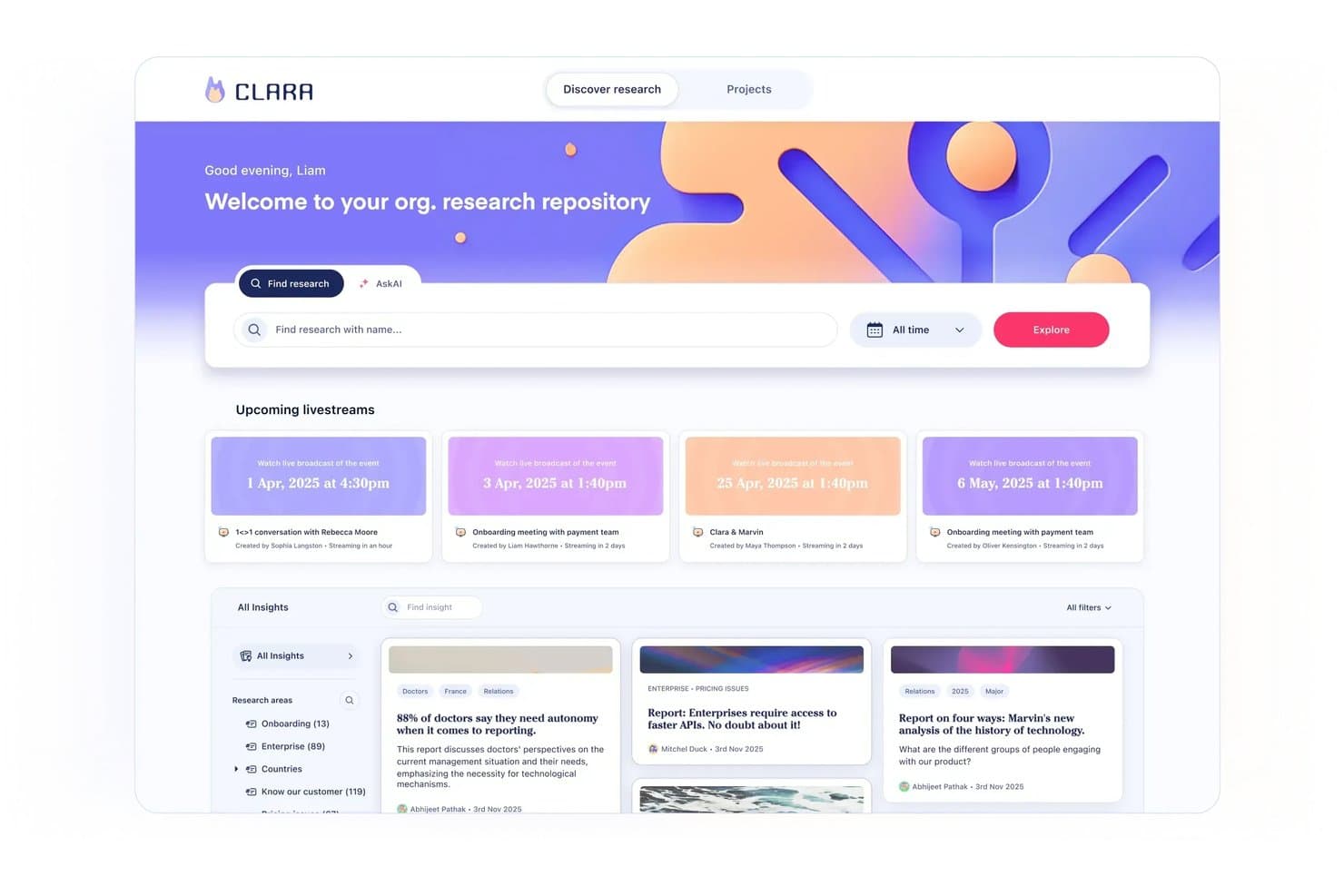
Marvin centralizes research insights and upcoming sessions in one repository. Marvin is an AI-powered UX research repository that centralizes interviews, surveys, support tickets, and other research data, with built-in transcription, tagging, synthesis, and cross-study search.
Who Is Marvin Best For?
Marvin is a strong fit for UX researchers and product managers who need to move from raw interview data to shareable, evidence-backed insights without losing track of what was learned across past studies.
Why I Picked Marvin
Marvin earns its spot on my shortlist because it covers the full arc of AI research synthesis, from live interview transcription to cross-study pattern detection, without requiring manual tagging to make search useful. I especially like Ask AI's explorer agents, which scan your entire repository, surface relevant moments across past studies, and show exactly which files informed the answer. Deep Research templates for thematic analysis, JTBD, and emotion analysis let me move from raw transcripts to structured findings in a single workflow rather than jumping between tools.
Marvin Key Features
- AI Notetaker: Automatically records, transcribes, and summarizes live calls on Zoom, Google Meet, and Microsoft Teams with speaker identification and timestamps.
- Living insight reports: Insights move through private, draft, shared, and published states, combining notes, quotes, clips, and AI analysis in a single report.
- Research newsletter automation: Auto-generates customizable research newsletters and posts insights directly to Slack or Microsoft Teams channels to keep stakeholders informed.
- Granular access permissions: Four distinct user roles—Admin, Full, Collaborator, and Viewer—with pod-level controls, PII visibility settings, and SSO support.
Marvin Integrations
Marvin offers 30+ native integrations, including Zoom, Google Meet, Microsoft Teams, Qualtrics, Dscout, UserTesting, Intercom, Zendesk, Slack, Jira, and Asana. Its Import API and MCP server support custom connections with Claude, ChatGPT, Cursor, and Copilot.
Pros and Cons
Pros:
- Insight reports connect evidence to decisions
- AI notes capture interviews with timestamps
- Repository-wide search surfaces past research
Cons:
- Cross-project synthesis can take considerable time
- AI analysis sometimes misreads research data
Learn more about Marvin:
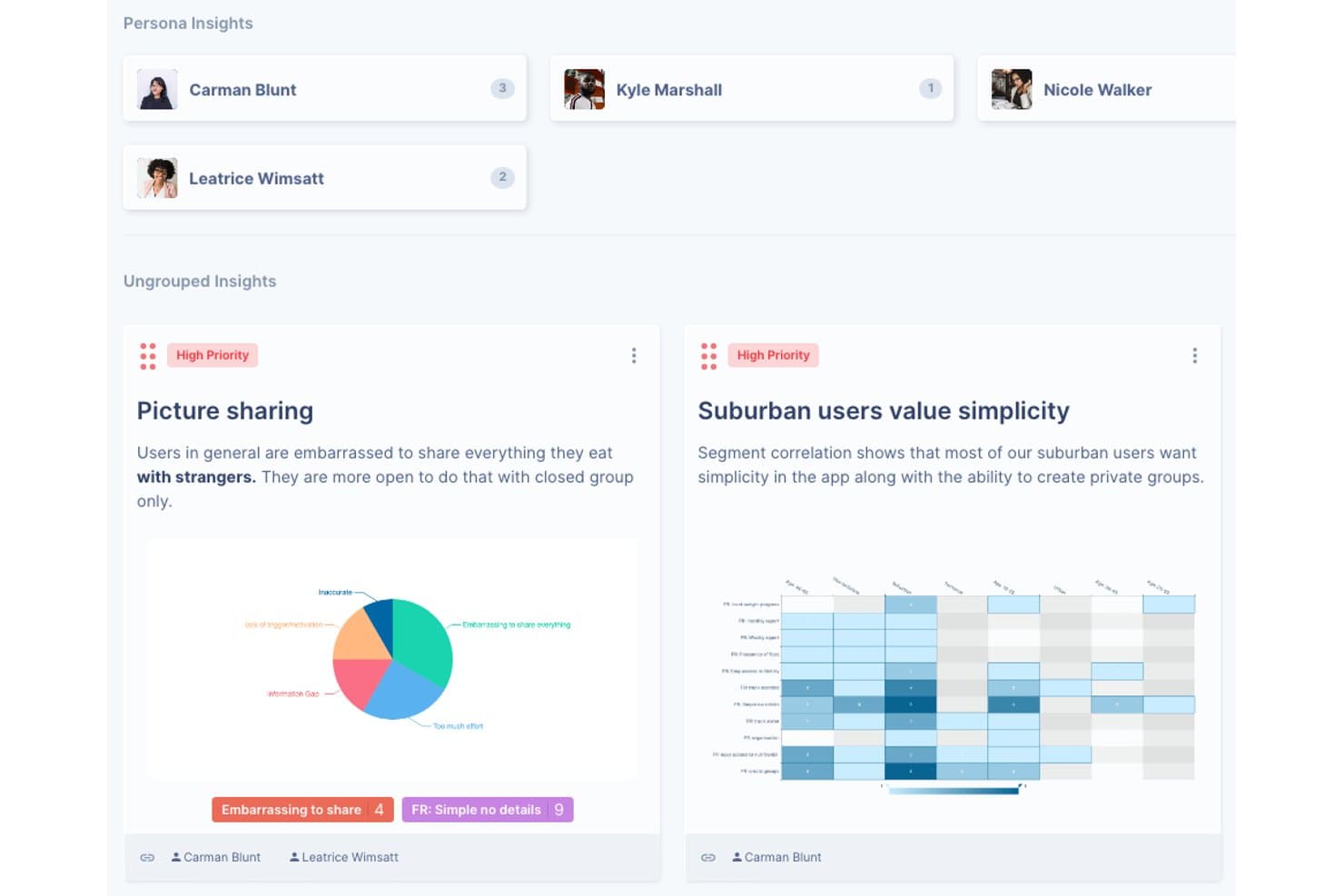
UserBit organizes research insights by persona with priority tags and charts. UserBit is a UX research repository tool built for multi-client workflows, combining interview management, notes, transcription, surveys, tagging, correlation analysis, and a stakeholder-facing Client Portal in one workspace.
Who Is UserBit Best For?
UserBit is a strong fit for UX researchers and design ops leads at agencies managing multiple client workspaces under a single flat-rate subscription.
Why I Picked UserBit
I've included UserBit in my top picks because its flat-rate Unlimited plan lets agencies add every client team member and stakeholder at no extra cost, which is rare in this category. I particularly like how each client gets its own isolated workspace with separate branding, permissions, and a dedicated Client Portal where stakeholders can filter and explore published insights without needing a researcher to walk them through it.
UserBit Key Features
- Correlation heatmaps: Visualize relationships between highlight tags and participant segments to surface patterns across your interview data.
- Global tag boards: Create and manage a shared tag taxonomy across all projects in a workspace, with changes syncing automatically.
- Stakeholder Client Portal: Give non-researcher audiences a branded, login-protected space to browse and filter published insights independently.
- Built-in transcription: Transcribe audio and video in 99 languages with speaker recognition, inline editing, and automatic clip creation from tagged segments.
UserBit Integrations
UserBit doesn't have any native integrations. It supports a beta REST API, Enterprise SSO with Okta, Google, OneLogin, and Azure AD, plus Zapier.
Pros and Cons
Pros:
- Evidence-linked insights strengthen research credibility
- Client Portal simplifies stakeholder insight access
- Isolated workspaces support multi-client research
Cons:
- Analytics interface can feel dated and confusing
- AI tagging and synthesis remain unreliable
Learn more about UserBit:
Diğer UX Araştırma Deposu Araçları
Kısa listeme giremeyen ancak yine de göz atmaya değer bazı ek UX araştırma deposu aracı seçenekleri şunlardır:
- 11StravitoBest for sharing insights with non-research teams
- 12AureliusBest for flat-rate, unlimited-user research repos
- 13NotionBest for research insights inside existing workflows
- 14MazeBest for prototype testing with built-in AI synthesis
- 15DscoutBest for field research in regulated industries
- 16UXArmyBest for usability research in APAC markets
How I Evaluate UX Research Repository Tools
I split my evaluation into three parts, with the most weight on core functionality: store research artifacts, tag findings, and search across studies. Next, I look for standout features such as AI theme clustering. Finally, I consider beyond-feature factors like onboarding for PMs and designers, support, and pricing as teams grow.
Core Functionality (Table Stakes For This List)
When I'm selecting tools for my list, I score each one on a scale from 0 (does not offer the functionality) to 5 (excels in this area) for each core functionality listed below. I then convert the total into a percentage to help assess each tool's overall fit, with extra weight on any functionalities I’ve deemed essential.
- Centralized Research Data (Essential): I check whether notes, recordings, transcripts, and survey results stay organized by study and remain easy to retrieve later.
- Tagging & Search (Essential): I look for tags plus keyword and filter search that can surface a specific customer quote across studies, not just within one project.
- Insight Synthesis: I assess whether teams can turn highlights into reusable themes and link each takeaway back to supporting notes or recordings.
- Cross-Study Analysis: I look for ways to compare tagged findings across projects and spot recurring onboarding confusion or changing customer needs.
- Stakeholder Sharing: I evaluate whether product and engineering partners can navigate curated findings without needing a researcher to interpret every file.
- Access Controls: I check whether roles distinguish who can view, edit, or contribute, especially when studies include sensitive participant data.
Once I have a list of tools that meet the criteria, I consider what sets each platform apart.
Differentiating Factors (What Sets Vendors Apart)
Here's how I compare and contrast different vendors:
Standout Features
I look for AI theme clustering that groups related highlights across studies automatically, since manually tagging hundreds of quotes is where adoption stalls. Insight-to-roadmap linking matters just as much—I evaluate whether a tool lets you trace a prioritization decision back to the supporting evidence, the way Dovetail or Productboard connect findings to feature requests. I also check for customizable stakeholder hubs where PMs and engineers can self-serve curated findings without needing a walkthrough from the researcher who ran the study.
Beyond Features
I evaluate how easily non-researchers can actually use the tool. If a PM needs a walkthrough just to browse findings, adoption stalls fast. I also look at licensing models—some vendors charge per seat while others offer free viewer roles, which matters when you need 30 stakeholders reading insights but only five people running studies. GDPR and SOC 2 compliance is non-negotiable for tools holding recorded interviews, so I check each vendor's data residency options and consent tracking.
UX Araştırma Deposu Aracı Nasıl Seçilir?
Uzun özellik listeleri ve karmaşık fiyatlandırma yapıları içinde kaybolmak kolaydır. Kendinize özgü yazılım seçim sürecinizde ilerlerken odaklanmanızı korumanıza yardımcı olmak için göz önünde bulundurmanız gereken faktörlerin bir kontrol listesi aşağıda yer alıyor:
| Faktör | Dikkat Edilmesi Gerekenler |
| Ölçeklenebilirlik | Aracın ekibinizle birlikte büyüyebildiğinden emin olun. Veri hacmi ve ek kullanıcı sayısı arttığında herhangi bir sorun yaşamadan destek sağlayıp sağlamadığını değerlendirin. |
| Entegrasyonlar | İş akışlarını kolaylaştırmak için aracın Slack, Jira veya Google Drive gibi mevcut yazılımlarınızla entegre olup olmadığını kontrol edin. |
| Özelleştirilebilirlik | Özelleştirilebilir panolar veya iş akışları gibi seçeneklerle aracı ekibinizin özel ihtiyaçlarına göre uyarlayabilme olanağı arayın. |
| Kullanım Kolaylığı | Ekibinizin aracı hızlıca benimsemesini sağlayacak kadar sezgisel olup olmadığını değerlendirin. Dik bir öğrenme eğrisi araştırma çalışmalarınızı yavaşlatabilir. |
| Bütçe | Fiyatlandırmanın bütçenizle uyumlu olup olmadığını analiz edin. Her fiyatlandırma kademesinde sunulan değeri ve gizli maliyetleri göz önünde bulundurun. |
| Güvenlik Önlemleri | Güçlü veri koruma önlemlerinin mevcut olduğundan emin olun. GDPR gibi sektör standartlarına uyumluluk arayın. |
| Destek | Yanıt süreleri ve eğitimler veya yardım merkezi gibi mevcut kaynaklar da dahil olmak üzere sunulan müşteri desteğinin düzeyini değerlendirin. |
| İş Birliği | Ekip verimliliğini artırmak için aracın gerçek zamanlı düzenleme veya paylaşılan çalışma alanları gibi iş birliğine dayalı özellikleri destekleyip desteklemediğini kontrol edin. |
UX Araştırma Deposu Araçlarındaki Trendler
Araştırmamda, farklı UX araştırması deposu aracı tedarikçilerinden sayısız ürün güncellemesi, basın bülteni ve sürüm günlüğü derledim. Takip ettiğim yeni ortaya çıkan trendlerden bazıları şunlar:
- Yapay Zekâ Destekli İçgörüler: Birçok araç, kullanıcı verilerinden daha derin içgörüler elde etmek için artık yapay zekâdan yararlanıyor. Bu trend, ekiplerin kalıpları hızlıca belirlemesine ve bilinçli kararlar almasına yardımcı oluyor. Dovetail gibi tedarikçiler, kullanıcı geri bildirimlerini etiketlemeye ve sentezlemeye yardımcı olmak için yapay zekâyı entegre ediyor.
- Geliştirilmiş Veri Görselleştirme: Araçlar, ekiplerin verileri kolay ve etkili bir şekilde yorumlamasına olanak tanıyan daha gelişmiş veri görselleştirme seçeneklerine odaklanıyor. Bu trend, karmaşık verilerin daha anlaşılır bir biçimde sunulmasına yardımcı olarak karar alma süreçlerini destekliyor.
- Uzaktan İş Birliği Özellikleri: Uzaktan çalışma daha yaygın hâle geldikçe araçlar, gerçek zamanlı iş birliğini destekleyen özelliklerini geliştiriyor. Buna, dağıtık ekipler için vazgeçilmez hâle gelen paylaşılan çalışma alanları ve gerçek zamanlı düzenleme özellikleri de dâhil.
- Kullanıcı Deneyimini Özelleştirme: Kullanıcılara daha fazla özelleştirme seçeneği sunma yönünde artan bir eğilim var. Bu, ekiplerin aracın arayüzünü ve işlevlerini kendi iş akışlarına ve ihtiyaçlarına daha uygun hâle getirmesine olanak tanıyor.
- Erişilebilirliğe Odaklanma: Araçların, engelli kullanıcılar da dâhil olmak üzere tüm kullanıcılar için erişilebilir olmasını sağlamak bir öncelik hâline geliyor. Buna, araştırma süreçlerinde kapsayıcılığı güvence altına alan klavye ile gezinme ve ekran okuyucu desteği gibi özellikler de dâhil.
UX Araştırması Deposu Araçları Nedir?
UX araştırması deposu araçları, kullanıcı araştırması verilerini depolayan, düzenleyen ve yöneten yazılım çözümleridir. Bu araçlar genellikle UX araştırmacıları, ürün yöneticileri ve tasarım ekipleri tarafından kullanıcı içgörülerini anlamlandırmak ve ürün geliştirme süreçlerini iyileştirmek için kullanılır. Etiketleme, veri görselleştirme ve iş birliği özellikleri gibi işlevler; verilerin düzenlenmesine, içgörülerin yorumlanmasına ve ekip çalışmasının kolaylaştırılmasına yardımcı olur. Genel olarak bu araçlar, ekiplerin kullanıcı araştırması verilerini verimli bir şekilde yönetip kullanabilmesi için merkezi bir platform sağlar.
UX Araştırması Deposu Araçlarının Özellikleri
UX araştırması deposu araçlarını seçerken aşağıdaki temel özelliklere dikkat edin:
- Entegrasyon özellikleri: Anket platformları, tasarım yazılımları veya analiz panoları gibi diğer araçlara bağlanın. Sorunsuz entegrasyonlar manuel çalışmayı azaltır ve iş akışınızın kesintisiz ilerlemesini sağlar.
- Merkezi veri depolama: Tüm araştırma bulgularınızı, belgelerinizi ve çoklu ortam dosyalarınızı güvenli tek bir konumda depolayın. Bu, ekibinizdeki herkesin ihtiyaç duyduğu bilgilere kolayca erişmesini sağlar; artık dosya aramakla uğraşmanız gerekmez.
- Gelişmiş arama ve filtreleme: Sonsuz klasörleri taramak zorunda kalmadan önemli içgörüleri veya katılımcı ayrıntılarını hızla bulun. Filtreler belirli çalışmalara, tarihlere, etiketlere veya kullanıcı segmentlerine odaklanmanızı sağlar ve süreci oldukça yönetilebilir hâle getirir.
- Etiketleme ve kategorilendirme: Araştırma verilerinizi konulara, metodolojilere veya proje adlarına göre etiketleyin ve düzenleyin. Bu yapı zamandan tasarruf etmenizi sağlar ve ihtiyaç duyduğunuz anda kalıpları veya eksiklikleri çok daha hızlı fark etmenize yardımcı olur.
- İş birliği araçları: Notları paylaşarak, yorum bırakarak veya ekip arkadaşlarınıza görevler atayarak gerçek zamanlı olarak birlikte çalışın. Sonsuz e-posta zincirleri arasında kaybolmadan geri bildirim toplayabilirsiniz.
- Sürüm geçmişi ve denetim izleri: Değişiklikleri takip edin ve kimin neyi, ne zaman düzenlediğini görün. Bu özellik, doğruluğu güvence altına almanız veya önceki bulguları her şeye yeniden başlamadan gözden geçirmeniz gerektiğinde son derece değerlidir.
- Katılımcı yönetimi: Tüm katılımcı bilgilerinizi düzenli ve güvenli tutun. Onay formlarını yönetebilir, iletişimi takip edebilir ve yanlışlıkla aynı kişiye iki kez davet gönderilmesini tek bir yerden önleyebilirsiniz.
- İçgörü sentezleme araçları: İlgili bulguları gruplayın ve temel içgörüleri sentezleyin. Bu, ham verileri projeleriniz için kullanılabilir bilgiye dönüştürmenize yardımcı olur ve elde ettiğiniz sonuçları hemen uygulanabilir hâle getirir.
- Güvenlik ve izin denetimleri: Ekip üyeleri ve paydaşlar için erişim düzeyleri belirleyin. Güçlü denetimler, hassas araştırmaların gizli kalmasını sağlarken iş birliği yapan kişilerin yalnızca kendileriyle ilgili olanları görmesine olanak tanır.
Yaygın Yapay Zekâ Özellikleri
Modern UX araştırması deposu araçları, ekiplerin daha akıllı ve hızlı çalışmasına yardımcı olmak için giderek daha fazla yapay zekâ ile güçlendiriliyor. Karşılaşacağınız yaygın yapay zekâ destekli özelliklerden bazıları şunlardır:
- Otomatik etiketleme ve kategorilendirme: AI, görüşme dökümleri veya anket yanıtları gibi araştırma verilerinizi tarayabilir ve ilgili etiketler veya kategoriler önerebilir. Bu, zamandan tasarruf etmenizi sağlar ve deponuzu minimum manuel çabayla düzenli tutar.
- İçgörü çıkarma: Gelişmiş algoritmalar, araştırmanızdaki yinelenen temaları, kalıpları ve duygu durumlarını öne çıkararak her notu tek tek okumak zorunda kalmadan temel içgörüleri ortaya çıkarmanıza yardımcı olabilir.
- Döküm hizmetleri: AI destekli döküm, sesli ve görüntülü görüşmeleri hızla aranabilir, düzenlenebilir metne dönüştürür. Bu, konuşmaları analiz etmeyi ve bulguları ekibinizle paylaşmayı kolaylaştırır.
- Akıllı arama: AI, bağlamı ve amacı anlayarak arama işlevini geliştirir ve doğal dil sorguları kullandığınızda bile daha doğru sonuçlar sunar.
- Katılımcı tekilleştirme: AI, yinelenen katılımcı kayıtlarını belirleyip birleştirerek temiz ve doğru bir veritabanı tutmanıza yardımcı olabilir.
- Otomatik özetler: Uzun araştırma oturumlarının veya raporların kısa özetlerini oluşturun; böylece paydaşlar tüm ayrıntıları incelemek zorunda kalmadan ana noktaları hızla kavrayabilir.
- Duygu analizi: AI, katılımcı geri bildirimlerinin duygusal tonunu değerlendirebilir ve kullanıcı tutumları ile tepkilerini daha derinlemesine anlamanızı sağlayabilir.
Katmanlı AI özellikleri iş akışınızı kolaylaştırabilir, manuel görevleri azaltabilir ve değerli içgörüleri daha hızlı ortaya çıkarmanıza yardımcı olabilir; böylece UX araştırma deposu araçlarınız daha da güçlü hale gelir.
UX Araştırma Deposu Araçlarının Faydaları
UX araştırma deposu araçlarını uygulamak, ekibiniz ve işletmeniz için çeşitli faydalar sağlar. Yararlanmayı bekleyebileceğiniz birkaç fayda şunlardır:
- Geliştirilmiş organizasyon: Etiketleme ve kategorilendirme özellikleri, araştırma verilerini iyi düzenlenmiş ve kolay erişilebilir durumda tutmanıza yardımcı olur.
- Geliştirilmiş iş birliği: Gerçek zamanlı iş birliği araçları, ekibinizin nerede olurlarsa olsunlar verimli bir şekilde birlikte çalışmasına olanak tanır.
- Daha hızlı içgörüler: Gerçek zamanlı analizler anında geri bildirim sağlayarak ekibinizin hızlı ve bilinçli kararlar almasına yardımcı olur.
- Daha iyi veri yorumlama: Veri görselleştirme özellikleri, karmaşık bilgileri anlamayı ve anlamlı sonuçlar çıkarmayı kolaylaştırır.
- Artırılmış erişilebilirlik: Erişilebilirlik özellikleri, engelli kişiler de dâhil olmak üzere ekibinizdeki herkesin aracı kullanabilmesini sağlar.
- Kolaylaştırılmış iş akışları: Entegrasyon özellikleri diğer yazılımlara bağlanarak verileri paylaşmayı ve platformlar arasında çalışmayı kolaylaştırır.
- Güvenli veri işleme: Güvenlik önlemleri hassas bilgileri koruyarak GDPR gibi sektör standartlarına uyumluluğu güvence altına alır.
UX Araştırma Deposu Araçlarının Maliyetleri ve Fiyatlandırması
UX araştırma deposu araçlarını seçmek, mevcut çeşitli fiyatlandırma modellerinin ve planların anlaşılmasını gerektirir. Maliyetler özelliklere, ekip büyüklüğüne, eklentilere ve diğer unsurlara göre değişir. Aşağıdaki tabloda yaygın planlar, bunların ortalama fiyatları ve UX araştırma deposu aracı çözümlerinde genellikle bulunan özellikler özetlenmiştir:
UX Araştırma Deposu Araçları için Plan Karşılaştırma Tablosu
| Plan Türü | Ortalama Fiyat | Yaygın Özellikler |
| Ücretsiz Plan | $0 | Temel veri depolama, sınırlı kullanıcı ve temel analizler. |
| Kişisel Plan | $5-$30/kullanıcı/ ay | Gelişmiş etiketleme, veri görselleştirme, iş birliği araçları ve temel destek. |
| İşletme Planı | $30-$60/ kullanıcı/ay | Tam analiz paketi, katılımcı bulma, entegrasyonlar ve öncelikli destek. |
| Kurumsal Plan | $60-$120/ kullanıcı/ay | Özel panolar, gelişmiş güvenlik, özel hesap yöneticisi ve özel entegrasyonlar. |
UX Araştırma Arşivi Araçları SSS
UX araştırma arşivi araçları hakkında sık sorulan bazı soruların yanıtları:
UX araştırma arşivi, normal bir veritabanından nasıl farklıdır?
UX araştırma arşivi, kullanıcı araştırması verilerini depolamak ve düzenlemek için özel olarak tasarlanırken normal bir veritabanı aynı özelleştirilmiş özellikleri sunmayabilir. Arşivler; içgörüleri ekipler arasında etkili bir şekilde sentezlemek ve paylaşmak için gerekli olan etiketleme, kategorilendirme ve iş birliği gibi işlevleri içerir.
Küçük bir tasarım ekibi UX araştırma arşivinden yararlanabilir mi?
Kesinlikle, küçük ekipler UX araştırma arşivinden büyük ölçüde yararlanabilir. Bu arşiv, araştırma verilerini verimli bir şekilde düzenlemelerine, yinelenen çalışmalardan kaçınmalarına ve bilinçli kararlar almalarına yardımcı olur. Kaynaklar sınırlı olsa bile, iyi sürdürülen bir arşiv süreçleri kolaylaştırabilir ve iş birliğini geliştirebilir.
UX araştırma arşivleri uzaktan çalışma için uygun mudur?
Evet, UX araştırma arşivleri verileri ve içgörüleri bulut tabanlı bir platformda merkezileştirdiği için uzaktan çalışma için idealdir. Bu erişilebilirlik, ekip üyelerinin farklı konumlardan etkili bir şekilde iş birliği yapmasına olanak tanır ve araştırma çalışmalarında süreklilik ile tutarlılığı güvence altına alır.
UX araştırma arşivleri ne kadar güvenlidir?
Güvenlik, UX araştırma arşivleri için en önemli önceliklerden biridir. Çoğu platform, hassas verileri korumak için GDPR gibi sektör standartlarına uyar. Bilgilere yalnızca yetkili personelin erişebilmesini sağlamak amacıyla erişim denetimleri ve şifreleme gibi özellikler sunarlar.
Bir UX araştırma arşivi ne sıklıkla güncellenmelidir?
UX araştırma arşivinizi düzenli olarak güncellemeniz önemlidir. Düzenli güncellemeler, verilerin güncel ve kullanışlı kalmasına yardımcı olur ve ekibinizin her zaman en yeni içgörülere erişebilmesini sağlar. Yeni bulgular eklemek ve mevcut verileri gözden geçirmek için bir rutin oluşturmak çok önemlidir.
Ücretsiz UX araştırma arşivi araçları var mı?
Evet, bazı UX araştırma arşivi araçları ücretsiz sürümler veya deneme sürümleri sunar. Bu seçenekler, ekiplerin başlangıçta herhangi bir maliyet üstlenmeden araştırmalarını düzenlemeye başlaması için harika bir yol olabilir. Ancak ücretsiz sürümlerde özellikler veya depolama kapasitesi açısından sınırlamalar bulunabilir.