

Yapay zekâ kullanıcı araştırması araçları, kullanıcı içgörülerini toplama, analiz etme ve bunlara göre hareket etme biçiminizi otomatikleştirmek ve geliştirmek için yapay zekâdan yararlanır. Araştırmayı hızlandırmanın, manuel çalışmayı azaltmanın veya gerçek ya da simüle edilmiş kullanıcılardan daha derin geri bildirimler almanın yollarını arıyorsanız bu araçlar sizin için tasarlanmıştır. Bu kadar çok seçenek varken hangi platformların gerçekten güvenilir sonuçlar sunduğunu ve iş akışınıza uyduğunu bilmek zordur. Bu kılavuz, önde gelen yapay zekâ kullanıcı araştırması araçlarını hızlıca karşılaştırmanıza yardımcı olacak; böylece ekibinizin araştırma sürecini iyileştirmek ve daha bilinçli ürün kararları almak için doğru çözümü bulabileceksiniz.
Why Trust Our Software Recommendations
6,700+
Reviews
20
Industry experts
16+
Evaluation factors
14
Years
Our team has been testing and reviewing software since 2012. As product managers ourselves, we know how difficult—and important—it is to choose the right software.
For this guide, we evaluated tools using hands-on testing and independent research, scoring tools using our selection criteria.
Our reviews reflect our human editorial judgment, not a sales pitch.
Expert reviewers:
- Andrew LumbySenior TPM
- Cristiano ValimSenior UI/UX Lead


Yapay Zekâ Kullanıcı Araştırması Araçları Karşılaştırma Tablosu
Bu karşılaştırma tablosu, muhasebeciler için en iyi yapay zekâ kullanıcı araştırması aracı seçimlerimin fiyatlandırma ayrıntılarını özetler:
Score legend (out of 5)
- Excellent4.5–5
- Good4–4.4
- Average3–3.9
- Below average2–2.9
- Poor1–1.9
Sorted by: Default
| Tool | Starting Price | Website | |||||||
|---|---|---|---|---|---|---|---|---|---|
Best with adaptive feedback taxonomy | Not rated | 2 | 4 | 5 | 5 | Not rated | 2 | Pricing upon request Free demo available | Website |
Best for AI-driven survey response analysis | Not rated | 1 | 4 | 3 | 3 | Not rated | 1 | $79/month 7-day free trial + free demo available | Website |
Best for large-scale participant panels | 4.0 out of 5 | 4 | 4 | 4 | 4 | 5 | 3 | Pricing upon request Free demo available | Website |
Best with AI-powered qualitative data analysis | 3.7 out of 5 | 4 | 4 | 5 | 4 | 1 | 4 | Pricing upon request Free plan + free demo available | Website |
Best with collaborative research repositories | 3.7 out of 5 | 5 | 3 | 4 | 4 | 1 | 5 | $15/user/month 15-day free trial | Website |
Best for integrated recruitment and research | 4.3 out of 5 | 4 | 4 | 5 | 4 | 5 | 4 | $129/seat/month Free trial + free demo available | Website |
Best for end-to-end cited AI research synthesis | 3.8 out of 5 | 4 | 4 | 4 | 3 | 4 | 4 | $49/month Free plan available | Website |
Best with automated interview scheduling | 3.7 out of 5 | 2 | 4 | 4 | 4 | 5 | 3 | Pricing upon request Free demo available | Website |
Best for voice-based research automation | 3.7 out of 5 | 3 | 4 | 4 | 4 | 3 | 4 | Pricing upon request Free demo available | Website |
Best for cross-study emotion and theme synthesis | 3.8 out of 5 | 4 | 4 | 4 | 4 | 4 | 3 | Pricing upon request Free demo available | Website |


Yapay Zekâ Kullanıcı Araştırması Araçları İncelemeleri
Aşağıda, kısa listeme giren en iyi yapay zekâ kullanıcı araştırması araçlarının ayrıntılı özetlerini bulabilirsiniz. İncelemelerim, sizin için en iyi seçeneği bulmanıza yardımcı olmak üzere her platformun özelliklerine, yeteneklerine ve en uygun kullanım alanlarına ayrıntılı bir bakış sunar.
 Best with adaptive feedback taxonomy
- Free demo available
- Pricing upon request
Visit WebsiteCustomer Rating:4.8/5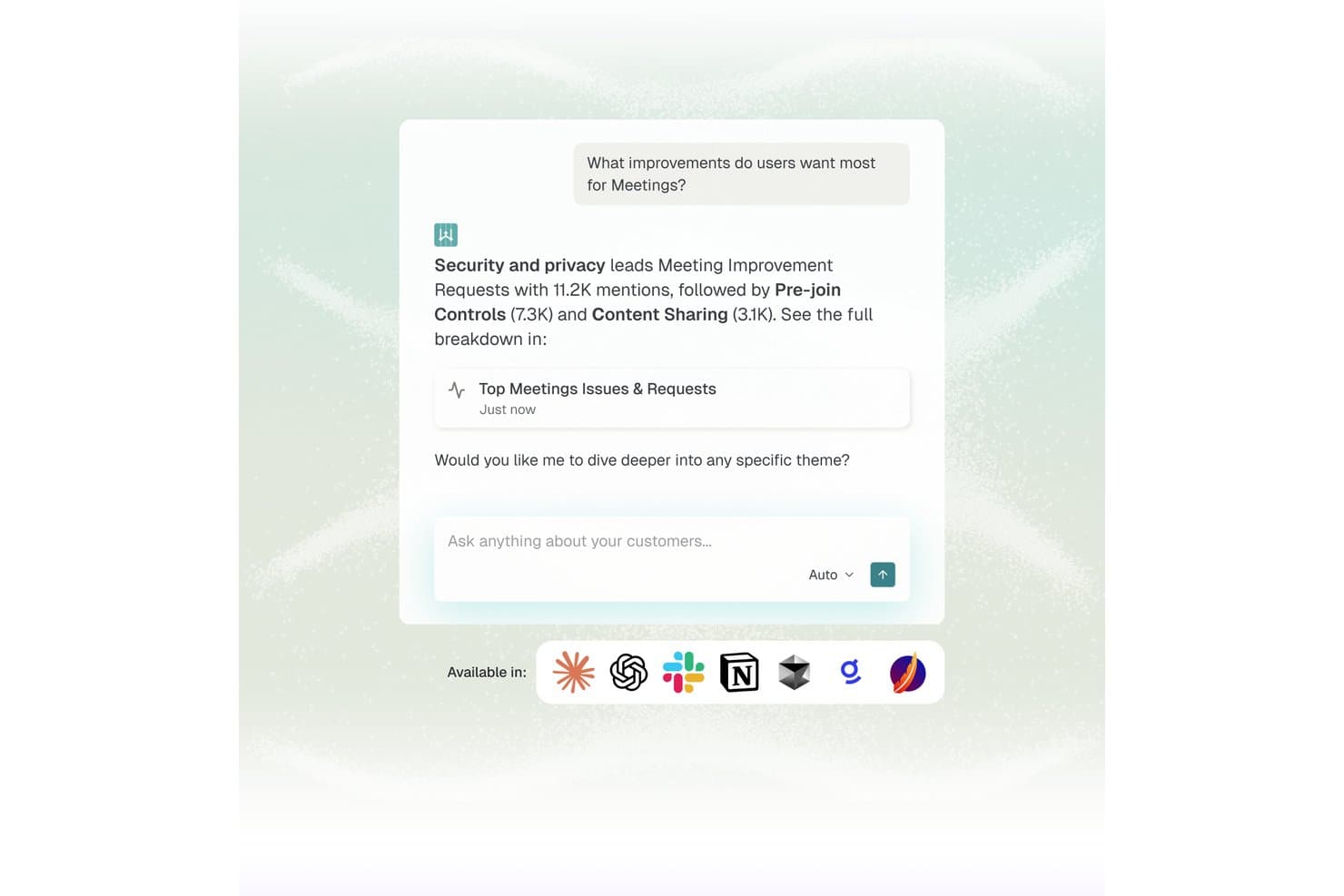
Enterpret offers an AI-powered chat interface that surfaces top user feedback themes, such as security and pre-join controls, from meeting improvement requests. Enterpret is a customer feedback intelligence platform that aggregates signals from 50+ sources and uses an adaptive AI taxonomy to automatically classify feedback, surface recurring themes, and make insights queryable in natural language.
Who Is Enterpret Best For?
Enterpret is a strong fit for mid-market and enterprise product teams managing high volumes of customer feedback across multiple channels every month.
Why I Picked Enterpret
Enterpret earns its spot on my shortlist because its adaptive taxonomy is genuinely unlike anything else I've tested. As products evolve, feedback categories shift, but Enterpret's AI automatically restructures its 5-level taxonomy to reflect new themes without manual re-tagging. I also like that Wisdom AI lets my team query the full feedback corpus in natural language and get cited, source-linked evidence back instantly.
Enterpret Key Features
- Wisdom AI natural language querying: Lets users search unified feedback data in plain language to get instant, evidence-linked insights.
- Customer context graph: Maps every piece of feedback to customer attributes, segment, and usage for deep filtering and segmentation.
- Real-time feedback ingestion: Aggregates product feedback from over 50 sources like Zendesk, Intercom, G2, Slack, and app store reviews.
- Workflow automation integrations: Triggers actions and pushes insights directly into Jira, Linear, and Slack to connect findings with product delivery.
Enterpret Integrations
Enterpret offers native integrations with Zendesk, Intercom, Salesforce, Gong, Slack, Qualtrics, Linear, Jira, Google Play Store, and the Apple App Store. An API is available for custom integrations.
Pros and Cons
Pros:
- Aggregates signals from 50+ feedback sources
- Natural language querying surfaces cited feedback evidence
- Adaptive taxonomy auto-updates as products evolve
Cons:
- Setup and taxonomy configuration takes significant time
- Primarily focused on feedback, not interview research
Learn more about Enterpret: Best for AI-driven survey response analysis
- 7-day free trial + free demo available
- From $79/month

Articos lets you test persona reactions to different types of brand copy. Articos is an AI user research platform that simulates participant interviews, generates synthetic personas, and analyzes responses to produce structured research reports with confidence scores and evidence chains.
Who Is Articos Best For?
Articos works well for UX researchers, product managers, and market research consultants who need to run studies without the time or budget for traditional participant recruitment.
Why I Picked Articos
Articos is one of my top picks because I love how it handles survey response analysis without the noise you get from raw AI output. Each study produces 17 focused themes (compared to 142 from a language model with a 22:1 noise ratio), backed by confidence scores and evidence chains. The hypothesis-blind architecture means personas can't detect what outcome I'm hoping for, so the findings hold up under scrutiny. That's a meaningful difference when I'm presenting results to a client.
Articos Key Features
- Synthetic persona generation: Build AI personas calibrated with Big Five personality science and enforced stance diversity across five archetypes (champions, pragmatists, skeptics, blockers, and observers).
- Instant survey feedback: Gather rapid qualitative and quantitative feedback from synthetic users, providing insights in minutes rather than days.
- Web corroboration: Cross-reference study findings with live external sources to validate synthetic insights.
- White-label PDF export: Export study results as branded, client-ready reports directly from the platform.
Articos Integrations
Articos doesn't have any native integrations. The platform runs in the browser, with research outputs available as white-label PDF exports you can share through your existing tools.
Pros and Cons
Pros:
- Built-in skeptic and late-adopter personas
- Reports are ready in under 30 minutes
- Hypothesis-blind architecture reduces confirmation bias
Cons:
- No native integrations with other tools
- Synthetic personas can't replace lived experiences
Learn more about Articos: Best for large-scale participant panels
- Free demo available
- Pricing upon request
Visit WebsiteCustomer Rating:4.5/5
UserTesting workspace dashboard displays tests, sessions, and project overview. UserTesting is an AI-powered user research platform that lets you source participants, launch usability tests, capture video feedback, and analyze user insights at scale.
Who Is UserTesting Best For?
UserTesting is a strong fit for UX researchers and product teams at large enterprises who need access to a broad, diverse participant panel.
Why I Picked UserTesting
I picked UserTesting as one of the best because I can instantly tap into a massive, global participant panel and launch studies with highly specific demographic filters. I like that I can run moderated and unmoderated tests, then use AI-powered video analysis to surface key insights. My team uses UserTesting to quickly validate prototypes and concepts with real users at scale.
UserTesting Key Features
- Task builder: Create custom tasks and scenarios for participants to complete during studies.
- Highlight reels: Compile and share key video moments from user sessions.
- Sentiment analysis: Automatically detect and tag positive or negative feedback in responses.
- Mobile app testing: Run usability tests on iOS and Android devices with real users.
UserTesting Integrations
Integrations include with Slack, Teams, Jira, Figma, FigJam, and Miro.
Pros and Cons
Pros:
- Advanced demographic and behavioral targeting
- Supports both moderated and unmoderated studies
- Access to a large, global participant pool
Cons:
- Occasional variability in participant quality
- Limited native integrations with other platforms
Learn more about UserTesting: Best with AI-powered qualitative data analysis
- Free plan + free demo available
- Pricing upon request

Dovetail projects dashboard with pinned studies and folders view. Dovetail is an AI user research platform that lets teams centralize research data, transcribe interviews, analyze qualitative feedback, and organize insights from multiple sources in one workspace.
Who Is Dovetail Best For?
Dovetail is a strong fit for UX researchers and product teams at mid-sized to large organizations who need to analyze and organize qualitative research data.
Why I Picked Dovetail
I picked Dovetail as one of the best because I can use its AI-powered analysis to quickly surface patterns in interview transcripts and open-ended feedback. I like that I can auto-tag qualitative data and generate instant summaries for large research projects. My team uses Dovetail to centralize notes, highlight key moments, and organize findings for easy sharing.
Dovetail Key Features
- Video and audio file support: Upload and analyze recordings directly within the platform.
- Collaborative workspace: Multiple users can work together on research projects in real time.
- Custom fields and tags: Create and manage your own metadata for organizing research data.
- Data import from external sources: Bring in research data from tools like Google Drive and Zoom.
Dovetail Integrations
Dovetail offers native integrations with Zoom, Google Drive, Slack, and Figma, and provides an API for custom integrations.
Pros and Cons
Pros:
- Enables real-time collaboration
- Supports video and audio file uploads
- AI auto-tags and summarizes qualitative data
Cons:
- Pricing is not transparently listed online
- No built-in participant recruitment tools
Learn more about Dovetail: Best with collaborative research repositories
- 15-day free trial
- From $15/user/month (billed annually)
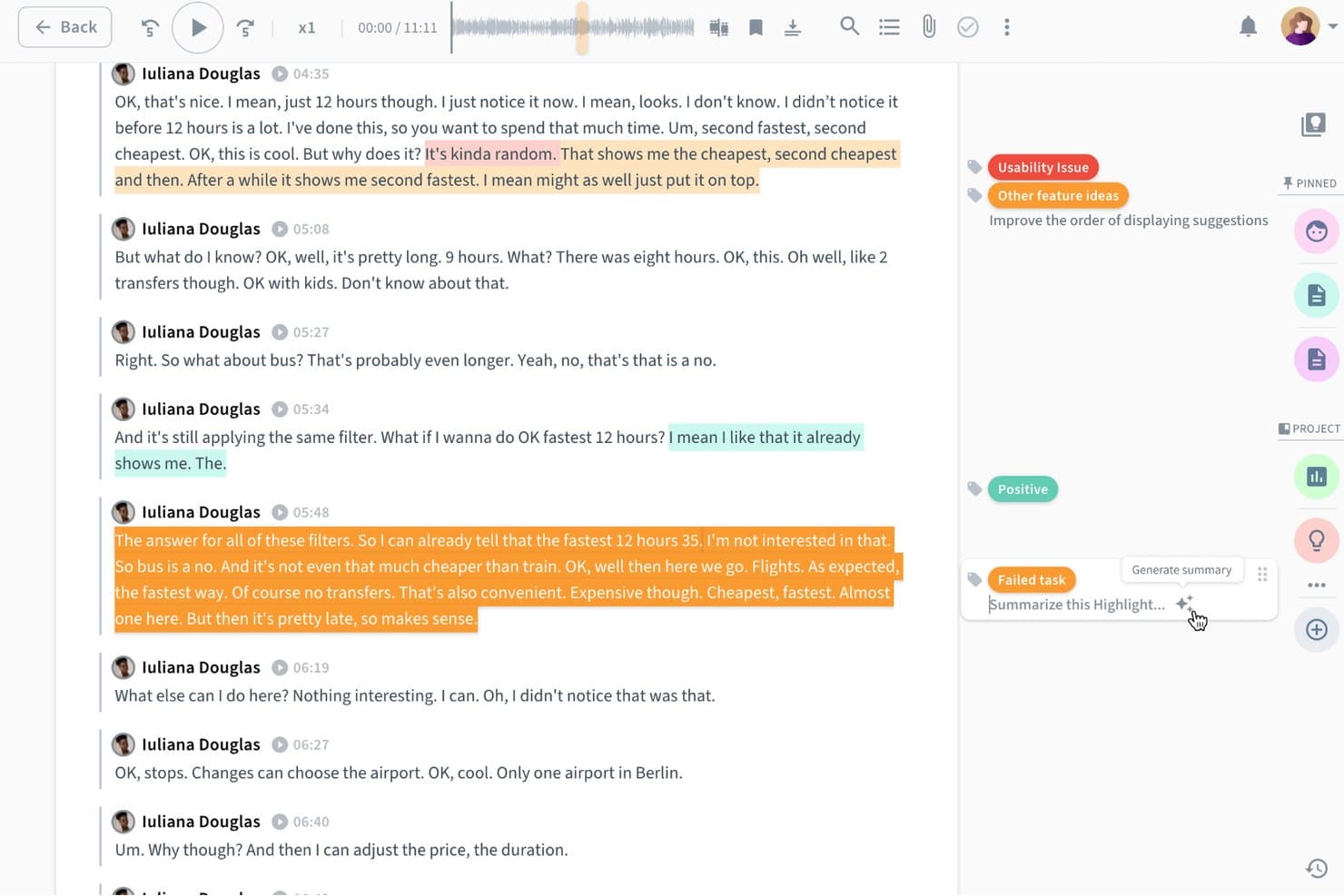
Condens lets users auto-summarize AI-tagged research highlights instantly. Condens is a user research repository platform that centralizes research data, supports tagging and analysis of qualitative findings, and lets teams collaborate on insights across studies.
Who Is Condens Best For?
Condens is a great fit for UX research teams that need a shared space to store, tag, and revisit findings across multiple studies.
Why I Picked Condens
Condens earns its spot on my shortlist because of how well it handles collaborative research repositories across a product team. I particularly like the tagging and synthesis layer, where you can link raw session data to structured insights and surface patterns across multiple studies without starting from scratch each time. The shared repository means researchers, product managers, and designers are all working from the same pool of evidence, which cuts down on duplicated research and keeps decisions grounded in real findings.
Condens Key Features
- AI-powered highlight reel creation: Condens automatically extracts and surfaces key moments from session recordings to help you build highlight clips without manual scrubbing.
- Evidence-linked insight cards: You can attach raw data clips, quotes, and notes directly to insight cards, keeping the evidence trail intact for every finding.
- Cross-study search: A global search lets you query findings, tags, and quotes across all past studies in your repository at once.
- Customizable tagging taxonomy: Teams can build and manage a shared tag structure to categorize data consistently across projects and researchers.
Condens Integrations
Native integrations are not clearly documented for Condens.
Pros and Cons
Pros:
- Searches findings across past studies
- Links evidence directly to insights
- AI surfaces highlights from recordings
Cons:
- Less suited to quantitative research analysis
- AI capabilities center on highlight extraction
Learn more about Condens: Best for integrated recruitment and research
- Free trial + free demo available
- From $129/seat/month

Great Question dashboard shows studies, interviews, and participant metrics. Great Question is an AI-powered user research platform that combines participant recruitment, scheduling, survey creation, interview management, and research repository features in one system.
Who Is Great Question Best For?
Great Question is a strong fit for UX researchers and product teams at SaaS companies who need integrated participant recruitment and research management.
Why I Picked Great Question
I picked Great Question as one of the best because I can manage participant recruitment, screeners, and scheduling all in one place. My team uses its built-in research CRM to track participant engagement and automate outreach. I like that I can launch interviews, surveys, and diary studies without switching tools.
Great Question Key Features
- Research repository: Store, organize, and search all research data in one place.
- Automated transcription: Convert interview recordings into searchable transcripts automatically.
- Survey builder: Create and distribute custom surveys to participants.
- Panel management: Maintain and segment participant panels for future studies.
Great Question Integrations
Great Question offers native integrations with Slack, HubSpot, Salesforce, Segment, and Zapier. An API is available for custom integrations.
Pros and Cons
Pros:
- Research repository with tagging and search
- Automated scheduling and calendar sync
- Built-in participant recruitment
Cons:
- No advanced AI analysis features
- Limited analytics and reporting options
Learn more about Great Question: Best for end-to-end cited AI research synthesis
- Free plan available
- From $49/month
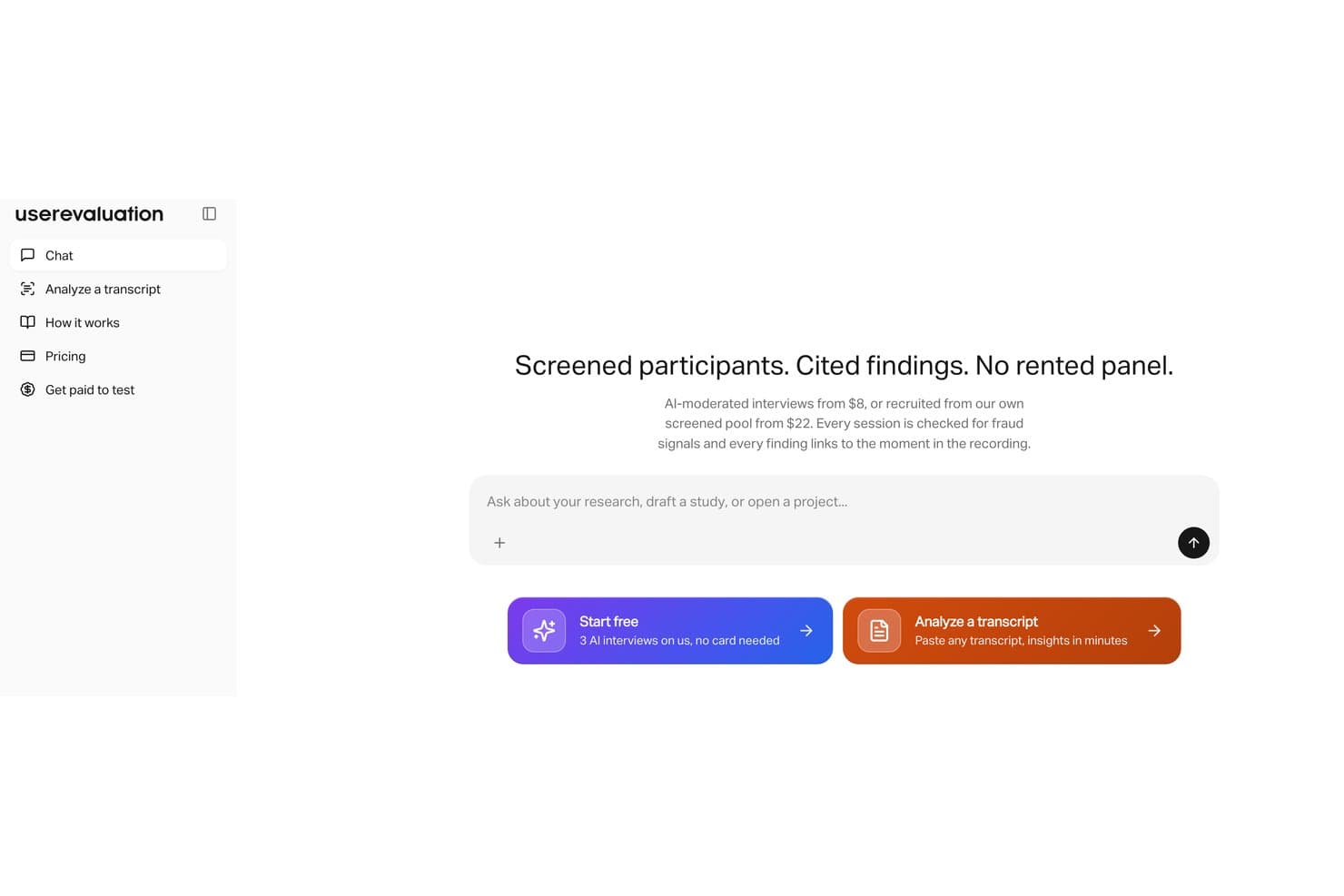
User Evaluation runs AI-moderated interviews with screened participants. User Evaluation is an AI-powered user research platform that lets you upload interviews, calls, and surveys to automatically generate transcripts, thematic analysis, insight reports, and citations from your qualitative data.
Who Is User Evaluation Best For?
User Evaluation is a strong fit for UX researchers and product teams who need to turn large volumes of qualitative data into cited, audit-ready insights without manual synthesis.
Why I Picked User Evaluation
I picked User Evaluation as one of the best because it handles the entire research synthesis pipeline in one place, from transcript generation to themed insight reports with cited sources. What I find genuinely useful is the automatic citation linking, which traces every AI-generated insight back to a specific moment in your interview or call recording. That means when a stakeholder questions a finding, you can point to the exact evidence without digging through hours of raw footage.
User Evaluation Key Features
- Multi-format data upload: Import video, audio, and text files from interviews, calls, and surveys directly into the platform for analysis.
- AI chat interface: Query your research data conversationally to surface specific answers or patterns across multiple sessions.
- Sentiment analysis: Automatically detects emotional tone across participant responses to highlight areas of friction or delight.
- Collaborative tagging: Tag and annotate transcript segments with teammates to organize findings before generating reports.
User Evaluation Integrations
Native integrations are not clearly documented.
Pros and Cons
Pros:
- Conversational queries surface cross-session patterns
- Analyzes interviews, calls, and surveys together
- Cited insights trace back to source moments
Cons:
- Sentiment results need qualitative validation
- Native integrations remain poorly documented
Learn more about User Evaluation:

Outset interview dashboard shows video, transcript, and AI insights. Outset is an AI user research platform that automates participant recruitment, interview scheduling, and session management for teams running qualitative research studies.
Who Is Outset Best For?
Outset is a strong fit for UX researchers and product teams at startups and mid-sized companies who need to automate qualitative interview logistics.
Why I Picked Outset
I picked Outset as one of the best because I can automate the entire interview scheduling process, from sending invites to managing reschedules, without manual back-and-forth. My team uses its AI-driven participant matching to quickly fill research sessions with qualified users. I also like that Outset handles reminders and calendar sync, so I can focus on running the interviews instead of logistics.
Outset Key Features
- Automated transcription: Generates transcripts of research interviews in real time.
- AI-powered interview summaries: Produces concise summaries of key findings after each session.
- Participant consent management: Tracks and stores participant consent forms securely.
- Custom screener surveys: Lets you build and distribute screeners to qualify research participants.
Outset Integrations
Native integrations are not publicly listed.
Pros and Cons
Pros:
- Built-in consent and screener management
- AI matches participants to research criteria
- Automates participant scheduling and reminders
Cons:
- Lacks advanced branching in screeners
- No native integrations with research platforms
Learn more about Outset:

Listen Research Agent chat has an interface with prompts and research suggestions. Listen is an AI-powered user research platform that automates voice-based interviews, transcribes conversations, and analyzes qualitative data for teams conducting user research at scale.
Who Is Listen Best For?
Listen is a strong fit for UX researchers and product teams at mid-sized to large organizations who need to automate and analyze voice-based user interviews.
Why I Picked Listen
I picked Listen as one of the best because I can automate voice-based user interviews and get instant transcriptions and AI-driven analysis. My team uses its research agent to schedule, conduct, and analyze interviews without manual effort. I like that Listen handles everything from recording to summarizing insights, so we can focus on interpreting results.
Listen Key Features
- Automated voice transcription: Converts recorded interviews into searchable text automatically.
- AI-powered sentiment analysis: Detects and tags emotional tone in user responses.
- Customizable interview templates: Lets you design and reuse structured interview formats.
- Insight tagging and organization: Allows you to categorize and organize findings for later review.
Listen Integrations
Native integrations are not publicly listed.
Pros and Cons
Pros:
- Multilingual support for diverse participant pools
- AI agent adapts questions in real time
- Fully automates voice interviews
Cons:
- Lacks in-depth analytics or visualization tools
- No support for video or screen sharing
Learn more about Listen: Best for cross-study emotion and theme synthesis
- Free demo available
- Pricing upon request
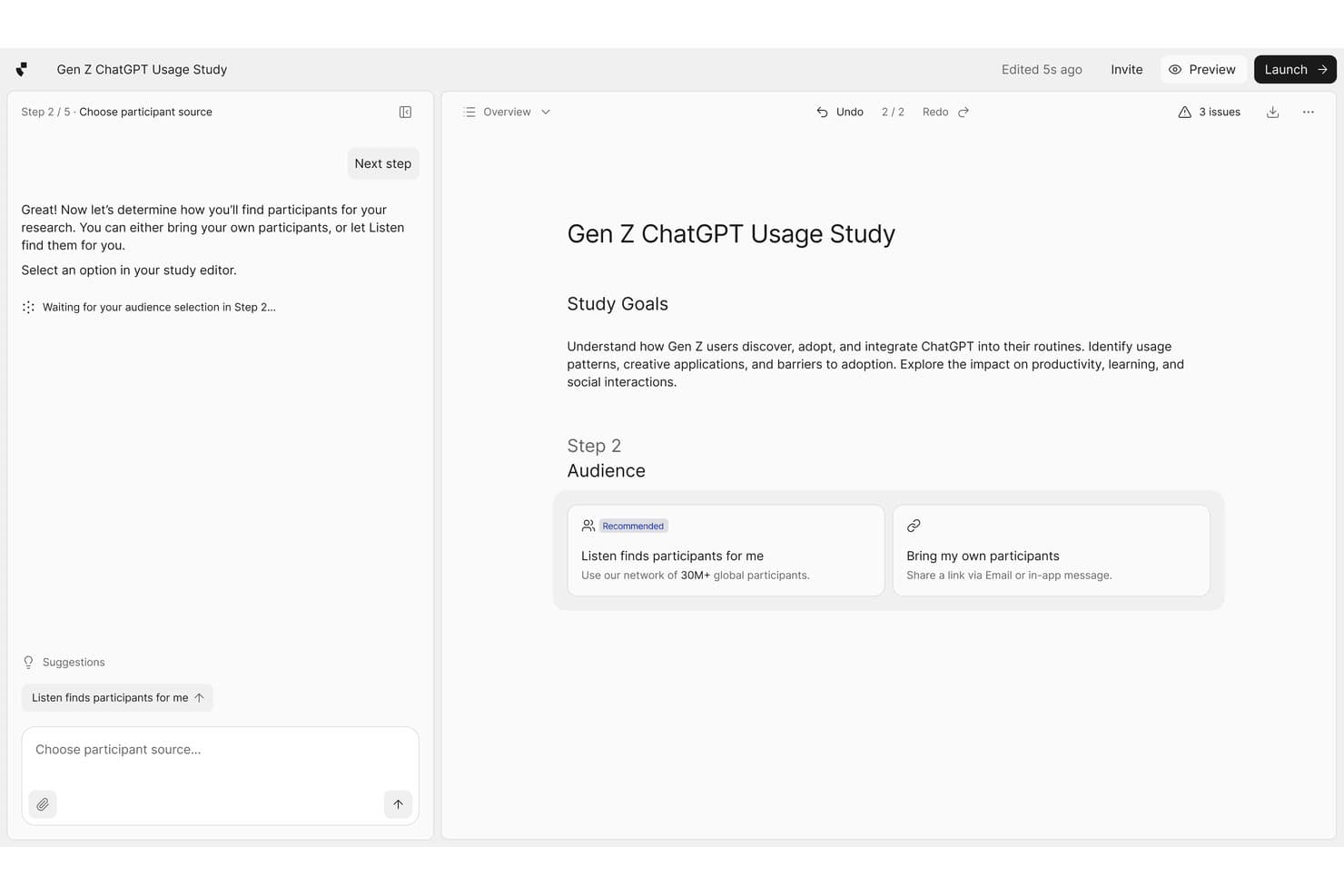
Listen Labs guides users through recruiting participants for research studies. Listen Labs is an AI user research platform that aggregates interview data across multiple studies, tagging emotional signals and surfacing recurring themes through automated analysis.
Who Is Listen Labs Best For?
Listen Labs is a strong fit for UX researchers and product teams running multiple rounds of qualitative research who need to connect emotional patterns across studies over time.
Why I Picked Listen Labs
Cross-study synthesis is where Listen Labs earns its spot on my shortlist. I love how it automatically tags emotional signals within interview responses and then surfaces recurring themes not just within a single study, but across multiple rounds of research over time. That means if anxiety around a specific onboarding step keeps surfacing across three separate studies, Listen Labs connects those dots for you. I've found that capability alone saves hours of manual tagging and cross-referencing.
Listen Labs Key Features
- Automated interview transcription: Listen Labs transcribes recorded user interviews and converts spoken responses into searchable, structured text.
- AI-generated highlight reels: The platform automatically clips the most relevant moments from interviews and compiles them into shareable video highlights.
- Participant sentiment tagging: Listen Labs labels individual responses with sentiment indicators, letting you filter and sort by emotional tone across your data.
- Research repository: All past studies, transcripts, and tags are stored in a central library you can search and reference at any time.
Listen Labs Integrations
Listen Labs offers documented integrations with Qualtrics, Rally, and Decipher (Forsta), plus an API for custom integrations and programmatic study creation.
Pros and Cons
Pros:
- Creates shareable AI-generated interview highlight reels
- Tags emotional signals in interview responses
- Connects themes across multiple research studies
Cons:
- Automated sentiment tags need researcher verification
- Focuses primarily on qualitative interview data
Learn more about Listen Labs:
Diğer Yapay Zekâ Kullanıcı Araştırması Araçları
İşte kısa listeme girmeyen ancak yine de incelemeye değer bazı ek yapay zekâ kullanıcı araştırması aracı seçenekleri:
- 11CoLoopBest for multilingual qualitative research synthesis
- 12GetWhyBest for enterprise consumer-insights research
- 13UserlyticsBest for multi-device remote usability testing
- 14MazeBest for rapid prototype feedback collection
- 15LyssnaBest with unmoderated task testing
- 16LooppanelBest for video call usability insights
- 17DscoutBest for longitudinal user studies
- 18MarvinBest with AI-driven research tagging
- 19HubbleBest for in-product user feedback collection
- 20UserologyBest for voice AI moderation with screen awareness
How I Evaluate AI User Research Tools
To make this list, a tool’s AI needs to handle user research, like transcribing interviews and finding themes. From there, I evaluate three things. Core functionality carries the most weight, like managing participants and organizing research. Then I look at standout features, like adaptive AI moderation, and factors beyond features, like whether findings include traceable evidence.
Core Functionality (Table Stakes For This List)
When I'm selecting tools for my list, I score each one on a scale from 0 (does not offer the functionality) to 5 (excels in this area) for each core functionality listed below. I then convert the total into a percentage to help assess each tool's overall fit, with extra weight on any functionalities I’ve deemed essential.
- Insight Synthesis (Essential): I look for AI that surfaces themes and sentiment across interviews or studies, while keeping findings tied to supporting responses.
- Transcription & Capture (Essential): I assess how well the tool captures and transcribes interviews or usability sessions, including speaker labels and searchable transcripts.
- Research Repository: I consider how the tool organizes notes, clips, transcripts, and tags, and whether teams can find evidence across past studies.
- AI-Assisted Reporting: I look for useful summaries or highlight reels that connect findings to source quotes for sharing with stakeholders.
- Participant Management: I assess whether teams can recruit, screen, schedule, and track participants as they plan interviews or usability studies.
- Natural Language Queries: I check whether a team member can ask a question in plain language and get a relevant answer with supporting research evidence.
Once I have a list of tools that meet the criteria, I consider what sets each platform apart.
Differentiating Factors (What Sets Vendors Apart)
Here's how I compare and contrast different vendors:
Standout Features
I look for adaptive AI moderation that adjusts follow-up questions based on what a participant actually says. A generic script misses the "why" behind answers, so tools like Outset AI that probe dynamically tend to surface richer insights. I also evaluate whether AI-generated summaries cite source quotes, because a theme without traceable evidence isn't useful in a roadmap debate. Cross-study pattern detection matters too. When I can spot a recurring pain point across three separate studies, that's a stronger signal than any single session provides.
Beyond Features
I evaluate whether AI-generated themes cite source quotes, because a finding you can't trace back to a real participant response won't survive a roadmap debate. Data privacy matters just as much—tools handling recorded interviews need strong encryption and clear consent workflows, especially when AI moderates live sessions. I also check how easily insights connect to tools like Jira or Slack, since research that stays locked in a separate platform rarely shapes actual product decisions.
Yapay Zekâ Kullanıcı Araştırması Araçları Nasıl Seçilir?
Uzun özellik listeleri ve karmaşık fiyatlandırma yapılarına takılıp kalmak kolaydır. Kendinize özgü yazılım seçim sürecinizde ilerlerken odağınızı korumanıza yardımcı olmak için göz önünde bulundurmanız gereken faktörleri aşağıda bir kontrol listesi olarak bulabilirsiniz:
| Faktör | Nelere Dikkat Edilmeli? |
|---|---|
| FaktörÖlçeklenebilirlik | Nelere Dikkat Edilmeli?Araç, mevcut ve gelecekteki araştırma hacminizi karşılayabilecek mi? Kullanıcı sınırlarını, depolama alanını ve proje kısıtlamalarını göz önünde bulundurun. |
| FaktörEntegrasyonlar | Nelere Dikkat Edilmeli?Temel araçlarınıza (ör. Slack, Jira, Google Workspace) yerel olarak bağlanabiliyor mu? Gerekirse API veya Zapier desteği olup olmadığını kontrol edin. |
| FaktörÖzelleştirilebilirlik | Nelere Dikkat Edilmeli?İş akışlarını, etiketleri ve şablonları araştırma sürecinize göre uyarlayabiliyor musunuz? Ekibinizi yavaşlatan katı sistemlerden kaçının. |
| FaktörKullanım kolaylığı | Nelere Dikkat Edilmeli?Yeni ekip üyeleri aracı ne kadar hızlı öğrenebilir? Açık bir gezinme yapısı, minimum eğitim gereksinimi ve sezgisel iş akışları arayın. |
| FaktörUygulama ve başlangıç süreci | Nelere Dikkat Edilmeli?Başlamak için hangi kaynaklar gerekiyor? Başlangıç desteğinin, veri aktarımı yardımının ve eğitim materyallerinin mevcut olup olmadığını değerlendirin. |
| FaktörMaliyet | Nelere Dikkat Edilmeli?Fiyatlandırma bütçenize ve kullanım şekillerinize uyuyor mu? Gizli ücretlere, kullanıcı başına ücretlere veya zorunlu eklentilere dikkat edin. |
| FaktörGüvenlik önlemleri | Nelere Dikkat Edilmeli?Araç, veri gizliliği ve güvenlik standartlarınızı karşılıyor mu? Şifrelemeyi, erişim denetimlerini ve uyumluluk sertifikalarını doğrulayın. |
| FaktörDestek erişilebilirliği | Nelere Dikkat Edilmeli?İhtiyaç duyduğunuzda hızlı destek alabiliyor musunuz? Canlı sohbet, e-posta veya telefon desteği olup olmadığını kontrol edin ve tipik yanıt sürelerini inceleyin. |
Yapay Zekâ Kullanıcı Araştırması Araçları Nedir?
Yapay zekâ kullanıcı araştırması araçları, kullanıcı araştırması verilerini toplama, analiz etme ve düzenleme sürecini otomatikleştirmek ve geliştirmek için yapay zekâ kullanan yazılım platformlarıdır. Bu araçlar, ekiplerin görüşme notlarını kaydetmesine, oturumları yazıya dökmesine, örüntüleri belirlemesine ve içgörüleri manuel yöntemlere kıyasla daha hızlı oluşturmasına yardımcı olur. Ürün yöneticileri, UX araştırmacıları ve büyük miktarlarda nitel geri bildirimi verimli bir şekilde yönetmesi ve sentezlemesi gereken ekipler için tasarlanmıştır.
Yapay Zekâ Kullanıcı Araştırması Araçlarının Özellikleri
Yapay zekâ kullanıcı araştırması araçlarını seçerken aşağıdaki temel özelliklere dikkat edin:
- Otomatik transkripsiyon: Sesli veya görüntülü görüşmeleri aranabilir metne dönüştürerek zamandan tasarruf sağlar ve manuel iş yükünü azaltır.
- Yapay zekâ destekli not alma: Canlı veya kaydedilmiş oturumlar sırasında önemli noktaları ve yapılacakları kaydederek ekiplerin görüşmeye odaklanmasına yardımcı olur.
- Duygu analizi: Geri bildirimlerdeki kullanıcı duygularını veya tutumlarını tespit edip kategorilere ayırmak için yapay zekâ kullanır ve eğilimleri ve sorunlu noktaları öne çıkarır.
- Etiketleme ve kategorilendirme: Daha kolay analiz ve raporlama için kullanıcıların içgörüleri temalara, konulara veya özel etiketlere göre düzenlemesine olanak tanır.
- Aranabilir depolar: Tüm araştırma verilerini merkezi ve aranabilir bir konumda saklayarak geçmiş bulgulara kolayca erişilmesini sağlar.
- İş birliği araçları: Birden fazla ekip üyesinin araştırma bulgularını gerçek zamanlı olarak incelemesini, açıklama eklemesini ve tartışmasını sağlar.
- Öne çıkan an derleme oluşturma: Hızlı paylaşım için görüşmelerdeki önemli anların kliplerini veya özetlerini otomatik olarak oluşturur.
- Dışa aktarma seçenekleri: Kullanıcıların transkriptleri, notları veya raporları daha ayrıntılı analiz ya da sunum için çeşitli biçimlerde indirmesine olanak tanır.
- Entegrasyon olanakları: Süreçleri kolaylaştırmak için proje yönetimi veya analiz platformları gibi iş akışınızdaki diğer araçlara bağlanır.
- Özelleştirilebilir şablonlar: Araştırma uygulamalarını standartlaştırmak amacıyla görüşme kılavuzları, not alma ve raporlama için hazır veya düzenlenebilir şablonlar sunar.
Yapay Zekâ Kullanıcı Araştırması Araçlarının Faydaları
Yapay zekâ kullanıcı araştırması araçlarını uygulamak ekibiniz ve işletmeniz için çeşitli faydalar sağlar. Yararlanabileceğiniz faydalardan bazıları şunlardır:
- Daha hızlı veri analizi: Yapay zekâ destekli transkripsiyon ve etiketleme, ham görüşmeleri uygulanabilir içgörülere dönüştürme sürecini hızlandırır.
- Geliştirilmiş doğruluk: Otomatik not alma ve duygu analizi, insan hatası ve ayrıntıların gözden kaçırılması riskini azaltır.
- Merkezi bilgi: Aranabilir depolar ve iş birliği araçları, tüm araştırma verilerini ekibiniz için düzenli ve erişilebilir tutar.
- Tutarlı araştırma uygulamaları: Özelleştirilebilir şablonlar ve standartlaştırılmış iş akışları, araştırmanın aynı yöntemle yürütülmesini ve belgelenmesini sağlamaya yardımcı olur.
- Geliştirilmiş ekip iş birliği: Gerçek zamanlı açıklama ekleme ve paylaşma özellikleri, ekiplerin araştırma projelerinde birlikte çalışmasını kolaylaştırır.
- Ölçeklenebilir araştırma operasyonları: Otomasyon, manuel iş yükünü artırmadan daha fazla sayıda görüşme ve geri bildirimle ilgilenmenizi sağlar.
- Daha iyi karar alma: Sentezlenmiş içgörülere hızlı erişim, daha bilinçli ürün ve tasarım seçimlerini destekler.
Yapay Zekâ Kullanıcı Araştırması Araçlarının Maliyetleri ve Fiyatlandırması
Yapay zekâ kullanıcı araştırması araçlarını seçmek, mevcut çeşitli fiyatlandırma modellerinin ve planların anlaşılmasını gerektirir. Maliyetler özelliklere, ekip büyüklüğüne, eklentilere ve diğer unsurlara göre değişir. Aşağıdaki tabloda yaygın planlar, ortalama fiyatları ve yapay zekâ kullanıcı araştırması aracı çözümlerinde genellikle bulunan özellikler özetlenmektedir:
Yapay Zekâ Kullanıcı Araştırması Araçları İçin Plan Karşılaştırma Tablosu
| Plan Türü | Ortalama Fiyat | Yaygın Özellikler |
|---|---|---|
| Plan TürüÜcretsiz Plan | Ortalama Fiyat$0 | Yaygın ÖzelliklerSınırlı transkripsiyon dakikası, temel not alma, kısıtlı depolama ve tek kullanıcı erişimi. |
| Plan TürüKişisel Plan | Ortalama Fiyat$10-$30/kullanıcı/ay | Yaygın ÖzelliklerSınırsız görüşme, aranabilir transkriptler, temel duygu analizi ve e-posta desteği. |
| Plan Türüİşletme Planı | Ortalama Fiyat$30-$80/kullanıcı/ay | Yaygın ÖzelliklerEkip iş birliği, gelişmiş etiketleme, entegrasyonlar, dışa aktarma seçenekleri ve öncelikli destek. |
| Plan TürüKurumsal Plan | Ortalama Fiyat$80-$150/kullanıcı/ay | Yaygın ÖzelliklerÖzel başlangıç süreci, gelişmiş güvenlik, özel hesap yöneticisi, API erişimi ve uyumluluk araçları. |
Yapay Zekâ Kullanıcı Araştırması Araçları SSS
Yapay zekâ kullanıcı araştırması araçları hakkında sık sorulan soruların bazı yanıtları:
Yapay zekâ kullanıcı araştırması araçları araştırma sürecini nasıl geliştirir?
Kullanıcı araştırması için yapay zekâ destekli araçlar; yazıya dökme, not alma ve etiketleme gibi tekrarlayan görevleri otomatikleştirerek analiz sürecini hızlandırır ve manuel çalışmayı azaltır. Yorulmayan bir araştırma asistanı gibi çalışan bu platformlar, zaman alan işleri üstlenerek UX ekiplerinin idari işlere daha az, içgörüleri yorumlamaya ise daha fazla odaklanmasını sağlar. Bu aşamada üretken yapay zekâ kullanmak, fikir oluşturma aşamasından nihai çıktıların hazırlanmasına geçişi optimize etmeye yardımcı olur.
Yapay zekâ kullanıcı araştırması araçları hem nitel hem de nicel verileri işleyebilir mi?
Evet, UX araştırması için en iyi yapay zekâ araçları; görüşmeler ve açık uçlu anket yanıtları gibi nitel veri kümelerini yönetmek üzere tasarlanmıştır, ancak bazıları nicel analizi de destekler. Bu yapay zekâ destekli platformlar, yüzlerce çıktı arasındaki temel temaları hızlı bir şekilde belirleyebilir. Ayrıca yapay zekâ tarafından yönetilen oturumlar, katılımcıların yanıtlarına göre ilgili takip sorularını otomatik olarak oluşturarak veri toplama sürecini geliştirebilir ve daha doğru bir kullanıcı yolculuğunun haritalandırılmasını sağlayabilir.
Yapay zekâ kullanıcı araştırması araçları hassas veriler için güvenli midir?
Evet, saygın yapay zekâ UX araştırması araçları hassas bilgileri korumak için şifreleme, erişim kontrolleri ve uyumluluk sertifikaları kullanır. Geri bildirimleri işlemek için bir LLM veya ChatGPT gibi belirli bir araç kullanırken paydaşların gizliliğinin korunduğundan emin olmak önemlidir. Güvenli bir kullanıcı deneyiminin sürdürülmesine ilişkin kuruluşunuzun standartlarını karşıladıklarından emin olmak için bu yapay zekâ özelliklerinin verileri nasıl işlediğini her zaman inceleyin.
Yapay zekâ kullanıcı araştırması araçlarında hangi entegrasyonları aramalıyım?
Mevcut araştırma yöntemlerinizle ve ekibinizin hâlihazırda kullandığı platformlarla (proje yönetimi platformları, bulut depolama ve iletişim araçları dâhil) entegrasyonlar arayın. Bu entegrasyonlar, içgörüleri tel kafeslere dönüştürebilen veya bir beyin fırtınası oturumundaki dijital yapışkan notları senkronize edebilen araçları içerebilir. Bu, iş akışlarını basitleştirmeye yardımcı olur ve araştırma bulgularının kuruluşunuz genelinde kolayca paylaşılmasını sağlar.
Bir yapay zekâ kullanıcı araştırması aracını uygulamaya geçirmek ne kadar sürer?
Uygulama süresi değişiklik gösterir, ancak bulut tabanlı araçların çoğu birkaç saat ile birkaç gün içinde kurulabilir. Daha modern, otomatik iş akışlarına geçiş yaparken veri geçişi, ekip eğitimi ve entegrasyon kurulumu gibi etkenler zaman çizelgesini etkileyebilir.