Bu kadar çok farklı kullanıcı geri bildirimi çözümü mevcutken, hangisinin sizin için doğru olduğunu belirlemek zordur. Bilinçli kararlar alarak ürününüzü geliştirmek ve iyileştirmek için kullanıcı deneyimleri, tercihleri ve sorunlu noktalar hakkında içgörüler toplamak istediğinizi biliyorsunuz; ancak hangi aracın en iyi olduğunu belirlemeniz gerekiyor. Yardımcı olabilirim! Bu yazıda, büyük ekiplerle ve çeşitli ürünlerle düzinelerce farklı araç kullanma konusundaki kişisel deneyimlerimden yararlanarak en iyi kullanıcı geri bildirimi yazılımlarına ilişkin seçimlerimi paylaşacak ve seçiminizi kolaylaştıracağım.
Why Trust Our Software Recommendations
6,700+
Reviews
20
Industry experts
16+
Evaluation factors
14
Years
Our team has been testing and reviewing software since 2012. As product managers ourselves, we know how difficult—and important—it is to choose the right software.
For this guide, we evaluated tools using hands-on testing and independent research, scoring tools using our selection criteria.
Our reviews reflect our human editorial judgment, not a sales pitch.
Expert reviewers:
- Andrew LumbySenior TPM
- Cristiano ValimSenior UI/UX Lead


Kullanıcı Geri Bildirimi Yazılımı Karşılaştırma Tablosu
En iyi kullanıcı geri bildirimi yazılımı seçimlerimin fiyatlandırma ayrıntıları bu karşılaştırma tablosunda özetlenmiştir:
Score legend (out of 5)
- Excellent4.5–5
- Good4–4.4
- Average3–3.9
- Below average2–2.9
- Poor1–1.9
Sorted by: Default
| Tool | Starting Price | Website | |||||||
|---|---|---|---|---|---|---|---|---|---|
Best for AI-powered contextual insights | 3.3 out of 5 | 1 | 5 | 2 | 5 | 5 | 2 | Pricing upon request Free demo available | Website |
Best for automated feedback tagging | Not rated | Not rated | 5 | Not rated | 5 | 5 | 1 | Pricing upon request Free demo available | Website |
Best for advanced omnichannel survey creation and distribution | 2.8 out of 5 | 4 | 4 | 3 | 3 | 2 | 1 | Pricing upon request Free demo available | Website |
Best for real-time multi-location feedback | 3.7 out of 5 | 5 | 5 | 3 | 4 | 4 | 1 | Pricing upon request 14-day free trial available | Website |
Best for actionable feedback | 3.7 out of 5 | 4 | 4 | 3 | 4 | 4 | 3 | $9/user/month Free plan available | Website |
Best for enterprise-wide voice-of-customer programs | 4.2 out of 5 | 5 | 5 | 4 | 4 | 5 | 2 | Pricing upon request Free demo available | Website |
Best for linking feedback to revenue impact | 4.0 out of 5 | 4 | 5 | 3 | 4 | 4 | 4 | Pricing upon request Free plan + 30-day free trial + free demo available | Website |
Best for revenue-weighted feedback prioritization | 4.2 out of 5 | 4 | 4 | 4 | 4 | 4 | 5 | Pricing upon request 30-day free trial + free demo available | Website |
Best for visual and video bug feedback capture | 3.8 out of 5 | 5 | 3 | 4 | 4 | 4 | 3 | $45/month Free 15-day trial | Website |
Best for AI-driven research repository analysis | 3.8 out of 5 | 2 | 5 | 2 | 5 | 5 | 4 | Pricing upon request Free plan + free demo available | Website |


En İyi Kullanıcı Geri Bildirimi Yazılımı İncelemeleri
Kısa listeme giren en iyi kullanıcı geri bildirimi yazılımlarına ilişkin ayrıntılı özetlerimi aşağıda bulabilirsiniz. İncelemelerim, sizin için en iyi olanı bulmanıza yardımcı olmak amacıyla her aracın temel özelliklerine, artılarına & eksilerine, entegrasyonlarına ve ideal kullanım alanlarına ayrıntılı bir bakış sunar.
 Best for AI-powered contextual insights
- Free demo available
- Pricing upon request
Visit WebsiteCustomer Rating:4.8/5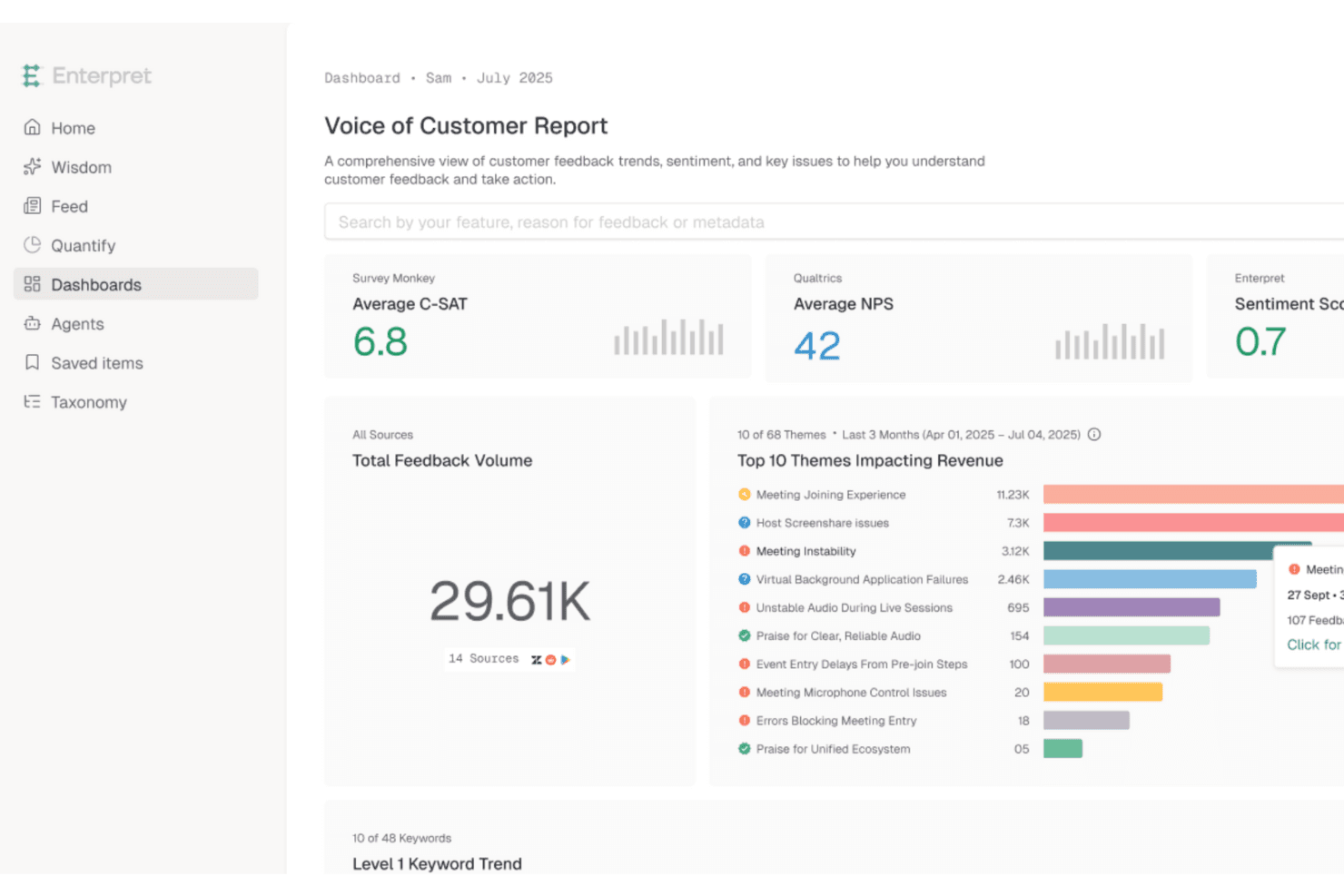
Enterpret unifies customer feedback to surface AI-driven insights fast. Enterpret is a customer intelligence platform that aggregates feedback from support tools, CRMs, sales calls, surveys, and review sites into a unified repository, then uses AI to categorize, analyze, and surface trends across all of it.
Who Is Enterpret Best For?
Enterpret is a strong fit for UX researchers and product teams at mid-market and enterprise companies that already collect feedback across multiple tools and need AI to make sense of it all.
Why I Picked Enterpret
Enterpret earns its spot on my shortlist because its AI doesn't just tag feedback—it builds a living "Customer Context Graph" that links every piece of feedback to specific product areas, customer segments, and business outcomes like churn and revenue. I love how the Adaptive Taxonomy updates itself as customer language evolves, so your categories stay accurate without manual upkeep. When a team like Canva's is processing feedback from 200M+ users, that kind of self-correcting AI analysis is what separates signal from noise.
Enterpret Key Features
- Plain-language search: Query your entire feedback repository using natural language instead of filters or boolean logic.
- Revenue-linked prioritization: Connect Salesforce and HubSpot data to feedback so you can rank issues by churn risk, NPS, and CSAT impact.
- Sales and market intelligence: Surface deal blockers and competitor trends from sales calls and market data alongside customer feedback.
- Close the Loop module: Automatically detects when a reported issue has been resolved and triggers follow-up workflows in tools like Jira, Linear, and Slack.
Enterpret Integrations
Enterpret offers documented integrations with Salesforce, HubSpot, Zendesk, Qualtrics, SurveyMonkey, Typeform, Jira, Linear, Slack, and Zapier. It also supports custom connectivity through APIs, webhooks, CSV uploads, Snowflake, and Segment.
Pros and Cons
Pros:
- Plain-language search supports cross-team analysis
- Adaptive taxonomy reveals evolving customer themes
- Connects feedback to revenue and churn
Cons:
- Users report inaccuracies and filtering issues
- Requires separate tools to collect feedback
Learn more about Enterpret: Best for automated feedback tagging
- Free demo available
- Pricing upon request
Visit WebsiteCustomer Rating:4.4/5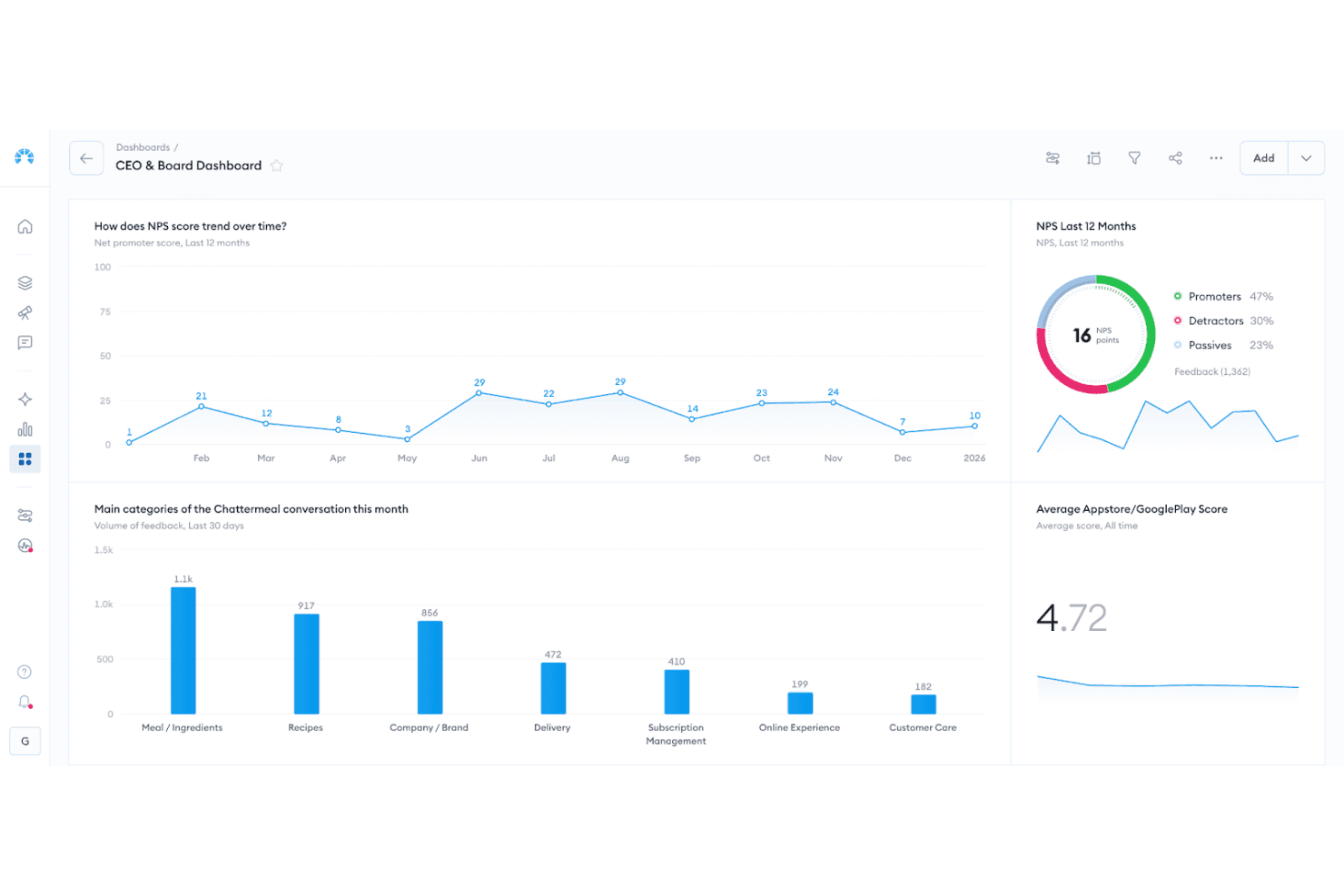
Chattermill dashboard visualizing sentiment themes, feedback volume, and trend changes over time. Chattermill is an AI-native feedback analysis platform that aggregates multichannel customer feedback from 65+ sources into a central repository, then applies automated tagging, sentiment analysis, and theme detection to surface patterns across large volumes of unstructured data.
Who Is Chattermill Best For?
Chattermill is a strong fit for enterprise CX and VoC teams that already collect feedback through other tools and need AI-powered analysis to make sense of it at scale.
Why I Picked Chattermill
I picked Chattermill as one of the best because its AI-driven tagging does something most tools can't: it automatically categorizes unstructured feedback across dozens of channels without manual effort. Precision Insights assigns themes and sentiment to every feedback item at scale, so patterns surface on their own. Lyra Agent takes it further, delivering analyst-level answers backed by verified customer quotes on demand.
Chattermill Key Features
- Anomaly detection: Automatically flags unexpected spikes or drops in feedback themes and sends real-time alerts to Slack, email, or Jira.
- Revenue-linked analysis: Connects feedback themes to CRM and transaction data to show how customer issues tie to churn or revenue impact.
- MCP and skills integrations: Lets you query your feedback data directly from AI tools like Claude, ChatGPT, and Notion AI.
- Contextual enrichment: Attaches metadata—including customer ID, channel, and location—to every feedback item for more precise filtering and reporting.
Chattermill Integrations
Chattermill offers 65+ native integrations, including Zendesk, Intercom, Qualtrics, SurveyMonkey, Trustpilot, Salesforce, Slack, Jira, and Snowflake. It also supports API connections, secure data feeds, and CSV uploads for centralizing feedback.
Pros and Cons
Pros:
- Surfaces anomalies with actionable internal alerts
- Links customer themes to revenue outcomes
- Automates tagging across unstructured feedback
Cons:
- Lacks customer-facing request voting
- Doesn't collect feedback directly
Learn more about Chattermill: Best for advanced omnichannel survey creation and distribution
- Free demo available
- Pricing upon request
Visit WebsiteCustomer Rating:4.5/5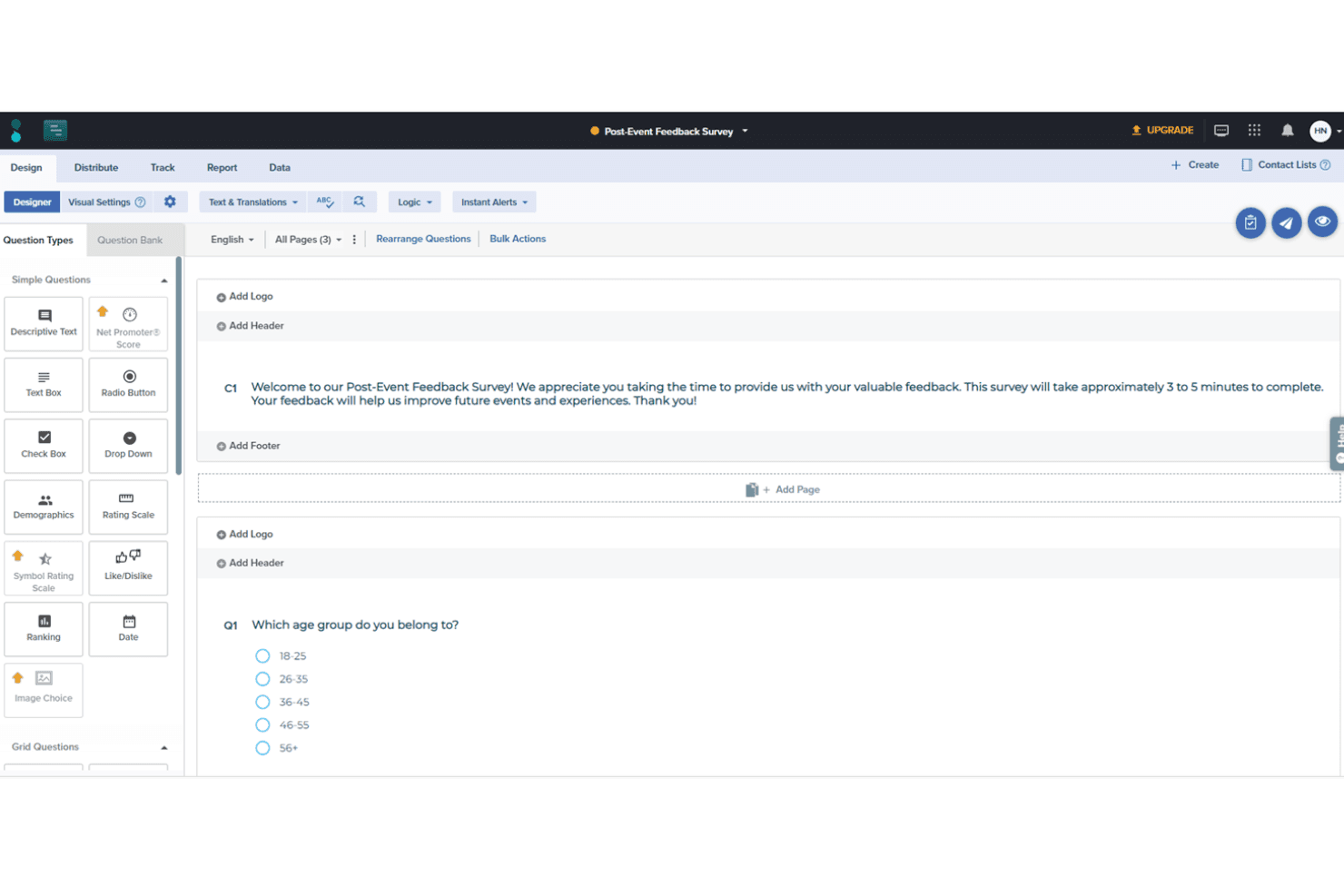
Sogolytics offers many options for survey designs, including various question types tailored to your unique needs. Sogolytics is an omnichannel survey and experience management platform that supports feedback collection across email, chat, social media, in-app, and more, with built-in AI-driven sentiment analysis, automated workflows, and real-time reporting.
Who Is Sogolytics Best For?
Sogolytics is a strong fit for customer experience and customer success teams that need to collect feedback across multiple channels and act on it through structured workflows.
Why I Picked Sogolytics
Sogolytics earns its spot on my shortlist because it covers more feedback channels in one platform than almost anything else I've evaluated. I particularly like how its triggered survey workflows fire automatically based on lifecycle events, so a delivery confirmation can instantly launch a CSAT survey without any manual setup. Its AI-driven sentiment and theme detection then surfaces patterns across all those responses in real time, which is exactly what CX teams need to act fast on customer issues.
Sogolytics Key Features
- Key Driver Analysis: Identifies which specific factors, like support wait times or onboarding steps, most influence customer satisfaction scores and renewal intent.
- SLA tracking: Assigns owners and deadlines to open feedback cases and monitors resolution times against defined service-level agreements.
- 100+ survey templates: Includes pre-built CSAT, NPS, and general feedback templates you can deploy immediately across any supported channel.
- Role-based data access controls: Lets you define who can view, edit, or export feedback data across teams and departments.
Sogolytics Integrations
Sogolytics lists 14 integrations, including Salesforce, HubSpot, Zendesk, Intercom, Slack, Microsoft Teams, ServiceNow, Snowflake, Shopify, and Stripe. It also lists Zapier.
Pros and Cons
Pros:
- Triggered surveys capture lifecycle feedback automatically
- AI surfaces sentiment and themes quickly
- Omnichannel collection captures feedback across channels
Cons:
- Public roadmap and changelog are absent
- No voting or request prioritization workflow
Learn more about Sogolytics: Best for real-time multi-location feedback
- 14-day free trial available
- Pricing upon request
Visit WebsiteCustomer Rating:4.7/5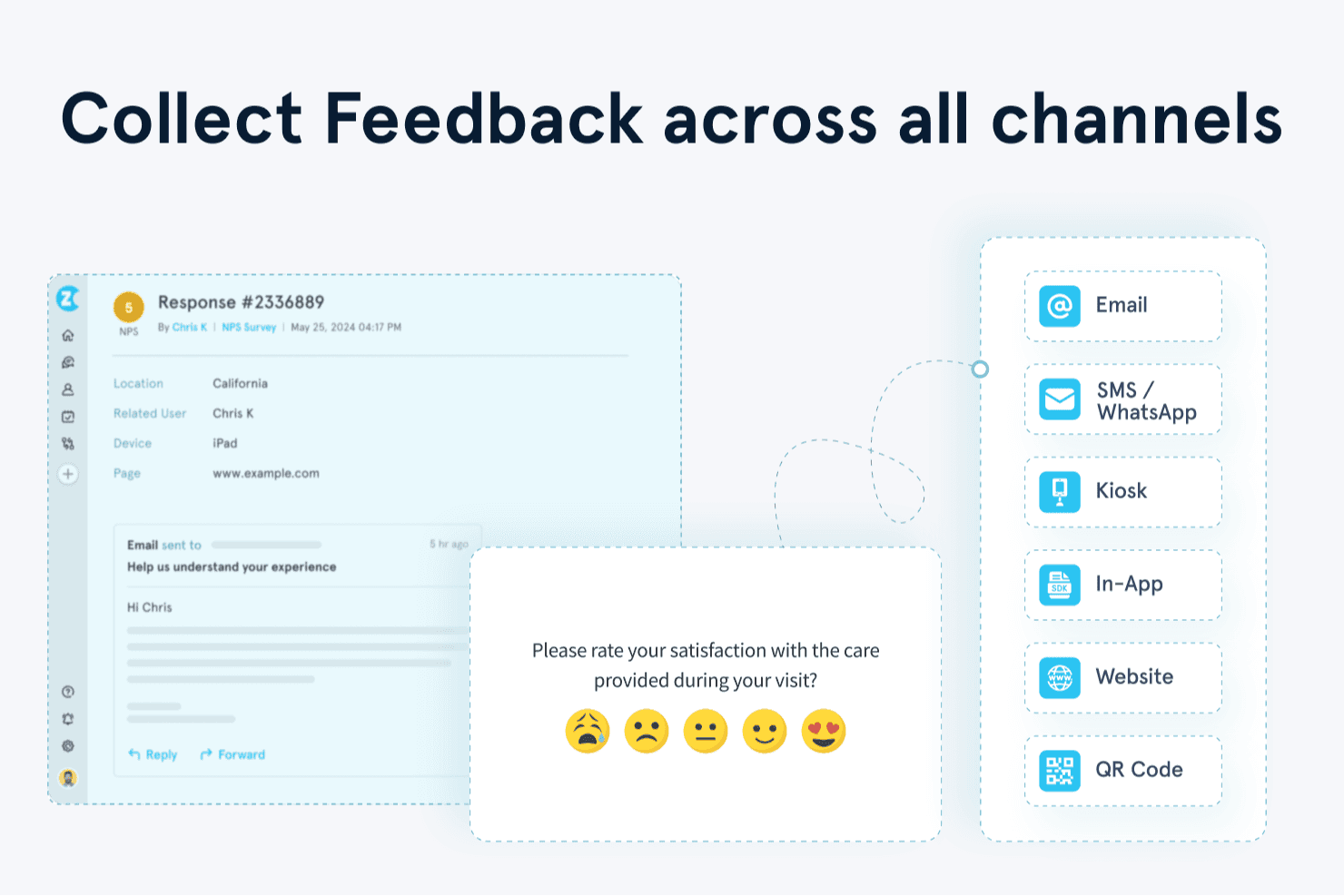
Zonka Feedback helps you collect customer feedback across email, SMS, WhatsApp, kiosks, websites, apps, and QR codes. Zonka Feedback is a multichannel user feedback platform that collects and centralizes responses from offline kiosks, email, SMS, WhatsApp, web, and in-app surveys, then applies AI-driven sentiment analysis, thematic tagging, and real-time reporting across locations and teams.
Who Is Zonka Feedback Best For?
Zonka Feedback is a strong fit for CX and customer success teams managing feedback across multiple physical or digital locations, especially in retail, hospitality, and healthcare.
Why I Picked Zonka Feedback
Zonka Feedback earns its spot on my shortlist because of how well it handles feedback across multiple physical locations in real time. I particularly like the offline kiosk mode, which keeps surveys running on iPads or Android tablets even without a connection, then syncs responses automatically. Admins can monitor every device's uptime, battery, and sync status remotely, making it easy to manage feedback collection across dozens of sites without being on the ground.
Zonka Feedback Key Features
- Multichannel survey distribution: Deploy surveys across email, SMS, WhatsApp, web, in-app SDK, and offline kiosks from a single platform.
- AI thematic and sentiment analysis: Automatically tags responses with themes, sentiment, and emotions to surface patterns across large volumes of feedback.
- Real-time alerts and case management: Triggers instant notifications via Slack, MS Teams, email, or SMS when low ratings come in, with task assignment built in.
- Ask AI co-pilot: Lets you query your entire feedback dataset using natural-language questions to get instant, data-backed answers.
Zonka Feedback Integrations
Zonka Feedback offers 20+ integrations, including Salesforce, HubSpot, Zendesk, Intercom, Jira, Slack, and Microsoft Teams. It also supports API, webhooks, Make, Integrately, and Zapier connections.
Pros and Cons
Pros:
- Reviewers praise responsive customer support
- Surfaces sentiment and themes automatically
- Tracks kiosk uptime across multiple locations
Cons:
- Some reviewers report bugs and instability
- No voting board for feature requests
Learn more about Zonka Feedback:
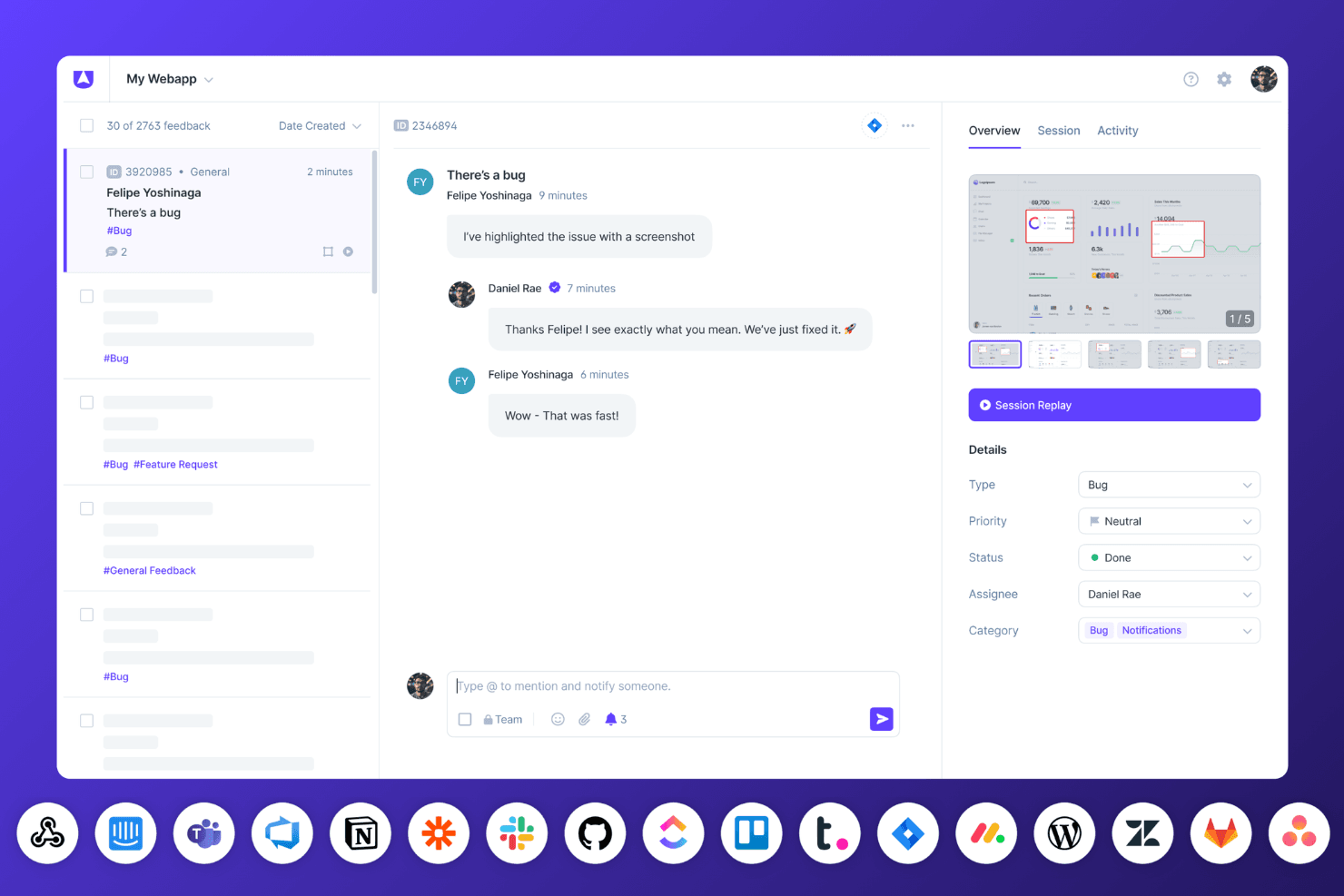
Userback’s bug tracking dashboard displays session replays, team conversations, and real-time status updates with connected integrations. Userback is a user feedback platform that combines embeddable widgets, visual annotation tools, in-app surveys, session replay, and AI-powered insights to help teams collect, organize, and act on customer feedback.
Who Is Userback Best For?
Userback is a strong fit for product managers and customer success teams who need visual, context-rich feedback they can act on immediately.
Why I Picked Userback
I picked Userback as one of the best because every piece of feedback arrives with real context you can act on: annotated screenshots, session replays, and captured console logs come bundled automatically. I love that AI Feedback & Insights then groups similar submissions and surfaces recurring themes, so patterns emerge without manual sorting. The MCP connectors, which pipe feedback directly into tools like Cursor or Claude, close the gap between what users report and what developers actually fix.
Userback Key Features
- NPS, CSAT, and CES surveys: Run in-app surveys using pre-built templates, with targeting options based on device, page, or user segment.
- Feature Portal: A branded community space where users can submit, view, and vote on feature requests, complete with a public roadmap and announcements.
- Browser extension: Lets internal teams and clients leave feedback on any webpage without any code or installation required.
- Feedback inbox and Kanban boards: A centralized workspace for managing, filtering, merging, and assigning incoming feedback across projects.
Userback Integrations
Userback offers 12+ integrations, including Jira, ClickUp, Asana, Intercom, Zendesk, Slack, Microsoft Teams, and MCP connectors for Claude, ChatGPT, and Cursor. It also supports Zapier and provides REST API access and webhooks on Business Plus.
Pros and Cons
Pros:
- Surveys measure satisfaction inside product journeys
- AI groups recurring themes and similar submissions
- Annotated feedback captures actionable technical context
Cons:
- Notification settings can feel overwhelming
- Prioritization lacks revenue-weighted scoring
Learn more about Userback: Best for enterprise-wide voice-of-customer programs
- Free demo available
- Pricing upon request
Visit WebsiteCustomer Rating:4.6/5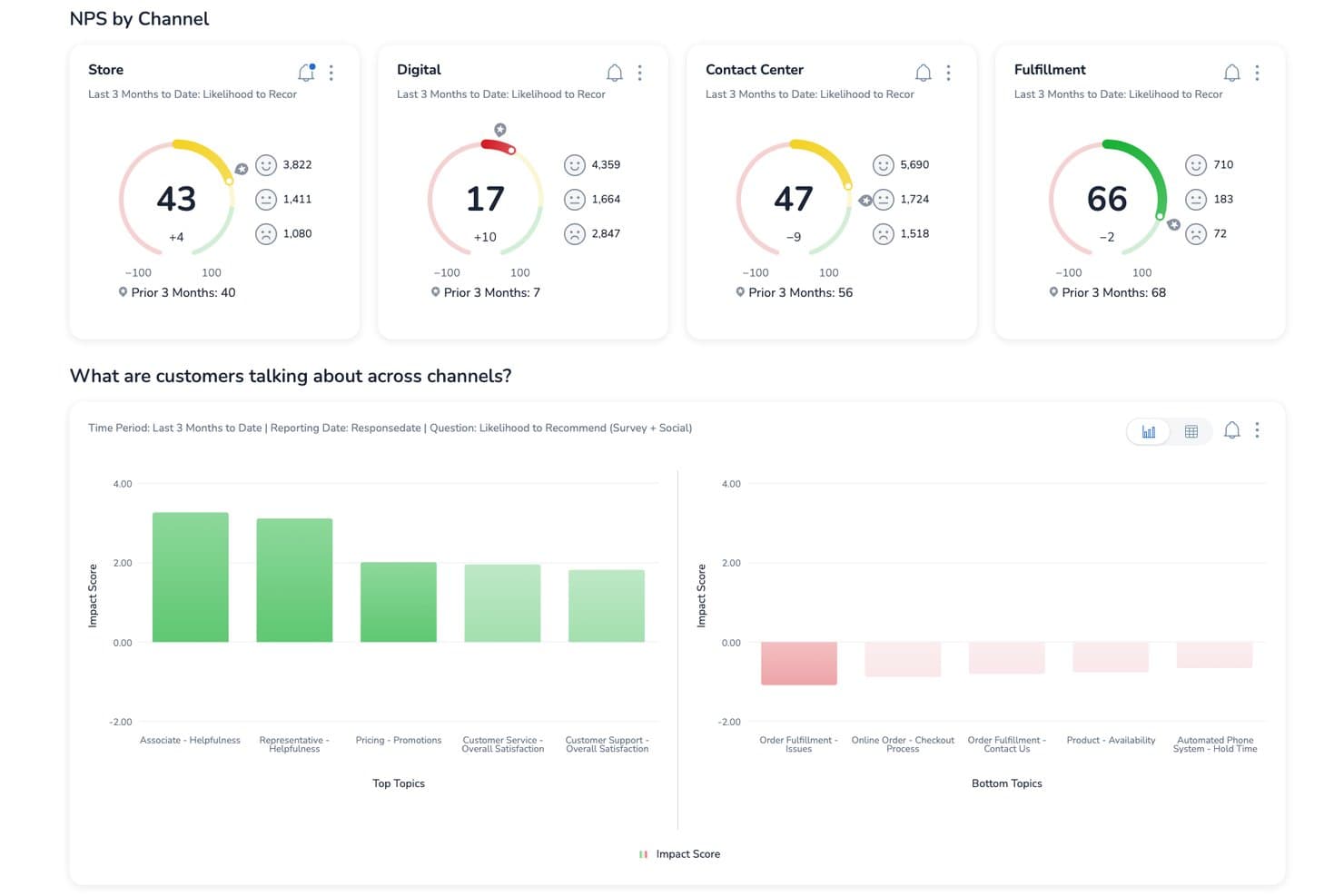
Medallia tracks NPS scores by channel to improve customer satisfaction. Medallia is an enterprise customer feedback platform that captures signals across web, mobile, in-app, speech, video, and social channels, then centralizes them into unified customer profiles with AI-powered text analytics, closed-loop case management, and role-based reporting.
Who Is Medallia Best For?
Medallia is a strong fit for enterprise CX teams running organization-wide voice-of-customer programs across multiple channels and regions.
Why I Picked Medallia
Medallia earns its spot on my shortlist because no other platform I've reviewed captures voice-of-customer signals at the same enterprise scale. I'm particularly impressed by TX Profiles, which build continuous, 360-degree timelines for each customer across web, mobile, speech, and social channels. Its AI text analytics layer then surfaces themes, sentiment, and emotion in real time, so CX teams can act on trends before they compound.
Medallia Key Features
- TX Profiles: Builds continuous, individual and account-level timelines that aggregate customer interactions across every channel in one place.
- Closed-loop case management: Automatically triggers follow-up actions and alerts frontline teams when feedback requires a direct response.
- Multi-language text and speech analytics: Detects themes, sentiment, emotion, and effort across dozens of languages using prebuilt and custom topic models.
- Role-based reporting: Delivers personalized dashboards and feedback views tailored to each team's function, with no user limits.
Medallia Integrations
Medallia offers integrations with Salesforce, Adobe, and ServiceNow, embedding customer insights into those platforms. Its Developer Portal supports custom connectivity, although specific API capabilities aren’t documented.
Pros and Cons
Pros:
- Closed-loop alerts prompt timely customer follow-up
- Connects sentiment themes to CSAT outcomes
- Captures feedback across web, mobile, and speech
Cons:
- No feature voting for product requests
- Enterprise implementation demands substantial planning
Learn more about Medallia: Best for linking feedback to revenue impact
- Free plan + 30-day free trial + free demo available
- Pricing upon request
Visit WebsiteCustomer Rating:4.4/5
You can use Pendo’s sentiment analysis to understand what delights or frustrates customers about your products and services. Pendo is a user feedback tool you can use to create in-app walkthroughs to improve new users’ onboarding and introduce existing users to new features. You can use Pendo to store user feedback giving you a better idea of the features you need to improve and new features customers want to see.
Pendo lets you generate reports and metrics using user feedback that the software collected so you can prioritize new features that can help boost your revenue. Understanding how customers feel about your products and services is an excellent way of determining areas where you are excelling and areas where you need to improve, and Pendo’s sentiment analysis feature can help you.
Pendo can help you analyze online reviews to gauge whether customers feel positively or negatively about your products and services. Instead of sending an online survey to a customer, you can use Pendo to present NPS, quizzes, and polls directly to customers through your mobile app to boost response rates.
Pendo integrates with other business tools, including Calendly, Figma, QualtricsXM, Amazon Redshift, and TrustRadius.
Pendo has a free plan, while the pricing for paid plans is available upon request.
Learn more about Pendo: Best for revenue-weighted feedback prioritization
- 30-day free trial + free demo available
- Pricing upon request
Visit WebsiteCustomer Rating:4.3/5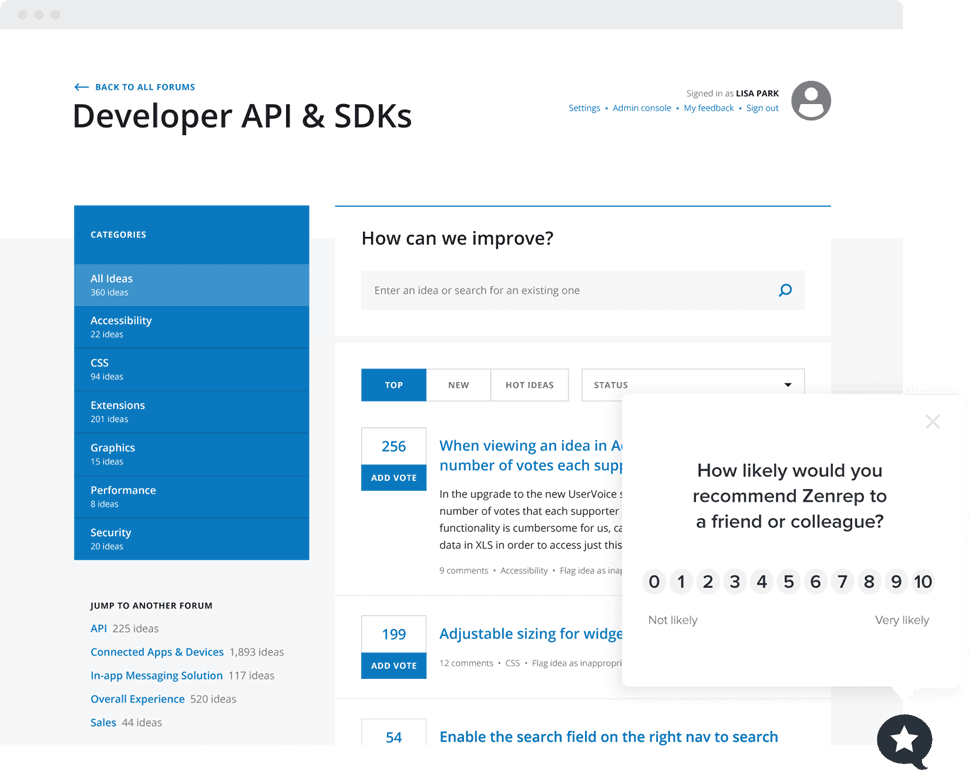
You can use Uservoice’s NPS widget to gauge customer loyalty and the likelihood of your product getting recommended to new users. UserVoice is an enterprise customer intelligence platform that collects feedback across portals, in-app widgets, and integrations, then centralizes, categorizes, and prioritizes it using AI-driven analysis and revenue-weighted scoring.
Who Is UserVoice Best For?
UserVoice is a strong fit for product managers and customer success teams at mid-market to enterprise companies that need to tie customer feedback directly to revenue impact.
Why I Picked UserVoice
UserVoice earns its spot on my list because of how it ties feedback directly to revenue. Its Indexing feature ranks ideas by ARR and account value pulled from Salesforce or HubSpot, so a request from a $200K account automatically outweighs one from a free trial user. AI Idea Insights then summarizes those ranked requests into digestible themes, so I'm not manually sifting through hundreds of submissions to find what actually moves the needle.
UserVoice Key Features
- AI Theme Detection: Automatically identifies recurring themes across submitted feedback and links each theme back to the original customer submissions.
- Feedback portal: A public-facing space where customers can post ideas, vote on existing requests, comment, and subscribe to status updates.
- Chrome extension: Lets internal teams capture feedback directly from email, support tools, and other workflows without switching to a separate app.
- Impact Reports: Displays urgency, sentiment, importance, and the revenue behind each request in a single view for quick decision-making.
UserVoice Integrations
UserVoice offers native integrations with Salesforce, HubSpot, Zendesk, Gainsight, Slack, Microsoft Teams, Jira, Azure DevOps, FullStory, and Dragonboat. Its Admin API supports custom integrations and data exports.
Pros and Cons
Pros:
- Status updates help close the feedback loop
- AI themes reveal recurring customer concerns
- Revenue-weighted prioritization focuses roadmap decisions
Cons:
- Advanced reporting feels limited for some teams
- Setup can take four to six weeks
Learn more about Uservoice: Best for visual and video bug feedback capture
- Free 15-day trial
- From $45/month
Visit WebsiteCustomer Rating:4.5/5
Customers can use Usersnap to send video feedback or screen recording about issues they encounter with your product. Usersnap is a customer feedback software for SaaS companies that collect customer feedback through video feedback and customer surveys. You can use Usersnap to label and assign issues to your product development team using Usersnap’s dashboard.
The software can help improve customer engagement by sharing ticket status and directly responding to feedback senders to close the customer feedback loop. If you want to understand better the issues customers are encountering with your products, then Usersnap is the ideal user feedback software for you because of its video feedback feature.
With Usersnap, customers can record their screens to capture issues, allowing a better context to help find solutions quickly. This visual feedback feature allows you to capture critical metadata like URL, browser information, and console log errors you can send to your engineers to help customers.
Usersnap integrates with other customer feedback and product management tools like Basecamp, Trello, WordPress, Evernote, and GitLab.
Usersnap pricing starts at $9/month/up to 2 users, and they provide a 15-day free trial.
Learn more about Usersnap: 10Best for AI-driven research repository analysis
Dovetail
- Free plan + free demo available
- Pricing upon request
 Learn more about Dovetail:
Diğer Kullanıcı Geri Bildirimi Yazılımları
Kısa listeme giremeyen ancak yine de göz atmaya değer bazı ek kullanıcı geri bildirimi yazılımı seçenekleri şunlardır:
- 11SurveySparrowBest for conversational surveys
- 12CannyUser feedback software for analyzing feedback from specific customers
- 13SurvicateBest for customer feedback integration
- 14UnwrapBest for automatic feedback trend detection
- 15FormsuiteBest for AI-generated feedback forms
- 16ProductboardBest for revenue-weighted feature prioritization
- 17ProdPadBest for linking feedback directly to roadmap outcomes
- 18Qualtrics XMBest for enterprise-scale CX feedback analysis
- 19FeaturebaseBest for closing the feedback loop with users
- 20FrillBest for idea boards with revenue-weighted voting
How I Evaluate User Feedback Software
I split my evaluation into three parts. Core functionality carries the most weight: I look for tools that capture feedback directly from users and centralize it in one searchable place. From there, I evaluate standout features like customer-weighted scoring, then consider support and onboarding quality.
Core Functionality (Table Stakes For This List)
When I'm selecting tools for my list, I score each one on a scale from 0 (does not offer the functionality) to 5 (excels in this area) for each core functionality listed below. I then convert the total into a percentage to help assess each tool's overall fit, with extra weight on any functionalities I've deemed essential.
- Feedback Collection (Essential): I check whether each tool offers surveys, in-app widgets, and embeddable forms that can be deployed across multiple touchpoints without heavy setup.
- Centralized Feedback Repository (Essential): Every tool needs a single, searchable hub where feedback from support tickets, sales calls, and direct submissions lives together.
- Categorization and Tagging: I look for flexible tagging systems that let you group feedback by theme, product area, or customer segment to spot patterns fast.
- Prioritization or Voting: Tools like Canny and Productboard handle this differently, so I evaluate whether voting, scoring, or weighted ranking helps surface high-impact requests.
- Analysis and Reporting: I evaluate whether the tool can surface sentiment shifts, trending topics, and volume changes over time in dashboards you can actually act on.
- Closing the Feedback Loop: Good tools notify users when their request ships or moves forward. I look for built-in status updates, changelogs, or automated emails tied to feedback items.
Once I have a list of tools that meet the criteria, I consider what sets each platform apart.
Differentiating Factors (What Sets Vendors Apart)
Here's how I compare and contrast different vendors:
Standout Features
Customer-weighted scoring is the feature I evaluate most closely. Tools like Productboard and Canny can tie votes to CRM data like MRR or plan tier, so a request from your largest account carries more weight than one from a free-trial user. I also check whether each tool offers AI-powered insight summarization, which clusters hundreds of raw feedback entries into themed summaries. That's the difference between reading 400 tickets and scanning five actionable trends. Finally, I look at duplicate detection and merging. Without it, the same request logged by three different reps fragments your data and skews prioritization.
Beyond Features
I evaluate how easily sales and CS teams can actually log feedback during their daily work. A browser extension or CRM plugin that lets a CSM capture a request mid-call matters more than a feature list no one uses. I also check API access and export options, since teams often need to pull feedback into internal BI tools or sync data with roadmap platforms like Jira or Shortcut. Security rounds out my review: SOC 2 compliance, role-based access controls, and GDPR readiness are non-negotiable when feedback is tied to customer accounts.
Kullanıcı Geri Bildirimi Yazılımı Nasıl Seçilir?
Uzun özellik listeleri ve karmaşık fiyatlandırma yapıları arasında kaybolmak kolaydır. Benzersiz yazılım seçim sürecinizde ilerlerken odağınızı korumanıza yardımcı olmak için göz önünde bulundurmanız gereken faktörlerin kontrol listesi aşağıda yer alıyor:
| Faktör | Dikkat Edilmesi Gerekenler |
|---|---|
| FaktörÖlçeklenebilirlik | Dikkat Edilmesi GerekenlerYazılım işletmenizle birlikte büyüyecek mi? Önemli performans sorunları yaşamadan artan geri bildirim ve kullanıcı hacmini destekleyip desteklemediğini değerlendirin. |
| FaktörEntegrasyonlar | Dikkat Edilmesi GerekenlerMevcut araçlarınızla çalışıyor mu? CRM sisteminiz, proje yönetimi yazılımınız ve iletişim platformlarınızla sorunsuz bir şekilde entegre olup olmadığını kontrol edin. |
| FaktörÖzelleştirilebilirlik | Dikkat Edilmesi Gerekenlerİhtiyaçlarınıza göre uyarlayabilir misiniz? Geri bildirim formlarını, panoları ve raporları özel iş akışı gereksinimlerinize uyacak şekilde özelleştirme seçenekleri arayın. |
| FaktörKullanım kolaylığı | Dikkat Edilmesi GerekenlerEkibiniz için kullanıcı dostu mu? Öğrenme eğrisini ve arayüzün tüm ekip üyelerinin etkili bir şekilde kullanabileceği kadar sezgisel olup olmadığını değerlendirin. |
| FaktörUygulama ve işe alıştırma | Dikkat Edilmesi GerekenlerNe kadar hızlı kullanmaya başlayabilirsiniz? İşe alıştırma sürecini, kurulum süresini ve eğitimler ile kılavuzlar gibi eğitim kaynaklarının kullanılabilirliğini değerlendirin. |
| FaktörMaliyet | Dikkat Edilmesi GerekenlerBütçeniz dahilinde mi? Fiyatlandırmayı sunulan özelliklerle karşılaştırın. Ek kullanıcılar veya özellikler için gizli maliyetleri ya da ücretleri göz önünde bulundurun. |
| FaktörGüvenlik önlemleri | Dikkat Edilmesi GerekenlerVerileriniz ne kadar güvende? Veri korumaya ilişkin sektör standartlarına uyduğundan ve şifreleme ile düzenli yedekleme gibi özellikler sunduğundan emin olun. |
Kullanıcı Geri Bildirimi Yazılımı Nedir?
Kullanıcı geri bildirimi yazılımı, müşterilerinizden veya kullanıcılarınızdan gelen geri bildirimleri toplamanıza ve anlamlandırmanıza yardımcı olan bir araçtır. Ürün yöneticileri, pazarlamacılar ve müşteri destek ekipleri bu aracı insanların neleri beğendiğini, beğenmediğini veya düzeltilmesini istediğini öğrenmek için kullanır. Anketler oluşturmanıza, sonuçlardaki eğilimleri fark etmenize ve bir sonraki aşamada neyi iyileştireceğinize karar vermenize olanak tanır; böylece en önemli konular üzerinde çalıştığınızdan emin olursunuz.
Özellikler
Kullanıcı geri bildirimi yazılımı seçerken aşağıdaki temel özelliklere dikkat edin:
- Anket oluşturma: Kullanıcı içgörülerini verimli bir şekilde toplamak için anketler tasarlamanıza ve dağıtmanıza olanak tanır.
- Veri analizi: Geri bildirim verilerini yorumlamak ve trendleri ve kalıpları ortaya çıkarmak için araçlar sunar.
- Entegrasyon olanakları: CRM'ler ve proje yönetimi araçları gibi mevcut yazılımlarla uyumluluk sağlar.
- Özelleştirilebilir formlar: Geri bildirim formlarını özel ihtiyaçlarınıza ve iş akışlarınıza uygun şekilde düzenlemenizi sağlar.
- Gerçek zamanlı analiz: Kullanıcı geri bildirimleri hakkında anında içgörüler sunarak zamanında kararlar almanıza yardımcı olur.
- Çok kanallı geri bildirim toplama: Web siteleri ve mobil uygulamalar da dahil olmak üzere çeşitli platformlardan geri bildirim toplamanızı sağlar.
- Duygu analizi: Geri bildirimlerdeki müşteri duygularını ve tutumlarını belirlemek ve yorumlamak için yapay zekâ kullanır.
- Yol haritası görselleştirmesi: Kullanıcı geri bildirimlerine göre ürün geliştirmeyi planlamanıza ve önceliklendirmenize yardımcı olur.
- Güvenlik önlemleri: Şifreleme ve veri koruma standartlarına uyumluluk yoluyla kullanıcı verilerini korur.
- Koşullu mantık: Kullanıcı yanıtlarına göre anketleri ve formları kişiselleştirmenize olanak tanıyarak etkileşimi artırır.
Faydalar
Kullanıcı geri bildirimi yazılımını uygulamak, ekibiniz ve işletmeniz için çeşitli faydalar sağlar. Yararlanabileceğiniz bazı faydalar şunlardır:
- Geliştirilmiş karar alma: Gerçek zamanlı analizlere ve veri analizine erişim, ekibinizin bilinçli kararları hızlı bir şekilde almasına yardımcı olur.
- Geliştirilmiş ürün geliştirme: Geri bildirim içgörüleri ve yol haritası görselleştirmesi, ekibinize kullanıcılar için en önemli özelliklere öncelik verme konusunda rehberlik eder.
- Müşteri memnuniyeti: Duygu analizi ve özelleştirilebilir formlar, kullanıcı ihtiyaçlarını etkili bir şekilde karşılamanıza ve memnuniyeti artırmanıza olanak tanır.
- Zaman tasarrufu: Entegrasyon olanakları ve çok kanallı geri bildirim toplama, geri bildirim sürecini kolaylaştırarak ekibinizin değerli zamanından tasarruf etmesini sağlar.
- Veri koruması: Güvenlik önlemleri, kullanıcı verilerinin güvenli bir şekilde işlenmesini sağlayarak müşterilerinizin güvenini korur.
- Artan etkileşim: Koşullu mantık ve kişiselleştirilmiş anketler, kullanıcıların etkileşimde kalmasını ve daha fazla geri bildirim sağlamaya istekli olmasını sağlar.
- Platformlar arası içgörüler: Çok kanallı geri bildirim toplama, farklı platformlardaki kullanıcı deneyimine ilişkin kapsamlı bir görünüm sunar.
Maliyetler ve Fiyatlandırma
Kullanıcı geri bildirimi yazılımı seçmek, mevcut çeşitli fiyatlandırma modellerinin ve planların anlaşılmasını gerektirir. Maliyetler özelliklere, ekip büyüklüğüne, eklentilere ve diğer unsurlara göre değişir. Aşağıdaki tablo, kullanıcı geri bildirimi yazılımı çözümlerinde yaygın planları, ortalama fiyatlarını ve genellikle dahil edilen özellikleri özetlemektedir:
Kullanıcı Geri Bildirimi Yazılımı İçin Plan Karşılaştırma Tablosu
| Plan Türü | Ortalama Fiyat | Yaygın Özellikler |
|---|---|---|
| Plan TürüÜcretsiz Plan | Ortalama Fiyat$0 | Yaygın ÖzelliklerTemel anket oluşturma, sınırlı yanıtlar ve temel analizler. |
| Plan TürüKişisel Plan | Ortalama Fiyat$5-$25/kullanıcı/ay | Yaygın ÖzelliklerÖzelleştirilebilir formlar, temel entegrasyonlar ve standart analizler. |
| Plan Türüİşletme Planı | Ortalama Fiyat$30-$75/kullanıcı/ay | Yaygın ÖzelliklerGelişmiş anket seçenekleri, çok kanallı geri bildirim ve geliştirilmiş raporlama araçları. |
| Plan TürüKurumsal Plan | Ortalama Fiyat$100-$200/kullanıcı/ay | Yaygın ÖzelliklerSınırsız yanıtlar, gelişmiş güvenlik özellikleri ve özel hesap desteği. |
Kullanıcı Geri Bildirim Yazılımı SSS
Kullanıcı geri bildirim yazılımı hakkında sık sorulan soruların bazı yanıtları:
Kullanıcı geri bildirim yazılımı aracılığıyla toplanan veriler güvenli midir?
Evet, güvenilir kullanıcı geri bildirim yazılımı çözümleri veri güvenliğine öncelik verir. Veri korumaya yönelik şifreleme uygular ve sektör standartlarına uyarlar. Satın almadan önce yazılımın güvenlik özelliklerini ve politikalarını inceleyin. Hassas kullanıcı bilgilerini korumak için kuruluşunuzun gereksinimlerini karşıladıklarından emin olun.
Kullanıcı geri bildirim yazılımı karar alma sürecinizi nasıl iyileştirebilir?
Ekibinizin kullanıcıların ürününüz veya hizmetiniz hakkında gerçekte ne düşündüğünü görmesine yardımcı olur. Böylece güncellemeleri varsayımlara değil, gerçek geri bildirimlere dayandırabilirsiniz. Kullanıcıların neleri beğenip beğenmediğine ilişkin kalıpları fark edersiniz; bu da ekibinizin en etkili değişikliklere odaklanmasına yardımcı olur. Ayrıca çabalarınızın hangi alanlarda sonuç verdiğini daha net görmenizi sağlar.
Uygulanabilir içgörüler elde etmek için kullanıcı geri bildirimlerini nasıl analiz edersiniz?
Yorumları veya yanıtları konuya göre gruplandırarak başlayın; böylece hangi alanların en sık gündeme geldiğini görebilirsiniz. Kullanıcı duyarlılığındaki eğilimleri gösteren tekrarlanan kelimeleri veya temaları arayın. Bu noktaları özetlemek, ekibinizin tek tek yorumların ardındaki genel mesajı anlamasına yardımcı olur.
Ekipler daha fazla kullanıcıyı geri bildirim paylaşmaya nasıl teşvik edebilir?
Formları basit tutarak ve görev tamamlandıktan sonra veya ürün sayfasında olduğu gibi kullanıcıların aşina olduğu yerlerde sunarak geri bildirim vermelerini kolay ve hızlı hâle getirin. Geri bildirim alındığında bunu onaylayarak kullanıcıların seslerinin duyulduğunu hissetmesini sağlayın. İnsanlar fikirlerinin önemli olduğunu bildiklerinde tekrar yanıt verme olasılıkları artar.
Ekipler kullanıcı geri bildirimlerini yönetirken hangi yaygın zorluklarla karşılaşır?
Geri bildirimleri verimli bir şekilde işleyemeyecek kadar çok geri bildirim alabilir veya geri bildirimler farklı kanallara dağılmış olabilir. Dengeli içgörüler yerine aşırı görüşlere odaklanmak da kolaydır. Hangi tür geri bildirimleri topladığınıza ilişkin net hedefler belirlemek, ekibinizin odağını korumasına yardımcı olur.
Kullanıcı geri bildirimlerini topladıktan sonra süreci nasıl tamamlarsınız?
Kullanıcılara geri bildirimlerinin değişikliklere yol açtığını gösteren güncellemeleri veya yanıtları paylaşın. Kısa bir teşekkür veya onay mesajı bile güven oluşturmaya ve geri bildirim akışını güçlü tutmaya yardımcı olur. Kullanıcılar fikirlerinin gerçek sonuçlara dönüştüğünü gördüklerinde ekibinizle etkileşimlerini sürdürmeye daha istekli olurlar.