
Bu kadar farklı beyin fırtınası aracı varken hangisinin sizin için doğru olduğunu belirlemek zordur. Fikir üretmenize ve yaratıcı sürecinize daha fazla düzen katmanıza yardımcı olacak bir araç istediğinizi biliyorsunuz, ancak hangi aracın en iyi olduğunu bulmanız gerekiyor. Bu yazıda, yeniliği teşvik etmek ve yaratıcılığınızı harekete geçirmek için en iyi beyin fırtınası araçları hakkındaki görüşlerimi paylaşarak seçiminizi kolaylaştırmanıza yardımcı olacağım.
Why Trust Our Software Recommendations
6,700+
Reviews
20
Industry experts
16+
Evaluation factors
14
Years
Our team has been testing and reviewing software since 2012. As product managers ourselves, we know how difficult—and important—it is to choose the right software.
For this guide, we evaluated tools using hands-on testing and independent research, scoring tools using our selection criteria.
Our reviews reflect our human editorial judgment, not a sales pitch.
Expert reviewers:
- Andrew LumbySenior TPM
- Cristiano ValimSenior UI/UX Lead


Karşılaştırma Tablosu: Beyin Fırtınası Araçları
Bu karşılaştırma tablosu, seçtiğim en iyi beyin fırtınası araçlarının her biri hakkında temel ayrıntıları özetlemektedir.
Score legend (out of 5)
- Excellent4.5–5
- Good4–4.4
- Average3–3.9
- Below average2–2.9
- Poor1–1.9
Sorted by: Default
| Tool | Starting Price | Website | |||||||
|---|---|---|---|---|---|---|---|---|---|
Best for importing data from spreadsheets | 4.5 out of 5 | 5 | 5 | 4 | 4 | 4 | 5 | $8/user/month Free plan + 14-day trial available | Book Demo |
Best brainstorming tool for project planning with tasks | 2.3 out of 5 | 3 | 3 | 2 | 2 | 1 | 3 | $10/user/month Free plan + 14-day trial available | Book Demo |
Best for structured team brainstorming with agile sync | 3.2 out of 5 | 2 | 4 | 3 | 4 | 4 | 2 | $8/active user/month Free version available | Website |
Best for diagramming-led brainstorming workflows | 3.7 out of 5 | 4 | 5 | 3 | 3 | 3 | 4 | $8/month Free plan + 7-day free trial + free demo available | Website |
Best for M365-embedded team ideation | 3.0 out of 5 | 4 | 3 | 1 | 4 | 2 | 4 | Pricing upon request Free plan available | Website |
Best for design-led teams using Figma | 4.0 out of 5 | 4 | 5 | 3 | 4 | 4 | 4 | $3/user/month Free plan available | Website |
Best for structured workshop facilitation | 4.2 out of 5 | 4 | 4 | 4 | 4 | 5 | 4 | $24.90/user/month Free plan + free demo available | Website |
Best for brainstorming with sticky notes | 4.2 out of 5 | 4 | 4 | 4 | 4 | 4 | 5 | $9/user/month Free plan + 7-day trial + demo available | Website |
Best for AI-guided ideation with dev tool sync | 3.7 out of 5 | 4 | 5 | 3 | 4 | 3 | 3 | Pricing upon request Free plan + 30-day trial + free demo available | Website |
Best for structured facilitation with AI clustering | 4.3 out of 5 | 4 | 5 | 3 | 5 | 5 | 4 | $9.99/user/month Free plan available | Website |


En İyi Beyin Fırtınası Araçlarına Genel Bakış
Her beyin fırtınası aracının en iyi kullanım alanını, dikkat çeken özelliklerini, artılarını ve eksilerini gösteren kısa bir açıklamasını burada bulabilirsiniz. Kullanıcı arayüzlerine de genel bir bakış sunmak için ekran görüntülerine yer verdim.
 1Best for importing data from spreadsheets
Miro
- Free plan + 14-day trial available
- From $8/user/month (billed annually)
Visit WebsiteCustomer Rating:4.8/5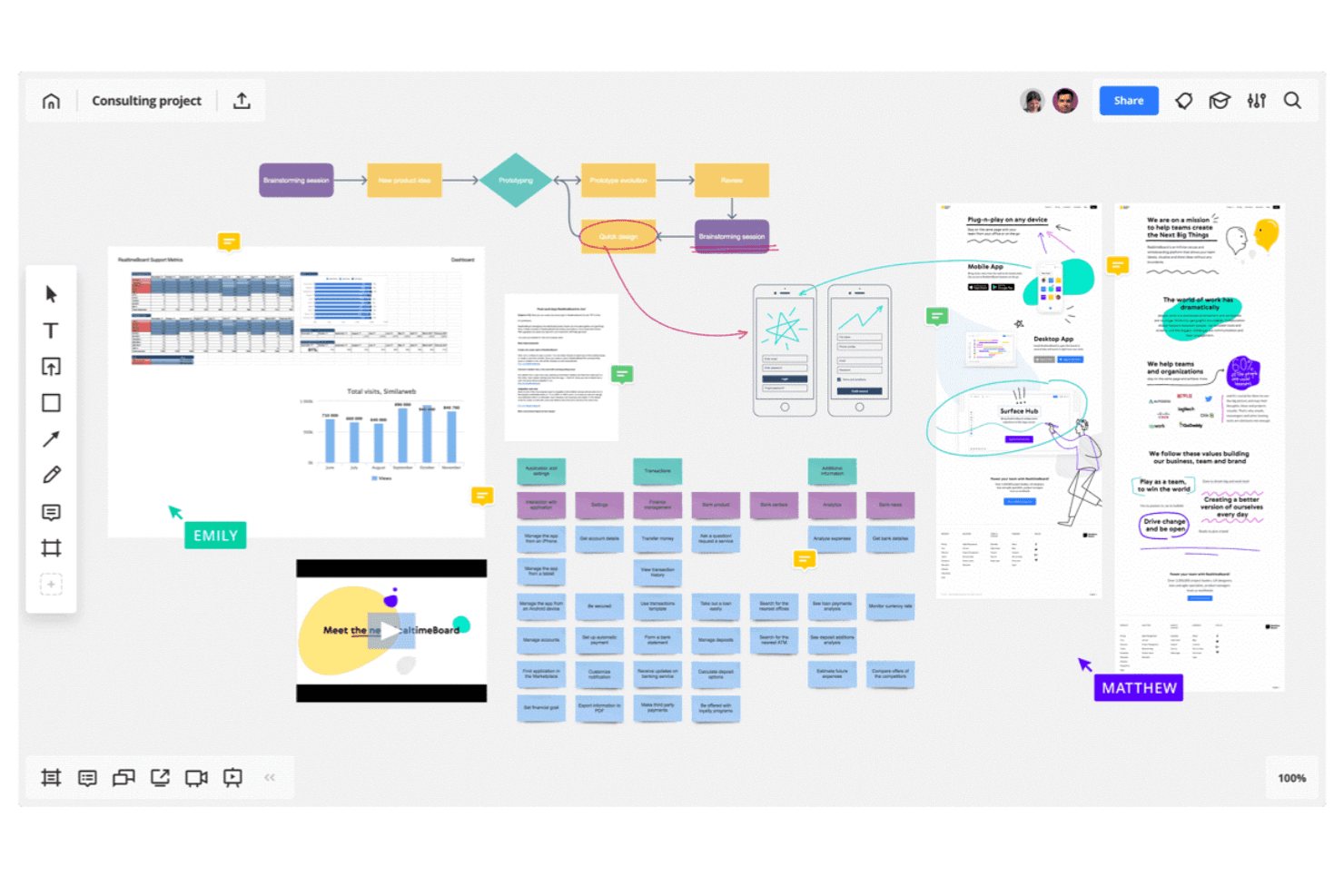
Miro allows you to map out complex workflows and systems. Miro is an infinite-canvas brainstorming and visual collaboration platform that combines sticky notes, mind maps, diagrams, flowcharts, spreadsheet import, AI-assisted clustering, and facilitation tools like voting, timers, and async Talktracks.
Who Is Miro Best For?
Miro is a strong fit for cross-functional teams—product managers, designers, and facilitators—who need to move ideas from raw input to structured plans without switching tools.
Why I Picked Miro
I picked Miro as one of the best because it's the only brainstorming tool I've used that lets you pull structured data directly from a spreadsheet onto an infinite canvas. Drop in a CSV and Miro converts rows into sticky notes or table elements you can cluster, tag, and rearrange in real time. From there, AI-assisted clustering groups related ideas automatically, and two-way sync with Jira or Asana moves prioritized items straight into your backlog without manual re-entry.
Miro Key Features
- Async Talktracks: Record a video walkthrough directly on a board so teammates can review and respond on their own time.
- AI Flows: Run multi-step AI workflows that convert raw board content into documents, diagrams, or summaries.
- Voting and anonymous voting: Run live voting sessions during workshops, with anonymous mode available to reduce groupthink.
- Miroverse community templates: Access thousands of community-built templates alongside Miro's native library to jumpstart any session.
Miro Integrations
Miro offers 250+ integrations, including Google Drive, Figma, Dropbox, Slack, Confluence, Jira, Asana, Linear, ClickUp, and Azure DevOps; Business supports two-way sync with the project management tools.
Pros and Cons
Pros:
- Talktracks support asynchronous workshop participation
- AI clusters themes from unstructured sticky notes
- Imports spreadsheet data onto the brainstorming canvas
Cons:
- AI usage is limited by monthly credits
- Large boards can become slow and laggy
 Best brainstorming tool for project planning with tasks
- Free plan + 14-day trial available
- From $10/user/month (billed annually)
Visit WebsiteCustomer Rating:4.3/5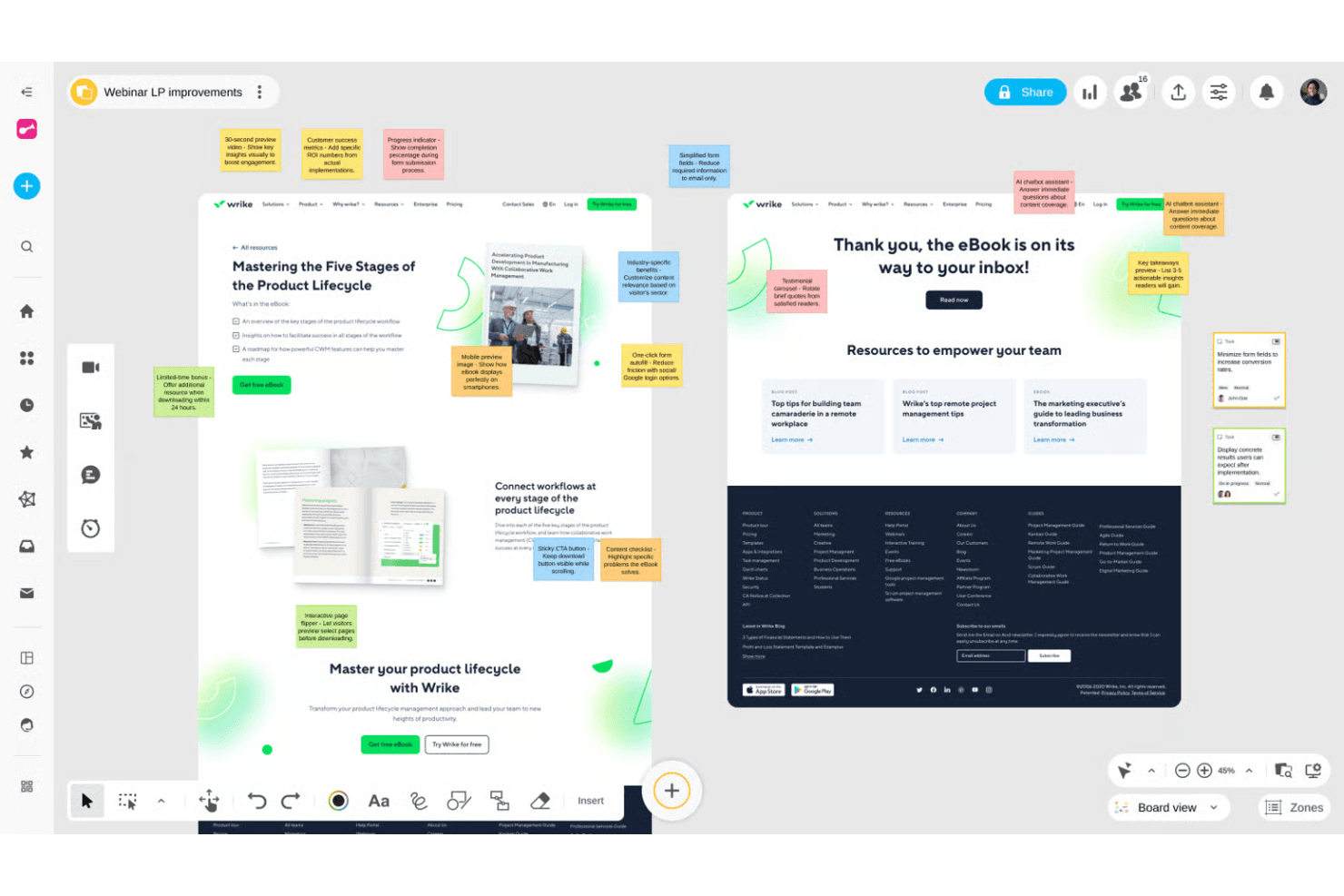
Wrike helps teams organize projects and connect ideas into workflows. Wrike is a project management platform that pairs an infinite collaborative whiteboard—with sticky notes, mind maps, and diagrams—with full project execution tools like Gantt charts, Kanban boards, and AI-powered task creation.
Who Is Wrike Best For?
Wrike is a good fit for product and project teams that want to move from whiteboard brainstorm to assigned tasks without switching tools.
Why I Picked Wrike
I picked Wrike as one of the best because it's the only tool on my list that turns a whiteboard brainstorm directly into a structured project. Wrike's AI reads your sticky notes and mind maps, then generates tasks, assigns them, and builds out Gantt charts or Kanban boards without any manual re-entry. I especially like that whiteboards attach to live projects, so the trail from idea to execution is always visible and nothing gets lost between sessions.
Wrike Key Features
- Whiteboard-to-task AI conversion: Wrike's AI reads sticky notes and mind maps on your whiteboard and generates structured tasks automatically.
- Guest collaboration via secure links: External participants can join whiteboard sessions without a Wrike account using customizable permission links.
- Polls and quizzes: Built-in voting tools let your team collect input and surface unbiased preferences during brainstorming sessions.
- Whiteboard-to-project attachment: Whiteboards link directly to live Wrike projects, keeping your ideation artifacts connected to active work.
Wrike Integrations
Wrike offers 400+ integrations, including Microsoft Teams, Zoom, Slack, Google, Dropbox, Jira, and GitHub. Whiteboards can open inside video calls, while Wrike Sync provides two-way connections with Jira and GitHub.
Pros and Cons
Pros:
- Guests join through secure links
- Whiteboards attach directly to projects
- Ideas become tasks without re-entry
Cons:
- Whiteboard operates as a separate add-on
- Limited facilitation controls for workshops
 Best for structured team brainstorming with agile sync
- Free version available
- From $8/active user/month
Visit WebsiteCustomer Rating:4.7/5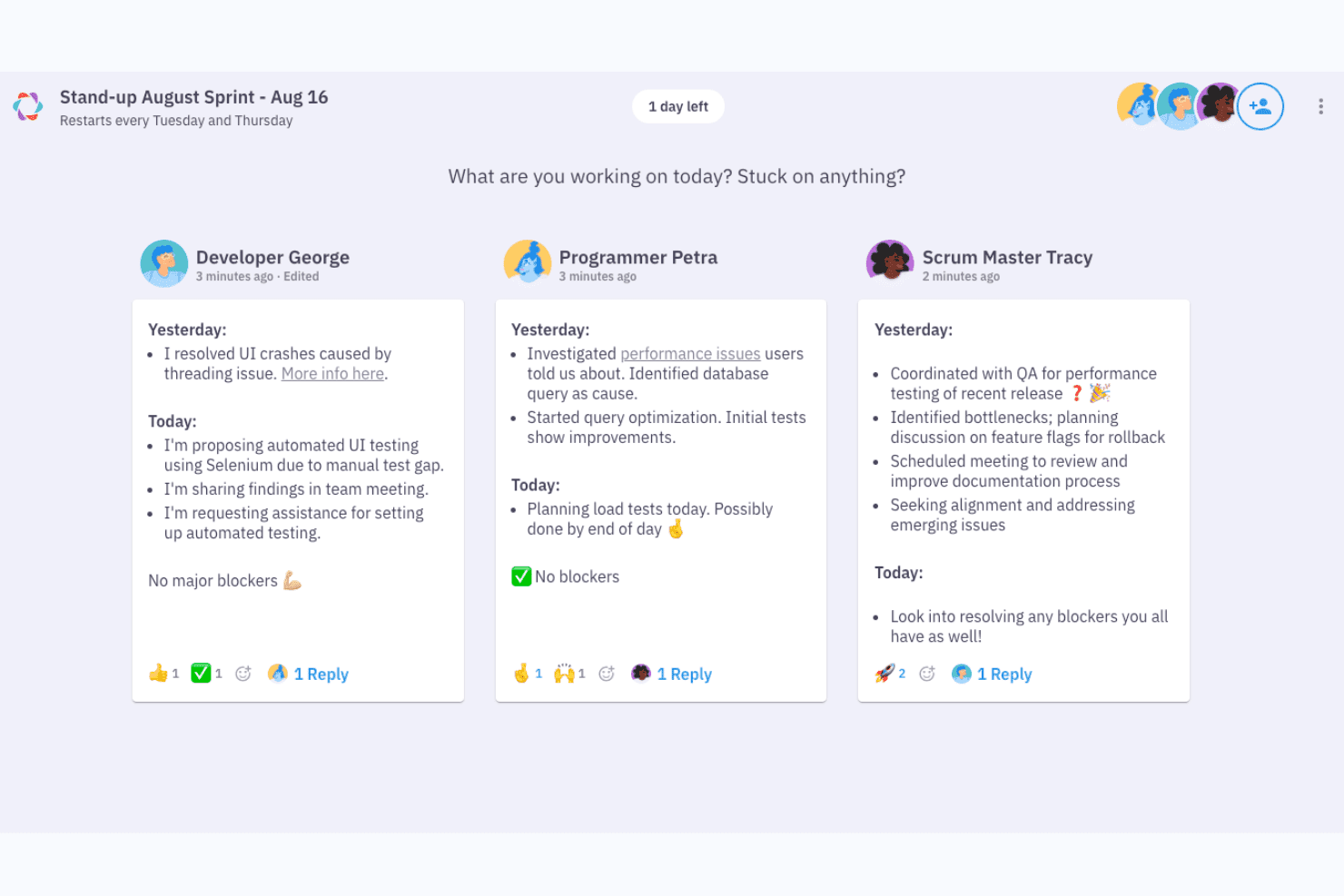
Parabol structures async standups with yesterday, today, and blockers. Parabol is an open-source agile meeting tool that structures brainstorming through a guided reflect-group-vote-discuss-tasks flow, with anonymous idea capture, drag-and-drop clustering, dot voting, and built-in retrospective and Sprint Poker templates.
Who Is Parabol Best For?
Parabol is a strong fit for agile teams and facilitators who need a structured, guided format to turn group input into decisions and action items.
Why I Picked Parabol
I picked Parabol as one of the best because it's the only tool on my list that turns brainstorming into a structured, guided ceremony rather than a free-for-all. I love how the reflect-group-vote-discuss-tasks flow keeps sessions moving, especially the anonymous reflection phase, which prevents louder voices from anchoring the room before quieter ideas surface. The AI-assisted group clustering is genuinely useful: hover over a card, see related reflections, and consolidate them in one click.
Parabol Key Features
- Anonymous reflection phase: Participants submit their ideas privately before anyone else can see them, preventing groupthink from shaping input early in the session.
- Sprint Poker estimation: Built-in Planning Poker uses Fibonacci and custom scales, with story points syncing directly back to Jira after the session.
- Async-ready meeting setup: Facilitators can open activities ahead of time with set deadlines, letting distributed teams contribute on their own schedule before a live session.
- Team Health check: A quick, anonymous pulse survey based on Google's Project Aristotle research tracks team sentiment across five categories and trends over time.
Parabol Integrations
Parabol lists seven integrations, including Jira, GitHub, GitLab, Slack, Mattermost, and Microsoft Teams. Enterprise adds support for Jira Data Center and self-managed GitLab.
Pros and Cons
Pros:
- Voting turns ideas into clear priorities
- Anonymous input reduces groupthink early
- Guided phases keep brainstorming focused
Cons:
- Agile templates limit open-ended innovation sessions
- No canvas for visual concept mapping
Learn more about Parabol: Best for diagramming-led brainstorming workflows
- Free plan + 7-day free trial + free demo available
- From $8/month
Visit WebsiteCustomer Rating:4.4/5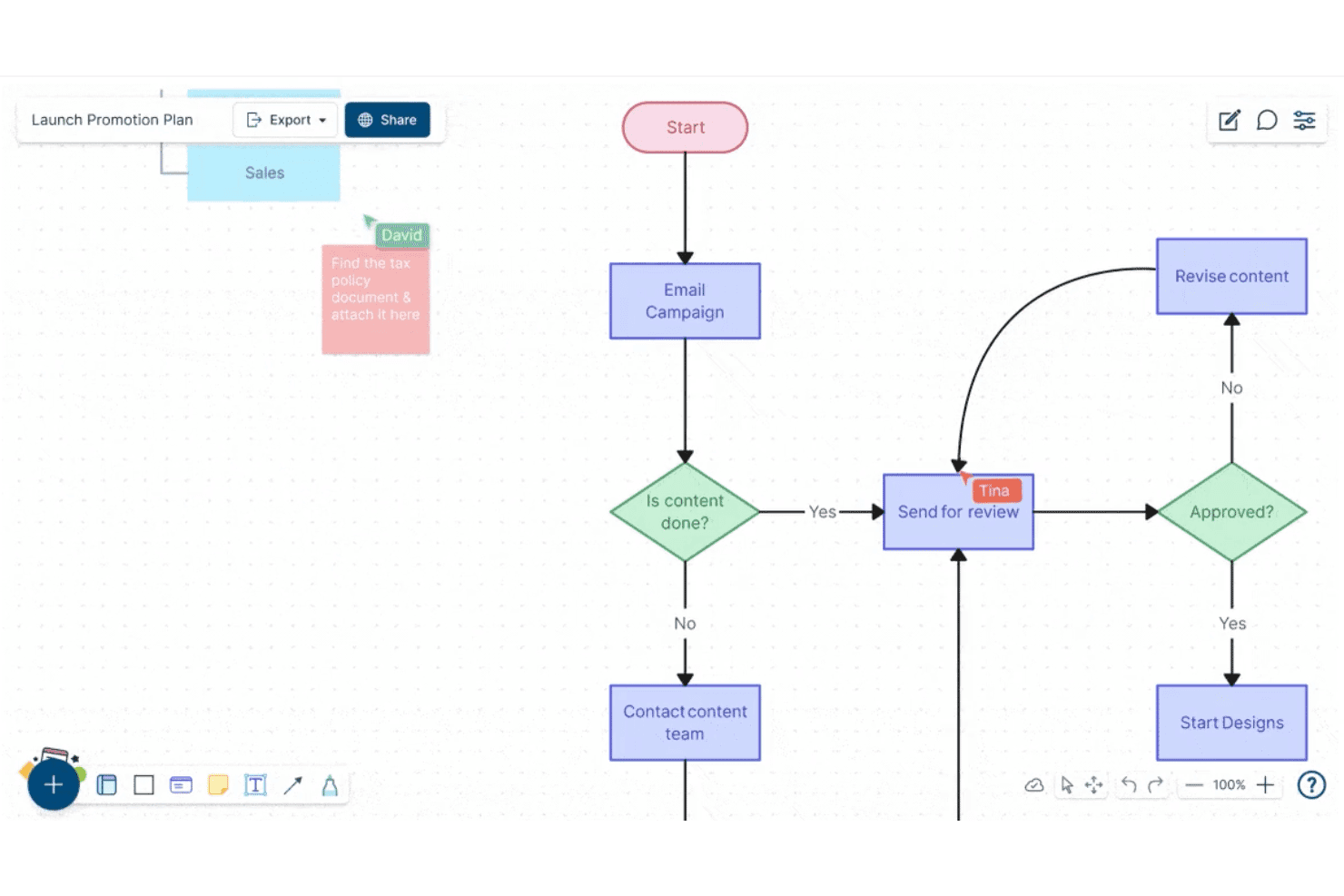
Creately lets users build and collaborate on flowcharts in real time. Creately is a visual collaboration and diagramming platform that combines an infinite canvas, sticky notes, freehand drawing, 70+ diagram types, 8,000+ templates, and real-time multi-user editing for brainstorming and structured planning workflows.
Who Is Creately Best For?
Creately is a strong fit for product managers, UX leads, and strategy teams who need to move fluidly between freeform ideation and structured diagramming without switching tools.
Why I Picked Creately
Creately earns its spot on my shortlist because it's one of the few tools that lets you move fluidly from a freeform sticky-note session directly into a structured diagram without leaving the canvas. I love that it ships with brainstorming-specific frameworks like Six Thinking Hats and Lotus diagrams alongside 8,000+ templates, so your team isn't starting from scratch. Timed, anonymous voting rounds out the ideation loop by letting groups converge on ideas without the usual groupthink pressure.
Creately Key Features
- Real-time multi-user editing: Multiple collaborators can edit the same canvas simultaneously, with visible cursors and spotlight or follow modes to keep everyone aligned.
- Timed, anonymous voting: Run voting sessions with a set time limit, with results appearing publicly or anonymously to help teams converge on ideas.
- Jira and Azure DevOps sync: Connect canvas items directly to Jira and Azure DevOps so ideas move into tracked work without leaving the tool.
- Presentation mode: Build slide decks directly from your canvas that update automatically as the board changes.
Creately Integrations
Creately offers integrations with Jira, GitHub, Azure DevOps, Google Sheets, Excel, Microsoft Teams, Slack, Google Drive, Confluence, and Zoom. It also provides an API for custom integrations and automation.
Pros and Cons
Pros:
- Timed anonymous voting supports fairer convergence
- Thousands of templates support varied workshops
- Diagramming turns ideas into structured workflows
Cons:
- Facilitation lacks private ideation controls
- Large boards can become sluggish
Learn more about Creately: Best for M365-embedded team ideation
- Free plan available
- Pricing upon request
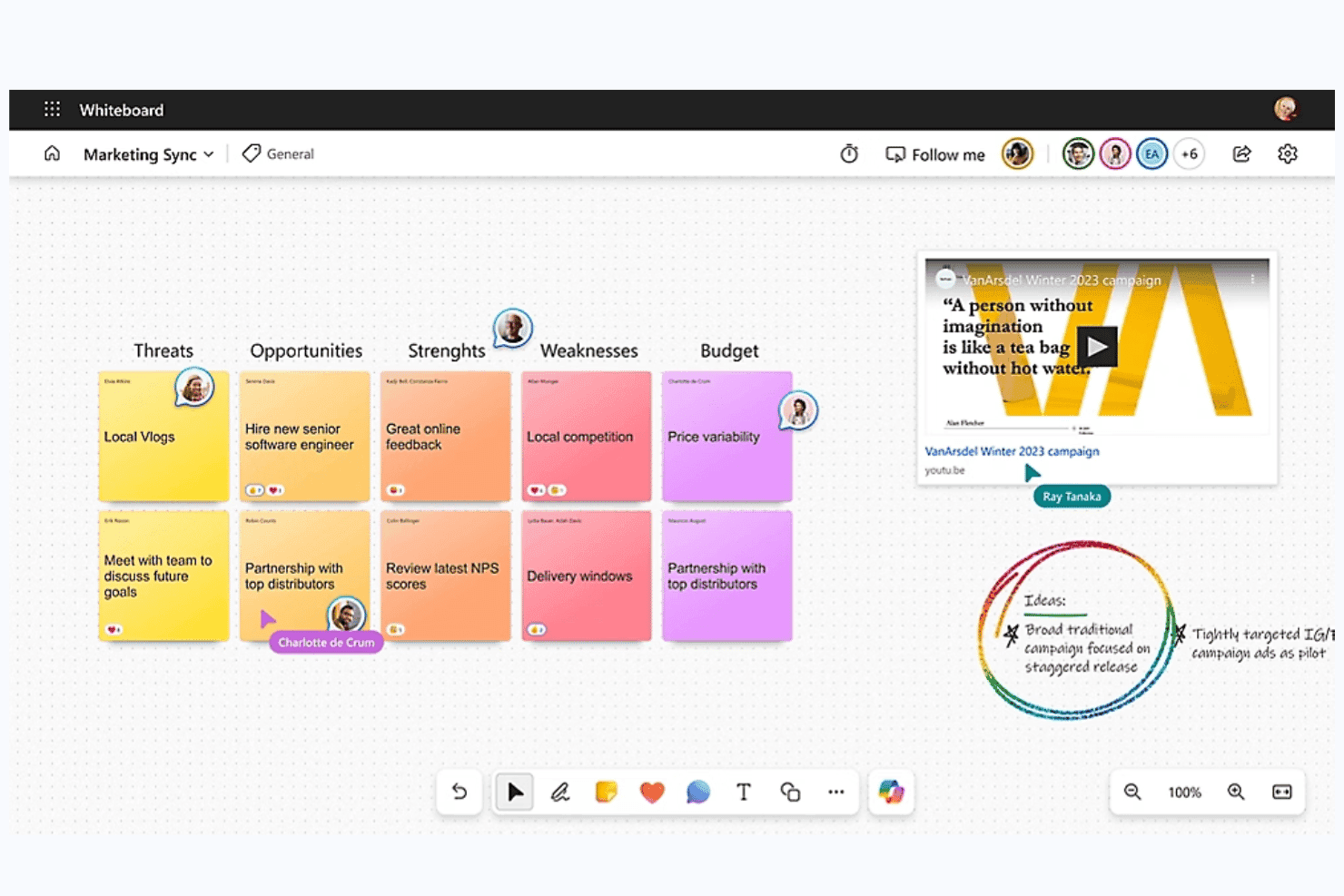
Microsoft Whiteboard is a digital whiteboard tool built into Microsoft 365 that offers a freeform collaborative canvas, sticky notes, smart inking, AI-assisted idea clustering and summarization via Copilot, and deep integration with Teams for real-time and async ideation sessions.
Who Is Microsoft Whiteboard Best For?
Microsoft Whiteboard is a natural fit for teams already working inside Microsoft 365, where pulling up a shared canvas in a Teams meeting requires zero extra setup or logins.
Why I Picked Microsoft Whiteboard
Microsoft Whiteboard earns its spot on my shortlist because it's the only brainstorming tool that lives natively inside Teams, meaning your team can open a shared canvas mid-meeting without switching apps or logging into anything new. I especially like Copilot's Categorize feature, which automatically groups sticky notes into color-coded clusters during live sessions, cutting the manual affinity-mapping work that usually eats up workshop time. The Summarize function then converts those clusters into an editable Loop document your team can act on immediately after the session wraps.
Microsoft Whiteboard Key Features
- Copilot Suggest: Generates a set of idea sticky notes directly on the canvas from a text prompt, giving teams a starting point when brainstorming stalls.
- Follow mode: Locks all participants' views to the facilitator's screen position as they navigate the canvas during live sessions.
- Async board access via OneDrive: Boards are stored in OneDrive for Business, so team members can contribute to a shared canvas before or after a meeting.
- Embedded Loop components: Teams can insert Microsoft Forms polls directly onto the canvas to collect structured input without leaving the board.
Microsoft Whiteboard Integrations
Microsoft Whiteboard offers native integrations across the Microsoft ecosystem, including Microsoft Teams, OneDrive for Business, Microsoft Loop, Microsoft Forms, Bing, and Microsoft Copilot. No third-party marketplace integrations or API are clearly documented.
Pros and Cons
Pros:
- Sticky notes support rich media capture
- Async boards support before-and-after-meeting input
- Copilot suggests, clusters, and summarizes ideas
Cons:
- Image-only export weakens action handoff
- No native dot voting or ranking
Learn more about Microsoft Whiteboard: Best for design-led teams using Figma
- Free plan available
- From $3/user/month (billed annually)
Visit WebsiteCustomer Rating:4.7/5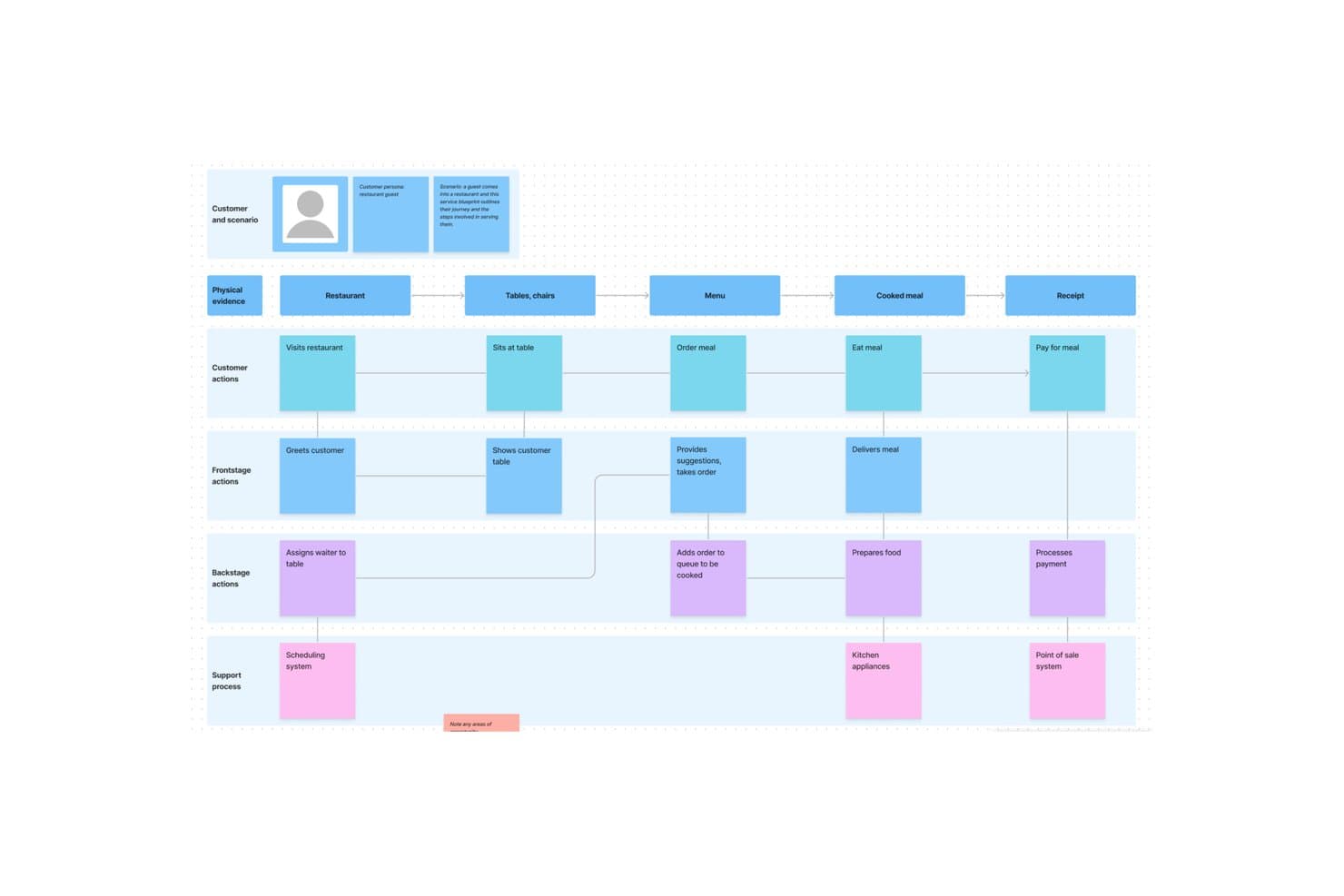
FigJam lets users map full service blueprints visually. FigJam is Figma's online whiteboard tool built for brainstorming, diagramming, and collaborative workshops, with sticky notes, AI-assisted clustering, 300+ templates, and live facilitation controls like spotlight mode, timers, and voting sessions.
Who Is FigJam Best For?
FigJam is a natural fit for cross-functional teams already working in Figma, where designers, PMs, and engineers share a single creative environment.
Why I Picked FigJam
FigJam earns its spot on my shortlist because it's built directly into the Figma ecosystem, making it the obvious brainstorming layer for teams that already live in Figma. I particularly like how AI-assisted sticky clustering lets you sort a chaotic ideation session into named themes and convert them into action items in one click. Spotlight mode is another feature I find genuinely useful: it pulls every participant's view to yours mid-session, so facilitation stays tight even across distributed teams.
FigJam Key Features
- 300+ ready-made templates: Choose from brainstorming frameworks, customer journey maps, retrospectives, roadmap reviews, and more—or build and save your own custom templates.
- Guest access: Anyone outside your organization can join a FigJam board for free for 24 hours without creating an account.
- Asana and Jira integrations: Convert ideas directly from a brainstorm session into trackable tasks in your project management tool.
- AI credit-based actions: Use AI to generate templates and visuals from a text prompt, with monthly credit allowances included on every paid plan.
FigJam Integrations
FigJam offers native integrations with Asana and Jira, helping teams turn brainstorm ideas into trackable tasks. Enterprise plans include API access for custom integrations across Figma workflows.
Pros and Cons
Pros:
- Spotlight keeps remote sessions coordinated
- 300-plus templates support varied workshops
- AI clusters sticky notes into themes
Cons:
- Research synthesis boards become muddy quickly
- Diagramming depth trails specialist whiteboards
Learn more about FigJam: Best for structured workshop facilitation
- Free plan + free demo available
- From $24.90/user/month (billed annually)
Visit WebsiteCustomer Rating:4.7/5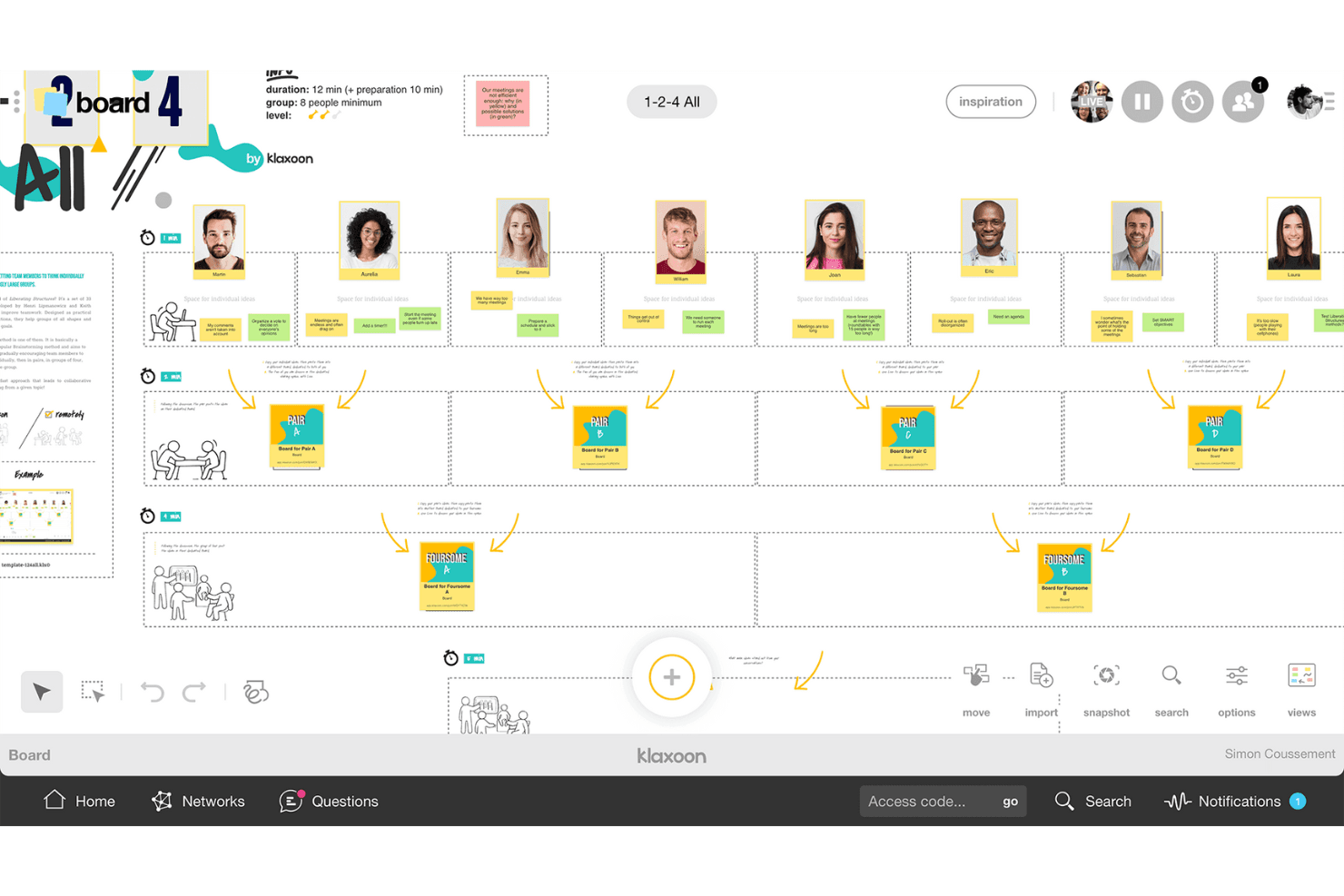
Klaxoon helps teams share ideas and organize discussions into actions. Klaxoon is a visual collaboration and workshop platform that combines an infinite whiteboard, structured facilitation controls, voting and prioritization tools, 200+ templates, and AI-assisted idea organization.
Who Is Klaxoon Best For?
Klaxoon is a strong fit for facilitators, consultants, and innovation teams who run structured workshops and need real-time facilitation controls alongside async collaboration tools.
Why I Picked Klaxoon
Klaxoon earns its spot on my list because no other tool I've tested matches its depth of live facilitation controls. I love how the Session feature lets you chain activities together—polls, quizzes, and boards—so a workshop flows like a proper agenda rather than a free-for-all. Sync Board is what really sets it apart: one click locks every participant's screen to the same canvas view, which I find invaluable when you need to walk a group through idea clustering or dot voting without losing anyone.
Klaxoon Key Features
- AI idea organization: Klaxoon's AI automatically sorts, summarizes, and translates ideas into 100+ languages directly on the board.
- Dot voting and polls: Participants can prioritize ideas using dot voting, likes, star ratings, word clouds, and live polls.
- Async missions: Missions and Adventures let contributors participate on their own schedule, keeping ideas flowing between live sessions.
- Wrike and Jira integration: Ideas on the board convert directly into Wrike tasks or Jira tickets, keeping discovery connected to delivery.
Klaxoon Integrations
Klaxoon offers a native Wrike integration and documented integrations with Jira, Confluence, Microsoft Teams, Google Workspace, OneDrive, Google Drive, Dropbox, and Zapier. Its API supports custom integrations.
Pros and Cons
Pros:
- AI groups and summarizes ideas automatically
- Multiple voting formats support quick prioritization
- Facilitator-led agendas keep workshops on track
Cons:
- Free participation limits restrict larger workshops
- Activity types take time to learn
Learn more about Klaxoon: Best for brainstorming with sticky notes
- Free plan + 7-day trial + demo available
- From $9/user/month (billed annually)
Visit WebsiteCustomer Rating:4.5/5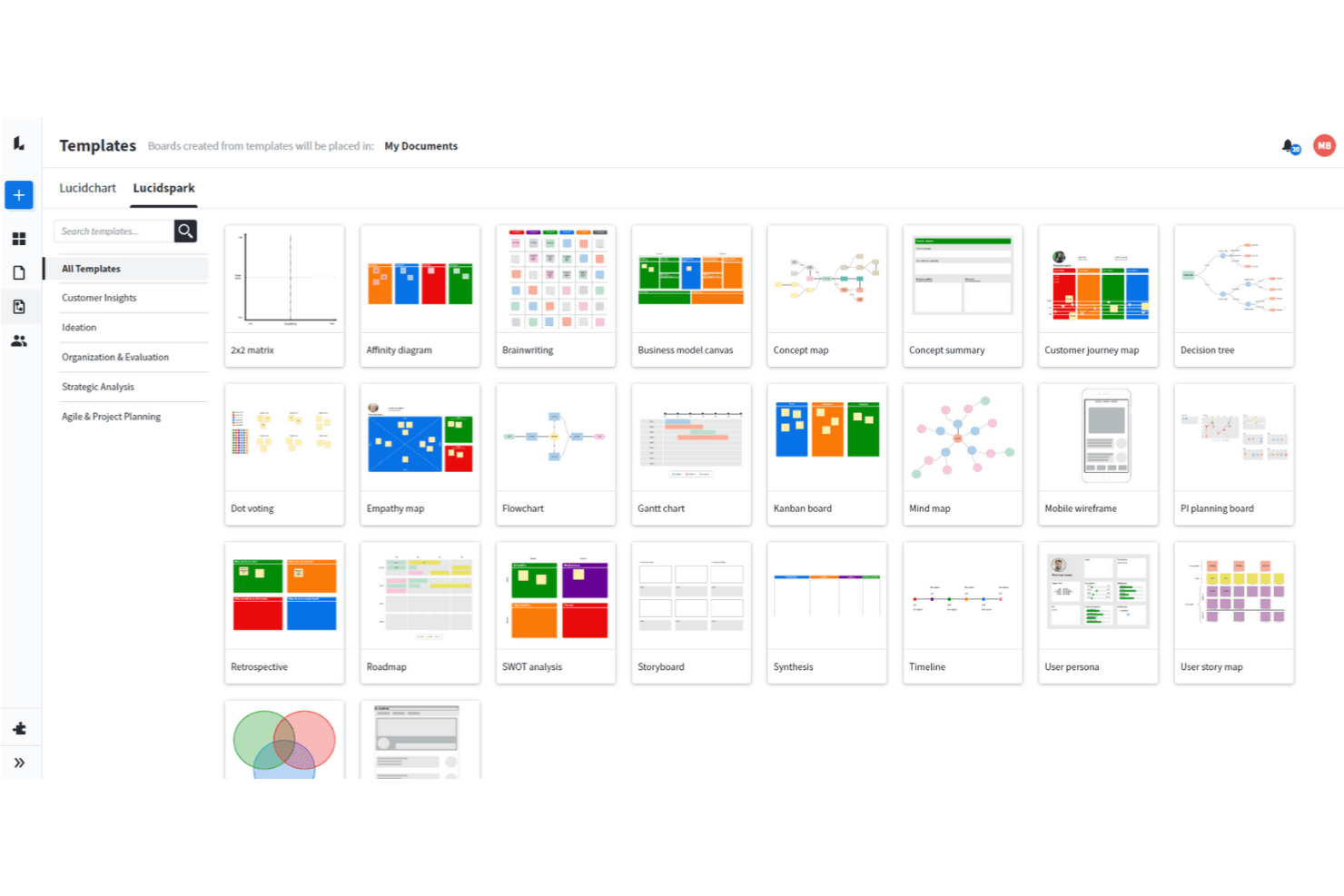
Lucidspark allows you to use a wide range of brainstorming techniques. Lucidspark is a visual collaboration and brainstorming tool built around an infinite canvas, offering sticky notes, mind maps, freehand drawing, AI-assisted ideation, voting sessions, and facilitation controls for live and async teamwork.
Who Is Lucidspark Best For?
Lucidspark is a great fit for facilitators, UX leads, and product managers who need to run structured brainstorming sessions and move ideas into execution without switching tools.
Why I Picked Lucidspark
Lucidspark earns its spot on my shortlist because sticky notes are genuinely central to how the tool works, not an afterthought. I love that private-mode brainstorming hides both note contents and authors until you're ready to reveal them, which keeps early ideas honest and avoids groupthink. From there, AI Magic Sort clusters those notes by theme automatically, so your team skips the tedious manual sorting and gets straight to discussing what matters.
Lucidspark Key Features
- Real-time collaborative canvas: An infinite shared canvas lets your whole team add, move, and edit ideas together live or asynchronously.
- Voting sessions: Team-tier voting lets facilitators run private or anonymous votes with time limits and live result tracking.
- Lucid Cards with Jira sync: Task-style cards connect directly to Jira and Azure DevOps, so ideas move into your backlog without leaving the board.
- Lucid AI idea generation: Prompt AI to generate ideas or build out an entire board, then summarize or cluster results by theme.
Lucidspark Integrations
Lucidspark offers 100+ marketplace integrations, including Jira, Azure DevOps, monday.com, Asana, Google Drive, Slack, Microsoft Teams, and Lucidchart. Team and Enterprise plans include a REST API for custom integrations.
Pros and Cons
Pros:
- Voting controls support group decisions
- AI clusters ideas by theme
- Sticky notes support private ideation
Cons:
- Canvas lacks native audio or video
- Free boards remain sharply limited
Learn more about Lucidspark: Best for AI-guided ideation with dev tool sync
- Free plan + 30-day trial + free demo available
- Pricing upon request
Visit WebsiteCustomer Rating:4.3/5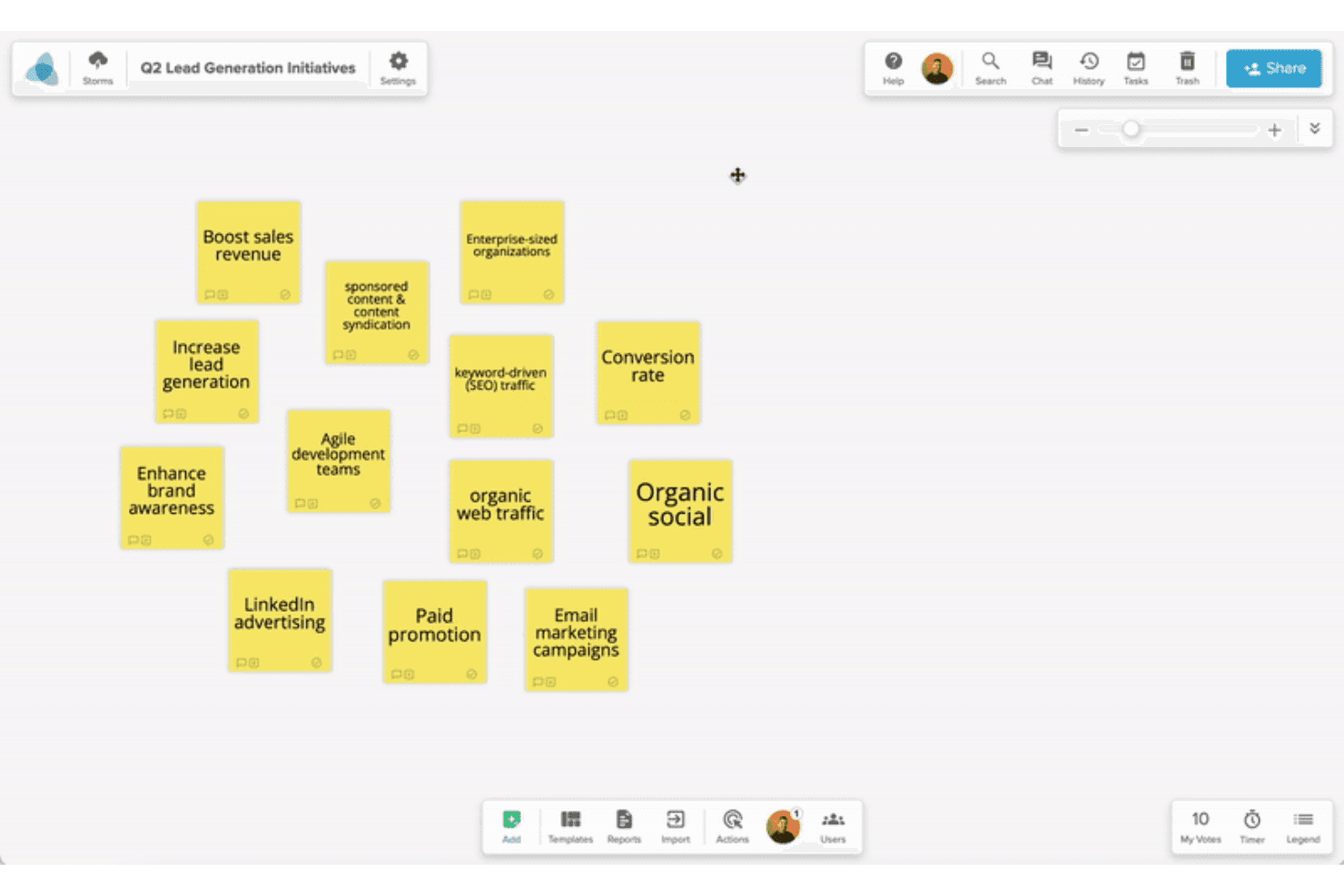
Stormboard helps teams capture and organize ideas into structured plans. Stormboard is a collaborative digital whiteboard built for structured brainstorming, offering AI-assisted idea generation, a large template library, real-time multi-user editing, and two-way sync with dev tools like Jira and Azure DevOps.
Who Is Stormboard Best For?
Stormboard is a strong fit for product and innovation teams that want AI-assisted ideation to flow directly into Jira, Rally, or Azure DevOps backlogs without manual handoffs.
Why I Picked Stormboard
I picked Stormboard as one of the best because StormAI is genuinely woven into the brainstorming process, not bolted on. It generates context-aware sticky notes per section, expands a single idea into five related ones, and clusters notes by theme or sentiment automatically. What pushes it further is the live two-way sync with Jira, Rally, and Azure DevOps, so ideas from a brainstorm session move directly into a sprint backlog without any manual re-entry.
Stormboard Key Features
- Substorms: Nest a full Storm inside a section of a parent Storm to break complex topics into focused, self-contained workspaces.
- Multiple sticky note types: Add text, image, video, freehand whiteboard, or index card notes to capture ideas in whatever format fits the moment.
- Built-in voting with exportable results: Collect votes directly on the board and export the results alongside word clouds and task data.
- Structured template library: Choose from hundreds of pre-built templates covering frameworks like SCAMPER, Affinity Diagram, and Abstraction Laddering.
Stormboard Integrations
Stormboard offers native two-way integrations with Jira, Rally, and Azure DevOps, plus Microsoft Office and Google Drive, Docs, Slides, and Sheets. It also connects with Microsoft Surface Hub and Azure OpenAI Service.
Pros and Cons
Pros:
- Multiple sticky note types support richer input
- Templates support structured discovery workshops
- StormAI expands and clusters brainstorm ideas
Cons:
- Live facilitation lacks video and spotlight tools
- Large sessions can experience board lag
Learn more about Stormboard: 10Best for structured facilitation with AI clustering
Mural
- Free plan available
- From $9.99/user/month (billed annually)
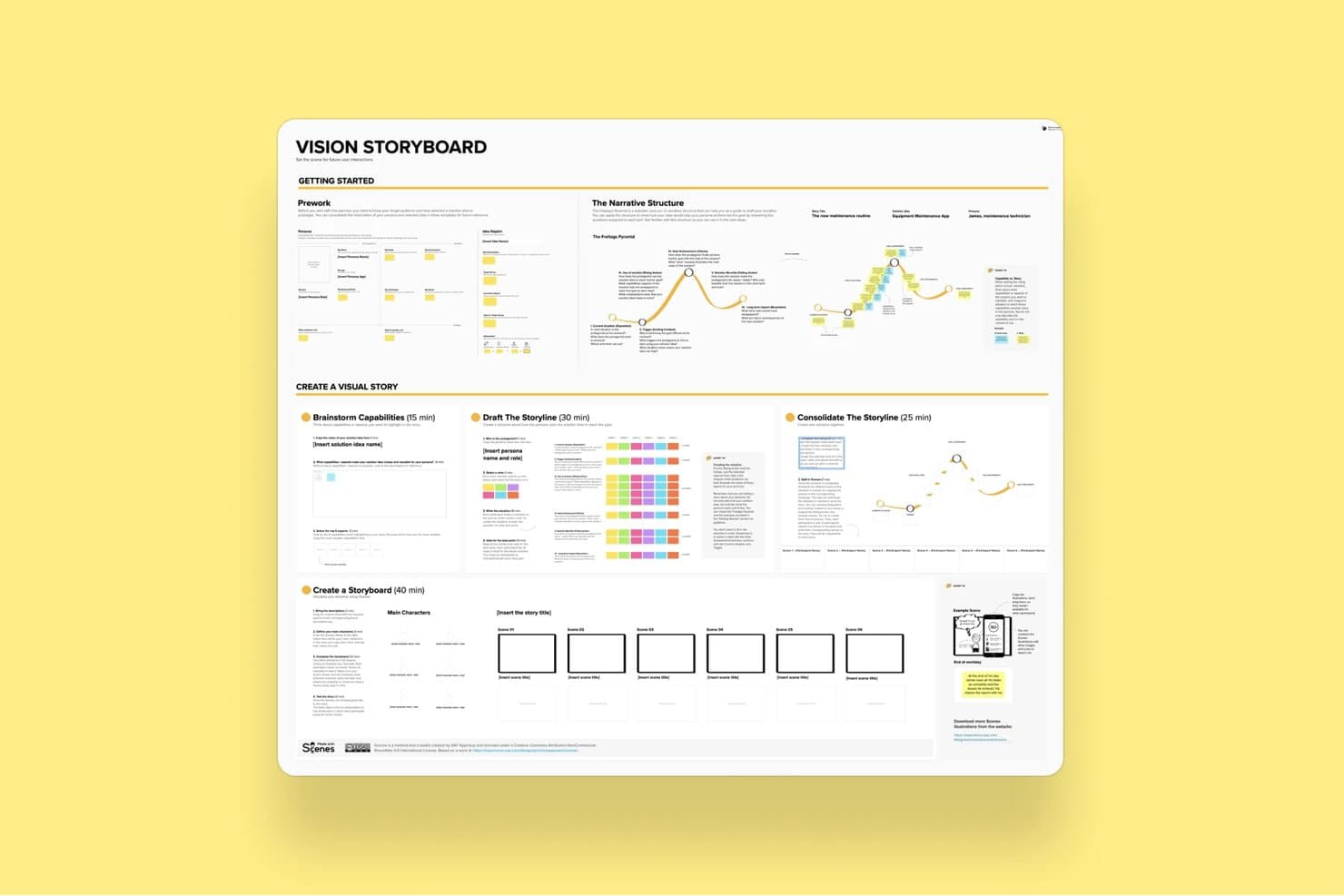
Mural's Vision Storyboard template guides users through building visual stories. Mural is a visual collaboration and brainstorming platform built around an infinite canvas, offering sticky notes, diagramming, AI-powered clustering, structured facilitation controls, and 250+ templates including LUMA design-thinking frameworks.
Who Is Mural Best For?
Mural is a strong fit for facilitators, consultants, and cross-functional teams who run structured workshops and need to move from raw ideas to organized outputs quickly.
Why I Picked Mural
Mural earns its spot on my shortlist because its AI Clustering feature genuinely changes how workshops end. Instead of manually grouping hundreds of sticky notes after a session, I can select them all and let Mural sort them into named thematic clusters, preview the results before committing, and then use the Summarize feature to pull key takeaways from each group. The full facilitation suite, including private mode to prevent groupthink and a step-by-step outline tool, means structured sessions stay on track from start to finish.
Mural Key Features
- Anonymous voting: Participants submit votes without seeing others' choices, keeping prioritization decisions free from social influence.
- Private mode: Hides each contributor's sticky notes from others during input phases, preventing groupthink before ideas are shared.
- Custom toolbar: Restricts which tools participants can access during a session, keeping the workspace focused on the task at hand.
- LUMA frameworks: A built-in set of design-thinking methods available on Business plans to guide teams through structured discovery and ideation activities.
Mural Integrations
Mural offers native integrations with Jira Cloud, Microsoft Teams, Zoom, Webex, Slack, Google Workspace, Adobe Creative Cloud Library, Butter, Azure Active Directory, Okta, and GitHub. It also provides an API for custom integrations.
Pros and Cons
Pros:
- Templates guide discovery and innovation workshops
- Facilitation controls support structured brainstorming sessions
- AI clustering organizes workshop output quickly
Cons:
- Large boards may respond slowly sometimes
- Interface changes can disrupt established workflows
Learn more about Mural:
Diğer Seçenekler
İşte en iyi beyin fırtınası araçları listesine giremeyen birkaç sağlam seçenek daha:
- 11ConceptboardBest for live facilitation with built-in video chat
- 12IdeamapBest for multi-method voting on brainstormed ideas
- 13LucidchartBest for turning diagrams into data-linked visuals
- 14ClickUpBest for turning whiteboard ideas into tracked tasks
- 15WhimsicalBest for product builders who sketch and plan
- 16MindomoBest for brainstorming across web, desktop and mobile
- 17BluescapeBest for brainstorming in air-gapped environments
- 18Confluence WhiteboardsBest for ideation that feeds straight into Jira
How I Evaluate Brainstorming Tools
I split my evaluation into three parts. First—and most heavily weighted—I check whether a tool lets teams edit a shared canvas simultaneously and capture ideas fast using sticky notes or freeform elements. Then I look at standout features like AI-assisted ideation and facilitation controls. Finally, I consider onboarding simplicity and pricing value.
Core Functionality (Table Stakes for This List)
When I'm selecting tools for my list, I score each one on a scale from 0 (does not offer the functionality) to 5 (excels in this area) for each core functionality listed below. I then convert the total into a percentage to help assess each tool's overall fit, with extra weight on any functionalities I've deemed essential.
- Real-Time Collaboration (Essential): I check whether multiple teammates can add and move sticky notes on the same board simultaneously without lag or cursor conflicts.
- Idea Capture Elements (Essential): Tools should offer more than plain text—I look for sticky notes, shapes, cards, and freeform drawing that let people capture thoughts fast.
- Organization & Clustering: I evaluate how easily you can drag ideas into groups, tag them by theme, or draw connectors to map relationships during an affinity mapping session.
- Voting & Prioritization: Built-in dot-voting or ranking matters here. I look at whether facilitators can configure vote limits and whether results display clearly for the group.
- Templates & Frameworks: A solid library of ready-made formats—like mind maps, SWOT grids, or How Might We boards—saves real setup time. I also check if you can save custom templates.
- Session Facilitation Controls: I look for features like timers, reveal toggles, and participant-management options that let a facilitator guide a structured workshop from start to finish.
Once I have a list of tools that meet the criteria, I consider what sets each platform apart.
Differentiating Factors (What Sets Vendors Apart)
Here's how I compare and contrast different vendors:
Standout Features
AI-assisted ideation is the first thing I check. I look for tools where AI can auto-cluster sticky notes or generate starter prompts mid-session—helpful when a product discovery workshop stalls. Timer and facilitation controls matter just as much. A good reveal toggle keeps ideas hidden until everyone has contributed, which prevents anchoring bias in remote sprint planning. I also evaluate whether a tool supports async contributions, since distributed teams need persistent boards that stay usable across time zones without losing thread context.
Beyond Features
I look at how easily ideas move from a brainstorming board into execution. If your team has to manually copy sticky notes into Jira or Linear, you've already lost context. Tools with native export or two-way sync to PM platforms save that handoff. Adoption matters just as much—I check whether non-technical stakeholders like execs or designers can jump in without a tutorial. A tool nobody opens after the first workshop isn't worth the license. I also evaluate security controls, since early-stage feature ideas are sensitive IP that needs proper board-level permissions and SSO.
Beyin Fırtınası Aracı Nasıl Seçilir?
Uzun özellik listeleri ve karmaşık fiyatlandırma yapılarına takılıp kalmak kolaydır. Kendinize özgü yazılım seçim sürecinizi yürütürken odağınızı korumanıza yardımcı olmak için göz önünde bulundurmanız gereken faktörlerin bir kontrol listesini aşağıda bulabilirsiniz:
| Faktör | Göz Önünde Bulundurulması Gerekenler |
|---|---|
| FaktörÖlçeklenebilirlik | Göz Önünde Bulundurulması GerekenlerAraç, ekibinizin büyüklüğü ve karmaşıklığıyla birlikte gelişebilir mi? Kullanıcı sınırlarına, çok miktarda veride performans düşüşlerine veya ekipler büyüdükçe hızla artan maliyetlere dikkat edin. |
| FaktörEntegrasyonlar | Göz Önünde Bulundurulması GerekenlerSlack, Jira, Figma veya Trello gibi mevcut araçlarınızla kolayca bağlantı kurabiliyor mu? Manuel geçici çözümler zaman kaybettirir ve ivmeyi yok eder. |
| FaktörÖzelleştirilebilirlik | Göz Önünde Bulundurulması GerekenlerŞablonları, iş akışlarını veya görünümleri ekibinizin düşünme ve çalışma biçimine uyacak şekilde uyarlayabilir misiniz? Herkese uyan tek tip kurulumlar genellikle işleri yavaşlatır. |
| FaktörKullanım kolaylığı | Göz Önünde Bulundurulması GerekenlerFarklı işlevlere sahip ekipler fazla açıklamaya ihtiyaç duymadan kullanmaya başlayabilir mi? Çözümü anlamak saatler sürerse, ne kadar güçlü olursa olsun insanlar onu kullanmaz. |
| FaktörUygulama ve işe alıştırma | Göz Önünde Bulundurulması GerekenlerÇalışmaya ne kadar hızlı başlayabilirsiniz? Ekibinizin ilk oturumunda katkı sunabilmesi için içe aktarma araçları, ürün turları ve uygulama içi yönlendirmeler arayın. |
| FaktörMaliyet | Göz Önünde Bulundurulması GerekenlerÖdediğiniz ücret karşılığında gerçekten ne elde ediyorsunuz? İş birliği özelliklerinin ödeme duvarlarının arkasında olmasına veya kullanım ihtiyaçlarıyla örtüşmeyen yüksek kullanıcı başı fiyatlandırmaya dikkat edin. |
| FaktörGüvenlik önlemleri | Göz Önünde Bulundurulması GerekenlerSSO, veri şifreleme ve kullanıcı rolü denetimlerini destekliyor mu? Ürün fikirleri veya fikrî mülkiyet üzerinde beyin fırtınası yapıyorsanız, zayıf güvenlik standartlarını göze almayın. |
| FaktörDâhilî kaynak gereksinimleri | Göz Önünde Bulundurulması GerekenlerBirinin şablonları, kullanıcıları veya entegrasyonları sürekli olarak yönetmesi gerekecek mi? Özellikle küçük ekipler için yalın araçlar zaman kazandırır. |
Beyin Fırtınası Araçları Nedir?
Beyin fırtınası araçları, bireylerin veya ekiplerin fikir üretmesine, bunları gruplar hâlinde düzenlemesine ve fikirler ya da konular arasındaki ilişkileri göstermesine yardımcı olan dijital araçlardır. Dijital beyaz tahtalar veya zihin haritalama araçlarıyla aynı yazılım grubuna dâhildir ve yaratıcı düşünmeyi ve grup iş birliğini teşvik etmek üzere tasarlanmıştır. Renkler, semboller, etiketler, yapışkan notlar ve diğer araçları kullanarak fikirleri görselleştirmenin yanı sıra, @ mesajları ve eş zamanlı ortak yazarlık da dâhil olmak üzere diğer ekip üyeleriyle iş birliği yapmaya yönelik çok sayıda yöntem sunarlar.
Beyin fırtınası araçları, grupların fikirler üzerinde iş birliği yapmak, görevleri düzenlemek ve yaratıcılığı artırmak için birlikte çalışmasına yardımcı olur. Ayrıca beyin fırtınası sürecini dijitalleştirerek daha önce kâğıt üzerinde veya manuel olarak yürütülen bir sürece düzen kazandırır; böylece gelecekte başvurmak üzere fikirlerinize her zaman geri dönebilirsiniz (şirketinizin toplantı odasındaki beyaz tahtaya karaladıklarınızın fotoğrafına tekrar bakmak yerine).
Beyin Fırtınası Araçlarının Özellikleri
Beyin fırtınası araçlarını seçerken aşağıdaki temel özelliklere dikkat edin:
- Gerçek zamanlı iş birliği: Birden fazla kullanıcının aynı anda fikir sunmasına olanak tanır; bu da ekiplerin canlı oturumlar sırasında uyumlu ve üretken kalmasına yardımcı olur.
- Görsel fikir haritalama: Kullanıcıların düşüncelerini diyagramlar veya zihin haritaları kullanarak düzenlemesini sağlar; böylece ilişkileri görmek ve kavramları geliştirmek kolaylaşır.
- Şablon kitaplığı: Yaygın beyin fırtınası biçimleri için hazır yapılar sunar; böylece ekipler sıfırdan kurulum yapmadan hızlıca başlayabilir.
- Yorum yapma ve geri bildirim araçları: Ekip üyelerinin doğrudan fikirler üzerinde görüş bırakmasını sağlar; bu da tartışmayı ve geliştirmeyi destekler.
- Oylama veya önceliklendirme: Ekiplerin fikirlere sıralama veya puan verme yoluyla en umut verici fikirlere odaklanmasını ve daha hızlı karar almasını sağlar.
- Dışa aktarma seçenekleri: Oturumların PDF, PNG veya CSV gibi çeşitli biçimlerde kaydedilmesini ya da paylaşılmasını destekler; bu da takip çalışmalarını kolaylaştırır.
- Erişim denetimleri: Yöneticilerin kimlerin görüntüleyebileceğini, düzenleyebileceğini veya yorum yapabileceğini yönetmesini sağlar; hassas fikirleri korur ve iş birliğine dayalı alanlarda düzeni sürdürür.
- Bulut tabanlı erişim: Ekip üyelerinin internet bağlantısı olan her yerden katılabilmesini sağlar; uzaktan ve hibrit çalışma modellerini destekler.
- Beyaz tahta işlevi: Serbest biçimli düşünme, taslak çizme veya herhangi bir kısıtlama olmadan diyagram oluşturma için esnek bir alan sunar.
- Entegrasyon desteği: İş akışlarını kolaylaştırmak ve bağlam değiştirme ihtiyacını azaltmak için Slack, Trello veya Google Drive gibi araçlara bağlanır.
Beyin Fırtınası Yazılımının Avantajları
Beyin fırtınası araçlarını uygulamak ekibiniz ve işletmeniz için çeşitli avantajlar sağlar. Faydalanabileceğiniz avantajlardan bazıları şunlardır:
- Daha hızlı fikir üretimi: Gerçek zamanlı katkılar ve görsel araçlar, ekiplerin daha kısa sürede daha fazla fikir üretmesine yardımcı olur.
- Daha iyi ekip uyumu: Paylaşılan çalışma alanları ve yorumlar herkesin aynı bilgiye sahip olmasını sağlar ve iletişim yanlışlıklarını azaltır.
- Daha düzenli oturumlar: Şablonlar ve haritalama özellikleri beyin fırtınasına yapı kazandırır; böylece fikirler kaybolmaz veya unutulmaz.
- Daha kolay karar alma: Oylama araçları ve önceliklendirme özellikleri, ekiplerin en değerli fikirleri hızlıca belirlemesine yardımcı olur.
- Geliştirilmiş uzaktan iş birliği: Bulut erişimi ve entegrasyonlar, farklı konumlardaki ekiplerin katılımını ve sürece bağlı kalmasını kolaylaştırır.
- Fikirlerin hayata geçirilmesinde güçlenme: Dışa aktarma seçenekleri ve bağlantılı iş akışları, ham fikirlerin gerçek sonraki adımlara dönüştürülmesine yardımcı olur.
- Daha anlaşılır belgeleme: Her katkı otomatik olarak kaydedilir; böylece belleğe veya notlara güvenmek zorunda kalmazsınız.
Beyin Fırtınası Araçlarının Maliyetleri ve Fiyatlandırması
Beyin fırtınası araçlarını seçmek, mevcut çeşitli fiyatlandırma modellerini ve planları anlamayı gerektirir. Maliyetler özelliklere, ekip büyüklüğüne, eklentilere ve daha fazlasına göre değişir. Aşağıdaki tabloda beyin fırtınası aracı çözümlerinde yaygın planlar, bunların ortalama fiyatları ve genellikle dâhil edilen özellikler özetlenmiştir:
Beyin Fırtınası Araçları İçin Plan Karşılaştırma Tablosu
| Plan Türü | Ortalama Fiyat | Yaygın Özellikler |
|---|---|---|
| Plan TürüÜcretsiz Plan | Ortalama Fiyat$0 | Yaygın ÖzelliklerTemel fikir yakalama, sınırlı şablonlar, tek kullanıcı erişimi ve en az düzeyde dışa aktarma seçenekleri. |
| Plan TürüKişisel Plan | Ortalama Fiyat$5–$15/kullanıcı/ay | Yaygın ÖzelliklerSınırsız panolar, ek şablonlar, bulut depolama ve e-posta desteği. |
| Plan Türüİşletme Planı | Ortalama Fiyat$10–$25/kullanıcı/ay | Yaygın ÖzelliklerEkip iş birliği, gerçek zamanlı düzenleme, üçüncü taraf uygulamalarla entegrasyonlar ve öncelikli destek. |
| Plan TürüKurumsal Plan | Ortalama Fiyat$20–$40/kullanıcı/ay | Yaygın ÖzelliklerGelişmiş yönetici denetimleri, SSO, denetim günlükleri, özel işe alıştırma süreci ve özel güvenlik ayarları. |
Beyin Fırtınası Araçları Hakkında SSS
Beyin fırtınası araçlarını kullanma konusunda kapsamlı deneyimim olduğundan, insanlar bu konu hakkında sık sık benden daha fazla bilgi istiyor. En sık sorulan soruların yanıtları burada:
Beyin fırtınası araçları uzaktan çalışan ekipleri nasıl destekler?
Beyin fırtınası araçları, uzaktan çalışan ekiplerin nerede oldukları fark etmeksizin fikirlerini gerçek zamanlı olarak paylaşmalarını sağlar. Aynı odadaymışsınız gibi iş birliği yapmak için ortak panoları, canlı düzenlemeyi, yorumları ve görüntülü görüşmeleri kullanabilirsiniz. İşlerin kesintisiz ilerlemesini sağlamak için bulut erişimi, otomatik kaydetme ve farklı cihazlarla uyumluluk sunan araçları tercih edin.
Beyin fırtınası neden önemlidir?
Beyin fırtınası; yaratıcılığı, yenilikçiliği ve iş birliğine dayalı problem çözmeyi teşvik etmenin kritik bir yoludur. Varsayımlara meydan okumak için alışılmışın dışında düşünmeyi kullanarak ekiplerin yeni fikirler üretmesini sağlayan harika bir yöntemdir.
Herkesi kapsayıcı toplantılara dahil etmek ekip moralini yükseltir, katılımı artırır ve yeni bir düşünme biçimine ilham verir. Bu da sonuç olarak daha iyi kararlar alınmasını ve daha etkili çözümler geliştirilmesini sağlayabilir.
Bazı popüler beyin fırtınası teknikleri nelerdir?
Yeni fikirler üretmek için kullanabileceğiniz birçok farklı beyin fırtınası tekniği vardır. Bunlar arasında zihin haritalama, SWOT analizi, Hızlı Fikir Üretimi ve Beyin Yazımı bulunur. Diğer popüler seçenekler arasında Altı Şapka ve SCAMPER (Yerine Koyma, Birleştirme, Uyarlama, Değiştirme, Başka Bir Amaçla Kullanma, Ortadan Kaldırma veya Tersine Çevirme) yer alır.
Kullanılacak en iyi teknik büyük ölçüde içinde bulunduğunuz durumun bağlamına ve beyin fırtınası oturumunun hedeflerine bağlıdır. Sizin için en iyi sonucu veren yaklaşımı bulmak üzere farklı teknikleri bir arada kullanmanızı öneririm.
Beyin fırtınası, zihin haritalamayla aynı şey midir?
İki kavram birbiriyle ilişkili olsa da beyin fırtınası, zihin haritalamayla aynı şey değildir. Beyin fırtınası, işe yarayan herhangi bir yöntemle çok çeşitli yeni fikirler üretmeyi ifade eden genel bir terimdir.
Zihin haritalama ise ekiplerin düşüncelerini ve fikirlerini düzenlemelerine yardımcı olan görsel bir araç veya tekniği ifade eder. Dolayısıyla beyin fırtınası yeni fikirler üretmeye odaklanırken zihin haritalama bu fikirleri düzenlemenize ve görselleştirmenize yardımcı olur.
Bir beyin fırtınası oturumu sırasında çok fazla fikri nasıl yönetirsiniz?
Beyin fırtınasının her turu için bir zamanlayıcı ayarlayın ve her kişinin paylaşabileceği fikir sayısını sınırlayın. Seçenekleri daraltmak için oylama veya puanlama özelliklerini kullanın. Tekrarları önlemek için benzer fikirleri bir araya getirin ve gerekirse düşük öncelikli fikirleri daha sonra yeniden değerlendirin.