

Managing user insights can be a daunting task for any product manager. You might find yourself buried under endless notes and feedback, struggling to make sense of it all. UX research repository tools are here to help you centralize and organize this valuable data, making it easier for your team to collaborate and make informed decisions.
In my experience testing and reviewing software, I've found these tools to be essential for turning raw data into actionable insights. I'll share my top picks, focusing on what sets each tool apart and how they can meet your unique needs.
Expect a straightforward, unbiased review to help you choose the right solution for your team.
Why Trust Our Software Recommendations
6,700+
Reviews
20
Industry experts
16+
Evaluation factors
14
Years
Our team has been testing and reviewing software since 2012. As product managers ourselves, we know how difficult—and important—it is to choose the right software.
For this guide, we evaluated tools using hands-on testing and independent research, scoring tools using our selection criteria.
Our reviews reflect our human editorial judgment, not a sales pitch.
Expert reviewers:
- Andrew LumbySenior TPM
- Cristiano ValimSenior UI/UX Lead


UX Research Repository Tools Comparison Table
This comparison table summarizes pricing details for my top UX research repository tools selections:
| Tool | Best For | Trial Info | Price | ||
|---|---|---|---|---|---|
| 1 | Best for DIY research ops at enterprise scale | Free plan + free demo + 14-day trial available | From $20/user/month | Website | |
| 2 | Best for AI-surfaced insights from live sessions | Free demo available | Pricing upon request | Website | |
| 3 | Best for multi-source feedback in one repo | Free demo available | Pricing upon request | Website | |
| 4 | Best for mixed-method research synthesis | Free plan available | From $208/user/month | Website | |
| 5 | Best for video clips shared without onboarding | Free demo available | From $395/month | Website | |
| 6 | Best for collaborative research repositories at scale | Free plan + free demo available | Pricing upon request | Website | |
| 7 | Best for qualitative analysis | 15-day free trial | From $15/user/month (billed annually) | Website | |
| 8 | Best for all-in-one research ops and CRM | Free trial + free demo available | From $129/seat/month | Website | |
| 9 | Best for end-to-end AI research synthesis | Free plan available | Pricing upon request | Website | |
| 10 | Best for flat-rate agency research repositories | Free plan available | From $20/month | Website |


Best UX Research Repository Tool Reviews
Below are my detailed summaries of the best UX research repository tools that made it onto my shortlist. My reviews offer a detailed look at the key features, pros & cons, integrations, and ideal use cases of each tool to help you find the best one for you.
 Best for DIY research ops at enterprise scale
- Free plan + free demo + 14-day trial available
- From $20/user/month
Visit WebsiteCustomer Rating:4.6/5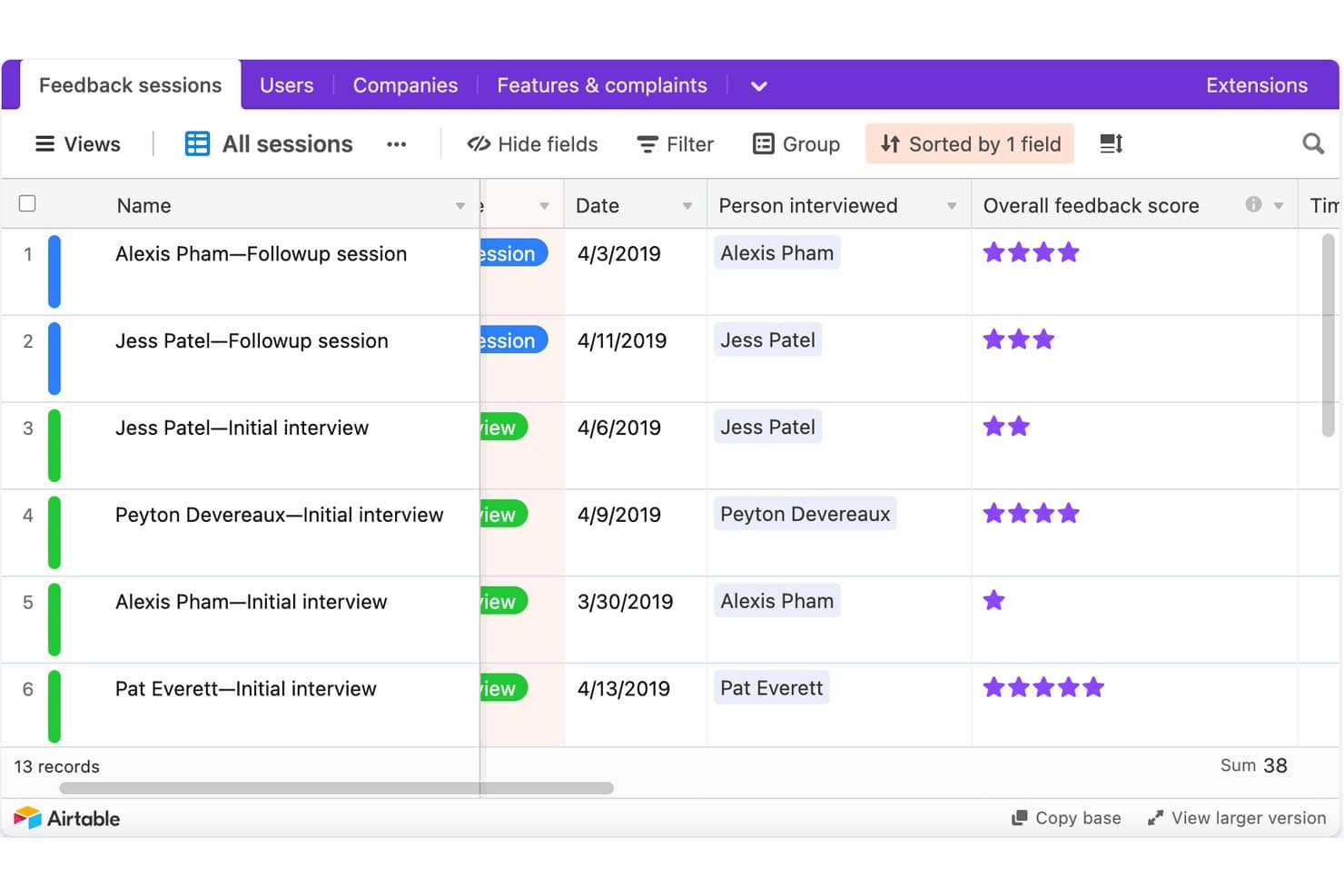
Airtable tracks UX research sessions with scores and dates. Airtable is a no-code relational database platform that research teams configure into a UX research repository, using linked tables, custom tagging fields, AI summarization, and stakeholder-facing interfaces to store and share findings.
Who Is Airtable Best For?
Airtable is a strong fit for design ops leads and product managers at enterprise organizations who have the bandwidth to build and maintain a custom research infrastructure.
Why I Picked Airtable
I've included Airtable in my top picks because it's the only tool on this list that lets enterprise research ops teams build exactly the repository structure they need from scratch. I love how a single Airtable base can house 2,000+ studies across 85+ researchers, linking raw observations to insights to recommendations in a traceable chain. Interface Designer then turns that same database into clean, read-only stakeholder dashboards without giving PMs or engineers edit access to the underlying data.
Airtable Key Features
- AI field summarization: AI fields automatically summarize interview notes and categorize feedback by sentiment directly inside your database records.
- Linked record tables: Connect studies, raw observations, insights, and recommendations in separate tables so every conclusion traces back to source evidence.
- Granular access permissions: Assign Owner, Creator, Editor, Commenter, or Read-only roles at the workspace and base level, with field- and record-level controls on Enterprise.
- Automation triggers: Set up automated Slack, email, or Teams notifications—like weekly study rollups—without writing any code.
Airtable Integrations
Airtable lists native integrations with Miro, Jira, Slack, Salesforce, Typeform, ChatGPT, Claude, Tableau Cloud, Zendesk, and Google Drive. Its API, scripting, custom extensions, and MCP connections support custom research workflows.
Pros and Cons
Pros:
- Creates tailored stakeholder research dashboards
- Scales across thousands of studies
- Links evidence to recommendations
Cons:
- No native transcript synthesis
- Requires ongoing taxonomy maintenance
Learn more about Airtable: Best for AI-surfaced insights from live sessions
- Free demo available
- Pricing upon request
Visit WebsiteCustomer Rating:4.5/5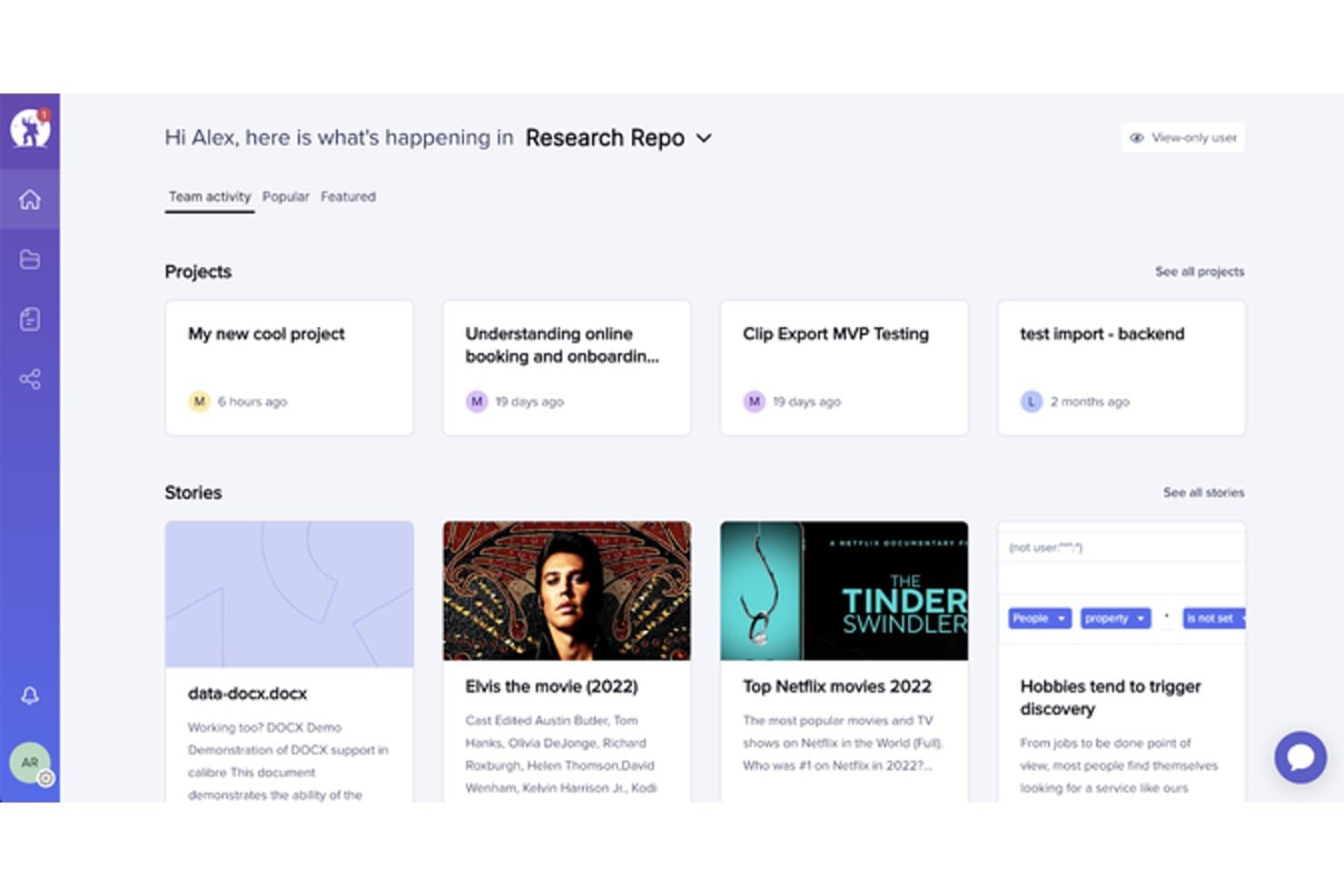
UserTesting organizes research projects and stories in a central repository. UserTesting is a user research platform that combines moderated and unmoderated testing, AI-powered insight synthesis, and a centralized research repository through its Insights Hub.
Who Is UserTesting Best For?
UserTesting fits product managers and designers at mid-size to enterprise companies who need fast video feedback from real users and want AI to do the heavy lifting of surfacing themes.
Why I Picked UserTesting
I picked UserTesting as one of the best because its AI does the synthesis work that usually falls on the researcher. After a live session wraps, Insights Discovery lets me ask questions like "What do we know about checkout friction?" across every past study, pulling answers from video and survey data without manual digging. Instant Insights and Smart tags automatically label moments by sentiment or theme, so key findings surface before I've even opened the transcript.
UserTesting Key Features
- Insights Hub: A centralized repository that organizes session videos, transcripts, surveys, and highlight reels into workspaces and folders across your team.
- Tag Manager: Create project-specific and global tags, bulk-apply them across studies, and control who can create or edit them based on their role.
- Collaborative Insights Reports: Build and co-edit shareable reports that pull in clips, tags, charts, and reels, then present them live using Presenter mode.
- Stakeholder integrations: Embed findings directly into Jira issues, Confluence pages, and Slack channels so non-researchers can act on research without leaving their tools.
UserTesting Integrations
UserTesting offers integrations with Figma, Jira, Jira Product Discovery, Confluence, Slack, Microsoft Teams, FigJam, Miro, and Atlassian Rovo. Its Results API supports custom integrations.
Pros and Cons
Pros:
- Collaborative reports package findings for stakeholders
- Evidence links connect themes to videos
- AI surfaces themes from live sessions
Cons:
- No built-in affinity mapping workspace
- Outside research artifact ingestion remains limited
Learn more about UserTesting: Best for multi-source feedback in one repo
- Free demo available
- Pricing upon request
Visit WebsiteCustomer Rating:4/5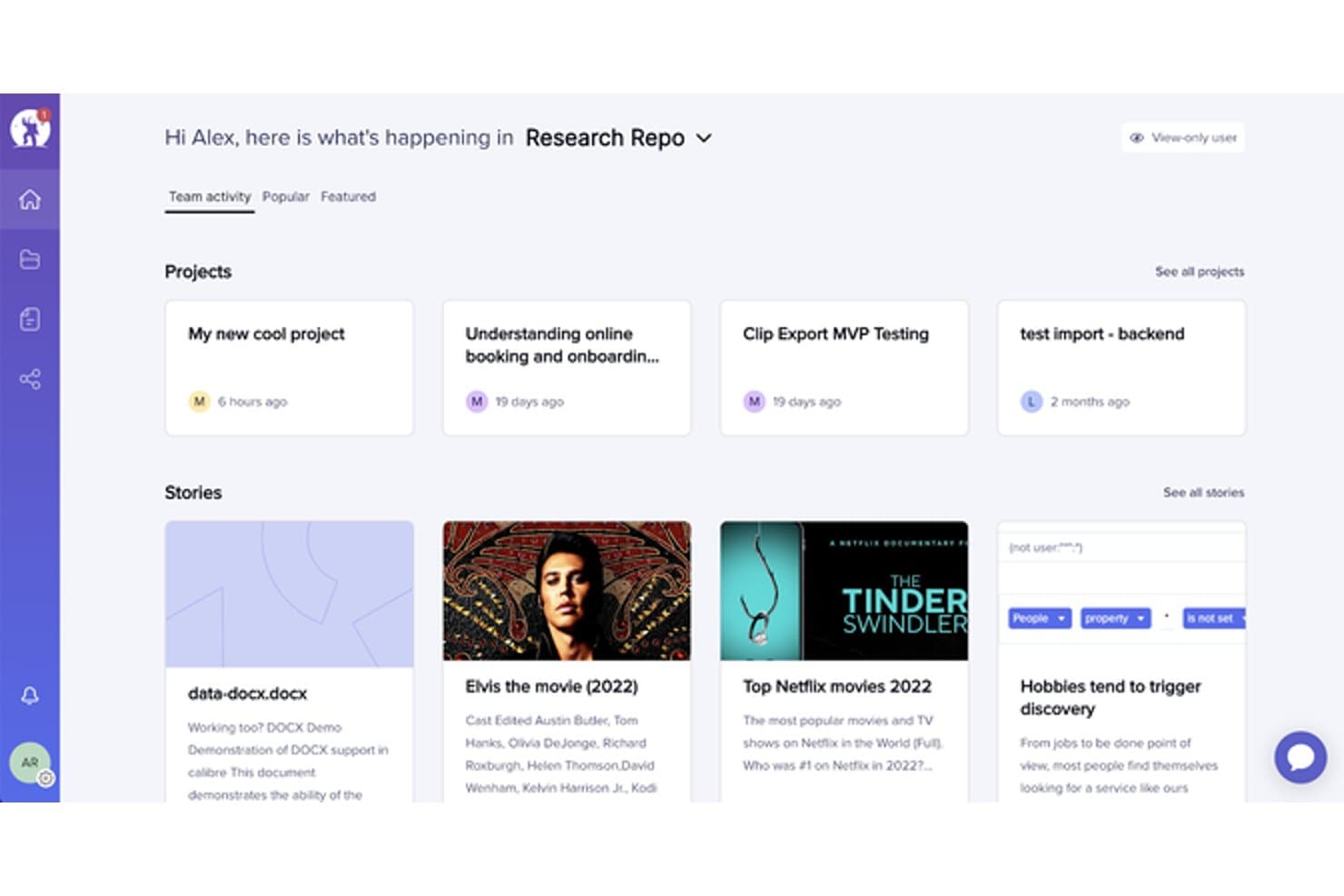
EnjoyHQ centralizes research projects and stories in one dashboard. EnjoyHQ is a UX research repository tool that centralizes qualitative data from multiple sources—interviews, support tickets, surveys, NPS, and app reviews—into one searchable workspace with tagging, transcription, and insight reporting.
Who Is EnjoyHQ Best For?
EnjoyHQ suits UX researchers on teams that pull feedback from many sources—support tickets, NPS, surveys, and app reviews—and need one searchable place to organize it all.
Why I Picked EnjoyHQ
I picked EnjoyHQ as one of the best because it pulls feedback from more places than almost any other research repository I've used—support tickets via Zendesk and Intercom, NPS from tools like Delighted and Wootric, app reviews from the App Store and Google Play, and interview recordings, all landing in one searchable workspace. What I especially like is its dual-taxonomy system, where you can maintain one tag structure for researchers and a separate one for stakeholders. Workspace-wide boolean and fuzzy search across all those sources makes it genuinely fast to surface older findings.
EnjoyHQ Key Features
- Free unlimited transcription: EnjoyHQ transcribes video and audio files at no cost in roughly 35 languages, with speaker timestamps and clip-cutting built in.
- Analysis board: Highlighted snippets from your data land directly on a visual board where you can group them into color-coded themes and filter by tags or customer properties.
- Automation rules: You can set conditions that automatically route incoming feedback into the right project without manual sorting.
- Granular access permissions: Assign users different roles across different workspaces, and control which project sections read-only members can see.
EnjoyHQ Integrations
EnjoyHQ offers native integrations with Jira, Zendesk, Intercom, Qualtrics, Typeform, UserTesting, UserZoom, Zoom, Slack, and Trello. It also provides a public API and supports Zapier.
Pros and Cons
Pros:
- Granular permissions support broad stakeholder access
- Free unlimited transcription supports multilingual studies
- Centralizes feedback across diverse research sources
Cons:
- Product future remains uncertain under UserTesting ownership
- Manual theme synthesis lacks automated clustering
Learn more about EnjoyHQ: Best for mixed-method research synthesis
- Free plan available
- From $208/user/month
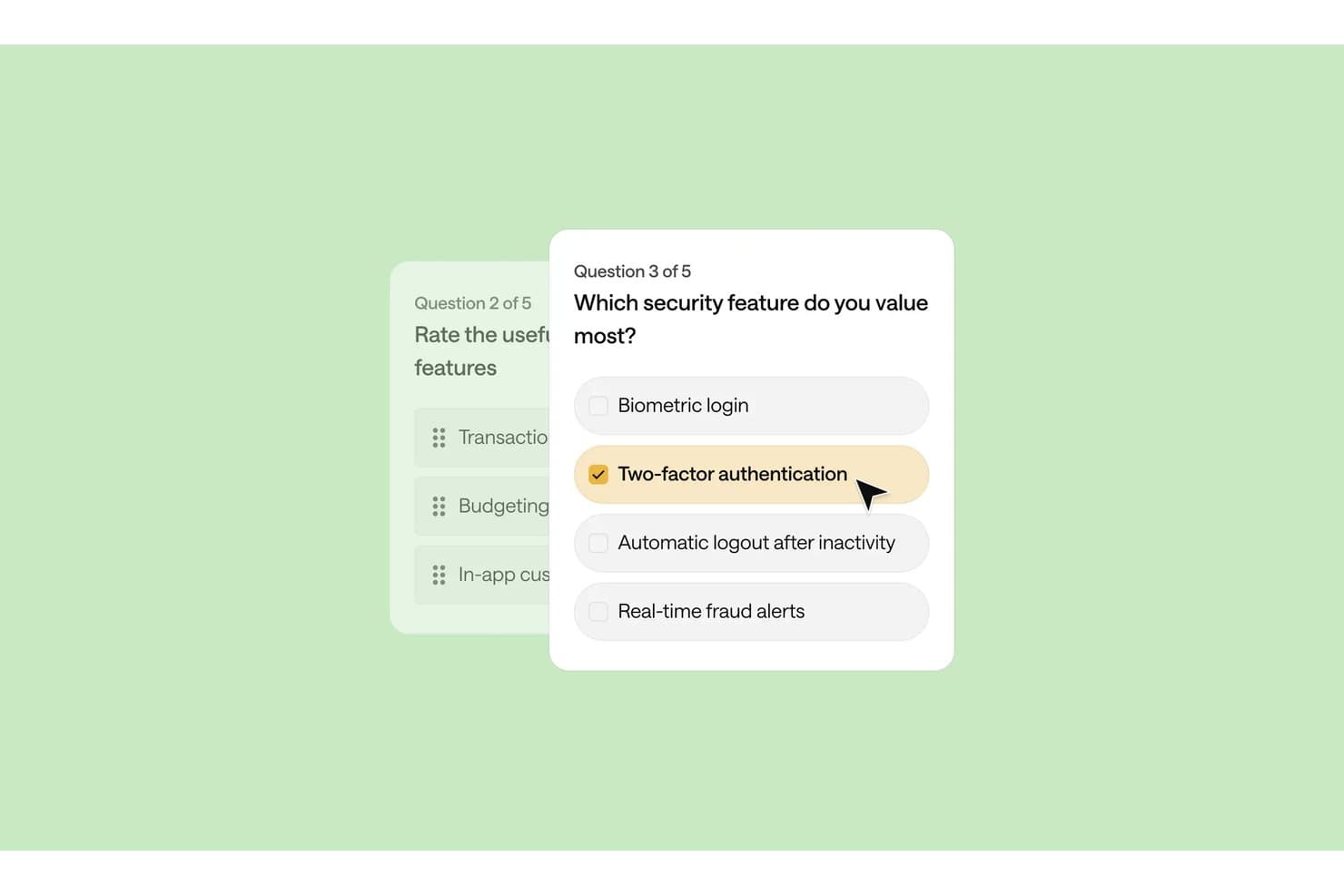
Optimal Workshop lets users build surveys with multiple-choice security questions. Optimal Workshop is a UX research platform that combines card sorting, tree testing, interviews, and qualitative analysis tools with an AI-powered repository for storing, tagging, and synthesizing research data across studies.
Who Is Optimal Workshop Best For?
Optimal Workshop suits UX researchers and research operations leads who need to run card sorting, tree testing, and qualitative interviews inside one platform and synthesize findings across methods.
Why I Picked Optimal Workshop
I picked Optimal Workshop as one of the best because it's one of the few tools that genuinely connects card sorting, tree testing, and qualitative interviews inside a single research repository. What I find especially useful is the Theme Builder, which lets me filter tagged observations across sessions and surface patterns as named themes with linked evidence. The AI Chat feature then takes that synthesized data and outputs it directly to Slack or Notion, so findings move from raw sessions to stakeholder-ready format without leaving the platform.
Optimal Workshop Key Features
- Chord diagram: Visualizes relationships between tags across your qualitative data, showing how observations connect to multiple themes at once.
- MCP integration: Connects AI tools like Claude, ChatGPT, and Gemini directly to your workspace so you can query and filter studies by type, participant segment, or timeframe.
- Highlight reels: Lets you clip and compile video moments from recorded sessions into shareable reels for stakeholders who weren't in the room.
- Participant recruitment panel: Gives you access to a built-in panel of over 10 million verified participants across 150+ countries, with built-in screening, scheduling, and incentive management.
Optimal Workshop Integrations
Optimal Workshop integrates with Slack, Notion, Confluence, Jira, Linear, Miro, Zoom, Google Meet, and Microsoft Teams for sharing findings and capturing interviews. Enterprise customers can connect Optimal’s API to data warehouses, BI tools, and internal dashboards.
Pros and Cons
Pros:
- Unlimited seats widen stakeholder access
- Linked evidence supports defensible research themes
- Strong card sorting and tree testing
Cons:
- Starter permissions limit repository governance
- Cross-study search remains immature
Learn more about Optimal Workshop: Best for video clips shared without onboarding
- Free demo available
- From $395/month
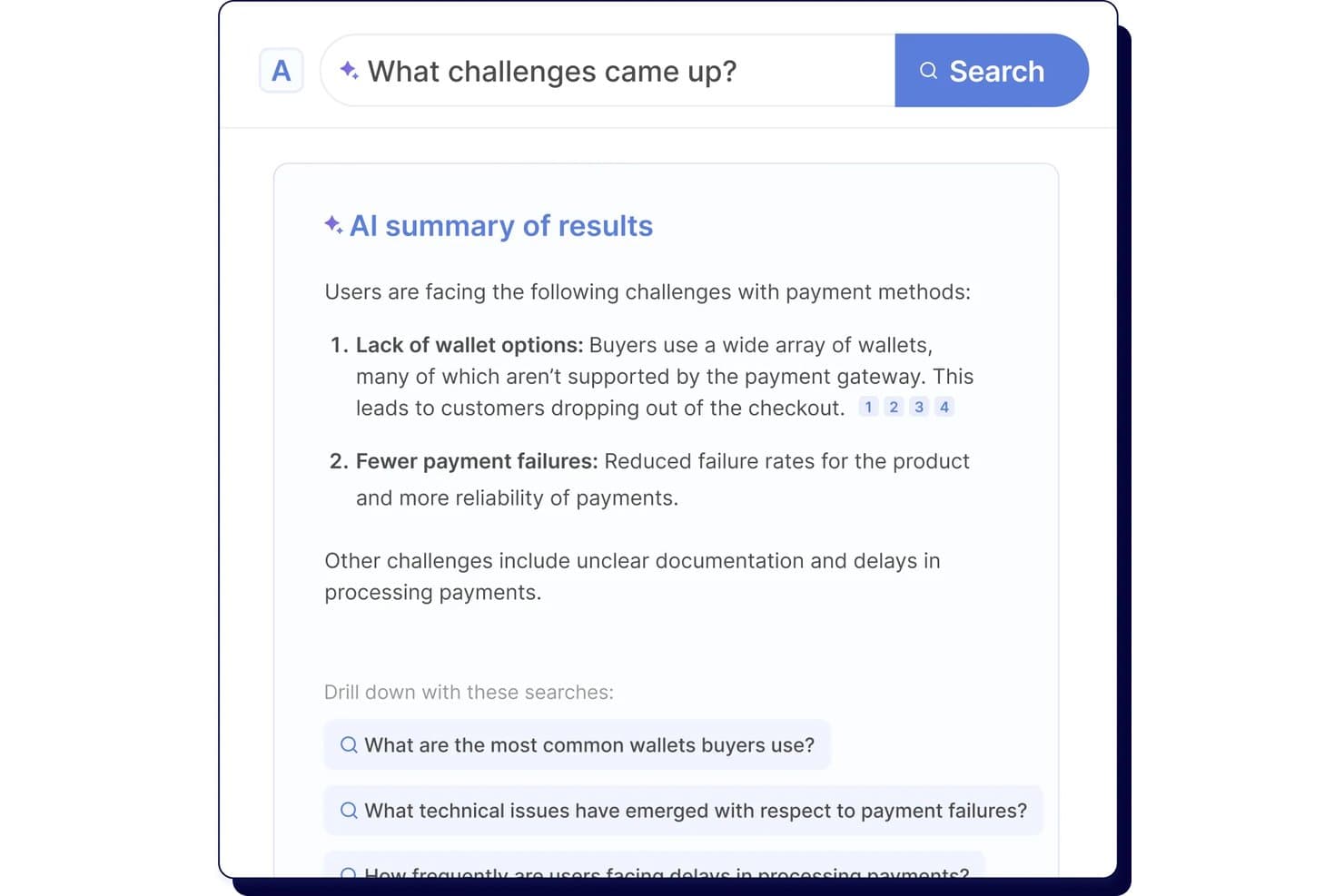
Looppanel's AI search surfaces key user research challenges instantly. Looppanel is a UX research repository platform that centralizes video recordings, transcripts, survey data, and documents, with AI-powered tagging, search, and synthesis tools for turning qualitative research into shareable insights.
Who Is Looppanel Best For?
Looppanel fits UX researchers and product teams who need to share video findings with stakeholders who won't log in to learn a new tool.
Why I Picked Looppanel
I've included Looppanel in my top picks because of how well it handles sharing video findings with people who will never log into a research tool. The Enterprise stakeholder search is built for exactly that: executives and PMs can browse and search across research without any onboarding. I also like that one-click video clips and auto-generated Research Reels let me surface a participant's exact words in seconds, then drop them straight into Slack with full source citations attached.
Looppanel Key Features
- Auto-tagging with theme grouping: AI automatically groups notes into themes across your project, which you can review and edit before finalizing.
- Ask Looppanel AI with citations: ask questions across your workspace and get AI-generated answers that link directly back to the source transcript quotes.
- Global Smart Search: searches notes, transcripts, reports, survey data, and insights across the entire workspace, surfacing relevant data even when it's untagged.
- Survey auto-analysis: automatically analyzes survey responses ranging from 5 to 500+ entries and surfaces key themes without manual sorting.
Looppanel Integrations
Looppanel offers 13 documented integrations, including Zoom, Microsoft Teams, Google Meet, Google Calendar, Slack, Jira, Confluence, HubSpot, Zendesk, and Qualtrics. Enterprise adds API access and custom integrations, while MCP connects Claude Desktop, ChatGPT, and Cursor.
Pros and Cons
Pros:
- Search finds untagged research data
- AI answers retain source citations
- Video clips make stakeholder sharing immediate
Cons:
- Advanced governance requires enterprise access
- Transcripts still contain frequent mistakes
Learn more about Looppanel: Best for collaborative research repositories at scale
- Free plan + free demo available
- Pricing upon request
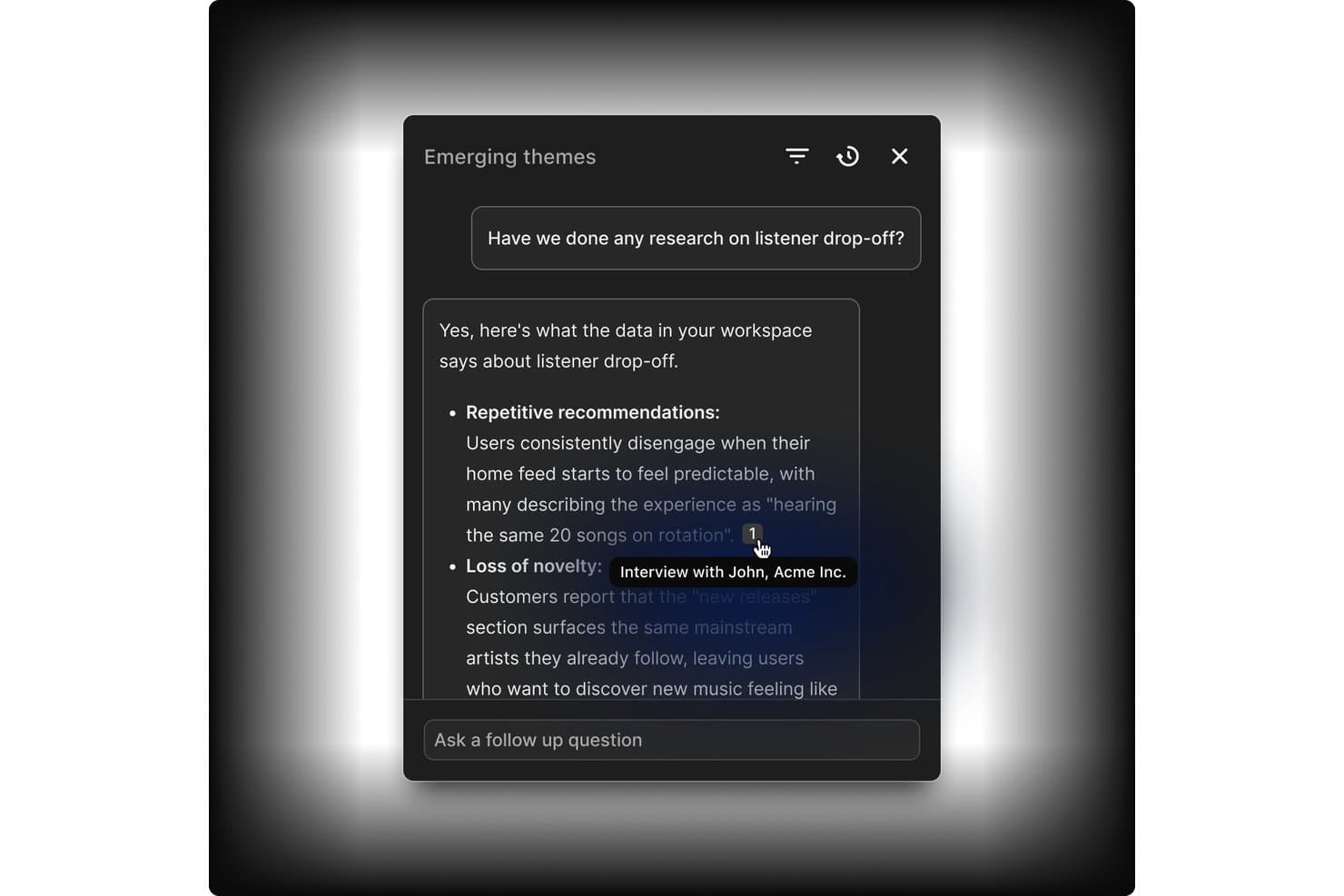
Dovetail links AI answers directly to source interview evidence. Dovetail is a customer intelligence platform that combines centralized research storage, AI-assisted tagging and synthesis, cross-study analysis, and stakeholder sharing into one collaborative research repository.
Who Is Dovetail Best For?
Dovetail fits enterprise research teams and DesignOps leads who need to manage research at scale across multiple studies, contributors, and stakeholders.
Why I Picked Dovetail
Dovetail earns its spot as one of the best on my shortlist because it's built to handle research at a scale that most tools simply aren't designed for. I love how workspace-level tag boards stay live across hundreds of projects simultaneously, so a taxonomy change made in one place reflects everywhere at once. Canvas AI clustering is also genuinely useful: when I'm pulling highlights from a dozen studies, the tool groups them by theme automatically, cutting hours of manual affinity mapping. Add free unlimited Viewer seats on Enterprise, and getting synthesized findings in front of engineering and product stakeholders becomes far less of an operational burden.
Dovetail Key Features
- Evidence-linked docs: Reports and chat answers cite exact video clips, timestamps, and quotes that link back to the original recording.
- Cross-project canvas: Pull highlights and references from multiple projects into a single infinite canvas for cross-study analysis.
- Contacts database: Store up to 50,000 research participants, link them to sessions and docs, and enrich records via Salesforce or HubSpot.
- Insight-to-roadmap linking: Send themes and data points directly to Jira or Linear as interactive embeds that link back to Dovetail.
Dovetail Integrations
Dovetail offers native integrations with Jira, Linear, Slack, Microsoft Teams, Notion, Figma, Productboard, Zoom, Google Meet, and Qualtrics. It also provides an API, CLI, MCP Server, and Zapier for custom connectivity.
Pros and Cons
Pros:
- Granular permissions support research governance
- Cross-study synthesis reveals recurring research themes
- Evidence-linked findings support stakeholder trust
Cons:
- Search reliability varies across larger datasets
- Advanced repository features require Enterprise
Learn more about Dovetail: Best for qualitative analysis
- 15-day free trial
- From $15/user/month (billed annually)
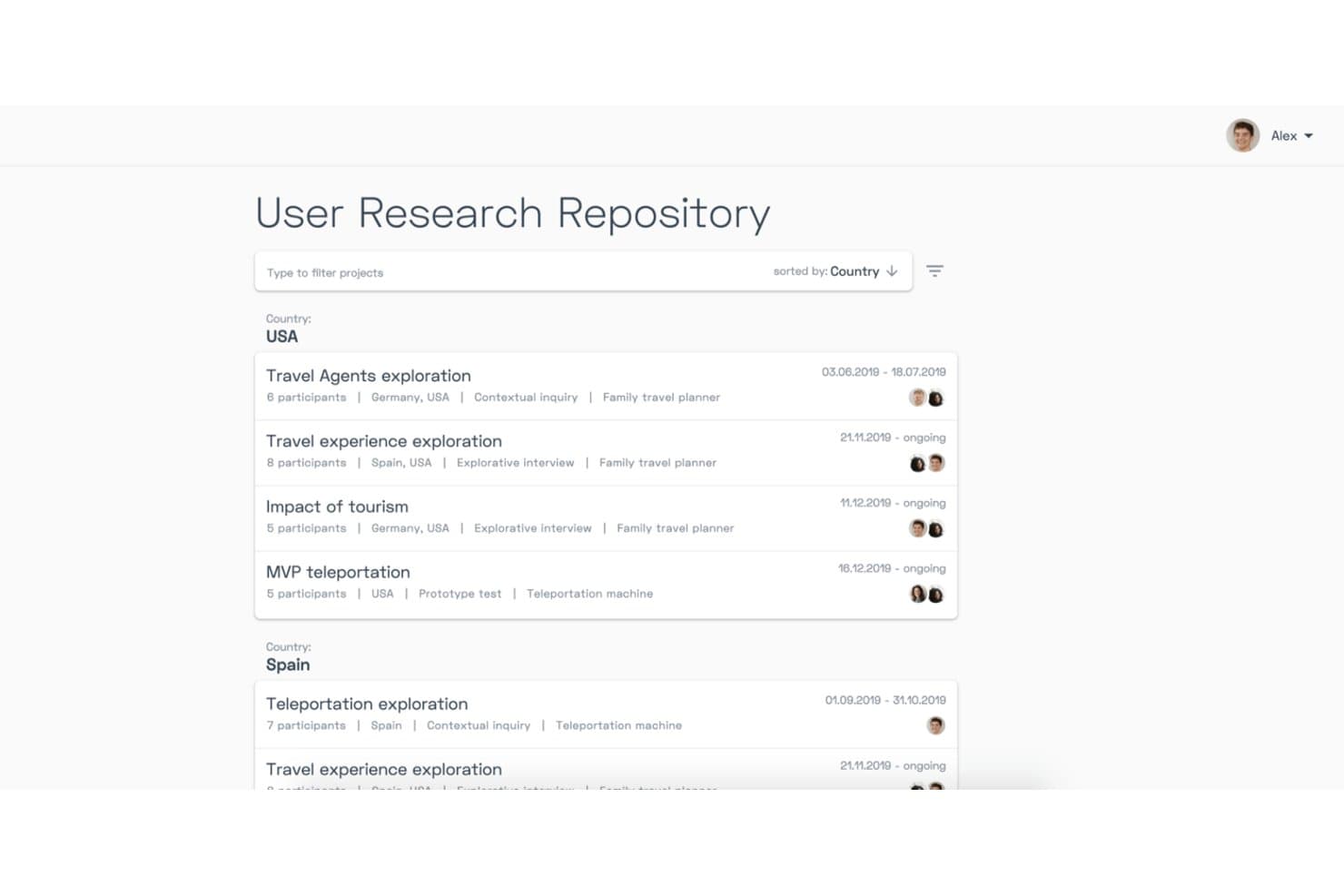
Condens organizes research projects by country with filters and metadata. Condens is a UX research repository and AI analysis platform that centralizes video, audio, notes, and text data, with tools for transcription, tagging, whiteboard synthesis, and AI-assisted qualitative analysis across studies.
Who Is Condens Best For?
Condens is a strong fit for UX researchers and product teams that do heavy qualitative work and need a structured, evidence-linked repository to synthesize findings at scale.
Why I Picked Condens
I picked Condens as one of the best because its qualitative analysis depth is genuinely hard to replicate elsewhere. I love how AI clustering groups transcript highlights into themes automatically, and how Smart Clusters keep updating as new data comes in, so synthesis isn't a one-time manual task. The whiteboard links every insight back to raw evidence, which means when stakeholders question a finding, I can trace it directly to the source clip.
Condens Key Features
- Global tag boards: A shared tag set that spans all projects, keeping your taxonomy consistent and preventing duplicate or conflicting tags across studies.
- Unlimited transcription: Every plan includes unlimited AI transcription in 85+ languages, with speaker recognition and timestamps built in.
- Insights Magazine: A customizable stakeholder hub where you can curate and publish findings for different audiences, with no login required for viewers.
- Cross-project participant profiles: Participant records that persist across studies, tracking demographics, consent, and session history in one place.
Condens Integrations
Condens offers documented integrations with Zoom, Google Drive, Microsoft Cloud, UserTesting, UXTweak, User Interviews, Zendesk, Slack, Microsoft Teams, and Figma. It also supports Notion, Jira, and Confluence embeds, plus an Enterprise API and Zapier.
Pros and Cons
Pros:
- No-login stakeholder findings access
- Unlimited transcription and storage
- Evidence-linked qualitative synthesis
Cons:
- Transcription can misrecognize names
- No built-in study recruitment
Learn more about Condens: Best for all-in-one research ops and CRM
- Free trial + free demo available
- From $129/seat/month

Great Question lets users tag and organize transcript highlights into a repository. Great Question is an all-in-one UX research platform that combines a research repository, participant CRM, recruitment, and study tools—including interviews, surveys, prototype tests, and AI-powered synthesis and search.
Who Is Great Question Best For?
Great Question is a strong fit for UX research teams that want to consolidate recruiting, CRM, study execution, and a searchable insight repository into one platform.
Why I Picked Great Question
I picked Great Question as one of the best because it's the only tool on this list that genuinely handles recruiting, participant CRM, study execution, and a searchable insight repository under one roof. I love how Ask AI lets me search across every study with natural-language questions and get verbatim, timestamped quotes back as evidence. The participant CRM tracks consent, study history, and custom attributes, so I'm never starting from scratch when I need to recruit for a follow-up study.
Great Question Key Features
- AI Synthesis: Automatically generates themed summaries, key insights, and a highlight reel from moderated interview studies with three or more transcripts.
- Global tag manager: Lets you create, color-code, group, and merge tags that apply across every study in your workspace for org-wide pattern tracking.
- Highlights Board: A drag-and-drop workspace where you group and organize video highlights into named, color-coded clusters for manual synthesis.
- Free unlimited Observer seats: Stakeholders can view the repository, attend live sessions, and browse findings without needing a paid seat.
Great Question Integrations
Great Question offers 20+ native integrations, including Zoom, Google Meet, Microsoft Teams, Slack, Figma, Google Workspace, Microsoft Outlook, Salesforce, Qualtrics, and Respondent. It also supports custom connections through its API and MCP server, plus Zapier.
Pros and Cons
Pros:
- Participant CRM connects recruitment with repository
- Free observers broaden stakeholder research access
- AI search returns cited transcript quotes
Cons:
- Repository excludes direct spreadsheet uploads
- AI synthesis only covers moderated interviews
Learn more about Great Question: Best for end-to-end AI research synthesis
- Free plan available
- Pricing upon request
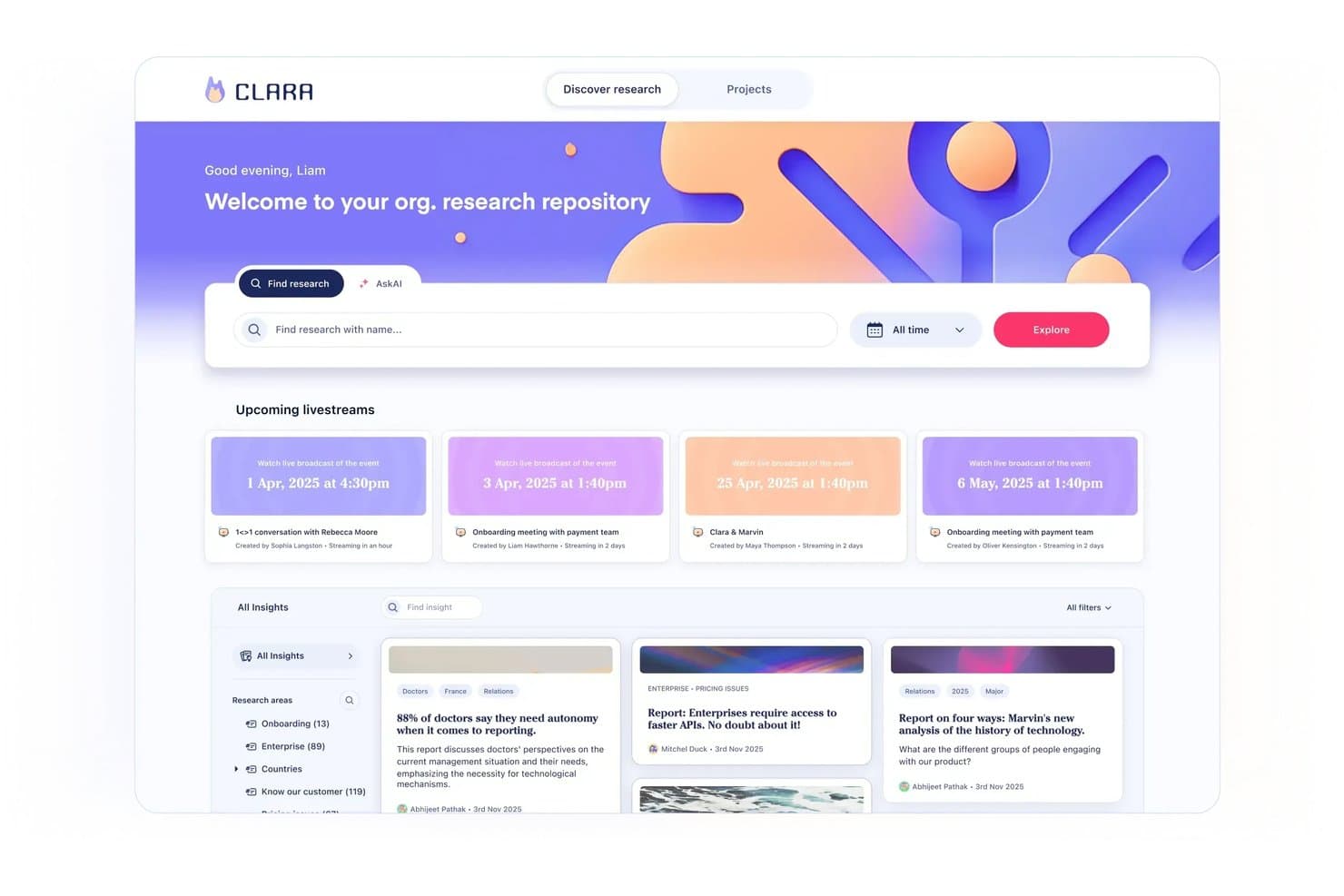
Marvin centralizes research insights and upcoming sessions in one repository. Marvin is an AI-powered UX research repository that centralizes interviews, surveys, support tickets, and other research data, with built-in transcription, tagging, synthesis, and cross-study search.
Who Is Marvin Best For?
Marvin is a strong fit for UX researchers and product managers who need to move from raw interview data to shareable, evidence-backed insights without losing track of what was learned across past studies.
Why I Picked Marvin
Marvin earns its spot on my shortlist because it covers the full arc of AI research synthesis, from live interview transcription to cross-study pattern detection, without requiring manual tagging to make search useful. I especially like Ask AI's explorer agents, which scan your entire repository, surface relevant moments across past studies, and show exactly which files informed the answer. Deep Research templates for thematic analysis, JTBD, and emotion analysis let me move from raw transcripts to structured findings in a single workflow rather than jumping between tools.
Marvin Key Features
- AI Notetaker: Automatically records, transcribes, and summarizes live calls on Zoom, Google Meet, and Microsoft Teams with speaker identification and timestamps.
- Living insight reports: Insights move through private, draft, shared, and published states, combining notes, quotes, clips, and AI analysis in a single report.
- Research newsletter automation: Auto-generates customizable research newsletters and posts insights directly to Slack or Microsoft Teams channels to keep stakeholders informed.
- Granular access permissions: Four distinct user roles—Admin, Full, Collaborator, and Viewer—with pod-level controls, PII visibility settings, and SSO support.
Marvin Integrations
Marvin offers 30+ native integrations, including Zoom, Google Meet, Microsoft Teams, Qualtrics, Dscout, UserTesting, Intercom, Zendesk, Slack, Jira, and Asana. Its Import API and MCP server support custom connections with Claude, ChatGPT, Cursor, and Copilot.
Pros and Cons
Pros:
- Insight reports connect evidence to decisions
- AI notes capture interviews with timestamps
- Repository-wide search surfaces past research
Cons:
- Cross-project synthesis can take considerable time
- AI analysis sometimes misreads research data
Learn more about Marvin:
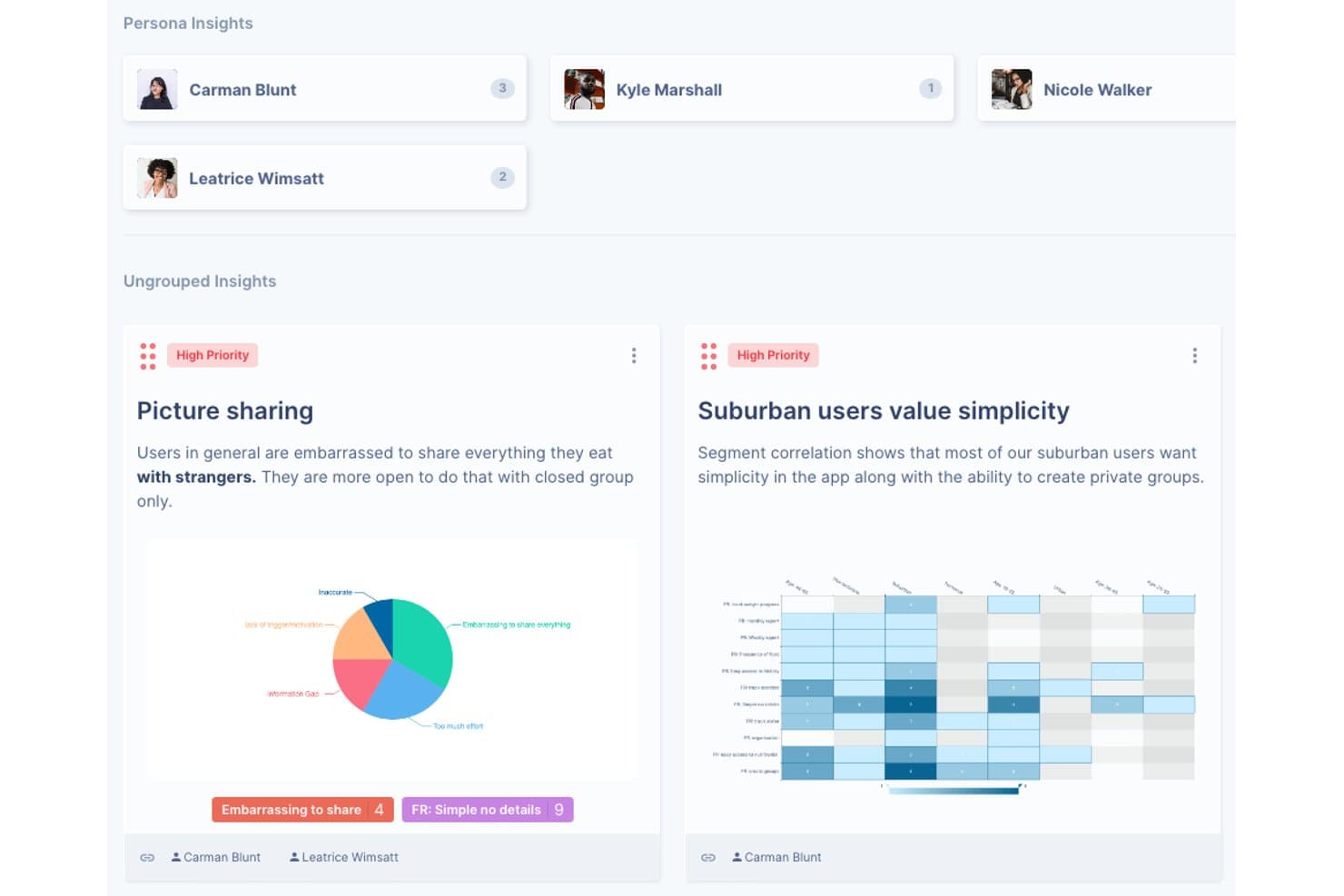
UserBit organizes research insights by persona with priority tags and charts. UserBit is a UX research repository tool built for multi-client workflows, combining interview management, notes, transcription, surveys, tagging, correlation analysis, and a stakeholder-facing Client Portal in one workspace.
Who Is UserBit Best For?
UserBit is a strong fit for UX researchers and design ops leads at agencies managing multiple client workspaces under a single flat-rate subscription.
Why I Picked UserBit
I've included UserBit in my top picks because its flat-rate Unlimited plan lets agencies add every client team member and stakeholder at no extra cost, which is rare in this category. I particularly like how each client gets its own isolated workspace with separate branding, permissions, and a dedicated Client Portal where stakeholders can filter and explore published insights without needing a researcher to walk them through it.
UserBit Key Features
- Correlation heatmaps: Visualize relationships between highlight tags and participant segments to surface patterns across your interview data.
- Global tag boards: Create and manage a shared tag taxonomy across all projects in a workspace, with changes syncing automatically.
- Stakeholder Client Portal: Give non-researcher audiences a branded, login-protected space to browse and filter published insights independently.
- Built-in transcription: Transcribe audio and video in 99 languages with speaker recognition, inline editing, and automatic clip creation from tagged segments.
UserBit Integrations
UserBit doesn't have any native integrations. It supports a beta REST API, Enterprise SSO with Okta, Google, OneLogin, and Azure AD, plus Zapier.
Pros and Cons
Pros:
- Evidence-linked insights strengthen research credibility
- Client Portal simplifies stakeholder insight access
- Isolated workspaces support multi-client research
Cons:
- Analytics interface can feel dated and confusing
- AI tagging and synthesis remain unreliable
Learn more about UserBit:
Other UX Research Repository Tools
Here are some additional UX research repository tools options that didn’t make it onto my shortlist, but are still worth checking out:
- 11StravitoBest for sharing insights with non-research teams
- 12AureliusBest for flat-rate, unlimited-user research repos
- 13NotionBest for research insights inside existing workflows
- 14MazeBest for prototype testing with built-in AI synthesis
- 15DscoutBest for field research in regulated industries
- 16UXArmyBest for usability research in APAC markets
How I Evaluate UX Research Repository Tools
I split my evaluation into three parts, in this order. First, I give the most weight to core functionality: store notes and recordings, tag findings, and search across studies for PMs and designers. Next, I look for AI theme clustering, then consider onboarding, support, permissions, and pricing value.
Core Functionality (Table Stakes For This List)
When I'm selecting tools for my list, I score each one on a scale from 0 (does not offer the functionality) to 5 (excels in this area) for each core functionality listed below. I then convert the total into a percentage to help assess each tool's overall fit, with extra weight on any functionalities I’ve deemed essential.
- Centralized Research Storage (Essential): I look for organized storage for notes, recordings, transcripts, and survey data across multiple research projects.
- Tagging & Search (Essential): I assess tags, filters, and keyword search for finding specific feedback or evidence across past studies.
- Insight Synthesis: I look for ways to group highlights into themes, insights, or takeaways separate from raw research data.
- Cross-Study Analysis: I check whether teams can compare findings and identify recurring patterns across interviews, studies, and projects.
- Stakeholder Sharing: I evaluate curated reports, insight views, and shareable evidence that product and engineering partners can access.
- Access Permissions: I assess controls for managing who can view, edit, contribute to, or share research content.
Once I have a list of tools that meet the criteria, I consider what sets each platform apart.
Differentiating Factors (What Sets Vendors Apart)
Here's how I compare and contrast different vendors:
Standout Features
I evaluate how well each tool links synthesized insights directly to roadmap items or Jira tickets, because traceability from evidence to prioritization decisions is where most teams lose momentum. AI theme clustering matters too—I check whether the tool surfaces emergent patterns across studies without requiring manual tagging upfront. Beyond analysis, I look at stakeholder hubs: can a VP self-serve relevant findings without training, or does sharing still mean exporting a slide deck?
Beyond Features
I evaluate how easily non-researchers can adopt each tool. If a PM needs a training session just to browse findings, adoption stalls. Templates and guided workflows matter here. I also check licensing models closely—some platforms charge per seat while others offer free viewer access, which changes the math fast when you need 30 stakeholders reading insights. GDPR and consent management is another factor I look for, since participant data carries real compliance risk.
How to Choose a UX Research Repository Tool
It’s easy to get bogged down in long feature lists and complex pricing structures. To help you stay focused as you work through your unique software selection process, here’s a checklist of factors to keep in mind:
| Factor | What to Consider |
| Scalability | Ensure the tool can grow with your team. Consider if it supports increased data volume and additional users without a hitch. |
| Integrations | Check if the tool integrates with your existing software like Slack, Jira, or Google Drive to streamline workflows. |
| Customizability | Look for options to tailor the tool to your team's specific needs, such as customizable dashboards or workflows. |
| Ease of Use | Evaluate if the tool is intuitive for your team to adopt quickly. A steep learning curve can slow down your research efforts. |
| Budget | Analyze if the pricing aligns with your budget. Consider the value offered at each pricing tier and any hidden costs. |
| Security Safeguards | Ensure strong data protection measures are in place. Look for compliance with industry standards like GDPR. |
| Support | Consider the level of customer support available, including response times and available resources like tutorials or a help center. |
| Collaboration | Check if the tool supports collaborative features like real-time editing or shared workspaces to enhance team efficiency. |
Trends in UX Research Repository Tools
In my research, I sourced countless product updates, press releases, and release logs from different UX research repository tool vendors. Here are some of the emerging trends I’m keeping an eye on:
- AI-Driven Insights: Many tools are now leveraging AI to provide deeper insights into user data. This trend is helping teams quickly identify patterns and make informed decisions. Vendors like Dovetail are incorporating AI to assist in tagging and synthesizing user feedback.
- Enhanced Data Visualization: Tools are focusing on more advanced data visualization options, allowing teams to interpret data easily and effectively. This trend helps in presenting complex data in a more digestible format, aiding in decision-making processes.
- Remote Collaboration Features: As remote work becomes more common, tools are enhancing features that support real-time collaboration. This includes shared workspaces and real-time editing, which are becoming essential for distributed teams.
- User Experience Customization: There's a growing trend toward offering more customization options for users. This allows teams to tailor the tool's interface and functionality to better fit their specific workflows and needs.
- Focus on Accessibility: Ensuring tools are accessible to all users, including those with disabilities, is becoming a priority. This includes features like keyboard navigation and screen reader support, ensuring inclusivity in research processes.
What Are UX Research Repository Tools?
UX research repository tools are software solutions that store, organize, and manage user research data. They are typically used by UX researchers, product managers, and design teams to make sense of user insights and improve product development. Features like tagging, data visualization, and collaboration capabilities help with organizing data, interpreting insights, and facilitating teamwork. Overall, these tools provide a centralized platform for teams to efficiently manage and utilize user research data.
Features of UX Research Repository Tools
When selecting UX research repository tools, keep an eye out for the following key features:
- Integration capabilities: Connect with other tools like survey platforms, design software, or analytics dashboards. Seamless integrations reduce manual work and keep your workflow running smoothly.
- Centralized data storage: Store all your research findings, documents, and multimedia files in one secure location. This ensures everyone on your team has easy access to what they need—no scavenger hunts required.
- Advanced search and filtering: Quickly locate important insights or participant details without digging through endless folders. Filters let you zero in on specific studies, dates, tags, or user segments, which makes the process refreshingly manageable.
- Tagging and categorization: Label and organize your research data by topics, methodologies, or project names. This structure saves you time and helps you spot patterns or gaps much faster when you need them most.
- Collaboration tools: Work together in real time by sharing notes, leaving comments, or assigning tasks to teammates. You can gather feedback without getting lost in endless email chains.
- Version history and audit trails: Track changes and see who edited what, and when. This is priceless when you need to ensure accuracy or revisit earlier findings without starting from scratch.
- Participant management: Keep all your participant information organized and secure. You can manage consent forms, track communication, and prevent accidental double-invitations in one spot.
- Insight synthesis tools: Group related findings and synthesize key insights. This helps you turn raw data into usable knowledge for your projects, making your takeaways immediately actionable.
- Security and permission controls: Set access levels for team members and stakeholders. Robust controls mean sensitive research stays private while letting collaborators see only what’s relevant to them.
Common AI Features
Modern UX research repository tools are increasingly powered by AI to help teams work smarter and faster. Here are some common AI-driven features you’ll find:
- Automated tagging and categorization: AI can scan your research data, like interview transcripts or survey responses, and suggest relevant tags or categories. This saves you time and keeps your repository organized with minimal manual effort.
- Insight extraction: Advanced algorithms can highlight recurring themes, patterns, and sentiments within your research, helping you surface key insights without having to read through every note.
- Transcription services: AI-powered transcription quickly converts audio and video interviews into searchable, editable text. This makes it easier to analyze conversations and share findings with your team.
- Smart search: AI enhances search functionality by understanding context and intent, delivering more accurate results even when you use natural language queries.
- Participant de-duplication: AI can identify and merge duplicate participant records, helping you maintain a clean and accurate database.
- Automated summaries: Generate concise summaries of lengthy research sessions or reports, so stakeholders can quickly grasp the main points without sifting through all the details.
- Sentiment analysis: AI can assess the emotional tone of participant feedback, giving you a deeper understanding of user attitudes and reactions.
Layered AI features can streamline your workflow, reduce manual tasks, and help you uncover valuable insights faster, making your UX research repository tools even more powerful.
Benefits of UX Research Repository Tools
Implementing UX research repository tools provides several benefits for your team and your business. Here are a few you can look forward to:
- Improved organization: Tagging and categorization features help you keep research data well-organized and easy to access.
- Enhanced collaboration: Real-time collaboration tools allow your team to work together efficiently, no matter where they are.
- Faster insights: Real-time analytics provide immediate feedback, helping your team make quick, informed decisions.
- Better data interpretation: Data visualization features make it easier to understand complex information and draw meaningful conclusions.
- Increased accessibility: Accessibility features ensure everyone on your team can use the tool, including those with disabilities.
- Streamlined workflows: Integration capabilities connect with other software, making it easier to share data and work across platforms.
- Secure data handling: Security safeguards protect sensitive information, ensuring compliance with industry standards like GDPR.
Costs and Pricing of UX Research Repository Tools
Selecting UX research repository tools requires an understanding of the various pricing models and plans available. Costs vary based on features, team size, add-ons, and more. The table below summarizes common plans, their average prices, and typical features included in UX research repository tools solutions:
Plan Comparison Table for UX Research Repository Tools
| Plan Type | Average Price | Common Features |
| Free Plan | $0 | Basic data storage, limited users, and essential analytics. |
| Personal Plan | $5-$30/user/ month | Advanced tagging, data visualization, collaboration tools, and basic support. |
| Business Plan | $30-$60/ user/month | Full analytics suite, participant recruitment, integrations, and priority support. |
| Enterprise Plan | $60-$120/ user/month | Custom dashboards, enhanced security, a dedicated account manager, and custom integrations. |
UX Research Repository Tools FAQs
Here are some answers to common questions about UX research repository tools:
How does a UX research repository differ from a regular database?
A UX research repository is designed specifically for storing and organizing user research data, while a regular database might not offer the same tailored features. Repositories include functionalities like tagging, categorization, and collaboration, which are essential for synthesizing and sharing insights effectively across teams.
Can a small design team benefit from a UX research repository?
Absolutely, small teams can greatly benefit from a UX research repository. It helps them organize research data efficiently, avoid duplicative work, and make informed decisions. Even with limited resources, a well-maintained repository can streamline processes and improve collaboration.
Are UX research repositories suitable for remote work?
Yes, UX research repositories are ideal for remote work as they centralize data and insights in a cloud-based platform. This accessibility allows team members to collaborate effectively from different locations, ensuring continuity and coherence in research efforts.
How are UX research repositories?
Security is a top priority for UX research repositories. Most platforms comply with industry standards like GDPR to protect sensitive data. They offer features such as access controls and encryption to ensure that only authorized personnel can access the information.
How often should a UX research repository be updated?
It’s important to update your UX research repository regularly. Consistent updates help keep the data relevant and useful, ensuring that your team always has access to the latest insights. Establishing a routine for adding new findings and revising existing data is essential.
Are there free UX research repository tools available?
Yes, some UX research repository tools offer free versions or trials. These options can be a great way for teams to start organizing their research without upfront costs. However, free versions might have limitations on features or storage capacity.